Msg 11442, Level 16, State 1, Line 4
Columnstore index creation is not supported in tempdb when memory-optimized metadata mode is enabled.
There’s no workaround for this, either. You can’t tell it to use a different database, this is just the way it’s built.
Hopefully in the future, there will be more cooperation between these two features.
Thanks for reading!
Going Further
If this is the kind of SQL Server stuff you love learning about, you’ll love my training. Blog readers get 25% off the Everything Bundle — over 100 hours of performance tuning content. Need hands-on help? I offer consulting engagements from targeted investigations to ongoing retainers. Want a quick sanity check before committing to a full engagement? Schedule a call — no commitment required.
I got a question from a past client recently about how a new data loading tool was side-stepping constraints. After taking a quick look at what was running, it was using BULK INSERT statements to do the load.
There’s nothing wrong that that! I’ve used it quite a bit, and found it very handy to efficiently load data from files. There really is a ton you can do with it.
But with flexibility comes, well, happy accidents.
Check Me Out
To show you what I mean, I’m going to use some quick and dirty examples. This isn’t meant to show you a perfect export process by any means.
I’m going to use BCP to output a small text file, and load it into a table in another database.
EXEC xp_cmdshell 'bcp "SELECT TOP (1000) * FROM StackOverflow2013.dbo.Badges ORDER BY Id;" queryout "c:\temp\Badges.txt" -w -T -S NADABRUTO\SQL2019';
Queue Ball
Let’s look at the table for a minute. There’s not a lot going on with it, but there is a check constraint:
ALTER TABLE Crap.dbo.Badges
    ADD CONSTRAINT ck_bootypie
        CHECK(LOWER(Name) NOT IN (N'beavis', N'butthead'));
Yes, it’s a bit of nonsense, but it doesn’t need to be realistic to show you the side effect.
It just has to entertain me for the duration of writing this post while stone cold sober.
Mostly.
See, right now, it’s trusted. Or not not trusted.
SELECT cc.name,
       SCHEMA_NAME(cc.schema_id) AS schema_name,
       OBJECT_NAME(cc.parent_object_id) AS object_name,
       cc.type_desc,
       cc.is_not_trusted
FROM sys.check_constraints AS cc
So solo
Inserts From A Different Room
Let’s take a regular old insert. If we do this, our constraint will still be trusted.
INSERT Crap.dbo.Badges ( Name, UserId, Date )
SELECT TOP (1000) Name, UserId, Date
FROM StackOverflow2013.dbo.Badges ORDER BY Id;
You’ll have to trust me on that. I mean, would anyone really know if I reused the same picture of the output?
Now here’s an insert with BULK INSERT.
BULK INSERT dbo.Badges
FROM 'c:\temp\Badges.txt'
WITH
    ( DATAFILETYPE = 'widechar',
      BATCHSIZE = 1048576,
      CODEPAGE = 'RAW',
      FIRSTROW = 1,
      FIELDTERMINATOR = '\t',
      ROWTERMINATOR = '\n',
      KEEPNULLS,
      MAXERRORS = 2147483647,
      CHECK_CONSTRAINTS, /*Quote me in, Quote me out*/
      TABLOCK );
If you notice the second to last option there, CHECK_CONSTRAINTS? That’s what SQL Server uses to figure out if it should evaluate constraints when the file imports.
This goes for both foreign keys and check constraints. It does not go for primary key or unique constraints. Those will still throw errors if violated.
If you run your BULK INSERT commands without that included, they’ll be marked as untrusted after you insert data.
But now it comes time to choose your own adventure.
The Optimizing Game
Now that we know the behavior, we can examine our choices.
Option 1: Evaluate Constraints On Load
This can slow down data loads
May cause additional blocking
You won’t have any work to do later
But… your loads may fail.
Then you’ll have to go look in text files to figure out why
Option 2: Load it all, deal with issues later
Data loads will be quicker
You’ll likely see less blocking
But you’ll have to try to re-trust your check constraints afterwards
If you’ve got large tables, or no good indexes to support constraints, this can be awful
Trusting constraints may fail, but figuring out which rows are broken is probably easier
If we want to re-trust our constraint, we’ll need to run a command like this:
ALTER TABLE Crap.dbo.Badges
    WITH CHECK CHECK CONSTRAINT ck_bootypie;
If you wanted to build dynamic commands to re-trust them across a bunch of tables, you’d need something like this:
SELECT N'ALTER TABLE '
       + QUOTENAME(s.name)
       + N'.'
       + QUOTENAME(o.name)
       + N' WITH CHECK CHECK CONSTRAINT '
       + QUOTENAME(f.name) AS utrusted_fk
FROM sys.foreign_keys AS f
INNER JOIN sys.objects AS o
    ON f.parent_object_id = o.object_id
INNER JOIN sys.schemas AS s
    ON o.schema_id = s.schema_id
WHERE f.is_not_trusted = 1;


SELECT N'ALTER TABLE '
       + QUOTENAME(s.name)
       + N'.'
       + QUOTENAME(o.name)
       + N' WITH CHECK CHECK CONSTRAINT '
       + QUOTENAME(c.name) AS utrusted_ck
FROM sys.check_constraints AS c
INNER JOIN sys.objects AS o
    ON c.parent_object_id = o.object_id
INNER JOIN sys.schemas AS s
    ON o.schema_id = s.schema_id
WHERE c.is_not_trusted = 1;
Go ahead and give those a run. You might be surprised what you find.
Thanks for reading!
Going Further
If this is the kind of SQL Server stuff you love learning about, you’ll love my training. Blog readers get 25% off the Everything Bundle — over 100 hours of performance tuning content. Need hands-on help? I offer consulting engagements from targeted investigations to ongoing retainers. Want a quick sanity check before committing to a full engagement? Schedule a call — no commitment required.
In this video, I delve into error handling within SQL Server cursors, a topic that recently sparked some interest on Twitter. Initially stumped by the challenge, I decided to create a simple table with numbers 0 through 10 to illustrate my point. As we navigate through the code and its execution, you’ll see firsthand how a cursor can get stuck in an infinite loop due to unhandled errors. By adding a `FETCH NEXT` statement within the catch block, I demonstrate a practical solution that allows the cursor to continue processing rows even after encountering an error. This video is not just about solving a specific problem but also serves as a reminder of the importance of robust error handling in stored procedures—especially when working with cursors.
Full Transcript
Don’t make fun of my hair. It’s not funny. It’s not amusing. It is a sad, sad reality that I’m living in, that we’re all living in, living through, hopefully living through, surviving in these trying times. So let’s talk about error handling in cursors because there was a spec a spec of interest on Twitter about seeing something about this. So this is funny because I was stumped by this. I was stumped by this and I was staring at it for a while, just not being able to figure it out. So what I’m going to do is create a table with the numbers 0 through 10 in it. So when we look at the results of just the select query, we’re going to start at 0 and kind of count up to 10. Alright, so let’s put that in the table, right? I guess we’ll select star from the table just to prove them. I hope select star isn’t too rough on this single column. Maybe I should add a computed column to stop myself from doing that. I don’t know. I’m undecided on that. 0 through 10. So that’s 11 rows altogether, right? Sort of confusing when you see 1, 0, and then 11, 10 down there. At least it is for me, but I’m kind of dumb. So, you know, I have that going for me. So what I originally started this, I was working on something.
I mean, it was a similar setup. You know, I was doing everything right, too. I was using a cursor and I was using a table variable for all the right things, right? So I was using a table variable to catch errors and I was using a cursor to iterate over something that I shouldn’t, like it was not a set-based thing that I could have just used a window function for. It was actually something that should be iterated over. It was re-enabling untrusted foreign keys and I figured, hey, what better use for a cursor than enabling foreign keys. So what I have here in my setup is some dynamic SQL. I just have this little variable in here to throw it away because I don’t want to return the table results.
I just want to look at the messages tab and show you what’s going on. Then I have this thing over here, which is going to catch this query inside of the cursor. I’ll get to that in a minute. And then I have a table that is going to catch error messages. And what I’m going to do after that is open my cursor and fetch everything into my variable here.
And then, of course, we’ll fetch status equals zero. I am going to print out my message with raise error. I’m going to execute my dynamic SQL and then I’m going to try to fetch next into my variable. variable. And I’m doing this inside of a try-catch block because, you know, working on SP underscore human events, I have gotten quite enamored with the old begin-try, begin-catch.
Because error handling is, I think, pretty valuable when you’re working with a big store procedure, right? Knowing exactly where something happened, where the error was, what the error was, like what was going on. That’s really, really valuable stuff. And I know there’s, you know, a certain amount of error handling that is just like, you know, maybe overboard.
But what the hell? You know, I like going overboard once in a while. You know why I like going overboard? Because it beats the crap out of being on a cruise ship. That’s why. So let’s, without too much further time wasting, let’s run this whole thing.
And let’s look at what happens. Now, if you go over to the Messages tab, you’re going to notice, I think, what I noticed. And, I mean, the first thing you’re going to notice is I forgot to set no count on. So we’re going to get this one row back. But the other thing is that we kept getting the same error over and over again.
We were stuck in an infinite loop. We did not just get 11 rows back because we moved on to the next one. We got, I don’t know, however many this one. I’m not counting. Are you crazy? But we kept hitting, we would keep hitting this error over and over again.
We would keep dividing by zero and we would never move on. Now, the way around this is to double up on our fetch next. And we actually need to take this right here and we need to put another version of it inside of the catch block.
And now when I run this whole thing and I declare my cursor and I step through, what am I going to get? I’m going to get a row back from my error catching table variable. And over in the Messages tab, I’m going to get this, right, where we divided by zero and we affected one row.
We got an error and then we went through and we did a bunch of stuff that actually would divide, right? And then we got this and, you know, I don’t know. We got one row effect. I don’t really know. I don’t really care.
That’s probably the select over here, right? But then back in that error catching table, we got the error number, the error severity, the error state, and the divide by zero and the error message, which is divide by zero encountered. So there we go. That’s that.
That’s how you do error handling inside of a cursor and still have your cursor make forward progress. If you only have the fetch next here, you’re just going to get stuck in an infinite loop. But if you put a fetch next in the catch block, you will catch the error and then move on.
And then you will start back here. Now, what I thought was a little weird about this is maybe like the fetch status thing, like not bailing out, but I don’t know.
Maybe I don’t understand cursors. There’s a lot I don’t understand. Maybe cursors is one of those things that I will just hopefully never understand. Or maybe I want to understand them.
I don’t know. Maybe my next training module will be all about the wonders of cursors. Wouldn’t that be fun for you? Thanks for watching.
Going Further
If this is the kind of SQL Server stuff you love learning about, you’ll love my training. Blog readers get 25% off the Everything Bundle — over 100 hours of performance tuning content. I’m also available for consulting if you just don’t have time for that and need to solve performance problems quickly.
If you wanna play with the code I used to try things out on your own, here it is:
CREATE TABLE zero_ten (id INT NOT NULL PRIMARY KEY);

INSERT dbo.zero_ten ( id )
SELECT 0 AS id
UNION ALL
SELECT TOP (10) ROW_NUMBER() OVER(ORDER BY 1/0)
FROM sys.messages AS m

SELECT * FROM dbo.zero_ten AS zt;
RETURN;

DECLARE c CURSOR LOCAL STATIC FOR
SELECT N'DECLARE @atmosphere INT; SELECT @atmosphere = 1/' + RTRIM(zt.id)
FROM dbo.zero_ten AS zt;

DECLARE @joydivision NVARCHAR(MAX) = N'';
DECLARE @errors TABLE
(
    id INT PRIMARY KEY IDENTITY,
    error_number INT,
    error_severity INT,
    error_state INT,
    error_message NVARCHAR(MAX)
);

OPEN c;
FETCH NEXT FROM c
INTO @joydivision;

WHILE @@FETCH_STATUS = 0
BEGIN
    BEGIN TRY
        RAISERROR(@joydivision, 0, 1) WITH NOWAIT;
        EXEC sys.sp_executesql @joydivision;
        FETCH NEXT FROM c INTO @joydivision;
    END TRY
    BEGIN CATCH
        INSERT @errors ( error_number, error_severity, error_state, error_message )
        SELECT ERROR_NUMBER(), ERROR_SEVERITY(), ERROR_STATE(), ERROR_MESSAGE();
        --FETCH NEXT FROM c INTO @joydivision;
    END CATCH;
END;

SELECT *
FROM @errors AS e;

CLOSE c;
DEALLOCATE c;
GO
There’s a lot of terrible advice out there about how to do this. It’s terrible because it involves the kinds of functions that really hurt performance: the scalar and multi-statement variety.
Worse, they’re usually full of while loops that build strings. These kinds of scalar functions aren’t currently eligible for inlining in 2019 either, so don’t think you’re going to get helped there, because they build strings.
SELECT with variable accumulation/aggregation (for example, SELECT @val += col1 FROM table1) is not supported for inlining.
Ain’t Perfect
I don’t think my solutions are perfect. Heck, doing this with T-SQL at all is a bad idea. You should be using CLR for this, but CLR has had so little support or betterment over the years, I don’t blame you for not embracing it. My dear friend Josh has taken the liberty of doing this part for you.
It would be nice if SQL Server had the kind of native support for writing in other languages that free databases do (especially since SQL Server supports Python, R, and Java now). But you know, we really needed uh… Well, just pick any dead-end feature that’s been added since 2005 or so.
My solutions use a numbers table. You’re free to try replacing that aspect of them with an inlined version like Jeff Moden uses in his string splitter, but I found the numbers table approach faster. Granted, it’s also less portable, but that’s a trade-off I’m willing to make.
What I don’t like about either solution is that I have to re-assemble the string using XML PATH. If you’ve got another way to do that, I’m all ears. I know 2017 has STRING_AGG, but that didn’t turn out much better, and it wouldn’t be usable in other supported versions.
Both scripts are hosted on my GitHub repo. I don’t want to set the example of using a blog post as version control.
SELECT u.DisplayName, gl.*
FROM dbo.Users AS u
    CROSS APPLY dbo.get_letters(u.DisplayName) AS gl
WHERE u.Reputation = 11;
Complaint Department
If you’ve got ideas, bugs, or anything else, please let me know on GitHub. I realize that both scripts have holes in them, but you may find them good enough to get you where you’re going.
Thanks for reading!
Going Further
If this is the kind of SQL Server stuff you love learning about, you’ll love my training. Blog readers get 25% off the Everything Bundle — over 100 hours of performance tuning content. Need hands-on help? I offer consulting engagements from targeted investigations to ongoing retainers. Want a quick sanity check before committing to a full engagement? Schedule a call — no commitment required.
You’re a DBA or Developer who needs to buckle down and focus on performance tuning SQL Server, and you need a clear path to gain understanding and expertise. Maybe you need to learn about something that you’re seeing in a query you’re trying to tune. It could be parameter sniffing; it could be a key lookup — doesn’t matter.
You’re busy, and you don’t have hours or days to watch long courses, hoping what you need to learn is in there. Over here, you can zoom to what you care about, and spend focused time learning about it. No distractions, no fast forwarding, no trying to remember where the solution to your problem was.
Whether you need to know how to fix a problem quickly, or you want to deeply understand it and gain knowledge you can use for the rest of your career, my training library has got you covered.
Best of all, learning doesn’t stop when the video ends. I’m here to help you keep learning.
About Me
I’m Erik, and all I focus on is SQL Server performance tuning.
Queries, indexes, and hardware are my breakfast, lunch, and dinner. Oxford commas are light snacks.
And you do! Wow! What a sales pitch. Four seams on that one.
Thanks for reading!
Going Further
If this is the kind of SQL Server stuff you love learning about, you’ll love my training. Blog readers get 25% off the Everything Bundle — over 100 hours of performance tuning content. Need hands-on help? I offer consulting engagements from targeted investigations to ongoing retainers. Want a quick sanity check before committing to a full engagement? Schedule a call — no commitment required.
In this video, I dive into the world of table variables in SQL Server 2019, exploring how they’ve been improved but still come with their own set of challenges. Specifically, I highlight the issue of cardinality estimation for table variables, which can lead to suboptimal query plans due to a lack of column-level statistics. By comparing table variables with temporary tables, I demonstrate that while SQL Server 2019 has made significant strides in improving these estimates, there are still scenarios where you might face performance issues. The video showcases how using temporary tables instead can provide more accurate cardinality estimates, but also points out the downsides of this approach, such as increased execution time and complexity.
Full Transcript
Erik Darling here to start a line of hand lotion reviews. No kidding. Though that would be more topical. And if you don’t see the pun that just occurred there, topical reviews of hand lotion, I think you should stop watching. You should get a new hobby. You should go collect rocks or something. Go investigate slime. I’m kidding. I’m sure it’s fine. Not everyone is doing it. You should go check it out. Now that isn’t the puns. Cool. So this video is not about hand lotion though. If this counts as sponsorship, then whatever. This video is about table variables, sort of generally, but more specifically table variables in SQL Server 2019. Now, in SQL Server 2019, Microsoft has made attempts to fix a lot of common problems that people will have. hit with query performance. And one of those issues is with table variable cardinality estimation.
In versions prior to SQL Server 2019, unless you applied a recompile hint or some goofy trace flag, you would get a one row estimate from a table variable. Now that changes a little bit with multi-statement table valued functions which are turn table variables. We’re not going to get into all that detail here. Just know that they are different. Now in SQL Server 2019, what happens is we pause after we insert data into a table variable. Now there’s a little bit of a branch here. So if it’s a stored procedure, you will pause. You will look at the number of rows that were inserted into the table variable and then SQL Server will cache that guess. So if you’re thinking to yourself, it sounds like table variables just became a new source of parameter sniffing. Well, golly and gosh, you are correct. In ad hoc queries, you will pause for each execution and SQL Server will look at the number of rows that went in and then we will, of course, just guess the number of rows that went into the table. Now an important thing that’s missing from all versions of SQL Server and across all table variables is that we have no column level information about the data that got put into our table variable.
We do not have a statistics histogram. We have nothing of the sort. We do not have any information that you would find in a normal statistics object that would tell you about the data distribution, distinctness, rows, average rows, range rows, all that good stuff. We don’t get that no matter what.
All we get is table cardinality. So while that is an improvement, there are times when that guess can go horrifically. Well, when that table cardinality guess just isn’t what makes a big difference. Sometimes it is, other times it isn’t. So I have this query. But I’m not going to run this query over here.
I’m going to run this query over here because we’re going to run this. And then we’re going to talk about what happens with table variables versus 10 tables. So I’m going to kick that off running. And the first thing that I want to note is that estimated plans do not help us here. If you look at this estimated plan, we can see that we insert 1001 rows estimated here. There we go. 1001. Hooray, hooray, hooray, hooray. But in this plan down below, we still get the one row guess sad face. We are not helped by the old estimated plan. No, we’re not. So let’s move on a little bit. Now, what I need to point out here is that table variables behind the scenes use a temporary object, a pound signed temp, pound, not signed, pound signed, pound sand temporary object. And if I run this query, it’ll thankfully run pretty quickly. And if you look over at the messages tab, we will see our mysterious pound signed object that gets created. Now, I wish that there were a way that I could pre-detect that pound signed object so that I could show you that there are no statistics involved with that thing. But I can’t.
What I can show you is that statistics exist for temporary tables, the pound sign actual temporary tables. I call them temporary tables plus because they’re temporary tables plus statistics. All right, or table variables plus statistics. That’s a good, it’s a good one. Good way to talk about things, right? So let’s look at what happens when we run this code. If we hit F5 here, and we use these super duper fancy new DMV or this this single singular super duper fancy new DMV as of SQL Server 2016, brand new, we will get some information back statistically about what data went into that temp table. We will have that. And yes, this can be cached. And yes, this can cause an issue. And I yes, I do have a video about that. And yes, I will link to it in the details. So you can go watch that later. But anyway, that’s the point there. So when SQL Server makes guesses about things, it can use this wonderful batch of his of information to look at what rows are in here.
And it can use that you can use that information to make a guess about what it’s going to have to do uh in the in the rest of the query. So if we turn on the query plan and we we rerun this, we have a lot of fun. We look at the execution plan. SQL Server can use information from over here to make guesses about what’s going to happen down here and how to choose that execution plan. Now, what I want to point out really quickly is that this query that I’m running here now, it doesn’t matter. I can leave off that DVCC free proc cache thing. I can run that this returns very, very quickly over here. This same query using a table variable is still executing over here after nearly three minutes.
So we we we have a we I think we have a plan quality issue on our hands here. I’m not really sure what else to tell you. Now, I know what you’re thinking, Eric, there’s no recompile hint here. But gosh darn it, this is SQL Server 2019. We don’t need a recompile hint. We get the same information without it because this is us running it over here and we get the table variable deferred compilation. Now, what’s sort of interesting is if we go a little bit deeper into things, right, if we look a little bit beyond the histogram, beyond, beyond, beyond, beyond, beyond, beyond. And we use this query that hits a table variable and we try to get cardinality estimation information from it. What we’ll get over in the messages tab is a whole bunch of stuff that I don’t understand at all. I start reading through it and I get I get cranky. But one thing that shows up in here that I think is very interesting is this line right here. CST call black box. That doesn’t sound like something that’s going to reveal a lot of information to us, does it? So let’s let’s search in here and let’s search in here. Let’s see. Yep, there it is. There’s I mean the first iteration of it. This actually shows up a bunch of times in here.
But we can see that when SQL Server tried to make a guess, it was guessing from a black box. It’s a no, no, no. You got me. Screwed there. Can’t nothing we can do about that. But if we as mature, experienced data professionals use a pound sign temporary table instead, and we on this query, we will get I mean first thing I want to point out in the execution plan is that we get a dead to rights accurate cardinality estimate over here. I think I forgot to show you that up here. If we come forward here. I don’t know. Maybe we will. Maybe we won’t. I don’t know what’s going to happen now.
Yeah, we get well, that’s weird. I don’t know. I forget. I forget what my point was there. But if we go look at the information over here. Yeah, two, no, one, one, yeah, rather than 12. Yeah, because it was good. Oh, yeah, because it gets 12 up there. I’m all I apologize. I’m exhausted today.
Come back over here. It gets 12 rows would come out of this 12. 12. Ha ha ha. Eric screwed up. No, Eric is exhausted. Eric hasn’t slept in like three nights. So deal with it. This video is free. I don’t want to hear about it. So yeah, we we made a guess of 12 rows up here. And we make an accurate guess down here of 27901 rows. There we go. Bingo, bingo.
We are set. We are sweet. We are golden. But we are still executing over here. That’s less than ideal. But anyway, what we have over here is, of course, where SQL Server makes its cardinality estimation. Over the messages tab over here and look, we will get accurate cardinality guesses down here. SQL Server will not use a black box to try and guess what was happening. And in case you didn’t notice, we just finished over here after five minutes and 51 seconds.
So we can see that over here, we we did pretty well. Yeah, we inserted 1000 rows very quickly. And if we head on down here and look, you can see that we we got our accurate table cardinality of 1001 rows. But we didn’t get that column level cardinality that would help us make better guesses on down the line. So if we scroll down a little bit here. Oh, actually, no, let’s blow this up a little because I care about your experience as an end user somewhat.
If we look over here, we got our 1001 row guess, which was great. And then down here, we things sort of fell apart. We got 35,000 rows back when we guessed 378. And then if we go, oh, go away tooltip. I don’t need you. If we go down here, where we guessed 10,099 rows, we got 1304009472. Now keep in mind that is from a key lookup. So that is a total number of rows that have and that have exited there. So you know, you know, keep in mind that there’s that going on.
The key lookups are kind of tricky. I’ll put a blog post together about that. But anyway, we can see over here that we maintained that guess that was not so hot there. And that we took five and a half minutes to run there. So sadness increases exponentially. Anyway, point is, the temp tables versus table variables thing can still matter even in SQL Server 2019. The lack of column level statistics can really still harm cardinality estimation. You may find in many cases that just getting table cardinality is good enough to solve many of your query problems. But oftentimes you will still need that true to life cardinality estimation that comes from column level statistics, which you don’t get even if you apply a recompile hint here. So I don’t know, whatever. I’m Erik Darling and I endorse hand washing and hand lotioning and staying indoors. Those are those are the three things that I endorse currently. I also endorse temp tables for the most part over table variables. Right, 99% of the time.
97. 96 and a half. I don’t know.
Going Further
If this is the kind of SQL Server stuff you love learning about, you’ll love my training. Blog readers get 25% off the Everything Bundle — over 100 hours of performance tuning content. Need hands-on help? I offer consulting engagements from targeted investigations to ongoing retainers. Want a quick sanity check before committing to a full engagement? Schedule a call — no commitment required.
Normally, I link people to this post by Kendra and this post by Paul when I need to point them to information about what goes wrong with local variables. They’re both quite good, but I wanted something a little more specific to the situation I normally see with people locally, along with some fixes.
First, some background:
In a stored procedure (and even in ad hoc queries or within dynamic SQL, like in the examples linked above), if you declare a variable within that code block and use it as a predicate later, you will get either a fixed guess for cardinality, or a less-confidence-inspiring estimate than when the histogram is used.
The local variable effect discussed in the rest of this post produces the same behavior as the OPTIMIZE FOR UNKNOWN hint, or executing queries with sp_prepare. I have that emphasized here because I don’t want to keep qualifying it throughout the post.
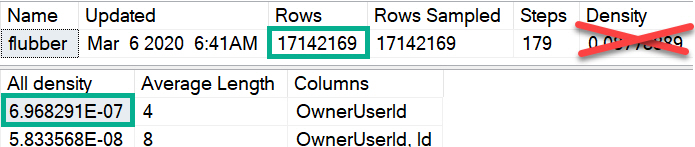
That estimate will be based on the number of rows in the table, and the “All Density” of the column multiplied together, for single equality predicates. The process for multiple predicates depends on which cardinality estimation model you’re using.
CREATE INDEX flubber
    ON dbo.Posts(OwnerUserId);

DBCC SHOW_STATISTICS(Posts, flubber);
Injury
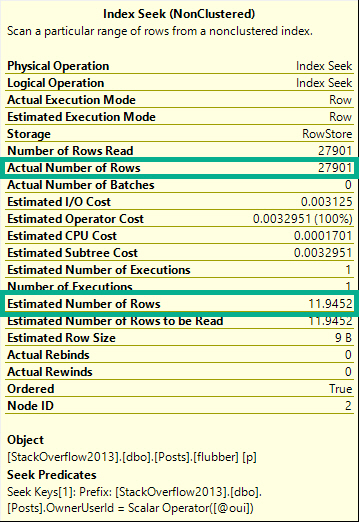
For example, this query using a single local variable with a single equality:
DECLARE @oui INT = 22656;
SELECT COUNT(*) FROM dbo.Posts AS p WHERE p.OwnerUserId = @oui;
Will get an estimate of 11.9-ish, despite 27,901 rows matching over here in reality.
Poo
Which can be replicated like so, using the numbers from the screenshot up yonder.
SELECT (6.968291E-07 * 17142169) AS [?]
Several Different Levels
You can replicate the “All Density” calculation by doing this:
SELECT (1 /
         CONVERT(FLOAT, COUNT(DISTINCT p.OwnerUserId))
         ) AS [All Density]
FROM Posts AS p
GO
Notice I didn’t call the estimate “bad”. Even though it often is quite bad, there are some columns where the distribution of values will be close enough to this estimate for it not to matter terribly for plan shape, index choice, and overall performance.
Don’t take this as carte blanche to use this technique; quite the opposite. If you’re going to use it, it needs careful testing across a variety of inputs.
Why? Because confidence in estimates decreases as they become based on less precise information.
In these estimates we can see a couple optimizer rules in action:
Inclusion: We assume the value is there — the alternative is ghastly
Uniformity: The data will have an even distribution of unique values
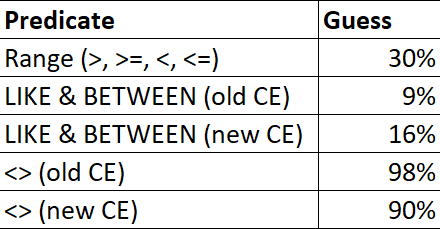
For ranges (>, >=, <, <=), LIKE, BETWEEN, and <>, there are different fixed guesses.
Destined for Lateness
These numbers may change in the future, but up through 2019 this is what my testing resulted in.
Heck, maybe this behavior will be alterable in the future :^)
No Vector, No Estimate
A lot of people (myself included) will freely interchange “estimate” and “guess” when talking about this process. To the optimizer, there’s a big difference.
An estimate represents a process where math formulas with strange fonts that I don’t understand are used to calculate cardinality.
A guess represents a breakdown in that process, where the optimizer gives up, and a fixed number is used.
Say there’s no “density vector” available for the column used in an equality predicate. Maybe you have auto-create stats turned off, or stats created asynchronously is on for the first compilation.
You get a guess, not an estimate.
ALTER DATABASE StackOverflow2013 SET AUTO_CREATE_STATISTICS OFF;
GO

DECLARE @oui INT = 22656;
SELECT COUNT(*) FROM dbo.Posts AS p WHERE p.OwnerUserId = @oui;
SELECT COUNT(*) FROM dbo.Posts AS p WHERE p.OwnerUserId = @oui OPTION(USE HINT('FORCE_LEGACY_CARDINALITY_ESTIMATION'));
GO

ALTER DATABASE StackOverflow2013 SET AUTO_CREATE_STATISTICS ON;
GO
Using the new cardinality estimator (CE), which Microsoft has quite presumptuously started calling the Default CE, I get a guess of 4,140.
Using the legacy CE, which maybe I’ll start referring to as the Best CE, to match the presumptuousness of Microsoft, I get a guess of 266,409.
Though neither one is particularly close to the reality of 27,901 rows, we can’t expect a good guess because we’re effectively poking the optimizer in the eyeball by not allowing it to create statistics, and by using a local variable in our where clause.
These things would be our fault, regardless of the default-ness, or best-ness, of the estimation model.
If you’re keen on calculating these things yourself, you can do the following:
SELECT POWER(CONVERT(FLOAT, 17142169), 0.75) AS BEST_CE;
SELECT SQRT(CONVERT(FLOAT, 17142169)) AS default_ce_blah_whatever;
SELECT COUNT_BIG(*)
FROM dbo.Posts AS p
WHERE p.CreationDate = p.CommunityOwnedDate;

SELECT COUNT_BIG(*)
FROM dbo.Posts AS p
WHERE p.CreationDate = p.CommunityOwnedDate
OPTION(USE HINT('FORCE_LEGACY_CARDINALITY_ESTIMATION'));
The so-called “default” CE thinks 1,714,220 rows will match for a column-equals-column comparison, and the “legacy” CE thinks 6.44248 rows will match, assuming that histograms are available for both of these queries.
How many actually match? 59,216.
I never said this was easy, HOWEVER!
Ahem.
The “legacy” CE estimate comes from advanced maths that only people who vape understand, while the so-called “default” CE just guesses ten percent, in true lazybones fashion. “You treat your stepmother with respect, Pantera!“, as a wise man once said.
Second, what we want to happen:
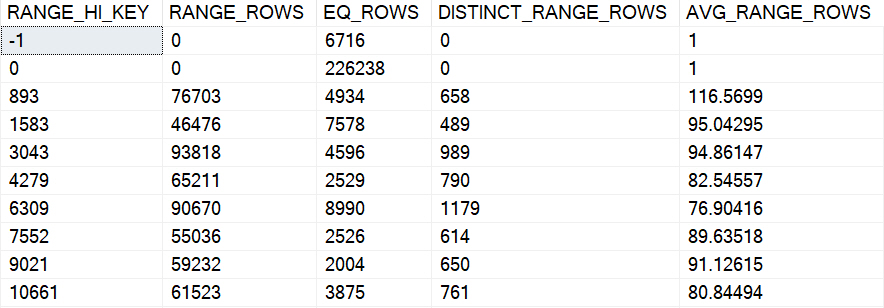
Code that uses literals, parameters, and other sniff-able forms of predicates use the statistics histogram, which typically has far more valuable information about data distribution for a column. No, they’re not always perfect, and sure, estimates can still be off if we use this, but that’s a chance I’m willing to take.
Even if they’re out of date. Maybe. Maybe not.
Look, just update those statistics.
American Histogram X
Like I mentioned before, these estimates typically have higher confidence levels because they’re often based on more precise details about the data.
If I had to rank them:
Direct histogram step hits for an equality
Intra-step hits for an equality
Direct histogram step hits for a range
Intra-step hits for a range
Inequalities (not equals to)
Joins
1000 other things
All the goofy stuff you people do to make this more difficult, like wrapping columns in functions, mismatching data types, using local variables, etc.
Of course, parameterized code does open us up to parameter sniffing issues, which I’m not addressing in this post. My only goal here is to teach people how to get out of performance jams caused by local variables giving you bad-enough estimates. Ha ha ha.
Plus, there’s a lot of negativity out there already about parameter sniffing. A lot of the time it does pretty well, and we want it to happen.
Over-Under
The main issues with the local variable/density vector estimates is that they most often don’t align well with reality, and they’re almost certainly a knee-jerk reaction to a parameter sniffing problem, or done out of ignorance to the repercussions. It would be tedious to walk through all of the potential plan quality issues that could arise from doing this, though I did record a video about one of them here.
Instead of doing all that stuff, I’d rather walk through what works and what doesn’t when it comes to fixing the problem.
But first, what doesn’t work!
Temporary Objects Don’t Usually Work
If you put the value of the local variable in a #temp table, you can fall victim to statistics caching. If you use a @table variable, you don’t get any column-level statistics on what values go in there (even with a recompile hint or trace flag 2453, you only get table cardinality).
There may be some circumstances where a #temp table can help, or can get you a better plan, but they’re probably not my first stop on the list of fixes.
The #temp table will require a uniqueness constraint to work
This becomes more and more difficult if we have multiple local variables to account for
And if they have different data types, we need multiple #temp tables, or wide tables with a column and constraint per parameter
From there, we end up with difficulties linking those values in our query. Extra joins, subqueries, etc. all have potential consequences.
Inline Table Valued Functions Don’t Work
They’re a little too inline here, and they use the density vector estimate. See this gist for a demo.
Recompile Can Work, But Only Do It For Problem Statements
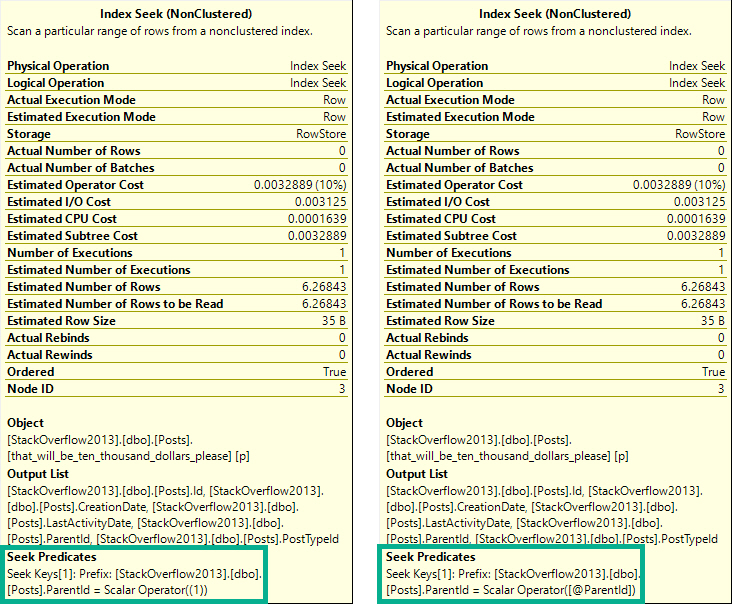
It has to be a statement-level recompile, using OPTION(RECOMPILE). Putting recompile as a stored procedure creation option will not allow for parameter embedding optimizations, i.e. WITH RECOMPILE.
One of these things is not like the other.
The tool tip on the left is from a plan with a statement-level recompile. On the right is from a plan with a procedure-level recompile. In the statement-level recompile plan, we can see the scalar operator is a literal value. In the procedure-level recompile, we still see @ParentId passed in.
The difference is subtle, but exists. I prefer statement-level recompiles, because it’s unlikely that every statement in a procedure should or needs to be recompiled, unless it’s a monitoring procedure or something else with no value to the plan cache.
Targeting specific statements is smarterer.
Erer.
A more detailed examination of this behavior is at Paul’s post, linked above.
Dynamic SQL Can Work
Depending on complexity, it may be more straight forward to use dynamic SQL as a receptacle for your variables-turned-parameters.
CREATE PROCEDURE dbo.game_time(@id INT)
AS BEGIN
    DECLARE @id_fix INT;
    SET @id_fix = CASE WHEN @id < 0 THEN 1 ELSE @id END;

    DECLARE @sql NVARCHAR(MAX) = N'';
    SET @sql += N'SELECT COUNT(*) FROM dbo.Posts AS p WHERE p.OwnerUserId = @id;';

    EXEC sys.sp_executesql @sql, N'@id INT', @id_fix
END;
Separate Stored Procedures Can Work
If you need to declare variables internally and perform some queries to assign values to them, passing them on to separate stored procedures can avoid the density estimates. The stored procedure occurs in a separate context, so all it sees are the values passed in as parameters, not their origins as variables.
In other words, parameters can be sniffed; variables can’t.
CREATE PROCEDURE dbo.game_time(@id INT)
AS
BEGIN
    DECLARE @id_fix INT;
    SET @id_fix = CASE WHEN @id < 0 THEN 1 ELSE @id END;

    EXEC dbo.some_new_proc @id_fix;
END;
Just pretend the dynamic SQL from above occupies the stored procedure dbo.some_new_proc here.
Optimizing For A Value Can Work
But choosing that value is hard. If one is feeling ambitious, one could take the local parameter value, compare it to the histogram on one’s own, then choose a value on one’s own that, one, on their own, could use to determine if a specific, common, or nearby value would be best to optimize for, using dynamic SQL that one has written on one’s own.
Ahem.
CREATE PROCEDURE dbo.game_time(@id INT)
AS BEGIN
    DECLARE @id_fix INT;
    SET @id_fix = CASE WHEN @id < 0 THEN 1 ELSE @id END;

    DECLARE @a_really_good_choice INT;
    SET @a_really_good_choice = 2147483647; --The result of some v. professional code IRL.

    DECLARE @sql NVARCHAR(MAX) = N'';
    SET @sql += N'SELECT COUNT(*) FROM dbo.Posts AS p WHERE p.OwnerUserId = @id OPTION(OPTIMIZE FOR(@id = [a_really_good_choice]));';
    SET @sql = REPLACE(@sql, N'[a_really_good_choice]', @a_really_good_choice);

    EXEC sys.sp_executesql @sql, N'@id INT', @id_fix;
END;
GO
Wrapping Up
This post aimed to give you some ways to avoid getting bad density vector estimates with local variables. If you’re getting good guesses, well, sorry you had to read all this.
When I see this pattern in client code, it’s often accompanied by comments about fixing parameter sniffing. While technically accurate, it’s more like plugging SQL Server’s nose with cotton balls and Lego heads.
Sometimes there will be several predicate filters that diminish the impact of estimates not using the histogram. Often a fairly selective predicate evaluated first is enough to make this not suck too badly. However, it’s worth learning about, and learning how to fix correctly.
Thanks for reading!
Going Further
If this is the kind of SQL Server stuff you love learning about, you’ll love my training. Blog readers get 25% off the Everything Bundle — over 100 hours of performance tuning content. Need hands-on help? I offer consulting engagements from targeted investigations to ongoing retainers. Want a quick sanity check before committing to a full engagement? Schedule a call — no commitment required.
If this is the kind of SQL Server stuff you love learning about, you’ll love my training. Blog readers get 25% off the Everything Bundle — over 100 hours of performance tuning content. Need hands-on help? I offer consulting engagements from targeted investigations to ongoing retainers. Want a quick sanity check before committing to a full engagement? Schedule a call — no commitment required.
If this is the kind of SQL Server stuff you love learning about, you’ll love my training. Blog readers get 25% off the Everything Bundle — over 100 hours of performance tuning content. Need hands-on help? I offer consulting engagements from targeted investigations to ongoing retainers. Want a quick sanity check before committing to a full engagement? Schedule a call — no commitment required.