Cursor Declarations That Use LOB Local Variables Can Bloat Your Plan Cache

I found a few stored procedures with single plan cache entries over 500 MB of memory each according to sys.dm_exec_cached_plans while optimizing the plan cache in production. The stored procedures were relatively simple and both execution plans were less than 1 MB when saved as sqlplan files. I was confused, offended, and confused.

First published on MSDN on Jan 09, 2007

Did you know that the memory used for cursors can be cached along with the compiled plan? I’ll include a direct quote of the ancient wisdom:

Inactive cursors are cached in the compiled plan. Just like MXCs there are two lists maintained here: the lookup list and the enum list. The lookup list stores the inactive cursors. When a cursor is de-allocated, the memory used to store the cursor is cached. On subsequent re-execution of the batch with this cursor, the cached cursor memory is reused and re-initialized as an active cursor. The enum list has the list of active and inactive cursors and is used to enumerate all cursors for a compiled plan.

Cursors are re-generatable given a compiled plan. Relative to compiled plans they are also relatively inexpensive to re-generate.

I checked sys.dm_exec_cached_plan_dependent_objects and found that nearly all of the cached memory was used for the cursors instead of the execution plans. This makes sense because there was no reason why a simple procedure should use 500 MB for a cached plan, but why were the cursors using so much memory?

Back to 2022

I was able to create a simple reproduction of the issue on SQL Server 2022 CU13 which is the most recent version currently available at the time of writing. Create a stored procedure that uses the OPENJSON() function along with an NVARCHAR(MAX) local variable as part of a cursor declaration. Here is one example:


CREATE OR ALTER PROCEDURE TestMemoryLeak_1
AS
BEGIN
    SET NOCOUNT ON;

    DECLARE @json NVARCHAR(MAX);

    SET @json = N'[
        {
            "Order": {
                "Number": "SO43659",
                "Date": "2024-05-31T00:00:00"
            },
            "AccountNumber": "AW29825",
            "Item": {
                "Price": 2024.9940,
                "Quantity": 1
            }
        },
        {
            "Order": {
                "Number": "SO43661",
                "Date": "2024-06-01T00:00:00"
            },
            "AccountNumber": "AW73565",
            "Item": {
                "Price": 2024.9940,
                "Quantity": 3
            }
        }
    ]';

    DECLARE json_cursor CURSOR FAST_FORWARD FOR 
    SELECT Number, OrderDate, Customer, Quantity
    FROM OPENJSON(@json) WITH (
        Number VARCHAR(200) '$.Order.Number',
        OrderDate DATETIME '$.Order.Date',
        Customer VARCHAR(200) '$.AccountNumber',
        Quantity INT '$.Item.Quantity'
    );

    DECLARE 
        @Number VARCHAR(200),
        @OrderDate DATETIME,
        @Customer VARCHAR(200),
        @Quantity INT;

    OPEN json_cursor;
    FETCH NEXT FROM json_cursor INTO @Number, @OrderDate, @Customer, @Quantity;
    WHILE @@FETCH_STATUS = 0
    BEGIN
        -- nobody wants to work anymore

        FETCH NEXT FROM json_cursor INTO @Number, @OrderDate, @Customer, @Quantity;
    END;
    CLOSE json_cursor;
    DEALLOCATE json_cursor;

    RETURN;
END;
GO

The amount of memory cached for the cursor execution can be seen with the following code:

DECLARE @plan_handle varbinary(64);
SELECT @plan_handle = plan_handle
FROM sys.dm_exec_procedure_stats
where object_id = object_id('[TestMemoryLeak_1]');

SELECT * FROM 
sys.dm_os_memory_objects
WHERE type = 'MEMOBJ_CURSOREXEC'
AND memory_object_address IN  (
    SELECT memory_object_address
    FROM sys.dm_exec_cached_plan_dependent_objects(@plan_handle)
);

I executed the test stored procedure 1 time, measured the memory usage, then executed it 9999 more times, and finally measured the memory usage again. I expected the memory usage to not change because the cursor always processes the same data. SQL Server betrayed my expectations:

a62 leak

A cursor that processes 2 rows of data has managed to use 163 MB of cached memory. Wonderful. One workaround is to remove OPENJSON() from the cursor definition by inserting the data into a table variable and making the cursor read from the table variable:

DECLARE @json_table TABLE (
    Number VARCHAR(200) NULL,
    OrderDate DATETIME NULL,
    Customer VARCHAR(200) NULL,
    Quantity INT NULL
);

INSERT INTO @json_table (Number, OrderDate, Customer, Quantity)
SELECT Number, OrderDate, Customer, Quantity
FROM OPENJSON(@json) WITH (
    Number VARCHAR(200) '$.Order.Number',
    OrderDate DATETIME '$.Order.Date',
    Customer VARCHAR(200) '$.AccountNumber',
    Quantity INT '$.Item.Quantity'
);

DECLARE json_cursor CURSOR FAST_FORWARD FOR 
SELECT Number, OrderDate, Customer, Quantity
FROM @json_table;

SQL Server no longer betrays my expectations. The amount of cached memory for the cursor does not change between 1 and 10000 executions:

a62 no leak

Here is a comparison using the sys.dm_exec_cached_plans DMV:

a62 compare

Determining which row is associated with each stored procedure is an exercise left up to the reader.

A second workaround is to define the cursor using the LOCAL argument. A third workaround is to define the local variable as NVARCHAR(4000). Thank you to the comments for both of these workarounds. Note that I originally thought the issue was related to OPENJSON() but it appears that was an error on my part. The presence of an LOB variable looks to be the determining factor.

Final Thoughts

Using local LOB variables as part of a cursor declaration can lead to ever-increasing amounts of cached memory associated with its cached plan. It’s possible that SQL Server will prune this plan once it experiences plan cache pressure, but it may also choose to prune other plans instead. I recommend coding defensively by always using the LOCAL argument for your cursor declarations. Thanks for reading!

Why does FAST_FORWARD make some cursors so much faster in SQL Server?

If you’re like me, you started your database journey by defining cursors with the default options. This went on until a senior developer or DBA kindly pointed out that you can get better performance by using the FAST_FORWARD option. Or maybe you were a real go-getter and found Aaron Bertrand’s performance benchmarking blog post on different cursor options. I admit that for many years I didn’t care to know why FAST_FORWARD sometimes made my queries faster. It had “FAST” in the name and that was good enough for me.

Recently I saw a production issue where using the right cursor options led to a 1000X performance improvement. I decided that ten years of ignorance was enough and finally did some research on different cursor options. This post contains a reproduction and discussion of the production issue.

A Dramatic Example

The code below creates a 16 GB table. It has a primary key and clustered index on the ID column and a nonclustered index on the ID2 column. You can adjust the TOP value to insert fewer rows if you wish to create a smaller table, but don’t drop it below 200000.

DROP TABLE IF EXISTS tbl_1;

CREATE TABLE tbl_1 (
ID BIGINT NOT NULL,
ID2 BIGINT NOT NULL,
PAGE_FILLER VARCHAR(5000) NOT NULL,
PRIMARY KEY (ID)
);

INSERT INTO tbl_1 WITH (TABLOCK)
SELECT RN, RN % 100000, REPLICATE('Z', 5000)
FROM
(
	SELECT TOP (2000000) ROW_NUMBER() OVER (ORDER BY (SELECT NULL)) RN
	FROM master..spt_values t1
	CROSS JOIN master..spt_values t2
) q
OPTION (MAXDOP 1);

CREATE INDEX IX2 ON tbl_1 (ID2);

Consider the following select query, which is a simplified example of the production query:

Select ID
from tbl_1
WHERE ID2 < 1
ORDER BY ID;

There’s an index on ID2 and the filter is highly selective: only 20 rows out of 2 million will match. I would expect the query optimizer to use that index and for the query to finish instantly. The following stored procedure defines a FAST_FORWARD cursor for that SELECT query, fetches the 20 matching rows, and does nothing with them:

CREATE OR ALTER PROCEDURE CURSOR_WITH_FF
AS
BEGIN
SET NOCOUNT ON;

Declare @ID BIGINT;

Declare FF Cursor FAST_FORWARD for
Select ID
from tbl_1
WHERE ID2 < 1
ORDER BY ID;

Open FF;
Fetch Next from FF into @ID;
WHILE @@FETCH_STATUS = 0
BEGIN
	Fetch Next from FF into @ID;
END;
Close FF;
Deallocate FF;
END;

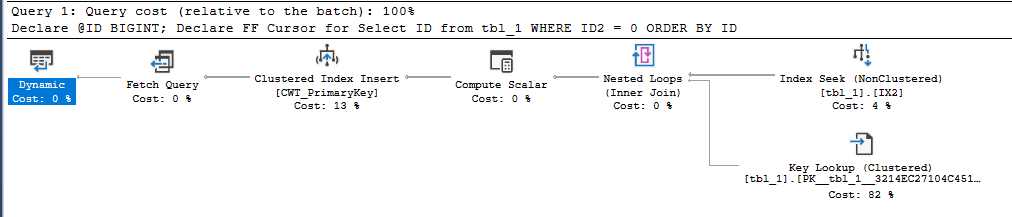
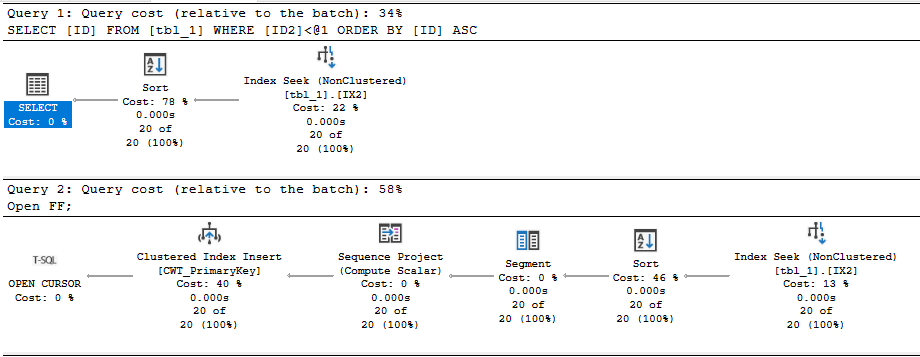
Executing the stored procedure takes about 2 ms on my machine. In this case, I get a query plan that’s very similar to what I’d get by running a simple SELECT query. There’s some additional cursor garbage, but that doesn’t impact performance in this case:

SQL Server Query Plan

Regrettably, the code takes 50 seconds to execute on my machine if I remove the FAST_FORWARD option. What is responsible for the dramatic difference in runtime?

The “What”

We can start by looking at the query plan for the default cursor:

SQL Server Query Plan

The query optimizer decided to do an ordered clustered index scan instead of using the IX2 index. We’re getting all rows from the cursor so we have to read through the whole table. That’s 20 scans with each scan covering about 5% of the table. We should definitely expect this to be less efficient than the FAST_FORWARD plan, but a 50 second execution time felt too slow based on what I know about my hardware. Looking at the wait stats:

SQL Server Query Plan

It’s certainly not surprising that I/O is the biggest contributor to wait time (what else would it be?), but why do I have so much I/O wait time when I have fast, locally attached storage with an average latency less than 1 ms? For a comparison test, I decided to force the query plan that the cursor picks but to run it outside of the cursor. The following code finished in about 8 seconds on my machine:

CHECKPOINT;
DBCC DROPCLEANBUFFERS;

Select ID
from tbl_1 WITH (INDEX(1))
WHERE ID2 < 1
ORDER BY ID
OPTION (MAXDOP 1);

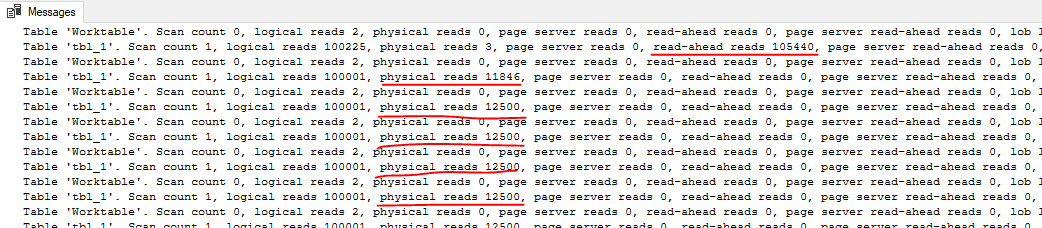
Using sys.dm_io_virtual_file_stats, I found that the cursor was doing about 240000 I/Os with an average I/O size of 66 KB. The single SELECT query did about 10000 I/Os with an average I/O size of 1.7 MB. The key difference is that only the first query execution of the cursor is able to get read-ahead reads:

SQL Server Query Plan

For the cursor execution, we don’t get read ahead reads for 95% of the I/O needed for the query. Even a sub-ms I/O latency can be painful when you have to do 240000 I/Os with a DOP 1 query. In summary, the FAST_FORWARD cursor is able to use an index to efficiently seek to the 20 matching rows. The cursor with default options does about 15 GB of I/O that’s not eligible for read-ahead reads.

Of course, the situation should be expected to be much worse in the cloud. Using the quoted latency of 5-10 ms for general purpose Managed Instances, one might expect the cursor with default options to take between 20 and 40 minutes. Just for fun, I decided to test it against a 4 vCore Managed Instance. The cursor with the FAST_FORWARD option took about 120 ms. The cursor with default options took about 70 minutes. Here are the wait stats for the execution:

SQL Server Query Plan

To put a positive spin on it: using the correct cursor options improved performance by 35000X on the Managed Instance.

The “Why”

I’ll start by saying that I don’t want to be a cursor expert. I’d much rather be an expert in not using cursors. I was having a lot of trouble explaining why the default cursor was getting such a bad query plan, but fortunately I was scooped 12 years ago. I’m going to reproduce the entire section on dynamic plans because you never know when a Microsoft hosted blog post will disappear:

A dynamic plan can be processed incrementally. In SQL Server we do this by serializing the state of the query execution into what we call a marker. Later, we can build a new query execution tree, use the marker to reposition each operator. Moreover, a dynamic plan can move forwards and backwards relative to its current position. Dynamic plans are used by both dynamic and some fast_forward cursors.

A dynamic plan consists only of dynamic operators — operators that support markers and moving forwards and backwards. This corresponds closely, but not exactly, to the query processing notion of streaming operators (vs. stop-and-go). But not every streaming operator is dynamic. In SQL Server, dynamic means:

1. The operator can be repositioned to its current position using a marker, or to a relative position (either next or previous) from its current one.

2. The operator’s state has to be small, so the marker can be small. No row data can be stored in the operator. In particular, no sort table, hash table, or work table. Not even one row can be stored, since a single row can be very large.

Without a dynamic plan, the cursor would need temporary storage to keep the query result set (or keyset thereof). A dynamic plan does no such thing! However, certain operators are disqualified — hash join, hash agg, compute sequence, and sort, for example. This leads to sub-optimal plans.

In short, you can consider a dynamic plan to be similar in concept to a plan with no blocking operators, but there are some additional restrictions. Reliable sources tell me that a cursor with default options will always pick a dynamic plan if one is available. For our SELECT query, a dynamic plan is indeed available. The ordering of the clustered index can be used to return sorted rows without doing an explicit sort. The IX2 index cannot be used for ordering because I’m filtering on ID2 with an inequality. Changing the query to do an equality filter instead allows for a dynamic plan that uses the IX2 index:

SQL Server Query Plan

What about cursors without default options? Going back to the original query, specifying the STATIC or KEYSET option avoids the bad query plan and uses the IX2 index to do an index seek. Both of those options write the cursor result set to a table in tempdb, so it makes intuitive sense that there wouldn’t be some kind of restriction that forces a clustered index scan.

Specifying the FAST_FORWARD option allows the query optimizer to pick between a static and dynamic plan. In this case, the static plan is obviously much more efficient, and the query optimizer is aware of that. It picks the static plan that doesn’t do the clustered index scan.

For completeness, specifying the READ_ONLY option also results in the index seek, as long as the DYNAMIC option isn’t also specified.

In general, I would say that FAST_FORWARD is still a good starting point for your cursors as long as your application code allows for the restrictions that come with it. FAST_FORWARD alone isn’t always sufficient to get query performance that is similar to what you’d get with a standard SELECT. As Erik points out, you’ll end up with a MAXDOP 1 query with that option. The query optimizer may also choose a worse dynamic plan instead of a static plan if the estimated query plan costs don’t reflect reality. Using STATIC instead of FAST_FORWARD can be quite helpful in some cases, but you’ll have to test your cursor specifically to know for sure. Of course, you may be able to write your code without using a cursor instead.

Insufficient Permissions

As someone always on the lookout for cool demos, this bit of the documentation caught my eye:

If a DECLARE CURSOR using Transact-SQL syntax does not specify READ_ONLY, OPTIMISTIC, or SCROLL_LOCKS, the default is as follows:

If the SELECT statement does not support updates (insufficient permissions, accessing remote tables that do not support updates, and so on), the cursor is READ_ONLY.

Could I get better performance by running the code as a login with less privileges? Sadly, I couldn’t get this to work. I verified that the lowly ‘erik’ login couldn’t modify data in the table but I got the same query plan as before. There was also no change in the properties column from the sys.dm_exec_cursors DMF.

I don’t know if the documentation was wrong or if I was doing something wrong on my end. I’d be interested in seeing a working repro of this if anyone has one.

Final Thoughts

Some query patterns can experience extremely poor performance with the default cursor options. You may be able to identify these queries by sorting by total logical reads in the standard SSMS query store reports. In our production environment we had a few cursors that were doing far more logical reads than anything else on the database, so they were easy to pick out. We were able to significantly speed up some of those queries just by adding the FAST_FORWARD option.

Thanks for reading!

Going Further


If this is the kind of SQL Server stuff you love learning about, you’ll love my training. Blog readers get 25% off the Everything Bundle — over 100 hours of performance tuning content. Need hands-on help? I offer consulting engagements from targeted investigations to ongoing retainers. Want a quick sanity check before committing to a full engagement? Schedule a call — no commitment required.

Local Variables Get Bad Cardinality Estimates In Cursors In SQL Server, Too

Work Off


While helping a client out with weird performance issues, we isolated part of the code that was producing a whole bunch of bad plans.

At the intersection of bad ideas, there was a cursor looping over a table gathering some data points with a local variable in the where clause.

For more background on that, check out these posts:

One might expect the query inside the cursor to be subject to some special rules, but alas, nothing good comes of it.

Eau de Sample


To repro a little bit, we need to create a certainly suboptimal index.

CREATE INDEX p ON dbo.Posts
    (OwnerUserId);

If you have a lot of single key column indexes, you’re probably doing indexing wrong.

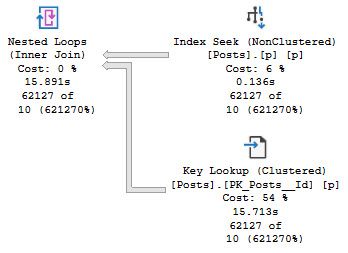
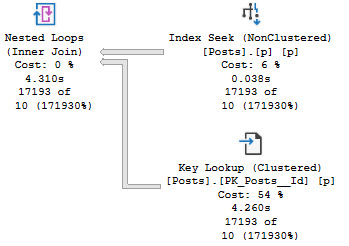
Full demo code is at the end because it’s a bit long, but the end result is five query plans that all share the same bad estimate based off the density vector.

The worst of them looks like this:

SQL Server Query Plan
Occurling

And the best of them looks like this:

SQL Server Query Plan
Gruntled

Over and Over


If you’re getting bad guesses like this over and over again in any loop-driven code, local variables might just be to blame.

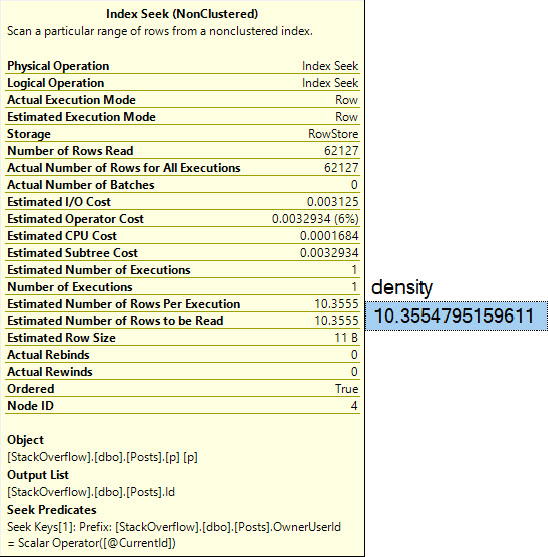
That guess of 10 rows of course comes from  this calculation:

SELECT 
    density = 
        (
            1 / 
            CONVERT
            (
                float, 
                COUNT(DISTINCT p.OwnerUserId)
            )
        ) *
        COUNT_BIG(*)
FROM Posts AS p

Which, with a little bit of rounding, gets us to the estimate we see in the query plan:

SQL Server Query Plan
hectic

Thanks for reading!

Going Further


If this is the kind of SQL Server stuff you love learning about, you’ll love my training. Blog readers get 25% off the Everything Bundle — over 100 hours of performance tuning content. I’m also available for consulting if you just don’t have time for that and need to solve performance problems quickly.

Demo Code


SET STATISTICS XML OFF;
SET NOCOUNT ON;

DECLARE 
    @CurrentId int;

DROP TABLE IF EXISTS #UserIds; 

CREATE TABLE #UserIds 
(
    UserId int PRIMARY KEY CLUSTERED
);

INSERT
    #UserIds WITH(TABLOCK)
(
    UserId
)
SELECT
    u.Id
FROM dbo.Users AS u
WHERE u.Reputation > 850000
ORDER BY u.Reputation DESC;


DECLARE counter CURSOR 
    LOCAL STATIC
FOR
SELECT 
    UserId 
FROM #UserIds;
 
OPEN counter;

FETCH NEXT FROM counter 
    INTO @CurrentId;

WHILE @@FETCH_STATUS = 0
BEGIN 
   
    SET STATISTICS XML ON;
    
    SELECT
        p.PostTypeId,
        c = COUNT_BIG(*)
    FROM dbo.Posts AS p
    WHERE p.OwnerUserId = @CurrentId
    GROUP BY p.PostTypeId
    ORDER BY c DESC;
    
    SET STATISTICS XML OFF;
 
FETCH NEXT FROM counter 
    INTO @CurrentId;
END;

CLOSE counter;
DEALLOCATE counter;


Error Handling In SQL Server Cursors

Spit My Last Error


Video Summary

In this video, I delve into error handling within SQL Server cursors, a topic that recently sparked some interest on Twitter. Initially stumped by the challenge, I decided to create a simple table with numbers 0 through 10 to illustrate my point. As we navigate through the code and its execution, you’ll see firsthand how a cursor can get stuck in an infinite loop due to unhandled errors. By adding a `FETCH NEXT` statement within the catch block, I demonstrate a practical solution that allows the cursor to continue processing rows even after encountering an error. This video is not just about solving a specific problem but also serves as a reminder of the importance of robust error handling in stored procedures—especially when working with cursors.

Full Transcript

Don’t make fun of my hair. It’s not funny. It’s not amusing. It is a sad, sad reality that I’m living in, that we’re all living in, living through, hopefully living through, surviving in these trying times. So let’s talk about error handling in cursors because there was a spec a spec of interest on Twitter about seeing something about this. So this is funny because I was stumped by this. I was stumped by this and I was staring at it for a while, just not being able to figure it out. So what I’m going to do is create a table with the numbers 0 through 10 in it. So when we look at the results of just the select query, we’re going to start at 0 and kind of count up to 10. Alright, so let’s put that in the table, right? I guess we’ll select star from the table just to prove them. I hope select star isn’t too rough on this single column. Maybe I should add a computed column to stop myself from doing that. I don’t know. I’m undecided on that. 0 through 10. So that’s 11 rows altogether, right? Sort of confusing when you see 1, 0, and then 11, 10 down there. At least it is for me, but I’m kind of dumb. So, you know, I have that going for me. So what I originally started this, I was working on something.

I mean, it was a similar setup. You know, I was doing everything right, too. I was using a cursor and I was using a table variable for all the right things, right? So I was using a table variable to catch errors and I was using a cursor to iterate over something that I shouldn’t, like it was not a set-based thing that I could have just used a window function for. It was actually something that should be iterated over. It was re-enabling untrusted foreign keys and I figured, hey, what better use for a cursor than enabling foreign keys. So what I have here in my setup is some dynamic SQL. I just have this little variable in here to throw it away because I don’t want to return the table results.

I just want to look at the messages tab and show you what’s going on. Then I have this thing over here, which is going to catch this query inside of the cursor. I’ll get to that in a minute. And then I have a table that is going to catch error messages. And what I’m going to do after that is open my cursor and fetch everything into my variable here.

And then, of course, we’ll fetch status equals zero. I am going to print out my message with raise error. I’m going to execute my dynamic SQL and then I’m going to try to fetch next into my variable. variable. And I’m doing this inside of a try-catch block because, you know, working on SP underscore human events, I have gotten quite enamored with the old begin-try, begin-catch.

Because error handling is, I think, pretty valuable when you’re working with a big store procedure, right? Knowing exactly where something happened, where the error was, what the error was, like what was going on. That’s really, really valuable stuff. And I know there’s, you know, a certain amount of error handling that is just like, you know, maybe overboard.

But what the hell? You know, I like going overboard once in a while. You know why I like going overboard? Because it beats the crap out of being on a cruise ship. That’s why. So let’s, without too much further time wasting, let’s run this whole thing.

And let’s look at what happens. Now, if you go over to the Messages tab, you’re going to notice, I think, what I noticed. And, I mean, the first thing you’re going to notice is I forgot to set no count on. So we’re going to get this one row back. But the other thing is that we kept getting the same error over and over again.

We were stuck in an infinite loop. We did not just get 11 rows back because we moved on to the next one. We got, I don’t know, however many this one. I’m not counting. Are you crazy? But we kept hitting, we would keep hitting this error over and over again.

We would keep dividing by zero and we would never move on. Now, the way around this is to double up on our fetch next. And we actually need to take this right here and we need to put another version of it inside of the catch block.

And now when I run this whole thing and I declare my cursor and I step through, what am I going to get? I’m going to get a row back from my error catching table variable. And over in the Messages tab, I’m going to get this, right, where we divided by zero and we affected one row.

We got an error and then we went through and we did a bunch of stuff that actually would divide, right? And then we got this and, you know, I don’t know. We got one row effect. I don’t really know. I don’t really care.

That’s probably the select over here, right? But then back in that error catching table, we got the error number, the error severity, the error state, and the divide by zero and the error message, which is divide by zero encountered. So there we go. That’s that.

That’s how you do error handling inside of a cursor and still have your cursor make forward progress. If you only have the fetch next here, you’re just going to get stuck in an infinite loop. But if you put a fetch next in the catch block, you will catch the error and then move on.

And then you will start back here. Now, what I thought was a little weird about this is maybe like the fetch status thing, like not bailing out, but I don’t know.

Maybe I don’t understand cursors. There’s a lot I don’t understand. Maybe cursors is one of those things that I will just hopefully never understand. Or maybe I want to understand them.

I don’t know. Maybe my next training module will be all about the wonders of cursors. Wouldn’t that be fun for you? Thanks for watching.

Going Further


If this is the kind of SQL Server stuff you love learning about, you’ll love my training. Blog readers get 25% off the Everything Bundle — over 100 hours of performance tuning content. I’m also available for consulting if you just don’t have time for that and need to solve performance problems quickly.

If you wanna play with the code I used to try things out on your own, here it is:

CREATE TABLE zero_ten (id INT NOT NULL PRIMARY KEY);

INSERT dbo.zero_ten ( id )
SELECT 0 AS id
UNION ALL 
SELECT TOP (10) ROW_NUMBER() OVER(ORDER BY 1/0)
FROM sys.messages AS m

SELECT * FROM dbo.zero_ten AS zt;
RETURN;

DECLARE c CURSOR LOCAL STATIC FOR
SELECT N'DECLARE @atmosphere INT; SELECT @atmosphere = 1/' + RTRIM(zt.id)
FROM dbo.zero_ten AS zt;

DECLARE @joydivision NVARCHAR(MAX) = N'';
DECLARE @errors TABLE
(
    id INT PRIMARY KEY IDENTITY,
    error_number INT,
    error_severity INT,
    error_state INT,
    error_message NVARCHAR(MAX)
);

OPEN c;
FETCH NEXT FROM c
INTO @joydivision;

WHILE @@FETCH_STATUS = 0
BEGIN
    BEGIN TRY
        RAISERROR(@joydivision, 0, 1) WITH NOWAIT;
        EXEC sys.sp_executesql @joydivision;
        FETCH NEXT FROM c INTO @joydivision;
    END TRY
    BEGIN CATCH
        INSERT @errors ( error_number, error_severity, error_state, error_message )
        SELECT ERROR_NUMBER(), ERROR_SEVERITY(), ERROR_STATE(), ERROR_MESSAGE();
        --FETCH NEXT FROM c INTO @joydivision;
    END CATCH;
END;

SELECT *
FROM @errors AS e;

CLOSE c;
DEALLOCATE c;
GO


My Favorite SQL Server Cursor Options: Local Static

Cursory


Video Summary

In this video, I dive into the world of cursors and explore why my favorite cursor option is the local static cursor. Despite some contention in the SQL community about which cursor options are best, I share one compelling reason for preferring local static cursors over others like the fast forward cursor. I explain how using a fast forward cursor can force your entire query to run serially, leading to suboptimal performance. By contrast, a local static cursor allows for parallel execution, significantly improving query performance in certain scenarios. The video also covers the importance of testing different cursor options and understanding their impact on execution plans and performance metrics.

Full Transcript

This is still just plain black coffee and I’m having a tough time with that this morning. I’m recording video number two today on this cold, chilly, rainy day. Brrr, day where it sure would be nice to have a heaping helping of some Lafroig or Lagavulin or Ardbeg in a fellas coffee cup. Sure would be nice. Ah, boy. So I want to talk about my favorite cursor options. I know that there is some contention.

I almost knocked my coffee over because I’m apparently too sober to function. So there is some contention about what the best cursor options are and why. And you should always use this and never use this. And I’m going to throw my hat in the ring.

And my favorite cursor options are local static. And there are very smart people out there like Erlend Somerskog who agree with me. And I’m going to show you one of my reasons why I like the local static cursor better than other cursor types. But first, we have to go look at that other cursor type.

So this is a type of cursor that a lot of people will tell you to use a local fast forward cursor. And if you look at the documentation for cursor options, you’ll see that fast forward has some optimizations. Optimizations.

What those optimizations are, we don’t know. I don’t know. I don’t think they’re documented. But one optimization about fast forward cursors that I heartily dislike is that when you run them, much like many other things in SQL Server, like inline scalar, non-valued functions, non-inlined scalar valued functions, modifying table variables, reading from multi-statement table valued function table variables, accessing some system views, blah, blah, blah, blah, blah, will force your entire query to run serially.

Let’s go take a look. So with the fast forward cursor in place, we can see that this query plan up here is entirely serial. And it runs for just about 11 and a half seconds. If I go look at the properties of this open cursor, right?

Something again, I think I say this in a lot of videos when I’m talking about execution plans. One should always be looking at the properties window when they are looking at query plans. There is so much good, rich, detailed information in there about what is going on with your query.

Without it, you would be lost. Sad babe in the woods. We can see immediately that there is a non-parallel plan reason. Now, why none of these things have spaces in them is beyond, is a little bit beyond me.

I’m not quite sure why. You know, I understand that sometimes space bars stop working. You could probably just ask Microsoft’s IT department for a new one.

They probably have some spares sitting around. But anyway, we have a non-parallel plan reason that says no parallel fast forward cursor, which is a bit of a departure from most non-parallel plan reasons.

Most of the time when you see a non-parallel plan reason, it will either say maxed offset to one or could not generate valid parallel plan. And could not generate valid parallel plan is an umbrella for a lot of things that we cannot have query parallelism for.

Now, am I saying that parallel queries should always be used or that they are the best or that you should always strive to have a parallel query? No. No, of course not. And if we’re being honest about the query that’s running, there are probably some indexes that would help this thing run a lot faster, where you wouldn’t notice a difference in the type of cursor that you are using.

But not everyone is in a position where they can, you know, change indexes or, you know, tune queries or tune logic or any of that other stuff. And you might have a big honking crazy query that drives the initial result set of the cursor you’re going to use. And you might not have too many options for tuning that.

This is one thing where changing the cursor option can help you a little bit. So this query takes 11 and a half seconds when it runs serially with the local and fast forward options assigned to the cursor. But over here we have a query or we have a cursor.

We have a… With my favorite cursor options, local static. And when we look at the query plan for local static, we can see that we do not have the same parallelism inhibitor going on that we did in the fast forward plan.

We actually have parallel, parallel, parallel, parallel up until we gather streams here. And this runs for about 2 point… Well, let’s be fair.

About 2.8 seconds. So we got about 12 seconds versus about 3 seconds. Right? Okay. So about a 9 second difference in the query that drives the initial population of the cursor temp table doodad thingy. So, kinda nice that you can…

You should be careful with your cursors and all that. And, you know… I think…

I think cursors are a bit inevitable in some cases. And, you know… Well, you know, some people might watch this video and hiss because I’m talking about ways to tune a cursor rather than just getting rid of the cursor. Well, I mean, like, you know, what if I was going to take the results of this cursor?

What if I was going to take ID, display name, and score? And what if I was going to feed those into a stored procedure and I was going to have to run that stored procedure over a whole bunch of rows? Like, how else am I really going to do that?

If I write a while loop, is it going to make a difference in how I call a stored procedure? If I dump those rows into a temp table, is it really going to be all that different than if I use a cursor to populate a static temporary object? No.

It’s not going to be all that different. So, you know, well, a lot of people will get mad about the cursor in general. And I understand why because there are some very bad uses for cursors. And, you know, I see them and I got to help people with those kind of performance problems pretty often.

But, you know, if I had the choice between spending a long time tuning a cursor query and just changing the cursor option and, you know, saving nine seconds right off the bat, you know, if I’m in a hustle, if I’m trying to like, you know, really get some stuff done, I might just go with the different cursor options to move things along. Maybe get to something else that’s, you know, a performance bump in the night for something I’m trying to tune.

Anyway, the moral of the story is don’t use cursors if you don’t have to. But if you have to or if you’re stuck with them for some other reason, choose a cursor. Look at your cursor options carefully.

Don’t just jump right to the fast forward cursor. It can, you know, do some do some performance testing, you know, run the run the query inside the cursor and see how it goes. And then then run the query inside the cursor and see if see if you get the same execution plan.

See if you get the same time, the same performance metrics, because, you know, if you run the query, then, you know, you don’t use outside of the cursor and you get a nice parallel plan and everything’s fast. And then you put it in the cursor and it takes 20 minutes, you’re gonna be like, oh, this damn cursor. But it’s you. It’s your fault. You chose the wrong cursor options.

Don’t blame the cursor. Blame the you. That’s it. Anyway, I’m gonna go now. I’m going to go invest in Scotland and have a nice day. So, thanks for watching. I hope you I hope you learned something.

I hope that you enjoyed yourself. Maybe. And I will see you in another video. Maybe even another one today.

I don’t know. I don’t know where I don’t know where today may take me in. And if I’m feeling proper Scottish, I might I might feel very record-y today. I don’t know. We’ll see. It’s a surprise for everyone.

Anyway. Thank you. And I will see you in another video where maybe I’ll still be able to stand up. Goodbye.

Going Further


If this is the kind of SQL Server stuff you love learning about, you’ll love my training. Blog readers get 25% off the Everything Bundle — over 100 hours of performance tuning content. Need hands-on help? I offer consulting engagements from targeted investigations to ongoing retainers. Want a quick sanity check before committing to a full engagement? Schedule a call — no commitment required.

SQL Server Cursors Are Often Misunderstood

Honk Honk


People often trash cursors even when they’re used for perfectly fine reasons.

I understand that this reaction may be because they’ve seen cursors misused in the past. Sometimes because they heard someone popular say it.

In either case, everything has a time and place, and there are many times when cursors aren’t the performance sucks people chalk them up to be.

Reasonable Uses


Places where cursors don’t freak me out:

  • Maintenance scripts (backup, checkdb, etc.)
  • Building dynamic strings
  • Batching modifications
  • Passing per-thing parameters to a stored procedure

It might shock you to find cursors in well-respected pieces of code, like sp_WhoIsActive. But if you crack open the procedure and search for “cursor”, you’ll find six of them that do different things. Do you still hate cursors?

What if I showed you Paul White his-very-self suggesting people use them?

Not to mention other luminaries and nobodies who have found reason to call upon the cursed cursors.

So What Then?


Should you start out most code by writing a cursor? Absolutely not.

Should you convert every cursor to a while loop? Ehhhhh.

Should you understand when you should or shouldn’t use a cursor? Absolutely.

Some people have had pretty good careers talking about knee-jerk reactions, and I think seeing a cursor declared illicits many knee jerk reactions.

Read the code. Understand the requirements.

I tune queries all day long. The number of times someone has said THIS CURSOR IS A REAL BIG PROBLEM and been right is pretty small.

Often, there was a tweak to the cursor options, or a tweak to the query the cursor was calling (or the indexes available to it) that made things run in a more immediate fashion. I want to tune queries, not wrestle with logic that no one understands. Old code is full of that.

The number of times I’ve seen someone tell me they made something faster with totally broken logic and incorrect results is pretty high.

Thanks for reading!

Going Further


If this is the kind of SQL Server stuff you love learning about, you’ll love my training. Blog readers get 25% off the Everything Bundle — over 100 hours of performance tuning content. Need hands-on help? I offer consulting engagements from targeted investigations to ongoing retainers. Want a quick sanity check before committing to a full engagement? Schedule a call — no commitment required.