SQL Server Performance Monitor
Stop paying thousands per server per year for monitoring tools built by people
who’ve never tuned a query in their lives.
This one’s free, open source, and built by someone who has.
68 collectors across SQL Server and PostgreSQL. Real-time alerts. A built-in MCP server for AI analysis, led by Darling, a headless service that watches 5 servers or 500, around the clock.
Your data never leaves your network.
SQL Server 2016–2025 • Azure SQL MI & DB • AWS RDS • PostgreSQL 13–18 incl. Aurora • MIT License • Signed binaries
Built for Working DBAs
One SQL Server or five hundred. You want real insight into what’s happening, without a bloated platform, a per-server tax, or a vendor holding your data.
Solo DBAs & Small Teams
A handful of SQL Servers, or a whole fleet of them. You need visibility into all of them, not a platform that costs more than the servers it watches.
Consultants & Contractors
Drop it on a client’s server, collect data, and diagnose their problems with real evidence. Take it with you when you leave.
Developers Who Care
Your app is slow and you suspect the database. Install this, run your workload, and see exactly which queries are killing performance.
This Might Not Be For You If…
You want a multi-tenant SaaS platform with a vendor-managed backend, per-seat licensing, and someone else holding your data. That’s a different tool. This runs on your own infrastructure, your data never leaves your network, and there’s no per-server tax.
If you need a support agreement and vendor documentation for compliance,
there’s a subscription for that.
What People Are Saying
“You guys make us DBAs look like absolute rockstars. I’m over here getting showered with praise, and all I do is use your scripts and follow your advice.”
“Replaced SentryOne and had it running in 10 minutes”
“It helped a lot to zone in on CPU starvation from the hypervisor on which the VM runs. IT team currently investigating the host configuration. Very impressed with the tool.”
Choose Your Edition
Two editions, one shared brain. Run a whole fleet as a service with Darling, or drop Lite on any box for instant triage.
Flagship • New
Headless Fleet MonitoringA service (Windows or Linux) with a bundled, self-managing PostgreSQL store collects your whole fleet around the clock, SQL Server and PostgreSQL targets alike, with nothing installed on the servers for its own storage. Browse it in a desktop viewer or a web dashboard, and drive it all from an AI agent over MCP. Scales from 5 servers to 500. Best For
Production fleets that need continuous, unattended collection, from a handful of servers to hundreds
|
Lite Edition
Standalone MonitoringSelf-contained app with embedded DuckDB. Connect directly to any SQL Server without installing anything on the target. Perfect for quick triage, and you take it with you when you leave. Best For
Quick performance triage, Azure SQL, or environments where you can’t install on the server
|

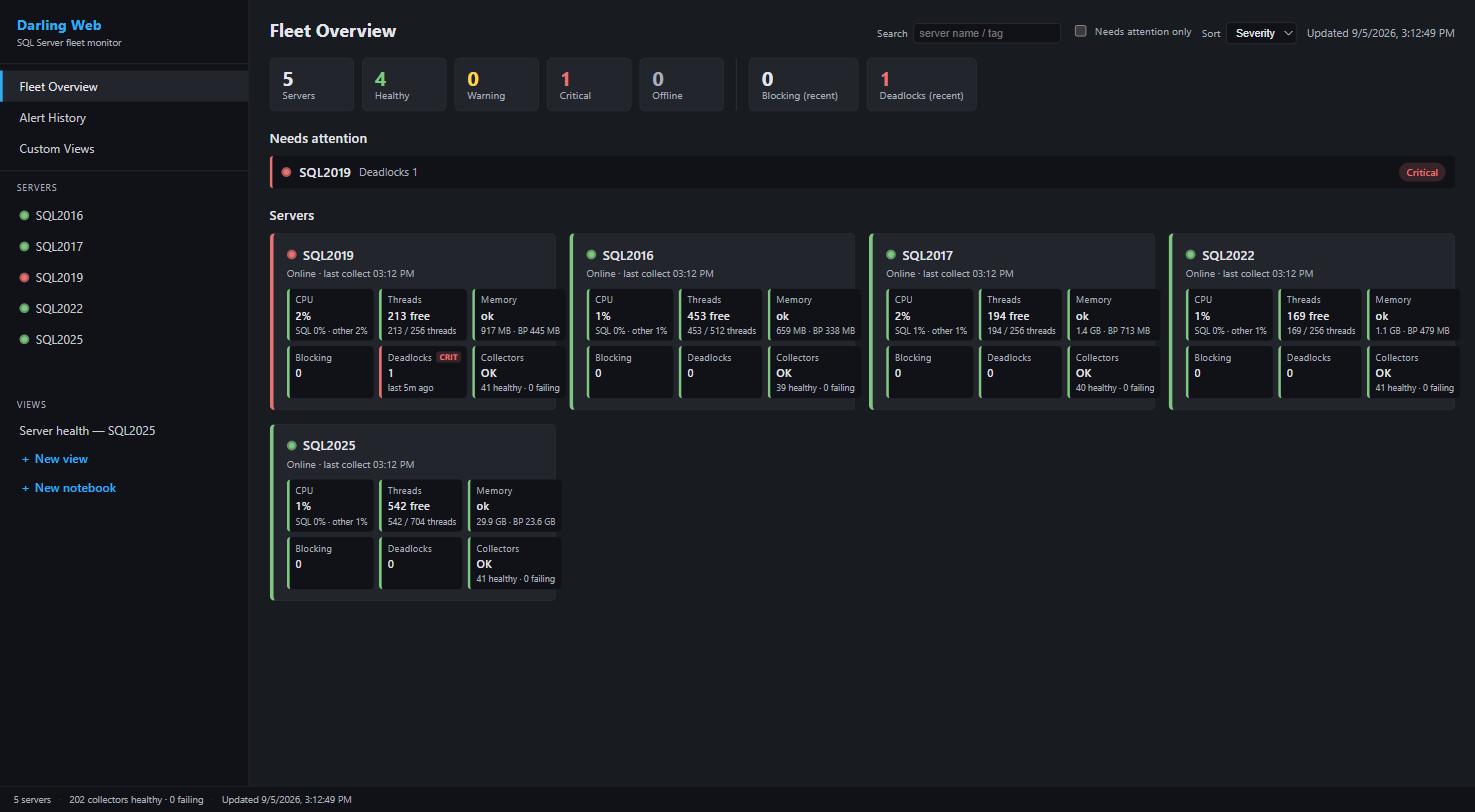
Darling web dashboard: per-server drill-down, live from the store

Lite Edition: standalone monitoring with sidebar
Query Your Data Directly
Darling keeps everything in a PostgreSQL store you control, and Lite in a local DuckDB file. No APIs, no export wizards, no vendor lake. Point any SQL client at it and query.
Views are included for common questions, but you’re not limited to them. Join the collection tables however you want, build Power BI reports, export to Excel. It’s just tables.
SELECT server_name, wait_type, sum(wait_time_ms) AS total_ms
FROM collect.wait_stats
WHERE collection_time >= now() – interval ‘1 day’
GROUP BY server_name, wait_type
ORDER BY total_ms DESC LIMIT 10;
Plan Analysis
Graphical Plan Viewer Built-In
Native ShowPlan rendering: no more squinting at SSMS in a separate window.
Click any collected query, procedure, or Query Store plan and see it instantly.
The built-in PlanAnalyzer applies 30 rules to surface the things you’d actually look for:
implicit conversions, missing indexes with usable predicates, residual predicates, spills, parameter sensitivity,
expensive operators. Operator-level cost breakdown next to the plan diagram.
Need to look at a plan from somewhere else? Drag a .sqlplan file
onto the window, paste plan XML directly, or open the viewer in standalone mode: no server connection required.

Plan viewer with PlanAnalyzer findings and operator cost breakdown
Custom Views
Dashboards & Notebooks, No SQL Required
Compose your own dashboards in the web viewer: pick a measure from the curated catalog, aggregate, group, filter, and chart it as lines, bars, pies, stacked areas, or stat cards. Every view saves for every seat and re-scopes live by server and time range.
Notebooks mix markdown with those same live panels for investigations you’ll run again: a deadlock postmortem, a memory story, a “what changed” timeline. Templates ship for both, so the first click gives you a working server-health dashboard instead of a blank canvas.
An AI agent can build them too: the MCP surface includes the Custom Views tools, so “make me a dashboard for this” is a sentence, not a project. Export and import as JSON to share them around.
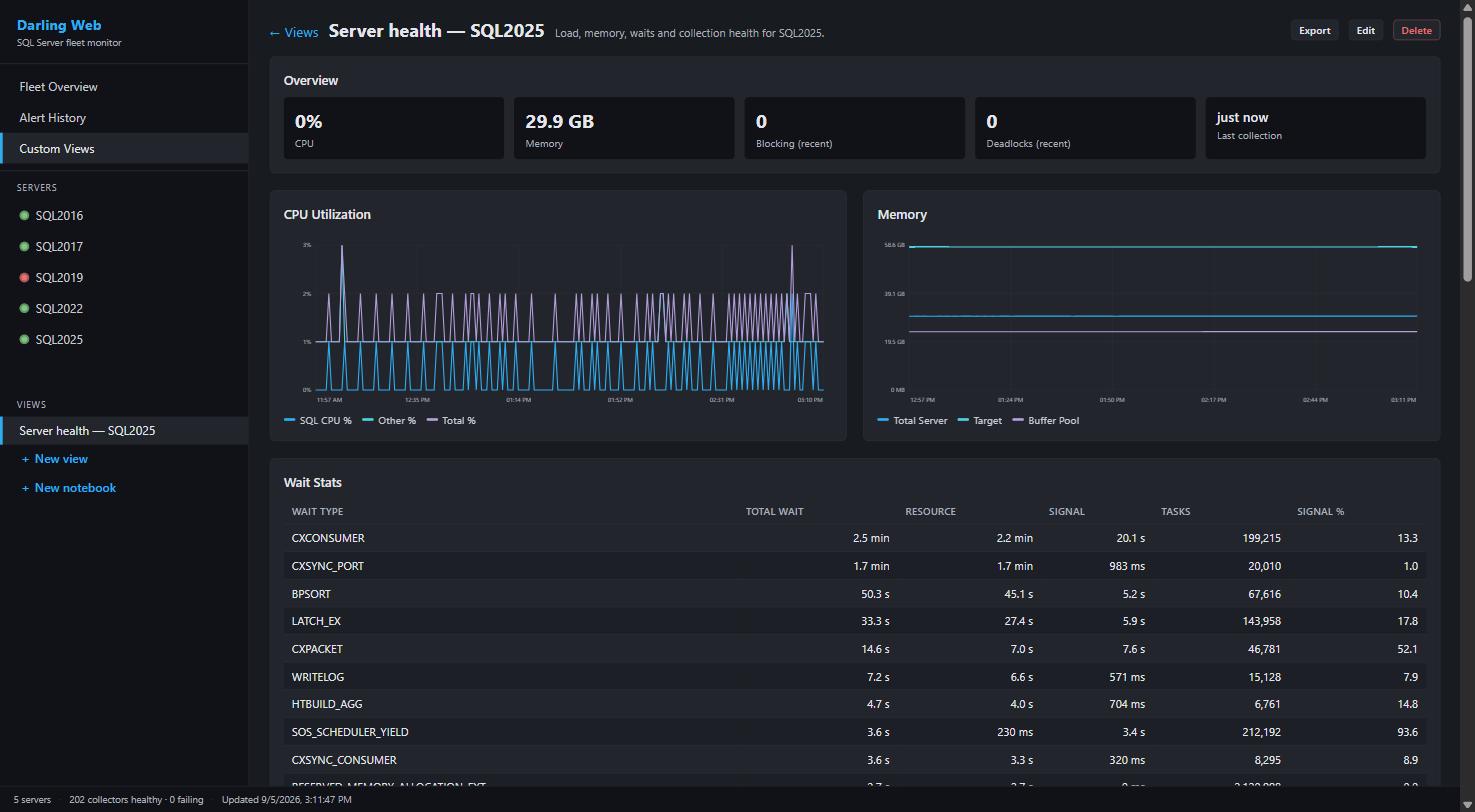
A template-built server health dashboard: stat cards, charts, and wait stats
AI Integration
MCP Server Built-In
Both editions include a Model Context Protocol server, letting AI assistants like Claude read your performance data directly: 134 tools in Darling, 77 in Lite. With Darling, an agent can also write: build Custom Views, tune alerts and mute rules, and onboard whole fleets, all over MCP.

Claude analyzing blocking and deadlock patterns via the MCP server
PostgreSQL & Aurora Monitoring
Darling watches PostgreSQL the way it watches SQL Server: 26 engine-specific collectors into the same store, with the viewer, web dashboard, and MCP all engine-aware. A read-only pg_monitor login is the whole setup. Nothing is installed on the target, no extension is required to start, and the ones you do have are detected and used.
Queries & Plans
- Statement stats, self-hosted and Aurora
- Plan capture via auto_explain, on Aurora and RDS too
- Per-query OS CPU and disk (pg_stat_kcache)
- Predicate statistics: what you filter on
- Test a hypothetical index without building it
Health & Maintenance
- Autovacuum, wraparound, and xmin horizon
- Table and index bloat, measured not estimated
- Index usage, with the unused-index evidence
- Configuration, and what changed in it
- Deadlock reports: the wait graph, not just a count
Engine Internals
- Wait analysis on every flavor, not just Aurora
- Blocking and lock state by mode and relation
- Shared buffers: what is actually resident
- Checkpoints, background writer, and WAL
- Replication, with the lag that catches a stalled standby
PostgreSQL 13 through 18. Aurora, RDS, and self-hosted. Column-level statistics are collected without the customer data in them.
Alerts & Notifications
Both editions include a real-time alert engine that watches for problems continuously. Lite surfaces them in the system tray; Darling, running headless, sends them by email and webhook.
What Gets Monitored
- Blocking: longest blocked session exceeds threshold (default 30s Darling, 5s Lite)
- Deadlocks: new deadlocks detected since the last check
- Poison waits: THREADPOOL, RESOURCE_SEMAPHORE, RESOURCE_SEMAPHORE_QUERY_COMPILE exceed average ms-per-wait threshold
- Long-running queries: any query exceeds elapsed-time threshold (default 5 minutes)
- TempDB space: usage exceeds percentage threshold (default 80%)
- Long-running agent jobs: current duration exceeds a multiple of historical average (default 3×)
- High CPU: total CPU exceeds threshold (default 90% Darling, 80% Lite)
- Server unreachable: a monitored server goes offline or comes back online
How You Get Notified
- System tray: balloon notifications with configurable per-metric cooldown (default 5 minutes)
- Email (SMTP): styled HTML with query text, blocking chains, and deadlock graph XML attachments
- Webhooks: HTTP POST to Slack, Teams, or any external alerting endpoint
- Resolved alerts: automatic “Cleared” notification when a condition resolves
- Mute rules: suppress recurring alerts by server, metric, database, query, wait type, or job (with optional expiration)
- Alert details: right-click any alert for query text, session info, wait breakdowns, blocking chains, and deadlock participants
- Silencing: right-click any server tab to acknowledge or silence alerts

Key Features
Smart Delta Collection
Collectors compute deltas automatically, showing actual work done between snapshots instead of cumulative totals.
Modern WPF Dashboard
Lite and the Darling viewer share a clean, responsive interface with filterable grids, interactive charts, and full dark and light themes. Darling adds a read-only web dashboard.
Secure by Default
Credentials stored in Windows Credential Manager with DPAPI encryption. SQL connections default to mandatory TLS. Never stores passwords in config files.
Lightweight, Tunable Collection
All queries use READ UNCOMMITTED for minimal impact. Per-collector schedules and named presets let you dial collection up or down and set quiet hours, no code required.
No Cloud Required
Darling keeps everything in its own bundled PostgreSQL store; Lite keeps it in local DuckDB files. Nothing leaves your network.
Real-Time Alerts
Eight alert types across tray (Lite), SMTP email, and webhooks (Slack, Teams, or any endpoint). Emails include query text, blocking chains, and XML attachments. Mute rules for noisy alerts.
Graphical Plan Viewer
Native ShowPlan rendering with a 30-rule PlanAnalyzer, operator-level cost breakdown, and a standalone mode for opening, pasting, or dragging in .sqlplan files without a server connection.
FinOps & Cost Optimization
Lite Edition surfaces utilization vs. provisioning, storage growth, idle databases, index analysis via sp_IndexCleanup, and concrete cost-cutting recommendations: enterprise feature audits, right-sizing, compression savings.
Signed Binaries
Every release is digitally signed via SignPath. No SmartScreen warnings, no “unknown publisher” prompts when your security team locks down execution.
Security & Trust
You’re giving a monitoring tool access to your SQL Servers. Here’s exactly what it does and doesn’t do.
What It Does
- Windows Credential Manager: passwords stored with DPAPI encryption, never in config files or plain text
- Mandatory TLS: SQL connections default to encrypted with certificate validation
- Parameterized queries: every SQL query uses parameters, zero string concatenation
- READ UNCOMMITTED: all monitoring queries run at this isolation level to avoid blocking your production workload
- Opt-in TLS for the web dashboard: bring your own certificate (PFX or PEM); a bad certificate fails closed instead of downgrading to plain HTTP
- Supply-chain provenance: Windows releases signed via SignPath; Linux artifacts carry Sigstore signatures and SLSA provenance you can verify
- Open source: every line of code is on GitHub for you to audit
What It Doesn’t Do
- No telemetry: zero analytics, tracking, or usage reporting of any kind
- No phone-home: the app never contacts any external server on its own
- No cloud dependency: everything stays on your machine and your SQL Servers
- No unsigned binaries: every release is digitally signed by SignPath, so SmartScreen and code-execution policies don’t fight you
- No hidden network calls: the only outbound traffic is the SMTP and webhook endpoints you configure yourself
What Gets Collected
One shared library: 42 SQL Server collectors in both editions, plus 26 PostgreSQL collectors in Darling.
Query Performance
- Query stats from plan cache
- Procedure stats
- Query Store metrics
- Active query snapshots
- Waiting tasks
Wait & Resource Stats
- Wait statistics (delta)
- Latch statistics
- Spinlock statistics
- CPU utilization
- Perfmon counters
Memory & I/O
- Memory grants
- Memory clerks
- Buffer pool pressure
- File I/O latency
- TempDB usage
Blocking & Events
- Blocked process reports
- Deadlock graphs
- Ring buffer events
- Default trace analysis
- System health events
Feature Docs
Every major feature documented: what it does, what you see, how to turn it on, and the limits stated plainly.
Getting Started
Darling Setup
- 1
Download the Darling service zip and extract it on a monitoring host
- 2
Run the scripted install from an elevated prompt; it bootstraps the Postgres store and starts the service
- 3
Add your servers: paste a list in the viewer, or onboard them over MCP
- 4
Optionally enable the web dashboard and MCP endpoint for browser and AI access
Lite Edition Setup
- 1
Download and extract the Lite Edition ZIP
- 2
Run
PerformanceMonitorLite.exe - 3
Click “Add Server” and enter your connection details
- 4
Data collection starts immediately: that’s it!
Also Supported
- Microsoft Entra ID (MFA) authentication for server connections
- Air-gapped friendly: no outbound calls except the SMTP and webhook endpoints you configure
- Always On Availability Groups: ReadOnlyIntent and MultiSubnetFailover for routing to readable secondaries
- Azure SQL Managed Instance & AWS RDS: auto-detected, incompatible collectors disabled automatically
- CSV export: right-click any grid
- PostgreSQL 13–18: Aurora, RDS, and self-hosted, monitored by Darling with a read-only pg_monitor login
- Timezone display: server time, local time, or UTC, your choice
Need Support or Compliance Coverage?
Performance Monitor is free, and it’s staying free. But “free and open source” doesn’t always
satisfy compliance teams, procurement departments, or auditors who need a vendor agreement
and a support contact on file before anything goes into production.
Supported
/year
- ✓ Unlimited instances: no auditing, no counting
- ✓ Email support, two-business-day response
- ✓ Guaranteed compatibility updates for new SQL Server versions and CUs
- ✓ Invoices and support agreement for compliance
- ✓ Priority feature requests
Get the Supported Subscription
Both tiers cost less than what most monitoring vendors charge for a single instance. These cover all of yours.
The software is identical for everyone: no locked features, no premium dashboards.
If you don’t need the vendor agreement, keep using it for free. It works exactly the same.
Support the Project
Ready to Monitor?
Download either edition and start understanding your SQL Server performance today.