The Renewal Email
You know the email. It shows up a month or two before the renewal date, usually from someone whose name you don’t recognize, with a subject line that’s trying very hard to sound like good news. “Your SQL Sentry subscription renewal” or whatever they’re calling it this quarter.
And then you look at the number.
And then you look at how many instances you’re monitoring.
And then you do the multiplication you wish you hadn’t done.
What a SQL Sentry Renewal Actually Costs
SQL Sentry licenses per monitored instance. Depending on when you negotiated your deal, whether you’re on subscription or perpetual-with-maintenance, and how good your procurement team is at saying “no” with a straight face, you’re probably looking at somewhere in the range of $1,500 to $3,000 per instance per year. Some folks are paying less, some are paying more. SolarWinds isn’t exactly publishing a price list on a billboard.
Let’s do some math that nobody asked for but everybody needs.
And that’s before you factor in the management server infrastructure, the monitoring service that needs to run somewhere, and the time your team spends maintaining all of it. SQL Sentry doesn’t just show up and sit quietly in the corner. It needs a place to live, and it needs feeding.
Oh, and this is SolarWinds we’re talking about. The same SolarWinds that had that little supply chain breach incident a few years back. The one where their update mechanism was compromised and used to distribute malware to thousands of organizations. I’m sure they’ve improved their security posture since then, and I genuinely hope so, but it’s the kind of thing that lives rent-free in a CISO’s head when the renewal conversation comes around.
What You Get for That Money
I’ll be fair. SQL Sentry is a legitimately capable product. The Performance Analysis Dashboard is good. The Top SQL view gives you solid visibility into what’s been running and how badly it’s been behaving. The advisory conditions system is flexible if you’re willing to invest the time to set it up properly. Storage forecasting is a nice touch. It can also monitor SSAS, SSRS, and Windows machines if you’re into that, which is scope a database-only tool won’t cover.
But here’s the thing. Most of the DBAs I talk to, and I talk to a lot of them, it’s literally my job, are using maybe 20 to 30% of what SQL Sentry can do. They open it up, check wait stats, look at top queries, see if anything’s blocking, and close it. Maybe they glance at the dashboards during an incident. Maybe they’ve set up a few alerts.
That’s a lot of money for a thing you mostly use as a fancy wait stats viewer with email notifications.
What Free Looks Like in 2026
I built PerformanceMonitor because I got tired of telling clients they needed to spend five figures a year on monitoring, and I got tired of every vendor ignoring me when I offered to help them make their tools less crappy. It’s open source, MIT licensed, and it has grown up a lot since I first wrote this page.
It comes in two editions. Darling is a headless service with its own bundled PostgreSQL and TimescaleDB store that watches your whole fleet around the clock, 5 servers or 500, with a web dashboard your team opens in a browser, a desktop viewer, and alerting over email and webhooks. Lite is a standalone desktop app that connects directly to a server and stores everything locally. Nothing installed on the servers you monitor, no Agent jobs required, data in five minutes.
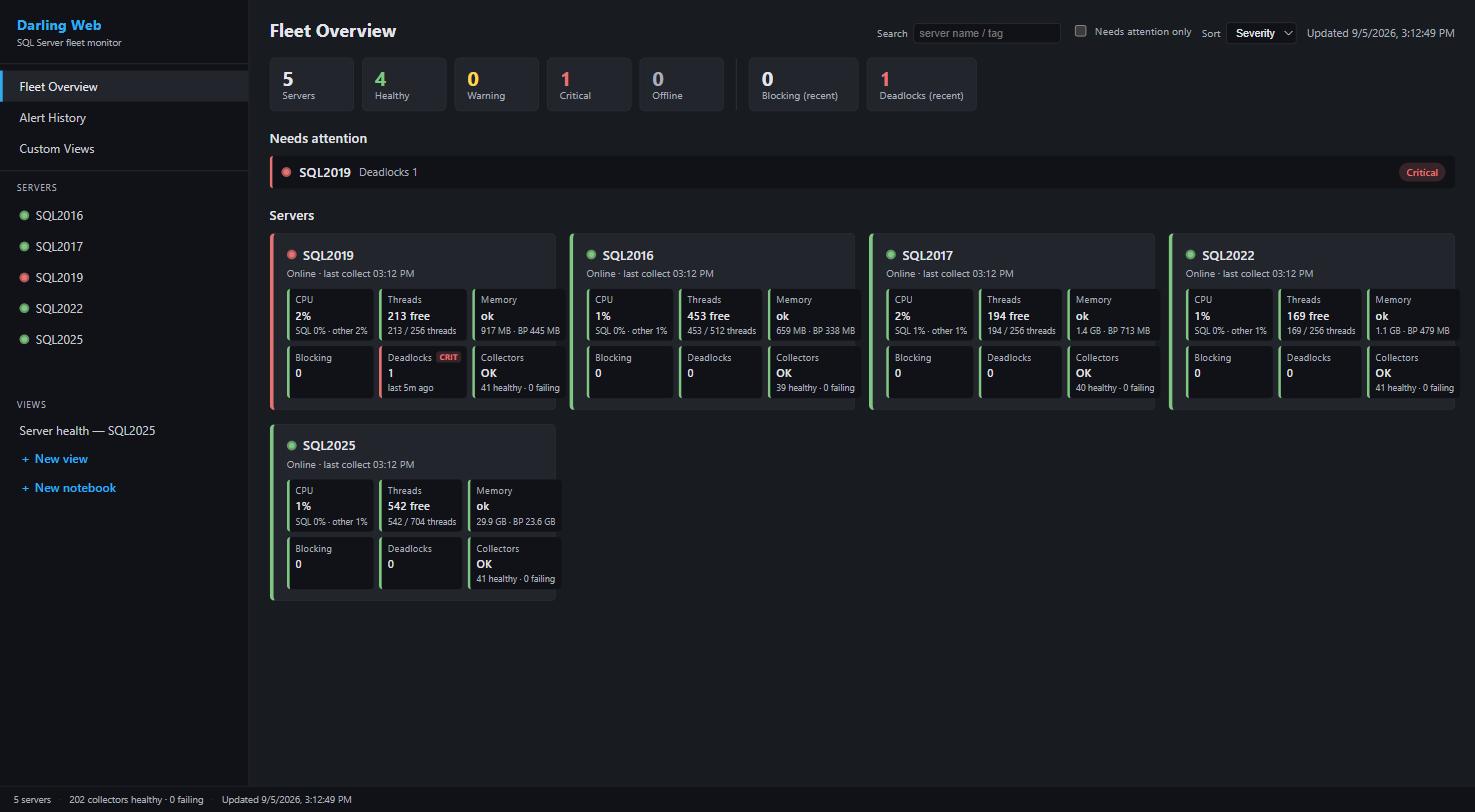
The fleet wall. Five servers, one of them flagged for a deadlock five minutes after it happened.
Both editions run the same library of more than 40 collectors covering the stuff you actually use SQL Sentry for on a daily basis: wait stats with deltas, CPU utilization, top queries and procedures by CPU, blocking chains, deadlock graphs, memory pressure, file I/O latency, TempDB, perfmon counters, Query Store, and execution plan capture with a 30-rule plan analyzer. Real-time alerts go out over email and webhooks to Slack, Teams, PagerDuty, or anything else that takes an HTTP POST.
The web dashboard also lets you compose your own dashboards and notebooks, no SQL required, and there are ready-made templates for the investigations you actually run: CPU, memory pressure, blocking and deadlocks, configuration review.
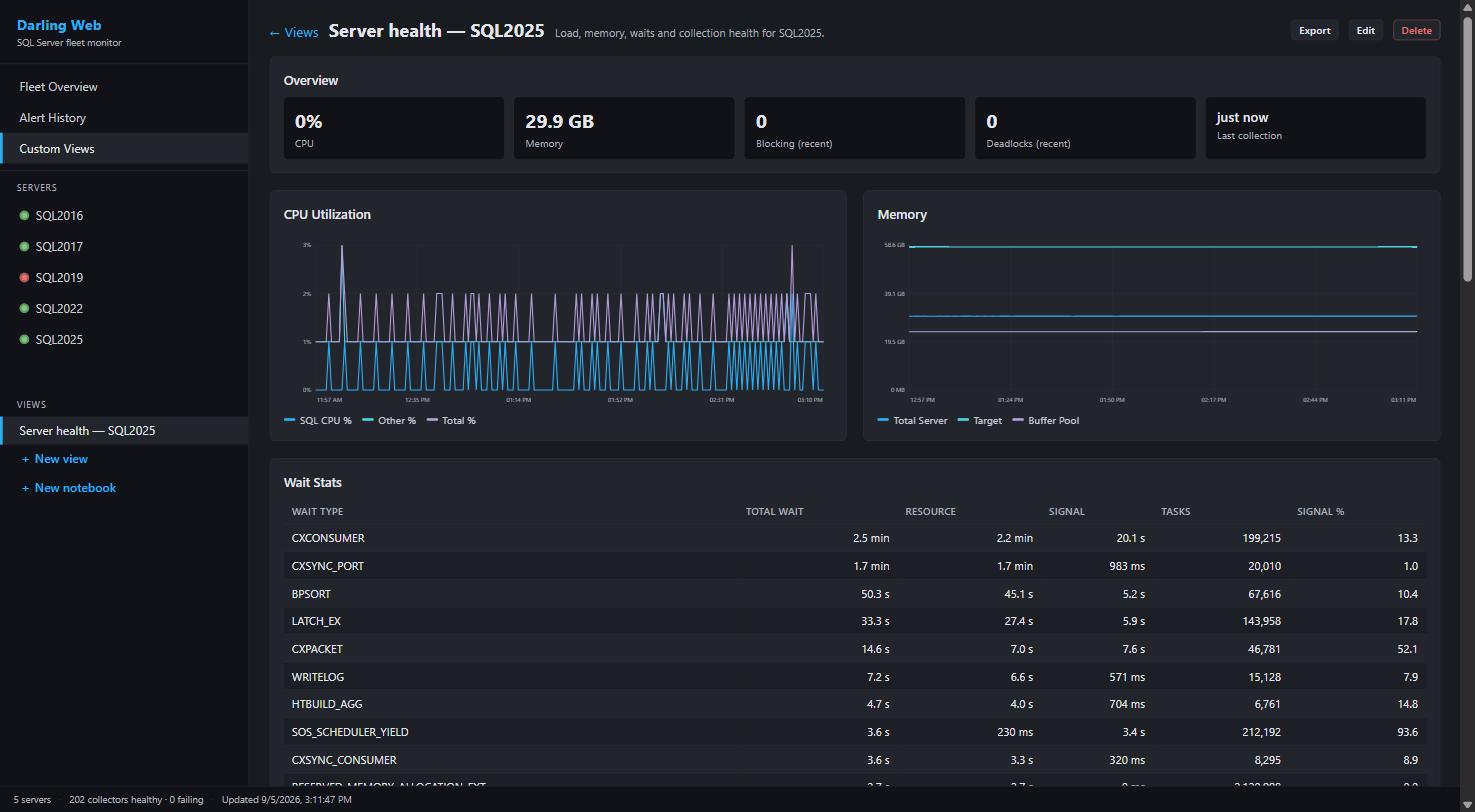
A ready-made server health dashboard in the web viewer. Built from a template in one click.
It supports SQL Server 2016 through 2025, Azure SQL Managed Instance, Azure SQL Database, and AWS RDS. Darling also monitors PostgreSQL, including Aurora and RDS, with more than 25 PostgreSQL-specific collectors, which is not something SQL Sentry will ever do for you. The Darling service runs on Windows or Linux; the desktop apps are Windows.
There’s no telemetry. Nothing phones home. No license keys. No feature gating. No “contact us for enterprise pricing.” No “your trial has expired.” You get the same tool whether you’re monitoring one dev instance or fifty production servers.
And both editions ship an MCP server, more than 200 tools in Darling and more than 100 in Lite, so you can point Claude or any other AI assistant at your actual monitoring data and ask questions in plain English. An agent can even onboard servers and build dashboards for you. That’s not something SQL Sentry is doing.
What You Give Up
I’m not going to stand here and tell you PerformanceMonitor does everything SQL Sentry does. It doesn’t monitor SSAS or SSRS. There’s no mobile app. There’s no storage forecasting with machine learning. If you need those things, you need those things.
But if you’re paying $1,500 or more per instance per year and mostly using it to check wait stats, find expensive queries, look at blocking, and get an email when something goes sideways, you’re paying a lot of money for a subset of features that a free tool covers.
The Part Where Your Security Team Nods
Because it’s open source, you can look at every single query it runs against your servers. No black box. No wondering what the monitoring tool is doing to your performance. Every release is digitally signed. Your data stays in a store you control, on your network, and the web dashboard is read-only, token-gated, and scoped to the subnets you allow. After the last few years of supply chain news, “you can read all of it and nothing leaves your building” is a security review that takes one meeting instead of six.
I built this thing because I do SQL Server performance consulting for a living, and I wanted a monitoring tool that thinks about SQL Server the way I do. Not the way a product manager at a software company thinks a DBA might want to look at their servers.
If Procurement Needs a Vendor
If “free and open source” makes your compliance team itchy, there’s a support subscription with a real agreement, invoices, and guaranteed compatibility updates. It’s $500 a year for unlimited instances. That is not a typo, and yes, it’s less than what SQL Sentry charges for one instance.
Before You Sign
I’m not going to pretend this replaces every feature in SQL Sentry. But if you’re staring at a renewal for $15,000, $30,000, or more, and you’re being honest with yourself about which features you actually open on a regular basis, maybe give the free version a look before you sign that PO.
It costs nothing to find out if it’s enough.
Thanks for reading.