The One You Actually Like
I’ll say something up front that I won’t say in every one of these posts: Redgate makes good stuff. SQL Prompt is one of the few tools I use daily and recommend without caveats. Their support team actually responds like humans. Their products generally work the way you expect them to.
So when the SQL Monitor renewal email shows up, there’s less dread and more of a quiet sigh. You like the product. You just wish it didn’t cost what it costs.
What a Redgate Monitor Renewal Actually Costs
Redgate Monitor licenses per server, not per instance, which is a slightly less painful model if you’re running multiple instances on the same box. Last time I looked, you’re in the neighborhood of $1,200 to $1,500 per server per year, depending on your support term length and whether you’re monitoring on-prem, Azure, or a mix.
That sounds almost reasonable until you start counting servers.
And if you’re monitoring Azure SQL Databases, those are licensed separately, five databases per license, so the math gets creative fast if you’ve got a lot of them. Redgate also bundles SQL Monitor into their broader platform deals, which means you might be paying for it as part of a suite that includes tools you don’t use. That’s not Redgate being shady, that’s just how enterprise software bundling works. But it does mean your actual cost for “just monitoring” can be hard to untangle from the invoice.
What You Get for That Money
The dashboard is clean and well-organized. The alerting is configurable without being overwhelming. The installation and upgrade process is about as painless as monitoring tool installations get, which is a low bar, but Redgate clears it. It supports PostgreSQL, Oracle, MySQL, and MongoDB alongside SQL Server now, so if you’re a multi-platform shop, that’s legitimate value.
Customer support is genuinely good. I know that sounds like a throwaway compliment, but in the monitoring tool space, it’s actually rare. Redgate’s support people tend to know the product and respond like they care. That matters when something breaks at 2 AM.
The honest criticism is that SQL Monitor is better at monitoring than it is at deep performance analysis. Several reviews echo the same thing: people use it for day-to-day monitoring and alerting, but reach for something else when they need to really dig into a performance problem. It’s wide but not always deep.
What Free Looks Like in 2026
This is the comparison where I have to be most careful, because Redgate SQL Monitor is a genuinely good product, and I don’t want to pretend otherwise. But “good” and “worth $24,000 a year” are two different conversations.
PerformanceMonitor covers the core monitoring most DBAs do in SQL Monitor daily. Wait stats with deltas and trend charts. Top queries and procedures by CPU. Blocking chains and deadlock detection with full XML graphs. Memory pressure. File I/O latency. TempDB. Perfmon counters. Real-time alerts over email and webhooks, and yes, that includes Slack and Teams and PagerDuty.
The Darling edition gives you the fleet experience: a headless service collecting around the clock into its own bundled time-series store, with a web dashboard your whole team can open in a browser. Fleet health cards, per-server drill-downs, alert history, tags for organizing servers, and composable dashboards and notebooks nobody has to write SQL for. Lite is a single-download desktop app for triage: connect to a server, nothing installed on the target, data in five minutes.
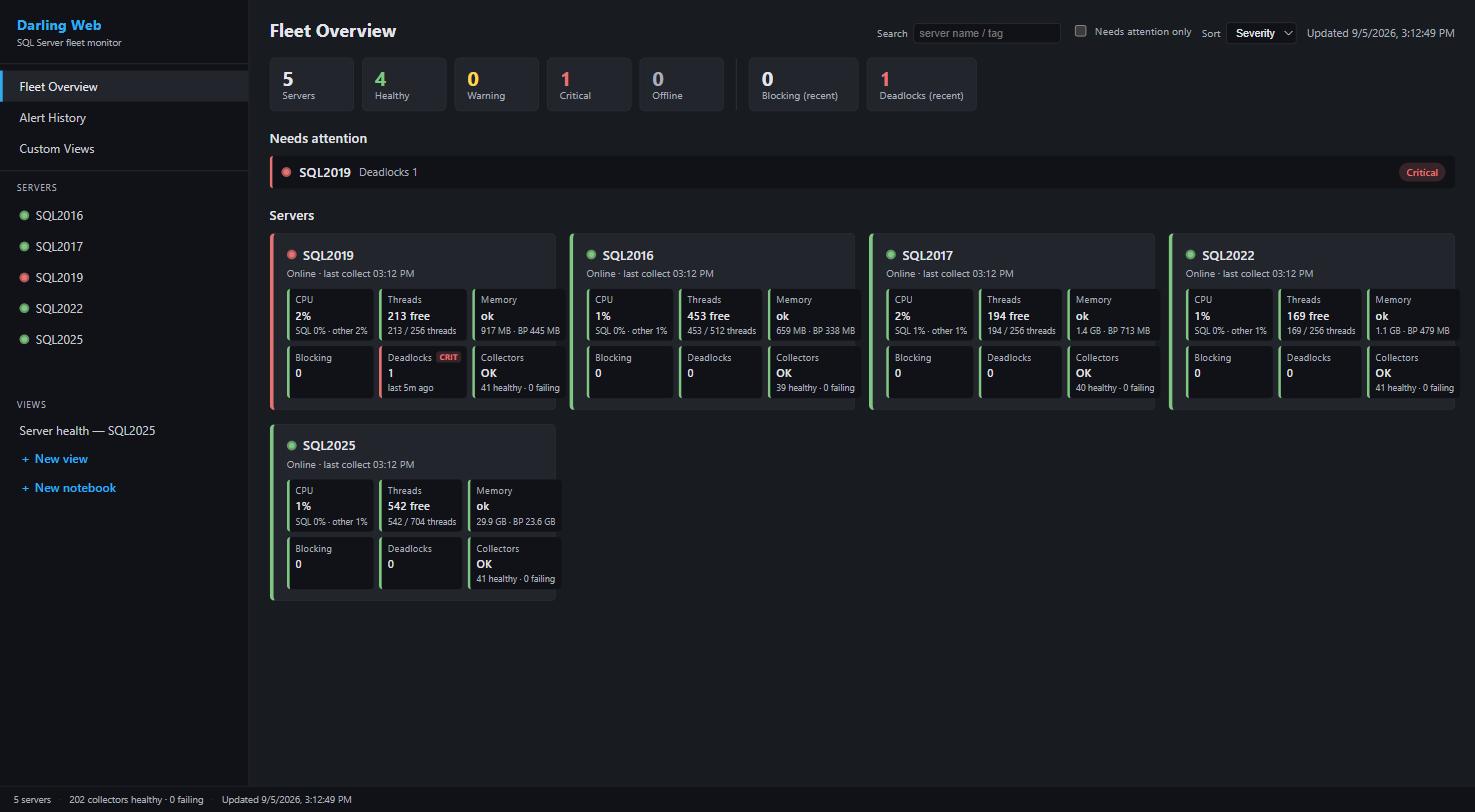
The web dashboard’s fleet wall. Browser access for the whole team, read-only by design.
Where PerformanceMonitor goes deeper than SQL Monitor is exactly where SQL Monitor users say they need a second tool: analysis. The built-in graphical plan viewer runs a 30-rule analyzer over every captured execution plan and flags implicit conversions, spills, residual predicates, parameter sensitivity, and the rest of the greatest hits. That’s built in, not a separate purchase.

The plan viewer. This is the “dig into a performance problem” part SQL Monitor users buy a second tool for.
On the multi-platform front: Darling now monitors PostgreSQL, including Aurora and RDS, with more than 25 PostgreSQL-specific collectors. Oracle, MySQL, and MongoDB it does not cover, and if those are load-bearing for you, Redgate keeps that advantage fair and square.
And the MCP server integration means you can point Claude or Cursor at your monitoring data and ask questions in plain English. more than 200 tools in Darling, more than 100 in Lite, including tools that let an AI agent onboard servers and build dashboards for you. That’s a workflow that didn’t exist two years ago, and it’s built in.
What You Give Up
No Oracle, MySQL, or MongoDB monitoring. No vendor-run cloud portal, the web dashboard runs on your own network. And no Redgate support team, though there’s a paid support subscription if you want a human on the hook, and the entire source code if you want to see for yourself.
But if your SQL Monitor deployment is mostly watching SQL Server, maybe with some Postgres on the side, and you’re paying five figures a year to see wait stats, get alerted on blocking, and check which queries are misbehaving, that’s what PerformanceMonitor does. For free. With deeper plan analysis built in. And with every query it runs against your servers available in the source code for you to inspect.
No telemetry. No phoning home. No license keys. No feature gating. No “contact sales for a quote.”
If Procurement Needs a Vendor
The support subscription gets you a real agreement, invoices, and guaranteed compatibility updates for $500 a year, unlimited servers. Less than half of one Redgate server license.
Before You Sign
I like Redgate. I use their stuff. I’m not here to trash them. But liking a company doesn’t mean you should pay $24,000 a year for something you can get for free, especially when the free version goes deeper on the performance analysis side that SQL Monitor users consistently say they wish was better.
It costs nothing to find out if it’s enough.
Thanks for reading.