Erik cries when SSMS lies

My SQL Server friendo Mr. Erik C. Darling was recently telling me about some work he did getting batch mode on paging queries. This sounded a bit odd to me because paging queries make me think of small seeks of rows against finely curated nonclustered rowstore indexes, so I asked him for a link to his blog post about it. He grumpily refused and told me to find the link myself, which I eventually did.

High End Machine Performance

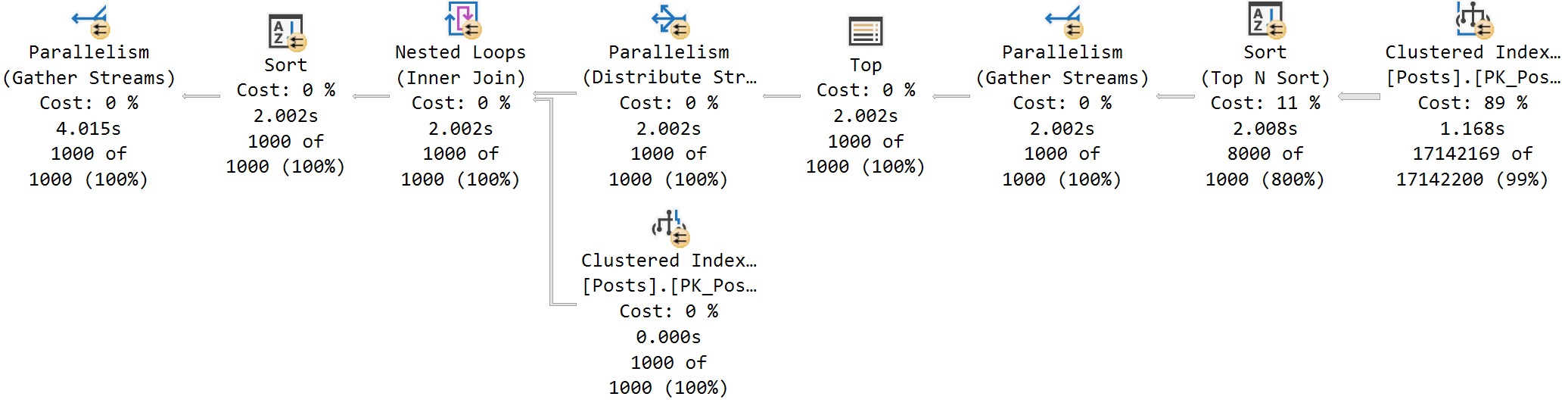
Erik’s first attempt used OFFSET/FETCH and resulted in a row mode query:

SQL Server Query Plan

The clustered index scan makes this a bit of a sad paging query. In Erik’s defense, there’s a whole host of real world reasons as to why you wouldn’t be able to make the perfect nonclustered index for your paging query:

  • End users may choose to sort on many different columns and you can’t index them all
  • A key member of your Index Approval Committee is on vacation
  • You already have more indexes on the table than your number of fingers
  • You’re working with third party software which does not allow you to create custom indexes

Getting back to the query, it doesn’t look that offensive to me. The row mode sort is a parallel top N sort and the overall number of rows to return is low, so each thread can independently sort its rows and return 1000 locally sorted rows to the parent operator. This is about as good as it gets with parallel row mode sorting. This is a row mode only query so the operator times that you see are the sum of that operator’s work and its children. In terms of real work done by the query, the scan clocks in at 1.168 seconds and the sort clocks in at 0.84 seconds. The final accounting at the end by the parent Parallelism (Gather Streams) is misleading at best and an outright LIE at worst. There wasn’t 4 seconds of work done by this query. There was only 2 seconds. The red lines illustrate the problem perfectly and I won’t be elaborating further:

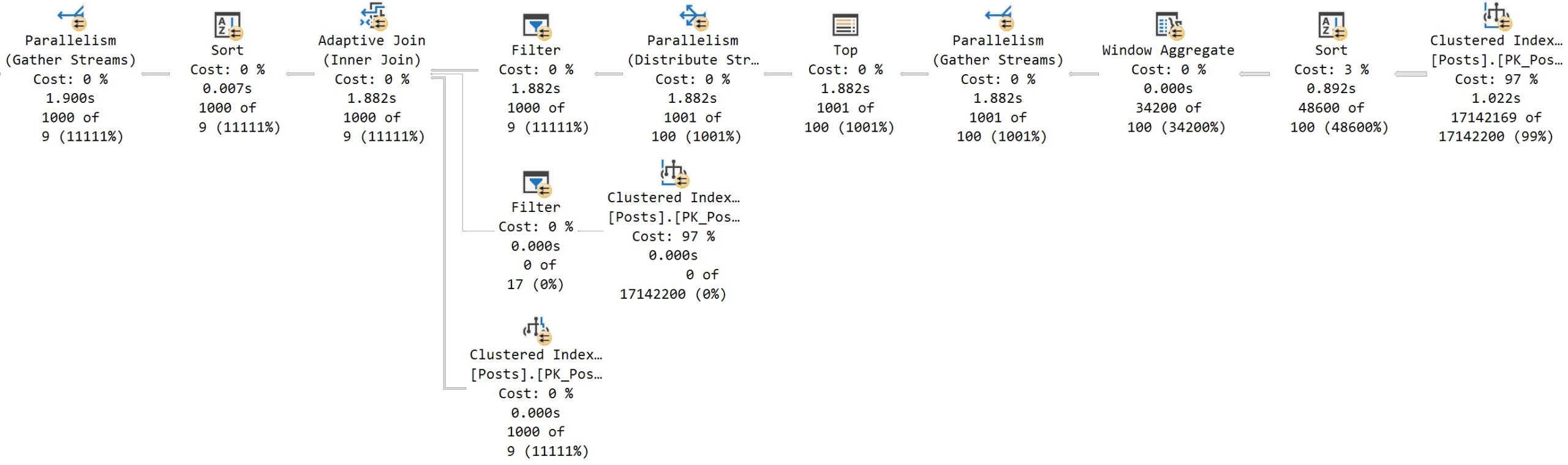
Erik’s second attempt uses ROW_NUMBER() and he achieves a plan with some batch mode operators using BMOR (batch mode on row store):

SQL Server Query Plan

The parallel batch mode sort works just fine here in that the single thread output property isn’t an issue. The parent operator is a batch mode window aggregate, but even if it wasn’t, the grandparent is a gather streams operator so the rows would end up on one thread anyway. Actual time statistics accounting works differently for batch mode operators: each batch mode operator only tracks its own work. In terms of real work done by the query, the scan clocks in at 1.1022 seconds and the sort clocks in at 0.892 seconds. This is quite similar to the first attempt. It could be argued that the batch mode sort is more efficient than the row mode top N sort, but I’d call it a wash considering the unpredictable rowstore to batch mode conversion overhead (which does seem to be small for this table).

Low End Machine Performance

I tested on my local machine with 64 GB of RAM which is less than Erik’s laptop. My clustered index scans took significantly longer than his, but as usual, there’s a lot to learn from low end machine performance. Let’s go back to the first reason as to why the table might not be indexed well for this particular query:

End users may choose to sort on many different columns and you can’t index them all

Microsoft presents a standard solution for this scenario: the humble nonclustered columnstore index. This will be great for my low end machine because I’ll be able to fit the new NCCI in memory. For those following along at home on their own low end machines, I created the index on every column except the Body column in a very carefree fashion:

CREATE NONCLUSTERED COLUMNSTORE INDEX ncci ON posts (
  Id
, AcceptedAnswerId
, AnswerCount
, ClosedDate
, CommentCount
, CommunityOwnedDate
, CreationDate
, FavoriteCount
, LastActivityDate
, LastEditDate
, LastEditorDisplayName
, LastEditorUserId
, OwnerUserId
, ParentId
, PostTypeId
, Score
, Tags
, Title
, ViewCount
) WITH (MAXDOP = 1)

I ran the OFFSET/FETCH query on my low end machine with MAXDOP 4 and it only took 430 CPU ms and 130 ms of elapsed time:

That’s a huge improvement compared to the 15-20 second runtime I was experiencing earlier. Interestingly, the second query (the ROW_NUMBER() approach) sticks with the parallel batch mode sort and performs significantly worse in comparison:

The key difference here is the batch mode Top N sort in the first query. Remember that the query compile process for BMOR is different than what you get when compiling in the presence of a glorious columnstore index. You can get the improved batch mode top N sort by also doing a fake join to an empty CCI table. Serious batch mode connoisseurs should be mindful of the compile differences as they seek to gain the greatest performance benefit possible from batch mode.

Final Thoughts

Friends don’t let friends be lied to by SSMS. Thanks for reading!

I finally got my first unfriendly stack overflow comment

I remember feeling a little nervous when when I first started contributing to stack exchange. It was supposedly unwelcoming and full of unfriendly people. I even planned on going to the version of the site full of database administrators, which obviously would be much worse than the average exchange site. My worries didn’t last long though. Sure, there was the occasional answer with a gruff tone, but I realized pretty quickly that I was getting help from industry experts for free. I interacted with a lot of cool, knowledgeable people (including the guy who owns this site) and I was able to help a lot of people with their problems. I even eventually got to shake hands with Sean Gallardy, the SQL dumping king.

In my opinion, one of the nicest things that you can do on the internet is spend your free time to help someone else with a problem. I also believe that it’s often whiny and counterproductive to complain about the free help that other people are offering. Those beliefs guided my interactions on the site and I ended up ranked #26 in reputation. The DBA stack exchange was a wonderful place of helping. The help wasn’t always perfect, but what is? Especially something given for free?

The Problem

Speaking of imperfections, I recently had a problem at work with CLR functions that were accessing files on Azure Blob Storage. We were planning for a migration to Azure SQL Database and these functions were flagged as an issue because that platform does not support CLR functions. The ideal solution would be to remove all interactions with the binary file data within SQL Server, but the complexity of the project and the migration timelines made this a tall order. So I went looking for a workaround.

I didn’t find anything except for a poorly answered stack exchange where someone had what appeared to be a similar problem to me.

A Solution

After picking at the problem and dealing with AI hallucinations, we eventually found something that worked as a proof of concept in a development environment. I’ll go ahead and reproduce my freshly minted stack overflow answer here:

We need to do something similar as part of a quick migration to Azure SQL Database to replace a CLR function that accessed data in Azure Blob Storage. Basic overview of process:

  1. Use extended events file names to make read and write requests. You can create one file per request and encode the request information in the file name.
  2. Use Azure Event Grid to trigger C# function execution whenever a new file is created. Your function code interacts with Azure Blob Storage and returns the necessary data to your Azure SQL Database.

As a first step, create an extended event session with an event condition that will never trigger and without any targets. I used user_event with an impossible filter value for event_id.

Detailed steps for making a read request for a file:

  1. Take your preferred concurrency protection lock to serialize file creation (sp_getapplock is a common choice).
  2. Use ALTER EVENT SESSION ... ON DATABASE ADD TARGET package0.event_file(SET filename=N'... to create a file. The file name should contain the information necessary to identify the requested file. In our application we use a GUID to identify files so we include the GUID in the file name.
  3. Use ALTER EVENT SESSION ... ON DATABASE DROP TARGET package0.event_file; to remove the file target within SQL Server (the file will persist in Azure Blob Storage).
  4. Release your concurrency protection lock.
  5. Wait in a loop until the requested data shows up in a cache table.
  6. While the T-SQL code waits, the C# function triggers off of the file creation. It parses the file name, make the API request to get the file from Azure Blob Storage, and writes the file data to the cache table within Azure SQL Database. In our development environment we experienced typical latency of around 500 ms for this step.
  7. The T-SQL wait loop ends and your code now has access to the file data within Azure SQL Database.

Detailed steps for making a write request for a file:

  1. Write the file data along with an identifying ID to a cache table.
  2. Take your preferred concurrency protection lock to serialize file creation (sp_getapplock is a common choice).
  3. Use ALTER EVENT SESSION ... ON DATABASE ADD TARGET package0.event_file(SET filename=N'... to create a file. The file name can be anything because it just informs your C# code that there’s something to process in the cache table. There’s no need to parse any information from the file name in the C# code.
  4. Use ALTER EVENT SESSION ... ON DATABASE DROP TARGET package0.event_file; to remove the file target within SQL Server (the file will persist in Azure Blob Storage).
  5. Release your concurrency protection lock.
  6. Wait in a loop until the requested data is deleted from the cache table.
  7. While the T-SQL code waits, the C# function triggers off of the file creation. It gets the file data from Azure SQL Database, makes the API request to write the file to Azure Blob Storage, and deletes the row from the cache table to signal success.
  8. The T-SQL wait loop ends and your code proceeds now that the file has been written to Azure Blob Storage.

As an aside, it’s theoretically possible to use sp_trace_generateevent to pass up to 8000 bytes of binary data to an extended event target file. However, extended events are buffered to files and you will likely experience high latency. It is even possible for events to be lost and not written to the file at all. Avoiding these issues is why we went with the approach that creates a single 4 KB file per file request.

Obviously this is a horrible way to abuse Extended Events but this was the best quick fix solution that we found.

Have you ever seen a solution so ugly that it wraps all the way around and starts to look beautiful? Sure, I wouldn’t recommend implementing something like this if you had any other option. But sometimes there’s simply no better option. Anyway, I posted that answer to give a faint sliver of hope to the next poor soul who was trying to solve the same problem. If it inspires someone else to find a solution, that’s awesome. I contribute to stack exchange solely to help others.

Apparently, the Real Problem Was Trying to Help

Some people contribute to the site for other reasons, such as this guy:

I tried to reply with a comment but stack overflow didn’t let me do it. Seemed to be some kind of bug with the site. I’ll implement another ugly workaround and respond here instead.

The question on stack overflow was posted in July 2022 and has 492 views and +3 net upvotes right now as I write this blog post. I can’t believe that I have to explain this, but I ended up at this “old” stack overflow question because that’s where google took me after trying to find a solution for the same problem. Who the hell cares how old the question is? Would the question somehow be better if I called in a favor with Aaron Bertrand and asked him to edit the database to change the year to 2025 instead of 2022? There’s even a meta post about answering old questions. The overwhelming consensus is that it’s perfectly okay to answer old questions.

Besides, are you sure that you want to discount the value of old questions and answers? Here’s one of your top ranked answers:

I got goosebumps while reading it. Truly extraordinary.

With respect to the question I answered, it is perfectly answerable and meets all of the necessary qualifications for a stack overflow question:

The OP doesn’t know how to do something within Azure SQL Database. What is the point of demanding a minimally reproducible example when he doesn’t know how to do it? That’s like asking someone to prove a negative. What do you expect him to provide? A code comment lamenting that he doesn’t know how to do it?

Finally, I followed the principles documented at how to answer while constructing my answer. There is nothing wrong with writing a “non-trivial” or “detailed” answer. There’s even a summary at the top. If you don’t like my answer, great, go down vote it. Please do anything other than arrogantly tut-tutting at me in a comment in a way that’s contrary to stack overflow’s own published principles. Not that it matters because I got no interest in playing unpaid janitor, but I don’t even have permission to close-vote the answer. I just want to help people. Maybe use some of your “community energy” to actually help people? A “Principal Software Engineer at Microsoft” surely can do better than one answer in the last year, right?

Big Data

Perhaps my experience was caused by a difference in culture between the DBA stack exchange and stack overflow. After all, the stats seem to speak for themselves:

  • DBA stack exchange: ~0 unfriendly comments on 459 answers = 0% unfriendly rate
  • stack overflow: 1 unfriendly comment on 1 answer = 100% unfriendly rate

Database administrators might not be so bad after all!

Final Thoughts

It’s wild how people act on the internet even while presenting their full name, photo, and their workplace. Some people should maybe stick to answering questions about how to reset passwords and leave the technical questions to others. This experience honestly lowered my opinion of the average Microsoft employee. I’d write you guys off completely if Sean wasn’t so good at analyzing dumps. Thanks for reading!

Cursor Declarations That Use LOB Local Variables Can Bloat Your Plan Cache

I found a few stored procedures with single plan cache entries over 500 MB of memory each according to sys.dm_exec_cached_plans while optimizing the plan cache in production. The stored procedures were relatively simple and both execution plans were less than 1 MB when saved as sqlplan files. I was confused, offended, and confused.

First published on MSDN on Jan 09, 2007

Did you know that the memory used for cursors can be cached along with the compiled plan? I’ll include a direct quote of the ancient wisdom:

Inactive cursors are cached in the compiled plan. Just like MXCs there are two lists maintained here: the lookup list and the enum list. The lookup list stores the inactive cursors. When a cursor is de-allocated, the memory used to store the cursor is cached. On subsequent re-execution of the batch with this cursor, the cached cursor memory is reused and re-initialized as an active cursor. The enum list has the list of active and inactive cursors and is used to enumerate all cursors for a compiled plan.

Cursors are re-generatable given a compiled plan. Relative to compiled plans they are also relatively inexpensive to re-generate.

I checked sys.dm_exec_cached_plan_dependent_objects and found that nearly all of the cached memory was used for the cursors instead of the execution plans. This makes sense because there was no reason why a simple procedure should use 500 MB for a cached plan, but why were the cursors using so much memory?

Back to 2022

I was able to create a simple reproduction of the issue on SQL Server 2022 CU13 which is the most recent version currently available at the time of writing. Create a stored procedure that uses the OPENJSON() function along with an NVARCHAR(MAX) local variable as part of a cursor declaration. Here is one example:


CREATE OR ALTER PROCEDURE TestMemoryLeak_1
AS
BEGIN
    SET NOCOUNT ON;

    DECLARE @json NVARCHAR(MAX);

    SET @json = N'[
        {
            "Order": {
                "Number": "SO43659",
                "Date": "2024-05-31T00:00:00"
            },
            "AccountNumber": "AW29825",
            "Item": {
                "Price": 2024.9940,
                "Quantity": 1
            }
        },
        {
            "Order": {
                "Number": "SO43661",
                "Date": "2024-06-01T00:00:00"
            },
            "AccountNumber": "AW73565",
            "Item": {
                "Price": 2024.9940,
                "Quantity": 3
            }
        }
    ]';

    DECLARE json_cursor CURSOR FAST_FORWARD FOR 
    SELECT Number, OrderDate, Customer, Quantity
    FROM OPENJSON(@json) WITH (
        Number VARCHAR(200) '$.Order.Number',
        OrderDate DATETIME '$.Order.Date',
        Customer VARCHAR(200) '$.AccountNumber',
        Quantity INT '$.Item.Quantity'
    );

    DECLARE 
        @Number VARCHAR(200),
        @OrderDate DATETIME,
        @Customer VARCHAR(200),
        @Quantity INT;

    OPEN json_cursor;
    FETCH NEXT FROM json_cursor INTO @Number, @OrderDate, @Customer, @Quantity;
    WHILE @@FETCH_STATUS = 0
    BEGIN
        -- nobody wants to work anymore

        FETCH NEXT FROM json_cursor INTO @Number, @OrderDate, @Customer, @Quantity;
    END;
    CLOSE json_cursor;
    DEALLOCATE json_cursor;

    RETURN;
END;
GO

The amount of memory cached for the cursor execution can be seen with the following code:

DECLARE @plan_handle varbinary(64);
SELECT @plan_handle = plan_handle
FROM sys.dm_exec_procedure_stats
where object_id = object_id('[TestMemoryLeak_1]');

SELECT * FROM 
sys.dm_os_memory_objects
WHERE type = 'MEMOBJ_CURSOREXEC'
AND memory_object_address IN  (
    SELECT memory_object_address
    FROM sys.dm_exec_cached_plan_dependent_objects(@plan_handle)
);

I executed the test stored procedure 1 time, measured the memory usage, then executed it 9999 more times, and finally measured the memory usage again. I expected the memory usage to not change because the cursor always processes the same data. SQL Server betrayed my expectations:

A cursor that processes 2 rows of data has managed to use 163 MB of cached memory. Wonderful. One workaround is to remove OPENJSON() from the cursor definition by inserting the data into a table variable and making the cursor read from the table variable:

DECLARE @json_table TABLE (
    Number VARCHAR(200) NULL,
    OrderDate DATETIME NULL,
    Customer VARCHAR(200) NULL,
    Quantity INT NULL
);

INSERT INTO @json_table (Number, OrderDate, Customer, Quantity)
SELECT Number, OrderDate, Customer, Quantity
FROM OPENJSON(@json) WITH (
    Number VARCHAR(200) '$.Order.Number',
    OrderDate DATETIME '$.Order.Date',
    Customer VARCHAR(200) '$.AccountNumber',
    Quantity INT '$.Item.Quantity'
);

DECLARE json_cursor CURSOR FAST_FORWARD FOR 
SELECT Number, OrderDate, Customer, Quantity
FROM @json_table;

SQL Server no longer betrays my expectations. The amount of cached memory for the cursor does not change between 1 and 10000 executions:

Here is a comparison using the sys.dm_exec_cached_plans DMV:

Determining which row is associated with each stored procedure is an exercise left up to the reader.

A second workaround is to define the cursor using the LOCAL argument. A third workaround is to define the local variable as NVARCHAR(4000). Thank you to the comments for both of these workarounds. Note that I originally thought the issue was related to OPENJSON() but it appears that was an error on my part. The presence of an LOB variable looks to be the determining factor.

Final Thoughts

Using local LOB variables as part of a cursor declaration can lead to ever-increasing amounts of cached memory associated with its cached plan. It’s possible that SQL Server will prune this plan once it experiences plan cache pressure, but it may also choose to prune other plans instead. I recommend coding defensively by always using the LOCAL argument for your cursor declarations. Thanks for reading!

Another Method to Reduce Temp Table Plan Cache Pollution

SQL Server allows stored procedures to reference temporary tables that were created in an outer scope. However, doing so can cause the plan cache pollution problem described here.

The Polluter

The problem can be observed with a simple repro script. The child stored procedure performs a series of updates on a temp table. The parent procedure creates the temp table, calls the child stored procedure, and returns data from the temp table.

CREATE OR ALTER PROCEDURE dbo.update_temp_table
AS
BEGIN
    SET NOCOUNT ON;
    -- the #outer_scope temp table is created in an outer scope

    UPDATE #outer_scope SET CNT = (SELECT COUNT(*) FROM master..spt_values t1 CROSS JOIN master..spt_values t2) + (SELECT COUNT(*) FROM master..spt_values t1 CROSS JOIN master..spt_values t2)
    WHERE ID = 1;

    UPDATE #outer_scope SET CNT = (SELECT COUNT(*) FROM master..spt_values t1 CROSS JOIN master..spt_values t3) + (SELECT COUNT(*) FROM master..spt_values t1 CROSS JOIN master..spt_values t2)
    WHERE ID = 1;

    UPDATE #outer_scope SET CNT = (SELECT COUNT(*) FROM master..spt_values t1 CROSS JOIN master..spt_values t4) + (SELECT COUNT(*) FROM master..spt_values t1 CROSS JOIN master..spt_values t2)
    WHERE ID = 1;

    UPDATE #outer_scope SET CNT = (SELECT COUNT(*) FROM master..spt_values t1 CROSS JOIN master..spt_values t5) + (SELECT COUNT(*) FROM master..spt_values t1 CROSS JOIN master..spt_values t2)
    WHERE ID = 1;
END;

GO

CREATE OR ALTER PROCEDURE dbo.parent_proc
AS
BEGIN
    SET NOCOUNT ON;

    CREATE TABLE #outer_scope (ID INT NOT NULL, CNT INT NULL);
    INSERT INTO #outer_scope (ID, CNT)
    VALUES (1, NULL);

    EXEC dbo.update_temp_table;

    SELECT * FROM #outer_scope;
END;

GO

I executed the parent_proc procedure on three different sessions and was rewarded with three different cached plans:

The Cleaner

One way to resolve this issue is to change the child procedure to create a new local temp table, to copy the data from the original table into the new one using its own child procedure, to perform the updates against the new table, and to copy back the data into the original table, again in a child procedure. That was a lot of words so perhaps code will be easier to understand:

CREATE OR ALTER PROCEDURE dbo.update_temp_table_import_temp_data
WITH RECOMPILE
AS
BEGIN	
    IF OBJECT_ID(N'tempdb..#outer_scope', 'U') IS NOT NULL
    BEGIN
        INSERT INTO #local_scope
        SELECT * FROM #outer_scope;
    END;
END;

GO


CREATE OR ALTER PROCEDURE dbo.update_temp_table_export_temp_data
WITH RECOMPILE
AS
BEGIN
    IF OBJECT_ID(N'tempdb..#outer_scope', 'U') IS NOT NULL
    BEGIN
        TRUNCATE TABLE #outer_scope;	

        INSERT INTO #outer_scope
        SELECT * FROM #local_scope;
    END;
END;

GO


CREATE OR ALTER PROCEDURE dbo.update_temp_table_NEW
AS
BEGIN
    SET NOCOUNT ON;
    
    CREATE TABLE #local_scope (ID INT NOT NULL, CNT INT NULL);
    
    EXEC dbo.update_temp_table_import_temp_data;
    
    UPDATE #local_scope SET CNT = (SELECT COUNT(*) FROM master..spt_values t1 CROSS JOIN master..spt_values t2) + (SELECT COUNT(*) FROM master..spt_values t1 CROSS JOIN master..spt_values t2)
    WHERE ID = 1;

    UPDATE #local_scope SET CNT = (SELECT COUNT(*) FROM master..spt_values t1 CROSS JOIN master..spt_values t3) + (SELECT COUNT(*) FROM master..spt_values t1 CROSS JOIN master..spt_values t2)
    WHERE ID = 1;

    UPDATE #local_scope SET CNT = (SELECT COUNT(*) FROM master..spt_values t1 CROSS JOIN master..spt_values t4) + (SELECT COUNT(*) FROM master..spt_values t1 CROSS JOIN master..spt_values t2)
    WHERE ID = 1;

    UPDATE #local_scope SET CNT = (SELECT COUNT(*) FROM master..spt_values t1 CROSS JOIN master..spt_values t5) + (SELECT COUNT(*) FROM master..spt_values t1 CROSS JOIN master..spt_values t2)
    WHERE ID = 1;
    
    EXEC update_temp_table_export_temp_data;
END;	
    
GO


CREATE OR ALTER PROCEDURE dbo.parent_proc_NEW
AS
BEGIN
    SET NOCOUNT ON;

    CREATE TABLE #outer_scope (ID INT NOT NULL, CNT INT NULL);
    INSERT INTO #outer_scope (ID, CNT)
    VALUES (1, NULL);

    EXEC dbo.update_temp_table_NEW;

    SELECT * FROM #outer_scope;
END;

GO

Running the new procedure in three different sessions no longer results in cache pollution:

This is because the references to outer-scoped temp tables have been moved to small, simple procedures that are built with a procedure level RECOMPILE hint. This approach has the following advantages:

  • There is no cache pollution for any of the code.
  • The update statements will be compiled significantly less often, especially on SQL Server 2019 and above.

It also has the following disadvantages:

  • Data from the outer table needs to be written to the local table and data from the local table is written back to the outer table.
  • The definition and columns of the temp table need to be duplicated in additional places in code.

I don’t think that this is the best general solution by any means, but it does fulfill a particular niche use case and I’ve been able to use this method in production code. For other ideas, Erland Sommarskog has a detailed write up of different ways of passing data between procedures.

Final Thoughts

When you need your plan cache to be cleaned there’s really only one person to call:

Thanks for reading!

Improving AT TIME ZONE Performance

Queries that use the AT TIME ZONE operator may perform worse than desired. For example, Jonathan Kehayias blogged about performance struggles with AT TIME ZONE at sqlskills.com. One key difference between Jonathan’s opinion and my own is that I enjoy writing these kinds of posts.

Test Data

The test data consists of one million rows per day over the month of January 2022 for a total of 31 million rows.

DROP TABLE IF EXISTS dbo.CCIForBlog;

CREATE TABLE dbo.CCIForBlog (
    SaleTimeUTC DATETIME2 NOT NULL,
    WidgetCount BIGINT NOT NULL,
    INDEX CCI CLUSTERED COLUMNSTORE
);

GO

SET NOCOUNT ON;

DECLARE
    @StartDate DATETIME2 = '20220101',
    @DaysToLoad INT = 31,
    @DaysLoaded INT = 0;

WHILE @DaysLoaded < @DaysToLoad
BEGIN
    INSERT INTO dbo.CCIForBlog (SaleTimeUTC, WidgetCount)
    SELECT DATEADD(SECOND, q.RN / 11.5, @StartDate), q.RN / 100000
    FROM
    (
        SELECT TOP (1000000) ROW_NUMBER() OVER (ORDER BY (SELECT NULL))
        FROM master..spt_values t1
        CROSS JOIN master..spt_values t2
    ) q (RN)
    OPTION (MAXDOP 1);

    SET @StartDate = DATEADD(DAY, 1, @StartDate);
    SET @DaysLoaded = @DaysLoaded + 1;
END;

CREATE STATISTICS S1 ON CCIForBlog (SaleTimeUTC);

Data is saved to a table with a clustered columnstore index. Of course, this is a small amount of data for a columnstore table. However, it is more than sufficient to demonstrate AT TIME ZONE as a performance bottleneck.

Filtering

Suppose an end user wants a count of widgets sold between January 3rd and January 6th. A first attempt at this query could look like the following:

SELECT SUM(WidgetCount)
FROM dbo.CCIForBlog c
WHERE c.SaleTimeUTC >= '20220103'
AND c.SaleTimeUTC < '20220106'
OPTION (MAXDOP 1);

This query plays to all of columnstore’s strengths and it only takes around 10 milliseconds to execute. The data was loaded in date order so most of the rowgroups are eliminated. However, end users don’t think in terms of UTC time. The end user actually wanted Central Standard Time. After a bit of research, the query is changed to as follows:

SELECT SUM(WidgetCount)
FROM dbo.CCIForBlog c
WHERE SWITCHOFFSET(c.SaleTimeUTC, 0) AT TIME ZONE 'Central Standard Time' >= '20220103'
AND SWITCHOFFSET(c.SaleTimeUTC, 0) AT TIME ZONE 'Central Standard Time' < '20220106'
OPTION (MAXDOP 1);

The AT TIME ZONE operator is useful when the number of offset minutes is unknown. UTC always has an offset of 0 so it is better to use SWITCHOFFSET(datetimeoffset_expression, 0)as opposed to AT TIME ZONE ‘UTC’. Even so, the query still takes over 3 minutes to execute on my machine. Nearly all of the execution time is spent on performing AT TIME ZONE calculations:

Note that using c.SaleTimeUTC AT TIME ZONE 'UTC' AT TIME ZONE 'Central Standard Time' would double the execution time.

One idea is to rewrite the filtering so that the time zone conversions are done on the constant values instead of the column:

WHERE c.SaleTimeUTC >= SWITCHOFFSET('20220103' AT TIME ZONE 'Central Standard Time', 0)
AND c.SaleTimeUTC < SWITCHOFFSET('20220106' AT TIME ZONE 'Central Standard Time', 0)

I strongly recommend against this approach. It can lead to wrong results for some time zones and boundary points. Instead, you can use the fact that datetimeoffset only supports an offset of up to +-14 hours. That means that (local – 14 hours) < UTC < (local + 14 hours) is true for any time zone and any point in time. A logically redundant filter can be added to the query:

SELECT SUM(WidgetCount)
FROM dbo.CCIForBlog c
WHERE SWITCHOFFSET(c.SaleTimeUTC, 0) AT TIME ZONE 'Central Standard Time' >= '20220103'
AND SWITCHOFFSET(c.SaleTimeUTC, 0) AT TIME ZONE 'Central Standard Time' < '20220106'
AND c.SaleTimeUTC >= DATEADD(HOUR, -14, '20220103')
AND c.SaleTimeUTC < DATEADD(HOUR, 14, '20220106')
OPTION (MAXDOP 1);

The newly improved query finishes in around 26 seconds. It is able to benefit from rowgroup elimination and performs significantly fewer time zone conversions compared to the original query. In this case, we were able to use knowledge about time zones and a bit of date math to improve performance from over 3 minutes to about 26 seconds.

Grouping

Suppose that an end user wants widget counts summarized by date. A first attempt at this query could look like the following:

SELECT ca.ConvertedDate, SUM(WidgetCount)
FROM dbo.CCIForBlog c
CROSS APPLY (
    SELECT CAST(c.SaleTimeUTC AS DATE)
) ca (ConvertedDate)
GROUP BY ca.ConvertedDate
OPTION (MAXDOP 1);

This query takes about 1 second on my machine. However, once again, the end user wants the data to be in CST instead of UTC. The following approach takes around 3 minutes:

SELECT ca.ConvertedDate, SUM(WidgetCount)
FROM dbo.CCIForBlog c
CROSS APPLY (
    SELECT CAST(SWITCHOFFSET(c.SaleTimeUTC, 0) AT TIME ZONE 'Central Standard Time' AS DATE)
) ca (ConvertedDate)
GROUP BY ca.ConvertedDate
OPTION (MAXDOP 1);

This should not be a surprise because the bottleneck in query performance is performing 31 million AT TIME ZONE calculations. That doesn’t change if the query performs filtering or grouping.

Historically, governments only perform daylight saving time or offset switches on the minute. For example, an offset won’t change at 2:00:01 AM, but it might change at 2:00:00 AM. The source data has one million rows per day, so grouping the date truncated to the minute, applying the time zone conversion to the truncated distinct values, and finally grouping by date should lead to significant performance improvement. One way to accomplish this:

SELECT ca.ConvertedDate, SUM(SumWidgetCount)
FROM 
(
    SELECT DATEADD(MINUTE, DATEDIFF(MINUTE, '20000101', c.SaleTimeUTC), '20000101'), SUM(WidgetCount)
    FROM dbo.CCIForBlog c
    GROUP BY DATEADD(MINUTE, DATEDIFF(MINUTE, '20000101', c.SaleTimeUTC), '20000101')
) q (SaleTimeUTCTrunc, SumWidgetCount)
CROSS APPLY (
    SELECT CAST(SWITCHOFFSET(q.SaleTimeUTCTrunc, 0) AT TIME ZONE 'Central Standard Time' AS DATE)
) ca (ConvertedDate)
GROUP BY ca.ConvertedDate
OPTION (MAXDOP 1);

The new query takes around 4 seconds on my machine. It needs to perform 44650 time zone conversions instead of 31 million. Once again, we were able to use knowledge about time zones and a bit of date math to improve performance.

Functioning

I’ve developed and open sourced replacement functions for AT TIME ZONE to provide an easier way of improving performance for queries that use AT TIME ZONE. The TZGetOffsetsDT2 function returns a pair of offsets and the TZFormatDT2 function transforms those offsets into the desired data type. The filtering query can be written as the following:

SELECT SUM(WidgetCount)
FROM dbo.CCIForBlog c
OUTER APPLY dbo.TZGetOffsetsDT2 (c.SaleTimeUTC, N'UTC', N'Central Standard Time') o
CROSS APPLY dbo.TZFormatDT2 (c.SaleTimeUTC, N'UTC', N'Central Standard Time', o.OffsetMinutes, o.TargetOffsetMinutes) f
WHERE f.ConvertedDateTime2 >= '20220103'
AND f.ConvertedDateTime2 < '20220106'
OPTION (MAXDOP 1);

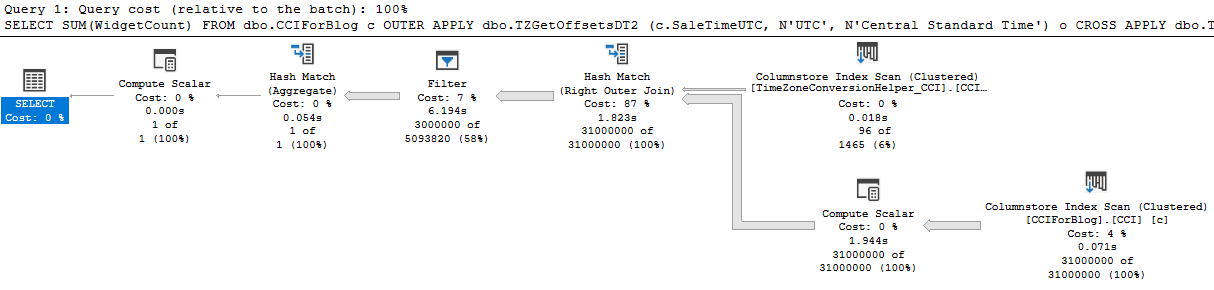
The new query takes around 10 seconds to execute. The new query plan is able to use batch mode processing at every step:


If desired, performance can be further improved by adding the same redundant filters as before:

SELECT SUM(WidgetCount)
FROM dbo.CCIForBlog c
OUTER APPLY dbo.TZGetOffsetsDT2 (c.SaleTimeUTC, N'UTC', N'Central Standard Time') o
CROSS APPLY dbo.TZFormatDT2 (c.SaleTimeUTC, N'UTC', N'Central Standard Time', o.OffsetMinutes, o.TargetOffsetMinutes) f
WHERE f.ConvertedDateTime2 >= '20220103'
AND f.ConvertedDateTime2 < '20220106'
AND c.SaleTimeUTC >= DATEADD(HOUR, -14, '20220103')
AND c.SaleTimeUTC < DATEADD(HOUR, 14, '20220106')
OPTION (MAXDOP 1);

The most optimized version takes around 1 second to execute. Quite an improvement compared to 3 minutes!

The grouping query can also be rewritten using the new functions:

SELECT f.ConvertedDate, SUM(WidgetCount)
FROM dbo.CCIForBlog c
OUTER APPLY dbo.TZGetOffsetsDT2 (c.SaleTimeUTC, N'UTC', N'Central Standard Time') o
CROSS APPLY dbo.TZFormatDT2 (c.SaleTimeUTC, N'UTC', N'Central Standard Time', o.OffsetMinutes, o.TargetOffsetMinutes) f
GROUP BY f.ConvertedDate
OPTION (MAXDOP 1);

This version takes about 7 seconds to execute. This is slower than the date truncation method which took 4 seconds but still much faster than the original AT TIME ZONE method.

Unfortunately, SQL Server limitations require a pair of functions to get the best performance. The open source project does provide a simpler function that can be called by itself but it is only eligible for nested loop joins.

Upgrading

SQL Server 2022 RC1 has signs of improvement for AT TIME ZONE. The basic queries that use AT TIME ZONE in this blog post take about 75 seconds to execute on my machine, so it could be estimated that SQL Server 2022 will reduce the CPU footprint of AT TIME ZONE by 60%. Release candidates are not fully optimized so it’s possible that final performance numbers will be different once the product goes GA. I suspect that these performance improvements are already present in Azure SQL Database but I can’t find any documentation for the change.

Final Thoughts

Please try my open source project if you’re experiencing performance problems with AT TIME ZONE. Thanks for reading!

Why Parallel Queries are Sometimes Slow In SQL Server

You may have noticed large variations in elapsed time for parallel queries while performing query tuning or observing a production workload. This post reviews some of the possible explanations for those variations. I’m testing on SQL Server 2022 RC0 but this behavior can be observed on all currently supported versions of SQL Server.

The Setup

The test data is very simple. Insert ten million sequential integers into a single column table with a clustered index:

CREATE TABLE dbo.ParallelTest (
Id BIGINT NOT NULL,
CONSTRAINT PK_ParallelTest PRIMARY KEY (Id)
);

INSERT INTO dbo.ParallelTest (Id)
SELECT [value]
FROM GENERATE_SERIES(1, 10000000);

Now consider the following query:

SELECT SUM(a.ID + b.ID) s
FROM dbo.ParallelTest a
INNER JOIN dbo.ParallelTest b ON a.ID = b.ID
OPTION (USE HINT ('DISALLOW_BATCH_MODE'));

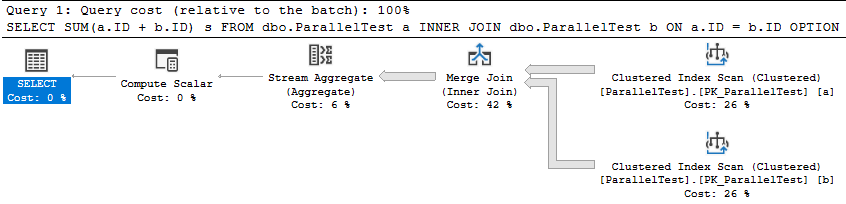
The query optimizer naturally picks a merge join for this query. The self-joined tables obviously have the same row count and the data is already sorted. That makes this query an ideal candidate for a serial merge join from the optimizer’s point of view . The USE HINT in the query isn’t particularly important and the example works without it, but its presence will be explained later. Here’s what the query plan looks like for me:

The query takes 2721 ms of CPU time and elapsed time to execute on my machine. It’s reasonable for CPU and elapsed time to match here because there’s nothing for the query to wait on. It’s the only user query running against the SQL instance. Next I’ll force a parallel merge join query plan by changing the query hints to the following:

SELECT SUM(a.ID + b.ID) s
FROM dbo.ParallelTest a
INNER JOIN dbo.ParallelTest b ON a.ID = b.ID
OPTION (MAXDOP 8, MERGE JOIN, USE HINT('ENABLE_PARALLEL_PLAN_PREFERENCE', 'DISALLOW_BATCH_MODE'));

I chose MAXDOP 8 because my test machine has 8 physical CPU cores. This is an unnatural query plan with a higher parallel cost than serial cost. The query optimizer only picked it because it was forced to. Note the presence of the exchange operators with a relatively high estimated cost:

The parallel query takes 6465 ms of CPU time and 1723 ms of elapsed time to execute on my machine. It finished about 33% faster than the serial query but CPU time more than doubled. The exchange operators added a large overhead for this query. Next I’ll run the same query again but I’ll make one of my CPUs busier than before. Consider the following infinite loop coded as a stored procedure:

CREATE OR ALTER PROCEDURE #p AS
SET NOCOUNT ON;
DECLARE @i INT;
WHILE 1 = 1
SET @i = 0;
GO

EXEC #p;

This code does not accomplish anything besides efficiently using CPU resources, which is exactly what I need for my test. I’m running the merge query at MAXDOP 8 on a machine with 8 CPU cores so I’m pretty much guaranteed to see scheduler contention for some of the workers of the parallel query. They will compete for CPU resources with the infinite loop.

Take a moment to predict the performance penalty that the parallel query will experience due to the busy scheduler. Will it be 2X slower? 3X slower? Worse? For a few hints, recall that hash distributed exchange operators will generally try to force an equal amount of work to each thread. Also recall that a parallel merge join requires order-preserving exchange operators. I’ve included Erik running at MAXDOP 8 to hopefully prevent you from accidentally seeing the answer before you’ve finalized your prediction.

With the busy scheduler, the query now takes 6818 ms of CPU time and 31745 ms of elapsed time to execute on my machine. The same code is over 18X slower simply due to the highly efficient stored procedure that’s running on the same SQL instance. Here are the query wait stats in case they are of interest:

<Wait WaitType=”CXPACKET” WaitTimeMs=”454673″ WaitCount=”5262″ />
<Wait WaitType=”CXSYNC_PORT” WaitTimeMs=”32539″ WaitCount=”41″ />
<Wait WaitType=”CXSYNC_CONSUMER” WaitTimeMs=”43″ WaitCount=”14″ />

scheduler_ring_buffer_recorded

This is an inappropriately brief introduction to a complex topic, but workers cooperate with each other by sharing time on schedulers. Under normal conditions, a worker will execute code on the scheduler for up to 4 milliseconds before yielding. The worker yields in case there’s another worker waiting to execute on the scheduler. When there’s not the original worker immediately starts executing code again. An example of when a worker yields early is if it needs to wait for an I/O operation.

scheduler_ring_buffer_recorded is the name of a debug extended event that you should probably never use. I often don’t follow my own advice, so I used it to get an idea of how often workers were yielding to the scheduler for the merge join queries. I only looked at action types of “SCHEDULER_NONPREEMPTIVE_RESUME” and I admit that this analysis is quite approximate. For the MAXDOP 1 query, there was a total of 705 events over 2872 milliseconds. In other words, the average time spent on the scheduler before yielding is close to the 4 ms soft maximum. This should be expected for the serial query if all of the data is in the buffer pool. There is no memory grant for the query (the reason for the USE HINT) and there’s not really any reason to yield early.

The parallel query had significantly more yields. Looking at one worker thread as an example, it had 14862 events over 1714 milliseconds. In other words, it had around 35 times the number of scheduler yields compared to the MAXDOP 1 query. The higher number of yields is a performance liability when competing with workers from other queries on the same scheduler. The infinite loop stored procedure dominates the workers from the parallel and gets around 97% of the cpu time on the scheduler. That’s a big part of why the parallel query is 18X slower than before.

Note that you can also get this information by looking at the yield_count column of the sys.dm_of_schedulers DMV, but those numbers are server wide and aren’t isolated to one query. With that said, I did get reasonably similar results when comparing that column to the extended event results.

To summarize, parallel query performance overhead isn’t as simple as just the direct overhead of the exchange operators. A query changing from serial to parallel can result in completely different interactions between the workers and the scheduler. The serial query executed its code 4 milliseconds at a time. The parallel query had to yield significantly more often. This type of change isn’t something that you can directly observe in a query plan.

Why Parallel Queries are Sometimes Slow

There are many reasons why a parallel query may not be as efficient as you hoped. I find these to be the most common:

1) There is an overhead associated with parallel exchange operators which is not present in serial queries. Moving data between worker threads requires additional CPU time which adds to the overall execution time of the query. I believe this is what is described by the following quote from the documentation:

Simple queries, frequently found in transaction processing applications, find the additional coordination required to execute a query in parallel outweigh the potential performance boost.

2) There’s some kind of additional coordination required between threads which delays query completion. For example, an order-preserving repartition streams operator is generally worse for performance than one that doesn’t need to preserve order. A different type of example can be seen in my blog post about slow parallel scans caused by cloud storage.

3) Work may be unevenly distributed between worker threads. For example, an eager index spool can only be built with one thread. Other threads may be idle while that temporary index is built. For a different example, a filtered parallel scan of a table may not output the same number of rows to all threads. All else being equal, a parallel query that cannot use all of the CPUs allowed by MAXDOP is not as efficient as one that can.

4) Work may be evenly distributed between worker threads but some of the CPUs are busier than others. Some parallel queries are as slow as their busiest CPU, even when queries are evenly sharing time on the scheduler. Of course, dramatic performance penalties can be seen when the parallel query gets an uneven amount of time on the scheduler (like in the demo in this blog post).

Mitigations

Individual parallel query performance can degrade due to contention on a single scheduler that’s used by one or more of its workers. You are more likely to run into problems with higher DOP or a higher number of concurrent queries. Lowering MAXDOP decreases the odds that you’ll run into the worst type of contention because the query uses fewer schedulers. Decreasing the number of queries decreases contention per scheduler which also helps.

To explain it in a different way, the simplest way to reduce problems with parallel queries is to have fewer worker threads per scheduler. This is of course a balancing act, but it’s one that you must perform for some workloads. Set Cost Threshold for Parallelism and server/database/resource governor MAXDOP appropriately. When possible, don’t run too many concurrent queries for your hardware.

For very important queries for which performance is critical, consider changing to a type of parallelism that isn’t as susceptible to scheduler contention issues. The two most common methods are a parallel apply pattern, perhaps using demand partitioning, or batch mode execution.

Batch mode is yet another complicated topic that I’m not going to explain here, but it uses a fundamentally different method of parallelism compared to row-mode execution which is generally much more robust against problems caused by busy schedulers. Below is a comparison of elapsed times with and without the infinite loop stored procedure running:

The elapsed time of the parallel batch mode query only changes slightly. This is also a nice property when considering overall server scalability.

Final Thoughts

I was going to originally blog about DOP feedback, but it’s taking a while for my feedback to kick in. Thanks for reading!

Ordered Columnstore Indexes on SQL Server 2022 CTP 2.0

Brent recently blogged about ordered columnstore indexes in SQL Server 2022 and had some trouble with them, so I decided to take a look into the mechanics of the feature. I’m testing on SQL Server 2022 CTP 2.0.

What does the ordered columnstore feature do?

  1. A sort operator may be added to query plans that insert into the table. The sort operator is a bit unusual in that the data may not be fully sorted.
  2. A sort operator is added when initially creating an ordered columnstore index. The level of rowgroup elimination fragmentation will depend on memory, DOP, and other factors.
  3. A sort operator is added when rebuilding an ordered columnstore index. The level of rowgroup elimination fragmentation will depend on memory, DOP, and other factors.

Technical details for insert

The sort for inserting into an ordered columnstore is a DML request sort. It appears to use the same internal mechanism as the sort that’s added for inserting into partitioned columnstore tables. The difference is that the data is sorted by the specified columns instead of a calculated partition id. In my testing, the sort appears to be a best effort sort that does not spill to tempdb. This means that if SQL Server thinks there won’t be enough memory then the data will not be fully sorted. Parallel inserts have an additional complication. Consider the following query plan image:

That is a row mode sort. It is a row mode sort because a batch mode parallel sort would put all resulting rows on a single thread which would make the parallel insert pointless. However, there’s no repartition streams operator as a child of the sort. Data is sorted on each thread in a best effort fashion. Even if there is enough memory to fully sort the data, you will end up with DOP threads of sorted data instead. The data will not be sorted globally. The split into threads will increase rowgroup elimination fragmentation.

As mentioned earlier, the sort operator does not always appear. It is not present when the cardinality estimate is very low (around 250 rows). I suspect that the same logic is used for adding the sort as adding the memory grant for compression. For very low cardinality estimates, the data will be inserted into delta rowgroups, even if there’s more than 102399 rows. By that same reasoning, I expect that there is no sort operator if the INSERT query hits a memory grant timeout.

For more information on this sort, see CQScanPartitionSortNew in Paul White’s blog post about different sort types in SQL Server.

Technical details for CREATE/REBUILD index

I spent less time looking into the sort that’s added as part of CREATE or REBUILD index. In my testing, the sort again does not spill to tempdb. The sort is also performed on a per thread basis for parallel index operations. The minimum fragmentation level will be achieved for a MAXDOP 1 operation with sufficient memory. Reducing memory or running the create index in parallel will increase fragmentation. This is unfortunate because ordered columnstore indexes do not support online index creation or rebuilds.

An unpopular opinion

I think that the community worries too much with columnstore with respect to achieving perfect segment ordering and keeping rowgroups at exactly 1048576 rows. If you perform basic maintenance and partition tables appropriately then that should be good enough for most data warehouse workloads. Most query performance issues are going to be caused by getting no elimination at all, scanning through too many soft-deleted rows, or the usual query performance problems. Scanning 11 rowgroups instead of 5 probably isn’t why your queries on columnstore indexes are slow today.

Final thoughts

As is, this feature can be described as a poor man’s partitioning. The sweet spot for this functionality feels very limited to me in its current state, but we’re still on CTP 2.0. Maybe there will be changes before RTM. Thanks for reading!

TRY_CAST and TRY_PARSE Can Return Different Results

There’s a lot of guidance out there that states that TRY_CAST is a faster, more modern version of TRY_PARSE and that TRY_PARSE should only be used if you need to set the optional culture parameter. However, the two functions can return different results in some cases, even without the culture parameter.

Parsing

First I’ll throw a million rows into a single varchar column temp table:

CREATE TABLE #number_as_string (why_tho VARCHAR(100));

INSERT INTO #number_as_string (why_tho)
SELECT ISNULL(CAST(TRY_CAST(q.RN % 33000 AS SMALLINT) AS VARCHAR(100)), '')
FROM
(
	SELECT TOP (1000000) ROW_NUMBER() OVER (ORDER BY (SELECT NULL)) RN
	FROM master..spt_values t1
	CROSS JOIN master..spt_values t2
) q;

Let’s suppose that I want to count the rows that are numbers that fit within the limits of the TINYINT data type. The following code takes 36937 ms of CPU time on my machine and returns a value of 7935:

SELECT COUNT_BIG(*)
FROM #number_as_string
WHERE TRY_PARSE(why_tho AS TINYINT) IS NOT NULL
OPTION (MAXDOP 1);

The poor performance of the query isn’t unexpected. The documentation mentions the following about TRY_PARSE:

Keep in mind that there is a certain performance overhead in parsing the string value.

Casting

I can use TRY_CAST in an attempt to avoid the string parsing overhead of TRY_PARSE. The following code uses 110 ms of CPU time so it is significantly faster than the previous query:

SELECT COUNT_BIG(*)
FROM #number_as_string
WHERE TRY_CAST(why_tho AS TINYINT) IS NOT NULL
OPTION (MAXDOP 1);

However, this query returns a value of 14895, nearly double the count from before. The query results are different because TRY_PARSE returns NULL for an empty string but TRY_CAST returns 0. As a workaround (special thanks to Stephen Morris), the following query returns the expected value of 7935 and completes after using 157 ms of CPU time:

SELECT COUNT_BIG(*)
FROM #number_as_string
WHERE TRY_CAST(why_tho AS TINYINT) IS NOT NULL AND why_tho NOT IN ('', '+', '-')
OPTION (MAXDOP 1);

Final Thoughts

It’s not that TRY_CAST is returning the wrong results. In SQL Server, an empty string converts to 0 when cast to an integer data type. It’s more so that when TRY_CAST is applied to a string, the person writing the query usually wants only the values that a human would consider to be a number. TRY_PARSE seems to follow a set of rules that is more in line with human judgment of what is and isn’t a number. Avoiding TRY_PARSE due to the performance penalty is still a good idea in many cases, but be sure to filter out empty strings if you don’t want them included in the result set. If anyone knows of any other values treated differently between TRY_CAST and TRY_PARSE kindly leave a comment on this blog post. Thanks for reading!
Unkillable Sessions and Undetected Deadlocks

I recently experienced a blocking issue in a production environment which had been going on for hours. As a responsible DBA, I tried to kill the head of the blocking chain. Unexpectedly, killing the session seemed to have no effect. The blocking continued and the session seemed to stick around.

How to Create an Unkillable Session

It’s surprisingly easy to create a session that seemingly can’t be killed. Use good judgment in picking an environment to run this code against. First you’ll need to enable the “Ad Hoc Distributed Queries” configuration option if you haven’t done so already:

sp_configure 'Ad Hoc Distributed Queries', 1;
RECONFIGURE;
GO
sp_configure;

You can then run the following code after replacing the SERVER_NAME and INSTANCE_NAME placeholder values with the server name and instance name that you’re running against. In other words, you want the OPENROWSET call to point at the same server that you’re executing the query against:

BEGIN TRANSACTION;

SELECT TOP (1) [name]
FROM master.dbo.spt_values WITH (TABLOCKX);

SELECT TOP (1) d.[name]
FROM OPENROWSET('SQLNCLI', '{{SERVER_NAME}}\{{INSTANCE_NAME}};Trusted_Connection=yes;', master.dbo.spt_values) AS d;

This code seems to run forever. Trying to kill the session is not effective, even though there’s no error message and a line written to the error log claiming that the session was killed. Running kill with the STATUSONLY option gives us the following:

SPID 56: transaction rollback in progress. Estimated rollback completion: 0%. Estimated time remaining: 0 seconds.

Trying to cancel the query using SSMS also seems to have no effect as well.

The Undetected Deadlock

Running sp_whoisactive reveals a pretty alarming state:

Session 56 (the one that I can see in SSMS) is waiting on an OLEDB wait. Based on the documentation, I assume that you’ll get this wait type while waiting for the OPENROWSET call to complete:

Includes all connection information that is required to access remote data from an OLE DB data source. This method is an alternative to accessing tables in a linked server and is a one-time, ad hoc method of connecting and accessing remote data by using OLE DB.

I did get callstacks for the OLEDB wait using the wait_info_external extended event, but there were two problems. The first problem is that wait_info_external fires after the wait is complete and the OLEDB wait won’t finish. The second problem is that the callstacks that I did get weren’t very interesting.

Getting back on topic, I believe that the OLEDB wait for session 56 can only end once session 66 completes its work. Session 66 is the session that was created by the OPENROWSET call. However, session 66 needs an IS lock on the spt_values table. That is not compatible with the exclusive lock held on that object by session 56. So session 56 is waiting on session 66 but session 66 is waiting on session 56. This is an undetected deadlock. The deadlock can be resolved by killing session 66 (the OPENROWSET query).

Note that if you are crazy enough to try this on your own, you may see a MEMORY_ALLOCATION_EXT wait instead of an OLEDB wait. I don’t believe that there’s any meaningful distinction there, but don’t assume that a long running OLEDB wait is required for this problem to occur.

Final Thoughts

This blocking issue was unusual in that killing the blocking session doesn’t resolve the issue. I had to kill the session getting blocked instead. Thanks for reading!
Why Some Types of Parallel Scans can be Slow on Cloud Storage

Upon reading the title, you may be thinking that of course parallel scans will be slow in the cloud. Cloud storage storage simply isn’t very fast. I would argue that there’s a bit more to it.

The Timeout

A query timed out the other day in production after running for 600 seconds. Of note, one of the tables used by the stored procedure is in a database with data files hosted by Azure blob storage. I grabbed the wait stats for the timed out query using query store:

According to the documentation, the latch category maps to LATCH_% wait types and the preemptive category maps to PREEMPTIVE_% wait types. I wasn’t able to reproduce the timeout when executing the same query text, even if I forced the exact same query plan with a USE PLAN. Admittedly, I was puzzled by the wait stats distribution for a while.

Decoding the Categories

I eventually realized that typically the first execution of the stored procedure for the business day tended to be the slowest. Sorting query store runtime DMV results by time:

I also noticed that the timed out executions tended to have higher physical I/O than the other executions. Sorting query store runtime DMV results by I/O:

I now finally had a method to reproduce the poor performance of the stored procedure: being the first one to run the code in the morning, presumably when the buffer pool didn’t have anything helpful for this stored procedure. Early in the morning, I was able to capture an actual plan that took 13 minutes at MAXDOP 8. Nearly all of the execution time is spent on an index scan for a table that is hosted on cloud storage:

Here are the top wait stats from the actual plan:

<Wait WaitType=”LATCH_EX” WaitTimeMs=”5423928″ WaitCount=”1971″ />
<Wait WaitType=”PAGEIOLATCH_SH” WaitTimeMs=”977288″ WaitCount=”29210″ />
<Wait WaitType=”CXPACKET” WaitTimeMs=”809678″ WaitCount=”700″ />
<Wait WaitType=”PREEMPTIVE_HTTP_REQUEST” WaitTimeMs=”43801″ WaitCount=”50344″ />

I used the task DMVs during query execution to get information about the latch type:


Now I know that the query spends most of its time trying to acquire exclusive latches of the ACCESS_METHODS_DATASET_PARENT type. There is also a fair amount of I/O wait time compared to the mysterious PREEMPTIVE_HTTP_REQUEST wait type.

The ACCESS_METHODS_DATASET_PARENT Latch

I asked the community if this latch was considered to be interesting. The winning option was “What?”. As usual, twitter is useless:

For my query, at times I observed seven out of eight worker threads all waiting for an exclusive latch at the same time. This isn’t surprising considering that the query averaged 6.7 LATCH_EX wait seconds per second. That the other thread was doing an I/O wait while the others were waiting for the latch, so perhaps the worker threads were doing I/Os while holding the latch resource. On a development environment (with unfortunately significantly better I/O), I mocked up a roughly similar table and enabled the latch_acquired, latch_released, file_read, and file_read_completed extended events. The results were quite educational:

There were two different patterns in the XE files. Sometimes the worker threads would acquire the latch, perform one or more I/Os, and release the latch. Otherwise they would acquire the latch and quickly release it without performing any I/Os. Paul Randal recently wrote the following about this latch:

When either a heap or an index is being accessed, internally there’s an object called a HeapDataSetSession or IndexDataSetSession, respectively. When a parallel scan is being performed, the threads doing the actual work of the scan each have a “child” dataset (another instance of the two objects I just described), and the main dataset, which is really controlling the scan, is called the “parent.”

When one of the scan worker threads has exhausted the set of rows it’s supposed to scan, it needs to get a new range by accessing the parent dataset, which means acquiring the ACCESS_METHODS_DATASET_PARENT latch in exclusive mode. While this can seem like a bottleneck, it’s not really, and there’s nothing you can do to stop the threads performing a parallel scan from occasionally showing a LATCH_EX wait for this latch.

At a very high level, I suspect that the fast latch releases (marked in blue in the above picture) occur when the worker thread can acquire an already available range of rows from the parent object. The slow latch releases (marked in red) occur when the worker thread tries to acquire a new range, can’t find one, and has to perform I/Os to add more ranges to the parent object. In both cases the parent object needs to be modified, so an exclusive latch is always taken. I don’t know how it actually works behind the scenes, but the theory matches the observed behavior.

In summary, the query does a parallel scan which is protected by the ACCESS_METHODS_DATASET_PARENT latch. The table getting scanned is hosted on cloud storage with high I/O latency. Latency being high contributes to the exclusive latch on ACCESS_METHODS_DATASET_PARENT getting held for a long time which can block all of the other parallel worker threads from proceeding.

The PREEMPTIVE_HTTP_REQUEST Wait Type

I already have enough information to be confident in a query tuning fix for the stored procedure, but for completeness, I also investigated the PREEMPTIVE_HTTP_REQUEST wait type. I was not able to find any useful documentation for this wait type. The official documentation only says “Internal use only.” Thanks, Microsoft.

A common technique to learn more about undocumented waits is to get callstacks associated with the wait type. I’ve seen the PREEMPTIVE_HTTP_REQUEST wait occur in Azure SQL databases, Azure SQL Managed Instances, and for databases hosted in Azure blob storage. It is possible to get callstacks for managed instances, but it is not possible to translate them because Microsoft does not release public symbols for managed instances. However, the blob storage scenario did allow me to get and translate call stacks for the wait. Below are a few of the stacks that I captured:

Performing I/Os to read data not in the buffer pool:

sqldk!XeSosPkg::wait_info_external::Publish
sqldk!SOS_Task::PushWait
sqlmin!SOS_Task::AutoSwitchPreemptive::AutoSwitchPreemptive
sqlmin!BlobAccess::AsyncHttpIOInternal
sqlmin!BlobAccess::AsyncIOInternal
sqlmin!XFCB2::ScatterReadInternal
sqlmin!FCB::ScatterRead
sqlmin!RecoveryUnit::ScatterRead
sqlmin!BPool::GetFromDisk
sqlmin!BPool::Get
sqlmin!BlobBase::FixNode
sqlmin!BlobManager::LocateBlob
sqlmin!BlobManager::OpenInternal
sqlmin!BlobManager::Open
sqlmin!LockBytesSS::Open
sqlmin!OpenLockBytesNew
sqlmin!OpenIlbssWithSeLobHandleRO
sqlmin!IndexDataSetSession::OpenStreamWithSeLobHandle
sqlmin!RowsetNewSS::OpenWithSeLobHandle
sqlmin!CBlobHandleBaseTableFactory::PilbGet
sqlTsEs!CompareLegacyLobNull
sqlTsEs!CTEsCompare<35,35>::BlCompareXcArgArgImpl
sqlTsEs!CEsExec::GeneralEval4
sqlmin!CQScanStreamAggregateNew::GetRowHelper

Writing LOB data to disk:

sqldk!XeSosPkg::wait_info_external::Publish
sqldk!SOS_Task::PushWait
sqlmin!SOS_Task::AutoSwitchPreemptive::AutoSwitchPreemptive
sqlmin!BlobAccess::AsyncHttpIOInternal
sqlmin!BlobAccess::AsyncIOInternal
sqlmin!XFCB2::ScatterReadInternal
sqlmin!FCB::ScatterRead
sqlmin!RecoveryUnit::ScatterRead
sqlmin!BPool::GetFromDisk
sqlmin!BPool::Get
sqlmin!BlobBase::FixNode
sqlmin!Blob::RWBlob
sqlmin!Blob::RWBlob
sqlmin!Blob::ReadWriteAt
sqlmin!BlobManager::ReadAtInternal
sqlmin!BlobManager::ReadAt
sqlmin!LockBytesSS::ReadAt
sqllang!write_LOB_chunked
sqllang!`anonymous namespace’::TSendRowClassNoCount<7,0>::TSendUnlimitedVartype<0>
sqllang!CTds74::SendRowImpl
sqlTsEs!CEsExec::GeneralEval
sqllang!CXStmtQuery::ErsqExecuteQuery
sqllang!CXStmtSelect::XretExecute
sqllang!CMsqlExecContext::ExecuteStmts<1,1>

Transaction log writes:

sqldk!XeSosPkg::wait_info_external::Publish
sqldk!SOS_Scheduler::UpdateWaitTimeStats
sqldk!SOS_Task::PopWait
sqlmin!SOS_ExternalAutoWait::~SOS_ExternalAutoWait
sqlmin!SOS_Task::AutoSwitchPreemptive::~AutoSwitchPreemptive
sqlmin!BlobAccess::AsyncHttpIOInternal
sqlmin!BlobAccess::AsyncIOInternal
sqlmin!XFCB2::AsyncWriteInternal
sqlmin!FCB::AsyncWrite
sqlmin!SQLServerLogMgr::FlushLCOld
sqlmin!SQLServerLogMgr::LogWriter
sqldk!SOS_Task::Param::Execute
sqldk!SOS_Scheduler::RunTask
sqldk!SOS_Scheduler::ProcessTasks
sqldk!SchedulerManager::WorkerEntryPoint
sqldk!SystemThreadDispatcher::ProcessWorker
sqldk!SchedulerManager::ThreadEntryPoint
KERNEL32.DLL+0x0000000000017974
ntdll.dll+0x000000000006A271

I’m guessing this one is renewing the lease as noted in the documentation: “the implementation of SQL Server Data Files in Azure Storage feature requires a renewal of blob lease every 45 to 60 seconds implicitly”

sqldk!XeSosPkg::wait_info_external::Publish
sqldk!SOS_Task::PushWait
sqlmin!SOS_Task::AutoSwitchPreemptive::AutoSwitchPreemptive
sqlmin!BlobAccess::AsyncHttpIOInternal
sqlmin!BlobAccess::AsyncIOInternal
sqlmin!LeaseRenewalManager2::RenewLeases
sqlmin!XStoreLeaseRenewalTask2
sqldk!SOS_Task::Param::Execute
sqldk!SOS_Scheduler::RunTask
sqldk!SOS_Scheduler::ProcessTasks
sqldk!SchedulerManager::WorkerEntryPoint
sqldk!SystemThreadDispatcher::ProcessWorker
sqldk!SchedulerManager::ThreadEntryPoint

Not surprisingly, all of them have to do with accessing azure storage. I was able to observe an interesting pattern during a table scan: every PAGEIOLATCH_SH wait was immediately preceded by a PREEMPTIVE_HTTP_REQUEST wait.

Getting stacks for the waits that are close together, with shared code removed and the I/O wait on top with the preemptive wait on the bottom:

sqldk!XeSosPkg::wait_info::Publish
sqldk!SOS_Task::PreWait
sqldk!WaitableBase::Wait
sqlmin!LatchBase::Suspend
sqlmin!LatchBase::AcquireInternal
sqlmin!BUF::AcquireLatch
sqlmin!BPool::Get
<<SHARED STACKS REMOVED>>

sqldk!XeSosPkg::wait_info_external::Publish
sqldk!SOS_Task::PushWait
sqlmin!SOS_Task::AutoSwitchPreemptive::AutoSwitchPreemptive
sqlmin!BlobAccess::AsyncHttpIOInternal
sqlmin!BlobAccess::AsyncIOInternal
sqlmin!XFCB2::ScatterReadInternal
sqlmin!FCB::ScatterRead
sqlmin!RecoveryUnit::ScatterRead
sqlmin!BPool::GetFromDisk
sqlmin!BPool::Get
sqlmin!BlobBase::FixNode
sqlmin!BlobManager::LocateBlob
sqlmin!BlobManager::OpenInternal
sqlmin!BlobManager::Open
sqlmin!LockBytesSS::Open
sqlmin!OpenLockBytesNew
sqlmin!OpenIlbssWithSeLobHandleRO
sqlmin!IndexDataSetSession::OpenStreamWithSeLobHandle
sqlmin!RowsetNewSS::OpenWithSeLobHandle
sqlmin!CBlobHandleBaseTableFactory::PilbGet
sqlTsEs!CompareLegacyLobNull

My understanding is that SQL Server makes an HTTP request to the blob storage in preemptive mode in order to queue an asynchronous I/O. The preemptive wait ends and the PAGEIOLATCH_SH wait begins shortly after. The traditional I/O wait ends when the I/O is received by SQL Server. That’s just a guess though.

I think a reasonable summary is that you should expect to see PREEMPTIVE_HTTP_REQUEST waits if you’re performing I/O against Azure storage. They are a normal part of SQL Server’s operations.

Reducing ACCESS_METHODS_DATASET_PARENT Latch Wait Time

In some situations, a query that is slow due to I/O performance can run faster with a higher DOP. Instead of one thread waiting for I/O you can have many threads waiting and overall runtime will decrease. Of course, this won’t work in all scenarios, such as if you’re hitting an IOPs limit. For my scenario, the DOP 8 query had 6.7 LATCH_EX wait seconds per second of runtime. Latch contention is so bad that it nearly steals all of the theoretical benefits achieved with query parallelism.

The obvious solution is to reduce the amount of I/O that is done by the query. That is what was indeed done to resolve the production issue. Another obvious solution is to improve I/O performance. More on that in the next section. However, in some cases the query may simply need to scan a lot of data and you can’t do anything about storage performance. In that situation, it may sometimes be practical to change the type of parallel scan performed by SQL Server.

Consider the following parallel plan against a partitioned table on the probe side:

For clarity, here is what the T-SQL looks like:

SELECT SUM(Case WHEN OffPageFiller IS NOT NULL THEN 1 ELSE 0 END)
FROM (
      VALUES (1),(2),(3),(4),(5),(6)
) v(v)
CROSS APPLY(
       SELECT OffPageFiller
       FROM dbo.SmallTable s
       INNER JOIN dbo.BigTablePart b ON s.JoinId = b.JoinId
       WHERE b.PartId = v.v
) q;

Each thread of the parallel nested loop operator gets assigned an entire partition and reads all of the data for that partition. There is no longer a need for the ACCESS_METHODS_DATASET_PARENT latch because the shared state between worker threads has been removed. I checked using extended events and found that the ACCESS_METHODS_DATASET_PARENT latch wait count was significantly decreased as expected. I suspect that the remaining latch acquisitions were from the hash build side scan. This type of access pattern requires a partitioned table, can be a pain to express in T-SQL, and may not work well if partitions are unevenly sized or if there aren’t enough partitions compared to DOP to get good demand-based distribution.

Perhaps a more reasonable option is to switch to columnstore instead. The query will do less I/O and I assume that the latch pattern is quite different, but I didn’t test this. Testing things in the cloud costs money. Maybe I should start a Patreon.

Reducing PREEMPTIVE_HTTP_REQUEST Wait Time

As I said earlier, I believe that seeing this wait is normal if you’re using azure storage. In my limited experience with it, any noticeable wait time was always tied to even longer PAGEIOLATCH waits. Tuning the query using traditional methods to reduce I/O wait time was always sufficient and I never had a need to specifically focus on PREEMPTIVE_HTTP_REQUEST. However, if you really need to focus on this wait type in particular for some reason, I’ll theorize some ways to reduce it:

  1. For all platforms, reduce I/O performed by the query using query tuning, schema changes, and so on.
  2. For managed instances, move your I/O from user databases to tempdb (it uses locally attached storage).
  3. For azure blob storage databases, make sure that you are using the right geographical region for your storage.

Here are a few more options which may not specifically reduce PREEMPTIVE_HTTP_REQUEST wait time but may improve I/O performance overall:

  1. For managed instances and azure blob storage databases, try increasing the size of your data files.
  2. For managed instances, try increasing the number of data files.
  3. For all platforms, switch to a more expensive tier of storage.

Final Thoughts

The query timed out in production because it performed a large parallel scan against a table that had little to no data in the buffer pool. PAGEIOLATCH waits were not the dominant wait type due to high latency from Azure blob storage. That high latency caused latch contention on the ACCESS_METHODS_DATASET_PARENT latch. My parallel scan was slow because cloud storage isn’t very fast. Maybe it isn’t so complicated after all?