If you take performance for your SQL Servers seriously, you should be using Query Store for your business critical databases.
I used to say this about third party monitoring tools, but the landscape for those has really tanked over the last few years. I used to really love SQL Sentry, but it has essentially become abandonware since SolarWinds bought SentryOne.
At this point, I’m happier to enable query store, and then use a couple extended events to capture blocking and deadlocks. While it would be stellar if Query Store also did that, for now life is easy enough.
To analyze blocking and deadlock Extended Events, I use:
This won’t capture absolutely everything, but that’s okay. We can usually get enough to go on with those three things. If you have bad blocking and deadlocking problems, you should start there.
But once you turn on Query Store, where do you go?
Gooey
If you’re okay with all the limitations of the GUI, you can tweak a few things to get more useful information out of it.
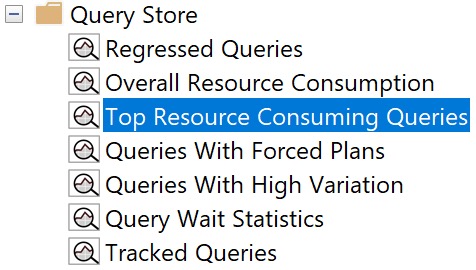
I usually start with the Top Resource Consuming Queries view, since, uh… those are usually good things to tune.
top resource consuming plans
But the crappy bar graph that Query Store defaults to is not what you want to see. There’s way too much jumping around and mousing over things to figure out what’s in front of you.
I like switching to the grid format with additional details view, by clicking the blue button like so:
additional details!
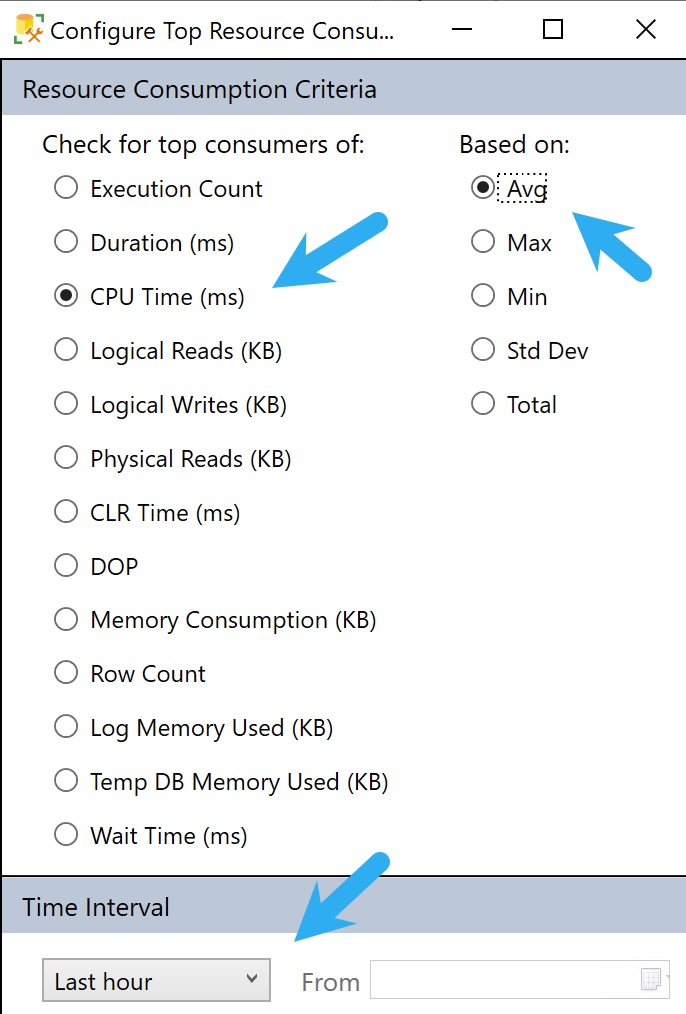
But we’re not done yet! Not by a long shot. The next thing we wanna do is hit the Configure button, and change what we’re looking at. See, the other crappy thing is that Query Store defaults to showing you queries by total duration.
What ends up being in here is a bunch of stuff that runs a lot, but tends to run quickly. You might get lucky and find some quick wins here, but it’s usually not where the real bangers live.
To get to those, we need to hit the Configure button and make a couple tweaks to look at queries that use a lot of CPU on average, and push the time back from only showing the last hour to the last week or so.
You can go back further, but usually the further you go back, the longer it takes to get you results.
configurator
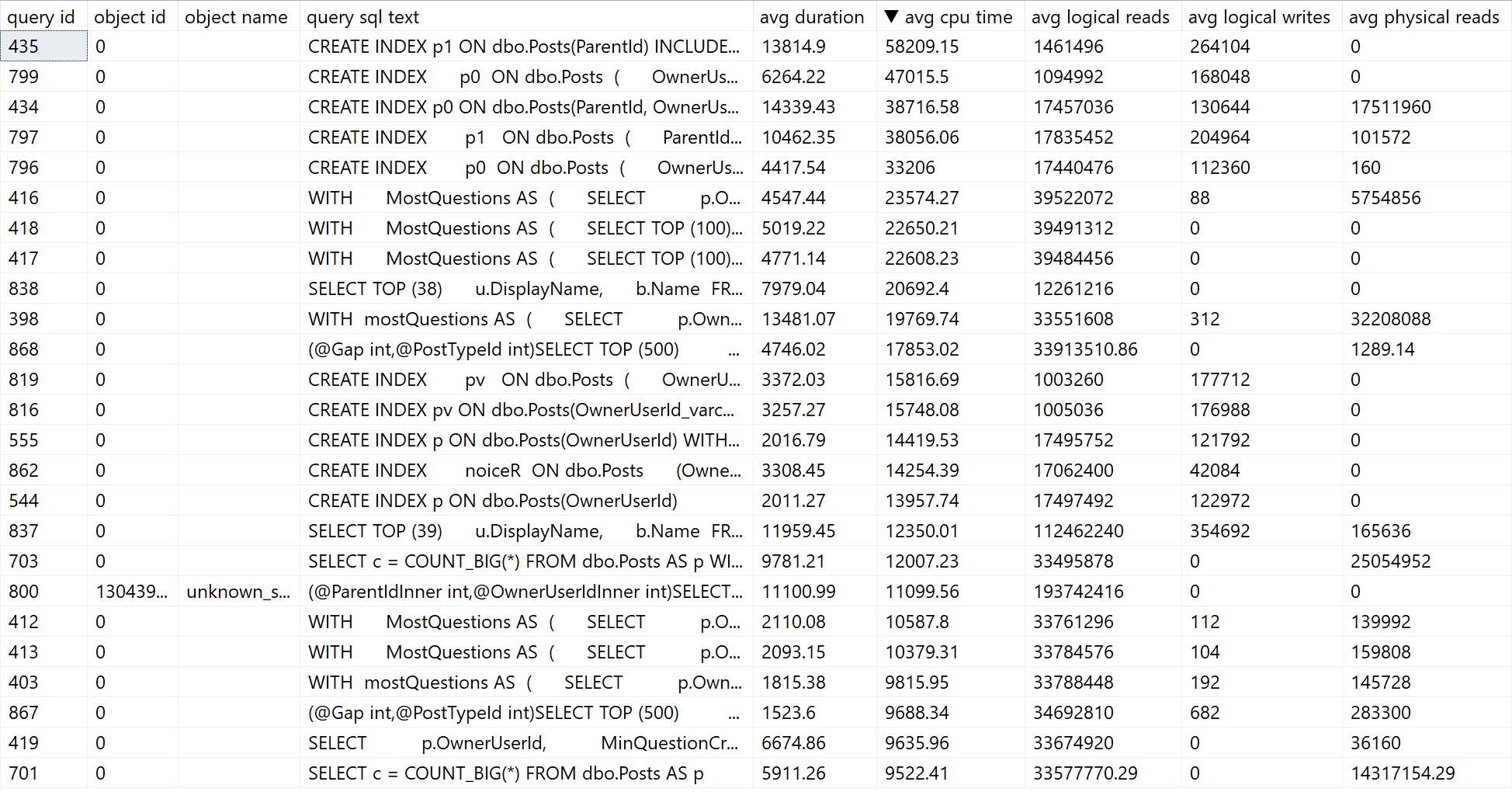
The problem here is that you can often get back quite a bit of noise that you can’t filter out or ignore. Here’s what mine looks like:
noise noise noise
We don’t really need to know that creating indexes took a long time. Substitute those with queries you don’t necessarily care about fixing, and you get the point.
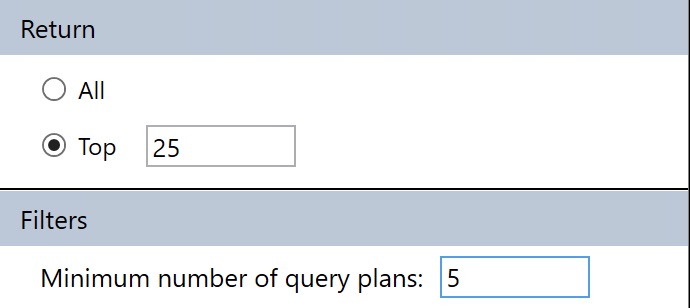
You can sort of control this by only asking for queries with a certain number of plans to come back, but if your queries aren’t parameterized and you have a lot of “single use” execution plans, you’ll miss out on those in the results.
min-maxing
This filter is available under the Configuration settings where we changes the CPU/Average/Dates before.
The major limitation of Query Store’s GUI is that you can’t search through it for specific problems. It totally could and should be in there, but as of this writing, it’s not in there.
The nice thing about sp_QuickieStore is that it gets rid of a lot of the click-clacking around to get things set up. You can’t save your Query Store GUI layout to open up and show you what you want every time, you have to redo it.
To get us to where we were with the settings above, all we have to do is this:
EXEC sp_QuickieStore
    @execution_count = 5;
By default, sp_QuickieStore will already sort results by average CPU for queries executed over the last week of Query Store data. It will also filter out plans for stuff we can’t really tune, like creating indexes, updating statistics, and waste of time index maintenance.
You’ll get results that look somewhat like so:
to the rescue!
There are a number of things you can do with to include or ignore only certain information, too:
@execution_count: the minimum number of executions a query must have
@duration_ms: the minimum duration a query must have
@execution_type_desc: the type of execution you want to filter
@procedure_schema: the schema of the procedure you’re searching for
@procedure_name: the name of the programmable object you’re searching for
@include_plan_ids: a list of plan ids to search for
@include_query_ids: a list of query ids to search for
@ignore_plan_ids: a list of plan ids to ignore
@ignore_query_ids: a list of query ids to ignore
@include_query_hashes: a list of query hashes to search for
@include_plan_hashes: a list of query plan hashes to search for
@include_sql_handles: a list of sql handles to search for
@ignore_query_hashes: a list of query hashes to ignore
@ignore_plan_hashes: a list of query plan hashes to ignore
@ignore_sql_handles: a list of sql handles to ignore
@query_text_search: query text to search for
You straight up can’t do any of that with Query Store’s GUI. I love being able to focus in on all the plans for a specific stored procedure.
Thanks for reading!
Going Further
If this is the kind of SQL Server stuff you love learning about, you’ll love my training. Blog readers get 25% off the Everything Bundle — over 100 hours of performance tuning content. Need hands-on help? I offer consulting engagements from targeted investigations to ongoing retainers. Want a quick sanity check before committing to a full engagement? Schedule a call — no commitment required.
It’s somewhat strange to hear people carry on about best practices that are actually worst practices.
One worst practice that has strong staying power is the OPTIMIZE FOR UNKNOWN hint, which we talked about yesterday.
It probably doesn’t help that Microsoft has products (I’m looking at you, Dynamics) which have a setting to add the hint to every query. Shorter: If Microsoft recommends it, it must be good.
Thanks, Microsoft. Dummies.
Using the OPTIMIZE FOR UNKNOWN hint, or declaring variables inside of a code block to be used in a where clause have the same issue, though: they make SQL Server’s query optimizer make bad guesses, which often lead to bad execution plans.
We’re going to create two indexes on the Posts table:
CREATE INDEX
    p0
ON dbo.Posts
(
    OwnerUserId
)
WITH
(
    SORT_IN_TEMPDB = ON,
    DATA_COMPRESSION = PAGE
);
GO

CREATE INDEX
    p1
ON dbo.Posts
(
    ParentId,
    CreationDate,
    LastActivityDate
)
INCLUDE
(
    PostTypeId
)
WITH
(
    SORT_IN_TEMPDB = ON,
    DATA_COMPRESSION = PAGE
);
GO
The indexes themselves are not as important as how SQL Server goes about choosing them.
Support Wear
This stored procedure is going to call the same query in three different ways:
One with the OPTIMIZE FOR UNKNOWN hint that uses parameters
One with local variables set to parameter values with no hints
One that accepts parameters and uses no hints
CREATE OR ALTER PROCEDURE
    dbo.unknown_soldier
(
    @ParentId int,
    @OwnerUserId int
)
AS
BEGIN
SET NOCOUNT, XACT_ABORT ON;

    SELECT TOP (1)
        p.*
    FROM dbo.Posts AS p
    WHERE p.ParentId = @ParentId
    AND   p.OwnerUserId = @OwnerUserId
    ORDER BY
        p.Score DESC,
        p.Id DESC
    OPTION(OPTIMIZE FOR UNKNOWN);

    DECLARE
        @ParentIdInner int = @ParentId,
        @OwnerUserIdInner int = @OwnerUserId;

    SELECT TOP (1)
        p.*
    FROM dbo.Posts AS p
    WHERE p.ParentId = @ParentIdInner
    AND   p.OwnerUserId = @OwnerUserIdInner
    ORDER BY
        p.Score DESC,
        p.Id DESC;

    SELECT TOP (1)
        p.*
    FROM dbo.Posts AS p
    WHERE p.ParentId = @ParentId
    AND   p.OwnerUserId = @OwnerUserId
    ORDER BY
        p.Score DESC,
        p.Id DESC;

END;
GO
Placebo Effect
If we call the stored procedure with actual execution plans enabled, we get the following plans back.
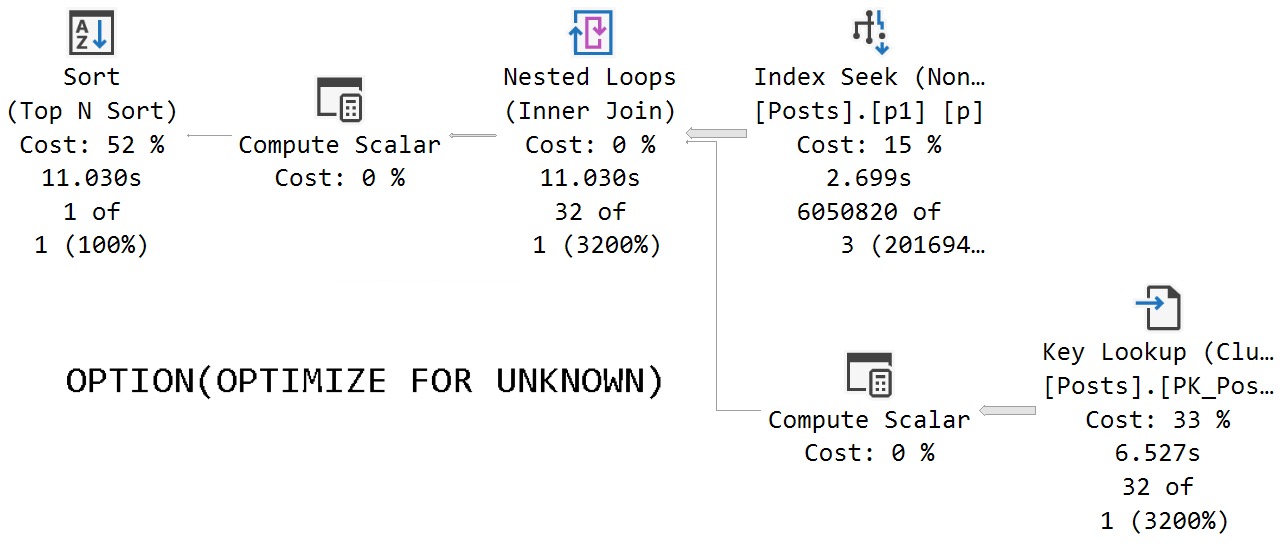
The assumed selectivity that the OPTIMIZE FOR UNKNOWN hint produces as a cardinality estimate is way off the rails.
SQL Server thinks three rows are going to come back, but we get 6,050,820 rows back.
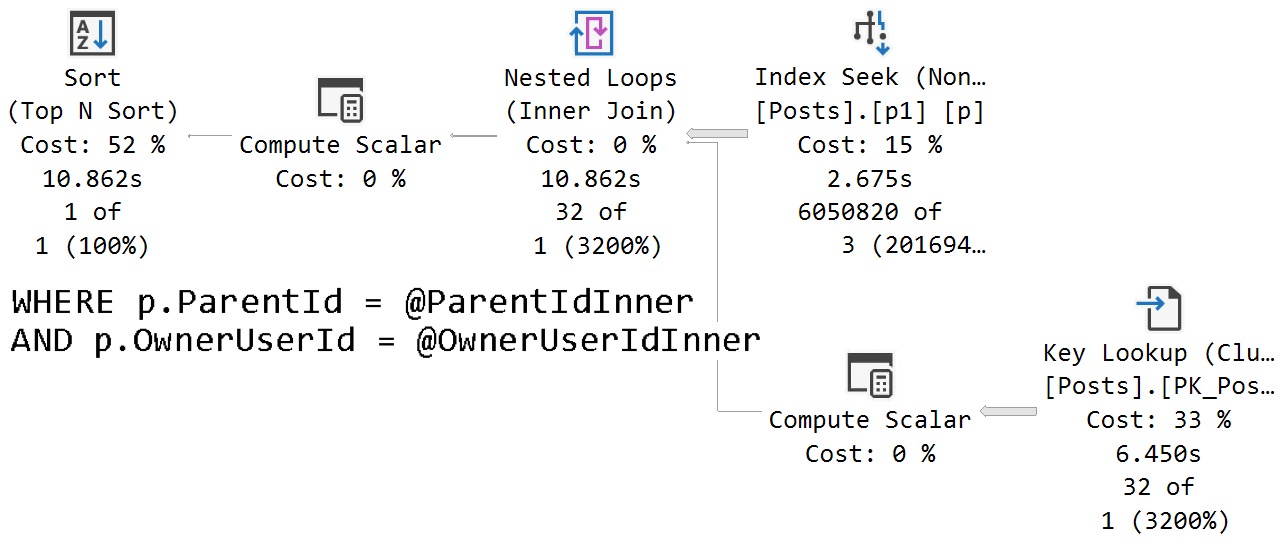
We get identical behavior from the second query that uses variables declared within the stored procedure, and set to the parameter values passed in.
release me
Same poor guesses, same index choices, same long running plan.
Parameter Effect
The query that accepts parameters and doesn’t have any hints applied to it fares much better.
transporter
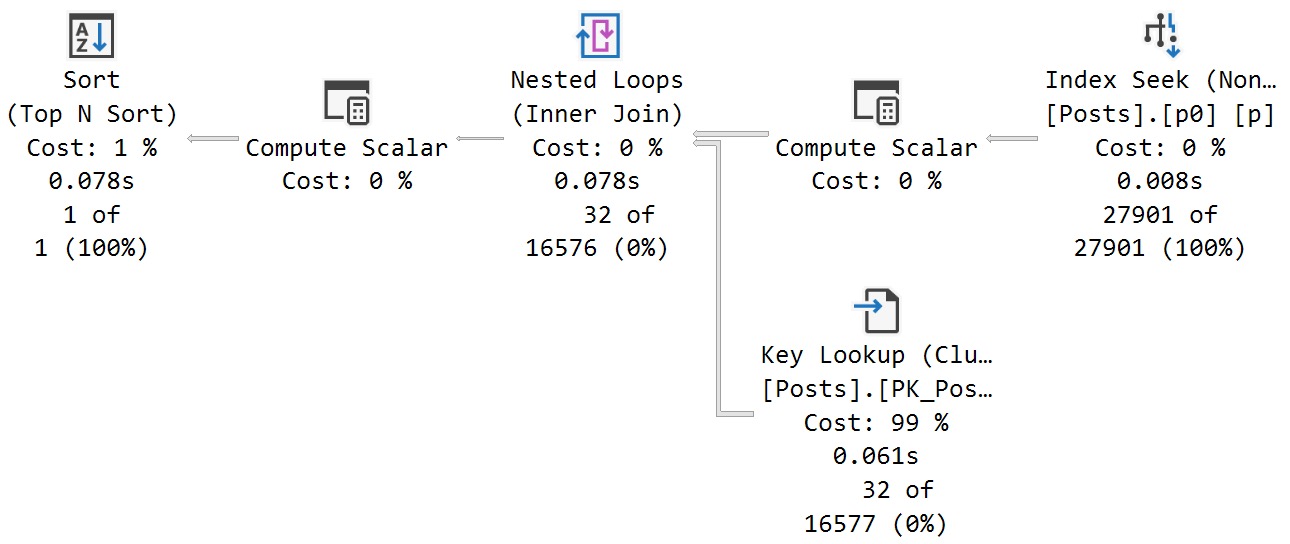
In this case, we get an accurate cardinality estimate, and a more suitable index choice.
Note that both queries perform lookups, but this one performs far fewer of them because it uses an index that filters way more rows out prior to doing the lookup.
The optimizer is able to choose the correct index because it’s able to evaluate predicate values against the statistics histograms rather than using the assumed selectivity guess.
Thanks for reading!
Going Further
If this is the kind of SQL Server stuff you love learning about, you’ll love my training. Blog readers get 25% off the Everything Bundle — over 100 hours of performance tuning content. Need hands-on help? I offer consulting engagements from targeted investigations to ongoing retainers. Want a quick sanity check before committing to a full engagement? Schedule a call — no commitment required.
I think I have probably spent 500 hours of my life rewriting T-SQL Scalar UDFs to avoid all the performance problems associated with them.
The obvious choice is the Inline Table Valued Function, which has fewer performance issues baked in. For the kids out there: they don’t spill trauma.
But getting the rewrite right can be tricky, especially when it’s possible for the function to return NULL values.
I’m going to walk through a simple example, and show you how to get the results you want, without adding abusing your developers.
What is not covered in this post are all the performance issues caused by UDFs. If you want to get into that, click the training link at the bottom of this post.
The Problem
Here’s the function we need to rewrite. It returns a simple bit value if a particular user was active after a certain date:
CREATE OR ALTER FUNCTION
    dbo.rewrite
(
    @UserId int,
    @LastAccessDate datetime
)
RETURNS bit
AS
BEGIN
    DECLARE
        @b bit = 0,
        @d datetime = GETDATE(); /*NOFROID4U*/

    SELECT
        @b =
            CASE
                WHEN u.Id IS NOT NULL
                THEN 1
                ELSE 0
            END
    FROM dbo.Users AS u
    WHERE u.Id = @UserId
    AND   u.LastAccessDate > @LastAccessDate;

    RETURN
        @b;
END;
GO
Since I’m using SQL Server 2022 in compatibility level 160, I’m declaring a useless datetime parameter and using GETDATE() to set it to a value to avoid scalar UDF inlining.
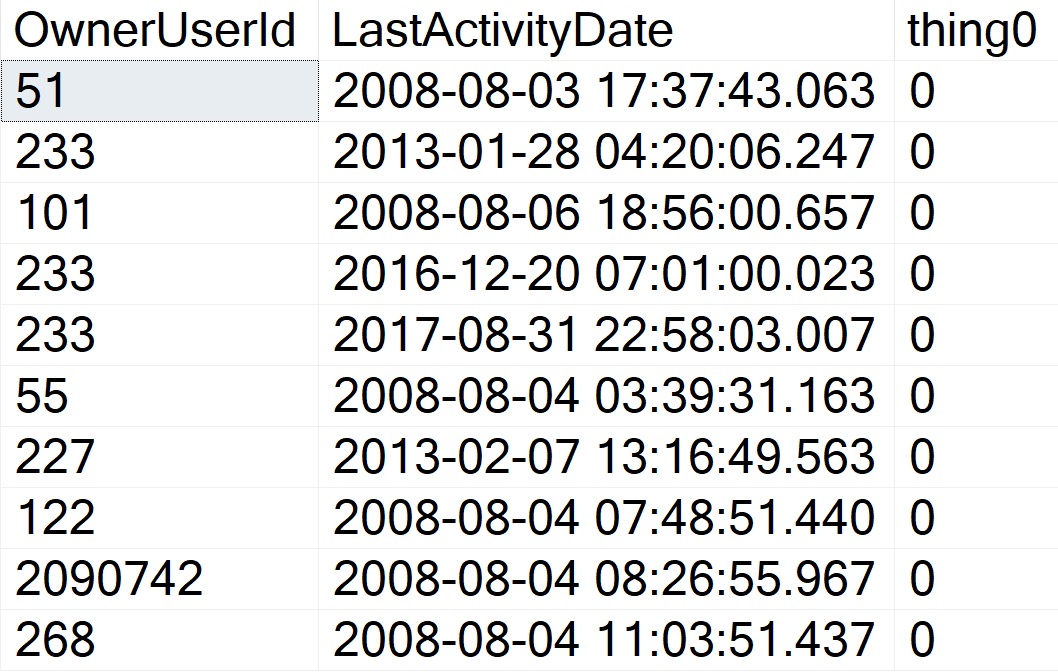
We can call it about like so (again, this query is too trivial to suffer any performance issues), and get some reasonable-looking results back.
SELECT TOP (10)
    p.OwnerUserId,
    p.LastActivityDate,
    thing0 =
        dbo.rewrite
        (
            p.OwnerUserId,
            GETDATE()
        )
FROM dbo.Posts AS p
WHERE p.Score = 1;
who i smoke
Writeable Media
Rewriting this function looks straightforward. All we need to do is Robocop a few parts and pieces and badabing badaboom we’re done.
Note that to really complete this, we’d also need to add a convert to bit to avoid SQL Server implicitly converting the output of the case expression to a (potentially) different datatype, but we’ll fix that in the final rewrite.
CREATE OR ALTER FUNCTION
    dbo.the_rewrite
(
    @UserId int,
    @LastAccessDate datetime
)
RETURNS table
WITH SCHEMABINDING
AS
RETURN
    SELECT
        b =
            CASE
                WHEN u.Id IS NOT NULL
                THEN 1
                ELSE 0
            END
    FROM dbo.Users AS u
    WHERE u.Id = @UserId
    AND   u.LastAccessDate > @LastAccessDate;
GO
Of course, this alters how we need to reference the function in the calling query. Inline table valued functions are totally different types of objects from scalar UDFs.
SELECT TOP (10)
    p.OwnerUserId,
    p.LastActivityDate,
    thing1 =
        (
            SELECT
                t.b
            FROM dbo.the_rewrite
            (
                p.OwnerUserId,
                GETDATE()
            ) AS t
        )
FROM dbo.Posts AS p
WHERE p.Score = 1;
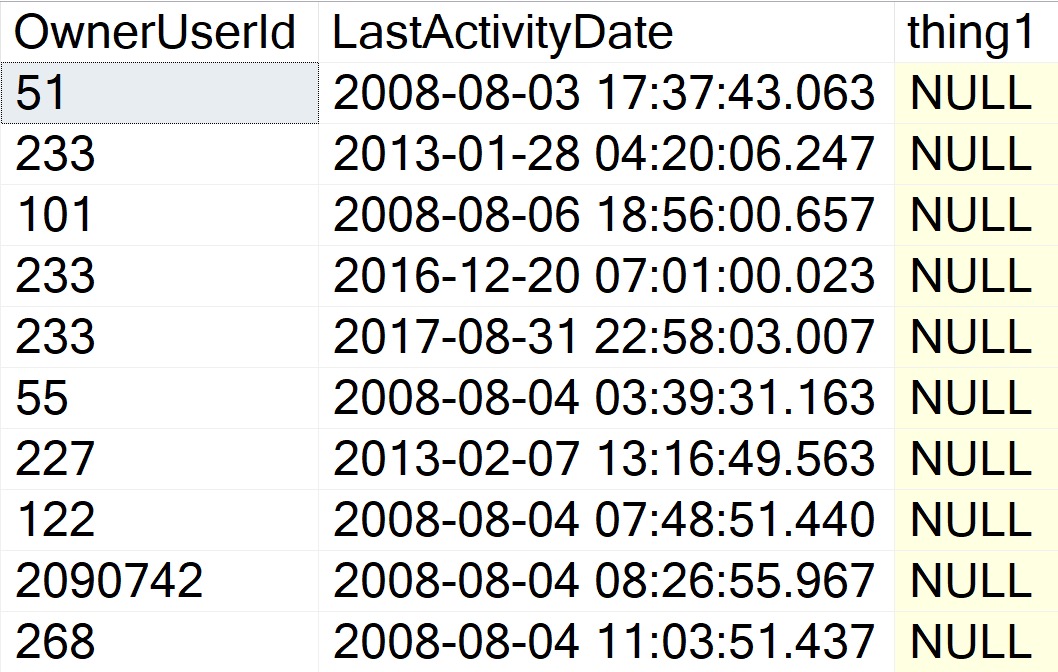
But the results are disappointing! Where we once had perfectly formed zeroes, now we have a bunch of NULLs that severely harsh our mellow.
torment
This can obviously cause problems for whomever or whatever is ingesting the result set.
Expectations: 1 or 0
Reality: NULL
Shame, that.
Changing The Query
Many developers will attempt something like this first, to replace NULLs in the calling query:
SELECT TOP (10)
    p.OwnerUserId,
    p.LastActivityDate,
    thing1 =
        (
            SELECT
                ISNULL
                (
                    t.b,
                    0
                )
            FROM dbo.the_rewrite
            (
                p.OwnerUserId,
                GETDATE()
            ) AS t
        )
FROM dbo.Posts AS p
WHERE p.Score = 1;
But this will still produce NULL realities where we have zeroed expectations. We could take a step way back and do something like this:
SELECT TOP (10)
    p.OwnerUserId,
    p.LastActivityDate,
    thing1 =
        ISNULL
        (
            (
                SELECT
                    t.b
                FROM dbo.the_rewrite
                (
                    p.OwnerUserId,
                    GETDATE()
                ) AS t
            ),
            0
        )
FROM dbo.Posts AS p
WHERE p.Score = 1;
GO
But this is an ugly and annoying thing to remember. Imagine having to explain this to someone reading or trying to incorporate our beautiful new function into a query.
We should fix this inside the function.
Fixer Upper
I’m not going to pretend this is the only way to do this. You can likely figure out half a million ways to pet this cat. It’s just easy.
CREATE OR ALTER FUNCTION
    dbo.the_inner_rewrite
(
    @UserId int,
    @LastAccessDate datetime
)
RETURNS table
WITH SCHEMABINDING
AS
RETURN

    SELECT
        b =
            CONVERT
            (
                bit,
                MAX(x.b)
            )
    FROM
    (
        SELECT
            b =
                CASE
                    WHEN u.Id IS NOT NULL
                    THEN 1
                    ELSE 0
                END
        FROM dbo.Users AS u
        WHERE u.Id = @UserId
        AND   u.LastAccessDate > @LastAccessDate

        UNION ALL

        SELECT
            b = 0
    ) AS x;
GO
We have:
Our original query, which may return 1 or 0 based on existence
A union all to a zero literal so that a result is guaranteed to be produced
An outer max to get the higher value between the two inner selects
And this will produce expected results, with the final output converted to a bit.
Thanks for reading!
Going Further
If this is the kind of SQL Server stuff you love learning about, you’ll love my training. Blog readers get 25% off the Everything Bundle — over 100 hours of performance tuning content. Need hands-on help? I offer consulting engagements from targeted investigations to ongoing retainers. Want a quick sanity check before committing to a full engagement? Schedule a call — no commitment required.
In yesterday’s post, I showed you a function rewrite from Scalar to Inline Table Valued, and gave you a couple example calls.
Now, if this is all you’re doing with a function, there’s absolutely no need to rewrite them.
SELECT
    cl.*
FROM dbo.CountLetters('1A1A1A1A1A') AS cl;

SELECT
    CountLetters =
        dbo.CountLetters_Bad('1A1A1A1A1A');
If you’re doing something like this, and maybe assigning it to a variable or using it to guide some branching logic, don’t you sweat it for one single solitary second.
You may want to make sure whatever code inside the function runs well, but changing the type of function here isn’t going to improve things.
More realistically, though, you’re going to be calling functions as part of a larger query.
Second To None
Let’s say you’re doing something a bit like this:
SELECT
    u.DisplayName,
    TotalScore =
        SUM(p.Score * 1.),
    Thing =
        dbo.CountLetters_Bad(u.DisplayName)
FROM dbo.Users AS u
JOIN dbo.Posts AS p
    ON p.OwnerUserId = u.Id
WHERE EXISTS
(
    SELECT
        1/0
    FROM dbo.Votes AS v
    WHERE p.Id = v.PostId
)
AND u.Reputation >= 100000
GROUP BY
    u.DisplayName
ORDER BY
    TotalScore DESC;
It’s a far different scenario than just assigning the output of a Scalar UDF to a variable or using it to guide some branching logic.
Brooklyn Zoo
A few minor syntax changes to the function and to how the query calls it can make a big difference.
SELECT
    u.DisplayName,
    TotalScore =
        SUM(p.Score * 1.),
    Thing =
        (SELECT * FROM dbo.CountLetters(u.DisplayName))
FROM dbo.Users AS u
JOIN dbo.Posts AS p
    ON p.OwnerUserId = u.Id
WHERE EXISTS
(
    SELECT
        1/0
    FROM dbo.Votes AS v
    WHERE p.Id = v.PostId
)
AND u.Reputation >= 100000
GROUP BY
    u.DisplayName
ORDER BY
    TotalScore DESC;
Since this is a table valued function, you have to ask for results from it like you’d ask for results from a table.
As long as someone wins who you’re rooting for. But here, no one’s rooting for scalar functions. They’re just unlovable.
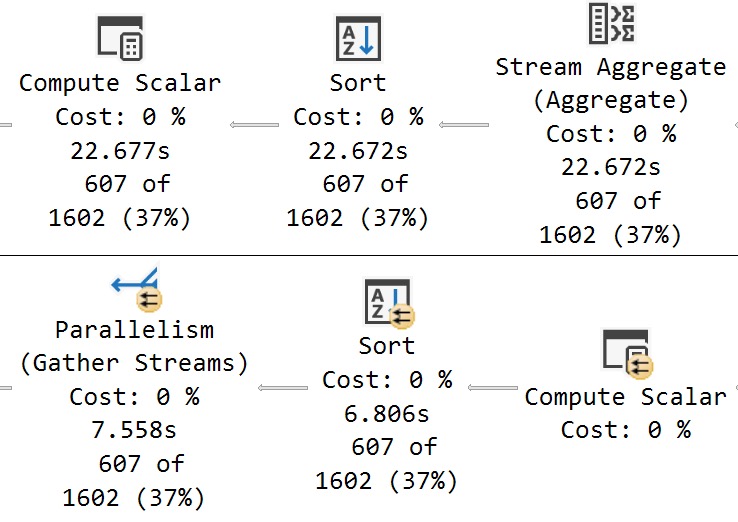
I’m going to show you the very end of these plans to see the timing differences.
1945
The Scalar UDF plan takes ~23 seconds, and the inline TVF plan takes 7.5 seconds.
And this is why testing certain linguistic elements in SQL needs to be done realistically. Just testing a single value would never reveal performance issues.
Thanks for reading!
Going Further
If this is the kind of SQL Server stuff you love learning about, you’ll love my training. Blog readers get 25% off the Everything Bundle — over 100 hours of performance tuning content. Need hands-on help? I offer consulting engagements from targeted investigations to ongoing retainers. Want a quick sanity check before committing to a full engagement? Schedule a call — no commitment required.
I have sort of a love/hate relationship with wait stats scripts and analysis. Sometimes they’re great to correlate with larger performance problems or trends, and other times they’re totally useless.
When you’re looking at wait stats, some important things to figure out are:
How much of a wait happened compared to uptime
If the waits lasted a long time on average
And you can do that out of the box with SQL Server. What you can’t get are two very important things:
When the waits happened
Which queries caused the waits
This stuff is vitally important for figuring out if wait stats are benign overall to the workload.
For example, let’s say your server has been up for 100 hours, and you spent 50 hours waiting on PAGEIOLATCH_SH waits. Normally I’d be pretty worried about that, and I’d be looking at if the server has enough memory, if queries are asking for big memory grants, if important queries are missing any indexes, etc.
But if we knew that all 50 of those hours were outside of normal use activity, and maybe even happened in a separate database for warehousing or archiving off data, we might be able to ignore it and focus on other portions of the workload.
When this finishes running, you’ll get three results back:
Overall wait stats for the period of time
Wait stats broken down by database for the period of time
Wait stats broken down by database and query for the period of time
And because I don’t want to leave you hanging, you’ll also get details about the waits themselves, like
How much of a wait happened compared to sampled time
How long the waits lasted on average in the sampled time
If you need to figure out which queries are causing wait stats that you’re worried about, this is a great way to get started with that investigation.
Thanks for reading!
Going Further
If this is the kind of SQL Server stuff you love learning about, you’ll love my training. Blog readers get 25% off the Everything Bundle — over 100 hours of performance tuning content. Need hands-on help? I offer consulting engagements from targeted investigations to ongoing retainers. Want a quick sanity check before committing to a full engagement? Schedule a call — no commitment required.
In yesterday’s post, I talked through how I capture blocking using sp_HumanEvents. Today I’m going to talk about a couple different ways I use it to capture query performance issues.
One thing I want to stress is that you shouldn’t use yesterday’s technique to gather query performance issues. One thing sp_HumanEvents does is capture actual execution plans, and that can really bog a server down if it’s busy.
I tend to use it for short periods of time, or for very targeted data collection against a single stored procedure or session id running things.
I’ve occasionally toyed with the idea of adding a flag to not get query plans, or to use a different event to get them.
I just don’t think there’s enough value in that to be worthwhile since the actual execution plan has so many important details that other copies do not.
So anyway, let’s do a thing.
Whole Hog
You can totally use sp_HumanEvents to grab absolutely everything going on like this:
You may need to do this in some cases when you’re first getting to know a server and need to get a feeling for what’s going on. This will show you any query that takes 5 seconds or longer in the 20 second window the session is alive for.
If you’re on a really busy server, it can help to cut down on how much you’re pulling in:
This will only pull in data from sessions if their spid is divisible by 5. The busier your server is, the weirder you might want to make this number, like 15/17/19 or something.
Belly
Much more common for me is to be on a development server, and want to watch my spid as I execute some code:
This is especially useful if you’re running a big long stored procedure that calls a bunch of other stored procedures, and you want to find all the statements that take a long time without grabbing every single query plan.
If you’ve ever turned on Actual Execution Plans and tried to do this, you might still be waiting for SSMS to become responsive again. It’s really painful.
By only grabbing query details for things that run a long time, you cut out all the little noisy queries that you can’t really tune.
I absolutely adore this, because it lets me focus in on just the parts that take a long time.
Shoulder
One pretty common scenario is for clients to give me a list of stored procedures to fix. If they don’t have a monitoring tool, it can be a challenge to understand things like:
How users call the stored procedure normally
If the problem is parameter sniffing
Which queries in the stored procedure cause the biggest problems
This will only collect sessions executing a single procedure. I’ll sometimes do this and work through the list.
Hoof
There are some slight differences in how I call the procedure in different circumstances.
When I use the @seconds_sample parameter, sp_HumanEvents will run for that amount of time and then spit out a result
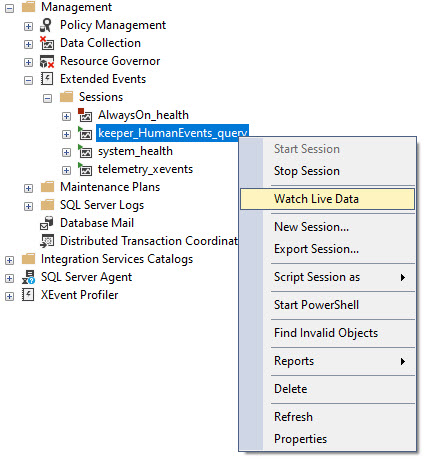
When I use the @keep_alive parameter, all that happens is a session gets created and you need to go watch live data like this:
viewme
Just make sure you do that before you start running your query, or you might miss something important.
Thanks for reading!
Going Further
If this is the kind of SQL Server stuff you love learning about, you’ll love my training. Blog readers get 25% off the Everything Bundle — over 100 hours of performance tuning content. Need hands-on help? I offer consulting engagements from targeted investigations to ongoing retainers. Want a quick sanity check before committing to a full engagement? Schedule a call — no commitment required.
Several weeks back, I blogged about a missed opportunity with the new parameter sensitive plan feature. At the time, I thought that there was indeed sufficient skewness available to trigger the additional plan variants, and apparently some nice folks at Microsoft agreed.
I’m not gonna go into a lot of depth here, because I’m writing this while traveling, but we get the (mostly) desired outcome of two different plans being generated. Each plan is more suitable to the amount of data that the query has to process.
If this is the kind of SQL Server stuff you love learning about, you’ll love my training. Blog readers get 25% off the Everything Bundle — over 100 hours of performance tuning content. Need hands-on help? I offer consulting engagements from targeted investigations to ongoing retainers. Want a quick sanity check before committing to a full engagement? Schedule a call — no commitment required.
Why? Because that’s the way it’s implemented in Postgres and DB2. Oracle, of course, just calls it TRUNC.
So, while it’s nice to have (what appears to be) the same behavior, it doesn’t exactly help to not have a 1:1 calling equivalent to other platforms.
I assume most of these additions to T-SQL are for cross-platform development and migrations.
Of course, Microsoft being so gosh darn late to this game means folks have probably been rolling-their-own versions of these functions for years.
If they went and called their system function DATE_TRUNC or even TRUNC, they might have some object naming issues to contend with.
Well, okay. But how does it work?
Childish Games
Here are some quick examples of how you call it.
SELECT TOP (10)
    u.DisplayName,
    year =
        DATETRUNC(YEAR, u.LastAccessDate),
    quarter =
        DATETRUNC(QUARTER, u.LastAccessDate),
    month =
        DATETRUNC(MONTH, u.LastAccessDate),
    dayofyear =
        DATETRUNC(DAYOFYEAR, u.LastAccessDate),
    day =
        DATETRUNC(DAY, u.LastAccessDate),
    week =
        DATETRUNC(WEEK, u.LastAccessDate),
    iso_week =
        DATETRUNC(ISO_WEEK, u.LastAccessDate),
    hour =
        DATETRUNC(HOUR, u.LastAccessDate),
    minute =
        DATETRUNC(MINUTE, u.LastAccessDate),
    second =
        DATETRUNC(SECOND, u.LastAccessDate),
    millisecond =
        DATETRUNC(MILLISECOND, u.LastAccessDate),
    microsecond =
        DATETRUNC(MICROSECOND, u.LastAccessDate) /*Doesn't work with datetime because there are no microseconds*/
FROM dbo.Users AS u;
And here are the results:
workin’
The thing to note here is that there’s no rounding logic involved. You just go to the start of whatever unit of time you choose. Of course, this doesn’t seem to do anything to the millisecond portion of DATETIME, because it’s not precise enough.
But for anyone out there who was hoping for a SOMONTH function to complement the EOMONTH function, you get this instead.
Works well enough!
But does it perform, Darling?
UnSARGable?
To make any test like this worthwhile, we need an index to make data searchable.
CREATE INDEX
    v
ON dbo.Votes
    (CreationDate)
WITH
(
    SORT_IN_TEMPDB = ON,
    DATA_COMPRESSION = PAGE
);
You know, because that’s what they do. To make searching faster. Hello.
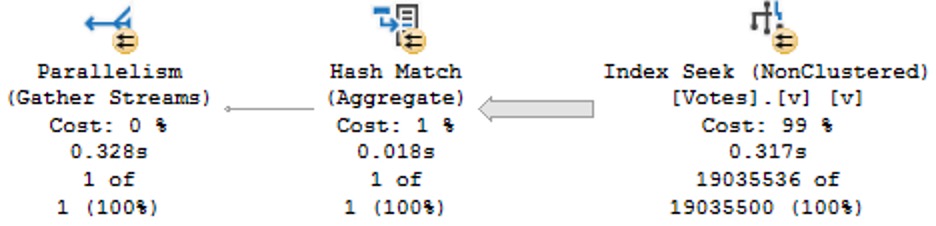
So look, under these perfect circumstances, everything performs well. But we have to do a lot of typing.
SELECT
    c = COUNT_BIG(*)
FROM dbo.Votes AS v
WHERE v.CreationDate >= DATETRUNC(YEAR, CONVERT(datetime, '20130101 00:00:00.000'));
Note here that we’re working on a literal value, not a column value, and we have to tell the datetrunc function which type we want via the convert function so that we get a simple seek plan:
SELECT
    c = COUNT_BIG(*)
FROM dbo.Votes AS v
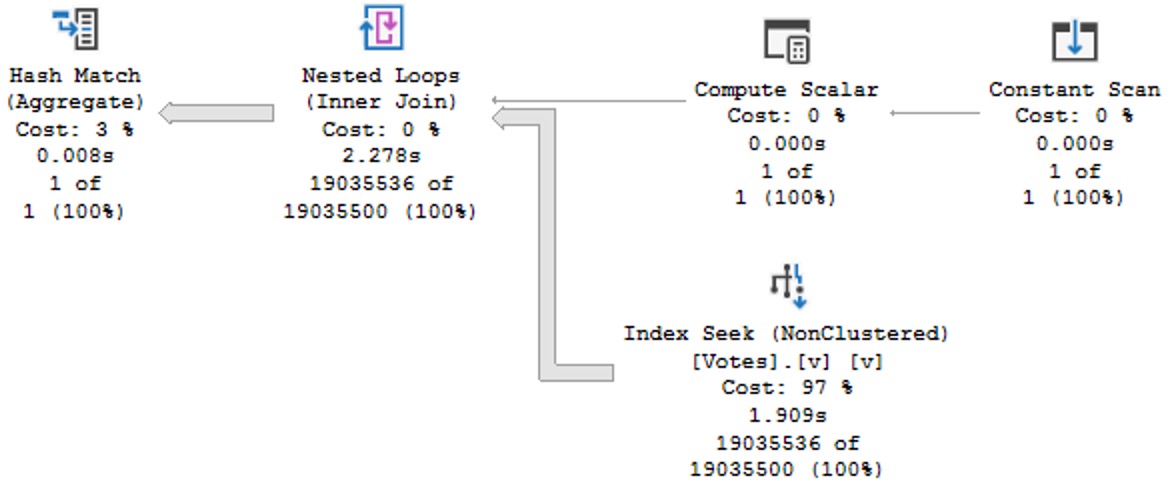
WHERE v.CreationDate >= DATETRUNC(YEAR, '20130101 00:00:00.000');
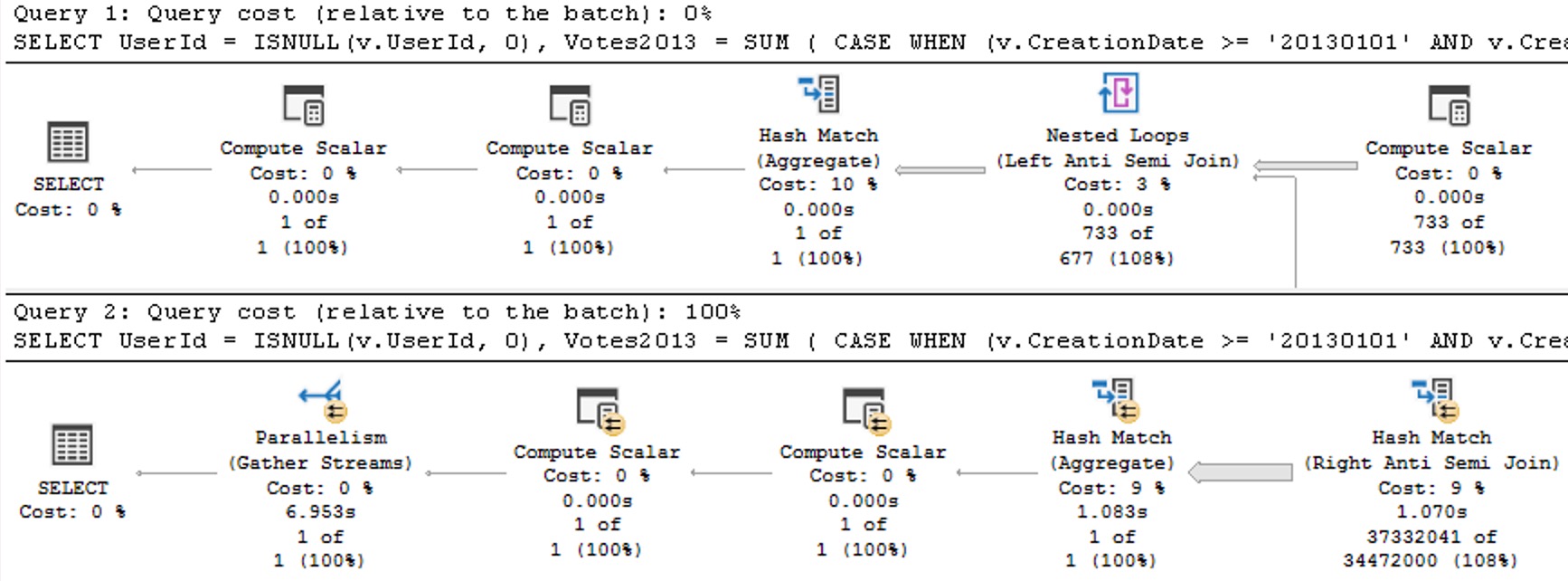
This has some… obvious performance issues compared to the above plan with correct data types.
query pan
Query Pranks
Frequent blog readers will not be surprised that wrapping a table column in the new DATETRUNC function yields old performance problems:
SELECT
    c = COUNT_BIG(*)
FROM dbo.Votes AS v
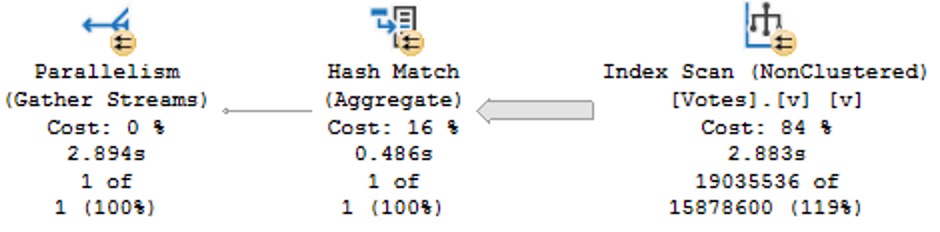
WHERE DATETRUNC(YEAR, v.CreationDate) >= CONVERT(datetime, '20130101 00:00:00.000');
This is particularly annoying because we’re truncating the column to the beginning of the year, which should be searchable in the index since that’s the sort order of the data in the index.
shined out
Like most functions, these are fine in the presentation layer, but terrible in the relational layer. There’s no warning about this performance degradation in the documentation, either at the example of using the function in a where clause, or in the final closing remarks.
But that’s par for the course with any of these built-in functions.
Thanks for reading!
Going Further
If this is the kind of SQL Server stuff you love learning about, you’ll love my training. Blog readers get 25% off the Everything Bundle — over 100 hours of performance tuning content. Need hands-on help? I offer consulting engagements from targeted investigations to ongoing retainers. Want a quick sanity check before committing to a full engagement? Schedule a call — no commitment required.
USE StackOverflow2013;
EXEC dbo.DropIndexes;
SET NOCOUNT ON;
DBCC FREEPROCCACHE;
GO


CREATE INDEX
   chunk
ON dbo.Posts
    (OwnerUserId, Score DESC)
INCLUDE
    (CreationDate, LastActivityDate)
WITH
    (MAXDOP = 8, SORT_IN_TEMPDB = ON, DATA_COMPRESSION = PAGE);
GO

CREATE OR ALTER VIEW
    dbo.PushyPaul
WITH SCHEMABINDING
AS
    SELECT
        p.OwnerUserId,
        p.Score,
        p.CreationDate,
        p.LastActivityDate,
        PostRank =
            DENSE_RANK() OVER
            (
               PARTITION BY
                  p.OwnerUserId
               ORDER BY
                  p.Score DESC
            )
    FROM dbo.Posts AS p;
GO

SELECT
    p.*
FROM dbo.PushyPaul AS p
WHERE p.OwnerUserId = 22656;
GO

CREATE OR ALTER PROCEDURE
    dbo.StinkyPete
(
    @UserId int
)
AS
SET NOCOUNT, XACT_ABORT ON;
BEGIN
    SELECT
        p.*
    FROM dbo.PushyPaul AS p
    WHERE p.OwnerUserId = @UserId;
END;
GO

EXEC dbo.StinkyPete
    @UserId = 22656;


/*Start Here*/

ALTER DATABASE
    StackOverflow2013
SET PARAMETERIZATION SIMPLE;

DBCC TRACEOFF
(
    4199,
    -1
);

ALTER DATABASE SCOPED CONFIGURATION
    SET QUERY_OPTIMIZER_HOTFIXES = OFF;


SELECT
    p.*
FROM dbo.PushyPaul AS p
WHERE p.OwnerUserId = 22656
AND   1 = (SELECT 1); /*Avoid trivial plan/simple parameterization*/


/*Let's cause a problem!*/
ALTER DATABASE
    StackOverflow2013
SET PARAMETERIZATION FORCED;

SELECT
    p.*
FROM dbo.PushyPaul AS p
WHERE p.OwnerUserId = 22656
AND   1 = (SELECT 1); /*Avoid trivial plan/simple parameterization*/


/*Can we fix the problem?*/
DBCC TRACEON
(
    4199,
    -1
);


SELECT
    p.*
FROM dbo.PushyPaul AS p
WHERE p.OwnerUserId = 22656
AND   1 = (SELECT 1); /*Avoid trivial plan/simple parameterization*/


/*That's kinda weird...*/
DBCC FREEPROCCACHE;


SELECT
    p.*
FROM dbo.PushyPaul AS p
WHERE p.OwnerUserId = 22656
AND   1 = (SELECT 1); /*Avoid trivial plan/simple parameterization*/


/*Turn Down Service*/
DBCC TRACEOFF
(
    4199,
    -1
);

SELECT
    p.*
FROM dbo.PushyPaul AS p
WHERE p.OwnerUserId = 22656
AND   1 = (SELECT 1); /*Avoid trivial plan/simple parameterization*/


/*Okay then.*/


/*I'm different.*/
ALTER DATABASE SCOPED CONFIGURATION
    SET QUERY_OPTIMIZER_HOTFIXES = ON;


SELECT
    p.*
FROM dbo.PushyPaul AS p
WHERE p.OwnerUserId = 22656
AND   1 = (SELECT 1); /*Avoid trivial plan/simple parameterization*/


/*Cleanup*/
ALTER DATABASE
    StackOverflow2013
SET PARAMETERIZATION SIMPLE;

ALTER DATABASE SCOPED CONFIGURATION
    SET QUERY_OPTIMIZER_HOTFIXES = OFF;

DBCC TRACEOFF
(
    4199,
    -1
);
Video Summary
In this video, I delve into a specific issue in Microsoft SQL Server 2017 CU30, where the documentation left out crucial details about how parameterized queries can affect query plans. I explain that running parameterized queries skips the cell on sequence project rule, preventing pushdown and causing full index scans instead of seeks. To demonstrate this, I walk through setting up an appropriate index and running both literal and parameterized queries to illustrate the difference in execution plans. The video also covers how trace flag 4199 affects query optimization but does not clear the plan cache, while the database scope configuration method does. This discrepancy highlights the importance of understanding these nuances for effective query tuning and optimization.
Full Transcript
Alright, I apologize if the lighting is a little bit weird. It’s a, there’s kind of a weird weather day out here, and the light is very bright and white, and then I turned on my ring light to try and compensate for that. I’m not sure how that’s gonna look, I’m not sure how that’s gonna go, but anyway. I, I, I need to follow up yesterday’s video about the, the, the Sell On Seek Project issue in Microsoft SQL Server 2017 CU30, because the, the, it turns out that the, the documentation in, in the, in this, in the cumulative update, shockingly, was, left, left some stuff to be desired, left, left some crucial elements out. Now.
This is still just saying the same thing that it said yesterday. In Microsoft SQL Server 2017, running parameterized query skips the cell on sequence project rule. Therefore, pushdown does not occur.
If you click on the little link there, nothing happens. It just takes you back to this, basically takes you to the bookmark of this issue. So that’s fun.
And that leaves out, like I said, a very crucial detail. Now, I’m going to walk back. Screw you, Mac Toolbar. Who does that?
Macs are the worst. If anyone ever tries to convince you to switch over to a Mac, burn them. Burn them like the witch they are.
Or warlock they are. Whatever it is. I don’t know. Anyway. Yesterday, we ran through this demo where we created an index that very well suits both the query that we’re going to run.
You know, owner user ID score, right? We got owner user ID and score and the windowing function. And creation date and last activity date in the select list. And later, we’re going to run some queries that filter on owner user ID with an equality predicate.
So this should be a totally seekable thing. So yesterday’s video, I showed you that if we use a literal value and we run that query, we get a nice seek. The literal value gets pushed down past the sequence project operator, seeks into the index.
But when we parameterize the query, that no longer happens. We scan the whole index, do the whole dense rank windowing function thing, and then filter out later. All right.
So we’re going to start here today. And we’re going to make sure that we are starting in the right place with none of this stuff going on. We want to make sure that none of these things are in effect when we run this. So I’m going to run this query, which is the same query that we ran yesterday, essentially.
But the reason I want to run it this way is with that one equals select one is to avoid SQL Server’s cost-based optimizer, trying to use a trivial plan or use simple parameterization on our query. And when we do that, we get this thing is a literal value.
And we can see that, you know, we have a sequence project, right? This is the SEQPRJ, part of that rule that gets skipped and all that. We got a couple of segments that I don’t really care about.
But then more importantly, we have the index seek into, again, our hero chunk. Anyway, let’s mess with that a little bit. Let’s cause a problem here.
So yesterday, I used a stored procedure to show you that a parameterized query would behave differently, even with the cumulative update installed, right? So let’s set parameterization to forced for this database.
And remember, under a simple parameterization, you pass in a literal value. It’s kind of up to the optimizer whether, you know, the trivial plan, simple parameterization kicks in and you actually get a simple parameterized query.
Under forced parameterization, under most circumstances, SQL Server will be like, oh, well, cool, we can throw this right at you, right? Turn that into a parameter magically for you.
All right. So now with parameterization force turned on, let’s run this thing. And this is where things sort of start to fall over, right? Because with forced parameterization turned on, we now have a query plan that looks like this.
I didn’t mean to have that tool tip pop up. Apologize there. But you’ll notice that this looks kind of funny, right?
Everything has these little spaces and stuff between and everything’s lowercase is God intended. So if anyone out there is watching and perhaps uses capitalized table aliases, perhaps this is, you know, a pretty good sign that that’s the wrong way to do things.
Just saying. But anyway, we have owner user ID equals at zero. And this is one of my favorite parts of simple parameterization is and at one equals select one.
So I’m not really sure where they came up with that. It’s just kind of cute for me. But anyway, the query plan looks a little bit different because we got this stuff up here to deal with that.
We actually have a startup expression predicate on the literal value one equaling the at one parameter. But, you know, that’s neither here nor there. The important part is down here where we now have that index scan that we saw yesterday.
Right? And that takes a couple seconds. And over here we have a filter operator. And that filter operator is where we figure out where that parameter value that we passed in gets applied.
Now, yesterday we had the stored procedure where it was called at user ID. Today the predicate is just going to be that at zero that we saw in the query text up here. Right?
That at zero. Okay. Okay. So, you know, when I was looking into it yesterday after I recorded the original video, something that threw me off and I thought was pretty funny was that, you know, a lot of these things are hidden behind trace flags. And now a very common one that a lot of these fixes get hidden behind is trace flag 4199.
4199 has been around, I don’t know, since like SQL Server. I think, I want to say 2008, but it might even be 2005. I refuse to try to find that literature at this point.
But 4199 hides a lot of the optimizer hot fixes that end up in SQL Server. So, this was like the first thing, like after I recorded yesterday’s video, I was like, okay, calm down. Send it yourself, Erik Darling.
Stop drinking. Well, that didn’t happen. But, so if you turn on this trace flag, something kind of funny happens at first. And that you turn on trace flag 4199 and you run the query again and you get the same query plan. All right.
And this might throw you off. All right. And why might this throw you off? Good question. I was just about to ask that. That was a great question. This is the next one that you answer in the video. So, the reason why you get the same query plan, this whole thing, is that turning on trace flag 4199, which enables optimizer hot fixes, doesn’t actually clear out the plan cache.
No, it does not. So, a trace flag that directly affects optimizer behavior does not clear out the plan cache. Why?
I don’t know. I’m going to pause for a moment. Hope I don’t make any mouth sounds with that. Do hate a mouth sound. But, let’s clear out the plan cache then.
Need a little pick me up there. Let’s clear out the plan cache and rerun this. My favorite characters ever is a rerun. But now, with trace flag 4199 enabled and a fresh plan generated for this query, we get the behavior that we would expect to see based on the documentation, which does not mention trace flag 4199. Out of the box with a little modification to the box there.
Tiny little difference. So, good, right? Sort of, I guess.
No one told you that. And that’s kind of depressing. But, let’s turn off trace flag 4199. Just to prove to you that that is the case, that 4199 does not do anything to the plan cache.
We turn that off, we’re actually still going to get the same query plan as last time, right? We get the seek plan again. So, that’s kind of annoying.
One thing that is different, and one thing that does clear out the plan cache and allow you to get the plan is to use the altered database scope configuration method of turning on optimizer hotfixes. Which is probably the preferred method, to be honest. Just because, you know, turning trace flags on and off is a little tricky.
You know, they don’t persevere restarts unless you, you know, set them at SQL Server startup. Or you have a startup store procedure run to flick those switches on. But, even with, like, stuff like trace flag 8048, you know, the startup procedure option isn’t quite as good because a bunch of other stuff gets initialized first.
So, anyway. Story for a different day. But, anyway.
So, you turn on optimizer hotfixes and all of it. And, you know, you will get the fresh plan and the plan cache and clear it out and get the seek plan and all that stuff. So, that’s sort of it for this one. If you want to see your parameters get pushed past the sequence project operator, you are going to need to enable trace flag 4199 and clear out the plan cache.
Or use the database scope configuration to set hotfixes on. So, moral of the story here. Well, I guess there’s maybe two or three of them.
We’ll see how many I think of as I start talking. One, Microsoft CU documentation is crap. Real bad.
Two, trace flag 4199 does not clear out the plan cache despite the fact that it directly affects the way the optimizer handles queries. Three, the database scope configuration for query optimizer hotfixes does clear out the plan cache. And, I guess, four, why the hell wouldn’t you make both of those things behave the same way?
Three, why wouldn’t a trace flag that changes optimizer behavior clear out the plan cache so that you can immediately see that optimizer behavior? That’s a little bit weird for me. I mean, I know, like, the database scope configuration thing, that cropped up around SQL Server 2016, I think.
So, we had, let’s see, like, probably three, four versions, major versions of SQL Server between, of trace flag 4199 not clearing out the plan cache. That’s, ain’t that cute as a boot. Anyway, I’m going to go finish this espresso, we’ll call it, and, I don’t know, wait five years for this video to render on my piece of crap Macintosh computer.
And, that’ll be, that’ll be my day. Just spend the day tending to the fire that, that occurs when, when I render a video. So, anyway, you all have a wonderful Saturday, or whatever day you end up watching this on.
I hope that, hope that you, hope that you are living your best lives. Thanks for watching.
Going Further
If this is the kind of SQL Server stuff you love learning about, you’ll love my training. Blog readers get 25% off the Everything Bundle — over 100 hours of performance tuning content. Need hands-on help? I offer consulting engagements from targeted investigations to ongoing retainers. Want a quick sanity check before committing to a full engagement? Schedule a call — no commitment required.
There are some code comments you see that really set the stage for how tuning a query is going to go.
Usually one misgiving about how SQL Server works gives way to a whole levee-breaking bevy of other ones and three days later you can’t feel your legs but dammit it’s done.
Okay, maybe it was three hours, but it felt like three days. Something about the gravitation pull of these black hole queries.
One fix I’ve been wishing for, or wish I’ve been fixing for, is a cure for local variables. I’d even be cool if Forced Parameterization was that cure, but you know…
Time will tell.
Husk
Let’s say we’ve got this stored procedure, which does something similar to the “I’m gonna fix parameter sniffing with a local variable hey why is everything around me turning to brimstone before my very eyes?” idea, but with… less of an end-of-times vibe.
CREATE OR ALTER PROCEDURE
    dbo.IndexTuningMaster
(
    @OwnerUserId int,
    @ParentId int,
    @PostTypeId int
)
AS
BEGIN
SET NOCOUNT, XACT_ABORT ON;

    /*Someone passed in bad data and we got a bad query plan,
      and we have to make sure that doesn't happen again*/

    DECLARE
        @ParentIdFix int =
            CASE
                WHEN @ParentId < 0
                THEN 0
                ELSE @ParentId
            END;

    SELECT TOP (1)
        p.*
    FROM dbo.Posts AS p
    WHERE p.ParentId = @ParentIdFix
    AND   p.PostTypeId = @PostTypeId
    AND   p.OwnerUserId = @OwnerUserId
    ORDER BY
        p.Score DESC,
        p.Id DESC;

END;
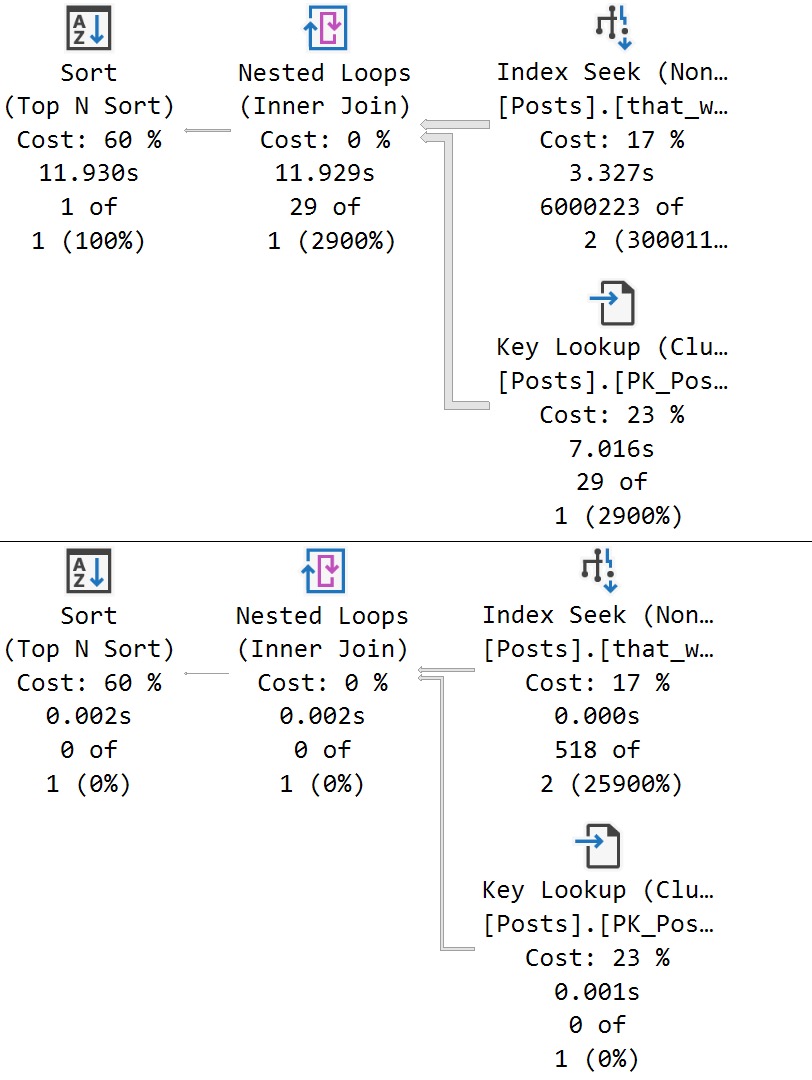
We get a super low guess for both. obviously that guess hurts a large set of matched data far worse than a small one, but the important thing here is that both queries receive the same bad guess.
This is a direct side effect of the local variable’s poor estimate, which PSP isn’t quite yet ready to go up against.
Thanks for reading!
Going Further
If this is the kind of SQL Server stuff you love learning about, you’ll love my training. Blog readers get 25% off the Everything Bundle — over 100 hours of performance tuning content. Need hands-on help? I offer consulting engagements from targeted investigations to ongoing retainers. Want a quick sanity check before committing to a full engagement? Schedule a call — no commitment required.