When one thinks of effective communicators, indexes aren’t usually at the top of the list. And for good reason!
They’re more the strong, silent type. Like Gary Cooper, as a wiseguy once said. But they do need to talk to each other, sometimes.
For this post, I’m going to focus on tables with clustered indexes, but similar communication can happen with the oft-beleaguered heap tables, too.
Don’t believe me? Follow along.
Clustered
This post is going to focus on a table called Users, which has a bunch of columns in it, but the important thing to start with is that it has a clustered primary key on a column called Id.
Shocking, I know.
 CONSTRAINT PK_Users_Id
 PRIMARY KEY CLUSTERED
(
    Id ASC
)
But what does adding that do, aside from put the table into some logical order?
The answer is: lots! Lots and lots. Big lots (please don’t sue me).
Inheritance
The first thing that comes to my mind is how nonclustered indexes inherit that clustered index key column.
Let’s take a look at a couple examples of that. First, with a couple single key column indexes. The first one is unique, the second one is not.
/*Unique*/
CREATE UNIQUE INDEX
    whatever_uq
ON dbo.Users
    (AccountId)
WITH
    (MAXDOP = 8, SORT_IN_TEMPDB = ON, DATA_COMPRESSION = PAGE);


/*Not unique*/
CREATE INDEX
    whatever_nuq
ON dbo.Users
    (AccountId)
WITH
    (MAXDOP = 8, SORT_IN_TEMPDB = ON, DATA_COMPRESSION = PAGE);
For these queries, pay close attention to the where clause. We’re searching on both the AccountId column that is the only column defined in our index, and the Id column, which is the only column in our clustered index.
SELECT
    records = COUNT(*)
FROM dbo.Users AS u WITH (INDEX = whatever_uq)
WHERE u.AccountId = 1
AND   u.Id = 1;

SELECT
    records = COUNT(*)
FROM dbo.Users AS u WITH (INDEX = whatever_nuq)
WHERE u.AccountId = 1
AND   u.Id = 1;
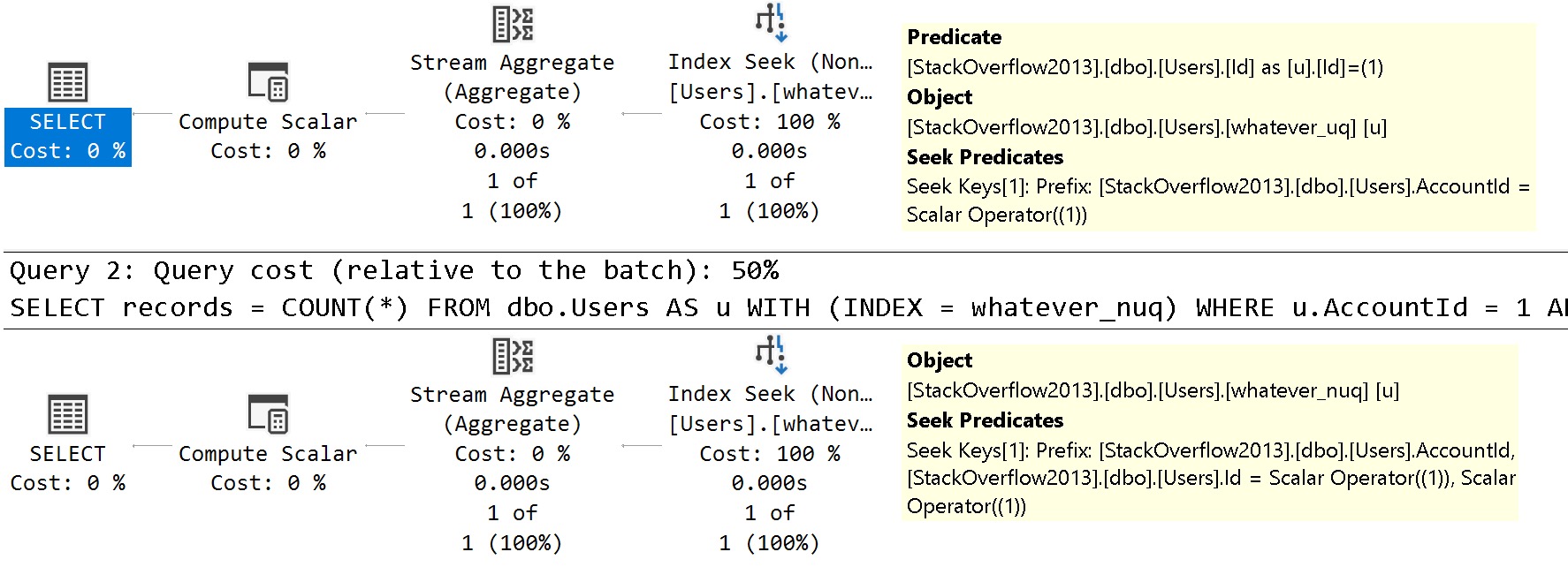
The query plans are slightly different in how the searches can be applied to each index.
dedicated
See the difference?
In the unique index plan, there is one seek predicate to AccountId, and one residual predicate on Id
In the non-unique index plan, there are two seeks, both to AccountId and to Id
The takeaway here is that unique nonclustered indexes inherit clustered index key column(s) are includes, and non-unique nonclustered indexes inherit them as additional key columns.
Fun!
Looky, Looky
Let’s create two nonclustered indexes on different columns. You know, like normal people. Sort of.
I don’t usually care for single key column indexes, but they’re great for simple demos. Remember that, my lovelies.
CREATE INDEX
    l
ON dbo.Users
    (LastAccessDate)
WITH
    (MAXDOP = 8, SORT_IN_TEMPDB = ON, DATA_COMPRESSION = PAGE);

CREATE INDEX
    c
ON dbo.Users
    (CreationDate)
WITH
    (MAXDOP = 8, SORT_IN_TEMPDB = ON, DATA_COMPRESSION = PAGE);
How will SQL Server cope with all that big beautiful index when this query comes along?
SELECT
    c = COUNT_BIG(*)
FROM dbo.Users AS u
WHERE u.CreationDate  >= '20121231'
AND   u.LastAccessDate < '20090101';
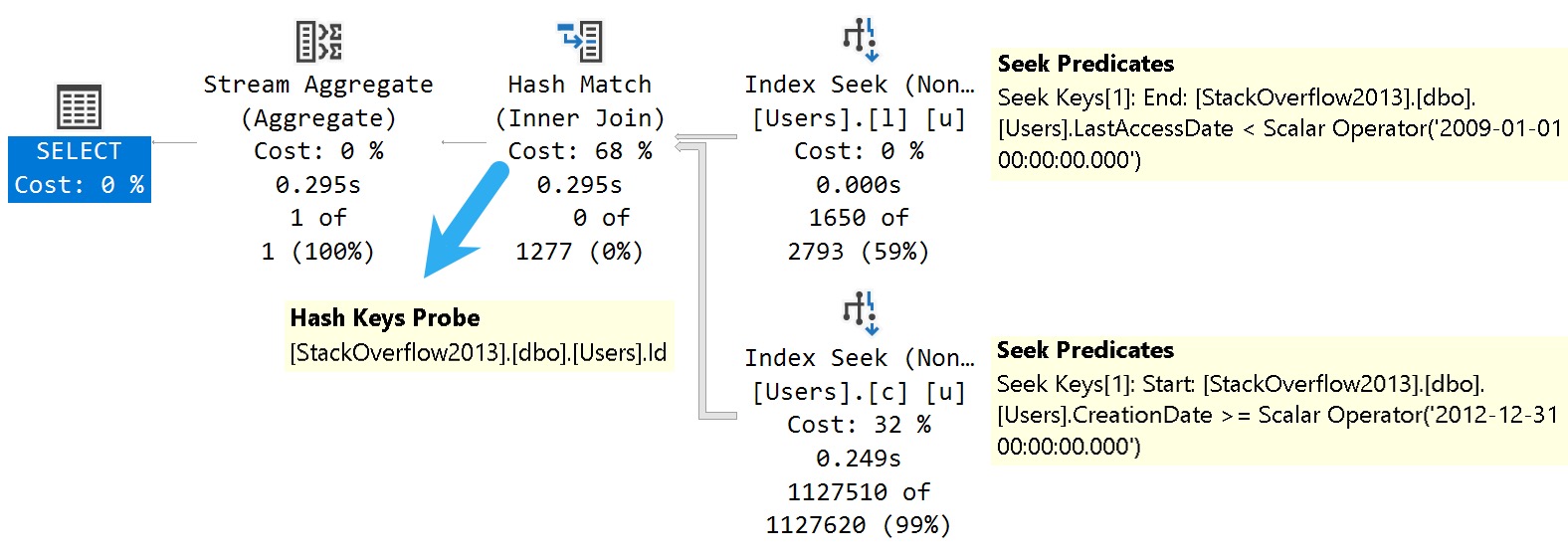
How about this bold and daring query plan?
indexified!
SQL Server joins two nonclustered indexes together on the clustered index column that they both inherited. Isn’t that nice?
Danes
More mundanely, this is the mechanism key lookups use to work, too. If we change the last query a little bit, we can see a great example of one.
SELECT
    u.*
FROM dbo.Users AS u
WHERE u.CreationDate  >= '20121231'
AND   u.LastAccessDate < '20090101';
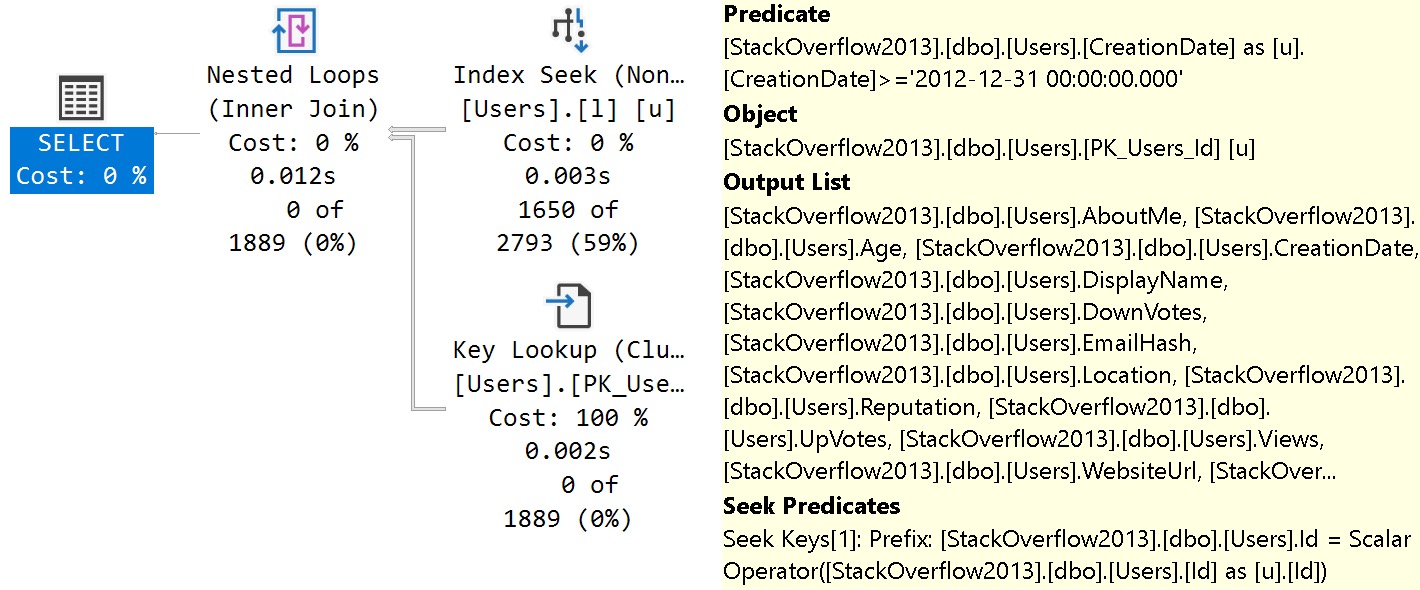
Selecting all the columns from the Users table, we get a different query plan.
uplook
The tool tip pictured above is detail from the Key Lookup operator. From the top down:
Predicate is the additional search criteria that we couldn’t satisfy with our index on Last Access Date
Object is the index being navigated (clustered primary key)
Output list is all the columns we needed from the index
Seek Predicates define the relationship between the clustered and nonclustered index, in this case the Id column
And this is how indexes talk to each other in SQL Server. Yay.
Thanks for reading!
Going Further
If this is the kind of SQL Server stuff you love learning about, you’ll love my training. Blog readers get 25% off the Everything Bundle — over 100 hours of performance tuning content. Need hands-on help? I offer consulting engagements from targeted investigations to ongoing retainers. Want a quick sanity check before committing to a full engagement? Schedule a call — no commitment required.
In yesterday’s post, I showed you a function rewrite from Scalar to Inline Table Valued, and gave you a couple example calls.
Now, if this is all you’re doing with a function, there’s absolutely no need to rewrite them.
SELECT
    cl.*
FROM dbo.CountLetters('1A1A1A1A1A') AS cl;

SELECT
    CountLetters =
        dbo.CountLetters_Bad('1A1A1A1A1A');
If you’re doing something like this, and maybe assigning it to a variable or using it to guide some branching logic, don’t you sweat it for one single solitary second.
You may want to make sure whatever code inside the function runs well, but changing the type of function here isn’t going to improve things.
More realistically, though, you’re going to be calling functions as part of a larger query.
Second To None
Let’s say you’re doing something a bit like this:
SELECT
    u.DisplayName,
    TotalScore =
        SUM(p.Score * 1.),
    Thing =
        dbo.CountLetters_Bad(u.DisplayName)
FROM dbo.Users AS u
JOIN dbo.Posts AS p
    ON p.OwnerUserId = u.Id
WHERE EXISTS
(
    SELECT
        1/0
    FROM dbo.Votes AS v
    WHERE p.Id = v.PostId
)
AND u.Reputation >= 100000
GROUP BY
    u.DisplayName
ORDER BY
    TotalScore DESC;
It’s a far different scenario than just assigning the output of a Scalar UDF to a variable or using it to guide some branching logic.
Brooklyn Zoo
A few minor syntax changes to the function and to how the query calls it can make a big difference.
SELECT
    u.DisplayName,
    TotalScore =
        SUM(p.Score * 1.),
    Thing =
        (SELECT * FROM dbo.CountLetters(u.DisplayName))
FROM dbo.Users AS u
JOIN dbo.Posts AS p
    ON p.OwnerUserId = u.Id
WHERE EXISTS
(
    SELECT
        1/0
    FROM dbo.Votes AS v
    WHERE p.Id = v.PostId
)
AND u.Reputation >= 100000
GROUP BY
    u.DisplayName
ORDER BY
    TotalScore DESC;
Since this is a table valued function, you have to ask for results from it like you’d ask for results from a table.
As long as someone wins who you’re rooting for. But here, no one’s rooting for scalar functions. They’re just unlovable.
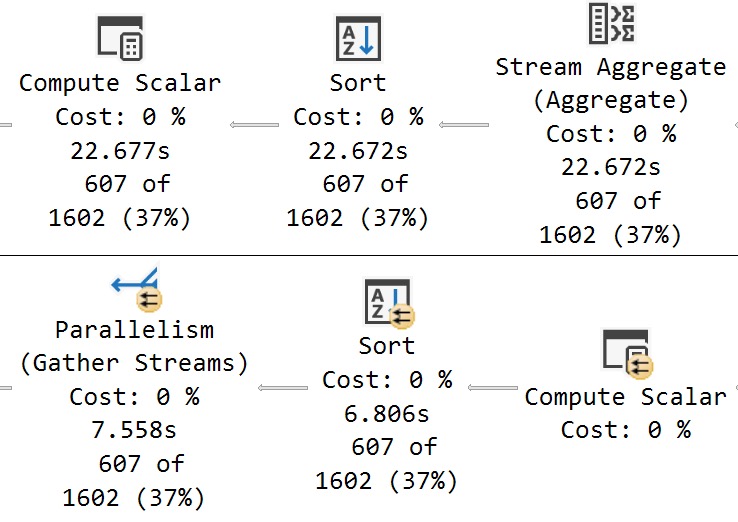
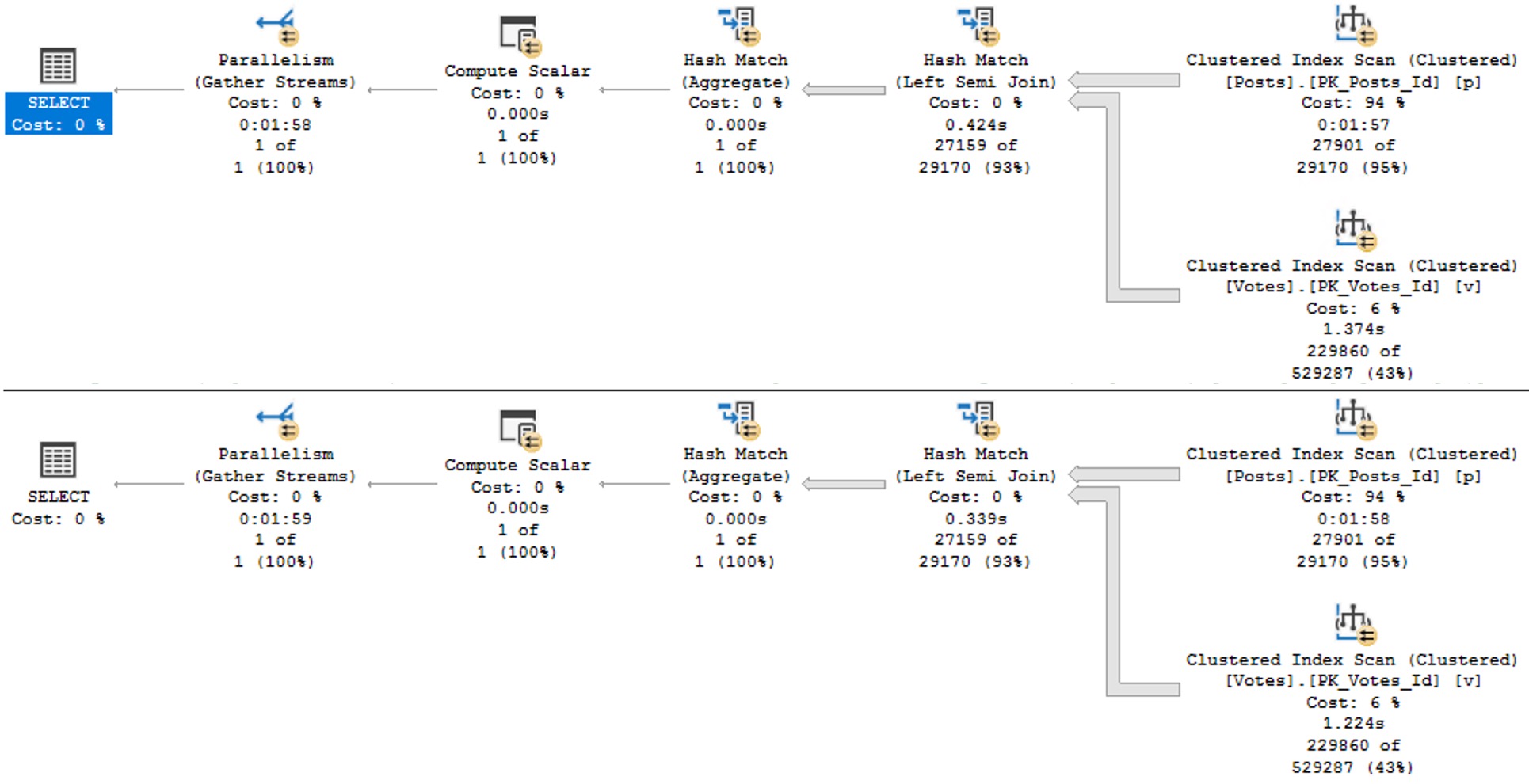
I’m going to show you the very end of these plans to see the timing differences.
1945
The Scalar UDF plan takes ~23 seconds, and the inline TVF plan takes 7.5 seconds.
And this is why testing certain linguistic elements in SQL needs to be done realistically. Just testing a single value would never reveal performance issues.
Thanks for reading!
Going Further
If this is the kind of SQL Server stuff you love learning about, you’ll love my training. Blog readers get 25% off the Everything Bundle — over 100 hours of performance tuning content. Need hands-on help? I offer consulting engagements from targeted investigations to ongoing retainers. Want a quick sanity check before committing to a full engagement? Schedule a call — no commitment required.
Imagine you have a rather complicated query that you want to abstract into a simple query for your less-than-with-it end users.
A view is probably a pretty good way of doing that, since you can shrink your preposterously-constructed tour through every table in the schema down to a simple select-from-one-object.
The problem is that now everyone expects it to perform well throughout all time, under any circumstances, come what may. It’s sort of like how your parents expect dinner to be $20 and tips to be 20% regardless of where they go or what they order.
Lobster? $5.
Steak? $5.
Bottle of wine? $5.
Any dessert you can imagine? $5.
Tip? Gosh, mister, another $5?
I sincerely apologize to anyone who continues to live in, or who moved to Europe to avoid tipping.
If you’d like some roommates, I have some parents you’d get along with.
Viewfinder
Creating a view in SQL Server doesn’t do anything special for you, outside of not making people remember your [reference to joke above] query.
You can put all manner of garbage in your view, make it reference another half dozen views full of garbage, and expect sparkling clean query performance every time.
Guess what happens?
Reality.
When you use views, the only value is abstraction. You still need to be concerned with how the query is written, and if the query has decent indexes to support it. In other words, you can’t just write a view and expect the optimizer to do anything special with it.
SQL Server doesn’t cache results, it only caches raw data. If you want the results of a view to be saved, you need to index it.
Take these two dummy queries, one against a created view, and the other an ad hoc query identical to what’s in the view:
CREATE OR ALTER VIEW
    dbo.just_a_query
WITH SCHEMABINDING
AS
SELECT
    p.OwnerUserId,
    TotalScore =
        ISNULL
        (
            SUM(p.Score),
            0
        ),
    TotalPosts =
        COUNT_BIG(*)
FROM dbo.Posts AS p
WHERE EXISTS
      (
          SELECT
              1/0
          FROM dbo.Votes AS v
          WHERE
              v.PostId = p.Id
      )
GROUP BY
    p.OwnerUserId;
GO

SELECT
    p.OwnerUserId,
    TotalScore =
        ISNULL
        (
            SUM(p.Score),
            0
        ),
    TotalPosts =
        COUNT_BIG(*)
FROM dbo.Posts AS p
WHERE EXISTS
      (
          SELECT
              1/0
          FROM dbo.Votes AS v
          WHERE
              v.PostId = p.Id
      )
AND
    p.OwnerUserId = 22656
GROUP BY
    p.OwnerUserId;
GO

SELECT
    jaq.*
FROM dbo.just_a_query AS jaq
WHERE
    jaq.OwnerUserId = 22656;
GO
The plans are identical, and identically bad. Why? Because I didn’t try very hard, and there’s no good indexes for them.
Remember when I said that’s important?
avenues lined with trees
Keep in mind this is a query with some batch mode involved, so it could be a lot worse. But both instances complete within a second or so of each other.
The horrible thing is that indexed views are so strict in SQL Server that we can’t even create one on the view in question. That really sucks. We get this error.
CREATE UNIQUE CLUSTERED INDEX
    cuqadoodledoo
    ON dbo.not_just_a_query
(
    OwnerUserId
)
WITH
(
    SORT_IN_TEMPDB = ON,
    DATA_COMPRESSION = PAGE
);
Msg 10127, Level 16, State 1, Line 95
Cannot create index on view “StackOverflow2013.dbo.not_just_a_query” because it contains one or more subqueries.
Consider changing the view to use only joins instead of subqueries. Alternatively, consider not indexing this view.
Alternatively, go screw yourself. Allowing joins but not exists is somewhat baffling, since they’re quite different in that joins allow for multiple matches but exists does not. We’d have to do a lot of fancy grouping footwork to get equivalent results with a join, since distinct isn’t allowed in an indexed view in SQL Server either.
We could also pull the exists out of the view, add the Id column to the select list, group by that and OwnerUserId, index both of them, and… yeah nah.
I have no idea who’s in charge of indexed views in the product at this point, but a sufficiently lubricated republic would likely come calling with tar and feathers in the face of this injustice.
This is basic query syntax. It’s not like uh… min, max, sum, avg, except, intersect, union, union all, cross apply, outer apply, outer joins, or um, hey, is it too late for me to change careers?
The Pain In Pain Falls Painly On The Pain
You may have ended up here looking to learn all the minute differences between views and indexed views in SQL Server.
You may be disappointed in reading this post, but I can assure you that you’re not nearly as disappointed in this post as I am with indexed views in SQL Server.
They’re like one of those articles about flying cars where you read the headline and you’re like “woah, I’m living in the future”, but then three paragraphs in you find out the cars don’t really fly or drive and they might actually just be igloos that are only big enough for an Italian Greyhound or a paper plane that the author’s kid glued wheels to.
If this is the kind of SQL Server stuff you love learning about, you’ll love my training. Blog readers get 25% off the Everything Bundle — over 100 hours of performance tuning content. Need hands-on help? I offer consulting engagements from targeted investigations to ongoing retainers. Want a quick sanity check before committing to a full engagement? Schedule a call — no commitment required.
When you’re trying to figure out how to store string data, it often seems easiest to just choose an extra long — even MAX — data type to avoid future truncation errors.
Even if you’re storing strings with a known, absolute length, developers may choose to not enforce that in the application, either via a drop down menu or other form of validation.
And so to avoid errors when users try to put their oh-so-important data in their oh-so-expensive database, we get columns added to tables that can fit a galaxy of data in them, when we only need to store an ashtray worth of data.
While getting data into those columns is relatively easy — most application inserts are single rows — getting data out of those columns can be quite painful, whether it’s searching or just presenting in the select portion of a query.
Let’s look at a couple simple examples of how that happens.
Search Engine
Let’s take a query like this one:
SELECT TOP (20)
    p.Id,
    p.Title,
    p.Body
FROM dbo.Posts AS p
WHERE p.Body LIKE N'SQL Server%';
The Body column in the Posts table is nvarchar and MAX, but the same thing would happen with a varchar column.
If you need a simple way to remember how to pronounce those data types, just remember to Pahk yah (n)vahcah in Hahvahd Yahd.
Moving on – while much has been written about leading wildcard searches (that start with a % sign), we don’t do that here. Also, in general, using charindex or patindex instead of leading wildcard like searching won’t buy you all that much (if anything at all).
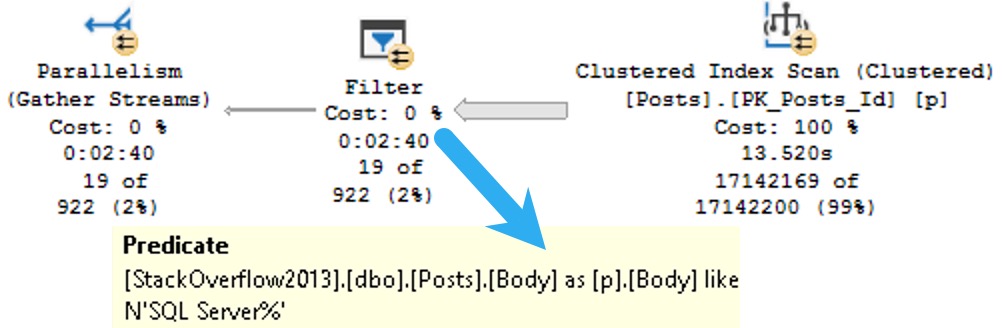
Anyway, since you can’t put a MAX datatype in the key of an index, part of the problem with them is that there’s no way to efficiently organize the data for searching. Included columns don’t do that, and so we end up with a query plan that looks some-such like this:
ouch in effect
We spend ~13.5 seconds scanning the clustered index on the Posts table, then about two minutes and twenty seven seconds (minus the original 13.5) applying the predicate looking for posts that start with SQL Server.
That’s a pretty long time to track down and return 19 rows.
Let’s change the query a little bit and look at how else big string columns can cause problems.
Memory Bank
Rather than search on the Body column, let’s select some values from it ordered by the Score column.
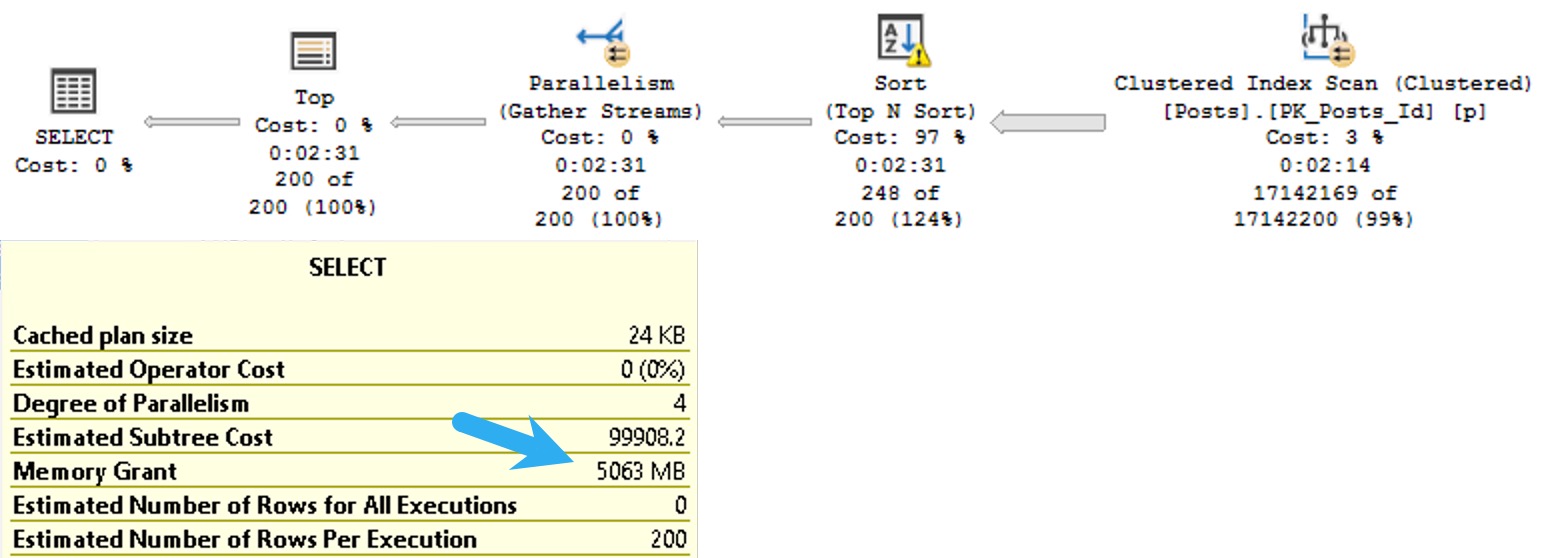
Since Score isn’t indexed, it’s not sorted in the database. That means SQL Server needs to ask for memory to put the data we’re selecting in the order we’re asking for.
SELECT TOP (200)
    p.Body
FROM dbo.Posts AS p
ORDER BY p.Score DESC;
The plan for this query asks for a 5GB memory grant:
quietly
I know what you’re thinking: the Body column probably has some pretty big data in it, and you’re right. In this case, it’s the right data type to use.
The bad news is that SQL Server will makes the same memory grant estimation based on the size of the data we need to sort whether or not it’s a good choice.
If this is the kind of SQL Server stuff you love learning about, you’ll love my training. Blog readers get 25% off the Everything Bundle — over 100 hours of performance tuning content. Need hands-on help? I offer consulting engagements from targeted investigations to ongoing retainers. Want a quick sanity check before committing to a full engagement? Schedule a call — no commitment required.
Several weeks back, I blogged about a missed opportunity with the new parameter sensitive plan feature. At the time, I thought that there was indeed sufficient skewness available to trigger the additional plan variants, and apparently some nice folks at Microsoft agreed.
I’m not gonna go into a lot of depth here, because I’m writing this while traveling, but we get the (mostly) desired outcome of two different plans being generated. Each plan is more suitable to the amount of data that the query has to process.
If this is the kind of SQL Server stuff you love learning about, you’ll love my training. Blog readers get 25% off the Everything Bundle — over 100 hours of performance tuning content. Need hands-on help? I offer consulting engagements from targeted investigations to ongoing retainers. Want a quick sanity check before committing to a full engagement? Schedule a call — no commitment required.
Why? Because that’s the way it’s implemented in Postgres and DB2. Oracle, of course, just calls it TRUNC.
So, while it’s nice to have (what appears to be) the same behavior, it doesn’t exactly help to not have a 1:1 calling equivalent to other platforms.
I assume most of these additions to T-SQL are for cross-platform development and migrations.
Of course, Microsoft being so gosh darn late to this game means folks have probably been rolling-their-own versions of these functions for years.
If they went and called their system function DATE_TRUNC or even TRUNC, they might have some object naming issues to contend with.
Well, okay. But how does it work?
Childish Games
Here are some quick examples of how you call it.
SELECT TOP (10)
    u.DisplayName,
    year =
        DATETRUNC(YEAR, u.LastAccessDate),
    quarter =
        DATETRUNC(QUARTER, u.LastAccessDate),
    month =
        DATETRUNC(MONTH, u.LastAccessDate),
    dayofyear =
        DATETRUNC(DAYOFYEAR, u.LastAccessDate),
    day =
        DATETRUNC(DAY, u.LastAccessDate),
    week =
        DATETRUNC(WEEK, u.LastAccessDate),
    iso_week =
        DATETRUNC(ISO_WEEK, u.LastAccessDate),
    hour =
        DATETRUNC(HOUR, u.LastAccessDate),
    minute =
        DATETRUNC(MINUTE, u.LastAccessDate),
    second =
        DATETRUNC(SECOND, u.LastAccessDate),
    millisecond =
        DATETRUNC(MILLISECOND, u.LastAccessDate),
    microsecond =
        DATETRUNC(MICROSECOND, u.LastAccessDate) /*Doesn't work with datetime because there are no microseconds*/
FROM dbo.Users AS u;
And here are the results:
workin’
The thing to note here is that there’s no rounding logic involved. You just go to the start of whatever unit of time you choose. Of course, this doesn’t seem to do anything to the millisecond portion of DATETIME, because it’s not precise enough.
But for anyone out there who was hoping for a SOMONTH function to complement the EOMONTH function, you get this instead.
Works well enough!
But does it perform, Darling?
UnSARGable?
To make any test like this worthwhile, we need an index to make data searchable.
CREATE INDEX
    v
ON dbo.Votes
    (CreationDate)
WITH
(
    SORT_IN_TEMPDB = ON,
    DATA_COMPRESSION = PAGE
);
You know, because that’s what they do. To make searching faster. Hello.
So look, under these perfect circumstances, everything performs well. But we have to do a lot of typing.
SELECT
    c = COUNT_BIG(*)
FROM dbo.Votes AS v
WHERE v.CreationDate >= DATETRUNC(YEAR, CONVERT(datetime, '20130101 00:00:00.000'));
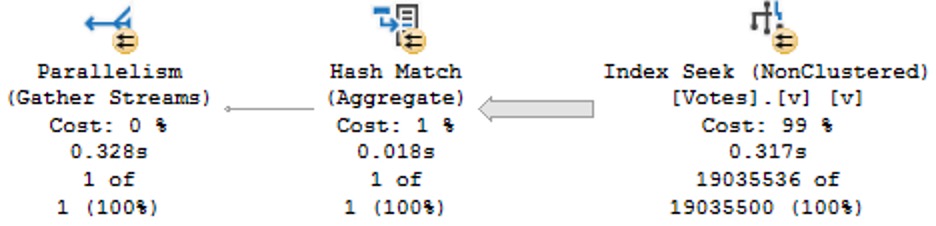
Note here that we’re working on a literal value, not a column value, and we have to tell the datetrunc function which type we want via the convert function so that we get a simple seek plan:
SELECT
    c = COUNT_BIG(*)
FROM dbo.Votes AS v
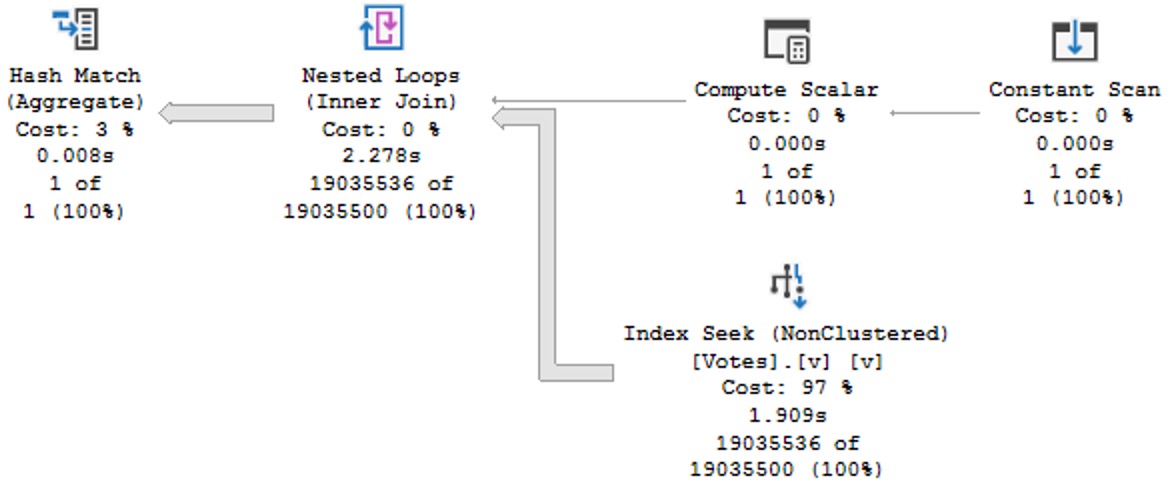
WHERE v.CreationDate >= DATETRUNC(YEAR, '20130101 00:00:00.000');
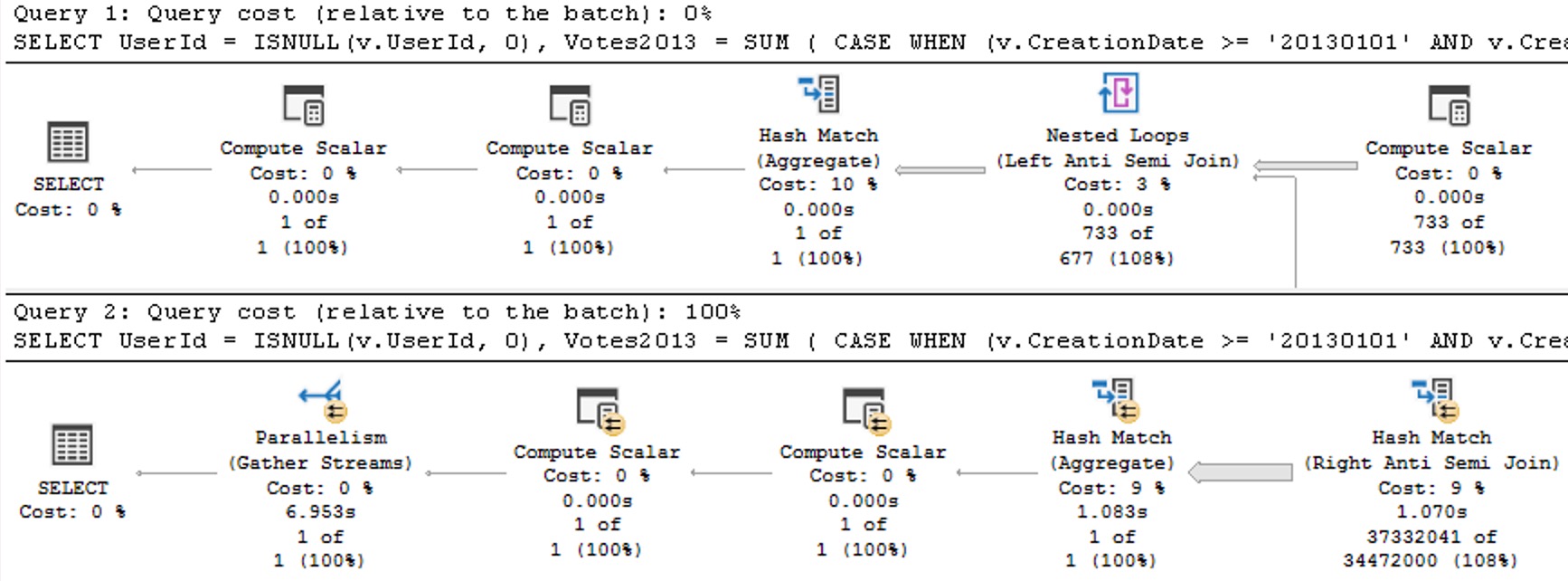
This has some… obvious performance issues compared to the above plan with correct data types.
query pan
Query Pranks
Frequent blog readers will not be surprised that wrapping a table column in the new DATETRUNC function yields old performance problems:
SELECT
    c = COUNT_BIG(*)
FROM dbo.Votes AS v
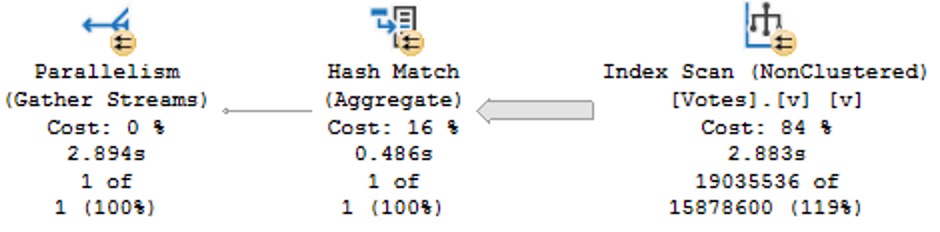
WHERE DATETRUNC(YEAR, v.CreationDate) >= CONVERT(datetime, '20130101 00:00:00.000');
This is particularly annoying because we’re truncating the column to the beginning of the year, which should be searchable in the index since that’s the sort order of the data in the index.
shined out
Like most functions, these are fine in the presentation layer, but terrible in the relational layer. There’s no warning about this performance degradation in the documentation, either at the example of using the function in a where clause, or in the final closing remarks.
But that’s par for the course with any of these built-in functions.
Thanks for reading!
Going Further
If this is the kind of SQL Server stuff you love learning about, you’ll love my training. Blog readers get 25% off the Everything Bundle — over 100 hours of performance tuning content. Need hands-on help? I offer consulting engagements from targeted investigations to ongoing retainers. Want a quick sanity check before committing to a full engagement? Schedule a call — no commitment required.
USE StackOverflow2013;
EXEC dbo.DropIndexes;
SET NOCOUNT ON;
DBCC FREEPROCCACHE;
GO


CREATE INDEX
   chunk
ON dbo.Posts
    (OwnerUserId, Score DESC)
INCLUDE
    (CreationDate, LastActivityDate)
WITH
    (MAXDOP = 8, SORT_IN_TEMPDB = ON, DATA_COMPRESSION = PAGE);
GO

CREATE OR ALTER VIEW
    dbo.PushyPaul
WITH SCHEMABINDING
AS
    SELECT
        p.OwnerUserId,
        p.Score,
        p.CreationDate,
        p.LastActivityDate,
        PostRank =
            DENSE_RANK() OVER
            (
               PARTITION BY
                  p.OwnerUserId
               ORDER BY
                  p.Score DESC
            )
    FROM dbo.Posts AS p;
GO

SELECT
    p.*
FROM dbo.PushyPaul AS p
WHERE p.OwnerUserId = 22656;
GO

CREATE OR ALTER PROCEDURE
    dbo.StinkyPete
(
    @UserId int
)
AS
SET NOCOUNT, XACT_ABORT ON;
BEGIN
    SELECT
        p.*
    FROM dbo.PushyPaul AS p
    WHERE p.OwnerUserId = @UserId;
END;
GO

EXEC dbo.StinkyPete
    @UserId = 22656;


/*Start Here*/

ALTER DATABASE
    StackOverflow2013
SET PARAMETERIZATION SIMPLE;

DBCC TRACEOFF
(
    4199,
    -1
);

ALTER DATABASE SCOPED CONFIGURATION
    SET QUERY_OPTIMIZER_HOTFIXES = OFF;


SELECT
    p.*
FROM dbo.PushyPaul AS p
WHERE p.OwnerUserId = 22656
AND   1 = (SELECT 1); /*Avoid trivial plan/simple parameterization*/


/*Let's cause a problem!*/
ALTER DATABASE
    StackOverflow2013
SET PARAMETERIZATION FORCED;

SELECT
    p.*
FROM dbo.PushyPaul AS p
WHERE p.OwnerUserId = 22656
AND   1 = (SELECT 1); /*Avoid trivial plan/simple parameterization*/


/*Can we fix the problem?*/
DBCC TRACEON
(
    4199,
    -1
);


SELECT
    p.*
FROM dbo.PushyPaul AS p
WHERE p.OwnerUserId = 22656
AND   1 = (SELECT 1); /*Avoid trivial plan/simple parameterization*/


/*That's kinda weird...*/
DBCC FREEPROCCACHE;


SELECT
    p.*
FROM dbo.PushyPaul AS p
WHERE p.OwnerUserId = 22656
AND   1 = (SELECT 1); /*Avoid trivial plan/simple parameterization*/


/*Turn Down Service*/
DBCC TRACEOFF
(
    4199,
    -1
);

SELECT
    p.*
FROM dbo.PushyPaul AS p
WHERE p.OwnerUserId = 22656
AND   1 = (SELECT 1); /*Avoid trivial plan/simple parameterization*/


/*Okay then.*/


/*I'm different.*/
ALTER DATABASE SCOPED CONFIGURATION
    SET QUERY_OPTIMIZER_HOTFIXES = ON;


SELECT
    p.*
FROM dbo.PushyPaul AS p
WHERE p.OwnerUserId = 22656
AND   1 = (SELECT 1); /*Avoid trivial plan/simple parameterization*/


/*Cleanup*/
ALTER DATABASE
    StackOverflow2013
SET PARAMETERIZATION SIMPLE;

ALTER DATABASE SCOPED CONFIGURATION
    SET QUERY_OPTIMIZER_HOTFIXES = OFF;

DBCC TRACEOFF
(
    4199,
    -1
);
Video Summary
In this video, I delve into a specific issue in Microsoft SQL Server 2017 CU30, where the documentation left out crucial details about how parameterized queries can affect query plans. I explain that running parameterized queries skips the cell on sequence project rule, preventing pushdown and causing full index scans instead of seeks. To demonstrate this, I walk through setting up an appropriate index and running both literal and parameterized queries to illustrate the difference in execution plans. The video also covers how trace flag 4199 affects query optimization but does not clear the plan cache, while the database scope configuration method does. This discrepancy highlights the importance of understanding these nuances for effective query tuning and optimization.
Full Transcript
Alright, I apologize if the lighting is a little bit weird. It’s a, there’s kind of a weird weather day out here, and the light is very bright and white, and then I turned on my ring light to try and compensate for that. I’m not sure how that’s gonna look, I’m not sure how that’s gonna go, but anyway. I, I, I need to follow up yesterday’s video about the, the, the Sell On Seek Project issue in Microsoft SQL Server 2017 CU30, because the, the, it turns out that the, the documentation in, in the, in this, in the cumulative update, shockingly, was, left, left some stuff to be desired, left, left some crucial elements out. Now.
This is still just saying the same thing that it said yesterday. In Microsoft SQL Server 2017, running parameterized query skips the cell on sequence project rule. Therefore, pushdown does not occur.
If you click on the little link there, nothing happens. It just takes you back to this, basically takes you to the bookmark of this issue. So that’s fun.
And that leaves out, like I said, a very crucial detail. Now, I’m going to walk back. Screw you, Mac Toolbar. Who does that?
Macs are the worst. If anyone ever tries to convince you to switch over to a Mac, burn them. Burn them like the witch they are.
Or warlock they are. Whatever it is. I don’t know. Anyway. Yesterday, we ran through this demo where we created an index that very well suits both the query that we’re going to run.
You know, owner user ID score, right? We got owner user ID and score and the windowing function. And creation date and last activity date in the select list. And later, we’re going to run some queries that filter on owner user ID with an equality predicate.
So this should be a totally seekable thing. So yesterday’s video, I showed you that if we use a literal value and we run that query, we get a nice seek. The literal value gets pushed down past the sequence project operator, seeks into the index.
But when we parameterize the query, that no longer happens. We scan the whole index, do the whole dense rank windowing function thing, and then filter out later. All right.
So we’re going to start here today. And we’re going to make sure that we are starting in the right place with none of this stuff going on. We want to make sure that none of these things are in effect when we run this. So I’m going to run this query, which is the same query that we ran yesterday, essentially.
But the reason I want to run it this way is with that one equals select one is to avoid SQL Server’s cost-based optimizer, trying to use a trivial plan or use simple parameterization on our query. And when we do that, we get this thing is a literal value.
And we can see that, you know, we have a sequence project, right? This is the SEQPRJ, part of that rule that gets skipped and all that. We got a couple of segments that I don’t really care about.
But then more importantly, we have the index seek into, again, our hero chunk. Anyway, let’s mess with that a little bit. Let’s cause a problem here.
So yesterday, I used a stored procedure to show you that a parameterized query would behave differently, even with the cumulative update installed, right? So let’s set parameterization to forced for this database.
And remember, under a simple parameterization, you pass in a literal value. It’s kind of up to the optimizer whether, you know, the trivial plan, simple parameterization kicks in and you actually get a simple parameterized query.
Under forced parameterization, under most circumstances, SQL Server will be like, oh, well, cool, we can throw this right at you, right? Turn that into a parameter magically for you.
All right. So now with parameterization force turned on, let’s run this thing. And this is where things sort of start to fall over, right? Because with forced parameterization turned on, we now have a query plan that looks like this.
I didn’t mean to have that tool tip pop up. Apologize there. But you’ll notice that this looks kind of funny, right?
Everything has these little spaces and stuff between and everything’s lowercase is God intended. So if anyone out there is watching and perhaps uses capitalized table aliases, perhaps this is, you know, a pretty good sign that that’s the wrong way to do things.
Just saying. But anyway, we have owner user ID equals at zero. And this is one of my favorite parts of simple parameterization is and at one equals select one.
So I’m not really sure where they came up with that. It’s just kind of cute for me. But anyway, the query plan looks a little bit different because we got this stuff up here to deal with that.
We actually have a startup expression predicate on the literal value one equaling the at one parameter. But, you know, that’s neither here nor there. The important part is down here where we now have that index scan that we saw yesterday.
Right? And that takes a couple seconds. And over here we have a filter operator. And that filter operator is where we figure out where that parameter value that we passed in gets applied.
Now, yesterday we had the stored procedure where it was called at user ID. Today the predicate is just going to be that at zero that we saw in the query text up here. Right?
That at zero. Okay. Okay. So, you know, when I was looking into it yesterday after I recorded the original video, something that threw me off and I thought was pretty funny was that, you know, a lot of these things are hidden behind trace flags. And now a very common one that a lot of these fixes get hidden behind is trace flag 4199.
4199 has been around, I don’t know, since like SQL Server. I think, I want to say 2008, but it might even be 2005. I refuse to try to find that literature at this point.
But 4199 hides a lot of the optimizer hot fixes that end up in SQL Server. So, this was like the first thing, like after I recorded yesterday’s video, I was like, okay, calm down. Send it yourself, Erik Darling.
Stop drinking. Well, that didn’t happen. But, so if you turn on this trace flag, something kind of funny happens at first. And that you turn on trace flag 4199 and you run the query again and you get the same query plan. All right.
And this might throw you off. All right. And why might this throw you off? Good question. I was just about to ask that. That was a great question. This is the next one that you answer in the video. So, the reason why you get the same query plan, this whole thing, is that turning on trace flag 4199, which enables optimizer hot fixes, doesn’t actually clear out the plan cache.
No, it does not. So, a trace flag that directly affects optimizer behavior does not clear out the plan cache. Why?
I don’t know. I’m going to pause for a moment. Hope I don’t make any mouth sounds with that. Do hate a mouth sound. But, let’s clear out the plan cache then.
Need a little pick me up there. Let’s clear out the plan cache and rerun this. My favorite characters ever is a rerun. But now, with trace flag 4199 enabled and a fresh plan generated for this query, we get the behavior that we would expect to see based on the documentation, which does not mention trace flag 4199. Out of the box with a little modification to the box there.
Tiny little difference. So, good, right? Sort of, I guess.
No one told you that. And that’s kind of depressing. But, let’s turn off trace flag 4199. Just to prove to you that that is the case, that 4199 does not do anything to the plan cache.
We turn that off, we’re actually still going to get the same query plan as last time, right? We get the seek plan again. So, that’s kind of annoying.
One thing that is different, and one thing that does clear out the plan cache and allow you to get the plan is to use the altered database scope configuration method of turning on optimizer hotfixes. Which is probably the preferred method, to be honest. Just because, you know, turning trace flags on and off is a little tricky.
You know, they don’t persevere restarts unless you, you know, set them at SQL Server startup. Or you have a startup store procedure run to flick those switches on. But, even with, like, stuff like trace flag 8048, you know, the startup procedure option isn’t quite as good because a bunch of other stuff gets initialized first.
So, anyway. Story for a different day. But, anyway.
So, you turn on optimizer hotfixes and all of it. And, you know, you will get the fresh plan and the plan cache and clear it out and get the seek plan and all that stuff. So, that’s sort of it for this one. If you want to see your parameters get pushed past the sequence project operator, you are going to need to enable trace flag 4199 and clear out the plan cache.
Or use the database scope configuration to set hotfixes on. So, moral of the story here. Well, I guess there’s maybe two or three of them.
We’ll see how many I think of as I start talking. One, Microsoft CU documentation is crap. Real bad.
Two, trace flag 4199 does not clear out the plan cache despite the fact that it directly affects the way the optimizer handles queries. Three, the database scope configuration for query optimizer hotfixes does clear out the plan cache. And, I guess, four, why the hell wouldn’t you make both of those things behave the same way?
Three, why wouldn’t a trace flag that changes optimizer behavior clear out the plan cache so that you can immediately see that optimizer behavior? That’s a little bit weird for me. I mean, I know, like, the database scope configuration thing, that cropped up around SQL Server 2016, I think.
So, we had, let’s see, like, probably three, four versions, major versions of SQL Server between, of trace flag 4199 not clearing out the plan cache. That’s, ain’t that cute as a boot. Anyway, I’m going to go finish this espresso, we’ll call it, and, I don’t know, wait five years for this video to render on my piece of crap Macintosh computer.
And, that’ll be, that’ll be my day. Just spend the day tending to the fire that, that occurs when, when I render a video. So, anyway, you all have a wonderful Saturday, or whatever day you end up watching this on.
I hope that, hope that you, hope that you are living your best lives. Thanks for watching.
Going Further
If this is the kind of SQL Server stuff you love learning about, you’ll love my training. Blog readers get 25% off the Everything Bundle — over 100 hours of performance tuning content. Need hands-on help? I offer consulting engagements from targeted investigations to ongoing retainers. Want a quick sanity check before committing to a full engagement? Schedule a call — no commitment required.
In the release notes for SQL Server 2017 CU30, there’s a note that it fixes a problem where parameters can’t be pushed passed Sequence Project operators:
“In Microsoft SQL Server 2017, running parameterized queries skips the SelOnSeqPrj rule. Therefore, pushdown does not occur.” But it doesn’t actually do that.
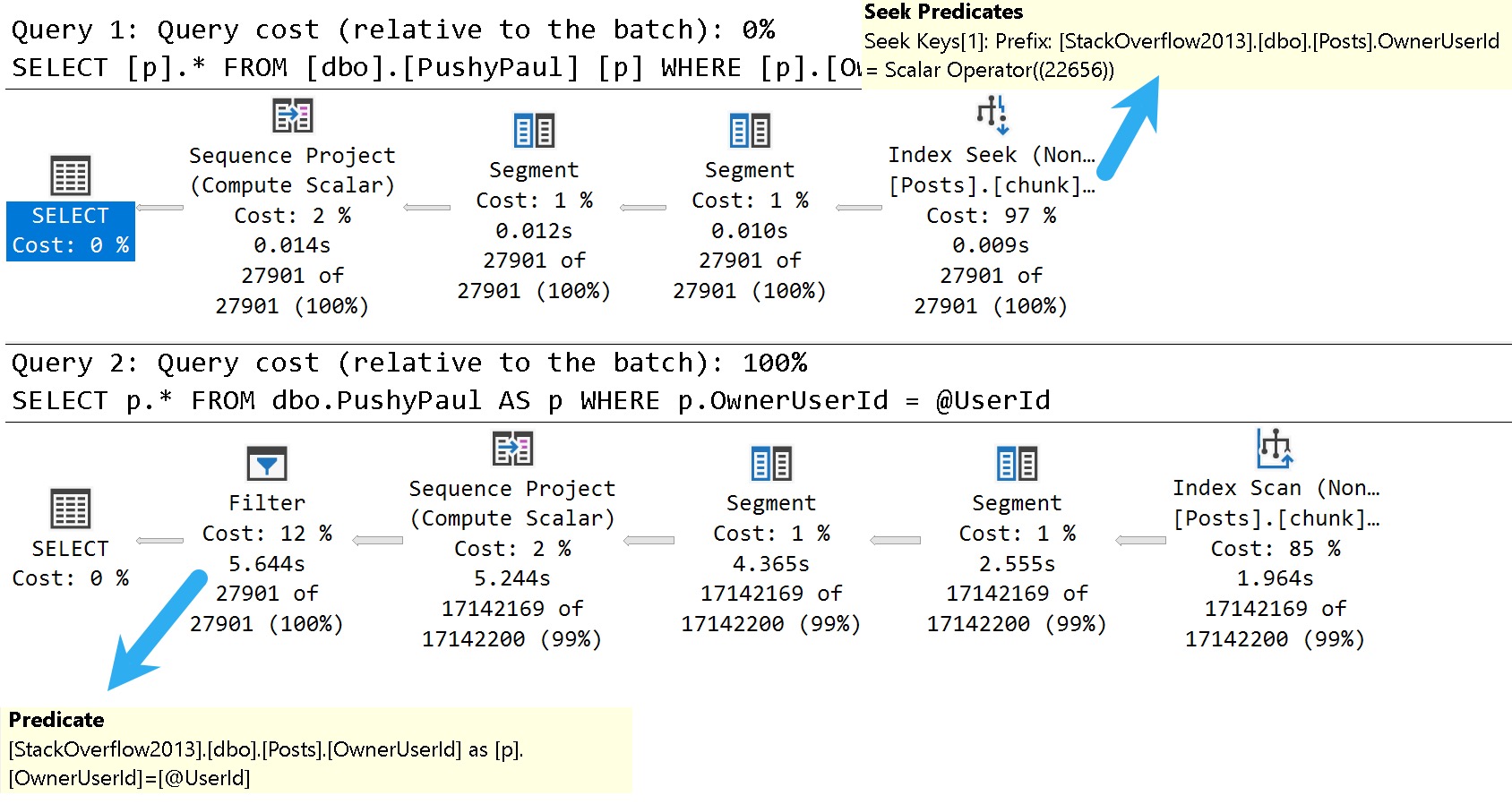
Here are the good and bad plans, comparing using a literal value vs. a parameterized value:
dunksville
In the plan with a literal value, the predicate is applied at the index seek, and the filtering is really quick.
In the plan with a parameterized value, the index is scanned, and applied at a filter way later in the query plan.
This is where the SelOnSeqPrj rule comes in: The parameter can’t be pushed past the Sequence Project operator like the literal value can.
Thanks for reading!
Video Summary
In this video, I delve into some of the known issues and updates in SQL Server 2017 CU30, focusing on one particular performance-related fix that caught my attention. Despite the title suggesting a discussion about 2000, we’re actually looking at modern SQL Server versions from 2022. I explore how running parameterized queries can sometimes skip certain seek optimizations, leading to suboptimal query plans. This issue has been around for quite some time and is something I’ve been highlighting in my work. The video demonstrates this with a practical example using SSMS, showing the difference between passing literal values versus parameters within stored procedures. It’s a reminder that while SQL Server continues to evolve, there are still areas where performance optimizations could be improved, especially when it comes to documentation and clear communication of these changes.
Full Transcript
Erik Darling here with Sir Erik Darling Data. And today I want to talk about SQL Server 2017 for some reason. Don’t ask me why. It’s 2000, midway through 2000, 2022. But we got CU30 for SQL Server 2017. Very exciting stuff in there. Just kidding. It’s not, mostly not very exciting. But there was one thing in there that caught my eye. Because it’s something that’s near and dear to my heart. Query performance stuff. I don’t know if you know that about me. I tend to, tend to traffic a bit in that area of the world. So, this is version, let’s, let’s use zoom it, proper human beings here. Will I wait for Mark Russinovich to release a new version that does screen recording? That’ll be nice. But let’s zoom in a little bit here. And let’s look at version 14.0.34. So, it’s, let’s go back to version 14.0.34.5.1.2. Wonderful. Get that sorted out. Well, if you, let’s go back. Thanks, Mac Toolbar for showing up and ruining my recording. Photo bombing piece of crap. Hate this thing. So, let’s go back over to SSMS real quick. And let’s just make sure that I am on SQL Server 2017 14.0.3451.2. So, we’re all sorted out there. That’s good for us. We got that all figured out. We’re doing, doing wonderful.
So, known issues in this update. What do we have going on here? What’s, what’s happening in this release? Well, uh, something about a latch timeout. Ooh, high availability. Don’t care. Ooh, trace flag. One, two, three, two, three. Great. We’re at 12,323 trace flag. Probably higher at this point. Uh, let’s see. Uh, match lock escalation, uh, change tracking. Who cares? Access violation occurred. When you try to truncate specific partitions using the partition function. Seems funny. Uh, dropping temp tables causes an unresolved deadlock and dump file. Ooh. Wow. Don’t drop those temp tables. Uh, let’s see. An assertion failure occurs when your query contains the merge statement. Big surprise.
Uh, let’s see. When you run dbcc checkdb with extended logical checks against a database by using the table valued function tbf that uses indexes. Here is the error message. Table percent ls does not exist. I’m going to pause here for a moment and ask you, why do we accept this? Why do we tolerate this? If we can’t get any sort of decent information about, uh, what fixes are out there for a piece of software, why can’t we get them in, in something that’s at least understandable?
Like, not everything has to be a book, but a complete thought would be nice. I don’t understand when this started happening or why this started happening, but the quality of the documentation for SQL Server is real, real broken. Uh, if you look at error, like, especially new error messages or new extended events, there is absolutely no oversight in the, in the, in the language used in there.
It’s full of typos and just like they saw one, uh, Aaron Bertrand brought one up to me yesterday where, uh, availability groups have a double dash between availability and groups. There’s, or always on or something like that. That has never been what they’ve been called or how they’ve been named or referred to.
And, uh, it, it, it really is just gone completely downhill. I don’t know whose idea that was. Maybe, maybe, maybe Postgres has just infiltrated Microsoft and they’re taking them down from the inside like termites.
I don’t know. Who knows? Tough to tell out there. It’s a, it’s a harsh world, isn’t it? But here’s the one that I want to talk about.
We’ll talk about this wonderful little thing right here. In Microsoft SQL Server 2017, running parameterized queries skips the sell on seek purge rule. Therefore, push down does not occur.
Well, thankfully, this is something that I’ve been demoing for years because it’s been a problem. Uh, I think the first time I ever read about it was in a Paul White blog post coming up on 10 years ago now. Crazy, right?
A 10-year-old performance bug in SQL Server. Well, I know they’re not busy fixing performance bugs and certainly not busy writing adequate documentation for anything. So here we are reading this.
Uh, I’m not even going to bother with this one. Uh, I don’t know. Uh, index creation script fails. Cool. Great. Great write-up.
Whoever did that. Summer intern’s really working hard. Summer intern found a beer fridge, apparently. All right. Well, everyone’s working from home, so everything’s a beer fridge. Anyway, let’s go see if that actually is fixed.
So, uh, I’ve already created this index. I’m not going to sit there and make you watch me create an index over again. But just to make sure that we are on the same page here, uh, what did I do wrong? Oh, I didn’t, I didn’t highlight select.
There we go. My own quality is going downhill, I guess, too. So, uh, let’s take a look at the results here. So this thing was just restarted. Well, this, this time isn’t going to make any sense to you. It’s actually about 8.30 in the morning here.
But my VM is on West Coast time because I never bothered to change it because I don’t care. Uh, it’s a VM, right? There’s a cattle, not pets or whatever. Uh, but anyway, I am actually running the correct version of SQL Server to see this wonderful performance fix in action.
I guess I shouldn’t make fun of anyone else’s, uh, abilities and I can’t even say fix in action. Uh, but anyway, I, I’ve got an index on my, my, my post table called chunk. I forget why I called it that.
It was a long time ago, uh, but the index is on owner user ID and score descending. And it includes creation date and last act, last activity date. And that index matches up pretty well with the goals of this view, right? So we have a windowing function on owner user ID and score descending.
And my, my, uh, my formatting of this thing is a little, is disagreeable even to me. I don’t, I don’t like the way that turned out. I’m going to fix that right here in front of all of you.
All right. So now everything is on, got its own line. No one, no one has to share too much space. Everything’s maintaining proper distance. Uh, but then we’re selecting owner user ID, score, creation date, and last activity.
So that index works out pretty well for everything that we’re trying to do in there, right? We’ve got everything for our dense rank completely in order. And we’ve got, uh, our, our select list columns and the includes up there.
So joy to the world. An index has come. So what should that fix fix? Well, we’re going to turn on a query plan here and we’re going to run this select, right?
So we run this thing and we have an execution plan. Let’s zoom in on this execution plan and see what happened. Now, even though, uh, we’ve got a case of simple parameterization here, I don’t, I have a feeling this doesn’t stick.
Uh, I could, I could do some extra stuff to validate that, but, uh, I’ve already done that and it’s quite boring to watch. So we’re going to, we’re going to skip that part. But if we look down here in the query plan, because we’ve used a literal value and a simple parameterization didn’t, didn’t topple our query into the C.
Uh, we’ve got an index seek into our index called for some reason chunk. That takes 0.008 milliseconds. Wow.
What a great query tuner that Erik Darling is. We should hire him to tune all our queries. Well, maybe not so fast. Uh, so. That worked out pretty well.
Passing the literal value. Right. Everything got pushed down the query plan. Everything worked out great. Uh, happy, happy about that. But now let’s create a store procedure. All right.
Because if we go back to what that, that the cumulative update was talking about, this is when running a parameterized query. All right. Parameterized and literal value.
Well, even though it looked like it might have been simple parameterized was not actual parameterized. Right. There’s a literal value in there. So now let’s parameterize query.
Can’t, can’t get enough of the word parameterized. Makes me feel so very proper. So we’re going to run this procedure. Or we’re going to create this procedure here called stinky Pete.
I don’t know why Pete’s stinky. Same reason I don’t know why that index is chunky. Mysteries of the world. But here we have a parameter called user ID.
And we’re going to pass that parameter to our view down here. All right. Now, owner user ID equals user ID. Remember, we’ve got this wonderful index for some reason named chunk that leads with owner user ID. And so we should have, just like when we pass in a literal value, we should get a perfectly good seek to that owner user ID value.
But when I run this and a big reveal here, this does not finish in 0.008 milliseconds. In fact, this catastrophe drags on for seven seconds. And if we look at the difference in the plan, let’s zoom in real nice on that.
We have an index scan now on the post table. That takes 2.213 seconds. A bit of a far cry from the 0.008 milliseconds.
And that just tends to get worse as we move on in the plan to a 2.289 and then 4.719 and then 5.628 and then 6.054. So six seconds total for the query execution plus a little bit of time for SSMS to spit out and render our results. So, yeah, it’s pretty disappointing.
It said, hey, we fixed something and then the only demo I… Well, the best demo I have that shows the problem still has a problem. So thanks there.
Perhaps a little bit extra QA would have helped that one. Maybe that wasn’t even supposed to be in there. I don’t know. Maybe that will get pulled out of the release notes. I couldn’t tell you. No one from Microsoft talks to me anymore.
I don’t know why. I missed Joe’s sack. MungoDB got real lucky there. Well, anyway, it is 8.40 a.m. now on Friday.
And with that, I think it’s time to start drinking because there’s just no hope for the world. It’s going to be my new company tagline. There’s no hope for the world.
I’m waiting for Beer Gut Magazine to buy me out. Anyway, you have a nice day. I’m going to go pour something now. The first thing about the Shield.
For You and me now, let’s see, there are a few ways to can philosopher bless the world. It’s too late. This is a nicelegen to have an intro.
Going Further
If this is the kind of SQL Server stuff you love learning about, you’ll love my training. Blog readers get 25% off the Everything Bundle — over 100 hours of performance tuning content. Need hands-on help? I offer consulting engagements from targeted investigations to ongoing retainers. Want a quick sanity check before committing to a full engagement? Schedule a call — no commitment required.
I can’t have my dear friend Brent being all distraught with all those fast cars around. That’s how accidents happen, and I fear he might leave the Blitz scripts to me in his will or something.
In Paul’s post, he talks about using undocumented trace flag 8666 to get additional details about Sort operators.
Let’s do that. Paul is smart, though he is always completely wrong about which season it is.
DROP TABLE IF EXISTS
    dbo.Votes_CCI;

SELECT
    v.*
INTO dbo.Votes_CCI
FROM dbo.Votes AS v;
I’m using the Votes table because it’s nice and narrow and I don’t have to tinker with any string columns.
Strings in databases were a mistake, after all.
DBCC TRACEON(8666);
CREATE CLUSTERED COLUMNSTORE INDEX
    vcci
ON dbo.Votes_CCI
ORDER (Postid);
DBCC TRACEOFF(8666);
Here’s what we get back in the query plan:
Tainted Sort
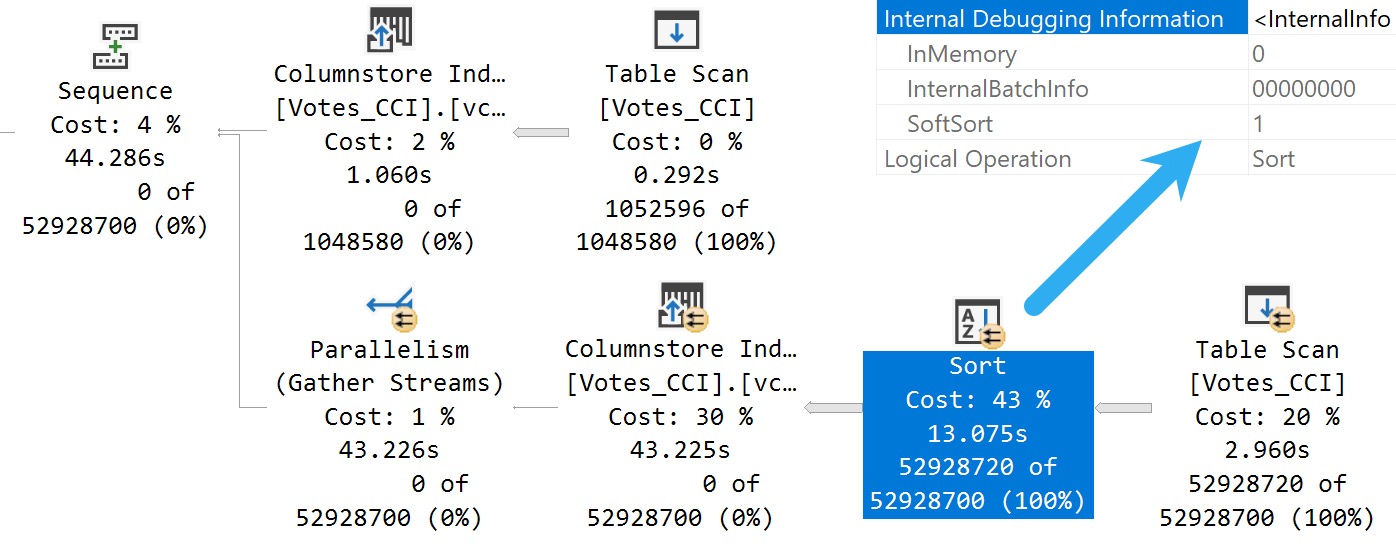
We’ve got a Soft Sort! What does our seasonally maladjusted friend say about those?
A “soft sort” uses only its primary memory grant and never spills. It doesn’t guarantee fully-sorted output. Each sort run using the available memory grant will be sorted. A “sort sort” represents a best effort given the resource available. This property can be used to infer that a Sort is implemented with CQScanPartitionSortNew without attaching a debugger. The meaning of the InMemory property flag shown above will be covered in part 2. It does not indicate whether a regular sort was performed in memory or not.
Well, with that attitude, it’s not surprising that there are so many overlapping buckets in the column store index. If it’s not good enough, what can you do?
Building the index with the Soft Sort here also leads to things being as bad as they were in Brent’s post.
Insert Debugging Here
Alas, there’s (almost) always a way. Microsoft keeps making these trace flag things.
There are a bunch of different ways to track them down, but figuring out the behavior of random trace flags that you may find just by enabling them isn’t easy.
One way to tie a trace flag to a behavior is to use WinDbg to step through different behaviors in action, and see if SQL Server checks to see if a trace flag is enabled when that behavior is performed.
If you catch that, you can be reasonably sure that the trace flag will have some impact on the behavior. Not all trace flags can be enabled at runtime. Some need to be enabled as startup options.
Sometimes it’s hours and hours of work to track this stuff down, and other times Paul White (b|t) already has notes on helpful ones.
The trace flag below, 2417, is present going back to SQL Server 2014, and can help with the Soft Sort issues we’re seeing when building ordered clustered column store indexes today.
Here’s another one:
DBCC TRACEON(8666, 2417);
CREATE CLUSTERED COLUMNSTORE INDEX
    vcci
ON dbo.Votes_CCI
ORDER (Postid)
WITH(MAXDOP = 1);
DBCC TRACEOFF(8666, 2417);
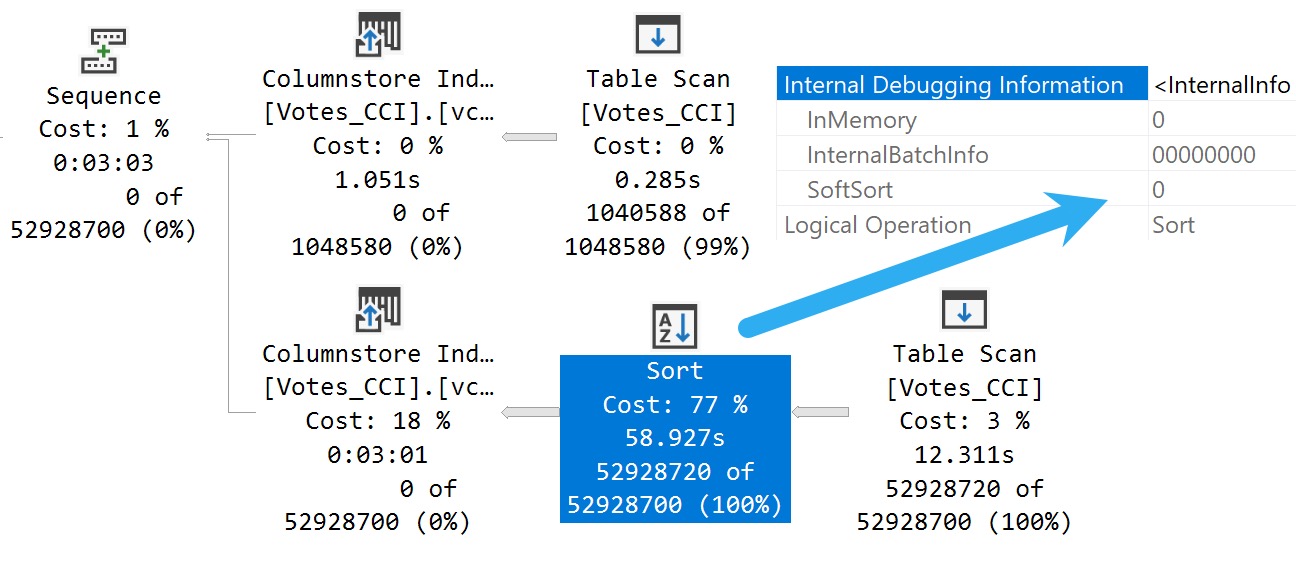
The MAXDOP 1 hint isn’t strictly necessary. With a parallel plan, you may see up to DOP overlapping row groups.
community service
That’s why it was a popular maneuver to emulate this behavior by creating a clustered row store index, and then create a clustered column store index over it with drop existing and a MAXDOP 1 hint.
At DOP 1, you don’t see that overlap. It takes a lot longer of course — 3 minutes instead of 30 or so seconds — which is a real bummer. But without it, you could see DOP over lapping rowgroups.
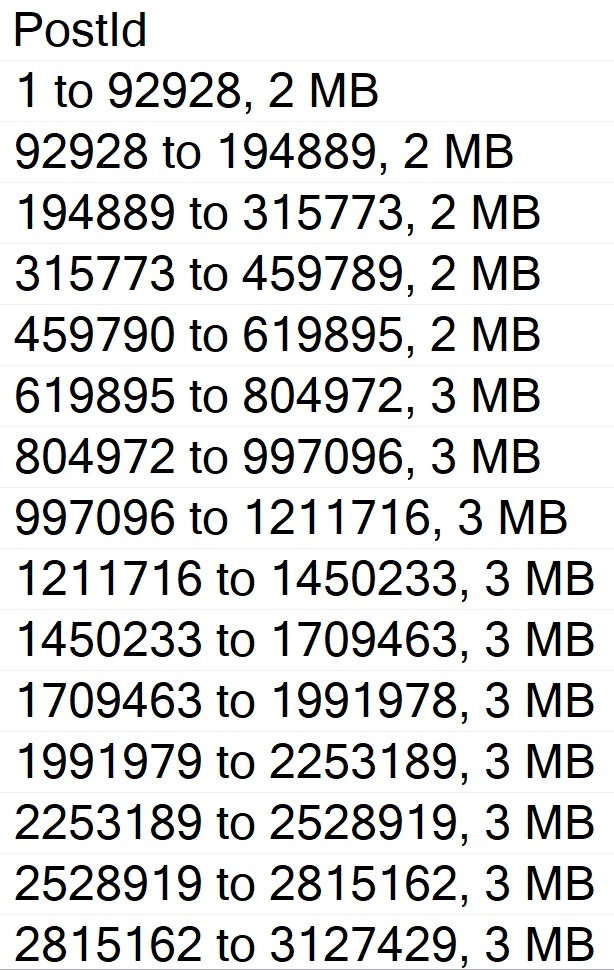
If you want All The Pretty Little Rowgroups, this is what you have to do.
Anyway, the result using sp_BlitzIndex looks a lot better now:
EXEC sp_BlitzIndex
    @TableName = 'Votes_CCI';
capture the flag
How nice.
You can also use undocumented and unsupported trace flag 11621, which is
[A] feature flag for the ‘partition sort on column store order’ so the end result is similar, but via a different mechanism to 2417.
A partition sort is useful in general to prevent unnecessary switching between partitions. If you sort the stream by partition, you process all the rows for one before moving on to the next. A soft sort is ok there because it’s just a performance optimization. Worst case, you end up switching between partitions quite often because the sort ran out of memory, but correct results will still occur.
Chain Gang
A “reasonable” alternative to trace flags maybe to adjust the index create memory configuration option. If we set it down to the minimum value, we get a “helpful” error message:
This index operation requires 123208 KB of memory per DOP.
The total requirement of 985800 KB for DOP of 8 is greater than the sp_configure value of 704 KB set for the advanced server configuration option “index create memory (KB)”.
Increase this setting or reduce DOP and rerun the query.
If you get the actual execution plan for the clustered column store index create or rebuild with the Soft Sort disabled and look at the memory grant, you get a reasonable estimate for what to set index create memory to.
Changing it does two things:
Avoids the very low memory grant that Soft Sorts receive, and causes the uneven row groups
The Soft Sort keeps the index create from going above that index create memory number
Setting index create memory for this particular index creation/rebuild to 5,561,824 gets you the nice, even row groups (at MAXDOP 1) that we saw when disabling the Soft Sort entirely.
Bottom line, here is that uneven row groups happen with column store indexes when there’s a:
Parallel create/rebuild
Low memory grant create/rebuild
If this sort of thing is particularly important to you, you could adjust index create memory to a value that allows the Soft Sort adequate memory.
But that’s a hell of a lot of work, and I hope Microsoft just fixes this in a later build.
The bits for this were technically available in SQL Server 2019 as well, but I’m not telling you how to do that. It’s not supported, and bad things might happen if you use it.
I mean, bad things happen in SQL Server 2022 where it’s supported unless you use an undocumented trace flag, but… Uh. I dunno.
This trace flag seems to set things back to how things worked in the Before Times, though, which is probably how they should have stayed.
Thanks for reading!
Going Further
If this is the kind of SQL Server stuff you love learning about, you’ll love my training. Blog readers get 25% off the Everything Bundle — over 100 hours of performance tuning content. Need hands-on help? I offer consulting engagements from targeted investigations to ongoing retainers. Want a quick sanity check before committing to a full engagement? Schedule a call — no commitment required.
There are some code comments you see that really set the stage for how tuning a query is going to go.
Usually one misgiving about how SQL Server works gives way to a whole levee-breaking bevy of other ones and three days later you can’t feel your legs but dammit it’s done.
Okay, maybe it was three hours, but it felt like three days. Something about the gravitation pull of these black hole queries.
One fix I’ve been wishing for, or wish I’ve been fixing for, is a cure for local variables. I’d even be cool if Forced Parameterization was that cure, but you know…
Time will tell.
Husk
Let’s say we’ve got this stored procedure, which does something similar to the “I’m gonna fix parameter sniffing with a local variable hey why is everything around me turning to brimstone before my very eyes?” idea, but with… less of an end-of-times vibe.
CREATE OR ALTER PROCEDURE
    dbo.IndexTuningMaster
(
    @OwnerUserId int,
    @ParentId int,
    @PostTypeId int
)
AS
BEGIN
SET NOCOUNT, XACT_ABORT ON;

    /*Someone passed in bad data and we got a bad query plan,
      and we have to make sure that doesn't happen again*/

    DECLARE
        @ParentIdFix int =
            CASE
                WHEN @ParentId < 0
                THEN 0
                ELSE @ParentId
            END;

    SELECT TOP (1)
        p.*
    FROM dbo.Posts AS p
    WHERE p.ParentId = @ParentIdFix
    AND   p.PostTypeId = @PostTypeId
    AND   p.OwnerUserId = @OwnerUserId
    ORDER BY
        p.Score DESC,
        p.Id DESC;

END;
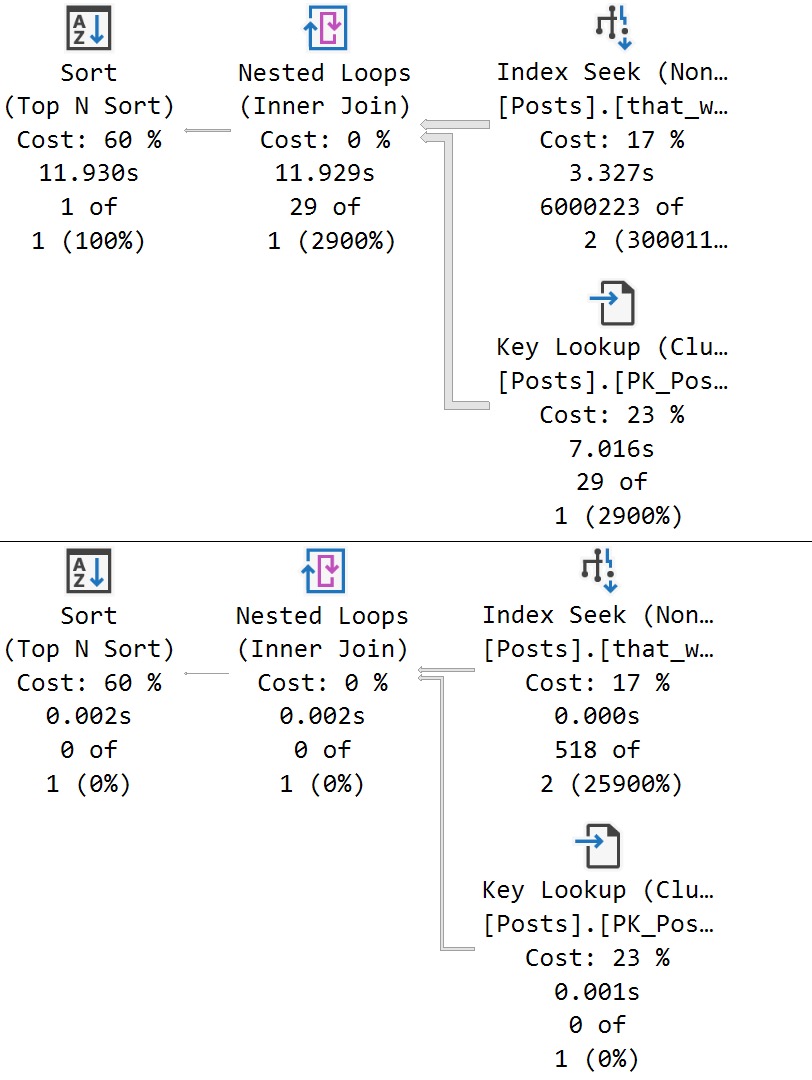
We get a super low guess for both. obviously that guess hurts a large set of matched data far worse than a small one, but the important thing here is that both queries receive the same bad guess.
This is a direct side effect of the local variable’s poor estimate, which PSP isn’t quite yet ready to go up against.
Thanks for reading!
Going Further
If this is the kind of SQL Server stuff you love learning about, you’ll love my training. Blog readers get 25% off the Everything Bundle — over 100 hours of performance tuning content. Need hands-on help? I offer consulting engagements from targeted investigations to ongoing retainers. Want a quick sanity check before committing to a full engagement? Schedule a call — no commitment required.