Views vs Indexed Views In SQL Server

Award Winning


Imagine you have a rather complicated query that you want to abstract into a simple query for your less-than-with-it end users.

A view is probably a pretty good way of doing that, since you can shrink your preposterously-constructed tour through every table in the schema down to a simple select-from-one-object.

The problem is that now everyone expects it to perform well throughout all time, under any circumstances, come what may. It’s sort of like how your parents expect dinner to be $20 and tips to be 20% regardless of where they go or what they order.

  • Lobster? $5.
  • Steak? $5.
  • Bottle of wine? $5.
  • Any dessert you can imagine? $5.
  • Tip? Gosh, mister, another $5?

I sincerely apologize to anyone who continues to live in, or who moved to Europe to avoid tipping.

If you’d like some roommates, I have some parents you’d get along with.

Viewfinder


Creating a view in SQL Server doesn’t do anything special for you, outside of not making people remember your [reference to joke above] query.

You can put all manner of garbage in your view, make it reference another half dozen views full of garbage, and expect sparkling clean query performance every time.

Guess what happens?

Reality.

When you use views, the only value is abstraction. You still need to be concerned with how the query is written, and if the query has decent indexes to support it. In other words, you can’t just write a view and expect the optimizer to do anything special with it.

SQL Server doesn’t cache results, it only caches raw data. If you want the results of a view to be saved, you need to index it.

Take these two dummy queries, one against a created view, and the other an ad hoc query identical to what’s in the view:

CREATE OR ALTER VIEW
    dbo.just_a_query
WITH SCHEMABINDING
AS
SELECT
    p.OwnerUserId,
    TotalScore = 
        ISNULL
        (
            SUM(p.Score), 
            0
        ),
    TotalPosts = 
        COUNT_BIG(*)
FROM dbo.Posts AS p
WHERE EXISTS
      (
          SELECT
              1/0
          FROM dbo.Votes AS v
          WHERE 
              v.PostId = p.Id      
      )
GROUP BY
    p.OwnerUserId;
GO 

SELECT
    p.OwnerUserId,
    TotalScore = 
        ISNULL
        (
            SUM(p.Score), 
            0
        ),
    TotalPosts = 
        COUNT_BIG(*)
FROM dbo.Posts AS p
WHERE EXISTS
      (
          SELECT
              1/0
          FROM dbo.Votes AS v
          WHERE 
              v.PostId = p.Id      
      )
AND 
    p.OwnerUserId = 22656
GROUP BY
    p.OwnerUserId;
GO 

SELECT
    jaq.*
FROM dbo.just_a_query AS jaq
WHERE 
    jaq.OwnerUserId = 22656;
GO 

The plans are identical, and identically bad. Why? Because I didn’t try very hard, and there’s no good indexes for them.

Remember when I said that’s important?
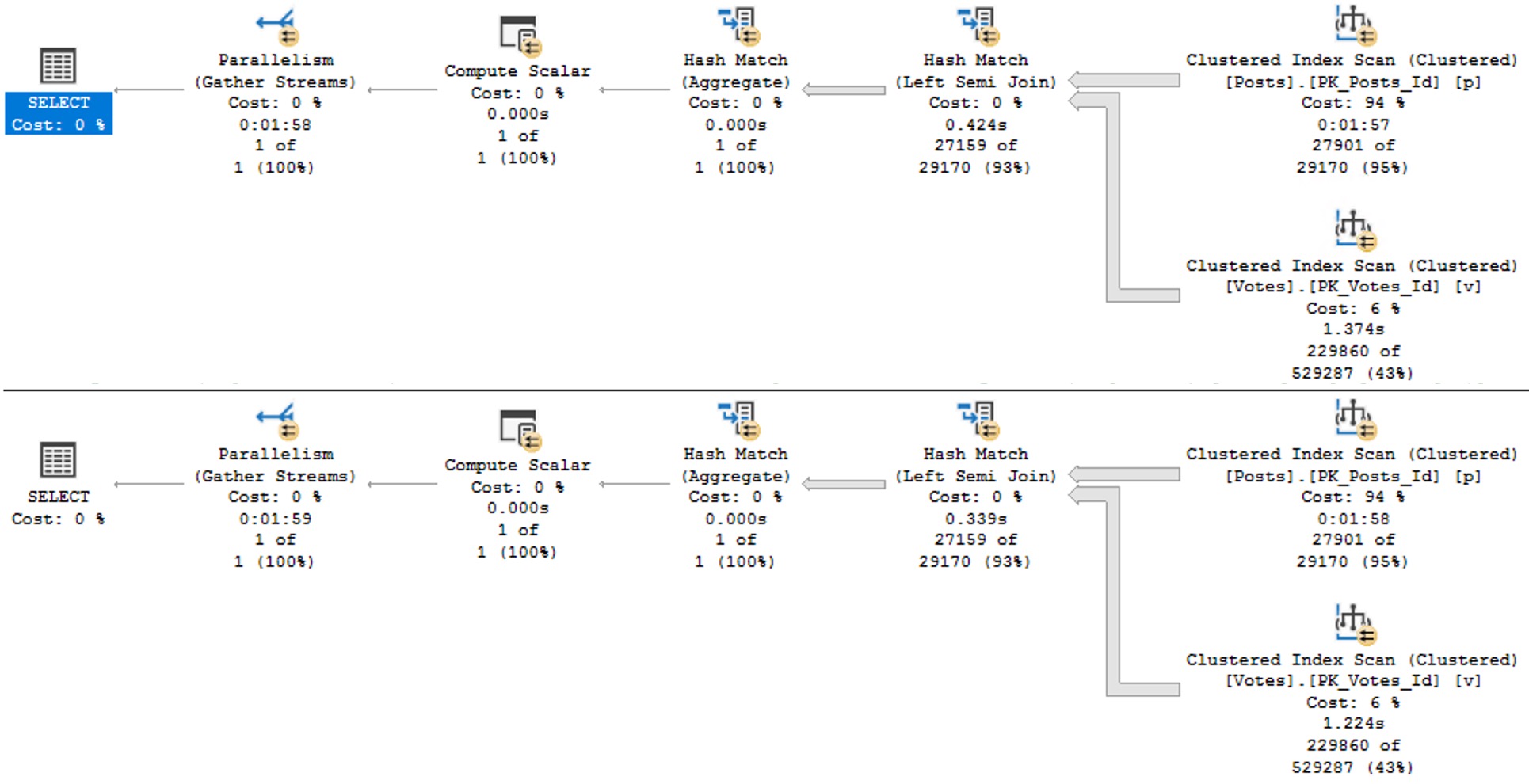
SQL Server Query Plan
avenues lined with trees

Keep in mind this is a query with some batch mode involved, so it could be a lot worse. But both instances complete within a second or so of each other.

So much for view performance.

Maintainer


The rules around indexed views are pretty strict, and the use cases are fairly narrow. I do find them quite useful on SQL Server Standard Edition where batch mode is terribly hobbled.

The horrible thing is that indexed views are so strict in SQL Server that we can’t even create one on the view in question. That really sucks. We get this error.

CREATE UNIQUE CLUSTERED INDEX 
    cuqadoodledoo
    ON dbo.not_just_a_query
(
    OwnerUserId
)
WITH
(
    SORT_IN_TEMPDB = ON,
    DATA_COMPRESSION = PAGE
);

Msg 10127, Level 16, State 1, Line 95

Cannot create index on view “StackOverflow2013.dbo.not_just_a_query” because it contains one or more subqueries. 

Consider changing the view to use only joins instead of subqueries. Alternatively, consider not indexing this view.

Alternatively, go screw yourself. Allowing joins but not exists is somewhat baffling, since they’re quite different in that joins allow for multiple matches but exists does not. We’d have to do a lot of fancy grouping footwork to get equivalent results with a join, since distinct isn’t allowed in an indexed view in SQL Server either.

We could also pull the exists out of the view, add the Id column to the select list, group by that and OwnerUserId, index both of them, and… yeah nah.

I have no idea who’s in charge of indexed views in the product at this point, but a sufficiently lubricated republic would likely come calling with tar and feathers in the face of this injustice.

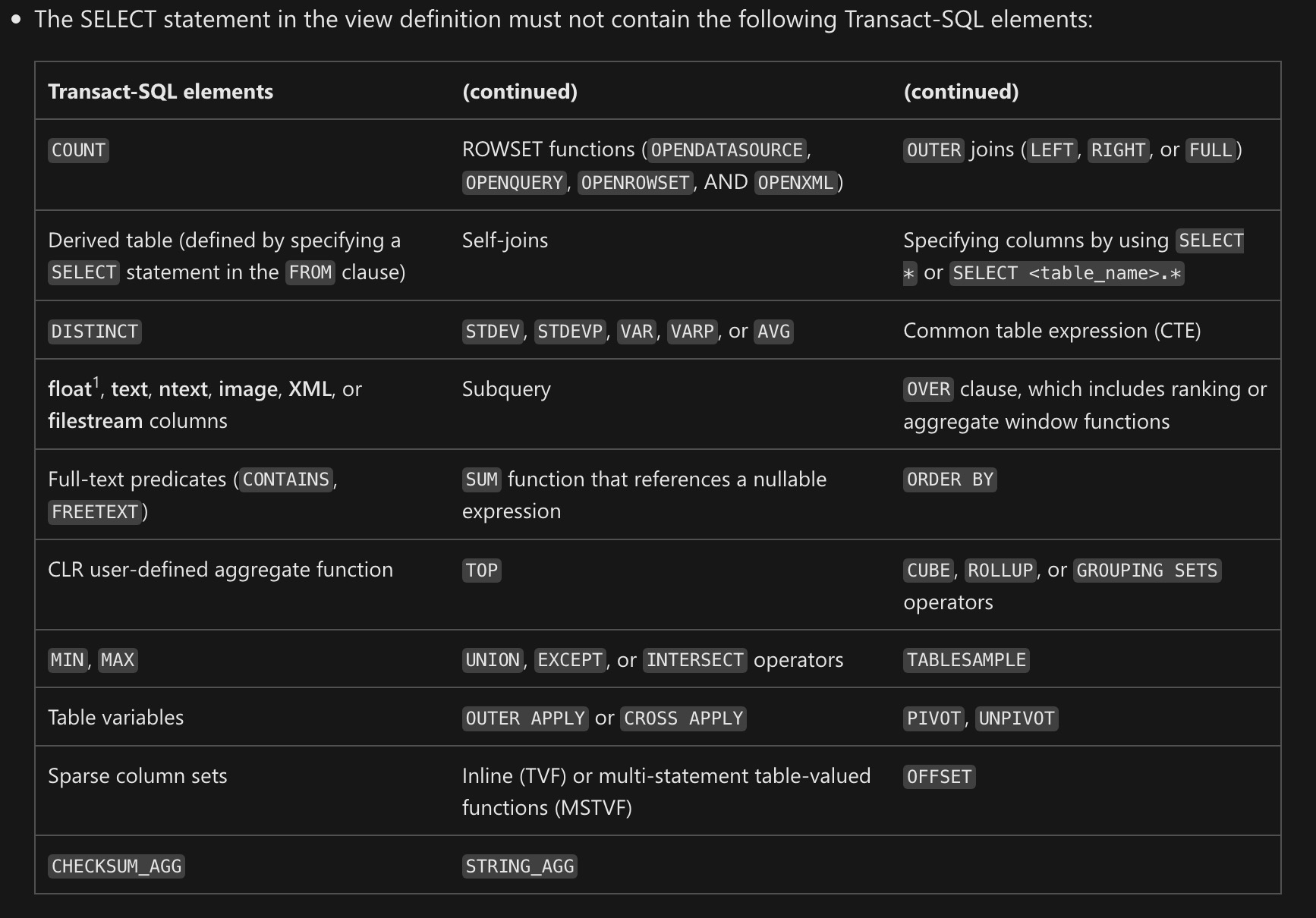
This is basic query syntax. It’s not like uh… min, max, sum, avg, except, intersect, union, union all, cross apply, outer apply, outer joins, or um, hey, is it too late for me to change careers?

The Pain In Pain Falls Painly On The Pain


You may have ended up here looking to learn all the minute differences between views and indexed views in SQL Server.

You may be disappointed in reading this post, but I can assure you that you’re not nearly as disappointed in this post as I am with indexed views in SQL Server.

They’re like one of those articles about flying cars where you read the headline and you’re like “woah, I’m living in the future”, but then three paragraphs in you find out the cars don’t really fly or drive and they might actually just be igloos that are only big enough for an Italian Greyhound or a paper plane that the author’s kid glued wheels to.

If you actually have a use case for indexed views, you’ll have to be really careful about making sure their maintenance doesn’t kill performance.

Thanks for reading!

Going Further


If this is the kind of SQL Server stuff you love learning about, you’ll love my training. Blog readers get 25% off the Everything Bundle — over 100 hours of performance tuning content. Need hands-on help? I offer consulting engagements from targeted investigations to ongoing retainers. Want a quick sanity check before committing to a full engagement? Schedule a call — no commitment required.

Indexed Views In SQL Server: No Filtered Indexes Or Filtered Statistics

Half Baked


In my quest to love indexed views more, I’m always trying new things with them to solve problems.

Occasionally, I am pleasantly surprised by what can be accomplished with them. Occasionally.

Today was not an occasion. Let’s take an unfortunate look.

CREATE TABLE
    dbo.IndexedViewMe
(
    id int PRIMARY KEY CLUSTERED
);
GO 

CREATE VIEW 
    dbo.TheIndexedView
WITH SCHEMABINDING
AS
SELECT
    ivm.id
FROM dbo.IndexedViewMe AS ivm;
GO 

CREATE UNIQUE CLUSTERED INDEX
    uqi
ON dbo.TheIndexedView
    (id);

INSERT 
    dbo.IndexedViewMe
(
    id
)
SELECT
    x.c
FROM 
(
    SELECT 1 
      UNION ALL 
    SELECT 2
) AS x(c);

This gives us a tiny little table and indexed view. If we try to do either of these things, it doesn’t go well:

CREATE INDEX 
    i
ON dbo.TheIndexedView
    (id)
WHERE 
    id = 2;

Msg 10610, Level 16, State 1, Line 40

Filtered index ‘i’ cannot be created on object ‘dbo.TheIndexedView’ because it is not a user table. Filtered indexes are only supported on tables.

If you are trying to create a filtered index on a view, consider creating an indexed view with the filter expression incorporated in the view definition.

CREATE STATISTICS 
    s
ON dbo.TheIndexedView
    (id)
WHERE 
    id = 2;

Msg 10623, Level 16, State 1, Line 47

Filtered statistics ‘s’ cannot be created on object ‘dbo.TheIndexedView’ because it is not a user table. Filtered statistics are only supported on user tables.

Sort of a bummer, that. And it strikes me that it’s an odd limitation — especially for the statistics — but what can you do?

Indexed views haven’t changed aside from bug fixes in forever and a day. I doubt there’ll be any real investment in enhancing them anytime soon.

Thanks for reading!

Going Further


If this is the kind of SQL Server stuff you love learning about, you’ll love my training. Blog readers get 25% off the Everything Bundle — over 100 hours of performance tuning content. Need hands-on help? I offer consulting engagements from targeted investigations to ongoing retainers. Want a quick sanity check before committing to a full engagement? Schedule a call — no commitment required.

Common SQL Server Consulting Advice: Adding Indexed Views

I am a heading


In the age of column store indexes, indexed views have a bit less attractiveness about them. Unless of course you’re on Standard Edition, which is useless when it comes to column store.

I think the biggest mark in favor of indexed views over column store in Standard Edition is that there is no DOP restriction on them, where batch mode execution is limited to DOP 2.

https://erikdarling.com/sql-server/how-useful-is-column-store-in-standard-edition/

One of the more lovely coincidences that has happened of late was me typing “SQL Server Stranded Edition” originally up above.

Indeed.

There are some good use cases for indexed views where column store isn’t a possibility, though. What I mean by that is they’re good at whipping up big aggregations pretty quickly.

Here are some things you oughtta know about them before trying to use them, though. The first point is gonna sound really familiar.

First, there are some session-level settings that need to be appropriately applied for them to be considered by the optimizer. This is especially important if you’re putting any logic into a SQL Server Agent job, because it uses the wrong settings for some reason.

Here are the correct settings:

  • QUOTED_IDENTIFIER ON
  • ANSI_NULLS ON
  • ANSI_PADDING ON
  • ANSI_WARNINGS  ON
  • ARITHABORT ON
  • CONCAT_NULL_YIELDS_NULL ON
  • NUMERIC_ROUNDABORT OFF

Second, you’ll wanna use the NOEXPAND hint when you touch an indexed view. Not only because that’s the only way to guarantee the view definition doesn’t get expanded by the optimizer, but also because (even in Enterprise Edition) that’s the only way to get statistics generated on columns in the view.

If you’ve ever seen a warning for missing column statistics on an indexed view, this is likely why. Crazy town, huh?

Third, indexed views maintain changes behind the scenes automatically, and that maintenance can really slow down modifications if you don’t have indexes that support the indexed view definition.

https://erikdarling.com/sql-server/indexed-view-maintenance-is-only-as-bad-as-your-indexes/

Fourth, you have to be REALLY careful if your indexed view is going to span more than one table.

Locking can get really weird, and as tables get super big maintenance can turn into a nightmare even with good indexes to back the join up.

Fifth, there are a ridiculous number of restrictions. The current docs look like this:

SQL Server Indexed View Limitations
ouch

Sixth, you need to be really careful when you alter and indexed view.

When you do that, all of the indexes and statistics get dropped.

Seventh, indexed views can be used a lot like other constructs we’ve talked about this week:

Eighth, if your indexed view has an aggregation in it, you need to have a COUNT_BIG(*) column in the view definition.

Buuuuuut, if you don’t group by anything, you don’t need one.

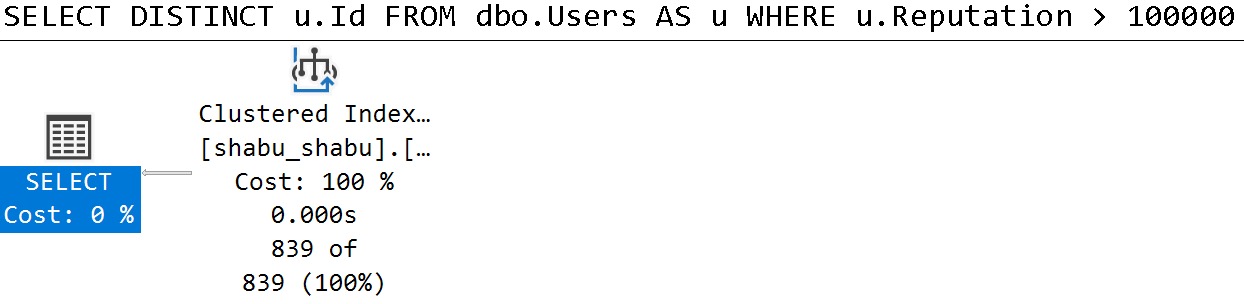
Ninth, yeah, you can’t use DISTINCT in the indexed view, but if you can use GROUP BY, and the optimizer can match queries that use DISTINCT to your indexed view.

CREATE OR ALTER VIEW 
    dbo.shabu_shabu
WITH SCHEMABINDING
AS 
SELECT
    u.Id,
    u.DisplayName,
    u.Reputation,
    Dracula = 
        COUNT_BIG(*)
FROM dbo.Users AS u
WHERE u.Reputation > 100000
GROUP BY
    u.Id,
    u.Reputation,
    u.DisplayName;
GO 

CREATE UNIQUE CLUSTERED INDEX 
    cuqadoodledoo
ON dbo.shabu_shabu
(
    Id
);

SELECT DISTINCT   
    u.Id
FROM dbo.Users AS u
WHERE u.Reputation > 100000;

Ends up with this query plan:

SQL Server Query Plan
balance

Tenth, the somewhat newly introduced GREATEST and LEAST functions do work in indexed views, which certainly makes things interesting.

I suppose that makes sense, since they’re probably just CASE expressions internally, but after everything we’ve talked about, sometimes it’s surprising when anything works.

Despite It All


When indexed views are the right choice, they can really speed up a lot of annoying aggregations among their other utilities.

This week we talked a lot about different things we can do to tables to make queries faster. This is stuff that I end up recommended pretty often, but there’s even more stuff that just didn’t make the top 5 cut.

Next week we’ll talk about some database and server level settings that can help fix problems that I end up telling clients to flip the switch on.

Thanks for reading!

Going Further


If this is the kind of SQL Server stuff you love learning about, you’ll love my training. Blog readers get 25% off the Everything Bundle — over 100 hours of performance tuning content. Need hands-on help? I offer consulting engagements from targeted investigations to ongoing retainers. Want a quick sanity check before committing to a full engagement? Schedule a call — no commitment required.

Software Vendor Mistakes With SQL Server: Not Using Filtered Indexes Or Indexed Views

Basic Training


In yesterday’s post, we covered some of the basics of designing nonslustered indexes to make queries go faster, but sometimes those aren’t quite enough.

In today’s post, I’m going to give you more of my paid training about filtered indexes and indexed views.

What I cover here is how to use them correctly, and some of the things they just don’t work well with. Again, if you like what you see, hit the link at the end of the post for 75% off.

Filtered Indexes


Here’s the intro to filtered indexes

Here are the demos:

Indexed Views


Here’s the intro to indexed views:

Here are the demos for indexed views:

Going Further


If this is the kind of SQL Server stuff you love learning about, you’ll love my training. Blog readers get 25% off the Everything Bundle — over 100 hours of performance tuning content. Need hands-on help? I offer consulting engagements from targeted investigations to ongoing retainers. Want a quick sanity check before committing to a full engagement? Schedule a call — no commitment required.

Software Vendor Mistakes With SQL Server: Not Cleaning Up Old Indexes

Annals


The longer your application has been around, the more developers and queries it has seen. There are a lot of ways the indexes could look, depending on how you approach performance issues with customers.

If you’re the type of shop that:

  • Creates specific indexes for clients experiencing problems or
  • Packages indexes into patches that everyone gets or
  • Allows clients to manage indexes on their own

You could be dealing with a lot of stray indexes depending on which path you’ve chosen. If no one is going back and looking at how all those indexes get used, you could be missing a lot of performance optimizations.

Three Ways


Let’s talk about the three ways that not cleaning up indexes can hurt performance that I see most often while working with clients:

Buffer Pool Pollution

SQL Server doesn’t work with pages while they’re stored on disk. It’s architected to work with pages that are stored in RAM, called the buffer pool, and that’s that. The more data you have by way of rows stored in tables, and indexes that make copies of data (except the clustered index, which is the base copy of your table), the more objects you have contending for space in the buffer pool.

There are other things that need space in memory too, like query memory grants we talked about earlier in the series. Between the buffer pool and query memory, there are three main types of memory contention you can see. In this post, though, what I want to get across is that all those index objects vie for space in the buffer pool when queries need to access them.

It doesn’t matter if an index hasn’t been used in 10 years to help a query go faster, if you need to load or modify data in the base table, the relevant index pages need to be read into memory for those to occur. If your data is larger than memory, or if you’re on a version of SQL Server with a cap on the buffer pool, you could be hitting serious performance problems going out to disk all the time to fetch data into memory.

How to tell if this is a problem you’re having: Lots of waiting on PAGEIOLATCH_XX 

Transaction Logging

The transaction log is SQL Server’s primitive blockchain. It keeps track of all the changes that happen in your database so they can be rolled back or committed during a transaction. It doesn’t keep track of things like who did it, or other things that Change Tracking, Change Data Capture, or Auditing get for you.

It also doesn’t matter (for the most part) which recovery model you’re in. Aside from a narrow scope of minimally logged activities like inserts and index rebuilds, everything gets fully logged. The big difference is who takes a log backup. Under FULL and BULK LOGGED, it’s you. Under SIMPLE, it’s SQL Server.

Just like with the buffer pool needing to read objects in from disk to make changes, the changes to those various objects need to be written to the transaction log, too. The larger those changes are, and the more objects get involved in those changes, the more you have to write to the log file.

There’s a whole layer of complication here that is way more than I can cover in this post — entire books are written about it — but the idea I want you to understand is that SQL Server is a good dog, and it’ll keep all your indexes up to date, whether queries use them to go faster or not.

How to tell if this is a problem you’re having: Lots of waiting on WRITELOG 

Lock Escalation

The more indexes you have, the more locking you’ll likely have to do in order to complete a write. For inserts and deletes, you’ll have to hit every index (unless they’re filtered to not include the data you’re modifying). For updates, you’ll only have to lock indexes that have columns being changed in them. The story gets a little more complicated under other circumstances where things like foreign keys, indexed views, and key lookups get involved, but for now let’s get the basics under control.

When you start making changes to a table, SQL Server has a few different strategies:

  • Row locks, with a Seek plan
  • Page locks, with a Scan plan
  • Object locks with a Scan plan

Because SQL Server has a set amount of memory set for managing locks, it’ll attempt to make the most of it by taking a bunch of row or page locks and converting them to object locks. That number is around the 5000 mark. The number of indexes you have, and if the plan is parallel, will contribute to that threshold.

How to tell if this is a problem you’re having: Lots of waiting on LCK_XX 

Sprung Cleaner


In this video, which is normally part of my paid training, I discuss how over-indexing can hurt you:

To find indexes that can be removed because they’re not used, a good, free tool is sp_BlitzIndex. It’s part of an open source project that I’ve spent a lot of time on. It’ll warn you about indexes that are unused by read queries, and even ones that have a really lopsided ratio of writes to reads.

Those are a great place to start your clean up efforts, because they’re relatively low-risk changes. If you have indexes that are sitting around taking hits from modifications queries and not helping read queries go faster, they’re part of the problem, not part of the solution.

Thanks for reading!

Going Further


If this is the kind of SQL Server stuff you love learning about, you’ll love my training. Blog readers get 25% off the Everything Bundle — over 100 hours of performance tuning content. Need hands-on help? I offer consulting engagements from targeted investigations to ongoing retainers. Want a quick sanity check before committing to a full engagement? Schedule a call — no commitment required.

Indexed Views As Filtered Indexes In SQL Server

Pssst!


If you landed here from Brent’s weekly links, use this link to get my training for 90% off.

The access is for life, but this coupon code isn’t! Get it while it lasts.

Discount applies at checkout, and you have to purchase everything for it to apply.

A Persistent Frustration


SQL Server comes with some great features for tuning queries:

  • Computed Columns
  • Filtered Indexes
  • Indexed Views

But there’s an interoperability issue when you try to use things together. You can’t create a filtered index with the filter definition on a computed column, nor can you create a filtered index on an indexed view.

If you find yourself backed into a corner, you may need to consider using an indexed view without any aggregation (which is the normal use-case).

Empty Tables


If we try to do something like this, we’ll get an error.

DROP TABLE IF EXISTS dbo.indexed_view;
GO

CREATE TABLE dbo.indexed_view
(
    id int PRIMARY KEY,
    notfizzbuzz AS (id * 2)
);
GO

CREATE INDEX n 
    ON dbo.indexed_view (notfizzbuzz) 
WHERE notfizzbuzz = 0;
GO

Yes, I’m putting the error message here for SEO bucks.

Msg 10609, Level 16, State 1, Line 19
Filtered index 'nfb' cannot be created on table 'dbo.indexed_view' because the column 'notfizzbuzz' in the filter expression is a computed column. 
Rewrite the filter expression so that it does not include this column.

An Indexed View Doesn’t Help


If we run this to create an indexed view on top of our base table, we still can’t create a filtered index, but there’s a different error message.

CREATE OR ALTER VIEW dbo.computed_column
WITH SCHEMABINDING
AS
SELECT
    iv.id, 
    iv.notfizzbuzz
FROM dbo.indexed_view AS iv;
GO 

CREATE UNIQUE CLUSTERED INDEX c 
    ON dbo.computed_column(id);

CREATE INDEX nfb 
    ON dbo.computed_column(notfizzbuzz) 
WHERE notfizzbuzz = 0;
Msg 10610, Level 16, State 1, Line 37
Filtered index 'nfb' cannot be created on object 'dbo.computed_column' because it is not a user table. 
Filtered indexes are only supported on tables. 
If you are trying to create a filtered index on a view, consider creating an indexed view with the filter expression incorporated in the view definition.

But what a thoughtful error message it is! Thanks, whomever wrote that.

Still Needs Help


We can create this indexed view just fine.

CREATE OR ALTER VIEW dbo.computed_column
WITH SCHEMABINDING
AS
SELECT
    iv.id, 
    iv.notfizzbuzz
FROM dbo.indexed_view AS iv
WHERE iv.notfizzbuzz = 0;
GO 

CREATE UNIQUE CLUSTERED INDEX c 
    ON dbo.computed_column(id);

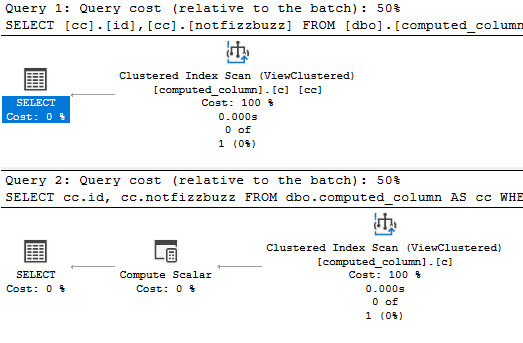
But if we try to select from it, the view is expanded.

SELECT
    cc.id, 
    cc.notfizzbuzz
FROM dbo.computed_column AS cc
WHERE cc.notfizzbuzz = 0;
SQL Server Query Plan
upstate

The issue here is the simple parameterization that is attempted with the trivial plan.

If we run the query like this, and look at the end of the output, we’ll see a message at the bottom that our query is safe for auto (simple) parameterization. This may still happen even if the plan doesn’t remain trivial (more detail at the link above!)

DBCC FREEPROCCACHE;
GO 
DBCC TRACEON(8607, 3604);
GO 
SELECT
    cc.id, 
    cc.notfizzbuzz
FROM dbo.computed_column AS cc
WHERE cc.notfizzbuzz = 0;
DBCC TRACEOFF(8607, 3604);
GO 

********************
** Query marked as Cachable
** Query marked as Safe for Auto-Param
********************

Making It Work


The two ways we can run this query to get the indexed view to be used are like so:

SELECT
    cc.id, 
    cc.notfizzbuzz
FROM dbo.computed_column AS cc WITH(NOEXPAND)
WHERE cc.notfizzbuzz = 0;


SELECT
    cc.id, 
    cc.notfizzbuzz
FROM dbo.computed_column AS cc
WHERE cc.notfizzbuzz = 0
AND   1 = (SELECT 1);
SQL Server Query Plan
thanks i guess

A Closer Look


If we put those two queries through the ringer, we’ll still see auto (simple) parameterization from the first query:

DBCC FREEPROCCACHE;
GO 
DBCC TRACEON(8607, 3604);
GO 
SELECT
    cc.id, 
    cc.notfizzbuzz
FROM dbo.computed_column AS cc WITH(NOEXPAND)
WHERE cc.notfizzbuzz = 0;
GO 
DBCC TRACEOFF(8607, 3604);
GO 

********************
** Query marked as Cachable
** Query marked as Safe for Auto-Param
********************

DBCC FREEPROCCACHE;
GO 
DBCC TRACEON(8607, 3604);
GO 
SELECT
    cc.id, 
    cc.notfizzbuzz
FROM dbo.computed_column AS cc
WHERE cc.notfizzbuzz = 0
AND   1 = (SELECT 1);
GO 
DBCC TRACEOFF(8607, 3604);
GO 

********************
** Query marked as Cachable
********************

It’s goofy, but it’s worth noting. Anyway, if I had to pick one of these methods to get the plan I want, it would be the NOEXPAND version.

Using that hint is the only thing that will allow for statistics to get generated on indexed views.

In case you’re wondering, marking the computed column as PERSISTED doesn’t change the outcome for any of these issues.

Thanks for reading!

Going Further


If this is the kind of SQL Server stuff you love learning about, you’ll love my training. Blog readers get 25% off the Everything Bundle — over 100 hours of performance tuning content. Need hands-on help? I offer consulting engagements from targeted investigations to ongoing retainers. Want a quick sanity check before committing to a full engagement? Schedule a call — no commitment required.

Starting SQL: SQL Server Indexes Store Key Column Data In Order

Index Skit (0:39)


The most common types of indexes you’re going to see in your life are of the rowstore variety.

As much as I love columnstore, it’s probably not something you’re going to see a whole lot outside of data warehouses. Sure, some folks will have reporting over OLTP, and might find some utility for them, but they can be tough to manage with all those tiny modifications.

Let’s stick with the stuff that’ll help you the most: clustered and nonclustered rowstore indexes.

There are important things to know about indexes, and we’ll get more in-depth later on. For now, let’s talk about how they can help a query.

Clustered


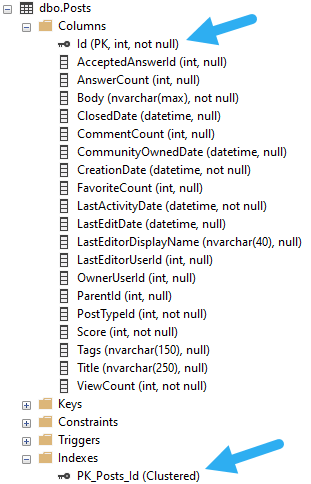
Our table has a clustered index on it, which is also playing the part of a primary key. The primary key attribute makes it unique, of course. By default, if you create a primary key, it’ll also be used as the clustered index key. If you only create a clustered index, it won’t be unique by default.

Let’s not get bogged down there, though. Here’s our index.

SQL Server Management Studio Table
so clustered

We can identify clustered indexes and which columns are in them pretty easily in SSMS.

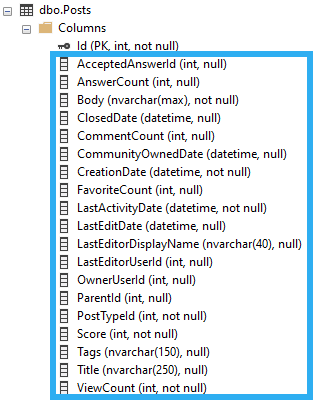
To simplify a bit, the clustered index is all these columns:

SQL Server Management Studio Table
every single one

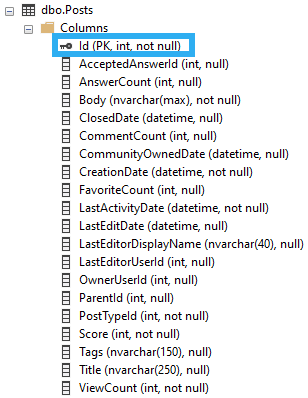
Ordered by this column:

SQL Server Management Studio Table
businessing

That’s Great But


Having the Id column in order doesn’t help us find data in other columns, because they’re not in order.

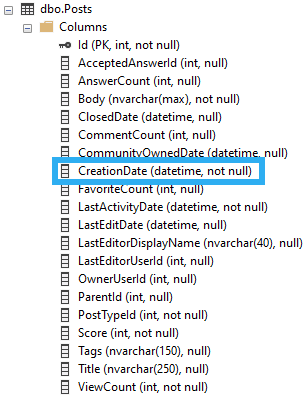
Let’s say we wanted to find posts by CreationDate. The values for it aren’t in an order that helps us search through them.

SQL Server Management Studio Table
where are they now?

If our query is only concerned with the CreationDate column we can create a single-column index on it. As queries become more complicated and involve more columns, we need to consider wider indexes sometimes so that they stand a better chance of getting used, but we’ll come back to that later.

Here’s our overly-simple query.

SELECT p.CreationDate,
       COUNT_BIG(*) AS records
FROM dbo.Posts AS p
WHERE p.CreationDate >= '20131225'
GROUP BY p.CreationDate;

And here’s how the optimizer decides to answer our query.

SQL Server Query Plan
down and out

We have to scan all of the data pages in the clustered index looking for CreationDates that match our predicate.

Make It Plain


It’s not such a crazy idea to create additional indexes to speed up queries, but how exactly do they do that?

What is it about indexes that magically make queries go faster? According to the title, they put data in order, so let’s go with that.

It’s easy enough to create a helpful index here.

CREATE INDEX CreationDate ON dbo.Posts(CreationDate);

Tomorrow, we’ll look at ways to see if our index gets used, and different ways to measure if it improves our query.

Thanks for reading!

Going Further


If this is the kind of SQL Server stuff you love learning about, you’ll love my training. Blog readers get 25% off the Everything Bundle — over 100 hours of performance tuning content. Need hands-on help? I offer consulting engagements from targeted investigations to ongoing retainers. Want a quick sanity check before committing to a full engagement? Schedule a call — no commitment required.

Indexed View Maintenance Is Only As Bad As Your Indexes In SQL Server

Wah Wah Wah


Yes, indexed view maintenance can be quite rough. I don’t mean like, rebuilding them. I will never talk about that.

I mean that, in some cases locks are serializable, and that if you don’t mind your indexes you may find run-of-the-mill modifications taking quite a long time.

Let’s go look!

Mill Town


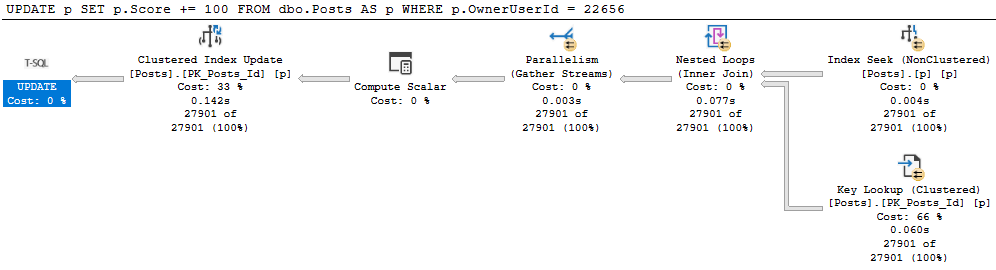
Let’s get update a small chunk of the Posts table.

BEGIN TRAN
UPDATE p
SET p.Score += 100
FROM dbo.Posts AS p
WHERE p.OwnerUserId = 22656;
ROLLBACK

Let’s all digress from the main point of this post for a moment!

It’s generally useful to give modifications an easy path to find data they need to update. For example:

SQL Server Query Plan
Uh no

This update takes 1.6 seconds because we have no useful index on OwnerUserId. But we get a daft missing index request, because it wants to include Score, which would mean we’d need to then update that index as well as read from it. Locking leads to NOLOCK hints. I tend to want to introduce as little of it as possible.

With an index on just OwnerUserId, our situation improves dramatically.

SQL Server Query Plan
100000X IMPROVEMENT

Allow Me To Reintroduce Myself


Let’s see what happens to our update with an indexed view in place.

CREATE OR ALTER VIEW dbo.PostScoresVotes
WITH SCHEMABINDING
AS 
SELECT   p.Id, 
         SUM(p.Score * 1.0) AS ScoreSum, 
		 COUNT_BIG(v.Id) AS VoteCount,
		 COUNT_BIG(*) AS OkayThen 
FROM     dbo.Posts AS p
JOIN     dbo.Votes AS v
    ON p.Id = v.PostId
WHERE p.PostTypeId = 2
AND   p.CommunityOwnedDate IS NULL
GROUP BY p.Id;
GO

CREATE UNIQUE CLUSTERED INDEX c_Id 
    ON dbo.PostScoresVotes(Id);

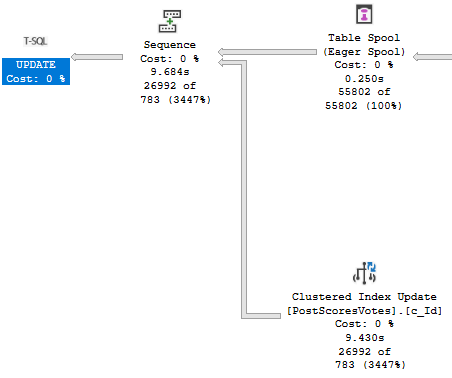
Our update query now takes about 10 seconds…

SQL Server Query Plan
Oof dawg

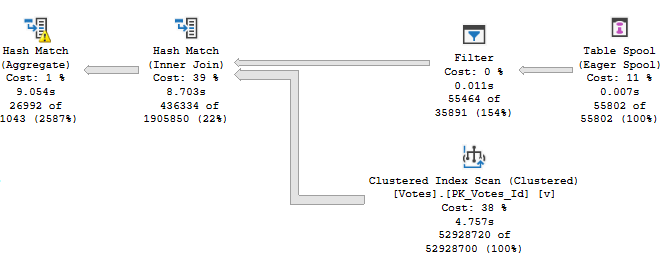
With the majority of the time being spent assembling the indexed view for maintenance.

SQL Server Query Plan
Yikes dawg

The Problem Of Course


Is that our indexes are bad. We’ve got no helpful index between Posts and Votes to help with the assembly.

Our first clue may have been when creating the indexed view took a long time, but hey.

Let’s fix it.

CREATE INDEX v ON dbo.Votes(PostId);

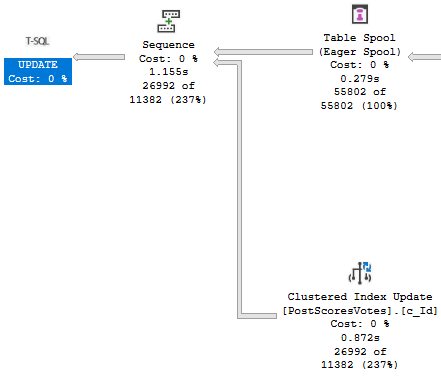
Now our update finishes in about a second!

SQL Server Query Plan
Cleant Up

Thanks for reading!

Going Further


If this is the kind of SQL Server stuff you love learning about, you’ll love my training. Blog readers get 25% off the Everything Bundle — over 100 hours of performance tuning content. Need hands-on help? I offer consulting engagements from targeted investigations to ongoing retainers. Want a quick sanity check before committing to a full engagement? Schedule a call — no commitment required.

Be Careful When You Alter SQL Server Indexed Views

Yo, Is That Mary?


Video Summary

In this video, I dive into the quirky behavior of indexed views in SQL Server, particularly focusing on what happens when you alter an index view. I share my personal experience with a six-year-old daughter who recently discovered that I’m on YouTube, which led to a priceless moment of realization for her. The main takeaway is that altering an index view can drop any indexes created on it, whether they are clustered or nonclustered. This can be quite surprising and potentially problematic if you’re not aware of this behavior. I walk through the process step-by-step using a simple example where creating or altering a view called “top comments” results in the disappearance of its index when altered. The video is light-hearted, filled with personal anecdotes, and aimed at making what could be a complex topic more approachable for SQL Server enthusiasts.

Full Transcript

This is gonna be one of those videos that you watch maybe because you see it on Twitter and then you’ll see it in a blog post a month later and be disappointed that it’s just a blog post with a video that you saw a month ago. But them’s the breaks when you have 30 blog posts already lined up. What do you want me to tell you? My six-year-old daughter recently discovered that I am on YouTube and the look on her face when she discovered that was priceless. Anyway, I’m here to talk, I shouldn’t introduce myself. My name’s Erik. I am, I am the janitor here at Erik Darling Data and I’m here to talk about something kind of funny that happens. with indexed views. Now, an indexed view is a pretty cool thing. It’s a, it’s a, it materializes a view. It makes that view a real, a real person like Pinocchio, what makes that view a real boy. And, I’m, it doesn’t matter if you use create or alter or create or alter here. It’s always the same thing, which I’ll, I’ll, I’ll walk through, but let’s create or alter a view called top comments. Now, if you want to create an index view, there are a whole bunch of rules that you have to follow.

There’s far too many rules for me to get into here, but a couple, one, a couple that we need for this particular index view are schema binding, which you need for all index views and account big column if you have an aggregate. Now, you can create index views without an aggregate that don’t have account big column because that wouldn’t make any sense. But, if you’re going to aggregate, uh, data in an index view, which is kind of like the whole point of an index view, or the whole point of most index views that I see, well, this is a pretty good, well, this is something you have to do anyway. So, let’s create this view and, uh, we’ll go look at that view and object explorer. You can see all the stupid things that I create, uh, writing demos. And that one was called, uh, top comments, I believe.

And if you go look, there is no index here, right? There’s no index on this view. And if we come back over here and we execute this, we’ll have an index on that view now. And now if we refresh, oh yeah, we’ve got to go up here to refresh. I promise I know what I’m doing. If we go here, refresh, and we look at top comments, we will now have an index on that view. So, we do have an index on that view now. Watch. Pay very careful, close attention to what’s going to happen next.

I’m going to say, I’m going to get rid of this window by hitting control and R. And I’m going to create or alter my view. And let’s go back and look. Let’s refresh this whole thing again. And let’s go into top comments. And look, my index is gone. My index has been dropped.

Now, if I go create that index again, it’ll show back up in there. And if I just run this as an alter view, I realize that not everyone is on at least SQL Server 2016. What’s that, 16? Then everyone can do create or alter. But if I do alter view, and I run this, and we go back and we look at top comments by refreshing, because we’re smart people and we know what we’re doing now, my index will be gone. Fun, right? So, moral of the story, be careful when you’re altering index views.

When you alter an index view, it drops any indexes you create on it. So, it will drop the clustered index. If you create additional nonclustered indexes on your index views, it will drop those too. And, I don’t know. You might not be lucky enough to have a very easy time recreating your indexes on your views.

It might not always be as painless a process as I have here on my view on my nice 64 gig of RAM laptop. Yes. 64 gig of RAM laptop. Anyway, I’m Eric, and I, of course, am the head chef at Erik Darling Data.

Thank you for watching. Thank you. I hope you learned something. I hope you at least enjoyed me rambling. It was probably better than whatever else you were going to do for the last four and a half minutes. I mean, probably not.

Anyway, thanks for watching, and I will see you in another video, another time, another place. Goodbye. What do you think I do? Have Bert Hold Faith? I order you. I started out before you. You did it to me, whatever’s all because I have a mythOL time.

Video Summary

In this video, I dive into the quirky behavior of indexed views in SQL Server, particularly focusing on what happens when you alter an index view. I share my personal experience with a six-year-old daughter who recently discovered that I’m on YouTube, which led to a priceless moment of realization for her. The main takeaway is that altering an index view can drop any indexes created on it, whether they are clustered or nonclustered. This can be quite surprising and potentially problematic if you’re not aware of this behavior. I walk through the process step-by-step using a simple example where creating or altering a view called “top comments” results in the disappearance of its index when altered. The video is light-hearted, filled with personal anecdotes, and aimed at making what could be a complex topic more approachable for SQL Server enthusiasts.

Full Transcript

This is gonna be one of those videos that you watch maybe because you see it on Twitter and then you’ll see it in a blog post a month later and be disappointed that it’s just a blog post with a video that you saw a month ago. But them’s the breaks when you have 30 blog posts already lined up. What do you want me to tell you? My six-year-old daughter recently discovered that I am on YouTube and the look on her face when she discovered that was priceless. Anyway, I’m here to talk, I shouldn’t introduce myself. My name’s Erik. I am, I am the janitor here at Erik Darling Data and I’m here to talk about something kind of funny that happens. with indexed views. Now, an indexed view is a pretty cool thing. It’s a, it’s a, it materializes a view. It makes that view a real, a real person like Pinocchio, what makes that view a real boy. And, I’m, it doesn’t matter if you use create or alter or create or alter here. It’s always the same thing, which I’ll, I’ll, I’ll walk through, but let’s create or alter a view called top comments. Now, if you want to create an index view, there are a whole bunch of rules that you have to follow.

There’s far too many rules for me to get into here, but a couple, one, a couple that we need for this particular index view are schema binding, which you need for all index views and account big column if you have an aggregate. Now, you can create index views without an aggregate that don’t have account big column because that wouldn’t make any sense. But, if you’re going to aggregate, uh, data in an index view, which is kind of like the whole point of an index view, or the whole point of most index views that I see, well, this is a pretty good, well, this is something you have to do anyway. So, let’s create this view and, uh, we’ll go look at that view and object explorer. You can see all the stupid things that I create, uh, writing demos. And that one was called, uh, top comments, I believe.

And if you go look, there is no index here, right? There’s no index on this view. And if we come back over here and we execute this, we’ll have an index on that view now. And now if we refresh, oh yeah, we’ve got to go up here to refresh. I promise I know what I’m doing. If we go here, refresh, and we look at top comments, we will now have an index on that view. So, we do have an index on that view now. Watch. Pay very careful, close attention to what’s going to happen next.

I’m going to say, I’m going to get rid of this window by hitting control and R. And I’m going to create or alter my view. And let’s go back and look. Let’s refresh this whole thing again. And let’s go into top comments. And look, my index is gone. My index has been dropped.

Now, if I go create that index again, it’ll show back up in there. And if I just run this as an alter view, I realize that not everyone is on at least SQL Server 2016. What’s that, 16? Then everyone can do create or alter. But if I do alter view, and I run this, and we go back and we look at top comments by refreshing, because we’re smart people and we know what we’re doing now, my index will be gone. Fun, right? So, moral of the story, be careful when you’re altering index views.

When you alter an index view, it drops any indexes you create on it. So, it will drop the clustered index. If you create additional nonclustered indexes on your index views, it will drop those too. And, I don’t know. You might not be lucky enough to have a very easy time recreating your indexes on your views.

It might not always be as painless a process as I have here on my view on my nice 64 gig of RAM laptop. Yes. 64 gig of RAM laptop. Anyway, I’m Eric, and I, of course, am the head chef at Erik Darling Data.

Thank you for watching. Thank you. I hope you learned something. I hope you at least enjoyed me rambling. It was probably better than whatever else you were going to do for the last four and a half minutes. I mean, probably not.

Anyway, thanks for watching, and I will see you in another video, another time, another place. Goodbye. What do you think I do? Have Bert Hold Faith? I order you. I started out before you. You did it to me, whatever’s all because I have a mythOL time.

Going Further


If this is the kind of SQL Server stuff you love learning about, you’ll love my training. Blog readers get 25% off the Everything Bundle — over 100 hours of performance tuning content. Need hands-on help? I offer consulting engagements from targeted investigations to ongoing retainers. Want a quick sanity check before committing to a full engagement? Schedule a call — no commitment required.