Imagine you have a rather complicated query that you want to abstract into a simple query for your less-than-with-it end users.
A view is probably a pretty good way of doing that, since you can shrink your preposterously-constructed tour through every table in the schema down to a simple select-from-one-object.
The problem is that now everyone expects it to perform well throughout all time, under any circumstances, come what may. It’s sort of like how your parents expect dinner to be $20 and tips to be 20% regardless of where they go or what they order.
Lobster? $5.
Steak? $5.
Bottle of wine? $5.
Any dessert you can imagine? $5.
Tip? Gosh, mister, another $5?
I sincerely apologize to anyone who continues to live in, or who moved to Europe to avoid tipping.
If you’d like some roommates, I have some parents you’d get along with.
Viewfinder
Creating a view in SQL Server doesn’t do anything special for you, outside of not making people remember your [reference to joke above] query.
You can put all manner of garbage in your view, make it reference another half dozen views full of garbage, and expect sparkling clean query performance every time.
Guess what happens?
Reality.
When you use views, the only value is abstraction. You still need to be concerned with how the query is written, and if the query has decent indexes to support it. In other words, you can’t just write a view and expect the optimizer to do anything special with it.
SQL Server doesn’t cache results, it only caches raw data. If you want the results of a view to be saved, you need to index it.
Take these two dummy queries, one against a created view, and the other an ad hoc query identical to what’s in the view:
CREATE OR ALTER VIEW
    dbo.just_a_query
WITH SCHEMABINDING
AS
SELECT
    p.OwnerUserId,
    TotalScore =
        ISNULL
        (
            SUM(p.Score),
            0
        ),
    TotalPosts =
        COUNT_BIG(*)
FROM dbo.Posts AS p
WHERE EXISTS
      (
          SELECT
              1/0
          FROM dbo.Votes AS v
          WHERE
              v.PostId = p.Id
      )
GROUP BY
    p.OwnerUserId;
GO

SELECT
    p.OwnerUserId,
    TotalScore =
        ISNULL
        (
            SUM(p.Score),
            0
        ),
    TotalPosts =
        COUNT_BIG(*)
FROM dbo.Posts AS p
WHERE EXISTS
      (
          SELECT
              1/0
          FROM dbo.Votes AS v
          WHERE
              v.PostId = p.Id
      )
AND
    p.OwnerUserId = 22656
GROUP BY
    p.OwnerUserId;
GO

SELECT
    jaq.*
FROM dbo.just_a_query AS jaq
WHERE
    jaq.OwnerUserId = 22656;
GO
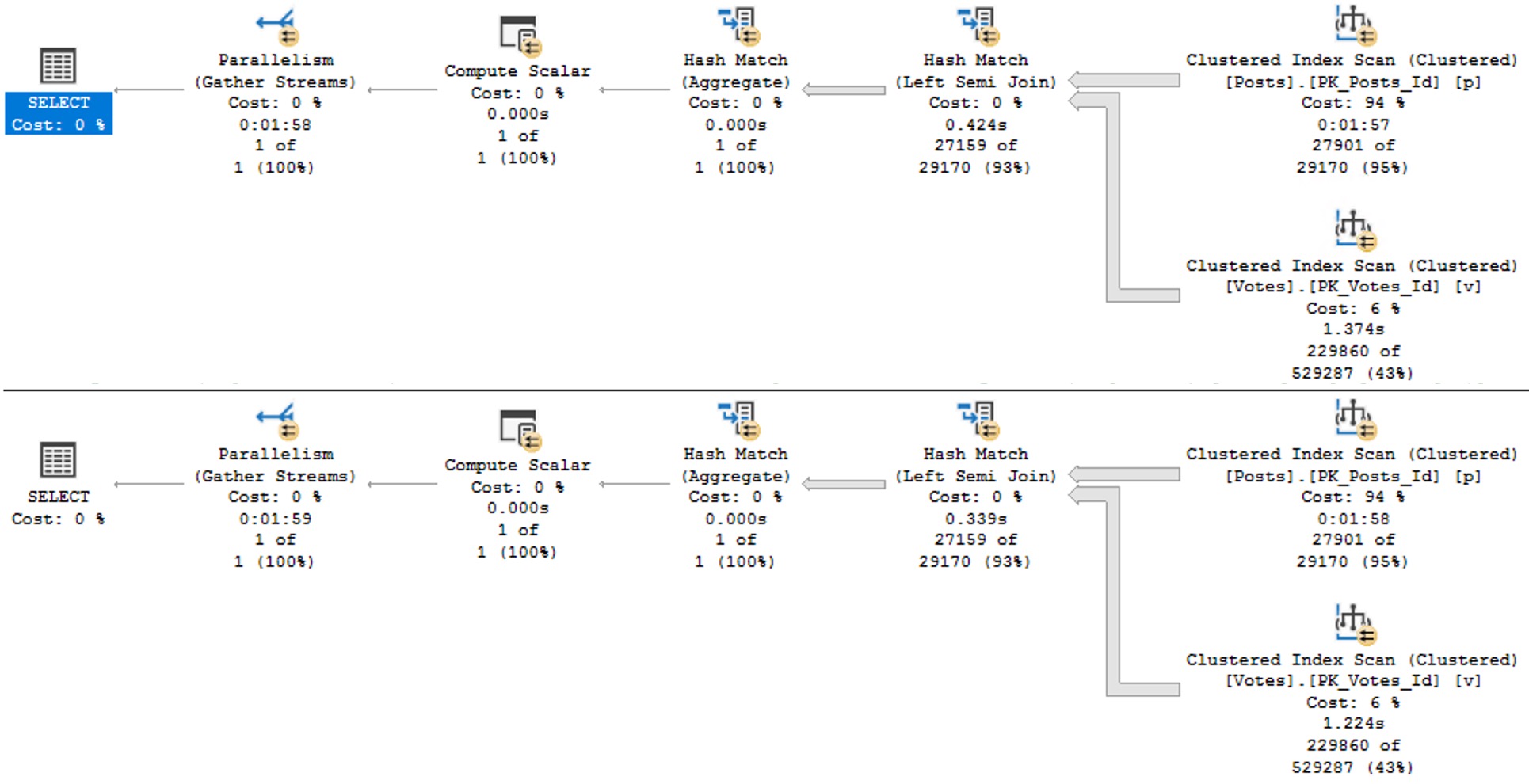
The plans are identical, and identically bad. Why? Because I didn’t try very hard, and there’s no good indexes for them.
Remember when I said that’s important?
avenues lined with trees
Keep in mind this is a query with some batch mode involved, so it could be a lot worse. But both instances complete within a second or so of each other.
The horrible thing is that indexed views are so strict in SQL Server that we can’t even create one on the view in question. That really sucks. We get this error.
CREATE UNIQUE CLUSTERED INDEX
    cuqadoodledoo
    ON dbo.not_just_a_query
(
    OwnerUserId
)
WITH
(
    SORT_IN_TEMPDB = ON,
    DATA_COMPRESSION = PAGE
);
Msg 10127, Level 16, State 1, Line 95
Cannot create index on view “StackOverflow2013.dbo.not_just_a_query” because it contains one or more subqueries.
Consider changing the view to use only joins instead of subqueries. Alternatively, consider not indexing this view.
Alternatively, go screw yourself. Allowing joins but not exists is somewhat baffling, since they’re quite different in that joins allow for multiple matches but exists does not. We’d have to do a lot of fancy grouping footwork to get equivalent results with a join, since distinct isn’t allowed in an indexed view in SQL Server either.
We could also pull the exists out of the view, add the Id column to the select list, group by that and OwnerUserId, index both of them, and… yeah nah.
I have no idea who’s in charge of indexed views in the product at this point, but a sufficiently lubricated republic would likely come calling with tar and feathers in the face of this injustice.
This is basic query syntax. It’s not like uh… min, max, sum, avg, except, intersect, union, union all, cross apply, outer apply, outer joins, or um, hey, is it too late for me to change careers?
The Pain In Pain Falls Painly On The Pain
You may have ended up here looking to learn all the minute differences between views and indexed views in SQL Server.
You may be disappointed in reading this post, but I can assure you that you’re not nearly as disappointed in this post as I am with indexed views in SQL Server.
They’re like one of those articles about flying cars where you read the headline and you’re like “woah, I’m living in the future”, but then three paragraphs in you find out the cars don’t really fly or drive and they might actually just be igloos that are only big enough for an Italian Greyhound or a paper plane that the author’s kid glued wheels to.
If this is the kind of SQL Server stuff you love learning about: these days I have AI do the annoying stuff for me. My new video course teaches you to work the same way, and I teach whole teams in a one-day workshop. Someone still has to know enough SQL Server to keep the robots in check, and that’s what my training is for.
In the release notes for SQL Server 2017 CU30, there’s a note that it fixes a problem where parameters can’t be pushed passed Sequence Project operators:
“In Microsoft SQL Server 2017, running parameterized queries skips the SelOnSeqPrj rule. Therefore, pushdown does not occur.” But it doesn’t actually do that.
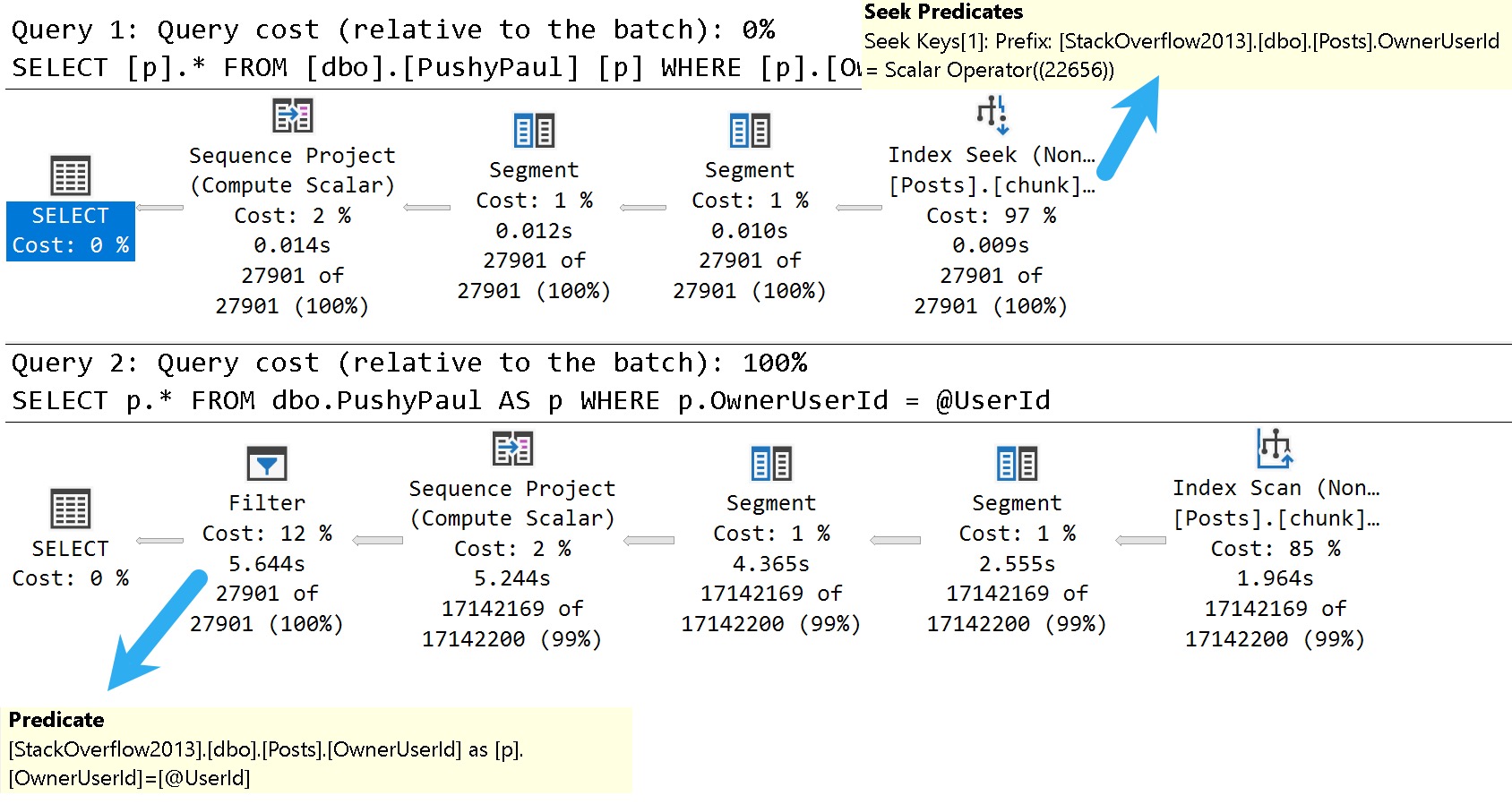
Here are the good and bad plans, comparing using a literal value vs. a parameterized value:
dunksville
In the plan with a literal value, the predicate is applied at the index seek, and the filtering is really quick.
In the plan with a parameterized value, the index is scanned, and applied at a filter way later in the query plan.
This is where the SelOnSeqPrj rule comes in: The parameter can’t be pushed past the Sequence Project operator like the literal value can.
Thanks for reading!
Video Summary
In this video, I delve into some of the known issues and updates in SQL Server 2017 CU30, focusing on one particular performance-related fix that caught my attention. Despite the title suggesting a discussion about 2000, we’re actually looking at modern SQL Server versions from 2022. I explore how running parameterized queries can sometimes skip certain seek optimizations, leading to suboptimal query plans. This issue has been around for quite some time and is something I’ve been highlighting in my work. The video demonstrates this with a practical example using SSMS, showing the difference between passing literal values versus parameters within stored procedures. It’s a reminder that while SQL Server continues to evolve, there are still areas where performance optimizations could be improved, especially when it comes to documentation and clear communication of these changes.
Full Transcript
Erik Darling here with Sir Erik Darling Data. And today I want to talk about SQL Server 2017 for some reason. Don’t ask me why. It’s 2000, midway through 2000, 2022. But we got CU30 for SQL Server 2017. Very exciting stuff in there. Just kidding. It’s not, mostly not very exciting. But there was one thing in there that caught my eye. Because it’s something that’s near and dear to my heart. Query performance stuff. I don’t know if you know that about me. I tend to, tend to traffic a bit in that area of the world. So, this is version, let’s, let’s use zoom it, proper human beings here. Will I wait for Mark Russinovich to release a new version that does screen recording? That’ll be nice. But let’s zoom in a little bit here. And let’s look at version 14.0.34. So, it’s, let’s go back to version 14.0.34.5.1.2. Wonderful. Get that sorted out. Well, if you, let’s go back. Thanks, Mac Toolbar for showing up and ruining my recording. Photo bombing piece of crap. Hate this thing. So, let’s go back over to SSMS real quick. And let’s just make sure that I am on SQL Server 2017 14.0.3451.2. So, we’re all sorted out there. That’s good for us. We got that all figured out. We’re doing, doing wonderful.
So, known issues in this update. What do we have going on here? What’s, what’s happening in this release? Well, uh, something about a latch timeout. Ooh, high availability. Don’t care. Ooh, trace flag. One, two, three, two, three. Great. We’re at 12,323 trace flag. Probably higher at this point. Uh, let’s see. Uh, match lock escalation, uh, change tracking. Who cares? Access violation occurred. When you try to truncate specific partitions using the partition function. Seems funny. Uh, dropping temp tables causes an unresolved deadlock and dump file. Ooh. Wow. Don’t drop those temp tables. Uh, let’s see. An assertion failure occurs when your query contains the merge statement. Big surprise.
Uh, let’s see. When you run dbcc checkdb with extended logical checks against a database by using the table valued function tbf that uses indexes. Here is the error message. Table percent ls does not exist. I’m going to pause here for a moment and ask you, why do we accept this? Why do we tolerate this? If we can’t get any sort of decent information about, uh, what fixes are out there for a piece of software, why can’t we get them in, in something that’s at least understandable?
Like, not everything has to be a book, but a complete thought would be nice. I don’t understand when this started happening or why this started happening, but the quality of the documentation for SQL Server is real, real broken. Uh, if you look at error, like, especially new error messages or new extended events, there is absolutely no oversight in the, in the, in the language used in there.
It’s full of typos and just like they saw one, uh, Aaron Bertrand brought one up to me yesterday where, uh, availability groups have a double dash between availability and groups. There’s, or always on or something like that. That has never been what they’ve been called or how they’ve been named or referred to.
And, uh, it, it, it really is just gone completely downhill. I don’t know whose idea that was. Maybe, maybe, maybe Postgres has just infiltrated Microsoft and they’re taking them down from the inside like termites.
I don’t know. Who knows? Tough to tell out there. It’s a, it’s a harsh world, isn’t it? But here’s the one that I want to talk about.
We’ll talk about this wonderful little thing right here. In Microsoft SQL Server 2017, running parameterized queries skips the sell on seek purge rule. Therefore, push down does not occur.
Well, thankfully, this is something that I’ve been demoing for years because it’s been a problem. Uh, I think the first time I ever read about it was in a Paul White blog post coming up on 10 years ago now. Crazy, right?
A 10-year-old performance bug in SQL Server. Well, I know they’re not busy fixing performance bugs and certainly not busy writing adequate documentation for anything. So here we are reading this.
Uh, I’m not even going to bother with this one. Uh, I don’t know. Uh, index creation script fails. Cool. Great. Great write-up.
Whoever did that. Summer intern’s really working hard. Summer intern found a beer fridge, apparently. All right. Well, everyone’s working from home, so everything’s a beer fridge. Anyway, let’s go see if that actually is fixed.
So, uh, I’ve already created this index. I’m not going to sit there and make you watch me create an index over again. But just to make sure that we are on the same page here, uh, what did I do wrong? Oh, I didn’t, I didn’t highlight select.
There we go. My own quality is going downhill, I guess, too. So, uh, let’s take a look at the results here. So this thing was just restarted. Well, this, this time isn’t going to make any sense to you. It’s actually about 8.30 in the morning here.
But my VM is on West Coast time because I never bothered to change it because I don’t care. Uh, it’s a VM, right? There’s a cattle, not pets or whatever. Uh, but anyway, I am actually running the correct version of SQL Server to see this wonderful performance fix in action.
I guess I shouldn’t make fun of anyone else’s, uh, abilities and I can’t even say fix in action. Uh, but anyway, I, I’ve got an index on my, my, my post table called chunk. I forget why I called it that.
It was a long time ago, uh, but the index is on owner user ID and score descending. And it includes creation date and last act, last activity date. And that index matches up pretty well with the goals of this view, right? So we have a windowing function on owner user ID and score descending.
And my, my, uh, my formatting of this thing is a little, is disagreeable even to me. I don’t, I don’t like the way that turned out. I’m going to fix that right here in front of all of you.
All right. So now everything is on, got its own line. No one, no one has to share too much space. Everything’s maintaining proper distance. Uh, but then we’re selecting owner user ID, score, creation date, and last activity.
So that index works out pretty well for everything that we’re trying to do in there, right? We’ve got everything for our dense rank completely in order. And we’ve got, uh, our, our select list columns and the includes up there.
So joy to the world. An index has come. So what should that fix fix? Well, we’re going to turn on a query plan here and we’re going to run this select, right?
So we run this thing and we have an execution plan. Let’s zoom in on this execution plan and see what happened. Now, even though, uh, we’ve got a case of simple parameterization here, I don’t, I have a feeling this doesn’t stick.
Uh, I could, I could do some extra stuff to validate that, but, uh, I’ve already done that and it’s quite boring to watch. So we’re going to, we’re going to skip that part. But if we look down here in the query plan, because we’ve used a literal value and a simple parameterization didn’t, didn’t topple our query into the C.
Uh, we’ve got an index seek into our index called for some reason chunk. That takes 0.008 milliseconds. Wow.
What a great query tuner that Erik Darling is. We should hire him to tune all our queries. Well, maybe not so fast. Uh, so. That worked out pretty well.
Passing the literal value. Right. Everything got pushed down the query plan. Everything worked out great. Uh, happy, happy about that. But now let’s create a store procedure. All right.
Because if we go back to what that, that the cumulative update was talking about, this is when running a parameterized query. All right. Parameterized and literal value.
Well, even though it looked like it might have been simple parameterized was not actual parameterized. Right. There’s a literal value in there. So now let’s parameterize query.
Can’t, can’t get enough of the word parameterized. Makes me feel so very proper. So we’re going to run this procedure. Or we’re going to create this procedure here called stinky Pete.
I don’t know why Pete’s stinky. Same reason I don’t know why that index is chunky. Mysteries of the world. But here we have a parameter called user ID.
And we’re going to pass that parameter to our view down here. All right. Now, owner user ID equals user ID. Remember, we’ve got this wonderful index for some reason named chunk that leads with owner user ID. And so we should have, just like when we pass in a literal value, we should get a perfectly good seek to that owner user ID value.
But when I run this and a big reveal here, this does not finish in 0.008 milliseconds. In fact, this catastrophe drags on for seven seconds. And if we look at the difference in the plan, let’s zoom in real nice on that.
We have an index scan now on the post table. That takes 2.213 seconds. A bit of a far cry from the 0.008 milliseconds.
And that just tends to get worse as we move on in the plan to a 2.289 and then 4.719 and then 5.628 and then 6.054. So six seconds total for the query execution plus a little bit of time for SSMS to spit out and render our results. So, yeah, it’s pretty disappointing.
It said, hey, we fixed something and then the only demo I… Well, the best demo I have that shows the problem still has a problem. So thanks there.
Perhaps a little bit extra QA would have helped that one. Maybe that wasn’t even supposed to be in there. I don’t know. Maybe that will get pulled out of the release notes. I couldn’t tell you. No one from Microsoft talks to me anymore.
I don’t know why. I missed Joe’s sack. MungoDB got real lucky there. Well, anyway, it is 8.40 a.m. now on Friday.
And with that, I think it’s time to start drinking because there’s just no hope for the world. It’s going to be my new company tagline. There’s no hope for the world.
I’m waiting for Beer Gut Magazine to buy me out. Anyway, you have a nice day. I’m going to go pour something now. The first thing about the Shield.
For You and me now, let’s see, there are a few ways to can philosopher bless the world. It’s too late. This is a nicelegen to have an intro.
Going Further
If this is the kind of SQL Server stuff you love learning about: these days I have AI do the annoying stuff for me. My new video course teaches you to work the same way, and I teach whole teams in a one-day workshop. Someone still has to know enough SQL Server to keep the robots in check, and that’s what my training is for.