I think I have probably spent 500 hours of my life rewriting T-SQL Scalar UDFs to avoid all the performance problems associated with them.
The obvious choice is the Inline Table Valued Function, which has fewer performance issues baked in. For the kids out there: they don’t spill trauma.
But getting the rewrite right can be tricky, especially when it’s possible for the function to return NULL values.
I’m going to walk through a simple example, and show you how to get the results you want, without adding abusing your developers.
What is not covered in this post are all the performance issues caused by UDFs. If you want to get into that, click the training link at the bottom of this post.
The Problem
Here’s the function we need to rewrite. It returns a simple bit value if a particular user was active after a certain date:
CREATE OR ALTER FUNCTION
    dbo.rewrite
(
    @UserId int,
    @LastAccessDate datetime
)
RETURNS bit
AS
BEGIN
    DECLARE
        @b bit = 0,
        @d datetime = GETDATE(); /*NOFROID4U*/

    SELECT
        @b =
            CASE
                WHEN u.Id IS NOT NULL
                THEN 1
                ELSE 0
            END
    FROM dbo.Users AS u
    WHERE u.Id = @UserId
    AND   u.LastAccessDate > @LastAccessDate;

    RETURN
        @b;
END;
GO
Since I’m using SQL Server 2022 in compatibility level 160, I’m declaring a useless datetime parameter and using GETDATE() to set it to a value to avoid scalar UDF inlining.
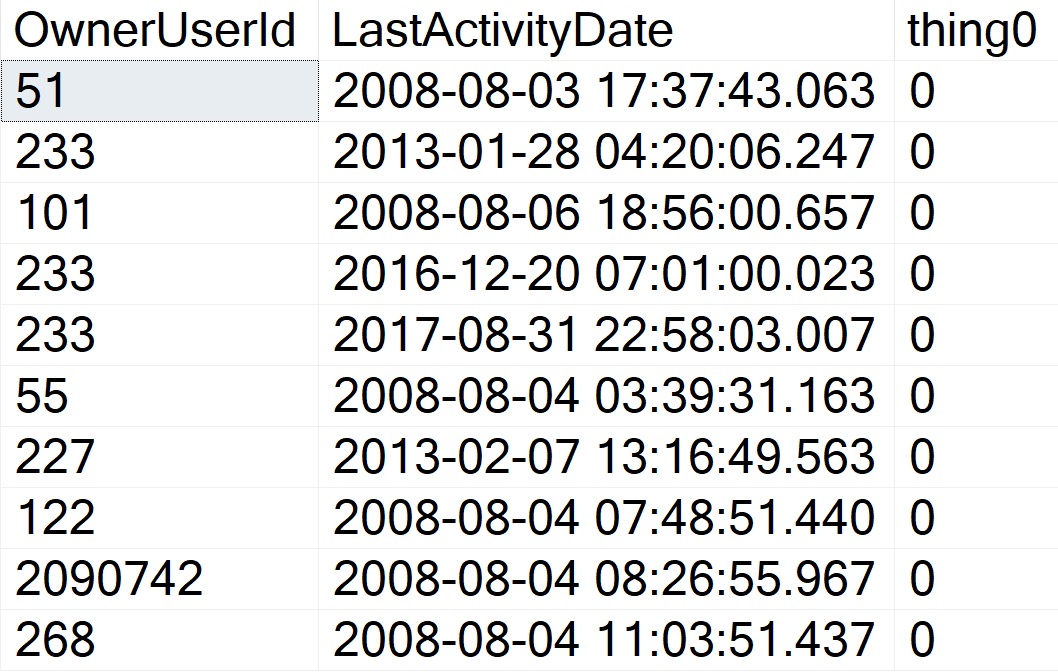
We can call it about like so (again, this query is too trivial to suffer any performance issues), and get some reasonable-looking results back.
SELECT TOP (10)
    p.OwnerUserId,
    p.LastActivityDate,
    thing0 =
        dbo.rewrite
        (
            p.OwnerUserId,
            GETDATE()
        )
FROM dbo.Posts AS p
WHERE p.Score = 1;
who i smoke
Writeable Media
Rewriting this function looks straightforward. All we need to do is Robocop a few parts and pieces and badabing badaboom we’re done.
Note that to really complete this, we’d also need to add a convert to bit to avoid SQL Server implicitly converting the output of the case expression to a (potentially) different datatype, but we’ll fix that in the final rewrite.
CREATE OR ALTER FUNCTION
    dbo.the_rewrite
(
    @UserId int,
    @LastAccessDate datetime
)
RETURNS table
WITH SCHEMABINDING
AS
RETURN
    SELECT
        b =
            CASE
                WHEN u.Id IS NOT NULL
                THEN 1
                ELSE 0
            END
    FROM dbo.Users AS u
    WHERE u.Id = @UserId
    AND   u.LastAccessDate > @LastAccessDate;
GO
Of course, this alters how we need to reference the function in the calling query. Inline table valued functions are totally different types of objects from scalar UDFs.
SELECT TOP (10)
    p.OwnerUserId,
    p.LastActivityDate,
    thing1 =
        (
            SELECT
                t.b
            FROM dbo.the_rewrite
            (
                p.OwnerUserId,
                GETDATE()
            ) AS t
        )
FROM dbo.Posts AS p
WHERE p.Score = 1;
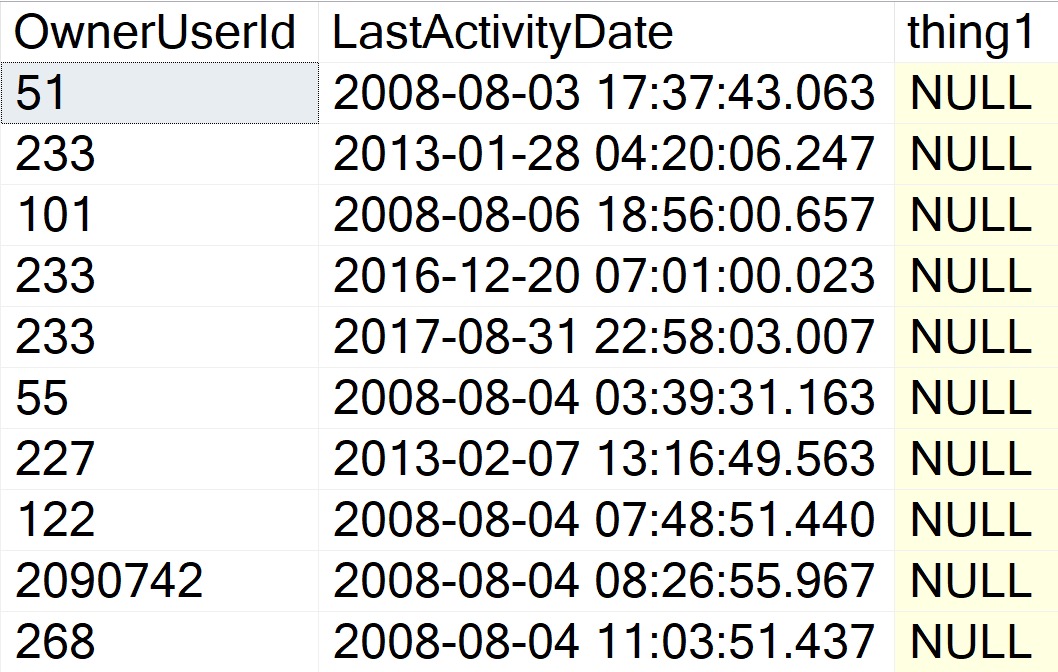
But the results are disappointing! Where we once had perfectly formed zeroes, now we have a bunch of NULLs that severely harsh our mellow.
torment
This can obviously cause problems for whomever or whatever is ingesting the result set.
Expectations: 1 or 0
Reality: NULL
Shame, that.
Changing The Query
Many developers will attempt something like this first, to replace NULLs in the calling query:
SELECT TOP (10)
    p.OwnerUserId,
    p.LastActivityDate,
    thing1 =
        (
            SELECT
                ISNULL
                (
                    t.b,
                    0
                )
            FROM dbo.the_rewrite
            (
                p.OwnerUserId,
                GETDATE()
            ) AS t
        )
FROM dbo.Posts AS p
WHERE p.Score = 1;
But this will still produce NULL realities where we have zeroed expectations. We could take a step way back and do something like this:
SELECT TOP (10)
    p.OwnerUserId,
    p.LastActivityDate,
    thing1 =
        ISNULL
        (
            (
                SELECT
                    t.b
                FROM dbo.the_rewrite
                (
                    p.OwnerUserId,
                    GETDATE()
                ) AS t
            ),
            0
        )
FROM dbo.Posts AS p
WHERE p.Score = 1;
GO
But this is an ugly and annoying thing to remember. Imagine having to explain this to someone reading or trying to incorporate our beautiful new function into a query.
We should fix this inside the function.
Fixer Upper
I’m not going to pretend this is the only way to do this. You can likely figure out half a million ways to pet this cat. It’s just easy.
CREATE OR ALTER FUNCTION
    dbo.the_inner_rewrite
(
    @UserId int,
    @LastAccessDate datetime
)
RETURNS table
WITH SCHEMABINDING
AS
RETURN

    SELECT
        b =
            CONVERT
            (
                bit,
                MAX(x.b)
            )
    FROM
    (
        SELECT
            b =
                CASE
                    WHEN u.Id IS NOT NULL
                    THEN 1
                    ELSE 0
                END
        FROM dbo.Users AS u
        WHERE u.Id = @UserId
        AND   u.LastAccessDate > @LastAccessDate

        UNION ALL

        SELECT
            b = 0
    ) AS x;
GO
We have:
Our original query, which may return 1 or 0 based on existence
A union all to a zero literal so that a result is guaranteed to be produced
An outer max to get the higher value between the two inner selects
And this will produce expected results, with the final output converted to a bit.
Thanks for reading!
Going Further
If this is the kind of SQL Server stuff you love learning about: these days I have AI do the annoying stuff for me. My new video course teaches you to work the same way, and I teach whole teams in a one-day workshop. Someone still has to know enough SQL Server to keep the robots in check, and that’s what my training is for.
This is a short post that I wanted to write on the heels of doing a bunch of work in sp_QuickieStore.
Many times, pulling data out of odd structures like XML or JSON can lead to difficulty in correctly typing each output element. I run into this commonly with query plan XML, of course. You may run into it elsewhere.
The main issue is that I often need to compare what comes out of those odd data structures to data stored more properly in other system views. For example:
Query Hash: Binary 8
Query Plan Hash: Binary 8
SQL Handle: Varbinary 64
Plan Handle: Varbinary 64
There’s some shenanigans you can use around big ints, but I’ve run into a lot of bugs with that. I don’t want to talk about it.
Nutty
As an example, this won’t match:
SELECT
    c =
        CASE
            WHEN '0x1AB614B461F4D769' = 0x1AB614B461F4D769
            THEN 1
            ELSE 0
        END;
The string does not implicitly convert to the binary 8 value. The same is true when you use varbinary values.
You might think that just converting the string to binary 8 would be enough, but no! This will still return a zero.
SELECT
    c =
        CASE
            WHEN CONVERT(binary(8), '0x1AB614B461F4D769') = 0x1AB614B461F4D769
            THEN 1
            ELSE 0
        END;
SELECT
    no =
        CONVERT(binary(8), '0x1AB614B461F4D769'),
    yes = CONVERT(binary(8), '0x1AB614B461F4D769', 1);
no	                yes
0x3078314142363134	0x1AB614B461F4D769
The same is true with varbinary, too:
SELECT
    no =
        CONVERT(varbinary(64), '0x0900F46AC89E66DF744C8A0AD4FD3D3306B90000000000000000000000000000000000000000000000000000'),
    yes = CONVERT(varbinary(64), '0x0900F46AC89E66DF744C8A0AD4FD3D3306B90000000000000000000000000000000000000000000000000000', 1);
no
0x30783039303046343641433839453636444637343443384130414434464433443333303642393030303030303030303030303030303030303030303030303030

yes
0x0900F46AC89E66DF744C8A0AD4FD3D3306B90000000000000000000000000000000000000000000000000000
The real answer here is to not rely on conversions, implicit or otherwise, when comparing data.
But, if you ever find yourself having to deal with some wonky binary data, this is one way to get yourself out of a scrape.
Thanks for reading!
Going Further
If this is the kind of SQL Server stuff you love learning about: these days I have AI do the annoying stuff for me. My new video course teaches you to work the same way, and I teach whole teams in a one-day workshop. Someone still has to know enough SQL Server to keep the robots in check, and that’s what my training is for.
I get this question a lot while working with clients, largely in a couple specific contexts:
Me telling someone they need to use dynamic SQL in a stored procedure
Applications sending over parameterized SQL statements that are executed with sp_executesql
Often, the dynamic SQL recommendation comes from needing to deal with:
IF branching
Parameter sensitivity
Optional parameters
Local variables
Even in the context of a stored procedure, these things can really suck performance down to a sad nub.
But The Code
Now, much of the SQL generated by ORMs terrifies me.
Even when it’s developer misuse, and not the fault of the ORM, it can be difficult to convince those perfect angels that the query their code generated is submaximal.
Now, look, simple queries do fine with an ORM (usually). Provided you’re:
Paying attention to indexes
Not using long IN clauses
Strongly typing parameters
Avoiding AddWithValues
You can skate by with your basic CRUD stuffs. I get worried as soon as someone looks at an ORM query and says “oh, that’s a report…” because there’s no way you’re generating reasonable reporting queries with an ORM.
Procedural Drama
The real upside of stored procedures isn’t stuff like plan reuse or caching or 1:1 better performance. A single parameterized query run in either context will perform the same, all things considered.
Where they shine is with additional flexibility in tuning things. Rather than one huge query that the optimizer has to deal with, you can split things up into more manageable chunks.
You also have quite a bit more freedom with various hints, trace flags, query rewrites, isolation levels, etc.
In other words: eventually your query needs will outgrow your ORMs ability to generate optimal queries.
Until then, use whatever you’re able to get your job done with.
Thanks for reading!
Going Further
If this is the kind of SQL Server stuff you love learning about: these days I have AI do the annoying stuff for me. My new video course teaches you to work the same way, and I teach whole teams in a one-day workshop. Someone still has to know enough SQL Server to keep the robots in check, and that’s what my training is for.
USE StackOverflow2013;
EXEC dbo.DropIndexes;
SET NOCOUNT ON;
DBCC FREEPROCCACHE;
GO


CREATE INDEX
   chunk
ON dbo.Posts
    (OwnerUserId, Score DESC)
INCLUDE
    (CreationDate, LastActivityDate)
WITH
    (MAXDOP = 8, SORT_IN_TEMPDB = ON, DATA_COMPRESSION = PAGE);
GO

CREATE OR ALTER VIEW
    dbo.PushyPaul
WITH SCHEMABINDING
AS
    SELECT
        p.OwnerUserId,
        p.Score,
        p.CreationDate,
        p.LastActivityDate,
        PostRank =
            DENSE_RANK() OVER
            (
               PARTITION BY
                  p.OwnerUserId
               ORDER BY
                  p.Score DESC
            )
    FROM dbo.Posts AS p;
GO

SELECT
    p.*
FROM dbo.PushyPaul AS p
WHERE p.OwnerUserId = 22656;
GO

CREATE OR ALTER PROCEDURE
    dbo.StinkyPete
(
    @UserId int
)
AS
SET NOCOUNT, XACT_ABORT ON;
BEGIN
    SELECT
        p.*
    FROM dbo.PushyPaul AS p
    WHERE p.OwnerUserId = @UserId;
END;
GO

EXEC dbo.StinkyPete
    @UserId = 22656;


/*Start Here*/

ALTER DATABASE
    StackOverflow2013
SET PARAMETERIZATION SIMPLE;

DBCC TRACEOFF
(
    4199,
    -1
);

ALTER DATABASE SCOPED CONFIGURATION
    SET QUERY_OPTIMIZER_HOTFIXES = OFF;


SELECT
    p.*
FROM dbo.PushyPaul AS p
WHERE p.OwnerUserId = 22656
AND   1 = (SELECT 1); /*Avoid trivial plan/simple parameterization*/


/*Let's cause a problem!*/
ALTER DATABASE
    StackOverflow2013
SET PARAMETERIZATION FORCED;

SELECT
    p.*
FROM dbo.PushyPaul AS p
WHERE p.OwnerUserId = 22656
AND   1 = (SELECT 1); /*Avoid trivial plan/simple parameterization*/


/*Can we fix the problem?*/
DBCC TRACEON
(
    4199,
    -1
);


SELECT
    p.*
FROM dbo.PushyPaul AS p
WHERE p.OwnerUserId = 22656
AND   1 = (SELECT 1); /*Avoid trivial plan/simple parameterization*/


/*That's kinda weird...*/
DBCC FREEPROCCACHE;


SELECT
    p.*
FROM dbo.PushyPaul AS p
WHERE p.OwnerUserId = 22656
AND   1 = (SELECT 1); /*Avoid trivial plan/simple parameterization*/


/*Turn Down Service*/
DBCC TRACEOFF
(
    4199,
    -1
);

SELECT
    p.*
FROM dbo.PushyPaul AS p
WHERE p.OwnerUserId = 22656
AND   1 = (SELECT 1); /*Avoid trivial plan/simple parameterization*/


/*Okay then.*/


/*I'm different.*/
ALTER DATABASE SCOPED CONFIGURATION
    SET QUERY_OPTIMIZER_HOTFIXES = ON;


SELECT
    p.*
FROM dbo.PushyPaul AS p
WHERE p.OwnerUserId = 22656
AND   1 = (SELECT 1); /*Avoid trivial plan/simple parameterization*/


/*Cleanup*/
ALTER DATABASE
    StackOverflow2013
SET PARAMETERIZATION SIMPLE;

ALTER DATABASE SCOPED CONFIGURATION
    SET QUERY_OPTIMIZER_HOTFIXES = OFF;

DBCC TRACEOFF
(
    4199,
    -1
);
Video Summary
In this video, I delve into a specific issue in Microsoft SQL Server 2017 CU30, where the documentation left out crucial details about how parameterized queries can affect query plans. I explain that running parameterized queries skips the cell on sequence project rule, preventing pushdown and causing full index scans instead of seeks. To demonstrate this, I walk through setting up an appropriate index and running both literal and parameterized queries to illustrate the difference in execution plans. The video also covers how trace flag 4199 affects query optimization but does not clear the plan cache, while the database scope configuration method does. This discrepancy highlights the importance of understanding these nuances for effective query tuning and optimization.
Full Transcript
Alright, I apologize if the lighting is a little bit weird. It’s a, there’s kind of a weird weather day out here, and the light is very bright and white, and then I turned on my ring light to try and compensate for that. I’m not sure how that’s gonna look, I’m not sure how that’s gonna go, but anyway. I, I, I need to follow up yesterday’s video about the, the, the Sell On Seek Project issue in Microsoft SQL Server 2017 CU30, because the, the, it turns out that the, the documentation in, in the, in this, in the cumulative update, shockingly, was, left, left some stuff to be desired, left, left some crucial elements out. Now.
This is still just saying the same thing that it said yesterday. In Microsoft SQL Server 2017, running parameterized query skips the cell on sequence project rule. Therefore, pushdown does not occur.
If you click on the little link there, nothing happens. It just takes you back to this, basically takes you to the bookmark of this issue. So that’s fun.
And that leaves out, like I said, a very crucial detail. Now, I’m going to walk back. Screw you, Mac Toolbar. Who does that?
Macs are the worst. If anyone ever tries to convince you to switch over to a Mac, burn them. Burn them like the witch they are.
Or warlock they are. Whatever it is. I don’t know. Anyway. Yesterday, we ran through this demo where we created an index that very well suits both the query that we’re going to run.
You know, owner user ID score, right? We got owner user ID and score and the windowing function. And creation date and last activity date in the select list. And later, we’re going to run some queries that filter on owner user ID with an equality predicate.
So this should be a totally seekable thing. So yesterday’s video, I showed you that if we use a literal value and we run that query, we get a nice seek. The literal value gets pushed down past the sequence project operator, seeks into the index.
But when we parameterize the query, that no longer happens. We scan the whole index, do the whole dense rank windowing function thing, and then filter out later. All right.
So we’re going to start here today. And we’re going to make sure that we are starting in the right place with none of this stuff going on. We want to make sure that none of these things are in effect when we run this. So I’m going to run this query, which is the same query that we ran yesterday, essentially.
But the reason I want to run it this way is with that one equals select one is to avoid SQL Server’s cost-based optimizer, trying to use a trivial plan or use simple parameterization on our query. And when we do that, we get this thing is a literal value.
And we can see that, you know, we have a sequence project, right? This is the SEQPRJ, part of that rule that gets skipped and all that. We got a couple of segments that I don’t really care about.
But then more importantly, we have the index seek into, again, our hero chunk. Anyway, let’s mess with that a little bit. Let’s cause a problem here.
So yesterday, I used a stored procedure to show you that a parameterized query would behave differently, even with the cumulative update installed, right? So let’s set parameterization to forced for this database.
And remember, under a simple parameterization, you pass in a literal value. It’s kind of up to the optimizer whether, you know, the trivial plan, simple parameterization kicks in and you actually get a simple parameterized query.
Under forced parameterization, under most circumstances, SQL Server will be like, oh, well, cool, we can throw this right at you, right? Turn that into a parameter magically for you.
All right. So now with parameterization force turned on, let’s run this thing. And this is where things sort of start to fall over, right? Because with forced parameterization turned on, we now have a query plan that looks like this.
I didn’t mean to have that tool tip pop up. Apologize there. But you’ll notice that this looks kind of funny, right?
Everything has these little spaces and stuff between and everything’s lowercase is God intended. So if anyone out there is watching and perhaps uses capitalized table aliases, perhaps this is, you know, a pretty good sign that that’s the wrong way to do things.
Just saying. But anyway, we have owner user ID equals at zero. And this is one of my favorite parts of simple parameterization is and at one equals select one.
So I’m not really sure where they came up with that. It’s just kind of cute for me. But anyway, the query plan looks a little bit different because we got this stuff up here to deal with that.
We actually have a startup expression predicate on the literal value one equaling the at one parameter. But, you know, that’s neither here nor there. The important part is down here where we now have that index scan that we saw yesterday.
Right? And that takes a couple seconds. And over here we have a filter operator. And that filter operator is where we figure out where that parameter value that we passed in gets applied.
Now, yesterday we had the stored procedure where it was called at user ID. Today the predicate is just going to be that at zero that we saw in the query text up here. Right?
That at zero. Okay. Okay. So, you know, when I was looking into it yesterday after I recorded the original video, something that threw me off and I thought was pretty funny was that, you know, a lot of these things are hidden behind trace flags. And now a very common one that a lot of these fixes get hidden behind is trace flag 4199.
4199 has been around, I don’t know, since like SQL Server. I think, I want to say 2008, but it might even be 2005. I refuse to try to find that literature at this point.
But 4199 hides a lot of the optimizer hot fixes that end up in SQL Server. So, this was like the first thing, like after I recorded yesterday’s video, I was like, okay, calm down. Send it yourself, Erik Darling.
Stop drinking. Well, that didn’t happen. But, so if you turn on this trace flag, something kind of funny happens at first. And that you turn on trace flag 4199 and you run the query again and you get the same query plan. All right.
And this might throw you off. All right. And why might this throw you off? Good question. I was just about to ask that. That was a great question. This is the next one that you answer in the video. So, the reason why you get the same query plan, this whole thing, is that turning on trace flag 4199, which enables optimizer hot fixes, doesn’t actually clear out the plan cache.
No, it does not. So, a trace flag that directly affects optimizer behavior does not clear out the plan cache. Why?
I don’t know. I’m going to pause for a moment. Hope I don’t make any mouth sounds with that. Do hate a mouth sound. But, let’s clear out the plan cache then.
Need a little pick me up there. Let’s clear out the plan cache and rerun this. My favorite characters ever is a rerun. But now, with trace flag 4199 enabled and a fresh plan generated for this query, we get the behavior that we would expect to see based on the documentation, which does not mention trace flag 4199. Out of the box with a little modification to the box there.
Tiny little difference. So, good, right? Sort of, I guess.
No one told you that. And that’s kind of depressing. But, let’s turn off trace flag 4199. Just to prove to you that that is the case, that 4199 does not do anything to the plan cache.
We turn that off, we’re actually still going to get the same query plan as last time, right? We get the seek plan again. So, that’s kind of annoying.
One thing that is different, and one thing that does clear out the plan cache and allow you to get the plan is to use the altered database scope configuration method of turning on optimizer hotfixes. Which is probably the preferred method, to be honest. Just because, you know, turning trace flags on and off is a little tricky.
You know, they don’t persevere restarts unless you, you know, set them at SQL Server startup. Or you have a startup store procedure run to flick those switches on. But, even with, like, stuff like trace flag 8048, you know, the startup procedure option isn’t quite as good because a bunch of other stuff gets initialized first.
So, anyway. Story for a different day. But, anyway.
So, you turn on optimizer hotfixes and all of it. And, you know, you will get the fresh plan and the plan cache and clear it out and get the seek plan and all that stuff. So, that’s sort of it for this one. If you want to see your parameters get pushed past the sequence project operator, you are going to need to enable trace flag 4199 and clear out the plan cache.
Or use the database scope configuration to set hotfixes on. So, moral of the story here. Well, I guess there’s maybe two or three of them.
We’ll see how many I think of as I start talking. One, Microsoft CU documentation is crap. Real bad.
Two, trace flag 4199 does not clear out the plan cache despite the fact that it directly affects the way the optimizer handles queries. Three, the database scope configuration for query optimizer hotfixes does clear out the plan cache. And, I guess, four, why the hell wouldn’t you make both of those things behave the same way?
Three, why wouldn’t a trace flag that changes optimizer behavior clear out the plan cache so that you can immediately see that optimizer behavior? That’s a little bit weird for me. I mean, I know, like, the database scope configuration thing, that cropped up around SQL Server 2016, I think.
So, we had, let’s see, like, probably three, four versions, major versions of SQL Server between, of trace flag 4199 not clearing out the plan cache. That’s, ain’t that cute as a boot. Anyway, I’m going to go finish this espresso, we’ll call it, and, I don’t know, wait five years for this video to render on my piece of crap Macintosh computer.
And, that’ll be, that’ll be my day. Just spend the day tending to the fire that, that occurs when, when I render a video. So, anyway, you all have a wonderful Saturday, or whatever day you end up watching this on.
I hope that, hope that you, hope that you are living your best lives. Thanks for watching.
Going Further
If this is the kind of SQL Server stuff you love learning about: these days I have AI do the annoying stuff for me. My new video course teaches you to work the same way, and I teach whole teams in a one-day workshop. Someone still has to know enough SQL Server to keep the robots in check, and that’s what my training is for.
In the release notes for SQL Server 2017 CU30, there’s a note that it fixes a problem where parameters can’t be pushed passed Sequence Project operators:
“In Microsoft SQL Server 2017, running parameterized queries skips the SelOnSeqPrj rule. Therefore, pushdown does not occur.” But it doesn’t actually do that.
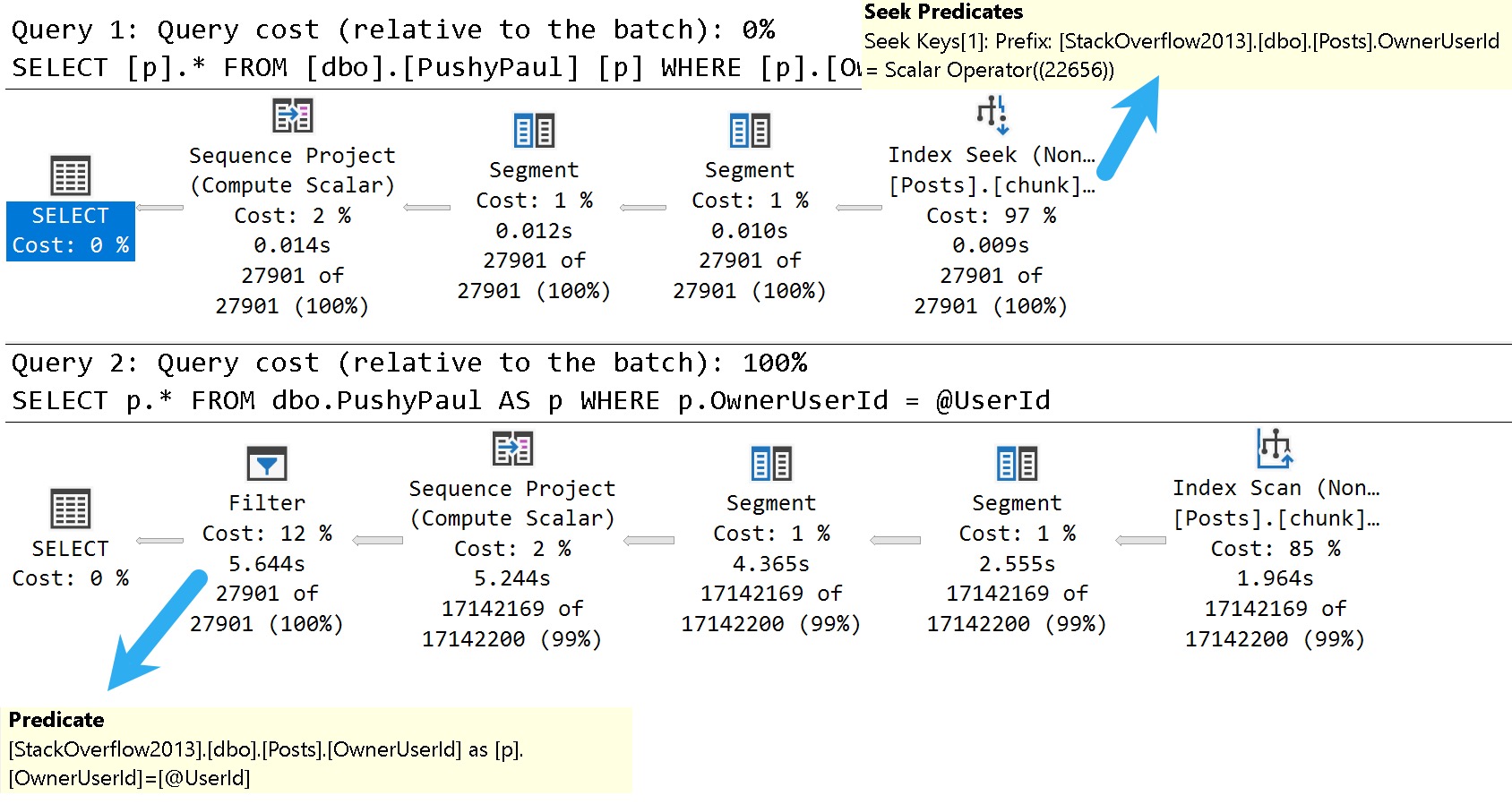
Here are the good and bad plans, comparing using a literal value vs. a parameterized value:
dunksville
In the plan with a literal value, the predicate is applied at the index seek, and the filtering is really quick.
In the plan with a parameterized value, the index is scanned, and applied at a filter way later in the query plan.
This is where the SelOnSeqPrj rule comes in: The parameter can’t be pushed past the Sequence Project operator like the literal value can.
Thanks for reading!
Video Summary
In this video, I delve into some of the known issues and updates in SQL Server 2017 CU30, focusing on one particular performance-related fix that caught my attention. Despite the title suggesting a discussion about 2000, we’re actually looking at modern SQL Server versions from 2022. I explore how running parameterized queries can sometimes skip certain seek optimizations, leading to suboptimal query plans. This issue has been around for quite some time and is something I’ve been highlighting in my work. The video demonstrates this with a practical example using SSMS, showing the difference between passing literal values versus parameters within stored procedures. It’s a reminder that while SQL Server continues to evolve, there are still areas where performance optimizations could be improved, especially when it comes to documentation and clear communication of these changes.
Full Transcript
Erik Darling here with Sir Erik Darling Data. And today I want to talk about SQL Server 2017 for some reason. Don’t ask me why. It’s 2000, midway through 2000, 2022. But we got CU30 for SQL Server 2017. Very exciting stuff in there. Just kidding. It’s not, mostly not very exciting. But there was one thing in there that caught my eye. Because it’s something that’s near and dear to my heart. Query performance stuff. I don’t know if you know that about me. I tend to, tend to traffic a bit in that area of the world. So, this is version, let’s, let’s use zoom it, proper human beings here. Will I wait for Mark Russinovich to release a new version that does screen recording? That’ll be nice. But let’s zoom in a little bit here. And let’s look at version 14.0.34. So, it’s, let’s go back to version 14.0.34.5.1.2. Wonderful. Get that sorted out. Well, if you, let’s go back. Thanks, Mac Toolbar for showing up and ruining my recording. Photo bombing piece of crap. Hate this thing. So, let’s go back over to SSMS real quick. And let’s just make sure that I am on SQL Server 2017 14.0.3451.2. So, we’re all sorted out there. That’s good for us. We got that all figured out. We’re doing, doing wonderful.
So, known issues in this update. What do we have going on here? What’s, what’s happening in this release? Well, uh, something about a latch timeout. Ooh, high availability. Don’t care. Ooh, trace flag. One, two, three, two, three. Great. We’re at 12,323 trace flag. Probably higher at this point. Uh, let’s see. Uh, match lock escalation, uh, change tracking. Who cares? Access violation occurred. When you try to truncate specific partitions using the partition function. Seems funny. Uh, dropping temp tables causes an unresolved deadlock and dump file. Ooh. Wow. Don’t drop those temp tables. Uh, let’s see. An assertion failure occurs when your query contains the merge statement. Big surprise.
Uh, let’s see. When you run dbcc checkdb with extended logical checks against a database by using the table valued function tbf that uses indexes. Here is the error message. Table percent ls does not exist. I’m going to pause here for a moment and ask you, why do we accept this? Why do we tolerate this? If we can’t get any sort of decent information about, uh, what fixes are out there for a piece of software, why can’t we get them in, in something that’s at least understandable?
Like, not everything has to be a book, but a complete thought would be nice. I don’t understand when this started happening or why this started happening, but the quality of the documentation for SQL Server is real, real broken. Uh, if you look at error, like, especially new error messages or new extended events, there is absolutely no oversight in the, in the, in the language used in there.
It’s full of typos and just like they saw one, uh, Aaron Bertrand brought one up to me yesterday where, uh, availability groups have a double dash between availability and groups. There’s, or always on or something like that. That has never been what they’ve been called or how they’ve been named or referred to.
And, uh, it, it, it really is just gone completely downhill. I don’t know whose idea that was. Maybe, maybe, maybe Postgres has just infiltrated Microsoft and they’re taking them down from the inside like termites.
I don’t know. Who knows? Tough to tell out there. It’s a, it’s a harsh world, isn’t it? But here’s the one that I want to talk about.
We’ll talk about this wonderful little thing right here. In Microsoft SQL Server 2017, running parameterized queries skips the sell on seek purge rule. Therefore, push down does not occur.
Well, thankfully, this is something that I’ve been demoing for years because it’s been a problem. Uh, I think the first time I ever read about it was in a Paul White blog post coming up on 10 years ago now. Crazy, right?
A 10-year-old performance bug in SQL Server. Well, I know they’re not busy fixing performance bugs and certainly not busy writing adequate documentation for anything. So here we are reading this.
Uh, I’m not even going to bother with this one. Uh, I don’t know. Uh, index creation script fails. Cool. Great. Great write-up.
Whoever did that. Summer intern’s really working hard. Summer intern found a beer fridge, apparently. All right. Well, everyone’s working from home, so everything’s a beer fridge. Anyway, let’s go see if that actually is fixed.
So, uh, I’ve already created this index. I’m not going to sit there and make you watch me create an index over again. But just to make sure that we are on the same page here, uh, what did I do wrong? Oh, I didn’t, I didn’t highlight select.
There we go. My own quality is going downhill, I guess, too. So, uh, let’s take a look at the results here. So this thing was just restarted. Well, this, this time isn’t going to make any sense to you. It’s actually about 8.30 in the morning here.
But my VM is on West Coast time because I never bothered to change it because I don’t care. Uh, it’s a VM, right? There’s a cattle, not pets or whatever. Uh, but anyway, I am actually running the correct version of SQL Server to see this wonderful performance fix in action.
I guess I shouldn’t make fun of anyone else’s, uh, abilities and I can’t even say fix in action. Uh, but anyway, I, I’ve got an index on my, my, my post table called chunk. I forget why I called it that.
It was a long time ago, uh, but the index is on owner user ID and score descending. And it includes creation date and last act, last activity date. And that index matches up pretty well with the goals of this view, right? So we have a windowing function on owner user ID and score descending.
And my, my, uh, my formatting of this thing is a little, is disagreeable even to me. I don’t, I don’t like the way that turned out. I’m going to fix that right here in front of all of you.
All right. So now everything is on, got its own line. No one, no one has to share too much space. Everything’s maintaining proper distance. Uh, but then we’re selecting owner user ID, score, creation date, and last activity.
So that index works out pretty well for everything that we’re trying to do in there, right? We’ve got everything for our dense rank completely in order. And we’ve got, uh, our, our select list columns and the includes up there.
So joy to the world. An index has come. So what should that fix fix? Well, we’re going to turn on a query plan here and we’re going to run this select, right?
So we run this thing and we have an execution plan. Let’s zoom in on this execution plan and see what happened. Now, even though, uh, we’ve got a case of simple parameterization here, I don’t, I have a feeling this doesn’t stick.
Uh, I could, I could do some extra stuff to validate that, but, uh, I’ve already done that and it’s quite boring to watch. So we’re going to, we’re going to skip that part. But if we look down here in the query plan, because we’ve used a literal value and a simple parameterization didn’t, didn’t topple our query into the C.
Uh, we’ve got an index seek into our index called for some reason chunk. That takes 0.008 milliseconds. Wow.
What a great query tuner that Erik Darling is. We should hire him to tune all our queries. Well, maybe not so fast. Uh, so. That worked out pretty well.
Passing the literal value. Right. Everything got pushed down the query plan. Everything worked out great. Uh, happy, happy about that. But now let’s create a store procedure. All right.
Because if we go back to what that, that the cumulative update was talking about, this is when running a parameterized query. All right. Parameterized and literal value.
Well, even though it looked like it might have been simple parameterized was not actual parameterized. Right. There’s a literal value in there. So now let’s parameterize query.
Can’t, can’t get enough of the word parameterized. Makes me feel so very proper. So we’re going to run this procedure. Or we’re going to create this procedure here called stinky Pete.
I don’t know why Pete’s stinky. Same reason I don’t know why that index is chunky. Mysteries of the world. But here we have a parameter called user ID.
And we’re going to pass that parameter to our view down here. All right. Now, owner user ID equals user ID. Remember, we’ve got this wonderful index for some reason named chunk that leads with owner user ID. And so we should have, just like when we pass in a literal value, we should get a perfectly good seek to that owner user ID value.
But when I run this and a big reveal here, this does not finish in 0.008 milliseconds. In fact, this catastrophe drags on for seven seconds. And if we look at the difference in the plan, let’s zoom in real nice on that.
We have an index scan now on the post table. That takes 2.213 seconds. A bit of a far cry from the 0.008 milliseconds.
And that just tends to get worse as we move on in the plan to a 2.289 and then 4.719 and then 5.628 and then 6.054. So six seconds total for the query execution plus a little bit of time for SSMS to spit out and render our results. So, yeah, it’s pretty disappointing.
It said, hey, we fixed something and then the only demo I… Well, the best demo I have that shows the problem still has a problem. So thanks there.
Perhaps a little bit extra QA would have helped that one. Maybe that wasn’t even supposed to be in there. I don’t know. Maybe that will get pulled out of the release notes. I couldn’t tell you. No one from Microsoft talks to me anymore.
I don’t know why. I missed Joe’s sack. MungoDB got real lucky there. Well, anyway, it is 8.40 a.m. now on Friday.
And with that, I think it’s time to start drinking because there’s just no hope for the world. It’s going to be my new company tagline. There’s no hope for the world.
I’m waiting for Beer Gut Magazine to buy me out. Anyway, you have a nice day. I’m going to go pour something now. The first thing about the Shield.
For You and me now, let’s see, there are a few ways to can philosopher bless the world. It’s too late. This is a nicelegen to have an intro.
Going Further
If this is the kind of SQL Server stuff you love learning about: these days I have AI do the annoying stuff for me. My new video course teaches you to work the same way, and I teach whole teams in a one-day workshop. Someone still has to know enough SQL Server to keep the robots in check, and that’s what my training is for.
First, I want to advise you to avoid doing things as much as possible like this in T-SQL. Use CLR, if you can. Or do it outside of your really expensive database server.
You know, rational choices.
Recently, I had an interesting client problem where they had a variety of string formats, and different potential start and end points to get a substring from.
Normally, I love computed columns for this, but there was no way to get exactly what they wanted without using a whole bunch of them. It was sort of annoying.
Because it was easier to get across in T-SQL, we ended up using a trigger.
Don’t look at me like that.
CharindexOf
First, let’s load up a small temp table with some different string values.
CREATE TABLE
    #strings
(
    string varchar(4)
);

INSERT
    #strings
(
    string
)
SELECT '1234'
  UNION ALL
SELECT '2341'
  UNION ALL
SELECT '3412'
  UNION ALL
SELECT '4123';
Now, let’s say that there was a need to figure out which number came first in the string. You can use the CHARINDEX function to do that, but it’s a little difficult to make it “dynamic”.
To make things easy, let’s create a helper table of search patterns.
CREATE TABLE
    #searches
(
    search varchar(1)
);

INSERT
    #searches
(
    search
)
SELECT '1'
  UNION ALL
SELECT '2'
  UNION ALL
SELECT '3'
  UNION ALL
SELECT '4';
ApplyOf
Now we can use a little bit of apply and derived table magic to figure out which of our search values appear first in our strings.
SELECT
    s.string,
    x1.search,
    x1.search_position
FROM #strings AS s
CROSS APPLY
(
    SELECT TOP (1)
        x0.search,
        x0.search_position
    FROM
    (
        SELECT
            s2.search,
            search_position =
                CHARINDEX(s2.search, s.string)
        FROM #searches AS s2
     ) AS x0
     ORDER BY x0.search_position
) AS x1;
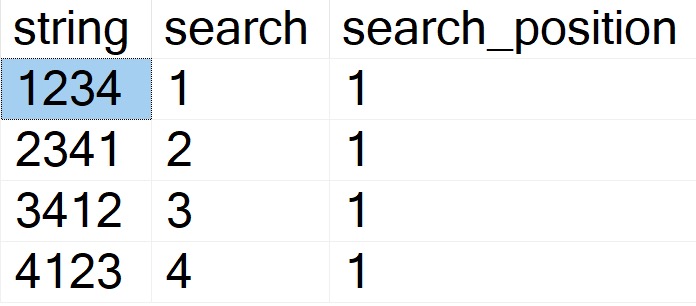
The results look like this:
medium
SubstringOf
Now we can add in the LEN and SUBSTRING functions in order to parse out the part of the column we’re interested in.
SELECT
    s.string,
    x1.search,
    x1.search_position,
    x1.search_length,
    sub =
        SUBSTRING
        (
            x1.search,
            x1.search_position,
            x1.search_length
        )
FROM #strings AS s
CROSS APPLY
(
    SELECT TOP (1)
        x0.search,
        x0.search_position,
        x0.search_length
    FROM
    (
        SELECT
            s2.search,
            search_position =
                CHARINDEX(s2.search, s.string),
            search_length =
                LEN(s2.search)
        FROM #searches AS s2
     ) AS x0
     ORDER BY x0.search_position
) AS x1;
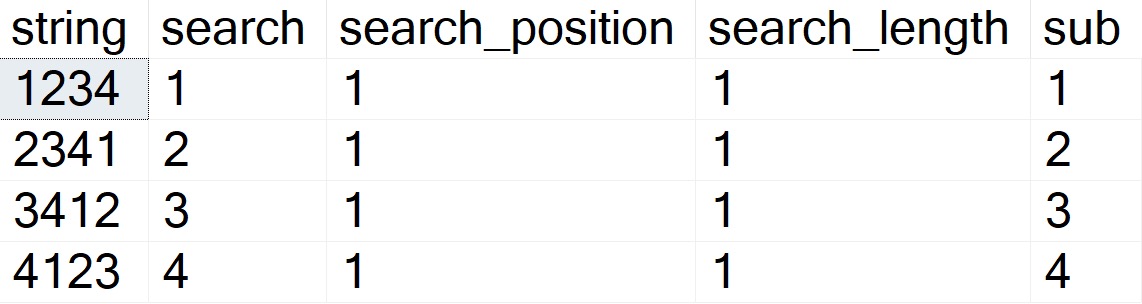
Now the results look like this:
Smart E. Pants
This is an admittedly pretty rudimentary example, but it’s tough to make this complicated without making it overly so.
If this is the kind of SQL Server stuff you love learning about: these days I have AI do the annoying stuff for me. My new video course teaches you to work the same way, and I teach whole teams in a one-day workshop. Someone still has to know enough SQL Server to keep the robots in check, and that’s what my training is for.
You can normally eyeball a query to find things that generally don’t agree with performance out of the box, like:
Functions (inline ones aside)
Table variables
Stacked Common Table Expressions
Non-SARGable predicates
Overly complicated queries
Insert a million other things here
But of course, the more complicated queries are, or the more layers of abstraction exist in a query, the harder this stuff is to spot quickly. Particularly with views, and nested views, bad ideas can be buried many layers deep in the sediment.
I call it sediment because code often looks like geologic layers, where you can tell who wrote what and when based on style and techniques that got used.
And to vendors who encrypt their god-awful code: �
The Great Untangling
Getting through that untangling can be a costly and time consuming process, depending on the level of damage done over the years, and the desired outcome. Sometimes it’s easier to rewrite everything from scratch than to do in-place rewrites of existing objects.
It’s obviously worth exploring enhancements in newer versions of SQL Server that may power things across the finish line:
Perhaps the new cardinality estimator does more good than harm
Batch Mode On Row Store does a lot of good with bad code
Scalar UDF Inlining can solve a lot of function problems
There are many other general and targeted improvements that might help your workload without code changes. Hopefully that continues with SQL Server 2022.
On top of the workload improvements, new versions also provide improved insights into problems via dynamic management views, Query Store, logging, and more.
If you’re not on at least SQL Server 2016 right now, you’re leaving a whole lot on the table as far as this goes.
Hiring Issues
It’s tough for smaller companies to attract full time talent to fix huge backlogs of issues across SQL Server stored procedures, functions, views, index and table design, and all that.
Or even harder, convert ORM queries into sensible stored procedures, etc. when you start hitting performance limitations in the single-query model.
First, I need acknowledge that not everyone wants to work for a huge company. Second, I need to acknowledge that salary isn’t everything to everyone.
But let’s assume that a smaller company want to hire someone in competition with a larger company. What can they offer when they run out of salary runway, and can’t match equity?
Clear career paths/Upward mobility
Flexible schedules
Paid time off for training
Covering the costs of training and certifications
Focusing on employee growth (not just sticking them in a corner to monkey with the same thing for years)
Quality of company culture (meeting overload was something I got a lot of DMs about)
Conference travel budgets
Meaningful company mission
Introducing tech savvy folks to the business side of things
Recognizing that not every employee wants to be an On-callogist
There were more, but these were the things I got the most hits from folks on. Having these doesn’t mean you can expect someone to take 20-30% less on the salary front, of course, but if you’re close to another offer these things might sway folks to your side.
Far and away, what I took from responses is that folks want to feel effective; like they can make a difference without a lot of bureaucracy and red tape. Get the hell out of my way, to coin a phrase.
Finder’s Fee
When it comes to attracting people to your company — think of it as your employer SEO — the SQL Server community is a great place to start.
If you want to try something for free, keep an eye out for when Brent posts to find out Who’s Hiring In The Database Community. It doesn’t cost you anything, but you have to keep on top of the posts and replies, and make sure you have good job description that sticks out.
If you have any location-based requirements for your candidates, try sponsoring a local SQL Server user group’s meetings for a few months. There may be a small, nominal fee if it’s entirely virtual. If it’s in-person, you’ll foot the bill for dozen or so pizza pies for attendees. That usually gets you an announcement before and after whatever speaker is presenting. It’s totally fair to ask for attendance numbers. Keeping on with that, consider sponsoring a SQL Saturday event. These typically have a deeper reach than a monthly user group, since there are more attendees in a concentrated area. You may get a booth, or your logo on slides, and whatever else you can negotiate with the event planners.
If you’re okay with spending more money for a lot of eyeballs, larger events like PASS Summit, and SQLBits are annual conferences with thousands of attendees. As a FYI, these are the types of conferences whomever you hire is probably going to want to attend, too.
Imagine that.
Askance
I have clients ask me to help them find quality employees for roles from time to time, or to help them interview folks they’ve farmed themselves.
Normally I’m happy to help on either front, and leave sealing the deal to them. I think from now on I’m gonna point them to this post, so they have some better ideas about how to put a stamp on things.
Not every company can offer everything, but as large companies continue to gobble up smaller ones, and Microsoft in particular keeps fishing folks out of the MVP pool, it’s going to be harder for those who remain to stay competitive. At least I think so: I haven’t quite been persuaded that there will be a coomba ya moment where everyone gets sick of the MegaCorp grind and goes back to mom and pop shops to reclaim their lost souls.
After all, a lot of folks do have their sights set on retirement. High salaries and generous equity (well, maybe not equity as the market is currently behaving) certainly help get them there faster.
That’s part of the picture that you can’t easily ignore, along with the oft-proferred wisdom that the only way to stay on a competitive salary track is to change jobs every 2-3 years.
Retention is going to get more difficult for everyone across the board, but the revolving door will largely let out with the bigger players who can afford to keep it spinning.
Thanks for reading!
Going Further
If this is the kind of SQL Server stuff you love learning about: these days I have AI do the annoying stuff for me. My new video course teaches you to work the same way, and I teach whole teams in a one-day workshop. Someone still has to know enough SQL Server to keep the robots in check, and that’s what my training is for.
I’m a really big fan of using operator properties for a lot of things, at least visually. Where things sort of fall down for that is copying and pasting things out.
For some stuff, you still need to head down to the XML.
Let’s say you have a stored procedure that accepts a bunch of parameters. The rest of this one isn’t important, but here you go:
CREATE OR ALTER PROCEDURE
    dbo.AwesomeSearchProcedure
(
    @OwnerUserId int = NULL,
    @CreationDate datetime = NULL,
    @LastActivityDate datetime = NULL,
    @PostTypeId int = NULL,
    @Score int = NULL,
    @Title nvarchar(250) = NULL,
    @Body nvarchar(MAX) = NULL
)
A Plan Appears
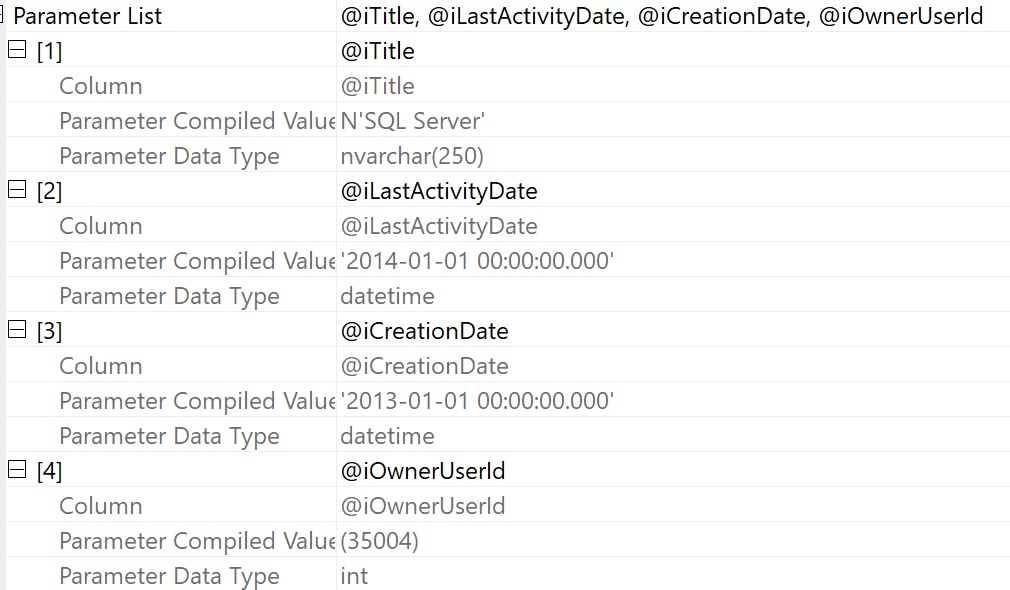
Let’s say we grab a query plan for this thing from the plan cache or query store. We can get the properties of the select operator and see compile time values:
Again — nice visually — but it doesn’t do much for us if we want to recreate executing the stored procedure to get an actual execution plan.
It’s also not terrible helpful if we want to simulate a parameter sniffing situation, because we only have the compile time values, not the run time values.
Bummer. But whatever.
XML Time!
If we right click and select “show execution plan XML”, we can scroll way down to the bottom to find the XML fragment that holds what the properties display:
This still isn’t awesome, because we have to do some surgery on the XML itself to get values out.
It’s even worse if we have a parameterized application query, because not only do we need to make a DECLARE to assign values to these variables but we need to turn the query itself into dynamic SQL.
For most things, I absolutely adore using operator properties. For some things, you still need the XML.
It’d be nice if there were some fancy copy and paste magic that would do that for you, but so far it doesn’t exist.
Thanks for reading!
Going Further
If this is the kind of SQL Server stuff you love learning about: these days I have AI do the annoying stuff for me. My new video course teaches you to work the same way, and I teach whole teams in a one-day workshop. Someone still has to know enough SQL Server to keep the robots in check, and that’s what my training is for.
There’s a lot of stuff flying around in a query plan. Data and what not.
Sure, you can hover over operators and arrows and see some stuff, but if you really wanna see stuff — I mean REALLY wanna see stuff — you gotta get into the properties.
You can access those in two ways:
Hit F4 (not F5 again; you already suffered through that)
Right click on any operator in the query plan and hit Properties
And that, my dear friend, will unlock many mysteries in your query plans.
Start With Select
I think one of the most interesting places to start is with the root operator (select, insert, update, delete), because there’s so much in there.
Here’s an abridged list of things you can see from the properties of the root node of an Actual Execution Plan:
Compile metrics: CPU, duration, memory
Degree Of Parallelism
Detailed Memory Grant information
Stats Usage
Query Time Stats in CPU and duration (including UDF times)
Parameter compile and runtime values
Nonparallel Plan reasons
Set Options
Warnings
CPU thread usage
Wait Stats
There’s more in there too, but holy cow! All the stuff you can learn here is fantastic. You might not be able to solve all your problems looking here, but it’s as good a place to start as any.
Plus, this is where you can get a sense of just how long your query ran for, and start tracking down the most troublesome operators.
Follow The Time
I’ve said before that operator costs are basically useless, and you should be following the operator times to figure out where things get wonky.
For some operators, just looking at the tool tip is enough. For example, if you have an operator that piles up a bunch of execution time because of a spill, the spill details are right in front of you.
contagious
But other times, operator properties expose things that aren’t surfaced at the tool tip.
Skew Manchu
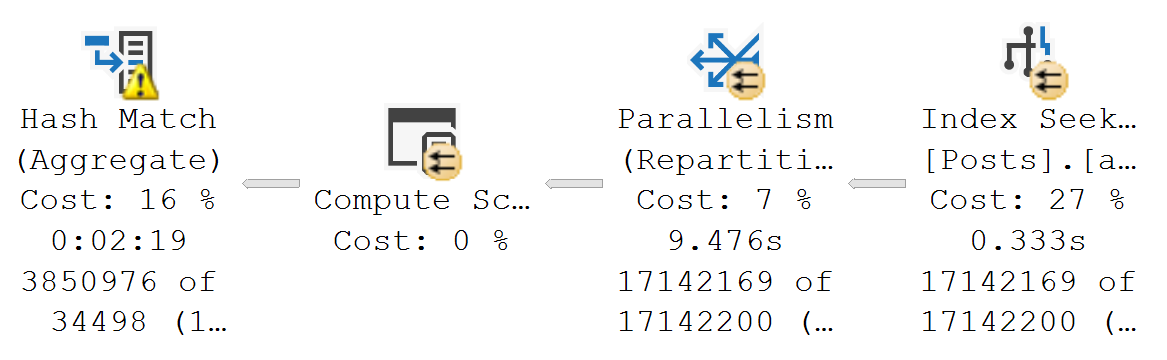
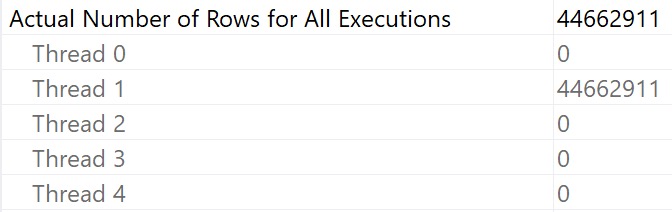
Take skewed parallelism, for example. There are no visual indicators that it happened (maybe there should be, but given the warnings we get now, I’m not sure I trust that summer intern).
year of the spider
But you know, it might be nice to know about stuff like this. Each thread is supposed to get an equal portion of the query memory grant, and if work is distributed unevenly, you can end up with weird, random performance issues.
This is something I almost always spot check in parallel plans. In a perfect world, duration would be CPU➗DOP. Life rarely ends up perfect, which is why it’s worth a look.
I To The O
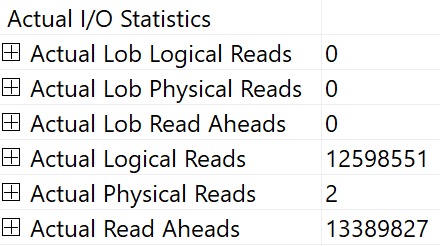
You can also see I/O stats at the operator level, logical and physical. This is why I kinda laugh at folks who still use SET STATISTICS TIME, IO ON; — you can get that all in one place — your query plan.
ding!
You can interpret things in the same way, it’s just a little easier to chew.
Thanks for reading!
Going Further
If this is the kind of SQL Server stuff you love learning about: these days I have AI do the annoying stuff for me. My new video course teaches you to work the same way, and I teach whole teams in a one-day workshop. Someone still has to know enough SQL Server to keep the robots in check, and that’s what my training is for.
The good news is that SQL Server’s query plans will attempt to warn you about problems. The bad news is that most of the warnings only show up in Actual Execution Plans. The worse news is that a lot of the warnings that try to be helpful in Estimated Execution plans can be pretty misleading.
Certain of these are considered runtime issues, and are only available in Actual Execution Plans, like:
Spills to tempdb
Memory Grants
I’ve never seen the “Spatial Guess” warning in the wild, which probably speaks to the fact that you can measure Spatial data/index adoption in numbers that are very close to zero. I’ve also never seen the Full Update For Online Index Build warning.
Then there are some others like Columns With No Statistics, Plan Affecting Converts, No Join Predicate, and Unmatched Indexes.
Let’s talk about those a little.
Columns With No Statistics
I almost never look at these, unless they’re from queries hitting indexed views.
The only time SQL Server will generate statistics on columns in an indexed view is when you use the NOEXPAND hint in your query. That might be very helpful to know about, especially if you don’t have useful secondary indexes on your indexed view.
If you see this in plans that aren’t hitting an indexed view, it’s likely that SQL Server is complaining that multi-column statistics are missing. If your query has a small number of predicates, it might be possible to figure out which combination and order will satisfy the optimizer, but it’s often not worth the time involved.
Like I said, I rarely look at these. Though one time it did clue me in to the fact that a database had auto create stats disabled.
So I guess it’s nice once every 15 years or so.
Plan Affecting Converts
There are two of these:
Ones that might affect cardinality estimates
Ones that might affect your ability to seek into an index
Cardinality Affecting
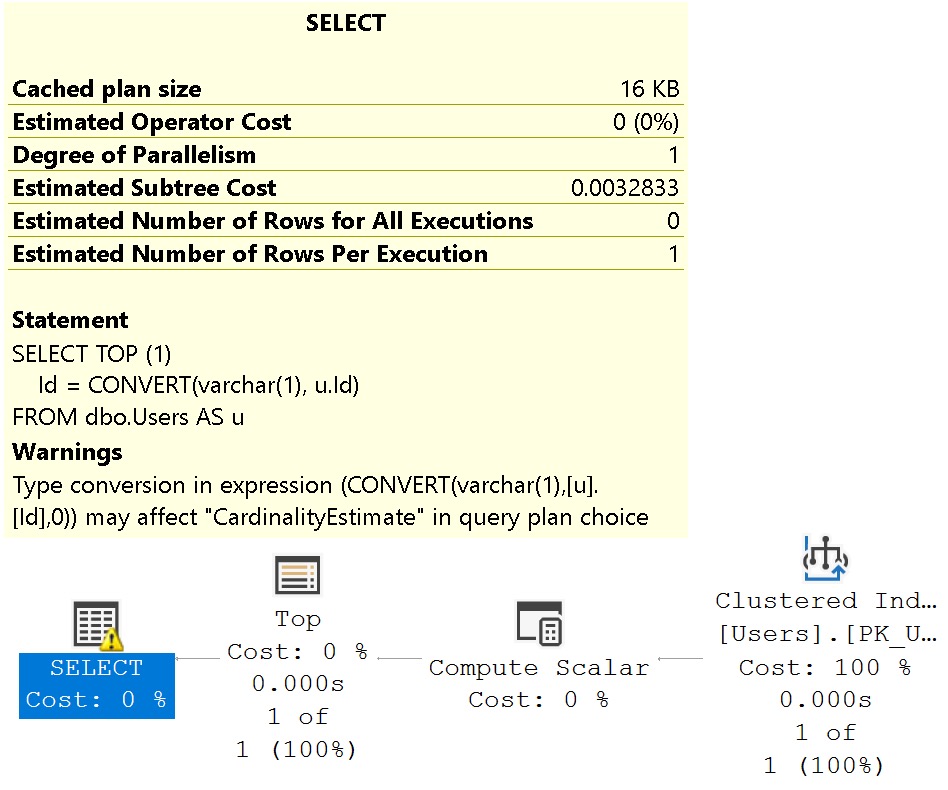
The problem I have with the cardinality estimation warning is that it shows up when it’s totally useless.
SELECT TOP (1)
    Id = CONVERT(varchar(1), u.Id)
FROM dbo.Users AS u;
fine2me
Like I said, misleading.
Seek Affecting
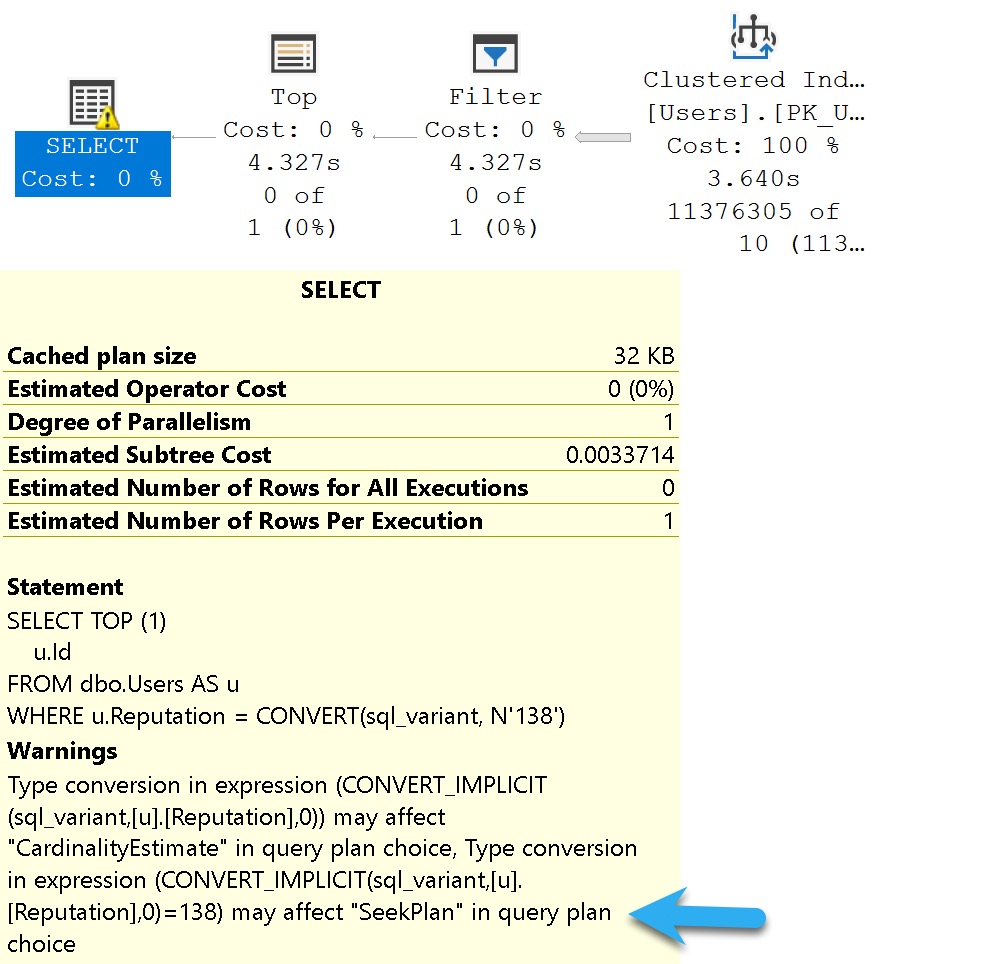
These can be misleading, but I often pay a bit more attention to them. They can be a good indicator of data type issues in comparison operations.
Where they’re misleading is when they tell you they mighta-coulda done a seek, when you don’t have an index that would support a seek.
SELECT TOP (1)
    u.Id
FROM dbo.Users AS u
WHERE u.Reputation = CONVERT(sql_variant, N'138');
knot4you
Of course, without an index on Reputation, what am I going to seek to?
Nothing. Nothing at all.
No Join Predicate
This one is almost a joke, I think.
Back when people wrote “old style joins”, they could have missed a predicate, or something. Like so:
SELECT
    c = COUNT_BIG(*)
FROM dbo.Users AS u,
     dbo.Badges AS b,
     dbo.Comments AS c
WHERE u.Id = b.UserId;
/*Oops no join on comments!*/
Except there’s no warning in this query plan for a missing join predicate.
well okay
But if we change the query to this, it’ll show up:
SELECT
    u.Id
FROM dbo.Users AS u,
     dbo.Badges AS b,
     dbo.Comments AS c
WHERE u.Id = b.UserId;
/*Oops no join on comments!*/
greatly
But let’s take a query that has a join predicate:
SELECT TOP (1)
    b.*
FROM dbo.Comments AS c
JOIN dbo.Badges AS b
    ON c.UserId = b.UserId
WHERE b.UserId = 22656;
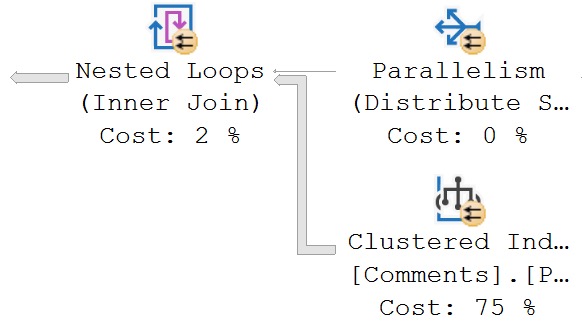
We still get that warning:
tough chickens
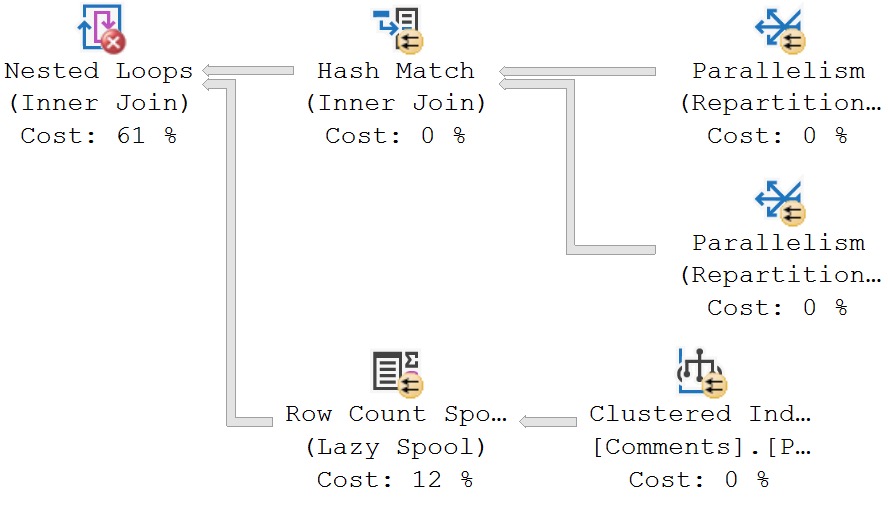
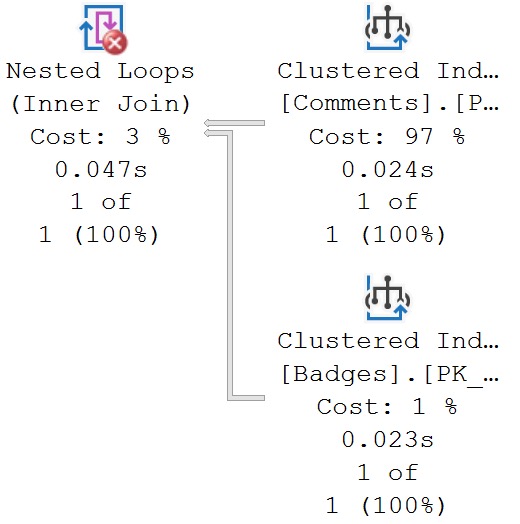
We still get a missing join predicate, even though we have a join predicate. The predicate is implied here, because of the where clause.
But apparently the check for this is only at the Nested Loops Join. No attempt is made to track pushed predicates any further.
run for your life
If there were, the warning would not appear.
Unmatched Indexes
If you create filtered indexes, you should know a couple things:
It’s always a good idea to have the column(s) you’re filter(ing) on somewhere in the index definition (key or include, whatever)
If query predicate(s) are parameterized on the column(s) you’re filter(ing) on, the optimizer probably won’t choose your filtered index
I say probably because recompile hints and unsafe dynamic SQL may prompt it to use your filtered index. But the bottom line here is parameters and filtered indexes are not friends in some circumstances.
Here’s a filtered index:
CREATE INDEX
    cigarettes
ON dbo.Users
    (Reputation)
WHERE
    (Reputation >= 1000000)
WITH
    (SORT_IN_TEMPDB = ON, DATA_COMPRESSION = PAGE);
And here’s a query that should use it:
SELECT
    u.Reputation
FROM dbo.Users AS u
WHERE u.Reputation >= 1000000;
BUUUUUUUUUUUUUUUT!
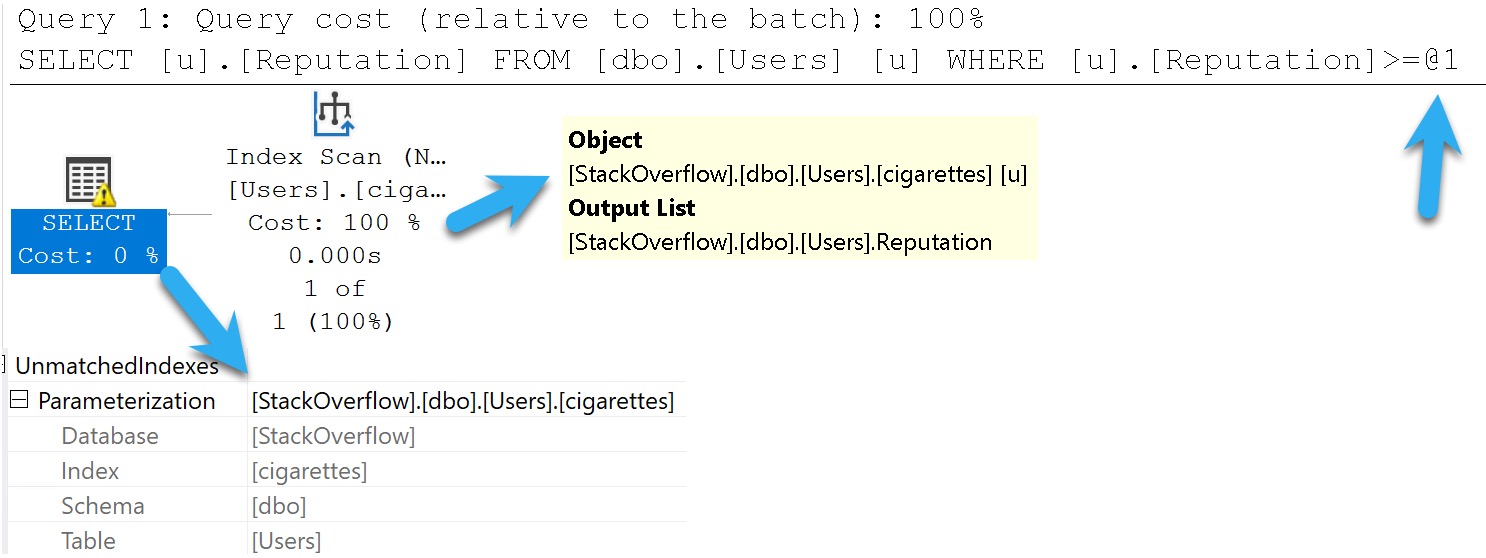
combine
SQL Server warns us we didn’t. This is an artifact of Simple Parameterization, which happens early on in the Trivial Plan optimization phase.
It’s very misleading, that.
Warnings And Other Drugs
In this post we covered common scenarios when plan warnings just don’t add up to much of a such. Does that mean you should always ignore them? No, but also don’t be surprised if your investigation turns up zilch.
If you’re interested in learning more about spills, check out the Spills category of my blog. I’ve got a ton of posts about them.
At this point, you’re probably wondering why people bother with execution plans. I’m sort of with you; everything up to the actual version feels futile and useless, and seems to lie to you.
Hopefully Microsoft invests more in making the types of feedback mechanisms behind gathering plans and runtime metrics easier for casual users in future versions of SQL Server.
Thanks for reading!
Going Further
If this is the kind of SQL Server stuff you love learning about: these days I have AI do the annoying stuff for me. My new video course teaches you to work the same way, and I teach whole teams in a one-day workshop. Someone still has to know enough SQL Server to keep the robots in check, and that’s what my training is for.