I am a heading
Thanks for watching! Demo scripts below.
Demo Scripts
USE StackOverflow2013;
EXEC dbo.DropIndexes;
SET NOCOUNT ON;
DBCC FREEPROCCACHE;
GO


CREATE INDEX
   chunk
ON dbo.Posts
    (OwnerUserId, Score DESC)
INCLUDE
    (CreationDate, LastActivityDate)
WITH
    (MAXDOP = 8, SORT_IN_TEMPDB = ON, DATA_COMPRESSION = PAGE);
GO

CREATE OR ALTER VIEW
    dbo.PushyPaul
WITH SCHEMABINDING
AS
    SELECT
        p.OwnerUserId,
        p.Score,
        p.CreationDate,
        p.LastActivityDate,
        PostRank =
            DENSE_RANK() OVER
            (
               PARTITION BY
                  p.OwnerUserId
               ORDER BY
                  p.Score DESC
            )
    FROM dbo.Posts AS p;
GO

SELECT
    p.*
FROM dbo.PushyPaul AS p
WHERE p.OwnerUserId = 22656;
GO

CREATE OR ALTER PROCEDURE
    dbo.StinkyPete
(
    @UserId int
)
AS
SET NOCOUNT, XACT_ABORT ON;
BEGIN
    SELECT
        p.*
    FROM dbo.PushyPaul AS p
    WHERE p.OwnerUserId = @UserId;
END;
GO

EXEC dbo.StinkyPete
    @UserId = 22656;


/*Start Here*/

ALTER DATABASE
    StackOverflow2013
SET PARAMETERIZATION SIMPLE;

DBCC TRACEOFF
(
    4199,
    -1
);

ALTER DATABASE SCOPED CONFIGURATION
    SET QUERY_OPTIMIZER_HOTFIXES = OFF;


SELECT
    p.*
FROM dbo.PushyPaul AS p
WHERE p.OwnerUserId = 22656
AND   1 = (SELECT 1); /*Avoid trivial plan/simple parameterization*/


/*Let's cause a problem!*/
ALTER DATABASE
    StackOverflow2013
SET PARAMETERIZATION FORCED;

SELECT
    p.*
FROM dbo.PushyPaul AS p
WHERE p.OwnerUserId = 22656
AND   1 = (SELECT 1); /*Avoid trivial plan/simple parameterization*/


/*Can we fix the problem?*/
DBCC TRACEON
(
    4199,
    -1
);


SELECT
    p.*
FROM dbo.PushyPaul AS p
WHERE p.OwnerUserId = 22656
AND   1 = (SELECT 1); /*Avoid trivial plan/simple parameterization*/


/*That's kinda weird...*/
DBCC FREEPROCCACHE;


SELECT
    p.*
FROM dbo.PushyPaul AS p
WHERE p.OwnerUserId = 22656
AND   1 = (SELECT 1); /*Avoid trivial plan/simple parameterization*/


/*Turn Down Service*/
DBCC TRACEOFF
(
    4199,
    -1
);

SELECT
    p.*
FROM dbo.PushyPaul AS p
WHERE p.OwnerUserId = 22656
AND   1 = (SELECT 1); /*Avoid trivial plan/simple parameterization*/


/*Okay then.*/


/*I'm different.*/
ALTER DATABASE SCOPED CONFIGURATION
    SET QUERY_OPTIMIZER_HOTFIXES = ON;


SELECT
    p.*
FROM dbo.PushyPaul AS p
WHERE p.OwnerUserId = 22656
AND   1 = (SELECT 1); /*Avoid trivial plan/simple parameterization*/


/*Cleanup*/
ALTER DATABASE
    StackOverflow2013
SET PARAMETERIZATION SIMPLE;

ALTER DATABASE SCOPED CONFIGURATION
    SET QUERY_OPTIMIZER_HOTFIXES = OFF;

DBCC TRACEOFF
(
    4199,
    -1
);
Video Summary
In this video, I delve into a specific issue in Microsoft SQL Server 2017 CU30, where the documentation left out crucial details about how parameterized queries can affect query plans. I explain that running parameterized queries skips the cell on sequence project rule, preventing pushdown and causing full index scans instead of seeks. To demonstrate this, I walk through setting up an appropriate index and running both literal and parameterized queries to illustrate the difference in execution plans. The video also covers how trace flag 4199 affects query optimization but does not clear the plan cache, while the database scope configuration method does. This discrepancy highlights the importance of understanding these nuances for effective query tuning and optimization.
Full Transcript
Alright, I apologize if the lighting is a little bit weird. It’s a, there’s kind of a weird weather day out here, and the light is very bright and white, and then I turned on my ring light to try and compensate for that. I’m not sure how that’s gonna look, I’m not sure how that’s gonna go, but anyway. I, I, I need to follow up yesterday’s video about the, the, the Sell On Seek Project issue in Microsoft SQL Server 2017 CU30, because the, the, it turns out that the, the documentation in, in the, in this, in the cumulative update, shockingly, was, left, left some stuff to be desired, left, left some crucial elements out. Now.
This is still just saying the same thing that it said yesterday. In Microsoft SQL Server 2017, running parameterized query skips the cell on sequence project rule. Therefore, pushdown does not occur.
If you click on the little link there, nothing happens. It just takes you back to this, basically takes you to the bookmark of this issue. So that’s fun.
And that leaves out, like I said, a very crucial detail. Now, I’m going to walk back. Screw you, Mac Toolbar. Who does that?
Macs are the worst. If anyone ever tries to convince you to switch over to a Mac, burn them. Burn them like the witch they are.
Or warlock they are. Whatever it is. I don’t know. Anyway. Yesterday, we ran through this demo where we created an index that very well suits both the query that we’re going to run.
You know, owner user ID score, right? We got owner user ID and score and the windowing function. And creation date and last activity date in the select list. And later, we’re going to run some queries that filter on owner user ID with an equality predicate.
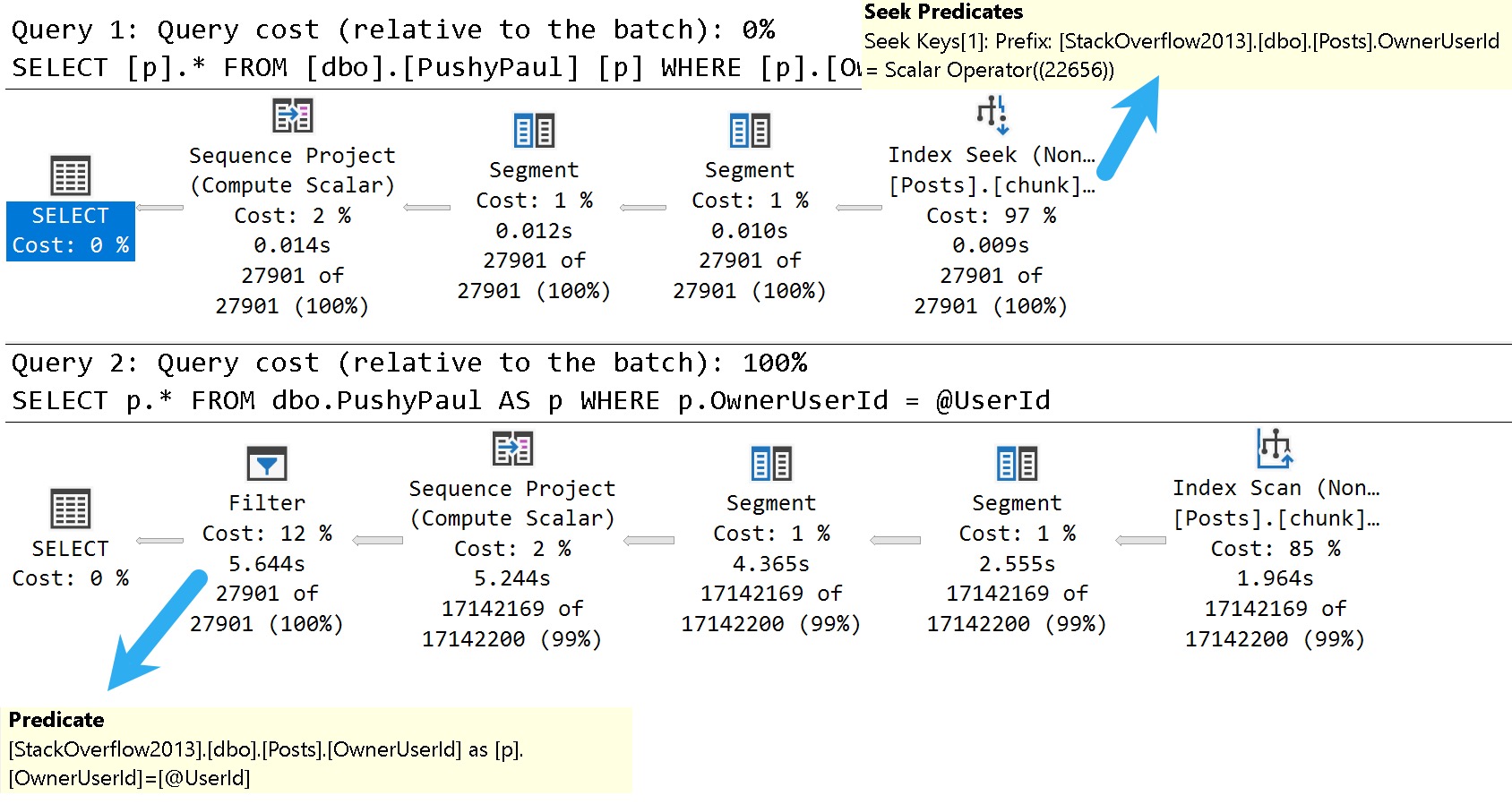
So this should be a totally seekable thing. So yesterday’s video, I showed you that if we use a literal value and we run that query, we get a nice seek. The literal value gets pushed down past the sequence project operator, seeks into the index.
But when we parameterize the query, that no longer happens. We scan the whole index, do the whole dense rank windowing function thing, and then filter out later. All right.
So we’re going to start here today. And we’re going to make sure that we are starting in the right place with none of this stuff going on. We want to make sure that none of these things are in effect when we run this. So I’m going to run this query, which is the same query that we ran yesterday, essentially.
But the reason I want to run it this way is with that one equals select one is to avoid SQL Server’s cost-based optimizer, trying to use a trivial plan or use simple parameterization on our query. And when we do that, we get this thing is a literal value.
And we can see that, you know, we have a sequence project, right? This is the SEQPRJ, part of that rule that gets skipped and all that. We got a couple of segments that I don’t really care about.
But then more importantly, we have the index seek into, again, our hero chunk. Anyway, let’s mess with that a little bit. Let’s cause a problem here.
So yesterday, I used a stored procedure to show you that a parameterized query would behave differently, even with the cumulative update installed, right? So let’s set parameterization to forced for this database.
And remember, under a simple parameterization, you pass in a literal value. It’s kind of up to the optimizer whether, you know, the trivial plan, simple parameterization kicks in and you actually get a simple parameterized query.
Under forced parameterization, under most circumstances, SQL Server will be like, oh, well, cool, we can throw this right at you, right? Turn that into a parameter magically for you.
All right. So now with parameterization force turned on, let’s run this thing. And this is where things sort of start to fall over, right? Because with forced parameterization turned on, we now have a query plan that looks like this.
I didn’t mean to have that tool tip pop up. Apologize there. But you’ll notice that this looks kind of funny, right?
Everything has these little spaces and stuff between and everything’s lowercase is God intended. So if anyone out there is watching and perhaps uses capitalized table aliases, perhaps this is, you know, a pretty good sign that that’s the wrong way to do things.
Just saying. But anyway, we have owner user ID equals at zero. And this is one of my favorite parts of simple parameterization is and at one equals select one.
So I’m not really sure where they came up with that. It’s just kind of cute for me. But anyway, the query plan looks a little bit different because we got this stuff up here to deal with that.
We actually have a startup expression predicate on the literal value one equaling the at one parameter. But, you know, that’s neither here nor there. The important part is down here where we now have that index scan that we saw yesterday.
Right? And that takes a couple seconds. And over here we have a filter operator. And that filter operator is where we figure out where that parameter value that we passed in gets applied.
Now, yesterday we had the stored procedure where it was called at user ID. Today the predicate is just going to be that at zero that we saw in the query text up here. Right?
That at zero. Okay. Okay. So, you know, when I was looking into it yesterday after I recorded the original video, something that threw me off and I thought was pretty funny was that, you know, a lot of these things are hidden behind trace flags. And now a very common one that a lot of these fixes get hidden behind is trace flag 4199.
4199 has been around, I don’t know, since like SQL Server. I think, I want to say 2008, but it might even be 2005. I refuse to try to find that literature at this point.
But 4199 hides a lot of the optimizer hot fixes that end up in SQL Server. So, this was like the first thing, like after I recorded yesterday’s video, I was like, okay, calm down. Send it yourself, Erik Darling.
Stop drinking. Well, that didn’t happen. But, so if you turn on this trace flag, something kind of funny happens at first. And that you turn on trace flag 4199 and you run the query again and you get the same query plan. All right.
And this might throw you off. All right. And why might this throw you off? Good question. I was just about to ask that. That was a great question. This is the next one that you answer in the video. So, the reason why you get the same query plan, this whole thing, is that turning on trace flag 4199, which enables optimizer hot fixes, doesn’t actually clear out the plan cache.
No, it does not. So, a trace flag that directly affects optimizer behavior does not clear out the plan cache. Why?
I don’t know. I’m going to pause for a moment. Hope I don’t make any mouth sounds with that. Do hate a mouth sound. But, let’s clear out the plan cache then.
Need a little pick me up there. Let’s clear out the plan cache and rerun this. My favorite characters ever is a rerun. But now, with trace flag 4199 enabled and a fresh plan generated for this query, we get the behavior that we would expect to see based on the documentation, which does not mention trace flag 4199. Out of the box with a little modification to the box there.
Tiny little difference. So, good, right? Sort of, I guess.
No one told you that. And that’s kind of depressing. But, let’s turn off trace flag 4199. Just to prove to you that that is the case, that 4199 does not do anything to the plan cache.
We turn that off, we’re actually still going to get the same query plan as last time, right? We get the seek plan again. So, that’s kind of annoying.
One thing that is different, and one thing that does clear out the plan cache and allow you to get the plan is to use the altered database scope configuration method of turning on optimizer hotfixes. Which is probably the preferred method, to be honest. Just because, you know, turning trace flags on and off is a little tricky.
You know, they don’t persevere restarts unless you, you know, set them at SQL Server startup. Or you have a startup store procedure run to flick those switches on. But, even with, like, stuff like trace flag 8048, you know, the startup procedure option isn’t quite as good because a bunch of other stuff gets initialized first.
So, anyway. Story for a different day. But, anyway.
So, you turn on optimizer hotfixes and all of it. And, you know, you will get the fresh plan and the plan cache and clear it out and get the seek plan and all that stuff. So, that’s sort of it for this one. If you want to see your parameters get pushed past the sequence project operator, you are going to need to enable trace flag 4199 and clear out the plan cache.
Or use the database scope configuration to set hotfixes on. So, moral of the story here. Well, I guess there’s maybe two or three of them.
We’ll see how many I think of as I start talking. One, Microsoft CU documentation is crap. Real bad.
Two, trace flag 4199 does not clear out the plan cache despite the fact that it directly affects the way the optimizer handles queries. Three, the database scope configuration for query optimizer hotfixes does clear out the plan cache. And, I guess, four, why the hell wouldn’t you make both of those things behave the same way?
Three, why wouldn’t a trace flag that changes optimizer behavior clear out the plan cache so that you can immediately see that optimizer behavior? That’s a little bit weird for me. I mean, I know, like, the database scope configuration thing, that cropped up around SQL Server 2016, I think.
So, we had, let’s see, like, probably three, four versions, major versions of SQL Server between, of trace flag 4199 not clearing out the plan cache. That’s, ain’t that cute as a boot. Anyway, I’m going to go finish this espresso, we’ll call it, and, I don’t know, wait five years for this video to render on my piece of crap Macintosh computer.
And, that’ll be, that’ll be my day. Just spend the day tending to the fire that, that occurs when, when I render a video. So, anyway, you all have a wonderful Saturday, or whatever day you end up watching this on.
I hope that, hope that you, hope that you are living your best lives. Thanks for watching.
Going Further
If this is the kind of SQL Server stuff you love learning about: these days I have AI do the annoying stuff for me. My new video course teaches you to work the same way, and I teach whole teams in a one-day workshop. Someone still has to know enough SQL Server to keep the robots in check, and that’s what my training is for.