SQL Server 2017 CU 30: The Real Story With SelOnSeqPrj Fixes

I am a heading


Thanks for watching! Demo scripts below.

Demo Scripts


USE StackOverflow2013;
EXEC dbo.DropIndexes;
SET NOCOUNT ON;
DBCC FREEPROCCACHE;
GO 


CREATE INDEX 
   chunk 
ON dbo.Posts 
    (OwnerUserId, Score DESC) 
INCLUDE  
    (CreationDate, LastActivityDate)
WITH
    (MAXDOP = 8, SORT_IN_TEMPDB = ON, DATA_COMPRESSION = PAGE);
GO 

CREATE OR ALTER VIEW 
    dbo.PushyPaul
WITH SCHEMABINDING
AS
    SELECT 
        p.OwnerUserId,
        p.Score,
        p.CreationDate,
        p.LastActivityDate,
        PostRank = 
            DENSE_RANK() OVER
            ( 
               PARTITION BY 
                  p.OwnerUserId 
               ORDER BY     
                  p.Score DESC 
            )
    FROM dbo.Posts AS p;
GO 

SELECT 
    p.* 
FROM dbo.PushyPaul AS p
WHERE p.OwnerUserId = 22656;
GO 

CREATE OR ALTER PROCEDURE 
    dbo.StinkyPete 
(
    @UserId int
)
AS 
SET NOCOUNT, XACT_ABORT ON;
BEGIN
    SELECT 
        p.* 
    FROM dbo.PushyPaul AS p
    WHERE p.OwnerUserId = @UserId;
END;
GO 

EXEC dbo.StinkyPete 
    @UserId = 22656;


/*Start Here*/

ALTER DATABASE 
    StackOverflow2013 
SET PARAMETERIZATION SIMPLE;

DBCC TRACEOFF
(
    4199, 
    -1
);

ALTER DATABASE SCOPED CONFIGURATION 
    SET QUERY_OPTIMIZER_HOTFIXES = OFF;


SELECT 
    p.* 
FROM dbo.PushyPaul AS p
WHERE p.OwnerUserId = 22656
AND   1 = (SELECT 1); /*Avoid trivial plan/simple parameterization*/


/*Let's cause a problem!*/
ALTER DATABASE 
    StackOverflow2013 
SET PARAMETERIZATION FORCED;

SELECT 
    p.* 
FROM dbo.PushyPaul AS p
WHERE p.OwnerUserId = 22656
AND   1 = (SELECT 1); /*Avoid trivial plan/simple parameterization*/


/*Can we fix the problem?*/
DBCC TRACEON
(
    4199, 
    -1
);


SELECT 
    p.* 
FROM dbo.PushyPaul AS p
WHERE p.OwnerUserId = 22656
AND   1 = (SELECT 1); /*Avoid trivial plan/simple parameterization*/


/*That's kinda weird...*/
DBCC FREEPROCCACHE;


SELECT 
    p.* 
FROM dbo.PushyPaul AS p
WHERE p.OwnerUserId = 22656
AND   1 = (SELECT 1); /*Avoid trivial plan/simple parameterization*/


/*Turn Down Service*/
DBCC TRACEOFF
(
    4199, 
    -1
);

SELECT 
    p.* 
FROM dbo.PushyPaul AS p
WHERE p.OwnerUserId = 22656
AND   1 = (SELECT 1); /*Avoid trivial plan/simple parameterization*/


/*Okay then.*/


/*I'm different.*/
ALTER DATABASE SCOPED CONFIGURATION 
    SET QUERY_OPTIMIZER_HOTFIXES = ON;


SELECT 
    p.* 
FROM dbo.PushyPaul AS p
WHERE p.OwnerUserId = 22656
AND   1 = (SELECT 1); /*Avoid trivial plan/simple parameterization*/


/*Cleanup*/
ALTER DATABASE 
    StackOverflow2013 
SET PARAMETERIZATION SIMPLE;

ALTER DATABASE SCOPED CONFIGURATION 
    SET QUERY_OPTIMIZER_HOTFIXES = OFF;

DBCC TRACEOFF
(
    4199, 
    -1
);

Video Summary

In this video, I delve into a specific issue in Microsoft SQL Server 2017 CU30, where the documentation left out crucial details about how parameterized queries can affect query plans. I explain that running parameterized queries skips the cell on sequence project rule, preventing pushdown and causing full index scans instead of seeks. To demonstrate this, I walk through setting up an appropriate index and running both literal and parameterized queries to illustrate the difference in execution plans. The video also covers how trace flag 4199 affects query optimization but does not clear the plan cache, while the database scope configuration method does. This discrepancy highlights the importance of understanding these nuances for effective query tuning and optimization.

Full Transcript

Alright, I apologize if the lighting is a little bit weird. It’s a, there’s kind of a weird weather day out here, and the light is very bright and white, and then I turned on my ring light to try and compensate for that. I’m not sure how that’s gonna look, I’m not sure how that’s gonna go, but anyway. I, I, I need to follow up yesterday’s video about the, the, the Sell On Seek Project issue in Microsoft SQL Server 2017 CU30, because the, the, it turns out that the, the documentation in, in the, in this, in the cumulative update, shockingly, was, left, left some stuff to be desired, left, left some crucial elements out. Now.

This is still just saying the same thing that it said yesterday. In Microsoft SQL Server 2017, running parameterized query skips the cell on sequence project rule. Therefore, pushdown does not occur.

If you click on the little link there, nothing happens. It just takes you back to this, basically takes you to the bookmark of this issue. So that’s fun.

And that leaves out, like I said, a very crucial detail. Now, I’m going to walk back. Screw you, Mac Toolbar. Who does that?

Macs are the worst. If anyone ever tries to convince you to switch over to a Mac, burn them. Burn them like the witch they are.

Or warlock they are. Whatever it is. I don’t know. Anyway. Yesterday, we ran through this demo where we created an index that very well suits both the query that we’re going to run.

You know, owner user ID score, right? We got owner user ID and score and the windowing function. And creation date and last activity date in the select list. And later, we’re going to run some queries that filter on owner user ID with an equality predicate.

So this should be a totally seekable thing. So yesterday’s video, I showed you that if we use a literal value and we run that query, we get a nice seek. The literal value gets pushed down past the sequence project operator, seeks into the index.

But when we parameterize the query, that no longer happens. We scan the whole index, do the whole dense rank windowing function thing, and then filter out later. All right.

So we’re going to start here today. And we’re going to make sure that we are starting in the right place with none of this stuff going on. We want to make sure that none of these things are in effect when we run this. So I’m going to run this query, which is the same query that we ran yesterday, essentially.

But the reason I want to run it this way is with that one equals select one is to avoid SQL Server’s cost-based optimizer, trying to use a trivial plan or use simple parameterization on our query. And when we do that, we get this thing is a literal value.

And we can see that, you know, we have a sequence project, right? This is the SEQPRJ, part of that rule that gets skipped and all that. We got a couple of segments that I don’t really care about.

But then more importantly, we have the index seek into, again, our hero chunk. Anyway, let’s mess with that a little bit. Let’s cause a problem here.

So yesterday, I used a stored procedure to show you that a parameterized query would behave differently, even with the cumulative update installed, right? So let’s set parameterization to forced for this database.

And remember, under a simple parameterization, you pass in a literal value. It’s kind of up to the optimizer whether, you know, the trivial plan, simple parameterization kicks in and you actually get a simple parameterized query.

Under forced parameterization, under most circumstances, SQL Server will be like, oh, well, cool, we can throw this right at you, right? Turn that into a parameter magically for you.

All right. So now with parameterization force turned on, let’s run this thing. And this is where things sort of start to fall over, right? Because with forced parameterization turned on, we now have a query plan that looks like this.

I didn’t mean to have that tool tip pop up. Apologize there. But you’ll notice that this looks kind of funny, right?

Everything has these little spaces and stuff between and everything’s lowercase is God intended. So if anyone out there is watching and perhaps uses capitalized table aliases, perhaps this is, you know, a pretty good sign that that’s the wrong way to do things.

Just saying. But anyway, we have owner user ID equals at zero. And this is one of my favorite parts of simple parameterization is and at one equals select one.

So I’m not really sure where they came up with that. It’s just kind of cute for me. But anyway, the query plan looks a little bit different because we got this stuff up here to deal with that.

We actually have a startup expression predicate on the literal value one equaling the at one parameter. But, you know, that’s neither here nor there. The important part is down here where we now have that index scan that we saw yesterday.

Right? And that takes a couple seconds. And over here we have a filter operator. And that filter operator is where we figure out where that parameter value that we passed in gets applied.

Now, yesterday we had the stored procedure where it was called at user ID. Today the predicate is just going to be that at zero that we saw in the query text up here. Right?

That at zero. Okay. Okay. So, you know, when I was looking into it yesterday after I recorded the original video, something that threw me off and I thought was pretty funny was that, you know, a lot of these things are hidden behind trace flags. And now a very common one that a lot of these fixes get hidden behind is trace flag 4199.

4199 has been around, I don’t know, since like SQL Server. I think, I want to say 2008, but it might even be 2005. I refuse to try to find that literature at this point.

But 4199 hides a lot of the optimizer hot fixes that end up in SQL Server. So, this was like the first thing, like after I recorded yesterday’s video, I was like, okay, calm down. Send it yourself, Erik Darling.

Stop drinking. Well, that didn’t happen. But, so if you turn on this trace flag, something kind of funny happens at first. And that you turn on trace flag 4199 and you run the query again and you get the same query plan. All right.

And this might throw you off. All right. And why might this throw you off? Good question. I was just about to ask that. That was a great question. This is the next one that you answer in the video. So, the reason why you get the same query plan, this whole thing, is that turning on trace flag 4199, which enables optimizer hot fixes, doesn’t actually clear out the plan cache.

No, it does not. So, a trace flag that directly affects optimizer behavior does not clear out the plan cache. Why?

I don’t know. I’m going to pause for a moment. Hope I don’t make any mouth sounds with that. Do hate a mouth sound. But, let’s clear out the plan cache then.

Need a little pick me up there. Let’s clear out the plan cache and rerun this. My favorite characters ever is a rerun. But now, with trace flag 4199 enabled and a fresh plan generated for this query, we get the behavior that we would expect to see based on the documentation, which does not mention trace flag 4199. Out of the box with a little modification to the box there.

Tiny little difference. So, good, right? Sort of, I guess.

No one told you that. And that’s kind of depressing. But, let’s turn off trace flag 4199. Just to prove to you that that is the case, that 4199 does not do anything to the plan cache.

We turn that off, we’re actually still going to get the same query plan as last time, right? We get the seek plan again. So, that’s kind of annoying.

One thing that is different, and one thing that does clear out the plan cache and allow you to get the plan is to use the altered database scope configuration method of turning on optimizer hotfixes. Which is probably the preferred method, to be honest. Just because, you know, turning trace flags on and off is a little tricky.

You know, they don’t persevere restarts unless you, you know, set them at SQL Server startup. Or you have a startup store procedure run to flick those switches on. But, even with, like, stuff like trace flag 8048, you know, the startup procedure option isn’t quite as good because a bunch of other stuff gets initialized first.

So, anyway. Story for a different day. But, anyway.

So, you turn on optimizer hotfixes and all of it. And, you know, you will get the fresh plan and the plan cache and clear it out and get the seek plan and all that stuff. So, that’s sort of it for this one. If you want to see your parameters get pushed past the sequence project operator, you are going to need to enable trace flag 4199 and clear out the plan cache.

Or use the database scope configuration to set hotfixes on. So, moral of the story here. Well, I guess there’s maybe two or three of them.

We’ll see how many I think of as I start talking. One, Microsoft CU documentation is crap. Real bad.

Two, trace flag 4199 does not clear out the plan cache despite the fact that it directly affects the way the optimizer handles queries. Three, the database scope configuration for query optimizer hotfixes does clear out the plan cache. And, I guess, four, why the hell wouldn’t you make both of those things behave the same way?

Three, why wouldn’t a trace flag that changes optimizer behavior clear out the plan cache so that you can immediately see that optimizer behavior? That’s a little bit weird for me. I mean, I know, like, the database scope configuration thing, that cropped up around SQL Server 2016, I think.

So, we had, let’s see, like, probably three, four versions, major versions of SQL Server between, of trace flag 4199 not clearing out the plan cache. That’s, ain’t that cute as a boot. Anyway, I’m going to go finish this espresso, we’ll call it, and, I don’t know, wait five years for this video to render on my piece of crap Macintosh computer.

And, that’ll be, that’ll be my day. Just spend the day tending to the fire that, that occurs when, when I render a video. So, anyway, you all have a wonderful Saturday, or whatever day you end up watching this on.

I hope that, hope that you, hope that you are living your best lives. Thanks for watching.

Going Further


If this is the kind of SQL Server stuff you love learning about, you’ll love my training. Blog readers get 25% off the Everything Bundle — over 100 hours of performance tuning content. Need hands-on help? I offer consulting engagements from targeted investigations to ongoing retainers. Want a quick sanity check before committing to a full engagement? Schedule a call — no commitment required.

Fixing Ordered Column Store Sorting In SQL Server 2022

Groove Is In The Heart


When Brent posted about the availability of, and disappointment with creating ordered column store indexes in SQL Server 2022, I got to work.

I can’t have my dear friend Brent being all distraught with all those fast cars around. That’s how accidents happen, and I fear he might leave the Blitz scripts to me in his will or something.

Anyway, I decided to dig in and see what was going on behind the scenes. Which of course, means query plans, and bothering people who are really good at debuggers.

Most of the problems that you’ll run into in SQL Server will come from sorting data.

Whenever I have to think about Sorts, I head to this post about all the different Sorts you might see in a query plan.

More on that later, though.

Cod Piece


In Paul’s post, he talks about using undocumented trace flag 8666 to get additional details about Sort operators.

Let’s do that. Paul is smart, though he is always completely wrong about which season it is.

DROP TABLE IF EXISTS
    dbo.Votes_CCI;

SELECT
    v.*
INTO dbo.Votes_CCI
FROM dbo.Votes AS v;

I’m using the Votes table because it’s nice and narrow and I don’t have to tinker with any string columns.

Strings in databases were a mistake, after all.

DBCC TRACEON(8666);
CREATE CLUSTERED COLUMNSTORE INDEX
    vcci
ON dbo.Votes_CCI
ORDER (Postid);
DBCC TRACEOFF(8666);

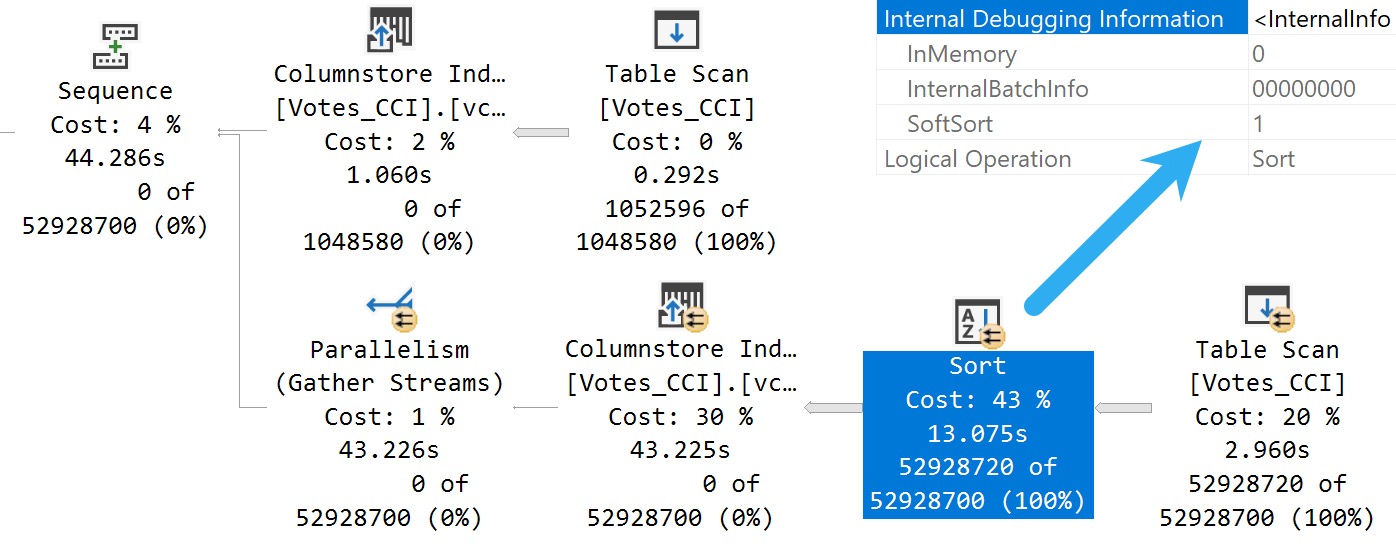
Here’s what we get back in the query plan:

SQL Server Query Plan
Tainted Sort

We’ve got a Soft Sort! What does our seasonally maladjusted friend say about those?

A “soft sort” uses only its primary memory grant and never spills. It doesn’t guarantee fully-sorted output. Each sort run using the available memory grant will be sorted. A “sort sort” represents a best effort given the resource available. This property can be used to infer that a Sort is implemented with CQScanPartitionSortNew without attaching a debugger. The meaning of the InMemory property flag shown above will be covered in part 2. It does not indicate whether a regular sort was performed in memory or not.

Well, with that attitude, it’s not surprising that there are so many overlapping buckets in the column store index. If it’s not good enough, what can you do?

Building the index with the Soft Sort here also leads to things being as bad as they were in Brent’s post.

Insert Debugging Here


Alas, there’s (almost) always a way. Microsoft keeps making these trace flag things.

There are a bunch of different ways to track them down, but figuring out the behavior of random trace flags that you may find just by enabling them isn’t easy.

One way to tie a trace flag to a behavior is to use WinDbg to step through different behaviors in action, and see if SQL Server checks to see if a trace flag is enabled when that behavior is performed.

If you catch that, you can be reasonably sure that the trace flag will have some impact on the behavior. Not all trace flags can be enabled at runtime. Some need to be enabled as startup options.

Sometimes it’s hours and hours of work to track this stuff down, and other times Paul White (b|t) already has notes on helpful ones.

The trace flag below, 2417, is present going back to SQL Server 2014, and can help with the Soft Sort issues we’re seeing when building ordered clustered column store indexes today.

Here’s another one:

DBCC TRACEON(8666, 2417);
CREATE CLUSTERED COLUMNSTORE INDEX
    vcci
ON dbo.Votes_CCI
ORDER (Postid)
WITH(MAXDOP = 1);
DBCC TRACEOFF(8666, 2417);

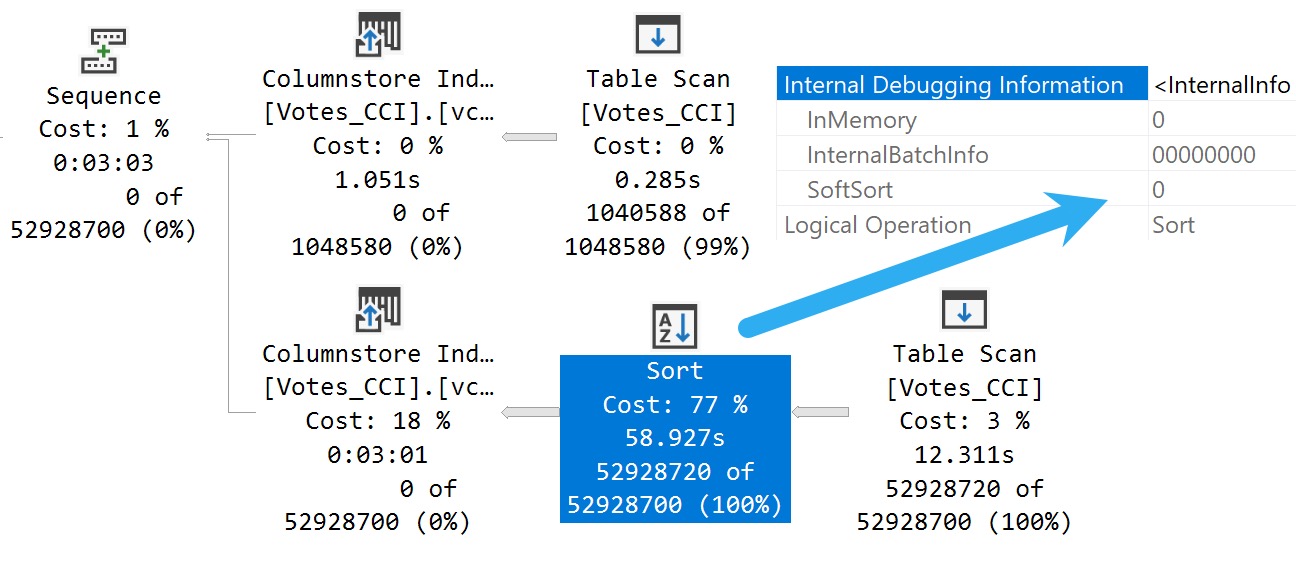
The MAXDOP 1 hint isn’t strictly necessary. With a parallel plan, you may see up to DOP overlapping row groups.

SQL Server Query Plan
community service

That’s why it was a popular maneuver to emulate this behavior by creating a clustered row store index, and then create a clustered column store index over it with drop existing and a MAXDOP 1 hint.

At DOP 1, you don’t see that overlap. It takes a lot longer of course — 3 minutes instead of 30 or so seconds — which is a real bummer. But without it, you could see DOP over lapping rowgroups.

If you want All The Pretty Little Rowgroups, this is what you have to do.

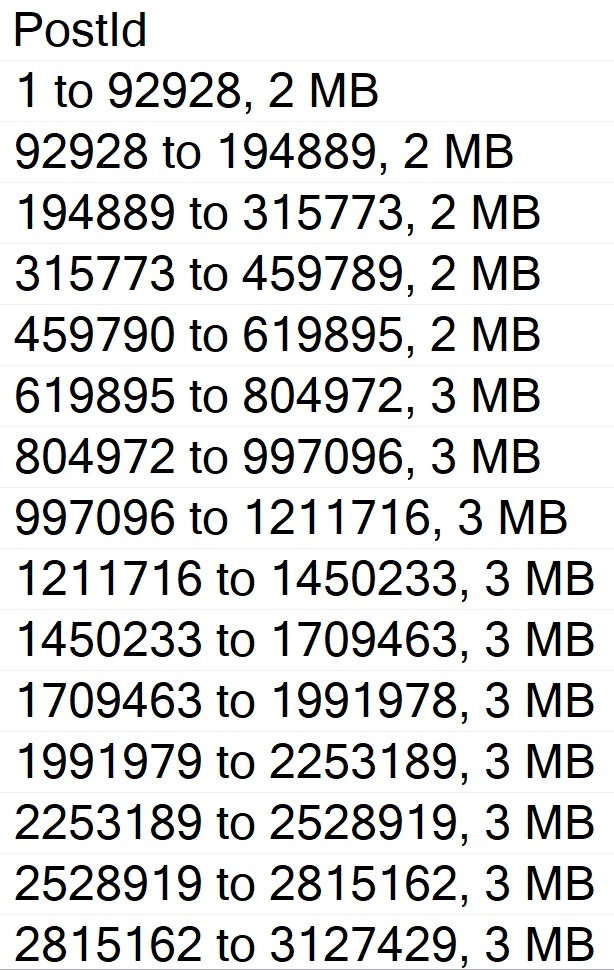
Anyway, the result using sp_BlitzIndex looks a lot better now:

EXEC sp_BlitzIndex
    @TableName = 'Votes_CCI';
SQL Server Query Results
capture the flag

How nice.

You can also use undocumented and unsupported trace flag 11621, which is

[A] feature flag for the ‘partition sort on column store order’ so the end result is similar, but via a different mechanism to 2417.
A partition sort is useful in general to prevent unnecessary switching between partitions. If you sort the stream by partition, you process all the rows for one before moving on to the next. A soft sort is ok there because it’s just a performance optimization. Worst case, you end up switching between partitions quite often because the sort ran out of memory, but correct results will still occur.

Chain Gang


A “reasonable” alternative to trace flags maybe to adjust the index create memory configuration option. If we set it down to the minimum value, we get a “helpful” error message:

EXEC sys.sp_configure 
    'index create memory', 
    704;

RECONFIGURE;

As promised:

Msg 8606, Level 17, State 1, Line 31

This index operation requires 123208 KB of memory per DOP.

The total requirement of 985800 KB for DOP of 8 is greater than the sp_configure value of 704 KB set for the advanced server configuration option “index create memory (KB)”.

Increase this setting or reduce DOP and rerun the query.

If you get the actual execution plan for the clustered column store index create or rebuild with the Soft Sort disabled and look at the memory grant, you get a reasonable estimate for what to set index create memory to.

Changing it does two things:

  • Avoids the very low memory grant that Soft Sorts receive, and causes the uneven row groups
  • The Soft Sort keeps the index create from going above that index create memory number

Setting index create memory for this particular index creation/rebuild to 5,561,824 gets you the nice, even row groups (at MAXDOP 1) that we saw when disabling the Soft Sort entirely.

Bottom line, here is that uneven row groups happen with column store indexes when there’s a:

  • Parallel create/rebuild
  • Low memory grant create/rebuild

If this sort of thing is particularly important to you, you could adjust index create memory to a value that allows the Soft Sort adequate memory.

But that’s a hell of a lot of work, and I hope Microsoft just fixes this in a later build.

Reality Bites


The cute thing here is that, while this syntactical functionality has been available in Azure Cloud Nonsense© for some time, no one uses that, so no one cares.

The bits for this were technically available in SQL Server 2019 as well, but I’m not telling you how to do that. It’s not supported, and bad things might happen if you use it.

I mean, bad things happen in SQL Server 2022 where it’s supported unless you use an undocumented trace flag, but… Uh. I dunno.

This trace flag seems to set things back to how things worked in the Before Times, though, which is probably how they should have stayed.

Thanks for reading!

Going Further


If this is the kind of SQL Server stuff you love learning about, you’ll love my training. Blog readers get 25% off the Everything Bundle — over 100 hours of performance tuning content. Need hands-on help? I offer consulting engagements from targeted investigations to ongoing retainers. Want a quick sanity check before committing to a full engagement? Schedule a call — no commitment required.

Common SQL Server Consulting Advice: Enabling Trace Flags

Lessen Earned


This is advice that I have to give less frequently these days, but is absolutely critical when I do.

With SQL Server 2016, suggestions that I’d normally make to folks became the default behavior

  • 1117 and 1118 for tempdb performance and contention
  • 2371 for stats update threshold improvements on large tables

By far the most common trace flag that I still have to get turned on is 8048. Please read the post at the link before telling me that it’s not necessary.

Most trace flags work best as a startup option, because then you don’t have to remember to turn them on again.

There are a lot of trace flags that I usually have people turn off, too. Most common at the 12XX trace flags that stick deadlock information in the error log.

There are far better ways to get at that information these days, like using the system health extended event session.

Lessen Earned


There are query-level trace flags that make sense sometimes, too as part of query tuning and experimentation.

Some of these have been replaced by written hints, too:

  • 8649 can be replaced by OPTION(USE HINT('ENABLE_PARALLEL_PLAN_PREFERENCE'));
  • 8690 can be replaced by OPTION(NO_PERFORMANCE_SPOOL);

Others are quite interesting to get more details about the optimization process. They almost all require 3604 to be used as well, to output messages the to console.

  • 2315: Memory allocations taken during compilation
  • 2363: (2014+) Statistics Info
  • 2372: Shows memory utilization during the different optimization stages
  • 2373: Shows memory utilization while applying optimization rules and deriving properties
  • 7352: Show final query tree (post-optimization rewrites)
  • 8605: Initial query tree
  • 8606: Additional LogOp trees
  • 8607: Optimizer output tree
  • 8608: Input tree copied into memo
  • 8609: Operation counts
  • 8612: Extra LogOp info
  • 8615: Final memo
  • 8619: Applied transformation rules
  • 8620: Add memo arguments to trace flag 8619
  • 8621: Rule with resulting tree
  • 8670: Disables Search2 phase of optimization
  • 8671: Disables logic that prunes memo and prevents optimizer from stopping due to “Good Enough Plan found”
  • 8675: Optimization phases and timing
  • 8757: Disable trivial plan generation
  • 9204: Interesting statistics loaded (< 2014)
  • 9292: Interesting statistics (< 2014)

If this all seems daunting, it’s because it is. And in most cases, it should be. But like… Why not make trace flags safeguards?

Diagnostic


Microsoft creates trace flags to change default product behavior, often to solve a problem.

If you read through a cumulative update patch notes, you might find some documentation (no seriously, stop laughing) that says you need to apply the CU and enable a trace flag to see a problem get resolved.

It would be nice if SQL Server were a bit more proactive and capable of self-healing. If the issue at hand is detected, why not enable the trace flag automatically? There’s no need for it to act like a sinking ship.

I get that it’s not feasible all the time, and that some of them truly are only effective at startup (but that seems like something that could be done, too).

Let’s look at semi-recent Trace Flag 8101 as an example!

When you run many online transactions on a database in Microsoft SQL Server 2019, you notice severe spinlock contention. The severe contention is generally observed on new generation and high-end systems. The following conditions apply to severe spinlock contention:

  • Requires modern hardware, such as Intel Skylake processors
  • Requires a server that has many CPUs
  • Requires a high number of concurrent users
  • Symptoms may include unexpected high CPU usage

Okay, some of this stuff can be (or is interrogated at startup as part of Hekaton checks). Maybe some is subjective, like what constitutes a high number of concurrent users, or CPU.

But there’s more!

Note In SQL Server 2019 Cumulative Update 16, we fixed spinlock contention on SPL_HOBT_HASH and SPL_COMPPLAN_SKELETON.

Okay, and…

Note Trace flag 8101 has to be turned on to enable the fix.

That seems far less subjective, and a good opportunity to self-heal a little bit. Flip the switch, SQL Server.

Thanks for reading!

Going Further


If this is the kind of SQL Server stuff you love learning about, you’ll love my training. Blog readers get 25% off the Everything Bundle — over 100 hours of performance tuning content. Need hands-on help? I offer consulting engagements from targeted investigations to ongoing retainers. Want a quick sanity check before committing to a full engagement? Schedule a call — no commitment required.

Trace Flag 8048 May Still Be Necessary After SQL Server 2016

Big Box


Way back when, SQL Servers with lots of cores could hit some weird contention on CMEMTHREAD. To fix that and a lot of other issues associated with running on a large server, people would resort to all sorts of trace flags.

My dear friend L_____ (b|t) has a list. Maybe not the most up to date list, but there are a lot of good references in the post.

Something we’ve both observed working with large servers is that Trace Flag 8048 might still be necessary under some circumstances.

Two Reasons


Starting with SQL Server 2016, it partitions memory dynamically. That’s cool.

Beats what it used to do by a country mile. Maybe even a continent mile.

But there are two problems you can run into:

  • You don’t meet the dynamic threshold, but still generate enough activity to run into contention
  • You run into issues faster than the dynamic threshold gets hit and starts taking effect

Many tools in the First Responder Kit will warn you about high CMEMTHREAD waits. You may even see them from heavy Query Store use.

If you’re running a large server, this trace flag may still be of value even after SQL Server 2016.

Thanks for reading!

Going Further


If this is the kind of SQL Server stuff you love learning about, you’ll love my training. Blog readers get 25% off the Everything Bundle — over 100 hours of performance tuning content. Need hands-on help? I offer consulting engagements from targeted investigations to ongoing retainers. Want a quick sanity check before committing to a full engagement? Schedule a call — no commitment required.

A Method to Find Trace Flags In SQL Server

Trace flags are often-hidden configuration switches within SQL Server that can be used to change advanced configuration options, enable or disable fixes, or provide additional diagnostic information. Microsoft recently (on the time scale of the product) published a list of supported trace flags.  The community has found other, undocumented trace flags through various means. The best repository that I’m aware of is maintained by Konstantin Ktaranov here and published here. This blog post contains a stored procedure that can find trace flags. The code contained in this blog post is extremely dangerous and should never be run in production. Be prepared to say goodbye to any server that you run it on.

Hunting Technique


Microsoft gives us a few clues about the range of valid trace flags. All of the documented trace flags (other than the one to make trace flags globally scoped, -1) are positive integers less than 11025. Looking through the list, we can see that similar trace flags are often grouped together. However, the most important hint is that DBCC TRACEON and DBCC TRACEOFF threw an error for any trace flag that’s above some hardcoded maximum. In SQL Server 2017 CU2 the largest allowed value is 11498. What if we had a stored procedure which could take a query to run, turn on one trace flag at a time from 1 to 11498, save off the XML from the estimated plan, turn off the trace flag, go to the next one, and compare all of the generated XML? That would give us a way to check for changes to the XML for everything in the known range of possible trace flags.The technique described above will not work for trace flags that can only be activated at server startup. You’ll need something like Brent’s method here for that. It also won’t work well for trace flags which need other trace flags to be enabled at the same time. Some trace flags have an effect which cannot be observed through an estimated plan, such as some server settings and aggregate pushdown for CCIs. Still, with the right test query and a little patience you can get some interesting results.

Prepare for the Hunt


The stored procedure requires a few tables to exist and be populated. There is a set of three tables that exclude trace flags in different ways:

CREATE TABLE dbo.STACK_DUMP_TFS (TF INT, PRIMARY KEY (TF));CREATE TABLE dbo.TFS_TO_EXCLUDE (TF INT, PRIMARY KEY (TF));CREATE TABLE dbo.KNOWN_TFS (TF INT, PRIMARY KEY (TF));

The first table, STACK_DUMP_TFS, contains trace flags that cause stack dumps which you never want to enable. I found two such trace flags during my testing, but there could be others depending on server configuration and the query that you’re testing. The TFS_TO_EXCLUDE table contains trace flags that you don’t want to enable for one reason or another. Maybe you want to enable a trace flag throughout the lifetime of a test or you’ve found a previously unknown trace flag and you don’t want to continue to show up your test results. The KNOWN_TFS table contains all trace flags found in Konstantin’s trace flag guide. Of course, you can populate the tables with whatever you want, but I put code to populate the tables with the dataset that I use on pastebin.Finally, the stored procedure logs what it finds to the following table:

CREATE TABLE dbo.LOG_TF_XML_COMPARE (TEST_NAME VARCHAR(100) NOT NULL,TF_SCOPE VARCHAR(10) NOT NULL,TF_NUMBER INTEGER NOT NULL,TF_IS_KNOWN INT,LOG_TIME DATETIME,QUERY_PLAN_XML XML,QUERY_ERROR_TEXT NVARCHAR(4000),PRIMARY KEY (TEST_NAME, TF_SCOPE, TF_NUMBER));

The structure of the table will make more sense after I go through an example later on in this post.

Set Your Bait


The stored procedure has a few parameters to define the search:

@test_name VARCHAR(100),@query_text NVARCHAR(3900),@tf_scope VARCHAR(10) = 'GLOBAL',@first_TF_to_search INT = 1,@last_TF_to_search INT = 11498,@skip_known_TFs INT = 1

The @test_name parameter controls what is logged to the TEST_NAME column of LOG_TF_XML_COMPARE. The stored procedure deletes all existing data from the table with a matching @test_name and @tf_scope.The @query_text parameter contains the query for which an estimated plan to be generated. Currently, the procedure only supports single statement queries, so you can’t define a variable or create a table in the query text and do something else after.The @tf_scope parameter controls if the trace flags are enabled at the session, global, or query level with QUERYTRACEON. Allowed inputs are 'GLOBAL', 'SESSION', and 'QUERY'. The query level can only be used if @query_text contains a '{{QUERYTRACEON}}' or '{{QUERYHINT}}' placeholder. '{{QUERYTRACEON}}' should be used as a substitute for QUERYTRACEON in the query and '{{QUERYHINT}}' should be used to create the OPTION part of a query, so you’d only use '{{QUERYTRACEON}}' if you need to specify other hints at the query level.@first_TF_to_search is the first trace flag to search with a default value of 1. Trace flags are always searched in ascending order.@last_TF_to_search is the last trace flag to search with a default value of 11498. I haven’t done any testing on lower versions of SQL Server, so it’s possible that you’ll see errors when trying trace flags with a higher value on some product versions.If @skip_known_TFs is set to 0 then trace flags in the KNOWN_TFS table will be skipped during the stored procedure run. Trace flags in the STACK_DUMP_TFS and TFS_TO_EXCLUDE tables are always skipped.

Begin the Hunt


The procedure enables a trace flag, generates a cached plan, does some cleanup on the plan, and saves it into the logging table if it’s different from the plan without any trace flags. The full code of the procedure is below:

-- THIS CODE DOES BAD THINGS!!!!CREATE OR ALTER PROCEDURE [dbo].[FIND_TRACE_FLAGS] (@test_name VARCHAR(100),@query_text NVARCHAR(3900),@tf_scope VARCHAR(10) = 'GLOBAL',@first_TF_to_search INT = 1,@last_TF_to_search INT = 11498,@skip_known_TFs INT = 1)ASBEGINDECLARE@plan_handle VARBINARY(64),@plan_xml XML,@query_error nvarchar(4000),@TF INT,@trace_sql VARCHAR(1000),@standard_plan_xml_as_string NVARCHAR(MAX),@TF_is_known INT,@query_text_to_run_w_placeholders NVARCHAR(4000),@query_text_to_run NVARCHAR(4000);SET NOCOUNT ON;IF @tf_scope NOT IN ('GLOBAL', 'SESSION', 'QUERY')BEGINTHROW 50001, 'Fix @tf_scope', 1;RETURN;END;IF @tf_scope = 'QUERY' AND @query_text NOT LIKE '%{{QUERYTRACEON}}%' AND @query_text NOT LIKE '%{{QUERYHINT}}%'BEGINTHROW 50001, '@query_text needs {{QUERYTRACEON}} or {{QUERYHINT}} placeholder', 1;RETURN;END;IF @first_TF_to_search NOT BETWEEN 1 AND 11498 -- max that doesn't error out in DBCC traceon is 11498BEGINTHROW 50001, 'Fix @first_TF_to_search', 1;RETURN;END;IF @last_TF_to_search NOT BETWEEN 1 AND 11498 -- max that doesn't error out in DBCC traceon is 11498BEGINTHROW 50001, 'Fix @@last_TF_to_search', 1;RETURN;END;IF @tf_scope = 'QUERY' AND @query_text NOT LIKE '%{{QUERYTRACEON}}%' AND @query_text NOT LIKE '%{{QUERYHINT}}%'BEGINTHROW 50001, '@query_text needs {{QUERYTRACEON}} or {{QUERYHINT}} placeholder', 1;END;DBCC TRACEON(8757) with NO_INFOMSGS; -- disable trivial plansDELETE FROM dbo.LOG_TF_XML_COMPARE WITH (TABLOCK)WHERE TEST_NAME = @test_name AND TF_SCOPE = @tf_scopeOPTION (RECOMPILE);DBCC FREEPROCCACHE with NO_INFOMSGS;SET @query_text_to_run_w_placeholders = N'SET NOEXEC ON; /* FIND_ME */' + @query_text;IF @tf_scope <> 'QUERY'BEGINSET @query_text_to_run = @query_text_to_run_w_placeholdersENDELSEBEGINSET @query_text_to_run = REPLACE(REPLACE(@query_text_to_run_w_placeholders, N'{{QUERYTRACEON}}', N''), N'{{QUERYHINT}}', N'');END;BEGIN TRYEXEC (@query_text_to_run);END TRYBEGIN CATCHSET @query_error = ERROR_MESSAGE();END CATCH;IF @query_error IS NOT NULLBEGINTHROW 50001, @query_error, 1;RETURN;END;SELECT /* HIDE_ME */ @plan_handle = ecp.plan_handle, @plan_xml = eqp.query_planFROM sys.dm_exec_cached_plans ecpCROSS APPLY sys.dm_exec_sql_text(ecp.plan_handle) estCROSS APPLY sys.dm_exec_query_plan (ecp.plan_handle) eqpWHERE est.text LIKE '%/* FIND_ME */%'AND est.text NOT LIKE '%/* HIDE_ME */%';DBCC FREEPROCCACHE (@plan_handle) WITH NO_INFOMSGS;SET @plan_xml.modify('declare default element namespace "http://schemas.microsoft.com/sqlserver/2004/07/showplan";delete /ShowPlanXML/BatchSequence/Batch/Statements/StmtSimple[1]');SET @plan_xml.modify('declare default element namespace "http://schemas.microsoft.com/sqlserver/2004/07/showplan";delete /ShowPlanXML/BatchSequence/Batch/Statements/StmtSimple/@StatementCompId');SET @plan_xml.modify('declare default element namespace "http://schemas.microsoft.com/sqlserver/2004/07/showplan";delete /ShowPlanXML/BatchSequence/Batch/Statements/StmtSimple/QueryPlan/@CompileTime');SET @plan_xml.modify('declare default element namespace "http://schemas.microsoft.com/sqlserver/2004/07/showplan";delete /ShowPlanXML/BatchSequence/Batch/Statements/StmtSimple/QueryPlan/@CompileCPU');SET @plan_xml.modify('declare default element namespace "http://schemas.microsoft.com/sqlserver/2004/07/showplan";delete /ShowPlanXML/BatchSequence/Batch/Statements/StmtSimple/QueryPlan/@CompileMemory');SET @plan_xml.modify('declare default element namespace "http://schemas.microsoft.com/sqlserver/2004/07/showplan";delete /ShowPlanXML/BatchSequence/Batch/Statements/StmtSimple/QueryPlan/TraceFlags');SET @plan_xml.modify('declare default element namespace "http://schemas.microsoft.com/sqlserver/2004/07/showplan";delete /ShowPlanXML/BatchSequence/Batch/Statements/StmtSimple/QueryPlan/OptimizerHardwareDependentProperties/@MaxCompileMemory');IF @tf_scope = 'QUERY' -- only wipe out text and other stuff when QUERYTRACEON is usedBEGINSET @plan_xml.modify('declare default element namespace "http://schemas.microsoft.com/sqlserver/2004/07/showplan";delete /ShowPlanXML/BatchSequence/Batch/Statements/StmtSimple/@StatementText');SET @plan_xml.modify('declare default element namespace "http://schemas.microsoft.com/sqlserver/2004/07/showplan";delete /ShowPlanXML/BatchSequence/Batch/Statements/StmtSimple/@QueryHash');SET @plan_xml.modify('declare default element namespace "http://schemas.microsoft.com/sqlserver/2004/07/showplan";delete /ShowPlanXML/BatchSequence/Batch/Statements/StmtSimple/@QueryPlanHash');END;INSERT INTO dbo.LOG_TF_XML_COMPARE VALUES (@test_name, @tf_scope, 0, 0, GETDATE(), @plan_xml, @query_error);SET @standard_plan_xml_as_string = CAST(@plan_xml AS NVARCHAR(MAX));SET @TF = @first_TF_to_search;WHILE @TF <= @last_TF_to_searchBEGINSET @query_error = NULL;SET @plan_handle = NULL;SET @plan_xml = NULL;SET @TF_is_known = 0;IF @TF = 8757 OR EXISTS (SELECT 1 FROM dbo.STACK_DUMP_TFS WHERE TF = @TF) OR EXISTS (SELECT 1 FROM dbo.TFS_TO_EXCLUDE WHERE TF = @TF)BEGINSET @TF = @TF + 1;CONTINUE;END;IF EXISTS (SELECT 1 FROM dbo.KNOWN_TFS WHERE TF = @TF)BEGINSET @TF_is_known = 1;END;IF @TF_is_known = 1 AND @skip_known_TFs = 1BEGINSET @TF = @TF + 1;CONTINUE;END;-- set trace flag at right levelIF @tf_scope = 'GLOBAL'BEGINSET @trace_sql = 'DBCC TRACEON(' + CAST(@TF AS VARCHAR(5)) + ', -1) with NO_INFOMSGS';EXEC (@trace_sql);ENDELSE IF @tf_scope = 'SESSION'BEGINSET @trace_sql = 'DBCC TRACEON(' + CAST(@TF AS VARCHAR(5)) + ') with NO_INFOMSGS';EXEC (@trace_sql);ENDELSEBEGINSET @query_text_to_run = REPLACE(REPLACE(@query_text_to_run_w_placeholders, N'{{QUERYTRACEON}}', N', QUERYTRACEON ' + CAST(@TF AS NVARCHAR(5))), N'{{QUERYHINT}}', N'OPTION(QUERYTRACEON ' + CAST(@TF AS NVARCHAR(5)) + N')' );END;BEGIN TRYEXEC (@query_text_to_run);END TRYBEGIN CATCHSET @query_error = ERROR_MESSAGE();END CATCH;IF @query_error IS NULLBEGINSELECT /* HIDE_ME */ @plan_handle = ecp.plan_handle, @plan_xml = eqp.query_planFROM sys.dm_exec_cached_plans ecpCROSS APPLY sys.dm_exec_sql_text(ecp.plan_handle) estCROSS APPLY sys.dm_exec_query_plan (ecp.plan_handle) eqpWHERE est.text LIKE '%/* FIND_ME */%'AND est.text NOT LIKE '%/* HIDE_ME */%';IF @plan_handle IS NOT NULLBEGINDBCC FREEPROCCACHE (@plan_handle) WITH NO_INFOMSGS;SET @plan_xml.modify('declare default element namespace "http://schemas.microsoft.com/sqlserver/2004/07/showplan";delete /ShowPlanXML/BatchSequence/Batch/Statements/StmtSimple[1]');SET @plan_xml.modify('declare default element namespace "http://schemas.microsoft.com/sqlserver/2004/07/showplan";delete /ShowPlanXML/BatchSequence/Batch/Statements/StmtSimple/@StatementCompId');SET @plan_xml.modify('declare default element namespace "http://schemas.microsoft.com/sqlserver/2004/07/showplan";delete /ShowPlanXML/BatchSequence/Batch/Statements/StmtSimple/QueryPlan/@CompileTime');SET @plan_xml.modify('declare default element namespace "http://schemas.microsoft.com/sqlserver/2004/07/showplan";delete /ShowPlanXML/BatchSequence/Batch/Statements/StmtSimple/QueryPlan/@CompileCPU');SET @plan_xml.modify('declare default element namespace "http://schemas.microsoft.com/sqlserver/2004/07/showplan";delete /ShowPlanXML/BatchSequence/Batch/Statements/StmtSimple/QueryPlan/@CompileMemory');SET @plan_xml.modify('declare default element namespace "http://schemas.microsoft.com/sqlserver/2004/07/showplan";delete /ShowPlanXML/BatchSequence/Batch/Statements/StmtSimple/QueryPlan/TraceFlags');SET @plan_xml.modify('declare default element namespace "http://schemas.microsoft.com/sqlserver/2004/07/showplan";delete /ShowPlanXML/BatchSequence/Batch/Statements/StmtSimple/QueryPlan/OptimizerHardwareDependentProperties/@MaxCompileMemory');IF @tf_scope = 'QUERY' -- only wipe out text and other stuff when QUERYTRACEON is usedBEGINSET @plan_xml.modify('declare default element namespace "http://schemas.microsoft.com/sqlserver/2004/07/showplan";delete /ShowPlanXML/BatchSequence/Batch/Statements/StmtSimple/@StatementText');SET @plan_xml.modify('declare default element namespace "http://schemas.microsoft.com/sqlserver/2004/07/showplan";delete /ShowPlanXML/BatchSequence/Batch/Statements/StmtSimple/@QueryHash');SET @plan_xml.modify('declare default element namespace "http://schemas.microsoft.com/sqlserver/2004/07/showplan";delete /ShowPlanXML/BatchSequence/Batch/Statements/StmtSimple/@QueryPlanHash');END;END;END;IF @standard_plan_xml_as_string <> CAST(@plan_xml AS NVARCHAR(MAX))BEGININSERT INTO dbo.LOG_TF_XML_COMPARE VALUES (@test_name, @tf_scope, @TF, @TF_is_known, GETDATE(), @plan_xml, @query_error);END;-- set trace flag at right levelIF @tf_scope = 'GLOBAL'BEGINSET @trace_sql = 'DBCC TRACEOFF(' + CAST(@TF AS VARCHAR(5)) + ', -1) with NO_INFOMSGS';EXEC (@trace_sql);ENDELSE IF @tf_scope = 'SESSION'BEGINSET @trace_sql = 'DBCC TRACEOFF(' + CAST(@TF AS VARCHAR(5)) + ') with NO_INFOMSGS';EXEC (@trace_sql);END;SET @TF = @TF + 1;END;SELECT *FROM LOG_TF_XML_COMPAREWHERE TEST_NAME = @test_name AND TF_SCOPE = @tf_scopeORDER BY TEST_NAME, TF_SCOPE, TF_NUMBER;DBCC TRACEOFF(8757) with NO_INFOMSGS; -- enable trivial plansEND;

There are some limitations. The current version can only handle single statement queries up to 4000 characters. The trace flag to disable trivial plans is automatically set during the run to avoid some trace flags that are missed otherwise. The run time is based on the complexity of the query plan. The XML parsing isn’t very efficient but I can run one test on average every two minutes.Running this procedure will clean the plan cache, clear any trace flags already set, and possibly do other bad things including, but not limited to, causing stack dumps or data integrity issues.

The First Kill


Looking for trace flags related to adaptive joins is a good way to test the procedure. Dima already posted about a few undocumented trace flags here so it should be easy to verify the results. I used the same table that I created as part of this blog post. Here’s the code that I ran for the test:

EXEC [dbo].[FIND_TRACE_FLAGS]'DEMO_FOR_BLOG',N'SELECT *FROM dbo.MY_FIRST_CCI oINNER JOIN dbo.SEEK_ME i ON o.JOIN_ID = i.JOIN_ID';

After 101 seconds here are the results:

a25_adaptive.PNG

I can click on the plans and diff them to get clues as to what the listed trace flags do.

Final Thoughts


Remember, this code is extremely dangerous and should never be run in production or even in an important test environment. Feel free to use it to hunt for trace flags if you wish. My only request is that you share anything that you find with the community in some form.

Thanks for reading!

Going Further


If this is the kind of SQL Server stuff you love learning about, you’ll love my training. Blog readers get 25% off the Everything Bundle — over 100 hours of performance tuning content. Need hands-on help? I offer consulting engagements from targeted investigations to ongoing retainers. Want a quick sanity check before committing to a full engagement? Schedule a call — no commitment required.