I admit that sp_prepare is an odd bird, and thankfully one that isn’t used a ton. I still run into applications that are unfortunate enough to have been written by people who hate bloggers and continue to use it, though, so here goes.
When you use sp_prepare, parameterized queries behave differently from normal: the parameters don’t get histogram cardinality estimates, they get density vector cardinality estimates.
Here’s a quick demo to show you that in action:
CREATE INDEX
    p
ON dbo.Posts
    (ParentId)
WITH
(
    SORT_IN_TEMPDB = ON,
    DATA_COMPRESSION = PAGE
);

DECLARE
    @handle int =
        NULL,
    @parameters nvarchar(MAX) =
        N'@ParentId int',
    @sql nvarchar(MAX) =
        N'
        SELECT
            c = COUNT_BIG(*)
        FROM dbo.Posts AS p
        WHERE p.ParentId = @ParentId;
        ';

EXEC sys.sp_prepare
    @handle OUTPUT,
    @parameters,
    @sql;

EXEC sys.sp_execute
    @handle,
    184618;

EXEC sys.sp_execute
    @handle,
    0;

EXEC sys.sp_unprepare
    @handle;
OldPlan
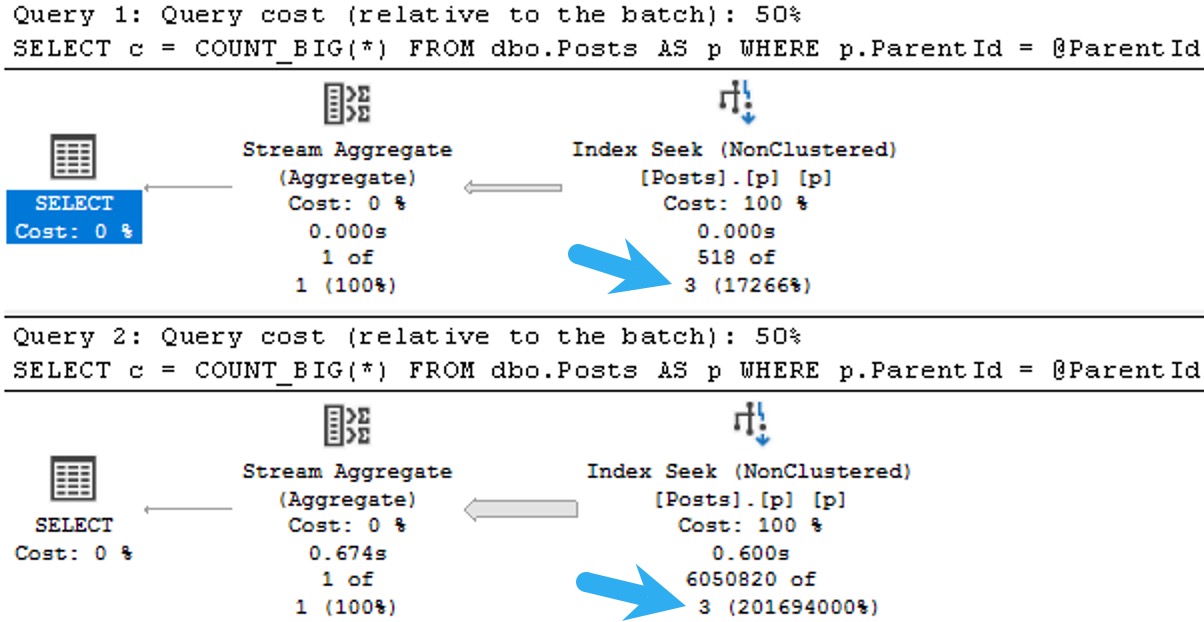
The plans for the two executions have the same poor cardinality estimate. In this case, since we have an ideal index and there’s no real complexity, there’s no performance issue.
But you can probably guess (at least for the second query) how being off by 201,694,000% might cause issues in queries that ask a bit more of the optimizer.
The point here is that both queries get the same incorrect estimate of 3 rows. If you add a recompile hint, or execute the same code using sp_executesql, the first query will get a histogram cardinality estimate, and the second query will reuse it.
one up
Given the historical behavior of sp_prepare, I was a little surprised that the Parameter Sensitive Plan (PSP) optimization available in SQL Server 2022 kicked in.
NewDifferent
If we change the database compatibility level to 160, the plans change a bit.
ALTER DATABASE StackOverflow2013 SET COMPATIBILITY_LEVEL = 160;
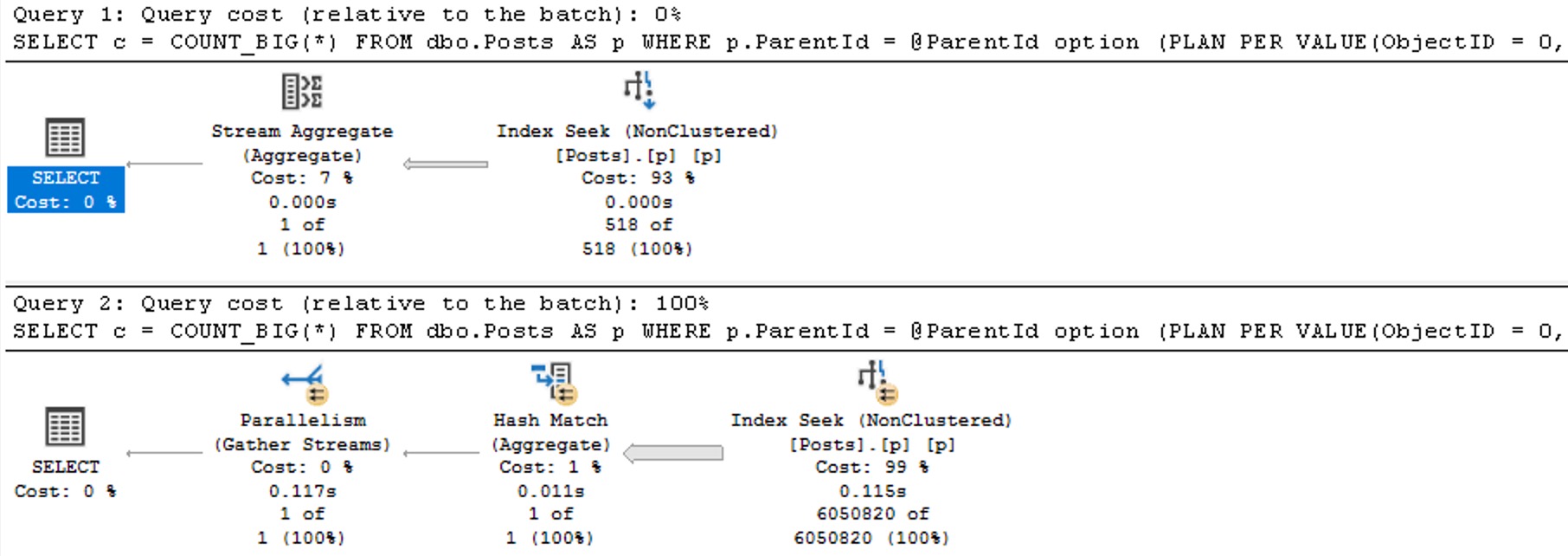
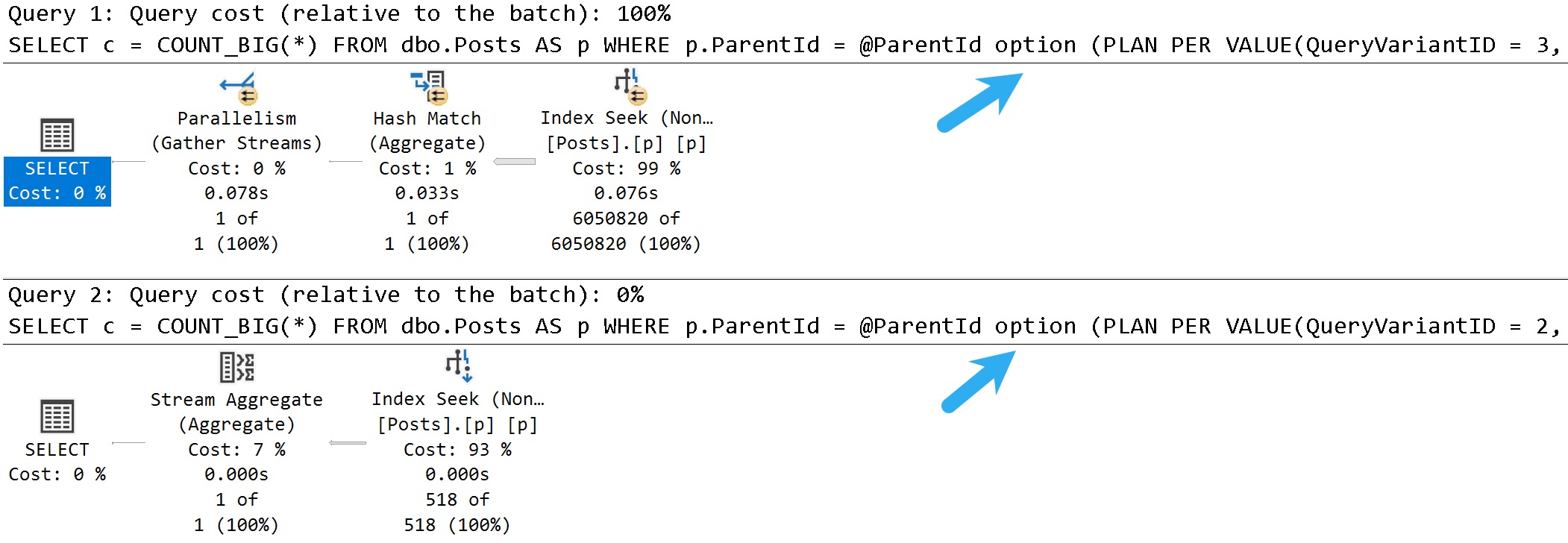
Now we see two different plans without a recompilation, as well as the plan per value option text at the end of the queries, indicating the PSP optimization kicked in.
two up
The differences here are fairly obvious, but…
Each plan gets accurate cardinality
The second plan goes parallel to make processing ~6 million rows faster
Different aggregates more suited to the amount of data in play are chosen (the hash match aggregate is eligible for batch mode)
Thanks for reading!
Going Further
If this is the kind of SQL Server stuff you love learning about: these days I have AI do the annoying stuff for me. My new video course teaches you to work the same way, and I teach whole teams in a one-day workshop. Someone still has to know enough SQL Server to keep the robots in check, and that’s what my training is for.
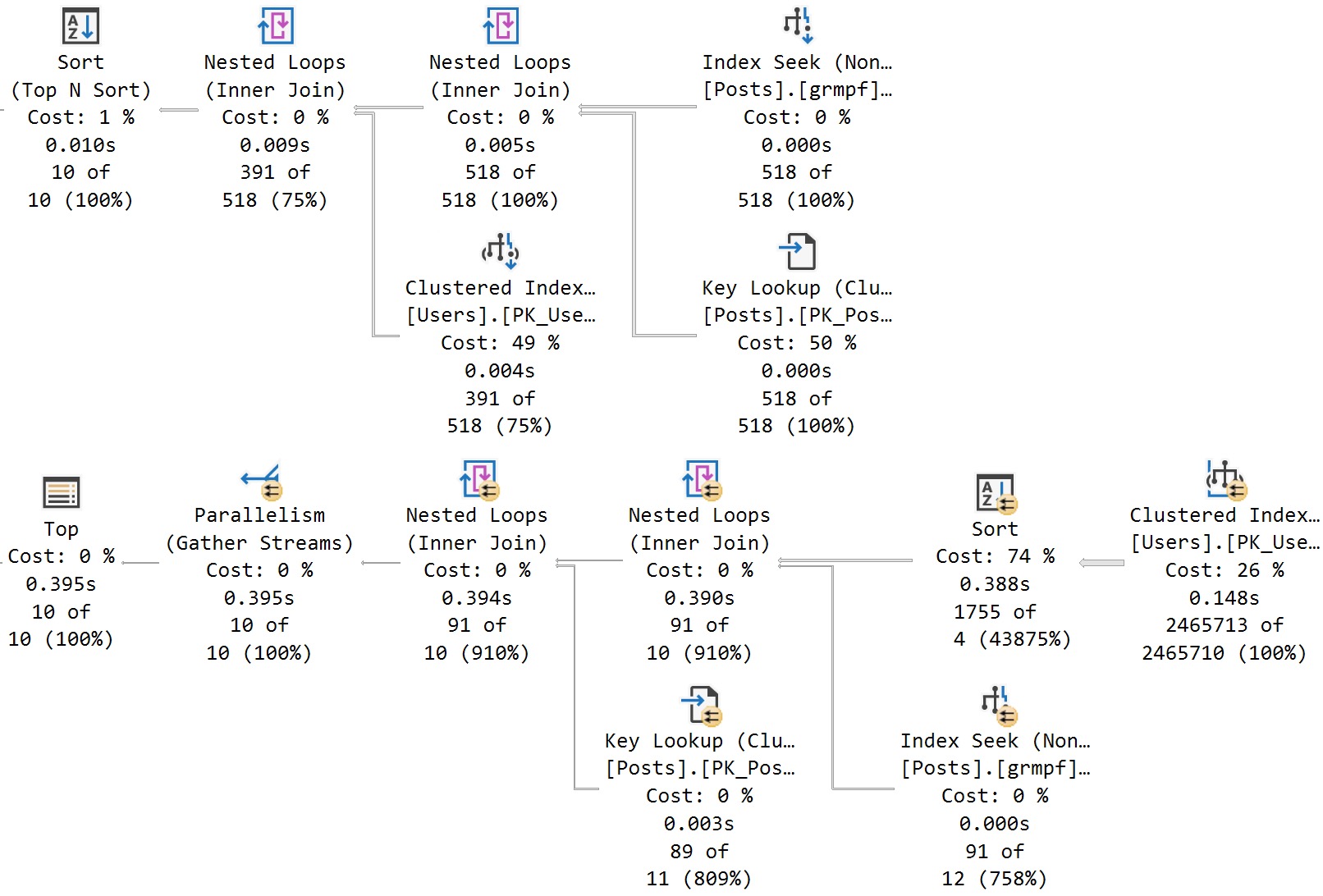
Several weeks back, I blogged about a missed opportunity with the new parameter sensitive plan feature. At the time, I thought that there was indeed sufficient skewness available to trigger the additional plan variants, and apparently some nice folks at Microsoft agreed.
I’m not gonna go into a lot of depth here, because I’m writing this while traveling, but we get the (mostly) desired outcome of two different plans being generated. Each plan is more suitable to the amount of data that the query has to process.
If this is the kind of SQL Server stuff you love learning about: these days I have AI do the annoying stuff for me. My new video course teaches you to work the same way, and I teach whole teams in a one-day workshop. Someone still has to know enough SQL Server to keep the robots in check, and that’s what my training is for.
In this video, I delve into the exciting new parameter-sensitive plan optimization introduced in SQL Server 2022. After a bit of a hiatus from recording videos due to other commitments and personal projects, the release of SQL Server 2022 has reignited my passion for sharing knowledge with you all. The video explores how this feature works by running queries multiple times with different input values, demonstrating the creation of distinct plans based on parameter sensitivity. I also highlight some quirks in query store data handling and plan cache management that arise from this optimization, offering insights into what developers might encounter as they adapt to these changes.
Full Transcript
Hello, hello, hello. Erik Darling here with Erik Darling Data. And I know that it’s been a little while since I recorded anything. That’s mostly because I’ve been really busy. I’ve still been writing nice things for all you kind and pleasant folks out there, but recording, I don’t know, it takes a special kind of thing for me to want to record something. And a lot of the stuff that I’ve been writing about has just not been stuff that I’ve been like, yeah, let’s record it. Let’s do a video about it. So I’ve been slacking a little bit on there. And, but now we have SQL Server 2022, and it has rekindled my desire to record things. So you’re welcome. Thank you, Microsoft, for releasing SQL Server 2022. And, I’ve been digging a lot into the parameter-sensitive plan optimization in SQL Server 2022. Because, I mean, apart from it being a very cool thing that now we have this, like, new layer of intelligent query processing where, all of a sudden, like, we don’t have the same, well, we don’t have the same. We don’t always have the same issue with parameter. We have new issues to deal with, like, when it misses out on perhaps a potentially useful optimization.
But anyway, now we have at least the built-in heuristic ability to occasionally get some help with parameter sniffing when the optimizer deems a parameter, a quality predicate, sensitive enough or having a sufficient skewness to generate multiple plans. So, what I’m going to do is run this main query here in a loop 10 times with two different sets of input values. One is going to be a 1 and a 0 up here, and the other is going to be a 2 and a 184618 down here. So if I run this, first we’re going to clear out the plan cache. We’re going to set, we’re going to clear all the data out of query store because I want this to be very clear.
All right, I’m going to clear it to make it, shut up. And I’m also just going to make sure that everyone knows that my database is in compat level 160, which is the magical new SQL Server 2022 compat level. I mean, I guess it’s old news if you’re up in Azure, but I don’t know. I don’t think people in Azure care, obviously. If they did, they wouldn’t use Azure. So we’re going to run those in a loop, and it’s going to finish pretty quickly because it’s an expert query tuner.
Even when I have queries that are parameter sensitive, they still manage to finish very quickly when I get my hands on them. But the main stuff that we need to pay attention to in here is if you look up here, we’re going to have, and this is how you’re going to know that your plans have received the parameter sensitive plan optimization. You’re going to see this option plan per value, and you’re going to get some query variant ID attached to your query.
Right now, you only have three options, or you only get three plans as part of this, right? So you will certainly only create three parameters, different parameter sensitive plans based on like bucketized values. And you can see those bucketized values if you look a little bit further over in the text of that hint where you see this predicate range, right?
And so you have stuff at the low end of the range, and you’ll have stuff at the high end of the range, and then you’ll have stuff in the middle of the range, which would be your third plan. I’m at the very top and very bottom of this, so I only have the two variant IDs. But if we scroll down through this, we’re going to see two distinct plans.
Really, they’re very similar in a lot of ways. The only thing that’s really different are these estimates over here, because one of them will actually find 50,000 rows, and the other one will not find anywhere near 50,000 rows. They’ll only find 518 rows.
And you can also see, of course, which parameter predicate… Oh, I didn’t go over it further enough. I’m goofy. I’m all out of practice here. You can also see which parameter SQL Server decided was the sensitive one, the sad little lad who dropped his lolly and leaves. And decided that that’s the one that needed some extra help and attention.
Needed a Kleenex and some spit on the cheek. But if you look through this stuff, these two plans are basically going to go back and forth over and over again. It’s going to be all query variant 2 and all query variant 3 going all the way down to the bottom.
And that’s the end of it, right? So these both executed 10 times a piece, just sort of in that loop. Now, where things get interesting…
If you read my blog, you would have seen a post sort of recently about how the parameter sensitive plan optimization, at least right now, as of this build, this first CTP build, kind of messes up plan cache stuff. Because when a store procedure calls a query and the query executes, it used to be, or at least it currently is, that you can figure out… Like there’s a parent object ID that gets tied back from the query to the store procedure that call this.
You can be like, oh, this query came from the store procedure. Great. That messes that up. They all get weird different SQL handles. Everything’s kind of a weird shamble over there.
There’s sort of a similar situation in query store. It’s not exactly the same. I mean, it is the same with you can’t tie statements back to the store procedure that called them. But there’s an additional sort of bit of weirdness that I want to talk you through here.
So what I’m going to do is execute these queries. And there’s nothing all that special or interesting about these queries. I’m not going to explain them because querying query store data is the hell on earth. I feel bad for anyone who does it.
I wrote spquickie store so that you wouldn’t have to do it because I care about you deeply as people. And I want you to have long and happy lives so you don’t have to think about these things. So looking through query store data, we have three distinct executions of this query, which is weird because we only had two plans, but I’m going to show you where that third thing comes from.
So if we blow this column up a little bit, and I wish there was a better way to do this without running some dumb substring parsing, we’ll see in this section that top plan, that ends the score descending clause of the query. The two ones below it have the plan per value, predicate range, blah, blah, blah stuff at the end of it.
All well and good. Where things get kind of interesting though, is if we, come on, move it, some scroll bars, not anyone’s friend, is when we look through other parts of this, right?
So we have query ID 123, plan ID 123, query text ID 123, okay, fine. Plan ID 1 doesn’t show up in runtime stats, right? So just kind of like a silly run, like query on, to get data out of the runtime stats view.
Query ID 1 doesn’t show up in there, right? We have, or sorry, plan ID 1 doesn’t show up there. We have plan ID 2 and 3 in there, right? So these two are in there.
This top one isn’t. Down at the bottom, and I will explain this query because this one is relatively simple to explain. We’re hitting a new view in SQL Server 2022 called sys.queryStoreVariant. And that is brand new.
And this is the one that tells us when a plan had a variant or a deviant in it somewhere. What’s kind of interesting here is that we have query variant query ID 2 and 3, right? So these query IDs would match up to these query IDs here.
Query ID 1 isn’t in there, right? Because it doesn’t have that option plan per value stuff in it. We have parent query ID, which does match up to that. And then we have dispatcher plan ID, which only shows you one.
Okay. Here’s where things get a little tricky. If we were to look for a plan, if we were to purely look for plans that have a variant in them, right? That were, you know, dispatched some other query plans.
This is all we get back. And as far as I know, I’m the first person to talk about this. So, you know, go me. Gold star, A plus, A for effort, all that stuff. We get this single operator back.
Multiple plan. Right? That’s all we get back here. Not a whole lot of detail. And if we go look at the XML, there’s a little bit more to see, but it’s kind of just weird stuff. You know, I mean, it’s all, you know, XML, which sucks to look at.
But we have this parameter sensitive predicate thing in here. We have a little bit of information about the, you know, the query. Like we can see what the query text is.
Just doesn’t have the parameter sensitive stuff tacked onto it. We can see the index that got used. We can see the boundary values for the parameter sensitivity stuff. And we can see the predicate that was considered parameter sensitive. Right?
So we get, there’s some, there’s some stuff in there, but it doesn’t show us the whole execution plan. If we click on any other, any of those other query plans, we’ll get the plan back. Like I said, there was the one that has a missing index attached to it. And then this one down here is the one that doesn’t have the missing index attached to it.
So those are the two variants that we saw when I executed the other scripts. So you have to be a little bit careful how you identify stuff in query store. Obviously you’d want to use the query variant query ID.
If you wanted to find the actual statements that had the varying plans in them. But right now getting, getting this dispatch or plan ID is just kind of useless. I wish there was another column that maybe had query variant plan ID in it so that we could say, Oh, this query was attached to this, you know, variant on the plan.
That might be kind of nice. The other thing that’s kind of interesting to look at in here is some of the hashes, right? So somehow these all have the same query hash, which is interesting.
I mean, because of the two of them have the option plan stuff at the end of them. So it almost doesn’t make sense for them to have that, but maybe, maybe that’s not considered as part of the hash value in there. Maybe that gets, maybe that gets sent in afterwards.
I don’t know. And then we have the query plan hash, which, you know, I guess that makes sense because, you know, we have this one where, you know, the, obviously that just that single multiple plan operator is not going to hash out to the same stuff. But then, you know, I mean, the other two are the same because it’s fundamentally the same plan.
It’s a blah, blah, key lookup. I mean, there was no difference in plan shape or anything. So in situations where the, the plan vary, the plan, the different plans generated had different shapes, different operators, parallel, not parallel, stuff like that. These would likely, these would likely vary.
What’s interesting to me though, is we have this query hash over here where they all end up being the same, but then quite obviously for last compile batch SQL handle and statement SQL handle, these are all very different values, right? This one’s 02, blah, blah, 51, 87, 72.
So these are all very different, right? These are all like just completely different SQL handles for things, right? These are all, these are all way different values. And even the statement SQL handles over, over here, obviously quite different values of the most will cooperate. Thank you very much, Mr. Mouse.
You are so useful today. Almost as useful as my liver. These all have very different values, right? So like, there’s a lot of stuff that’s just sort of spread out in here where, you know, before, there would at least be like some semblance of, of like, stuff you could figure out, right?
You could like, say, oh, the SQL handle for this query hasn’t changed. So this is where stuff gets a little bit trickier to identify and kind of get, get to the bottom of in here. So I guess the main thing here is be on the lookout for this, these kinds of changes.
Be on the lookout for maybe your query store scripts not working or getting you the value data that you want back as you start getting these new views into things. Obviously this dispatcher plan ID that just shows you the multiple plan operators, not very useful, right?
Like that’s not a very good query plan for you to use. The parent query ID likewise, that’s just going to get you this thing back, right? Query ID one, right?
That’s just going to get you that, you know, like that, the, the initial query without any of the parameter sensitive stuff attached to it. But you really want to be using this as query variant query ID, because this is what’s going to get you to these column to rather to these rows over here that have the more interesting plans. So, you know, be aware of this stuff, you know, as much as I love the idea of fixing parameter sniffing, I wish that there was a little bit less sort of nonsense, nonsense and shenanigans going on behind the scenes with all of the, the, the different values that, the, the queries generate and stuff.
I understand there has to be some separation. It wouldn’t make sense for everything to be just kind of congealed in together, but I do wish that there were a little bit more tooling or visibility into some of this stuff. For example, I mean, like, like I said earlier, it would be really helpful to have a query variant plan ID in here to track us to the plan IDs that we care about where there are variations.
And, you know, even in query store, you know, I talked about the plan cache earlier, even in query store, anything that gets called in the store procedure has a zero for a parent object ID when it gets a parameter sensitive plan optimization. So it’s going to be interesting seeing if that’s kind of stuff gets fixed or worked out as, as the CTPs roll out and we get closer to closer to RTM time. But anyway, sort of an initial observation, maybe at some point in the future, this video will be completely wrong.
Uh, that would be nice, but who knows? Uh, anyway, uh, I’m going to go now cause it’s, um, yeah, again, it’s seven, like seven 30 on a Friday. I’m going to, I’m going to go, uh, have, pour me a nice glass of something into my, my beer gut magazine, uh, mug.
And, uh, you know, maybe, maybe, maybe I’ll remember recording this video tomorrow. Maybe not. We’ll see. It’s all, it’s all a coin toss. It’s all up in the air.
Anyway, thanks for watching. Uh, I will see you hopefully in another video soon. Now the SQL Server 2022 stuff does have me, uh, back on to, uh, to actually record videos again. So I don’t know. I’ll have to work on that.
You have to brush off the rust and anything. Anyway, goodbye.
Going Further
If this is the kind of SQL Server stuff you love learning about: these days I have AI do the annoying stuff for me. My new video course teaches you to work the same way, and I teach whole teams in a one-day workshop. Someone still has to know enough SQL Server to keep the robots in check, and that’s what my training is for.
There are some code comments you see that really set the stage for how tuning a query is going to go.
Usually one misgiving about how SQL Server works gives way to a whole levee-breaking bevy of other ones and three days later you can’t feel your legs but dammit it’s done.
Okay, maybe it was three hours, but it felt like three days. Something about the gravitation pull of these black hole queries.
One fix I’ve been wishing for, or wish I’ve been fixing for, is a cure for local variables. I’d even be cool if Forced Parameterization was that cure, but you know…
Time will tell.
Husk
Let’s say we’ve got this stored procedure, which does something similar to the “I’m gonna fix parameter sniffing with a local variable hey why is everything around me turning to brimstone before my very eyes?” idea, but with… less of an end-of-times vibe.
CREATE OR ALTER PROCEDURE
    dbo.IndexTuningMaster
(
    @OwnerUserId int,
    @ParentId int,
    @PostTypeId int
)
AS
BEGIN
SET NOCOUNT, XACT_ABORT ON;

    /*Someone passed in bad data and we got a bad query plan,
      and we have to make sure that doesn't happen again*/

    DECLARE
        @ParentIdFix int =
            CASE
                WHEN @ParentId < 0
                THEN 0
                ELSE @ParentId
            END;

    SELECT TOP (1)
        p.*
    FROM dbo.Posts AS p
    WHERE p.ParentId = @ParentIdFix
    AND   p.PostTypeId = @PostTypeId
    AND   p.OwnerUserId = @OwnerUserId
    ORDER BY
        p.Score DESC,
        p.Id DESC;

END;
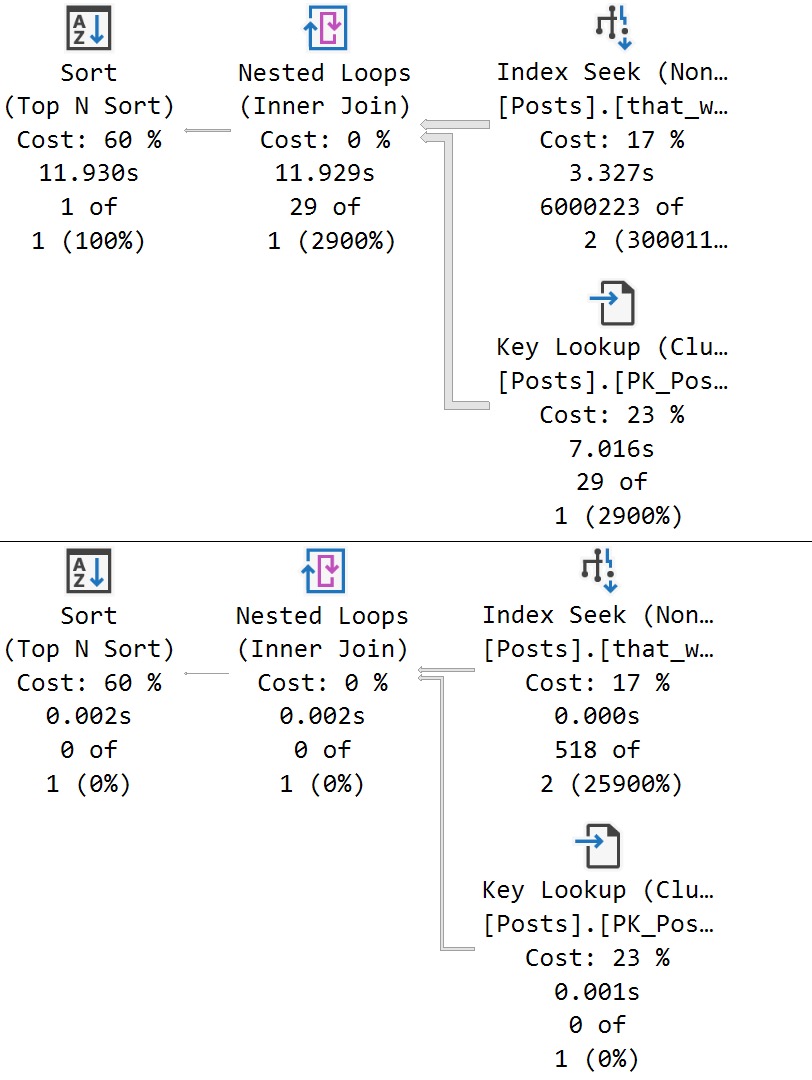
We get a super low guess for both. obviously that guess hurts a large set of matched data far worse than a small one, but the important thing here is that both queries receive the same bad guess.
This is a direct side effect of the local variable’s poor estimate, which PSP isn’t quite yet ready to go up against.
Thanks for reading!
Going Further
If this is the kind of SQL Server stuff you love learning about: these days I have AI do the annoying stuff for me. My new video course teaches you to work the same way, and I teach whole teams in a one-day workshop. Someone still has to know enough SQL Server to keep the robots in check, and that’s what my training is for.
While the Parameter Sensitive Plan (PSP) optimization won’t fix every problem with this lazy coding habit, it can fix some of them in very specific circumstances, assuming:
The parameter is eligible for PSP
The parameter is present across IF branches
We’re going to use a simple one parameter example to illustrate the potential utility here.
After all, if I make these things too complicated, someone might leave a comment question.
The horror
IFTTT
Here’s the procedure we’re using. The point is to execute one branch if @Reputation parameter is equal to one, and another branch if it equals something else.
In the bad old days, both queries would get a plan optimized at compile time, and neither one would get the performance boost that you hoped for.
In the good news days that you’ll probably get to experience around 2025, things are different!
CREATE OR ALTER PROCEDURE
    dbo.IFTTT
(
    @Reputation int
)
AS
BEGIN
SET NOCOUNT, XACT_ABORT ON;

SET STATISTICS XML ON;

    IF @Reputation = 1
    BEGIN
        SELECT
            u.Id,
            u.DisplayName,
            u.Reputation,
            u.CreationDate
        FROM dbo.Users AS u
        WHERE u.Reputation = @Reputation;
    END;

    IF @Reputation > 1
    BEGIN
        SELECT
            u.Id,
            u.DisplayName,
            u.Reputation,
            u.CreationDate
        FROM dbo.Users AS u
        WHERE u.Reputation = @Reputation;
    END;

SET STATISTICS XML OFF;

END;
GO
Johnson & Johnson
If we execute these queries back to back, each one gets a new plan:
EXEC dbo.IFTTT
    @Reputation = 1;
GO

EXEC dbo.IFTTT
    @Reputation = 2;
GO
psychic driving
Optimize For You
The reason why is in the resulting queries, as usual. The Reputation column has enough skew present to trigger the PSP optimization, so executions with differently-bucketed parameter values end up with different plans.
And of course, each plan has different compile and runtime values:
care
If I were to run this demo in a compatibility level under 160, this would all look totally different.
This is one change I’m sort of interested to see the play-out on.
Thanks for reading!
Going Further
If this is the kind of SQL Server stuff you love learning about: these days I have AI do the annoying stuff for me. My new video course teaches you to work the same way, and I teach whole teams in a one-day workshop. Someone still has to know enough SQL Server to keep the robots in check, and that’s what my training is for.
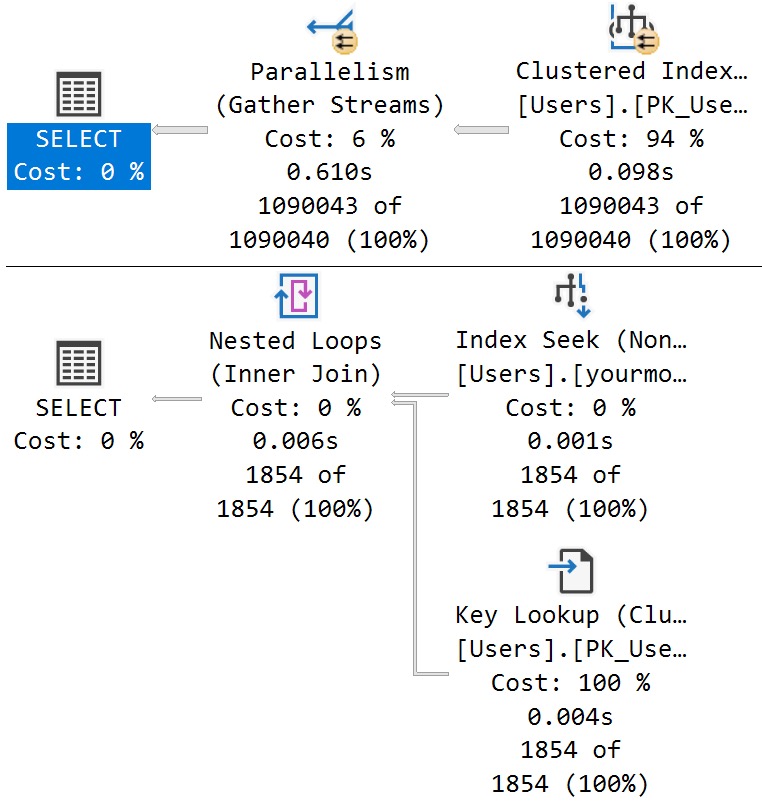
After seeing places where the Parameter Sensitive Plan (PSP) optimization quite stubbornly refuses to kick in, it’s somewhat amusing to see it kick in where it can’t possibly have any positive impact.
Even though some parameters are responsible for filtering on columns with highly skewed data, certain other factors may be present that don’t allow for the type of plan quality issues you might run into under normal parameter sensitivity scenarios:
Adequate indexing
Row goals
Other filtering elements
This isn’t to say that they can always prevent problems, but they certainly tend to reduce risks much of the time.
If only everything were always ever perfect, you know?
Setup
Let’s start by examining some data in the Posts table.
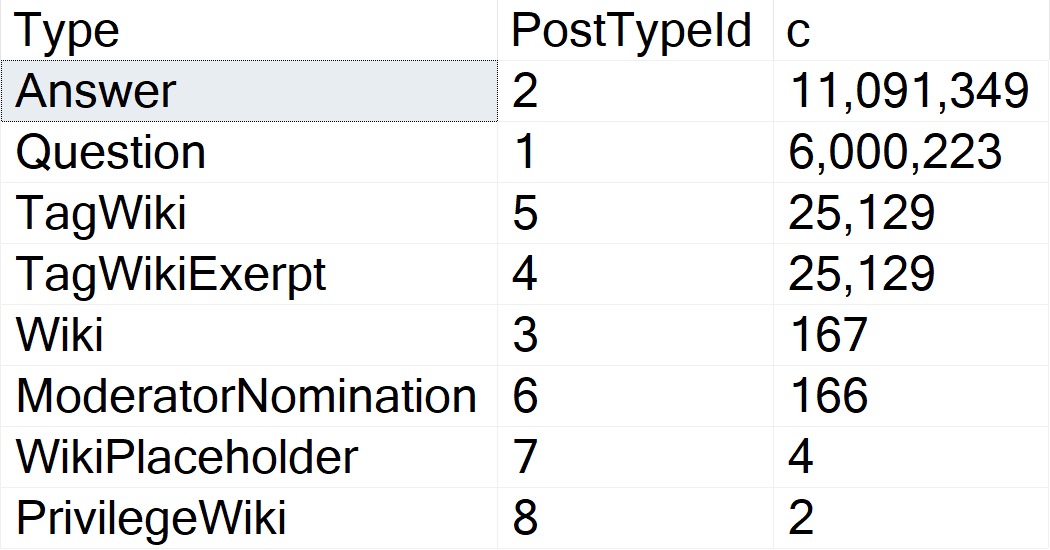
First, PostTypeIds:
resultant
Questions and answers are the main types of Posts. The data is clearly skewed, here, and in my testing this does qualify for PSP on its own.
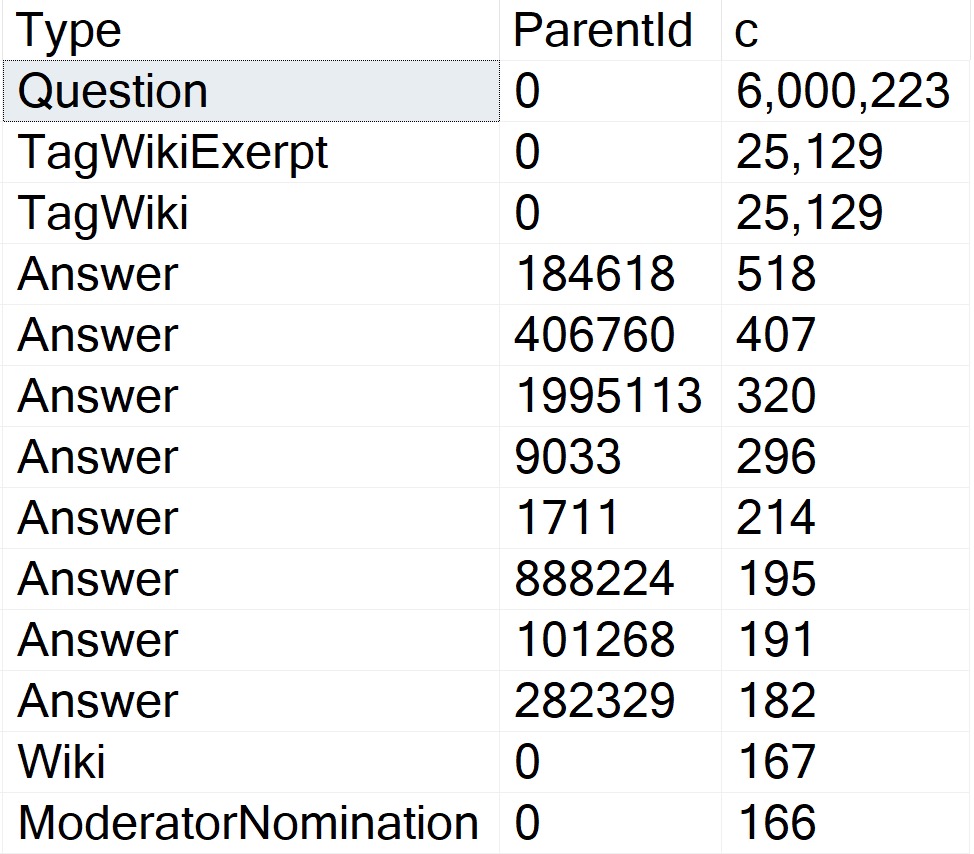
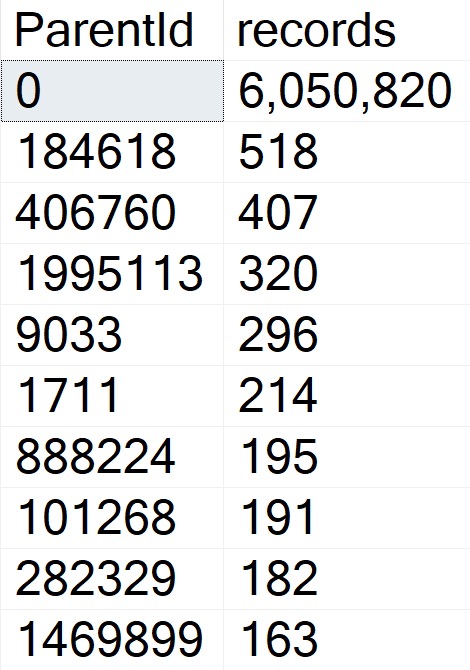
The thing is, there are several attributes that Questions can have that Answers can’t. One of those is a ParentId. Looking through how the top 15 or so of those counts breaks down:
hitherto
Okay, so! Wikis don’t have ParentIds, neither do Moderator Nominations. More importantly, Questions don’t.
The Question with the Most answers is Id 184618, with 518. A far cry from the next-nearest Post Types, and light years from the number of Questions with a ParentId of zero.
More important than loving your data is knowing your data.
To Query A Butterfly
Let’s say we have this query:
SELECT TOP (5000)
    p.Id,
    p.OwnerUserId,
    p.Score
FROM dbo.Posts AS p
WHERE p.PostTypeId = @po
AND   p.ParentId = @pa
ORDER BY
    p.Score DESC;
The three things we care about getting done are:
Filtering to PostTypeId
Filtering to ParentId
Ordering by Score
Either of these indexes would be suitable for that:
CREATE INDEX
    popa
ON dbo.Posts
(
    PostTypeId,
    ParentId,
    Score DESC
)
WITH
(
    SORT_IN_TEMPDB = ON,
    DATA_COMPRESSION = PAGE
);

CREATE INDEX
    papo
ON dbo.Posts
(
    ParentId,
    PostTypeId,
    Score DESC
)
WITH
(
    SORT_IN_TEMPDB = ON,
    DATA_COMPRESSION = PAGE
);
With No PSP At All
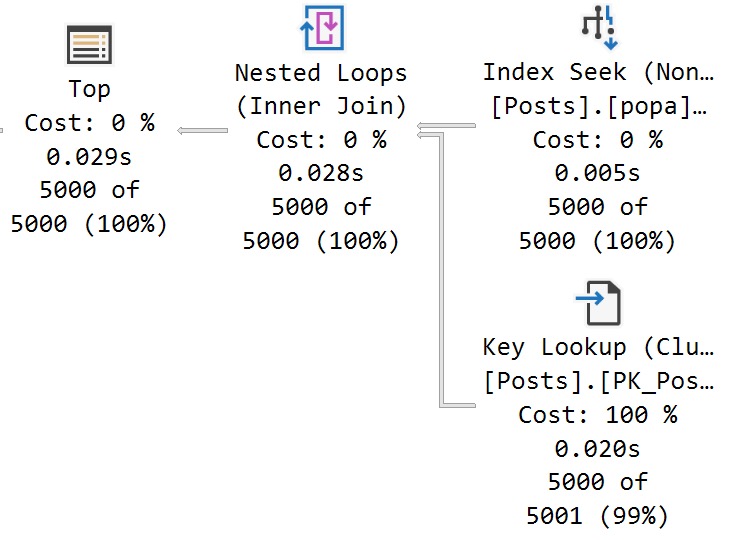
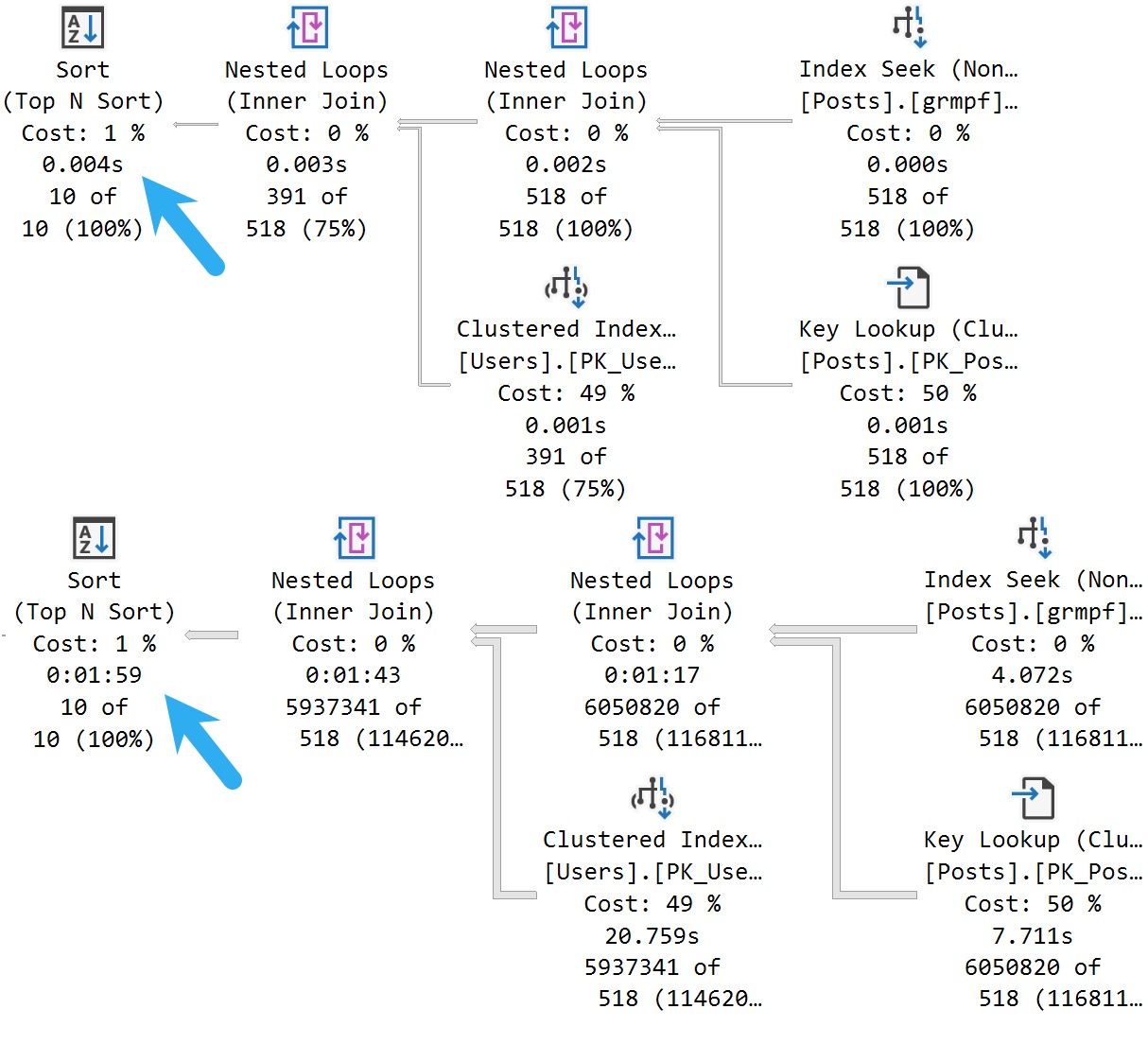
Under compatibility level 150, we can run the query in a variety of ways and get nearly identical performance results:
There’s a 27 millisecond difference between the two to find the first 5000 rows that match both predicates. You would have to run these in a very long loop to accumulate a meaningful overall difference.
In this case, both queries use and reuse the same execution plan. You can see that in the estimates.
With All The PSP
Switching to compat level 160, the queries are injected with the PLAN PER VALUE hint.
SELECT TOP (5000)
    p.Id,
    p.OwnerUserId,
    p.Score
FROM dbo.Posts AS p
WHERE p.PostTypeId = @po
AND   p.ParentId = @pa
ORDER BY
    p.Score DESC
OPTION
(
    PLAN PER VALUE
    (
        QueryVariantID = 2,
        predicate_range
        (
            [StackOverflow2013].[dbo].[Posts].[PostTypeId] = @po,
            100.0,
            10000000.0
        )
    )
)

SELECT TOP (5000)
    p.Id,
    p.OwnerUserId,
    p.Score
FROM dbo.Posts AS p
WHERE p.PostTypeId = @po
AND   p.ParentId = @pa
ORDER BY
    p.Score DESC
OPTION
(
    PLAN PER VALUE
    (
        QueryVariantID = 3,
        predicate_range
        (
            [StackOverflow2013].[dbo].[Posts].[PostTypeId] = @po,
            100.0,
            10000000.0
        )
    )
)
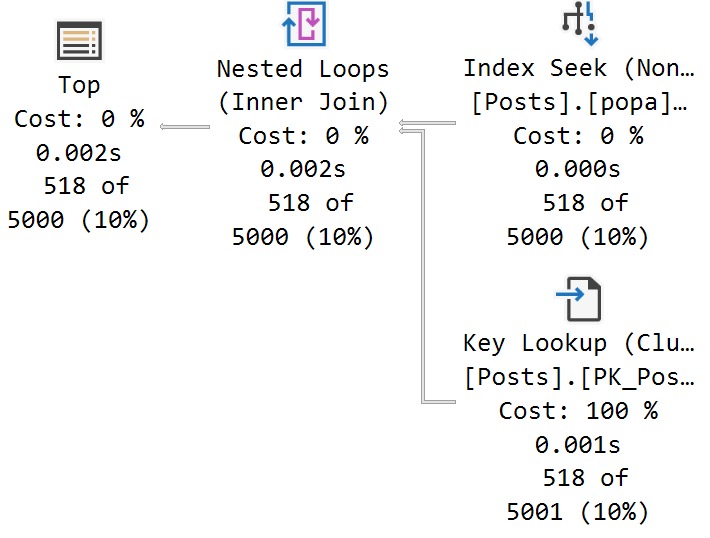
The thing is, both queries end up with identical execution times to when there was no PSP involved at all.
In other words, there is no parameter sensitivity in this scenario, despite there being skew in the column data.
Even searching for the “big” result — Questions with a ParentId of zero, finishes in <30 milliseconds.
Ah well. Gotta train the models somehow.
Thanks for reading!
Going Further
If this is the kind of SQL Server stuff you love learning about: these days I have AI do the annoying stuff for me. My new video course teaches you to work the same way, and I teach whole teams in a one-day workshop. Someone still has to know enough SQL Server to keep the robots in check, and that’s what my training is for.
When I talk to clients about using dynamic SQL, they’re usually under the misconception that those plans can’t get reused.
That may be true under some circumstances when:
It’s not properly parameterized
You use EXEC only and not sp_executesql
Under more favorable circumstances, dynamic SQL gets run, executed, and plans cached and reused with the same frequency as stored procedures.
Now, dynamic SQL isn’t exactly the same as stored procedures. There’s a lot you can do with those that just looks a mess in dynamic SQL, especially longer bits of code.
In today’s post, we’re going to look at how the Parameter Sensitive Plan (PSP) optimization works with dynamic SQL.
Bright, Sunshiny
I just learned how to spell “sunshiny”. Don’t let anyone ever tell you there’s nothing left to learn.
To keep up the sunshiny visage of today’s post, let’s get a TL;DR here: PSP does work with parameterized dynamic SQL.
Here’s an example, using a query with a parameter eligible for the PSP optimization.
DECLARE
    @sql nvarchar(MAX) =
        N'',
    @parameters nvarchar(MAX) =
        N'@ParentId int';

SELECT
    @sql += N'
SELECT
    c = COUNT_BIG(*)
FROM dbo.Posts AS p
WHERE p.ParentId = @ParentId;
';

EXEC sys.sp_executesql
    @sql,
    @parameters,
    0;

EXEC sys.sp_executesql
    @sql,
    @parameters,
    184618;
Both executions here get the option(plan per value... text at the end that indicates PSP kicked in, along with different query plans as expected.
end of time
Being Dense
Writing the not-good kind of dynamic SQL, like so:
SELECT
    @sql = N'
SELECT
    c = COUNT_BIG(*)
FROM dbo.Posts AS p
WHERE p.ParentId = ' + CONVERT(nvarchar(11), 0) + ';';
You will of course get different execution plans, but you’ll get a new execution plan for every different value that gets passed in. You will not get the PSP optimization.
This is not a good example of how you should be writing dynamic SQL. Please don’t do this, unless you have a good reason for it.
Anyway, this is good news, especially for parameterized ORM queries that currently plague many systems in crisis that I get to see every week.
Fun.
Thanks for reading!
Going Further
If this is the kind of SQL Server stuff you love learning about: these days I have AI do the annoying stuff for me. My new video course teaches you to work the same way, and I teach whole teams in a one-day workshop. Someone still has to know enough SQL Server to keep the robots in check, and that’s what my training is for.
The index and procedure creation script for this are a bit on the long side, so I’m going to stick them in a GitHub gist to keep the post concise, since we have some other ground to cover here.
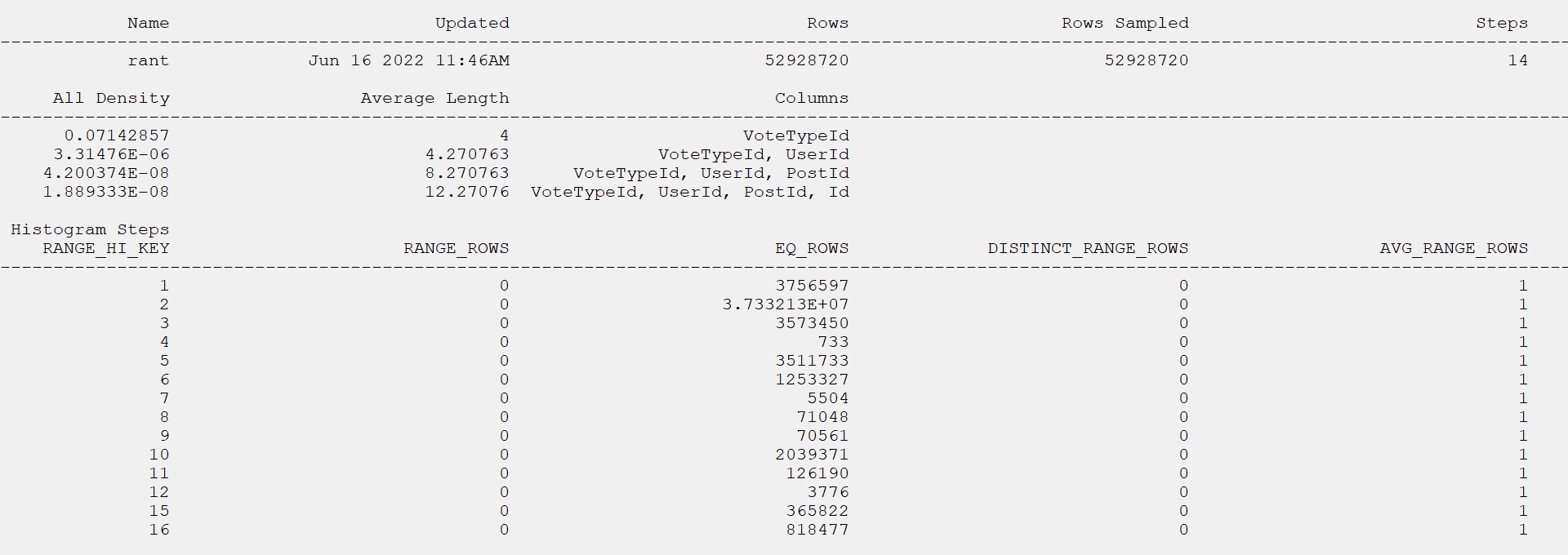
I want to lead with the statistics object that gets used for the query, which has a single equality predicate on the parameter value to search the VoteTypeId column.
The relevant portion of the query is this:
FROM     dbo.Votes AS v
WHERE    v.VoteTypeId = @VoteTypeId
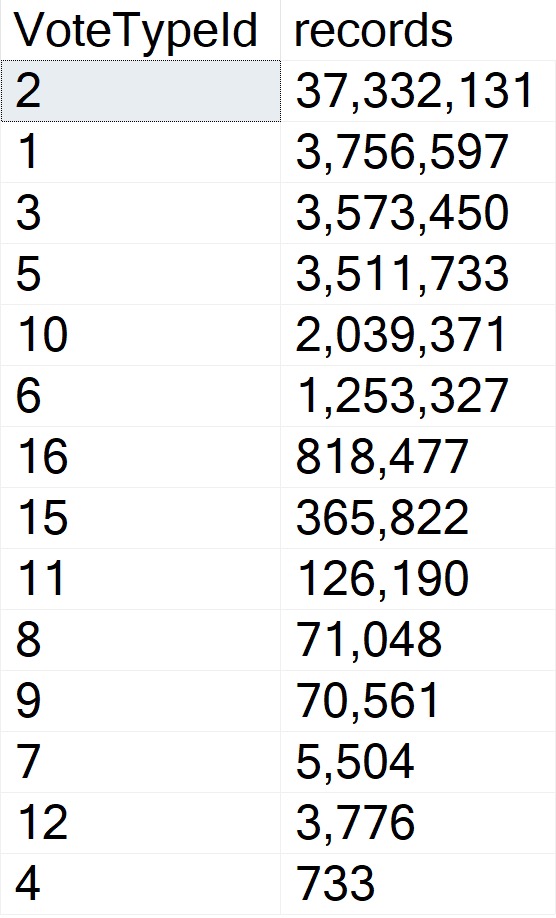
The histogram matches the row counts from the table precisely. Thanks, full scan!
So, what’s the problem?
Autoproblematic
To my eye, there’s sufficient skewness here to present parameter sensitivity issues.
skewdriver
But SQL Server disagrees!
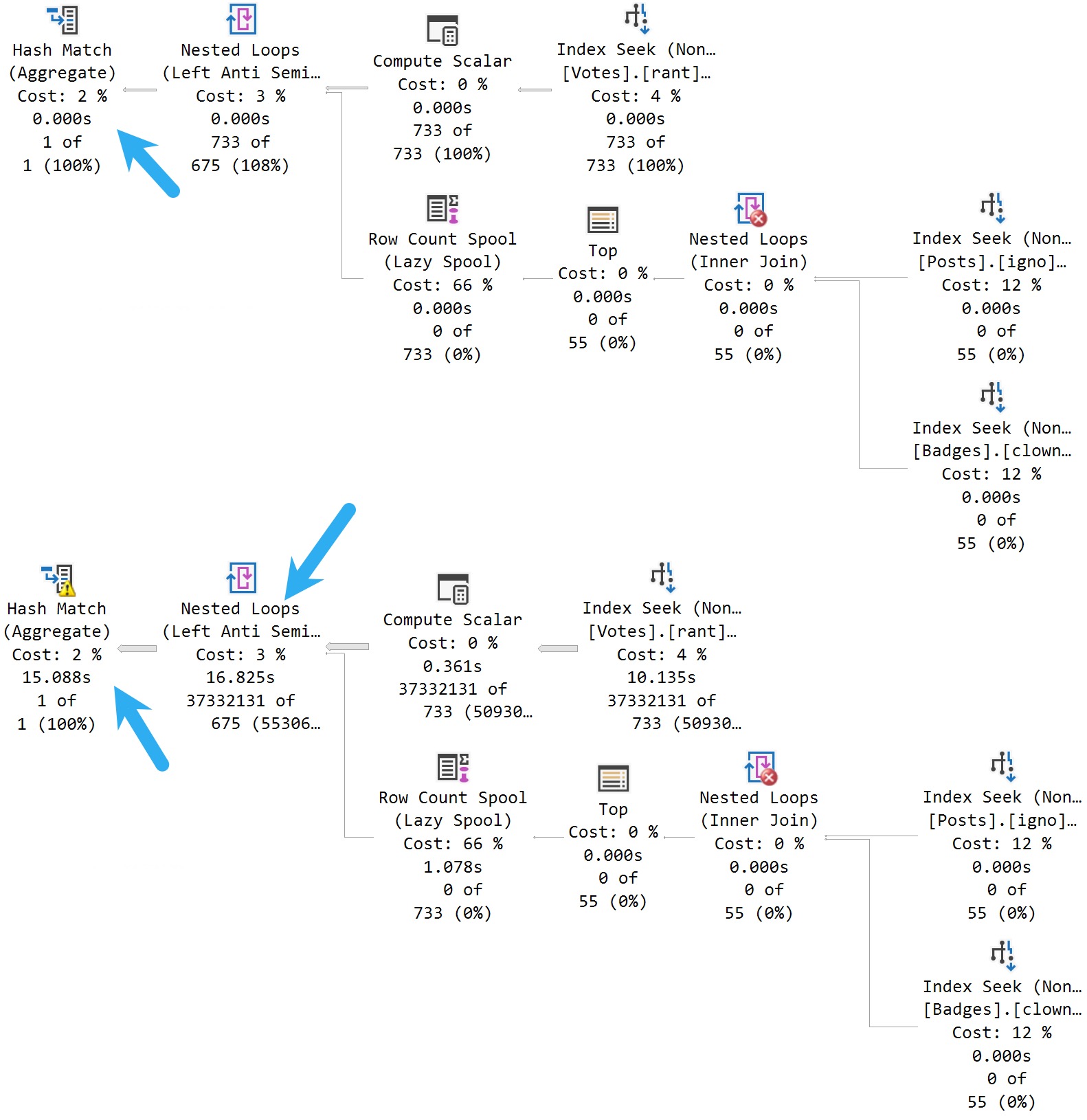
ouch dude
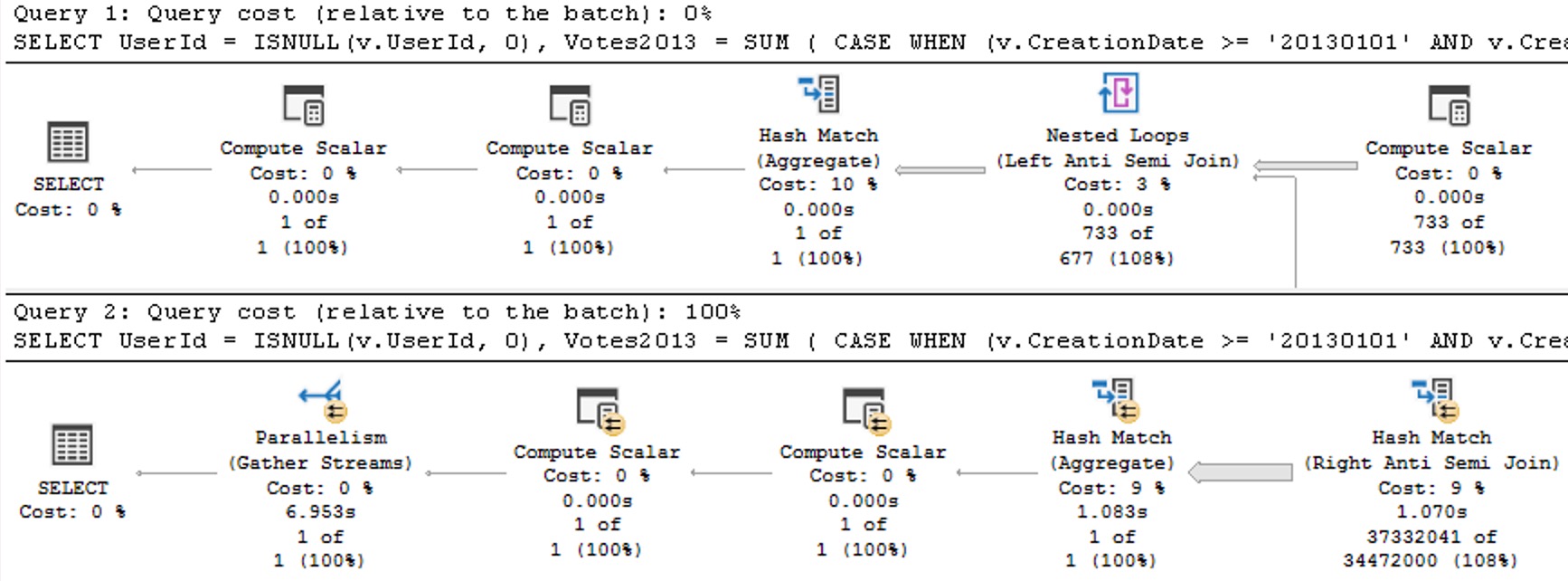
733 records vs. 37 million records seems appropriately skewed to me, but we get all of the typical parameter sensitivity symptoms.
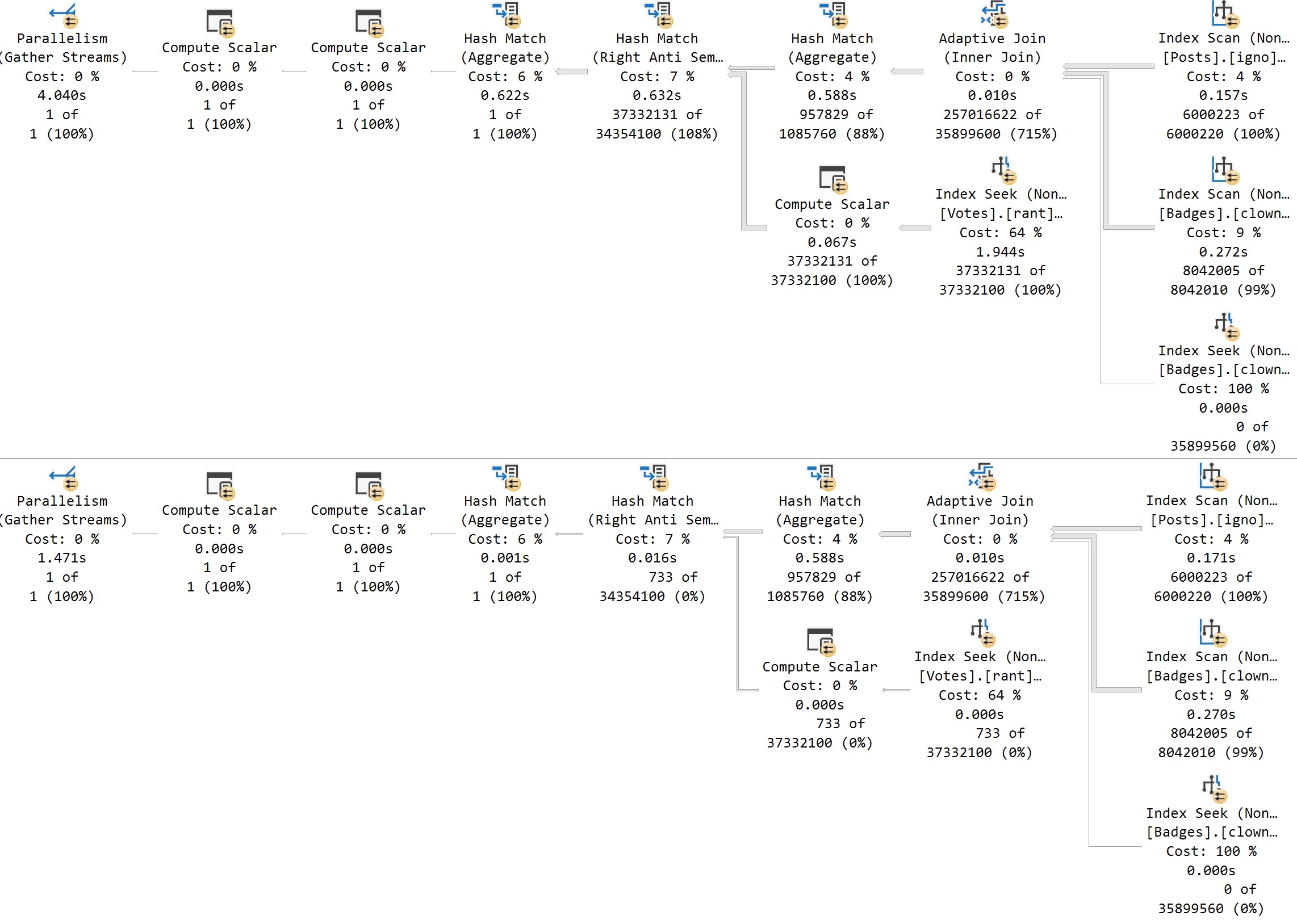
Take a moment here to admire the somewhat confusing plan timing that Batch Mode operations are presenting here: The bottom query runs for around 32 seconds.
Up to the Nested Loops join, we use ~17 seconds of wall clock time with our serial execution plan. The Hash Match operator runs for 15 seconds on its own, in Batch Mode.
Parameter sensitivity still happens in SQL Server 2022.
Reversi
If we run the procedure in reverse order, using 4 to cache the plan and then 2 to reuse, we get a similar regression:
little things
Now, okay, let’s pause for a minute here. I need to backtrack, but I don’t want to spend a ton of blogspace on it. I’m also going to put the information in a very snooty block quote.
If we re-run the procedure from the section up above to search for VoteTypeId 2 a second time, Memory Grant Feedback will fix the spill at the Hash Join, and bring the total execution time down to about 15 seconds.
That is an improvement, but… Look at the plan here. If VoteTypeId 2 uses a plan more suited to the number of rows it has to process, the overall time is around 4 seconds, with no need for a memory grant correction.
The second plan for this execution sequence, searching for VoteTypeId 4 second in order, the overall time goes from 0 seconds and 0 milliseconds to 1.4 seconds. The big plan does not make searching for infrequent values faster.
So you see, the big plan isn’t always better.
Missed Connections
Hey, look, this is the first CTP. Maybe stuff like this is still getting ironed out. Maybe this blog post will change the course of history.
I am only moderately influential in the eyes of Microsoft, though, so perhaps not.
Anyway, this seems like a situation with sufficient skew to produce the Dispatcher plan and then additional sub-plans to account for far different row counts present in the VoteTypeId column.
If this scenario (and other similar scenarios) is outside the scope of the feature, query tuning folks are still going to have a whole lot of parameter sensitivity issues to deal with.
And should that be the case, I’d like to speak to the manager.
Thanks for reading!
Going Further
If this is the kind of SQL Server stuff you love learning about: these days I have AI do the annoying stuff for me. My new video course teaches you to work the same way, and I teach whole teams in a one-day workshop. Someone still has to know enough SQL Server to keep the robots in check, and that’s what my training is for.
I’ve used this procedure as an example in the past. It’s a great parameter sniffing demo.
Why is it great? Because there’s exactly one value in the Posts table that causes an issue. It causes that issue because someone hated the idea of normalization.
The better thing to do here would be to have separate tables for questions and answers. Because we don’t have those, we end up with a weird scnenario.
In the Posts table, because questions and answers are lumped in together, there are certain traits that different types of posts can’t share:
Answers can’t have answers
Questions can’t have parent questions
There are other examples, but those are the two most obvious ones. But anyway, because of that, every Question has a ParentId of zero, and every Answer has the ParentId of the question it was posted under.
With around 6 million questions in the Posts table, that means there are around 6 million rows with a ParentId of zero, and around 11 million rows with other values.
lopsided
Current Affairs
In compat level 150, if I run this procedure like so:
If this is the kind of SQL Server stuff you love learning about: these days I have AI do the annoying stuff for me. My new video course teaches you to work the same way, and I teach whole teams in a one-day workshop. Someone still has to know enough SQL Server to keep the robots in check, and that’s what my training is for.
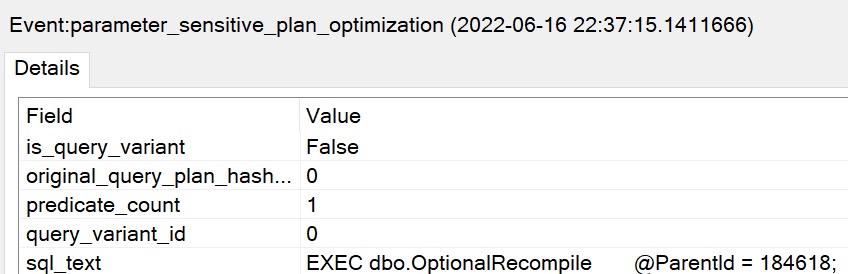
parameter_sensitive_plan_optimization: This event is fired when a query uses Parameter Sensitive Plan (PSP) Optimization feature.
parameter_sensitive_plan_optimization_skipped_reason: Occurs when the parameter sensitive plan feature is skipped. Use this event to monitor the reason why parameter sensitive plan optimization is skipped
parameter_sensitive_plan_testing: Fired when parameter sensitive plan is tested.
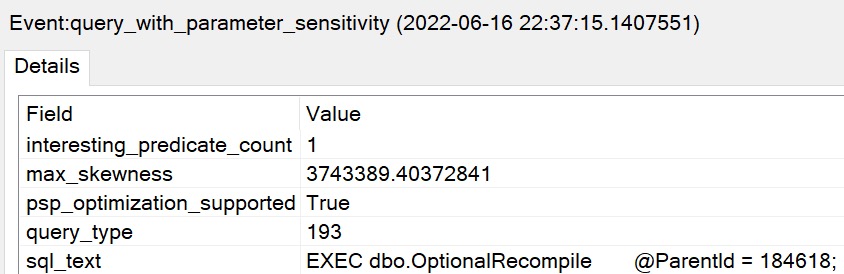
query_with_parameter_sensitivity: This event is fired when a query is discovered to have parameter sensitivity. This telemetry will help us in identifying queries that are parameter sensitive and how skewed the columns involved in the query are.
The only one I haven’t gotten to fire yet in my testing is parameter_sensitive_plan_testing which does not break my heart.
Mythos
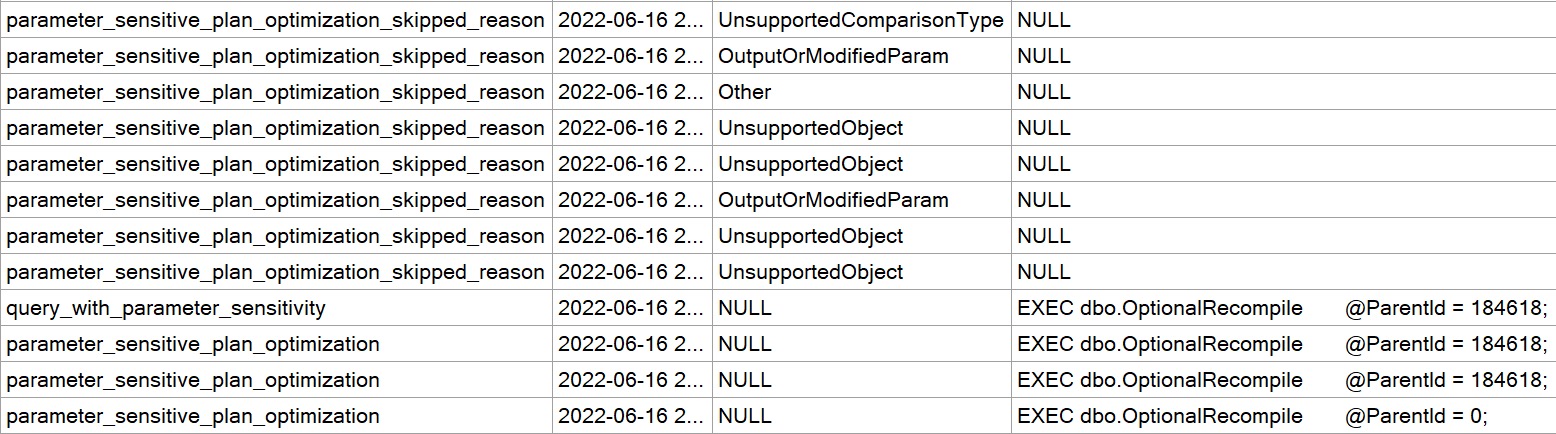
Most of what gets returned by those is barely useful. The one that I thought was most promising was the skipped_reasonevent. I was able to track map values down for that one:
Reading through that list, there are some interesting points where the feature won’t kick in. These points are sort of a ghosts of query anti-patterns past.
TableVariable
HasLocalVar
CursorWithPopulate
Tvf
ParamSniffDisabled
NonInlinedUDF
And, of course, this one gave me quite the chuckle: QueryTextTooLarge.
YOU HEAR THAT ENTITY FRAMEWORK?
Dulls
The results from my Extended Event session, and… I’ll talk through my disappointment in a moment, was not terribly spectacular.
ho hum
The skipped_reason doesn’t reliably collect query text the way the other events do. That makes identifying the query that got skipped pretty difficult. There may be another action (like the stack) that captures it, but I haven’t had time to fully investigate yet.
so what?
Okay. Fine.
yep.
What do you do with this? I’m not sure yet. I don’t think I see much use in these just yet.
Hey, tomorrow’s another day. We’ll look at how the feature kicks in and fixes a parameter sniffing issue with this procedure.
Thanks for reading!
Going Further
If this is the kind of SQL Server stuff you love learning about: these days I have AI do the annoying stuff for me. My new video course teaches you to work the same way, and I teach whole teams in a one-day workshop. Someone still has to know enough SQL Server to keep the robots in check, and that’s what my training is for.