Emulating GETDATE() on Azure SQL Database

GETDATE() always uses the UTC time zone on Azure SQL Database which can be a compatibility issue for applications that assume that GETDATE() is using a different time zone. Developers may wish to replace GETDATE() with code that continues to use their expected time zone to avoid UTC time reforms. For example, I’ve seen application code with over 50,000 references to the GETDATE function. Replacing all of those calls with GETUTCDATE() would be a herculean effort.

FAST 1

I don’t know how good Erik’s SEO is, but here’s a simple replacement if you don’t care about performance and just need something that gives you the previous behavior of GETDATE():

CREATE OR ALTER FUNCTION dbo.[GetDateNew]()
RETURNS DATETIME
WITH SCHEMABINDING
AS
BEGIN
    RETURN SYSDATETIMEOFFSET() AT TIME ZONE N'Central Standard Time';
END;
GO

Keep reading if you’d like to do better than that.

AT TIME ZONE At Risk

AT TIME ZONE was a great addition to SQL Server 2016 that allowed for the retirement of many well-meaning but poorly implemented attempts to do time zone conversions in T-SQL. However, it was not without its own problems:

  • The CPU cost per execution was surprisingly high, but this was addressed in SQL Server 2022 and in Azure SQL Database.
  • AT TIME ZONE makes scalar UDFs ineligible for inlining.
  • AT TIME ZONE usage results in an “unknown” cardinality estimate.

You can see the cardinality estimate issue in action by populating a simple table with about 6 million rows.

DROP TABLE IF EXISTS dbo.Level100;

CREATE TABLE dbo.Level100 (
    TenantID INT NOT NULL,
    InsertTime DATETIME NOT NULL
);

INSERT INTO dbo.Level100 (TenantID, InsertTime)
SELECT q.RN % 4, DATEADD(MINUTE, -1 * RN, GETDATE())
FROM
(
    SELECT ROW_NUMBER() OVER (ORDER BY (SELECT NULL)) RN
    FROM master..spt_values t1
    CROSS JOIN master..spt_values t2
) q;

CREATE INDEX TenantID_InsertTime ON dbo.Level100 (TenantID) INCLUDE (InsertTime);

CREATE INDEX InsertTime_TenantID ON dbo.Level100 (InsertTime) INCLUDE (TenantID);

The first query uses GETDATE():

SELECT COUNT(*)
FROM dbo.Level100 l
WHERE l.TenantID = 2
AND l.InsertTime > DATEADD(MINUTE, -10, GETDATE())
OPTION (MAXDOP 1);

The filter against TenantID is expected to return 25% of the rows in the table and the filter against InsertTime is expected to return less than 0.001% of the rows. As expected, the query optimizer chooses to filter against the InsertTime_TenantID index and the query finishes instantly:

a66 good

The second query uses AT TIME ZONE:

SELECT COUNT(*)
FROM dbo.Level100 l
WHERE l.TenantID = 2
AND l.InsertTime > DATEADD(MINUTE, -10, CAST(SYSDATETIMEOFFSET() AT TIME ZONE N'Central Standard Time' AS DATETIME))
OPTION (MAXDOP 1);

Once again, the filter against TenantID is expected to return 25% of the rows in the table. However, the presence of AT TIME ZONE results in an unknown inequality estimate against InsertTime which is 30%. The query optimizer makes a different choice and goes with the TenantID_InsertTime index because 25% < 30%:

a66 bad

Meme Preparation

It seems that we need to return to the bad old days before we had AT TIME ZONE available in SQL Server. One advantage that we have is that the function only needs to do the time zone conversion for the current moment in time. Central time is six hours behind UTC at the time of publication, so we could construct a function like this:

CREATE OR ALTER FUNCTION dbo.[GetDateCT](@PassInGetDateUTC DATETIME)
RETURNS DATETIME
WITH SCHEMABINDING
AS
BEGIN
    RETURN DATEADD(HOUR, -6, @PassInGetDateUTC);
END;
GO

The input parameter is there to make the function eligible for inlining because GETDATE() and other similar functions prevent inlining. Returning to the same query as before:

SELECT COUNT(*)
FROM dbo.Level100 l
WHERE l.TenantID = 2
AND l.InsertTime > DATEADD(MINUTE, -10, dbo.[GetDateCT](GETUTCDATE()))
OPTION (MAXDOP 1);

We can see that the new function results in a reasonable cardinality estimate and the query optimizer makes the correct index choice:

a66 also good

Of course, this function definition will need to be updated a few times per year to deal with daylight savings time changes. It isn’t too difficult to design a process to automatically perform these updates, but honestly I expect that the hassle of doing something will exceed the tolerance of most companies. However, this option is available to you if you need to preserve the usually superior cardinality estimation behavior enjoyed with GETDATE().

How to Convert Time Zones in SQL Server?

a66 maymay

Parsing and Arsing

Any solution you pick, other than a naked reference to SYSDATETIMEOFFSET() along with AT TIME ZONE, may result in parsing issues in your code. For example, some parts of certain queries do not allow for subqueries, so a subquery replacement against a table-valued function will not work as a direct replacement. Even the simplest scalar UDF reference can result in code that fails to parse, such as the following:

CREATE TABLE #t (
    StupidColumn DATETIME dbo.[GetDateNew]()
);

Fortunately, most of these issues are likely rare in practice and should be straightforward to address.

Keep in mind that you also need to fix GETDATE() references in areas such as default column values, constraints, computed columns, default column tables for table types, and so on. I would personally use a naked reference to SYSDATETIMEOFFSET() along with AT TIME ZONE for these areas as I see no benefit in using a scalar UDF.

Summary of Issues for Various Solutions

I was going to put some introduction text here, but whatever, you can figure out the point of this section on your own.

Inline table-valued function approach

  • Most T-SQL compatibility issues
  • Very verbose
  • Cardinality issues with AT TIME ZONE

Naked SYSDATETIMEOFFSET() AT TIME ZONE N’Central Standard Time’ replacement

  • Very verbose
  • Cardinality issues with AT TIME ZONE

Simple scalar UDF with AT TIME ZONE:

  • UDF is not eligible for inlining
  • UDF will return different values as the query executes which probably isn’t what you want

Non-static scalar UDF:

  • Function definition must occasionally be refreshed
  • Somewhat verbose
  • Some types of queries, such as those with CTEs, will not allow any UDF to be inlined

Final Thoughts

Messy no-win situations like this highlight the importance of picking the right cloud platform for your application. Azure SQL Managed Instance and Azure VMs avoid this problem entirely. Thanks for reading!
Why MAX Data Types Are Usually A Bad Choice For SQL Server Columns

Easy Rider


When you’re trying to figure out how to store string data, it often seems easiest to just choose an extra long — even MAX — data type to avoid future truncation errors.

Even if you’re storing strings with a known, absolute length, developers may choose to not enforce that in the application, either via a drop down menu or other form of validation.

And so to avoid errors when users try to put their oh-so-important data in their oh-so-expensive database, we get columns added to tables that can fit a galaxy of data in them, when we only need to store an ashtray worth of data.

While getting data into those columns is relatively easy — most application inserts are single rows — getting data out of those columns can be quite painful, whether it’s searching or just presenting in the select portion of a query.

Let’s look at a couple simple examples of how that happens.

Search Engine


Let’s take a query like this one:

SELECT TOP (20)
    p.Id,
    p.Title,
    p.Body
FROM dbo.Posts AS p
WHERE p.Body LIKE N'SQL Server%';

The Body column in the Posts table is nvarchar and MAX, but the same thing would happen with a varchar column.

If you need a simple way to remember how to pronounce those data types, just remember to Pahk yah (n)vahcah in Hahvahd Yahd.

Moving on – while much has been written about leading wildcard searches (that start with a % sign), we don’t do that here. Also, in general, using charindex or patindex instead of leading wildcard like searching won’t buy you all that much (if anything at all).

Anyway, since you can’t put a MAX datatype in the key of an index, part of the problem with them is that there’s no way to efficiently organize the data for searching. Included columns don’t do that, and so we end up with a query plan that looks some-such like this:

SQL Server Query Plan
ouch in effect

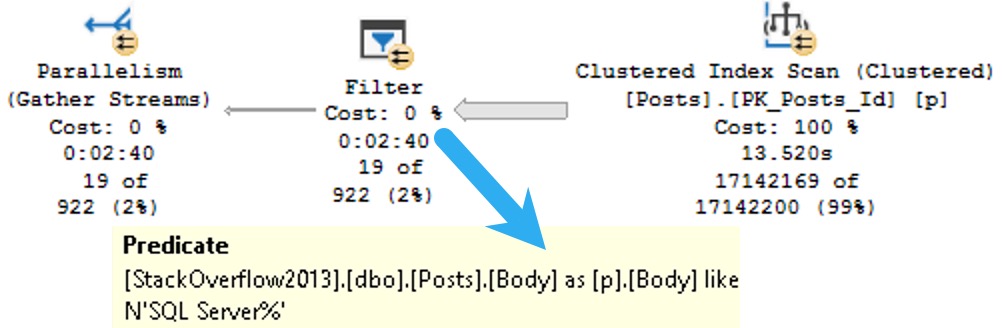
We spend ~13.5 seconds scanning the clustered index on the Posts table, then about two minutes and twenty seven seconds (minus the original 13.5) applying the predicate looking for posts that start with SQL Server.

That’s a pretty long time to track down and return 19 rows.

Let’s change the query a little bit and look at how else big string columns can cause problems.

Memory Bank


Rather than search on the Body column, let’s select some values from it ordered by the Score column.

Since Score isn’t indexed, it’s not sorted in the database. That means SQL Server needs to ask for memory to put the data we’re selecting in the order we’re asking for.

SELECT TOP (200)
    p.Body
FROM dbo.Posts AS p
ORDER BY p.Score DESC;

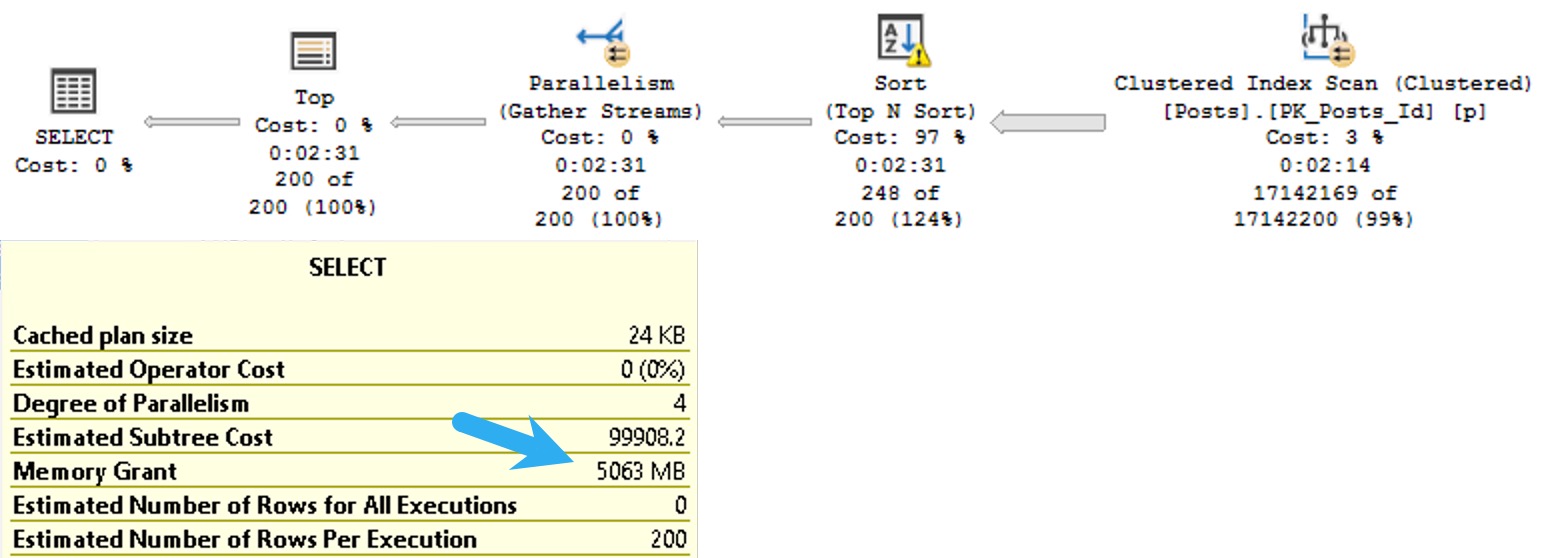
The plan for this query asks for a 5GB memory grant:

SQL Server Query Pla
quietly

I know what you’re thinking: the Body column probably has some pretty big data in it, and you’re right. In this case, it’s the right data type to use.

The bad news is that SQL Server will makes the same memory grant estimation based on the size of the data we need to sort whether or not it’s a good choice.

I talk more about that in this Q&A on Stack Exchange.

Thanks for reading!

Going Further


If this is the kind of SQL Server stuff you love learning about, you’ll love my training. Blog readers get 25% off the Everything Bundle — over 100 hours of performance tuning content. Need hands-on help? I offer consulting engagements from targeted investigations to ongoing retainers. Want a quick sanity check before committing to a full engagement? Schedule a call — no commitment required.

SQL Server 2022: Cardinality Estimation Feedback

Quiet As Kept


I’ve been trying to take the general temperature when it comes to SQL Server 2022. At least from a performance perspective, some interesting things have been introduced so far.

There have been a few neat things:

  • Parameter Sensitive Plan optimizations
  • Query Store Hints
  • Memory Grant Feedback improvements
  • DOP Feedback
  • Cardinality Estimation Feedback

I’m not seeing a whole lot out there. I’m not sure why. I follow quite a few SQL bloggers via Feedly.

Perhaps it’s just too new. Maybe everyone is waiting for CTP SP1.

Well, anyway. In this post I want to talk a little bit about what Cardinality Estimation Feedback can do, and what it can’t do.

What It Do


First, you need Query Store enabled to get this to work. It relies on the Query Store Plan hints also introduced for SQL Server 2022.

For queries that execute frequently and retain cached plans, the optimizer will look at some of the assumptions that get made under different Cardinality Estimation models.

Things like:

  • Row Goals
  • Predicate independence/correlation
  • Join containment being simple or base

What each of those things means isn’t terribly important to the post, but all of them are things that are influenced by using the legacy or default cardinality estimators.

As I understand it, this is a bit like Memory Grant Feedback. If estimation issues are detected, a different plan will be attempted. If that plan corrects a performance issue, then the hint will get persisted in Query Store.

Pretty cool, but…

What It Don’t Do


It doesn’t fix things while they’re running, like Adaptive Joins can do. That’s sort of unfortunate! Hear me out on why.

Often, when model errors are incorrect, queries run for a long time. Particularly when row goals are introduced, query plans are quite sensitive to those goals not being met quickly.

It’d be really unfortunate for you to sit around waiting for 15-16 executions of a poor performing query to finish executing before an intervention happens.

I would have either:

  • Reduced, or made this threshold configurable
  • Been more aggressive about introducing Adaptive Joins when CE models influence plan choices

After all, Adaptive Joins help queries at runtime rather than waiting for an arbitrary number of executions and then stepping in.

Perhaps there was a good reason for not doing this, but those were the first two things to cross my mind when looking into the feature.

How It Do


I was able to get the feature to kick in using a familiar query.

Here’s the setup script:

DBCC FREEPROCCACHE;
ALTER DATABASE 
    StackOverflow2010 
SET 
    QUERY_STORE CLEAR;
GO

    CREATE INDEX whatever 
        ON dbo.Votes(CreationDate, VoteTypeId, PostId);
    
    CREATE INDEX apathy
        ON dbo.Posts (PostTypeId)
            INCLUDE (OwnerUserId, Score, Title);
GO

    SELECT TOP (2500) 
        p.OwnerUserId, 
        p.Score, 
        p.Title, 
        v.CreationDate,
        ISNULL(v.BountyAmount, 0) AS BountyAmount
    FROM dbo.Posts AS p
    JOIN dbo.Votes AS v
        ON  p.Id = v.PostId
    WHERE v.VoteTypeId = 1
    AND   p.PostTypeId = 1
    ORDER BY v.CreationDate DESC;
    GO 17

SELECT qspf.* FROM sys.query_store_plan_feedback AS qspf;

SELECT qsqh.* FROM sys.query_store_query_hints AS qsqh;

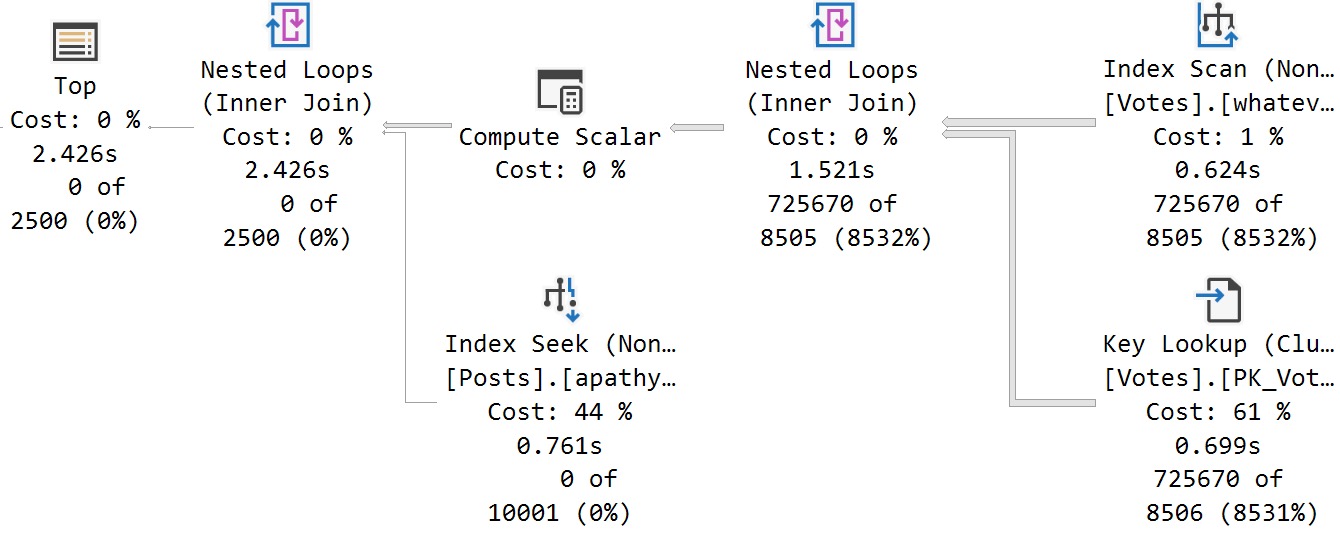
For the first 16 runs, we get the same query plan that takes about 2 seconds.

SQL Server Query Plan
if you got a problem

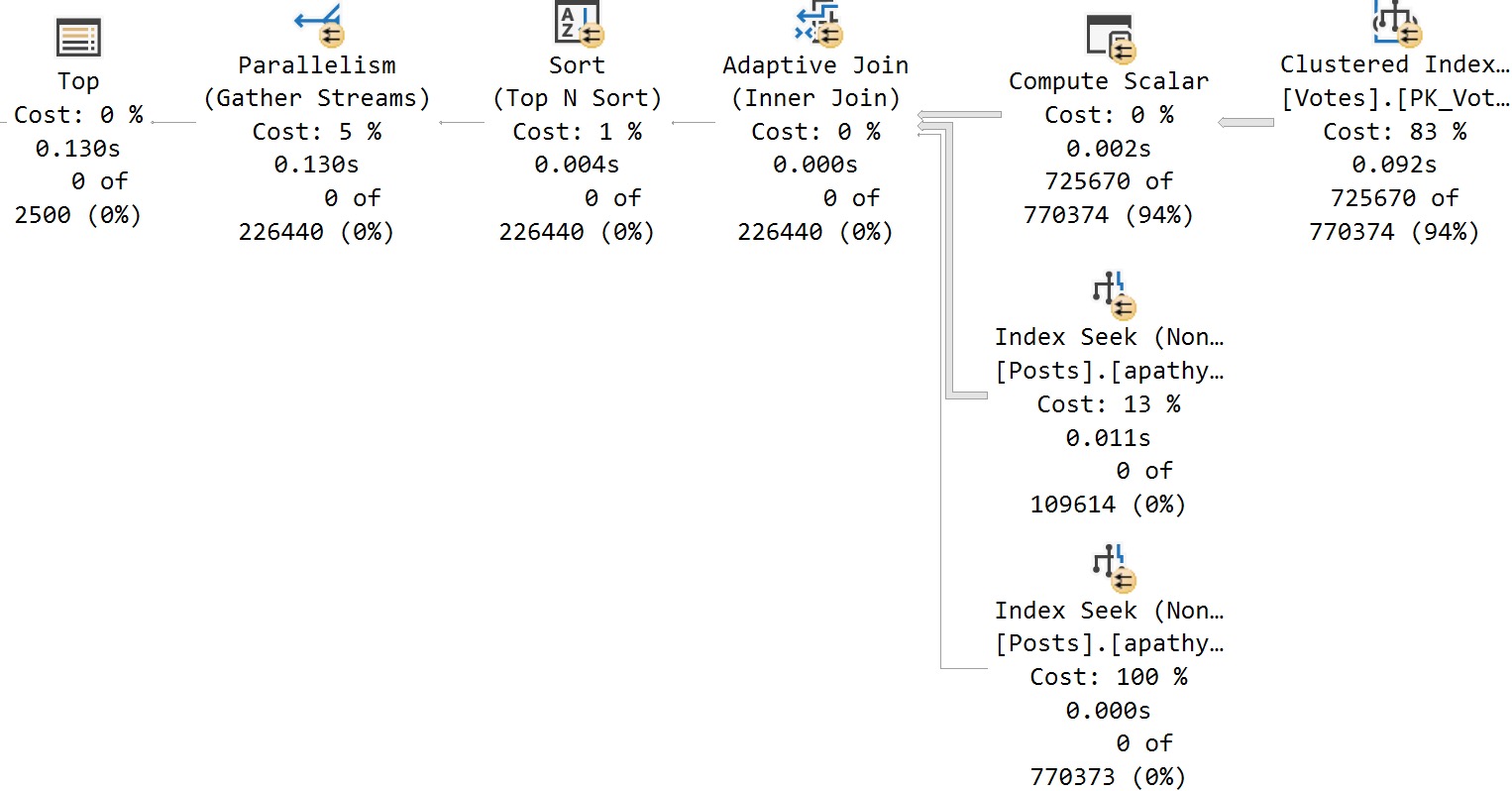
Then, magically, on run #17, we get a different query plan!

SQL Server Query Plan
yo i’ll solve it

Pretty cool! The plan totally changed, and clearly got better. I am happy about this. Not so happy that it would have taken 16 executions of a Potentially Painful© query to get here, but you know.

Here we are.

In Query Store


There are a couple views that will detail where hints came from and which were applied:

SQL Server Query Results
clowny clown clown

Since I just cleared out query store prior to this running, we can infer some things:

  • CE Feedback kicked in and gave us a new plan with a hint to disable row goals
  • The second plan generated was identified by the engine as needing memory grant feedback

I suppose this is a good reason to do some work on sp_QuickieStore so y’all can see this stuff in action.

Thanks for reading!

Going Further


If this is the kind of SQL Server stuff you love learning about, you’ll love my training. Blog readers get 25% off the Everything Bundle — over 100 hours of performance tuning content. Need hands-on help? I offer consulting engagements from targeted investigations to ongoing retainers. Want a quick sanity check before committing to a full engagement? Schedule a call — no commitment required.

SQL Server Performance Mysteries: Why Does Production Get A Bad Plan That Development Doesn’t?

Statistical Legacy


A client question that I get quite a bit is around why queries in production get a bad query plan that queries in dev, QA, or staging don’t get is typically answered by looking at statistics.

Primarily, it’s because of the cardinality estimates that queries get around ascending keys. It usually gets called the ascending key problem, but the gist is that:

  • You have a pretty big table
  • You’re using the legacy cardinality estimator
  • A whole bunch of rows get inserted, but not enough to trigger an auto stats update
  • You’re not using compatibility level >= 130 or trace flag 2371
  • Queries that look for values off an available histogram get a one row estimate using the legacy Cardinality Estimator or a 30% estimate using the default Cardinality Estimator

Which is a recipe for potentially bad query plans.

Reproductive Script


Here’s the full repro script. If you’re using a different Stack Overflow database, you’ll need to adjust the numbers.

USE StackOverflow2013;

/*Figure out the 20% mark for stats updates using legacy compat levels*/
SELECT
    c = COUNT_BIG(*),
    c20 = CEILING(COUNT_BIG(*) * .20)
FROM dbo.Users AS u;

/*Stick that number of rows into a new table*/
SELECT TOP (493143)
    u.*
INTO dbo.Users_Holder
FROM dbo.Users AS u
ORDER BY u.Id DESC;


/*Delete that number of rows from Users*/
WITH 
    del AS
(
SELECT TOP (493143)
    u.*
FROM dbo.Users AS u
ORDER BY u.Id DESC
)
DELETE
FROM del;

/*I'm using this as a shortcut to turn off auto stats updates*/
UPDATE STATISTICS dbo.Users WITH NORECOMPUTE;

/*Put the rows back into the Users Table*/
SET IDENTITY_INSERT dbo.Users ON;

INSERT
    dbo.Users
(
    Id,
    AboutMe,
    Age,
    CreationDate,
    DisplayName,
    DownVotes,
    EmailHash,
    LastAccessDate,
    Location,
    Reputation,
    UpVotes,
    Views,
    WebsiteUrl,
    AccountId
)
SELECT
    uh.Id,
    uh.AboutMe,
    uh.Age,
    uh.CreationDate,
    uh.DisplayName,
    uh.DownVotes,
    uh.EmailHash,
    uh.LastAccessDate,
    uh.Location,
    uh.Reputation,
    uh.UpVotes,
    uh.Views,
    uh.WebsiteUrl,
    uh.AccountId
FROM dbo.Users_Holder AS uh;

SET IDENTITY_INSERT dbo.Users OFF;

/*Figure out the minimum Id we put into the holder table*/
SELECT
    m = MIN(uh.Id)
FROM dbo.Users_Holder AS uh;

/*Compare estimates*/
SELECT
    c = COUNT_BIG(*)
FROM dbo.Users AS u
WHERE u.Id > 2623772
OPTION(USE HINT('FORCE_LEGACY_CARDINALITY_ESTIMATION'));


SELECT
    c = COUNT_BIG(*)
FROM dbo.Users AS u
WHERE u.Id > 2623772
OPTION(USE HINT('FORCE_DEFAULT_CARDINALITY_ESTIMATION'));

/*Cleanup*/
UPDATE STATISTICS dbo.Users;

TRUNCATE TABLE dbo.Users_Holder;

Query Plans


Here are the plans for the stars of our show:

SQL Server Query Plan
king push

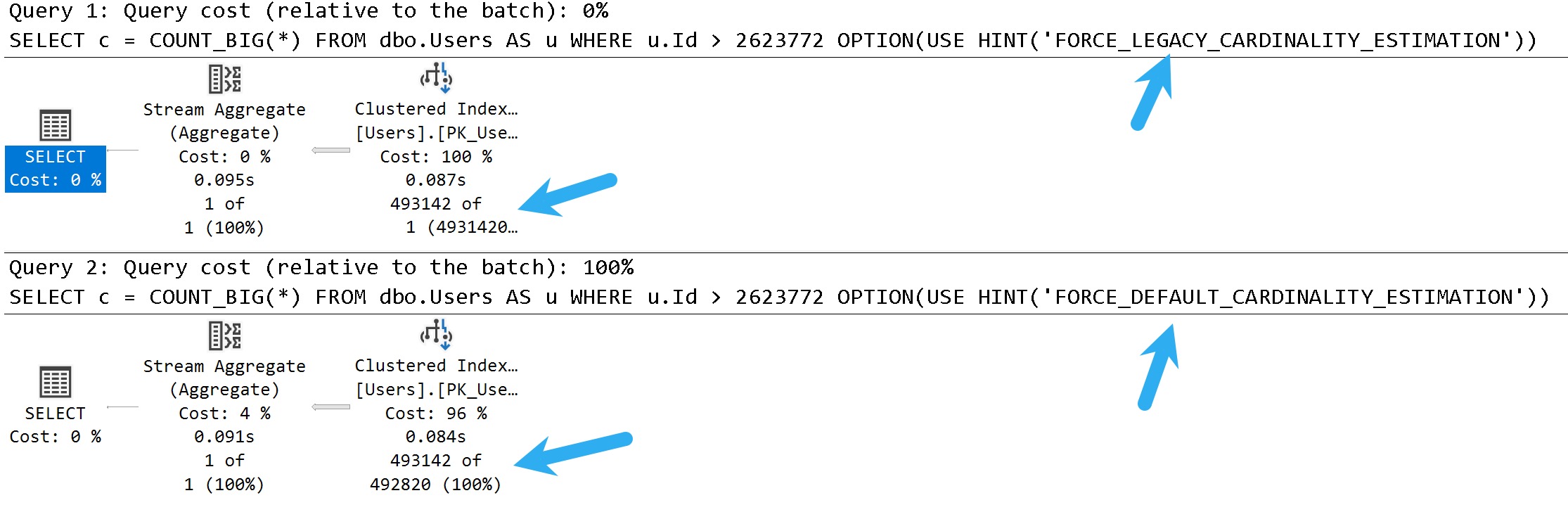
In these query plans, you can see the legacy cardinality estimator gets a one row estimate, and the default cardinality estimator gets a 30% estimate.

There isn’t necessarily a one-is-better-than-the-other answer here, either. There are times when both can cause poor plan choices.

You can think of this scenario as being fairly similar to parameter sniffing, where one plan choice does not fit all executions well.

Checkout


There are a lot of ways that you can go about addressing this.

In some cases, you might be better off using trace flag 2371 to trigger more frequent auto stats updates on larger tables where the ~20% modification counter doesn’t get hit quickly enough. In others, you may want to force one estimator over the other depending on which gets you a better plan for most cases.

Another option is to add hints to the query in question to use the default cardinality estimator (FORCE_DEFAULT_CARDINALITY_ESTIMATION), or to generate quick stats for the index/statistics being used (ENABLE_HIST_AMENDMENT_FOR_ASC_KEYS). Documentation for both of those hints is available here. Along these lines, trace flags 2389, 2390, or 4139 may be useful as well.

Of course, you could also try to address any underlying query or index issues that may additionally contribute to poor plan choices, or just plan differences. A common problem in them is a seek + lookup plan for the one row estimate that doesn’t actually make sense when the actual number of rows and lookup executions are encountered at runtime.

Thanks for reading!

Going Further


If this is the kind of SQL Server stuff you love learning about, you’ll love my training. Blog readers get 25% off the Everything Bundle — over 100 hours of performance tuning content. Need hands-on help? I offer consulting engagements from targeted investigations to ongoing retainers. Want a quick sanity check before committing to a full engagement? Schedule a call — no commitment required.

Local Variables vs Forced Parameterization In SQL Server Queries

Questions, Arise!


I think it was sometime in the last century that I mentioned I often recommend folks turn on Forced Parameterization in order to deal with poorly formed application queries that send literal rather than parameterized values to SQL Server.

And then just like a magickal that, I recommended it to someone who also has a lot of problems with Local Variables in their stored procedures.

They were curious about if Forced Parameterization would fix that, and the answer is no.

But here’s proofs. We love the proofs.

Especially when they’re over 40.

A Poorly Written Stored Procedure


Here’s this thing. Don’t do this thing. Even the index is pretty dumb, because it’s on a single column.

CREATE INDEX
    i
ON dbo.Users
    (Reputation)
WITH
    (SORT_IN_TEMPDB= ON, DATA_COMPRESSION = PAGE);
GO 

CREATE PROCEDURE
    dbo.humpback
(
    @Reputation int
)
AS
BEGIN
SET NOCOUNT, XACT_ABORT ON;

    /*i mean don't really do this c'mon*/
    DECLARE 
        @ReputationCopy int = ISNULL(@Reputation, 0);
    
    SELECT
        u.DisplayName,
        u.Reputation,
        u.CreationDate,
        u.LastAccessDate
    FROM dbo.Users AS u
    WHERE u.Reputation = @ReputationCopy;

END;

If we look at the statement parameterization type, available with Query Store enabled, it returns 0. That’s true whether or not we enable simple or forced parameterization:

ALTER DATABASE StackOverflow2013 SET PARAMETERIZATION FORCED;
GO 
EXEC dbo.humpback 
    @Reputation = 11;
GO 

ALTER DATABASE StackOverflow2013 SET PARAMETERIZATION SIMPLE;
GO 

EXEC dbo.humpback 
    @Reputation = 11;
GO 

For now, you’ll have to do a little more work to fix local variable problems.

Thanks for reading!

Going Further


If this is the kind of SQL Server stuff you love learning about, you’ll love my training. Blog readers get 25% off the Everything Bundle — over 100 hours of performance tuning content. Need hands-on help? I offer consulting engagements from targeted investigations to ongoing retainers. Want a quick sanity check before committing to a full engagement? Schedule a call — no commitment required.

One Thing The “New” Cardinality Estimator Does Better In SQL Server

Or “Default”, If That’s Your Kink


Look, I’m not saying there’s only one thing that the “Default” cardinality estimator does better than the “Legacy” cardinality estimator. All I’m saying is that this is one thing that I think it does better.

What’s that one thing? Ascending keys. In particular, when queries search for values that haven’t quite made it to the histogram yet because a stats update hasn’t occurred since they landed in the mix.

I know what you’re thinking, too! On older versions of SQL Server, I’ve got trace flag 2371, and on 2016+ that became the default behavior.

Sure it did — only if you’re using compat level 130 or better — which a lot of people aren’t because of all the other strings attached.

And that’s before you go and get 2389 and 2390 involved, too. Unless you’re on compatibility level 120 or higher! Then you need 4139.

Arduous


Anyway, look, it’s all documented.

2371 Changes the fixed update statistics threshold to a linear update statistics threshold. For more information, see this AUTO_UPDATE_STATISTICS Option.

Note: Starting with SQL Server 2016 (13.x) and under the database compatibility level 130 or above, this behavior is controlled by the engine and trace flag 2371 has no effect.

Scope: global only

2389 Enable automatically generated quick statistics for ascending keys (histogram amendment). If trace flag 2389 is set, and a leading statistics column is marked as ascending, then the histogram used to estimate cardinality will be adjusted at query compile time.

Note: Please ensure that you thoroughly test this option, before rolling it into a production environment.

Note: This trace flag does not apply to CE version 120 or above. Use trace flag 4139 instead.

Scope: global or session or query (QUERYTRACEON)

2390 Enable automatically generated quick statistics for ascending or unknown keys (histogram amendment). If trace flag 2390 is set, and a leading statistics column is marked as ascending or unknown, then the histogram used to estimate cardinality will be adjusted at query compile time. For more information, see this Microsoft Support article.

Note: Please ensure that you thoroughly test this option, before rolling it into a production environment.

Note: This trace flag does not apply to CE version 120 or above. Use trace flag 4139 instead.

Scope: global or session or query (QUERYTRACEON)

4139 Enable automatically generated quick statistics (histogram amendment) regardless of key column status. If trace flag 4139 is set, regardless of the leading statistics column status (ascending, descending, or stationary), the histogram used to estimate cardinality will be adjusted at query compile time. For more information, see this Microsoft Support article.

Starting with SQL Server 2016 (13.x) SP1, to accomplish this at the query level, add the USE HINT ‘ENABLE_HIST_AMENDMENT_FOR_ASC_KEYS’ query hint instead of using this trace flag.

Note: Please ensure that you thoroughly test this option, before rolling it into a production environment.

Note: This trace flag does not apply to CE version 70. Use trace flags 2389 and 2390 instead.

Scope: global or session or query (QUERYTRACEON)

I uh. I guess. ?

Why Not Just Get Cardinality Estimation Right The First Time?


Great question! Hopefully someone knows the answer. In the meantime, let’s look at what I think this new-fangled cardinality estimator does better.

The first thing we need is an index with literally any sort of statistics.

CREATE INDEX v ON dbo.Votes_Beater(PostId);

Next is a query to help us figure out how many rows we can modify before an auto stats update will kick in, specifically for this index, though it’s left as an exercise to the reader to determine which one they’ve got in effect.

There are a lot of possible places this can kick in. Trace Flags, database settings, query hints, and more.

SELECT TOP (1)
    OBJECT_NAME(s.object_id) AS table_name,
    s.name AS stats_name,
    p.modification_counter,
    p.rows,
    CONVERT(bigint, SQRT(1000 * p.rows)) AS [new_auto_stats_threshold],
    ((p.rows * 20) / 100) + CASE WHEN p.rows > 499 THEN 500 ELSE 0 END AS [old_auto_stats_threshold]
FROM sys.stats AS s
CROSS APPLY sys.dm_db_stats_properties(s.object_id, s.stats_id) AS p
WHERE s.name = 'v'
ORDER BY p.modification_counter DESC;

Edge cases aside, those calculations should get you Mostly Accurate™ numbers.

We’re going to need those for what we do next.

Mods Mods Mods


This script will allow us to delete and re-insert a bunch of rows back into a table, without messing up identity values.

--Create a temp table to hold rows we're deleting
DROP TABLE IF EXISTS #Votes;
CREATE TABLE #Votes (Id int, PostId int, UserId int, BountyAmount int, VoteTypeId int, CreationDate datetime);

--Get the current high PostId, for sanity checking
SELECT MAX(vb.PostId) AS BeforeDeleteTopPostId FROM dbo.Votes_Beater AS vb;

--Delete only as many rows as we can to not trigger auto-stats
WITH v AS 
(
    SELECT TOP (229562 - 1) vb.*
    FROM dbo.Votes_Beater AS vb
    ORDER BY vb.PostId DESC
)
DELETE v
--Output deleted rows into a temp table
OUTPUT Deleted.Id, Deleted.PostId, Deleted.UserId, 
       Deleted.BountyAmount, Deleted.VoteTypeId, Deleted.CreationDate
INTO #Votes;

--Get the current max PostId, for safe keeping
SELECT MAX(vb.PostId) AS AfterDeleteTopPostId FROM dbo.Votes_Beater AS vb;

--Update stats here, so we don't trigger auto stats when we re-insert
UPDATE STATISTICS dbo.Votes_Beater;

--Put all the deleted rows back into the rable
SET IDENTITY_INSERT dbo.Votes_Beater ON;

INSERT dbo.Votes_Beater WITH(TABLOCK)
        (Id, PostId, UserId, BountyAmount, VoteTypeId, CreationDate)
SELECT v.Id, v.PostId, v.UserId, v.BountyAmount, v.VoteTypeId, v.CreationDate
FROM #Votes AS v;

SET IDENTITY_INSERT dbo.Votes_Beater OFF;

--Make sure this matches with the one before the delete
SELECT MAX(vb.PostId) AS AfterInsertTopPostId FROM dbo.Votes_Beater AS vb;

What we’re left with is a statistics object that’ll be just shy of auto-updating:

2020 11 11 12 26 12
WE DID IT

Query Time


Let’s look at how the optimizer treats queries that touch values! That’ll be fun, eh?

--Inequality, default CE
SELECT
    COUNT_BIG(*) AS records
FROM dbo.Votes_Beater AS vb
WHERE vb.PostId > 20671101
OPTION(RECOMPILE);

--Inequality, legacy CE
SELECT
    COUNT_BIG(*) AS records
FROM dbo.Votes_Beater AS vb
WHERE vb.PostId > 20671101
OPTION(RECOMPILE, USE HINT('FORCE_LEGACY_CARDINALITY_ESTIMATION'));

--Equality, default CE
SELECT
    COUNT_BIG(*) AS records
FROM dbo.Votes_Beater AS vb
WHERE vb.PostId = 20671101
OPTION(RECOMPILE);

--Equality, legacy CE
SELECT
    COUNT_BIG(*) AS records
FROM dbo.Votes_Beater AS vb
WHERE vb.PostId = 20671101
OPTION(RECOMPILE, USE HINT('FORCE_LEGACY_CARDINALITY_ESTIMATION'));

For the record, > and >= produced the same guesses. Less than wouldn’t make sense here, since it’d hit mostly all values currently in the histogram.

SQL Server Query Plan
hoodsy

Inside Intel


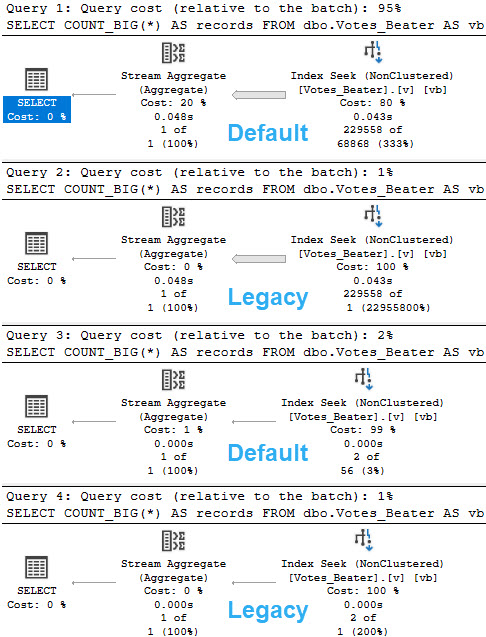
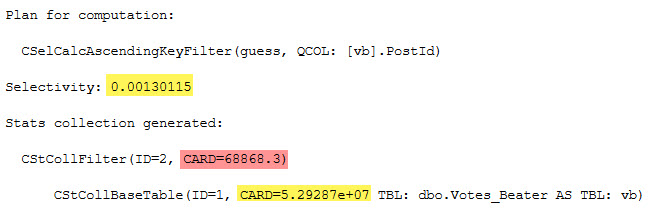
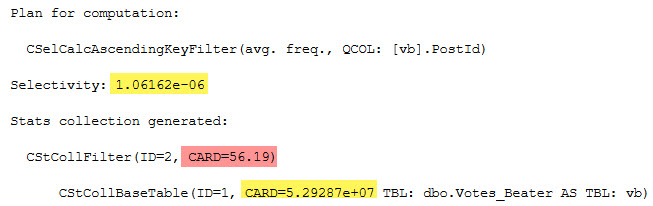
For the legacy CE, there’s not much of an estimate. You get a stock guess of 1 row, no matter what.

For the default CE, there’s a little more to it.

2020 11 11 13 38 13
inequality
SELECT (0.00130115 * 5.29287e+07) AS inequality_computation;


2020 11 11 13 39 06
equality
SELECT (1.06162e-06 * 5.29287e+07) AS equality_computation;

And of course, the CARD for both is the number of rows in the table:

SELECT CONVERT(bigint, 5.29287e+07) AS table_rows;

I’m not sure why the scientific notation is preferred, here.

A Little Strange


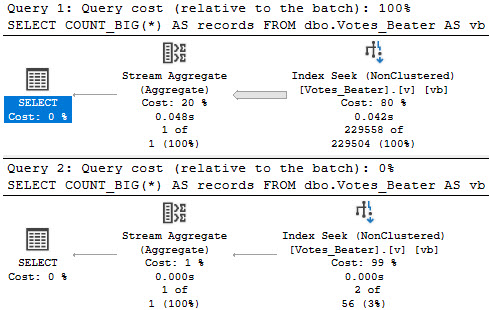
Adding in the USE HINT mentioned earlier in the post (USE HINT ('ENABLE_HIST_AMENDMENT_FOR_ASC_KEYS')) only seems to help with estimation for the inequality predicate. The guess for the equality predicate remains the same.

SQL Server Query Plan
well okay

Thanks for reading!

Going Further


If this is the kind of SQL Server stuff you love learning about, you’ll love my training. Blog readers get 25% off the Everything Bundle — over 100 hours of performance tuning content. Need hands-on help? I offer consulting engagements from targeted investigations to ongoing retainers. Want a quick sanity check before committing to a full engagement? Schedule a call — no commitment required.

Starting SQL: What’s The Difference Between Parameters And Local Variables In SQL Server?

Parameter Positive


There are many good reasons to parameterize a query, but there are also trade-offs. There’s no such thing as a free parameter, as they say.

In this post, we’re going to discuss what is and isn’t a parameter, and some of the pros and cons.

What’s important to keep in mind is that good indexing can help avoid many of the cons, but not all. Bad indexing, of course, causes endless problems.

There are many good reasons to parameterize your queries, too. Avoiding SQL injection is a very good reason.

But then!

What’s Not A Parameter


It can be confusing to people who are getting started with SQL Server, because parameters and variables look exactly the same.

They both start with @, and feel pretty interchangeable. They behave the same in many ways, too, except when it comes to cardinality estimation.

To generalize a bit, though, something is a parameter if it belongs to an object. An object can be an instance of:

  • A stored procedure
  • A function
  • Dynamic SQL

Things that aren’t parameters are things that come into existence when you DECLARE them. Of course, you can pass things you declare to one of the objects above as parameters. For example, there’s a very big difference between these two blocks of code:

DECLARE @VoteTypeId INT = 7;

SELECT *
FROM dbo.Votes AS v
WHERE v.VoteTypeId = @VoteTypeId;

DECLARE @sql NVARCHAR(MAX) = N'
SELECT *
FROM dbo.Votes AS v
WHERE v.VoteTypeId = @VoteTypeId;
'
EXEC sp_executesql @sql, N'@VoteTypeId INT', @VoteTypeId;

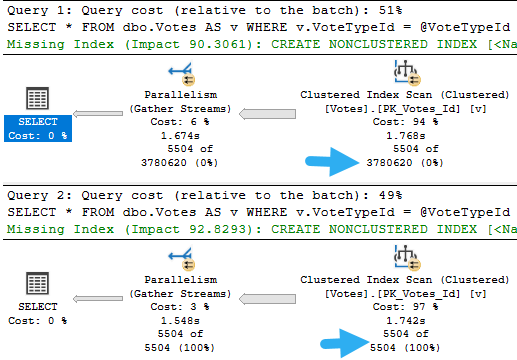
But it’s not obvious until you look at the query plans, where the guess for the declared variable is god awful.

Then again, if you read the post I linked to up there, you already knew that. Nice how that works.

If you’re too lazy to click, I’m too lazy to repeat myself.

SQL Server Query Plan
thanks

What’s the point? Variables, things you declare, are treated differently from parameters, things that belong to a stored procedure, function, or dynamic SQL.

Parameter Problems


The problem with parameterization is one of familiarity. It not only breeds contempt, but… sometimes data just grows apart.

Really far apart.

SELECT 
    v.VoteTypeId, 
    COUNT_BIG(*) AS records
FROM dbo.Votes AS v
GROUP BY v.VoteTypeId
ORDER BY records;
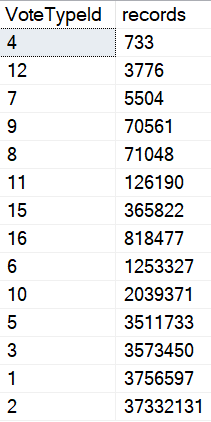
SQL Server Query Results
pattern forming

Natural Selection


When you parameterize queries, you give SQL Server permission to remember, and more importantly, to re-use.

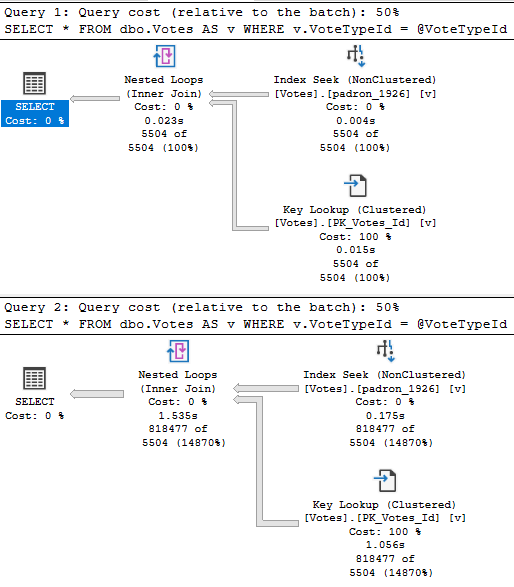
What it re-uses is the execution plan, and what it remembers are cardinality estimates. If we do something like this, we don’t get two different execution plans, or even two different sets of guesses, even though the values that we’re feeding to each query have quite different distributions in our data.

The result is two query plans that look quite alike, but behave quite differently.

SQL Server Query Plan
wist

One takes 23 milliseconds. The other takes 1.5 seconds. Would anyone complain about this in real life?

Probably not, but it helps to illustrate the issue.

Leading Miss


Where this can get confusing is when you’re trying to diagnose a performance problem.

If you look in the plan cache, or in query store, you’ll see the plan that gets cached for the very first parameter. It’ll look simple and innocent, sure. But the problem is with a totally different parameter that isn’t logged anywhere.

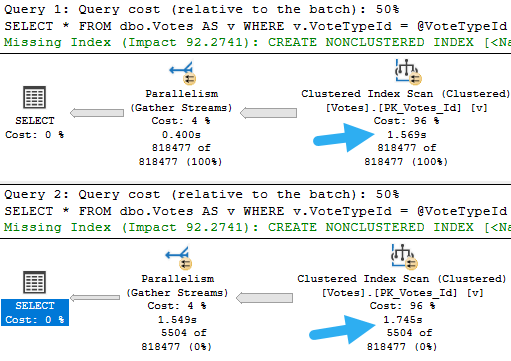
You might also face a different problem, where the query recompiles because you restarted the server, updated stats, rebuilt indexes, or enough rows in the table changed to trigger an automatic stats update. If any of those things happen, the optimizer will wanna come up with a new plan based on whatever value goes in first.

If the roles get reversed, the plan will change, but they’ll both take the same amount of time now.

DECLARE @VoteTypeId INT;

SET @VoteTypeId = 16

DECLARE @sql NVARCHAR(MAX) = N'
SELECT *
FROM dbo.Votes AS v
WHERE v.VoteTypeId = @VoteTypeId;
';
EXEC sp_executesql @sql, N'@VoteTypeId INT', @VoteTypeId;

SET @VoteTypeId = 7;

SET @sql = N'
SELECT *
FROM dbo.Votes AS v
WHERE v.VoteTypeId = @VoteTypeId;
';
EXEC sp_executesql @sql, N'@VoteTypeId INT', @VoteTypeId;
SQL Server Query Plan
totin’

Deal With It ?


In the next few posts, we’ll talk about what happens when you don’t parameterize queries, and different ways to deal with parameter sniffing.

  • A recompile hint can help, it might not always be appropriate depending on execution frequency and plan complexity
  • Optimize for unknown hints will give you the bad variable guess we saw at the very beginning of this post

We’re going to need more clever and current ways to fix the issue. If you’re stuck on those things recompiling or unknown-ing, you’re stuck not only on bad ideas, but outdated bad ideas.

Like duck l’orange and Canadian whiskey.

Thanks for reading!
Going Further


If this is the kind of SQL Server stuff you love learning about, you’ll love my training. Blog readers get 25% off the Everything Bundle — over 100 hours of performance tuning content. Need hands-on help? I offer consulting engagements from targeted investigations to ongoing retainers. Want a quick sanity check before committing to a full engagement? Schedule a call — no commitment required.

How Are Table Variables Different In SQL Server 2019?

WallaWallaBingBang


Video Summary

In this video, I dive into the world of table variables in SQL Server 2019, exploring how they’ve been improved but still come with their own set of challenges. Specifically, I highlight the issue of cardinality estimation for table variables, which can lead to suboptimal query plans due to a lack of column-level statistics. By comparing table variables with temporary tables, I demonstrate that while SQL Server 2019 has made significant strides in improving these estimates, there are still scenarios where you might face performance issues. The video showcases how using temporary tables instead can provide more accurate cardinality estimates, but also points out the downsides of this approach, such as increased execution time and complexity.

Full Transcript

Erik Darling here to start a line of hand lotion reviews. No kidding. Though that would be more topical. And if you don’t see the pun that just occurred there, topical reviews of hand lotion, I think you should stop watching. You should get a new hobby. You should go collect rocks or something. Go investigate slime. I’m kidding. I’m sure it’s fine. Not everyone is doing it. You should go check it out. Now that isn’t the puns. Cool. So this video is not about hand lotion though. If this counts as sponsorship, then whatever. This video is about table variables, sort of generally, but more specifically table variables in SQL Server 2019. Now, in SQL Server 2019, Microsoft has made attempts to fix a lot of common problems that people will have. hit with query performance. And one of those issues is with table variable cardinality estimation.

In versions prior to SQL Server 2019, unless you applied a recompile hint or some goofy trace flag, you would get a one row estimate from a table variable. Now that changes a little bit with multi-statement table valued functions which are turn table variables. We’re not going to get into all that detail here. Just know that they are different. Now in SQL Server 2019, what happens is we pause after we insert data into a table variable. Now there’s a little bit of a branch here. So if it’s a stored procedure, you will pause. You will look at the number of rows that were inserted into the table variable and then SQL Server will cache that guess. So if you’re thinking to yourself, it sounds like table variables just became a new source of parameter sniffing. Well, golly and gosh, you are correct. In ad hoc queries, you will pause for each execution and SQL Server will look at the number of rows that went in and then we will, of course, just guess the number of rows that went into the table. Now an important thing that’s missing from all versions of SQL Server and across all table variables is that we have no column level information about the data that got put into our table variable.

We do not have a statistics histogram. We have nothing of the sort. We do not have any information that you would find in a normal statistics object that would tell you about the data distribution, distinctness, rows, average rows, range rows, all that good stuff. We don’t get that no matter what.

All we get is table cardinality. So while that is an improvement, there are times when that guess can go horrifically. Well, when that table cardinality guess just isn’t what makes a big difference. Sometimes it is, other times it isn’t. So I have this query. But I’m not going to run this query over here.

I’m going to run this query over here because we’re going to run this. And then we’re going to talk about what happens with table variables versus 10 tables. So I’m going to kick that off running. And the first thing that I want to note is that estimated plans do not help us here. If you look at this estimated plan, we can see that we insert 1001 rows estimated here. There we go. 1001. Hooray, hooray, hooray, hooray. But in this plan down below, we still get the one row guess sad face. We are not helped by the old estimated plan. No, we’re not. So let’s move on a little bit. Now, what I need to point out here is that table variables behind the scenes use a temporary object, a pound signed temp, pound, not signed, pound signed, pound sand temporary object. And if I run this query, it’ll thankfully run pretty quickly. And if you look over at the messages tab, we will see our mysterious pound signed object that gets created. Now, I wish that there were a way that I could pre-detect that pound signed object so that I could show you that there are no statistics involved with that thing. But I can’t.

What I can show you is that statistics exist for temporary tables, the pound sign actual temporary tables. I call them temporary tables plus because they’re temporary tables plus statistics. All right, or table variables plus statistics. That’s a good, it’s a good one. Good way to talk about things, right? So let’s look at what happens when we run this code. If we hit F5 here, and we use these super duper fancy new DMV or this this single singular super duper fancy new DMV as of SQL Server 2016, brand new, we will get some information back statistically about what data went into that temp table. We will have that. And yes, this can be cached. And yes, this can cause an issue. And I yes, I do have a video about that. And yes, I will link to it in the details. So you can go watch that later. But anyway, that’s the point there. So when SQL Server makes guesses about things, it can use this wonderful batch of his of information to look at what rows are in here.

And it can use that you can use that information to make a guess about what it’s going to have to do uh in the in the rest of the query. So if we turn on the query plan and we we rerun this, we have a lot of fun. We look at the execution plan. SQL Server can use information from over here to make guesses about what’s going to happen down here and how to choose that execution plan. Now, what I want to point out really quickly is that this query that I’m running here now, it doesn’t matter. I can leave off that DVCC free proc cache thing. I can run that this returns very, very quickly over here. This same query using a table variable is still executing over here after nearly three minutes.

So we we we have a we I think we have a plan quality issue on our hands here. I’m not really sure what else to tell you. Now, I know what you’re thinking, Eric, there’s no recompile hint here. But gosh darn it, this is SQL Server 2019. We don’t need a recompile hint. We get the same information without it because this is us running it over here and we get the table variable deferred compilation. Now, what’s sort of interesting is if we go a little bit deeper into things, right, if we look a little bit beyond the histogram, beyond, beyond, beyond, beyond, beyond, beyond. And we use this query that hits a table variable and we try to get cardinality estimation information from it. What we’ll get over in the messages tab is a whole bunch of stuff that I don’t understand at all. I start reading through it and I get I get cranky. But one thing that shows up in here that I think is very interesting is this line right here. CST call black box. That doesn’t sound like something that’s going to reveal a lot of information to us, does it? So let’s let’s search in here and let’s search in here. Let’s see. Yep, there it is. There’s I mean the first iteration of it. This actually shows up a bunch of times in here.

But we can see that when SQL Server tried to make a guess, it was guessing from a black box. It’s a no, no, no. You got me. Screwed there. Can’t nothing we can do about that. But if we as mature, experienced data professionals use a pound sign temporary table instead, and we on this query, we will get I mean first thing I want to point out in the execution plan is that we get a dead to rights accurate cardinality estimate over here. I think I forgot to show you that up here. If we come forward here. I don’t know. Maybe we will. Maybe we won’t. I don’t know what’s going to happen now.

Yeah, we get well, that’s weird. I don’t know. I forget. I forget what my point was there. But if we go look at the information over here. Yeah, two, no, one, one, yeah, rather than 12. Yeah, because it was good. Oh, yeah, because it gets 12 up there. I’m all I apologize. I’m exhausted today.

Come back over here. It gets 12 rows would come out of this 12. 12. Ha ha ha. Eric screwed up. No, Eric is exhausted. Eric hasn’t slept in like three nights. So deal with it. This video is free. I don’t want to hear about it. So yeah, we we made a guess of 12 rows up here. And we make an accurate guess down here of 27901 rows. There we go. Bingo, bingo.

We are set. We are sweet. We are golden. But we are still executing over here. That’s less than ideal. But anyway, what we have over here is, of course, where SQL Server makes its cardinality estimation. Over the messages tab over here and look, we will get accurate cardinality guesses down here. SQL Server will not use a black box to try and guess what was happening. And in case you didn’t notice, we just finished over here after five minutes and 51 seconds.

So we can see that over here, we we did pretty well. Yeah, we inserted 1000 rows very quickly. And if we head on down here and look, you can see that we we got our accurate table cardinality of 1001 rows. But we didn’t get that column level cardinality that would help us make better guesses on down the line. So if we scroll down a little bit here. Oh, actually, no, let’s blow this up a little because I care about your experience as an end user somewhat.

If we look over here, we got our 1001 row guess, which was great. And then down here, we things sort of fell apart. We got 35,000 rows back when we guessed 378. And then if we go, oh, go away tooltip. I don’t need you. If we go down here, where we guessed 10,099 rows, we got 1304009472. Now keep in mind that is from a key lookup. So that is a total number of rows that have and that have exited there. So you know, you know, keep in mind that there’s that going on.

The key lookups are kind of tricky. I’ll put a blog post together about that. But anyway, we can see over here that we maintained that guess that was not so hot there. And that we took five and a half minutes to run there. So sadness increases exponentially. Anyway, point is, the temp tables versus table variables thing can still matter even in SQL Server 2019. The lack of column level statistics can really still harm cardinality estimation. You may find in many cases that just getting table cardinality is good enough to solve many of your query problems. But oftentimes you will still need that true to life cardinality estimation that comes from column level statistics, which you don’t get even if you apply a recompile hint here. So I don’t know, whatever. I’m Erik Darling and I endorse hand washing and hand lotioning and staying indoors. Those are those are the three things that I endorse currently. I also endorse temp tables for the most part over table variables. Right, 99% of the time.

97. 96 and a half. I don’t know.

Going Further


If this is the kind of SQL Server stuff you love learning about, you’ll love my training. Blog readers get 25% off the Everything Bundle — over 100 hours of performance tuning content. Need hands-on help? I offer consulting engagements from targeted investigations to ongoing retainers. Want a quick sanity check before committing to a full engagement? Schedule a call — no commitment required.

How Bad Cardinality Estimates Lead To Bad Query Plan Choices

Let’s Run A Cruddy Query


We’ve got no supporting indexes right now. That’s fine.

The optimizer is used to not having helpful indexes. It can figure things out.

    SELECT   p.*
    FROM     dbo.Posts AS p
    JOIN     dbo.Votes AS v
        ON p.Id = v.PostId
    WHERE    p.PostTypeId = 2
    AND      p.CreationDate >= '20131225'
    ORDER BY p.Id;
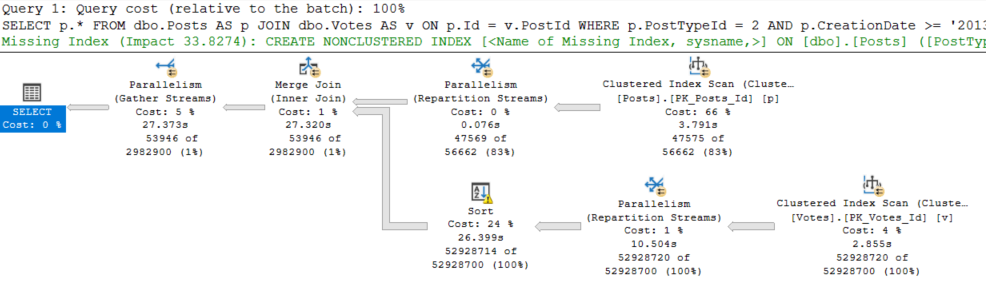
SQL Server Query Plan
Snap City.

So uh. We got a merge join here. For some reason. And a query that runs for 27 seconds.

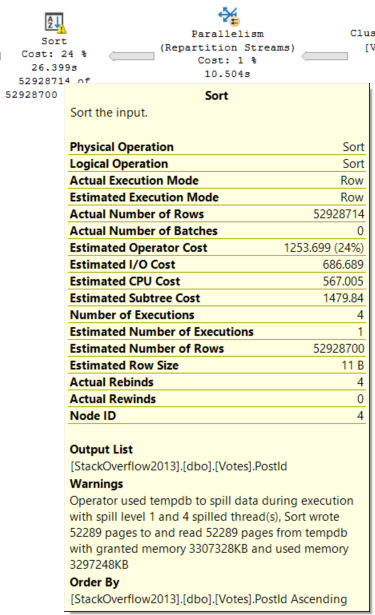
The optimizer was all “no, don’t worry, we’re good to sort 52 million rows. We got this.”

SQL Server Query Plan
YOU’VE GOT THIS.

[You don’t got this — ED]

Choices, Choices


Since we have an order by on the Id column of the Posts table, and that column is the Primary Key and Clustered index, it’s already in order.

The optimizer chose to order the PostId column from the Votes table, and preserve the index order of the Id column.

Merge Joins expect ordered input on both sides, don’tcha know?

It could have chosen a Hash Join, but then the order of the Id column from the Posts table wouldn’t have been preserved on the other side.

Merge Joins are order preserving, Hash Joins aren’t. If we use a Hash Join, we’re looking at ordering the results of the join after it’s done.

But why?

SQL Server Query Plan
Good Guess, Bad Guess

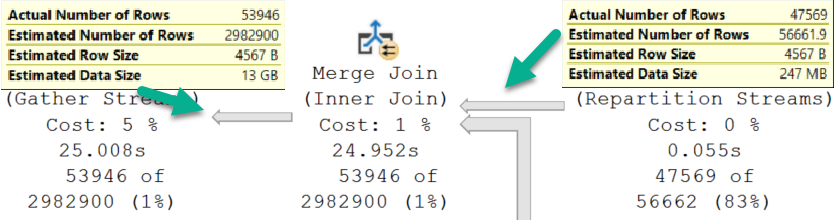
Going into the Merge Join, we have a Good Guess™

Coming out of the Merge Join, we have a Bad Guess™

Thinking back to the Sort operator, it only has to order the PostId column from the Votes table.

That matters.

Hash It Up


To compare, we need to see what happens with a Hash Join.

SQL Server Query Plan
smh

Okay, ignore the fact that this one runs for 2.6 seconds, and the other one ran for 27 seconds.

Just, like, put that aside.

Here’s why:

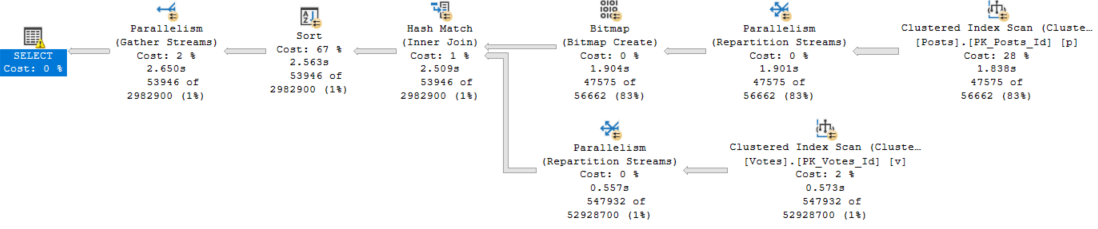
SQL Server Query Plan
Neither Nor

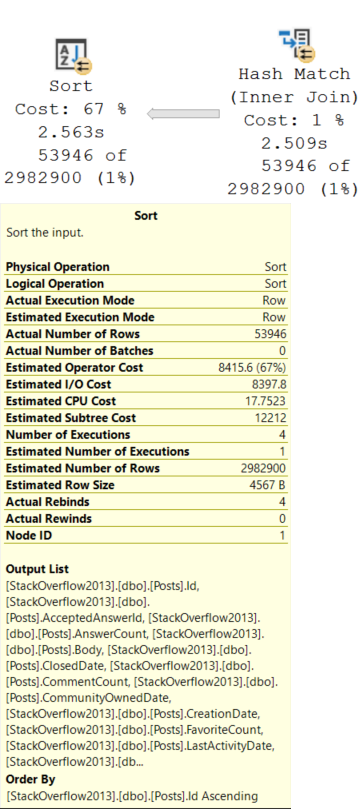
This Sort operator is different. We need to sort all of the columns in the Posts table by the Id column.

Remember that the Id column is now out of order after the Hash Join.

Needing to sort all those columns, including a bunch of string columns, along with an NVARCHAR(MAX) column — Body — inflates the ever-weeping-Jesus out of the memory grant.

SQL Server Query Plan
I see.

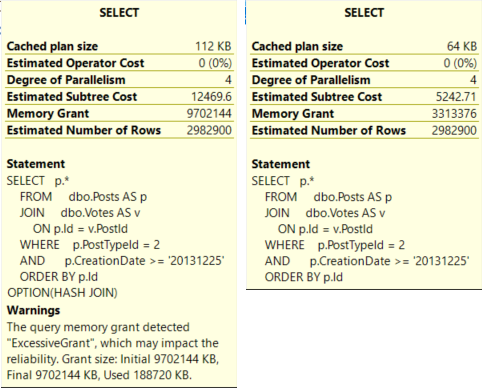
The Hash Join plan is not only judged to be more than twice as expensive, but it also asks for a memory grant that’s ~3x the size of the Merge Join plan.

Finish Strong


Let’s tally up where we’re at.

Both queries have identical estimated rows.

The optimizer chooses the Merge Join plan because it’s cheaper.

  • The Merge Join plan runs for 27 seconds, asks for 3.3GB of RAM, and spills to disk.
  • The Hash Join plan runs for 3 seconds, asks for 9.7GB of RAM and doesn’t spill, but it only uses 188MB of the memory grant.

That has impacted the reliability.

In a world where memory grants adjust between executions, I’ll take the Hash Join plan any day of the week.

But this is SQL Server 2017, and we don’t get that without Batch Mode, and we don’t get Batch Mode without playing some tricks.

There are lots of solutions if you’re allowed to tune queries or indexes, but not so much otherwise.

In the next couple posts, I’ll look at different ways to approach this.

Thanks for reading!
Going Further


If this is the kind of SQL Server stuff you love learning about, you’ll love my training. Blog readers get 25% off the Everything Bundle — over 100 hours of performance tuning content. Need hands-on help? I offer consulting engagements from targeted investigations to ongoing retainers. Want a quick sanity check before committing to a full engagement? Schedule a call — no commitment required.

Why Some SQL Server Date Functions Get Better Cardinality Estimates

Date Debate


Searching dates is a common enough task. There are, of course, good and bad ways to do this.

Aaron Bertrand’s article, Bad habits to kick: mis-handling date / range queries, is a good place to start to learn about that subject.

This isn’t quite about the same thing, just about some behavior that I thought was interesting, and how it changes between cardinality estimator versions.

Bad Robot


If you’ve been query tuning for a while, you probably know about SARGability, and that wrapping columns in functions is generally a bad idea.

But just like there are slightly different rules for CAST and CONVERT with dates, the repercussions of the function also vary.

The examples I’m going to look at are for YEAR() and MONTH().

If you want a TL;DR, here you go.

2019 03 31 11 47 20
Reality Bites

If you wanna keep going, follow me!

USING


The takeaway here isn’t that doing either of these is okay. You should fully avoid wrapping columns in functions in general.

One of the main problems with issuing queries with non-SARGable predicates is that the people who most often do it are the people who rely on missing index requests to direct tuning efforts, and non-SARGable queries can prevent those requests from surfacing, or ask for an even more sub-optimal index than usual.

If you have a copy of the StackOverflow2013 database, you can replicate the results pretty easily on SQL Server 2017.

They may be slightly different depending on how the histogram is generated, but the overarching theme is the same.

Yarly


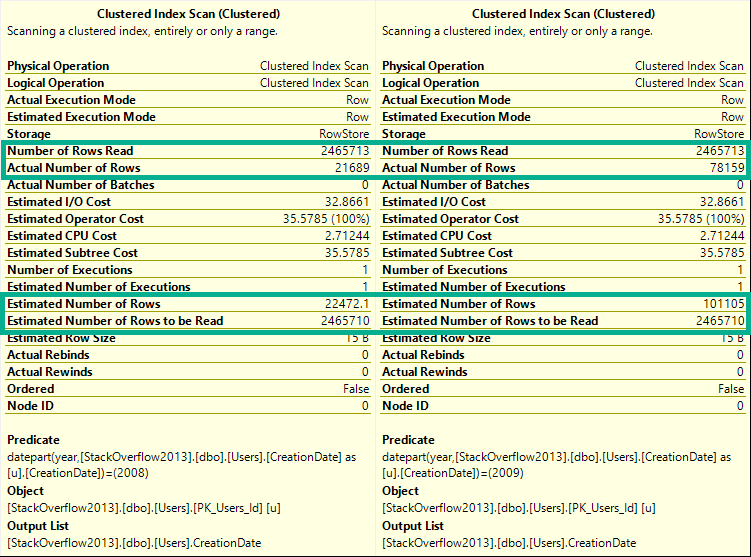
If you run these queries, and look at the estimated and actual rows in the Clustered Index scan tooltip, you’ll see they change for every query.

DECLARE @blob_eater DATETIME;

    SELECT @blob_eater = u.CreationDate
    FROM dbo.Users AS u
    WHERE YEAR(u.CreationDate) = 2008;

    SELECT @blob_eater = u.CreationDate
    FROM dbo.Users AS u
    WHERE YEAR(u.CreationDate) = 2009;

    SELECT @blob_eater = u.CreationDate
    FROM dbo.Users AS u
    WHERE YEAR(u.CreationDate) = 2010;

    SELECT @blob_eater = u.CreationDate
    FROM dbo.Users AS u
    WHERE YEAR(u.CreationDate) = 2011;

    SELECT @blob_eater = u.CreationDate
    FROM dbo.Users AS u
    WHERE YEAR(u.CreationDate) = 2012;

    SELECT @blob_eater = u.CreationDate
    FROM dbo.Users AS u
    WHERE YEAR(u.CreationDate) = 2013;
    GO

Here’s a sample from the 2008 and 2009 queries.

2019 03 31 11 59 00
Wild For The Night

ED: I took a break from writing this and “went to brunch”.

Any logical inconsistencies will work themselves out eventually.

Cash Your Checks And Come Up


Alright, let’s try that again with by month.

If you hit yourself in the head with a hammer and forgot the TL;DR, here’s what happens:

DECLARE @blob_eater DATETIME;

    SELECT @blob_eater = u.CreationDate
    FROM dbo.Users AS u
    WHERE MONTH(u.CreationDate) = 1;

    SELECT @blob_eater = u.CreationDate
    FROM dbo.Users AS u
    WHERE MONTH(u.CreationDate) = 2;

    SELECT @blob_eater = u.CreationDate
    FROM dbo.Users AS u
    WHERE MONTH(u.CreationDate) = 3;

    SELECT @blob_eater = u.CreationDate
    FROM dbo.Users AS u
    WHERE MONTH(u.CreationDate) = 4;

    SELECT @blob_eater = u.CreationDate
    FROM dbo.Users AS u
    WHERE MONTH(u.CreationDate) = 5;

    SELECT @blob_eater = u.CreationDate
    FROM dbo.Users AS u
    WHERE MONTH(u.CreationDate) = 6;

    SELECT @blob_eater = u.CreationDate
    FROM dbo.Users AS u
    WHERE MONTH(u.CreationDate) = 7;

    SELECT @blob_eater = u.CreationDate
    FROM dbo.Users AS u
    WHERE MONTH(u.CreationDate) = 8;

    SELECT @blob_eater = u.CreationDate
    FROM dbo.Users AS u
    WHERE MONTH(u.CreationDate) = 9;

    SELECT @blob_eater = u.CreationDate
    FROM dbo.Users AS u
    WHERE MONTH(u.CreationDate) = 10;

    SELECT @blob_eater = u.CreationDate
    FROM dbo.Users AS u
    WHERE MONTH(u.CreationDate) = 11;

    SELECT @blob_eater = u.CreationDate
    FROM dbo.Users AS u
    WHERE MONTH(u.CreationDate) = 12;

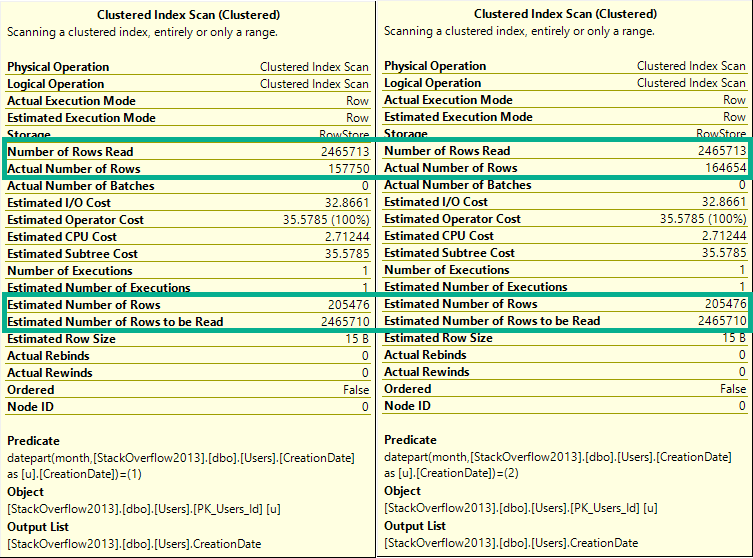
If you run these, they’ll all have the same guess on the clustered index scan.

To keep things simple, let’s look at the first couple:

2019 03 31 15 04 34
BADLY

The difference here is that now every single row estimate will be 205,476.

Lesson learned: The optimizer can make a decent statistical guess at the year portion of a date, but not the month portion.

In a way, you can think of this like a LIKE query.

The optimizer can make a decent guess at ‘YEAR%’, but not at ‘%MONTH%’.

Actual Facts To Snack On And Chew


The same thing happens for both new and old cardinality estimators.

DECLARE @blob_eater DATETIME;

    SELECT @blob_eater = u.CreationDate
    FROM dbo.Users AS u
    WHERE YEAR(u.CreationDate) = 2008
    OPTION(USE HINT('FORCE_DEFAULT_CARDINALITY_ESTIMATION'));

    SELECT @blob_eater = u.CreationDate
    FROM dbo.Users AS u
    WHERE YEAR(u.CreationDate) = 2008
    OPTION(USE HINT('FORCE_LEGACY_CARDINALITY_ESTIMATION'));
    GO 

DECLARE @blob_eater DATETIME;

    SELECT @blob_eater = u.CreationDate
    FROM dbo.Users AS u
    WHERE MONTH(u.CreationDate) = 12
    OPTION(USE HINT('FORCE_DEFAULT_CARDINALITY_ESTIMATION'));


    SELECT @blob_eater = u.CreationDate
    FROM dbo.Users AS u
    WHERE MONTH(u.CreationDate) = 12
    OPTION(USE HINT('FORCE_LEGACY_CARDINALITY_ESTIMATION'));
    GO

Wouldn’t Get Far


But if we combine predicates, something really different happens between Linda Cardellini estimators.

DECLARE @blob_eater DATETIME;

    SELECT @blob_eater = u.CreationDate
    FROM dbo.Users AS u
    WHERE MONTH(u.CreationDate) = 12
    AND YEAR(u.CreationDate) = 2012
    OPTION(USE HINT('FORCE_DEFAULT_CARDINALITY_ESTIMATION'));


    SELECT @blob_eater = u.CreationDate
    FROM dbo.Users AS u
    WHERE MONTH(u.CreationDate) = 12
    AND YEAR(u.CreationDate) = 2012
    OPTION(USE HINT('FORCE_LEGACY_CARDINALITY_ESTIMATION'));
    GO
2019 03 31 15 11 08
WRONG

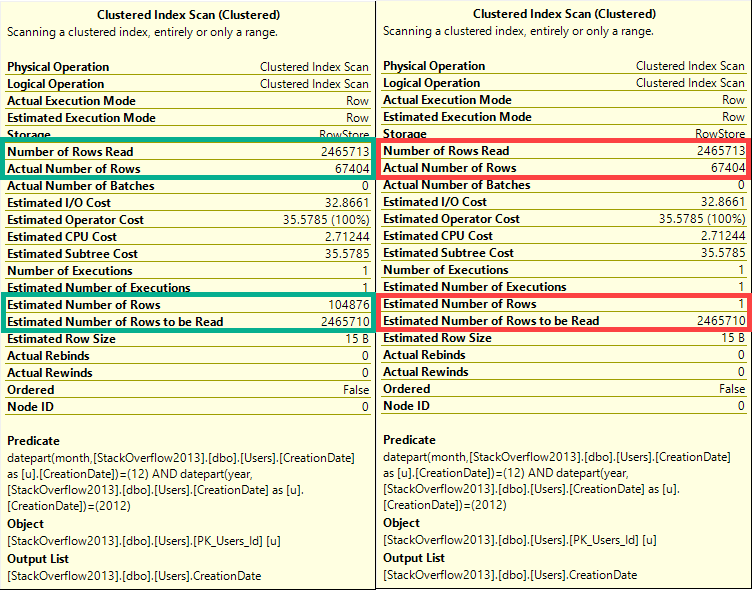
In this case, the old CE (on the right), makes a very bad guess of 1 row.

The new CE (on the left) makes a slightly better, but still not great guess.

Ended


Neither of these is a good way to query date or time data.

You can see in every tooltip that, behind the scenes, the queries used the DATEPART function, which means that also doesn’t help.

The point of this post is that someone may use a function to query the year portion of a date and assume that SQL Server does a good job on any other portion, which isn’t the case.

None of these queries are SARGable, and at no point is a missing index request raised on the CreationDate column, even though if you add one it gets used and reduces reads.

Thanks for reading!
Going Further


If this is the kind of SQL Server stuff you love learning about, you’ll love my training. Blog readers get 25% off the Everything Bundle — over 100 hours of performance tuning content. Need hands-on help? I offer consulting engagements from targeted investigations to ongoing retainers. Want a quick sanity check before committing to a full engagement? Schedule a call — no commitment required.