Cursor Declarations That Use LOB Local Variables Can Bloat Your Plan Cache

I found a few stored procedures with single plan cache entries over 500 MB of memory each according to sys.dm_exec_cached_plans while optimizing the plan cache in production. The stored procedures were relatively simple and both execution plans were less than 1 MB when saved as sqlplan files. I was confused, offended, and confused.

First published on MSDN on Jan 09, 2007

Did you know that the memory used for cursors can be cached along with the compiled plan? I’ll include a direct quote of the ancient wisdom:

Inactive cursors are cached in the compiled plan. Just like MXCs there are two lists maintained here: the lookup list and the enum list. The lookup list stores the inactive cursors. When a cursor is de-allocated, the memory used to store the cursor is cached. On subsequent re-execution of the batch with this cursor, the cached cursor memory is reused and re-initialized as an active cursor. The enum list has the list of active and inactive cursors and is used to enumerate all cursors for a compiled plan.

Cursors are re-generatable given a compiled plan. Relative to compiled plans they are also relatively inexpensive to re-generate.

I checked sys.dm_exec_cached_plan_dependent_objects and found that nearly all of the cached memory was used for the cursors instead of the execution plans. This makes sense because there was no reason why a simple procedure should use 500 MB for a cached plan, but why were the cursors using so much memory?

Back to 2022

I was able to create a simple reproduction of the issue on SQL Server 2022 CU13 which is the most recent version currently available at the time of writing. Create a stored procedure that uses the OPENJSON() function along with an NVARCHAR(MAX) local variable as part of a cursor declaration. Here is one example:


CREATE OR ALTER PROCEDURE TestMemoryLeak_1
AS
BEGIN
    SET NOCOUNT ON;

    DECLARE @json NVARCHAR(MAX);

    SET @json = N'[
        {
            "Order": {
                "Number": "SO43659",
                "Date": "2024-05-31T00:00:00"
            },
            "AccountNumber": "AW29825",
            "Item": {
                "Price": 2024.9940,
                "Quantity": 1
            }
        },
        {
            "Order": {
                "Number": "SO43661",
                "Date": "2024-06-01T00:00:00"
            },
            "AccountNumber": "AW73565",
            "Item": {
                "Price": 2024.9940,
                "Quantity": 3
            }
        }
    ]';

    DECLARE json_cursor CURSOR FAST_FORWARD FOR 
    SELECT Number, OrderDate, Customer, Quantity
    FROM OPENJSON(@json) WITH (
        Number VARCHAR(200) '$.Order.Number',
        OrderDate DATETIME '$.Order.Date',
        Customer VARCHAR(200) '$.AccountNumber',
        Quantity INT '$.Item.Quantity'
    );

    DECLARE 
        @Number VARCHAR(200),
        @OrderDate DATETIME,
        @Customer VARCHAR(200),
        @Quantity INT;

    OPEN json_cursor;
    FETCH NEXT FROM json_cursor INTO @Number, @OrderDate, @Customer, @Quantity;
    WHILE @@FETCH_STATUS = 0
    BEGIN
        -- nobody wants to work anymore

        FETCH NEXT FROM json_cursor INTO @Number, @OrderDate, @Customer, @Quantity;
    END;
    CLOSE json_cursor;
    DEALLOCATE json_cursor;

    RETURN;
END;
GO

The amount of memory cached for the cursor execution can be seen with the following code:

DECLARE @plan_handle varbinary(64);
SELECT @plan_handle = plan_handle
FROM sys.dm_exec_procedure_stats
where object_id = object_id('[TestMemoryLeak_1]');

SELECT * FROM 
sys.dm_os_memory_objects
WHERE type = 'MEMOBJ_CURSOREXEC'
AND memory_object_address IN  (
    SELECT memory_object_address
    FROM sys.dm_exec_cached_plan_dependent_objects(@plan_handle)
);

I executed the test stored procedure 1 time, measured the memory usage, then executed it 9999 more times, and finally measured the memory usage again. I expected the memory usage to not change because the cursor always processes the same data. SQL Server betrayed my expectations:

a62 leak

A cursor that processes 2 rows of data has managed to use 163 MB of cached memory. Wonderful. One workaround is to remove OPENJSON() from the cursor definition by inserting the data into a table variable and making the cursor read from the table variable:

DECLARE @json_table TABLE (
    Number VARCHAR(200) NULL,
    OrderDate DATETIME NULL,
    Customer VARCHAR(200) NULL,
    Quantity INT NULL
);

INSERT INTO @json_table (Number, OrderDate, Customer, Quantity)
SELECT Number, OrderDate, Customer, Quantity
FROM OPENJSON(@json) WITH (
    Number VARCHAR(200) '$.Order.Number',
    OrderDate DATETIME '$.Order.Date',
    Customer VARCHAR(200) '$.AccountNumber',
    Quantity INT '$.Item.Quantity'
);

DECLARE json_cursor CURSOR FAST_FORWARD FOR 
SELECT Number, OrderDate, Customer, Quantity
FROM @json_table;

SQL Server no longer betrays my expectations. The amount of cached memory for the cursor does not change between 1 and 10000 executions:

a62 no leak

Here is a comparison using the sys.dm_exec_cached_plans DMV:

a62 compare

Determining which row is associated with each stored procedure is an exercise left up to the reader.

A second workaround is to define the cursor using the LOCAL argument. A third workaround is to define the local variable as NVARCHAR(4000). Thank you to the comments for both of these workarounds. Note that I originally thought the issue was related to OPENJSON() but it appears that was an error on my part. The presence of an LOB variable looks to be the determining factor.

Final Thoughts

Using local LOB variables as part of a cursor declaration can lead to ever-increasing amounts of cached memory associated with its cached plan. It’s possible that SQL Server will prune this plan once it experiences plan cache pressure, but it may also choose to prune other plans instead. I recommend coding defensively by always using the LOCAL argument for your cursor declarations. Thanks for reading!

A Not So Silent Bug With Filtered Indexes On Computed Columns In SQL Server

Bugbash


At some point in the past, I blogged about a silent bug with computed columns and clustered column store indexes.

In this post, I’m going to take a quick look at a very loud bug.

Normally, you can’t add a filtered index to a computed column. I’ve always hated that limitation. How nice would that be for so many currently difficult tasks?

I wonder if Oracle…

You Can’t Do That On Television


If you run this code to completion — and boy are you missing out if you don’t — you get an error.

CREATE TABLE dbo.ohno
(
    id int NOT NULL, 
    crap AS id * 2
);
GO 

CREATE NONCLUSTERED INDEX c 
ON dbo.ohno
    (crap) 
WHERE crap > 0;
GO

Here’s the error:

Msg 10609, Level 16, State 1, Line 13
Filtered index 'c' cannot be created on table 'dbo.ohno' because the column 'crap' in the filter expression is a computed column. 
Rewrite the filter expression so that it does not include this column.

Okay, great! Works on my machine.

Kapow, Kapow


However, you can totally create this table using the inline index creation syntax.

CREATE TABLE dbo.ohyeah
(
    id int NOT NULL, 
    crap AS id * 2,
    INDEX c 
        (crap) 
    WHERE crap > 0
);
GO

However,  if you try to query the table, you’re met with a buncha errors.

SELECT
    id
FROM dbo.ohyeah AS o;

SELECT
c = COUNT_BIG(*)
FROM dbo.ohyeah AS o;

Even without explicitly referencing the computed column, you get this error message.

Msg 207, Level 16, State 1, Procedure ohyeah, Line 1 [Batch Start Line 29]
Invalid column name 'crap'.
Msg 207, Level 16, State 1, Procedure ohyeah, Line 1 [Batch Start Line 29]
Invalid column name 'crap'.
Msg 207, Level 16, State 1, Procedure ohyeah, Line 1 [Batch Start Line 29]
Invalid column name 'crap'.
Msg 207, Level 16, State 1, Procedure ohyeah, Line 1 [Batch Start Line 29]
Invalid column name 'crap'.
Msg 207, Level 16, State 1, Procedure ohyeah, Line 1 [Batch Start Line 29]
Invalid column name 'crap'.
Msg 4184, Level 16, State 2, Line 30
Cannot retrieve table data for the query operation because the table "dbo.ohyeah" schema is being altered too frequently. 
Because the table "dbo.ohyeah" contains a filtered index or filtered statistics, changes to the table schema require a refresh of all table data. 
Retry the query operation, and if the problem persists, use SQL Server Profiler to identify what schema-altering operations are occurring.

You see what? See you what that error message says? “[I[f the problem persists, use SQL Server Profiler to identify what schema-altering operations are occurring”

Use SQL Server Profiler.

Take that, Extended Events.

Thanks for reading!

Going Further


If this is the kind of SQL Server stuff you love learning about, you’ll love my training. I’m offering a 25% discount to my blog readers if you click from here. I’m also available for consulting if you just don’t have time for that and need to solve performance problems quickly.

A Silent Bug With Clustered Column Store Indexes And Computed Columns In SQL Server 2019

Oh Boy


This bug has been reported to the proper authorities, and this blog post is not to dunk on the Summer Intern responsible for column store indexes, but to warn you to not do this, because I don’t know what it will break under the covers.

If you read the documentation for column store indexes, it says that column store indexes can’t be created on persisted computed columns.

And that’s true. If we step through this script, creating the column store index will fail.

/*Bye Felicia*/
DROP TABLE IF EXISTS dbo.cci;
GO 

/*Hi Felicia*/
CREATE TABLE dbo.cci(id int, fk int, sd date, ed datetime);
GO 

/*COMPUTER!*/
ALTER TABLE dbo.cci ADD cc AS id * 2;
ALTER TABLE dbo.cci ALTER COLUMN cc ADD PERSISTED;
GO 

/*Rats*/
CREATE CLUSTERED COLUMNSTORE INDEX c ON dbo.cci;
GO

The error message we get is pretty clear:

Msg 35307, Level 16, State 1, Line 76
The statement failed because column 'cc' on table 'cci' is a computed column. 
Columnstore index cannot include a computed column implicitly or explicitly.

80 Blocks from Tiffany’s


However, if we change the order of things a little bit, we’ll find that we can add a persisted computed column to a table with a clustered column store index on it.

/*Bye Felicia*/
DROP TABLE IF EXISTS dbo.cci;
GO 

/*Hi Felicia*/
CREATE TABLE dbo.cci(id int, fk int, sd date, ed datetime, INDEX c CLUSTERED COLUMNSTORE);
GO 

/*???*/
ALTER TABLE dbo.cci ADD cc AS id * 2;
ALTER TABLE dbo.cci ALTER COLUMN cc ADD PERSISTED;
GO 

/*With data?*/
INSERT dbo.cci
(
    id, fk, sd, ed
)
VALUES
(
    10, 10, GETDATE(), GETDATE()  
);

/*yepyepyepyepyepyep*/
SELECT
    c.*
FROM dbo.cci AS c

/*Eh?*/
ALTER INDEX c ON dbo.cci REBUILD;
ALTER INDEX c ON dbo.cci REORGANIZE;
DBCC CHECKTABLE('dbo.cci');

And everything seems to work. However, if we drop the column store index, it can’t be re-created.

The key here is that the computed column is added, and then the persisted attribute is added second. That is where an error should be thrown.

But what do I know? I’m just a bouncer.

Bomber


Again, I’m telling you not to do this. I’m telling you that it might break things in gruesome and horrible ways.

I don’t think that this is a preview of upcoming support for persisted computed columns in clustered column store indexes.

Thanks for reading!

p.s. Really, don’t do this

p.p.s. If you do this you’re asking for trouble

p.p.p.s. This was fixed in CU12

Going Further


If this is the kind of SQL Server stuff you love learning about, you’ll love my training. I’m offering a 25% discount to my blog readers if you click from here. I’m also available for consulting if you just don’t have time for that and need to solve performance problems quickly.

Why Filtered Indexes Are Broken In SQL Server

Fix Your Indexes, Pal


Video Summary

In this video, I explore the nuances of filtered indexes in SQL Server and why they might not always be used as expected. I set up a simple query to count posts based on certain conditions and created two indexes tailored to these conditions. However, when running the query, I noticed that SQL Server did not use one of the indexes designed specifically for filtering out null values from the community owned date column. This led me to investigate further and discovered that including the community owned date in the index definition was necessary for the filter to work as intended. The video delves into why this happens and provides a solution, which could be particularly useful for those working with filtered indexes to exclude nulls or other specific values. I also share a link to a related issue on Connect and mention Aaron Bertrand’s reference to Ladybug, hoping it might help others facing similar challenges.

Full Transcript

You know what would be fun if me writing demos were entertaining at all? I’ve seen Chrissy Lemair’s live streams of her coding things and me writing demos would not be entertaining at all to anybody. So I’m going to leave that. Leave that idea. Let that idea die. What I want to talk about in this video is where filtered indexes are broken. I don’t mean broken like they don’t filter data or something. I just mean filter like you might not see them used. So we have a simple query here. And I call it a simple query because I usually I try to write queries to be as simple as possible to get the point of the demo across. So we have a count in here. And this count is against the post table. And we’re counting where the parent ID in the post table equals the ID from out here and the score is greater than zero. And from the outer count, we are filtering on where community owned date is null. So fairly simple stuff. It’s a count with an account, sort of a join inside. And to satisfy this query, to make sure that this query is satisfied.

I have created two indexes. One index that satisfies, I think, fairly well the inner query where we need to hit, we need to see where parent ID is equal to q.id and score is greater than zero. And this other index on ID where community owned date is null to make sure that we can filter down to this. Now I should have already created these. It’s been a weird day. So yes, I did. Good job. What I’m going to do is turn on execution plans because without them we would not have much of anything to look at. And I’m going to run this query. And we are going to sit and wait. Why are we going to wait so long? I don’t know. I don’t know. Apparently we had a lot of stuff to count. And when I go look at the execution plan, we are going to see something kind of funny. SQL Server used this index down here to great effect, wonderful effect. Yes, wonderful effect. 1.7 seconds spent in that index. And up here though, we see that we did not use our filtered index. We read all 17 million rows of the post table. And because of that, we spent, I don’t know, 10 seconds there. And I don’t know, we just didn’t have a good time generally running this query.

Now what I want to do is tag this index back in. I want to say, SQL Server, please use this index regardless of what you think your best judgment is. And I’m going to run this query again. And I don’t know. It’s not going to necessarily do any better. Doing better is actually not the point. The point is to figure out why SQL Server didn’t use that index to begin with. We have a question of SQL Server. Why? I asked you, I’ve created this index especially for you and you didn’t use it and I feel neglected and alone. I don’t think you take our relationship seriously. When we go look at the execution plan for this one, which took just about twice as long. Ooh la la. Some funny things happened. What is new in this plan? Well, we still hit the goat. The goat was fine.

But now we see that we hit this index and we did fairly well here, but 13 seconds in a key lookup. Bugger, what happened? What did we key lookup? Well, sadly, we evaluated our predicate. Community owned date is null over here. Even though that index is filtered on where community owned date is null. We don’t have any of those null values in there. SQL Server didn’t believe us. I mean, I hate when people say literally, but literally this index filters out anything where community owned date is null. What predicate is there to evaluate?

What could possibly be happening in there? Well, what we need to do in order to get this to be functional is include community owned date in the definition of the index. So we will, and this is maybe something that should be, would be obvious to some people, but we, we got away up with score not being in the index. It was just where score equals zero. And SQL Server had no problem with that.

But in order to get this to work, we need to include community owned date in the index definition. Why? I don’t know. It’s been called a bug. It’s been called an oversight. It’s been called a mistake. But I’ve been called all those same thing. So I don’t, I don’t really, I don’t really know what to think there. But now when I run this query, we will get our, I mean, it’s going to use our index because I’m telling SQL Server to use our index. And we’ll finish a few seconds faster than our previous time. But more importantly, we use our index and there is no, no key lookup malarkey or shenanigans.

So with creation date included in the index definition, we no longer have to do that. Now, this is, this seems to only happen with is null, is null filters. So if you are the type of person who creates filtered indexes to, to screen nulls out or, or whatever, then you may find this to be useful information. There is a link to fix this thing. And I think this thing has been hanging about since connect with a thing.

Aaron Bertrand recently referenced something called ladybug, which I am not, I’m not nearly old enough to recall. So best of luck there, Aaron. But there’s a shortened bit.ly link that goes to this link. So bit.ly forward slash uppercase B, uppercase F broken filters. These links are case sensitive. So if you do care enough to go and vote on things, you will have to type that in the, the, the long way, but I will put links to them in the video description so that you can exert minimal effort in your life.

It’s like with everything else. Anyway, that does it for me today. I am, I am done recording stuff. It is about 4 p.m. Eastern. And I am going to go drink now. I’m going to go enjoy my day. I’ve done enough for you. Anyway, thanks for watching. Hope you learned something. See you tomorrow. Maybe. I hope not. Goodbye.

Going Further


If this is the kind of SQL Server stuff you love learning about, you’ll love my training. I’m offering a 25% discount to my blog readers if you click from here. I’m also available for consulting if you just don’t have time for that and need to solve performance problems quickly.

A Bug With OBJECTPROPERTYEX And Column Store Indexes

No, Not That Bug


There’s a known bug with partitioned tables, but this is different. This one is with rows in the delta store.

Here’s a quick repro:

USE tempdb;

DROP TABLE IF EXISTS dbo.busted;

CREATE TABLE dbo.busted ( id BIGINT, INDEX c CLUSTERED COLUMNSTORE );

INSERT INTO dbo.busted WITH ( TABLOCK )
SELECT     TOP ( 50000 )
           1
FROM       master..spt_values AS t1
CROSS JOIN master..spt_values AS t2
OPTION ( MAXDOP 1 );

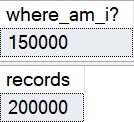
-- reports 0, should be 50k
SELECT CAST(OBJECTPROPERTYEX(OBJECT_ID('dbo.busted'), N'Cardinality') AS BIGINT) AS [where_am_i?];
SELECT COUNT_BIG(*) AS records
FROM   dbo.busted;

INSERT INTO dbo.busted WITH ( TABLOCK )
SELECT     TOP ( 150000 )
           1
FROM       master..spt_values AS t1
CROSS JOIN master..spt_values AS t2
OPTION ( MAXDOP 1 );

-- reports 150k, should be 200k
SELECT CAST(OBJECTPROPERTYEX(OBJECT_ID('dbo.busted'), N'Cardinality') AS BIGINT) AS [where_am_i?];
SELECT COUNT_BIG(*) AS records
FROM   dbo.busted;

SELECT object_NAME(csrg.object_id) AS table_name, *
FROM sys.column_store_row_groups AS csrg
ORDER BY csrg.total_rows;

In Pictures


2019 09 05 17 26 10
In Particular

This is the interesting bit, because you can obviously see the difference between open and compressed row groups.

SQL Server Query Results
Give us money

The 50k rows in the delta store aren’t counted towards table cardinality.

Thanks for reading!

Going Further


If this is the kind of SQL Server stuff you love learning about, you’ll love my training. I’m offering a 25% discount to my blog readers if you click from here. I’m also available for consulting if you just don’t have time for that and need to solve performance problems quickly.

CHECKDB Bug With SQL Server 2017 And ColumnStore Indexes

CHECKDB Bug With SQL Server 2017 And ColumnStore Indexes


Thanks for watching!

Video Summary

In this video, I delve into an interesting issue that still seems to be present in SQL Server up to version 2017 CU14, specifically when running DBCC CheckDB with the “physical only” option on databases containing columnstore indexes. While it’s not a catastrophic bug, encountering these errors can certainly be perplexing and time-consuming. I meticulously document my findings by rebuilding both the table and index, ensuring that all other potential issues are ruled out. The video walks you through how running DBCC CheckDB with physical only reveals numerous red text errors, which are confined to just one table within the database. Despite these error messages, a simple SELECT statement on the problematic table executes successfully without any issues, leading me to conclude that this might indeed be a bug rather than actual data corruption. I strongly recommend running a full DBCC CheckDB and DBCC CheckTable in addition to the physical only option for thorough verification.

Full Transcript

Howdy folks, Erik Darling here with Erik Darling Data, still, apparently that’s still a thing, trudging along all these many months later. And I’m recording this video basically to document what I think is still a bug in SQL Server up to SQL Server 2017 CU14. No, it’s not the most like, awful incriminating, like, like, like results destroying bug in the world. But it can be pretty confusing when you run into it. Because it happens when you run DBCC CheckDB with physical only on a database that has a columnstore index in it. Now, I’ve got to do some due diligence here. And I have rebuilt the table and I have rebuilt the index. And the version of SQL Server that I am running on is indeed 2014 CU14. This has been patched for a while now. This isn’t a fresh patching at all. This computer has been rebooted about a bajillion times since then. So there’s nothing like just waiting in the rings, like, just like, maybe he didn’t do something right. I’ve done most things right here. Now, when I run a regular CheckDB, when I run a full CheckDB on this database, right, the whole deal, not just physical only, this completes successfully. You can see down here that it ran for about, oh, gosh, there we go. About two minutes and 43 seconds. So that’s, that’s fine. That’s good. And when I run CheckTable on this, on this table, where the, where the problem happens, this also runs fine. So DBCC CheckTable on users underscore CX also completes successfully and doesn’t throw any errors. When I run DBCC CheckDB with physical only, I get a whole lot of red text. Yeah. And you can see that when we zoom in a little bit in here, you can see that all of the errors that it found are only in this one table. All right. And if we scroll through all the errors that it found are only in this one table, right?

All of the error, all the object IDs, that’s all this one seven, whatever, you can read it later, ends in 51. And the full message is looks like this. Offroad data is referenced by blah, blah, blah, blah, blah, blah, blah, blah, blah, blah, blah, blah, blah, blah, blah, blah, blah, blah, blah, blah, blah, not seen in the scan. Now, this matches exactly the text of a known issue that was supposedly fixed in cumulative update 11. We scroll in here, see you 11 2017. and if we read the error message that it references, this looks a whole heck of a lot like the one that we just saw in Management Studio. So this is still happening, and I mean it’s not the worst thing in the world. Again, just if you ever run into this, it’s a thing. Now if I take that number, this object ID right here, 17 yada yada, and I go look at what it is, it is indeed that table, users underscore cx, which is a copy of the users table in the Stack Overflow database that I have put a clustered columnstore index on, and we can see that the only index on this table right now is indeed that clustered columnstore index. I don’t have any other indexes sitting around on here. That is the whole kit and caboodle. Now what’s really funny, and what I think kind of proves that there’s no actual corruption in here, is that when I select star from that table, the query executes successfully. This runs for a while too, returning all those rows. 2.4 million rows, about 33 seconds, and so this runs for that whole time, and the query plan you can see reads, it scans that clustered columnstore index, so it’s not like sneaky reading data from anywhere else.

It’s all coming from right there. So all that to say this, if you are hitting error messages from running dbcc checkdb with physical only, and you’ve got columnstore indexes, don’t worry. I don’t think you actually have corruption. You might. You might. I don’t, but I think that that’s the bug that I’m hitting, and you might too. So to be extra safe, if you do find that physical only throws error messages on your columnstore indexes, run a full checkdb. Don’t just run with physical only.

Run dbcc checktable, run dbcc checkdb, check alloc, whatever file group, whatever else you might do. And maybe you’ll figure out if you do or don’t have corruption in that way. But for now, if you hit it, and you do your due diligence, and you check those other things, and you still find that you don’t have corruption, it’s only with physical only, well, join the club, pal. Yeah, it’s a bug. It’s a bug.

Fix your bug. Fix your bug. Anyway, again, I am Erik Darling with Erik Darling Data. I hope that… Is this how few people are using columnstore? It takes me to run checkdb with physical only to find a bug? That hurts. That hurts my feelings. I’m sure it hurts columnstore’s feelings, too. Anyway, goodbye.

Going Further


If this is the kind of SQL Server stuff you love learning about, you’ll love my training. I’m offering a 25% discount to my blog readers if you click from here. I’m also available for consulting if you just don’t have time for that and need to solve performance problems quickly.

A SQL Server Query Plan Memory Grant Bug?

Yes, That’s A Question


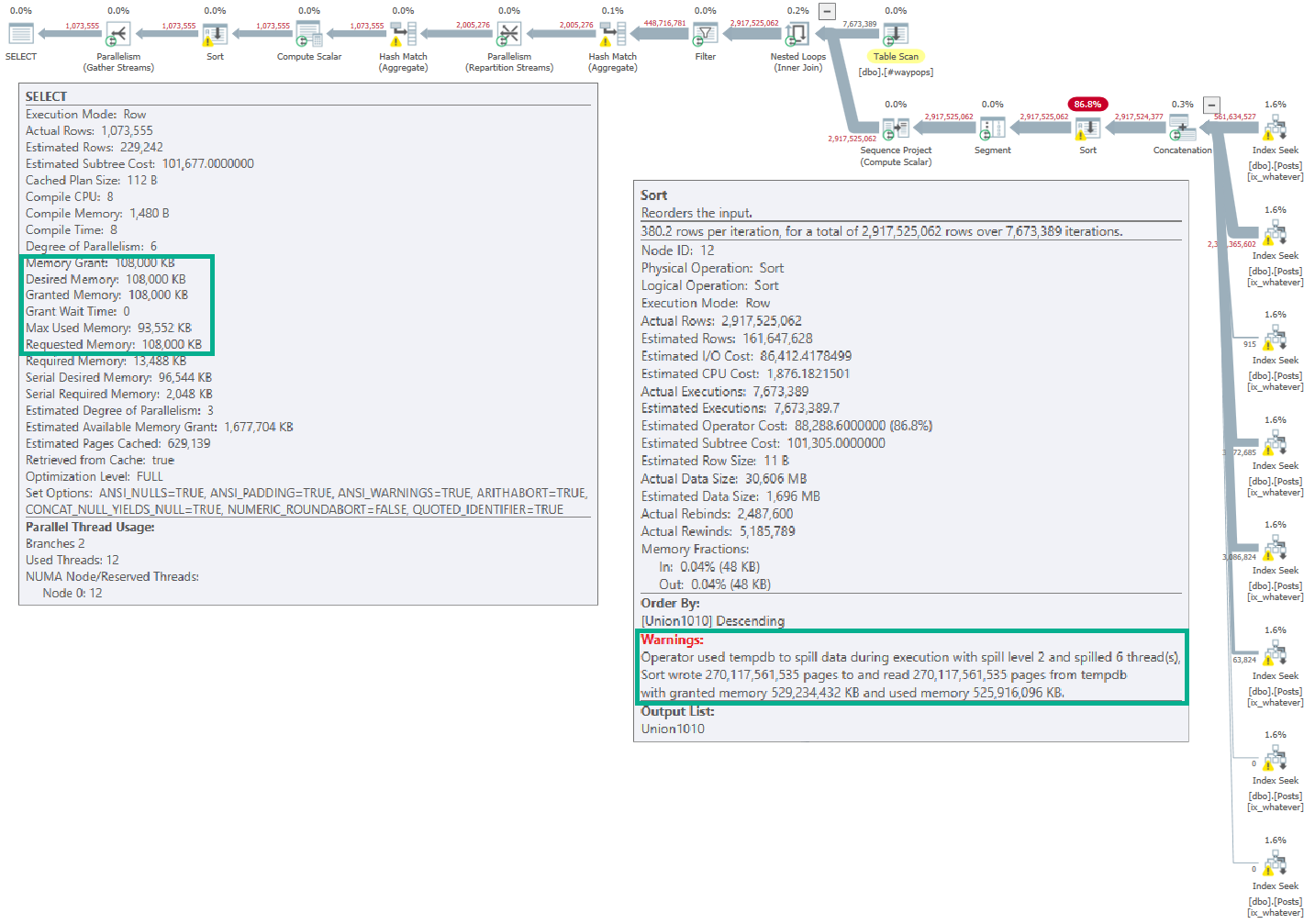
I have no idea if this is a bug or not, but I thought it was interesting. Looking at information added to spills in SQL Server 2016

SQL Server Query Plan

If you open the linked-to picture, you’ll see (hopefully) that the full memory grant for the query was 108,000KB.

But the spill on the Sort operator lists a far larger grant: 529,234,432KB.

This is in the XML, and not an artifact of Plan Explorer.

Whaddya think, Good Lookings? Should I file a bug report?

Thanks for reading!

Going Further


If this is the kind of SQL Server stuff you love learning about, you’ll love my training. I’m offering a 25% discount to my blog readers if you click from here. I’m also available for consulting if you just don’t have time for that and need to solve performance problems quickly.