Step 1: Install the Clippy digital assistant SSMS add-on
Go to github and grab the code. Clippy wants you to be on a recent version of SQL Server so only SQL Server 2022+ is supported.
Step 2: Create your first Clippy alert and schedule it
For illustrative purposes, below is a very basic check that throws an alert if CPU >= 80%
DECLARE
    @CPUFromBuffer INT,
    @LogMessage VARCHAR(100);

select TOP (1) @CPUFromBuffer = record.value('(./Record/SchedulerMonitorEvent/SystemHealth/ProcessUtilization)[1]', 'int')
from (
    select timestamp, convert(xml, record) as record
    from sys.dm_os_ring_buffers
    where ring_buffer_type = N'RING_BUFFER_SCHEDULER_MONITOR'
    and record like '%<SystemHealth>%'
) as RingBufferInfo
ORDER BY timestamp DESC;

IF @CPUFromBuffer >= 80
BEGIN
    SET @LogMessage = 'Your SQL Server is using ' + CAST(@CPUFromBuffer AS VARCHAR(10)) + '% of available CPU.'
    EXEC dbo.AddPaperClipToErrorLog @LogMessage;
END;
Step 3: Trigger the alert
On my local machine with 8 physical cores I can simply run the following query and wait:
 WITH vCTE AS (
      SELECT v.v
      FROM
      (VALUES
      (0),(1),(2),(3),(4),(5),(6),(7),(8),(9),(10),(11),(12),(13),(14),(15),(16),(17),(18),(19),(20),(21),(22),(23),(24),(25),(26),(27),(28),(29),(30),(31),(32),(33),(34),(35),(36),(37),(38),(39),(40),(41),(42),(43),(44),(45),(46),(47),(48),(49),(50),(51),(52),(53),(54),(55),(56),(57),(58),(59),(60),(61),(62),(63),(64),(65),(66),(67),(68),(69),(70),(71),(72),(73),(74),(75),(76),(77),(78),(79),(80),(81),(82),(83),(84),(85),(86),(87),(88),(89),(90),(91),(92),(93),(94),(95)
      ) v(v)
)
SELECT MIN(v0.v + ca.v)
FROM vCTE v0
CROSS APPLY (
      SELECT MIN(v1.v + v2.v + v3.v + v4.v + v5.v) v
      FROM vCTE v1
      CROSS JOIN vCTE v2
      CROSS JOIN vCTE v3
      CROSS JOIN vCTE v4
      CROSS JOIN vCTE v5
      WHERE v1.v > (v0.v - 96)
) ca
OPTION (NO_PERFORMANCE_SPOOL, MAXDOP 8, USE HINT (N'ENABLE_PARALLEL_PLAN_PREFERENCE'));
Normally people handle errors to… handle errors. But I came across someone doing something sort of interesting recently.
Before we talk about that, let’s talk about the more normal way of capturing errors from T-SQL:
CREATE OR ALTER PROCEDURE
    dbo.error_muffler
(
    @i int
)
AS
BEGIN
SET NOCOUNT, XACT_ABORT ON;

    BEGIN TRY

        SELECT
            x = 1/@i;

    END TRY

    BEGIN CATCH
        /*Do some logging or something?*/
        THROW;
    END CATCH;

END;
So if we execute our procedure like this, it’ll throw a divide by zero error:
EXEC dbo.error_muffler
    @i = 0;
Msg 8134, Level 16, State 1, Procedure dbo.error_muffler, Line 12 [Batch Start Line 33]
Divide by zero error encountered.
Well, good. That’s reasonable.
Empty Iterator
What I recently saw someone doing was using an empty catch block to suppress errors:
CREATE OR ALTER PROCEDURE
    dbo.error_muffler
(
    @i int
)
AS
BEGIN
SET NOCOUNT, XACT_ABORT ON;

    BEGIN TRY

        SELECT
            x = 1/@i;

    END TRY

    BEGIN CATCH
        /*Nothing here now*/
    END CATCH;

END;
GO
So if you execute the above procedure, all it returns is an empty result with no error message.
Kinda weird.
Like not having finger or toenails.
Trigger Happy
Of course (of course!) this doesn’t work for triggers by default, because XACT_ABORT is on by default..
CREATE TABLE
    dbo.catch_errors
(
    id int NOT NULL
);
GO

CREATE OR ALTER TRIGGER
    dbo.bury_errors
ON
    dbo.catch_errors
AFTER INSERT
AS
BEGIN
    BEGIN TRY
        UPDATE c
            SET c.id = NULL
        FROM dbo.catch_errors AS c;
    END TRY
    BEGIN CATCH

    END CATCH;
END;
GO
If we try to insert a row here, we’ll get a really weird error message, unswallowed.
INSERT
    dbo.catch_errors
(
    id
)
VALUES
(
    1
);
Womp:
Msg 3616, Level 16, State 1, Line 29
An error was raised during trigger execution. The batch has been aborted and the user transaction, if any, has been rolled back.
If we were to SET XACT_ABORT OFF; in the trigger definition, it would work as expected.
Thanks for reading!
Going Further
If this is the kind of SQL Server stuff you love learning about: these days I have AI do the annoying stuff for me. My new video course teaches you to work the same way, and I teach whole teams in a one-day workshop. Someone still has to know enough SQL Server to keep the robots in check, and that’s what my training is for.
While I still don’t install Azure Data Studio by default, I heard recently from Erin Stellato (t) that there’s a preview of real, live, actual execution plans out now.
Since not having query plans available was one of my chief gripes about ADS, I figured this was a good time to install it.
The pro here is that it looks like the query plan assets are much higher DPI than the ones in SSMS, but… I still can’t picture using it every day just yet.
There’s some key stuff missing, like being able to hide query results, and plan operators don’t show parallelism yet. While I hear that a lot of improvements are on the to-do list, between whatever is going on internally along with the GitHub backlog, I have no idea what the timeline is for them.
A Query Plan In Azure Data Studio
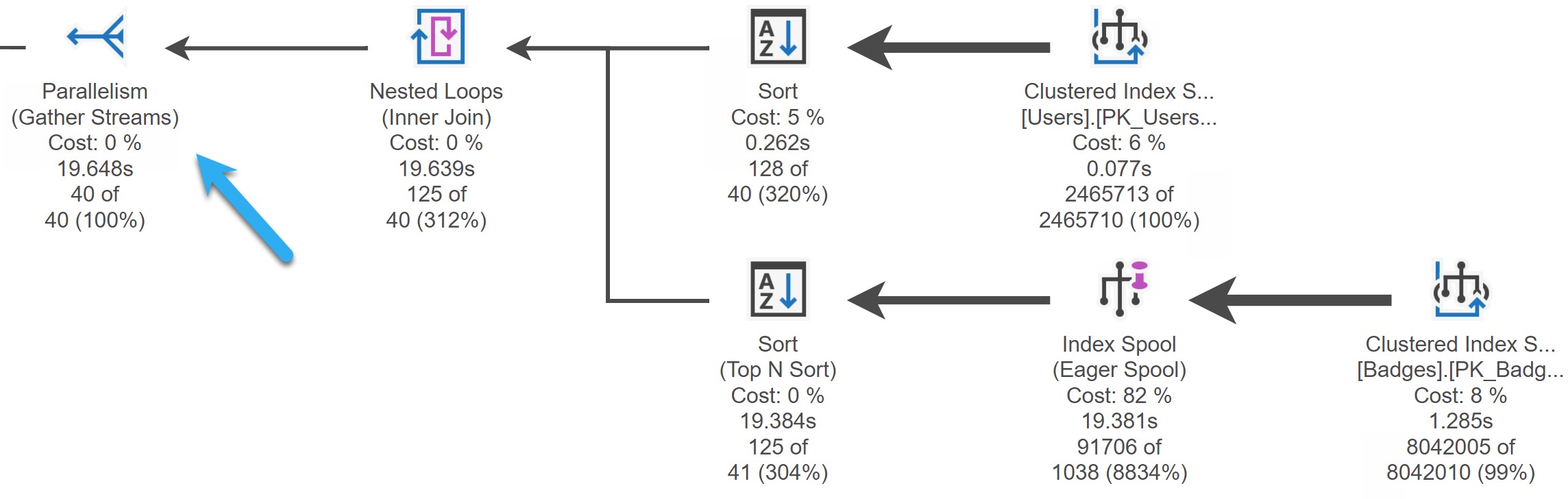
If you enable the workbench editor enable preview setting, you can hit CTRL+M to get an actual execution plan. Here’s what it looks like:
clean and shiny
The arrow is just to point out the the plan does have parallelism engaged, but it is not shown anywhere (yet, I know, I know).
It is cool that you can get the full properties of any of the operators, and that operator times are consistent with what SSMS shows. Also, I like the highly accusatory, Snag-It style arrows here.
The Same Plan In SSMS
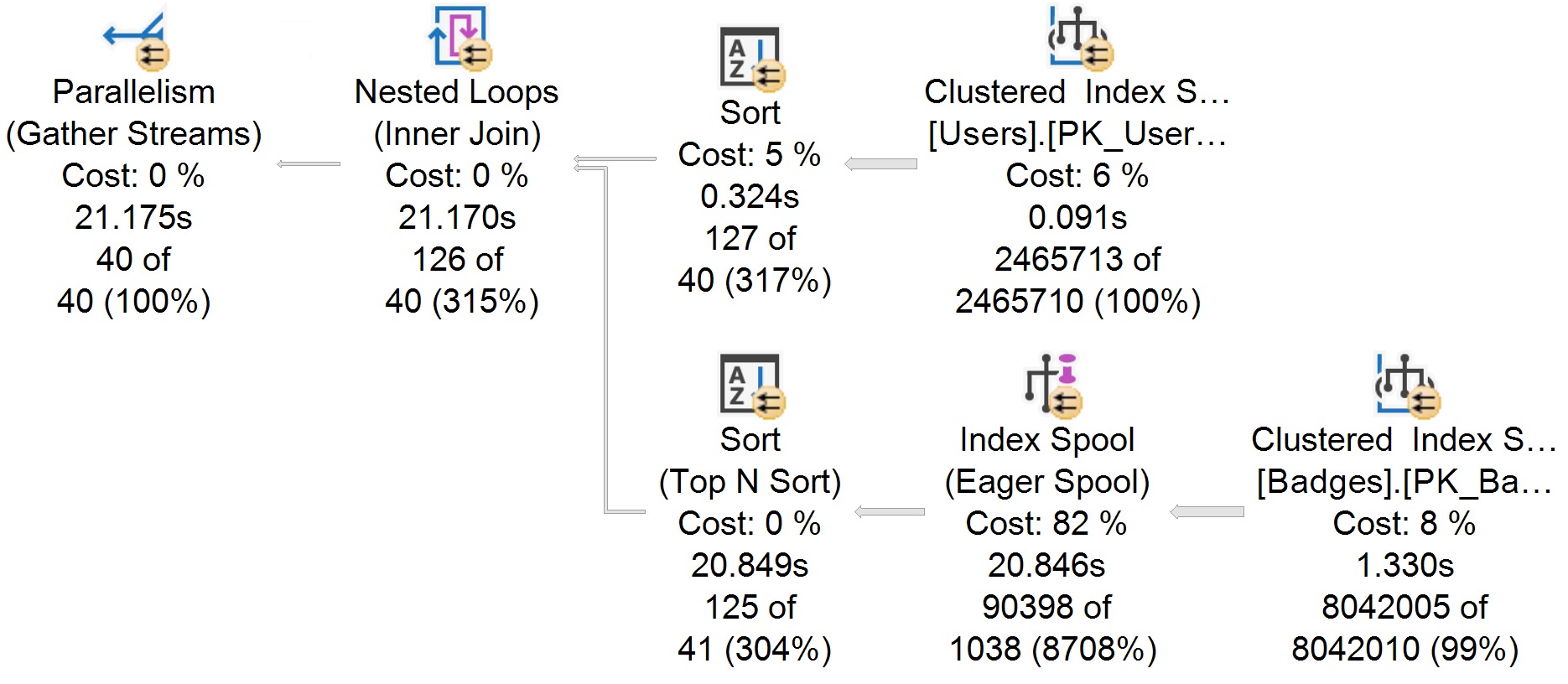
I recently changed the font that my query plans use to one that’s a bit less offensive. The only point here is that in this plan you can see parallelism more easily, and maybe that the operator icons aren’t quite as spiffy.
nice font
Aside from slight variations in CPU timing, the plans are virtually identical. Good!
Kind of.
Six Different Ways
My criticisms of how query plans are displayed are somewhat nit-picky, and I’d even wager that some people might disagree with me on how things should show up.
For example, i think it’s quite confusing that batch mode operators track time differently than row mode operators, and that there’s no real visual indication as to which operators use batch mode. I also very much dislike that in both the ADS and SSMS plans, the index operation is cut off. “Clustered Index S…” doesn’t help anyone.
I’d also find it useful to have an I/O rollup in the root node, where other Query Time Statistics are. But hey.
When you get deeper into things, stuff like a visual indicator of how many times an operator executed, and missing index requests for Eager Index Spools would be nice, too.
Anyway, I’m still not the target audience for ADS (at least so far as I can tell), and I’ll be sticking with SSMS for now, but this is a very nice addition for folks who ADS is more useful for.
Thanks for reading!
Going Further
If this is the kind of SQL Server stuff you love learning about: these days I have AI do the annoying stuff for me. My new video course teaches you to work the same way, and I teach whole teams in a one-day workshop. Someone still has to know enough SQL Server to keep the robots in check, and that’s what my training is for.
I had a client get in touch recently because they thought they had corruption. That’s not normally my cup of tea, but I offered to jump on and take a look.
We got to talking, and they said users had been getting some nasty error messages. Stuff like this:
Msg 2745, Level 16, State 2, Procedure dbo.oh_no, Line 8 [Batch Start Line 13]
Process ID 56 has raised user error 50000, severity 20. SQL Server is terminating this process.
Msg 50000, Level 20, State 1, Procedure dbo.oh_no, Line 8 [Batch Start Line 13]
SCARY THINGS
Msg 596, Level 21, State 1, Line 13
Cannot continue the execution because the session is in the kill state.
Msg 0, Level 20, State 0, Line 13
A severe error occurred on the current command.  The results, if any, should be discarded
I don’t know if you’ve ever seen corruption error messages, but they’re… uh. Look, there’s a reason I send people to Microsoft. It’s $500 well spent.
Thankfully this was just an overzealous new developer who wanted to show people the wonders and miracles of error handling.
If you use RAISERROR with a severity level of 20 or higher, and the WITH LOG clause, it kills the connection. Without the WITH LOG CLAUSE, you won’t get a proper error, and it also wouldn’t enter a CATCH block.
CREATE OR ALTER PROCEDURE dbo.oh_no
AS
SET NOCOUNT, XACT_ABORT ON;
BEGIN

    IF 1 < 2
        BEGIN
            RAISERROR('SCARY THINGS', 20, 1) WITH LOG, NOWAIT;
        END;

END;
GO

EXEC dbo.oh_no;
GO
What you return to people can be mighty confusing. Especially if your application only shows the first error message. Ahem.
Mercy
I’d probably be worried if I started seeing that pop up, too.
Part Two
Only somewhat related to part one, but probably a good time to mention it: If you want RAISERROR to get you to a TRY/CATCH block and throw an error, you have to use a severity 16 or higher and WITH LOG. For instance, this won’t work:
CREATE OR ALTER PROCEDURE dbo.oh_yes
AS
SET NOCOUNT, XACT_ABORT ON;
BEGIN

    IF 1 < 2
        BEGIN TRY

            RAISERROR('IS THIS THING ON?', 10, 1) WITH LOG, NOWAIT;

            SELECT 'NO SHUT UP' AS NO_U;

        END TRY
        BEGIN CATCH
            THROW;
        END CATCH;
END;

EXEC dbo.oh_yes;
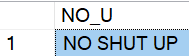
Your code will keep right on chugging along.
Chippy
Despite the fact that an “error” was raised.
Are you German?
You need to give this old hound a higher severity (and WITH LOG) to get it to bark.
RAISERROR('IS THIS THING ON?', 16, 1) WITH LOG, NOWAIT;
Then you get it back in red.
I used to be like you.
Parting
Error handling is good for all sorts of things. You can retry deadlocks, handle and log edge cases, keep loops alive, and more.
RAISERROR is useful for figuring out where you’re at in some logic — and I know, it’s deprecated — but I find using the combination of THROW and FORMATMESSAGE tedious and cumbersome. I don’t want to add things to sys.messages. I don’t want to use two functions instead of one to pretty print some information. What’s the point?
Thanks for reading!
Going Further
If this is the kind of SQL Server stuff you love learning about: these days I have AI do the annoying stuff for me. My new video course teaches you to work the same way, and I teach whole teams in a one-day workshop. Someone still has to know enough SQL Server to keep the robots in check, and that’s what my training is for.
In this video, I delve into error handling within SQL Server cursors, a topic that recently sparked some interest on Twitter. Initially stumped by the challenge, I decided to create a simple table with numbers 0 through 10 to illustrate my point. As we navigate through the code and its execution, you’ll see firsthand how a cursor can get stuck in an infinite loop due to unhandled errors. By adding a `FETCH NEXT` statement within the catch block, I demonstrate a practical solution that allows the cursor to continue processing rows even after encountering an error. This video is not just about solving a specific problem but also serves as a reminder of the importance of robust error handling in stored procedures—especially when working with cursors.
Full Transcript
Don’t make fun of my hair. It’s not funny. It’s not amusing. It is a sad, sad reality that I’m living in, that we’re all living in, living through, hopefully living through, surviving in these trying times. So let’s talk about error handling in cursors because there was a spec a spec of interest on Twitter about seeing something about this. So this is funny because I was stumped by this. I was stumped by this and I was staring at it for a while, just not being able to figure it out. So what I’m going to do is create a table with the numbers 0 through 10 in it. So when we look at the results of just the select query, we’re going to start at 0 and kind of count up to 10. Alright, so let’s put that in the table, right? I guess we’ll select star from the table just to prove them. I hope select star isn’t too rough on this single column. Maybe I should add a computed column to stop myself from doing that. I don’t know. I’m undecided on that. 0 through 10. So that’s 11 rows altogether, right? Sort of confusing when you see 1, 0, and then 11, 10 down there. At least it is for me, but I’m kind of dumb. So, you know, I have that going for me. So what I originally started this, I was working on something.
I mean, it was a similar setup. You know, I was doing everything right, too. I was using a cursor and I was using a table variable for all the right things, right? So I was using a table variable to catch errors and I was using a cursor to iterate over something that I shouldn’t, like it was not a set-based thing that I could have just used a window function for. It was actually something that should be iterated over. It was re-enabling untrusted foreign keys and I figured, hey, what better use for a cursor than enabling foreign keys. So what I have here in my setup is some dynamic SQL. I just have this little variable in here to throw it away because I don’t want to return the table results.
I just want to look at the messages tab and show you what’s going on. Then I have this thing over here, which is going to catch this query inside of the cursor. I’ll get to that in a minute. And then I have a table that is going to catch error messages. And what I’m going to do after that is open my cursor and fetch everything into my variable here.
And then, of course, we’ll fetch status equals zero. I am going to print out my message with raise error. I’m going to execute my dynamic SQL and then I’m going to try to fetch next into my variable. variable. And I’m doing this inside of a try-catch block because, you know, working on SP underscore human events, I have gotten quite enamored with the old begin-try, begin-catch.
Because error handling is, I think, pretty valuable when you’re working with a big store procedure, right? Knowing exactly where something happened, where the error was, what the error was, like what was going on. That’s really, really valuable stuff. And I know there’s, you know, a certain amount of error handling that is just like, you know, maybe overboard.
But what the hell? You know, I like going overboard once in a while. You know why I like going overboard? Because it beats the crap out of being on a cruise ship. That’s why. So let’s, without too much further time wasting, let’s run this whole thing.
And let’s look at what happens. Now, if you go over to the Messages tab, you’re going to notice, I think, what I noticed. And, I mean, the first thing you’re going to notice is I forgot to set no count on. So we’re going to get this one row back. But the other thing is that we kept getting the same error over and over again.
We were stuck in an infinite loop. We did not just get 11 rows back because we moved on to the next one. We got, I don’t know, however many this one. I’m not counting. Are you crazy? But we kept hitting, we would keep hitting this error over and over again.
We would keep dividing by zero and we would never move on. Now, the way around this is to double up on our fetch next. And we actually need to take this right here and we need to put another version of it inside of the catch block.
And now when I run this whole thing and I declare my cursor and I step through, what am I going to get? I’m going to get a row back from my error catching table variable. And over in the Messages tab, I’m going to get this, right, where we divided by zero and we affected one row.
We got an error and then we went through and we did a bunch of stuff that actually would divide, right? And then we got this and, you know, I don’t know. We got one row effect. I don’t really know. I don’t really care.
That’s probably the select over here, right? But then back in that error catching table, we got the error number, the error severity, the error state, and the divide by zero and the error message, which is divide by zero encountered. So there we go. That’s that.
That’s how you do error handling inside of a cursor and still have your cursor make forward progress. If you only have the fetch next here, you’re just going to get stuck in an infinite loop. But if you put a fetch next in the catch block, you will catch the error and then move on.
And then you will start back here. Now, what I thought was a little weird about this is maybe like the fetch status thing, like not bailing out, but I don’t know.
Maybe I don’t understand cursors. There’s a lot I don’t understand. Maybe cursors is one of those things that I will just hopefully never understand. Or maybe I want to understand them.
I don’t know. Maybe my next training module will be all about the wonders of cursors. Wouldn’t that be fun for you? Thanks for watching.
Going Further
If this is the kind of SQL Server stuff you love learning about: these days I have AI do the annoying stuff for me. My new video course teaches you to work the same way, and I teach whole teams in a one-day workshop. Someone still has to know enough SQL Server to keep the robots in check, and that’s what my training is for.
If you wanna play with the code I used to try things out on your own, here it is:
CREATE TABLE zero_ten (id INT NOT NULL PRIMARY KEY);

INSERT dbo.zero_ten ( id )
SELECT 0 AS id
UNION ALL
SELECT TOP (10) ROW_NUMBER() OVER(ORDER BY 1/0)
FROM sys.messages AS m

SELECT * FROM dbo.zero_ten AS zt;
RETURN;

DECLARE c CURSOR LOCAL STATIC FOR
SELECT N'DECLARE @atmosphere INT; SELECT @atmosphere = 1/' + RTRIM(zt.id)
FROM dbo.zero_ten AS zt;

DECLARE @joydivision NVARCHAR(MAX) = N'';
DECLARE @errors TABLE
(
    id INT PRIMARY KEY IDENTITY,
    error_number INT,
    error_severity INT,
    error_state INT,
    error_message NVARCHAR(MAX)
);

OPEN c;
FETCH NEXT FROM c
INTO @joydivision;

WHILE @@FETCH_STATUS = 0
BEGIN
    BEGIN TRY
        RAISERROR(@joydivision, 0, 1) WITH NOWAIT;
        EXEC sys.sp_executesql @joydivision;
        FETCH NEXT FROM c INTO @joydivision;
    END TRY
    BEGIN CATCH
        INSERT @errors ( error_number, error_severity, error_state, error_message )
        SELECT ERROR_NUMBER(), ERROR_SEVERITY(), ERROR_STATE(), ERROR_MESSAGE();
        --FETCH NEXT FROM c INTO @joydivision;
    END CATCH;
END;

SELECT *
FROM @errors AS e;

CLOSE c;
DEALLOCATE c;
GO