As a procedure, sp_WhoIsActive is pretty perfect. It’s not all things to all people, but it does what it’s supposed to do really well.
One thing I really like about it is that you can change a couple things about the way it returns data to you (or to a logging table) in different ways:
The set of columns
The sorting of columns
There are definitely good uses for these options, especially when you’re beyond the “what the hell is going on here?” phase and on to the “troubleshooting a specific problem” phase.
Just as a couple examples, if you were specifically troubleshooting:
tempdb issues, you’d wanna sort and focus on tempdb related columns
blocking issues, you’d wanna sort and focus on blocking related columns
Let’s take a look at how to do that.
Focus On tempdb
If you want to focus on just what’s using a lot of tempdb without any other noise, and you want to find out what’s using the most tempdb right at the top, you can do this:
Sort the results by what currently has the most stuff in tempdb
Only output columns related to tempdb use with some other identifying details
What’s nice about this is that not only does it help you totally focus right in on what you care about.
And if you’re taking screenshots to document what hellish things are happening, you don’t have to spend a bunch of time editing them to cut distractions out.
Focus On Blocking
This is one I use a whole bunch when clients are hitting blocking issues.
Finds which queries have the most blocked sessions under them
Sort the results by which sessions are doing the most blocking
Gets additional information about the session, like isolation level, locks, etc.
Only outputs columns you need to see relevant blocking details
If you don’t have an extended event session set up to capture blocking and stuff like that, this is a great way to get a lot of the same information on the fly.
What You Do
There are probably other variations on this that would be useful to you at various times. These are just to get you started.
Meaning, if you were troubleshooting high CPU, it might make sense to sort by that descending or something.
Thanks for reading!
Going Further
If this is the kind of SQL Server stuff you love learning about, you’ll love my training. Blog readers get 25% off the Everything Bundle — over 100 hours of performance tuning content. Need hands-on help? I offer consulting engagements from targeted investigations to ongoing retainers. Want a quick sanity check before committing to a full engagement? Schedule a call — no commitment required.
Let’s say for the sake of argument that @table variables were always more “in-memory” than #temp tables (they’re not). They’d still have a lot of the same fundamental problems:
With all that stuff in mind: who cares if they’re only in memory? There are so many downsides for most query patterns, they could all happen in quantum space and performance would still stink.
And here’s the other thing: Most of y’all don’t have enough memory to begin with, and the memory you do have you misuse in a million ways. Why do you wanna make that worse?
Thanks for reading!
Going Further
If this is the kind of SQL Server stuff you love learning about, you’ll love my training. Blog readers get 25% off the Everything Bundle — over 100 hours of performance tuning content. Need hands-on help? I offer consulting engagements from targeted investigations to ongoing retainers. Want a quick sanity check before committing to a full engagement? Schedule a call — no commitment required.
I solve a lot of problems with #temp tables, indeed I do. And I hate people who are reflexively anti-#temp table.
If you’re into jokes (I’m definitely not into jokes; SQL is serious business), you could even call them #foolish.
Get it?
Ahem 🎤👈
However (!) I learned a lesson recently about how using them in certain ways can cause weird plan cache pollution.
When you’re hitting the issue, the optional_spid column in dm_exec_plan_attributes will be populated with a non-zero value. You can use this query to quickly check for that happening on your system:
SELECT
    pa.attribute,
    pa.value,
    decp.refcounts,
    decp.usecounts,
    decp.size_in_bytes,
    decp.memory_object_address,
    decp.cacheobjtype,
    decp.objtype,
    decp.plan_handle
FROM sys.dm_exec_cached_plans AS decp
CROSS APPLY sys.dm_exec_plan_attributes (decp.plan_handle)  AS pa
WHERE pa.attribute = N'optional_spid'
AND   pa.value > 0;
Let’s talk about those!
Creating Across Stored Procedure Executions
Check out this piece of code:
CREATE OR ALTER PROCEDURE
    dbo.no_spid
AS
BEGIN
    SET NOCOUNT ON;

    CREATE TABLE #t (id int);
    INSERT #t (id) VALUES (1);

    EXEC dbo.a_spid; --Hi

END;
GO


CREATE OR ALTER PROCEDURE
    dbo.a_spid
AS
BEGIN
    SET NOCOUNT ON;

    CREATE TABLE #t (id int);
    INSERT #t (id) VALUES (2);

END;
GO
In the first procedure, we create a #temp table, and insert a row, then execute another procedure, where we create a #temp table with the same name and insert a row.
The second #temp table doesn’t have to have the same definition here, only the same name. I’m just re-using the definition out of convenience.
Using the above query, we’ll see this:
polluted
And if we run sp_BlitzCache, we’ll indeed see multiple plans for a_spid, though no_spid seems to get plans associated with it because the plans are hashed to the same value. Heh. That plan cache… 🙄
diamonds are forever
Referencing Across Stored Procedure Executions
Check out this code:
CREATE OR ALTER PROCEDURE
    dbo.internal
(
    @c bigint
)
AS
BEGIN
SET NOCOUNT ON;

    CREATE TABLE #t(id int);
    INSERT #t (id) VALUES (1);

    SELECT
        @c = COUNT_BIG(*)
    FROM #t AS t
    WHERE 1 = (SELECT 1);

    EXEC dbo.not_internal 0; --Hi

END;
GO

CREATE OR ALTER PROCEDURE
    dbo.not_internal
(
    @c bigint
)
AS
BEGIN

    INSERT #t (id) VALUES (2);

    SELECT
        @c = COUNT_BIG(*)
    FROM #t AS t
    WHERE 1 = (SELECT 1);

END;
GO
We’re creating a #temp table in one stored procedure, and then executing another stored procedure that references the same #temp table this time.
Just like above, if we execute the procedures across a couple different SSMS tabs, we’ll see this:
scope
And from the plan cache:
heearghh
Same thing as last time. Multiple plans for not_internal. In both cases, the outer stored procedure has an optional_spid of 0, but the inner procedure has the spid that executed it attached.
Dynamic SQL
My fellow blogger Joe Obbish came up with this one, which is really interesting. It’s necessary to point out that this is Joe’s code, so no one asks me why the formatting is so ugly 😃
CREATE OR ALTER PROCEDURE no_optional_spid AS
BEGIN
    CREATE TABLE #obj_count (
    [DB_NAME] SYSNAME NOT NULL,
    OBJECT_COUNT BIGINT NOT NULL
    );

    DECLARE @db_name SYSNAME = 'Crap';

    DECLARE @sql NVARCHAR(4000) = N'SELECT @db_name, COUNT_BIG(*)
    FROM ' + QUOTENAME(@db_name) + '.sys.objects';

    INSERT INTO #obj_count
    EXEC sp_executesql @sql, N'@db_name SYSNAME', @db_name = @db_name;
END;
GO

CREATE OR ALTER PROCEDURE has_optional_spid AS
BEGIN
    CREATE TABLE #obj_count (
    [DB_NAME] SYSNAME NOT NULL,
    OBJECT_COUNT BIGINT NOT NULL
    );

    DECLARE @db_name SYSNAME = 'Crap';

    DECLARE @sql NVARCHAR(4000) = N'INSERT INTO #obj_count
    SELECT @db_name, COUNT_BIG(*)
    FROM ' + QUOTENAME(@db_name) + '.sys.objects';

    EXEC sp_executesql @sql, N'@db_name SYSNAME', @db_name = @db_name;

END;
GO
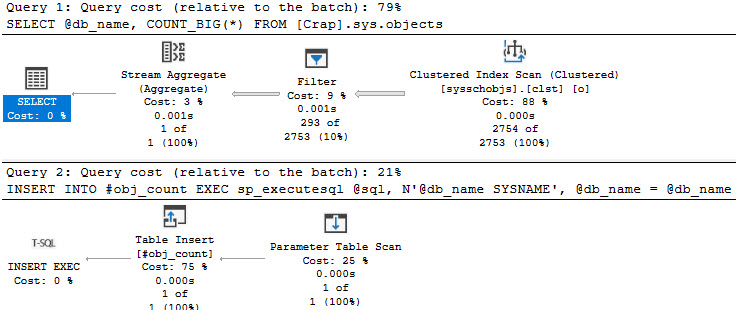
In this case, we have two procedures that create a #temp table with the same name, and insert into them with dynamic SQL. I have a feeling that this would also occur under other circumstances where you use the INSERT…EXEC paradigm, e.g. a stored procedure.
Same deal here, if we look at the same things, except that it’s more helpful to look at the execution_count column in sp_BlitzCache.
BOBBY
And…
SUZIE
Everything has 200 executions, except the internal parameter table scan that does the #temp table insert:
fodder
5k Finisher
This post explores a few scenarios where the *optional_spid* cache pollution does happen. There are likely more, and I’m happy to add scenarios if any readers out there have them.
There are plenty of scenarios where this scenario doesn’t happen, too. I don’t want you to think it’s universal.
It really only happens when #temp tables have identical names, or you reference any #temp table across two or more execution scopes. In these examples, the execution scopes are stored procedures and dynamic SQL.
I tried a bunch of stuff that I thought would cause the problem, but didn’t.
So yeah. Love your #temp tables, too.
Thanks for reading!
Going Further
If this is the kind of SQL Server stuff you love learning about, you’ll love my training. Blog readers get 25% off the Everything Bundle — over 100 hours of performance tuning content. Need hands-on help? I offer consulting engagements from targeted investigations to ongoing retainers. Want a quick sanity check before committing to a full engagement? Schedule a call — no commitment required.
I got a very interesting issue about sp_HumanEvents recently, and I couldn’t quite figure out why things were going wonky.
The problem was that at some point when monitoring blocking long-term, something was taking up a whole lot of tempdb.
I’m gonna say up front that the problem was using a recompile hint with LOB variable assignment in a loop. That doesn’t mean you should avoid any one of those things, but be careful when you use them in concert.
This post wouldn’t be possible without my friends Joe and Paul, who helped me track down the issue and with the internals of it.
Thumper
Rather than make you go through running and causing blocking, the issue is reproduced through this demo:
DECLARE @lob nvarchar(max) = N'x';
DECLARE @x xml = N'<x>' + REPLICATE(@lob, 1024 * 1024) + N'</x>';
DECLARE @loop integer = 0;
DECLARE @t table (x nvarchar(1));

WHILE @loop < 5
BEGIN

    INSERT
        @t
    (
        x
    )
    SELECT
        x = @x.value('(./x/text())[1]', 'nvarchar(1)')
    OPTION (RECOMPILE);

    DELETE @t;

    SELECT
        ddtsu.internal_objects_alloc_page_count,
        ddtsu.internal_objects_dealloc_page_count,
        internal_object_reserved_page_count =
        (
            SELECT
                SUM(internal_object_reserved_page_count)
            FROM tempdb.sys.dm_db_file_space_usage
        )
    FROM sys.dm_db_task_space_usage AS ddtsu
    WHERE ddtsu.session_id = @@SPID;

    SET @loop += 1;
END;
The trick here is to run it with the recompile hint available, and then quoted out.
Jumper
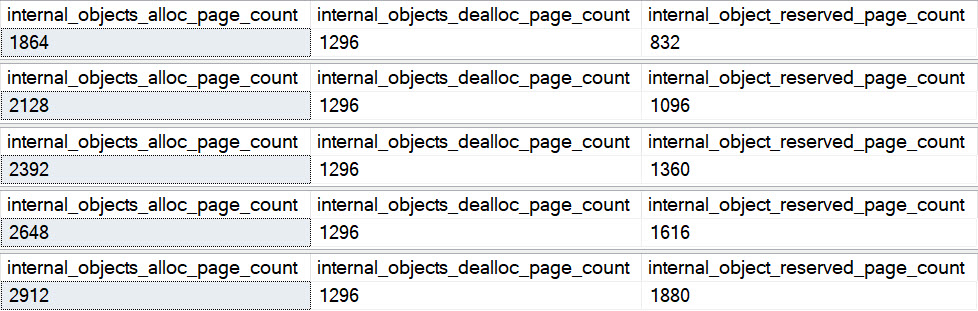
With recompile available, this is the result:
denial
The internal objects keep going up, except the deallocated number. That’s the column in the middle.
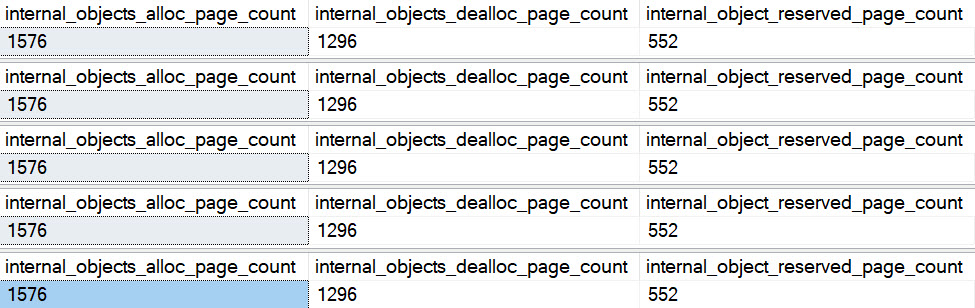
With recompile quoted out, the numbers are a lot different.
When it’s allowed, tempdb objects get cleaned up at the end of the statement.
When it’s not, it gets cleaned up at the end of the batch.
This has been reported to Microsoft for some analysis. Hopefully there’s some remedy for it in the future.
Thanks for reading!
Going Further
If this is the kind of SQL Server stuff you love learning about, you’ll love my training. Blog readers get 25% off the Everything Bundle — over 100 hours of performance tuning content. Need hands-on help? I offer consulting engagements from targeted investigations to ongoing retainers. Want a quick sanity check before committing to a full engagement? Schedule a call — no commitment required.
This post is admittedly short, but since we’re short of First Party Solutions™ to gripe to Microsoft with… I need to save this stuff somewhere.
You get 12 tempdb files, even if your instance has 16, 24, 32, 40, 64, or 80 cores
There’s no way to turn on in-memory tempdb
death of auto tune
If your workload is tempdb-heavy, and you have a special configuration for it on-prem, you might have a tough time moving it to Managed Instance. Also consider that disk performance (even though tempdb is “local”) is garbage, and you can’t do anything about it.
I think the lack of in-memory tempdb is odd too, since many features are cloud-first. One may wonder aloud why a performance feature that’s a couple years old now still isn’t available in flagship business critical cloud offerings.
It was only recently (September 2021) that scalar UDF inlining became available up in Azure SQL DB and Managed Instance.
Who’s really on the cutting edge? All those stodgy holdouts hanging about in their earthly garb.
Thanks for reading!
Going Further
If this is the kind of SQL Server stuff you love learning about, you’ll love my training. Blog readers get 25% off the Everything Bundle — over 100 hours of performance tuning content. Need hands-on help? I offer consulting engagements from targeted investigations to ongoing retainers. Want a quick sanity check before committing to a full engagement? Schedule a call — no commitment required.
I was helping a client troubleshoot a scalability issue recently, where during one point in their workload tempdb went out of control.
What was puzzling them was that nothing in the stored procedure did anything with temporary objects, cursors, or any of the other obvious things that go to el baño público. And the query plan itself was a pretty simple little loopy thing.
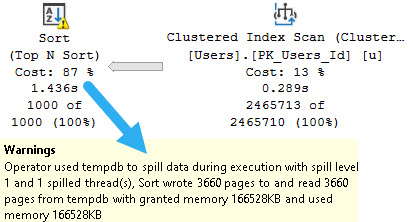
Despite the fact that the query was only passing around 7 rows, we were getting a one row estimate, and there was a spilling Sort operator.
Chance Of Cloudballs
There were a couple compounding issues here, of course, like that their database is hosted in the cloud.
It doesn’t matter which cloud you talk about, this is a problem they all have and I see people face constantly.
I/O sucks, up there.
It was a lot harder to get this to repro on my local hardware, because I have very nice drives.
Let’s take a look!
Bleak
If I run this query, it’ll spill a little bit. I have the MAXDOP 1 hint on there to artificially slow it down. Without that, the fast query and I/O make the contention harder to hit.
SELECT TOP (1000)
    u.Id
FROM dbo.Users AS u
ORDER BY u.Reputation
OPTION(MAXDOP 1);
just like me
I stuck it in a stored procedure to make calling it from ostress a little bit easier.
No Return
After running for a bit, eventually we hit GAM contention:
tuesday
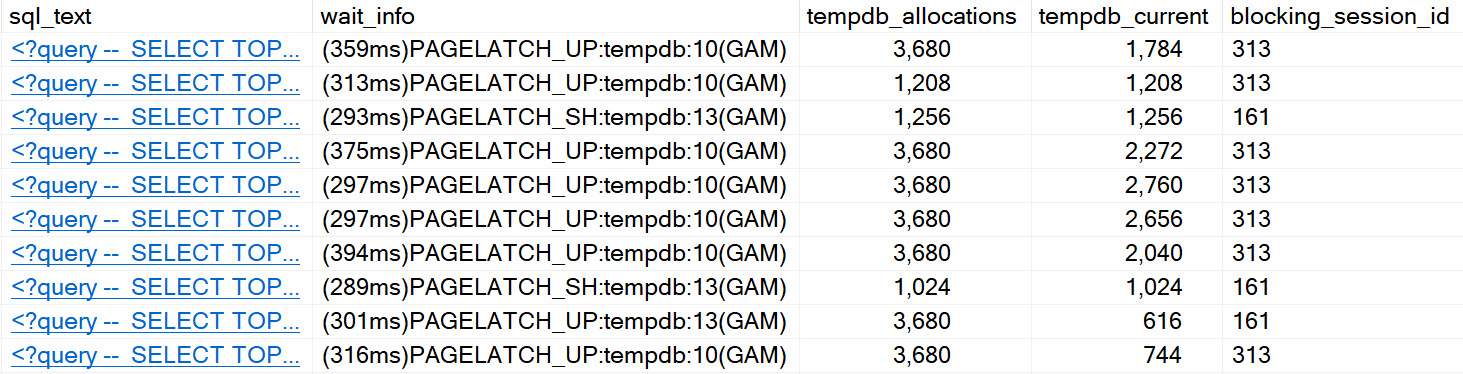
We can see all the classic signs of tempdb contention, arising from spills.
It’s worth noting that enabling in-memory tempdb seems to alleviate this issue for the most part. I’d show you a picture of that, but it’s not worth 1000 words.
Fixing The Spill
Normally, I wouldn’t bother fixing a spill of that size, but in this case it was worthwhile because it was harming concurrency.
The quick fix was to add a MIN_GRANT_PERCENT hint. The long-term fix is to add an index to support the Sort operation.
There are many reasons why a spill may occur. Poor estimates are quite common, but the reason for that poor estimate has about a billion potential root causes.
Even if your query gets enough memory, sometimes you may still see spills because certain operators had to share memory.
It’s a wild world.
Thanks for reading!
Going Further
If this is the kind of SQL Server stuff you love learning about, you’ll love my training. Blog readers get 25% off the Everything Bundle — over 100 hours of performance tuning content. Need hands-on help? I offer consulting engagements from targeted investigations to ongoing retainers. Want a quick sanity check before committing to a full engagement? Schedule a call — no commitment required.
In this video, I delve into an interesting scenario comparing the performance of a stored procedure using a temp table versus one utilizing a table variable under high concurrency in SQL Server 2019. Surprisingly, despite the usual criticisms of table variables, my tests showed that they outperformed the temp table by nearly 30 seconds. However, I also explore the new feature introduced in SQL Server 2019—tempDB metadata being stored in memory—which was supposed to enhance performance further. Unfortunately, this feature didn’t provide a significant boost for either method during my tests. The video concludes with a hopeful note, suggesting that once everyone upgrades to SQL Server 2019, the use of temp tables could become more widespread and efficient, potentially leading to an end to my current dead-end job at Erik Darling Data. Who knows, maybe I’ll find myself sipping cocktails on a beach in Bora Bora instead!
Full Transcript
Erik Darling here, still stuck in this dead-end job at Darling Data, or Erik Darling Data, whatever that idiot named the company. And I think, was it a week ago? Maybe it was a week ago. It could very well have been a week ago. I recorded a video showing a race between a store procedure that uses a temp table and a store procedure that uses a table variable under very high concurrency, and found, interestingly, that the much maligned table variable did indeed get off to, did indeed cross the finish line much, much faster. And it’s full 30 seconds faster. But of course, you know, table variables do have a lot of downsides. And I covered them in that video. But you know, there’s stuff that, there’s stuff about them that can be unattractive at times. And SQL Server 2019 offers us this lovely new feature feature, where we can put some tempDB metadata in memory. By in memory, I mean using the Hecatonish in memory file group stuff for some of the views in tempDB. There’s lots of information about which ones are in there. And I have a feeling that more are going to end up there. So I’m not going to list them all now because that list will quickly be inaccurate. And I don’t want I don’t I don’t need any more inaccuracies in my in my video.
So I’m just going to leave that alone. You can you can read whatever current documentation or whatever documentation is current when you watch this, because you are going to watch this because you have no choice because you are also stuck in your dead end job. Just not a darling, Eric, darling, darling, Eric data. Dead. So just to recap a little bit what we do here, we have our first store procedure up here that uses a temp table, we create a temp table, we insert some stuff into the temp table, and then that’s it. We just create it jumping in. That’s all. And then one down here, where we declare a table variable, and insert into the table variable. And then that’s it. That’s that’s all we do.
It’s the end of the road. To wrap those up nice and neat and make calling them from an outside application easier. I have this store procedure that wraps both of them in up and gets us a number to pass into them. And then executes one or the other based on whatever we pass in here. So we’re going to So if we do that, we do that. If we do that, we do that. Good. So what I have SQL Server 2019 is of course, this lovely, lovely new setting. Tim DB metadata memory optimized, our value in use is one that means it’s been enabled. And now let’s see how things turn out this time around.
This time, though, I want to run the table variable test first, because I want to see if we can do any better. So remember, remember last time, this finished in about eight seconds. So let’s see if the in memory stuff helps the temp table variable. So I’m going to hit that. I’m going to go over to this window when SP who is active and just kind of watch stuff go through in the weight info column is still going to be remarkably empty. And we are done. How long did that take? That took 7.599. So I don’t know what is that a 400 millisecond or so difference. I don’t know. I don’t think that that was very helpful.
So it looks like table variables are still still fast, but the new feature doesn’t really help them spin any faster. Now let’s go back and let’s test temp tables because remember last time temp tables took about 38 seconds, nearly 40 seconds to run. So let’s get who is active ready. Let’s clear that screen. So we have no bias or judgment going on there.
And we’ll kick that off and let’s see what SP who is active tells us. Ooh, the weight info column here is no, we are not seeing all those page latch EX weights. And we’re going, we’re going, and we’re done. And that was not 38 seconds, was it?
That was 11.7 seconds. So pretty cool that under real high concurrency, we can get much better. Tempt table performance from SQL Server 2019 with our fancy in memory, temp DB metadata feature. So that’s nice. I like that. I enjoy that.
And I look forward to, you know, being able to use temp tables all willy nilly as soon as everyone just goes ahead and goes, goes ahead and upgrades 2019 or all your problems are solved. And you probably won’t even, probably won’t even need me anymore.
I can go, go pursue my dreams of getting out of this dead end job. And I don’t know, maybe I’ll, maybe I’ll open a bar on the beach in Bora Bora. And we’ll look into that.
And we’ll look into that. we’ll look into that. So,
Going Further
If this is the kind of SQL Server stuff you love learning about, you’ll love my training. Blog readers get 25% off the Everything Bundle — over 100 hours of performance tuning content. Need hands-on help? I offer consulting engagements from targeted investigations to ongoing retainers. Want a quick sanity check before committing to a full engagement? Schedule a call — no commitment required.
In this video, I delve into the often misunderstood world of table variables in SQL Server, exploring their uses and benefits, particularly when dealing with high concurrency and frequent execution. Using a series of stored procedures to test both temp tables and table variables, I demonstrate how these objects perform under stress using RML Utilities’ O Stress tool. The results show that while temp tables can lead to significant contention and slower performance due to their serialization issues, table variables shine in scenarios requiring quick, parallel query execution. This video aims to provide clarity on when it’s appropriate to use table variables over other temporary storage options, highlighting the importance of choosing the right tool for the job based on your specific workload requirements.
Full Transcript
Erik Darling here with Erik Darling Data, named one of the top 1001 sexiest SQL Server consulting companies in the world by BeerGut Magazine. And on this lovely Sunday, and it is Sunday, and so am I, I am enjoying a GinFizz of sorts. Mmm. Mmm. What a delicacy. Today we’re going to talk about when you should use table variables. Table variables get sort of an understandably bad rap for a lot of reasons. You know, you get the forced serialization when you modify them, you get the crappy estimates unless you recompile or throw some hokey trace flags at them. You get the the, um, what do you call it? What was the other one? There was another good one I had. Oh yeah. SQL Server has no idea what’s in them. Not only does it have no idea how much is in them, but it has no idea what the contents of that much is. And that’s not good. Often not good when we care about things like queries that have good cardinality estimates and perform well and plan shape makes a, makes a huge difference. But, uh, they’re there for a reason. They, they do not exist just to make consultants money finger wagging at you. Poor people who are there for a reason. They do not exist just to make consultants money finger wagging at you. Poor people who are there for a reason. They do not exist just to make consultants money finger wagging at you.
Who, who, who keep using them for no particular reason. Uh, they do exist for a good reason. And, uh, I’ve, I’ve talked a little bit about how they help when you, uh, have very high frequency execution for queries. Uh, but what I didn’t explore then was, uh, what happens when you also have very high concurrency along with the high frequency execution. And that’s what we’re going to look at today. Now I am going to use a, uh, a couple store procedures. that I used, uh, in the past to look at how these two different types of objects perform. Uh, one of them is a temp table test. And, um, you know, I know it’s not maximally, maximally realistic, but that’s fine. Cause all it has to do is show you behavior. Not everything is going to be a hundred percent true to life, real world. This is what happened demo this, but it just shows you what happens in the real world when you use different objects for different purposes. And this is the whole point. Thanks for watching. I’m just going to leave now, go enjoy my, my gin fizz. So this, uh, this one here is a temp table tester and we create a temp table. I don’t know how I missed a semi colon. There’s a sloppy of me. It’s been gone. It’s going to kill me next time I see him and I get assassinated. Uh, actually no, it’s not even my fault. Cause I, I use SQL prompt and I hit, uh, insert semi colons. And I don’t know what, what was going on with that. I don’t know. Maybe SQL prompt is dumb, but all this does is create a temp table. Uh, insert into the temp table and then we’re done with it. Uh, this one down here, look, see this, the semi colons here. I don’t know what, what the H E double, double doglegs happened.
No, but this one declares a table variable and then does the exact same thing. Now, of course, we have to pass something in to these store procedures and, uh, I don’t want to have to do that in a weird way. So what I did is I wrote a wrapper store procedure, uh, for, for these things. And, uh, it’s called the temp test wrapper. You know, I’ll have all this code somewhere. I mean, probably, probably in the blog post. I’m not going to stick all the code in the YouTube description. That’s annoying.
Uh, but it’ll be, it’ll, it’ll accompany the blog post along with some links to other things that I’ve written about table variables in the past. Uh, including the miraculous video where I, I test running these store procedures in a loop. Won’t that be fun for you? Uh, so yeah, so this thing, uh, declares a, uh, declares a variable and, uh, we set that variable to some random number between, uh, uh, one and the max ID in the post database, which is first exact overflow 2013 is currently 2119501.
In case you had trouble reading that number. And then, uh, you know, with the test procedure is, oh, you know, uh, temp, temp table test, then we’ll run temp table test. And if the test proc that we pass in up here is that, then we’ll run that. And I guess I should, I mean, I don’t really need to make it unicode. I guess I, I guess I should for completeness, right?
And make sure I don’t go against any of my, any of my own best practices mismatching data types. Not that this is going to matter, but whatever. I don’t want to get hoisted by my own petard or whatever that’s called unitard. Um, but you know, if we run these things, we get query plans turned on over here.
If we, uh, if we test these things out and run them, uh, we will get an execution plan that, uh, accurately portrays what we wanted to do. We have an insert into our pound sign temp table and then insert into our at sign table variable. We are all good. So what I’m going to do next is run use O stress from the lovely and talented RML utilities.
And I’m going to use that to, uh, run a bunch of concurrent threads 1000 times. So 300 sessions for 1000 iterations. And I just want to make a lot of busy work for the server. There’s no other point to it. Just plain busy work.
And let’s go over here and let’s, uh, plug that into. Oh, stress and get off that off and running. And let’s come over to here to SP who is active.
And we’re going to use this get task info parameter to get, uh, additional weight stat information. We see a whole bunch of page latch EX weights. And if we run this a whole bunch of times, uh, that’s what we’re just going to see piling up, right? Maybe they’re not terribly long.
Maybe this is no, not the worst, but you know, we can obviously see the, the tempDB contention occurring. We can see SQL Server trying to figure out where to put stuff, where things go, where do you belong? Um, I don’t know.
I don’t know where to go anymore. So if we keep running this, we’re just going to keep seeing it, right? It’s obvious signs of contention. Now, if, uh, we have code where it matters that, uh, that like, you know, what, what we’re putting into our, our temp table, we might just have to deal with some of that contention.
We might just have to, you know, live with it because we might need some of the, uh, the benefits of temp tables that table variables don’t have. You can put data into them in a, in a parallel query. You can, uh, you can create indexes on them that actually make a big difference because, you know, you get statistical information, you get all accurate.
Well, I mean, you know, usually accurate row counts. So there are some, you know, kind of iffies around, um, uh, temp tables getting cached and stored procedures. But as I always say, if that is your biggest problem, you should just go on vacation and find a new job where you will have interesting problems to solve again. Uh, but if you look, that whole thing took about 40 seconds to complete.
39.368, which is close enough to 40 for me. And I’m going to order a 40 later in remembrance of this fine demo. Uh, but next let’s go and look at table variables.
All right. Let’s, for good luck, we’re going to clear that out. And now we’re going to run the table variable version. Come back over here and let’s start running who is active.
And we’ll start seeing that wait info column. It doesn’t have anything in it. We’re not really waiting on anything. And, uh-oh, we’re done in eight seconds. So, if we were measuring this workload, right?
And I know it’s not the most realistic thing in the world, but, you know, let’s just say you have a lot of user sessions that come in, do something quick, and get out. So, well, if, you know, the idea is to make those user sessions as quick as possible because you don’t want them hanging around doing things, well, then we need to maybe consider the type of temporary object that we’re using to push those queries through. So, table variables do have very good uses in this case.
In this case, you know, we had an 8.3 second workload versus, what was that, almost 40 seconds if I’m remembering correctly. And I should remember correctly because now I have to order a 40 later and remembrance of that fine query. So, I’ll let you know how that smells in another video.
So, anyway, you know, table variables do get a lot of flack, and rightly so. They have probably messed up performance for people more times than they have solved a big performance problem. But this is a case where I would absolutely use one.
It’s a little bit of a niche case, but there are definitely industries, and there are definitely workloads where this kind of thing is, you know, the norma. The norma. The normal.
The norma. This is the norma gene. But, yeah, if you have that type of workload where you have very, very high frequency execution, and you need to push a bunch of tiny little queries through very, very quickly, table variables just might be the solution for you.
Now, of course, like, you know, one step further is, you know, the in-memory table variable, which I blogged about recently. I suppose I should put a link to that somewhere, too. I don’t know where it’s going to end up, though.
I don’t like to make promises about putting things in the YouTube description because quite often I forget. And I’m bad about remembering to go back and do it until someone leaves a comment and says, Hey, you said you were going to put this in the thing, and then you didn’t.
I’m like, yeah, sorry. Happens to me all the time. I’m forgetful. That’s why I blog a lot and record videos so I can remember. I don’t have to remember.
Anyway, I’m going to get back to my gin fizz and my Sunday because I am Sunday. And I will see you in another video another time. Thank you for watching.
Going Further
If this is the kind of SQL Server stuff you love learning about, you’ll love my training. Blog readers get 25% off the Everything Bundle — over 100 hours of performance tuning content. I’m also available for consulting if you just don’t have time for that and need to solve performance problems quickly.
USE StackOverflow2013;
EXEC dbo.DropIndexes;
SET NOCOUNT ON;
DBCC FREEPROCCACHE;
GO

CREATE INDEX whatever
ON dbo.Posts
    (OwnerUserId)
INCLUDE
    (Score);
GO

CREATE OR ALTER PROCEDURE dbo.TempTableTest (@Id INT)
AS
BEGIN
SET NOCOUNT, XACT_ABORT ON;

    CREATE TABLE #t(i INT NOT NULL);

    INSERT
        #t ( i )
    SELECT
        p.Score
    FROM dbo.Posts AS p
    WHERE p.OwnerUserId = @Id;

END;
GO

CREATE OR ALTER PROCEDURE dbo.TableVariableTest (@Id INT)
AS
BEGIN
SET NOCOUNT, XACT_ABORT ON;

    DECLARE @t TABLE (i INT NOT NULL);

    INSERT
        @t ( i )
    SELECT
        p.Score
    FROM dbo.Posts AS p
    WHERE p.OwnerUserId = @Id;

END;
GO


CREATE OR ALTER PROCEDURE dbo.TempTestWrapper (@TestProc sysname)
AS
BEGIN
SET NOCOUNT, XACT_ABORT ON;

DECLARE @rando int =
    ((ABS(CHECKSUM(NEWID())) % 21195018) + 1); /*this is the max id in posts for SO2013*/

IF @TestProc = N'TempTableTest'
    BEGIN
        EXEC dbo.TempTableTest @rando;
    END;

IF @TestProc = N'TableVariableTest'
    BEGIN
        EXEC dbo.TableVariableTest @rando;
    END;

END;
GO

/*Testing*/
EXEC dbo.TempTestWrapper @TestProc = 'TempTableTest';
EXEC dbo.TempTestWrapper @TestProc = 'TableVariableTest';

/*

ostress -SSQL2019S -d"StackOverflow2013" -Q"EXEC dbo.TempTestWrapper @TestProc = 'TempTableTest';" -U"ostress" -P"ostress" -q -n300 -r1000 -o"C:\temp\crap"

ostress -SSQL2019S -d"StackOverflow2013" -Q"EXEC dbo.TempTestWrapper @TestProc = 'TableVariableTest';" -U"ostress" -P"ostress" -q -n300 -r1000 -o"C:\temp\crap"

*/
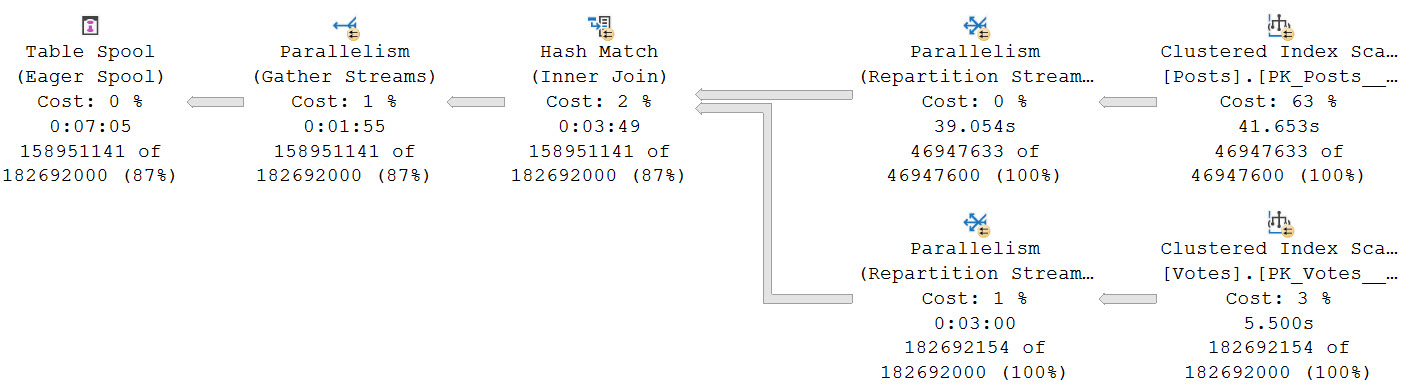
Using the scenario from yesterday’s post as an example of why you might want to think about rewriting queries with Table Spools in them to use temp tables instead, look how the optimizer chooses a plan with an Eager Table Spool.
The “Eager” part means the entire set of rows is loaded into a temporary object at once.
drugas
That’s a lot of rows, innit? Stick some commas in there, and you might just find yourself staring down the barrel of a nine digit number.
Worse, we spend a long time loading data into the spool, and doing so in a serial zone. There’s no good way to know exactly how long the load is because of odd operator times.
If you recall yesterday’s post, the plan never goes back to parallel after that, either. It runs for nearly 30 minutes in total.
Yes Your Tempdb
If you’re gonna be using that hunka chunka tempdb anyway, you might as well use it efficiently. Unless batch mode is an option for you, either as Batch Mode On Rowstore, or tricking the optimizer, this might be your best bet.
Keep in mind that Standard Edition users have an additional limitation where Batch Mode queries are limited to a DOP of 2, and don’t have access to Batch Mode On Rowstore as of this writing. The DOP limitation especially might make the trick unproductive compared to alternatives that allow for MOREDOP.
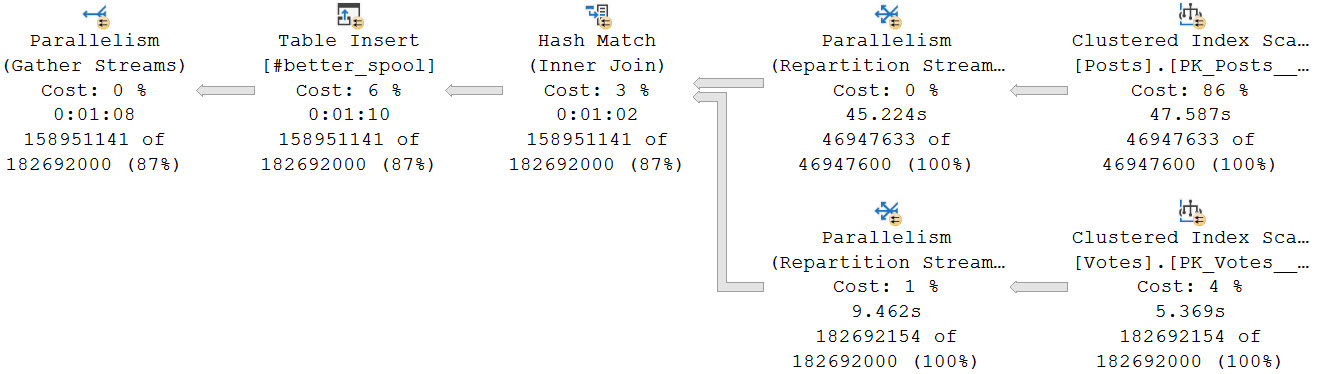
For example, if we dump that initial join into a temp table, it only takes about a minute to get loaded at a DOP of 8. That is faster than loading data into the spool (I mean, probably. Just look at that thing.).
sweet valley high
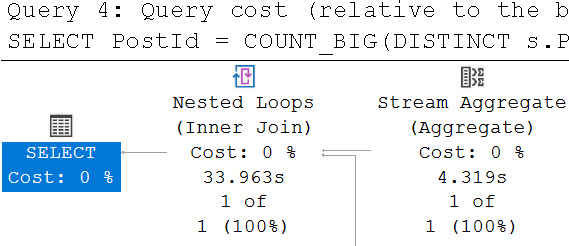
The final query to do the distinct aggregations takes about 34 seconds.
lellarap
Another benefit is that each branch that does a distinct aggregation is largely in a parallel zone until the global aggregate.
muggers
In total, both queries finish in about a 1:45. A big improvement from nearly 30 minutes relying on the Eager Table Spool and processing all of the distinct aggregates in a serial zone. The temp table here doesn’t have that particular shortcoming.
In the past, I’ve talked a lot about Eager Index Spools. They have a lot of problems too, many of which are worse. Of course, we need indexes to fix those, not temp tables.
Thanks for reading!
Going Further
If this is the kind of SQL Server stuff you love learning about, you’ll love my training. Blog readers get 25% off the Everything Bundle — over 100 hours of performance tuning content. Need hands-on help? I offer consulting engagements from targeted investigations to ongoing retainers. Want a quick sanity check before committing to a full engagement? Schedule a call — no commitment required.
My dear friend Kendra asked… Okay, look, I might have dreamed this. But I maybe dreamed that she asked what people’s Cost Threshold For Blogging™ is. Meaning, how many times do you have to get asked a question before you write about it.
I have now heard people talking and asking about in-memory table variables half a dozen times, so I guess here we are.
Talking about table variables.
In memory.
Yes, Have Some
First, yes, they do help relieve tempdb contention if you have code that executes under both high concurrency and frequency. And by high, I mean REALLY HIGH.
Like, Snoop Dogg high.
Because you can’t get rid of in memory stuff, I’m creating a separate database to test in.
Here’s how I’m doing it!
CREATE DATABASE trash;

ALTER DATABASE trash
ADD FILEGROUP trashy
    CONTAINS MEMORY_OPTIMIZED_DATA ;

ALTER DATABASE trash
ADD FILE
(
    NAME=trashcan,
    FILENAME='D:\SQL2019\maggots'
)
TO FILEGROUP trashy;

USE trash;

CREATE TYPE PostThing
AS TABLE
(
    OwnerUserId int,
    Score int,
    INDEX o HASH(OwnerUserId)
    WITH(BUCKET_COUNT = 100)
) WITH
(
    MEMORY_OPTIMIZED = ON
);
GO
Here’s how I’m testing things:
CREATE OR ALTER PROCEDURE dbo.TableVariableTest(@Id INT)
AS
BEGIN

    SET NOCOUNT, XACT_ABORT ON;

    DECLARE @t AS PostThing;
    DECLARE @i INT;

    INSERT @t
        ( OwnerUserId, Score )
    SELECT
        p.OwnerUserId,
        p.Score
    FROM Crap.dbo.Posts AS p
    WHERE p.OwnerUserId = @Id;

    SELECT
        @i = SUM(t.Score)
    FROM @t AS t
    WHERE t.OwnerUserId = 22656
    GROUP BY t.OwnerUserId;

    SELECT
        @i = SUM(t.Score)
    FROM @t AS t
    GROUP BY t.OwnerUserId;

END;
GO
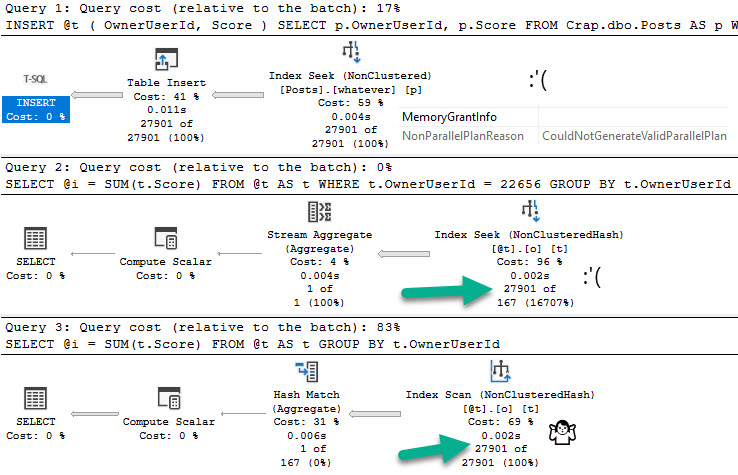
If we flip database compatibility levels to 150, deferred compilation kicks in. Great. Are you on SQL Server 2019? Are you using compatibility level 150?
Don’t get too excited.
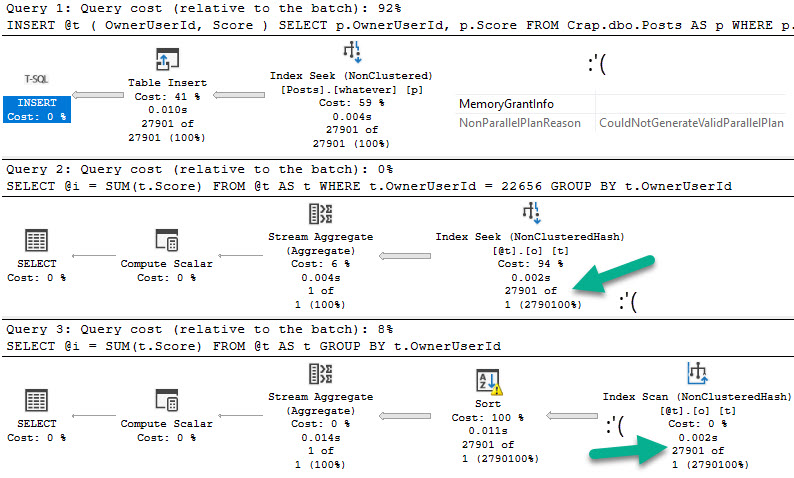
Let’s give this a test run in compat level 140:
DECLARE @i INT = 22656;
EXEC dbo.TableVariableTest @Id = @i;
everything counts in large amounts
Switching over to compat level 150:
yeaaahhhhh
Candy Girl
So what do memory optimized table variables solve?
Not the problem that table variables in general cause.
They do help you avoid tempdb contention, but you trade that off for them taking up space in memory.
Precious memory.
Do you have enough memory?
Thanks for reading!
Going Further
If this is the kind of SQL Server stuff you love learning about, you’ll love my training. Blog readers get 25% off the Everything Bundle — over 100 hours of performance tuning content. Need hands-on help? I offer consulting engagements from targeted investigations to ongoing retainers. Want a quick sanity check before committing to a full engagement? Schedule a call — no commitment required.