Using Exchange Demand Partitioning to Improve Parallel Query Scalability In SQL Server

One of our SQL Server workloads runs many concurrent parallel queries on a possibly already busy server. Other work occurring on the server can have dramatic effects on parallel query runtimes. One way to improve scalability of parallel query runtimes is to achieve query plans with operators that allow a dynamic amount of work to be completed by each parallel worker thread. For example, exchange operators with a partitioning type of hash or round robin force a typically even amount of work to be completed by each worker thread. If a worker thread happens to be on a busy scheduler then query runtime may increase due to the longer runtime of the worker thread that is competing for CPU resources. Serial zones in parallel query plans can of course have the same problem. Batch mode operators, exchange operators with a partitioning type of broadcast or demand, and the parallel page supplier are all examples of operators which can do a dynamic amount of work per thread. Those are the operators that I prefer to see in query plans for this workload.

Very little has been written about exchange operators with a partitioning type of demand, so I forgive you for not hearing of it before today. There is a brief explanation available here, an example of using demand partitioning to improve some query plans involving partitioned tables, and a Stack Exchange answer for someone comparing round robin and demand partitioning. You have the honor of reading perhaps the fourth blog post about the subject.

Start


The demos are somewhat dependent on hardware so you may not see identical results if you are following along. I’m testing on a machine with 8 CPU and with max server memory was set to 6000 MB. Start with a table with a multi-column primary key and insert about 34 million rows into it:

DROP TABLE IF EXISTS #;
CREATE TABLE # (
ID BIGINT NOT NULL,
ID2 BIGINT NOT NULL,
STRING_TO_AGG VARCHAR(MAX),
PRIMARY KEY (ID, ID2)
);

INSERT INTO # WITH (TABLOCK)
SELECT RN, v.v, REPLICATE('REPLICATE', 77)
FROM (
SELECT TOP (4800000) ROW_NUMBER() OVER (ORDER BY (SELECT NULL)) RN
FROM master..spt_values
CROSS JOIN master..spt_values t2
) q
CROSS JOIN (VALUES (1), (2), (3), (4), (5), (6), (7)) v(v);

The query tuning exercise is to insert the ID column and a checksum of the concatenation of all the STRING_TO_AGG values for each ID value ordered by ID2. This may seem like an odd thing to do but it is based upon a production example with an adjustment to not write as much data as the real query. Not all of us have SANs in our basements, or even have a basement. Use the following for the target table:

DROP TABLE IF EXISTS ##;

CREATE TABLE ## (
ID BIGINT NOT NULL,
ALL_STRINGS_CHECKSUM INT
);

Naturally we use SQL Server 2019 CU4 so the STRING_AGG function is available to us. Here is one obvious way to write the query:

INSERT INTO ## WITH (TABLOCK)
SELECT ID, CHECKSUM(STRING_AGG(STRING_TO_AGG , ',') WITHIN GROUP (ORDER BY ID2))
FROM #
GROUP BY ID
OPTION (MAXDOP 8);

The above query takes about 63 seconds on my machine with a cost of 2320.57 optimizer units. The query optimizer decided that a serial plan was the best choice:

SQL Server Query Plan

This is a rather lame result for a query tuning exercise so I will assume that I know better and force a parallel query plan with undocumented trace flag 8649. SQL Server warns us that the estimated cost is 4816.68 optimizer units but surely doesn’t expect a detail like that to stop me. The adjusted query executes in 75 seconds:

SQL Server Query Plan

My arrogance is checked. The parallel query is slower than the serial version that the query optimizer wanted us to have. The problem is the hash exchange operator. It is an order preserving exchange with a high MAXDOP and wide rows. This is the worst possible situation for exchange performance. How else can we write the query? Batch mode is not available for STRING_AGG so that’s out. Does anyone remember anything about tuning row mode queries?

The Dark Side


Query hints along with carefully constructed T-SQL are the pathway to many abilities, some considered to be unnatural. We can give the classic Parallel Apply query pattern made famous by Adam Machanic a shot to solve this problem. Perhaps you are thinking that there is no driving table for the outer side of a nested loop join, but we can create one by sampling the clustered index of the base table. I’ll skip that part here and just use what I know about the data to divide it into 96 equal ranges:

DROP TABLE IF EXISTS ###;
CREATE TABLE ### (s BIGINT NOT NULL, e BIGINT NOT NULL);

INSERT INTO ###
VALUES
(1, 50000),
(50001, 100000),
(100001, 150000),
(150001, 200000),
(200001, 250000),
(250001, 300000),
(300001, 350000),
(350001, 400000),
(400001, 450000),
(450001, 500000),
(500001, 550000),
(550001, 600000),
(600001, 650000),
(650001, 700000),
(700001, 750000),
(750001, 800000),
(800001, 850000),
(850001, 900000),
(900001, 950000),
(950001, 1000000),
(1000001, 1050000),
(1050001, 1100000),
(1100001, 1150000),
(1150001, 1200000),
(1200001, 1250000),
(1250001, 1300000),
(1300001, 1350000),
(1350001, 1400000),
(1400001, 1450000),
(1450001, 1500000),
(1500001, 1550000),
(1550001, 1600000),
(1600001, 1650000),
(1650001, 1700000),
(1700001, 1750000),
(1750001, 1800000),
(1800001, 1850000),
(1850001, 1900000),
(1900001, 1950000),
(1950001, 2000000),
(2000001, 2050000),
(2050001, 2100000),
(2100001, 2150000),
(2150001, 2200000),
(2200001, 2250000),
(2250001, 2300000),
(2300001, 2350000),
(2350001, 2400000),
(2400001, 2450000),
(2450001, 2500000),
(2500001, 2550000),
(2550001, 2600000),
(2600001, 2650000),
(2650001, 2700000),
(2700001, 2750000),
(2750001, 2800000),
(2800001, 2850000),
(2850001, 2900000),
(2900001, 2950000),
(2950001, 3000000),
(3000001, 3050000),
(3050001, 3100000),
(3100001, 3150000),
(3150001, 3200000),
(3200001, 3250000),
(3250001, 3300000),
(3300001, 3350000),
(3350001, 3400000),
(3400001, 3450000),
(3450001, 3500000),
(3500001, 3550000),
(3550001, 3600000),
(3600001, 3650000),
(3650001, 3700000),
(3700001, 3750000),
(3750001, 3800000),
(3800001, 3850000),
(3850001, 3900000),
(3900001, 3950000),
(3950001, 4000000),
(4000001, 4050000),
(4050001, 4100000),
(4100001, 4150000),
(4150001, 4200000),
(4200001, 4250000),
(4250001, 4300000),
(4300001, 4350000),
(4350001, 4400000),
(4400001, 4450000),
(4450001, 4500000),
(4500001, 4550000),
(4550001, 4600000),
(4600001, 4650000),
(4650001, 4700000),
(4700001, 4750000),
(4750001, 4800000);

I can now construct a query that gets a parallel apply type of plan:

INSERT INTO ## WITH (TABLOCK)
SELECT ca.*
FROM ### driver
CROSS APPLY (
	SELECT TOP (987654321987654321) ID, CHECKSUM(STRING_AGG(STRING_TO_AGG , ',') WITHIN GROUP (ORDER BY ID2)) ALL_STRINGS_CHECKSUM
	FROM # WITH (FORCESEEK)
	WHERE ID BETWEEN driver.s AND driver.e
	GROUP BY ID
) ca
OPTION (MAXDOP 8, NO_PERFORMANCE_SPOOL, FORCE ORDER);

This is an unnatural query plan. The query optimizer assigned it a cost of 36248.7 units. I had to add the TOP to get a valid query plan with an index seek. Removing the TOP operator results in error 8622. Naturally such things won’t stop us and running the query results in an execution time between 15 – 19 seconds on my machine which is the best result yet.

SQL Server Query Plan

This query plan has an exchange partitioning type of round robin. Recall such exchange types can lead to trouble if there’s other work executing on one of the schedulers used by a parallel worker thread. So far I’ve been testing these MAXDOP 8 queries with nothing else running on my 8 core machine. I can make a scheduler busy by running a MAXDOP 1 query that has no real reason to yield before exhausting its 4 ms quantum. Here is one way to accomplish that:

SELECT TOP (1) t1.high + t2.high + t3.high + t4.high
FROM master..spt_values t1
CROSS JOIN master..spt_values t2
CROSS JOIN master..spt_values t3
CROSS JOIN master..spt_values t4
ORDER BY t1.high + t2.high + t3.high + t4.high
OPTION (MAXDOP 1, NO_PERFORMANCE_SPOOL);

Wait stats for this query if you don’t believe me:

SQL Server Wait Stats

Running this query at the same time as the parallel query can apply a large performance penalty to the parallel query. The parallel query can take up to 48 seconds to execute if even a single worker thread has to share time on a scheduler with another. That is, the query ran 3 times slower when I added a single MAXDOP 1 query to the workload. Looking at thread details for the parallel query:
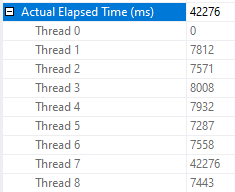
SQL Server Threads

As you can see, one of the worker threads took a significantly longer amount of time to complete its work compared to the other threads. There is no logged wait statistic for this kind of performance problem in which the other parallel worker threads complete their work much earlier than when the query finishes. If there’s no worker thread then there is no wait associated with the query. The only way to catch this is to look at actual row distribution or the CPU time to elapsed time ratio.

You may be wondering why the query is worse than twice as slow as before. After all, if all workers do an equal amount of work but one now gets access to half as much CPU as before it seems reasonable to expect the runtime to double instead of triple. The workers of the parallel query have many reasons they might yield before exhausting their full 4 ms quantum – an I/O wait for example. The MAXDOP 1 SELECT query is designed to not yield early. What is very likely happening is that the MAXDOP 1 query gets a larger share of the scheduler’s resources than 50%. SQL Server 2016 made adjustments to try to limit this type of situation but by its very nature I don’t see how it could ever lead to a perfect sharing of a scheduler’s resources.

Demanding Demand Partitioning


We can get an exchange operator with demand based partitioning by replacing the driving temp table with a derived table. Full query text below:

INSERT INTO ## WITH (TABLOCK)
SELECT ca.*
FROM (
VALUES
(1, 50000),
(50001, 100000),
(100001, 150000),
(150001, 200000),
(200001, 250000),
(250001, 300000),
(300001, 350000),
(350001, 400000),
(400001, 450000),
(450001, 500000),
(500001, 550000),
(550001, 600000),
(600001, 650000),
(650001, 700000),
(700001, 750000),
(750001, 800000),
(800001, 850000),
(850001, 900000),
(900001, 950000),
(950001, 1000000),
(1000001, 1050000),
(1050001, 1100000),
(1100001, 1150000),
(1150001, 1200000),
(1200001, 1250000),
(1250001, 1300000),
(1300001, 1350000),
(1350001, 1400000),
(1400001, 1450000),
(1450001, 1500000),
(1500001, 1550000),
(1550001, 1600000),
(1600001, 1650000),
(1650001, 1700000),
(1700001, 1750000),
(1750001, 1800000),
(1800001, 1850000),
(1850001, 1900000),
(1900001, 1950000),
(1950001, 2000000),
(2000001, 2050000),
(2050001, 2100000),
(2100001, 2150000),
(2150001, 2200000),
(2200001, 2250000),
(2250001, 2300000),
(2300001, 2350000),
(2350001, 2400000),
(2400001, 2450000),
(2450001, 2500000),
(2500001, 2550000),
(2550001, 2600000),
(2600001, 2650000),
(2650001, 2700000),
(2700001, 2750000),
(2750001, 2800000),
(2800001, 2850000),
(2850001, 2900000),
(2900001, 2950000),
(2950001, 3000000),
(3000001, 3050000),
(3050001, 3100000),
(3100001, 3150000),
(3150001, 3200000),
(3200001, 3250000),
(3250001, 3300000),
(3300001, 3350000),
(3350001, 3400000),
(3400001, 3450000),
(3450001, 3500000),
(3500001, 3550000),
(3550001, 3600000),
(3600001, 3650000),
(3650001, 3700000),
(3700001, 3750000),
(3750001, 3800000),
(3800001, 3850000),
(3850001, 3900000),
(3900001, 3950000),
(3950001, 4000000),
(4000001, 4050000),
(4050001, 4100000),
(4100001, 4150000),
(4150001, 4200000),
(4200001, 4250000),
(4250001, 4300000),
(4300001, 4350000),
(4350001, 4400000),
(4400001, 4450000),
(4450001, 4500000),
(4500001, 4550000),
(4550001, 4600000),
(4600001, 4650000),
(4650001, 4700000),
(4700001, 4750000),
(4750001, 4800000)
) driver( s, e)
CROSS APPLY (
	SELECT TOP (987654321987654321) ID, CHECKSUM(STRING_AGG(STRING_TO_AGG , ',') WITHIN GROUP (ORDER BY ID2)) ALL_STRINGS_CHECKSUM
	FROM # WITH (FORCESEEK)
	WHERE ID BETWEEN CAST(driver.s AS BIGINT) AND CAST(driver.e AS BIGINT)
	GROUP BY ID
) ca
OPTION (MAXDOP 8, NO_PERFORMANCE_SPOOL, FORCE ORDER);

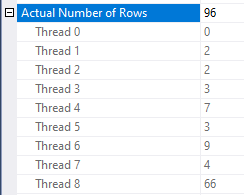
Query performance is effectively random. The query was observed to execute as quickly as 15 seconds and as slowly as 45 seconds. In some situations there was an incredible amount of skew in row distributions between threads:
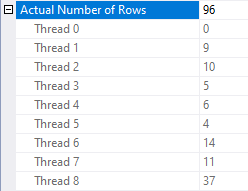
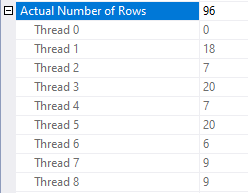
SQL Server Threads

SQL Server Threads

SQL Server Threads

This is an unexpected situation if there are no other queries running on the server. Query performance is most disappointing.

Is there a trace flag?


Yes! The problem here is that the nested loop join uses the prefetch optimization. Paul White writes:

One of the available SQL Server optimizations is nested loops prefetching. The general idea is to issue asynchronous I/O for index pages that will be needed by the inner side — and not just for the current correlated join parameter value, but for future values too.

That sounds like it might be wildly incompatible with a demand exchange operator. Querying sys.dm_exec_query_profiles during query execution proves that the demand exchange isn’t working as expected: worker threads no longer fully process the results associated with their current row before requesting the next one. That is what can lead to wild skew between the worker threads and as a result query performance is effectively random.

Documented trace flag 8744 disables this optimization. Adding it to the query using QUERYTRACEON results in much more stable performance. The query typically finishes in about 15 seconds. Here is an example thread distribution:
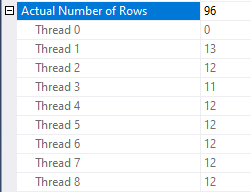
SQL Server Threads

If you fight the ISV fight like I do, you may not be able to enable trace flags for individual queries. If you’re desperate you could try artificially lowering the cardinality estimate from the derived table. An OPTIMIZE FOR query hint with a direct filter is my preferred way to accomplish this. I like to set the cardinality estimate equal to MAXDOP but I have no real basis for doing this. Here is the full query text:

DECLARE @filter BIGINT = 987654321987654321;
INSERT INTO ## WITH (TABLOCK)
SELECT ca.*
FROM (
VALUES
(1, 50000),
(50001, 100000),
(100001, 150000),
(150001, 200000),
(200001, 250000),
(250001, 300000),
(300001, 350000),
(350001, 400000),
(400001, 450000),
(450001, 500000),
(500001, 550000),
(550001, 600000),
(600001, 650000),
(650001, 700000),
(700001, 750000),
(750001, 800000),
(800001, 850000),
(850001, 900000),
(900001, 950000),
(950001, 1000000),
(1000001, 1050000),
(1050001, 1100000),
(1100001, 1150000),
(1150001, 1200000),
(1200001, 1250000),
(1250001, 1300000),
(1300001, 1350000),
(1350001, 1400000),
(1400001, 1450000),
(1450001, 1500000),
(1500001, 1550000),
(1550001, 1600000),
(1600001, 1650000),
(1650001, 1700000),
(1700001, 1750000),
(1750001, 1800000),
(1800001, 1850000),
(1850001, 1900000),
(1900001, 1950000),
(1950001, 2000000),
(2000001, 2050000),
(2050001, 2100000),
(2100001, 2150000),
(2150001, 2200000),
(2200001, 2250000),
(2250001, 2300000),
(2300001, 2350000),
(2350001, 2400000),
(2400001, 2450000),
(2450001, 2500000),
(2500001, 2550000),
(2550001, 2600000),
(2600001, 2650000),
(2650001, 2700000),
(2700001, 2750000),
(2750001, 2800000),
(2800001, 2850000),
(2850001, 2900000),
(2900001, 2950000),
(2950001, 3000000),
(3000001, 3050000),
(3050001, 3100000),
(3100001, 3150000),
(3150001, 3200000),
(3200001, 3250000),
(3250001, 3300000),
(3300001, 3350000),
(3350001, 3400000),
(3400001, 3450000),
(3450001, 3500000),
(3500001, 3550000),
(3550001, 3600000),
(3600001, 3650000),
(3650001, 3700000),
(3700001, 3750000),
(3750001, 3800000),
(3800001, 3850000),
(3850001, 3900000),
(3900001, 3950000),
(3950001, 4000000),
(4000001, 4050000),
(4050001, 4100000),
(4100001, 4150000),
(4150001, 4200000),
(4200001, 4250000),
(4250001, 4300000),
(4300001, 4350000),
(4350001, 4400000),
(4400001, 4450000),
(4450001, 4500000),
(4500001, 4550000),
(4550001, 4600000),
(4600001, 4650000),
(4650001, 4700000),
(4700001, 4750000),
(4750001, 4800000)
) driver( s, e)
CROSS APPLY (
	SELECT TOP (987654321987654321) ID, CHECKSUM(STRING_AGG(STRING_TO_AGG , ',') WITHIN GROUP (ORDER BY ID2)) ALL_STRINGS_CHECKSUM
	FROM # WITH (FORCESEEK)
	WHERE ID BETWEEN CAST(driver.s AS BIGINT) AND CAST(driver.e AS BIGINT)
	GROUP BY ID
) ca
WHERE driver.s <= @filter
OPTION (OPTIMIZE FOR (@filter = 350001), MAXDOP 8, NO_PERFORMANCE_SPOOL, FORCE ORDER);

Query performance is the same as with TF 8744:

SQL Server Query Plan


Does this query do better than round robin partitioning when there is a busy MAXDOP 1 query running at the same time? I ran it a few times and it completed in about 15-16 seconds every time. One of the worker threads does less work and the others cover for it:
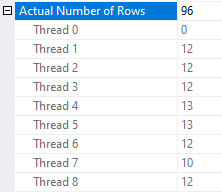
SQL Server Threads

In this example the nested loop join only gets the prefetch optimization if the cardinality estimate is more than 25 rows. I do not know if that number is a fixed part of the algorithm for prefetch eligibility but it certainly feels unwise to rely on this behavior never changing in a future version of SQL Server. Note that prefetching is a trade-off. For some workloads you may be better off with round robin partitioning and prefetching compared to demand without prefetching. It’s hard to imagine a workload that would benefit from demand with prefetching but perhaps I’m not being creative enough in my thinking.

Final Thoughts


In summary, the example parallel apply query that uses demand partitioning performs 2-3 times better the query that uses round robin partitioning when another serial query is running on the server. The nested loop prefetch optimization does not work well witth exchange operator demand partitioning and should be avoided via a trace flag or other tricks if demand partitioning is in use.

There are a few things that Microsoft could do to improve the situation. A USE HINT that disables nested loop prefetching would be most welcome. I think that there’s also a fairly strong argument to make that a query pattern of a nested loop join with prefetching with a first child of a demand exchange operator is a bad pattern that the query optimizer should avoid if possible. Finally, it would be nice if there was a type of wait statistic triggered when some of a parallel query’s workers finish their work earlier than others. The problematic queries here have very little CXPACKET waits and no EXECSYNC waits. Imagine that I put a link to UserVoice requests here and imagine yourself voting for them.

Thanks for reading!

Going Further


If this is the kind of SQL Server stuff you love learning about, you’ll love my training. Blog readers get 25% off the Everything Bundle — over 100 hours of performance tuning content. Need hands-on help? I offer consulting engagements from targeted investigations to ongoing retainers. Want a quick sanity check before committing to a full engagement? Schedule a call — no commitment required.

Untrusted Foreign Keys Still Check New Data In SQL Server

Blitzing


This comes up enough that I figured I’d write it down with a quick example. Foreign keys, which are next to useless in SQL Server, can become untrusted for a variety of reasons. Why? Because they don’t help with cardinality estimation, and join elimination only happens for inner joins when you don’t select any columns from one table.

How often do you write queries like that?

Becoming Untrusted


Probably the most common reasons for foreign keys become not trusted are someone using BULK INSERT without specifying the CHECK_CONSTRAINTS option, or disabling them to make loading data via another method easier, and then re-enabling them with the “wrong” syntax.

This comes up pretty often when looking at sp_BlitzIndex results with clients, who are deeply distrustful of their data.

Let’s look at an easy example.

CREATE TABLE dbo.child(child_id INT PRIMARY KEY, parent_id INT NOT NULL);
CREATE TABLE dbo.parent(parent_id INT PRIMARY KEY);

Here are two tables, which we’ll add a foreign key to. There are all sorts of fun questions we can ask about which way the relationship should go:

  • Do all parents need a child?
  • Do all children need a parent?

If one if designing a school database, you may have kids with no parent listed for any number of reasons, from death to emancipation. Likewise, you may have parents of children who graduate, but getting rid of them means adding them back if they have another kid go into the school. This is already too complicated for me.

“Pretending”


Let’s say we finally settle on which way the relationship should go, and add a foreign key.

--Add a FK
ALTER TABLE dbo.child ADD CONSTRAINT parental_advisory FOREIGN KEY (parent_id) REFERENCES dbo.parent(parent_id);

This means we can have a row in parent that doesn’t exist in child:

INSERT dbo.parent ( parent_id )
VALUES ( 1 );

But we can’t have a row in child that doesn’t exist in parent:

INSERT dbo.child ( child_id, parent_id )
VALUES ( 1, 2 );

We’ll get an error for trying this!

Msg 547, Level 16, State 0, Line 42
The INSERT statement conflicted with the FOREIGN KEY constraint "parental_advisory". The conflict occurred in database "Crap", table "dbo.parent", column 'parent_id'.

Unless…

Call A Lawyer


--Disable it
ALTER TABLE dbo.child NOCHECK CONSTRAINT parental_advisory;

If we disable the foreign key, we can put whatever data in we want, including data that violates the foreign key.

We can even re-enable the foreign key without validating data we put into the table:

--Re-enable the foreign key without validating data
ALTER TABLE dbo.child CHECK CONSTRAINT parental_advisory;

If we check on the status of the foreign key, we’ll see that it’s enabled; it’s just not trusted.

SELECT fk.name,
       fk.is_disabled,
       fk.is_not_trusted
FROM sys.foreign_keys AS fk 
WHERE fk.name = 'parental_advisory';

But just having it enabled will prevent bad new data from coming in:

INSERT dbo.child ( child_id, parent_id )
VALUES ( 2, 3 );

We’ll get the same error as above.

If you want to enable the foreign key and validate current data, you need to run the command like this:

--Re-enable the foreign key validating data
ALTER TABLE dbo.child WITH CHECK CHECK CONSTRAINT parental_advisory;

But this will fail if there’s any bad data:

Msg 547, Level 16, State 0, Line 52
The ALTER TABLE statement conflicted with the FOREIGN KEY constraint "parental_advisory". The conflict occurred in database "Crap", table "dbo.parent", column 'parent_id'.

Tracking It Down


When you have foreign key validation fail, you’ll need to clean data up that doesn’t fit. You can use queries that look something like this to do it.

SELECT * 
FROM dbo.child AS c
WHERE NOT EXISTS
(
    SELECT 1/0
    FROM dbo.parent AS p
    WHERE p.parent_id = c.parent_id
);

Thanks for reading!

Going Further


If this is the kind of SQL Server stuff you love learning about, you’ll love my training. Blog readers get 25% off the Everything Bundle — over 100 hours of performance tuning content. Need hands-on help? I offer consulting engagements from targeted investigations to ongoing retainers. Want a quick sanity check before committing to a full engagement? Schedule a call — no commitment required.
Detecting Parallel Query Plan Performance Issues In Query Store

Let’s Have Fun


I got asked recently if there’s a way to find parallel queries that are potentially skewed.

One thing that you’ll see quite often is that duration and cpu time aren’t much different. For parallel queries, it should be the opposite — you should be using more CPU in order to reduce duration. Granted, this query could also find queries that were blocked, but it’s a start.

WITH XMLNAMESPACES ( 'http://schemas.microsoft.com/sqlserver/2004/07/showplan' AS x ), 
skew AS 
(
    SELECT qsp.query_id, 
           qsp.plan_id,
           qsrs.avg_cpu_time / 1000. AS avg_cpu_time_ms, 
           qsrs.avg_duration / 1000. AS avg_duration_ms,
           (qsrs.avg_duration - qsrs.avg_cpu_time) / 1000. AS the_difference_ms,
           qsrs.avg_dop, 
           CONVERT(XML, qsp.query_plan) AS query_plan
    FROM sys.query_store_runtime_stats AS qsrs
    JOIN sys.query_store_plan AS qsp
        ON qsrs.plan_id = qsp.plan_id
    WHERE qsp.is_parallel_plan = 1
    AND qsrs.avg_duration >= qsrs.avg_cpu_time
)
SELECT sk.*
FROM skew AS sk
    OUTER APPLY sk.query_plan.nodes('//x:StmtSimple') AS s(c)
WHERE s.c.exist('@StatementType[.= "SELECT"]') = 1
ORDER BY sk.avg_duration_ms DESC;

If you’re wondering why I’m looking at the XML outside a CTE, it’s because Query Store doesn’t store plans in XML, so you get an error. This was the first workaround I found.

Msg 9506, Level 16, State 1, Line 125
The XMLDT method 'nodes' can only be invoked on columns of type xml.

And if you’re wondering how Query Store stores query plans, JOIN THE CLUB:

2020 05 02 14 19 16
i quit.

Just when you thought the image datatype was deprecated, huh?

Thanks for reading!

Going Further


If this is the kind of SQL Server stuff you love learning about, you’ll love my training. Blog readers get 25% off the Everything Bundle — over 100 hours of performance tuning content. Need hands-on help? I offer consulting engagements from targeted investigations to ongoing retainers. Want a quick sanity check before committing to a full engagement? Schedule a call — no commitment required.
Standard Edition Programmability Features Are Not Performance Features

It’s All A Ruse


Back at the end of 2016, a Service Pack got released along with a promise: SQL Server’s programmability surface area would be equal across all editions.

Meaning that features which were previously paywalled behind $7k cores could now be used on less expensive editions.

A lot of people were happy about this, because

  • You could use features without checking edition first, which cut down on code and potential errors
  • Developers were less likely to use something in developer edition, which later couldn’t be rolled out to standard edition

In other words, the “developer edition” issues were solved.

Except they weren’t, because performance is still far from equal.

Sing Along With Me Now


Let’s check out RDBMS scalability and performance for some gotchas that can sneak up on you if you’re using Developer Edition to Develop, and Standard Edition in Production.

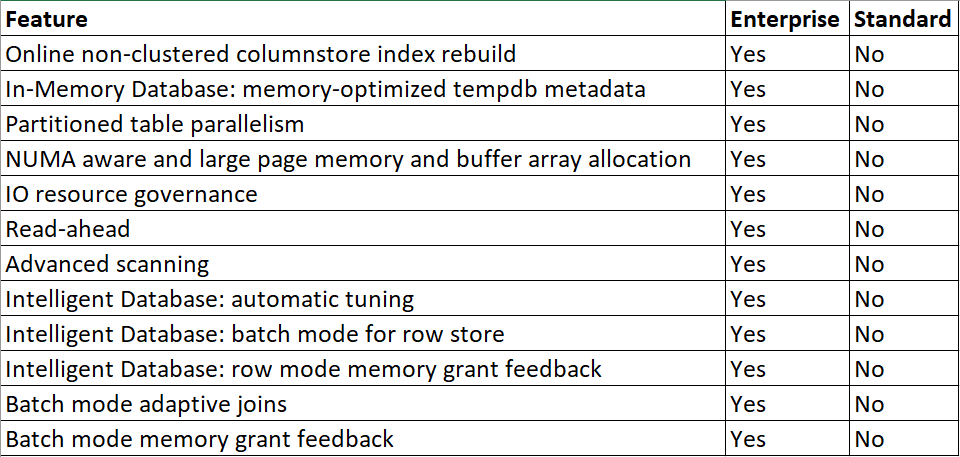
Here’s a list of stuff that you might turn on, or benefit from when performance tuning in your development environment, that wouldn’t translate to Standard Edition:

2020 05 01 13 29 30
And then…

That’s the list of stuff that’s a straight up “no”. On top of that, there are some things that aren’t quite a “no”, but aren’t quite a “yes” either. Batch Mode queries have a MAXDOP of 2 in Standard Edition, and lack SIMD support. That’s bitten me in the past when doing performance tuning work.

My Fair Lady


Some of these features are opt-in, so if you turn them on in Development and they don’t work in Production, that is your fault and your fault alone.

Others have feature switches, many of which are database scoped configurations, so you can disable them for an entire workload and not have to go mangling a bunch of queries.

But then there are others which you have no control over:

  • Batch Mode DOP 2 limit
  • Large page allocations
  • Read aheads
  • Merry go round scans (Advanced scanning)

Those are all things that seem slight, or easy to avoid, until you have performance gaps between Dev and Prod, and figuring out why takes seriously in-depth, and often frustrating trouble shooting steps.

Calls to have a “Standard Edition” switch for Developer Edition have been around, I’m told, forever and a day. I’m not going to open a new User Voice item in dev/null asking for it. Just be aware that your performance test results may not pan out when you deploy from Developer Edition to Standard Edition.

Thanks for reading!

Going Further


If this is the kind of SQL Server stuff you love learning about, you’ll love my training. Blog readers get 25% off the Everything Bundle — over 100 hours of performance tuning content. Need hands-on help? I offer consulting engagements from targeted investigations to ongoing retainers. Want a quick sanity check before committing to a full engagement? Schedule a call — no commitment required.
Pros and Cons Of Last Page Contention Solutions For SQL Server

Hidden Away


If one dare go looking, a list of Microsoft Approved™ solutions for dealing with last page contention exists.

I’m going to walk through my experiences with them in different scenarios, so you get a better understanding of which ones work best, and which ones can be tough to implement.

Keep a few things in mind, though:

  • Since 2019 adoption is pretty low so far, I’m not including optimize for sequential key, even though I think it’s the best overall solution. It’s minimally invasive, doesn’t require changing indexes, key columns, or column order, and doesn’t require a rebuild to enable. If I had to pick my favorite, this’d be it. Good job all around, there.
  • None of the previous solutions are exactly friendly to big tables if you need to make the changes in place, and are endlessly complicated by other features and paradigms. Foreign keys? Drop those first. AG? Put it in async. Features that rely on Primary Keys? Turn off, pray you can turn back on. The list is extensive and ever-growing.
  • In non-Enterprise versions of SQL Server, where there are no ONLINE options for changing indexes, you’ll probably need to ask for outage windows to avoid blocking when making in-place changes. Though I typically find offline changes run faster, they’re far less friendly to concurrency.

Example Table


But anyway, let’s review these things. That’s what we’re here to do.

This is the table we’re going to be using as an example, which I’ve inflated a bit to have ~200 million rows.

CREATE TABLE dbo.VotesBig
(
    Id INT IDENTITY,
    PostId INT NOT NULL,
    UserId INT NULL,
    BountyAmount INT NULL,
    VoteTypeId INT NOT NULL,
    CreationDate DATETIME NOT NULL,
    CONSTRAINT vb_pk_id
        PRIMARY KEY CLUSTERED ( Id ASC )
);

Method 1


Make the column that contains sequential values a nonclustered index, and then move the clustered index to another column. For example, for a primary key on an identity column, remove the clustered primary key, and then re-create it as a nonclustered primary key.

This sounds just dandy, minus the above caveats about changing keys around. Using the VotesBig table as an example, you could either use PostId or UserId as the new non-unique clustered index key. In the public release of the Stack Overflow database, the UserId column is largely scrubbed out, so I’ll be using PostId in my example.

In real life I’d opt for UserId, which would be far less likely to have hot spots towards the end of the index, where new questions and answers with higher Ids are likely to be attracting insert activity from voting.

I gotta be honest, though: every time I’ve tried this method, I’ve ended up with contention on any index that leads with the identity column. Perhaps not as drastic, but still there. Wherever you have ever-increasing keys, you run that risk, and if you’re hitting the issue sometimes just shifting it to another index isn’t sufficient.

If you’re going to use this method, please please please think about dropping nonclustered indexes first, and adding them back after you create the clustered index. This avoids having to modify them to disinclude, and then include the clustered index key columns. They really do get in the way when removing and re-adding clustered indexes.

...Drop Nonclustered Indexes First...
ALTER TABLE dbo.VotesBig DROP CONSTRAINT vb_pk_id;
CREATE CLUSTERED INDEX cx_id ON dbo.VotesBig(PostId);
ALTER TABLE dbo.VotesBig ADD CONSTRAINT vb_pk_postid PRIMARY KEY NONCLUSTERED(Id);

Method 2


Reorder the clustered index definition in such a way that the leading column isn’t the sequential column. This requires that the clustered index be a composite index. For example, in a customer table, you can make a CustomerLastName column be the leading column, followed by the CustomerID. We recommend that you thoroughly test this method to make sure that it meets performance requirements.

Okay, this is slightly less confusing. But hell, you better hope you don’t have queries relying on seeking to “CustomerID” if you do this (at least without also searching on “CustomerLastName” with an equality, too). Just like above, yeah, you could create another index to satisfy them by leading with “CustomerID”, but you may find yourself dealing with contention on that index now.

I’ve also seen this cause issues with foreign keys where you may no longer have a single column candidate key.

Not that I like foreign keys all that much. They’re sort of dreary in SQL Server. They don’t really help with cardinality estimation, and join elimination is a farce, largely. One of my favorite recent clients had columns named “_FK” to denote relationships, without any actual foreign keys to back them up. They were just indexed properly.

Shocking, I know.

...Drop Nonclustered Indexes First...
ALTER TABLE dbo.VotesBig
    ADD CONSTRAINT vb_pk_id PRIMARY KEY CLUSTERED(PostId, Id);

Anyway, this is a somewhat dangerous option without careful testing and domain knowledge about the way the table is queried and referenced.

Method 3


Add a nonsequential hash value as the leading index key. This will also spread out the inserts. A hash value could be generated as a modulo that matches the number of CPUs on the system. For example, on a 16-CPU system, you can use a modulo of 16. This method spreads out the INSERT operations uniformly against multiple database pages.

Well, well, well. This is fun. It’s a lot like the above option, except you have to add a column with no business logic whatsoever, and no hope of being used by queries as a predicate. That puts you in an extra tough spot if you need to search on “CustomerID” often for the same reasons as above. You change this part, then you add the nonclustered index, you end up with contention on the nonclustered index. Yes, I do feel like I have to keep saying that.

Suddenly, upgrading to 2019 seems like less of a headache.

Anyway, there are some shortcuts you can take that the Microsoft post doesn’t mention. For this example, you don’t need a persisted not null computed column.

Adding a column with that definition would be quite painful for a big table.

For you.

...Drop Nonclustered Indexes First...
ALTER TABLE dbo.VotesBig
ADD HashValue AS ISNULL(CONVERT(TINYINT, ABS(Id) % 16), 0);

ALTER TABLE dbo.VotesBig
ADD CONSTRAINT vb_pk_hv_id
    PRIMARY KEY CLUSTERED ( HashValue, Id );

You can use the ISNULL function to mark the column as not-nullable, and it doesn’t need to be persisted to be used in the Primary Key. It will need to be persisted to use in a later example with partitioning that uses a similar technique as this, but with an upside missing here around index key order.

One thing I’ve had some success with using this method is changing the modulus math to match the number of cores in a NUMA node. It’s certainly something to mess with, but nothing to get hung up on if performance is acceptable with the first number you choose.

Method 4


Use a GUID as the leading key column of an index to ensure the uniform distribution of inserts.

Note Although it achieves the goal, we don’t recommend this method because it presents multiple challenges, including a large index key, frequent page splits, low page density, and so on.

Hey, it’s hard to run out of GUIDs. You’ll never have to worry about doing a BIGGUID conversion.

But still, yeah. I’d have a tough time going for this one, given that like above, the GUID would have no searchable meaning, and on top of that all your nonclustered indexes would inherit the GUID, and… man. Usually I make fun of people who obsess about page splits, but I think I’d join them here.

You might even talk me into crazy things like “adjusting fill factor” and “doing regular index maintenance” with this setup.

Now I’ve had to go and get drunk and the rest of this post will be terribly unreliable.

Method 5


Use table partitioning and a computed column that has a hash value to spread out the INSERT operations. Because this method uses table partitioning, it’s usable only on Enterprise editions of SQL Server. Note You can use Partitioned tables in SQL Server 2016 SP1 Standard Edition. For more information, see the description of “Table and index partitioning” in the article Editions and supported features of SQL Server 2016.

But okay, hey. We have to add a computed column, and then we have to partition by it. But I promised you that something would be different here, right?

First things first, this part sucks on big tables. This runs for an hour on my laptop, which has 8 3GHz cores and 64GB of RAM.

...Drop Nonclustered Indexes First...
ALTER TABLE dbo.VotesBig
ADD HashValue AS ISNULL(CONVERT(TINYINT, ABS(Id) % 16), 0) PERSISTED;

The PERISTED keyword here means we have to go writing this thing to every darn page. What a drag it is getting persisted.

Then we have to create our partition function and scheme. Just don’t try to rename them. Because you can’t. Ha ha ha.

CREATE PARTITION FUNCTION pf_hash (TINYINT) AS RANGE LEFT FOR VALUES (0,1,2,3,4,5,6,7,8,9,10,11,12,13,14,15);
CREATE PARTITION SCHEME ps_hash AS PARTITION pf_hash ALL TO ([PRIMARY])

In the long run, though this can be worth it, because you can do this.

ALTER TABLE dbo.VotesBig
ADD CONSTRAINT vb_pk_hv_id
    PRIMARY KEY CLUSTERED ( Id, HashValue ) ON ps_hash(HashID);

Your index keeps the more valuable column for queries up front, but still partitions by the hash value, and achieves reducing last page contention.

I experimented with using a Sequence instead of hashing an existing column, but didn’t find it any less painful to put in place.

M.E.T.H.O.D. MAN


Sequences?

It’s possible to replace modulus math on an identity column with a sequence that resets every N values, e.g.

CREATE SEQUENCE dbo.vote_sequence
AS TINYINT
START WITH 1
INCREMENT BY 1
MINVALUE 1
MAXVALUE 16
CYCLE
CACHE 16;

But I don’t think you’d gain much, and you’d just be introducing another dependency. It also doesn’t buy you anything when altering the table, because the column definition would have to have the sequence as a default to fetch the next value from it.

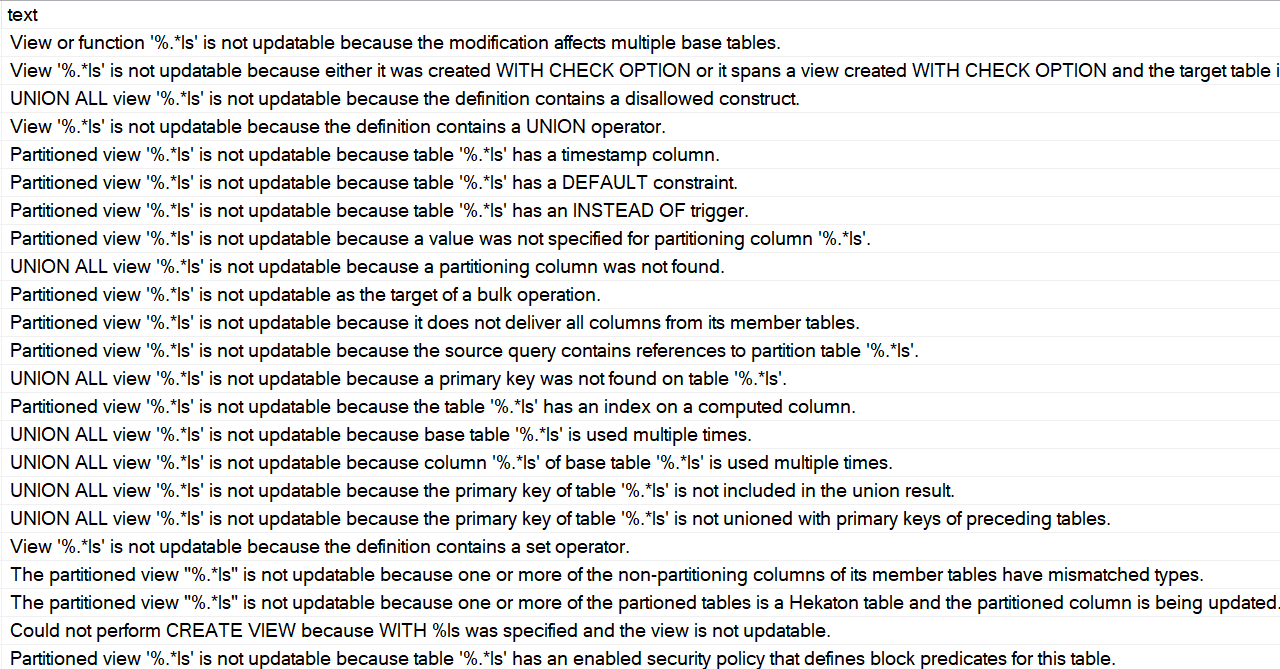
Partitioned Views?

Perhaps conspicuously missing from this post is talk about partitioned views.

As much as I love them, there are an absolutely insane amount of rules to get them to be updatable through the view name.

That’s an attractive ability if you’re keen on making as few code changes as possible, but in practice…

2020 05 01 10 41 27 1
Mongrel Rage

They’re only a good idea if you have a lot of control over the table definitions and code, and have a heck of a lot of patience.

There are a lot of gotchas up front around identity columns, primary keys, and a bunch of other stuff.

If you can control the code to point modifications to the right tables, or to the newest table for inserts, they’re potentially an easier-to-manage option that table partitioning.

Why? Because you can define the “new” table with whatever method you’d like to avoid last page contention, and since it’s effectively an empty partition, the intrusive changes aren’t an issue anymore.

Thanks for reading!

Going Further


If this is the kind of SQL Server stuff you love learning about, you’ll love my training. Blog readers get 25% off the Everything Bundle — over 100 hours of performance tuning content. Need hands-on help? I offer consulting engagements from targeted investigations to ongoing retainers. Want a quick sanity check before committing to a full engagement? Schedule a call — no commitment required.
The More SQL Server Features You Use, The More Painful Database Changes Become

Vanilla


Features are new. Features are sexy. Features do things for you automatically.

But they often come with a lot of baggage.

  • They may not work at all with other features
  • They may not support full capabilities across the board
  • They may require you to make architectural changes to use them
  • They may never progress beyond V1 because of low adoption or shifting priorities

Once you get past that stuff, consider that things change and get added so fast that the documentation can’t keep up. You might dive headlong into a feature and have to build your own documentation about what works and what doesn’t along the way. If you’re an early adopter, there’s a pretty good chance it’s up to you to find bugs and other issues, and work with the nice folks at Microsoft to fix them.

That’s not always pleasant for databases, where changes — especially for data of a certain size — can often mean downtime, or weeks to months of preparation.

Manila


Some features require things, too. Think of the number of features that rely on tables having a Primary Key.

If you wanted to make changes to a Primary Key in order to incorporate another feature like Partitioning, you may find yourself at the at the unfortunate end of an Ouroboros of error messages, turning things like Replication or Change Data Capture or Temporal Tables off to get something working, and then finding yourself waiting a very long time for them to turn back on. And that assumes that turning them back on doesn’t require other changes.

I can hear a lot of you saying that this is the value of hiring someone with the experience to implement things correctly the first time, but that gets harder to do as you incorporate more features to accomplish database side-quests (take Auditing, for example), and new features get added into the mix that no one really has practical experience with on their own, never-you-mind when you mix them up with other features you might be using.

Gorilla


The 800lb gorilla in the room is testing space. Without that, it’s impossible to fit, retrofit, or even scope the amount of work it would take to get a new thing working in your current environment.

If you can test the process, great. But a lot of people have a hard time testing features under load, which is where many snags get hit.

At the heart of it is that there’s no such thing as a free feature. When you turn something on that requires your database to do more work on top of processing transactions, it’s up to you to figure out how to compensate for that load. You also have to make peace with the fact that certain things might be impossible, or become much harder as you introduce features.

Make sure you understand what you’re signing up for.

Thanks for reading!

Going Further


If this is the kind of SQL Server stuff you love learning about, you’ll love my training. Blog readers get 25% off the Everything Bundle — over 100 hours of performance tuning content. Need hands-on help? I offer consulting engagements from targeted investigations to ongoing retainers. Want a quick sanity check before committing to a full engagement? Schedule a call — no commitment required.
Building Reusable Queues In SQL Server Part 2

The Tenant


In part 1, we designed a table for our process to work off of. Now we’re going to look at how we can write a procedure that works off of the table effectively.

For the table, our main priorities were indexing to make sure we can find work easily, and not allowing duplicate items.

For our worker procedure, the main goals are going to be

  • Looping until we run out of work
  • Finding and reserving work with minimal locking
  • Making that process atomic

Thankfully, this is a lot easier than it sounds. The table design does a lot of the work for us.

Queue Ball


I’m going to step through the code, and then show you the fully assembled babby at the end.

First up, making a loop happen:

WHILE EXISTS
(
  SELECT 1/0
  FROM dbo.four_queue AS fq WITH(READPAST)
  WHERE fq.in_process = 0
)

While any rows that aren’t in process exist in the table, we want this to keep picking up work. If you need an eternal loop, just use 1 = 1 or something.

We’re using readpast here, because we won’t want to hit any blocking every time we check to see if we need to go back into the loop.

Second up, finding and reserving work

WITH q4 AS
(
    SELECT TOP (1) fq.*
    FROM dbo.four_queue AS fq WITH(READPAST, ROWLOCK, UPDLOCK)
    WHERE fq.in_process = 0
    ORDER BY fq.id
)
UPDATE q4
    SET q4.in_process = 1,
        q4.start_date = SYSDATETIME(),
        @id = q4.id,
        @reputation = q4.reputation
FROM q4;

This is where all the cool stuff is, to be honest.

In our CTE, we isolate a single row. The TOP (1) with an ORDER BY gives us the lowest id that hasn’t been processed yet.

With the SELECT, we’re using some locking hints:

  • Readpast: Means we can skip over locked rows, but not ignore locks like NOLOCK would do
  • Rowlock: We nicely ask the optimizer to only lock a single row
  • Updlock: Even though this is a SELECT, take an UPDATE lock (LCK_M_U)

The UPDATE that occurs outside of the SELECT is pretty nifty, too. I tried to get OUTPUT to work here, but the variable assignment seemed to disagree with it.

A lot of people don’t know that you can assign a value to a variable like this, but anyway.

  • Mark the row as being processed
  • Get the processing start time
  • Assign the table id to a parameter
  • Assign the reputation we want to find to a parameter

Thirdly and thusly

DECLARE @sql NVARCHAR(MAX) = N'
SELECT COUNT_BIG(*) AS records
FROM dbo.Users AS u
WHERE u.Reputation = @i_reputation;
';

RAISERROR(@sql, 0, 1) WITH NOWAIT;
EXEC sys.sp_executesql @sql, N'@i_reputation int', @reputation;

We’ll pass the @reputation to some dynamic SQL and execute it. Like I mentioned before, this is just to keep the example brief. There’s absolutely no need to do this.

A fifth of fifthly

UPDATE fq
    SET fq.end_date = SYSDATETIME()
FROM dbo.four_queue AS fq
WHERE id = @id
AND   in_process = 1;

We’ll use the id parameter to update the end time, so we can find any processes that took a long time and look into them.

Out Of The Way


In real life, I’d probably want some error handling in here, but for a quick blog post example, this is good enough.

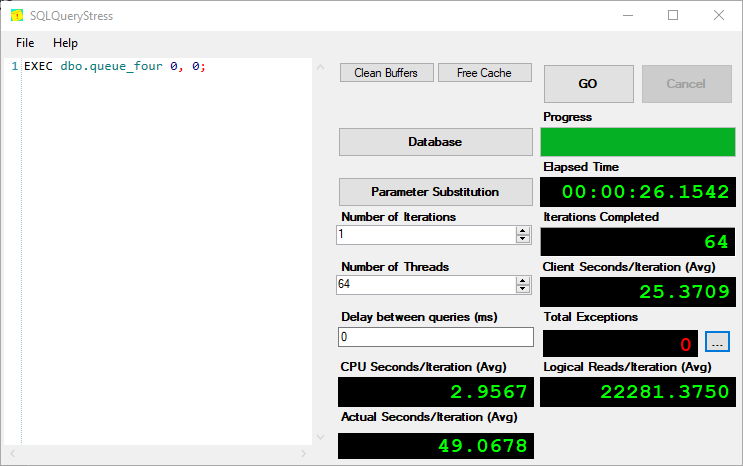
Now I can use a tool like SQL Query Stress to throw a bunch of workers at it and see if I run into any blocking or deadlocking.

We know there aren’t any deadlocks, because SQS doesn’t have any errors in it.

2020 04 28 13 53 56
CHEERS

All ~20k rows get processed in about 26 seconds.

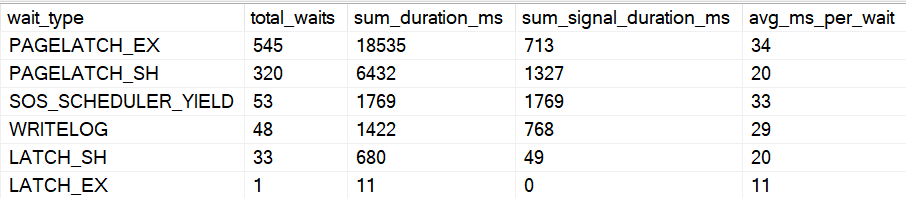
We can even use sp UNDERSCORE HumanEvents to look at wait stats for the duration.

EXEC sp_HumanEvents @event_type = 'waits', @seconds_sample = 30, @database_name = 'StackOverflow2013';
2020 04 28 14 12 52
Humanly

Not too shabby, eh?

CREATE OR ALTER PROCEDURE dbo.queue_four(@id INT, @reputation INT)
AS
BEGIN
SET NOCOUNT, XACT_ABORT ON;

WHILE EXISTS
(
  SELECT 1/0
  FROM dbo.four_queue AS fq WITH(READPAST)
  WHERE fq.in_process = 0
)
    BEGIN
    
        WITH q4 AS
        (
            SELECT TOP (1) fq.*
            FROM dbo.four_queue AS fq WITH(READPAST, ROWLOCK, UPDLOCK)
            WHERE fq.in_process = 0
            ORDER BY fq.id
        )
        UPDATE q4
            SET q4.in_process = 1,
                q4.start_date = SYSDATETIME(),
                @id = q4.id,
                @reputation = q4.reputation
        FROM q4;
        
        DECLARE @sql NVARCHAR(MAX) = N'
        SELECT COUNT_BIG(*) AS records
        FROM dbo.Users AS u
        WHERE u.Reputation = @i_reputation;
        ';
        
        RAISERROR(@sql, 0, 1) WITH NOWAIT;
        EXEC sys.sp_executesql @sql, N'@i_reputation int', @reputation;
    
        UPDATE fq
            SET fq.end_date = SYSDATETIME()
        FROM dbo.four_queue AS fq
        WHERE id = @id
        AND   in_process = 1;
    
    END;

END;

Particular Needs


I’ve run into a few situations where developers needed to the queue table to act as a job scheduler of sorts, where certain applications may connect, look for work, and need to retry.

This would change the basic table design to look like this:

CREATE TABLE 
    dbo.four_queue
(
    id bigint IDENTITY NOT NULL,
    in_process bit NOT NULL
        DEFAULT 0,
    reputation int NOT NULL,
    scheduled_start_date datetime NULL
        DEFAULT GETDATE(),
    start_date datetime NULL
        DEFAULT GETDATE(),
    end_date datetime NULL
        DEFAULT GETDATE() + 0.00001,
    duration_milliseconds AS (DATEDIFF(MILLISECOND, start_date, end_date)),
    app_server sysname NULL,
    attempts tinyint NOT NULL
        DEFAULT 0,
    CONSTRAINT big_idea
        PRIMARY KEY CLUSTERED (in_process, id),
    INDEX fq_uq_r UNIQUE NONCLUSTERED (reputation)
        WITH (IGNORE_DUP_KEY = ON)
);

The way you index the table is going to depend on which columns you add and what your query logic ultimately ends up looking like, but you should keep the same priorities in mind: make it as easy as possible to seek to the rows you care about, and provide data in the order required to move things along quickly. Tables acting in this extended capacity tend to get a lot more rows added to them than a normal FIFO, FILO, LIFO, or FAFO queue table.

Handling Retries and Multiple App Servers


Our queue table has 3 columns that we haven’t used so far: scheduled_start_date, app_server, and attempts. If we make our fetch query a little more complicated by leveraging these columns, we can solve a few more typical queue challenges:

  • An app server can pick up any of its own unfinished tasks again if it restarts
  • Any available app server can pick up anybody’s unfinished task if it’s sat around for too long (like if the original app server is locked up, or permanently deleted)
  • If a task has been retried 3 times, don’t try again

Here’s our new query to fetch the next available task. Note that it will need an @app_server_name parameter – pass in whatever app server is working on the task.

WITH 
    q4 AS
(
    SELECT TOP (1) 
        fq.*
    FROM dbo.four_queue AS fq 
        WITH(READPAST, ROWLOCK, UPDLOCK)
    WHERE fq.scheduled_start_date <= SYSDATETIME()
    AND 
    (
      /* pick up work no one has started yet */
      fq.in_process = 0
      
      /* pick up my own unfinished business */
      OR 
        (
          fq.in_process = 1 
          AND end_date IS NULL 
          AND app_server = @app_server_name 
          AND attempts < 3
        ) 
      
      /* pick up stuff from app servers that died */
      OR 
        (
          fq.in_process = 1 
          AND end_date IS NULL 
          AND start_date < DATEADD(MINUTE, -10, SYSDATETIME())) 
          AND attempts < 3 
    )	
    ORDER BY 
        fq.id
)
UPDATE 
   q4
SET 
    q4.in_process = 1,
    q4.start_date = SYSDATETIME(),
    q4.app_server_name = @app_server_name
    q4.attempts = q4.attempts + 1,
    @id = q4.id,
    @reputation = q4.reputation
FROM q4;

You may find for some use cases, you need separate queries, dynamic SQL, or a UNION ALL of the OR clause elements to get it to perform correctly and get the plan shape you’re after.

Thanks for reading!

Going Further


If this is the kind of SQL Server stuff you love learning about, you’ll love my training. Blog readers get 25% off the Everything Bundle — over 100 hours of performance tuning content. Need hands-on help? I offer consulting engagements from targeted investigations to ongoing retainers. Want a quick sanity check before committing to a full engagement? Schedule a call — no commitment required.

Building Reusable Queues In SQL Server Part 1

How Long Must I Stay On This Stuff?


One thing about queues in databases: hey kinda suck. But with a little finesse, there are ways to make them function pretty well.

Before you ask about Service Broker: it’s usually overkill, and unnecessary XML in these scenarios.

When you’re building queues, there are lots of different things to consider.

  • Do I want to reuse it?
  • Can I just dequeue (delete) items?
  • Do I need to process things in any order?
  • Is there a “pending” element to the processing?

An example of a pending queue is in sp_AllNightLog, where there’s a list of databases that worker Agent jobs hit to take log backups repeatedly.

Four Queue


Let’s gin up a simple scenario, and say we wanna stick a list of unique Reputations from the Users table into another table, and then have a whole bunch of queries work off of it to do something.

The something in this case is getting a simple count, which is just to be pithy, and probably a bad use of a queue IRL.

Here’s what my ideal table would look like:

CREATE TABLE dbo.four_queue
(
    id BIGINT IDENTITY NOT NULL,
    in_process BIT NOT NULL DEFAULT 0,
    reputation INT NOT NULL,
    start_date DATETIME NULL DEFAULT GETDATE(),
    end_date DATETIME NULL DEFAULT GETDATE() + 0.00001,
    duration_milliseconds AS (DATEDIFF(MILLISECOND, start_date, end_date)),
    CONSTRAINT big_idea PRIMARY KEY CLUSTERED(in_process, id),
    INDEX fq_uq_r UNIQUE NONCLUSTERED (reputation) WITH(IGNORE_DUP_KEY = ON)
);

A little explanation of the table: this is good for a reusable, ordered queue, that’ll give us some feedback on how long things took. It could also be used if there were a pending element, but we’d probably wanna change the indexing so that we could find either the last start time, or the last end time efficiently.

The thing that probably needs the most explanation here is the indexing and constraints. Because I know you, and you’re staring at the way I have my primary key, and you’re getting an itch and a twitch. That’s okay, you’ve been conditioned for years to put the most selective column first. Unfortunately, that won’t work here.

It’ll make a little more sense in part 2 when we take a closer look at the queries, but the gist of it is that when we’re searching for rows to process (in_process = 0), we want to be able to find them quickly, which is harder to do when it’s the second column in the index and we’re not searching on the id column.

We’ve also got a fun constraint on there to make sure we only have unique values for Reputation, but we’re just going to silently throw away duplicates without throwing an error. This is there just in case someone tries to be sneaky and insert a row on their own to thwart our Perfect Queue Process™

Data Dumping


The cool part about the way the table is set up is that we don’t need to do anything special to get data into it.

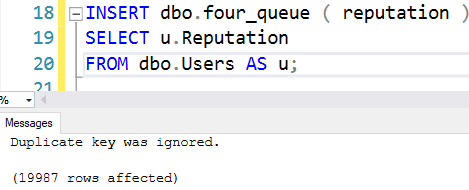
INSERT dbo.four_queue ( reputation )
SELECT u.Reputation
FROM dbo.Users AS u;
2020 04 28 9 42 20
Insertion Technique

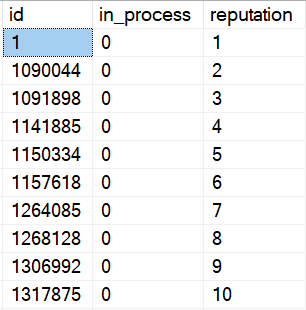
Fair warning here, IGNORE_DUP_KEY does fun stuff to our identity column:

2020 04 28 9 45 22
Sequential is inconsequential.

Since the identity doesn’t have any meaning beyond the order that rows were inserted in, it doesn’t matter that it’s not sequential. Order is order, even with gaps.

If you need it to be sequential for some in(s)ane reason, don’t use an identity and use ROW_NUMBER instead.

Totally Tabular


We’ve got a table, and we’ve got data in it.

In Part 2, we’ll look at designing a procedure to work off the queue.

Thanks for reading!

Going Further


If this is the kind of SQL Server stuff you love learning about, you’ll love my training. Blog readers get 25% off the Everything Bundle — over 100 hours of performance tuning content. Need hands-on help? I offer consulting engagements from targeted investigations to ongoing retainers. Want a quick sanity check before committing to a full engagement? Schedule a call — no commitment required.

The Best Worst Code That Never Was

We All Hear What We Want To Hear


When Kendra Little (b|t) announced the #BESTWORSTCODE contest, I thought we’d be showing off bad and quirky code that we’d seen or written.

So I went digging through my personal archives, did a little updating, and proudly came up with the below examples.

It turns out that wasn’t at all what was going to happen! Kendra, of course, had much better ideas. And now I have the pubs database probably forever.

Anyway, presented without comment is what I was going to submit.

Thanks for reading!

/*We don't really have to name anything*/
DECLARE @ TABLE(_ INT DEFAULT 0);
INSERT @ (_)
DEFAULT VALUES;

/*Do we ever divide?*/
SELECT ROW_NUMBER() OVER(ORDER BY 1/0) AS [1/0]
FROM @ #@
WHERE EXISTS
(
    SELECT 1/0 AS [1/0]
    FROM @ AS ##@
    WHERE #@._ = ##@._
);


/* Highly illogical. ??? */
IF (1 + 2 = 4)
    BEGIN
        DECLARE @ TINYINT;
    END;
SELECT @ = 1;
SELECT @ AS [?];
GO

IF (2 + 1 = 4)
    BEGIN
        DECLARE @ TINYINT = 1/0;
    END;
SELECT @ AS [?];
GO


/*Conventional Naming.*/
DROP TABLE IF EXISTS #;

CREATE TABLE # (int INT, INDEX xml CLUSTERED (int));
INSERT # ( int )
SELECT varbinary.sysname
FROM 
(
    SELECT TOP (1000 * 1000) 1e0 AS sysname
    FROM sys.messages AS smallmoney
    CROSS JOIN sys.messages AS money
) AS varbinary;


/*This is fine.*/
SELECT TOP (2-1) sql_variant.int
FROM # AS sql_variant;

/*This is also fine.*/
ALTER TABLE # ADD real AS int / 0e0;

/*How many errors should I get?*/
SELECT SUM(ROWCOUNT_BIG()) AS float
FROM # AS sql_variant
GROUP BY ();


/*Oh, now you care.*/
CREATE INDEX columnstore ON #(real);

Going Further


If this is the kind of SQL Server stuff you love learning about, you’ll love my training. Blog readers get 25% off the Everything Bundle — over 100 hours of performance tuning content. Need hands-on help? I offer consulting engagements from targeted investigations to ongoing retainers. Want a quick sanity check before committing to a full engagement? Schedule a call — no commitment required.

Giving Back: Free And Discounted Online Training

Launchtime


Just about a month ago, I launched my online training.

It had been in the works for a while, as I was building up material I was really happy with, alongside working with my smart, wonderful, good-looking clients.

And, you know, those family people. I can hear them once in a while.

It has been a spectacular month, especially considering all that’s going on. As of this writing (at just before the 30 day mark), I’ve given away nearly $40k in training to those in need.

That number doesn’t include other sales — it’s just the giveaways — and for some reason that report cost me a $150.

2020 05 08 7 38 07
Free like bears

It’s been incredibly gratifying helping everyone going through a tough time right now. It’s something I plan to keep doing, though hopefully not because of these pesky global pandemic things, that have ruined more brunches than cheap prosecco and broken heels.

After that, you’ll have to wait for my Spooky Samhain sale.

Thanks for reading!

Going Further


If this is the kind of SQL Server stuff you love learning about, you’ll love my training. Blog readers get 25% off the Everything Bundle — over 100 hours of performance tuning content. Need hands-on help? I offer consulting engagements from targeted investigations to ongoing retainers. Want a quick sanity check before committing to a full engagement? Schedule a call — no commitment required.