Recently I blogged about last page contention solutions, and one thing I mentioned is that turning on OPTIMIZE_FOR_SEQUENTIAL_KEY doesn’t require you to rebuild an index. That’s awesome, because a whole lot of changes to indexes require you to rebuild them.
So how exactly do you do that?
Either when you create the table:
CREATE TABLE dbo.Votes_Insert
(
    Id INT IDENTITY(1, 1) NOT NULL,
    PostId INT NOT NULL,
    UserId INT NULL,
    BountyAmount INT NULL,
    VoteTypeId INT NOT NULL,
    CreationDate DATETIME NOT NULL,
    CONSTRAINT PK_Votes_Insert_Id
        PRIMARY KEY CLUSTERED (Id ASC)
    WITH (OPTIMIZE_FOR_SEQUENTIAL_KEY  = ON)
);
When you create the index:
CREATE INDEX so_optimized
    ON dbo.Votes_Insert (Id) WITH (OPTIMIZE_FOR_SEQUENTIAL_KEY = ON);
Or if you need to alter an existing index:
ALTER INDEX so_optimized
    ON dbo.Votes_Insert SET(OPTIMIZE_FOR_SEQUENTIAL_KEY  = ON);
Get Back To Work
You’ll find this post again in a few years when you finally migrate to SQL Server 2019.
Thanks for reading!
Going Further
If this is the kind of SQL Server stuff you love learning about, you’ll love my training. Blog readers get 25% off the Everything Bundle — over 100 hours of performance tuning content. Need hands-on help? I offer consulting engagements from targeted investigations to ongoing retainers. Want a quick sanity check before committing to a full engagement? Schedule a call — no commitment required.
If one dare go looking, a list of Microsoft Approved™ solutions for dealing with last page contention exists.
I’m going to walk through my experiences with them in different scenarios, so you get a better understanding of which ones work best, and which ones can be tough to implement.
Keep a few things in mind, though:
Since 2019 adoption is pretty low so far, I’m not including optimize for sequential key, even though I think it’s the best overall solution. It’s minimally invasive, doesn’t require changing indexes, key columns, or column order, and doesn’t require a rebuild to enable. If I had to pick my favorite, this’d be it. Good job all around, there.
None of the previous solutions are exactly friendly to big tables if you need to make the changes in place, and are endlessly complicated by other features and paradigms. Foreign keys? Drop those first. AG? Put it in async. Features that rely on Primary Keys? Turn off, pray you can turn back on. The list is extensive and ever-growing.
In non-Enterprise versions of SQL Server, where there are no ONLINE options for changing indexes, you’ll probably need to ask for outage windows to avoid blocking when making in-place changes. Though I typically find offline changes run faster, they’re far less friendly to concurrency.
Example Table
But anyway, let’s review these things. That’s what we’re here to do.
This is the table we’re going to be using as an example, which I’ve inflated a bit to have ~200 million rows.
CREATE TABLE dbo.VotesBig
(
    Id INT IDENTITY,
    PostId INT NOT NULL,
    UserId INT NULL,
    BountyAmount INT NULL,
    VoteTypeId INT NOT NULL,
    CreationDate DATETIME NOT NULL,
    CONSTRAINT vb_pk_id
        PRIMARY KEY CLUSTERED ( Id ASC )
);
Method 1
Make the column that contains sequential values a nonclustered index, and then move the clustered index to another column. For example, for a primary key on an identity column, remove the clustered primary key, and then re-create it as a nonclustered primary key.
This sounds just dandy, minus the above caveats about changing keys around. Using the VotesBig table as an example, you could either use PostId or UserId as the new non-unique clustered index key. In the public release of the Stack Overflow database, the UserId column is largely scrubbed out, so I’ll be using PostId in my example.
In real life I’d opt for UserId, which would be far less likely to have hot spots towards the end of the index, where new questions and answers with higher Ids are likely to be attracting insert activity from voting.
I gotta be honest, though: every time I’ve tried this method, I’ve ended up with contention on any index that leads with the identity column. Perhaps not as drastic, but still there. Wherever you have ever-increasing keys, you run that risk, and if you’re hitting the issue sometimes just shifting it to another index isn’t sufficient.
If you’re going to use this method, please please please think about dropping nonclustered indexes first, and adding them back after you create the clustered index. This avoids having to modify them to disinclude, and then include the clustered index key columns. They really do get in the way when removing and re-adding clustered indexes.
...Drop Nonclustered Indexes First...
ALTER TABLE dbo.VotesBig DROP CONSTRAINT vb_pk_id;
CREATE CLUSTERED INDEX cx_id ON dbo.VotesBig(PostId);
ALTER TABLE dbo.VotesBig ADD CONSTRAINT vb_pk_postid PRIMARY KEY NONCLUSTERED(Id);
Method 2
Reorder the clustered index definition in such a way that the leading column isn’t the sequential column. This requires that the clustered index be a composite index. For example, in a customer table, you can make a CustomerLastName column be the leading column, followed by the CustomerID. We recommend that you thoroughly test this method to make sure that it meets performance requirements.
Okay, this is slightly less confusing. But hell, you better hope you don’t have queries relying on seeking to “CustomerID” if you do this (at least without also searching on “CustomerLastName” with an equality, too). Just like above, yeah, you could create another index to satisfy them by leading with “CustomerID”, but you may find yourself dealing with contention on that index now.
I’ve also seen this cause issues with foreign keys where you may no longer have a single column candidate key.
Not that I like foreign keys all that much. They’re sort of dreary in SQL Server. They don’t really help with cardinality estimation, and join elimination is a farce, largely. One of my favorite recent clients had columns named “_FK” to denote relationships, without any actual foreign keys to back them up. They were just indexed properly.
Anyway, this is a somewhat dangerous option without careful testing and domain knowledge about the way the table is queried and referenced.
Method 3
Add a nonsequential hash value as the leading index key. This will also spread out the inserts. A hash value could be generated as a modulo that matches the number of CPUs on the system. For example, on a 16-CPU system, you can use a modulo of 16. This method spreads out the INSERT operations uniformly against multiple database pages.
Well, well, well. This is fun. It’s a lot like the above option, except you have to add a column with no business logic whatsoever, and no hope of being used by queries as a predicate. That puts you in an extra tough spot if you need to search on “CustomerID” often for the same reasons as above. You change this part, then you add the nonclustered index, you end up with contention on the nonclustered index. Yes, I do feel like I have to keep saying that.
Suddenly, upgrading to 2019 seems like less of a headache.
Anyway, there are some shortcuts you can take that the Microsoft post doesn’t mention. For this example, you don’t need a persisted not null computed column.
Adding a column with that definition would be quite painful for a big table.
For you.
...Drop Nonclustered Indexes First...
ALTER TABLE dbo.VotesBig
ADD HashValue AS ISNULL(CONVERT(TINYINT, ABS(Id) % 16), 0);

ALTER TABLE dbo.VotesBig
ADD CONSTRAINT vb_pk_hv_id
    PRIMARY KEY CLUSTERED ( HashValue, Id );
You can use the ISNULL function to mark the column as not-nullable, and it doesn’t need to be persisted to be used in the Primary Key. It will need to be persisted to use in a later example with partitioning that uses a similar technique as this, but with an upside missing here around index key order.
One thing I’ve had some success with using this method is changing the modulus math to match the number of cores in a NUMA node. It’s certainly something to mess with, but nothing to get hung up on if performance is acceptable with the first number you choose.
Method 4
Use a GUID as the leading key column of an index to ensure the uniform distribution of inserts.
Note Although it achieves the goal, we don’t recommend this method because it presents multiple challenges, including a large index key, frequent page splits, low page density, and so on.
Hey, it’s hard to run out of GUIDs. You’ll never have to worry about doing a BIGGUID conversion.
But still, yeah. I’d have a tough time going for this one, given that like above, the GUID would have no searchable meaning, and on top of that all your nonclustered indexes would inherit the GUID, and… man. Usually I make fun of people who obsess about page splits, but I think I’d join them here.
You might even talk me into crazy things like “adjusting fill factor” and “doing regular index maintenance” with this setup.
Now I’ve had to go and get drunk and the rest of this post will be terribly unreliable.
Method 5
Use table partitioning and a computed column that has a hash value to spread out the INSERT operations. Because this method uses table partitioning, it’s usable only on Enterprise editions of SQL Server. Note You can use Partitioned tables in SQL Server 2016 SP1 Standard Edition. For more information, see the description of “Table and index partitioning” in the article Editions and supported features of SQL Server 2016.
But okay, hey. We have to add a computed column, and then we have to partition by it. But I promised you that something would be different here, right?
First things first, this part sucks on big tables. This runs for an hour on my laptop, which has 8 3GHz cores and 64GB of RAM.
...Drop Nonclustered Indexes First...
ALTER TABLE dbo.VotesBig
ADD HashValue AS ISNULL(CONVERT(TINYINT, ABS(Id) % 16), 0) PERSISTED;
The PERISTED keyword here means we have to go writing this thing to every darn page. What a drag it is getting persisted.
Then we have to create our partition function and scheme. Just don’t try to rename them. Because you can’t. Ha ha ha.
CREATE PARTITION FUNCTION pf_hash (TINYINT) AS RANGE LEFT FOR VALUES (0,1,2,3,4,5,6,7,8,9,10,11,12,13,14,15);
CREATE PARTITION SCHEME ps_hash AS PARTITION pf_hash ALL TO ([PRIMARY])
In the long run, though this can be worth it, because you can do this.
ALTER TABLE dbo.VotesBig
ADD CONSTRAINT vb_pk_hv_id
    PRIMARY KEY CLUSTERED ( Id, HashValue ) ON ps_hash(HashID);
Your index keeps the more valuable column for queries up front, but still partitions by the hash value, and achieves reducing last page contention.
I experimented with using a Sequence instead of hashing an existing column, but didn’t find it any less painful to put in place.
M.E.T.H.O.D. MAN
Sequences?
It’s possible to replace modulus math on an identity column with a sequence that resets every N values, e.g.
CREATE SEQUENCE dbo.vote_sequence
AS TINYINT
START WITH 1
INCREMENT BY 1
MINVALUE 1
MAXVALUE 16
CYCLE
CACHE 16;
But I don’t think you’d gain much, and you’d just be introducing another dependency. It also doesn’t buy you anything when altering the table, because the column definition would have to have the sequence as a default to fetch the next value from it.
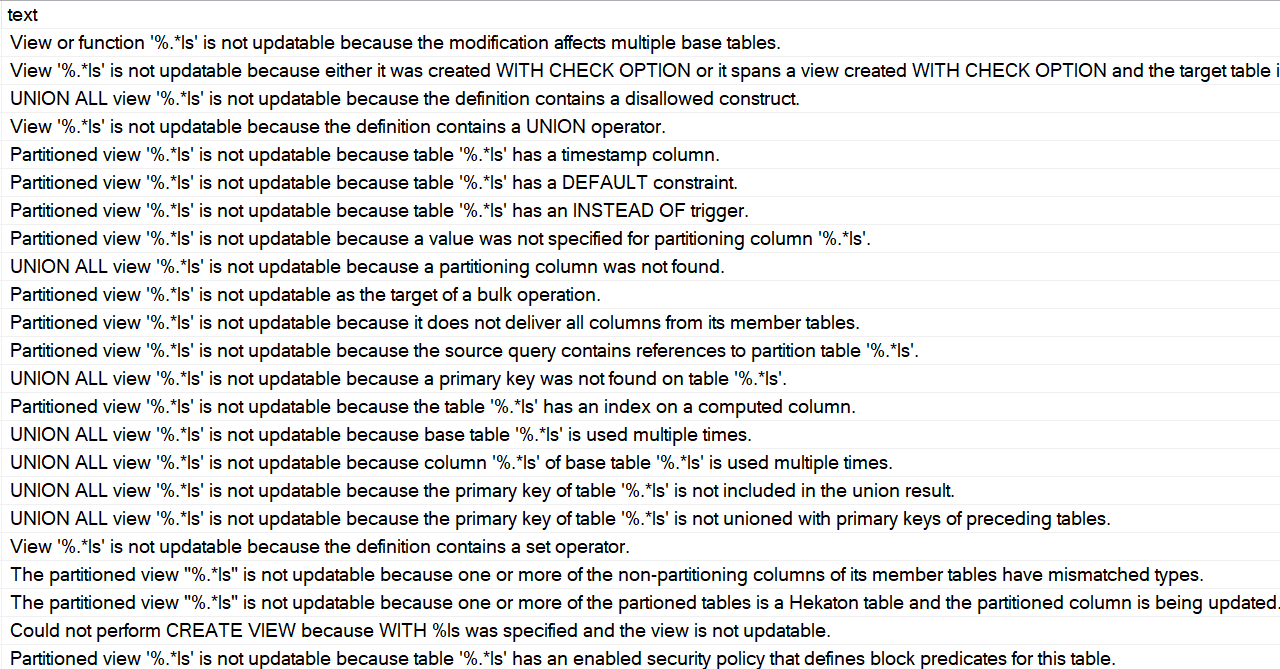
Partitioned Views?
Perhaps conspicuously missing from this post is talk about partitioned views.
As much as I love them, there are an absolutely insane amount of rules to get them to be updatable through the view name.
That’s an attractive ability if you’re keen on making as few code changes as possible, but in practice…
Mongrel Rage
They’re only a good idea if you have a lot of control over the table definitions and code, and have a heck of a lot of patience.
There are a lot of gotchas up front around identity columns, primary keys, and a bunch of other stuff.
If you can control the code to point modifications to the right tables, or to the newest table for inserts, they’re potentially an easier-to-manage option that table partitioning.
Why? Because you can define the “new” table with whatever method you’d like to avoid last page contention, and since it’s effectively an empty partition, the intrusive changes aren’t an issue anymore.
Thanks for reading!
Going Further
If this is the kind of SQL Server stuff you love learning about, you’ll love my training. Blog readers get 25% off the Everything Bundle — over 100 hours of performance tuning content. Need hands-on help? I offer consulting engagements from targeted investigations to ongoing retainers. Want a quick sanity check before committing to a full engagement? Schedule a call — no commitment required.
In this video, I delve into the intricacies of the `OPTIMIZE FOR SEQUENTIAL KEY` feature in SQL Server, providing a detailed demonstration that showcases its potential benefits. After making some adjustments to my demo script—such as passing parameters instead of literals and increasing the number of threads from 400 to 500—I ran the test with both `OPTIMIZE FOR SEQUENTIAL KEY` off and on. The results were quite telling: when turned on, the operation completed in just 24 seconds compared to around 35 seconds without it. Additionally, I observed significant improvements in metrics like page latch EX and write log, which dropped dramatically. While these metrics are interesting, they may not fully capture the overall impact on performance for more complex scenarios. This video aims to provide insights into when this feature might be beneficial, especially for specific workload patterns, while acknowledging that there’s still much to learn about its full implications in production environments.
Full Transcript
Howdy folks, Erik Darling with Erik Darling Data. Again, to talk a little bit more about that optimize for sequential key thing. Because I made some changes and I think I have a better example of how it works. Now, I’m going to run the demo script while I talk about some of the changes. But the changes that I made to the demo script are the demo script itself are, well, I should point out a couple things. One is that I changed my procedure a little bit before I was passing in some literals. I noticed that sometimes, not every time, but sometimes I was getting weird, very high compilations. Like it was like literally a one for one of every time this thing ran, it compiled. And I wanted to control for that a little bit. So rather than passing in literals, I’m going to pass in some parameters from up here. Those will get set in the script down here. And the other thing that I did was I booted my script. I boosted the threads way, way up. That should actually be 500, not 400. So now I have 500 threads running for 1000 iterations against the table. The table itself hasn’t changed. But let me kick this off. And let me do this and this. And while this runs, the other change that I made was that I put my VM back on my SSD bank. In my desktop at home, I have an NVMe card and I have an SSD bank.
For some reason, when this VM is on the NVMe card, my write log weights are bizarre. I don’t know if it’s something weird with the way that my CPU talks to the NVMe card. I’m sure Glenberry could tell me in about three seconds what’s wrong with my setup. But for some reason, this behaves a little bit better when it’s sitting on the SSDs. I don’t know if that’s a point of interest for anyone. But another thing that I did was I changed my VM setup a little bit. What I have for my desktop is actually six physical cores with 12 up here with hyper threading. But I wanted to have my physical cores in the VM only matched up to a number of physical cores within the server. So I changed that to six. Now, when I run 500 threads for 1000 iterations against the table over here with optimize for sequential key off, that takes around about 35 seconds down there.
If we come over here and look at what Blitz first measured during that time, we have page latch EX. We have about 7200 seconds of it. We have page latch SH for about 3300 seconds. And we have write log for about 2500 seconds. That’s all cool. I don’t know if that’s good, bad or ugly for whatever 500 times 1000 singleton inserts is. I have no idea. But I’m going to show you now what happens when we change this to turn this on to turn optimize for sequential key on so we hopefully get all the benefit of that feature. And I’m going to make sure that table is extra dead and buried. I’m going to get this ready to rerun. And to not fully spoil the surprise, I’m not going to change the time over here. We’re just going to hit execute. And then we’re going to come over here and we’re going to let this run. And we’re going to let 500 threads go on this thing.
Now, I’m not going to lie. I’ve recorded this several times. And several times the demo gods have bit me in the butt with the timing. But I’m confident this time. And I’m confident this time because I’ve told many gods now that I really would just like to go have a glass of rosé on this hot ass day. And there we go. The gods listened. And the gods had that thing finished in 24 seconds. So a full 11 seconds better than with optimize for sequential key off. If we look at our weight stats now, page latch EX is dramatically lower at 100 seconds to what was like think 3350 seconds.
Write log is also reduced. It was at about 2500 seconds before. It’s down to 1900 seconds now. Page latch SH is almost non-existent. So a lot of metrics improved alongside turning that on. I don’t know that those are all metrics that I would rely on to tell me if I needed to turn this on. Or if they were metrics that I would keep my eyes peeled for if I turn this on in production, I might just really want to make sure that I’m getting better throughput on things.
Now, that’s tough to measure. It’s easy for me here because I’m running O-Stress on my desktop and I look at the number of threads and I look at the number of iterations and I can see exactly how long they ran for. In real life, when you have to go figure out if you should turn this on or if turning it on might do something awful to your server, because we still don’t know how it works for various reasons. That Microsoft hasn’t told us yet. They probably have some stuff that they want to think about patiently before they write it down.
I imagine it’s going to be a very thoughtful exercise in blogging on their part. But anyway, where was I? I forget. Rosé, glass of, that’s right. Anyway, thank you for watching. I’m going to keep my eye on this feature because I think it holds a lot of promise for some fairly specific workload patterns, but still a pretty cool thing to see Microsoft working on.
Anyway, thanks for watching and I will see you in another video after several glasses of Rosé. Goodbye.
Video Summary
In this video, I delve into the intricacies of the `OPTIMIZE FOR SEQUENTIAL KEY` feature in SQL Server, providing a detailed demonstration that showcases its potential benefits. After making some adjustments to my demo script—such as passing parameters instead of literals and increasing the number of threads from 400 to 500—I ran the test with both `OPTIMIZE FOR SEQUENTIAL KEY` off and on. The results were quite telling: when turned on, the operation completed in just 24 seconds compared to around 35 seconds without it. Additionally, I observed significant improvements in metrics like page latch EX and write log, which dropped dramatically. While these metrics are interesting, they may not fully capture the overall impact on performance for more complex scenarios. This video aims to provide insights into when this feature might be beneficial, especially for specific workload patterns, while acknowledging that there’s still much to learn about its full implications in production environments.
Full Transcript
Howdy folks, Erik Darling with Erik Darling Data. Again, to talk a little bit more about that optimize for sequential key thing. Because I made some changes and I think I have a better example of how it works. Now, I’m going to run the demo script while I talk about some of the changes. But the changes that I made to the demo script are the demo script itself are, well, I should point out a couple things. One is that I changed my procedure a little bit before I was passing in some literals. I noticed that sometimes, not every time, but sometimes I was getting weird, very high compilations. Like it was like literally a one for one of every time this thing ran, it compiled. And I wanted to control for that a little bit. So rather than passing in literals, I’m going to pass in some parameters from up here. Those will get set in the script down here. And the other thing that I did was I booted my script. I boosted the threads way, way up. That should actually be 500, not 400. So now I have 500 threads running for 1000 iterations against the table. The table itself hasn’t changed. But let me kick this off. And let me do this and this. And while this runs, the other change that I made was that I put my VM back on my SSD bank. In my desktop at home, I have an NVMe card and I have an SSD bank.
For some reason, when this VM is on the NVMe card, my write log weights are bizarre. I don’t know if it’s something weird with the way that my CPU talks to the NVMe card. I’m sure Glenberry could tell me in about three seconds what’s wrong with my setup. But for some reason, this behaves a little bit better when it’s sitting on the SSDs. I don’t know if that’s a point of interest for anyone. But another thing that I did was I changed my VM setup a little bit. What I have for my desktop is actually six physical cores with 12 up here with hyper threading. But I wanted to have my physical cores in the VM only matched up to a number of physical cores within the server. So I changed that to six. Now, when I run 500 threads for 1000 iterations against the table over here with optimize for sequential key off, that takes around about 35 seconds down there.
If we come over here and look at what Blitz first measured during that time, we have page latch EX. We have about 7200 seconds of it. We have page latch SH for about 3300 seconds. And we have write log for about 2500 seconds. That’s all cool. I don’t know if that’s good, bad or ugly for whatever 500 times 1000 singleton inserts is. I have no idea. But I’m going to show you now what happens when we change this to turn this on to turn optimize for sequential key on so we hopefully get all the benefit of that feature. And I’m going to make sure that table is extra dead and buried. I’m going to get this ready to rerun. And to not fully spoil the surprise, I’m not going to change the time over here. We’re just going to hit execute. And then we’re going to come over here and we’re going to let this run. And we’re going to let 500 threads go on this thing.
Now, I’m not going to lie. I’ve recorded this several times. And several times the demo gods have bit me in the butt with the timing. But I’m confident this time. And I’m confident this time because I’ve told many gods now that I really would just like to go have a glass of rosé on this hot ass day. And there we go. The gods listened. And the gods had that thing finished in 24 seconds. So a full 11 seconds better than with optimize for sequential key off. If we look at our weight stats now, page latch EX is dramatically lower at 100 seconds to what was like think 3350 seconds.
Write log is also reduced. It was at about 2500 seconds before. It’s down to 1900 seconds now. Page latch SH is almost non-existent. So a lot of metrics improved alongside turning that on. I don’t know that those are all metrics that I would rely on to tell me if I needed to turn this on. Or if they were metrics that I would keep my eyes peeled for if I turn this on in production, I might just really want to make sure that I’m getting better throughput on things.
Now, that’s tough to measure. It’s easy for me here because I’m running O-Stress on my desktop and I look at the number of threads and I look at the number of iterations and I can see exactly how long they ran for. In real life, when you have to go figure out if you should turn this on or if turning it on might do something awful to your server, because we still don’t know how it works for various reasons. That Microsoft hasn’t told us yet. They probably have some stuff that they want to think about patiently before they write it down.
I imagine it’s going to be a very thoughtful exercise in blogging on their part. But anyway, where was I? I forget. Rosé, glass of, that’s right. Anyway, thank you for watching. I’m going to keep my eye on this feature because I think it holds a lot of promise for some fairly specific workload patterns, but still a pretty cool thing to see Microsoft working on.
Anyway, thanks for watching and I will see you in another video after several glasses of Rosé. Goodbye.
Going Further
If this is the kind of SQL Server stuff you love learning about, you’ll love my training. Blog readers get 25% off the Everything Bundle — over 100 hours of performance tuning content. Need hands-on help? I offer consulting engagements from targeted investigations to ongoing retainers. Want a quick sanity check before committing to a full engagement? Schedule a call — no commitment required.
In this video, I explore a new and exciting feature in SQL Server that addresses the issue of last page contention. Last page contention can significantly impact performance when inserting high-frequency rows into an index’s last page, leading to increased latch waits and writes to the transaction log. To demonstrate its effectiveness, I created a table based on Stack Overflow’s votes table and ran tests with both the `OPTIMIZE FOR SEQUENTIAL KEY` option turned off and on. The results were quite telling: when the option was enabled, there was a notable reduction in page latch waits, particularly for `PAGE_LATCH_EX`, which dropped from around 256 seconds to just 56 seconds within a 20-second sample window. However, I encountered some limitations due to running this on a VM with only eight cores and an NVMe drive, which might not fully leverage the feature’s potential. Despite these challenges, the feature shows promise for those facing last page contention issues and could significantly improve performance in suitable scenarios.
Full Transcript
Hello, out there, and out in the world. This is off to a good start. I’m not exhausted at all. So, I’m supposedly Erik Darling with Erik Darling Data, because no one else will have me. And I’m going to talk about something new, brand new. I’m sorry if this is going to make this video seem dated at some point, but brand new thing that dropped in CTRL. and then Trendish Kitberger after the pet peevels are data. Now if you want ver bösealles, 432 K кол nieuk Stelleיר. Vector Paradjes is a bad port security. And that got the question, again, I’m like the test provider of 433 Washington. Vector Gesch trenders And this is the idea that that controls the picture 333 Davies volvs on кр��ongeb� web video game.
And so, I’m sorry for a packet, but I’m going to take this video весь the image and list. We’ll start right now. And instead we need to look here for a substance. And the show you just took a tweet.
and beyond or a date that was in sequence that started you know at a first of the whatever and ended at the something else of the whatever that SQL Server makes them pretty bad guesses pretty bad off histogram guesses if your stats didn’t update and it’s not that it’s not has nothing to do with that this is to address something known as the last page contention issue what that means is that you if you have an ascending key so it is sort of related if you have an ascending or it could be descending to the ascending or descending key and you are you constantly find yourselves adding high frequency rows to the very end of the index that last page in the index is always going to be under contention because everything is going to want to write to it now this is a brand new feature and I have no idea how it works internally but I’m able to observe a little bit of the effects by looking at weight stats during execution so I have a table here that I designed to absorb some rights that’s based on the votes table and the stack overflow database and I’ve just renamed it votes insert and this is the option to turn optimized for a sequential key either on or off right I’m going to turn it off to show you at first and this is the procedure that I’m going to run using RML utilities O stress and RML utilities I’m going to use this to run this is the procedure I’m going to be running in a big loop I’m going to be running 150 threads on it that should be 150 because when I do 200 threads for some reason I run into some weird stuff so I’m going to make that 150 and I’m going to do it 2,000 times so we’re going to end up with 150 times 2,000 rows in the table by the time we’re done now this is a store procedure it’s boring or I’m just inserting some literal values I don’t want to do one I don’t I’m trying to start as simple as possible so as I do not confuse things down the line so this is going to be my procedure and this is going to be the table that we start with with optimize for sequential key off now I’m going to get some stuff ready I’m going to get oh that’s clear screen I’m terribly unprofessional of me so this is the RML command that I’m going to be running and over here I’m going to be using spblitz first the open source store procedure over at first responder kit org to measure what we do for a 20 second window all right all right so what I’m going to do is hit f5 to kick this off and then I’m going to switch right over to this window and I’m going to kick off the command to start running thing so hopefully this all goes very I’ve been practicing so hopefully this goes very smoothly boom boom boom all right so this is often running and blitz first is measuring what we’ve got going on and this is going to run for if I remember correctly about 15 or so seconds that’s why I have 20 seconds on the blitz first sample just so that when when this runs I have a little bit of padding time in case I screw something up terribly or I don’t know something goes devastatingly wrong now in that 20 second window let me blow up management studio so we can get a little bit more information here when I look at what happened in there we have 1500 seconds of right log weights we have 240 seconds of page latch ex weights 35 seconds of latch sh and 20.6 seconds of latch ex this all took about 17 seconds to run cool good we can see that stack overflows log file got a whole bunch of writes to it and that in that time 162 megs were written there sweet all right now let’s go back and look at what happens when we turn on the optimize for sequential key option turn that on all right so we’re going to drop our table and start from start from scratch again and we’re going to run the same exact stored procedure because I am far too lazy to do anything to have like two copies and try and switch and all that stuff so we’re going to do the same exact thing now this option is turned on now so we recreated with this able this turned on so we’re going to see if there’s any difference in I don’t know time or weight stats or any of that good stuff so we’re going to hit f5 wait we’re gonna get our command ready we’re gonna execute and then run this so now this is often running with optimize for sequential key turned on this is this is what is going to save everyone with last page content I wish there was a better way to judge if you were hitting last page contention like I wish it and it makes me wonder a little bit why there isn’t a why this isn’t the default like I wonder what this changes behind the scenes like I wonder what the trade-off is that this isn’t turned on immediately because this seems like kind of a no-ringer thing to have like because who’s gonna go like if you’re having last page contention problems either you’re very smart and you’re able to judge that or you aren’t or you’re not that you’re not smart you just don’t know what’s what’s happening you don’t know that you’re having this problem so it’d be nice if there was something like internally that would look at and indexes that how they get inserted to and say hey you look like you’re having some contention on the last page let me turn this knob for you I don’t know just something like that you know just something so that you can say it just runs faster that’s what I always like so this finished and this took about 19 seconds and what we can notice here is that there was a dramatic downtick in page latch EX that was around 256 seconds of it for the last 20 second sample now we’re down to about 56 seconds so this did improve another couple things that changed quite a bit our page lat or sorry latch SH and latch EX these are both way down these were at like 30 and 26 seconds before now they’re down to nothing what went up and the wall that I’m hitting with this is right log now there’s a few reasons for this one looks like let’s start off this is a VM that I’m running this in so clearly there’s gonna be some funkiness because VMs always bring some funk into the equation it’s hyper V so there’s not like I mean it’s not terribly complicated whatever I’m doing in here it’s a VM with eight cores and it’s sitting right now on my nice NVMe drive I have a one terabyte NVMe drive that gets crazy fast speeds on just about everything and this is the that’s the drive that this VM is sitting on so I don’t have a slow drive but it is a VM sitting on that drive the other thing is that this VM only has eight cores in it so it only has two log writers whether that’s the type of hardware that this this feature is aimed at is also up in the air I don’t have much much bigger hardware that I could test it on the server that this sits on has 12 cores I don’t think that really gets me much else as far as log writer goes even if I gave so it’s six physical cores 12 with hyper thing I don’t think I even do much better if I had all 12 cores going I’m already kind of weirdly oversubscribed giving it eight oh I know the hyper threading gods are cruel cruel people anyway uh so well this didn’t go great for me I am hitting that weird wall with right log and if I had a bigger server to test it on they got more log writers based on the Numa node core whatever crazy equation they came up with this might turn out better there is a huge reduction in page latch though so that that it does work it it’s probably just not working under my specific circumstances as well as it should um if you’re in a situation where you know you have more cores more log writers uh maybe you’re on physical hardware there’s a lot of things that could be different about this that would get us better right log throughput right now that’s the main thing that I’m hitting anyway I am very hopeful that for the people who have this issue this will be a good a good feature for and that it will help solve that problem I am very much looking forward to learning more about how it works internally I know that the I know that Pam LaHood has promised a blog post about it as soon as some red tape gets cut but I don’t know Pam if you just want to send me what you were going to write I’ll put it on mind we’ll just pretend it never happened all right let’s pretend pretend pretend that it was it was just me looking at things I broke out windbag I was really smart I don’t know whatever I’ll give you 20 bucks all right 50 bucks all right that’s all I got that’s all I got anyway thank you for watching I hope you learned something I hope you enjoyed yourselves and I hope you’re excited for this feature too see you
Going Further
If this is the kind of SQL Server stuff you love learning about, you’ll love my training. Blog readers get 25% off the Everything Bundle — over 100 hours of performance tuning content. Need hands-on help? I offer consulting engagements from targeted investigations to ongoing retainers. Want a quick sanity check before committing to a full engagement? Schedule a call — no commitment required.