In this video, I dive into the quirky behavior of indexed views in SQL Server, particularly focusing on what happens when you alter an index view. I share my personal experience with a six-year-old daughter who recently discovered that I’m on YouTube, which led to a priceless moment of realization for her. The main takeaway is that altering an index view can drop any indexes created on it, whether they are clustered or nonclustered. This can be quite surprising and potentially problematic if you’re not aware of this behavior. I walk through the process step-by-step using a simple example where creating or altering a view called “top comments” results in the disappearance of its index when altered. The video is light-hearted, filled with personal anecdotes, and aimed at making what could be a complex topic more approachable for SQL Server enthusiasts.
Full Transcript
This is gonna be one of those videos that you watch maybe because you see it on Twitter and then you’ll see it in a blog post a month later and be disappointed that it’s just a blog post with a video that you saw a month ago. But them’s the breaks when you have 30 blog posts already lined up. What do you want me to tell you? My six-year-old daughter recently discovered that I am on YouTube and the look on her face when she discovered that was priceless. Anyway, I’m here to talk, I shouldn’t introduce myself. My name’s Erik. I am, I am the janitor here at Erik Darling Data and I’m here to talk about something kind of funny that happens. with indexed views. Now, an indexed view is a pretty cool thing. It’s a, it’s a, it materializes a view. It makes that view a real, a real person like Pinocchio, what makes that view a real boy. And, I’m, it doesn’t matter if you use create or alter or create or alter here. It’s always the same thing, which I’ll, I’ll, I’ll walk through, but let’s create or alter a view called top comments. Now, if you want to create an index view, there are a whole bunch of rules that you have to follow.
There’s far too many rules for me to get into here, but a couple, one, a couple that we need for this particular index view are schema binding, which you need for all index views and account big column if you have an aggregate. Now, you can create index views without an aggregate that don’t have account big column because that wouldn’t make any sense. But, if you’re going to aggregate, uh, data in an index view, which is kind of like the whole point of an index view, or the whole point of most index views that I see, well, this is a pretty good, well, this is something you have to do anyway. So, let’s create this view and, uh, we’ll go look at that view and object explorer. You can see all the stupid things that I create, uh, writing demos. And that one was called, uh, top comments, I believe.
And if you go look, there is no index here, right? There’s no index on this view. And if we come back over here and we execute this, we’ll have an index on that view now. And now if we refresh, oh yeah, we’ve got to go up here to refresh. I promise I know what I’m doing. If we go here, refresh, and we look at top comments, we will now have an index on that view. So, we do have an index on that view now. Watch. Pay very careful, close attention to what’s going to happen next.
I’m going to say, I’m going to get rid of this window by hitting control and R. And I’m going to create or alter my view. And let’s go back and look. Let’s refresh this whole thing again. And let’s go into top comments. And look, my index is gone. My index has been dropped.
Now, if I go create that index again, it’ll show back up in there. And if I just run this as an alter view, I realize that not everyone is on at least SQL Server 2016. What’s that, 16? Then everyone can do create or alter. But if I do alter view, and I run this, and we go back and we look at top comments by refreshing, because we’re smart people and we know what we’re doing now, my index will be gone. Fun, right? So, moral of the story, be careful when you’re altering index views.
When you alter an index view, it drops any indexes you create on it. So, it will drop the clustered index. If you create additional nonclustered indexes on your index views, it will drop those too. And, I don’t know. You might not be lucky enough to have a very easy time recreating your indexes on your views.
It might not always be as painless a process as I have here on my view on my nice 64 gig of RAM laptop. Yes. 64 gig of RAM laptop. Anyway, I’m Eric, and I, of course, am the head chef at Erik Darling Data.
Thank you for watching. Thank you. I hope you learned something. I hope you at least enjoyed me rambling. It was probably better than whatever else you were going to do for the last four and a half minutes. I mean, probably not.
Anyway, thanks for watching, and I will see you in another video, another time, another place. Goodbye. What do you think I do? Have Bert Hold Faith? I order you. I started out before you. You did it to me, whatever’s all because I have a mythOL time.
Video Summary
In this video, I dive into the quirky behavior of indexed views in SQL Server, particularly focusing on what happens when you alter an index view. I share my personal experience with a six-year-old daughter who recently discovered that I’m on YouTube, which led to a priceless moment of realization for her. The main takeaway is that altering an index view can drop any indexes created on it, whether they are clustered or nonclustered. This can be quite surprising and potentially problematic if you’re not aware of this behavior. I walk through the process step-by-step using a simple example where creating or altering a view called “top comments” results in the disappearance of its index when altered. The video is light-hearted, filled with personal anecdotes, and aimed at making what could be a complex topic more approachable for SQL Server enthusiasts.
Full Transcript
This is gonna be one of those videos that you watch maybe because you see it on Twitter and then you’ll see it in a blog post a month later and be disappointed that it’s just a blog post with a video that you saw a month ago. But them’s the breaks when you have 30 blog posts already lined up. What do you want me to tell you? My six-year-old daughter recently discovered that I am on YouTube and the look on her face when she discovered that was priceless. Anyway, I’m here to talk, I shouldn’t introduce myself. My name’s Erik. I am, I am the janitor here at Erik Darling Data and I’m here to talk about something kind of funny that happens. with indexed views. Now, an indexed view is a pretty cool thing. It’s a, it’s a, it materializes a view. It makes that view a real, a real person like Pinocchio, what makes that view a real boy. And, I’m, it doesn’t matter if you use create or alter or create or alter here. It’s always the same thing, which I’ll, I’ll, I’ll walk through, but let’s create or alter a view called top comments. Now, if you want to create an index view, there are a whole bunch of rules that you have to follow.
There’s far too many rules for me to get into here, but a couple, one, a couple that we need for this particular index view are schema binding, which you need for all index views and account big column if you have an aggregate. Now, you can create index views without an aggregate that don’t have account big column because that wouldn’t make any sense. But, if you’re going to aggregate, uh, data in an index view, which is kind of like the whole point of an index view, or the whole point of most index views that I see, well, this is a pretty good, well, this is something you have to do anyway. So, let’s create this view and, uh, we’ll go look at that view and object explorer. You can see all the stupid things that I create, uh, writing demos. And that one was called, uh, top comments, I believe.
And if you go look, there is no index here, right? There’s no index on this view. And if we come back over here and we execute this, we’ll have an index on that view now. And now if we refresh, oh yeah, we’ve got to go up here to refresh. I promise I know what I’m doing. If we go here, refresh, and we look at top comments, we will now have an index on that view. So, we do have an index on that view now. Watch. Pay very careful, close attention to what’s going to happen next.
I’m going to say, I’m going to get rid of this window by hitting control and R. And I’m going to create or alter my view. And let’s go back and look. Let’s refresh this whole thing again. And let’s go into top comments. And look, my index is gone. My index has been dropped.
Now, if I go create that index again, it’ll show back up in there. And if I just run this as an alter view, I realize that not everyone is on at least SQL Server 2016. What’s that, 16? Then everyone can do create or alter. But if I do alter view, and I run this, and we go back and we look at top comments by refreshing, because we’re smart people and we know what we’re doing now, my index will be gone. Fun, right? So, moral of the story, be careful when you’re altering index views.
When you alter an index view, it drops any indexes you create on it. So, it will drop the clustered index. If you create additional nonclustered indexes on your index views, it will drop those too. And, I don’t know. You might not be lucky enough to have a very easy time recreating your indexes on your views.
It might not always be as painless a process as I have here on my view on my nice 64 gig of RAM laptop. Yes. 64 gig of RAM laptop. Anyway, I’m Eric, and I, of course, am the head chef at Erik Darling Data.
Thank you for watching. Thank you. I hope you learned something. I hope you at least enjoyed me rambling. It was probably better than whatever else you were going to do for the last four and a half minutes. I mean, probably not.
Anyway, thanks for watching, and I will see you in another video, another time, another place. Goodbye. What do you think I do? Have Bert Hold Faith? I order you. I started out before you. You did it to me, whatever’s all because I have a mythOL time.
Going Further
If this is the kind of SQL Server stuff you love learning about, you’ll love my training. Blog readers get 25% off the Everything Bundle — over 100 hours of performance tuning content. Need hands-on help? I offer consulting engagements from targeted investigations to ongoing retainers. Want a quick sanity check before committing to a full engagement? Schedule a call — no commitment required.
This time it’s an attempt to explain how SQL Server chooses which statistics to update.
It’s not glamorous, and it may even make you angry, but you know.
They can’t all be posts about…
*checks notes*
*stares into the camera*
*tears up notes*
*tears up*
*stares off camera until someone cuts to commercials*
And We’re Back
Let’s start with the query we’re going to use to examine our statistics.
    SELECT      t.name,
	            s.name,
				s.stats_id,
				sp.last_updated,
				sp.rows,
				sp.rows_sampled,
				sp.modification_counter
    FROM        sys.stats AS s
    JOIN        sys.tables AS t
        ON s.object_id = t.object_id
    CROSS APPLY sys.dm_db_stats_properties(s.object_id, s.stats_id) AS sp
    WHERE       t.name = 'UserStats';
Right now, the results aren’t too interesting, because we only have a statistics object attached to the Primary Key.
We’re not gonna touch that column. We’re gonna use another column.
This query will get system generated statistics created on the AccountId column.
    SELECT COUNT(*)
    FROM   dbo.UserStats AS u
    WHERE  u.AccountId > 1000
    AND    u.AccountId < 9999
	OPTION(RECOMPILE);
How nice of you to ask.
By itself, this isn’t very interesting. Let’s create an index, too.
CREATE INDEX ix_AccountId ON dbo.UserStats ( AccountId );
Take Me Out Tonight
The index created statistics, too. With the equivalent of a full scan! See that rows_sampled column?
I mean, why not, if you’re already scanning the whole table to get the data you need for the index, right?
Right.
I’m gonna use a couple updates to flip values around.
	UPDATE u
	SET u.AccountId = u.UpVotes + u.DownVotes
	FROM dbo.UserStats AS u
	WHERE 1 = 1;

	UPDATE u
	SET u.AccountId = u.UpVotes - u.DownVotes
	FROM dbo.UserStats AS u
	WHERE 1 = 1;
Don’t ask me why I swallowed a fly.
But the WHERE 1 = 1 is enough to get SQL Prompt to not warn me about running an update with no where clause.
Modifideded.
Both stats objects have been modified the same number of times.
Let’s run our COUNT query and see what happens!
Oh, dammit.
We can see that only the stats for the index were updated (and with the default sampling rate, not a full scan).
Now let’s create another stats object with FULLSCAN.
CREATE STATISTICS s_AccountId ON dbo.UserStats ( AccountId ) WITH FULLSCAN;
We’ll also go ahead and run an update again.
B-b-b-b-back
And then our COUNT query…
Ayeeeeeeee
SQL Server took two perfectly good fully sampled statistics and reduced them to the default sampling.
This doesn’t hurt our query, but it certainly is annoying to see.
A lot of the stuff people call “rocket science” about statistics options, like auto create and auto update stats, are there for a reason.
When you let SQL Server make choices, they’re not always the best ones.
Tracking this stuff down and understanding when and if it’s a problem is hard work, though. Don’t flip those switches lightly, my friends.
Thanks for reading!
Going Further
If this is the kind of SQL Server stuff you love learning about, you’ll love my training. Blog readers get 25% off the Everything Bundle — over 100 hours of performance tuning content. Need hands-on help? I offer consulting engagements from targeted investigations to ongoing retainers. Want a quick sanity check before committing to a full engagement? Schedule a call — no commitment required.
In dramatic fashion, I’m revisiting something from this post about stats updates.
It’s a quick post, because uh… Well. Pick a reason.
Get In Gear
Follow along as I repeat all the steps in the linked post to:
Load > 2 billion rows into a table
Create a stats object on every column
Load enough new data to trigger a stats refresh
Query the table to trigger the stats refresh
Except this time, I’m adding a mAxDoP 1 hint to it:
SELECT COUNT(*)
FROM dbo.Vetos
WHERE UserId = 138
AND   PostId = 138
AND   BountyAmount = 138
AND   VoteTypeId = 138
AND   CreationDate = 138
OPTION(MAXDOP 1);
Here’s Where Things Get Interesting
Bothsies
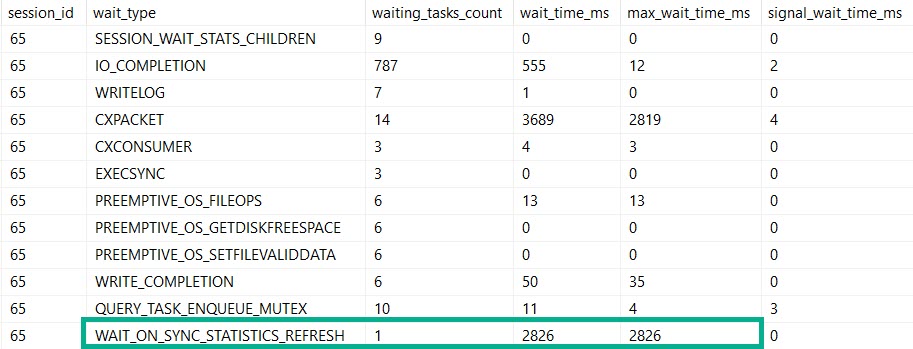
Our MaXdOp 1 query registers nearly the same amount of time on stats updates and parallelism.
If this is madness…
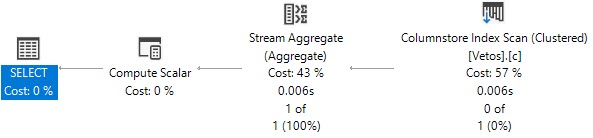
But our plan is indeed serial. Because we told it to be.
By setting maxDOP to 1.
Not Alone
So, if you’re out there in the world wondering why this crazy kinda thing goes down, here’s one explanation.
Are there others? Probably.
But you’ll have to find out by setting MAXdop to 1 on your own.
Thanks for reading!
Going Further
If this is the kind of SQL Server stuff you love learning about, you’ll love my training. Blog readers get 25% off the Everything Bundle — over 100 hours of performance tuning content. Need hands-on help? I offer consulting engagements from targeted investigations to ongoing retainers. Want a quick sanity check before committing to a full engagement? Schedule a call — no commitment required.
Clustered columnstore indexes can be a great solution for data warehouse workloads, but there’s not a lot of advanced training or detailed documentation out there. It’s easy to feel all alone when you want a second opinion or run into a problem with query performance or data loading that you don’t know how to solve.
In this full day session, I’ll teach you the most important things I know about clustered columnstore indexes. Specifically, I’ll teach you how to make the right choices with your schema, data loads, query tuning, and columnstore maintenance. All of these lessons have been learned the hard way with 4 TB of production data on large, 96+ core servers. Material is applicable from SQL Server 2016 through 2019.
Here’s what I’ll be talking about:
– How columnstore compression works and tips for picking the right data types
– Loading columnstore data quickly, especially on large servers
– Improving query performance on columnstore tables
– Maintaining your columnstore tables
This is an advanced level session. To get the most out of the material, attendees should have some practical experience with columnstore and query tuning, and a solid understanding of internals such as wait stats analysis. You don’t need to bring a laptop to follow along.
Courtyard Times Square – 114 West 40th street NY, NY 10018
Meeting Room – Lower Level – Meeting Room A & B
Going Further
If this is the kind of SQL Server stuff you love learning about, you’ll love my training. Blog readers get 25% off the Everything Bundle — over 100 hours of performance tuning content. Need hands-on help? I offer consulting engagements from targeted investigations to ongoing retainers. Want a quick sanity check before committing to a full engagement? Schedule a call — no commitment required.
Last week’s thrilling, stunning, flawless episode of whatever-you-wanna-call-it.
Video Summary
In this video, I dive into the world of SQL Server query plans and execution, addressing some common questions and misconceptions head-on. Starting off with a bit of frustration towards YouTube’s tendency to mess up my recordings, I share how important it is to understand the nuances between estimated and actual plans. I explain that while there’s technically only one plan, the pre-execution show plan (the estimated plan) and the post-execution plan (which includes actual metrics) are distinct entities with their own unique characteristics. This discussion leads into a detailed exploration of how many indexes might be too many, covering factors like locking, blocking, memory usage, and workload patterns. I also touch on the complexities introduced by features such as Read Committed Snapshot Isolation (RCSI), offering practical advice for those considering its implementation in their databases. Overall, this video aims to provide a clearer understanding of SQL Server’s query optimization process and the considerations involved in database design and tuning.
Full Transcript
All right. Try that again. The do-over of all do-overs. The grand do-over. I like when audio works. Audio should be better now. Should be. YouTube does awful things to me. Every time, every time I do this, every time. I hate you, YouTube. I hate you, YouTube. You’re the worst. The pits. Gigantic, awful. I wish this was something stronger. Canada Dry Sparkling Seltzer Water.
All right. Who has questions? There are like a billion people here. Someone has to have a question about SQL Server. Someone. Someone out there.
Must have a question about SQL Server. Otherwise, why would you show up? What, what good reason is there to show up and watch me do nothing? Play with scissors? You just start cutting my hair randomly.
You don’t want to do that. No one likes that. See the dancing. It’s always moving. Just do what I want. When you dance, Kenneth. You see anyone saying, hey, Kenneth, good job dancing.
Kenneth, dance for me. No. Did I see the discussion yesterday about actual first estimated plants? Yes, I did. And it is the same thing that I’ve been saying since the dawn of time.
That when you talk about an actual plan, it’s just the plan that has the actual metrics in it. There’s no. Well, I won’t say there’s no functional difference.
But that’s, that’s where things get tricky. That’s where things get a little bit awkward when you say that there’s, there’s no difference. Because when you get an estimated plan, there are things that don’t happen. That happen in the actual plan.
Or what we should start calling them are the pre-execution query plan and the post-execution show plan. There are all sorts of post-optimization rewrites that may end up in the query plan. All sorts of things that happen post-optimization.
If you look at an extended events. If you ever look at extended events there, when you look under, oh gosh, what’s it called? So actually this brings up an interesting thing. So I’m going to get to everyone’s questions, but I want to share this because it’s funny.
If you use SSMS 18 and you have it crash because you use extended events or like you open up the extended events thing. If you do new session wizard instead of new session, it doesn’t crash, which is amazing to me. Anyway, I’m going to just do a couple of things here because I want to talk about how many different events there are for show plan.
There are four. Actually, let me make sure that I have the debug thing opened up too. Okay, there’s four altogether.
There’s post-compilation show plan. There’s post-execution show plan. There’s pre-execution show plan. In query store generate show plan failure. Let’s leave the query store one out of this. There are three show plan events. And extended events that you can use to capture execution plans.
The pre-execution show plan is, you know, exactly what it sounds like. The query hasn’t been executed yet, but it has a query plan. The post-compilation show plan is after SQL Server says, okay, I got a query here. I’m going to, this is, I’m going to plan.
And then you have the post-execution plan, which may contain rewrites that weren’t, stuff like bitmaps and other things that weren’t available or that weren’t explored yet when you had the pre-execution show plan or just the post-compilation show plan. The post-execution show plan is also going to have the actual stuff in it. So there’s all sorts of, I mean, while there is functionally one plan, you might see different things in the post-execution show plan than just the actual metrics.
You know, like, like query plans now get all sorts of extra stuff in them, right? They got wait stats, they get operator times, they get all sorts of cool stuff. And you can only see that in the actual, in the actual plan.
Let’s call it the post-execution plan. So you can only see it in the post-execution plan. But there are also optimizer rewrites that might show up in the post-execution show plan that would not be in the pre-execution plan. There are decisions that SQL Server makes that might show up in there that wouldn’t be in the pre-execution plan.
So I think for the for the sake of all of sanity, there, the way that we should really refer to query plans are the pre-execution show plan, right, which is like estimated pen like control L or whatever button you hit up in management studio and then the post-execution plan, which contains actual metrics about things. So there is one query plan, but there are two versions of the plan. There is the pre-execution show plan, the post-execution show plan.
And I’m right about that. You can tell everyone on Twitter Erik Darling’s right about that. Don’t listen to anyone else. Anyway, we have other questions now. Now that I’ve been talking for how long is it that 20, 30 minutes, half hour, 45 minutes.
How long did I talk about? That was a long talk. That was a long, long talk. I just never talked about anything that long. Sammy says, how many indexes is too many? I don’t know. I don’t know. You tell me. How many indexes do you have?
And are you having problems with those indexes? Too many? Okay. So let’s see. What things that you look at when you want to find, do I have too many indexes? What happened in my life that I have so many indexes? What went on that caused so many indexes to show up and what am I seeing now? Great questions.
So if you have too many indexes, you will see more locking because you have more objects to lock. You will see more blocking because more things are getting locked. Unless you have magical settings turned on or you use no lock everywhere. But then writers will still block each other.
So you might see more of that. You might see worse use of memory. You might see, you know, that metric that everyone poops their pants about. You might see PLE get really low because all of a sudden you need to read a whole bunch more stuff into memory.
When you modify it, you might see more, more indexes need to end up. Come on into memory. We’ve got to change you. You got pages. You got to write on those pages. Let’s get into memory. You might see PLE drop. Oh boy. You might see increased page IO latch SH if you’re needing to go out to disk to get more indexes.
So it’s like saying, it’s like asking someone, well, how many calories is eating at maintenance for you? That’s going to depend on a heck of a lot of stuff, right? Like when you talk about eating at maintenance, right? You talk about like calories in versus calories out. So clearly I specialize in calories in, but if you talk about eating at maintenance, like how many calories, how many indexes that can I have?
How many calories can I have? Well, it depends. How sedentary are you? How much time do you spend sitting on your butt? How much time do you spend up being active? How many times, how much time do you spend doing stuff at the gym, going for walks, swimming, riding a bike, thinking real hard, cleaning?
Oh man, it was funny when I first met my wife, she was like, you know, if you clean the house, you burn like 200 calories. Yeah. Okay. Your cardio is made. I will just make messes for the rest of your life. You will be skinny.
But yeah, it’s like, like what is like, so how do you eat at maintenance? Well, you have to figure out how active you are, how inactive you are. If you have a table with a very, very low write profile, right? A table just doesn’t take that many writes for some reason.
Like, you know, you load data in like once a night or something, and then you read data out, it’s going to matter, right? Like, write patterns matter for how many indexes you can have. That and like settings like RCSI, which we have a question about, I promise you I will get to.
You know, if you’re using no lock-ins, you can have way more indexes because you don’t have to worry about locking. But you know, you know, there are other factors involved. How much memory do you have?
Oh, there’s lots of stuff, right? There’s lots of stuff to think about. There’s no such thing as like, how many indexes is too many for everyone or anyone? Like how many calories can I eat? Because you have to adjust that based on what you do, right? It’s not just make a Blakins statement about that. I hate people who make, I hate everyone who makes blanket statements.
You can quote me on that. I hate everyone who makes blanket statements. Beat that. But yeah, so you know, it really depends on your, you know, starting from the outside and working in. If you have an availability group or if you have, you know, mirroring because you’re still cool or if you have log shipping, you know, then that’ll affect how may affect how many indexes you have because you have to start sending those indexes to other places.
If you have a crappy San, I don’t just mean disks. I mean the whole storage area network, you might be able to have fewer indexes because you might be spending a lot of time going out to disk and to read those indexes in. You might cause a lot of contention on those shared resources that, that exist between your server and the disks and the, and the storage area network.
If you have a lot of memory that might not matter. If you have way more memory than data, which is, which I’m sure is all of you. You’re all, you all have a terabyte of memory and like a hundred gigs of data.
You know, it’s, that’s going to change things, right? You can have more indexes because you don’t have to worry about that stuff. If you have a high right workload, you can have fewer indexes. I don’t know. There’s a lot of stuff, a lot of stuff. How many indexes is too many depends on you and your hardware and your choice of H a technology, H a D R technology.
Lots of things go into that equation. Yeah. Figure it out though. Look at your weight stats. Look at your locking, look at your blocking, look at your workload. Look at, uh, you know, your servers error logs.
See if you have a lot of see if the server is, you know, going going crazy with like 15 second IO warnings or flush cash or like saturation messages. That’s what I would do. Anyway. Kenneth says I found a property that tells you if the plan came from the cash or not.
Yeah, that’s a little wonky though. I wouldn’t always rely on that. I’ve seen cases where like I’m using a recompile hint and it’s telling me that the plan came from the cash. So I would be careful with that one. Uh, Kapil says I’ve been in this heated debate with developers to enable RCS in this database where there are about a thousand of blocking and deadlock throughout the day. We are on default and I am proposing to enable RCS and test it out from temp TB.
I am good. What are the things that should be taken care of? And what are the caveats will enable enabling RCS? Well, uh, excuse me, the revenge of the seltzer. Um, so here’s, here’s the thing. I generally love RCS.
I think it’s wonderful, but. And here’s here. There are a few butts with it. Well, not big butts, medium sized butts like 90s, like 90s butts, not 80s butts. So the thing with RCS, I of course, is, you know, you say you’re good from temp TB.
So I’m going to assume that you have multiple temp TB files. If you’re on a version prior to 2016, you probably have trace flags one, one, one, seven and one, one, one, eight enabled. If you’re on a newer version, 2016 and up, those are the default behavior. So you don’t have to worry about it anymore.
Uh, so. What I would start being concerned about, um, a, if you have any queries that depend on locking and blocking for correctness, like if you do any queuing, like if you say I need to, you know, um. What’s the, what’s the classic analogy?
I need to assign tickets to whoever. Uh, doesn’t have a ticket available. RCS. I can mess with that because you might be reading version of rows where someone, you know, uh, already has a ticket, but the, that hasn’t like fully gone through yet or something. And you might like double ticket someone. So RCS can affect query correctness where you depend on blocking.
The other thing that you have to start worrying about is long running transactions. So the version store cleans up in different ways, depending on if you have RCS or snapshot enabled. So long running transactions affect how much version store you’re taking out in different ways.
But you need to start being more wary of long running transactions. You also need to start being more concerned about, um, well, gosh, how many indexes you have, because the more indexes you, you need to, uh, modify the more stuff will end up in the version store. You also need to worry about the size of your transactions again, going back to what we were talking about for indexes.
If you have, if you are loading or modifying lots and lots of rows, your version store is going to get lots and lots and lots of big. So you need to be a little bit careful there and you need to, uh, start batching your modifications in smart ways. Like say only update, like, you know, a hundred thousand rows at a time.
So you don’t blow out your version store and therefore tempt. So there’s lots of stuff. Lots of stuff. Um, but there, you know, as far as like the initial set of things, I would, you know, a pay attention to queries that use cues, right? Let’s say like, I need to do things in a certain order and I need locking to do that.
So the other thing is that our CSI isn’t going to necessarily help with deadlocks because deadlocks are primarily, um, primarily. I’m going to say primarily because it’s not a hundred percent. Again, I hate people.
I hate everyone who makes blanket statements, but deadlocks are primarily, uh, writer on writer contention and our CSI is not going to help that. It will significantly help readers and writers get along better. Snapshot isolation you can use to, um, help writers not conflict, but that gets tough. That gets difficult because then you have to start handling exceptions where, uh, like a transaction tries to run and update a role that’s not there anymore.
So, bye. So you need to start handling that. Um, let’s see. Let’s scan down the list here. V says back in the day when you were learning to tune queries, did you ever hit major roadblocks in terms of progress? I’m interested to know what if so?
Yeah. You know, um, of course. Yeah. You always, there’s always going to be something, right? Whether it’s like, you know, you are in a position where, you know, you really want to change an index, but you can’t change the index. You’re the one adding index.
You can’t add an index. You really want to do something and you, for some reason, can’t do it, right? Like, I hit that all the time when I work with people who are like, we have entity framework and I’m like, great. And so, development time must be really fast. Great.
Because you can’t really do a lot with those queries. And any framework calls off and writes whatever query it wants. So, you know, it’s nice that now you can inject query hints, which is wonderful. But, you know, with EF, it’s a lot of like, you know, trying to like force plans, either plan guides or query store if someone has that turned on. That’s always a tough one.
You know, and then stuff where, you know, you see a bunch of anti patterns, right? And you’re like, well, these are like, you know, I’m going to like step through my playbook of stuff I know can help queries. The first thing I’m going to do is I’m going to ditch these anti patterns and I’m going to make things better by reversing those.
And then, holy crap, like you make things worse. Like there have been times I’m like tuning query. I’m like, ah, local variables, scale our functions. Now you’re doing all this stuff wrong.
This is all messed up. And I’ll like, I’ll like start plucking these things out one by one. I’m like, why is the query taking longer? Why is this so much lower? What was happening before? Like, what, like, how did I make things worse by taking out the things that everyone says are bad? And, you know, it’s because again, people make these blanket statements and they’re not going to be wrong.
They’re often bizarre. Bizarre. So, you know, and it’s always frustrating too when, you know, you, you invest a lot of time learning about something and learning the best ways to go about trying to tune things. And you start making these changes that, you know, have helped like lots of queries in the past that you’ve used and the steadfast, loyal query tuning tricks that like worked and done stuff.
And then you like, you start to like, this does nothing is helping. Nothing is changing this query. And that’s when, you know, you do have to, you know, sort of start, you do have to reexamine your, your, your playbook at that point and say, okay, what am I doing wrong?
What can I do differently here? And, you know, that’s also when the investigation kind of has to go beyond, okay, I’m changing things about the query and I’m changing things about the indexes, but I am not getting the expected results. And that’s when you kind of have to go a level deeper and you have to start figuring out, okay, well, you know, I’ve got, I’ve got these changes that I’m making that should be making things better.
What’s wrong now? And you kind of have to start like, okay, well, like, you know, if I’m running this query, what else is going on in the server? Like, what is the serve?
What’s what feedback is a server giving me about what’s happening here? Like, am I, am I, you know, changing things, but am I using more CPU or less CPU or doing more writes or more reads or less reads? Am I being blocked? Is like, there’s just some fundamental issue with the server where it’s like, just like a, like a thing that I’m never going to be able to vault over. Right.
Like, you know, I think I blogged recently about when I was working with a client and, you know, like I would, like I’m, I’m, I’m up early. I’m always up or I’m, I’m, I essentially never sleep. I’m like four hours a night, something like that. But, you know, I’m up, I’m up early. I’m like, you know, like I like to get in and do stuff.
I like to, you know, go to the gym later. I look to do all my work early so I can get out and, you know, like I’m tuning this query and like, I’m making okay progress, but like it’s like six in the morning. I’m like, yeah, I’m like, got this thing down from like, I don’t know, 10 seconds to two seconds or something. And then like, is the morning war on?
I was like, I’m like, I want to show this to people. And I’m like, like seven o’clock. It took seven seconds again. And then like eight, nine o’clock. It was like 20 seconds, 10 or 11 o’clock. It was like 30 seconds. Like. How did this get slower?
And like I wasn’t being blocked by anything because I was in my own separate database. But this server was just so hammered with other queries. I was hitting like thread pool. I was hitting like resource semaphore weights. I was, I was getting knocked around by other act. There was just like things about the server that meant this query was never going to be reliably fast.
I could get it to be faster. And I said a vacuum like when there was nothing else on the server. And maybe if every other, like if every other query running on the server got tuned, this thing would be reliably fast. Or like if every other instance of this query were tuned the way I had it tuned, like they would all like take up fewer resources.
So I wouldn’t be as blocked out as I was. But the end of the day was like baffling. And, you know, sometimes, sometimes you hit roadblocks that aren’t your fault. So there’s lots of stuff in there. So, yeah, I don’t know.
There’s that. Let’s see. Sammy says great analog. Thank you. I try. I try my best to be an eight track man. Let’s see. Lee says personally, I would watch out for the version store size and having our CSI turned on.
Yes. Good job, Lee. I think I think that’s a new picture. I like it. Nice sky behind you. Sam says if they’re literally duplicate indexes, is there any overhead dropping a non clustered if it’s a primary key? I don’t understand that question.
If it’s an exact. So generally, when you have a primary key, it’s also the clustered index. And if you have a nonclustered index on top of just that primary key column, it can be helpful because then you can use that that narrow index to look up the same values that you would in the primary key and SQL Server knowing that is the primary key knows that it’s unique. So it can do all sorts of fun stuff there.
Of course, you know, there’s going to be overhead, but most of the overhead I find in indexes is not with the insert pattern. Most rows get inserted like OLTP wise, like like one row at a time or maybe like five or 10 rows at a time if you’re updating like an orders table with like the items in the order or something. But so like most insert patterns are like, you know, customer comes in and does something like you might like audit it or, you know, they might my new customer, right?
You typically had one new cut, you know, like 10 new customers that get loaded or like a million new customers to get loaded in at once unless you do something weird in the application. But anyway, you know, you know, it can sometimes having a narrower do like slightly duplicative index is a good thing because, you know, if your primary key is a clustered index, you can get pretty bogged down. If you’re just constantly leaning on the clustered index for things.
So, you know, well, it can be helpful and totally be helpful. I think the classic example is, you know, looking at like, say, like only have like a clustered index on a table and say, like select count from table, right? And look at how many like set statistics time and IO on.
Look at how many reads you do. Look at how much CPU you use. Then create a nonclustered index on the clustered index key column or columns or whatever, and then do the same count. So it was ever can use a smaller index, right? So like the smaller indexes are like, even if they’re duplicative of the bigger indexes, I’m more concerned with a bunch of nonclustered indexes that are duplicative of each other than I am a nonclustered index. That’s slightly do that slightly duplicative of the clustered index just because I don’t like leaning on clustered indexes for stuff.
They’re big, right? They’re like the table. They’re like, you know, big strings in there or XML or JSON or bar by big strings. You have to read all that stuff, you know, potentially.
SQL Server is pretty good about not reading lob data when it doesn’t have to. But if you have like regular string data in there that’s like not max or 4,000, 8,000, not on overflow pages, then yeah, you know, it’s like I’m totally cool with having narrower versions of indexes for SQL Server to use and not and have like a smaller memory footprint, hopefully. And, you know, be able to read faster and all that other good stuff, right?
Like density is important to you know how many how many rows you can fit on pages is also pretty important. So I like to, you know, I like to have my indexes be as dense as possible. I can I can read it.
I can read them quickly. Let’s see. But Bill says exactly. I have those with separate 10 DB drives on SSDs. Kerberos. What about I don’t do that stuff. Don’t ask me about Kerberos. Let’s see.
Cabell says I have max four to five. I’m gonna assume indexes per table. This DB is 10 terabytes with partitioning enabled. Oh, okay. All right. 10 terabytes is like, you know, pretty big. I hope you’re not storing a bunch of like PDFs and stuff in there. That’s always a favorite of mine.
Like we’re like, we have a 40 terabyte database. It’s huge. You can’t do anything with it. And I’m like, well, what’s in there? And they’re like PDFs images. I’m like, well, there you go. Good news. I have excellent consulting advice for you. I have unbeatable consulting advice about that.
Don’t do it. Done. Unbeatable. Don’t do that. Don’t do it. Don’t stop. But we need to edit PDS and SQL. I’m like, no, you goddamn.
People have people want to do funny things. And like you and like when, when you’re first learning about C, you’re like, oh, that’s a neat trick. I remember, you know, like when I, whenever I, it seemed like when I was first learning stuff, whenever I like asked the internet a question about SQL Server, I would end up on SQL Server Central. And you would find people write these articles like generating barcodes and like QR codes and like, and like ran and like whatever random numbers, editing PDFs and HTML.
And you’re like, wow, you spent a lot of time doing that. And then like, you know, I just, I just, the more you learn about SQL, you realize like you spent a lot of time on that bad idea. Like, wow, you, you really invested a lot of time in that bad idea.
That’s, that’s, that’s kind of sad. Someone write articles. It’s like, no, no, please don’t do that though. It’s nice that you figured out how, but please don’t.
Like what’s that? It’s that, that Jurassic Park thing spent so much time asking if you could, you didn’t bother if you asking if you should. Don’t come on. Let’s see.
Lee says, I would agree. We still have deadlocks when we have RCSI in all our instances. Yeah. It’s just one of those things you got to, I mean, if you have, I mean, if you truly have a lot of indefeatable deadlocks, your absolute best bet in the world is retry logic.
It like it, I would, I won’t say it’s hacky to do it in stored procedures. Like it’s not hacky. It’s just maybe not my favorite pattern.
I would much rather do it in the application and just like, like retry something a few times, like wait, like a hundred milliseconds and retry. Like, because then at least you can send something back to, you know, whoever is trying to do something. Like you can say, like, you know, like you can either say like update a screen that’s like, has like a progress bar on it or say retrying transaction or something like that.
So that, you know, they have some feedback. It’s not just like, wait, like let’s, let’s see deadlock monitors every five seconds. So let’s say it wakes up and it takes a couple of seconds to do something.
So let’s say waiting seven seconds and then just getting a, like a red blob. You’re like, wait a minute. What happened? And then like, you know, trying, I’m going to do something again. So I like app retry logic a lot. Deadlocks have a very specific error number.
So it’s pretty easy to capture. You can do it in store procedures too. And I’m fine with it. There is totally okay with me there. It’s I just like applic. I just like when I just making developers do stuff. I like making developers do work more than I like making SQL Server do work. Like go program something.
What do we pay you for? Let’s see. Bill says just customer data. And yeah, we’re designed for some of the tables, especially those data types. It’s just 24 seven and data keeps coming. Yeah, I hear that.
Um, uh, let’s see, let’s see what other, what do I have anything charming to say about that? Um, I think, you know, so if you can’t sell them on RCSI, if they’re like, we don’t want every single transaction using this, then there’s always snapshot isolation. So you can, you can sell them piecemeal on things, right?
So the nice thing about snapshot isolation is that you get all the benefits of RCSI, but you have to ask for it, right? So you have to say, please, SQL Server, may I have the snapshot isolation in SQL services? Yeah, no problem, pal.
I got you. So, you know, if you have like, if you have read queries that you know are long running, you can say, okay, from you know what, we’re going to turn on snapshot isolation. And we’re just going to try it with these queries first, we’re going to see how it goes, right? We’re, we’re just going to try it as toes in the water, flick it a little bit, see what’s going on in there, make sure there are no snakes or worms with teeth or evil fish or snapping turtles.
Amoeba, brain eating amoeba, make sure that we have nothing too crazy in there. And then, and then, you know, if, if you can sell them on, on the, like, like, say you have reporting queries or just like queries that do a lot of reads or for some reason, and those keep getting blocked. And snapshot isolation is a good way to introduce people to the wonders of optimistic isolation levels, because you can sell them on the big queries and then you can, you can say, okay, look, our CSI, I know it swings a big bat, right?
Just, that’s just right over the head. But, but, but snapshot isolation, you can, you can get in there and like really, like a, like a watchmaker, figure out which queries you want to apply it to, just use it for those. So I would, so maybe if you can’t sell them on our CSI, you can sell them on snapshot isolation.
You can save them on like the, the, the bit by bit thing. That would be, that would be my goal. I think that’s what I would go with. He says worms with teeth is code for no lock, right? You know, no lock just gets this bad rap.
I can’t figure it out. Just kidding. I would literally say no lock is just misunderstood, but man, it’s, I don’t know. The worst part about like anything to do with no lock is.
There’s no like just dead simple alternative to it. Because SQL Server by default is pessimistic. If SQL Server were optimistic by default, which it should be, which it is an Azure SQL DB.
And gosh, darn it. You wouldn’t have people making this mistake. And it sucks to have to like lecture grown grown ass people. You shouldn’t use no lock.
Here’s why. You shouldn’t do it. They’re like, but it made my life better. You’re like, yes, but you might have wrong data. And they’re like, where? I don’t know. How do you know?
That’s, that’s like, well, you could have incorrect data. You could have incorrect data. You could see incorrect data. It’s not a good idea. No lock doesn’t mean you’re not taking any locks. No lock means you’re not respecting other people’s locks. And so, you know, it’s misnamed is the first problem.
It’s misnamed. It should be with no care. Like, I don’t care what I get. Give me something.
I don’t care. With no care would be a much better name for no lock. Anyway, I’ve been going for over a half hour now. I’m going to hop on. Well, I have about 20 minutes to eat before I have another call. So I was on a call all morning and a call right before this, and I’m going to be on another call with the same headphones on.
My ears are going to start smelling like headphones. It’s going to be disgusting. Anyway, I’ll see you next week with my headphone ears. Anyway, thanks for coming. I hope you had fun and learn stuff, and I will see you next time. Goodbye.
Adios. Yeah. Bye.
Going Further
If this is the kind of SQL Server stuff you love learning about, you’ll love my training. Blog readers get 25% off the Everything Bundle — over 100 hours of performance tuning content. Need hands-on help? I offer consulting engagements from targeted investigations to ongoing retainers. Want a quick sanity check before committing to a full engagement? Schedule a call — no commitment required.
In the first post, I looked at a relatively large table. 50 million rows is a decent size.
But 50 million row tables might not be the target audience for this wait.
So, we’re gonna go with a >2 billion row table. Yes, dear reader, this table would break your PUNY INTEGER limits.
Slightly different
The full setup scripts are pretty long, but I’ll show the basic idea here.
Because this table is going to be fairly large, I’m gonna use clustered column store for maximum compressions.
USE StackOverflow2013;
GO

DROP TABLE IF EXISTS dbo.Vetos;
GO

CREATE TABLE dbo.Vetos
(
    Id INT NOT NULL,
    PostId INT NOT NULL,
    UserId INT NULL,
    BountyAmount INT NULL,
    VoteTypeId INT NOT NULL,
    CreationDate DATETIME NOT NULL,
    INDEX c CLUSTERED COLUMNSTORE
);


INSERT INTO dbo.Vetos WITH(TABLOCKX)
SELECT ISNULL(v.Id, 0) AS Id,
       v.PostId,
       v.UserId,
       v.BountyAmount,
       v.VoteTypeId,
       v.CreationDate
FROM
(
SELECT * FROM dbo.Votes
UNION ALL

-- I'm snipping 18 union alls here

SELECT * FROM dbo.Votes
) AS v;
The first test is just with a single statistics object.
CREATE STATISTICS s_UserId ON dbo.Vetos (UserId);
Fork In The Road
Since every sane person in the world knows that updating column store indexes is a donkey, I’m switching to an insert to tick the modification counter up.
INSERT INTO dbo.Vetos WITH(TABLOCKX)
SELECT ISNULL(v.Id, 0) AS Id,
       v.PostId,
       v.UserId,
       v.BountyAmount,
       v.VoteTypeId,
       v.CreationDate
FROM
(
SELECT * FROM dbo.Votes
UNION ALL
SELECT * FROM dbo.Votes
UNION ALL
SELECT * FROM dbo.Votes
UNION ALL
SELECT * FROM dbo.Votes
UNION ALL
SELECT * FROM dbo.Votes
) AS v;
Query Time
To test the timing out, I can use a pretty simple query that hits the UserId column:
SELECT COUNT_BIG(*)
FROM dbo.Vetos
WHERE UserId = 138
AND 1 = (SELECT 1);
The query runs for ~3 seconds, and…
Takeover
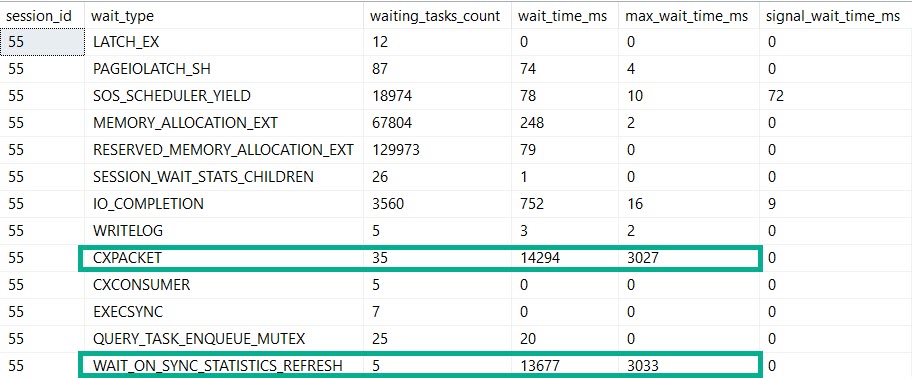
We spent most of that three seconds waiting on the stats refresh.
I know, you’re looking at those parallelism waits.
But what if the stats update went parallel? I’ll come back to this in another post.
Query Times Two
If you’re thinking that I could test this further by adding more stats objects to the UserId column you’d be dreadfully wrong.
SQL Server will only update one stats object per column. What’s the sense in updating a bunch of identical stats objects? I’ll talk about this more in another post, too.
If I reload the table, and create more stats objects on different columns, though…
CREATE STATISTICS s_UserId ON dbo.Vetos (UserId);
CREATE STATISTICS s_PostId ON dbo.Vetos (PostId);
CREATE STATISTICS s_BountyAmount ON dbo.Vetos (BountyAmount);
CREATE STATISTICS s_VoteTypeId ON dbo.Vetos (VoteTypeId);
CREATE STATISTICS s_CreationDate ON dbo.Vetos (CreationDate);
And then write a bigger query after inserting more data to tick up modification counters…
SELECT COUNT(*)
FROM dbo.Vetos
WHERE UserId = 138
AND   PostId = 138
AND   BountyAmount = 138
AND   VoteTypeId = 138
AND   CreationDate = 138;
Dangalang
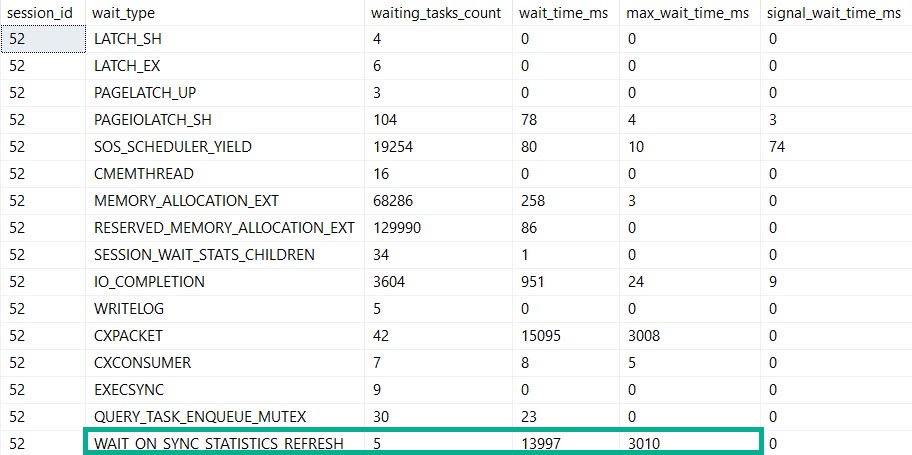
This query runs for 14 seconds, and all of it is spent in the stats update.
Bigger, Badder
Alright, prepare to be blown away: things that are fast against 50 million rows are slower against 2 billion rows.
That include automatic stats updates.
So yeah, if you’re up in the billion row range, automatic stats creation and updates might just start to hurt.
If you move to SQL Server 2019, you’ll have some evidence for when refreshes take a long time, but still nothing for when the initial creation takes a long time.
Thanks for reading!
Going Further
If this is the kind of SQL Server stuff you love learning about, you’ll love my training. Blog readers get 25% off the Everything Bundle — over 100 hours of performance tuning content. Need hands-on help? I offer consulting engagements from targeted investigations to ongoing retainers. Want a quick sanity check before committing to a full engagement? Schedule a call — no commitment required.
I’ve delighted to announce that I’ve been selected to present a full day session for SQL Saturday Portland.
The Oregon one, not the Maine one.
I’ll be delivering my Total Server Tuning session, where you’ll learn all sorts of horrible things about SQL Server.
I’m going to be talking about how queries interact with hardware, wait stats that matter, and query tuning.
Seats are limited, so hurry on up and get yourself one before you get FOMO in your MOJO.
Thanks for reading!
Going Further
If this is the kind of SQL Server stuff you love learning about, you’ll love my training. Blog readers get 25% off the Everything Bundle — over 100 hours of performance tuning content. Need hands-on help? I offer consulting engagements from targeted investigations to ongoing retainers. Want a quick sanity check before committing to a full engagement? Schedule a call — no commitment required.
There’s a known bug with partitioned tables, but this is different. This one is with rows in the delta store.
Here’s a quick repro:
USE tempdb;

DROP TABLE IF EXISTS dbo.busted;

CREATE TABLE dbo.busted ( id BIGINT, INDEX c CLUSTERED COLUMNSTORE );

INSERT INTO dbo.busted WITH ( TABLOCK )
SELECT     TOP ( 50000 )
           1
FROM       master..spt_values AS t1
CROSS JOIN master..spt_values AS t2
OPTION ( MAXDOP 1 );

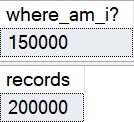
-- reports 0, should be 50k
SELECT CAST(OBJECTPROPERTYEX(OBJECT_ID('dbo.busted'), N'Cardinality') AS BIGINT) AS [where_am_i?];
SELECT COUNT_BIG(*) AS records
FROM   dbo.busted;

INSERT INTO dbo.busted WITH ( TABLOCK )
SELECT     TOP ( 150000 )
           1
FROM       master..spt_values AS t1
CROSS JOIN master..spt_values AS t2
OPTION ( MAXDOP 1 );

-- reports 150k, should be 200k
SELECT CAST(OBJECTPROPERTYEX(OBJECT_ID('dbo.busted'), N'Cardinality') AS BIGINT) AS [where_am_i?];
SELECT COUNT_BIG(*) AS records
FROM   dbo.busted;

SELECT object_NAME(csrg.object_id) AS table_name, *
FROM sys.column_store_row_groups AS csrg
ORDER BY csrg.total_rows;
In Pictures
In Particular
This is the interesting bit, because you can obviously see the difference between open and compressed row groups.
Give us money
The 50k rows in the delta store aren’t counted towards table cardinality.
Thanks for reading!
Going Further
If this is the kind of SQL Server stuff you love learning about, you’ll love my training. Blog readers get 25% off the Everything Bundle — over 100 hours of performance tuning content. Need hands-on help? I offer consulting engagements from targeted investigations to ongoing retainers. Want a quick sanity check before committing to a full engagement? Schedule a call — no commitment required.
Clustered columnstore indexes can be a great solution for data warehouse workloads, but there’s not a lot of advanced training or detailed documentation out there. It’s easy to feel all alone when you want a second opinion or run into a problem with query performance or data loading that you don’t know how to solve.
In this full day session, I’ll teach you the most important things I know about clustered columnstore indexes. Specifically, I’ll teach you how to make the right choices with your schema, data loads, query tuning, and columnstore maintenance. All of these lessons have been learned the hard way with 4 TB of production data on large, 96+ core servers. Material is applicable from SQL Server 2016 through 2019.
Here’s what I’ll be talking about:
– How columnstore compression works and tips for picking the right data types
– Loading columnstore data quickly, especially on large servers
– Improving query performance on columnstore tables
– Maintaining your columnstore tables
This is an advanced level session. To get the most out of the material, attendees should have some practical experience with columnstore and query tuning, and a solid understanding of internals such as wait stats analysis. You don’t need to bring a laptop to follow along.
Courtyard Times Square – 114 West 40th street NY, NY 10018
Meeting Room – Lower Level – Meeting Room A & B
Going Further
If this is the kind of SQL Server stuff you love learning about, you’ll love my training. Blog readers get 25% off the Everything Bundle — over 100 hours of performance tuning content. Need hands-on help? I offer consulting engagements from targeted investigations to ongoing retainers. Want a quick sanity check before committing to a full engagement? Schedule a call — no commitment required.
Last week’s thrilling, stunning, flawless episode of whatever-you-wanna-call-it.
Video Summary
In this video, I delve into a real-world scenario where I faced some unexpected challenges with my web hosting provider, GoDaddy, and the Office 365 email service. I share my experience of dealing with emails that consistently end up in junk folders despite repeated attempts to flag them as not junk, leading me to consider switching to G Suite. The discussion then shifts to a technical question from the community: how to evaluate whether a table with numerous indexes should be optimized or if the existing indexes are sufficient for the workload pattern. I walk through using SQL Server’s SP_BlitzIndex and SP_BlitzCache stored procedures to analyze index usage, focusing on read and write operations, and emphasize the importance of understanding the actual workload before making any changes.
Full Transcript
SQL Server, T-SQL, SSMS, query plans, and data. It’s been a bad week for me and Microsoft. Me and Microsoft have had some problems this week.
When I signed up for web hosting, I went through GoDaddy, largely because I had an account. There was no other real reason for it there. I had an account there. I had bought domains through there in the past.
And so I just went with it. I went crazy. I was like, I’m going to use you, GoDaddy. And I got my stuff through GoDaddy. And they provide you with email via Office 365. The problem I’ve been having with Office since I started using it is that the contact form on my website generates an email.
And the email is from the person who sends it. And the subject line is SQL Server Consulting Inquiry. Okay, pretty easy.
And for the last now nine months and three days, every email that comes in as a SQL Server Consulting Inquiry goes into junk email. I dutifully say not junk and I report it to Microsoft as not junk. I say this is not junk email.
This is how Erik Darling makes his money. This is how Erik Darling affords new Nagel prints when he wants them. There’s another one behind there. But every single one goes to junk despite me reporting it over and over again. And so I’m this close to moving to G Suite.
The only thing I have to figure out is how much of a pain in the butt it’s going to be to move to G Suite. And then if I can keep the rest of the Office products that I need because, you know, I just don’t want the email. But having like, like Word and PowerPoint and Excel and all that, all the other stuff that I use pretty frequently would be nice to have.
Ren and Stimpy is not new though. Ren and Stimpy has been in my life. Let’s see, it’s 2019 for almost five years.
Ren and Stimpy has been in my life. I bought Ren and Stimpy and Dune at the same time. Dune over there. Oh, yeah, that’s what that’s there. But this this past weekend I bought I bought some Nagels. They were they weren’t they weren’t expensive.
They’re not like real Nagels. They’re they’re just Nagel posters. They were like 100 bucks. So I was just happy to get some Nagels. I just have to put them up. It’s the other problem I have is finding time to put things up. Eventually, I’ll figure that out.
I also need to find time to shave. Art all seems to be from a distinct era. Ren and Stimpy was the 90s. Dune was the 80s. Nagel was the 80s. I love I love I love some 80s. I guess I guess is your point.
You’re right there if you’re if you’re trying to call me a fan of the 80s. I do not dispute that. Cannot dispute that. All right, so.
No one’s asking any questions, so I actually have a mailbag question. This week someone was kind enough whose name I won’t say on air out of respect for the living and the dead. And also out of respect for the fact that they probably don’t want that.
So I’ll just say we’ll just call them. See, I’ll check my notes. We will call them butt stuff. So my friend butt stuff has asked.
I’m looking at a table with 10 indexes. 10. 10 indexes. The DBA said he wasn’t worried about the cost of inserts, but I’m concerned. There seems to be overlap on the indexes.
An extra column here. Combineable includes there. The developers said they worked very hard on these indexes and aren’t changing any of them. How how do I go about proving or disproving that I should have these I should change make the index changes that I want. Hmm.
Hmm. Well, it’s a great great set of questions. And the first thing that I would the first thing I want to bring up is, so if you want, if you want to, if there’s a hill that you’re willing to die on, you have to be really, really sure that like there’s there’s a problem there in the first place. So.
I while back, I was in a similar situation where I was working with a client who had migrated their application from access. And when they did that, somehow, I don’t know what the process was exactly. I’m unclear on that because I’ve never migrated anything from access to SQL Server.
I have thankfully blissfully and any other kind where I have I’ve avoided that situation in my life. But when they did that, what they told me what happened is that SQL Server created all the tables. Or not all but many of the tables is the tables had clustered indexes that were like all of the columns in the table.
So you would have a column table with five or six columns in it. And SQL Server created a clustered index on all five or six. And I was like.
It’s the worst thing I’ve ever seen. Access sucks, man. So I I I I I I I I I I’m going to show these people how bad this is. And so I set up a test to do a bunch of single column or single row inserts into a similar table with a wide clustered index. And it turns out they didn’t make a difference for single row inserts.
It started to make a difference when I got up around like a million rows or 2 million rows or, you know, like larger inserts, but they weren’t doing inserts like that. So it was totally wasn’t applicable. In other words, I I got all riled up for nothing.
I was all I was all I I was like it was like index design crazy at that point in my life, I guess. And I was sitting there, man, I got to show these people what’s up. You know, really, really bury this one. And I was wrong internally.
I was wrong. So the first thing to do is understand your workload pattern. If you’re doing a bunch of single row inserts, probably not going to be the biggest deal in the world. Where it might start making a bigger deal is if you’re doing larger updates or deletes. So there are two stored procedures that are going to help you with this with this problem.
The first one is going to be SP Blitz index, which you can go to first, which I I made a code contribution to last last week weekend. Same with Blitz cache actually did did a few things on Blitz cache, but those are the two you’re going to use. You go to first responder kit dot org.
Oh, one word. Hold up a sign here. Let me let me let me let me make a sign for you. So that everyone understands where they’re going to go. And so you’re going to use SP Blitz index and first you’re going to run it against the database that you care about. And then you’re going to zoom in on the table that you care about.
So you can use the database name parameter. You can it’s really hard trying to write and talk at the same time independently. That’s interesting.
So you’re going to first run it against a database that you care about. Right, you’re going to look at the overall problems in the database that table might not be that big a deal. 10 indexes isn’t that crazy to me. And the second thing you’re going to look at second thing you’re going to do with SP Blitz index is use it to zoom in on a specific table. So if you feed it a database name and a table name, then you can zoom in and see if there’s any weird stuff with the with the table itself.
But what I would take a look at. When I would take a look at an SP Blitz index when you run it against the entire database one I would use I would use mode for so first I hope that’s not backwards for all of you first responder kit.org. So head over there and when you run it against Blitz index the entire database see if there are warnings for the table that you care about.
See if there are like big warnings like aggressive locking warnings are like like missing index warnings and like, you know, the duplicate and borderline duplicate index warnings. See if the stuff like that first. That’s the first thing that I would poke at.
And then and then after you run SP Blitz index and you look at that what I want you to do is run SP Blitz cache. What SP Blitz cache is the way you want to run SP Blitz cache is you want to run it. You want to run it.
Since you are your primary concern is with rights. Right with writing to that table you want to run it with a sort order rights or average rights AVG rights or the word average all spilled out. So it all depends on on how many fingers you have I think is how you end up spelling that I I don’t I have all of my fingers, but I don’t type with that many fingers. I think I type like this mostly or sometimes like this.
I very rarely get those involved. But yeah, so run it by rights first and see if there are any queries that are doing a lot of rights against this table that we care about. The second thing I want you to do is run it by reads or average reads.
So again AVG or average depending on how many fingers we’re going to get involved. And then I want you to look and see if there are any queries that are hitting that table and for doing a lot of reads. What this is going to tell you is two things one from Blitz index.
We’re going to see if we have any aggressive locking warnings. If we see aggressive locking warnings and I’m going to say, okay, there are queries that touch this table. That lock it up pretty good. Those are hopefully if your plan cash is like stable and solid and it’s not being cleared out constantly.
If it is, you’re going to have to run this. We’re going to have to run Blitz cash more regularly to maybe find these things, but you can run Blitz cash. You can see what’s doing a lot of rights. Hopefully the queries that we care about, they’re doing a lot of rights are going to be the ones that are hitting that table.
And then we can figure out, okay, maybe there’s a way that we can not do so many rights against that table and not lock it up so much. Ways to do that would be like batching, batching transactions. We’ll only hitting like, you know, 500, 1,000 rows at a time or something.
Right. If you are doing like big, big old whomping inserts into that table. And then the other thing we can look at is by reads. So, so if like, we’re not going to probably unless you’re doing big inserts. You’re not going to see anything that interesting.
Like there, what might pop up is updates because you could have to search a whole lot of a table to update very little of the table. So where that’s going to tie in is you might have some missing index requests against that table. And you might also have some, some update queries that are some delete queries.
If you, I mean, no, no, no, no, no one ever deletes anything. There’s no deletions in the database. We self delete maybe sometime once in a while. No one ever deletes anything, but yeah, that’s where you’re going to start to see if maybe there’s a query that’s looking for a lot of data and not finding it easily. It might be modifying data too.
It might be an update or a delete with the where clause. It might just be scanning a whole bunch of the table. So what I would, what I would do in that case is look first for like pathological symptoms that you have a case to prove, right? I wouldn’t go write my own tests, my own demonstrations.
I wouldn’t go writing my own sort of like test harness to try and prove or disprove when it’s bad. Cause it just might not be lined up with the reality of how that table gets used. I would want to like you, I would want to go into the plan cache.
I would want to go look at the metrics that SQL servers keeping about the indexes on that table. And I really want to start there and build a case with what’s, with what’s actually happening on the server rather than like, I think that might be bad. Let me, let me just go pick on these people for about, about these indexes that they worked so hard on.
I’m sorry. I didn’t mean to say that. This is a family friendly podcast or YouTube video, whatever. Anyway, let’s get back to the story. So yeah, you might be able to find some underlying pathologies with the borderline, borderline duplicate indexes and blitz index. And you might be able to find, you might be able to corroborate some of those pathologies with the information from blitz cache.
But, you know, make sure that, you know, you’re, you’re finding stuff that’s actually happening on the server, not just stuff that’s happening in your head when you look at that table. Because a lot of the times when, you know, as, as people who, who, who stare at SQL servers all day, we get very used to anti patterns or perceived anti patterns and chasing those things down. And quite often those anti patterns, those perceived anti patterns aren’t the, aren’t the biggest problem on a server.
And sometimes they’re not even a problem at all. Not every, I mean, anti patterns are like, you know, never a good thing to, you know, really like, like always chase down to the very end. You might find some and you might say, okay, well, this is, you know, something that generally you’d want to avoid, but it just might not be the problem that you’re having on that server. So I would, I would, I would, you know, I would take my time.
I would, I would not surface with more talk about changing things on this table until you have some evidence that there is a something bad going on. And B that, you know, it’s something you can correct by changing those indexes and C that, you know, it’s your index changes that don’t make the difference. Because it might not be an index consolidation thing.
You might need another index or two on that table. You, I know you have 10 and you really want to get rid of some and you want to combine some and I’m with that. I’m totally with that. But the problem might not be the indexes you have. The problem might be the indexes you don’t have. So anyway, that’s what I think about that.
I didn’t think of edit. I didn’t, I didn’t rehearse any of that. I just, I just did that off the top of my head. So you’re welcome. That is exactly the thought process I would have. And it would take me 15 minutes to get to that point with myself as well. I’m an incredibly unoptimized human being.
Forrest says, what do you think about EF queries? Well, Forrest, I think the same thing about EF queries that I think about presidents. As little as possible. Unless there’s something I have to think about them.
I don’t want to think about them. I don’t want to be faced with them. I don’t want to, I don’t want, I don’t want them in my head. I don’t want them burning away the precious few brain cells that I have left in here because I, it’s, it wouldn’t be good. Wouldn’t be good.
It’s scientifically proven that if you think about entity framework queries, or if you squat below parallel, that brain cells will shoot out of your ears, shoot directly out. And then it will explode. That’s exactly what it’ll do.
All right. So, do we have another question? Someone else want to talk? Someone else have a question about SQL Server? Or, I don’t know, anything else? Anyway, my friend butt stuff.
I hope that, I hope that answered your question. Forrest, who I will apparently be seeing in about a month for SQL Saturday. Crazy, right? Forrest is going to be in New York for SQL Saturday.
Joe Obish is going to be in New York for SQL Saturday. A lot of other very talented speakers are going to be in New York for SQL Saturday. Mr. Robish is having a pre-con for SQL Saturday. Very excited. His first one. Get him out of the gate with that.
Set him up good and proper as a valued pre-con presenter. Hopefully, anyway. As long as he doesn’t like turn into a fainting goat on stage. We’ll see. We’ll see about that. So this is where things get funny.
Outlook will let through stuff from Ninja Forms. Which I don’t, I got a newsletter from Ninja Forms. Which I’ve never asked for. I’ve never signed up for. I’ve never used.
But there we go. You know, there I go getting a newsletter from them. That doesn’t go into spam. What goes into spam? Consulting inquiries. Things that I need to get paid. Things that I need to pay rent for this room. Forrest asks, how often do you run across clients who would benefit from batch mode or columnstore?
Benefit from columnstore? I would say three or four times a year. I will get a client that is simply absorbing an insane amount of data and then aggregating it elsewhere.
I run across that three or four times a year. People who would benefit from batch mode generally. It’s not that they would benefit necessarily from batch mode processing.
Though some undoubtedly would. What a lot of people would benefit from is the stuff that’s currently hidden behind batch mode processing. So like the memory grant stuff. The adaptive join stuff.
You know, that stuff. The stuff that can sort of maybe kind of eventually help with parameter sniffing. So pretty often, pretty often it will see that, you know, I think everyone on earth with a SQL Server or the database in general probably is in some way dealing with. What do you call it?
What’s that word? What’s that word? Parameter sniffing. There we go. Slow in the application. Fast in SSMS. Someone has a deal with it. So yeah, you know, some of that stuff would help. Peter says, I tried to convince some NYC buddies to go to your columnstore thingy, but they all said columnstore is one of the things that works awesome. So no need to go.
Wow. You know, if they’re that good with columnstore, then they should be teaching the pre-con. So if columnstore is working fine for you, that’s great. I think if it’s the Joe’s pre-con is for people who want to really, really learn like like in depth about columnstore and batch mode processing.
I don’t necessarily know that there’s a good counter to that. If they’re not interested in learning more and they think their columnstore workload is running fine. That’s great.
I think what they would find is ways to make it better. I think they would find ways to improve upon what they’re already doing. Unless they’re unless their name is Nico. And then they maybe not maybe they might not learn anything if the name is Nico. You wrote a lot of their column stars.
Well, there you go. What problems could they possibly run into with you with you having been at the helm? I can’t can’t imagine. Can’t imagine why they’ve got to be so flawless. Why would they? Why would they ever need to learn anything further about columnstore? God bless.
God bless. Let’s see here. All right. Checking for some questions here. No questions there. No, that’s a thing. That’s another thing.
All right. Cool. Anyone else? Anyone else have a question? While I’m here staring at you blindly mindlessly getting bored getting lonely getting sad. Anyway.
All right. I’m going to get going then. Thank you for joining me. Thanks for hanging out. And I will see you next week. For a whole nother episode of this, whatever you want to call it. Marios.
Thanks for jumping up and standing over myrice. AsẸ. As I trulyolan can optimize your thanks to my heart and your song. Themetros are all about thesinoss launches remains your subescaytes.
Going Further
If this is the kind of SQL Server stuff you love learning about, you’ll love my training. Blog readers get 25% off the Everything Bundle — over 100 hours of performance tuning content. Need hands-on help? I offer consulting engagements from targeted investigations to ongoing retainers. Want a quick sanity check before committing to a full engagement? Schedule a call — no commitment required.