I’ve written about all of these separately in various places, so if you’ve been reading my blog(s) and Stack Exchange answers for a while, these may seem old news.
Of course, collecting them all in one place was inspired by another recent Q&A.
Let’s get going.
Eyeroll
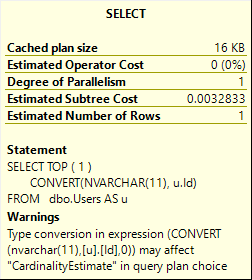
SELECT TOP ( 1 )
       CONVERT(NVARCHAR(11), u.Id)
FROM   dbo.Users AS u;
Seems pretty explicit to me, pal.
Yep. I’d ignore this one all day long.
Squints
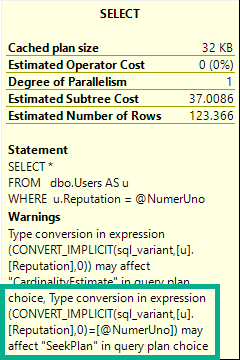
DECLARE @NumerUno SQL_VARIANT = '10000000';
SELECT *
FROM   dbo.Users AS u
WHERE  u.Reputation = @NumerUno;
Cheap haircut
That’s awfully presumptuous.
I don’t even have A index on Reputation, nevermind enough index to facilitate an entire Seek Plan.
I’ve seen this catch people off guard. They fix the implicit conversion, and expect an index seek.
Ah well.
Checks Notes
CREATE INDEX tabs
	ON dbo.Comments(UserId);

CREATE INDEX spaces
    ON dbo.Votes(UserId);

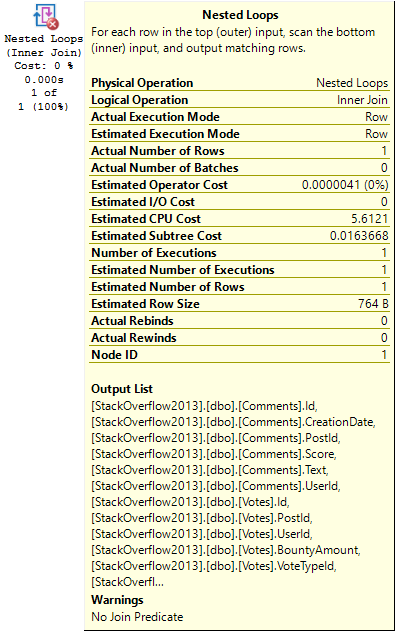
SELECT TOP (1) *
FROM   dbo.Comments AS c
JOIN   dbo.Votes AS v
    ON v.UserId = c.UserId
WHERE  c.UserId = 22656;
RFC
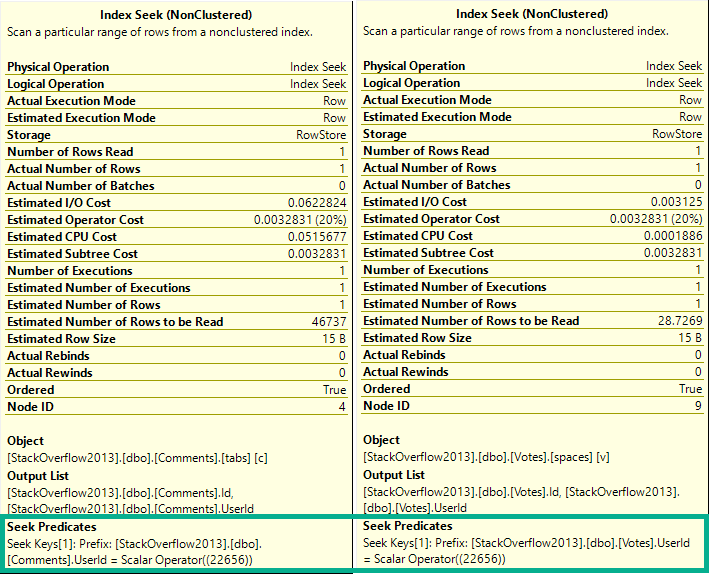
The check for this happens at the join. There’s no further down-plan check on the index access operations.
If there were, it’d see this:
Complaint Apartment
Only matching rows come out, anyway. The join predicate is, like, implied in the where clause.
Oh Um Sweatie No No No No No
CREATE INDEX handsomedevil
    ON dbo.Users(Reputation)
        WHERE Reputation > 1000000;

SELECT COUNT(*) AS records
FROM dbo.Users AS u
WHERE u.Reputation > 1000000;
Ayyyyyyyy
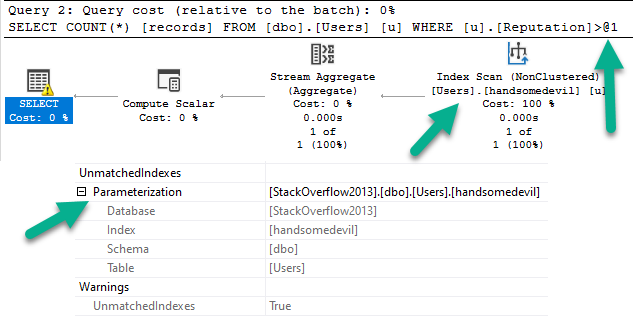
So the simple parameterization thing fires off a warning about a filtered index that we used not being used.
yep yep yep yep yep yep
First Of All, Ew.
Genie In A Bottle
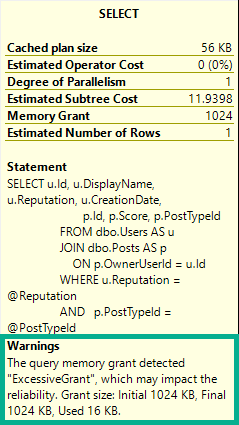
This thing needs some boundaries. Maybe like available memory should figure in or something?
Probably?
Call me, I have lots of great ideas.
Thanks for reading!
Going Further
If this is the kind of SQL Server stuff you love learning about, you’ll love my training. Blog readers get 25% off the Everything Bundle — over 100 hours of performance tuning content. Need hands-on help? I offer consulting engagements from targeted investigations to ongoing retainers. Want a quick sanity check before committing to a full engagement? Schedule a call — no commitment required.
Instead, let’s talk about a different one: Editable Execution Plans.
We already have this to some degree via query hints and turning optimizer rules on and off.
The problem is that you have to remember all those crazy things, and some hints can affect multiple parts of the plan that you don’t want changed.
If the query you’re changing is in the middle of a big ol’ stored procedure, this process is even more tedious.
Glamorous
Let’s say you wanna experiment with different things, but not without re-running a query over and over to check on the plan with your written hints.
You could change:
Join order
Join types
Index choices
Aggregations
Seeks or Scans
Memory grants and fractions
Basically any element exposed in the XML would be up for grabs — I won’t list them all here, because I think you get the point.
Then you can run your query with your new plan.
If it’s a stunning success, you can force that plan.
Spool Removal
This has downsides, of course.
You could make things worse (but you could do that anyway — trust me, I do it all the time), you could get incorrect results, or errors if you remove certain operators (again, these are all things you can do by being silly anyway).
But, like query hints, this could be a really powerful tool in the hands of experienced query tuners, and people looking to get better at query tuning.
Thanks for reading!
Going Further
If this is the kind of SQL Server stuff you love learning about, you’ll love my training. Blog readers get 25% off the Everything Bundle — over 100 hours of performance tuning content. Need hands-on help? I offer consulting engagements from targeted investigations to ongoing retainers. Want a quick sanity check before committing to a full engagement? Schedule a call — no commitment required.
I was workload testing on SQL Server 2019 RC1 when I ran into a wait type I’d never noticed before: PVS_PREALLOCATE. Wait seconds per second was about 2.5 which was pretty high for this workload. Based on the name it sounded harmless but I wanted to look into it more to verify that.
The first thing that I noticed was that total signal wait time was suspiciously low at 12 ms. That’s pretty small compared to 55000000 ms of resource wait time and suggested a low number of wait events. During testing we log the output of sys.dm_os_wait_stats every ten seconds so it was easy to graph the deltas for wait events and wait time for PVS_PREALLOCATE during the workload’s active period:
This is a combo chart with the y-axis for the delta of waiting tasks on the left and the y-axis for the delta of wait time in ms on the right. I excluded rows for which the total wait time of PVS_PREALLOCATE didn’t change. As you can see, there aren’t a lot of wait events in total and SQL Server often goes dozens of minutes, or sometimes several hours, before a new wait is logged to the DMV.
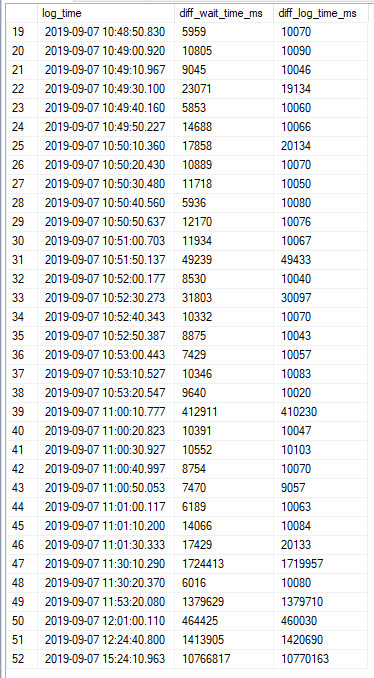
This pattern looked like a single worker that was almost always in a waiting state. To get more evidence for that I tried comparing the difference in logging time with the difference in wait time. Here are the results:
Everything matches within a margin of error of 10 seconds. Wait stats are logged every 10 seconds so everything fits. The data looks exactly as it should if a single session was almost always waiting on PVS_PREALLOCATE. I was able to find said session:
I did some more testing on another server and found that all waits were indeed tied to a single internal session id. The PVS_PREALLOCATOR process starts up along with the SQL Server service and has a wait type of PVS_PREALLOCATE until it wakes up and has something to do. Blogging friend Forrest found this quote about ADR:
The off-row PVS leverages the table infrastructure to simplify storing and accessing versions but is highly optimized for concurrent inserts. The accessors required to read or write to this table are cached and partitioned per core, while inserts are logged in a non-transactional manner (logged as redo-only operations) to avoid instantiating additional transactions. Threads running in parallel can insert rows into different sets of pages to eliminate contention. Finally, space is pre-allocated to avoid having to perform allocations as part of generating a version.
That’s good enough for me. This wait type appears to be benign from a waits stats analysis point of view and I recommend filtering it out from your queries used to do wait stats analysis.
Thanks for reading!
Going Further
If this is the kind of SQL Server stuff you love learning about, you’ll love my training. Blog readers get 25% off the Everything Bundle — over 100 hours of performance tuning content. Need hands-on help? I offer consulting engagements from targeted investigations to ongoing retainers. Want a quick sanity check before committing to a full engagement? Schedule a call — no commitment required.
I know, you’re sitting there and you’re staring at this post thinking “but I use Plan Explorer”.
I use it too, sometimes. The problem is that when I’m with a client, they don’t always have it.
More locally, I think there are some things SSMS visualizes better than Plan Explorer.
One example is rows on parallel threads. Another example is the operator times that started showing up a while back in SSMS 18, which aren’t there at all yet.
There’s some other stuff, but this isn’t what the post is about.
Complaint Department
A lot of the complaints people have about query plans in SSMS are with what’s in front of them.
It’s one of the like, 2 episodes I remember. I think a dog dies or something in the other one.
Anyway, the redhead one from the staring meme moves in with the drunk robot one and thinks the apartment is a closet but then opens a door and reveals a big apartment with a great view at the end of the commercial delivery time.
The part of SSMS people complain about.
And I get it. There’s a real lack of attention paid to UX in query plans.
It’s not quite as bad as Extended Events, but it’s there.
BUUUUUUUUUUUUUUUUUUTT…
Button Pusher
I read a lot of posts about query plans, and I rarely see people bring up the properties tab.
And I get it. The F4 button is right next to the F5 button. If you hit the wrong one, you might ruin everything.
But hear me out, dear reader. I care about you. I want your query plan reading experience to be better.
Hit F4.
Look at what you can get, just from the SELECT operator:
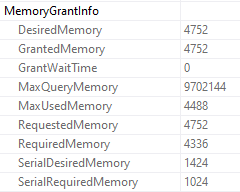
Memory Grant
Ooey, gooey, memory grant info.
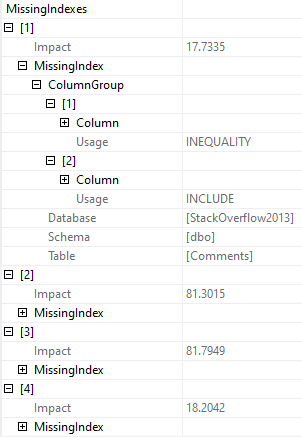
Missing Indexes
If there’s more than one missing index, you can see all of them.
Now, yeah, this sucks because you can’t script them out. Assembling them from here is pretty crappy.
But at least it’s not just the first one that may or may not be the best one.
Goldmine
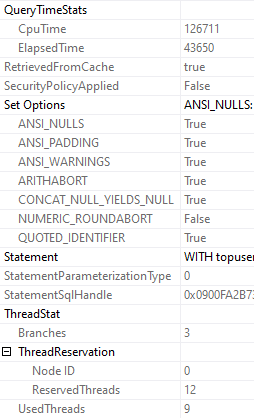
You can see the CPU and elapsed time. Since we’re on the select operator, we get the full plan’s timing.
If you get the properties on individual operators, you can see the timing for (most) specific operators.
One part that I love is ThreadStat, which tells you how many concurrent parallel branches, and how many threads your query reserved and used.
Waist. Waste. Waits.
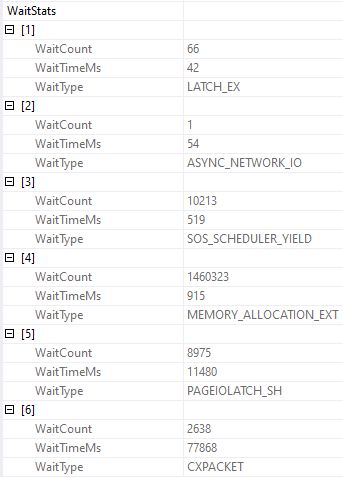
You can also get wait stats, if you’re into that sort of thing.
And, yeah, this part leaves some data out. You won’t see CXCONSUMER here, or LCK_ waits, which is frustrating.
Nopebooks
Since query plans are what I primarily care about, I’m sticking with SSMS.
And when I look at query plans, I’m hitting F4.
Trust me. If you start poking around in there, you’ll be amazed at what you can find.
If only you knew how bad things really are.
Thanks for reading!
Going Further
If this is the kind of SQL Server stuff you love learning about, you’ll love my training. Blog readers get 25% off the Everything Bundle — over 100 hours of performance tuning content. Need hands-on help? I offer consulting engagements from targeted investigations to ongoing retainers. Want a quick sanity check before committing to a full engagement? Schedule a call — no commitment required.
Clustered columnstore indexes can be a great solution for data warehouse workloads, but there’s not a lot of advanced training or detailed documentation out there. It’s easy to feel all alone when you want a second opinion or run into a problem with query performance or data loading that you don’t know how to solve.
In this full day session, I’ll teach you the most important things I know about clustered columnstore indexes. Specifically, I’ll teach you how to make the right choices with your schema, data loads, query tuning, and columnstore maintenance. All of these lessons have been learned the hard way with 4 TB of production data on large, 96+ core servers. Material is applicable from SQL Server 2016 through 2019.
Here’s what I’ll be talking about:
– How columnstore compression works and tips for picking the right data types
– Loading columnstore data quickly, especially on large servers
– Improving query performance on columnstore tables
– Maintaining your columnstore tables
This is an advanced level session. To get the most out of the material, attendees should have some practical experience with columnstore and query tuning, and a solid understanding of internals such as wait stats analysis. You don’t need to bring a laptop to follow along.
Courtyard Times Square – 114 West 40th street NY, NY 10018
Meeting Room – Lower Level – Meeting Room A & B
Going Further
If this is the kind of SQL Server stuff you love learning about, you’ll love my training. Blog readers get 25% off the Everything Bundle — over 100 hours of performance tuning content. Need hands-on help? I offer consulting engagements from targeted investigations to ongoing retainers. Want a quick sanity check before committing to a full engagement? Schedule a call — no commitment required.
Last week’s thrilling, stunning, flawless episode of whatever-you-wanna-call-it.
Video Summary
In this video, I delve into a mix of personal reflections and technical discussions, weaving together various topics from database administration to scripting. Starting off on a somewhat chaotic note, I share the day’s peculiarities—working on my PowerShell skills and tuning queries while dealing with an unexpected cuticle issue that has become a daily ritual. The conversation quickly shifts to the diverse nature of DBA roles across different companies, highlighting how despite varied responsibilities, many challenges and experiences remain remarkably similar. Throughout the video, I also touch on ongoing projects like refining the BlitzScripts and exploring ideas for improving index management tools.
Full Transcript
I’m live. This is my second attempt at starting this because the first attempt went back to using the wrong microphone. Crazy, I know. Crazy, I know. So now, let’s see. Is anyone in here? No, no one in here. Good. I didn’t want to talk to anyone anyway. To be honest, he’s… Kidding. I love talking to people. I love talking to people. I love getting to know people, having their questions. I’m in deleting videos, maybe… Why won’t you let me delete you? There we go. Very confusing. Things around deleting videos on YouTube. So my prediction is no one’s going to show up. And my further prediction is that I’m going to talk about nothing for about 45 more seconds. Literally 45 seconds.
We’ll see, though. Who knows what will happen. Right now. We know what I should have done. I feel silly. For not doing this. When I had a bunch of stuff to do, I could have done that. Well, actually, I don’t know if I could have done that. Isn’t that… It’s depressing to know that I don’t even… I don’t think I could have done that. I…
I really… What I was thinking is, I mean, it would be cool if… Because I was… I’ve been working on the first responder kit again. Working on the first responder kit. A lot of fun. Again, getting back into the Blitz scripts. Because… Let’s face it. Writing a bunch of stuff like that from scratch would be goofy as hell.
Goofy. You know, in my head when I first was thinking about doing it, I was like, I have all these ideas that would tie all these disparate data points together. And I really want to code that. And then I’m like…
The reality of work set in. The reality of free time set in. And, you know, I just… I end up… You know, because I’m so comfortable with them, I end up using the Blitz scripts when I talk to my customers. So that’s fun.
I don’t know. It’s all right. It’s all right. So I’ve been working on those again. I added a couple things. Well, hopefully, as long as my pull requests are approved at some point. I…
I’ve added a couple things to BlitzCache. And I added… Well, I’m adding something now to BlitzIndex. It looks like it works. So I’m going to save this and create a pull request. I can’t show you because YouTube streaming sucks like that. But I promise you I’m doing it.
Live and in person while you watch. Let’s see. Joe has a question, though. Joe has an important question about partitioning. One of my favorite subjects. For partitioned indexes, does the field that is partitioned on need to be in the key value list? God, yes.
Like, I think that might be like an actual restriction. But on top of that, like, if you want partition elimination, if you want any of, like, the meager scraps of performance improvement that you might get from partitioning your indexes, it better be in there. Otherwise, you are screwed in ways which I cannot account for.
So, yes. Yes, it does. Definitely want that in there. Absolutely. Without it, who knows what will happen to you.
Be sucked into the cold, lifeless vortex of space. Blood cold boiled in your veins. You’ll be in good company, though. You’ll be with Elon Musk’s car guy. You’ll be with George Clooney space dust himself in that dumb movie.
Gravity. What was the other one? There was some other space movie. Steve Buscemi, maybe. Tim Robbins or someone just opened up their space mask and they go, squish themselves.
That’s how I want to go. Valiantly in space. Preferably shooting a laser. That’s my ideal. My ideal way to go. Yeah, buddy.
Yeah, buddy. All right. There are a handful of you here. I’m surprised. I was expecting no one to show up. Lucky me. But you have to ask questions if you want.
If you want this to go on for any amount of time. For all, what, 10 of you or something? Someone has to have a question about SQL Server. Otherwise, I’m going to go lay down on the floor and cry that I’m not on vacation anymore. Actually, I’ll probably just go to the gym.
I got to the gym three times in a month. And it was three days in a row when we were at a hotel that had one that I could do anything in that wasn’t cardio. The rest of the time, two weeks we were in an Airbnb, which had no gym.
And when I brought up the idea of getting a temporary gym membership, my wife scowled at me in a way that she has not scowled at me in a long time. Not since I think we were dating. And what else?
I don’t know. A couple other hotels here in had somehow worse hotel gyms than usual. And so I am a disgusting, soft mess right now. And I’ve been at the gym every single day this week just trying to get things to firm up a little bit in preparation for next week when I will resume regular lifting activities.
Regular. Regular. Hopefully putting another 200.
I want to get 250 overhead. I want to get 250 overhead press. As strict as possible. That’s what I’m going for. Because 225 ain’t good enough. 225 felt good until I realized it wasn’t 250.
And I don’t know. I guess 250 will feel good until I realize it’s not 300 or something. Idiot. Idiotic, right? 250 isn’t nuts.
250 is good. 250 is good because it’s more than I weigh. 225 is like borderline on that. Which is, you know, for guys about 5’10”.
It’s a healthy chunk of fat. See, Joe says, I have a table that is partitioned on field one. However, there is only one distinct value in field one. Seems worthless to have partitioning, right?
Yeah. That is the most useless partitioning. Because you have one partition. How many partitions? It was one. This is one single partition in that entire table. But on the other hand, I think it might be like just undoing partitioning on that table might not be worth the hassle.
I would probably just leave it alone. Like, is this an SAP database? This sounds like something that would happen in an SAP database.
So there’s like, I’ve worked with people who use SAP. And it’s funny. It’s an ERP, but not SAI.
Okay. So something like that. So it’s funny because SAP has like this software that they’re like, we’re going to be so flexible. You can use, it’s like multi-site or something like that. So like all the clustered indexes start with like this site key or something.
And then, but most people just have like a single site. So the clustered indexes are all just like the number one. That’s great.
Yeah. Multi-site. Exactly. I know. So let’s see here. Inful. I wonder what it is. Let’s see.
Marcy says, I heard you say you’re going to work on Blitz scripts. Can you please make Blitz index archive and delete unused indexes by table? So one of my grand plans for Blitz index has always been not like an automated version of that. Because like, I’m not willing to take the insurance risk of an automated version of that.
But like, right now it’s like a lot of analysis and not a lot of action. So what I wanted, like, what I wanted to do for a long time was like, give advice rather than just say, this is what’s up. Yeah.
Yeah. So what I wanted to do was like, have a mode where, you know, the advice turned into action. So like, if you had some unused indexes or some low, like low, not good use indexes, we would just say, here’s a drop script for that. Maybe you should think about dropping that.
Rather than like, just give you 20 columns of how poorly used they are. So stuff like that. And so like, unlike the real goal, like in my head, the ultimate goal would be to go through both indexes that you currently have and unused indexes and try to based on, well, for you, for indexes that exist. So based on reads, can start to consolidate overlapping indexes and for missing index requests based on impact and uses, consolidate indexes.
That’s going to be a little tougher. That’s going to be actually a lot tougher. But I would love to be able to put that in there.
Like in my, in my head, I think I have like good ideas to do that. But then, you know, the funny thing about my good ideas is that as soon as, as soon as I’m like, yep, here we go, it’s implemented. I’m like, oh, wait, that, that didn’t work.
There’s anyone who can do it. It’s me. I don’t know. I’m pretty sure there are lots of people who could do it. I can, I can think of so many people who I wish would do it instead. Boy, Rowdy says, what’s up, Eric?
What’s up, Rowdy? How are you? How are things in a sandwich biz? I kid. Rowdy is a semi-professional human being. Not quite as professional as Marcy. Marcy is extra professional.
Oh, boy. Everything’s boring today. It’s a weird day.
Like, it’s even like more weird than a usual Friday. I woke up late. I talked to Joe Sack for an hour about nothing. I don’t know. Worked on, worked on BlitzScripts.
Felt like I had a job again. Just kidding. Doesn’t feel that way at all. It was, so I, today I, you know, it was, it’s, it was the first time working on them as an outsider. So, I, I, I got all weird. It was all weird, like, not having, like, elevated access to stuff.
And I had, I actually had to read an old blog post of mine about how to work with other people’s GitHub repos. It’s like, oh, that’s how you do it. Oh, I messed that up. So, like, I had to, like, create my own fork and branch in my own fork and then create pull requests. And it was all goofy.
Like, ugh, how do, how do regular people do this? Just give me SA, Brent. Whatever, whatever it’s called on GitHub. I’m only going to go delete everything. Use those. Jerk. Anyway.
Marty says, working on some PowerShell, T-SQL bastardization scripts and hoping for Friday to go faster. You know, boy, that PowerShell. You love that PowerShell. I’ve never quite figured that PowerShell thing out. For me, you know what’s funny is for me, PowerShell was always a way to run SQL against some servers that, for some reason, I couldn’t use a, what do you call it?
Centralized server? That’s how long I’ve ignored DBS. Central management server.
There we go. Yeah. You know, I like PowerShell for some stuff. I like PowerShell for, like, administrative things. Like, for administering, like, Active Directory or Exchange or failover clusters or if you’re Paul White, managing availability groups with PowerShell is, like, a huge part of your job. And so, like, I think administratively, it’s really powerful and it’s got a lot going for it.
But the hot glue people use it as is sane sometimes. That’s where I learned it as a sysadmin. Now I have a hammer and everything is a nail.
I hear you. That’s how I feel about temp tables. No, I’m kidding. Ah, temp tables are great. I can’t tell you how many problems temp tables solve. Like, every day that I work with someone tuning queries, I feel like, don’t know, I’m picking my nails with a knife. I’m an idiot.
I’m probably going to cut a fingernail off my hand. But I’ve got this one weird corner cuticle situation. I don’t have dirty nails. I barely have any nails whatsoever. I have this one weird corner cuticle situation which is driving me nuts. So that’s what I’m doing surgery on while I talk. Because apparently it’s calming.
But, yeah, so every time I talk to someone, I was, like, working on, like, tuning queries. It’s, like, normal-looking query. You know, like, just, like, a select, pretty simple join, pretty simple where clause.
There’s, like, a bunch of, like, sub-queries in the select list. I’m, like, I’m, like, like, weird top one, like, go do some complicated count out and do stuff. I’m, like, this is confusing.
So I just, like, dump the regular select list into a temp table and then just do the sub-queries with the temp table. And I’m, like, oh, yeah, that fixed every single day. See, Matt says, isn’t it interesting that as DBAs we all do so many different things and that companies’ expectations that we support are so different from one shop to another?
Yeah, it’s, you know, I think it’s the beauty of the job is that so many people can call themselves DBAs and have very similar, you know, pains and war stories and, you know, very similar scars. But do very different jobs. Like, you know, I’m sure there’s been all sorts of, you know, like, if you take a production-type DBA who’s, you know, trying to, you know, fail over to DR or, like, you know, deal with an availability, like, patch an availability group or something crazy.
Like, they’ll have, like, very similar, it’s almost like how at one point in the world, different cultures all have, like, very similar stories or symbols or, like, you know, gods or something in their lore and, like, their beliefs and all that. Whereas, like, it doesn’t matter what angle you approach being a DBA from, you end up dealing with very similar issues. And it’s, like, like, you have management on one end and users on the other end and you in the middle and, like, developers annoying you.
Sorry, developers. You’re great. Thanks for keeping me in work. But, yeah, it’s just, like, it’s funny. And, you know, I’m, like, I’m a perf guy, but I end up talking to people about, you know, HA and DR stuff a lot.
And I sent out a tweet the other day about how, like, since I started my own thing, I’ve had four conversations with people about how you can’t have multiple writable, like, have, like, multiple primaries. They’re like two nodes that can accept rights in an availability group. Like, doesn’t it, isn’t it, is that not clear or not?
Like, like, they’re arguing with me. Like, I didn’t invent the technology and I didn’t write the documentation. Here’s the documentation. Here’s where it says you can’t do that. I’m like, no. But management wants it.
Like, talk to Microsoft. I actually had someone accuse me of, or not, well, not accuse me, but someone asked me who I worked for. Like, someone, someone thought that I was, like, in cahoots with some company who, like, just didn’t want them to use AGs or something. Like, I was, like, I was, like, I was part of, like, big failover cluster.
Like, the failover cluster industrial complex. I was, like, I’m not lying to you. Oh, Rowdy, were you copying and pasting, you sly dog? That came in real fast.
Rowdy says, I think every DBA has a story about that time the patch failed to apply and failed to roll back. That time the cluster did that weird thing. It didn’t come back up. The time storage. Oh, man. The storage one. Everyone has, like, well, everyone who has been on a SAN, been on a SAN, has that storage story. And, Rowdy, I tell a detail-free version of our story, of our time together, with that thing that didn’t go right on that server with all the databases.
I tell that frequently when people are, like, well, this is how we’re taking backups. I’m, like, y’all gonna have problems at some point. Problems.
Big problems. Big problems. I’m, like, yeah, keep doing that. Call me in a few months. Yeah, that was fun. I fondly remember the part of that call where, like, we don’t care about this database. I’m, like, cool, skip.
Start from scratch. Like, we never use that thing anyway. I’m, like, sweet. Not deal with that. Yeah.
But, I mean, so those are, like, those are great examples of production DBA-type problems. And, you know, if you do perf stuff, if you’re, like, a developer-type DBA, you’re gonna have problems where, like, you know, you create, you try to create that index and you cause blocking for three days. And then you hit cancel and you cause blocking for three more days because you had to, the thing had to roll back.
Or, like, you know, you tried to fix a problem and you, you know, created a bug with the fix for the problem. It’s, like, so many different things that, you know, you can all share that, like, you all understand the pain that those moments caused working with the database. Because, like, no matter what you’re trying to do with the database, there’s, like, this significant, like, pain that can be had when things go wrong.
You have to, everyone, everyone’s gonna come together on that. It doesn’t matter. You know?
I feel, like, I feel tremendous sympathy for people who need to manage complex, high availability and disaster recovery. It’s, like, I have tremendous sympathy. I would, my, my, my goose would be cooked on that. Not in a good way.
Not in a friendly Christmas goose way. Like, goose fell into the fire way. Rowdy says, I’m looking forward to pass to get to tell and hear those stories. Well, you know, I know you are, but here’s the thing, Rowdy. Passes all BI people and AI and machine learning.
So they’re just not gonna get it. They’re, they’re gonna stare at you like you are a caveman. And, like, you’re like your, uh, what’s his name? Sylvester Stallone in Demolition Man. Like, you just crawled out of a sewer.
Eating a rat burger. The blonde streak in your hair or something. No, I’m kidding. Passes, passes, uh, I don’t know. They’re doing their thing. They’re having fun.
They’re having fun this year. Hopefully they, uh, ignite some new curiosity. New passions in people. No one explained the shells.
This is a family-friendly, uh, YouTube broadcast. I actually read something very exciting that Spotify is testing a create podcast thing. And if Spotify introduces an easy way for me to create a podcast, I will podcast the hell out of this.
Because, gosh darn it, every other way I look into doing it, I, like, like, Libsyn or, I don’t know. It’s, I don’t know. It just looks weird.
I wish I could pay someone, like, five bucks an episode to just do it for me. I would make my life a lot easier while I stand here brandishing weapons, trying to fix a cuticle. Crazy, right?
So, like, uh, while I was, while I was on vacation, I tried to, I tried to use the time semi-wisely to, uh, since I obviously wasn’t going to the gym, to, like, figure out, like, okay, how can I be, like, uh, better at stuff. And the one recurring theme that I came across, like, literally every successful person.
Everyone, well, let’s see. Every, every successful person with a podcast that I, I, I, I tried to, like, read stuff from. Um, suggest, says you should meditate.
You should start meditating. You know, start easy. A couple minutes, five minutes, ten minutes. Uh, and just, like, meditate. Like, close your eyes and concentrate on breathing. Then, like, you know, there are some great meditation apps out there.
Now, like, I hear meditation app, and I get, like, dude, that’s, like, you know, you’re, you’re trying to do, like, this, this thing. Like, like, there’s an app for that seems like a real, you know, pardon my French, but I, I did just, did just get back from the continent. It seems real shitty to need an app just to meditate.
And so, you know, I will close my eyes and breathe for a little bit. Seems like a reasonable start to things, you know. Do it, do it if I feel stressed out or in the morning or if I’m banging my head against a problem that I can’t seem to make heads or tails of. So, like, do that, and then, uh, so I, I started to look at some apps that might, you know, like, might, might expand that horizon a little.
And so I’m, like, going through, I have an Android, so I’m going through the Play Store, and, like, I see a bunch of, a bunch of apps that are, like, like, free to download. I’m, like, you know, make me pay for this. Okay, you know, you put some work in, you recorded stuff, you should get paid for your work.
That’s, you know. Okay. But then you open up all of these apps, and the first thing they do is ask for your email address. I’m, like, you son of a bitch.
Never, I, it got me so stressed out. Like, I’m, like, ah, I’m going to, this, look at this app. It has a seashell for, for an icon. Oh, I’m going to be so relaxed in a minute. You open it up, and, like, there’s this, like, like, pretty blue sparkly thing happens. You’re, like, ooh.
And, like, if I, if I ever had sound on my phone, I’m sure it would have been, like, like, tinkling chimes and relaxing, relaxing wind, wind noises. But, no. Enter your email address. Don’t have an account? Don’t sign up with Facebook, and I’m, like, immediately just twitch. Lose my mind.
Like, the, like, the opposite of what meditation should impart on you is what happened to me. Like, just anger. Pure anger. Please enter your email address. Like, no, I’m not doing it.
I’m very angry about that. So, that was my experience with, with meditation apps. They’re dumb. They’re dumb, and don’t download them. Don’t encourage people who ask for your email address. That’s it.
I don’t know. So, now I, now I’ve, I’ve, I’ve, I’ve found, uh, there’s a kids channel on YouTube. Called Pure Star Kids. And if you, if you just search on YouTube for countdown rainbow timer, you’ll find all of their videos, which range from, like, one minute to, like, an hour. But it’s just, like, a picture of a rainbow that’s, like, semi-animated.
And, and it counts down. And at the end of the, the countdown, there’s, like, birds chirping that plays. And if that’s, that’s about my speed. So, no, no guided transcendental tantric yoga chakra clearing talking voice meditation for me. I’m just gonna close my eyes and fall half asleep and wait until I hear birds chirping.
Something like that. I don’t know. See if that works. We’ll see if that works or if it’s just a waste of five minutes of my day. Who knows?
Who knows? All right. No one’s asking questions anymore. And I’m, I’m getting to the point where I’m just rambling. So, uh, I’m gonna call this one a day. Uh, I will, now that I’m, I’m, I’m, I’m back, I’ll be here next week, too, as long as no senseless tragedy befalls me. Anyway, adios.
See you next week. Thanks for showing up. You’re all sports.
Going Further
If this is the kind of SQL Server stuff you love learning about, you’ll love my training. Blog readers get 25% off the Everything Bundle — over 100 hours of performance tuning content. Need hands-on help? I offer consulting engagements from targeted investigations to ongoing retainers. Want a quick sanity check before committing to a full engagement? Schedule a call — no commitment required.
Indexes remind me of salt. And no, not because they’re fun to put on slugs.
More because it’s easy to tell when there’s too little or too much indexing going on. Just like when you taste food it’s easy to tell when there’s too much or too little salt.
Salt is also one of the few ingredients that is accepted across the board in chili.
To continue feeding a dead horse, the amount of indexing that each workload and system needs and can handle can vary quite a bit.
Appetite For Nonclustered
I’m not going to get into the whole clustered index thing here. My stance is that I’d rather take a chance having one than not having one on a table (staging tables aside). Sort of like a pocket knife: I’d rather have it and not need it than need it and not have it.
At some point, you’ve gotta come to terms with the fact that you need nonclustered indexes to help your queries.
But which ones should you add? Where do you even start?
Let’s walk through your options.
If Everything Is Awful
It’s time to review those missing index requests. My favorite tool for that is sp_BlitzIndex, of course.
Now, I know, those missing index requests aren’t perfect.
I’m gonna share an industry secret with you: No one else looking at your server for the first time is going to have a better idea. Knowing what indexes you need often takes time and domain/workload knowledge.
If you’re using sp_Blitzindex, take note of a few things:
How long the server has been up for: Less than a week is usually pretty weak evidence
The “Estimated Benefit” number: If it’s less than 5 million, you may wanna put it to the side in favor of more useful indexes in round one
Duplicate requests: There may be several requests for indexes on the same table with similar definitions that you can consolidate
Insane lists of Includes: If you see requests on (one or a few key columns) and include (every other column in the table), try just adding the key columns first
Of course, I know you’re gonna test all these in Dev first, so I won’t spend too much time on that aspect ?
If One Query Is Awful
You’re gonna wanna look at the query plan — there may be an imperfect missing index request in there.
Hip Hop Hooray
And yeah, these are just the missing index requests that end up in the DMVs added to the query plan XML.
They’re not any better, and they’re subject to the same rules and problems. And they’re not even ordered by Impact.
Cute. Real cute.
sp_BlitzCache will show them to you by Impact, but that requires you being able to get the query from the plan cache, which isn’t always possible.
If You Don’t Trust Missing Index Requests
And trust me, I’m with you there, think about the kind of things indexes are good at helping queries do:
Find data
Join data
Order data
Group data
Keeping those basic things in mind can help you start designing much smarter indexes than SQL Server can give you.
You can start finding all sorts of things in your query plans that indexes might change.
If this is the kind of SQL Server stuff you love learning about, you’ll love my training. Blog readers get 25% off the Everything Bundle — over 100 hours of performance tuning content. Need hands-on help? I offer consulting engagements from targeted investigations to ongoing retainers. Want a quick sanity check before committing to a full engagement? Schedule a call — no commitment required.
I thought it could be helpful to go into more detail for what I plan to present at the columnstore precon that’s part of SQL Saturday New York City. Note that everything here is subject to change. I tried to include all of the main topics planned at this time. If you’re attending and really want to see something covered, let me know and I’ll be as transparent as possible about what I can and cannot do.
Part 1: Creating your table
Definitions
Delta rowgroups
How columnstore compression works
What can go wrong with compression
Picking the right data types
Deciding on partitioning
Indexing
When should you try columnstore?
Part 2: Loading data quickly
Serial inserts
Parallel inserts
Inserts into partitioned tables
Inserts to preserve order
Deleting rows
Updating rows
Better alternatives
Trickle insert – this is a maybe
Snapshot isolation and ADR
Loading data on large servers
Part 3: Querying your data
The value of maintenance
The value of patching
How I read execution plans
Columnstore/batch mode gotchas with DMVs and execution plans
I love helping people solve their problems. That’s probably why I stick around doing what I do instead of opening a gym.
That and I can’t deal with clanking for more than an hour at a time.
Recently I helped a client solve a problem with a broad set of causes, and it was a lot of fun uncovering the right data points to paint a picture of the problem and how to solve it.
Why So Slow?
It all started with an application. At times it would slow down.
No one was sure why, or what was happening when it did.
Over the course of looking at the server together, here’s what we found:
The server had 32 GB of RAM, and 200 GB of data
There were a significant number of long locking waits
There were a significant number of PAGEIOLATCH_** waits
Indexes had fill factor of 70%
There were many unused indexes on important tables
The error log was full of 15 second IO warnings
There was a network choke point where 10Gb Ethernet went to 1Gb iSCSI
Putting together the evidence
Alone, none of these data points means much. Even the 15 second I/O warnings could just be happening at night, when no one cares.
But when you put them all together, you can see exactly what the problem is.
Server memory wasn’t being used well, both because indexes had a very low fill factor (lots of empty space), and because indexes that don’t help queries had to get maintained by modification queries. That contributed to the PAGEIOLATCH_** waits.
Lots of indexes means more objects to lock, which generally means more locking waits.
Because we couldn’t make good use of memory, and we had to go to disk a lot, the poorly chosen 1Gb iSCSI connections were overwhelmed.
To give you an idea of how bad things were, the 1Gb iSCSI connections were only moving data at around USB 2 speeds.
Putting together the plan
Most of the problems could be solved with two easy changes: getting rid of unused indexes, and raising fill factor to 100. The size of data SQL Server would regularly have to deal with would drop drastically, so we’d be making better use of memory, and be less reliant on disk.
Making those two changes fixed 90% of their problems. Those are great short term wins. There was still some blocking, but user complaints disappeared.
We could make more changes, like adding memory to be even less reliant on disk, and replacing the 1Gb connections, sure. But the more immediate solution didn’t require any downtime, outages, or visits to the data center, and it bought them time to carefully plan those changes out.
If you’re hitting SQL Server problems that you just can’t get a handle on, drop me a line!
Thanks for reading!
Going Further
If this is the kind of SQL Server stuff you love learning about, you’ll love my training. Blog readers get 25% off the Everything Bundle — over 100 hours of performance tuning content. Need hands-on help? I offer consulting engagements from targeted investigations to ongoing retainers. Want a quick sanity check before committing to a full engagement? Schedule a call — no commitment required.
If this is the kind of SQL Server stuff you love learning about, you’ll love my training. Blog readers get 25% off the Everything Bundle — over 100 hours of performance tuning content. Need hands-on help? I offer consulting engagements from targeted investigations to ongoing retainers. Want a quick sanity check before committing to a full engagement? Schedule a call — no commitment required.