In this video, I wanted to share a simple but often overlooked tip in SQL Server Management Studio (SSMS) that can greatly enhance your presentations or detailed explanations of queries. Many people already know about features like setting present mode, adjusting font sizes, and using tools like Zoom for highlighting and drawing. However, there’s one feature that I believe isn’t utilized as much as it should be: the ability to type and edit text directly in the Messages tab. By doing this, you can make your output more readable and easier to understand, especially when dealing with large numbers or complex queries. For instance, you can add commas to separate thousands, highlight important lines for emphasis, and even draw attention to specific parts of your query results. This tip might seem small, but it can significantly improve the clarity and effectiveness of your presentations or documentation sessions.
Full Transcript
Hey! Erik Darling here with Erik Darling data as usual. Still to this. Still haven’t given up on that one yet. Maybe I never will. Who knows? I don’t know. So I just wanted to record a quick video today as a gentle reminder about one presentation tip with SQL Server Management Studio that I don’t see people using a lot. Now, there’s all sorts of tips that people will give you. Like if you go up into Quick Launch and you start typing presentation in here, you’ll get this thing to set present mode on, which adjusts some fonts and some colors so that you can present better. If you go into Tools and then Options and then you click on Fonts and Colors, you can change the font size of certain text. So you can make the output grid text bigger or you can make the Messages tab text bigger. And you can always install Zoom it. And you can zoom in and you can circle stuff and you can point at stuff and draw smiley faces or a smiley robot face. I maybe thing. But that’s not the none of those is really what I’m here to talk about. No, but I want to talk about is something a little bit simpler. Now, a lot of people will turn statistics time and IO on and maybe even set no count on before they run a query so that they can get some diagnostic information about the query in the Messages tab.
And I’ve done just that. What I want to remind you about, you nice lovely people out there, is that you can type and edit text in the Messages tab. So if you wanted to, you know, perhaps highlight some of these line items a little bit better, you can, you know, put stuff on new lines and you can do all that and you can type in commas when you want to like show people like how big a number is. So you go one, two, three, and then one, two, three, four. Oops. Two, three, four. There we go. So that’s a real number there. And if you want to stick a comma in here, you can stick a comma in here and you can stick a comma in here and kind of make things a little bit more readable. Because for some reason, Microsoft hates sticking commas or any sort of thing that might help you identify just how big a number is. And that can be frustrating for people, especially people in the back who, you know, might have a hard time seeing until you zoom in with your nicely formatted numbers and show everyone exactly what you’re talking about.
Anyway, that’s just something that I, I personally wanted to talk about on this. Well, let’s just say it’s a day of the week where I probably shouldn’t be in my office recording a video. I should probably be out doing something else, but that’s why it’s going to be short and that’s why I’m going to get going and go do something else with my day that hopefully involves $15 eggs and bottomless somethings.
Anyway, thanks for watching. I hope you learned something. Hope you enjoyed yourself.
Video Summary
In this video, I wanted to share a simple but often overlooked tip in SQL Server Management Studio (SSMS) that can greatly enhance your presentations or detailed explanations of queries. Many people already know about features like setting present mode, adjusting font sizes, and using tools like Zoom for highlighting and drawing. However, there’s one feature that I believe isn’t utilized as much as it should be: the ability to type and edit text directly in the Messages tab. By doing this, you can make your output more readable and easier to understand, especially when dealing with large numbers or complex queries. For instance, you can add commas to separate thousands, highlight important lines for emphasis, and even draw attention to specific parts of your query results. This tip might seem small, but it can significantly improve the clarity and effectiveness of your presentations or documentation sessions.
Full Transcript
Hey! Erik Darling here with Erik Darling data as usual. Still to this. Still haven’t given up on that one yet. Maybe I never will. Who knows? I don’t know. So I just wanted to record a quick video today as a gentle reminder about one presentation tip with SQL Server Management Studio that I don’t see people using a lot. Now, there’s all sorts of tips that people will give you. Like if you go up into Quick Launch and you start typing presentation in here, you’ll get this thing to set present mode on, which adjusts some fonts and some colors so that you can present better. If you go into Tools and then Options and then you click on Fonts and Colors, you can change the font size of certain text. So you can make the output grid text bigger or you can make the Messages tab text bigger. And you can always install Zoom it. And you can zoom in and you can circle stuff and you can point at stuff and draw smiley faces or a smiley robot face. I maybe thing. But that’s not the none of those is really what I’m here to talk about. No, but I want to talk about is something a little bit simpler. Now, a lot of people will turn statistics time and IO on and maybe even set no count on before they run a query so that they can get some diagnostic information about the query in the Messages tab.
And I’ve done just that. What I want to remind you about, you nice lovely people out there, is that you can type and edit text in the Messages tab. So if you wanted to, you know, perhaps highlight some of these line items a little bit better, you can, you know, put stuff on new lines and you can do all that and you can type in commas when you want to like show people like how big a number is. So you go one, two, three, and then one, two, three, four. Oops. Two, three, four. There we go. So that’s a real number there. And if you want to stick a comma in here, you can stick a comma in here and you can stick a comma in here and kind of make things a little bit more readable. Because for some reason, Microsoft hates sticking commas or any sort of thing that might help you identify just how big a number is. And that can be frustrating for people, especially people in the back who, you know, might have a hard time seeing until you zoom in with your nicely formatted numbers and show everyone exactly what you’re talking about.
Anyway, that’s just something that I, I personally wanted to talk about on this. Well, let’s just say it’s a day of the week where I probably shouldn’t be in my office recording a video. I should probably be out doing something else, but that’s why it’s going to be short and that’s why I’m going to get going and go do something else with my day that hopefully involves $15 eggs and bottomless somethings.
Anyway, thanks for watching. I hope you learned something. Hope you enjoyed yourself.
Going Further
If this is the kind of SQL Server stuff you love learning about, you’ll love my training. Blog readers get 25% off the Everything Bundle — over 100 hours of performance tuning content. Need hands-on help? I offer consulting engagements from targeted investigations to ongoing retainers. Want a quick sanity check before committing to a full engagement? Schedule a call — no commitment required.
If you seriously want to debug, you’ve gotta use something like WinDbg. It’s tough, but powerful.
It’s also… Where do you even start? The most common thing to do is set a Break Point.
Figuring out where you wanna set it can be challenging.
Sometimes you can capture a thread and step through the code.
Sometimes you can find the call stack you want by searching through symbols
The problem with these is that stepping through code that runs in milliseconds has taken me over an hour at times, and call stacks often have cryptic names.
In the meantime, you’ll have to get the intro material from me. I recently used it to help answer a tough question.
There are times when traditional troubleshooting methods won’t help you.
Instructional
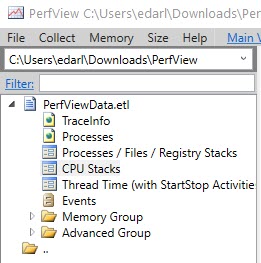
PerfView is just an executable. I like to stick it in its own folder; it keeps the files that get created together.
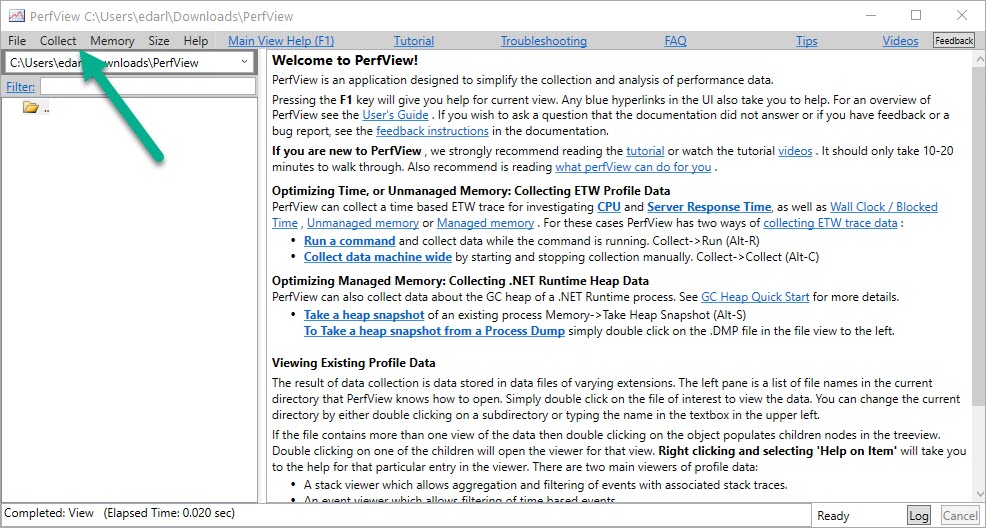
When you open it up, you’re gonna wanna hit the Collect menu.
Greetings
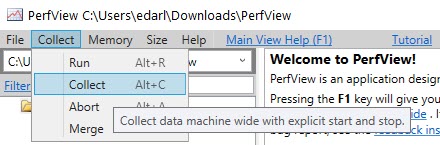
Hit collect (or Alt+C, now that you peeked, cheater).
Jane’s Collection
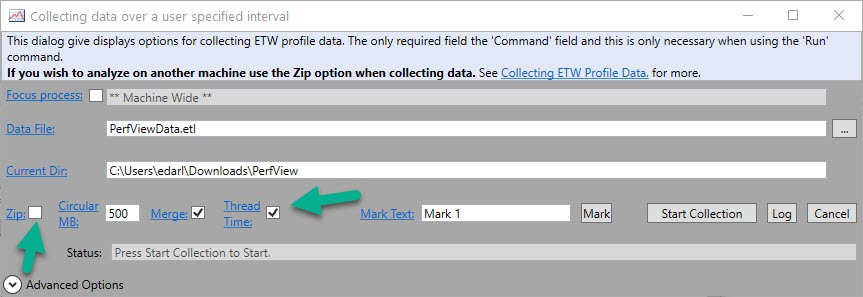
I usually skip zipping, unless I know I’m going to send these to someone else. You can always zip them later.
I like to grab thread time. I dunno why. I’ve always done it, and I’m superstitious.
I also listen to Planet Earth every time I’m on a plane taking off because it assures a safe trip. Right?
Right.
Choices, Choices
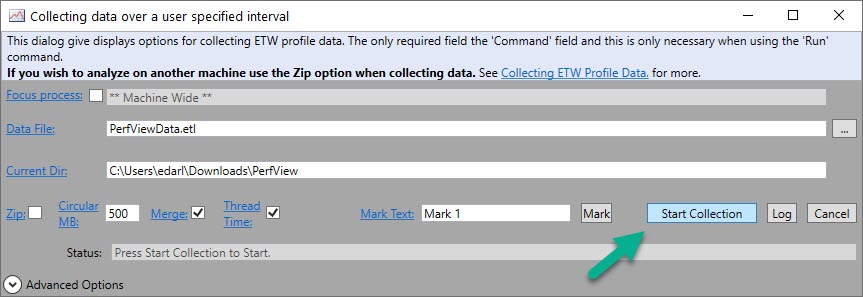
Next, when you’re ready to get stuff, hit Start Collection. This button will change to Stop Collection after you click it.
You’ll wanna stop the trace when the thing you wanna profile is done running, or when you think you’ve got sufficient sample.
Starter
Now, I have to warn you here. You don’t wanna take a long collection. These files get big.
You also have to factor in that profiling code can slow it down.
CPU Stacks
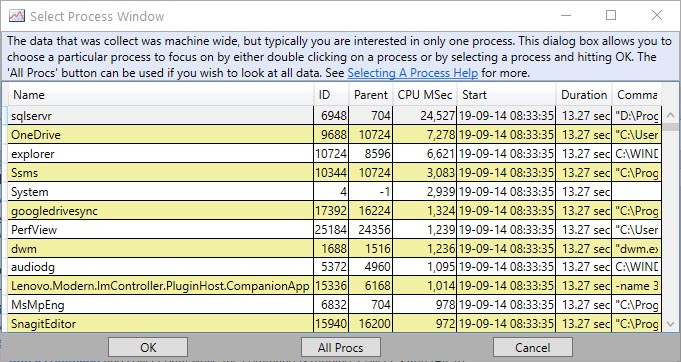
CPU stacks are where I go next. When you double click on that, you’ll get a pop up to pick which application you wanna dig into.
PerfView collects system wide. So really, please, please, please don’t run it for a very long time.
sqlservr
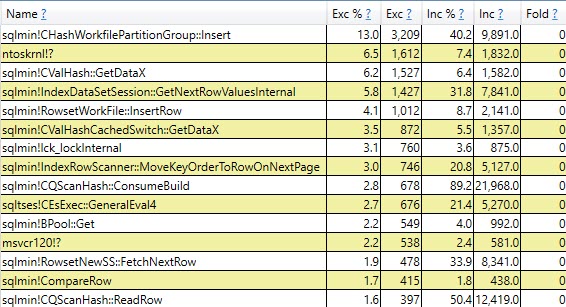
Double click into sqlservr, and you’ll get a list of stuff.
Greatest
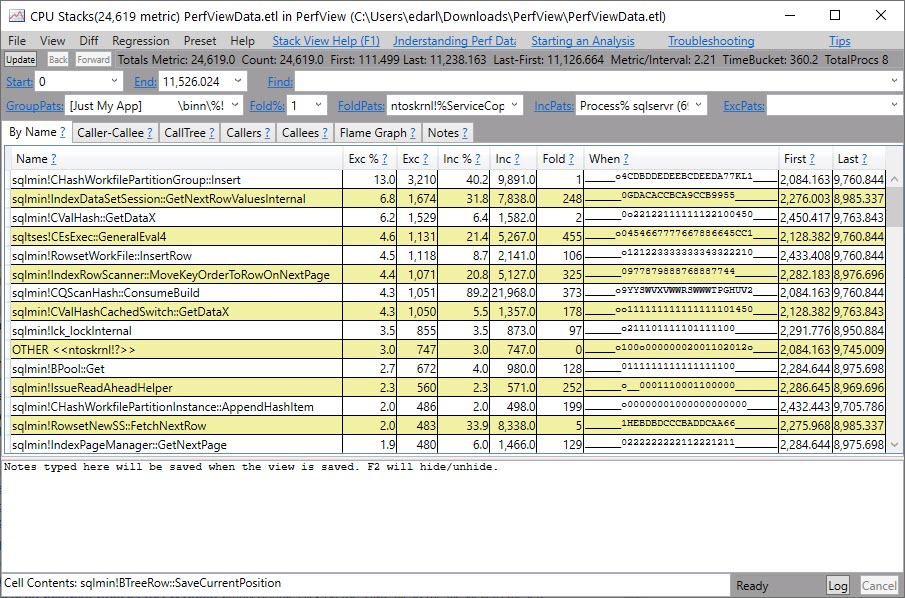
It won’t look like this for you at first. There’ll be a lot of jibberish and question marks. You need to get symbols for them to make sense.
Symbology
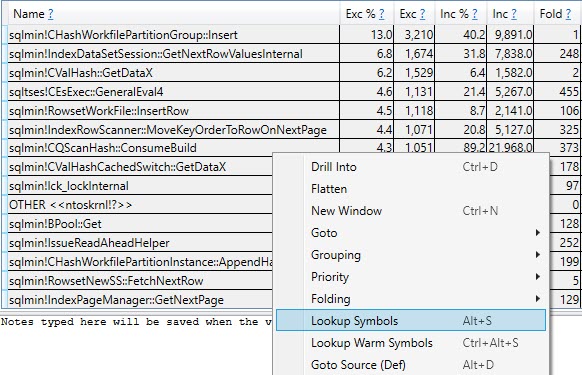
Hit ctrl+a to highlight the whole list of lines, then either hit alt+s or right click and select Lookup Symbols.
If it’s your first time doing this, it might take a while to download them, but you really need to do this part to make any sense of what’s going on.
Do Not Group Or Fold
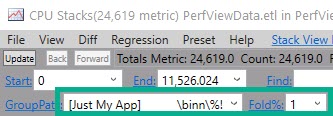
The next thing you wanna do is clear out GroupPats — just highlight, hit delete, and then enter.
Next, change Fold% to 0 and hit enter.
This’ll make sure you get the most detail from your sample.
Fortunate
You can click around here to get other views of the data.
Mean to it.
How Does This Relate To Debugging?
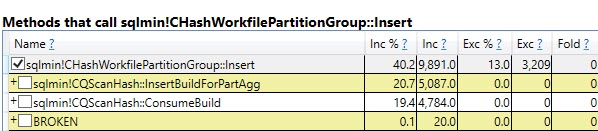
Well, see those list of call stacks up there? That’s what you use to set Break Points in a debugger.
You might see something interesting there that either doesn’t have the full detail you’re after, or you want to follow more closely.
Either way, this is a good example of how to take a closer look at what SQL Server is up to under the hood without getting lost in a debugger.
Thanks for reading!
Going Further
If this is the kind of SQL Server stuff you love learning about, you’ll love my training. Blog readers get 25% off the Everything Bundle — over 100 hours of performance tuning content. Need hands-on help? I offer consulting engagements from targeted investigations to ongoing retainers. Want a quick sanity check before committing to a full engagement? Schedule a call — no commitment required.
Under most circumstances, this won’t happen. Most.
Shared locks taken by read queries will let go pretty quickly.
Under most circumstances.
Out, Liars
To hold onto Shared locks, you’d need to use an isolation level escalation hint, like REPEATABLE READ.
I could do that here if I were a lazy cheater.
Instead, I’m going to show you a more common and interesting scenario.
You see, like a lot of important specks of knowledge, this one comes from Craig Freedman:
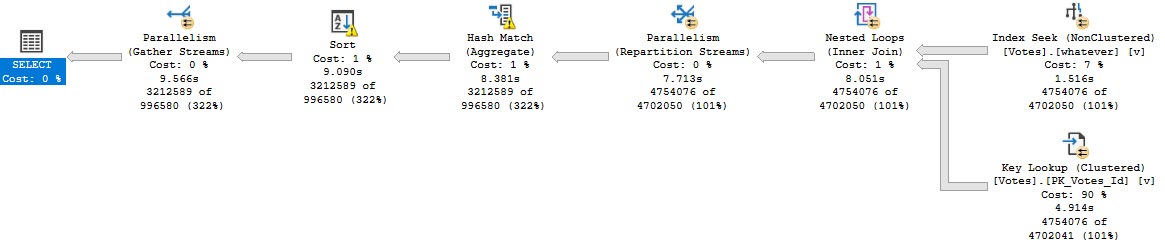
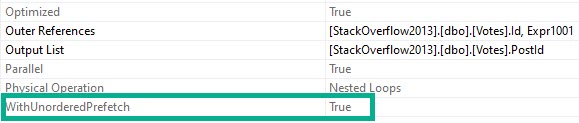
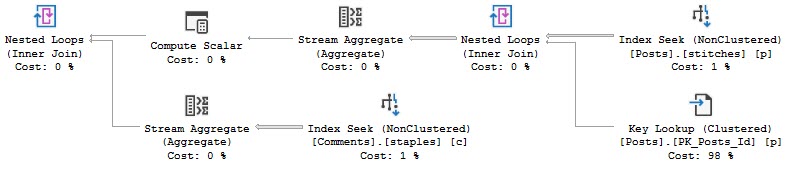
Note the “WITH UNORDERED PREFETCH” keywords on the nested loops join.
I am not going to demontrate it , but when SQL Server executes this query, it holds S locks on the rows returned by the index seek until the query finishes executing.
I’m going to be a little bit of a lazy cheater here, and rather than show you where this can happen with parameter sniffing or some other weird optimizer choice, I’m going to use an index hint to use this index:
CREATE INDEX whatever ON dbo.Votes(CreationDate, VoteTypeId);
Then I’m going to run this query, which’ll take about 10 seconds:
DECLARE @i INT
SELECT   @i = v.PostId
FROM     dbo.Votes AS v WITH (INDEX = whatever)
WHERE    v.CreationDate >= '20080101'
AND      v.VoteTypeId > 5
GROUP BY v.PostId
ORDER BY v.PostId;
Here’s what the query plan looks like:
Your My Best Wishes
And when we get the properties of the Nested Loops Join, we’ll see the Unordered Prefetch property set to true.
Steve Prefetchtaine
If I kick that query off and look at the results of sp_WhoIsActive @get_locks = 1, I’ll see this:
Which is exactly what I want — a Shared object lock on Votes that has been GRANTed. That’ll get held onto for the duration of the query.
Now when I try to run this update, it’ll get blocked:
BEGIN TRAN
UPDATE dbo.Votes SET UserId = 2147483647
ROLLBACK
Note that I’m only wrapping it in a transaction here so it’ll roll back. It will still get blocked without that, but then I’d have to reverse the update on my own.
And Who Is Active is showing us that the read query has been blocking the write query for around 4 seconds.
Capper
If you’re out there in the world and you see a read query that blocked a write query, take a close look at the query plan for a Nested Loops Join with the Unordered Prefetch property set to true.
I bet you’ll find one. And I’ll bet your query wasn’t fast.
Fixing the Key Lookup may not make your query faster, but it should alleviate the blocking because of long-held shared locks.
Thanks for reading!
Going Further
If this is the kind of SQL Server stuff you love learning about, you’ll love my training. Blog readers get 25% off the Everything Bundle — over 100 hours of performance tuning content. Need hands-on help? I offer consulting engagements from targeted investigations to ongoing retainers. Want a quick sanity check before committing to a full engagement? Schedule a call — no commitment required.
In yesterday’s post, we looked at MSTVFs. Today, we’re going to look at inlined functions.
And I know, that sounds weird. But it’s because we’re going to circle back to scalar valued functions, and how they’re inlined in SQL Server 2019 as well.
There’s stuff in here you’ll have to look out for when you move to SQL Server 2019.
Side By Side
The first thing we need is the function itself, which is just an inlined version of the others.
CREATE OR ALTER FUNCTION dbo.CommentsAreHorribleInline(@Id INT)
RETURNS TABLE
WITH SCHEMABINDING
AS
RETURN
SELECT (SELECT SUM(Score) FROM dbo.Posts AS p WHERE p.OwnerUserId <= @Id)
	   -
	   (SELECT COUNT_BIG(*) FROM dbo.Comments AS c WHERE c.UserId <= @Id) AS Tally
GO
Where these differ from both kinds of functions, is that you can’t find them ANYWHERE on their own.
They don’t appear in any DMVs, or in the plan cache as isolated code. Since they’re inlined, it’s just a part of whatever query references it.
Let’s start simple, though:
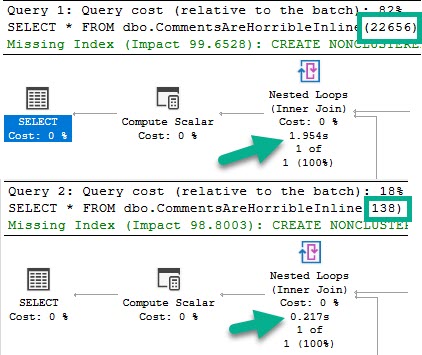
SELECT * FROM dbo.CommentsAreHorribleInline(22656);

SELECT * FROM dbo.CommentsAreHorribleInline(138);
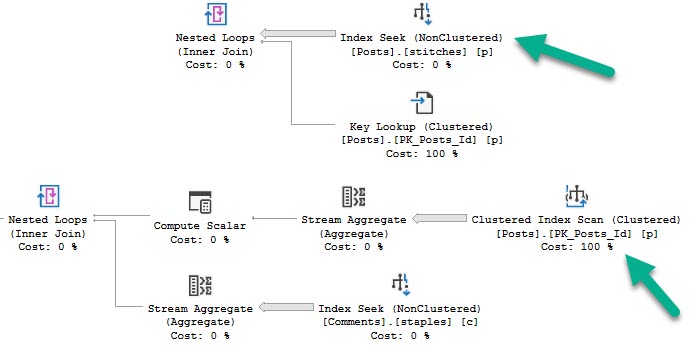
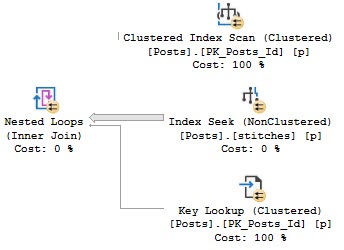
Like in the other posts, the chief difference between these two plans is the index access choice.
The 22656 plan scans the clustered index, and the 138 plan does a nonclustered index seek with a key lookup.
Check the other posts in the series for pictures of that if you’re interested.
Tops and Bottoms
As in the other examples, the clustered index scan is considerably slower than the nonclustered index seek plan.
But that’s not where things are interesting. Where they’re interesting is when we call the function in a “larger” query.
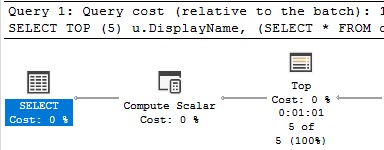
SELECT TOP (5) u.DisplayName,
       (SELECT * FROM dbo.CommentsAreHorribleInline(u.Id))
FROM dbo.Users AS u
GO
Spool And Spool Alike
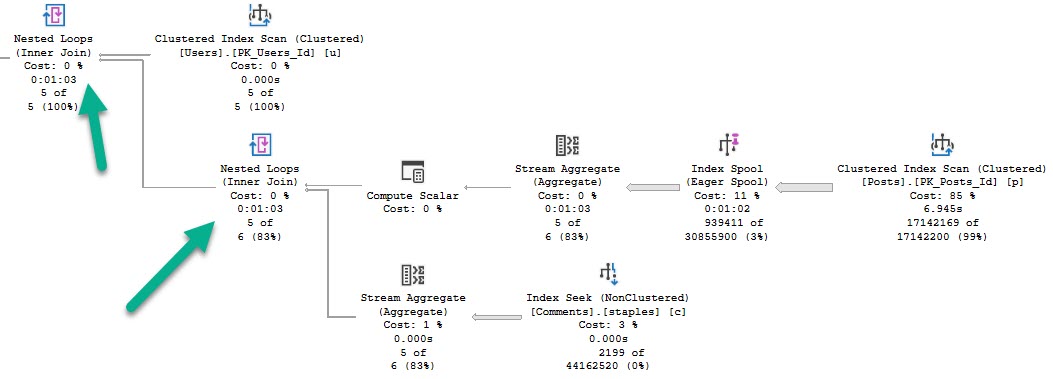
This query runs for a full minute.
Adios
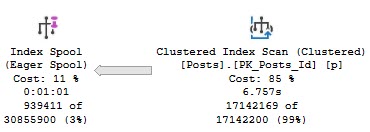
We see why early on — an eager index spool.
You again.
This appears to happen because the optimizer is drunk as hell doesn’t like the idea of scanning the clustered index, or recycling the seek + lookup 5 times.
The index reflects what a two column clustered index keyed on OwnerUserId would look like.
Think about it like if you selected OwnerUserId and Score into a #temp table and put a clustered index on the table with the key on OwnerUserId.
Damaja
Remember that part of the reason for this plan change is that we’re no longer just subtracting one aggregate from another like when we call the function on its own, there’s the additional “join” to the Users table. Correlated subqueries are just that — joins.
Solitaire
Futurist
I’d love to have more to say about how this changes in SQL Server 2019, but an identical pattern occurs, similar to what I blogged about earlier in the summer.
I caught some private flack about how the TOP (1) pattern in that post could easily be replace with an aggregate like MIN.
While that’s totally true, there’s no similar replacement for this pattern. We could expand the index to cover the Score column to get rid of the spool, which goes back to another post I wrote about 2019 optimizer features, where you’ll need wider (covering) indexes for them to be used.
Thanks for reading!
Going Further
If this is the kind of SQL Server stuff you love learning about, you’ll love my training. Blog readers get 25% off the Everything Bundle — over 100 hours of performance tuning content. Need hands-on help? I offer consulting engagements from targeted investigations to ongoing retainers. Want a quick sanity check before committing to a full engagement? Schedule a call — no commitment required.
In yesterday’s post, we looked at we looked at simple scalar function plan caching.
Today, we’ll look at MSTVFs. If you’re not sure what that means, look at the title of the post real quick.
Yeah, up there.
On we go.
Dirty Version
The function will do the same thing as before, just rewritten to be a MSVTF.
CREATE OR ALTER FUNCTION dbo.CommentsAreHorribleMulti(@Id INT)
RETURNS @Tally TABLE(Tally BIGINT)
WITH SCHEMABINDING
AS
BEGIN
INSERT @Tally ( Tally )
SELECT (SELECT SUM(Score) FROM dbo.Posts AS p WHERE p.OwnerUserId <= @Id)
	   -
	   (SELECT COUNT_BIG(*) FROM dbo.Comments AS c WHERE c.UserId <= @Id)
RETURN
END
GO
Now, where these differ immediately from SVFs (scalar valued functions), is that they don’t show up in the plan cache by name.
Wrong Hook
Note that these are both “statements”.
Also, unlike SVFs, they don’t show up in dm_exec_function_stats. This is documented behavior, but whatever.
And even though they’re called a “Proc” in dm_exec_cached_plans, they only show up in dm_exec_query_stats, not dm_exec_procedure_stats (which is why BlitzCache calls them a Statement).
Different Sniffint
Unlike SVFs, which don’t have a restriction on the function body using parallelism, all table variable modifications are forced to run serially (unless you’re sneaky).
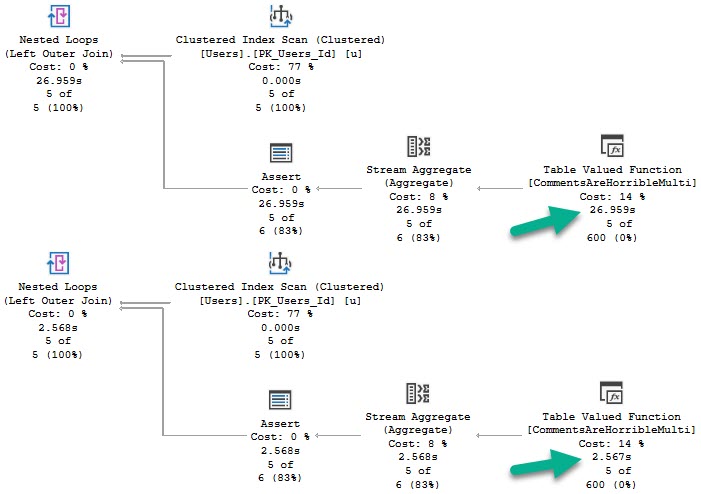
That means both insert queries will be serialized, with the main difference being index access.
arrowed
Like before, if we cache either plan, it will get reused. And just like before, the clustered index scan plan is significantly slower.
SELECT TOP (5) u.DisplayName,
       (SELECT * FROM dbo.CommentsAreHorribleMulti(u.Id))
FROM dbo.Users AS u
Old Dress
Plan Noir
Just like scalar functions, these can have different plans cached and reused, and may fall victim to parameter sniffing.
Again, this depends a lot on how the function is called and used. It’s just something to be aware of when tuning queries that call functions.
Execution times may vary greatly depending on… well…
Parameters.
Thanks for reading!
Going Further
If this is the kind of SQL Server stuff you love learning about, you’ll love my training. Blog readers get 25% off the Everything Bundle — over 100 hours of performance tuning content. Need hands-on help? I offer consulting engagements from targeted investigations to ongoing retainers. Want a quick sanity check before committing to a full engagement? Schedule a call — no commitment required.
But to make matters worse, we’re going to combine them with a problem no one is pretending to solve: bad parameter sniffing.
After all, that’s what can go wrong when you cache a plan, right?
Our Dummy
This is our function. It’s set up to do something that should happen on Stack sites: users should be penalized for leaving comments.
Okay, so this isn’t exactly how it would work. But stick with me, because it makes a better demo.
CREATE OR ALTER FUNCTION dbo.CommentsAreHorribleScalar(@Id INT)
RETURNS BIGINT
WITH SCHEMABINDING, RETURNS NULL ON NULL INPUT
AS
BEGIN
DECLARE @Tally BIGINT
SELECT @Tally =
	   (SELECT SUM(Score) FROM dbo.Posts AS p WHERE p.OwnerUserId = @Id)
	   -
	   (SELECT COUNT_BIG(*) FROM dbo.Comments AS c WHERE c.UserId = @Id)
RETURN @Tally
END
GO
Really, we’re just getting a sum of all the scores in the Posts table for a user, then subtracting the count of comments they’ve left.
Because comments are horrible.
Anyway.
Individually
If we run these two queries, the plan will get reused.
We can free the cache, run them in the other order, and the same will happen in reverse.
Of course, each one gets a different plan.
22656138
Tangentially, these functions will end up dm_exec_function_stats, which was introduced in 2016, and can also be identified by name in the plan cache.
SELECT *
FROM sys.dm_exec_function_stats AS defs;

EXEC sp_BlitzCache @StoredProcName = 'CommentsAreHorribleScalar';
Sniffing
If we cache a plan for 22656 or 138, and then run a query like this:
SELECT TOP (100) u.DisplayName,
       dbo.CommentsAreHorribleScalar(u.Id)
FROM dbo.Users AS u;
The query will reuse whatever the cached plan is.
Again, using BlitzCache to track the plan down:
Favorite shoe
In this case, the query is simple enough that the plan difference doesn’t change performance very much.
Let’s change our function a little bit to see a better example.
Appalled
Here it is:
CREATE OR ALTER FUNCTION dbo.CommentsAreHorribleScalar(@Id INT)
RETURNS BIGINT
WITH SCHEMABINDING, RETURNS NULL ON NULL INPUT
AS
BEGIN

DECLARE @Tally BIGINT

SELECT @Tally =
	   (SELECT SUM(Score) FROM dbo.Posts AS p WHERE p.OwnerUserId <= @Id)
	   -
	   (SELECT COUNT_BIG(*) FROM dbo.Comments AS c WHERE c.UserId <= @Id)

RETURN @Tally

END
GO
The plans are way different now:
Bananas
22656 scans the clustered index, and 138 seeks into the nonclustered index with a key lookup.
For the record, the bad plan is the clustered index scan, and the fast plan is the nonclustered index seek.
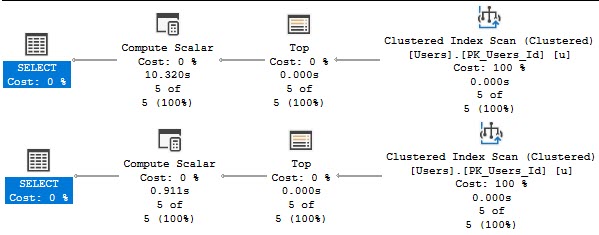
Running a smaller query (because the top hundred made me impatient), the difference is obvious.
SELECT TOP (5) u.DisplayName,
       dbo.CommentsAreHorribleScalar(u.Id)
FROM dbo.Users AS u;
Compute hahahahahahahalar
The version of the query that gets the bad function plan has a 10 second compute scalar, and the version of the query that gets the good function plan finishes in 900ms.
Functions Can Get Different Plans
Depending on how you call them, and how much data they might have to touch, this can be a big deal or no deal.
Because I know I’ll get some semi-related questions:
The body of scalar functions have no restrictions on parallelism, only the calling statements are forced to run serially
Functions run “once per row”, with the number of rows being dependent on where in the plan the compute scalar appears
Thanks for reading!
Going Further
If this is the kind of SQL Server stuff you love learning about, you’ll love my training. Blog readers get 25% off the Everything Bundle — over 100 hours of performance tuning content. Need hands-on help? I offer consulting engagements from targeted investigations to ongoing retainers. Want a quick sanity check before committing to a full engagement? Schedule a call — no commitment required.
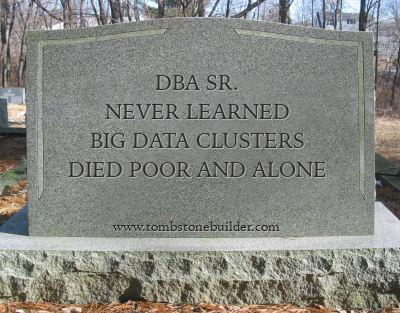
With a new version of SQL Server coming out soon, you’re gonna hear about a lot of DBAs dying due to some new feature or another.
Don’t be caught off guard like your poor, passed-on colleagues who didn’t prepare for other massive die-offs from:
Missing index requests ?
Virtualization ?
PowerShell ?
The Cloud ?
Query Store ?
Data Science (???)
RIP In Peace
Loved Ones
We’ve been studying the trends here at Darling Data, and we’ve found a $700,0000% increase in DBA death and dismemberment with each new SQL Server release.
That’s 15 quadrillion percent more than the cost of milk in the Himalayas.
Think about it.
Yak Milk.
Don’t let your loved ones drink Yak Milk because you wanted to be buried in a life-sized replica of Nick’s Computer.
The best part about the plan is that’s totally tax free. Because if you don’t tell, I won’t tell either.
And you’ll be dead.
Federal* data shows a staggering increase in the cost of burying all those DBAs.
Apparently it’s tough to get someone in the ground while they’re kicking and screaming.
Call 1-900-WHATEVER today to learn more about the benefits you and your family deserve.
Plan Operators are standing by!
*: I assume there’s federal data on this that agrees with me. Subject to change at any time. Not an actual number in this timeline. Not Data Driven®
Going Further
If this is the kind of SQL Server stuff you love learning about, you’ll love my training. Blog readers get 25% off the Everything Bundle — over 100 hours of performance tuning content. Need hands-on help? I offer consulting engagements from targeted investigations to ongoing retainers. Want a quick sanity check before committing to a full engagement? Schedule a call — no commitment required.
Clustered columnstore indexes can be a great solution for data warehouse workloads, but there’s not a lot of advanced training or detailed documentation out there. It’s easy to feel all alone when you want a second opinion or run into a problem with query performance or data loading that you don’t know how to solve.
In this full day session, I’ll teach you the most important things I know about clustered columnstore indexes. Specifically, I’ll teach you how to make the right choices with your schema, data loads, query tuning, and columnstore maintenance. All of these lessons have been learned the hard way with 4 TB of production data on large, 96+ core servers. Material is applicable from SQL Server 2016 through 2019.
Here’s what I’ll be talking about:
– How columnstore compression works and tips for picking the right data types
– Loading columnstore data quickly, especially on large servers
– Improving query performance on columnstore tables
– Maintaining your columnstore tables
This is an advanced level session. To get the most out of the material, attendees should have some practical experience with columnstore and query tuning, and a solid understanding of internals such as wait stats analysis. You don’t need to bring a laptop to follow along.
Courtyard Times Square – 114 West 40th street NY, NY 10018
Meeting Room – Lower Level – Meeting Room A & B
Going Further
If this is the kind of SQL Server stuff you love learning about, you’ll love my training. Blog readers get 25% off the Everything Bundle — over 100 hours of performance tuning content. Need hands-on help? I offer consulting engagements from targeted investigations to ongoing retainers. Want a quick sanity check before committing to a full engagement? Schedule a call — no commitment required.
Last week’s thrilling, stunning, flawless episode of whatever-you-wanna-call-it.
Video Summary
In this video, I share some personal updates and reflections on my health and work life, while also diving into technical discussions about SQL Server. I start by talking about a recent bout of vertigo that has been affecting me, which led to the Epley maneuver for relief. This segues into a discussion on SQL Server performance tuning, specifically focusing on how version upgrades can sometimes lead to worse performance due to changes in cardinality estimators. I also address the topic of “optimized for sequential key” and its mysterious nature, as well as some interesting queries from viewers about database encryption and bulk inserts. Throughout the video, I offer advice on finding jobs that align better with one’s passions and how to handle imposter syndrome by writing things down and referencing facts more confidently. The technical portion includes practical tips on troubleshooting poor-performing queries and understanding encryption mechanisms in SQL Server environments like Azure. Overall, it’s a mix of personal anecdotes and professional insights aimed at helping DBAs and developers navigate their roles more effectively.
Full Transcript
I’m live, and I have my contacts in this week, so no glasses for you nice people. You get to see my face completely unfettered by shoddy Ray-Bans. So, lucky you. Lucky, lucky you. All 7,000 of you that have decided to join me today. On this glorious occasion of this splendid defeat. Ever think of LASIK? Yeah, I always think of LASIK. I mean, I always, uh, I don’t know what it is. Yeah, I would love to get LASIK. Another thing, yes, I would absolutely get LASIK. I would absolutely. get LASIK. I probably should get LASIK. I mean, I don’t drive, so I don’t have to worry about driving at night. I barely leave the house after dark. I don’t think walking at night would be an issue either. Mostly I’m afraid of like they, so there’s two things, I guess, because I have, I have a stigmatism. And so that automatically makes LASIK like three times as expensive or something. And, uh, the other thing is that I am afraid of, of them messing up and just like shooting a laser through my eyes. So. Sometimes, sometimes I, I really wanna, but then I’m like, eh, you know.
I’d rather be able to see poorly than have, have holes in my face where my eyes used to be. Laser holes in my face. There’s other stuff that I would, I would like to get surgically fixed first. Like, I just wish someone would take a drill and like make my ear canals better. My ears are awful.
I, uh, I woke up in the middle of the night on Sunday spinning, which is not that unusual of an occurrence, but it was like particularly bad. And, uh, I, I, I realized that I had vertigo, not just alcohol induced spins. I had, I had like legit vertigo. I had like, I hadn’t felt that way. I guess the last time I had felt even remotely like that was when, uh, Brent took people on the Alaskan cruise. And the first night at sea, the boat was, uh, the first night at sea, the boat was at all sorts of bizarre angles, flitting and floating around.
And, uh, I was, I was seasick for like a month after that. Uh, so when this, when this happened, it was like significantly, it was like acute vertigo. It was not intractable. It was just acute. And, uh, so I had to do this thing called, uh, the hell is it called again? Hang on. Hang on. Hang on. Hang on. I’m going to go look this up. Uh, vertigo maneuvers. What’s it called?
The Epley maneuver. E-P-L-E-Y. Epley maneuver. And I had to like lay back with my head hanging off the bed and like turn it and turn and turn my head and flip around. It was, it worked. Gosh darn it. It worked. Worked wonderfully. Uh, the acuteness of the vertigo has subsided to just slightly mild nausea. So that’s nice.
Uh, I’m just, I’m just cramming Dramamine and Advil in my head now. So whatever. It’s fun. It’s fun. Today’s the first day that I have not felt significantly dizzy since Monday. Hopefully I’m on the, hopefully I’m on the mend. I haven’t been going to the gym because, uh, I, I’ve been unsteady on my feet.
That seems like a pretty bad time to, you know, squatter, deadlift or overhead press, any of those things. Anyway. That was, that’s my, that’s been my fun week so far.
If I’ve seemed, uh, cranky or short in any, in any venue this week, probably because I’ve just been, uh, sick and on Dramamine for the entire week. Dude, how you’re getting better. Thanks, Rowdy.
I’m going to assume you meant hope. At least, you know, partially assume you meant hope. I don’t know. Hope is a useless venture.
Yeah, yeah, yeah. All right. Someone, it’s been five minutes of me talking about being dizzy. Someone, someone asked me a SQL Server question before, before I have no attendance whatsoever. Not, not, not doing my dancing monkey routine and making people, making, hopefully making people’s lives easier.
Is they interact with the incredible piece, the incredible feat of engineering known as Microsoft SQL Server. That has, somehow has worse partitioning than Postgres. Far worse partitioning than Oracle.
Far worse partitioning than probably DB2. I say that without ever having used DB2. I could be completely wrong. I’m going to put an asterisk on that one.
Farrest asks a question near and dear to my heart. How often do you see version upgrades leading to worse performance? Man.
That’s, that happens a lot. That new cardinality estimator is just… I would like to, I would, I would, I would like an intimate look at the workloads that it helps.
I mean, granted, the legacy cardinality estimator certainly messed a lot of stuff up. And the certain, legacy cardinality estimator was certainly never completely perfect. That’s why they worked on the new one.
But I would really like to know exactly what kind of workload the new one is, like, super beneficial for. Because when, when, when I look at, like, the workloads that, that tank when they use it, like, this isn’t that bad. You’re not doing anything weird.
You’re not, like, like messing things up in any way that other people aren’t messing things up. Like, what makes this cardinality estimator so much worse for you? And this is after flailing at stuff like stats updates and, like, like changing indexes and, like, moving chunks of code around.
And it’s like, this is still not good. Something is a muck here. So pretty often, yeah.
And it’s like, it’s not like I want to spook people away from using the new cardinality estimator. It’s just, you have to really, really test that thing out. And you have to really pay close attention to what, which, to which queries, how they behave under the different cardinality estimator. I’ve seen somewhere it’s just, like, nothing changed, really.
It’s like, it’s disappointing. Coming for fireworks of some kind. This is, like, something to go, like, miraculously bad or something to go, like, miraculously right. It’s going to happen.
This is, like, the same thing. Like, there’s, like, a hundred row difference in the estimate. I’m like, oh, it’s not exciting. Then again, very few people want excitement out of SQL Server.
Very few people are like, excite me. Everyone’s just like, please just stay, just be quiet. Just don’t do anything awful. It’s like having a baby in a restaurant.
Please just be quiet and don’t cry and don’t, like, pull the tablecloth off the table or, like, knock any glasses over. Just please just, like, sit and be cute and quiet. Peter, my goodness.
Did you ever get more or juicier details on optimized for sequential key? Saw one pretty sparse follow-up on the announcement. Nothing since.
No, I haven’t gotten anything new on that. You know, there was a blog post kind of going through how it worked, which, you know, I guess for something that’s patented, you know, something that’s, like, secret sauce. It gave an okay amount of detail.
I mean, it’s probably, you know, not going to be enough unless you can, you know, look at source code and debuggers and all sorts of other fun stuff. But, you know, no, no, I haven’t gotten anything. Then again, very few people willingly give information to me.
Very few people are, like, let me volunteer you this information. I don’t know. I try to get on the cool kid lists where people are, like, let me tell you how this works.
But, you know, cool kid lists won’t happen. Chloe. How are we doing?
What was I going to say? Yeah, I went for a walk. I went for a walk this morning. Pleasant walk.
Hi. Lee says, I’m troubleshooting a poor-performing query. When I ran spwhoisactive with getlocks equals one, I see the following database.encryption scan. Did someone turn on?
Did someone try to turn it on? Did someone try to use it in some way? I’m curious about that. It sounds like someone is trying to turn on TDE or someone is trying to use, like, always encrypted or something. So that’s cute.
That’s curious. I don’t know. Let’s see. Hmm. Yeah.
It looks like someone was trying to turn on TDE of some kind. I’m going to stick you, stick the first thing I found into chat because it sounds promising. Yeah.
Unfortunately, there’s very little else that that could mean. It’s most likely related to either, like, TDE or column-level encryption or cards outside trying to beat my foul language. Yeah.
It’s about it. There’s not a lot else that causes that. Azure. Ooh. The plot thickens. I don’t know.
Does Azure use, like, some sort of encryption in the background that we don’t know about? I wonder if it was for, like, maybe it’s for, like, a system database or something. I bet, you know, it would make a certain amount of sense if Azure, like, encrypted your local system databases.
I’m going to get my thinking juice in. Column-level encryption is present with that. It sounds like a good place to start troubleshooting.
It sounds to me like something that might give you an encryption scan. That would be the next direction that I pointed my troubleshooting efforts in. Further than that, I don’t know because I do nothing with security.
It’s wonderful. It’s wonderful to not ever touch security. I never have to worry about securing anything.
All I have to worry about is making something faster. It’s like, yes. It’s great. I get to sit around with all my fun tricks, learn some new tricks. Justin Patterson says, bulk insert on a table with a date time column, default get date.
All dates are the same. Yeah. So when it’s in a transaction like that, when you do bulk insert, you’ll get all the same values for stuff like that. So even if you had other default values for like Rand, I think new ID might be.
Actually, I don’t know. I was going to say new ID might be the only thing that’s immune to that, but I’ve never actually tried it. So I don’t want to promise you anything.
That makes sense to me if you’re bulk inserting. SQL Server is probably like, yeah, get date. All right. The reason that I want to say that that is the way it goes is because in the Stack Overflow example database, the votes table, there’s a creation date column that is a date time.
And there is only ever like a single, there’s like, it’s all like chunks of a single date value that ends up in there. There is like no, never any like value for the timestamp. It’s all like full somethings.
Just like dates with no time attached to them. And I think that’s because there’s a bulk insert process that goes there. That’s all I know. That’s all I know, I’m sticking to it.
I’ve had other, there are other columns that have non-deterministic functions like that that will not give you different values on insert. You have to like feed them something to get different values. He says, I want to practice performance tuning and keep getting roped into nonsense, i.e. stuff that bores me.
Why would I ignore that message? That’s a great message. Get a job where you get, stop getting roped into stuff that annoys you. That’s the best way to do it.
Look for jobs where they’re like, we need people to performance tune this database and say, I want to focus on performance tuning. The reason that I want to leave this job is because I do not get to do enough performance tuning, which is my passion with SQL Server. And so I end up getting roped into figuring out why someone is trying to turn on TDE and why that person has privileges to turn on TDE in this database that I’m trying to performance tune.
You have a junior now. Congratulations. Mazel tov.
Hope juniors a healthy baby. And you can make them get roped into the stuff that bores you so that they can leave as soon as possible. So one thing you have to be careful of with those juniors, if they get bored, they’re going to not lie.
They might exaggerate their experience in their time with your company when they start looking for new jobs. And it’s, oh, you know, I’ve been, boy, I’ve been working hard at this DBA thing for a long time. Imposter syndrome is now 100%.
I don’t believe in imposter syndrome. Just don’t. I think what a lot of people confuse for imposter syndrome is a lack of confidence in their knowledge about certain things. And while I think that’s certainly an understandable thing to have, and that’s certainly probably a good way to stay on your toes about things.
There are times when it hits me, and I used to think that it was imposter syndrome when someone would, like, say something that was wrong. And I would know that it’s wrong. But, like, hearing someone else say it would make me question whether or not I knew my stuff.
And I used to think, man, I feel that must be imposter syndrome. Maybe, I don’t know. Maybe it feels different to other people.
But that’s always what it struck me as. And over time, I sort of got more confidence in the stuff that I know. And I started writing things down more so that I could be more confident in it. And that seemed to help.
Writing things down is helpful. Being able to reference facts and correctness is helpful. So don’t feel like an imposter. You know, we’re all continuing to learn, except people who work with TDE, because they have very little to learn.
And then they’re done. And then they can go back to, like, playing chess in a park or whatever. Go back to ranting at pigeons.
And, you know, so, like, whenever that happens to me now, and, you know, it’s probably easier for me to do this as a consultant. So whenever someone says something that I know to be demonstrably false about SQL Server or databases or computers in general, what I always do is say, all right, can you, like, can you show me where you read that?
Like, can you show me, like, can you show me some source for your information? Or if they were, like, well, I tested it. I’m, like, I’d love to see it.
Can you show me your test? Like, can you show me what you did that led to that conclusion? And very often, those people will go silent. The whole show me your work thing leads to a lot of people just quitting and giving up.
Like, I don’t have it anymore. It’s a long time ago. I have to go check my email or something like that. I have to dig through my scripts folder.
Okay. I’ll wait on that. We’ll be over here waiting for you. Pantelis says, I found this.
And then, ah, there we go. Oh, oh, we had to split up the message. I see now. In Azure, all newly created SQL databases are encrypted by default. And the database encryption key is protected by a built-in server certificate.
Certificate maintenance and rotation are managed by the service and require no input from the user. Jeez. Like, no input from the user is just like, I would really like this maintenance to not happen while I’m trying to performance doing the database.
It seems like a strange thing to not get user input on. I would want input on that. It seems like if someone was going to be doing that sort of thing on a database that I was working on, I would be like, hey, I have input on when I would like this to happen.
If you see SB who is active running, stop doing what you’re doing. Something bad is happening. It could be, like, I still think it’s going to be like a system database maybe.
Or the column level encryption thing that you said you’re using. Who knows? All sorts of fun stuff going on there. All sorts of fun stuff going on up in the cloud.
All sorts of fun stuff. Does anyone else have a SQL Server question? Come on.
There are a billion of you out there. One billion. You’re not spamming chat. There’s no spam, please. Ask all the questions you want.
There is nothing else in here. He said I have a stinky update statement which has a function being used. For example, update my table set my field equals write my field 1.6.
My table has around 10 million records in it. I know the best thing here would be to remove the function entirely, but I can’t do that. Is there any way I can prove this?
Only way I have been able to improve this is to do something like set my field equals write. Yeah.
So the function, built-in functions. Let me be very clear about this. Built-in functions like write, left, substring, date, add, date, time. And that situation don’t have the same kind of overhead that, like a user-defined function of this scalar or multi-statement like the at sign table variable returning type would.
Those functions don’t really trouble queries too much unless you put them in a where clause. Now, granted, like how you’re doing it in the where clause might be helpful in that even though you have to scan all 10 million rows, you probably rule some of those 10 million rows out.
So what I would do is rather than update your table with that, I would add a computed column. Not persisted, just a computed column. So you could add, you know, it’s an alter table, my table.
Add my field computed as case when my field 2 is not equal to write my field 1, 6, then write my field 1, 6. And that would be instant, as long as you don’t persist it, that would be instantaneous.
And then you could index that column. You could do all sorts of fun stuff to that column. You wouldn’t have to go and update the entire table.
You would just have this virtual column sitting on your table that has that on there. No, that would, no, no. Those, the built-in functions are CLR.
They’re CLR. Let’s just call them CLR-ish. They’re behind the scenes. They are C Sharp. They take advantage of .NET stuff, and they don’t, they don’t, they don’t force anything to run serially. So, no.
You don’t have that problem there. The only thing that forces, I mean, there are a few things that force serialization. Right now, the most common is scalar user-defined functions. Modifying table variables in 99% of circumstances.
Global aggregates. Certain system views. The recursive part of a recursive CTE. Gosh, a whole bunch of stuff.
Top, when it’s outside of a cross-supply. Justin says, how do you pronounce S-A-R-G ability? How do I pronounce that word?
Sargability. Search argument. Sargability. If anyone says Sargability, ask them if they pronounce argument, argument. Or if they, I guess that’s it.
And then if they want to argue with you about it, you can say, well, that’s not how you pronounce argue. Ijit. That’s my advice.
You have heard S-Argability? The hell said that? You have my permission to throw eggs at whoever pronounces it that way. How do you pronounce G-I-F?
That depends on where I am in the world. In France, it is les GIFs. In certain parts of rural America, it is GIF.
In other parts, depending on local colloquialisms, it could be GIF or GIF or GIF. It kind of depends on where you are. Local factors apply.
Okay. Local factors apply to that. There’s no, I mean, there might be. There might be an intended way to pronounce that.
But, you know, all sorts of things happen when words are culturally embraced by people who speak differently, speak different languages. So, really, you know, hard Gs and soft Gs don’t exist in every single tongue. Some, I’ve heard that there are some languages out there that don’t have the letter G in them at all.
They’ve skipped over it entirely. So, how do you pronounce that? How do you pronounce that word if you don’t, if you haven’t invented the letter G? It’s a tough one.
It’s a tough one. You know, most importantly, there is an I in GIF, and I decide how I’m going to say that one. Greek have no letter G.
Isn’t that ironic? So, they’re just reeks. That’s weird, because I know several Greek people.
Well, I guess, I guess, I mean, they’re named like Giorgio or something. Or George, George, George something, Georgious, Giorgio, Giorgio, or Georgie, something like that. I don’t know.
I’ve given up on learning new languages. I’m just no good at it. I can’t even learn JavaScript. Talk about how tough life is.
But in English, G is not associated with a single sound. No, G is associated with many sounds, including sounds that aren’t like, you know, G alone, like ing. Like, there’s no G sound, like ing, ing, ing.
Like, talking, texting, walking. There’s a G in there. Josh has announced his presence, thank goodness.
I was wondering how I was going to develop an ulcer without you. Now that you’re here, you better ask a good question. Which you won’t, because you’re lazy.
You didn’t come prepared. Yes, today’s episode is brought to you by the letter G. Like, G, I wish I was sitting somewhere drinking.
Gosh darn it. I want to go drink. Golly and gosh. Glass of wine sure would be great.
Grandma’s gin, Ginny Gums, Gristle Grimly. Gee, I’m still at work. It’s 1230 here.
Oh, it’s like 530 there, I think. Unless you have a weird daylight savings time thing going on. It’s 530 there, I think. I think UK is five hours ahead.
France is six. Wilson says, I saw this on Reddit today. You have any tools you use? What?
Tools. I got a whole box of tools behind those nagels that someday I’m going to use to hang up those nagels. But I have to buy a piece of furniture for over here first. My office underwent a half-assed redesign before I went on vacation for a month.
I got a new standing desk. And I threw up my old desk, which was like an L shape. And it had a bunch of drawers and storage in it.
So now I have my old standing desk riser put up to maximum height. And I’m using that as ghetto shelving until I decide on what kind of piece of furniture I’m going to use over here to put my stuff on. And then when I get that, I can make more permanent choices about where Ren and Stimpy and the nagels will go.
And that’s how dull my life is. I don’t know. It’s awful.
Josh asks, if a query’s duration and CPU usage increases according to Query Store, there’s your first problem. Never trust a query store. But nothing else does.
With the same plan, same logical reads, dop, et cetera, what could that mean? Well, if it’s the same reads, that rules a lot of things out like index fragmentation. And if duration and CPU are both going up, then that rules out external forces like blocking, in which case duration would increase and CPU would stay the same or maybe even go down.
Let’s see. What could cause that? Maybe.
Well, it’s the same plan. Well, actually, that could make sense. What if, I mean, you could be, what if you’re just dealing with more data? Or, I guess what I might be interested in is, if it’s the same plan, are you hitting parameter sniffing?
Remember that one? Remember parameter sniffing? That thing that you learned about in high school?
That was glue sniffing. Yeah. All right. Well, I mean, it sounds like it could be parameter sniffing. It could be. I don’t really know what else to make of that.
If it’s the same plan, and reads aren’t, oh, well, reads aren’t going up, so parameter sniffing would probably rule that out. Yeah. It’s a VM.
Oh, boy. Okay. So, if you’re on SQL Server 2017, if you’re on SQL Server 2017 and using Query Store, you might want to join off to that aggregate wait stats view, like Query Store wait stats, to see if there are different waits involved for different iterations of this query. That’s what I’d point to.
That’s what I’d point to. But you’re probably on 2016, and I’m going to be disappointed in you. Oh, good idea. I finally had one of those.
I’m so happy when I have a good idea. Happens once a year. Once a year. My good idea for last year was, well, it’s still this year. Crap.
I guess I have two good ideas this year. Actually, three. One is, I didn’t get a real job. Two is, I had temporary tattoos made for swag. And three is, check the wait stats.
It’s funny, because I hate wait stats. Josh wonders aloud if SOS scheduler yield, like CPU contention or an oversubscribed VM, would be included in CPU time. Maybe.
Maybe. I would also look at what that query is doing, because, well, it might need to read like a fairly set amount of data.
I don’t know. Is it? I’m always curious when, like, a query is, like, really CPU intensive without being really read intensive. Like, what are you up to in there?
Like, all your data is in memory if you’re not doing, like, a lot of reads. Grumbling monster behind me. All your data is in memory.
If you’re just, like, purely pushing CPU, that’s one thing. I wonder if this query is parallel or serial, if the plan is parallel or serial. And I would wonder further if there are other issues involved.
I don’t know. We’ll have to wait for this. This sounds like a good question for dba.stackexchange.com, a site you may or may not have heard of, for data professionals.
A parallel plan. Let’s see. It’s from an SE question.
You thief! You liar! Come here with bootleg questions. I had to shoot you. Shoot you like the scoundrel you are. It’s a parallel plan.
Well, if it’s someone else’s question, I’m going to assume you don’t have access to run the query and see if there is perhaps some issues with the parallelisms of the query. Like, perhaps some spillage or some skewedness across different things. Because that would certainly explain why CPU and duration would go up without a meaningful increase in reads.
I would want to know. So here’s what I would, here’s where I would dig in. Right?
Reads are the same. Yeah, reads are the same. Same plan. Same dot. Duration and CPU are going up.
Tell me if that query is doing any writes. Tell me if that query is spilling or spooling or doing something else. Tell me if that, like, you know, there’s no way to see it now.
But now it’s like all these, all these things that, like, queries that when selects cause rights, that’s, that’s in my head now. And I’m thinking, like, well, I don’t know, like, like, are you updating stats behind the scenes sometimes? Are you, are you doing some other labor intensive tasks that wouldn’t show up traditionally with a query?
Right? Wouldn’t, wouldn’t, wouldn’t impact query runtime. Wouldn’t, like, show up as, like, a query weight.
It would just be, we did, we had more CPU associated with us behind the scenes. But, you know, we don’t have a good way of finding that out. So I would want to know if that query is performing writes of any kind.
That’s, that would be my next thing. I.O. completion weights would be something to look into. Because that’s usually our sleep task.
So I.O. completion would be, like, sort spills. Sleep, sleep task would be, like, hash spills. There’s no way to tell behind the scenes if it’s updating stats or something when the query runs. But, you know, depending on what goes on there, that could be, could be a drag.
Be quite a drag. Ha ha ha ha ha ha ha. So, yeah. That’s what I would, that’s, that would be, that would be my, the next place that I went to look at. My troubleshooting repertoire.
Like, what’s going on behind here? Oh, man. That was exhausting. It is a select into.
Okay. Well. We’ve, we’ve, we’ve certainly started to piece together slowly but surely. What, what is, what might be going on with this query?
So now we have a select into. Are we selecting into a user database or into a temp table? Do we have additional contention in this user, user database or in this temp table for some reason? Do we have anything that might be blocking writes to this table?
I know it’s a select into. But if you have snapshots occurring, like snapshot backups occurring, they’re quiescing activity. Well, because no, it’s, no, they’ll be blocking.
Never mind. We’re back to the CPU and duration going up and nothing else. Arr. Just trying to crowdsource my answer so I can get more rep than you. Ah, just go ahead.
I’ll, if I could bounty all my rep away and live like a stack exchange hermit, I would. But I do not have the patience to give my rep away like 500 points at a time. One day at a time.
I don’t think you, like you can’t have multiple bounties open at once. Forrest brings up an interesting point. If there’s only a small amount of space available in the database, does SQL Server have to spend more time writing disjoint extents?
How about this one? Does SQL, if SQL Server has to grow when, that has to grow the database and you do the select into? That’s certainly something that I don’t know that, like, I don’t know if that would count towards query CPU and duration.
Like, definitely query duration. I’m not sure if that would count towards query CPU. But if we had to grow the database and, and growths were slow in the database, like, let’s say, you know, a database, database was good.
Like, instant file initialization wasn’t turned on or, so instant file wasn’t turned on, you’re expanding the data file behind the scenes. That might be something. Another thing is, if the log file has to grow, that’s, I mean, instant file initialization never helps that.
So, if behind the scenes, we’re having to grow the transaction log, that could, that could certainly add. And, like, again, like, the part that I’m not sure on is if that would count towards query runtime. I’ve never cared enough to figure that out.
Maybe, maybe I do now. Or maybe that would make a good blog post for someone with a burning question on their mind. I don’t know that it’s quite burning for me yet.
What is burning is how hungry I am. That I’ve been talking for 40 minutes. 10 minutes longer than my usual webcast length. And I’m going to go eat now.
So, thank you for hanging out. I hope you had a time good with your face parts. Bye. Bye.
Bye.
Video Summary
In this video, I share some personal updates and reflections on my health and work life, while also diving into technical discussions about SQL Server. I start by talking about a recent bout of vertigo that has been affecting me, which led to the Epley maneuver for relief. This segues into a discussion on SQL Server performance tuning, specifically focusing on how version upgrades can sometimes lead to worse performance due to changes in cardinality estimators. I also address the topic of “optimized for sequential key” and its mysterious nature, as well as some interesting queries from viewers about database encryption and bulk inserts. Throughout the video, I offer advice on finding jobs that align better with one’s passions and how to handle imposter syndrome by writing things down and referencing facts more confidently. The technical portion includes practical tips on troubleshooting poor-performing queries and understanding encryption mechanisms in SQL Server environments like Azure. Overall, it’s a mix of personal anecdotes and professional insights aimed at helping DBAs and developers navigate their roles more effectively.
Full Transcript
I’m live, and I have my contacts in this week, so no glasses for you nice people. You get to see my face completely unfettered by shoddy Ray-Bans. So, lucky you. Lucky, lucky you. All 7,000 of you that have decided to join me today. On this glorious occasion of this splendid defeat. Ever think of LASIK? Yeah, I always think of LASIK. I mean, I always, uh, I don’t know what it is. Yeah, I would love to get LASIK. Another thing, yes, I would absolutely get LASIK. I would absolutely. get LASIK. I probably should get LASIK. I mean, I don’t drive, so I don’t have to worry about driving at night. I barely leave the house after dark. I don’t think walking at night would be an issue either. Mostly I’m afraid of like they, so there’s two things, I guess, because I have, I have a stigmatism. And so that automatically makes LASIK like three times as expensive or something. And, uh, the other thing is that I am afraid of, of them messing up and just like shooting a laser through my eyes. So. Sometimes, sometimes I, I really wanna, but then I’m like, eh, you know.
I’d rather be able to see poorly than have, have holes in my face where my eyes used to be. Laser holes in my face. There’s other stuff that I would, I would like to get surgically fixed first. Like, I just wish someone would take a drill and like make my ear canals better. My ears are awful.
I, uh, I woke up in the middle of the night on Sunday spinning, which is not that unusual of an occurrence, but it was like particularly bad. And, uh, I, I, I realized that I had vertigo, not just alcohol induced spins. I had, I had like legit vertigo. I had like, I hadn’t felt that way. I guess the last time I had felt even remotely like that was when, uh, Brent took people on the Alaskan cruise. And the first night at sea, the boat was, uh, the first night at sea, the boat was at all sorts of bizarre angles, flitting and floating around.
And, uh, I was, I was seasick for like a month after that. Uh, so when this, when this happened, it was like significantly, it was like acute vertigo. It was not intractable. It was just acute. And, uh, so I had to do this thing called, uh, the hell is it called again? Hang on. Hang on. Hang on. Hang on. I’m going to go look this up. Uh, vertigo maneuvers. What’s it called?
The Epley maneuver. E-P-L-E-Y. Epley maneuver. And I had to like lay back with my head hanging off the bed and like turn it and turn and turn my head and flip around. It was, it worked. Gosh darn it. It worked. Worked wonderfully. Uh, the acuteness of the vertigo has subsided to just slightly mild nausea. So that’s nice.
Uh, I’m just, I’m just cramming Dramamine and Advil in my head now. So whatever. It’s fun. It’s fun. Today’s the first day that I have not felt significantly dizzy since Monday. Hopefully I’m on the, hopefully I’m on the mend. I haven’t been going to the gym because, uh, I, I’ve been unsteady on my feet.
That seems like a pretty bad time to, you know, squatter, deadlift or overhead press, any of those things. Anyway. That was, that’s my, that’s been my fun week so far.
If I’ve seemed, uh, cranky or short in any, in any venue this week, probably because I’ve just been, uh, sick and on Dramamine for the entire week. Dude, how you’re getting better. Thanks, Rowdy.
I’m going to assume you meant hope. At least, you know, partially assume you meant hope. I don’t know. Hope is a useless venture.
Yeah, yeah, yeah. All right. Someone, it’s been five minutes of me talking about being dizzy. Someone, someone asked me a SQL Server question before, before I have no attendance whatsoever. Not, not, not doing my dancing monkey routine and making people, making, hopefully making people’s lives easier.
Is they interact with the incredible piece, the incredible feat of engineering known as Microsoft SQL Server. That has, somehow has worse partitioning than Postgres. Far worse partitioning than Oracle.
Far worse partitioning than probably DB2. I say that without ever having used DB2. I could be completely wrong. I’m going to put an asterisk on that one.
Farrest asks a question near and dear to my heart. How often do you see version upgrades leading to worse performance? Man.
That’s, that happens a lot. That new cardinality estimator is just… I would like to, I would, I would, I would like an intimate look at the workloads that it helps.
I mean, granted, the legacy cardinality estimator certainly messed a lot of stuff up. And the certain, legacy cardinality estimator was certainly never completely perfect. That’s why they worked on the new one.
But I would really like to know exactly what kind of workload the new one is, like, super beneficial for. Because when, when, when I look at, like, the workloads that, that tank when they use it, like, this isn’t that bad. You’re not doing anything weird.
You’re not, like, like messing things up in any way that other people aren’t messing things up. Like, what makes this cardinality estimator so much worse for you? And this is after flailing at stuff like stats updates and, like, like changing indexes and, like, moving chunks of code around.
And it’s like, this is still not good. Something is a muck here. So pretty often, yeah.
And it’s like, it’s not like I want to spook people away from using the new cardinality estimator. It’s just, you have to really, really test that thing out. And you have to really pay close attention to what, which, to which queries, how they behave under the different cardinality estimator. I’ve seen somewhere it’s just, like, nothing changed, really.
It’s like, it’s disappointing. Coming for fireworks of some kind. This is, like, something to go, like, miraculously bad or something to go, like, miraculously right. It’s going to happen.
This is, like, the same thing. Like, there’s, like, a hundred row difference in the estimate. I’m like, oh, it’s not exciting. Then again, very few people want excitement out of SQL Server.
Very few people are like, excite me. Everyone’s just like, please just stay, just be quiet. Just don’t do anything awful. It’s like having a baby in a restaurant.
Please just be quiet and don’t cry and don’t, like, pull the tablecloth off the table or, like, knock any glasses over. Just please just, like, sit and be cute and quiet. Peter, my goodness.
Did you ever get more or juicier details on optimized for sequential key? Saw one pretty sparse follow-up on the announcement. Nothing since.
No, I haven’t gotten anything new on that. You know, there was a blog post kind of going through how it worked, which, you know, I guess for something that’s patented, you know, something that’s, like, secret sauce. It gave an okay amount of detail.
I mean, it’s probably, you know, not going to be enough unless you can, you know, look at source code and debuggers and all sorts of other fun stuff. But, you know, no, no, I haven’t gotten anything. Then again, very few people willingly give information to me.
Very few people are, like, let me volunteer you this information. I don’t know. I try to get on the cool kid lists where people are, like, let me tell you how this works.
But, you know, cool kid lists won’t happen. Chloe. How are we doing?
What was I going to say? Yeah, I went for a walk. I went for a walk this morning. Pleasant walk.
Hi. Lee says, I’m troubleshooting a poor-performing query. When I ran spwhoisactive with getlocks equals one, I see the following database.encryption scan. Did someone turn on?
Did someone try to turn it on? Did someone try to use it in some way? I’m curious about that. It sounds like someone is trying to turn on TDE or someone is trying to use, like, always encrypted or something. So that’s cute.
That’s curious. I don’t know. Let’s see. Hmm. Yeah.
It looks like someone was trying to turn on TDE of some kind. I’m going to stick you, stick the first thing I found into chat because it sounds promising. Yeah.
Unfortunately, there’s very little else that that could mean. It’s most likely related to either, like, TDE or column-level encryption or cards outside trying to beat my foul language. Yeah.
It’s about it. There’s not a lot else that causes that. Azure. Ooh. The plot thickens. I don’t know.
Does Azure use, like, some sort of encryption in the background that we don’t know about? I wonder if it was for, like, maybe it’s for, like, a system database or something. I bet, you know, it would make a certain amount of sense if Azure, like, encrypted your local system databases.
I’m going to get my thinking juice in. Column-level encryption is present with that. It sounds like a good place to start troubleshooting.
It sounds to me like something that might give you an encryption scan. That would be the next direction that I pointed my troubleshooting efforts in. Further than that, I don’t know because I do nothing with security.
It’s wonderful. It’s wonderful to not ever touch security. I never have to worry about securing anything.
All I have to worry about is making something faster. It’s like, yes. It’s great. I get to sit around with all my fun tricks, learn some new tricks. Justin Patterson says, bulk insert on a table with a date time column, default get date.
All dates are the same. Yeah. So when it’s in a transaction like that, when you do bulk insert, you’ll get all the same values for stuff like that. So even if you had other default values for like Rand, I think new ID might be.
Actually, I don’t know. I was going to say new ID might be the only thing that’s immune to that, but I’ve never actually tried it. So I don’t want to promise you anything.
That makes sense to me if you’re bulk inserting. SQL Server is probably like, yeah, get date. All right. The reason that I want to say that that is the way it goes is because in the Stack Overflow example database, the votes table, there’s a creation date column that is a date time.
And there is only ever like a single, there’s like, it’s all like chunks of a single date value that ends up in there. There is like no, never any like value for the timestamp. It’s all like full somethings.
Just like dates with no time attached to them. And I think that’s because there’s a bulk insert process that goes there. That’s all I know. That’s all I know, I’m sticking to it.
I’ve had other, there are other columns that have non-deterministic functions like that that will not give you different values on insert. You have to like feed them something to get different values. He says, I want to practice performance tuning and keep getting roped into nonsense, i.e. stuff that bores me.
Why would I ignore that message? That’s a great message. Get a job where you get, stop getting roped into stuff that annoys you. That’s the best way to do it.
Look for jobs where they’re like, we need people to performance tune this database and say, I want to focus on performance tuning. The reason that I want to leave this job is because I do not get to do enough performance tuning, which is my passion with SQL Server. And so I end up getting roped into figuring out why someone is trying to turn on TDE and why that person has privileges to turn on TDE in this database that I’m trying to performance tune.
You have a junior now. Congratulations. Mazel tov.
Hope juniors a healthy baby. And you can make them get roped into the stuff that bores you so that they can leave as soon as possible. So one thing you have to be careful of with those juniors, if they get bored, they’re going to not lie.
They might exaggerate their experience in their time with your company when they start looking for new jobs. And it’s, oh, you know, I’ve been, boy, I’ve been working hard at this DBA thing for a long time. Imposter syndrome is now 100%.
I don’t believe in imposter syndrome. Just don’t. I think what a lot of people confuse for imposter syndrome is a lack of confidence in their knowledge about certain things. And while I think that’s certainly an understandable thing to have, and that’s certainly probably a good way to stay on your toes about things.
There are times when it hits me, and I used to think that it was imposter syndrome when someone would, like, say something that was wrong. And I would know that it’s wrong. But, like, hearing someone else say it would make me question whether or not I knew my stuff.
And I used to think, man, I feel that must be imposter syndrome. Maybe, I don’t know. Maybe it feels different to other people.
But that’s always what it struck me as. And over time, I sort of got more confidence in the stuff that I know. And I started writing things down more so that I could be more confident in it. And that seemed to help.
Writing things down is helpful. Being able to reference facts and correctness is helpful. So don’t feel like an imposter. You know, we’re all continuing to learn, except people who work with TDE, because they have very little to learn.
And then they’re done. And then they can go back to, like, playing chess in a park or whatever. Go back to ranting at pigeons.
And, you know, so, like, whenever that happens to me now, and, you know, it’s probably easier for me to do this as a consultant. So whenever someone says something that I know to be demonstrably false about SQL Server or databases or computers in general, what I always do is say, all right, can you, like, can you show me where you read that?
Like, can you show me, like, can you show me some source for your information? Or if they were, like, well, I tested it. I’m, like, I’d love to see it.
Can you show me your test? Like, can you show me what you did that led to that conclusion? And very often, those people will go silent. The whole show me your work thing leads to a lot of people just quitting and giving up.
Like, I don’t have it anymore. It’s a long time ago. I have to go check my email or something like that. I have to dig through my scripts folder.
Okay. I’ll wait on that. We’ll be over here waiting for you. Pantelis says, I found this.
And then, ah, there we go. Oh, oh, we had to split up the message. I see now. In Azure, all newly created SQL databases are encrypted by default. And the database encryption key is protected by a built-in server certificate.
Certificate maintenance and rotation are managed by the service and require no input from the user. Jeez. Like, no input from the user is just like, I would really like this maintenance to not happen while I’m trying to performance doing the database.
It seems like a strange thing to not get user input on. I would want input on that. It seems like if someone was going to be doing that sort of thing on a database that I was working on, I would be like, hey, I have input on when I would like this to happen.
If you see SB who is active running, stop doing what you’re doing. Something bad is happening. It could be, like, I still think it’s going to be like a system database maybe.
Or the column level encryption thing that you said you’re using. Who knows? All sorts of fun stuff going on there. All sorts of fun stuff going on up in the cloud.
All sorts of fun stuff. Does anyone else have a SQL Server question? Come on.
There are a billion of you out there. One billion. You’re not spamming chat. There’s no spam, please. Ask all the questions you want.
There is nothing else in here. He said I have a stinky update statement which has a function being used. For example, update my table set my field equals write my field 1.6.
My table has around 10 million records in it. I know the best thing here would be to remove the function entirely, but I can’t do that. Is there any way I can prove this?
Only way I have been able to improve this is to do something like set my field equals write. Yeah.
So the function, built-in functions. Let me be very clear about this. Built-in functions like write, left, substring, date, add, date, time. And that situation don’t have the same kind of overhead that, like a user-defined function of this scalar or multi-statement like the at sign table variable returning type would.
Those functions don’t really trouble queries too much unless you put them in a where clause. Now, granted, like how you’re doing it in the where clause might be helpful in that even though you have to scan all 10 million rows, you probably rule some of those 10 million rows out.
So what I would do is rather than update your table with that, I would add a computed column. Not persisted, just a computed column. So you could add, you know, it’s an alter table, my table.
Add my field computed as case when my field 2 is not equal to write my field 1, 6, then write my field 1, 6. And that would be instant, as long as you don’t persist it, that would be instantaneous.
And then you could index that column. You could do all sorts of fun stuff to that column. You wouldn’t have to go and update the entire table.
You would just have this virtual column sitting on your table that has that on there. No, that would, no, no. Those, the built-in functions are CLR.
They’re CLR. Let’s just call them CLR-ish. They’re behind the scenes. They are C Sharp. They take advantage of .NET stuff, and they don’t, they don’t, they don’t force anything to run serially. So, no.
You don’t have that problem there. The only thing that forces, I mean, there are a few things that force serialization. Right now, the most common is scalar user-defined functions. Modifying table variables in 99% of circumstances.
Global aggregates. Certain system views. The recursive part of a recursive CTE. Gosh, a whole bunch of stuff.
Top, when it’s outside of a cross-supply. Justin says, how do you pronounce S-A-R-G ability? How do I pronounce that word?
Sargability. Search argument. Sargability. If anyone says Sargability, ask them if they pronounce argument, argument. Or if they, I guess that’s it.
And then if they want to argue with you about it, you can say, well, that’s not how you pronounce argue. Ijit. That’s my advice.
You have heard S-Argability? The hell said that? You have my permission to throw eggs at whoever pronounces it that way. How do you pronounce G-I-F?
That depends on where I am in the world. In France, it is les GIFs. In certain parts of rural America, it is GIF.
In other parts, depending on local colloquialisms, it could be GIF or GIF or GIF. It kind of depends on where you are. Local factors apply.
Okay. Local factors apply to that. There’s no, I mean, there might be. There might be an intended way to pronounce that.
But, you know, all sorts of things happen when words are culturally embraced by people who speak differently, speak different languages. So, really, you know, hard Gs and soft Gs don’t exist in every single tongue. Some, I’ve heard that there are some languages out there that don’t have the letter G in them at all.
They’ve skipped over it entirely. So, how do you pronounce that? How do you pronounce that word if you don’t, if you haven’t invented the letter G? It’s a tough one.
It’s a tough one. You know, most importantly, there is an I in GIF, and I decide how I’m going to say that one. Greek have no letter G.
Isn’t that ironic? So, they’re just reeks. That’s weird, because I know several Greek people.
Well, I guess, I guess, I mean, they’re named like Giorgio or something. Or George, George, George something, Georgious, Giorgio, Giorgio, or Georgie, something like that. I don’t know.
I’ve given up on learning new languages. I’m just no good at it. I can’t even learn JavaScript. Talk about how tough life is.
But in English, G is not associated with a single sound. No, G is associated with many sounds, including sounds that aren’t like, you know, G alone, like ing. Like, there’s no G sound, like ing, ing, ing.
Like, talking, texting, walking. There’s a G in there. Josh has announced his presence, thank goodness.
I was wondering how I was going to develop an ulcer without you. Now that you’re here, you better ask a good question. Which you won’t, because you’re lazy.
You didn’t come prepared. Yes, today’s episode is brought to you by the letter G. Like, G, I wish I was sitting somewhere drinking.
Gosh darn it. I want to go drink. Golly and gosh. Glass of wine sure would be great.
Grandma’s gin, Ginny Gums, Gristle Grimly. Gee, I’m still at work. It’s 1230 here.
Oh, it’s like 530 there, I think. Unless you have a weird daylight savings time thing going on. It’s 530 there, I think. I think UK is five hours ahead.
France is six. Wilson says, I saw this on Reddit today. You have any tools you use? What?
Tools. I got a whole box of tools behind those nagels that someday I’m going to use to hang up those nagels. But I have to buy a piece of furniture for over here first. My office underwent a half-assed redesign before I went on vacation for a month.
I got a new standing desk. And I threw up my old desk, which was like an L shape. And it had a bunch of drawers and storage in it.
So now I have my old standing desk riser put up to maximum height. And I’m using that as ghetto shelving until I decide on what kind of piece of furniture I’m going to use over here to put my stuff on. And then when I get that, I can make more permanent choices about where Ren and Stimpy and the nagels will go.
And that’s how dull my life is. I don’t know. It’s awful.
Josh asks, if a query’s duration and CPU usage increases according to Query Store, there’s your first problem. Never trust a query store. But nothing else does.
With the same plan, same logical reads, dop, et cetera, what could that mean? Well, if it’s the same reads, that rules a lot of things out like index fragmentation. And if duration and CPU are both going up, then that rules out external forces like blocking, in which case duration would increase and CPU would stay the same or maybe even go down.
Let’s see. What could cause that? Maybe.
Well, it’s the same plan. Well, actually, that could make sense. What if, I mean, you could be, what if you’re just dealing with more data? Or, I guess what I might be interested in is, if it’s the same plan, are you hitting parameter sniffing?
Remember that one? Remember parameter sniffing? That thing that you learned about in high school?
That was glue sniffing. Yeah. All right. Well, I mean, it sounds like it could be parameter sniffing. It could be. I don’t really know what else to make of that.
If it’s the same plan, and reads aren’t, oh, well, reads aren’t going up, so parameter sniffing would probably rule that out. Yeah. It’s a VM.
Oh, boy. Okay. So, if you’re on SQL Server 2017, if you’re on SQL Server 2017 and using Query Store, you might want to join off to that aggregate wait stats view, like Query Store wait stats, to see if there are different waits involved for different iterations of this query. That’s what I’d point to.
That’s what I’d point to. But you’re probably on 2016, and I’m going to be disappointed in you. Oh, good idea. I finally had one of those.
I’m so happy when I have a good idea. Happens once a year. Once a year. My good idea for last year was, well, it’s still this year. Crap.
I guess I have two good ideas this year. Actually, three. One is, I didn’t get a real job. Two is, I had temporary tattoos made for swag. And three is, check the wait stats.
It’s funny, because I hate wait stats. Josh wonders aloud if SOS scheduler yield, like CPU contention or an oversubscribed VM, would be included in CPU time. Maybe.
Maybe. I would also look at what that query is doing, because, well, it might need to read like a fairly set amount of data.
I don’t know. Is it? I’m always curious when, like, a query is, like, really CPU intensive without being really read intensive. Like, what are you up to in there?
Like, all your data is in memory if you’re not doing, like, a lot of reads. Grumbling monster behind me. All your data is in memory.
If you’re just, like, purely pushing CPU, that’s one thing. I wonder if this query is parallel or serial, if the plan is parallel or serial. And I would wonder further if there are other issues involved.
I don’t know. We’ll have to wait for this. This sounds like a good question for dba.stackexchange.com, a site you may or may not have heard of, for data professionals.
A parallel plan. Let’s see. It’s from an SE question.
You thief! You liar! Come here with bootleg questions. I had to shoot you. Shoot you like the scoundrel you are. It’s a parallel plan.
Well, if it’s someone else’s question, I’m going to assume you don’t have access to run the query and see if there is perhaps some issues with the parallelisms of the query. Like, perhaps some spillage or some skewedness across different things. Because that would certainly explain why CPU and duration would go up without a meaningful increase in reads.
I would want to know. So here’s what I would, here’s where I would dig in. Right?
Reads are the same. Yeah, reads are the same. Same plan. Same dot. Duration and CPU are going up.
Tell me if that query is doing any writes. Tell me if that query is spilling or spooling or doing something else. Tell me if that, like, you know, there’s no way to see it now.
But now it’s like all these, all these things that, like, queries that when selects cause rights, that’s, that’s in my head now. And I’m thinking, like, well, I don’t know, like, like, are you updating stats behind the scenes sometimes? Are you, are you doing some other labor intensive tasks that wouldn’t show up traditionally with a query?
Right? Wouldn’t, wouldn’t, wouldn’t impact query runtime. Wouldn’t, like, show up as, like, a query weight.
It would just be, we did, we had more CPU associated with us behind the scenes. But, you know, we don’t have a good way of finding that out. So I would want to know if that query is performing writes of any kind.
That’s, that would be my next thing. I.O. completion weights would be something to look into. Because that’s usually our sleep task.
So I.O. completion would be, like, sort spills. Sleep, sleep task would be, like, hash spills. There’s no way to tell behind the scenes if it’s updating stats or something when the query runs. But, you know, depending on what goes on there, that could be, could be a drag.
Be quite a drag. Ha ha ha ha ha ha ha. So, yeah. That’s what I would, that’s, that would be, that would be my, the next place that I went to look at. My troubleshooting repertoire.
Like, what’s going on behind here? Oh, man. That was exhausting. It is a select into.
Okay. Well. We’ve, we’ve, we’ve certainly started to piece together slowly but surely. What, what is, what might be going on with this query?
So now we have a select into. Are we selecting into a user database or into a temp table? Do we have additional contention in this user, user database or in this temp table for some reason? Do we have anything that might be blocking writes to this table?
I know it’s a select into. But if you have snapshots occurring, like snapshot backups occurring, they’re quiescing activity. Well, because no, it’s, no, they’ll be blocking.
Never mind. We’re back to the CPU and duration going up and nothing else. Arr. Just trying to crowdsource my answer so I can get more rep than you. Ah, just go ahead.
I’ll, if I could bounty all my rep away and live like a stack exchange hermit, I would. But I do not have the patience to give my rep away like 500 points at a time. One day at a time.
I don’t think you, like you can’t have multiple bounties open at once. Forrest brings up an interesting point. If there’s only a small amount of space available in the database, does SQL Server have to spend more time writing disjoint extents?
How about this one? Does SQL, if SQL Server has to grow when, that has to grow the database and you do the select into? That’s certainly something that I don’t know that, like, I don’t know if that would count towards query CPU and duration.
Like, definitely query duration. I’m not sure if that would count towards query CPU. But if we had to grow the database and, and growths were slow in the database, like, let’s say, you know, a database, database was good.
Like, instant file initialization wasn’t turned on or, so instant file wasn’t turned on, you’re expanding the data file behind the scenes. That might be something. Another thing is, if the log file has to grow, that’s, I mean, instant file initialization never helps that.
So, if behind the scenes, we’re having to grow the transaction log, that could, that could certainly add. And, like, again, like, the part that I’m not sure on is if that would count towards query runtime. I’ve never cared enough to figure that out.
Maybe, maybe I do now. Or maybe that would make a good blog post for someone with a burning question on their mind. I don’t know that it’s quite burning for me yet.
What is burning is how hungry I am. That I’ve been talking for 40 minutes. 10 minutes longer than my usual webcast length. And I’m going to go eat now.
So, thank you for hanging out. I hope you had a time good with your face parts. Bye. Bye.
Bye.
Going Further
If this is the kind of SQL Server stuff you love learning about, you’ll love my training. Blog readers get 25% off the Everything Bundle — over 100 hours of performance tuning content. Need hands-on help? I offer consulting engagements from targeted investigations to ongoing retainers. Want a quick sanity check before committing to a full engagement? Schedule a call — no commitment required.
You may have noticed that TF 3656 appears to no longer work in SQL Server 2019 RC1. Symbols are not resolved in Extended Events event data even with that trace flag enabled. Trace flag 2592 must also be enabled to resolve symbols. This was recently added by Microsoft to the documentation. This concludes the shortest blog post I will ever write.