I seem to have gotten quite a few questions about this lately, so I’m going to write down some thoughts here.
It’s probably crappy form for a blog post, but what the heck.
Queries Decide The Isolation Level
They can choose anything from read uncommitted to serializable. Read uncommitted is the more honest term for what’s going on. When people see the “nolock” hint, they often assume that means their query won’t take any locks. What it really means is that it will ignore locks taken by other queries. The more accurate term would be “norespect”. This is probably what leads to confusion: reading uncommitted data sounds different than not locking data. But they’re both the same.
The Storage Engine Decides Which Locks Are Used
And if lock escalation is attempted. The storage engine will respect the query’s isolation level, and any table-level settings related to lock granularity, like not allowing row or page locks. It may not fully respect any query level hints regarding lock granularity.
One thing that helps reduce the chance of lock escalation is having a good index to help your modification query find rows. Though if you need to find a million rows, don’t expect SQL Server to happily take a million row locks, just because of an index.
Batching modifications is one way to avoid lock escalation when you need to modify a lot of rows, though it isn’t always possible to do this. If for some reason you need to roll the entire change back, you’d have to keep track of all the committed batches somewhere, or wrap the entire thing in a transaction (which would defeat the purpose, largely).
One thing that increases the chance of lock escalation is having many indexes present on a table. For inserts and deletes, all of those indexes will get touched (unless they’re filtered around the rows to be inserted or deleted. For updates, any indexes containing the column(s) to be modified will need to be touched (again, barring filtering around the updated portion). Lock counts are cumulative across objects.
Not All “Blocking” Is “Locking”
In other words, when you see queries being blocked, there may not be an LCK wait involved. Some “blocking” can happen with resource contention, whether it’s physical (CPU, memory, disk), logical (like if there’s latch or spinlock contention), or even programmatic (if you’re lucky enough to see the source code).
This can happen in tempdb if you’re creating a lot of objects rapid-fire, even if you’re using table variables. Table variables can avoid some of the overhead that temp tables incur under high frequency execution, but not all of it.
Thanks for reading!
Going Further
If this is the kind of SQL Server stuff you love learning about, you’ll love my training. Blog readers get 25% off the Everything Bundle — over 100 hours of performance tuning content. Need hands-on help? I offer consulting engagements from targeted investigations to ongoing retainers. Want a quick sanity check before committing to a full engagement? Schedule a call — no commitment required.
I’m going to be honest with you, I have no idea how most people who use sp_BlitzCache run it.
Most people I talk to are like “oh, that’s not sp_Blitz?”
Ahem.
Anyway, I’m going to show you a cool way to look at your plan cache a little bit more differenter than usual.
Average The Life
When you run it and use @SortOrder, it will sort by the “total” column of whichever metric you pick. CPU, Reads, Duration, Writes — you get the picture.
But you can also run it to sort by what uses the most of a metric on average.
Sure, totals point out what runs a lot — but things that run a lot might not have much to tune.
You can make a note like “Should we be caching this?” for you developers to laugh at.
Queries that use a lot of resources on average often stand a good chance at being tuned, where queries that just use a lot of resources because of how frequently they run may not.
Anyway, that’ll be $1.
Thanks for reading!
Going Further
If this is the kind of SQL Server stuff you love learning about, you’ll love my training. Blog readers get 25% off the Everything Bundle — over 100 hours of performance tuning content. Need hands-on help? I offer consulting engagements from targeted investigations to ongoing retainers. Want a quick sanity check before committing to a full engagement? Schedule a call — no commitment required.
Where you’ll learn all sorts of horrible things about SQL Server. The kind of stuff that no one else wants to talk about.
Here’s the promo video that I recorded it for SQL Bits, which I still love today.
Seats are limited, so hurry on up and get yourself one before you get FOMO in your MOJO.
Thanks for reading!
Going Further
If this is the kind of SQL Server stuff you love learning about, you’ll love my training. Blog readers get 25% off the Everything Bundle — over 100 hours of performance tuning content. Need hands-on help? I offer consulting engagements from targeted investigations to ongoing retainers. Want a quick sanity check before committing to a full engagement? Schedule a call — no commitment required.
Last week’s thrilling, stunning, flawless episode of whatever-you-wanna-call-it.
Video Summary
In this video, I share a bizarre personal experience that has been affecting my daily life for the past few weeks. After taking an unexpected dose of antihistamines, I’ve found myself dealing with a range of side effects, including exhaustion and a general sense of being more tired than usual. Despite these challenges, I dive into various SQL Server topics, discussing the latest updates from Ola Hallengren’s scripts, the potential benefits and pitfalls of ADR (Accelerated Database Recovery), and advice for teams transitioning between SQL Server editions. The conversation also touches on my experiences working with maintenance plans and how they have remained largely unchanged over the years, prompting me to reflect on the evolution—or lack thereof—of certain features in SQL Server.
Full Transcript
I’m live. How lucky for me. How very, very lucky for me. It was recently brought to my attention that some people really enjoy my non-SQL related babbling that goes on until I’m not going to be able to do it. enough people show up and start talking. Hello, friend Peter. So, I’m going to waste a little bit of time while people show up and get questions ready by talking about something really crazy that happened to me. I talked a little bit about it. I can’t remember too well. It’s been a weird month. And the reason it’s been a weird month is because about a month ago, I woke up in the middle of the night and the world was spinning in a way that I have never experienced the world spinning before. At first I thought it was just booze. Like I sat up and I felt better. And then I was like, all right, lay back down. I lay back down and I was okay unless I turned my head from one side to the other. And when I turned my head to the side, the world would just go spinning like crazy. And I turned this side, it would do the same thing. And, uh, it turns out that I had vertigo or benign peroxial. I forget what the P and the V stand for, but I had that. And so I did this thing called the Epley maneuver where you like lay with your head back and tilt from side to side and do this stuff until the dizziness stops. And that’s supposed to like realign this stuff in your head that’s causing the vertigo. And that worked. That worked. When I lay down, I could move my head from side to side and I no longer have crazy crazy world spinning stuff. Uh, but what did happen after that is. This sort of like background discomfort, what felt like motion sickness. And the reason I know what this felt like is cause when, when Brent took us on, uh, the cruise to Alaska, I got, there was a rough night at sea when I got really, really bad sea sickness. I wasn’t throwing up, but like it threw me off and I had to take antihistamines for like, a month after we got home. So it was like this very same feeling. I think like, I, I don’t forget what I took last time, but this time around I took a different antihistamine.
And, uh, the, like a funny side effect of like consistent antihistamine use that I recently learned is that it makes your eyes very dry. Like my eyes just felt deplete. Like I just felt like I had sand in my eyes constantly. And like an idiot, I thought it was just allergies. And so I was using allergy eye drops in my eyes on top of take. So I was probably just making, making matters worse. Uh, and, and now, now I’m taking this, like, like this, like dry eye specific eye drops. And, and my eyes finally feel like a little bit less crappy, but it was like, they were dry to the point where like, when I blinked, my eyelids would twitch. And I was like, so like when you put together, so no, the other thing about it so dry that like, like bright lights were a little blurry. So like you put dizziness, blurry, bright lights. And, uh, and what was the other thing? And the, whatever else I said, and you put those together. I’m like, man, I’m dead.
But then I start re like reading and I’m like, Oh no, I might just have very dry eyes from antihistamines, everything else. So I’ve come full circle. Basically this is, this is the index fragmentation of the human body is, uh, I kept doing, I kept, I kept fighting symptom after symptom. Um, when really I just had to stop, if I stopped fighting symptoms and things would have gotten better.
Oh, I can’t believe I told, I told you all that just to get there. Ah, something else. Well, the, the million of you that are in here, the billions of you that are in here, someone has to have a question about SQL Server.
When do you better have a question about SQL Server or you’re all in trouble? Really? Poop pains.
No, no. Thankfully, no poop pains. Thankfully, blessedly poop pain free. Can’t complain about that. No. Other stuff. You know, other stuff gets weird.
I just have, I’ve, what it all comes down to is I have terrible sinuses and inner ears. I said that I’ve been like that my entire life. And so like anything that goes a little bit wrong with an ear or a sinus turns into like a month long fight. Like my head feels like there’s someone inflating bike tires in it.
And I get all woogie and wonky and I stare at things funny. It’s no fun. I wish, I wish that there were just surgery where I could get my sinuses removed and replaced with like stainless steel. That would be nice.
George wants to know if in-memory OLTP is any good. Any good? Sure. For limited values of any. If you need to, if you need to plop data into tables very quickly, it’s very good.
If you need to modify data in those tables pretty quickly and match free, it can be pretty good for that. But, you know, I would be happy if most people had enough memory to just like keep the tables they currently have in memory rather than thinking that it would be, it would be, it would be a more, more appropriate reaction to try to specifically keep some tables in memory. Because, you know, you’re, you’re, you’re incurring a lot of potential technical debt when you could just incur some awesome RAM.
You could put things in memory and then everyone would be happy because they would say, oh, how much faster this is. I don’t have to wait on that crappy sand to get my data anymore. Or, my, my buffer pool is not constantly being flushed because of the 25 gig memory grant that this awful query asks for.
There are so many upsides to adding memory without, without adding it, or like without just pinning certain tables in there. And we’re good old B, DBCC pin table. Man, that was a blast.
You could, you could pin tables in memory. SQL Server wouldn’t argue with you. It didn’t help if things, if it was bigger than memory. Boom.
So one downside. One very big downside of DBCC pin table. No. I don’t even know. I don’t even think you can run that command anymore. Let’s go find out. I’m going to be rude for a second. Let’s see.
Let’s see here. DBCC. I know you can’t see my management studio. No, no, you can. Man, an incorrect number of parameters. I don’t even know. I don’t know if it still works, though. I have to go find that out somewhere. So I did group by yesterday.
The wonderful, lovely, action-packed, thrill-riddled group by online conference. That was a lot of fun. I had the 5 o’clock slot, which freaked me out because it was all the fault of time zones that I ended up there.
I thought it was at 1 p.m. So I was like, oh, I’m just going to hang out until 1, do the 1 o’clock thing, and then pass out. And then on the final speaker email, it was like, all times PDT. And I was like, oh, oh, my. That’s 5 p.m.
Oops. So I did that. I did some demos from my SQL Server performance tuning tasting menu, which I like because I can be completely incoherent in the demos that I do and string them together in whatever order I want.
And I can just talk until my time’s up. It’s a wonderful thing. So I ran out of time a little bit on the last one. I had like eight minutes left, and I was like, I can do this in eight minutes. And then I babbled too much. There’s someone outside yelling obscenities.
Whatever. Peter says, how often do you do client work where you aren’t allowed to use your usual tool set and are only allowed to use built-in default SSMS profile? I do most of my work in SSMS. So for me, it’s just a matter of, oh, God, excuse me.
Another side effect of antihistamines is that they are exhausting. So what I always say is, look, you might not like what I’m about to do. But I use the first responder kit stuff still.
So I used it before I worked for Brent, and I used it and worked on it while I was there. And I still use it and work on it now. So that’s like my primary tool set for doing things.
You know, there are some other queries that I’ll run if there’s a very specific problem that one of them turns up. But generally, you know, I just say, look, I’m going to install these scripts in the master database. It’s for expediency.
We have a limited amount of time together. I want to be as efficient and effective as possible and, you know, getting data, doing analysis on it. So look, I’m going to put these in master. When we’re done, you can delete them. You can get, we can wipe them out. You might see that they’re useful and want to keep them.
That’s fine too. But this is the way we’re going to work for a few hours today. And most people will just deal with it. Or like, I’ve met very little resistance to that. You know, some people are like, well, what are these scripts?
I’d be like, man, if you don’t know, if you don’t know, you’re not really in a place to like question, but you have the DBA title and you don’t know what ST Blitz is. I have serious concerns about how much you have, like, like what, what your job experience has brought you.
You should probably chill out. It’s not even an authority thing. It’s like, it’s like if, if, if I brought Advil to your house and you were like, I have a headache and I was like, take this Advil.
You were like, it’s Advil. Sounds untrusted. I don’t, I don’t trust your Advil. I don’t believe you. Yes, Peter, there is a cleanup script. Zane says, he sees people who don’t know SP who is active.
Yeah. Yeah, I know. Running to people who don’t have that either. There are times when I’ll just like reflexively type that in a window and hit F5 and they’re like, not found. Like, huh? Where am I? George says, Eric is the Advil for SQL Server.
Vitamin Advil. It’s my favorite. It’s my favorite vitamin. I don’t know. Would I be, would I be Advil? I don’t know. Maybe I’d be something spicier. Maybe like Percocets. Yeah.
Yeah. So Peter says he gets super bummed. I’m just gonna leave it at that. Peter gets super bummed. When he sees old versions of SP Blitz stuff. It’s, you know, it’s like, well, the one hand people are like, how could this get any better? This is so great.
Why would I ever need to update it? Yeah. Super old. Yeah. All this stuff. All this stuff. All this on fire, man. He’s been putting a ton of work into those things. I really like the stuff that he added to. Well, I mean, you could do, you can do backups and like in order and in parallel. You can have check DB run and like only hit a certain number of databases.
And then like only do databases that haven’t been hit yet. He added cool thresholds to rebuild stuff. And then by thresholds, I mean like a min and max number of pages.
So like min pages was always there, but max pages wasn’t. So you could have a table that’s so big. You’re like, no, I don’t, I don’t want to ever try to rebuild this. But it would just take, it would be too much work. Just leave it alone. And then also on the statistics stuff, Ola added.
So like before it was like you choose only modified statistics. And if like the modification counter was greater than one, you would go and mess with it. But he added like a percentage now. So you can, you can, you have a little bit more control over just how modified statistics have to be before they get updated.
I don’t know. There’s a lot of good stuff going on in there. I’m, I like all of it. I like all the stuff Ola has been doing. You know, especially it makes, it makes it a lot. I mean, you know, it’s more options. And so people might not be using them or using them correctly. But, you know, at least, at least when I, when I run into people who are using newer versions, I can be like, no, check out this thing.
We can, we can make this better and have that, have this run in a smarter way. It’s great. Something that maintenance plans haven’t done in a long time. Maintenance plans are just kind of the same old stupid. I don’t think I’ve seen maintenance plans change much since like 2014. And I think like the big change to the, they could, they could just like put stuff to Azure or whatever.
I’m like, come on. Come on. Come on. Come on. And George says, have you had a chance to play with ADR yet? ADR for those who don’t know is accelerated database recovery. Recovery.
I wish I, I wish you could put like a cool echo effect on my voice for that. I’m not that high tech though. Yeah. I think I have a YouTube video about me messing or a blog post about me messing with it. Uh, you know, I think, I think I like it. We’ll see how, we’ll see how things pan out.
You know, it’s one of those, it’s one of those features where like, you know, it’s really easy to show a nice demo of things like a nice, easy demo of it. Um, but I would imagine that there’s going to be all sorts of edge cases and race conditions and, you know, ineffective parts of it that will get sussed out.
You know, this is V1 release. No, it’s all right. V1, V1s are always rough. V1, a columnist or was garbage.
V1, our availability groups were brutal. So, so they’re all fine stuff, but there’ll be some bugs in there. You know, I say this because, you know, uh, like pretty much every, every V1 thing you hit weirdness with, you know, you know, or you hit like some, there’s like some, like even like to the state query store, if you put enough stuff in it, cleanup doesn’t run.
Uh, there’s like, like insane things happen to it and make it, it becomes unquery. It’s like, I’m not sure you will at times. Poor Joe Olbysh was telling, was talking about having one of the built-in reports run for over 30 minutes.
I’m like, yeah, work that out. I blogged about that too. Wow. Blogged about everything. SQL Dev DBA says, any recommendations for a team moving from enterprise, to enterprise from standard, uh, mainly data warehouse, just looking for recommendations from administration and tuning perspective.
Well, you know, I think it’s a funny question because, uh, there’s, there’s not a substantial difference between enterprise and standard anymore. And I’m going to, I’m going to caveat that in a few different ways, but what, what I’m going to compare it to immediately is Oracle, where with Oracle, there are very big differences.
And administration and, and tuning things that you have access to between standard and enterprise, different add-ons, different, different, you know, uh, different crates. You can open hopefully like some loot drops when you, when you do something really good.
Uh, but so there, that difference exists in that world, but with SQL Server, you primarily, you have the same tool set regardless of version. Um, and standard and enterprise. And then in 2016, uh, 2016, uh, 2016, 2016 SP1, uh, for standard edition, all of the, um, all of the, well, not all, but a lot of the programmability features became available though, like without like full hardware support.
So like you could do Hecaton and dedicate 32 gigs of memory to that. You could do columnstore and dedicate 32 gigs of memory to that. Um, you know, so there were, there were like, you didn’t get like transparent data encryption, but pretty much everything else you got.
Uh, so from perform from an administrative and tuning perspective, there’s not a whole lot of difference between, uh, surface area wise between enterprise and standard. So no, but you know, when people tell me they’re moving from standard to enterprise, I hope that they are embracing the new infinite hardware.
There that there’ll be, that there’ll be granted access to, you know, you can have however much, but like, you know, within like OS capacity reason, you can have, uh, you can have way more memory. You can use more CPUs, you can do all sorts of great stuff. You know, there’s, there’s cool things in there.
You know, there’s like merry-go-round scans, which aren’t available in standard edition. And not that I think those would be used a lot in the data warehouse. It’s not like, at least not often. There’s not like a lot of super concurrent activity where things might need to share reads, but who knows? You might have a special data warehouse.
Uh, but yeah, not really. Um, no, it’s, uh, I mean, some of the, the online, uh, capabilities are interesting, but you know, there’s like, if you need to like change tables, that might be a little bit easier, but I mean, no one, no one’s really rebuilding data warehouse indexes. That’s insanity.
It’s like insanity squared. Yeah. So, I mean, in a nutshell, no. Uh, no, let’s just leave it at that. Uh, let’s see.
Uh, mainly getting it because it includes power BI report server, but we’ll take advantage of other features too. All right. Well, there you go. Good luck with power BI. I refuse to open that thing. Uh, George says, do you have any cookie cutter techniques to increase performance on a system that uses an ORM and no store procedures also maxed off one. So cookie cutter?
Kind of. Uh, it depends on the ORM. So you tell me what the ORM is and then I’ll, I’ll, I might talk more about cookie cutter stuff. Sam says, when is your group by from yesterday going to be available?
I don’t know. They, I, they haven’t told me. I think it was usually within like a week before. I don’t know if that’s still true. Hopefully it is. Uh, I would like if it was within a week because then I could, I could put up a blog post. I’m like, I’m like, I’m just about a month out on blog posts, like, like a month of blog posts in the queue.
So it’d be nice to just get one more thing in there. Uh, and hibernate crap. That’s the one, that’s the one I don’t know a lot about. Um, so as far as I know and hibernate, as far as I remember and hibernate, uh, already does a pretty decent job with parameterization. Um, jeez.
Uh, oh, is that, I can’t remember now. I’m so sad that I can’t remember this. So there, there, there’s some difference in ORMs and, and the, the driver they use and in what they use to, uh, send queries to SQL. So like some will use SP execute SQL or SP prep exec.
And then others will use like SP prepare. And a while back, uh, uh, I’m going to try to see if I can find the blog post that I wrote about it, but I wrote about this a while back and how, um, uh, SP prepare is weird with performance in a way that, uh, SP, uh, execute SQL or SP prep exec isn’t. And that SP prepare essentially sends you a, uh, yeah, bingo.
So SP prepare sucks. And that it, the, the variables or the parameters for that get the density vector estimate. And, um, it, it, you often get very bad cardinality estimate guesses.
So check out the blog post link that I stuck in there. Uh, there’s a little bit more evidence behind that, but SP prepare, yeah, SP prepare can really ruin your day. So, um, uh, I’m not sure if you, if I’m not exactly sure where it is that you, if, if you can change how things are called. Uh, but that’s one thing that I’ve found can be difficult.
So, as far as cookie cutter stuff goes, changing the way in hibernate sends queries sometimes. Uh, yeah, doesn’t it though? Let’s see.
Uh, Josh says, and hibernate has a problem where it uses precise length string variables based on actual parameter value. So you can get lots of duplicate plans in the cache. Ah, yeah, that too. That’s, that’s, that’s a downer.
I wouldn’t, I wouldn’t want to do that. Um, I don’t, I don’t even think would let’s would force parameterization even help that. I don’t know. I don’t know when force parameterization would intercept that and make, make mealy worms out of it. Crazy.
Crazy. Crazy. Crazy. The insane things that people do with SQL Server databases. Huh? Right? Imagine if, imagine if the nice people in hibernate read my query. Or read my blog post about SP prepare and SP prep exec.
Imagine, imagine the world we live in. Oh, there’s one query I found the other day had 50,000 plans. Yeah, that’s not unheard of. Next, next thing I know you’ll be telling me that it calls cursors too.
Ha ha ha ha ha ha. Listen, everything that occurs for anyway. Everything that occurs for anyway. See, SazDV says I have 15 K instances of order hinting.
I bet it’s all SP who is active. I bet it’s all SP who is active. That’s what I always, I find that. Yeah. There, there are order hints that have you ever read through SP who is active ever in your life? There are so many hints and, and oh my God, it’s everything.
Adam, Adam was like off his ass when he wrote that. It was, there are temp tables that he creates one row statistics on. There are all sorts of joint hints.
There are all sorts of query hints like, like keep plan and keep fixed plan for like tape temp tables. It is insane when you read through it. There are, there’s even, there are even sections of SP who is active that call cursors that go through and do stuff. It is, it is whatever he, I don’t know what he was on when he wrote that.
I think he spent like a hundred hours. I forget how many hours it was either a thousand hours. Maybe he said on that. It was just like, wow. There are some incredible stuff in there, but yeah, he, he, he goes wild. Goes wild.
It was a, it was, it’s a joy reading through that. Um, one thing that I really like doing with SP who is active is if you ever want to have a really fun time with it, if you ever want to like see the query that it finally runs, uh, or like look at the execution plan for it. Uh, run it in a window and choose, um, show own speed.
Uh, like she, I think that’s the, that thing that’s a parameter. If you just choose show own speed and you turn on query plans. Uh, you can, you can see SP who is active running and you can see the query that it calls and you can see the query plan for it.
And it’s very funny to look through. Cause like when you, especially when you call it with like different parameters and it does different things within, within that is hysterical. The stuff that you see in there.
He hysterical. At least it makes me laugh. I, I, I get the giggles. When, when I read it. I stopped after the dynamic SQL and went maybe when I’m better at T SQL. Well, the thing is that I don’t think you can ever get good enough at T SQL to fully understand everything that Adam does.
Uh, the section where like section of code where he figures out agent job steps. It’s unreal, unreal, unreal. You have to like take, uh, like a, like a bar binary value and that’s in XML and convert it to like three different things.
And then like parse it out. It’s insane. What goes on in there? Like, I mean, you know, that’s talk, talk about hitting a mark. No one else could hit.
That’s what SP who was active did. And I don’t, I can’t think of anyone who could hit that mark. Now we’ve lost Adam to postgres. Postgres and Python. Will he ever return? Will he ever return?
I don’t know. I don’t know. I’d be happy if he’d returned to New York. Good. Use a dinner date. It’s a fun dinner date. I don’t know.
What are we doing here? It’s Friday. Where, why are you people working? You people doing more with your lives. Uh, did I miss anything in here? Not really.
Phillip Jones says, not having the diagnostics pack sucks. Yes, it does. Yeah. If you work with Oracle, if you work with SQL Server, you just, you have the same DMVs everywhere. Woo hoo. George says, I just got home. Well, how, I hope that, I hope you had a pleasant train ride, George.
I hope you had a, a license and a permit for that train ride and that you weren’t stopped by the constabulary. I’m very… Ticketed for any offenses. At least, you know, that’d be nice.
All right. It is close enough to 1230. Actually it is 1230. Why is this clock lying to me? The clock sucks. All right. So, it’s been a half hour. I’m going to get going.
I have another call soon. I don’t know. I’d like to wander around first before talking to anyone else. Thank you for joining. Thank you for all the great questions. I will hopefully see you next Friday. Same place.
Same time. Whatever. Forrest was here and he asked me nothing. Stink, Forrest. Stink. Stink.
Going Further
If this is the kind of SQL Server stuff you love learning about, you’ll love my training. Blog readers get 25% off the Everything Bundle — over 100 hours of performance tuning content. Need hands-on help? I offer consulting engagements from targeted investigations to ongoing retainers. Want a quick sanity check before committing to a full engagement? Schedule a call — no commitment required.
Just like SQL Server needs centralized performance views, SQL Server needs easy views into health data.
Right now, there’s too much spread around too many different places to be helpful to people.
You ever try to assemble a backup report? Worse, what about things you don’t know about?
I seem to catch people weekly with the wrong type of page verification across a bunch of databases.
You shouldn’t need special scripts to figure out when you last ran DBCC CHECKDB.
What Should They Cover?
In a centralized schema, maybe called health (or something else that would stick out to end users — not just an ocean of “sys” views):
Backups (schedule, failures)
CHECKDB (last good, failures)
Agent Job Failures/Operators Notified
Bad Settings or configurations (like shrinking or auto close)
Server Events, like restarts, memory dumps, high severity errors, etc.
That’s a pretty good start. It won’t replace All Your Favorite Scripts™, but it’ll help a lot of people out who just don’t know where to start.
Thanks for reading!
Going Further
If this is the kind of SQL Server stuff you love learning about, you’ll love my training. Blog readers get 25% off the Everything Bundle — over 100 hours of performance tuning content. Need hands-on help? I offer consulting engagements from targeted investigations to ongoing retainers. Want a quick sanity check before committing to a full engagement? Schedule a call — no commitment required.
Though I would be cool with new ones, as long as they’re not memes.
When you’re trying to gauge some high level performance metrics on a new server, you probably have your favorite scripts.
They could be various Blitzes, they could be some stuff you’ve had sitting in your script folder, maybe they’re from the Tiger Toolbox.
Whatever.
The point is that you, dear reader, are smart and engaged enough to know about and use these things.
A lot of people aren’t.
I’m not talking about another thing to go find and install. I mean these should come with the product.
Perf Schema
It would be really cool if SQL Server had a system schema called perf. In there you could have views to all sorts of neat things.
It would exist in every database, and it would have views in it to fully assemble the mess of DMVs that accompany:
Query Store
Plan Cache
Index Usage
Missing Indexes
File Stats
Wait Stats
Locking
Deadlocks
Assembling all those views is painful for beginners (heck Query Store is painful for everyone). Worse, they may find scripts on the internet that are wrong or outdated (meaning they may not have new columns, or they may give outdated advice on things).
What would make these particularly helpful is that they could aggregate metrics at the database level. Server-wide counters are cool until your server is really wide, and it’s impossible to tell where stuff like wait stats are coming from. This wouldn’t be too difficult to implement, since Azure SQLDB already has to have a bunch of self-contained stuff, due to the lack of cross-database queries.
Best of all, Microsoft can keep them up to date based on which version and edition of SQL Server you’re on, and if certain changes get back ported.
Thanks for reading!
Going Further
If this is the kind of SQL Server stuff you love learning about, you’ll love my training. Blog readers get 25% off the Everything Bundle — over 100 hours of performance tuning content. Need hands-on help? I offer consulting engagements from targeted investigations to ongoing retainers. Want a quick sanity check before committing to a full engagement? Schedule a call — no commitment required.
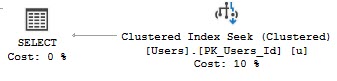
Having some key lookups in your query plans is generally unavoidable.
You’ll wanna select more columns than you wanna put in a nonclustered index, or ones with large data types that you don’t wanna bloat them with.
Enter the key lookup.
They’re one of those things — I’d say even the most common thing — that makes parameterized code sensitive to the bad kind of parameter sniffing, so they get a lot of attention.
The thing is, most of the attention that they get is just for columns you’re selecting, and most of the advice you get is to “create covering indexes”.
That’s not always possible, and that’s why I did this session a while back on a different way to rewrite queries to sometimes make them more efficient. Especially since key lookups may cause blocking issues.
Milk and Cookies
At some point, everyone will come across a key lookup in a query plan, and they’ll wonder if tuning it will fix performance.
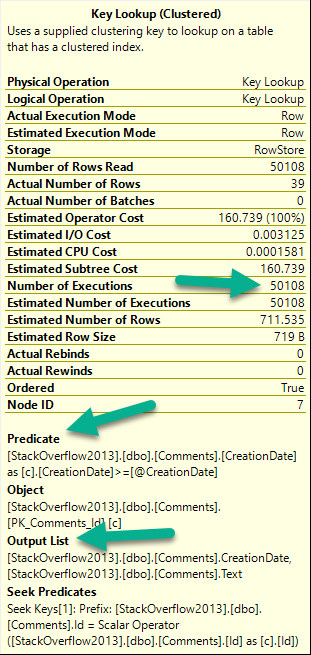
There are three things to pay attention to when you look at a key lookup:
I know what to do
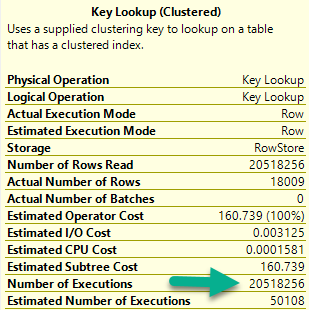
Number of executions: This is usually more helpful in an actual plan
If there are any Predicates involved: That means there are parts of your where clause not in your nonclustered index
If there’s an Output List involved: That means you’re selecting columns not in your nonclustered index
For number of executions, generally higher numbers are worse. This can be misleading if you’re looking at a cached plan because… You’re going to see the cached number, not the runtime number. They can be way different.
Notice I’m not worried about the Seek Predicates here — that just tells us how the clustered index got joined to the nonclustered index. In other words, it’s the clustered index key column(s).
Figure It Out
Here’s our situation: we’re working on a new stored procedure.
CREATE PROCEDURE dbo.predicate_felon (@Score INT, @CreationDate DATETIME)
AS
BEGIN

    SELECT *
    FROM dbo.Comments AS c
    WHERE c.Score = @Score
    AND   c.CreationDate >= @CreationDate
    ORDER BY c.CreationDate DESC;

END;
Right now, aside from the clustered index, we only have this nonclustered index. It’s great for some other query, or something.
CREATE INDEX ix_whatever
ON dbo.Comments (Score, UserId, PostId)
GO
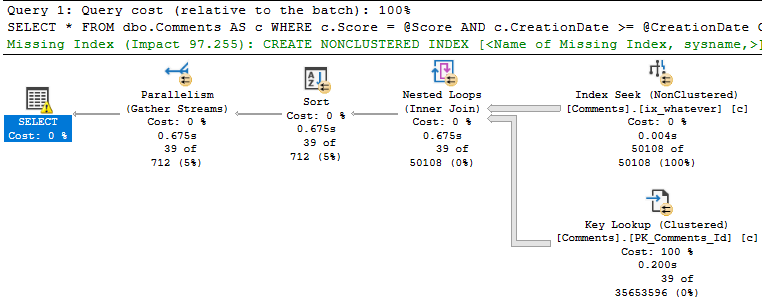
When we run the stored procedure like this, it’s fast.
SQL Server wants an index — a fully covering index — but if we create it, we end up a 7.8GB index that has every column in the Comments table in it. That includes the Text column, which is an NVARCHAR(700). Sure, it fixes the key lookup, but golly and gosh, that’s a crappy index to have hanging around.
Bad Problems On The Rise
The issue turns up when we run the procedure like this:
EXEC dbo.predicate_felon @Score = 0, --El Zero
                         @CreationDate = '2013-12-31';
Not so much.
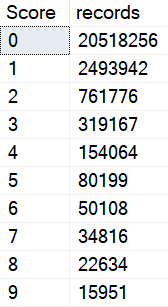
This happens because there are a lot more 0 scores than 6 scores.
Quiet time
Smarty Pants
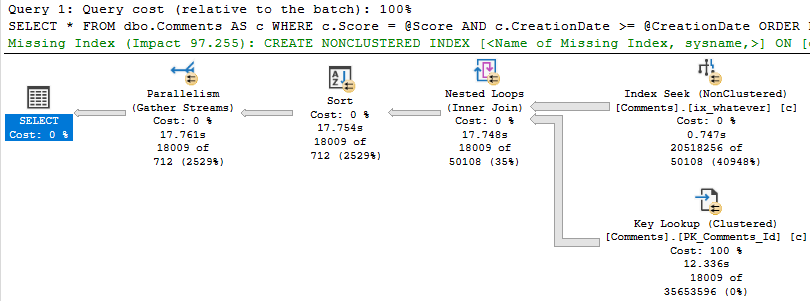
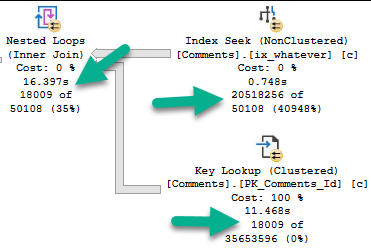
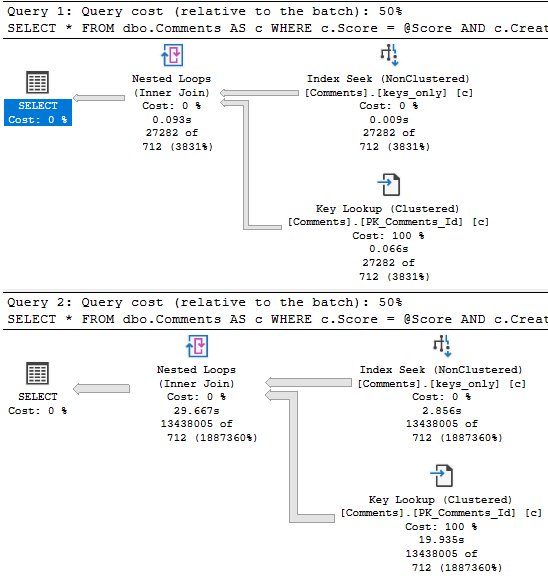
Eagle eyed readers will notice that the second query only returns ~18k rows, but it takes ~18 seconds to do it.
The problem is how much time we spend locating those rows. Sure, we can Seek into the nonclustered index to find all the 0s, but there are 20.5 million of them.
Looking at the actual plan, we can spot a few things.
Hunger ManagementHangman
The 18k rows we end up with are only filtered to with they key lookup, but it has to execute 20.5 million times to evaluate that extra predicate.
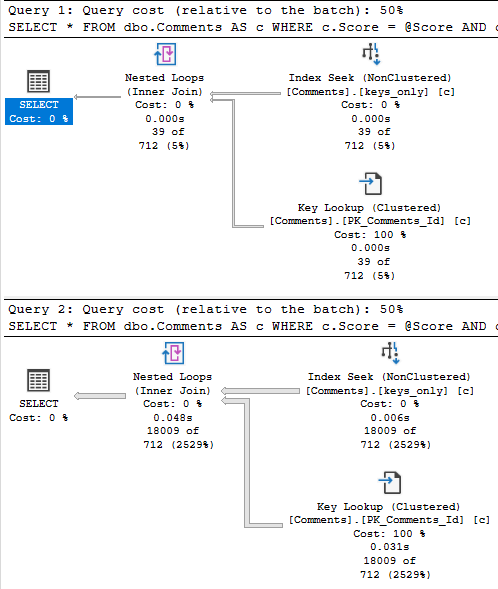
If we just index the key columns, the key lookup to get the other columns (PostId, Text, UserId) will only execute ~18k times. That’s not a big deal at all.
CREATE NONCLUSTERED INDEX keys_only
    ON dbo.Comments ( Score, CreationDate );
This index is only ~500MB, which is a heck of a lot better than nearly 8GB covering the entire thing.
With that in place, both the score 6 and score 0 plans are fast.
rq
Why This Is Effective, and When It Might Not Be
This works here because the date filter is restrictive.
When we can eliminate more rows via the index seek, the key lookup is less of a big deal.
If the date predicate were much less restrictive, say going back to 2011, boy oh boy, things get ugly for the 0 query again.
Of course, returning that many rows will suck no matter what, so this is where other techniques come in like Paging, or charging users by the row come into play.
What? Why are you looking at me like that?
Thanks for reading!
Going Further
If this is the kind of SQL Server stuff you love learning about, you’ll love my training. Blog readers get 25% off the Everything Bundle — over 100 hours of performance tuning content. Need hands-on help? I offer consulting engagements from targeted investigations to ongoing retainers. Want a quick sanity check before committing to a full engagement? Schedule a call — no commitment required.
I’ve delighted to announce that I’ve been selected to present a full day session for SQL Saturday Portland.
The Oregon one, not the Maine one.
I’ll be delivering my Total Server Tuning session, where you’ll learn all sorts of horrible things about SQL Server.
I’m going to be talking about how queries interact with hardware, wait stats that matter, and query tuning.
Seats are limited, so hurry on up and get yourself one before you get FOMO in your MOJO.
Thanks for reading!
Going Further
If this is the kind of SQL Server stuff you love learning about, you’ll love my training. Blog readers get 25% off the Everything Bundle — over 100 hours of performance tuning content. Need hands-on help? I offer consulting engagements from targeted investigations to ongoing retainers. Want a quick sanity check before committing to a full engagement? Schedule a call — no commitment required.
Today we’re going to look at how unused indexes add to locking problems.
Hold My Liquor
Video Summary
In this video, I delve into the impact of unused indexes on lock escalation in SQL Server. Starting off with a real-world scenario where I demonstrate how these unused indexes can significantly affect query performance by altering lock behavior, I walk you through an example update query and show how adding even seemingly helpful indexes can lead to excessive locking. By experimenting with various indexes and observing the resulting lock patterns, I aim to illustrate that having numerous indexes on frequently modified data can accelerate lock escalation, potentially causing more blocking issues. This video is a continuation of my exploration into unused indexes and their hidden costs, encouraging viewers to think critically about index quality rather than just quantity.
Full Transcript
Ehhhhh. It’s 8.30 in the morning and I’m recording this because I have a call in like an hour and I have some stuff that I got to do before that. I was going to record it last night but I got sleepy. Anyway, we’re going to talk about how unused indexes. Now, yesterday’s post was about how unused indexes could mess up the buffer pool, how they get going there when queries read them to put writes on them, right? To modify them. So here we’re going to talk about how that can change lock escalation. Now, the, like I’m not going to set up a weird workload to like say, hey, look at these indexes are so unused, blah, blah, blah. I don’t want you to think about these as just being like extra indexes. I want you to think about these being unused indexes. These are low quality indexes. They’re not like just extra. They’re not just like hanging around, but not like we had a certain number of indexes. You can’t have more than that because it’s just going to ruin your life. I just want you to think of it as a context. Like you ran SP Blitz index or something. You saw like unused indexes or you saw like indexes with a high right to read ratio against them and you want to know like what problems they might cause. There are a bunch of them. We talked about the buffer pool yesterday when we have to maintain these indexes when they’re written to and today we’re going to look at how they affect lock escalation. Now, the update query that I’m going to run is over in this window.
It updates everyone’s age where the user reputation equals 191 and of course I chose that number for a very specific reason. Now, let’s make sure that we don’t have any indexes going on here and we don’t. And I just want to show you really quickly that when we run this with no index on the table, we update 1500 rows. And when we look at the request mode, we have locked exclusively some pages. We have only asked for an intent exclusive lock on the object. The thing is without a helpful index to help us find user IDs with this reputation.
Let’s put that down a little bit. Without a helpful index to help us find user IDs of this reputation. This query just takes like excessive little of this where we’ll take like an object level lock pretty quickly. Right now. So, if we run this query, we can get one. And if we get this run this query, we can’t this this query is effectively blocked because this person has a reputation of 191, which is a record that we’re updating. So, let’s kill that and let’s roll this back and let’s add a helpful index and look how locking changes. So, that index is now in place. We’ll run our update.
And now let’s look at what we have locked. And now we only have intent exclusive locks on pages. We only have an intent exclusive lock on the object. And now we have exclusive locks on the key of an index. That index is the index we have the locks on is the one that we just created over here on the reputation column. So, we would still be able to select this data, but we wouldn’t be able to select this data because this data would still be locked.
Cool. Now, let’s roll this back and let’s see at what point of adding indexes does SQL Server say, well, I’m just going to lock the entire table. So, we’re going to add this index. And the point of all these indexes is that they all have the age column in them somewhere. So, that means that we’re going to have to modify them. Right? If they didn’t have the age column in them, we wouldn’t have to touch them.
But since these all have the age column in them and we’re updating age, well, that’s just a break. So, we added that index. Let’s go over here and look at this. Still 1500 rows. And when we run this, now we just have more locks on more keys. Okay? We went up from 1500 to 3100 something. Right? We effectively doubled the amount of locks.
So, now, go back and we’ll add our next index. What will happen now? Where will this go? We’ll do begin trend. Update that. Come back over here and look. Now, we just have more total locks over here. We still only have intent exclusive locks down here.
We only have the exclusive, like, I’ll mess with you locks up here. Fine. Roll this back. All right. Now, we’re going to add a full one, two, three, fourth, fourth index to the table. And when that’s in place, we’ll go look and see what happens. We’ll come run our update over here. We can trend 1556. What happens now? Well, 9000 locks up here. That’s getting up there, right?
And everything you heard about lock escalation is weird. All right. Let’s add another index to the mix. Let’s go get this one on there. And it was funny when I was practicing writing this, the amount of times I forgot to roll this back before trying to create an index. It was terrible. It was very unprofessional. And there was a lot of just terrible blocking involved.
So let’s go and run this now. And now we have, well, still attended the, but, but, but, but. And now we just have 10,000, almost 11,000 key locks. Ooh, boy, SQL Server. What are you up to? I’m being quite devilish, quite devilish this morning. It was being quite devilish last night too, if I do say so myself. That’s SQL Server. All right.
So now we’re going to go run this update again with a yet another index on the table and we’ll run this and 14,000 key locks, one exclusive lock. All right. Only on key intent, intent, funny, right? Funny stuff. All right. Roll you back. Messed everything up. Messed the whole thing up. Now let’s add one more index.
Let’s see what we add when we add this one to the pile. What happens? Begin turn, run that, see what kind of locks we have. And finally, we have an exclusive lock on the object. So now we have a full table lock, which means that if we wanted to run this count query, we couldn’t.
This query is now blocked. So the bottom line on what I was trying to, what I’m trying to get to you, get, get across to you here, is that when you have a lot of indexes on a table, you typically increase lock escalation when you need to modify data. Now, this is assuming that, you know, you have indexes on data that is frequently modified.
This can be very frequent for, you know, of course, inserts because inserts, you know, they just kind of write to wherever. Single row inserts, probably not, probably not as bad, but, you know, probably take quite a bit of that. But, you know, when you update data or when you delete data with a where clause, depending on how much data you’re deleting, you may see lock escalation occur much faster when you have more indexes on the table and you’re taking more locks.
Because the locks are, like, cumulative, right? So you may see lock escalation happen faster when you have more indexes. Now, there’s all sorts of ways to remedy this, right?
There’s all sorts of ways to get around, like, the terrible reader-on-writer locking that we were just looking at, you know, there’s optimistic isolation levels. There’s, of course, the fabulous, wonderful no-lock hint that I see everyone use so successfully and so happily. I’m kidding.
It’s a miserable experience for everybody. Anyway, that’s it for me. I’m going to go finish my coffee and, I don’t know, I’ll probably be embarrassed by how incoherent I was on this later. Anyway, thanks for watching.
I hope you learned something. I hope you liked the video. Maybe? Maybe? I don’t know. Maybe you did. Maybe you didn’t. Anyway, I’m Eric with Erik Darling Data. I’m actually Erik Darling, too, so if that counts.
Anyway, thank you for watching and I will see you in another video at another time. Maybe I’ll wear a cowboy hat in the video. It doesn’t exactly look like a cowboy hat.
Before I get my jacket, I perhaps Hong Haut, who will get on Tuesday? I certainly don’t know. I’m here waiting. Maybe I’m going to see one of my shoes. Sometimes I could walk a basketball over your shoes and do my shoes and do my shoes. Or there is a little惹 of a laundry thing from now, and then I will open any shoes. Maybe I can walk a covered aba or a cafeteria. Right, absolutely. Okay, sure.
Video Summary
In this video, I delve into the impact of unused indexes on lock escalation in SQL Server. Starting off with a real-world scenario where I demonstrate how these unused indexes can significantly affect query performance by altering lock behavior, I walk you through an example update query and show how adding even seemingly helpful indexes can lead to excessive locking. By experimenting with various indexes and observing the resulting lock patterns, I aim to illustrate that having numerous indexes on frequently modified data can accelerate lock escalation, potentially causing more blocking issues. This video is a continuation of my exploration into unused indexes and their hidden costs, encouraging viewers to think critically about index quality rather than just quantity.
Full Transcript
Ehhhhh. It’s 8.30 in the morning and I’m recording this because I have a call in like an hour and I have some stuff that I got to do before that. I was going to record it last night but I got sleepy. Anyway, we’re going to talk about how unused indexes. Now, yesterday’s post was about how unused indexes could mess up the buffer pool, how they get going there when queries read them to put writes on them, right? To modify them. So here we’re going to talk about how that can change lock escalation. Now, the, like I’m not going to set up a weird workload to like say, hey, look at these indexes are so unused, blah, blah, blah. I don’t want you to think about these as just being like extra indexes. I want you to think about these being unused indexes. These are low quality indexes. They’re not like just extra. They’re not just like hanging around, but not like we had a certain number of indexes. You can’t have more than that because it’s just going to ruin your life. I just want you to think of it as a context. Like you ran SP Blitz index or something. You saw like unused indexes or you saw like indexes with a high right to read ratio against them and you want to know like what problems they might cause. There are a bunch of them. We talked about the buffer pool yesterday when we have to maintain these indexes when they’re written to and today we’re going to look at how they affect lock escalation. Now, the update query that I’m going to run is over in this window.
It updates everyone’s age where the user reputation equals 191 and of course I chose that number for a very specific reason. Now, let’s make sure that we don’t have any indexes going on here and we don’t. And I just want to show you really quickly that when we run this with no index on the table, we update 1500 rows. And when we look at the request mode, we have locked exclusively some pages. We have only asked for an intent exclusive lock on the object. The thing is without a helpful index to help us find user IDs with this reputation.
Let’s put that down a little bit. Without a helpful index to help us find user IDs of this reputation. This query just takes like excessive little of this where we’ll take like an object level lock pretty quickly. Right now. So, if we run this query, we can get one. And if we get this run this query, we can’t this this query is effectively blocked because this person has a reputation of 191, which is a record that we’re updating. So, let’s kill that and let’s roll this back and let’s add a helpful index and look how locking changes. So, that index is now in place. We’ll run our update.
And now let’s look at what we have locked. And now we only have intent exclusive locks on pages. We only have an intent exclusive lock on the object. And now we have exclusive locks on the key of an index. That index is the index we have the locks on is the one that we just created over here on the reputation column. So, we would still be able to select this data, but we wouldn’t be able to select this data because this data would still be locked.
Cool. Now, let’s roll this back and let’s see at what point of adding indexes does SQL Server say, well, I’m just going to lock the entire table. So, we’re going to add this index. And the point of all these indexes is that they all have the age column in them somewhere. So, that means that we’re going to have to modify them. Right? If they didn’t have the age column in them, we wouldn’t have to touch them.
But since these all have the age column in them and we’re updating age, well, that’s just a break. So, we added that index. Let’s go over here and look at this. Still 1500 rows. And when we run this, now we just have more locks on more keys. Okay? We went up from 1500 to 3100 something. Right? We effectively doubled the amount of locks.
So, now, go back and we’ll add our next index. What will happen now? Where will this go? We’ll do begin trend. Update that. Come back over here and look. Now, we just have more total locks over here. We still only have intent exclusive locks down here.
We only have the exclusive, like, I’ll mess with you locks up here. Fine. Roll this back. All right. Now, we’re going to add a full one, two, three, fourth, fourth index to the table. And when that’s in place, we’ll go look and see what happens. We’ll come run our update over here. We can trend 1556. What happens now? Well, 9000 locks up here. That’s getting up there, right?
And everything you heard about lock escalation is weird. All right. Let’s add another index to the mix. Let’s go get this one on there. And it was funny when I was practicing writing this, the amount of times I forgot to roll this back before trying to create an index. It was terrible. It was very unprofessional. And there was a lot of just terrible blocking involved.
So let’s go and run this now. And now we have, well, still attended the, but, but, but, but. And now we just have 10,000, almost 11,000 key locks. Ooh, boy, SQL Server. What are you up to? I’m being quite devilish, quite devilish this morning. It was being quite devilish last night too, if I do say so myself. That’s SQL Server. All right.
So now we’re going to go run this update again with a yet another index on the table and we’ll run this and 14,000 key locks, one exclusive lock. All right. Only on key intent, intent, funny, right? Funny stuff. All right. Roll you back. Messed everything up. Messed the whole thing up. Now let’s add one more index.
Let’s see what we add when we add this one to the pile. What happens? Begin turn, run that, see what kind of locks we have. And finally, we have an exclusive lock on the object. So now we have a full table lock, which means that if we wanted to run this count query, we couldn’t.
This query is now blocked. So the bottom line on what I was trying to, what I’m trying to get to you, get, get across to you here, is that when you have a lot of indexes on a table, you typically increase lock escalation when you need to modify data. Now, this is assuming that, you know, you have indexes on data that is frequently modified.
This can be very frequent for, you know, of course, inserts because inserts, you know, they just kind of write to wherever. Single row inserts, probably not, probably not as bad, but, you know, probably take quite a bit of that. But, you know, when you update data or when you delete data with a where clause, depending on how much data you’re deleting, you may see lock escalation occur much faster when you have more indexes on the table and you’re taking more locks.
Because the locks are, like, cumulative, right? So you may see lock escalation happen faster when you have more indexes. Now, there’s all sorts of ways to remedy this, right?
There’s all sorts of ways to get around, like, the terrible reader-on-writer locking that we were just looking at, you know, there’s optimistic isolation levels. There’s, of course, the fabulous, wonderful no-lock hint that I see everyone use so successfully and so happily. I’m kidding.
It’s a miserable experience for everybody. Anyway, that’s it for me. I’m going to go finish my coffee and, I don’t know, I’ll probably be embarrassed by how incoherent I was on this later. Anyway, thanks for watching.
I hope you learned something. I hope you liked the video. Maybe? Maybe? I don’t know. Maybe you did. Maybe you didn’t. Anyway, I’m Eric with Erik Darling Data. I’m actually Erik Darling, too, so if that counts.
Anyway, thank you for watching and I will see you in another video at another time. Maybe I’ll wear a cowboy hat in the video. It doesn’t exactly look like a cowboy hat.
Before I get my jacket, I perhaps Hong Haut, who will get on Tuesday? I certainly don’t know. I’m here waiting. Maybe I’m going to see one of my shoes. Sometimes I could walk a basketball over your shoes and do my shoes and do my shoes. Or there is a little惹 of a laundry thing from now, and then I will open any shoes. Maybe I can walk a covered aba or a cafeteria. Right, absolutely. Okay, sure.
Going Further
If this is the kind of SQL Server stuff you love learning about, you’ll love my training. Blog readers get 25% off the Everything Bundle — over 100 hours of performance tuning content. Need hands-on help? I offer consulting engagements from targeted investigations to ongoing retainers. Want a quick sanity check before committing to a full engagement? Schedule a call — no commitment required.
When you find unused indexes, whether using Some Script From The Internet™, sp_BlitzIndex, or Database Telepathy, the first thing most people think of is “wasted space”.
Sure, okay, yeah. That’s valid. They’re in backups, restores, they get hit by CHECKDB. You probably rebuild them if there’s a whisper of fragmentation.
But it’s not the end of the story.
Not by a long shot.
Today we’re going to look at how redundant indexes can clog the buffer pool up.
Holla Back
If you want to see the definitions for the views I’m using, head to this post and scroll down.
Heck, stick around and watch the video too.
LIKE AND SUBSCRIBE.
Now, sp_BlitzIndex has two warnings to catch these “bad” indexes:
Unused Indexes With High Writes
NC Indexes With High Write:Read Ratio
Unused are just what they sound like: they’re not helping queries read data at all. Of course, if you’ve rebooted recently, or rebuilt indexes on buggy versions of SQL Server, you might get this warning on indexes that will get used. I can’t fix that, but I can tell you it’s your job to keep an eye on usage over time.
Indexes with a high write to read ratio are also pretty self-explanatory. They’re sometimes used, but they’re written to a whole lot more. Again, you should keep an eye on this over time, and try to understand both how important they might be to your workload, or how much they might be hurting your workload.
I’m not going to set up a fake workload to generate those warnings, but I am going to create some overlapping indexes that might be good candidates for you to de-clutter.
Index Entrance
The Votes table is pretty narrow, but it’s also pretty big — 53 million rows or so as of Stack 2013.
Here are my indexes:
CREATE INDEX who ON dbo.Votes(PostId, UserId) INCLUDE(BountyAmount);
CREATE INDEX what ON dbo.Votes(UserId, PostId) INCLUDE(BountyAmount);
CREATE INDEX [where] ON dbo.Votes(CreationDate, UserId) INCLUDE(BountyAmount);
CREATE INDEX [when] ON dbo.Votes(BountyAmount, UserId) INCLUDE(CreationDate);
CREATE INDEX why ON dbo.Votes(PostId, CreationDate) INCLUDE(BountyAmount);
CREATE INDEX how ON dbo.Votes(VoteTypeId, BountyAmount) INCLUDE(UserId);
First, I’m gonna make sure there’s nothing in memory:
CHECKPOINT;
GO 2
DBCC DROPCLEANBUFFERS;
GO
Don’t run that in production. It’s stupid if you run that in production.
Now when I go to look at what’s in memory, nothing will be there:
SELECT *
FROM dbo.WhatsUpMemory AS wum
WHERE wum.object_name = 'Votes'
I’m probably not going to show you the results of an empty query set. It’s not too illustrative.
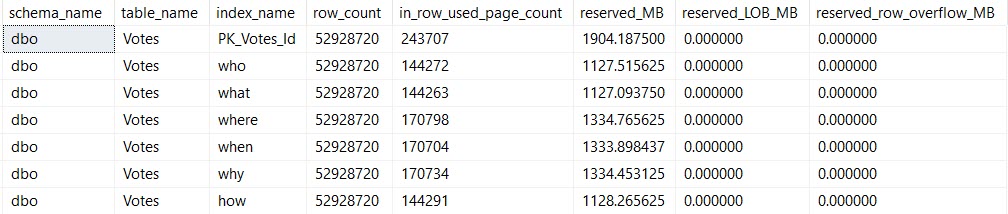
I am going to show you the index sizes on disk:
SELECT *
FROM dbo.WhatsUpIndexes AS wui
WHERE wui.table_name = 'Votes';
Size Mutters
And I am going to show you this update:
UPDATE v
SET v.BountyAmount = 2147483647
FROM dbo.Votes AS v
WHERE v.BountyAmount IS NULL
AND   v.CreationDate >= '20131231'
AND v.VoteTypeId > 2;
After The Update
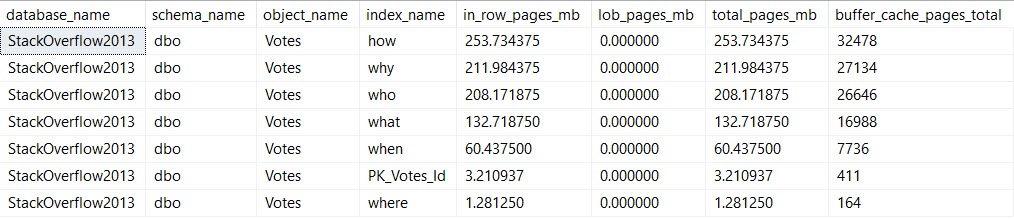
This is when things get more interesting for the memory query.
Life Of A Moran
We’re updating the column BountyAmount, which is present in all of the indexes I created. This is almost certainly an anti-pattern, but it’s good to illustrate the problem.
Pieces of every index end up in memory. That’s because all data needs to end up in memory before SQL Server will work with it.
It doesn’t need the entirety of any of these indexes in memory — we’re lucky enough to have indexes to help us find the 10k or so rows we’re updating. I’m also lucky enough to have 64GB of memory dedicated to this instance, which can easily hold the full database.
But still, if you’re not lucky enough to be able to fit your whole database in memory, wasting space in the buffer pool for unused (AND OH GODD PROBABLY FRAGMENTED) indexes just to write to them is a pretty bad idea.
After all, it’s not just the buffer pool that needs memory.
You also need memory for memory grants (shocking huh?), and other caches and activities (like the plan cache, and compressed backups).
Cleaning up those low-utilization indexes can help you make better use of the memory that you have.
Thanks for reading!
Going Further
If this is the kind of SQL Server stuff you love learning about, you’ll love my training. Blog readers get 25% off the Everything Bundle — over 100 hours of performance tuning content. Need hands-on help? I offer consulting engagements from targeted investigations to ongoing retainers. Want a quick sanity check before committing to a full engagement? Schedule a call — no commitment required.