At the beginning of 2020, I recorded a bunch of training videos, and put on some live classes throughout the year. As much as I love doing that stuff, my current office absolutely sucks for it.
Like a lot of families, we spent most of 2020 trying to figure out how to make the most of the space we had, and then thinking longer-term about what our space requirements are.
We thought about moving to a lot of different places. We looked in difference cities, states, and even countries (visa applications for France weren’t available for a lot of the year though).
The entire time, I sort of put off recording training content and putting on classes, because the experience wasn’t great for me. That’s it. I stopped streaming, didn’t record YouTube videos for a while, and just buckled down to focus on blogging and client work.
Getting set up to do any of that stuff was a process, and the whole green screen situation in a small office just didn’t work out. It was right behind me, I’d knock into it, and the lighting in here made all sorts or artifacts and flicker effects. I was never really happy with the final product.
Add to it that there was a lot of outside noise and annoyances.
Very blah, as they say.
We finally found a new place that suits our needs though, and I have a much bigger office now that doesn’t require anyone else sacrificing space. I’m getting things migrated to the new space, and when I do I’ll start planning out more live stuff and training.
Stay tuned!
Going Further
If this is the kind of SQL Server stuff you love learning about, you’ll love my training. Blog readers get 25% off the Everything Bundle — over 100 hours of performance tuning content. Need hands-on help? I offer consulting engagements from targeted investigations to ongoing retainers. Want a quick sanity check before committing to a full engagement? Schedule a call — no commitment required.
SQL Server 2019 has been a bit of a roller coaster ride. In particular, UDF inlining started as I think the most interesting addition to the product. Big brain stuff, for sure.
It has been nerfed quite a bit, with seemingly more and more restrictions added to every cumulative update. Hopefully some of these can be lifted at the feature matures, but I understand how difficult all this is.
People program absolute bloodbaths into functions.
Today, I want to look at one restriction that has a fairly simple workaround: Calling GETDATE().
Emptied
Let’s use a simple function that figures out if fewer than 90 days exist between two dates.
CREATE OR ALTER FUNCTION dbo.sneaky
(
    @StartDate datetime,
    @EndDate datetime
)
RETURNS bit
WITH
    SCHEMABINDING,
    RETURNS NULL ON NULL INPUT
AS
BEGIN
RETURN
    CASE
        WHEN DATEDIFF
             (
                 DAY,
                 @StartDate,
                 ISNULL(@EndDate, GETDATE())
             ) < 90
       THEN 1
       ELSE 0
    END;
END;
GO
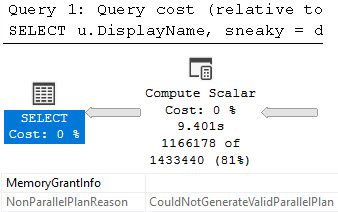
This function can’t be inlined, because we call GETDATE() inside the function body. We can witness all the baddities that scalar UDFs cause as usual.
SELECT
    u.DisplayName,
    sneaky =
        dbo.sneaky(u.CreationDate, u.LastAccessDate)
FROM dbo.Users AS u
WHERE EXISTS
      (
          SELECT
              1/0
          FROM dbo.Posts AS p
          JOIN dbo.Votes AS v
              ON v.PostId = p.Id
          WHERE p.OwnerUserId = u.Id
      );
The query won’t be allowed to use parallelism, the function will execute once per row it needs to process, etc. etc. etc.
quarters
Cool Street
The better option is to use a third function argument that you can pass GETDATE() to.
CREATE OR ALTER FUNCTION dbo.sneakier
(
    @StartDate datetime,
    @EndDate datetime,
    @FallBack datetime
)
RETURNS bit
WITH
    SCHEMABINDING,
    RETURNS NULL ON NULL INPUT
AS
BEGIN
RETURN
    CASE
        WHEN DATEDIFF
             (
                 DAY,
                  @StartDate,
                  ISNULL(@EndDate, @FallBack)
             ) < 90
       THEN 1
       ELSE 0
    END;
END;
GO
You could also change the calling query to protect from NULLs and remove the check from the function, like so:
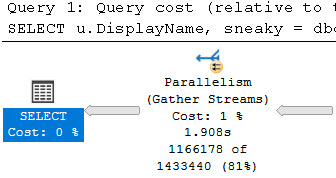
Calling the new function like so results in a much faster query execution time:
SELECT
    u.DisplayName,
    sneaky =
        dbo.sneakier(u.CreationDate, u.LastAccessDate, GETDATE())
FROM dbo.Users AS u
WHERE EXISTS
      (
          SELECT
              1/0
          FROM dbo.Posts AS p
          JOIN dbo.Votes AS v
              ON v.PostId = p.Id
          WHERE p.OwnerUserId = u.Id
      );
GO
on my head?
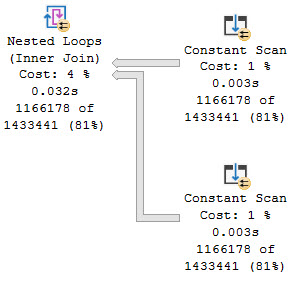
The plan is allowed to go parallel, and rather than the function being hidden in a Compute Scalar operator, it’s represented in the query plan by Constant Scan operators that produce the necessary rows.
too many horses
Pokemon Drift
These types of rewrites will probably become more common as people move to newer versions of SQL Server, and embrace higher compatibility levels where these features are allowed to maneuver.
Of course, at the rate things change, that may be a long ways off.
Thanks for reading!
Going Further
If this is the kind of SQL Server stuff you love learning about, you’ll love my training. Blog readers get 25% off the Everything Bundle — over 100 hours of performance tuning content. Need hands-on help? I offer consulting engagements from targeted investigations to ongoing retainers. Want a quick sanity check before committing to a full engagement? Schedule a call — no commitment required.
If this is the kind of SQL Server stuff you love learning about, you’ll love my training. Blog readers get 25% off the Everything Bundle — over 100 hours of performance tuning content. Need hands-on help? I offer consulting engagements from targeted investigations to ongoing retainers. Want a quick sanity check before committing to a full engagement? Schedule a call — no commitment required.
When writing queries, sometimes you have the pleasure of being able to pass a literal value, parameter, or scalar expression as a predicate.
With a suitable index in place, any one of them can seek appropriately to the row(s) you care about.
But what about when you need to compare the contents of one column to another?
It gets a little bit more complicated.
All About Algorithms
Take this query to start with, joining Users to Posts.
SELECT
    c = COUNT_BIG(*)
FROM dbo.Users AS u
JOIN dbo.Posts AS p
    ON p.OwnerUserId = u.Id;
The OwnerUserId column doesn’t have an index on it, but the Id column on Users it the primary key and the clustered index.
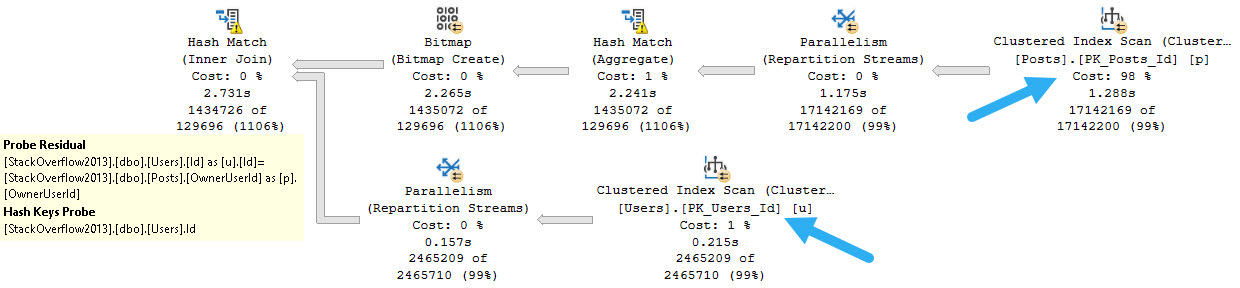
But the type of join that’s chosen is Hash, and since there’s no where clause, there’s no predicate to apply to either table for filtering.
jumbo
This is complicated slightly by the Bitmap, which is created on the OwnerUserId column from the Posts table and applied to the Id column from the Users table as an early filter.
The same pattern can generally be observed with Merge Joins. Where things are a bit different is with Nested Loops.
Shoop Da Loop
If we use a query hint, we can see what would happen with a Nested Loops Join.
SELECT
    c = COUNT_BIG(*)
FROM dbo.Users AS u
JOIN dbo.Posts AS p
    ON p.OwnerUserId = u.Id
OPTION(LOOP JOIN);
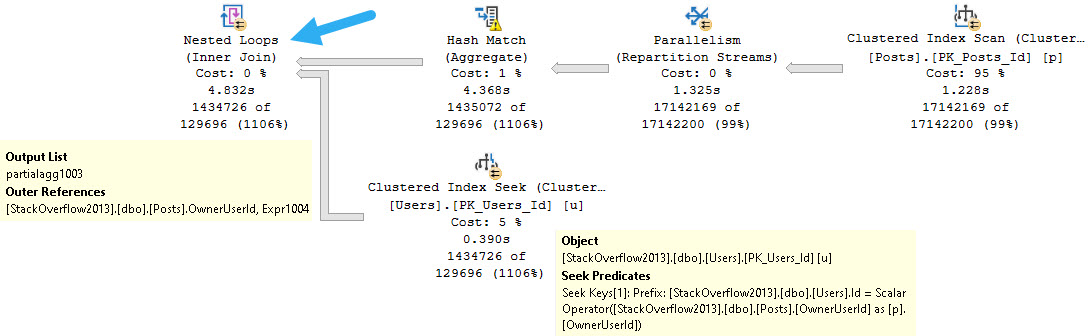
The plan looks like this now, with a Seek on the Users table.
petting motions
The reason is that this flavor of Nested Loops, known as Apply Nested Loops, takes each row from the outer input and uses it as a scalar operator on the inner input.
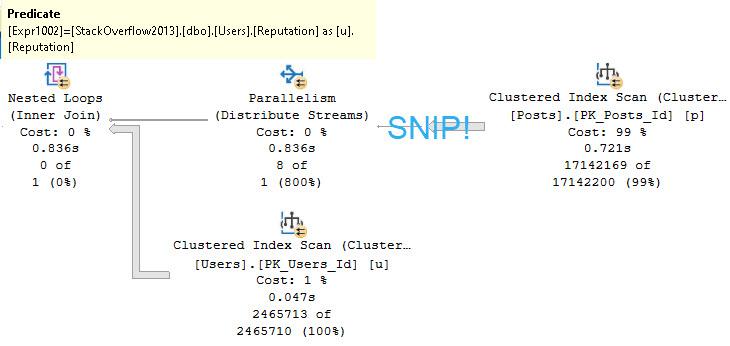
An example of Regular Joe Nested Loops™ looks like this:
SELECT
    c = COUNT_BIG(*)
FROM dbo.Users AS u
WHERE u.Reputation =
(
    SELECT
        MIN(p.Score)
    FROM dbo.Posts AS p
);
Where the predicate is applied at the Nested Loops operator:
and bert
Like most things, indexing is key, but there are limits.
Innermost
Let’s create this index:
CREATE INDEX ud ON dbo.Users(UpVotes, DownVotes);
And run this query:
SELECT
    c = COUNT_BIG(*)
FROM dbo.Users AS u
WHERE u.UpVotes = u.DownVotes;
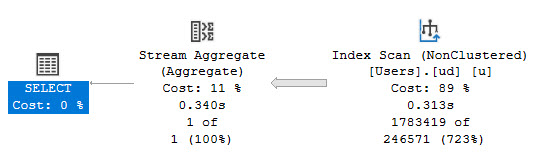
The resulting query plan looks like this:
did a cuss
But what other choice is there? If we want a seek, we need a particular thing or things to seek to.
SELECT
    c = COUNT_BIG(*)
FROM dbo.Users AS u
WHERE u.UpVotes = u.DownVotes
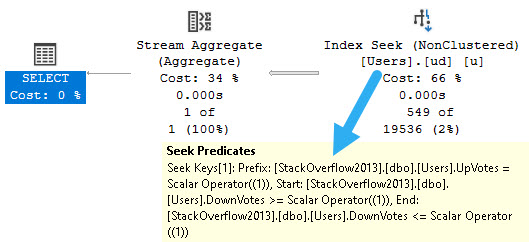
AND   u.UpVotes = 1;
name game
We seek to everyone with an UpVote of 1, and then somewhat awkwardly search the DownVotes column for values >= 1 and <= 1.
But again, these are specific values we can search for.
Thanks for reading!
Going Further
If this is the kind of SQL Server stuff you love learning about, you’ll love my training. Blog readers get 25% off the Everything Bundle — over 100 hours of performance tuning content. Need hands-on help? I offer consulting engagements from targeted investigations to ongoing retainers. Want a quick sanity check before committing to a full engagement? Schedule a call — no commitment required.
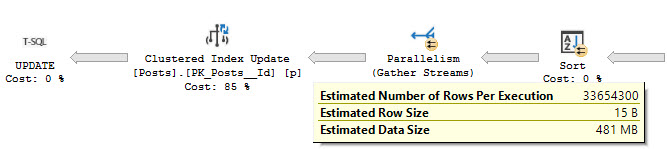
You probably have a bunch of nonclustered indexes that need to be read so that…
All those indexes can be modified, and written to the transaction log as well
If your database is synchronously replicated anywhere, you have to wait on that ack
There are no Batch Mode modifications
Usually when modifications need to hit a significant number of rows, I want to think about batching things. That might not always be possible, but it’s certainly a kinder way to do things.
If you can’t batch inserts and deletes, you may want to think about using partitioning to quickly switch data in and out.
And of course, don’t use MERGE.
Thanks for reading!
Going Further
If this is the kind of SQL Server stuff you love learning about, you’ll love my training. Blog readers get 25% off the Everything Bundle — over 100 hours of performance tuning content. Need hands-on help? I offer consulting engagements from targeted investigations to ongoing retainers. Want a quick sanity check before committing to a full engagement? Schedule a call — no commitment required.
In this post, I’m going to take a quick look at a very loud bug.
Normally, you can’t add a filtered index to a computed column. I’ve always hated that limitation. How nice would that be for so many currently difficult tasks?
I wonder if Oracle…
You Can’t Do That On Television
If you run this code to completion — and boy are you missing out if you don’t — you get an error.
CREATE TABLE dbo.ohno
(
    id int NOT NULL,
    crap AS id * 2
);
GO

CREATE NONCLUSTERED INDEX c
ON dbo.ohno
    (crap)
WHERE crap > 0;
GO
Here’s the error:
Msg 10609, Level 16, State 1, Line 13
Filtered index 'c' cannot be created on table 'dbo.ohno' because the column 'crap' in the filter expression is a computed column.
Rewrite the filter expression so that it does not include this column.
Okay, great! Works on my machine.
Kapow, Kapow
However, you can totally create this table using the inline index creation syntax.
CREATE TABLE dbo.ohyeah
(
    id int NOT NULL,
    crap AS id * 2,
    INDEX c
        (crap)
    WHERE crap > 0
);
GO
However, if you try to query the table, you’re met with a buncha errors.
SELECT
    id
FROM dbo.ohyeah AS o;

SELECT
c = COUNT_BIG(*)
FROM dbo.ohyeah AS o;
Even without explicitly referencing the computed column, you get this error message.
Msg 207, Level 16, State 1, Procedure ohyeah, Line 1 [Batch Start Line 29]
Invalid column name 'crap'.
Msg 207, Level 16, State 1, Procedure ohyeah, Line 1 [Batch Start Line 29]
Invalid column name 'crap'.
Msg 207, Level 16, State 1, Procedure ohyeah, Line 1 [Batch Start Line 29]
Invalid column name 'crap'.
Msg 207, Level 16, State 1, Procedure ohyeah, Line 1 [Batch Start Line 29]
Invalid column name 'crap'.
Msg 207, Level 16, State 1, Procedure ohyeah, Line 1 [Batch Start Line 29]
Invalid column name 'crap'.
Msg 4184, Level 16, State 2, Line 30
Cannot retrieve table data for the query operation because the table "dbo.ohyeah" schema is being altered too frequently.
Because the table "dbo.ohyeah" contains a filtered index or filtered statistics, changes to the table schema require a refresh of all table data.
Retry the query operation, and if the problem persists, use SQL Server Profiler to identify what schema-altering operations are occurring.
You see what? See you what that error message says? “[I[f the problem persists, use SQL Server Profiler to identify what schema-altering operations are occurring”
If this is the kind of SQL Server stuff you love learning about, you’ll love my training. Blog readers get 25% off the Everything Bundle — over 100 hours of performance tuning content. Need hands-on help? I offer consulting engagements from targeted investigations to ongoing retainers. Want a quick sanity check before committing to a full engagement? Schedule a call — no commitment required.
I see a lot of scripts on the internet that use dynamic SQL, but leave people wide open to SQL injection attacks.
In many cases they’re probably harmless, hitting DMVs, object names, etc. But they set a bad example. From there, people will adapt whatever dynamic SQL worked elsewhere to something they’re currently working on.
Here’s a simple script to show you how just sticking brackets into a string doesn’t protect you from SQL injection:
DROP TABLE IF EXISTS #t
CREATE TABLE #t(id int);

DECLARE
    @s nvarchar(max) = N'[' + N'PRINT 1] DROP TABLE #t;--' + N']';

PRINT @s

EXEC sys.sp_executesql
    @s;

SELECT
    *
FROM #t AS t;
GO

DROP TABLE IF EXISTS #t
CREATE TABLE #t(id int);

DECLARE
    @s nvarchar(max) = QUOTENAME(N'PRINT 1] DROP TABLE #t;--')

PRINT @s

EXEC sys.sp_executesql
    @s;

SELECT
    *
FROM #t AS t;
GO
You can run this anywhere, and the results look like this:
[PRINT 1] DROP TABLE #t;--]
Msg 2812, Level 16, State 62, Line 572
Could not find stored procedure 'PRINT 1'.
Msg 208, Level 16, State 0, Line 583
Invalid object name '#t'.
[PRINT 1]] DROP TABLE #t;--]
Msg 2812, Level 16, State 62, Line 587
Could not find stored procedure 'PRINT 1] DROP TABLE #t;--'.
In the section where square brackets were used, the temp table #t got dropped. In the section where QUOTENAME was used, it wasn’t.
When you’re writing dynamic SQL, it’s important to make it as safe as possible. Part of that is avoiding the square bracket trap.
Thanks for reading!
Going Further
If this is the kind of SQL Server stuff you love learning about, you’ll love my training. Blog readers get 25% off the Everything Bundle — over 100 hours of performance tuning content. Need hands-on help? I offer consulting engagements from targeted investigations to ongoing retainers. Want a quick sanity check before committing to a full engagement? Schedule a call — no commitment required.
If you’re on a new-ish version of SQL Server, using STRING_AGG is your best bet for this. Please use it instead.
Unlike STRING_SPLIT, it’s not compatibility-walled. You don’t need to be on level 130+ to use it.
If you’re on an earlier version, your most reliable bet is using XML. Using the local variable method can have quite unexpected results at times. I’ve seen it go from returning a full list of values to only returning the last value more times than I can count.
Let’s look at the XML version, though. Just in case you’re not on SQL Server 2017.
Weirdoverse
The purpose of these queries is to show you hot to remove XML elements, and handle XML control characters like &, <, >, etc. All of these results return a single row, just to keep the examples simple.
SELECT
    x =
    (
        SELECT
                b.Name
        FROM dbo.Badges AS b
        WHERE b.Id = 100564
        FOR XML
            PATH('')
    );
This will return two things we don’t want:
XML elements
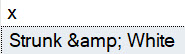
An ampersand turned into &
monkeybone
To get rid of the XML elements, we can alias the inner results as [text()]
SELECT
    x =
    (
        SELECT
            [text()] =
                b.Name
        FROM dbo.Badges AS b
        WHERE b.Id = 100564
        FOR XML
            PATH('')
    );
That will give us this back, still with the ampersand all mangled up.
malt shop
To fix that, we need to add a little bit to the XML-ing:
SELECT
   x =
   (
       SELECT
           [text()] =
               b.Name
       FROM dbo.Badges AS b
       WHERE b.Id = 100564
       FOR XML
           PATH(''),
           TYPE
   ).value
     (
         './text()[1]',
         'nvarchar(max)'
     );
First, we need to add TYPE to the XML PATH syntax. That’ll give us an XML typed return type to use the .value method on.
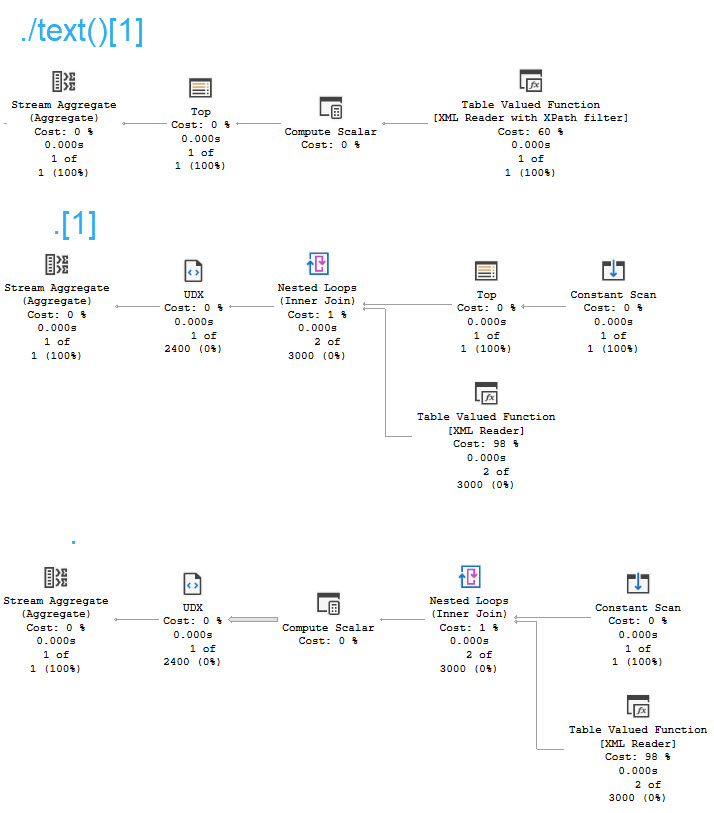
From there, we can grab the text element, and give it a data type. You don’t specifically need to get ./text()[1] though, but I tend to use it because I’ve seen some very weird performance issues when using less verbose expressions like .[1] or just . instead.
Plans
Here are the plan differences, which are negligible for a single row.
monikers
Of course, local factors may require deviating from what generally works best.
Thanks for reading!
Going Further
If this is the kind of SQL Server stuff you love learning about, you’ll love my training. Blog readers get 25% off the Everything Bundle — over 100 hours of performance tuning content. Need hands-on help? I offer consulting engagements from targeted investigations to ongoing retainers. Want a quick sanity check before committing to a full engagement? Schedule a call — no commitment required.
In this video, I delve into why the default Read Committed isolation level in SQL Server databases is often a suboptimal choice. Using a practical example, I demonstrate how using Read Committed Snapshot Isolation (RCSI) can provide more consistent results compared to the traditional Read Committed setting. By creating two simple tables with identical data and running a query that involves nested loops joins, I illustrate how RCSI ensures that we consistently get the same result set even when the underlying data is being updated. This example highlights why RCSI should be preferred over Read Committed for most scenarios, as it offers better consistency without the drawbacks associated with the inferior isolation level.
Full Transcript
Erik Darling here with Erik Darling Data, as usual. And today we’re here to talk about why read committed to default isolation level for most SQL Server databases is garbage. Well, this is just one of many reasons. There have been other reasons that I’ve talked about before in other blog posts and videos why it’s crappy, but this is one that I stumbled on while working on something for SPBli. So let’s first over in the first responder kit. And I was a bit surprised. I was even a bit surprised by this one. So let’s just get right into it. I’m going to create two tables and you may find this demo unrealistic, but it’s good enough for me to give you an overview of what I was running into. So we have two tables, tables one and table two. And in both of those tables, all I have is the numbers one through 10. So if you go down here and run these queries, you can verify that. Table one has the numbers one through 10 in it and table two has the numbers one through 10 in it. Good enough. Over in this window, I’m going to show you a couple of things before we, before we proceed with the query itself. Now, first I have read committed snapshot isolation turned on for this database that I’m in here, right? So if I go and look at sys.databases, I can see that my database lovingly named crap has read committed snapshot isolation enabled. But the query down here is the query.
Here has a couple hints on it. One is to read from table two with read committed lock. This is going to force the query to use the read committed isolation level. Just using set transaction isolation level read committed up at the top of the query is semantically different from using this locking hint for a few different reasons. I also have a force order hint down here. The reason I have a force order hint down here is to make sure that table two ends up on the inner side of a nested loops joint. I think I need to turn on query plans to do that. To show you that. And if I do, then you’ll see the shape of the query plan is about like this. So for every row that comes out of table one, we’re going to go into a nested loops join and then we’re going to hit table two down here. Okay. And that’s about that. So if I run this query, we’re going to see that all total for all of these columns is 55 over and over and over again. That’s because they’re not changing. If I come over to this window and I start running this update and I come back over here, we’re going to start seeing some interesting stuff happen. Namely that we’re going to be getting different values back in this column. So 65, 75, 85, 95, 105, 115. Weird, right? Read committed, reading all that good committed data. And this will happen repeatedly.
Every time we run this, we’ll get a different bunch of numbers back from all total over here. So we can see 45, 55, 75, 85, 95. What the hell is going on with this? I thought we were reading committed data here. What happened to us? This is bad news, right? This is terrible. So let’s kill this. And let’s talk about why read committed snapshot isolation is the greatest isolation level of all time. So let’s get rid of that. Let’s run this. And since no values are changing, this isn’t the biggest deal in the world. I just wanted to make sure I got things right.
Now let’s reset things over here. Let’s start these tables from scratch. We have IDs one through 10 and both tables two and tables one. So good for us there. And let’s run this query once more to make sure that everything’s golden. And now let’s come over here and run this update, right? Run that update in the loop. And every time we run this now, all of our numbers will be nice and lined up and in order and exactly the way that we want them. In other words, all the same.
Why did you change colors on me? How dare you? But we get consistent results back using read committed snapshot isolation. As soon as we stop using the inferior should be deprecated, destroyed, and forgotten for all time read committed isolation level, we do a lot better with result consistency, which I hear is important in databases. I hear there’s some rules that sound drug related that are supposed to make results in databases consistent. I forget exactly what it is. I don’t know. I don’t want to get busted by the DEA over on this channel talking about database rules and stuff. I don’t want to have the federales come after me. But this is just another reason why read committed is a garbage isolation level.
You know, apart from the fact that you can have readers block writers and readers deadlock with writers under read committed. And, you know, you can have all sorts of weird inconsistent results with it. This is just another example of inconsistent results with the read committed isolation level.
So, um, please don’t use it. Please use a real isolation level like snapshot isolation or read committed snapshot isolation. You know, isolation levels that give you correct results or something.
Going Further
If this is the kind of SQL Server stuff you love learning about, you’ll love my training. Blog readers get 25% off the Everything Bundle — over 100 hours of performance tuning content. Need hands-on help? I offer consulting engagements from targeted investigations to ongoing retainers. Want a quick sanity check before committing to a full engagement? Schedule a call — no commitment required.
In this video, I dive into the intriguing world of collation in SQL Server, specifically focusing on a peculiar scenario that caught my attention. Using a lengthier string value to populate a temporary table, I demonstrate how different collations can lead to unexpected query plan behavior and performance issues, especially when creating or updating statistics. The video delves into the nuances of using non-default collations like Latin General CS AS WS (Case Sensitive, Accent Sensitive, with Supplementary Characters) versus the default SQL_Latin1_General_CP1_CS_AS, highlighting how these differences can result in misleading execution times and query plans that don’t accurately reflect the actual performance. Through this exploration, I aim to shed light on potential pitfalls for database administrators and developers who might be using non-standard collations without fully understanding their implications.
Full Transcript
Erik Darling here with Erik Darling Data. Still alive despite the best efforts of many, including so far the only person who the Customer Experience Improvement Program has actively tried to murder. Actually, there was an attempt on my life via the artificial intelligence built into the CEIP. It was vicious. Got into a knockdown, drag-out brawl with it. I’m lucky to be alive. Lucky to be alive. Anyway, today we’re going to talk about collation. Because collation is weird. Collation is bizarre. I’m not going to pretend that I understand a lot about it because I really don’t. Flat out, I just don’t understand a ton about it. But I do want to talk about something interesting that I found slash saw slash ran into. I don’t know why I’m slashing so many things. It’s a very violent video so far. The assassinations, slashings, it’s terrible. It’s like the 60s. Alright, so to get us set up for this, to repro sort of what was happening when I noticed this issue with a customer, we’re going to grab a fairly decent length of screen.
That length of string. That length of string is going to be a part of a query plan. We’re not going to represent it as XML, though. We’re just going to represent it as regular, regular old string storage. But the important thing is that we have one row in this temp table that has 50,000 characters or so in it. And we’re going to use that because it’s a nice low number where I can still get things to demo well. And I don’t have to come up with like all different length, lengths, lengths of lengths in the table that I’m going to create to get this thing to repro. And in real life, the table that I was looking at had like, you know, some columns had like two or three characters. Others had like 200,000 characters. So it was just like a lot of swing. And I don’t want to, I don’t want to work that hard. To be honest, this is a free video. Only so much I’m going to do. I’m kidding. Go to the end of the R3, people.
So what I’m going to do is use a collation that is not the database’s default collation. I’m using this Latin general, Latin one general, case sensitive, accent sensitive, and with supplementary characters to fill a table with just a whole bunch of that value over and over again. So the 50,000 characters from, uh, the first 50,000 characters that query plan, we’re just going to stick them into a, into a table. And then we’re going to look at a couple different things that happened. I think, I think are interesting. I mean, you, you might, you might not, I don’t know. Uh, we’ll see what happens.
It’s a, it’s a weird day. It’s the second day of June and it’s strangely cold, but I’m sweating. Uh, anyway, so we have that table all populated and, uh, I mean, it was sort of unimportant, but just so you see what I’m talking about, the regular collation that I would be using with this database is this one, the, uh, SQL underscore CP1 case sensitive access, accent sensitive. This is the default for, I think most, or I mean the SQL Latin one general is, uh, the default for, I think most databases.
Uh, they do generally use the case insensitive, accent insensitive version of this. Uh, but a long time ago, a really mean guy, uh, made me do all of my script development on case sensitive instances, just in case they had to get deployed on case sensitive instances out in the wild. Because, you know, I don’t, no one wants to deal with those errors.
So I have had case sensitive databases, uh, for the last, uh, six years now. Some good reason. Uh, so let’s take a quick look at why in some cases you might need a different collation for things.
So if we run this query, right, we get back, uh, the emoji that we select here. That’s no, that’s no big deal. That’s almost to be expected in any, uh, any, any collation that supports Unicode characters.
That’s not that big a deal. But where things change a little bit is, uh, notice that we’re using this here, uh, this here collation with the supplementary character font. And what this changes is if we need to, uh, work with this as a string, we get two different sort of weird results here.
Uh, the first result that we get back is a little question mark. It’s a little who’s he, what’s it? I don’t know who you are, what you are.
Uh, but for this one, we get back the emoji that we asked for. So there are some valid use cases for different collations outside of the regular old default one. Where this got interesting was when we needed, or when, not me, when SQL Server needed to, uh, update statistics or create statistics on these columns.
So what I’m going to do is, uh, run everything on this, in this, on this page. Uh, we’re going to look at what our session weights are, uh, at the start. We’re going to set statistics time and IO on.
And then we’re going to run this query where we’re going to get the length and the count from, uh, the test table grouped by the Envarkar character, uh, the Envarkar column in that table, rather. Uh, set statistics time and IO off, and then check out user statistics at the very end. So I’m going to get that running.
We’re going to see that we do not have much going on here, but when we go look over here, uh, this query has been running for about four and a half seconds. You can see it’s still executing over here. That’s still chugging along.
Uh, and if you run this a couple of times, we’ll see this still go and go and go and, you know, whatever. It’s going to run for a little bit. Uh, but if you go look at the execution plan, we sort of have a funny looking query plan. Now, if you were to look at this while the query was executing, you might think to yourself, oh, this is the query plan of the query that I’m looking at.
Would you be right? Would you be wrong? I don’t know.
But you see this query is still executing. We’re almost 40 seconds in, right? And it’s still just going and going and going. What could it possibly be up to for 40 seconds? This does not look like that big, bad or gnarly of a query plan, right?
Looking at this still going 50 seconds in. And it’s finally done after 50 seconds. Here’s the wild part.
Keep an eye on what this query plan is. We scan the clustered index. We compute a scale R. We sort some data. And then we stream aggregate some data. And that looks like a pretty reasonable execution plan for a query that just does a select len with a count and a group by. You might see that sort of pattern everywhere where you sort the data and aggregate it.
And then you’re done, right? But look what happens here. This is where things get very interesting.
Down in the bottom, which I’m going to have to maneuver this in some kind of weird way. Actually, you know what? Maybe I’ll put my video head somewhere else for this video. It’s not completely in the way.
But if we look down here, we can see that this query ran for 53 seconds on the wall clock. The wait stats before this thing ran were nothing, right? We had some memory allocation ext because, I don’t know, we opened a window in SSMS.
Down here, we can see that this query did not generate 53 seconds worth of waits anywhere. Maybe four seconds there total. Actually, maybe, I don’t even think there’s three seconds there total.
And now if we go look at the messages tab, the time that SQL Server reports, 54 seconds there. But look at all this chuggalug up here. All right.
And now, the mystery, the plot is going to thicken. Like Texas chili. This is the query plan that we get back for the query itself, which is a completely different query plan from the one that we just saw in that other window.
We have a clustered index seek and then a hash match aggregate. And this thing says that it took 53 milliseconds. What’s interesting is if we come over here and we look at the plan XML.
And I know, I know, I’m sorry. I apologize. Looking at XML.
Again, another video looking at XML. But look at what is buried in here. Statman. Again, we all know that means that SQL Server was doing something with statistics for this query. Look at this execution plan again.
This execution plan was for creating the statistics. Why that’s not a big deal, but why it’s an interesting deal is SQL Server 2019 introduced a brand new wait stat called wait on sync statistics refresh. This thing fires off when synchronous stats updates kick off.
This does not kick off, which I believe I covered in another video or blog post, when statistics are first created. So it can be very, very misleading, to say the least, trying to figure out what the problem is in this situation. Where you’re creating statistics for the first time when you’re waiting on it for 50 seconds.
I don’t know, nothing really. But it’s just a little bit odd that really nothing in the query plan or anything in here gives us any indication that this query actually executed for that long doing what it does. If we look at the query time stats, we’re still going to have 53 milliseconds right there.
And, you know, just to be clear, this doesn’t happen under the SQL collation. This only happens under this weird Windows collation. If I were to rerun this test and use the SQL collation that’s native to the database, or native to the, I don’t know, you want to say native to the database.
That’s misleading, too. If I were to use a SQL collation that, instead of the Windows collation, then this would execute just about instantly and not be misleading. So if you have anyone using the Latin collations here that don’t have SQL in front, coming up with statistics on string columns can be a rather brutish experience.
I’m not saying that you don’t have a valid use case for them and that they’re bad. But I am saying that you might hit some really weird performance issues, either when stats get created on string columns using this collation, or when stats get updated on columns using this collation. And I think that’s just about that.
I’m going to go do something completely different now. I don’t know. I don’t know what yet.
Thanks for watching. I hope you learned something. I hope you enjoyed yourself. And if you see the customer experience improvement program, you tell them I’m coming for them. All right.
Maybe you don’t say that. I don’t think that’s legally defensible at this point. It’s on video. I should probably just stop talking now. All right.
I’m going to go call my lawyer. Maybe I can get YouTube censored. All right. Goodbye.
Going Further
If this is the kind of SQL Server stuff you love learning about, you’ll love my training. Blog readers get 25% off the Everything Bundle — over 100 hours of performance tuning content. Need hands-on help? I offer consulting engagements from targeted investigations to ongoing retainers. Want a quick sanity check before committing to a full engagement? Schedule a call — no commitment required.