Erik cries when SSMS lies

My SQL Server friendo Mr. Erik C. Darling was recently telling me about some work he did getting batch mode on paging queries. This sounded a bit odd to me because paging queries make me think of small seeks of rows against finely curated nonclustered rowstore indexes, so I asked him for a link to his blog post about it. He grumpily refused and told me to find the link myself, which I eventually did.

High End Machine Performance

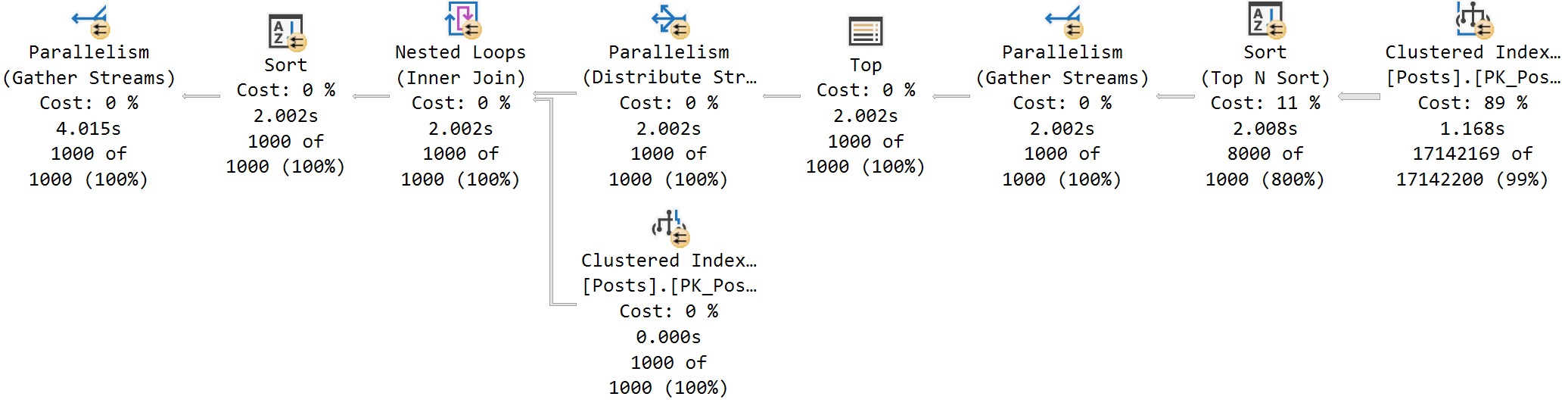
Erik’s first attempt used OFFSET/FETCH and resulted in a row mode query:
SQL Server Query Plan

The clustered index scan makes this a bit of a sad paging query. In Erik’s defense, there’s a whole host of real world reasons as to why you wouldn’t be able to make the perfect nonclustered index for your paging query:

  • End users may choose to sort on many different columns and you can’t index them all
  • A key member of your Index Approval Committee is on vacation
  • You already have more indexes on the table than your number of fingers
  • You’re working with third party software which does not allow you to create custom indexes

Getting back to the query, it doesn’t look that offensive to me. The row mode sort is a parallel top N sort and the overall number of rows to return is low, so each thread can independently sort its rows and return 1000 locally sorted rows to the parent operator. This is about as good as it gets with parallel row mode sorting. This is a row mode only query so the operator times that you see are the sum of that operator’s work and its children. In terms of real work done by the query, the scan clocks in at 1.168 seconds and the sort clocks in at 0.84 seconds. The final accounting at the end by the parent Parallelism (Gather Streams) is misleading at best and an outright LIE at worst. There wasn’t 4 seconds of work done by this query. There was only 2 seconds. The red lines illustrate the problem perfectly and I won’t be elaborating further:

a65 red

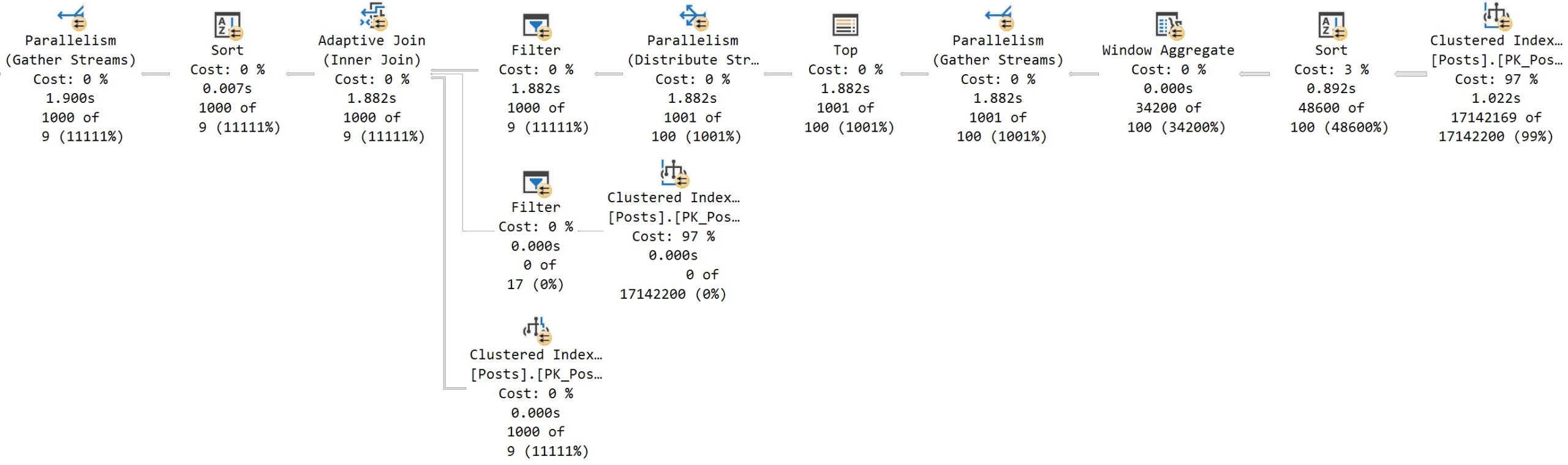
Erik’s second attempt uses ROW_NUMBER() and he achieves a plan with some batch mode operators using BMOR (batch mode on row store):
SQL Server Query Plan

The parallel batch mode sort works just fine here in that the single thread output property isn’t an issue. The parent operator is a batch mode window aggregate, but even if it wasn’t, the grandparent is a gather streams operator so the rows would end up on one thread anyway. Actual time statistics accounting works differently for batch mode operators: each batch mode operator only tracks its own work. In terms of real work done by the query, the scan clocks in at 1.1022 seconds and the sort clocks in at 0.892 seconds. This is quite similar to the first attempt. It could be argued that the batch mode sort is more efficient than the row mode top N sort, but I’d call it a wash considering the unpredictable rowstore to batch mode conversion overhead (which does seem to be small for this table).

Low End Machine Performance

I tested on my local machine with 64 GB of RAM which is less than Erik’s laptop. My clustered index scans took significantly longer than his, but as usual, there’s a lot to learn from low end machine performance. Let’s go back to the first reason as to why the table might not be indexed well for this particular query:

End users may choose to sort on many different columns and you can’t index them all

Microsoft presents a standard solution for this scenario: the humble nonclustered columnstore index. This will be great for my low end machine because I’ll be able to fit the new NCCI in memory. For those following along at home on their own low end machines, I created the index on every column except the Body column in a very carefree fashion:

CREATE NONCLUSTERED COLUMNSTORE INDEX ncci ON posts (
  Id
, AcceptedAnswerId
, AnswerCount
, ClosedDate
, CommentCount
, CommunityOwnedDate
, CreationDate
, FavoriteCount
, LastActivityDate
, LastEditDate
, LastEditorDisplayName
, LastEditorUserId
, OwnerUserId
, ParentId
, PostTypeId
, Score
, Tags
, Title
, ViewCount
) WITH (MAXDOP = 1)

I ran the OFFSET/FETCH query on my low end machine with MAXDOP 4 and it only took 430 CPU ms and 130 ms of elapsed time:

a65 gotta go fast

That’s a huge improvement compared to the 15-20 second runtime I was experiencing earlier. Interestingly, the second query (the ROW_NUMBER() approach) sticks with the parallel batch mode sort and performs significantly worse in comparison:

a65 too slow

The key difference here is the batch mode Top N sort in the first query. Remember that the query compile process for BMOR is different than what you get when compiling in the presence of a glorious columnstore index. You can get the improved batch mode top N sort by also doing a fake join to an empty CCI table. Serious batch mode connoisseurs should be mindful of the compile differences as they seek to gain the greatest performance benefit possible from batch mode.

Final Thoughts

Friends don’t let friends be lied to by SSMS. Thanks for reading!
SQL Server Management Studio Should Add Filters When You Get Execution Plans

Have You Heard The One…


Whenever I’m tuning a long stored procedure, I use sp_HumanEvents to grab query plans and other details about what’s going on.

The thing is… It should be a lot easier than that. Unfortunately, when you tell SSMS that you want to get actual execution plans, it gives you absolutely everything.

For code that loops or has a lot of tiny queries that run leading up to more painful queries. All that is a slog, and can result in SSMS becoming unresponsive or crashing.

It’s be really cool if hitting the Actual Execution Plan button filter out some stuff so you’re not collecting everything.

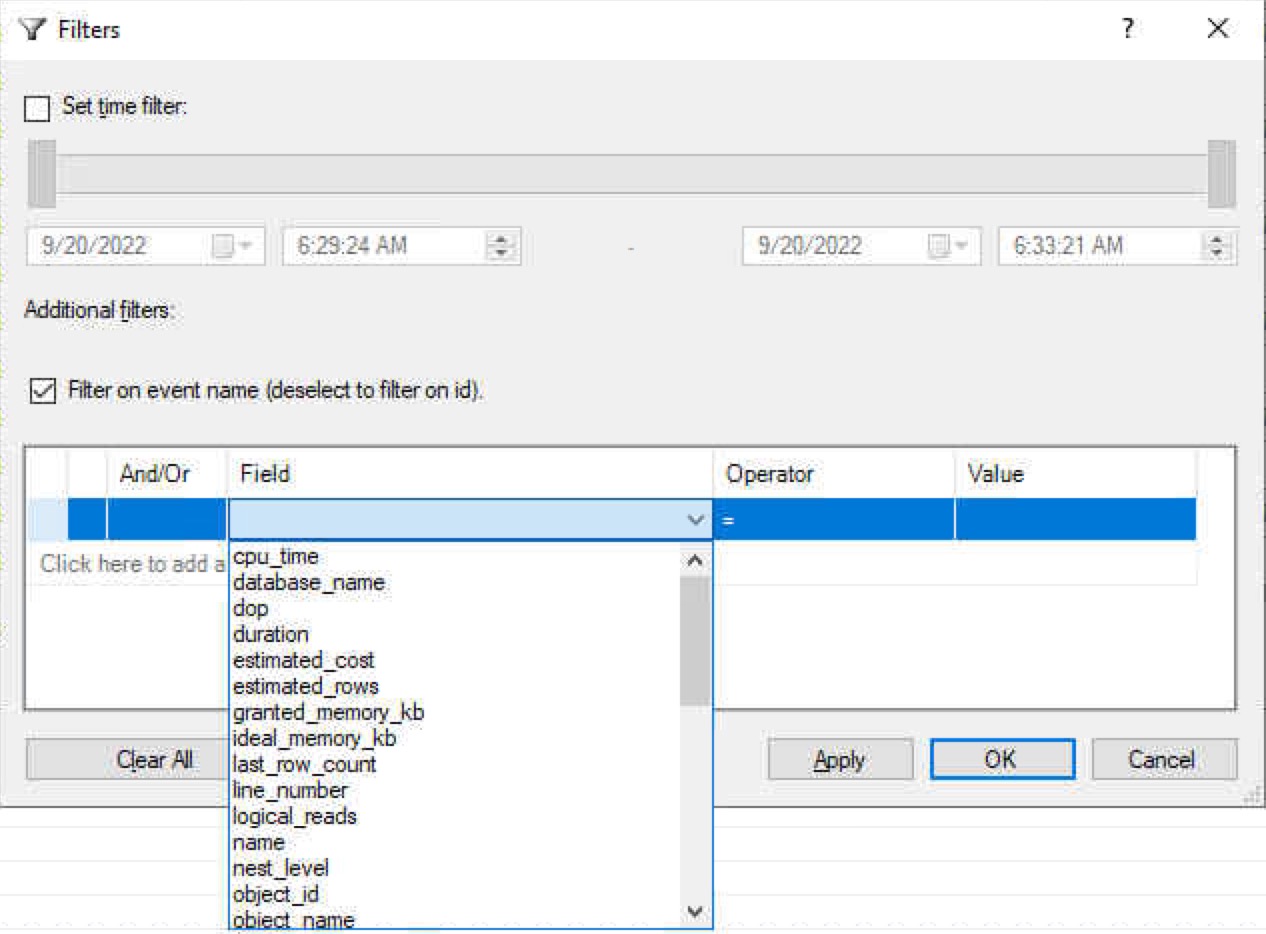
It could even use the same GUI style as Extended Events.

SQL Server Extended Events
in england

Granted, not all the ones pictured here would make sense, but metrics like CPU and duration would be helpful to keep noisy query plans out of the picture.

Thanks for reading!

Going Further


If this is the kind of SQL Server stuff you love learning about, you’ll love my training. Blog readers get 25% off the Everything Bundle — over 100 hours of performance tuning content. Need hands-on help? I offer consulting engagements from targeted investigations to ongoing retainers. Want a quick sanity check before committing to a full engagement? Schedule a call — no commitment required.

Sort Thread Numbers Correctly in SSMS Operator Properties

Dyslexical


Sort Thread Numbers Correctly in Operator Properties

Thanks for watching!

Video Summary

In this video, I delve into a minor but irritating graphical quirk in SQL Server Management Studio (SSMS) that has been bugging me for some time now. It’s not just an SSMS issue; it seems to manifest in other places within the SQL Server ecosystem as well. The problem arises when looking at execution plans, specifically in parallel operators, where the sorting of properties pane entries becomes erratic and frustratingly out of order—especially when dealing with more than nine threads. I walk through a workaround for this issue, explaining how to navigate around it by opening tooltips and manually selecting rows, but ultimately, I encourage viewers to voice their frustration through Microsoft’s User Voice platform. By voting on the relevant issue, we can collectively push for improvements in SSMS, making it a more pleasant environment for query tuning and analysis.

Full Transcript

Erik Darling. Bum, bum, bum. He still does not own ErikDarling.com because I’m a cheapskate and I don’t want to pay $1,500 for my own name on the internet. That seems a little outlandish to me. Maybe when it gets down under $1,000, I’ll do it. Anyway, it’s now Sunday, apparently, and today’s broadcast is brought to you by Dom Perignon 2009. And this was brought home from the lovely restaurant, per se. This is their wine stopper thing that they gave us for the bottle. I don’t know that they normally give these out, but it’s the coolest thing that I own now. So, if they want to sponsor me in other ways, I would happily take their sponsorship. But anyway, today’s video is about a minor graphical annoyance that I have with SQL Server Management Studio. Now, this is not the only place that you’ll see an oddity like this. There are many other places within SQL Server. Gosh, this smells good.

Oh, this is not the only place that you can do. Within SQL Server Management Studio where you’ll see this. Maybe it happens in Azure Data Studio, too. I don’t know. I refuse to install that. Anyway, here’s what it is. So, we have this query that does dumb things, admittedly dumb things. I know it’s dumb. I know it’s stupid looking. I know it serves absolutely no purpose in what it does. But when we look at the execution plan, more importantly, when we dive into the parallel operators of the execution plan, something aggravating happens. So, let’s go do what we should do as professional query tuners, always.

Open up the properties pane and let’s open this up. Now, completely ignoring the fact that this is the best parallel skew demo ever written. Open up the properties pane. What the hell is going on here? And then down here. Why? Why? Now, the other place where this used to come up is in the wait stats. So, I think it was… Maybe it was… I can’t remember if it was an SSMS version that fixed it or a SQL Server version that fixed it. It would make sense that it was an SSMS version that fixed it.

But who knows? If you looked at the wait stats, the wait stats would be sorted incorrectly, too. So, that actually is apparently fixed now. But, you know, good. But we still have this problem. And this problem persists across… Ah, come on. So, here’s another funny thing. Sometimes when you go to get the properties, the tooltip shows up. And then you can’t get them because the tooltip shows up over the properties.

And who knows where that is? So, what you have to do is be sneaky, a sneaky little rabbit. And you have to get the tooltip and then hit properties and then crack that open and then highlight that row so that we preserve it. We preserve the positioning across all these operators and go click. And look, they all sort wonky.

The sorting is a muck. Well, except on this one where there’s nothing happening because that’s a gather stream. So, if we crack this one open… Well, this one… I mean, at least the skew is gone here. Alright? At least we don’t have the skew here, but we still have this quite unfortunate sorting.

Anyway, if you’re the type of person who doesn’t like that, doesn’t like the way that looks, think that looks foolish, I have a user voice item that you can vote on. You can express your contempt and disdain for the current state of sorting parallel threads above 9, I guess, in SQL Server Management Studio.

And the link will be attached to the YouTube video and probably in the blog post as well. I just haven’t written it yet, but it’s there. So, watch out for that. Vote for it. Help me make SQL Server Management Studio a nicer place to live and do business.

Sorry, I can’t stop staring at this wine stopper. It’s like the neatest contraption. I bet that like… I could just order these from like a restaurant wholesale place. I bet it’s not even like some extra fancy thing.

I’m probably… It’s probably overblown just because it has a fancy restaurant name etched in the top. Anyway, I’m gonna go get back to enjoying the smell of this champagne on yet another rainy day. Thank you for watching. Thank you for hopefully voting on this issue.

And hopefully, democracy will win and we’ll get this whole sorting thing straightened out. Have a nice day.

Going Further


If this is the kind of SQL Server stuff you love learning about, you’ll love my training. Blog readers get 25% off the Everything Bundle — over 100 hours of performance tuning content. Need hands-on help? I offer consulting engagements from targeted investigations to ongoing retainers. Want a quick sanity check before committing to a full engagement? Schedule a call — no commitment required.

Make ADS An Optional Install Alongside SSMS

Update Update!


Starting with SSMS 20, ADS is no longer bundled together with it.

From: Upcoming changes for SQL Server Management Studio (SSMS) – Part 3:

For SSMS 20 we have removed Azure Data Studio from the installation.  In addition to being a highly voted item (Make ADS An Optional Install Alongside SSMS · Community (azure.com)), this aligns with the future extension work for SSMS 21 and we decided to make the change in the current release.

I’m quite happy to be aligned with future extension work for SSMS 21 🥰

Update!


Starting with SSMS 18.8 officially, but available in SSMS 18.7 as well, if you install via command line, you can use the following switch to avoid installing Azure Data Studio (ADS).

SSMS-Setup-ENU.exe /Passive DoNotInstallAzureDataStudio=1

Odd Couple


SSMS 18.7 was released, with an announcement that whenever you install SSMS from here on out, you’d also be installing Azure Data Studio, along with whatever dependencies exist in there. Right now, there’s a short list, but that might change so I’m not going to get into it.

It’s an odd choice, and a bit forced. Sort of like whenever you go to update Java and it wants to install three toolbars and something to clean out your internet cache. But at least Oracle has the decency to ask first.

I’ve opened a UserVoice item to let ADS be an optional install, rather than forced.

The thing is, they’re tools for totally different people. If you look at the feature comparison sheet for ADS and SSMS, you can see what I mean.

Don’t You Read The Slides?


Mr. O has a great slide about the different kinds of DBAs you might meet in the world. If you pair that up with the features that are available in each tool, you can see where each one pretty neatly fits into different roles and the way they’d work.

If you need to work cross-platform, deal with source code, big data clusters, or more developer-related tasks, ADS is for you.

Go get it! After all, it’s still a standalone download, too ???

If you’re working with query plans in depth, AGs, Query Store, or about a dozen other tasks that are more DBA-focused, you still have to use SSMS, and it doesn’t make much sense to switch back and forth unless you specifically need something only ADS does.

Likewise, it doesn’t make sense to switch between ADS and SSMS if you don’t use any of the SSMS-specific functionality.

There’s totally part of the crowd that might need both. I get that, too. But bundling them together is sort of like selling someone a six pack of beer, where three of them are non-alcoholic.

I’ve nothing against ADS. I think it fits well into very specific workflows, just not enough to force everyone who needs SSMS to also install it.

Make ADS An Optional Install Alongside SSMS


From the UserVoice issue:

Starting with SSMS 18.7, Azure Data Studio is being automatically installed alongside SSMS with no option to not install it. ADS is still available as a standalone install, though.

I’d like a way to make the install optional for people who don’t need any ADS functionality.

Particularly for admins putting SSMS on their SQL Server for whom additional unknown dependencies might not be tolerable to security teams, not having to remember to uninstall additional items every time they update SSMS would be helpful. Even with an automated deployment, it requires an installation and then multiple uninstaller runs.

On top of that, ADS is updated monthly, and SSMS has a less frequent release cadence. That leaves most people juggling two installers anyway, or only updating ADS when they update SSMS. That seems an odd choice, especially given the lack of reciprocal bundling.

Thanks for reading!

Going Further


If this is the kind of SQL Server stuff you love learning about, you’ll love my training. Blog readers get 25% off the Everything Bundle — over 100 hours of performance tuning content. Need hands-on help? I offer consulting engagements from targeted investigations to ongoing retainers. Want a quick sanity check before committing to a full engagement? Schedule a call — no commitment required.