SQL Server Queries Go Faster When They Don’t Touch Disk

A Rears


GitHub scripts

Thanks for watching!

Video Summary

In this video, I delve into the intricacies of how data caching affects query performance in SQL Server. Starting with a 37-gig table, I demonstrate how having all necessary data cached in memory can drastically reduce execution times from 14 seconds to just half a second, showcasing the power of efficient buffer pool utilization. As we move on to larger datasets, I explore scenarios where memory limitations and inappropriate indexing strategies can lead to prolonged page IO latch wait times, emphasizing the importance of optimizing both memory allocation and index design for optimal performance.

Full Transcript

Silly, shameful, slut of a charlatan. Silly, shame… Dang! My vocal coach is not going to be happy with me. Erik Darling here with Erik Darling Data, the Darlingest Data of them all, I hear. And on this rainy afternoon, I am enjoying a glass of champagne. If I were drinking a cocktail, I would go over the ingredients with you. Well, since I’m drinking a one-ingredient cocktail, it is a Paul Lenoir composition number three, and it is a 100% Chardonnay Grand Cru of some sort.

I did my best to memorize everything on the label, but I have probably failed you as miserably as I have failed my voice training coach. And anyway, getting to the point, today’s video… Actually, this is one of two videos I’m recording today. The other one is different, but I love when one demo spawns two things I can talk about.

So stay tuned for that useless information that has no bearing on your life whatsoever, or your Saturday afternoon. Unless you’re going to watch it, which… Thanks. Thanks for watching. But this video is going to continue on with a theme that I have been talking about in blog posts and other videos lately about how queries can steal space from the buffer pool, where you store your data pages that SQL Server gives out to queries, and how important it is to make sure that you have the appropriate hardware for your workload.

Because oftentimes when I’m working with clients, they go, well, how do I know if I have the right hardware? How do I know this out of the other thing? And I’m going to show you a little bit about that, and also a little bit about how to tell things are good, bad, or ugly for you. So, what we’re going to look at first, because I have to explain a little bit about this environment, is what it looks like.

So, this server, this VM, here we go, let’s go deep. This VM has 16 virtual processors. Mm-hmm. 16 of them.

This is a laptop. I’m very impressed. And this VM has 96 gigs of memory, because the right thing to do is to multiply 96 by 1024, and you get that number. Or else you’re a metric idiot.

So, we have that. And the laptop itself, my laptop, this 17-inch thing sitting next to me working very hard, is like so. So, we have this processor in there, with eight real cores, and let’s call it eight fake cores.

Actually, I don’t know which ones are real and fake. It could go this way, too. It could have real and fake in that direction.

I don’t really know. I don’t really care. Hyper-threaded like a loser anyway. It doesn’t matter which ones are fake. Half of them are fake. And so, I guess the 16 virtual cores that the VM have are like really virtual. I don’t know.

Extra virtual. Eight of them are fake. Eight of them are wrong. Eight of them are not things. And my laptop. Again, my laptop has 128 gigs of memory. If your production SQL Server has less than this, and you are concerned about performance, boy, howdy.

I will gladly open up my darling data’s cloud to you. Just watch out when I run demos. Things get a little hairy.

And you’ll notice that I have SSDs in this thing. I don’t know why disk D is zero. It’s a brave choice, but let’s move on. If we measure the disks that I have in here, and the only one I ran was the top line, because that’s the only one that I really care about for these purposes.

You can see that I can read, and this is gigabytes of, oh, I’m sorry. I forgot to hit a button. This is gigabytes a second.

All right. Gigabytes, not megabytes. I can read data at 3.2 gigs a second. I can write data right around 2.6 gigs a second. So that’s nice.

It’s pretty sweet, right? 3.2 gigs a second. I like that. I like the sound of that. That sounds good. And, you know, when I’m working with clients and talking about sort of like the correct hardware for SQL Server, at some point someone is always going to jump up on their desk and talk, we need faster disks, damn it.

Well, technically the fastest disk out there is memory. So let’s focus on that. But most people who I talk to are not using direct attached storage. Most people who I talk to are virtualized in some way and using a SAN in some way.

And so they are not going to get this. They’re not going to get all this goodness here. They are going to get much different speeds.

And it’s not going to be the fault of their disks. When they talk about getting faster and faster disks, that’s great. But the data still has to get to those disks somehow. And it’s usually the getting to those disks that doesn’t work well.

I mean, you can make it work well, but most people don’t. And the point of this all is to say that I have very fast disks. They are undeniably fast disks.

And I want to show you two different things here. So on that 2019 server, I have two copies of the Stack Overflow database. I have a full, let’s call it a full Stack Overflow, a full stack over here.

And the full stack database, I forget, I think the last date is at the end of 2019 or so. Maybe, yeah, the end of 2019. So it’s a pretty recent copy and it’s a pretty big copy.

And then I have this other copy of Stack Overflow that ends in 2013. So the last date in here is Christmas Eve of, or New Year’s Eve. Not Christmas Eve.

New Year’s Eve of 2013. And that’s technically when the world should have ended anyway, if God still listened to me. Which I don’t know why God stopped listening to me. I give such great advice about everything else.

Getting rid of the planet Earth was right in the plan since day one, end in 2013. I don’t know why mine’s got changed. Anyway.

What we have here is a few things. And these are helper views that I use in some of my demonstrations. And I will have links to the GitHub links to these up in the YouTube description and in the blog post, hopefully, if I, as long as I remember. And so what happens here?

What we’re going to do is we’re going to look at how big this index is. We’re going to clear out memory. We’re going to get the execution plan for this count query from the post table. We’re going to look at what’s in memory afterwards.

Right? We know that since we’re clearing out memory that nothing’s going to be in there. And then we’re going to run the query again afterwards, again getting the execution plan. And we’re going to do the same.

So this is in the 2013 database. That’s that context. And then we’re going to do that again in the big Stack Overflow database. And if you’ll notice, I have this hint on the, on this, this query, because apparently the nice people who make the dynamic management views in SQL Server are not terribly good at, at designing them and performance stinks unless you tinker with things a little bit.

So Microsoft, if you would like some consultation on how to make these things faster, I am available for you. I care about your health and wellness and happiness, especially that of Joe Sack. Everyone else?

I’m kidding. I’m kidding. You’re all fine people. So let’s look at what happens here. Let’s look. So at the very beginning, right, we have this. And this tells us how big the, the clustered index on the post table is.

Because I don’t have any nonclustered indexes right now. And by gosh, I’m a terrible DBA for that, huh? So this copy, right, 2013 is about 37 gigs.

And a number that I have a lot of physical agony trying to round between 47 and 40, between 4.7 gigs and 4.8 gigs. I just don’t know where to go with it. It’s just so in the middle.

But you can see there, you decide for yourself. It is 4741.96, yada, yada, yada, megabytes. You can go to gigabytes with that any way you want.

Any way you want, baby. So we run this query. We have the execution plan for it. We look at what’s in memory afterwards, which is basically the entire table, or at least all the pages that we needed to get a count. Which is great.

The count again to make sure we didn’t cheat. We didn’t mess around here. We didn’t count fewer rows. That is the number of rows in the table if you look at the nice matching row count there. Wow, that database sure is consistent.

And then let’s look at the query plans. So the first time this runs, we get a query that takes about 14 seconds. That’s reading from clean Bufferville.

We had to get everything from disk. And it took about 14 seconds for us to read about 37 gigs from disk up into memory. You can see all that time spent right in here.

13.916 seconds. Ooh, wee, ooh, ah, ah. Charming, I’m sure.

And if you look at the properties over here, because we are on such a spankin’ new version of SQL Server. SQL Server 2019 probably patched up to the latest. Again, I’m a terrible DBA, so I don’t really know these things off the top of my head.

But if you look at the weight stats over here, so very important thing whenever you’re looking at query plans, especially actual execution plans, actual factual plans, is to be hitting the properties of different operators and looking at the stuff that comes up in this window.

Because all sorts of fun, interesting things show up there that just don’t show up in the tooltips. If you look at that tooltip, there’s hardly any information there. If you look at what’s in the properties pane, boy howdy.

Whoo! Whoo! If you’re data-driven, you could spend days driving around in there. So let’s look at the weight stats of this thing. And way up at the top, way, way, way up at the top, I think the rest of these, honestly, the rest of these weight stats in here are going to be completely useless, but way up at the top, we spend 10 seconds reading pages from disk into memory.

So for about 37-gig table, reading data at 3.2 gigs a second takes 10 seconds. Would you believe that? Would you believe that?

Would you believe that math? Would you believe that math to get 32 gigs of pages into memory? Well, I guess it’s a little bit worth a lot of pages.

I don’t know. Math works out. It’s there. It’s perfectly fine. Don’t worry about it. I’m sure there were other things involved. I’m sure there were other things involved. So that’s what happened there, right?

Cool. 14 seconds. And now let’s look at the execution plan for the second run when everything was already there. Quite a remarkable difference, isn’t it?

Hmm? Quite remarkable. About half a second to run that query. If you go look at the wait stats for this, we will no longer have 10 wait stats here. And on top of that, we will no longer have, well, I mean, crossing my fingers now that I’ve said it, we don’t have any weights on page IO.

I didn’t actually didn’t look at this before I ran it. Again, on top of being a terrible DBA, I’m also a terrible presenter. So just never watch anything I do.

You’ll be horrified. So we look at this and what do we have? No weights on reading pages from disk. We have some internal weights for SQL Server to do things that it has to do, but we don’t have any weights on disk anymore. Wonderful.

And that solved a 14 second problem for us by about 13 and a half seconds, having that data already in there. This gets worse when we have bigger data, bigger data, big, big data. What we’re going to see here is a slightly different scenario running through the exact same thing as in the other one.

We have slightly different information. This table, rather than being 37 gigs, is about 120 gigs with 22 gigs of lob data. I told you the world should have ended in 2013 and you didn’t listen to me.

And then after we read pages from disk into memory, notice now that we don’t have the entire table cached in memory anymore. We do not have that. We do not have enough space in the 96 gigs of data or 96 gigs of memory that we have assigned to this server.

We’re hobbled a little bit by the max server memory setting. If you go with the properties and we look at memory, you will see that I have about 88 gigs. Again, if you divide 90112 by 1024 because you’re a smart person, you will get back 88 gigs.

So we have 88 gigs of memory assigned to this. We read about 83 gigs of this table up into memory. I’m sure there’s other memory needs on here.

There’s other stuff going on that the TGL server needs some memory for. So we use about 83 gigs of space for the buffer pool and we have that hanging about in there. Wonderful.

Perfect. Glorious. Wonderful. Like the champagne. I’m told that I’m not allowed to drink on camera by my lawyer. I’m just going to smell it.

Mmm. That smells delicious. So let’s look at this when we have a bigger table. All right.

So we have to, when we read this one from disc, that takes 40, well, rounding this isn’t bad. This takes about 43 seconds. I’m willing to round there. I’m willing to go the extra mile for you. And if we, again, because we are very smart performance, we’re terrible DBAs, but we are very smart performance tuners.

If we go look at the properties of this. Now we look at the weight stats here. We have, oh, that’s a tough rounder. Oh, it’s so close. It’s right in the middle.

Oh, I can’t make these decisions. We now have about 32-ish seconds of page IO latch weight. So about 32-ish seconds of our lives were spent reading pages from disc up into memory. And if we go look at that second execution plan, this one’s going to be different.

Isn’t it? This one is going to have run for 34 seconds. Why?

Because we had to read stuff back into memory. We only had some of this stuff in memory. We didn’t have the right stuff in memory. If we go look at weight stats and we look at the top one, we will have spent a little bit less time reading pages from disc into memory, but we still had to read a whole bunch of pages from disc into memory, right?

So less, but still not great. If we crack that first one back open, so we go from, oh, wait, that’s the wrong one. I went back too far. Demo over.

Leave. Leave. All of you. If we go back to the source one, it’s 42 seconds versus 34 seconds. So that didn’t turn out too much better, did it? And again, this is reading data very fast. This is not slow data.

This is fast data. I like my data big. I like my data fast. I like the smell of that champagne. It’s a, it’s the, these are the few of my favorite things. And so the point here is that if you are looking at your server, if you’re looking at the weight stats on your server and you see that you are waiting a lot on page IO latch weight.

So again, we come back to these weight stats over here. If you find yourself waiting on page IO latch underscore S to the H, you most likely have a deficiency. Now, your deficiency could be in one of three areas.

You could have too little memory. That would be an obvious deficiency. You could have inappropriate indexes for your workload, either too many indexes, right? Cause too many things competing for space in the buffer pool that you have to keep reading up and flushing out and bring them back and come on again, off again and missing indexes, right?

So you could have a lack of opportune indexes for your queries. That’s another one. And you could also have queries that are battling your buffer pool for memory, for memory grants, right?

So things like sorts and hashes that require memory that will take memory away from your buffer pool. So those are three places where you could have some room to improve. Often when I look at servers, all three are true.

Often when I look at servers, they are laughably smaller than my production, my production laptop, which is again, this. Oh, wait, I should go back to the CPU graph so you can see all my fake CPUs again. So this and this, all right, that’s my laptop.

Cost me about four grand from Lenovo. It was a good sale, but you know. Put some money into your production SQL Server that runs your business.

I put some money into the production SQL Server that runs mine. It’s just what we do. Got to spend money to make money in here.

So anyway, what we talked about today, a little bit, sort of in a nutshell, is, God, I forget. Well, there was a champagne. That was good.

There was the size of my laptop, the size of the VM, the size of the two stack overflow databases, and the size, two different sizes of the post table. And how having more, and how having the data fully in memory when we needed to read it was very, very helpful. That query went from 14 or seconds down to about half a second.

But when we had a table that didn’t fully fit into memory, even reading from it again with some of the data in memory didn’t save us all that much time. We still ended up in a pretty tough spot. And we also talked about how if you see your servers waiting a lot on page IOLatch waits.

Now it could be more than .underscore sh. There are also page IOLatch underscore ex and underscore up and I think KP and KL and some other ones. But the ones that you’ll see the most often are page IOLatch sh and page IOLatch ex.

That is an exclusive page IOLatch and that is when modification queries need data. The SH is shared latches for select queries for the most part there. So that’s what you would look at.

And if you see a lot of those waits, if you like yours, if the amount of time that queries are waiting on those waits is significant, then you have some work to do. You have to look at how you have sized your server. You have to look at how you have designed your indexes.

And you have to look at how your queries are asking for memory. If you need help with that stuff, I guess that’s where someone like me comes in. But I don’t know, you’re watching this YouTube video for free.

Apparently you like free. So who knows? Anyway, thank you for watching. I hope you learned something. I’m going to take another sniff of my champagne and enjoy my Saturday. Bye.

Going Further


If this is the kind of SQL Server stuff you love learning about, you’ll love my training. Blog readers get 25% off the Everything Bundle — over 100 hours of performance tuning content. Need hands-on help? I offer consulting engagements from targeted investigations to ongoing retainers. Want a quick sanity check before committing to a full engagement? Schedule a call — no commitment required.

How I Set Up To Tune SQL Server Stored Procedures

I am a heading


Video Summary

In this video, I share my setup and process for tuning code, whether it’s stored procedures or functions. I demonstrate how I split the screen to compare the original code with the optimized version side by side, ensuring that any changes are clearly visible and easily reversible if needed. By keeping a results window on one side and an execution plan on the other, I can quickly verify query outcomes and identify performance bottlenecks without interrupting my workflow. This setup allows me to track improvements over time and make informed decisions about breaking down complex queries into more manageable parts. Additionally, I show how to set up this split screen using the Window File menu in SQL Server Management Studio (SSMS), making it a straightforward process for anyone looking to improve their coding efficiency.

Full Transcript

Erik Darling here, Erik Darling Data. Normally I say that I wanted to record a video, but didn’t actually want to record a video. I wanted to go take a nap. So here we are. And this video is decidedly non-technical. This is me dipping my toes into professional development. Kidding. I would never do that. I have no soft skills whatsoever. My softest skill is being nice to bartenders. That’s my soft skill. This video is about how I set up to tune code. Whether it’s a stored procedure or a function or anything else in the world. It’s important. It is muy importante. to have a good setup so that you can be as efficient as possible while people are paying you to fix things for them. So what I always do, and this is an admittedly smushed version of what I do. I usually have a slightly larger screen, but for the purposes of recording, 1920 by 1080 is just what you’re gonna get. Sorry. That’s it. So what I always do is I have a split screen. And I have a split screen for a couple reasons. One is because I want to compare what the code looked like before I made any changes. I’ll usually do that. I’ll usually keep the the virgin version on the right side, the untouched version on the right side.

And I’ll keep that over here so that I know exactly what things looked like before I went and did anything. I can also keep that over here in case something over here gets so screwed up that I just need to start over. That never happens to me though. Too good at my job. So that’s the first thing, right? So you have this thing over here. This is what things looked like before. This is what things looked like after. The other thing that I have in there. The other thing that I have in there is another useful window in this setup is this one right here. And what we get in this window, and what will also be in I believe this window, are the results and query plans. You see, if you have a long or even long-ish running query, the last thing you want to do is have to keep running it to see if the results are right, and see what the execution plan looked like and if it got any better or worse or faster.

So over here, I’ll keep a copy of the version. So over here, I’ll keep a copy of the stored procedure run, the virgin stored procedure run, as is, with the hopefully correct results. There have been several times when working with people when we have been looking at the results of a query and they’ve been like, oh wait, that’s not right. That can’t possibly be. And then we have a different issue to tackle, but that is not really the point here.

The point here is we should assume that the results of this query are correct, and that we are trying to reproduce those results in a faster manner. Crazy. So we have the results over here, so we can easily compare side by side the results, make sure things line up. Does 355 have 1045? Yes, it does. 1045. Look at that. That’s great.

I also like to keep the execution plan up, so that I can see which parts of the query that I want to focus on. Oop, I grabbed the wrong thing there. Story of my life. So I can see which parts of the query I want to focus on. And then, as I get to tuning on this side, I haven’t done anything over here yet, so don’t judge me.

Then I can compare like, okay, well, you know, this video used to take 9.4 or this video, this insert. This insert used to take 9.4 seconds and I got it down on this side to X number of seconds. And then over here, I’ll do the same thing. It’s like, oh, the select took 42 seconds and now I managed to get it this much faster.

So I have a before and after. And I can also kind of see like, you know, there are a lot of times when tuning a query, when it makes a lot of sense to break a query up into multiple pieces, right? Like you don’t want to run, like sometimes having that one big query is like the worst idea.

It’s like, shoot, man, I don’t understand what this query does. And like breaking it up into multiple pieces is a good idea. And then like you have to figure out if those multiple pieces are all faster than the one big one.

So this is just a very helpful general setup for me. Now, another thing that I’ll do is I’ll keep a copy of some notes over on the left side. Let’s say that, you know, I’m running my query and maybe it’s going on for a little bit longer than I thought it would.

I’ll probably have SP who is active open over here so I can see what’s going on when the query runs, get the plan for it, see what’s happening. If I need to make any notes or create any indexes that don’t really make sense to have as a comment, I’ll put that over on this side so that I can reference it pretty easily without having to flip around through a million windows.

And I’ll just remember what I did when. So this is how I set up and get organized to tune code. And I don’t know.

I don’t think there’s anything too ambitious in here. It should be a pretty easy thing for you to reproduce. Oh yeah, I forgot. I forgot to show you how to do this.

There’s always something. Again, if you take, if you have, if you want to get this split screen set up, you just go to the window file menu up here and you choose new, new vertical tab group. And if you choose new vertical tab group, you will get that line in the middle where you can have two sets of queries.

Two sets of queries there. If you, if you don’t, if you don’t already have a vertical tab group set up, you can also set up a, a horizontal tab group. I don’t know how much more helpful that would be though.

That might, that might not be as helpful, but I find the vertical tab group very helpful. I hope that you, my dear watcher, listener, reader, stalker, maybe future drinking buddy if you play your cards right, have enjoyed this video. Hope that maybe you, you learned something like maybe to lead with the instruction.

Maybe not. This is what happens when I record videos sober. It’s your fault you did this to me.

It’s your fault. Never happened again though, I promise. Never happened again. Anyway, thank you for watching. I hope you learned something. And I’m going to go take a nap.

Have a good day.

Going Further


If this is the kind of SQL Server stuff you love learning about, you’ll love my training. Blog readers get 25% off the Everything Bundle — over 100 hours of performance tuning content. Need hands-on help? I offer consulting engagements from targeted investigations to ongoing retainers. Want a quick sanity check before committing to a full engagement? Schedule a call — no commitment required.
Tuning I/O Is Often About Tuning Indexes In SQL Server

One Metric Ton Of Indexes


Let’s say you hate your storage. Let’s say you hate it so much that you want you SQL Serve to touch it as little as possible.

You’re most of the people I talk to. Congratulations.

But how do you do that?

Let’s talk about a few things.

How SQL Server Works With Data


It doesn’t matter if a query wants to read or modify data, all those itty-bitty little data pages need to end up in memory.

How much ends up in memory depends on how big your tables are, and how helpful your indexes are.

Likewise, the more indexes you need to modify, the more need to be in memory for that to happen.

You need to design indexes so that you can support your queries by making it easy for them to locate data. That’s your where clause, and guess what?

Your modification queries have where clauses, too.

How You Can Make Indexing Better


Make sure you’re reviewing your indexes regularly. Things that you need to keep an eye on:

  • Duplicative indexes
  • Under-utilized indexes

Even when indexes are defined on the same columns, they’re separate sets of pages within your data files.

  • If you have indexes that are on very similar sets of columns, or supersets/subsets of columns, it’s probably time to start merging them
  • If you have indexes that just aren’t being read, or aren’t being read anywhere near as much as they’re written to, you should think about ditching them

Cleaning up indexes like this gives you more breathing room to add in other indexes later.

It also gives you far fewer objects competing for space in memory.

That means the ones you have left stand a better chance of staying there, and your queries not having to go to disk for them.

How You Can Make Indexes Better


There are all sorts of things you can do to make indexes better, too. I don’t mean rebuilding them, either!

I mean getting smarter about what you’re indexing.

Things like filtered indexes and index compression can net you big wins when it comes to reducing the overall size of indexes.

My friend Andy Mallon has some Great Posts™ about compression over on his blog:

And of course, computed columns can help if you’ve got a wonky schema.

Smaller indexes that take up less space in memory make more efficient use of the space you have, which means you can fit more in there.

How You Can Make Tables Better


There are some obvious bits here, like being extra careful with choosing string length.

LOB data can lead to weird locking, and mess with memory grants.

And of course, overly-wide, non-normalized tables can also lead to issues.

If you’re running an OLTP workload, you may also want to make sure that your critical tables aren’t heaps.

Those things tend to take up more space in memory than they need to.

And of course, if you need any help fixing these types of issues, drop me a line!

Thanks for reading!

Going Further


If this is the kind of SQL Server stuff you love learning about, you’ll love my training. Blog readers get 25% off the Everything Bundle — over 100 hours of performance tuning content. Need hands-on help? I offer consulting engagements from targeted investigations to ongoing retainers. Want a quick sanity check before committing to a full engagement? Schedule a call — no commitment required.

SARGable Isn’t Just For Your SQL Server Where Clause

Maybe Probably


It’s likely also obvious that your join clauses should also be SARGable. Doing something like this is surely just covering up for some daft data quality issues.

SELECT
    COUNT_BIG(*) AS records
FROM dbo.Users AS u
JOIN dbo.Posts AS p
    ON ISNULL(p.OwnerUserId, 0) = u.Id;

If 0 has any real meaning here, replace the NULLs with zeroes already. Doing it at runtime is a chore for everyone.

But other things can be thought of as “SARGable” too. But perhaps we need a better word for it.

I don’t have one, but let’s define it as the ability for a query to take advantage of index ordering.

World War Three


There are no Search ARGuments here. There’s no argument at all.

But we can plainly see queries invoking functions on columns going all off the rails.

Here’s an index. Please enjoy.

CREATE INDEX c ON dbo.Comments(Score);

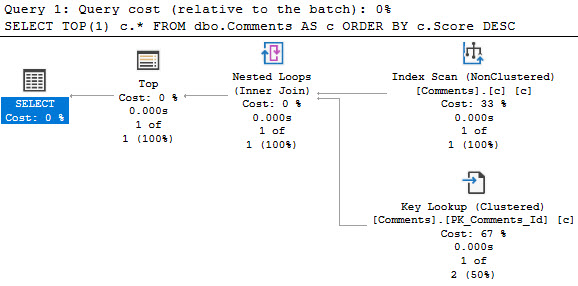
Now, let’s write a query. Once well, once poorly. Second verse, same as the first.

SELECT TOP(1)
    c.*
FROM dbo.Comments AS c
ORDER BY 
    c.Score DESC;

SELECT TOP(1)
    c.*
FROM dbo.Comments AS c
ORDER BY 
    ISNULL(c.Score, 0) DESC;

The plan for the first one! Yay!

SQL Server Query Plan
inky

Look at those goose eggs. Goose Gossage. Nolan Ryan.

The plan for the second one is far less successful.

SQL Server Query Plan
trashy vampire

We’ve done our query a great disservice.

Not Okay


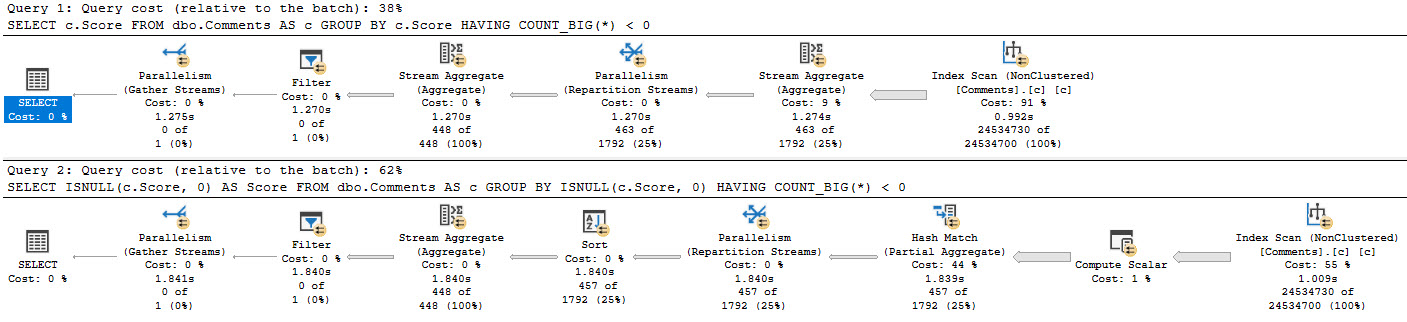
Grouping queries, depending on scope, can also suffer from this. This example isn’t as drastic, but it’s a simple query that still exhibits as decent comparative difference.

SELECT 
    c.Score
FROM dbo.Comments AS c
GROUP BY 
    c.Score
HAVING 
    COUNT_BIG(*) < 0;

SELECT 
    ISNULL(c.Score, 0) AS Score
FROM dbo.Comments AS c
GROUP BY 
    ISNULL(c.Score, 0)
HAVING 
    COUNT_BIG(*) < 0;

To get you back to drinking, here’s both plans.

SQL Server Query Plan
the opposite of fur

We have, once again, created more work for ourselves. Purely out of vanity.

Indexable


Put yourself in SQL Server’s place here. Maybe the optimizer, maybe the storage engine. Whatever.

If you had to do this work, how would you prefer to do it? Even though I think ISNULL should have better support, it applies to every other function too.

Would you rather:

  • Process data in the order an index presents it and group/order it
  • Process data by applying some additional calculation to it and then grouping/ordering

That’s what I thought.

Thanks for reading!

Going Further


If this is the kind of SQL Server stuff you love learning about, you’ll love my training. Blog readers get 25% off the Everything Bundle — over 100 hours of performance tuning content. Need hands-on help? I offer consulting engagements from targeted investigations to ongoing retainers. Want a quick sanity check before committing to a full engagement? Schedule a call — no commitment required.

The Great Memory Heist: How Queries Steal Memory From SQL Server’s Buffer Pool

Best Buy


Thanks for watching!

Video Summary

In this video, I dive into the world of SQL Server memory management and how it can be a tricky beast to tame. I share my personal experience with a large table that exceeds the available memory on my VM, illustrating just how critical memory is for SQL operations, even when you think you have plenty. I also explore the often misunderstood relationship between buffer pool memory and non-buffer pool memory, highlighting why simply setting server memory might not be enough to ensure smooth query performance.

Full Transcript

Oh boy. Oh boy. Erik Darling here with Erik Darling Data to this very day. I’m thinking about taking data out of the company title. I don’t really, I don’t actually care for data. I actually, I actually sort of hate it. It seems to be a big problem for people. Either they have too much of it, they don’t know what they have, they have, they have stuff they shouldn’t have. I don’t know, it just seems like, seems like data is nothing but trouble. I think this would be the Erik Darling Fun Company where we only talk about fun, non-dreary. things because data is very dreary, isn’t it? There’s no good news. It’s all depressing. And speaking of depressing, today I’m going to talk about memory, something which I have very little of, personally. But thankfully, my laptop has a decent amount of. My laptop sitting, my new laptop sitting over here to the right of me has 128 gigs of memory in it. And I have a single VM with 96 gigs of memory in it. Unheard of, I know. Unheard of. A single laptop with 128 gigs of memory. Amazing. But this memory is going to have a tough time in life. Because despite the fact that there are 96 gigs of memory in my laptop, I have this table in this Stack Overflow database that is 120 gigs. 120.

And as we all know, SQL Server does not work with pages on disk. Doesn’t matter how good your disks are. Doesn’t matter how expensive they are. Doesn’t matter how much. You paid your storage vendor for all flash and memory, NVMe, whatever. Other fine words they have for these disks. It’s before my 9am cocktails. So this might not be the smoothest take that I’ve ever done in my life. But, yeah, so SQL Server doesn’t care about pages on disk. Anything that you want to do with your data.

Whether it’s a read or a modification, it must end up in memory first. Hmm? Hmm. So even if we were to completely overtake memory on this VM with data from this table, it’s still not completely fitting there. Now, right now, in the buffer pool, well, it went down a little bit. I don’t know why it did. I didn’t do anything.

But actually, this is a good thing. So the buffer pool. Boy, oh boy. Monte Carlo. I might need to pour myself a Monte Carlo if I’m going to continue recording this video. So if we look at right now, what’s in the buffer pool is about 76 gigs of data.

Dreary, dreary data. And if I come over here and I run this count, I’ve been bullied a little bit into changing my query formatting. And so I’m going to give it, I’m going to give this a shot. It’s a little spidery for me.

I’m going to send a little alias in there. So it’s a little spidery for me. I don’t know if I like everything on a new line and indent it over. I’m going to give it a shot. I’m going to see, I’m going to see how it works out.

But if I run this, and I come back over here, and I start running this, we’re going to see the buffer pool gradually go up a little bit, right? 86. Oh, it’s climbing a little bit. Oh, it’s fluctuating. But it’s right around 86 gigs, which is fine because I have max server memory set to about 88 gigs here.

Now, the second query is looking for non-buffer pool memory, right? And I have a filter on here that’s looking, that’s filtering out stuff to make sure it has at least a gig of memory assigned to it. But, oops, I’m going to see this pre-9 a.m.

This pre-9 a.m. cocktail stuff is rough. But if I look over here, there’s a whole bunch of non-buffer pool memory that’s probably, I don’t know, about 2 gigs worth of stuff. I’m not a math guy. I don’t want to write another query to prove it to you.

But I would imagine that the 86 gigs of buffer pool is diminished by 2 gigs because of all the other stuff in here, right? But right now, the thing that I care about is anything, any non-buffer pool memory that has more than a gig of stuff in it, right? And if I run this and look, it’s going to be about 86 gigs.

So that’s just about there. Okay, fine. Now, here’s where people get all messed up when it comes to SQL Server. They look at, you know, I don’t know, the amount of data they have, and they think, well, 64 gigs will do.

It doesn’t matter how much data is actually in there. It’s like, I don’t know. I’m looking at this cloud instance, and if I keep adding memory, then the cores keep going up, and it keeps getting more expensive.

So I’m just going to stop adding memory. But memory is important. And not just for this buffer pool thing, because I want you to watch what happens to the buffer pool as I run queries that need memory.

So I’m just going to select a top 1,000. See, this is very spidery looking to me. It’s quite spidery.

I’m going to select a top 1,000 from comments ordered by score descending. And, of course, I do not have an index on this comments table that puts the score column in order. So I am going to have to physically sort this.

And sorting data is one of those SQL Server’s tiny little baby hands comes and breaks out the, comes and starts ordering the data. But we need memory to do that. We need a memory grant to do that.

So if I come over here and I run this, and I start looking at the buffer pool and what other memory is getting used, you can see that SQL Server has granted that query 16 gigs of memory. And as memory gets loaned out to that query, the size of the buffer pool goes down. And if I throw another one of those in the mix, we’ll see non-buffer pool memory go up again and buffer pool memory go down again.

This is getting into a rough situation. My buffer pool is severely limited, right? So now let’s get another one in there, right?

Let’s get a third one in there. Now we can see non-buffer pool memory. It’s up to 50. It’s almost half and half, right? It’s almost half of our buffer pool is gone to memory clerk SQL reservation. So SQL Server has made a reservation at Shea memory clerk, and we have granted these queries memory, and we have taken that memory from the buffer pool.

All right? We have stolen that memory from the buffer pool. It’s ours now.

So this is something that a lot of people don’t plan for when they start designing or speccing SQL Servers or choosing cloud instances. The memory you choose is not purely for the buffer pool. The memory that you choose has many, many other tasks.

We saw that even before there was 50 gigs of memory granted out to these queries, what happened? There’s about 2 gigs to other stuff, right? Just other things.

I don’t know. It’s playing cache, other doodads, gizmos, whatever SQL Server has to do. I don’t really know. I’m not good at this stuff. But all these queries have finished running now, and what I want you to notice is that the buffer pool is down to 32 gigs. 32 gigs.

And it’s not immediately coming back up, is it? They can keep running this query, and it’s going to stay right where it is. Even though there’s nothing else down here, SQL Server isn’t immediately just like, oh, well, come on, get in the buffer pool. Come on, the water’s fine.

It’s beautiful in here. Is it? No, it’s not happening. It’s not happening. SQL Server is not immediately filling. Because what does it know? How does it know what we need in there?

It doesn’t. SQL Server is not that smart. SQL Server is dumb like me. That’s why I like it. But if we come over here and we run this count query again against the post table, we will slowly see the buffer pool start to fill back up. And here it comes.

Coming roaring back to life. But this is sort of a funny thing because this is a situation that people often confuse with parameter sniffing. Waiting for SQL Server to read a bunch of pages from disk into memory is not exactly a fast thing all the time.

Right? Depending on the size of your data or the type of the data that you’re reading in. Like all sorts of stuff.

Like what you have to read. You can end up waiting a very, very long time to read pages from disk off into memory. Now, this count against the post table just ran for about 40 seconds.

It doesn’t take that long. It doesn’t actually take that long to count records in the post table. It’s like it’s not a 40 second operation.

But going off to disk and reading stuff can be a not fun thing to do. And this is something that you need to think very, very carefully about when you’re designing hardware or picking hardware or picking an instance size for your SQL Server. It’s not only how much data you have.

What are the memory requirements of your queries? Right? Because this thing ran for 24 seconds this time. It ran for 40 seconds last time reading a bunch of stuff from disk into memory.

But we had a bunch more stuff in memory this time. So we actually had a slightly faster query. We look at the properties of this. And we look at the weight stats. Number one is going to be page IOL action.

What do you know? About 16 seconds of the time we spent in this query was reading pages from disk into memory. Crazy, right?

Crazy. Well, it is 9.05 about. And it is time for my 9 a.m. cocktail. So I am going to go have that.

And I am going to bid you a fun to do. Thank you for watching. And I hope you learned something. And I will see you in another video another time. Goodbye. Thank you very much. Goodbye. Bye.

Going Further


If this is the kind of SQL Server stuff you love learning about, you’ll love my training. Blog readers get 25% off the Everything Bundle — over 100 hours of performance tuning content. Need hands-on help? I offer consulting engagements from targeted investigations to ongoing retainers. Want a quick sanity check before committing to a full engagement? Schedule a call — no commitment required.

Be Careful With SET ANSI_DEFAULTS ON In SQL Server

Secret Agent Plan


My dislike for implicit transactions is well documented. Recently, while working with a client, I noticed that they had a bunch of them causing blocking.

Digging in a little bit further, I noticed they were all coming from an Agent Job. Of course, by default, Agent runs with a bunch of wacked-out ANSI options.

To get the job to perform better — which it did — it had to make use of a filtered index on an archival task. If you scroll way down in that doc, you’ll see a note:

Review the required SET options for filtered index creation in CREATE INDEX (Transact-SQL) syntax

In order to create, or have queries use your filtered index, they need to have very specific options set correctly.

Baggage


Rather than just setting the required options, which was apparently a lot of typing, someone had just set all the ANSI defaults on.

SET ANSI_DEFAULTS ON;

But this comes with some additional baggage, in the form of implicit transactions. If you run DBCC USEROPTIONS; with that turned on:

Set Option              Value
----------------------- --------------
textsize                2147483647
language                us_english
dateformat              mdy
datefirst               7
statistics XML          SET
lock_timeout            -1
quoted_identifier       SET
arithabort              SET
ansi_null_dflt_on       SET
ansi_defaults           SET
ansi_warnings           SET
ansi_padding            SET
ansi_nulls              SET
concat_null_yields_null SET
cursor_close_on_commit  SET
implicit_transactions   SET <---- UwU what's this
isolation level         read committed

It sets all the things you actually need, plus a couple other options for implicit transactions and cursor close on commit.

Baggage


Of course, had someone just done a bit more typing, all would have been well and good.

SET ANSI_NULLS ON;
SET ANSI_PADDING ON;
SET ANSI_WARNINGS ON;
SET ARITHABORT ON;
SET CONCAT_NULL_YIELDS_NULL ON;
SET QUOTED_IDENTIFIER ON;

Using SET ANSI_DEFAULTS OFF;is equally disappointing, sort of.

Set Option              Value
----------------------- --------------
textsize                2147483647
language                us_english
dateformat              mdy
datefirst               7
lock_timeout            -1
arithabort              SET
concat_null_yields_null SET
isolation level         read committed

It really does just flip everything off. Not that I’m saying it shouldn’t — but maybe we need a command in between?

SET ANSI_DEFAULTS BACK_TO_NORMAL; or something.

Whatever “normal” means.

Thanks for reading!

Going Further


If this is the kind of SQL Server stuff you love learning about, you’ll love my training. Blog readers get 25% off the Everything Bundle — over 100 hours of performance tuning content. Need hands-on help? I offer consulting engagements from targeted investigations to ongoing retainers. Want a quick sanity check before committing to a full engagement? Schedule a call — no commitment required.

Documentation for dm_db_missing_index_group_stats_query

No, It’s New


When I was checking out early builds of SQL Server 2019, I noticed a new DMV called dm_db_missing_index_group_stats_query, that I thought was pretty cool.

It helped you tie missing index requests to the queries that requested them. Previously, that took a whole lot of heroic effort, or luck.

With this new DMV, it’s possible to combine queries that look for missing indexes with queries that look for tuning opportunities in the plan cache or in Query Store.

It seems to tie back to dm_db_missing_index_groups, on the index_group_handle column in this DMV joined to the group handle column in the new DMV.

If you’re wondering why I’m not giving you any code samples here, it’s because I’m going to get some stuff built into sp_BlitzIndex to take advantage of it, now that it’s documented.

Special thanks to William Assaf (b|t) for helping to get this done.

Thanks for reading!

Going Further


If this is the kind of SQL Server stuff you love learning about, you’ll love my training. Blog readers get 25% off the Everything Bundle — over 100 hours of performance tuning content. Need hands-on help? I offer consulting engagements from targeted investigations to ongoing retainers. Want a quick sanity check before committing to a full engagement? Schedule a call — no commitment required.

Parameter Sniffing Is Usually A Good Thing In SQL Server

Tick Tock


I talk to a lot of people about performance tuning. It seems like once someone is close enough to a database for long enough, they’ll have some impression of parameter sniffing. Usually a bad one.

You start to hear some funny stuff over and over again:

  • We should always recompile
  • We should always use local variables
  • We should always recompile and use local variables

Often, even if it means writing unsafe dynamic SQL, people will be afraid to parameterize things.

Between Friends


To some degree, I get it. You’re afraid of incurring some new performance problem.

You’ve had the same mediocre performance for years, and you don’t wanna make something worse.

The thing is, you could be making things a lot better most of the time.

  • Fewer compiles and recompiles, fewer single-use plans, fewer queries with multiple plans
  • Avoiding the local variable nonsense is, more often than not, going to get you better performance

A Letter To You


I’m going to tell you something that you’re not going to like, here.

Most of the time when I see a parameter sniffing problem, I see a lot of other problems.

Shabbily written queries, obvious missing indexes, and a whole list of other things.

It’s not that you have a parameter sniffing problem, you have a general negligence problem.

After all, the bad kind of parameter sniffing means that you’ve got variations of a query plan that don’t perform well on variations of parameters.

Once you start taking care of the basics, you’ll find a whole lot less of the problems that keep you up at night.

If that’s the kind of thing you need help with, drop me a line.

Thanks for reading!

Going Further


If this is the kind of SQL Server stuff you love learning about, you’ll love my training. Blog readers get 25% off the Everything Bundle — over 100 hours of performance tuning content. Need hands-on help? I offer consulting engagements from targeted investigations to ongoing retainers. Want a quick sanity check before committing to a full engagement? Schedule a call — no commitment required.

A General Indexing Strategy For Normal Queries In SQL Server

Find Your Data First


Most queries will have a where clause. I’ve seen plenty that don’t. Some of’em have surprised the people who developed them far more than they surprised me.

But let’s start there, because it’s a pretty important factor in how you design your indexes. There are all sorts of things that indexes can help, but the first thing we want indexes to do in general is help us locate data.

Why? Because the easier we can locate data, the easier we can eliminate rows early on in the query plan. I’m not saying we always need to have an index seek, but we generally want to filter out rows we don’t care about when we’re touching the table they’re in.

Burdens


When we carry excess rows throughout the query plan, all sorts of things get impacted and can become less efficient. This goes hand in hand with cardinality estimation.

At the most severe, rows can’t be filtered when we touch tables, or even join them together, and we have to filter them out later.

I wrote about that here and here.

When that happens, it’s probably not your indexes that are the problem — it’s you.

You, specifically. You and your awful query.

We can take a page from the missing index request feature here: helping queries find the rows we care about should be a priority.

Sweet N’ Low


When people talk about the order predicates are evaluated in, the easiest way to influence that is with the order of columns in the key of your index.

Since that defines the sort order of the index, if you want a particular column to be evaluated first, put it first in the key of the index.

Selectivity is a decent attribute to consider, but not the end all be all of index design.

Equality predicates preserve ordering of other key columns in the index, which may or may not become important depending on what your query needs to accomplish.

Post Where


After the where clause, there are some rather uncontroversial things that indexes can help with:

  • Joins
  • Grouping
  • Ordering

Of course, they help with this because indexes put data in order.

Having rows in a deterministic order makes the above things either much easier (joining and grouping), or free (ordering).

How we decide on key column order necessarily has to take each part of the query involved into account.

If a query is so complicated that creating one index to help it would mean a dozen key columns, you probably need to break things down further.

Minnow


When you’re trying to figure out a good index for one query, you usually want to start with the where clause.

Not always, but it makes sense in most cases because it’s where you can find gains in efficiency.

If your index doesn’t support your where clause, you’re gonna see an index scan and freak out and go in search of your local seppuku parlor.

After that, look to other parts of your query that could help you eliminate rows. Joins are an obvious choice, and typically make good candidates for index key columns.

At this point, your query might be in good enough shape, and you can leave other things alone.

If so, great! You can make the check out to cache. I mean cash.

Thanks for reading!

Going Further


If this is the kind of SQL Server stuff you love learning about, you’ll love my training. Blog readers get 25% off the Everything Bundle — over 100 hours of performance tuning content. Need hands-on help? I offer consulting engagements from targeted investigations to ongoing retainers. Want a quick sanity check before committing to a full engagement? Schedule a call — no commitment required.

Reconsidering SQL Server’s Missing Index Requests

Milk Carton


Part of reviewing any server necessarily includes reviewing indexes. When you’re working through things that matter, like unused indexes, duplicative indexes, heaps, etc. it’s pretty clear cut what you should do to fix them.

Missing indexes are a different animal though. You have three general metrics to consider with them:

  • Uses: the number of times a query could have used the index
  • Impact: how much the optimizer thinks it can reduce the cost of the query by
  • Query cost: How much the optimizer estimates the query will cost to run

Of those metrics, impact and query cost are entirely theoretical. I’ve written quite a bit about query costing and how it can be misleading. If you really wanna get into it, you can watch the whole series here.

In short: you might have very expensive queries that finish very quickly, and you might have very low cost queries that finish very slowly.

Especially in cases of parameter sniffing, a query plan with a very low cost might get compiled and generate a missing index request. What happens if every other execution of that query re-uses the cheaply-costed plan and runs for a very long time?

You might have a missing index request that looks insignificant.

Likewise, impact is how much the optimizer thinks it can reduce the cost of the current plan by. Often, you’ll create a new index and get a totally different plan. That plan may be more or less expensive that the previous plan. It’s all a duck hunt.

The most reliable of those three metrics is uses. I’m not saying it’s perfect, but there’s a bit less Urkeling there.

When you’re looking at missing index requests, don’t discount those with lots of uses for low cost queries. Often, they’re more important than they look.

Thanks for reading!

Going Further


If this is the kind of SQL Server stuff you love learning about, you’ll love my training. Blog readers get 25% off the Everything Bundle — over 100 hours of performance tuning content. Need hands-on help? I offer consulting engagements from targeted investigations to ongoing retainers. Want a quick sanity check before committing to a full engagement? Schedule a call — no commitment required.