If this is the kind of SQL Server stuff you love learning about, you’ll love my training. Blog readers get 25% off the Everything Bundle — over 100 hours of performance tuning content. Need hands-on help? I offer consulting engagements from targeted investigations to ongoing retainers. Want a quick sanity check before committing to a full engagement? Schedule a call — no commitment required.
Something is broken in the way that you store data.
You’re overloading things, and you’re going to hit big performance problems when your database grows past puberty.
Thanks for reading!
Going Further
If this is the kind of SQL Server stuff you love learning about, you’ll love my training. Blog readers get 25% off the Everything Bundle — over 100 hours of performance tuning content. Need hands-on help? I offer consulting engagements from targeted investigations to ongoing retainers. Want a quick sanity check before committing to a full engagement? Schedule a call — no commitment required.
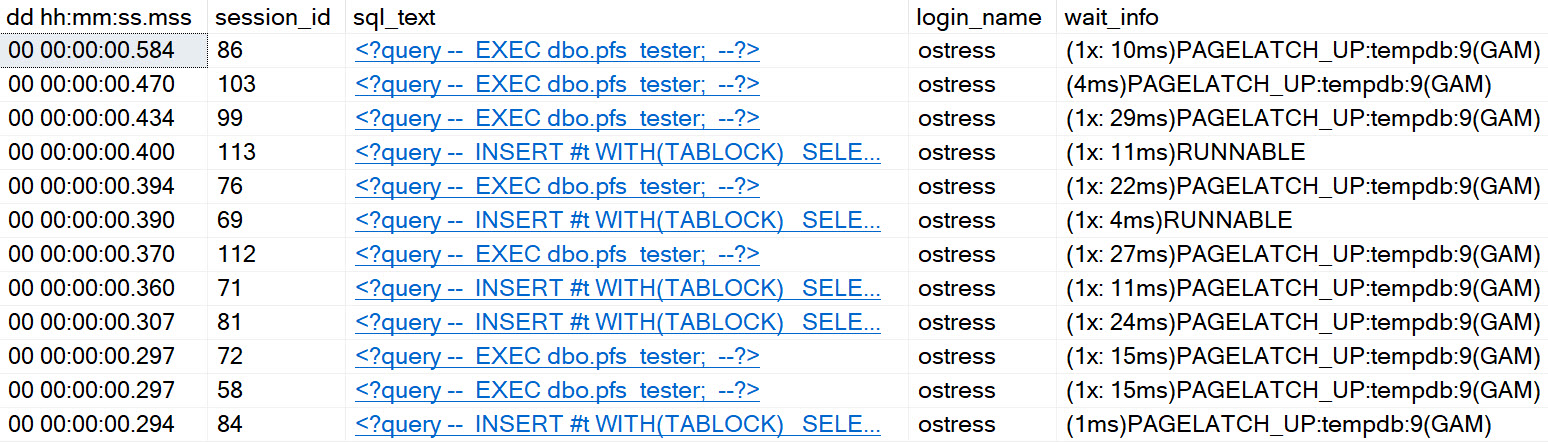
Even on SQL Server 2019, with in-memory tempdb metadata enabled, and an appropriate number of evenly sized data files, you can experience certain types of contention in tempdb.
It’s better. It’s definitely and totally better, but it’s still there. With that in mind, I wrote a stored procedure that you can stick in your favorite stress tool, to see how tempdb handles different numbers of concurrent sessions. You can download it here, on GitHub.
If you need a tool to run a bunch of concurrent sessions against SQL Server, my favorite two free ones are:
If you’re on < SQL Server 2016, you might need trace flags 1117 and 1118
You might have a bunch of other stuff hemming up tempdb, too
Check out this video for some other things that can cause problems too.
Thanks for reading!
Going Further
If this is the kind of SQL Server stuff you love learning about, you’ll love my training. Blog readers get 25% off the Everything Bundle — over 100 hours of performance tuning content. Need hands-on help? I offer consulting engagements from targeted investigations to ongoing retainers. Want a quick sanity check before committing to a full engagement? Schedule a call — no commitment required.
Filtered indexes are really interesting things. Just slap a where clause on your index definition, and you can do all sorts of helpful stuff:
Isolate hot data
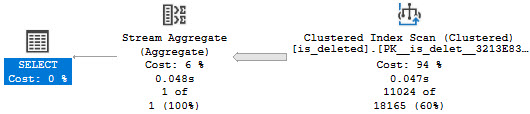
Make soft delete queries faster
Get a histogram specific to the span of data you care about
Among other things, of course. There are some annoying things about them though.
They only work with specific ANSI options
If you don’t include the filter definition columns in the index, it might not get used
They only work when queries use literals, not parameters or variables
Majorly
Part of the optimizer’s process consists of expression matching, where things like computed columns, filtered indexes, and indexed views are considered for use in your query.
I mean, if you have any of them. If you don’t, it probably just stares inwardly for a few nanoseconds, wondering why you don’t care about it.
Something that this part of the process is terrible at is any sort of “advanced” expression matching. It has to be exact, or you get whacked.
Here’s an example:
DROP TABLE IF EXISTS dbo.is_deleted;

CREATE TABLE dbo.is_deleted
(
    id int PRIMARY KEY,
    dt datetime NOT NULL,
    thing1 varchar(50) NOT NULL,
    thing2 varchar(50) NOT NULL,
    is_deleted bit NOT NULL
);

INSERT dbo.is_deleted WITH(TABLOCK)
(
    id,
    dt,
    thing1,
    thing2,
    is_deleted
)
SELECT
    x.n,
    DATEADD(MINUTE, x.n, GETDATE()),
    SUBSTRING(x.text, 0, 50),
    SUBSTRING(x.text, 0, 50),
    x.n % 2
FROM (
SELECT
    ROW_NUMBER() OVER
    (
        ORDER BY 1/0
    ) AS n,
    m.*
FROM sys.messages AS m
) AS x;

CREATE INDEX isd
ON dbo.is_deleted
    (dt)
INCLUDE
    (is_deleted)
WHERE
    (is_deleted = 0);
Overly
If you run that setup script, you’ll get yourself a table that’s ripe for a filtered index on the is_deleted column.
But it doesn’t work with every type of query pattern. Some people are super fancy and want to find NOTs!
SELECT
    COUNT_BIG(*) AS records
FROM dbo.is_deleted AS id
WHERE id.dt >= GETDATE() + 200
AND   (NOT 1 = id.is_deleted)
AND   1 = (SELECT 1);
I have the 1 = (SELECT 1) in there for reasons. But we still get no satisfaction.
hurtin
If we try to force the matter, we’ll get an error!
SELECT
    COUNT_BIG(*) AS records
FROM dbo.is_deleted AS id WITH(INDEX = isd)
WHERE id.dt >= GETDATE() + 200
AND   (NOT 1 = id.is_deleted)
AND   1 = (SELECT 1);
The optimizer says non.
Msg 8622, Level 16, State 1, Line 84
Query processor could not produce a query plan because of the hints defined in this query.
Resubmit the query without specifying any hints and without using SET FORCEPLAN.
It has no problem with this one, though.
SELECT
    COUNT_BIG(*) AS records
FROM dbo.is_deleted AS id
WHERE id.dt >= GETDATE() + 200
AND   (0 = id.is_deleted)
AND   1 = (SELECT 1);
Underly
It would be nice if there were some more work put into filtered indexes to make them generally more useful.
In much the same way that a general set of contradictions can be detected, simple things like this could be too.
Computed columns have a similar issue, where if the definition is col1 + col2, a query looking at col2 + col1 won’t pick it up.
It’s a darn shame that such potentially powerful tools don’t get much love.
Thanks for reading!
Going Further
If this is the kind of SQL Server stuff you love learning about, you’ll love my training. Blog readers get 25% off the Everything Bundle — over 100 hours of performance tuning content. Need hands-on help? I offer consulting engagements from targeted investigations to ongoing retainers. Want a quick sanity check before committing to a full engagement? Schedule a call — no commitment required.
But isnull has some particular capabilities that are interesting, despite its limitations: only two arguments, specific to SQL Server, and uh… well, we can’t always get three reasons, as a wise man once said.
There is one thing that makes isnull interesting in certain scenarios. Let’s look at a couple.
Green Easy
First, we’re gonna need an index.
CREATE INDEX party
ON dbo.Votes
    (CreationDate, VoteTypeId)
INCLUDE
    (UserId);
Yep, we’ve got an index. Survival of the fittest.
Here are some queries to go along with it. Wouldn’t want our index getting lonely, I suppose.
All that disk entropy is probably scary enough.
SELECT TOP (10)
    u.DisplayName
FROM dbo.Users AS u
WHERE NOT EXISTS
(
    SELECT
        1/0
    FROM dbo.Votes AS v
    WHERE v.UserId = u.Id
    AND v.VoteTypeId IN (1, 2, 3)
    AND ISNULL(v.CreationDate, '19000101') > '20131201'
)
ORDER BY u.CreationDate DESC;

SELECT TOP (10)
    u.DisplayName
FROM dbo.Users AS u
WHERE NOT EXISTS
(
    SELECT
        1/0
    FROM dbo.Votes AS v
    WHERE v.UserId = u.Id
    AND v.VoteTypeId IN (1, 2, 3)
    AND COALESCE(v.CreationDate, '19000101') > '20131201'
)
ORDER BY u.CreationDate DESC;
Pager Back
The first query uses isnull, and the second query uses coalesce. Just in case that wasn’t obvious.
I know, I know — I’ve spent a long time over here telling you not to use isnull in your where clause, lest ye suffer the greatest shame to exist, short of re-gifting to the original gift giver.
Usually, when you wrap a column in a function like that, bad things happen. Seeks turn into Scans, wine turns into water, spaces turn into tabs, the face you remember from last call turns into a November Jack O’Lantern.
But in this case, the column wrapped in our where clause, which is the leading column of the index, is not nullable.
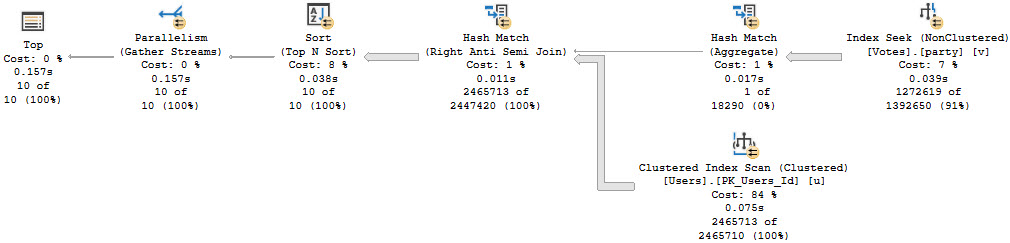
SQL Server’s optimizer, having its act together, can figure this out and produce an Index Seek plan.
you’ll live forever
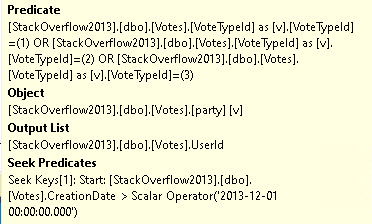
The null check is discarded, and end up with a Seek to the CreationDate values we care about, and a Residual Predicate on VoteTypeId.
goodness
Big Famous
The second query, the one that uses coalesce, has a few things different about it. Let’s cut to the plan.
butcher
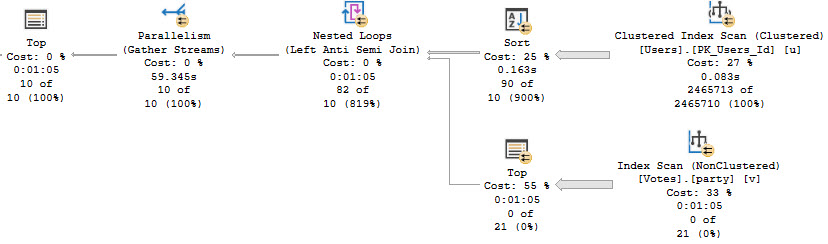
Rather than 157ms, this query runs for over a minute by five seconds. All of the time is spent in the Top > Index Scan. We no longer get an Index Seek, either.
burdened
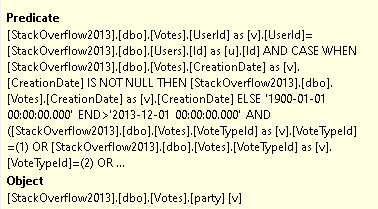
Notice that the predicate on CreationDate is a full-on case expression, checking for null-ness. This could be an okay scenario if we had something to Seek to, but without proper indexing and properly written queries, it’s el disastero.
The reason that the query changes is due to the optimizer deciding that a row goal would make things better. This is why we have a Nested Loops Join, and the Top > Index Scan. It doesn’t work out very well.
This isn’t the only time you might see this, but it’s probably the worst.
SELECT TOP (10)
    u.DisplayName
FROM dbo.Users AS u
LEFT JOIN dbo.Votes AS v
    ON  v.UserId = u.Id
    AND v.VoteTypeId IN (1, 2, 3)
    AND ISNULL(v.CreationDate, '19000101') > '20131201'
WHERE v.Id IS NULL
ORDER BY u.CreationDate DESC;

SELECT TOP (10)
    u.DisplayName
FROM dbo.Users AS u
LEFT JOIN dbo.Votes AS v
    ON  v.UserId = u.Id
    AND v.VoteTypeId IN (1, 2, 3)
    AND COALESCE(v.CreationDate, '19000101') > '20131201'
WHERE v.Id IS NULL
ORDER BY u.CreationDate DESC;
It’s not as bad here, but it’s still noticeable.
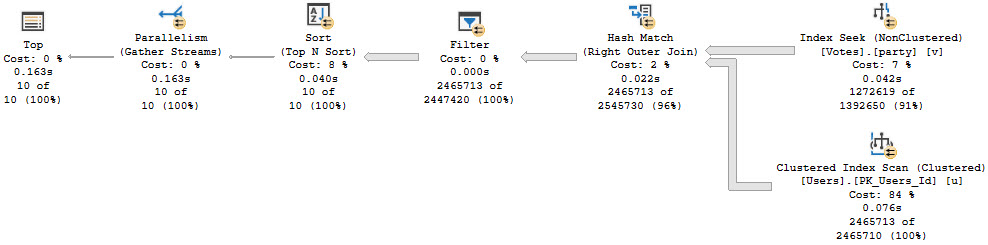
The plan with isnull looks about like so:
you’re fast
At 163ms, there’s not a lot to complain about here.
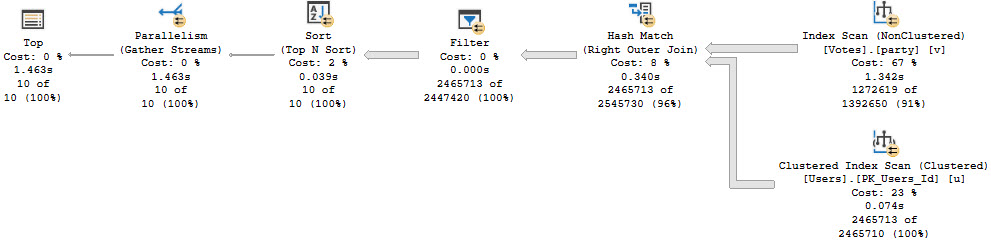
The coalesce version does far worst, at just about 1.5 seconds.
gasp!
We Learned Some Things
In SQL Server, using functions in where clauses is generally on the naughty list. In a narrow case, using the built-in isnull function results in better performance than coalesce on columns that are not nullable.
This pattern should generally be avoided, of course. On columns that are nullable, things can really go sideways in either case. Of course, this matters most when the function results in an otherwise possible Index Seek is impossible, and we can only use an Index Scan to find rows.
An additional consideration is when we can Seek to a very selective set of rows first. Say we can get things down to (for the purposes of explanation only) around 1000 rows with a predicate like Score > 10000.
For the remaining 1000 rows, it’s not likely that an additional Predicate like the ones we saw today would have added any drama to the execution time of a relatively simple query.
They may, however, lead to poor cardinality estimates in more complicated queries.
Thanks for reading!
Going Further
If this is the kind of SQL Server stuff you love learning about, you’ll love my training. Blog readers get 25% off the Everything Bundle — over 100 hours of performance tuning content. Need hands-on help? I offer consulting engagements from targeted investigations to ongoing retainers. Want a quick sanity check before committing to a full engagement? Schedule a call — no commitment required.
While I was answering a question, I had to revisit what happens when using different flavors of recompile hints with stored procedure when they call inner stored procedures. I like when this happens, because there are so many little details I forget.
Anyway, the TL;DR is that if you have nested stored procedures, recompiling only recompiles the outer one. The inner procedures — really, I should say modules, because it includes other objects that compile query plans — but hey. Now you know what I should have said.
If you want to play around with the tests, you’ll need to grab sp_BlitzCache. I’m too lazy to write plan cache queries from scratch.
Testament
The procedures:
CREATE OR ALTER PROCEDURE dbo.inner_sp
AS
BEGIN

    SELECT
        COUNT_BIG(*) AS records
    FROM sys.master_files AS mf;
END;
GO

CREATE OR ALTER PROCEDURE dbo.outer_sp
--WITH RECOMPILE /*toggle this to see different behavior*/
AS
BEGIN

    SELECT
        COUNT_BIG(*) AS records
    FROM sys.databases AS d;

    EXEC dbo.inner_sp;

END;
GO
The tests:
--It's helpful to run this before each test to clear out clutter
DBCC FREEPROCCACHE;

--Look at this with and without
--WITH RECOMPILE in the procedure definition
EXEC dbo.outer_sp;

--Take out the proc-level recompile and run this
EXEC dbo.outer_sp WITH RECOMPILE;

--Take out the proc-level recompile and run this
EXEC sp_recompile 'dbo.outer_sp';
EXEC dbo.outer_sp;

--You should run these between each test to verify behavior
--If you just run them here at the end, you'll be disappointed
EXEC sp_BlitzCache
    @DatabaseName = 'Crap',
    @QueryFilter = 'procedure',
    @SkipAnalysis = 1,
    @HideSummary = 1;

EXEC sp_BlitzCache
    @DatabaseName = 'Crap',
    @QueryFilter = 'statement',
    @SkipAnalysis = 1,
    @HideSummary = 1;
Whatchalookinat?
After each of these where a recompile is applied, you should see the inner proc/statement in the BlitzCache results, but not the outer procedure.
It’s important to understand behavior like this, because recompile hints are most often used to help investigate parameter sniffing issues. If it’s taking place in nested stored procedure calls, you may find yourself with a bunch of extra work to do or needing to re-focus your use of recompile hints.
Of course, this is why I much prefer option recompile hints on problem statements. You get much more reliable behavior.
For instances running at least SQL Server 2008 build 2746 (Service Pack 1 with Cumulative Update 5), using OPTION (RECOMPILE) has another significant advantage over WITH RECOMPILE: Only OPTION (RECOMPILE) enables the Parameter Embedding Optimization.
Thanks for reading!
Going Further
If this is the kind of SQL Server stuff you love learning about, you’ll love my training. Blog readers get 25% off the Everything Bundle — over 100 hours of performance tuning content. Need hands-on help? I offer consulting engagements from targeted investigations to ongoing retainers. Want a quick sanity check before committing to a full engagement? Schedule a call — no commitment required.
CPUs aren’t normally expensive, but ask them to run a query and the cost skyrockets. It doesn’t matter where you are in the world or in the cloud, prepare to get gouged.
You’d think SQL Server was an Hermes purse.
Life is a bit worse in the cloud, where CPU count and RAM amount are inexorably tied together. Sure, Azure offers constrained vCPU instances that help with that, but still.
Money is expensive, and it never goes on sale.
Slacker
If your CPU load stays consistently under 20%, and you don’t need a bunch of cushion for regularly scheduled tasks like ETL or ELT or LET me write a sentence before changing the acronym, then what’s the point of all those CPUs?
I’m not saying they have to run at 100% and you should be using them to air fry your Hot Pockets, but what’s wrong with running at 40-60%? That still leaves you a good bit of free ticks and cycles in case a parameter gets poorly sniffed or some other developer disaster befalls your server.
When a workload is pretty well-tuned, you should focus on right-sizing hardware rather than staring at your now-oversized hardware.
Bragging Rights
It’s often quite an achievement to say that you tuned this and that and got CPU down from 80% to 20%, but now what?
Can you give back some cores to the VM host? Consolidate workloads? Move to a smaller instance size?
Fashion models are great, but they’re not great role models for servers. CPUs should not be sitting around being expensive and bored.
Thanks for reading!
Going Further
If this is the kind of SQL Server stuff you love learning about, you’ll love my training. Blog readers get 25% off the Everything Bundle — over 100 hours of performance tuning content. Need hands-on help? I offer consulting engagements from targeted investigations to ongoing retainers. Want a quick sanity check before committing to a full engagement? Schedule a call — no commitment required.
I don’t really mean that unrelated queries block each other, but it sure does look like they do.
Implicit Transactions are really horrible surprises, but are unfortunately common to see in applications that use JDBC drivers to connect to SQL Server, and especially with applications that are capable of using other database platforms like Oracle as a back-end.
The good news is that in the latter case, support for using Read Committed Snapshot Isolation (RCSI) is there to alleviate a lot of your problems.
Problem, Child
Let’s start with what the problem looks like.
awkward
A couple unrelated select queries are blocking each other. One grabbing rows from the Users table, one grabbing rows from the Posts table.
This shouldn’t be!
Even if you run sp_WhoIsActive in a way to try to capture more of the command text than is normally shown, the problem won’t be obvious.
sp_WhoIsActive
    @get_locks = 1;
GO

sp_WhoIsActive
    @get_locks = 1,
    @get_full_inner_text = 1,
    @get_outer_command = 1;
GO
What Are Locks?
If we look at the details of the locks column from the output above, we’ll see the select query has locks on Posts:
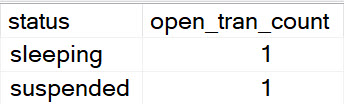
We may also note something else quite curious about the output. The select from Users is sleeping, with an open transaction.
melatonin
How It Happens
The easiest way to show you is with plain SQL commands, but often this is a side effect of your application connection string.
In one window, step through this:
--Run this and stop
SET IMPLICIT_TRANSACTIONS ON;

--Run this and stop
UPDATE p
    SET p.ClosedDate = SYSDATETIME()
FROM dbo.Posts AS p
WHERE p.Id = 11227809;

--Run this and stop
SELECT TOP (10000)
    u.*
FROM dbo.Users AS u
WHERE u.Reputation = 2
ORDER BY u.Reputation DESC;

--Don't run these last two until you look at sp_WhoIsActive
IF @@TRANCOUNT > 0 ROLLBACK;

SET IMPLICIT_TRANSACTIONS OFF;
In another window, run this:
--Run this and stop
SET IMPLICIT_TRANSACTIONS ON;

--Run this and stop
SELECT TOP (100)
    p.*
FROM dbo.Posts AS p
WHERE p.ParentId = 0
ORDER BY p.Score DESC;

--Don't run these last two until you look at sp_WhoIsActive
IF @@TRANCOUNT > 0 ROLLBACK;

SET IMPLICIT_TRANSACTIONS OFF;
How To Fix It
Optimistically:
If you’re using implicit transactions, and queries execute together, you won’t always see the full batch text. At best, the application will be written so that queries using implicit transactions will close out immediately. At worst, there will be some bug, or some weird connection pooling going on so that sessions never actually commit and release their locks.
Fortunately, using an optimistic isolation level alleviates the issue, since readers and writers don’t block each other. RCSI is the easiest for this situation usually, because Snapshot Isolation (SI) requires queries to request it specifically.
Of course, if you’re issuing other locking hints at the query level already that enforce more strict isolation levels, like READCOMMITEDLOCK, HOLDLOCK/SERIALIZABLE, or REPEATABLE READ, RCSI won’t help. It will be overruled, unfortunately.
Programmatically:
You could very well be using this in your connection string by accident. If you have control over this sort of thing, change the gosh darn code to stop using it. You probably don’t need to be doing this, anyway. If for some reason you do require it, you probably need to dig a bit deeper in a few ways:
Is there a bug in your code that’s causing queries not to commit?
Going a little deeper, there could also be some issues with indexes, or the queries that are modifying data that are contributing to excess locking. Again, RCSI is a quick fix, and changing the connection string is a good idea if you can do it, but don’t ignore these long-term.
Thanks for reading!
Going Further
If this is the kind of SQL Server stuff you love learning about, you’ll love my training. Blog readers get 25% off the Everything Bundle — over 100 hours of performance tuning content. Need hands-on help? I offer consulting engagements from targeted investigations to ongoing retainers. Want a quick sanity check before committing to a full engagement? Schedule a call — no commitment required.
I’ve been working with CDC and CT way too much, and even I’m annoyed with how much it’s coming out in blog posts.
I’m going to cover a lot of ground quickly here. If you get lost, or there’s something you don’t understand, your best bet is to reference the documentation to get caught up.
The idea of this post is to show a few different concepts at once, with one final goal:
How to see if a specific column was updated
How to get just the current change information about a table
How to add information about user and time modified
How to add information about which procedure did the modification
The first thing we’re gonna do is get set up.
ALTER DATABASE Crap
    SET CHANGE_TRACKING = ON;
GO

USE Crap;
GO

--Bye Bye
DROP TABLE IF EXISTS dbo.user_perms;

--Oh, hello
CREATE TABLE dbo.user_perms
(
    permid int,
    userid int,
    permission varchar(20),
    CONSTRAINT pu PRIMARY KEY CLUSTERED (permid)
);

--Turn on CT first this time
ALTER TABLE dbo.user_perms
    ENABLE CHANGE_TRACKING
    WITH (TRACK_COLUMNS_UPDATED = ON);
With that done, let’s stick some rows in the table, and see what we have for changes.
--Insert some rows
INSERT
    dbo.user_perms(permid, userid, permission)
SELECT
    x.c,
    x.c,
    CASE WHEN x.c % 2 = 0
         THEN 'db_datareader'
         ELSE 'sa'
    END
FROM
(
    VALUES (1),(2),(3),(4),(5),
           (6),(7),(8),(9),(10)
) AS x(c);

--What's in the table?
SELECT
    cc.*
FROM dbo.user_perms AS cc

--What's in Change Tracking?
SELECT
    ct.*
FROM CHANGETABLE(CHANGES dbo.user_perms, 0) AS ct;
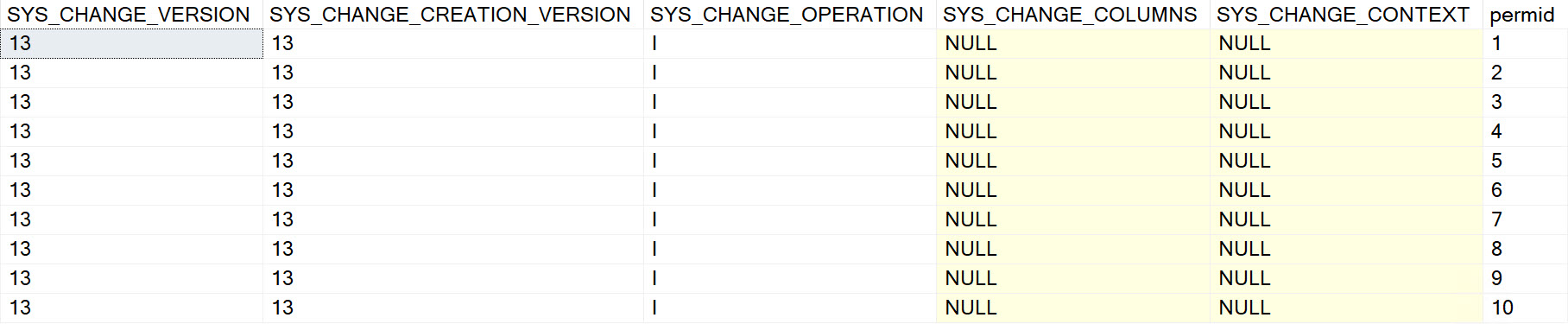
This is what the output look like:
would you do it again?
What Changed?
To find this out, we need to look at CHANGE_TRACKING_IS_COLUMN_IN_MASK, but there’s a caveat about this: it only shows up if you look at specific versions of the changed data. If you just pass null or zero into CHANGETABLE, you won’t see that.
Let’s update and check on some things.
--Update one row, change it to 'sa'
UPDATE up
  SET up.permission = 'sa'
FROM dbo.user_perms AS up
WHERE up.permid = 2;

--No update?
SELECT
    ct.*
FROM CHANGETABLE(CHANGES dbo.user_perms, NULL) AS ct;

--No update?
SELECT
    ct.*
FROM CHANGETABLE(CHANGES dbo.user_perms, 0) AS ct;
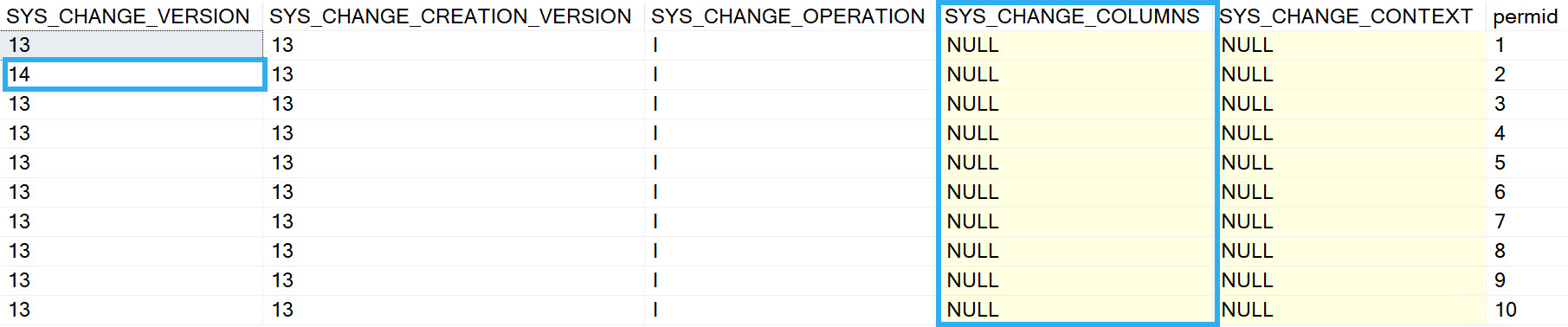
We updated a row, but if we look at the wrong version, we won’t see the change:
hrm
But we will see that permid = 2 has a different change version than the rest of the rows.
Zooming In
If we want to see the version of things with our change, we need to figure out the current version change tracking has stored. This is database-level, but it’s also… wrong.
The max version always seems to be one version too high. Doing this will return nothing from CHANGETABLE:
--No update?
DECLARE @ctcv bigint = (SELECT CHANGE_TRACKING_CURRENT_VERSION());
SELECT  @ctcv AS CHANGE_TRACKING_CURRENT_VERSION;

SELECT
    ct.*
FROM CHANGETABLE(CHANGES dbo.user_perms, @ctcv) AS ct;
GO
To get data back that we care about, we need to do advanced maths and subtract 1 from the current version.
--No update?
DECLARE @ctcv bigint =
    (SELECT CHANGE_TRACKING_CURRENT_VERSION() -1);
SELECT  @ctcv AS CHANGE_TRACKING_CURRENT_VERSION;

SELECT
    ct.*,
    CHANGE_TRACKING_IS_COLUMN_IN_MASK
    (COLUMNPROPERTY(OBJECT_ID('dbo.user_perms'),
                    'permission',
                    'ColumnId'),
                    ct.SYS_CHANGE_COLUMNS) AS is_permission_column_in_mask
FROM CHANGETABLE(CHANGES dbo.user_perms, @ctcv) AS ct;
family ties
This is also when we need to bring in CHANGE_TRACKING_IS_COLUMN_IN_MASK to figure out if the permission column was updated.
Audacious
The next thing we’ll wanna do is tie an update to a particular user. We can do that with CHANGE_TRACKING_CONTEXT.
As a first example, let’s just get someone’s user name when they run an update.
--Update one row, change it to 'sa'
DECLARE @ctc varbinary(128) =
    (SELECT CONVERT(varbinary(128), SUSER_NAME()));

WITH CHANGE_TRACKING_CONTEXT (@ctc)
UPDATE up
  SET up.permission = 'sa'
FROM dbo.user_perms AS up
WHERE up.permid = 4;
To validate things a little, we’re gonna join the results of the CHANGETABLE function to the base table.
SELECT
    up.permid,
    up.userid,
    up.permission,
    ct.SYS_CHANGE_VERSION,
    ct.SYS_CHANGE_OPERATION,
    CONVERT(sysname, ct.SYS_CHANGE_CONTEXT) as 'SYS_CHANGE_CONTEXT'
FROM CHANGETABLE (CHANGES dbo.user_perms, 0) AS ct
LEFT OUTER JOIN dbo.user_perms AS up
    ON ct.permid = up.permid;
what is this.
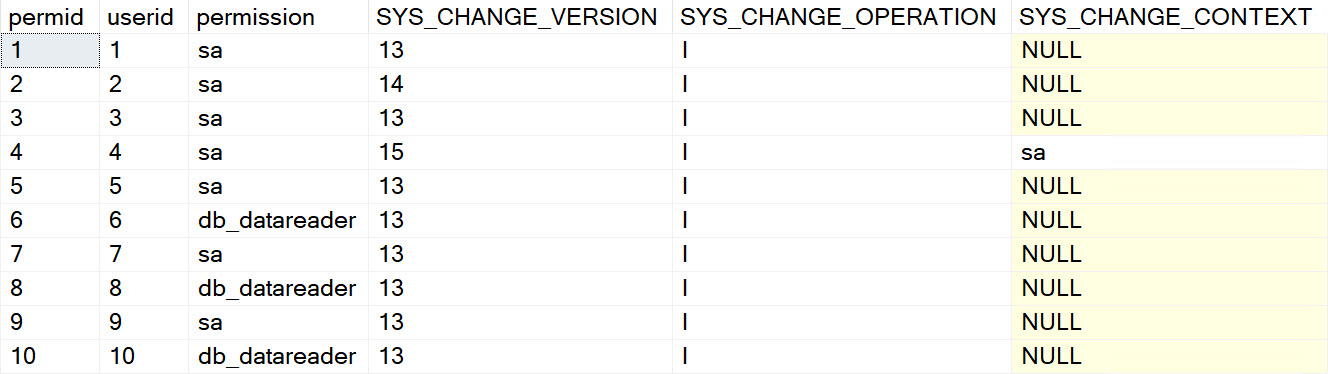
We get sa back from SYS_CHANGE_CONTEXT, so that’s nice. But we’re doing this a bit naively, because the SYS_CHANGE_OPERATION column is telling us that sa inserted that row.
That’s… technically wrong. But it’s wrong because we’re looking at the wrong version. This solution definitely isn’t perfect unless you really only dig into the most recent rows. Otherwise, you might blame the wrong person for the wrong thing.
Let’s add a little more information in, and get the right row out. We’re gonna go a step further and add a date to the context information.
--Update one row, change it to 'sa'
DECLARE @ctc varbinary(128) =
    (SELECT CONVERT(varbinary(128),
                        'User: ' +
                        SUSER_NAME() +
                        ' @ ' +
                        CONVERT(varchar(30), SYSDATETIME())) );

WITH CHANGE_TRACKING_CONTEXT (@ctc)
UPDATE up
  SET up.permission = 'sa'
FROM dbo.user_perms AS up
WHERE up.permid = 6;


DECLARE @ctcv bigint =
    (SELECT CHANGE_TRACKING_CURRENT_VERSION() -1);
SELECT  @ctcv AS CHANGE_TRACKING_CURRENT_VERSION;

SELECT
    up.permid,
    up.userid,
    up.permission,
    ct.SYS_CHANGE_VERSION,
    ct.SYS_CHANGE_CREATION_VERSION,
    ct.SYS_CHANGE_OPERATION,
    ct.SYS_CHANGE_COLUMNS,
    CONVERT(sysname, ct.SYS_CHANGE_CONTEXT) as 'SYS_CHANGE_CONTEXT'
FROM CHANGETABLE (CHANGES dbo.user_perms, @ctcv) AS ct
LEFT OUTER JOIN dbo.user_perms AS up
    ON ct.permid = up.permid;
GO
talk is cheap
Cool! Now we have the right operation, and some auditing information correctly associated with it.
Proc-nosis Negative
To add in one more piece of information, and tie things all together, we’re going to add in a stored procedure name. You could do this with a string if you wanted to identify app code, too. Just add something in like Query: dimPerson or whatever you want to call the section of code generated the update.
CREATE OR ALTER PROCEDURE dbo.ErikIsSickOfChangeTracking
AS
BEGIN
SET NOCOUNT, XACT_ABORT ON;

DECLARE @ctc varbinary(128) =
    (SELECT CONVERT(varbinary(128),
                        'User: ' +
                        SUSER_NAME() +
                        ' @ ' +
                        CONVERT(varchar(30), SYSDATETIME()) +
                        ' with ' +
                        OBJECT_NAME(@@PROCID)) );

WITH CHANGE_TRACKING_CONTEXT (@ctc)
UPDATE up
  SET up.permission = 'sa'
FROM dbo.user_perms AS up
WHERE up.permid = 8;

DECLARE @ctcv bigint =
    (SELECT CHANGE_TRACKING_CURRENT_VERSION() -1);
SELECT  @ctcv AS CHANGE_TRACKING_CURRENT_VERSION;

SELECT
    up.permid,
    up.userid,
    up.permission,
    ct.SYS_CHANGE_VERSION,
    ct.SYS_CHANGE_CREATION_VERSION,
    ct.SYS_CHANGE_OPERATION,
    CHANGE_TRACKING_IS_COLUMN_IN_MASK
        (COLUMNPROPERTY(OBJECT_ID('dbo.user_perms'),
                        'permission',
                        'ColumnId'),
                        ct.SYS_CHANGE_COLUMNS) AS is_column_in_mask,
    ct.SYS_CHANGE_COLUMNS,
    CONVERT(sysname, ct.SYS_CHANGE_CONTEXT) as 'SYS_CHANGE_CONTEXT'
FROM CHANGETABLE (CHANGES dbo.user_perms, @ctcv) AS ct
LEFT OUTER JOIN dbo.user_perms AS up
    ON ct.permid = up.permid;

END;

EXEC dbo.ErikIsSickOfChangeTracking;
Which will give us…
soap opera
It’s Over
I don’t think I have anything else to say about Change Tracking right now.
Thanks for reading!
Going Further
If this is the kind of SQL Server stuff you love learning about, you’ll love my training. Blog readers get 25% off the Everything Bundle — over 100 hours of performance tuning content. Need hands-on help? I offer consulting engagements from targeted investigations to ongoing retainers. Want a quick sanity check before committing to a full engagement? Schedule a call — no commitment required.
Sometimes documentation is overwhelming, and it’s easy to miss important distinctions between features.
One thing I’ve seen people run into is that these two technologies have very different relationships with Partitioning.
Now, I know this isn’t going to be the most common scenario, but often when you find people doing rocket surgeon stuff like tracking data changes, there are lots of other features creeping around.
Change Data Capture Lets You Choose
When you run sys.sp_cdc_enable_table to enable Change Data Capture for a table, there’s a parameter to allow for Partition Switching.
It’s fittingly named @allow_partition_switch — and it’s true by default.
That means if you’re using CDC, and you get an error while trying to switch partitions, it’s your fault. You can fix it by disabling and re-enabling CDC with the correct parameter here.
EXEC sys.sp_cdc_disable_table
    @source_schema = 'dbo',
    @source_name = 'ct_part',
    @capture_instance = 'dbo_ct_part';

EXEC sys.sp_cdc_enable_table
    @source_schema = 'dbo',
    @source_name = 'ct_part',
    @role_name = NULL, --or whatever you used before
    @allow_partition_switch = 1;
Change Tracking Just Says No
To demo things a little:
CREATE PARTITION FUNCTION ct_func (int)
AS RANGE LEFT FOR VALUES
    (1, 2, 3, 4, 5);
GO

CREATE PARTITION SCHEME ct_scheme
AS PARTITION ct_func
    ALL TO([PRIMARY]);
GO
We don’t need anything fancy for the partitioning function/scheme, or the tables:
CREATE TABLE dbo.ct_part
(
    id int PRIMARY KEY CLUSTERED ON ct_scheme(id),
    dt datetime
);

CREATE TABLE dbo.ct_stage
(
    id int PRIMARY KEY,
    dt datetime
);
Now we flip on Change Tracking:
ALTER TABLE dbo.ct_part
    ENABLE CHANGE_TRACKING
    WITH (TRACK_COLUMNS_UPDATED = ON);
We can get a little bit fancy with how we stick data into the table (ha ha ha), and how we figure out what the “highest” partition number is so we can try to switch it out.
INSERT
    dbo.ct_part(id, dt)
SELECT
    x.c,
    x.c
FROM
(
    VALUES (1),(2),(3),(4),(5)
) AS x(c);

SELECT
    c.*
FROM dbo.ct_part AS c
CROSS APPLY
(
    VALUES($PARTITION.ct_func(c.id))
) AS cs (p_id);
Since we (probably against most best practices) have five partitions, all with one row in them, our highest partition number will be five.
If we try to switch data out into our staging table, we’ll get an error message:
ALTER TABLE dbo.ct_part
    SWITCH PARTITION 5 TO dbo.ct_stage;

Msg 4900, Level 16, State 2, Line 62
The ALTER TABLE SWITCH statement failed for table 'Crap.dbo.ct_part'.
It is not possible to switch the partition of a table that has change tracking enabled.
Disable change tracking before using ALTER TABLE SWITCH.
We could disable Change Tracking here, do the switch, and flip it back on, but then we’d lose all the tracking data.
SELECT
    ct.*
FROM CHANGETABLE(CHANGES dbo.ct_part, 0) AS ct;

ALTER TABLE dbo.ct_part
    DISABLE CHANGE_TRACKING;

ALTER TABLE dbo.ct_part
    SWITCH PARTITION 5 TO dbo.ct_stage;

ALTER TABLE dbo.ct_part
    ENABLE CHANGE_TRACKING
    WITH (TRACK_COLUMNS_UPDATED = ON);

SELECT
    ct.*
FROM CHANGETABLE(CHANGES dbo.ct_part, 0) AS ct;
hello goodbye
Is This A Dealbreaker?
This depends a lot on how you’re using the data in Change Tracking tables, and whether or not you can lose all the data in there every time you switch data out.
If processes that rely on the data in there have all completed, and you’re allowed to start from scratch, you’re fine. Otherwise, Change Tracking might not be the solution for you. Similarly, Temporal Tables don’t do so well with Partition Switching either.
Change Data Capture handles partition switching just fine, though. It’s a nice perk, and for some people it narrows the choices down to one immediately.
Thanks for reading!
Going Further
If this is the kind of SQL Server stuff you love learning about, you’ll love my training. Blog readers get 25% off the Everything Bundle — over 100 hours of performance tuning content. Need hands-on help? I offer consulting engagements from targeted investigations to ongoing retainers. Want a quick sanity check before committing to a full engagement? Schedule a call — no commitment required.