Most scripts (even ones I’ve worked on!) that look at the plan cache, have had the ability to sort it by different metrics: CPU, reads, writes, duration, etc.
A lot of people are very interested in long running queries — and I am too!
Heck, they’re how I make money. Blogging pays like crap.
But there’s a slight problem with only looking at query duration.
Fake Locks
Let’s say I have a stored procedure that looks like this:
CREATE OR ALTER PROCEDURE dbo.dblock (@id INT)
AS
BEGIN
    BEGIN TRAN
        UPDATE u
        SET u.Reputation = 2147483647
        FROM dbo.Users AS u
        WHERE u.Id = @id

        WAITFOR DELAY '00:00:07.000'
    ROLLBACK
END;
GO
It’s there to simulate a long running modification query. You know, the kind of thing that’ll lead to blocking.
The kind of blocking that can make other queries feel like they take a long time.
Street Team
Here’s another stored procedure:
CREATE OR ALTER PROCEDURE dbo.the_lox (@id INT)
AS
BEGIN
    SELECT u.Id
    FROM dbo.Users AS u
    WHERE u.Id = @id
END;
GO
This will finish instantly. The Id column of the Users table is the Primary Key, as well as the Clustered Index.
There is literally nothing to tune here.
But it may look like it, sometimes…
D’evils
If I run these in different windows, the lox will be blocked by dblock.
--One Window
EXEC dbo.dblock @id = 22656;
GO

--Other window
EXEC dbo.the_lox @id = 22656;
GO
If you were wondering why I had a 7 second wait, it’s because it generally takes me two seconds to flip windows and run a query.
When the situation resolves, this is what the metrics look like:
SELECT OBJECT_NAME(deps.object_id) AS stored_procedure_name,
       ( deps.last_worker_time / 1000. ) AS cpu_time,
       ( deps.last_elapsed_time / 1000. ) AS run_time
FROM   sys.dm_exec_procedure_stats AS deps
WHERE  deps.object_id = OBJECT_ID('dbo.the_lox');
GO
Everything You Got
The query barely used any CPU, but it ran for 5 seconds.
If you order your plan cache by elapsed time, you might see blameless queries up at the top.
There are a lot of reasons why they could end up there, and blocking is one of them.
Unfortunately, there’s currently nothing to tell you why. If you’re just getting started with query tuning, this could look befuddling.
Are Averages Better?
Sometimes it helps to look at what runs for a long time on average — you can figure that out by looking at the number of executions.
That can make better sense of things, but not if a query has only run once, or if it gets blocked a lot.
It may make more sense to factor in metrics that represent physical work, like CPU, reads, or writes, rather than just relying purely on wall clock time.
Thanks for reading!
Going Further
If this is the kind of SQL Server stuff you love learning about, you’ll love my training. Blog readers get 25% off the Everything Bundle — over 100 hours of performance tuning content. Need hands-on help? I offer consulting engagements from targeted investigations to ongoing retainers. Want a quick sanity check before committing to a full engagement? Schedule a call — no commitment required.
A KB article was recently published that suggested that memory time-out behavior was changed for CCI inserts:
When you try to create a Columnstore Index on a table in Microsoft SQL Server 2016 or 2017, the request may fail after 25 seconds with memory time-out error 8645, depending on how many memory consuming queries are running concurrently and/or how much memory is available at the time of the request. The memory time-out error may occur even when you configure longer memory request time-out at an instance level or at a resource pool level.
I’ve never seen that error occur for serial inserts. Serial inserts time out after 25 seconds and execute with minimum required memory. They write directly to the delta store instead of attempting compression. So it looked like this change affects parallel inserts but the details weren’t at all clear to me.
Time out for time-outs
Why should we care about memory grant timeouts for CCI insert queries? Simply put, lots of bad things can happen when those queries can time out, both for serial and for parallel inserts. For serial insert queries, I’ve observed deadlocks, extremely poor performance along with long SLEEP_TASK waits, and extremely long rollbacks. For parallel insert queries, I’ve observed queries that run seemingly forever, poor performance of the SELECT part, and error 8645. You probably don’t want any of that occurring in production. It would be very helpful if it was possible to extend the 25 second time-out for queries that insert into columnstore tables.
Time out for time-outs
I’ve found it extremely useful to keep around a 2017 RTM environment with no CUs to figure when issues related to columnstore were introduced into the product. First we’ll take a look at the behavior on 2017 RTM to see error 8645 in action. I want a relatively simple parallel insert query that will run for longer than 25 seconds and will take a large memory grant. I decided on the following query:
INSERT INTO dbo.TARGET_CCI_1 WITH (TABLOCK)
SELECT ca.SLOW, ca.INFLATE_GRANT
FROM (VALUES (0), (1), (2), (3)) v(x)
CROSS APPLY (
	SELECT TOP (1048576) sc.SLOW, sc.INFLATE_GRANT
	FROM dbo.SLOW_TO_COMPRESS sc
	WHERE sc.FOR_SEEKING = v.x
) ca
OPTION (MAXDOP 2);
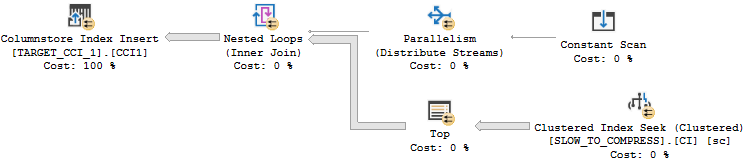
I get the properties that I’m after with a few undocumented tricks. The inflate grant column is a VARCHAR(8000) column. That data type significantly increases the memory grant for parallel inserts even with all NULLs. For the SLOW column, I’m loading integers evenly distributed between 0 and 7999. That data pattern can take longer than expected to compress. The worst case is with around 16000 distinct evenly distributed integers. If you’d like to understand why check out this answer by Paul White. Finally, the CROSS APPLY pattern means that I’ll get demand-based parallelism with each nested loop execution reading exactly enough rows from SLOW_TO_COMPRESS to fill up one rowgroup. It may be helpful to look at the query plan:
The query takes about 40 seconds to execute on my machine. If you’d like to follow along at home, set max server memory to 8000 MB and run the following code:
DROP TABLE IF EXISTS dbo.SLOW_TO_COMPRESS;

CREATE TABLE dbo.SLOW_TO_COMPRESS (
	FOR_SEEKING INT NULL,
	SLOW BIGINT NULL,
	INFLATE_GRANT VARCHAR(8000) NULL
);

CREATE CLUSTERED INDEX CI ON dbo.SLOW_TO_COMPRESS
(FOR_SEEKING);

INSERT INTO dbo.SLOW_TO_COMPRESS WITH (TABLOCK)
SELECT q.RN / 1048576, RN % 10000, NULL
FROM
(
	SELECT TOP (4 * 1048576) -1 + ROW_NUMBER()
		OVER (ORDER BY (SELECT NULL)) RN
	FROM master..spt_values t1
	CROSS JOIN master..spt_values t2
) q
OPTION (MAXDOP 1);

GO

DECLARE @table_id INT = 1,
@sql NVARCHAR(4000);

WHILE @table_id <= 6
BEGIN
	SET @sql = N'DROP TABLE IF EXISTS dbo.TARGET_CCI_'
	 + CAST(@table_id AS NVARCHAR(2))
	 + N'; CREATE TABLE dbo.TARGET_CCI_'
	 + CAST(@table_id AS NVARCHAR(2))
	 + N'(
		SLOW BIGINT NULL,
		INFLATE_GRANT VARCHAR(8000) NULL,
		INDEX CCI1 CLUSTERED COLUMNSTORE
	)';

	EXEC sp_executesql @sql;

	SET @table_id = @table_id + 1;
END;

GO

CREATE OR ALTER PROCEDURE dbo.INSERT_INTO_TARGET_CCI
(@table_id INT)
AS
BEGIN

DECLARE @sql NVARCHAR(4000) = N'INSERT INTO dbo.TARGET_CCI_'
+ CAST(@table_id AS NVARCHAR(2))
+ N' WITH (TABLOCK)
SELECT ca.SLOW, ca.INFLATE_GRANT
FROM (VALUES (0), (1), (2), (3)) v(x)
CROSS APPLY (
	SELECT TOP (1048576) sc.SLOW, sc.INFLATE_GRANT
	FROM SLOW_TO_COMPRESS sc
	WHERE sc.FOR_SEEKING = v.x
) ca
OPTION (MAXDOP 2)';

EXEC sp_executesql @sql;

END;
Error code 8645
Batch files that call sqlcmd are a convenient way to kick off lots of queries. For example:
Note that I do not have Resource Governor enabled. If I kick off five queries at once using the batch file I don’t get an error. After 25 seconds two of the five queries are able to execute with the same memory grant as others:
It does make me uncomfortable to see query memory grants exceed the target memory for the semaphore by so much, but at least it’s not over max server memory:
I ran the same test but kicked off a sixth query in SSMS. After 25 seconds I saw the following error for the sixth query:
Msg 8645, Level 17, State 1, Line 1
A timeout occurred while waiting for memory resources to execute the query in resource pool ‘default’ (2). Rerun the query.
I want my lawyer
On SQL Server 2017 CU14 I ran a variety of tests by changing the memory time-out settings at the Resource Governor query level or at the instance level. I tried different Resource Governor pools and even serial queries. I still saw a timeout of 25 seconds no matter what I did. I contacted the attorney that I keep on retainer to help me interpret SQL Server KB articles. Let’s review the relevant text again:
When you try to create a Columnstore Index on a table in Microsoft SQL Server 2016 or 2017, the request may fail after 25 seconds with memory time-out error 8645, depending on how many memory consuming queries are running concurrently and/or how much memory is available at the time of the request. The memory time-out error may occur even when you configure longer memory request time-out at an instance level or at a resource pool level.
He pointed out that the article doesn’t actually say that the time-out is now configurable. Just that it wasn’t configurable in the past. The symptom may strictly describe error 8645. So perhaps the adjustment was very narrow and has to do with avoiding that error only. Fair enough. I ran the same test that say error 8645 on RTM and the sixth query still hit error 8645.
Two of these things aren’t like the others
Let’s kick off five queries on CU14 and take another look at sys.dm_exec_query_memory_grants:
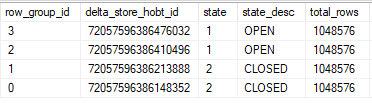
That’s odd. The two queries that hit the 25 second timeout have lower values for max_used_memory_kb than the queries that didn’t time out, even though the memory grants are the same. Looking at sys.dm_db_column_store_row_group_physical_stats for one of the tables with the lower memory grant:
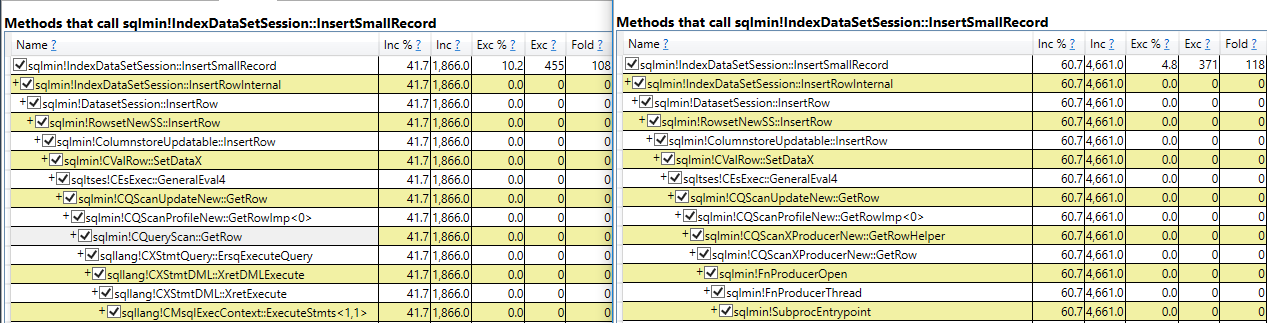
All rows were written to delta stores even though each thread got over 2 million rows. The query still takes its required memory grant but it doesn’t use most of the part reserved for columnstore compression. My best guess is that this is the change described in the KB article. A superficial glance suggests that the internal implementation is the same one used for writing to a delta store in serial:
I think that I can understand the argument for making this change. However, I see intermittent intra-query parallel deadlocks when queries time out in this way:
Msg 1205, Level 13, State 78, Line 1
Transaction (Process ID 61) was deadlocked on lock | communication buffer resources with another process and has been chosen as the deadlock victim. Rerun the transaction.
I’ve also seen this error as well when going too far above target memory:
Msg 701, Level 17, State 123, Line 1
There is insufficient system memory in resource pool ‘default’ to run this query.
Personally, I’d like to see clearly defined behavior that focus on stability. When writing code that does parallel inserts into columnstore indexes it may be desirable to catch errors 8645, 1205, and 701 and to retry the insert after rolling back, perhaps at MAXDOP 1.
Final thoughts
Kb articles for SQL Server fixes can sometimes be misleading because they may focus on how the problem was described in a support ticket even if the scope of the fix or the solution have little to nothing to do with said description. After reading KB article 4480641 you could easily think that error code 8645 no longer occurs with parallel columnstore inserts or that it’s possible to override the 25 second memory timeout for columnstore inserts. Neither one of those is true. Parallel inserts into columnstore tables can still exceed target memory, but they write to multiple delta stores if they hit their 25 second timeout. Thanks for reading!
Last week’s thrilling, stunning, flawless episode of whatever-you-wanna-call-it.
Was preempted by a flight! Sorry about that, we’ll be back next week.
The perils of being a one man band, I suppose.
Going Further
If this is the kind of SQL Server stuff you love learning about, you’ll love my training. Blog readers get 25% off the Everything Bundle — over 100 hours of performance tuning content. Need hands-on help? I offer consulting engagements from targeted investigations to ongoing retainers. Want a quick sanity check before committing to a full engagement? Schedule a call — no commitment required.
Sometimes, you only wanna work on one thing. Other times, you only wanna work on something if it’s not locked by something else.
Locking hints can be really handy in these situations, especially the READPAST hint. The documentation for it says that it allows you to skip over row level locks (that means you can’t skip over page or object level locks).
What it leaves out is that your READPAST query may also need to try to take row level shared locks.
Here’s an example!
Sterling Reputation
If I run this query, it’ll take out locks we don’t want (without an index on Reputation).
BEGIN TRAN
UPDATE u
SET u.Reputation += 1
FROM dbo.Users AS u
WHERE u.Reputation = 1047863;

ROLLBACK
If we use sp_WhoIsActive @get_locks = 1; we’ll get this back:
But the addition of the index makes row level locks a more obvious choice for both queries.
Thanks for reading!
Going Further
If this is the kind of SQL Server stuff you love learning about, you’ll love my training. Blog readers get 25% off the Everything Bundle — over 100 hours of performance tuning content. Need hands-on help? I offer consulting engagements from targeted investigations to ongoing retainers. Want a quick sanity check before committing to a full engagement? Schedule a call — no commitment required.
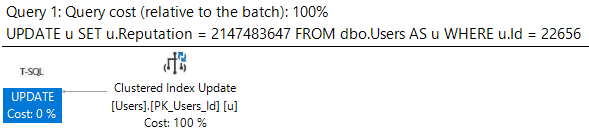
Let’s say we’ve got a simple update query. When we run it, it finishes instantly, and the query plan has no surprises.
BEGIN TRAN
UPDATE u
SET u.Reputation = 2147483647
FROM dbo.Users AS u
WHERE u.Id = 22656;

ROLLBACK
One to the two
Then one day DevOps comes along and says that every time Reputation gets updated in the Users table, we have to check a bunch of conditions and then do a bunch of stuff based on the value.
One of those checks is to see if anyone has the ?INT MAX? and then insert a row into Badges.
Because I’m lazy (Agile?), I’m going to stick a waitfor in the trigger to simulate all the other checks and actions.
CREATE OR ALTER TRIGGER dbo.one_time
ON dbo.Users
AFTER UPDATE
AS
BEGIN

    IF EXISTS ( SELECT 1/0
                FROM Inserted
                WHERE Inserted.Reputation = 2147483647 )

    INSERT dbo.Badges ( Name, UserId, Date )
    SELECT N'INT MAX OMG', Id, GETDATE()
    FROM Inserted

    WAITFOR DELAY '00:00:10.000'

END;
GO
Less Simpler Times
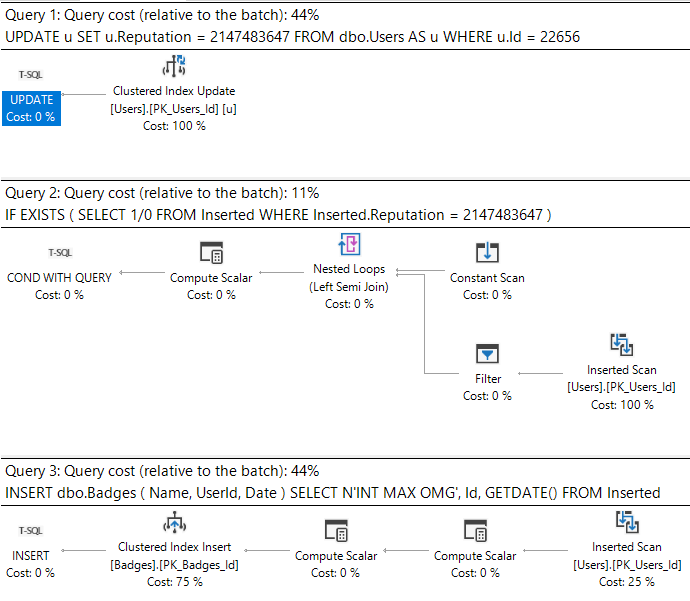
Now when we run our update, the plan looks like this.
Ass-mar
What’s important here is that we can see the work associated with the triggers.
What sucks is when we look at the plan cache.
Back To Easy
I’m gonna stick that update in a stored procedure to make life a little easier when we go looking for it.
CREATE PROCEDURE dbo.update_reputation
AS
BEGIN
    BEGIN TRAN
    UPDATE u
    SET u.Reputation = 2147483647
    FROM dbo.Users AS u
    WHERE u.Id = 22656;

    ROLLBACK
END;
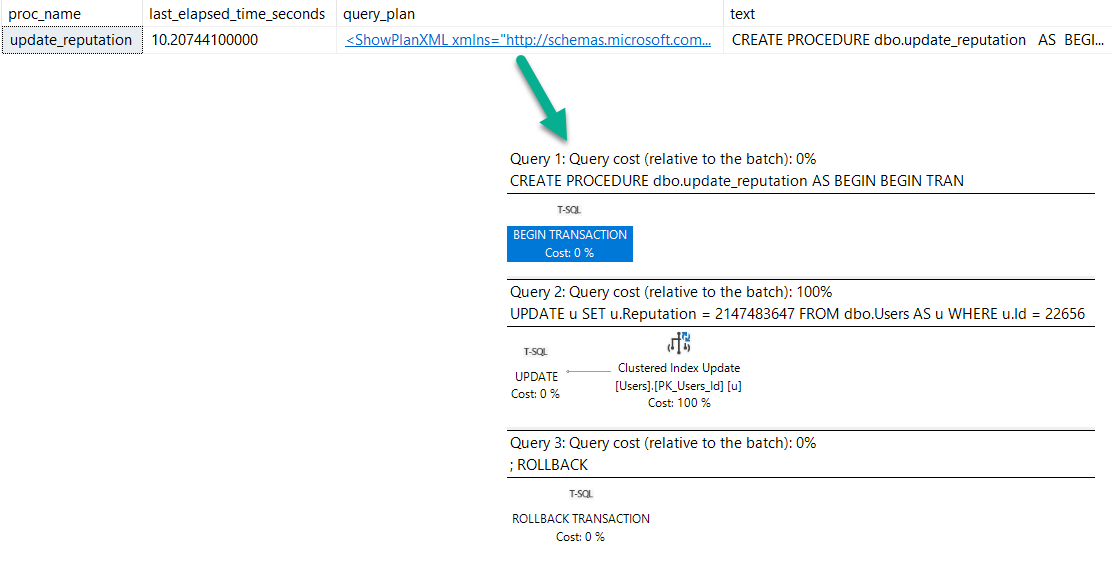
After running the procedure, here’s what we get back from the plan cache.
    SELECT OBJECT_NAME(deps.object_id) AS proc_name,
           deps.last_elapsed_time / 1000. / 1000. AS last_elapsed_time_seconds,
           deqp.query_plan,
           dest.text
    FROM sys.dm_exec_procedure_stats AS deps
    CROSS APPLY sys.dm_exec_query_plan(deps.plan_handle) AS deqp
    CROSS APPLY sys.dm_exec_sql_text(deps.plan_handle) AS dest
    WHERE deps.object_id = OBJECT_ID('dbo.update_reputation');
Investigative Reports
We have a procedure reporting that it ran for 10 seconds (which it did, sort of…).
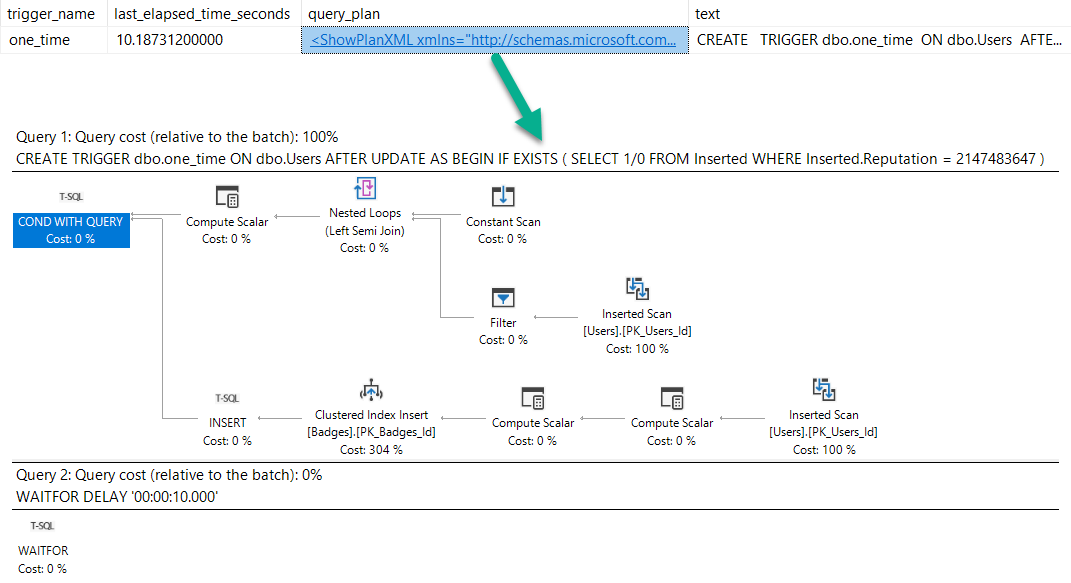
But no mention of the trigger. Hm.
Of course, we can get this information from trigger stats, but we’d have to know to go looking:
    SELECT OBJECT_NAME(object_id) AS trigger_name,
           dets.last_elapsed_time / 1000. / 1000. AS last_elapsed_time_seconds,
           deqp.query_plan,
           dest.text
    FROM sys.dm_exec_trigger_stats AS dets
    CROSS APPLY sys.dm_exec_query_plan(dets.plan_handle) AS deqp
    CROSS APPLY sys.dm_exec_sql_text(dets.plan_handle) AS dest
    WHERE OBJECT_ID = OBJECT_ID('dbo.one_time');
Get busy
Lying Liars
When seemingly simple modification queries take a long time, things may not be as simple as they appear.
Blocking, and triggers might be at play. Unfortunately, there’s not a great way of linking any of that together right now.
Thanks for reading!
Going Further
If this is the kind of SQL Server stuff you love learning about, you’ll love my training. Blog readers get 25% off the Everything Bundle — over 100 hours of performance tuning content. Need hands-on help? I offer consulting engagements from targeted investigations to ongoing retainers. Want a quick sanity check before committing to a full engagement? Schedule a call — no commitment required.
This isn’t quite about the same thing, just about some behavior that I thought was interesting, and how it changes between cardinality estimator versions.
Bad Robot
If you’ve been query tuning for a while, you probably know about SARGability, and that wrapping columns in functions is generally a bad idea.
But just like there are slightly different rules for CAST and CONVERT with dates, the repercussions of the function also vary.
The examples I’m going to look at are for YEAR() and MONTH().
If you want a TL;DR, here you go.
Reality Bites
If you wanna keep going, follow me!
USING
The takeaway here isn’t that doing either of these is okay. You should fully avoid wrapping columns in functions in general.
One of the main problems with issuing queries with non-SARGable predicates is that the people who most often do it are the people who rely on missing index requests to direct tuning efforts, and non-SARGable queries can prevent those requests from surfacing, or ask for an even more sub-optimal index than usual.
If you have a copy of the StackOverflow2013 database, you can replicate the results pretty easily on SQL Server 2017.
They may be slightly different depending on how the histogram is generated, but the overarching theme is the same.
Yarly
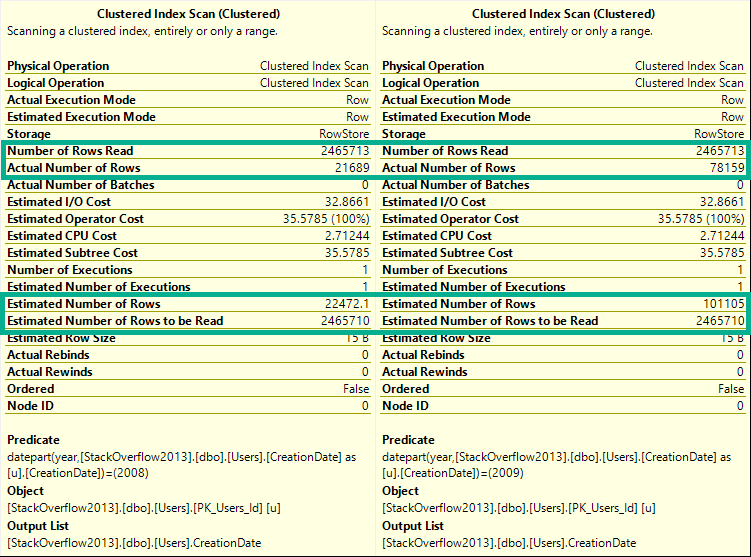
If you run these queries, and look at the estimated and actual rows in the Clustered Index scan tooltip, you’ll see they change for every query.
DECLARE @blob_eater DATETIME;

    SELECT @blob_eater = u.CreationDate
    FROM dbo.Users AS u
    WHERE YEAR(u.CreationDate) = 2008;

    SELECT @blob_eater = u.CreationDate
    FROM dbo.Users AS u
    WHERE YEAR(u.CreationDate) = 2009;

    SELECT @blob_eater = u.CreationDate
    FROM dbo.Users AS u
    WHERE YEAR(u.CreationDate) = 2010;

    SELECT @blob_eater = u.CreationDate
    FROM dbo.Users AS u
    WHERE YEAR(u.CreationDate) = 2011;

    SELECT @blob_eater = u.CreationDate
    FROM dbo.Users AS u
    WHERE YEAR(u.CreationDate) = 2012;

    SELECT @blob_eater = u.CreationDate
    FROM dbo.Users AS u
    WHERE YEAR(u.CreationDate) = 2013;
    GO
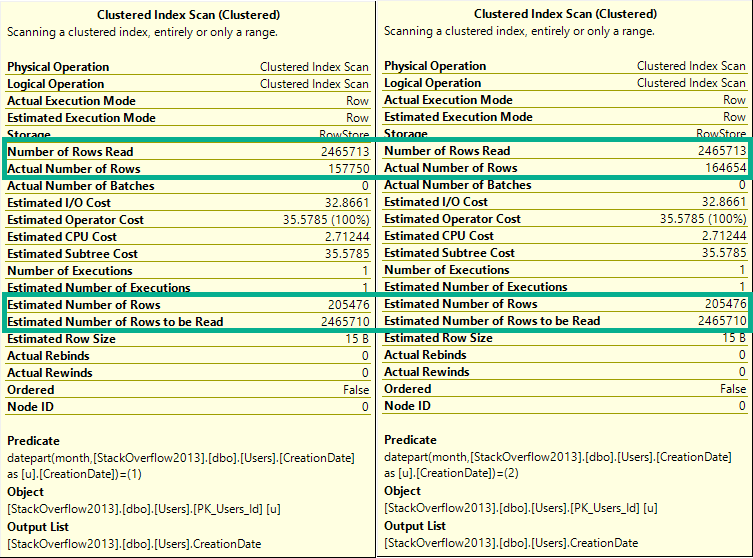
Here’s a sample from the 2008 and 2009 queries.
Wild For The Night
ED: I took a break from writing this and “went to brunch”.
Any logical inconsistencies will work themselves out eventually.
Cash Your Checks And Come Up
Alright, let’s try that again with by month.
If you hit yourself in the head with a hammer and forgot the TL;DR, here’s what happens:
DECLARE @blob_eater DATETIME;

    SELECT @blob_eater = u.CreationDate
    FROM dbo.Users AS u
    WHERE MONTH(u.CreationDate) = 1;

    SELECT @blob_eater = u.CreationDate
    FROM dbo.Users AS u
    WHERE MONTH(u.CreationDate) = 2;

    SELECT @blob_eater = u.CreationDate
    FROM dbo.Users AS u
    WHERE MONTH(u.CreationDate) = 3;

    SELECT @blob_eater = u.CreationDate
    FROM dbo.Users AS u
    WHERE MONTH(u.CreationDate) = 4;

    SELECT @blob_eater = u.CreationDate
    FROM dbo.Users AS u
    WHERE MONTH(u.CreationDate) = 5;

    SELECT @blob_eater = u.CreationDate
    FROM dbo.Users AS u
    WHERE MONTH(u.CreationDate) = 6;

    SELECT @blob_eater = u.CreationDate
    FROM dbo.Users AS u
    WHERE MONTH(u.CreationDate) = 7;

    SELECT @blob_eater = u.CreationDate
    FROM dbo.Users AS u
    WHERE MONTH(u.CreationDate) = 8;

    SELECT @blob_eater = u.CreationDate
    FROM dbo.Users AS u
    WHERE MONTH(u.CreationDate) = 9;

    SELECT @blob_eater = u.CreationDate
    FROM dbo.Users AS u
    WHERE MONTH(u.CreationDate) = 10;

    SELECT @blob_eater = u.CreationDate
    FROM dbo.Users AS u
    WHERE MONTH(u.CreationDate) = 11;

    SELECT @blob_eater = u.CreationDate
    FROM dbo.Users AS u
    WHERE MONTH(u.CreationDate) = 12;
If you run these, they’ll all have the same guess on the clustered index scan.
To keep things simple, let’s look at the first couple:
BADLY
The difference here is that now every single row estimate will be 205,476.
Lesson learned: The optimizer can make a decent statistical guess at the year portion of a date, but not the month portion.
In a way, you can think of this like a LIKE query.
The optimizer can make a decent guess at ‘YEAR%’, but not at ‘%MONTH%’.
Actual Facts To Snack On And Chew
The same thing happens for both new and old cardinality estimators.
DECLARE @blob_eater DATETIME;

    SELECT @blob_eater = u.CreationDate
    FROM dbo.Users AS u
    WHERE YEAR(u.CreationDate) = 2008
    OPTION(USE HINT('FORCE_DEFAULT_CARDINALITY_ESTIMATION'));

    SELECT @blob_eater = u.CreationDate
    FROM dbo.Users AS u
    WHERE YEAR(u.CreationDate) = 2008
    OPTION(USE HINT('FORCE_LEGACY_CARDINALITY_ESTIMATION'));
    GO

DECLARE @blob_eater DATETIME;

    SELECT @blob_eater = u.CreationDate
    FROM dbo.Users AS u
    WHERE MONTH(u.CreationDate) = 12
    OPTION(USE HINT('FORCE_DEFAULT_CARDINALITY_ESTIMATION'));


    SELECT @blob_eater = u.CreationDate
    FROM dbo.Users AS u
    WHERE MONTH(u.CreationDate) = 12
    OPTION(USE HINT('FORCE_LEGACY_CARDINALITY_ESTIMATION'));
    GO
Wouldn’t Get Far
But if we combine predicates, something really different happens between Linda Cardellini estimators.
DECLARE @blob_eater DATETIME;

    SELECT @blob_eater = u.CreationDate
    FROM dbo.Users AS u
    WHERE MONTH(u.CreationDate) = 12
    AND YEAR(u.CreationDate) = 2012
    OPTION(USE HINT('FORCE_DEFAULT_CARDINALITY_ESTIMATION'));


    SELECT @blob_eater = u.CreationDate
    FROM dbo.Users AS u
    WHERE MONTH(u.CreationDate) = 12
    AND YEAR(u.CreationDate) = 2012
    OPTION(USE HINT('FORCE_LEGACY_CARDINALITY_ESTIMATION'));
    GO
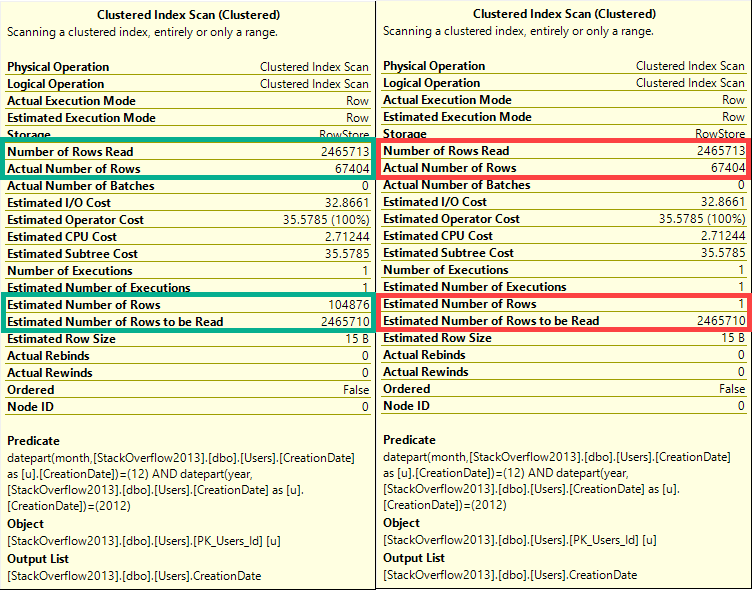
WRONG
In this case, the old CE (on the right), makes a very bad guess of 1 row.
The new CE (on the left) makes a slightly better, but still not great guess.
Ended
Neither of these is a good way to query date or time data.
You can see in every tooltip that, behind the scenes, the queries used the DATEPART function, which means that also doesn’t help.
The point of this post is that someone may use a function to query the year portion of a date and assume that SQL Server does a good job on any other portion, which isn’t the case.
None of these queries are SARGable, and at no point is a missing index request raised on the CreationDate column, even though if you add one it gets used and reduces reads.
Thanks for reading!
Going Further
If this is the kind of SQL Server stuff you love learning about, you’ll love my training. Blog readers get 25% off the Everything Bundle — over 100 hours of performance tuning content. Need hands-on help? I offer consulting engagements from targeted investigations to ongoing retainers. Want a quick sanity check before committing to a full engagement? Schedule a call — no commitment required.
I’ll be presenting The SQL Server Performance Tasting Menu.
You’re a DBA or Developer, and you’ve been using SQL Server for a few years.
You know there are different ways to make queries faster, but you’re not sure when to use them.
I’m Erik Darling, and I’ll be your sommelier for the evening.
Over several courses of delicious demos, I’ll show you the types of performance problems different tuning techniques pair well with, and which ones to avoid.
When we’re done, you’ll understand exactly what patterns to look for when you’re troubleshooting slow queries, and how to approach them.
You’ll have the secret recipe for gourmet queries.
If this is the kind of SQL Server stuff you love learning about, you’ll love my training. Blog readers get 25% off the Everything Bundle — over 100 hours of performance tuning content. Need hands-on help? I offer consulting engagements from targeted investigations to ongoing retainers. Want a quick sanity check before committing to a full engagement? Schedule a call — no commitment required.
Last week’s thrilling, stunning, flawless episode of whatever-you-wanna-call-it.
Video Summary
In this video, I found myself reflecting on the challenges and frustrations of working in IT, particularly when it comes to database management and moving between different systems. The conversation touched on a range of topics, from the excitement surrounding SQL Server 2019 to the difficulties of convincing users to upgrade from older versions. One of the key points was the disparity between the features available in newer versions of SQL Server and the reluctance of many organizations to move beyond their current setups. This led to discussions about memory management, trace flags, and even the transition to alternative databases like PostgreSQL on Linux. Despite these challenges, I shared my experience with a specific instance where setting up lock pages in memory on a laptop helped silence error logs but also highlighted the complexities involved when managing resources across different environments. Overall, it was an engaging session that underscored both the benefits and pitfalls of working with complex IT systems.
Full Transcript
I’m live. I bet no one’s going to show up this week because I missed two weeks in a row, which is terrible of me. Terrible of me. What a horrible person I am. Let’s see here.
Uh, yeah. Still no one. Not to. I’m going to wait one minute and then I’m out of here and I will delete this from memory. Oh, there’s one person.
All right. All one of you. I hope you have lots of good questions. Otherwise, otherwise we’re going to be very happy to be able to do this. I’m going to be very lonely. Oh, God, it’s you. Oh, man.
It’s going to be like insider chat when I just talk about funny stuff that happened in Madison. All right. Two of you.
Two of you. Not bad. All right. Not bad. Not bad. All right. Man, this is what I get from missing time. Messes and messes everyone up. That and my camera refuses to focus. Why are you so close?
I’m back here. Oh, God damn it. There we go. All right. Camera’s sort of working now. Maybe. Back to one. Crap. Someone ask a question.
Someone say something. I’m going to be like this is getting out of hand. Getting way out of hand. Ba-bum. Oh, man. All right.
This is dull. Forrest is here and not asking questions. No one else is showing up. Actually, I can’t even see who’s still here. That’s the depressing thing. I don’t have like an attendee list. All right. This gets one more minute.
Not even a minute. This gets 30 seconds. And then it’s dead to me. Dead to me. Uh… Fifteen. Ten.
Uh… Two people. Is one of you going to do something interesting? I don’t know. I don’t know what’s going to happen. What’s going to happen? I’m not a squirrel to sit here.
I’m tuning the worst door procedure in the world right now anyway. It is like eight CTE chained and joined and bound and gagged. And the query plan is like this big about. Is that a hole in my shirt?
Oh, it is. Man, I look terrible now. I didn’t know that was there. Anything over here? No. All right. We’re getting rid of this shirt when we’re done. Now you can all see the one spot on my body that I don’t have a tattoo. Sad. We have this like just running this thing to like get a plan for it and compare other things to it is absurd.
It takes, I don’t know how long. It just runs for a very long time. Doing a lot of dumb things. Doing a lot of things that I don’t necessarily agree with. I was in Madison last week.
And I had a client thing the week before. And thankfully I have a client thing. After this. At one. So I’ll be bothering.
Bothering people for money instead of bothering you for free. It’s always a good call. And then. Yeah. So Madison was a lot of fun. I had like 50 people. When my, my pre-con.
It was sold out. Wild. A lot of people in there. And the event. The event itself was pretty fun. I got to see.
Joe Obish talk about columnstore. Which is a treat. Got to see. I don’t know. I forget. I forget what else happened. Yeah. Selling stuff out is a, it’s a fun, fun feeling. But then it makes you think like, man, what if there were, what if there were 10 more seats?
You don’t get greedy, but you’re like, oh, what if? What if? What if, what if that room was a little bigger? What could, how many more people could we have taught about SQL Server and taco consumption? And the, the flight back.
Well, I, before I, before I talk about anything else, if, if you’re able to attend SQL Saturday Madison next year, I highly recommend it. Especially if they invite me back. Yeah. The flight back was, was weird.
Because what happened is. They, they, they, they thought that there would be unexpected, they expected unexpected turbulence. And they stopped drink service.
Yeah. So that was, that was a bummer of a flight. Even, even sitting in the, in the upfront section, I couldn’t get, I couldn’t get another bottle of, another little mini bottle of wine. And I was very sad about that. And so I was, I was sitting there just waiting.
That was, that was fun. Farah says, if you were a client, how would you pick a quality consultant? I would go to ericdarlingdata.com. And I would click on the, the contact form. And I would, I would send an email to a blurry, a blurry gentleman whose camera refuses to focus.
Well, I mean, really, it depends on what you, what you want out of consulting. There are some people who want, you know, sort of long-term remote DBA work. And, you know, someone to provide on-call support.
And, and for them, I think Mike Walsh over at Straight Past SQL is a pretty good choice for that. There are some people who want advice about their SQL Server. And that’s where someone like me comes in. I’m very good at giving people advice. I’m not good at giving myself advice.
Clearly ended up with, with this, with neck tattoos and this haircut. So I don’t really know that I would give my, I would take advice from me about me. But advice about SQL Server for someone else, I’m, I’m pretty good at. But then there’s people who want like, you know, sort of someone to jump in and start tuning things. I can do that.
And I’m, I’m, I’m perfectly comfortable doing that. You know, if you have a performance tuning stuff, I’m happy to do that work too. But if you need to like advice about H A and D R, I would probably choose someone other than me. Because I’m going to tell you the same thing I tell everyone else.
Get a failover cluster and get log shipping and don’t think about anything else. Zane says that he would take advice from me about lifting large objects. The funny thing is, is I lift fairly small objects that just happen to weigh a lot. So if I had to lift something big, I don’t know.
I don’t know how I do. I don’t know how I’d handle that. Peter says, why even fly if there’s no booze? I feel the same way. Man, when I, when I, when there’s a, when there’s a plane trip involved, it’s me. Like I get to the airport like two hours early.
I’m hanging out in the lounge. I get on the plane and I’m like, like slam the car down. Like give me all the red wine you have. I’ll give you back whatever I don’t finish. And, and that’s pretty fun. Let’s see.
I don’t know. Let’s see. Peter says, how, how is it settling into being, being your own CEO? Pretty good. Pretty good on that. Look, I got, I got, I got a thing. Yeah. Look, it’s got my name on it. So I’m pretty happy with that. The card number isn’t on the front. So don’t bother trying to pause that to figure anything out.
The card number is on the back. I checked. So you can’t tell anything from that, but I’m, I’m, I’m doing, doing pretty good as my own boss. At least I’m, at least I’m pretty happy with my performance as my own boss. I don’t know how other people feel about it. We’ll have to wait and see.
I got, I got my first wireless phone charger. Cause the battery port on my like thousand year old phone is busted. They’re not busted. It’s just very flaky. So it’s a lot of like me just like wiggling wires to get things working. Anyway, should probably answer a SQL Server question at some point.
If anyone has one, I don’t know if anyone has one. What do I think about SQL Server 2019? Yes.
I know who you are. You’ve been, uh, from what I’ve seen of it, I like it. I know. I mean, it’s only in, it’s only in CTP and it’s only CTP 2.4. And you know, it’s still good. It’s still good. It’s not even like a, it hasn’t even hit release candidate yet. And I have a feeling that it’ll be at least one more, if not two more CTPs before we hit release candidate.
But so far it’s very promising. You know, um, it’s, it’s got some nice steps forward in a lot of ways for things. And it’s going to be interesting to see in, in six years, how those steps forward finally pan out when people start moving to 2019. Because damn you people can’t even get off 2008 and 2008 R2.
How am I supposed to get excited about 2019? How am I supposed to get excited about it? What demos? Man, it’s rough. I’m like, look at all this cool stuff you have. Look at all this cool stuff you have in 2019.
People are like, eh, I got 2008. I’m like, man, it’s brutal. It’s brutal out there. Like, I don’t know how, I don’t know how to talk people into doing something smarter with their, with their lives and with themselves.
It’s very frustrating. Very frustrating. But no one listens. No one listens to consultants anyway. It’s like, what do you want me to do? What do you want me to do? Let’s see.
Peter says, I’m moving from SQL Server to Postgres on Linux starting Monday. Please tell me why I’m insane. I mean, it’s, it’s crazy because, you know, uh, you know, I actually, you know, I don’t know. You, you, you, you might be really into Postgres and you might be really into Linux. I, um, I once took a job very briefly administering.
Well, the, the job description was like, it’s Postgres SQL. And I was like, cool. Well, I I’ve heard of that. It has some neat stuff in it. It’s developer friendly. I’ll work with that.
And then I, then I got in there and it was red shift. I was like, oh, that’s a little different. It’s like a, like kind of a fork of an older Postgres, but I was like, I’ll, I’ll stick with it. Let’s see what happens. And then it was just like, well, we’ve got these consultants. And I was like, oh boy. And the consultants are like, we’ve built an ETL process.
And I was like, sweet. I don’t have to do any work. And then I was like, is there any documentation for the ETL process? And they were like, no. And I was like, could you make some? And they were like, we’re not full-time employees. I was like, what? And I was like, well, can you, can you please just like, give me like a brief overview of how to use the ETL tool that you built?
Because it was, it was not like a command line tool where you could do anything and things were exposed to you. It was a command line. I mean, sorry, it wasn’t a GUI. It was a command line tool. And you had to like do a bunch of stuff to the files to get it to work. And none of it was like, like written out.
And so I’m sitting there and I’m like, all right, look, you need to document. This in some way that I can at least like get off the ground with it. And they were like, okay, fine. And they made a video. It was a 20 minute video.
And there was no voiceover. There was no voice explaining what was going on. There was just a mouse pointer circling things and like pointing agitatedly at things. And the audio was like a country, like, like diddly guitar loop was like, or something like that.
But it was like that over and over again. And I’m sitting there listening to this and watching this like frantic mouse over. And like these, like the video was on like, like this big, and I couldn’t even see what was being written into the command line. And I quit soon after that. I got a new job after that. It was like immediate.
It was like, I was like, like, as soon as like I’m watching this video on one screen and like working on my resume on the other screen. And I think I lasted like, I think it was like a month and a half, maybe two months there. And it was just like, this is like, and I would have been happy. I’m not happy.
I would have been okay working with like Redshift and doing stuff there. Cause it’s a pretty cool tool, but man, it like the, everything else that was going on around, around that, that project was. I don’t know a lot of German curse words.
So I don’t know. Let’s see. Laura says thoughts about memory management. In other words, enterprise edition and eight gigs more of memory plus lockpages of memory. Wait, eight gigs of memory. Why do you have eight gigs of memory on enterprise edition? That’s like, like my, I think my phone has most of eight gigs.
Why? That’s not, not, not rational. It’s not sane. Don’t do that. Yeah. That was, that was the hamster dance song. Why do you, okay.
I don’t understand what your question is. And what you have a lot more memory than my eight gig minimum. I don’t care. That’s fine. Does it, does it never bothered me any minimum memory, setting minimum server memory to eight gigs.
I guess. If you have lockpages and memory on, you shouldn’t need to set minimum memory. Uh, and, uh, yeah, I, I, I’m, I’m trying to figure out a way when like lockpages and memory would be a worse choice than setting min server memory. And the only time that it’s like, either the only time, so be fair, either of those settings will make things go kaboom.
If you have an overcommitted VM and that memory balloon driver starts freaking out. So be careful with that. If it’s a VM and the VM host is severely overcommitted, then, uh, I would, I would avoid, I would avoid either of those settings, but setting min server memory to eight gigs. I don’t think is gonna really do much of anything.
Do you use trace like eight 34? Uh, no, not really. Um, no, uh, I’ve never really found, I’ve never really found a, a, a, a use case for, for me anyway, where it made things significantly better. Um, so I’ve never, I’ve never like really set it up and kept it.
It was, it was like, like sometimes I tried stuff and I couldn’t, I couldn’t find a tangible difference. There might’ve been some like cool spin locky under the, under the covers difference that, you know, um, uh, I don’t know. Maybe, maybe someone else found something cool to do, but, uh, I could never figure out what, what would be fun or interesting to do with that.
So, sorry, I wish, I wish I had better advice about trace like eight 34. Uh, I know that there was a bunch of, um, bunch of guidance about when to use it. And for what, like a while ago, I just don’t know.
I just don’t know that it’s terribly relevant anymore. See, Peter says, I set lock pages of memory on my laptop just to shut up the error log. Uh, I set lock pages in memory too, but, uh, then sometimes I have to do stuff that requires memory for other things. And I have to like restart SQL.
So it gives up the memory. So like, oh, my, like on my laptop, I have 64 gigs of memory. Uh, my local server instance can get like, I think 50 gigs or something or 55 gigs. I forget what I haven’t said to. But then like, if I have a, I have a VM that I set to get like 16 gigs or eight gigs or something, eventually I can’t start my VMs or like the VMs start freaking out because SQL Server is just like, nope, that’s my memory. You can’t have any, you don’t get any of that bad DBA.
Okay. Let’s see. Uh, all right. Nothing fun going on there. Uh, so I’ve, I’ve started taking, well, I’ve started offering to take questions for office hours via like Twitter and email and stuff. And, uh, so far I haven’t really gotten any.
The one, the one question that I got was like, like, like, like, like, like a page long thing. It was like, you should tell me how to like do this very specific thing. I was like, oh yeah, that’s consulting. You should, should pay. Can’t answer that in a half hour of free webcast.
Let’s see. Uh, he just says about half the time I have SQL Server as manual start. No, I have it as manual start too, but then I start up and I do stuff with it. And then I have to switch to use a VM to do something. And I hit VM problems. Is there a hashtag or something?
No, just tweet me, whatever it is, whatever you want to call it. I don’t know. Whatever, whatever you call the form of communication of, on Twitter, where there’s an at sign and then my Twitter handle, it would be a fine way to get to things. I think.
I think anyway, I can’t, I can’t say for sure for everyone that that would be a good thing. And some of you might not even be on Twitter. I don’t know. Some of you might, might do other things that, um, that like, I don’t know, make you happy in life. Or I don’t know.
What else? What else? What do people do who aren’t on Twitter? Like what, what’s your internet? Like, what, like, what do you, what do you do with your internet existence? I’m curious. Like, it’s stuff that like, I would be interested in. It was like, cause like I need, cause now I need stuff to do that’s not Twitter.
And that would be, I think appropriate for me to have like, just non-Twitter things going on. So if you have, if you have non-Twitter things, that would be great. Like, like going outside.
So, yeah. So, but see, the thing is, every time I go outside, it’s expensive. When I go outside, it’s like, uh, I, I go eat food. And when I go outside and eat food, that’s expensive.
Cause I have a wife and two kids and I got to drag them everywhere. Or if I, even if I go, if I go up by myself, I’m like, well, I’m going to go someplace real nice. Now they don’t have, I don’t have those losers. But no, I was kidding. Uh, but yeah, going outside. And then like, I go to the gym that’s going outside, but the gym isn’t far away. I, I, I’ve done an admirable job of, of going to the gym in the laziest way possible, where the gym is like a three minute walk.
So Laura says I uninstalled Twitter on the phone to let go of it. Sometimes that’s a good, that’s a good call. Um, for the, for the first like month or so, I was just like, you know, I’m only going to, uh, have, I’m only going to use Twitter on my phone, like through the website.
And then I realized that like, sometimes that was just a really, really bad way to be doing things. Like I spent longer wrestling something on the website than is this really quickly, quick to do with the app. And so I don’t know. That was it.
It says what technical awesomeness did attendees here? Madison precon most appreciate. I don’t know. I haven’t gotten session feedback yet. Um, I think some of the stuff about how SQL Server allocates threads and memory to queries went over pretty well.
And I think, uh, people’s people get a really eyeopening, um, experience from, uh, when I show them exactly how contention works with, uh, sans. So like showing them like that, the wire is a limiting factor and that like, like contention there, like the, uh, like the, the competition for a shared resource is what often makes sans feel slow when it’s not, but I shouldn’t, I can’t give away too much.
Then, then no one will ever pay to see it again. I’m surprised they paid to see it in the first place, but if I get, if I get to have that happen again, that’s wonderful. So there’s that, I don’t know. There was at least one attendee of my precon in this room. So maybe they can, maybe they can tell you more about what they, what they liked about it.
Yeah. Dang wires. I hate those dang wires. Uh, is the three minute walk to the gym, my car. Yeah, basically. Sometimes I, uh, yeah, that’s about it. Yeah.
Yeah. I don’t know. Occasionally I wrestle with my humanity. That’s a, that’s a, that’s a, that’s a quick fight. Humanity never wins. Uh, let’s see here. Darren said, uh, wait, wait, there’s another, there’s actual, see what’s it?
Uh, actual last query plan. Thoughts. Um, no, I, mixed feelings. Uh, one, one of those mixed feelings is like. All right. If you’re going to invest in that, put it in query store, because that’s the kind of thing that would make people turn query store on.
But at the same time, if it’s in query store, most people are going to go, I’m not turning that thing on. Um, but I think it would, it would talk some people into it. I think it would be, uh, work. I think that would be a worthy thing there. Um, it doesn’t really collect actual, actual stuff that I would want inquiry plans like operator times and like weight stats and stuff like that.
So then that, that, that, that would be really compelling for me to start using it. Uh, you know, it, like, um, like as soon as I saw it, I was like, man, it would be like awesome. If I could like, you know, tweak blitz cash to look at that DMV instead and get all this actual query plan information out.
And then I saw what was in it and I was like, eh, that’s not actual enough. Not actual enough for me to get into GitHub again. So yeah, that was that. Uh, let’s see here. Any SQL Saturday pre-cons, any other ones this year? Um, no SQL Saturday pre-cons lined up yet, though I am open if anyone out there is listening and, and is in need of, uh, uh, uh, a funny performance pre-con, uh, at their SQL Saturday event, hit me up.
There’s many ways to do that. Um, let’s see. Uh, I don’t know how to say that. Uh, do you listen to music or podcasts while gymming? No, I, uh, headphones just get in the way. Uh, if you, if you get, if you’re, if you get bored at the gym, you’re doing cardio and I have no sympathy for you.
If you’re lifting weights, you don’t get bored. If you’re lifting weights here, you’re too, too encumbered to get bored. You gotta, you gotta really do something weird with weights to get bored lifting weights. He says, what percent is of your clients don’t use query store so you can’t convince them to turn it on?
Uh, I don’t know. Um, I can convince most people to turn it on, on a dev server and collect information on things. Uh, but, you know, in prod people are a little bit more prickly about what they turn on and what they use.
Josh says, I wonder if more people would turn on query store if the default capture mode wasn’t all. Uh, so maybe, well, no, no, cause when most people turn it on, they have no idea that there’s a default capture mode. Problem is it like no one ever, it’s like, it’s like nothing about when you go look around at stuff, you’re just like, oh yeah, turn on query store.
There are options. I’m not gonna, I’m scared of those. Um, but even if it was auto, I mean, like people turn it on and they have all and it’s like collects everything and maybe burns a bunch of CPU and everything stinks.
And then they turn it off and they’re like, well, that sucked. Never turning that thing on again. Tech news says, where are you from? I’m from America. Where are you from? Tech news. Tech news.
Anyway, like query, and query store is one of those things that I’m afraid is just gonna like hit a wall. Cause this query store DMVs are terrible. Like the information they collect is great, but querying them is a nightmare. The built-in reports are janky as hell.
They take forever to run. And I don’t necessarily blame like whoever wrote the reports, but you know, you’re, you’re, you’re hitting these like, you know, I don’t know what you want to call them. Um, base views or tables or table type functions or whatever. And it’s just like, Oh, it’s a very, very slow sometimes.
And you’re churning through a lot of data and you’re, you know, you’ve got query plans coming up. You’ve got query texts coming up. And I just feel like these are things that are not as difficult to, to deal with in the plan cache.
But for some reason, query store made them even harder to deal with. Right. Tech news is from India. I’ve never been to India. I might go there someday. I should, I should someday go to the homeland of my favorite food on the planet. Which David Lynch Dune version?
Are you, do you mean like, like between like the regular version and like the extended cut and the director’s cut or like the TV show? Like which, which versions, which versions are on, which versions are in play here? Yeah.
Yeah. I like it. I like, I like it for as long as I can get it. And I’ll tell you why. Most of the time these days when I get to watch Dune is when my wife and kids aren’t home. And I usually end up taking a nap while I watch it. And I feel like if I fall asleep at the beginning of Dune and I wake up at the end of Dune and it’s like the director’s cut, I’ve taken a good nap.
That’s like a solid, like, like two hours. Of nap time. So I prefer the director’s cut for that. If I, if I wake up, if I use the regular version and I wake up and Dune is over, I have no way to gauge how long I slept. But if I wait, like fall asleep, like when they’re, when they’re doing like the intro stuff.
And then I, I, I wake up when like the, like when Paul is fighting, whatever Sting’s name was, I forget now, whatever Harkonnen that was. Then I’ve had a good nap. Uh, TZH says being able, unable to do things like click on a query in the query store UI and saying, I really don’t care about this really limits its useless.
I’ve tried to find the DMVs instead of the behind it, but as far as I know, they’re really not friendly. I mean, they’re all, they’re all available to you. Like you can find them on, on books online, but yeah, they’re, they’re really unfriendly to query. Um, and the, the, the way the data is stored is kind of annoying to deal with.
Cause if you want to put like any of the metrics in human consumable form, you have to like do some math to convert stuff from like microseconds or from 8k pages. And you’re like, man, just tell me what’s bad. You have all my queries.
Tell me what sucks. You have all my query XML. Like, like tell me what’s bad in it. Why, why do you make me go jump through all these damn hoops to do things? And I feel the same way about monitoring tools that, you know, uh, grab like endless server information and then like give you no guidance about what to do with it.
They’re sitting there watching your server. They’re taking information constantly from your server. They’re collecting metric after metric. They’re offering you absolutely no solutions. Just sitting there watching they like, and they have, they can like, they can asynchronously same thing with query.
So can asynchronously just look through like a little bit of XML at a time. Look for like some bad stuff in there. Look for non-parallel plan reasons. Look for implicit conversions. Look for missing indexes. Look for, for anything. Go in there and show me what’s wrong. Tell me what’s happening.
And it drives me nuts. It’s software that makes your life not any easier. Software should never, never like leave you like where you are. Use software to make your life better, to make your life easier. Using software that makes your life harder or doesn’t actually solve a problem for you. Especially when you have to pay for it.
Sucks. Sucks. Fix your software. Sons of guns. Maybe, maybe there are some daughters of guns too. I don’t know. I have a whole family of gun relatives. Fix your stuff.
Get your act together. People aren’t going to pay 1200 bucks per instance for garbage for long. Tell you that much. Let’s see. Peter says, I was told by a guy with neck tattoos and implicit conversion warnings might be a red herring. Yeah, that’s true. Some of them are. And there’s very easy ways to tell the difference between which ones are and which ones aren’t.
So seek affecting, which is in the XML. You can see when it’s seek affecting. Then, perhaps you have an issue. But if it’s just the cardinality estimation one, that happens when you select stuff and it converts and you’re like, wow, how is selecting something is a different data type going to mess up cardinality estimation?
You know damn well how many of that is coming out no matter what. It’s like the no join predicate warning. It’s absurd. There’s no join predicate, but there is.
And it’s just because there’s not one at the join that it freaks out. It’s like, okay. You really got me there. It’s solving a big problem for me. Oh, man.
All right. I got a client thing starting in a half hour, so I got to go. Thank you all for showing up and asking me questions. I will be back next week. I hope. You know, assuming good health and lack of death continue to shine upon me. I will be back next week.
And yeah, I promise I’ll actually even do some promotion for it. Who knows? It’ll be crazy. Anyway, thanks. I’ll see you next time. Goodbye. Goodbye. Thank you.
Going Further
If this is the kind of SQL Server stuff you love learning about, you’ll love my training. Blog readers get 25% off the Everything Bundle — over 100 hours of performance tuning content. Need hands-on help? I offer consulting engagements from targeted investigations to ongoing retainers. Want a quick sanity check before committing to a full engagement? Schedule a call — no commitment required.
In this video, I dive into some of the new features in SQL Server CTP 2.4, specifically focusing on a feature called “elevate online” within database scoped configurations. I explain how this setting can potentially change the behavior of index rebuild operations, allowing them to run online even if they are not explicitly flagged as such. By demonstrating with an example, I show that while this might seem like a performance improvement in certain scenarios, it actually results in longer rebuild times for me—three times longer in my case. The video also touches on the confusing nature of some of the new settings and their inconsistent use of data typing, which can lead to confusion among users.
Full Transcript
Hello, Erik Darling here with Erik Darling Data, here to talk about another goodie in CTP 2.4 that caught my eye and I think is at least nominally cool. We’ll have to wait and see what you think of it. You’re free to have your own opinion. You don’t have to think it’s cool because I think it’s cool. I think a lot of stuff is cool that many other people would think is decidedly uncool. Now, first thing we have to make sure of is that our data boss is in compat level 150 and we can double check that by looking at sys.databases and hitting the old F5-er there and we’ll zoom in and we’ll see that stack overflow is in compat level 150. That is sweet because that’s exactly what I told it to do. It’s amazing how that works. Now, I want to show you some new stuff in sys.database scoped configurations. Not the least of which is Microsoft’s complete inability to respect data typing. We have some ones and some zeros and some offs. Make up your mind. This is why people get confused. Off. One, zero, off. What’s on? Is it three or is it on? Or is it one? I don’t know.
But there’s some stuff in here. If you notice the wording next to those offs, which were so haphazardly added, we’ll see a couple things. We’ll see some more words. Elevate online and elevate resumable. Now, I haven’t messed with elevate resumable yet, but I would assume that it’s pretty close to what elevate online does. There’s some other new stuff in there that I’m not going to get into because that’s not the point of this video.
But there’s this verbose truncation warning down there that I’m fairly excited about. And I’m even more excited because it has a one next to it, not an on or an off. So I’m pretty excited about that.
So let’s look at what elevate online does. Now, I’ve got an index on the post table and I’ve already created it, so I don’t have to do that. That’s going to throw an error. Good. Now, the way to turn on this elevate online thing is by saying alter database scoped configuration. Set elevate online equals when supported.
Not on or off. When supported. God almighty. Anyway, what this means is, so in the old days, if you said alter index whatever on votes rebuild. I’m going to make sure that’s turned off.
So in the old days when you did alter index whatever on votes rebuild, the default behavior was for it to be an offline operation. So if I say rebuild and I come over here and I say select count and I come over here and I run sp who is active, I’m going to see that my select is stuck behind that index rebuild. It’s blocked.
So that the rebuild of the index that the select count is trying to read from is blocked by the rebuild of that index. So I have to wait for this index to finish rebuilding in order for the count to finish. Thankfully, it does. And the index rebuild takes nine seconds.
You can see very clearly there. Nine seconds. Very nice. Right. Nine seconds. Not bad. Not bad for an index rebuild. And when we come over here, we can see that this ran for about eight seconds. So I didn’t start this exactly when the index rebuild started, but it was a little bit after. So we had to wait for that rebuild to stop.
And then when it stopped, it finished immediately. Just so you can see, we did read from ix whatever in the query plan. So we were trying to read from the index that was being rebuilt. And if I just hit F5 on this, this will finish quickly. This finishes in under a second when it’s not blocked.
So now let’s go look at what happens when we set this database scoped configuration to when supported. So I’m going to run that. And that’s going to take effect. And I’m going to run this rebuild. And what’s going to happen is rebuild and this.
And this will finish, well, not immediately, but really quickly. So this finished in two seconds. And if we look over here, of course, nothing’s going to be blocked. But this index rebuild is still going to be going. So the query finished immediately.
But now I’ve got an index rebuild. Well, it used to finish in nine seconds. Now it’s at 23 seconds. And well, that took 26 seconds. So that’s about three times as long to do the index rebuild online as it is to do it offline. Now this has been a thing in SQL Server, I mean, for as long as there have been those.
And I think index rebuilds were a mistake. I’m going to go ahead and say that. But for as long as you’ve been able to rebuild indexes online or offline, you have had the situation where the index rebuild offline was a lot faster than the index rebuild online. So that’s still true.
So what this means is that if you’re on a version of SQL Server, like, say, Enterprise Edition, which magically makes all your CPUs worth four and a half times as much money, you can run index rebuilds and other operations online. You can’t do that right now in standard edition. I don’t know if that’s coming to standard edition or if it’s never going to happen.
But who knows? Who knows? I don’t know. To me, it’s not a performance feature because it takes three times as long to rebuild an index, at least in this case. It could be longer for you or other things. Crazy to think about that. But anyway, yeah.
So that’s what index elevate online does, is when you have an operation that is eligible to be run online, elevate online will elevate it to online unless you specifically say with online equals off. So let’s go ahead and do that. Let’s do with online equals off here.
And we’ll hit and we’ll do that. And now even with this on, so I’m going to make sure that’s extra turned on, and I’m going to run my rebuild with online equals off specifically, and then run my select query, and I am going to be el blockadood all over again. Kaboom, right?
Sad face. Such sad faces. So if you specifically say build this thing offline, then SQL Server will respect that. But if you run it with no, with sort of an agnostic point of view, if you just say rebuild, and you have elevate online equals when supported, and you’re on, is it version or edition? One of those.
One of those things. Edition, probably? Edition of SQL Server that supports online index operations, you can have your index rebuilds take three times as long, too. This doesn’t change my mind about rebuilding indexes. I still think you should do that as rarely as humanly possible. I would only do it if you need to change something about the index or if you delete a whole bunch of data.
But that’s a story for another time. Anyway, thanks for watching. I hope you learned something vaguely interesting about elevate online when supported, not on or off. Oh, look.
Now it’s when supported. Good. Good. Oh, you know what? I bet that there’s tri-value. I bet it’s because of the tri-value logic. I bet because there’s fail unsupported is another option, too. So let’s just, for completeness, let’s copy that and let’s just say fail supported here. And let’s run that.
And let’s go look. Yeah, now it’s fail unsupported. So that’s good. It’s good to know that. But if you’re the kind of person who writes DMV queries, this is going to drive you out of your gut for damped mind. Anyway, thank you for watching.
I hope you learned something. And I will see you next time, probably. As long as these DMV queries don’t kill me. Thanks for watching.
Going Further
If this is the kind of SQL Server stuff you love learning about, you’ll love my training. Blog readers get 25% off the Everything Bundle — over 100 hours of performance tuning content. Need hands-on help? I offer consulting engagements from targeted investigations to ongoing retainers. Want a quick sanity check before committing to a full engagement? Schedule a call — no commitment required.
In this video, I explore an interesting enhancement in SQL Server related to TempDB metadata being stored in memory to reduce contention issues. I demonstrate how enabling this feature requires turning on advanced options and setting a specific configuration setting to one, which necessitates a server restart for the changes to take effect. Despite these improvements, I also show that not all TempDB metadata is memory-optimized, leading to continued locking and contention problems even with the new settings in place. Through practical examples using SQL Query Stress, I highlight the ongoing challenges and potential areas for further optimization within TempDB management.
Full Transcript
Hello. Is this thing on? Better be on. I paid for this thing to be on. Erik Darling here with Erik Darling Data. I’m hoping that someday I will get a free personalized Swiss Army knife with my company logo on it, but I am not that successful yet. I am still only getting pens. Erik Darling here with my company. Anyway, big day. It was a big day yesterday for SQL Server stuff, and I know it was a big day because my wife was annoyed with how long I spent in my office poking around at CTP 2.4.
Erik Darling here with my company. So what I wanted to show you was kind of a neat improvement to TemptDB, where some TemptDB metadata is able to be stored in memory in order to reduce contention. Erik Darling, if you remember with the whole in-memory thing, it’s a latch-free or lock-free or something-free. Erik Darling, all I know is that it’s never free. It’s going to cost you money either in licensing or in memory or something else. I don’t know. Time, probably. Your sanity.
But some TemptDB metadata is now able to be stored in memory. Now, there’s a sys.configuration setting for this. So you’ll have to go in and you’ll have to make sure that you turn on advanced options, and you’ll also have to make sure that you set this setting to one. So it’s now TemptDB metadata memory optimized with fun, fun stuff. Now, when you turn this on, it does require a restart. You do have to reboot SQL Server to get this to take effect. And I didn’t see a way in the installer to make that turn on by default, like when you first install SQL Server. Maybe you don’t have to restart it after you hit production or something, but maybe that’s coming.
You know, the installer is still the 2017 installer, so that’ll probably, hopefully change by the time this thing hits release candidate or RTM or one of those crazy acronyms. Anyway, after you turn that on, some TemptDB system tables are now stored in memory. So if we look at this helpful DMV up here, sys.dmdbxtp object stats, we will now see a whole bunch of TemptDB stuff in memory. So sys.dmdxt.com. So sys.dmdxt.com. So sys.dmdxt.com. So sys.dmdxt.com is called obj.dxt.com. You can read that on your own. I’m not going to read all that for you.
You’re at least semi-literate people if you can type YouTube in and SQL Server. If you just ended up here by accident and you were looking for porn and got turned around. But yeah, so now some of this stuff is in memory, which is pretty cool. Now, what I wanted to show you next is that even though some of this stuff is still in memory, not all of it, this doesn’t solve fully TemptDB contention problems in memory.
So what I’m going to do is I have the lovely open source SQL query stress here. And what I’m going to do is just create a bunch of tables in TemptDB. I’m not going to put any data in them. There’s no select. There’s no insert. There’s no update, delete. There’s nothing going on.
It’s just me creating a lot of TemptDB objects. Now, I’m going to create TemptDB objects across 200 threads. So I’m going to have 200 workers just going in and creating TemptDBs and then leaving.
Or creating TemptTables, not creating TemptDBs, creating TemptTables and then leaving. And I’m going to do that just for effect. I’m going to do that 200 times just to make sure that I can catch lots of stuff happening. Now, the first thing I want to show you is I’m going to kick this off, and hopefully this won’t fry my computer, is if we run spwhoisactive with getlocks equals 1, we’ll run this for a little bit and we’ll start to see some blocking.
Now, the blocking, oops, come on, zoom it, work with me here. The blocking is all happening just on these table creates. We can see blocking session ID is populated.
If we go over here, we can see session ID 273 is just creating a TemptTable. Go away. It’s just creating a TemptTable the way all the other ones are. And if we look carefully at spwhoisactive’s output, if we go over to the locks column, normally this would be populated with XML that would tell us exactly what was locked, what was the page level, key, object, what it was.
But this is null for us. It means we’re not showing any locks here. But we’re still being blocked. We still have all these sessions that are getting blocked when we try to run this.
Is that finished? It’s finished. I talked for too long and that’s what happened. That’s what I get for talking. And then sometimes SQL query stress doesn’t like coming back to life when I beat it up terribly like that. Let’s see what this is doing.
Oh, you don’t need to see that. All right. What are you up to? Did you crash again? You probably crashed again. All right. The perils of open source, ladies and gentlemen. All right.
So let’s go into task mugger and let’s end task there. And I’m going to pause this video while I set that back up. All right.
We’re back now. So I have SQL query stress back after a magnificent crash. And what I want to show you now is, so spwhoisactive does not show us any locks. But if we go into tempDB and we run, not that query, if we run this query, this will show us all sorts of funny locks.
Now, it’s not going to return anything right now because there’s nothing going on right now. But if I fire up SQL query stress and I start running and I hit F5, we’ll start to see some locks on some tables in tempDB. And we’ll wait until we hit some fun numbers in there.
Give it one more run. All right. So that looks pretty good to me. So if we zoom in now and we look at exactly what is getting locked and what kind of locks, we’ll ignore all the childish acronyms that we could have. We could spell out looking at the locks that go on there.
And we’ll look at what actually got locked. So these two system views, sysalloc units and sysrowsets, are not currently memory optimized. So we are still taking locks against them and we still can hit contention when we’re hitting these system views to get stuff going.
Now, if I run, I have no idea if SQL query stress has crashed, if it’s still running, if it’s still doing anything. It might not be. Yeah, it’s not responding again.
It doesn’t matter, though, because I showed you everything that I want to show you. And it’s just kind of stuck there again. Darn you, SQL query stress. This is why I usually use O stress, but I wanted you to be able to see the create table thing in there. Anyway, let’s kill that.
Because we don’t need to see that anymore. And hopefully that’ll work. Anyway, so cool step forward for Temp TV. I think it still has a little bit of work to do.
I’m not sure why those two system views weren’t included in the memory optimizationing of Temp TV. Maybe they will be if I gripe about it enough. Or if the right people are watching this.
I don’t know who those people would be, though. Maybe they’re on Twitter. I’ll have to go find out. Anyway, thank you for watching. I hope you learned something.
I hope you thought this was kind of cool. And I will see you, I guess, next time. Probably. If there isn’t next time. You never know. You never know. What if I get abducted by aliens?
I think that’s the best case for me. Some outer space women. Anyway, see you next time.
Going Further
If this is the kind of SQL Server stuff you love learning about, you’ll love my training. Blog readers get 25% off the Everything Bundle — over 100 hours of performance tuning content. Need hands-on help? I offer consulting engagements from targeted investigations to ongoing retainers. Want a quick sanity check before committing to a full engagement? Schedule a call — no commitment required.