In this video, I share an exciting new feature in SQL Server 2019 CTP 2.4 that makes tracking down missing index requests much easier. Typically, identifying the query responsible for a missing index has been a bit of a challenge, involving either sifting through plan cache entries or running complex DMV queries. However, with these recent updates, you can now directly access the query hash, plan hash, and last SQL handle associated with missing index requests in the `sys.dm_db_missing_index_group_stats` DMV. This allows for seamless joining to `sys.dm_exec_query_stats` and `sys.dm_exec_query_plan`, providing a straightforward way to retrieve the exact query that requested the missing index. While it’s worth noting that if the execution plan is no longer cached, this information won’t be available, I find this feature incredibly useful and believe it will greatly enhance troubleshooting and optimization efforts in SQL Server environments.
Full Transcript
Howdy folks, Erik Darling here with Erik Darling Data, being mildly distracted by a pen that I got. It has my company name on it. Eh, I know that I’m doing incredibly well as a limited liability corporation when I’ve started receiving personalized office supplies. Very good feeling. But today I’m here to talk about something really cool that I just noticed in SQL Server, 2019, CTP 2.4, which just dropped today like a few hours ago or a couple hours ago or some, some amounts of time ago that I can’t really recall because my brain doesn’t work anymore. But really neat and quick video just to show you what it is. Now, usually when you run a query and you know, whether you get the actual plan or whether you go into the plan cache or whether you, you know, go off and run crazy DMV queries, when you have missing indexes, it’s always been kind of tough to tie what query asked for that and that missing index and the missing index request over in the DMVs. For instance, I have this query here, which is asking for a nonclustered index on the post table that includes owner user ID. And I guess I suppose that’s an okay index request. It’s not the, maybe not the greatest missing index request in the world because, you know, owner user ID is, in the join and we might, might, might, might want to index the columns that we join on. But that’s not the point here. The point here is this. Now, rather than either having to by chance come across this plan in the plan cache or run a DMV query and say, huh, I wonder, I wonder what query query was I was asking for that. Well, now we can get that.
So, uh, in, uh, in the, uh, in the system, DM, DB missing index group stats query, uh, there are a couple new columns and I’m going to, I’ve already run this and I’m not going to run it again cause that would be ridiculous, but we have some new columns where, holy crow, that zoomed in big. Uh, but we get the query hash query plan hash and last SQL handle of, uh, the query that asked for the missing index. So now, when we, uh, query this DMV, we can join it off to sys.dm exec query stats and we can cross apply sys.dm exec query plan handle to find the query plan of the query that asked for the missing index. And I think that’s really, really spiffy. The only thing is, let’s see, let’s run this and let’s, let’s rerun this and let’s see, let’s see if this changes. Yeah. Now, now we get nothing back. So if, if you’re, if you’re, if the execution plan isn’t in the plan cache anymore, uh, it’s not going to tell us about that missing index.
Which is neither good nor bad, but it’s just a thing. Bummer, huh? Anyway, uh, that’s about all I had for this one. For now, I might come back to this as time allows. But anyway, uh, thank you for watching. Uh, I hope that you are excited, uh, or at least as, as, like, like the neighborhood of excited as I am about, uh, this new SQL Server version. And I hope that someday you too start getting personalized office supplies is a sign of your business’s ultimate success.
Anyway, uh, thanks for watching or whatever. I don’t know, listening, maybe just staring blankly at a screen pretending to work. It could be anything really. Anyway, thanks. See you next time. Goodbye. Button.
Video Summary
In this video, I share an exciting new feature in SQL Server 2019 CTP 2.4 that makes tracking down missing index requests much easier. Typically, identifying the query responsible for a missing index has been a bit of a challenge, involving either sifting through plan cache entries or running complex DMV queries. However, with these recent updates, you can now directly access the query hash, plan hash, and last SQL handle associated with missing index requests in the `sys.dm_db_missing_index_group_stats` DMV. This allows for seamless joining to `sys.dm_exec_query_stats` and `sys.dm_exec_query_plan`, providing a straightforward way to retrieve the exact query that requested the missing index. While it’s worth noting that if the execution plan is no longer cached, this information won’t be available, I find this feature incredibly useful and believe it will greatly enhance troubleshooting and optimization efforts in SQL Server environments.
Full Transcript
Howdy folks, Erik Darling here with Erik Darling Data, being mildly distracted by a pen that I got. It has my company name on it. Eh, I know that I’m doing incredibly well as a limited liability corporation when I’ve started receiving personalized office supplies. Very good feeling. But today I’m here to talk about something really cool that I just noticed in SQL Server, 2019, CTP 2.4, which just dropped today like a few hours ago or a couple hours ago or some, some amounts of time ago that I can’t really recall because my brain doesn’t work anymore. But really neat and quick video just to show you what it is. Now, usually when you run a query and you know, whether you get the actual plan or whether you go into the plan cache or whether you, you know, go off and run crazy DMV queries, when you have missing indexes, it’s always been kind of tough to tie what query asked for that and that missing index and the missing index request over in the DMVs. For instance, I have this query here, which is asking for a nonclustered index on the post table that includes owner user ID. And I guess I suppose that’s an okay index request. It’s not the, maybe not the greatest missing index request in the world because, you know, owner user ID is, in the join and we might, might, might, might want to index the columns that we join on. But that’s not the point here. The point here is this. Now, rather than either having to by chance come across this plan in the plan cache or run a DMV query and say, huh, I wonder, I wonder what query query was I was asking for that. Well, now we can get that.
So, uh, in, uh, in the, uh, in the system, DM, DB missing index group stats query, uh, there are a couple new columns and I’m going to, I’ve already run this and I’m not going to run it again cause that would be ridiculous, but we have some new columns where, holy crow, that zoomed in big. Uh, but we get the query hash query plan hash and last SQL handle of, uh, the query that asked for the missing index. So now, when we, uh, query this DMV, we can join it off to sys.dm exec query stats and we can cross apply sys.dm exec query plan handle to find the query plan of the query that asked for the missing index. And I think that’s really, really spiffy. The only thing is, let’s see, let’s run this and let’s, let’s rerun this and let’s see, let’s see if this changes. Yeah. Now, now we get nothing back. So if, if you’re, if you’re, if the execution plan isn’t in the plan cache anymore, uh, it’s not going to tell us about that missing index.
Which is neither good nor bad, but it’s just a thing. Bummer, huh? Anyway, uh, that’s about all I had for this one. For now, I might come back to this as time allows. But anyway, uh, thank you for watching. Uh, I hope that you are excited, uh, or at least as, as, like, like the neighborhood of excited as I am about, uh, this new SQL Server version. And I hope that someday you too start getting personalized office supplies is a sign of your business’s ultimate success.
Anyway, uh, thanks for watching or whatever. I don’t know, listening, maybe just staring blankly at a screen pretending to work. It could be anything really. Anyway, thanks. See you next time. Goodbye. Button.
Going Further
If this is the kind of SQL Server stuff you love learning about, you’ll love my training. Blog readers get 25% off the Everything Bundle — over 100 hours of performance tuning content. Need hands-on help? I offer consulting engagements from targeted investigations to ongoing retainers. Want a quick sanity check before committing to a full engagement? Schedule a call — no commitment required.
As a consultant, people sometimes send me query plans. They’re usually estimated, or cached plans.
That’s not bad! You can get a sense of some important things based on them, but there’s a ton of detail in actual plans that makes life easier.
One example is with parameter sniffing: estimated and cached plans look like they did something completely reasonable.
Getting an actual plan is tough, though, especially if it’s a long running query, or the query runs modifications.
Containers Are All The Rage
What if query plan XML had enough information in it for you to “execute” the query locally without returning any results?
What if you could press play, fast forward, and rewind on a query plan?
What if you could try things like using the new or old CE or other hints on the query?
What if parameters could be masked (but differentiated internally) to test parameter sniffing?
This might be possible with the right information collected, even if some of it is imperfect. In newer versions of SQL Server, even information about statistics is gathered by the plan.
With the direction Microsoft is finally going in collecting runtime information about queries, I wouldn’t be surprised if something like this became possible.
Thanks for reading!
Going Further
If this is the kind of SQL Server stuff you love learning about, you’ll love my training. Blog readers get 25% off the Everything Bundle — over 100 hours of performance tuning content. Need hands-on help? I offer consulting engagements from targeted investigations to ongoing retainers. Want a quick sanity check before committing to a full engagement? Schedule a call — no commitment required.
Last week’s thrilling, stunning, flawless episode of whatever-you-wanna-call-it.
Thanks for watching!
Video Summary
In this video, I share my experiences from the recent Bits conference and reflect on the fun and challenges of being a speaker there. I discuss how I managed to keep my mustache despite my wife’s initial approval, hinting at potential adventures or hijinks that might come with it. Additionally, I delve into some technical topics like foreign keys in production, deadlock issues related to cascading actions, and troubleshooting SPN stuff for SQL Server. I also provide insights on SSIS package design and the behavior of spools in query plans, hoping to help fellow database professionals navigate these complex areas more effectively.
Full Transcript
I’m alive. I’m live. Oh, I’m so nervous. It’s been like 10 seconds and no one’s here. Let me quit things that make noise. So I’m back from bits, and bits was quite enjoyable. I like bits a lot. I hope that I get to go back next year. Regardless of where it is, who knows where it will be? I know that right now they kind of rotate between a few different places. So it’s like Telford, London, Manchester. Last year was London, this year was Manchester, so I don’t know if it’ll be back in Telford. Though I hear there’s not much ado. in Telford, England. So who knows? Maybe they’ll find somewhere else to do it where there’s more going on. I ran out of stickers while I was there. I had to get new stickers. I ordered much more this time. Many more stickers. I actually have to send some out to people. And I have fun secret swag coming that will hopefully be here in time for a… I got a pre-con in Madness.
in. Yeah. I went to Madsson, Wisconsin at the beginning of the month. Next month. And like the sixth I think. So I’m going to be off to Madsson, Wisconsin to talk more about SQL Server. I’m gonna see my friend Joe Obish who lives out there. Be a good time for everyone. I hope. I still haven’t been able to shave off the mustache. My wife decided that she likes it. Yeah. Yeah. Keeping it on for now. Wife might, I was gonna shave it off. I was like, yeah, keep it look good. I was like, I don’t think so, but you said so. You know, what the hell? What’s the worst thing that happens? I have a mustache. Where I live, it’s not the weirdest thing in the world for someone to have hand and neck tattoos and a mustache. Stick with it. See how things go. Who knows? Maybe this mustache will get me into some trouble, get some hijinks, have some adventure in my life. The mustache adventures.
Food crumbs. More like leftovers, yes. You’re talking to a guy who has had food on his glasses on several occasions, so food and a mustache wouldn’t be too outlandish. Wild stuff out there. All right. What was I going to say? I’ve been working on some fun stuff this week.
I found some fun deadlock things, and the deadlocks were all related to cascading foreign keys, and many of the cascading actions, cascading deletes more specifically, many of the cascading actions didn’t have supporting indexes for the foreign keys, so there’s like these giant clustered index scans hidden away in foreign key cascading actions, which is quite interesting. And I’ve been writing some weird queries against the Sentry 1 repository database, so like some of the stuff that’s not available in the GUI yet is like hidden away in the table, so I’ve been writing stuff against that. I want to blog about it, but I’m not sure where the blog post is going to end up. I don’t know.
It depends on what Aaron Bertrand thinks about my query. Let’s see where that goes. Fun stuff there. Getting emails from people about stuff and things. Someone ask a question, because I’m just sitting here babbling to myself for the last five minutes. If no one has questions, I’m just going to go put my head down, because I have a terrible sinus infection in case you can’t tell. My face feels awful. Worse than it looks, I guarantee you.
Any recommendations for automated ERDs other than database diagrams and SSMS? Well, SSMS is going, got rid of those. They’ve been deprecated. As soon as you move to SSMS, I think it’s version 18. They’re gone. I think Toad makes a pretty good one.
Richie used to have a lot of good recommendations for these. If you’re on Twitter and you want to bother Richie about it, then I would say, hey, Richie, what’s good for database diagrams? He used to use those a lot for stuff. Me, I just model everything after the Stack Overflow database.
Yeah, and that’s why they’re getting rid of them, I guess, because hardly anyone uses them. And everyone I know at some point in their life has opened up Management Studio, went to click on something and accidentally clicked on database diagrams. You get that pop up, like, there aren’t any diagrams. Do you want to make something? You’re like, no, I didn’t want that at all.
I wouldn’t like the opposite of that. I would like no diagrams. So I had something kind of funny happen the other day where I went to the archery range and I was shooting for the first time in, like, months. And I did not move my arm out of the way in time.
And you can’t really tell all that well because of the tattoo and everything, but there’s this big bruise going down my arm and it’s swollen as hell because a bowstring caught it. A lot of fun there. A lot of fun there. Let’s see. Josh asks, how would you explain CX consumer weights to someone that is so new? Well, CX consumer is like the leader of a gang, right? So you have, let’s say that you have a dot for query running and you have four worker threads and they go out there and do gang stuff, go out there, do some crime, right? Doing awful things out there to good law abiding citizens. So you have people, you have these four gang members out there doing awful things. And that one coordinator thread is the gang leader and he’s waiting for them to come back and hear their stories. That’s CX consumer. CX consumer is a gang leader and he’s waiting on all the other gang members to finish doing things. They come back from their nefarious deeds and activities. So he sends them out and they go out and do things. And then, well, those four, four people are out there doing stuff. CX consumer is racking up saying, come on, man, hurry up, hurry up, bring my money. Smacking people around.
Zane says he used it once and it didn’t work so well. I agree that that has never worked so well. So let’s all agree not to use that ever again because that, that doesn’t sound like a lot of fun. Uh, let’s see. Uh, I made foreign keys in production unknowingly with the diagrams once.
Wow. That’s, uh, that’s interesting. Did, cause I’m assuming that that didn’t like, like it just created foreign keys and it didn’t actually like, like index them or do anything helpful to support those foreign keys. Yeah, no, right. No, probably not. Yeah. That’s a good time. That’s a real good time. Uh, yes, you’re welcome, Josh. Um, I, I have no other insight into that. Um, I, I did blog a while back. Some guy, you’ve probably never heard of a site, um, about, uh, about when, cause a lot of people said that CX consumer weights were not, uh, or something that you can ignore. And I disagree completely because, uh, if you have a parallel query that is waiting on a lot of CX consumer, it can be, you’ll have to excuse the crime scene back there. Uh, it can be, um, what do you call it? Uh, bad, but it can be a sign of, uh, really, really terribly skewed parallelism. Uh, Julie asks, what’s the best way to troubleshoot SSPI SPN errors? Uh, I skip right past troubleshooting and go right to the active directory people. And when I talk to the active, active directory people, I say, Hey, active directly people, make sure that my SQL Server service accounts, uh, have the ability to delegate SPNs. I want them to specifically have that privilege. Uh, so that I don’t have to troubleshoot that error. I just know that my, my AD service accounts have that privilege available to them. And I don’t have to think about it. There are like all sorts of, you know, uh, commands you can write to set like, uh, DOS commands and PowerShell commands to like set SPNs manually. Uh, that’s for the birds. I say active directory person, please give my, uh, account the ability to delegate SPNs on its own. So I don’t have to worry about that later because I’ll be damned if I’m gonna remember all those commands. Um, if anyone wants to be super helpful, uh, the late great Robert Davis had a blog post about, uh, troubleshooting SPN stuff. And if you feel like Googling that and putting the link in chat for me, that’d be great. Cause when I start doing that, I get all messed up. I don’t have anyone to help me with it. I need, I need, I need all you to be helpers.
Hugo says at least you had foreign keys better than most databases. I don’t know. I, I almost disagree because most of the time I’m not getting any great benefit from foreign keys. Like it’s nice to know the relationships, but I’m not seeing like, uh, what do you call it there? I like join elimination. Cause how often are you like querying two tables and only selecting columns from one? And then, you know, you load data in or like you have to delete data or like you have to update data or anything like that and go start checking all those foreign keys for the birds and the birds. Julian was Robert Davis, D A V I S. Uh, you’ll, his website is SQL soldier dot something calm probably. But over there, there was a, a good, a good writeup on a SPN type stuff. But like I said, you’re much better off going to the, uh, the AD people and just requesting the right permissions for your, your account, your service accounts. Let’s see. Hugo says more often than you’d think through views. I views. What’s up next? You have a lot of tricks up your sleeves. Hugo’s got tricks.
I hung out with Hugo at SQL bits. Hugo’s always fun to hang out with. Hugo is sitting in my session right behind it. So it’s just like no pressure there. I am dressed up in a, in a wife beater and, and, and, and, and, and light wash jeans running around like a, like a, like a fool and staring at these two. And they’re like the front row, like terrified. Like, please don’t let me say anything. Don’t let me say anything. Don’t. Uh, Zane says most of my work has been OLAP. And then FKs have not seemed necessary or beneficial. Yeah. Uh, data warehouse foreign keys. I’m, I’m, I’m usually, I’m usually pretty steadfastly against those. You might be able to convince me in a few, few scenarios, but, uh, for the most part, you know, uh, if I see foreign keys in a data warehouse, I get nervous because if you, especially if it’s, if, especially if it’s like a clear out and reload data warehouse, where you’re like, not just like a trickle in, it’s got a slowly trickling, changing thing. If you have to, if you’re just like every day, you’re like wiping it out and reloading lots and lots of data in foreign keys, but your butt hard, not, not good there. If you like data integrity should be done in the OLTP side, you shouldn’t be doing data integrity in the data warehouse. That should be handled when you put data in, like in tiny little chunks.
Let’s see. Uh, what is that? Uh, uh, let’s see. Uh, that’s a long name there. Uh, I am working on an SSIS package that identifies non-matching records in a, in a progress DB, uh, and updates records in Azure SQL DB. Would you create a new SQL DB for the progress table and then use a lookup task or is there a more elegant solution? Uh, I’m going to be very honest with you. I do not use SSIS a whole lot. Um, if you have, if you, if this is a new project and you have the luxury, I would, I would try it every way that you think might be, might be rational for you to go with and, uh, see which one works the best. Um, you know, lookup, lookup tables are certainly good for some, man, there is someone out there sawing away. I hope it’s not like a mass murder. I hope it’s not uh, I don’t have a terribly good answer for that just because of my, my lack of experience with SSIS.
Uh, I’m not really sure what the workflow you have currently looks like and why you think the, the lookup table would be better. If you want to stick some more details, maybe some nice person in chat who uses SSIS a lot would chime in and save my skin from, from, uh, more babbling about things that I don’t know. Oh my goodness. Let’s see. I had an email question or rather a, a, a Twitter message question this week about spools. And, uh, I’m waiting for the person to send me the query plan for it. But the question was, why do spools spools so much data? So like, that was, that was like the, the, the bottom line of the question. And the reason is that, uh, a spool doesn’t just, uh, so a lazy spool doesn’t just execute once. An eager spool will execute once, grab a whole bunch of rows, and then allow the parent operator to just kind of grab whatever it wants from that spool. Uh, lazy spools execute lots of times. Usually you can tell by the rebinds and rewinds and executions. Well, actually executions will be the total of rebinds and rewinds for a lazy spool. But, uh, for a rewind, that means you, uh, you use data in the spool.
And for a rebind, that means you went down to the child operators of the spool, ran those and got a new set of data and brought that in to the spool. And the spools usually happen on the inner side of nested loops because it’s a very repetitive, right? It’s a loop. It’s the only, you only join that loops, hashes and merge joins. They go get data, go get data, jam that data together. Nested loops are like, I got some data, go look, get some data, go look, get some data, go look. So it gets very repetitive.
And when the optimizer says, I think we could make this repetitive task less repetitive by reusing spool data, then it creates a spool of some kind, either, usually either a table spool or an index spool. And it, uh, and it populates it with stuff, usually data. And then it goes and uses that data. So for a table spool specifically, a lazy table spool, uh, you’ll, you’ll get a value from the other side of nested loops, say, go get me, go spool this data for me. Usually there’s a sort in there at some point too, if your data doesn’t, if your data isn’t in, isn’t in index order, like, uh, of the way you’re going to go look for it, uh, the optimizer will usually inject a sort into the plan to make sure that, uh, when you go, when you go spool data in that data is reused, uh, as often as possible, right? Cause if you have like numbers one through 10 and you have 10 of each, it makes a lot of sense to order those from one to 10, like one, one, one, one, one, two, two, two, two, like on so on. So you get the one, you go look for the one, and then you can reuse the one nine more times. Then you get the two, go get the data for the two, and you can reuse the data for two, nine more times. Uh, so that’s why spools typically show a lot of, a lot more rows coming out of them than going in or something like that. Let’s see. Zane says, you should get both as data flows, then use a merge, and then do conditional splitting. That’s likely your best SSIS flow.
Hit up a Q&A on dba.se, and I’ll help. Zane is always helpful. Zane is one of the most helpful human beings around. Uh, and it’s, it’s, it’s, that’s, that is, he’s right. That is a good question for, uh, dba.stackexchange.com, where you can go and add a lot more detail and, uh, put a lot more, like, you know, give us, give us some, uh, you know, what do you call it there? Uh, screenshots. Everyone loves screenshots. Peter says, my rule for SSIS is to get data from A to B and leave logic outside the packages and solution. Uh, yeah, so I, I do tend to agree there. Um, most specifically because, um, when, uh, I want people to use SSIS, it’s usually in place of linked server queries.
And people will always do this awful thing where they’re like, I’ve got a linked server. I’m just going to write a query. I’m going to write this fancy query, and I’m going to send like a big join condition where clause, something like that out across the linked server query. And it just never tends to end terribly well. There’s also this nasty downside of linked server inserts where I believe they’re row by row. So I usually just like to grab as much stuff, uh, like they’re row by row. If you go from like one out, uh, when you’re bringing a bunch of data in, you can just dump stuff into a table, the query it locally and you’re in much better shape. So, uh, that’s when, that’s what, so when I want people to stop using linked server queries, I usually suggest that they use SSIS instead because it is much, much less sloppy to, you know, go get data, especially if like, you know, have SSIS off on another server, go grab, have it sit up there with its own resources and everything, go grab data, push it around, push it around, push it around. It’s nice. Nice way to do things.
Not that I’ve ever done it, but I hear it’s very nice. SSIS is an ETL tool. So why would you avoid transformation? Oh boy. Religious, getting religious in here. Yeah, I don’t have, I don’t, I don’t know. Don’t ask, don’t ask me that.
Hugo’s on your case now that you better watch out. I’ll be real careful. Hugo, Hugo won’t, Hugo won’t let go. We blogging about you. He will give you the what phone on that. Let’s see. Do we have any email questions coming in? I have a thank you email from SQL bits for attending. Yeah, you’re welcome. SQL bits. That was a great time. I will always go to SQL bits as long as they have me. It’s a, it’s a fun conference, especially because I feel like it’s a bit less stuffy than other conferences. You know, there’s a, they just do such a nice job of making it a fun and, and very friendly environment. And every, every year I see that they, they put these big, big pillows on the ground that people can just hang out in. And every year I see at least like two or three people for the course of the event, just like face down sleeping on pillows. Like, like, like with their luggage next to them or like wearing a backpack. It’s like later. It’s amazing. I love it. Did you go sightseeing anywhere? Uh, so I spent a lot of my time at, uh, at SQL bits with, uh, penal daway. Uh, and that was, that was a lot of fun. We went out to dinner a bunch. Uh, I also, also hung out with, uh, Andy Mallon and, uh, Randolph and, uh, our friend Joanna was a very good time. Uh, sightseeing.
No, not really. Uh, I’m not, I’m not much of a sightseer, especially, uh, my, my idea of sightseeing is to, uh, look at menus and, and, and like wine lists. That’s, that’s my sightseeing. There’s not a lot, no, there’s not a lot of sightseeing in Manchester. I don’t think at least where I was. Uh, it was, it was, it was funny being there because, uh, every, it seems like every trip I take, I have some piece of electronic equipment that just stops working immediately.
Last year it was, uh, my laptop power supply. I plugged it in at, at the first day of our pre-con, I plugged it in to the thing and, uh, plugged it into my laptop and it started leaking. Like it just, it wouldn’t charge. And like this weird fluid, there was like, like, like warm Vaseline just started leaking, like just like grease started cooking out, like cooking oil. So I leaking out of the, out of like the weird rectangle thing that’s in the middle of every, uh, every, every laptop power supply. So that was, that was, that was the year before last. And this year, uh, I had my travel power adapter.
I plugged it in and it made a pop noise and that was the end of it. Uh, nothing would charge in there. So I had to throw that out and it took me a long time to find a new one. I don’t, I walked around for like 45 minutes. I went to like every Sainsbury’s and like electronic store that was around the hotel. And finally I walked into like a random pharmacy, you know, it’s like, do you sell power supplies? I was like, yeah, look at this one. I was like, perfect. I’ll take that. And that wouldn’t work the entire time. It was great.
Uh, let’s see. Didn’t you tweet a picture of a literal, a literal sewage? Yes, that was a literal sewage canal. Uh, well, it was, I mean, when the canal was full of water, it looks much nicer. But the first night I was there, uh, I was, I was, I was walking around at night. I was walking back to the hotel and, uh, I noticed that the canal was drained and it just looked like there was just like, like, like a, like a, like a, like garbage alley the whole way through. Uh, so I don’t know. Max says, did Freddie end up making an appearance?
Why, why didn’t you watch my, my video yet, Max? It’s available on the SQL bits website. You can see for yourself. You can see me dressed up as Freddie with your own eyes. Let’s see. A lot of talk about SSIS over in chat. I’ve seen it correctly version controlled and TFS, but it only lasted until I let one of my colleagues get his mitts on it. I’ve had tons of success doing source controlled SSIS packages. I’ve even built a few semi applications with SSIS. Wow. Holy smokes. You people do a lot with SSIS. I’m glad someone out there does because it’s not going to be me. I’m too old to learn these new tricks.
Far too old. I got to stick, I got to stick to boring stuff like the optimizer. TFS is great for source controlling SSIS and SSRS. That’s the first positive thing I’ve heard about TFS. Usually when people talk about TFS, there’s a long, long string of curse words either before or after, or like even, even in between the T and the F and the S. Usually, usually the F and the S get replaced with some of the things that are not so nice.
Not so family friendly. But yeah, it’s funny to hear that. TFS is good for something. Finally. Thank you, TFS. What a wild ride. Let’s see. Any questions coming in on Twitter? No, not really. All right. Yeah, Manchester was a, was a really good time. I went to, there’s a, there’s a whiskey bar near the hotel called Britain Britain’s Protection, which was very, very good. They had 300 whiskeys. And I think we drank all of them at one point or another. It was a lot of, it’s a lot of that. And then a few nice restaurants. I had, I had a burger in, in Manchester that was not disappointing. Usually, usually in England, the burgers are not like Americans, like up to American standards for burgers, but this one was damn good. That was it. I was, I quite enjoyed that. It was at a, it was at a place called Almost Famous. It’s very good. I would, I would have that burger again.
Someone keeps calling me. I’m not going to talk to them. No, thank you. I like that T-Mobile now tells me when there’s a, when there’s a scam likely. Martin says, Red’s does good burgers in Manchester. Yeah. I heard that Red’s is actually a really, really good barbecue spot. But I just didn’t get a chance to go there. There was a, there was a lot of, I was hanging out with Penal most of the time and he’s a vegetarian. So bringing him to a barbecue place would have been kind of rude. Like here, have like, have some sweet potato.
I got you some broccoli. But, uh, we went to, uh, I don’t know, went to a French place. We went to a Thai place. Everything was generally pretty good. Yeah, it’s right. I mean, if you’re getting a call, it’s probably, probably is a scam. Most likely is most likely is the only people who call me when it’s not a scammer to like, tell me someone is dead or got arrested or something. So I’m like, I will like never pick up my phone. It’s like never good news. It’s always like someone, someone needs money for something. Goodbye. There’s some good mock meat barbecue places in London. Uh, yeah, but we were in Manchester. So, you know, the fake meat was what only what was locally available, unfortunately.
Have I talked to you about your extended warranty? Uh, man, I need, I need one of those on myself. I need an extended warranty on myself. I got life insurance, but I need an extended warranty. Anyway, uh, Martin says, so real meat. Yeah. Real meat. It was, it was all mostly real as far as I could tell. Uh, I would commute four hours to be vegetarian as long as there was a significant amount of alcohol during that commute. You would have to, you would have to really, really get me lit to make that four hour trip worth it. If you’re like, like, like, like if you want me to go four hours for peas, man, you, you would, you would have to, you would have to throw down for that.
Uh, isn’t that called health and extended warranty and yourself, isn’t that called health insurance? Uh, yeah, I guess so. That’s what costs me a lot of money every month. Now you used to cost a whole lot less when I had a real job or, you know, when I had like a, a slightly more real job, it was my other, my, my last fake job had good insurance. Now that I’m paying for it on my own, I have expensive with my, with myself, myself fake job. I have, I have, it’s expected to be inexpensive.
So yeah. So Zane would have to get on the meat train to, for four hours to be a vegetarian. You, you, you, you sort that out yourself. Uh, I think Northern trains are pretty heavily look it up as a rule. Uh, I didn’t get on a train at all there. I took a cab to and from the airport.
I took a plane out and the rest of the time I walked around, I don’t even think I took an Uber or anything like, uh, within the city. I walked everywhere. I was, I was, I was up and down Dean’s gate so much that people probably thought I was a prostitute showing my legs off on the street, all drunk. There was one night I took a detour off Dean’s gate and I walked through like, like shady Jack the Ripper style alleys. I walked by a casino and I walked by a parking garage and there was like a gang of kids drinking beer in the parking garage. And I was like, man, you, you are truly delinquents. If you’re drinking beer in a parking garage like that, you are truly, truly delinquent. You can always decide to migrate to the civilized world. Uh, civilized world wouldn’t have me Hugo. I wish, I wish, I wish they would sometimes sort of, if they would, I would move to, uh, is what my, my, my question, like whenever, whenever I am like, man, what do I want to do for work? My first stop is I look at like French job boards for any vineyards that need a DBA. Unfortunately, most vineyards are not too heavily reliant on SQL Server.
So if I, if I could find a vineyard that needed a DBA, you can, you can bet I’d be out of here. Like pay me whatever you want. Y’all don’t need money. Go hang out. You can, you could, you could almost pay my salary and mine at that point. I would be a okay. Uh, so it’s like, like vineyards and Scottish distilleries. If you could, if like, like, like, like a Freud or Lagavulin or something needed a DBA, I would be out. Like goodbye. Peter says, sounds like you should work with Chris.
Yeah. I would love to, except I don’t know anything about PowerShell, but maybe if she needed a DBA, then, then maybe, but, uh, she could take the PowerShell. I’ll take the SQL Server. It could, could trade that task off. Hugo says, I’d beat you to it. Yeah, you probably would. You’re much closer.
You have a much easier walk, much easier walk than me. Me, I’d be very slow at that. Very, very slow. So, but anyway, I don’t know. Those are, those would be my, my, my, like what I would, what I would leave America for is if LaFroig, Lagavulin, anyone in Chateauneuf-du-Pape, uh, if you’re listening and you need someone to work on SQL Server for you, call me. I’m mostly available. Free 99 for you.
Lovely, lovely people. Lovely, lovely people out there. All right. It’s been a half hour. Uh, I need to go blow my nose and take some like Afrin or something. And, uh, it was lovely talking to you. Hopefully we’ll all be here next week and we can do the same thing. Thanks for, thanks for coming. Thanks for watching. And, uh, I will see you next time. Goodbye.
Going Further
If this is the kind of SQL Server stuff you love learning about, you’ll love my training. Blog readers get 25% off the Everything Bundle — over 100 hours of performance tuning content. Need hands-on help? I offer consulting engagements from targeted investigations to ongoing retainers. Want a quick sanity check before committing to a full engagement? Schedule a call — no commitment required.
sql_variant can have a maximum length of 8016 bytes. This includes both the base type information and the base type value. The maximum length of the actual base type value is 8,000 bytes.
Since the optimizer needs to plan for your lazinessindecisivenesslack of respect for human life inexperience, you can end up getting some rather enormous memory grants, regardless of the type of data you store in variant columns.
Ol’ Dirty Demo
Here’s a table with a limited set of columns from the Users table.
CREATE TABLE dbo.UserVariant
(
    Id SQL_VARIANT,
    CreationDate SQL_VARIANT,
    DisplayName SQL_VARIANT,
    Orderer INT IDENTITY
);

INSERT dbo.UserVariant WITH(TABLOCKX)
( Id, CreationDate, DisplayName )
SELECT u.Id, u.CreationDate, u.DisplayName
FROM dbo.Users AS u
In all, about 2.4 million rows end up in there. In the real table, the Id column is an integer, the CreationDate column is a DATETIME, and the DisplayName column is an NVARCHAR 40.
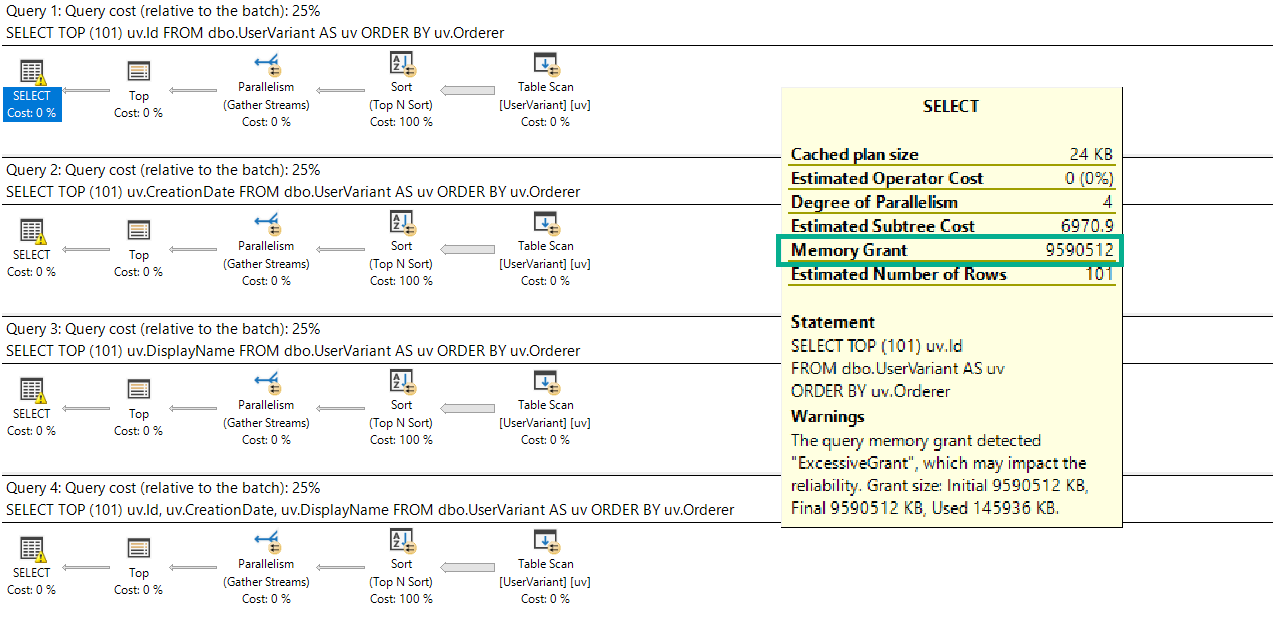
Sadly, no matter which column we select, the memory grant is the same:
SELECT TOP (101) uv.Id
FROM dbo.UserVariant AS uv
ORDER BY uv.Orderer;

SELECT TOP (101) uv.CreationDate
FROM dbo.UserVariant AS uv
ORDER BY uv.Orderer;

SELECT TOP (101) uv.DisplayName
FROM dbo.UserVariant AS uv
ORDER BY uv.Orderer;

SELECT TOP (101) uv.Id, uv.CreationDate, uv.DisplayName
FROM dbo.UserVariant AS uv
ORDER BY uv.Orderer;
It’s also the maximum memory grant my laptop will allow: about 9.6GB.
Large Marge
Get’em!
As if there aren’t enough reasons to avoid sql_variant, here’s another one.
Thanks for reading.
Going Further
If this is the kind of SQL Server stuff you love learning about, you’ll love my training. Blog readers get 25% off the Everything Bundle — over 100 hours of performance tuning content. Need hands-on help? I offer consulting engagements from targeted investigations to ongoing retainers. Want a quick sanity check before committing to a full engagement? Schedule a call — no commitment required.
There’s a joke about two economists walking down the street.
One of them asks the other how they’re doing.
The punchline is that their response is “compared to what?”
It’s not the best joke, and it’s something to keep in mind when you’re measuring anything, but SQL Server specifically.
This isn’t a post about collecting baselines, though it’s a relevant concept.
Scenery, Yo
One of the best ways to find bottlenecks in SQL Server is to look at wait stats.
Lots of scripts and monitoring tools will show you top waits, percentages, signal waits, and even percentages of signal waits.
Oh baby, those datapoints.
But there’s frequently a missing axis: compared to what?
Weakly Links
Let’s say you’ve got 604,800 seconds of CX packet waits.
Let’s also say they’re 95% of your total server wait stats.
How does your opinion of that number change if your server has been up for:
One Day (86,400 seconds)
One Week (604,800 seconds)
One Month (2,592,000 seconds)
One Year (31,536,000 seconds)
Obviously, if your server has been up for a day, you might wanna pay more attention to that metric.
If your server has been up for two weeks, it becomes less of an issue.
Seven Year Abs
I’ll give you another example: OH MY GOD YOU ATE 20,000 CALORIES.
In a day, that might be cause for concern
In a week, you’re about average
In a month, you might need medical attention
In a year, well, you’re probably more calorically important to worms
Compared to what is a pretty important measure.
Forced Perspective
I get it. Someone can clear out wait stats, and judging uptime can be unreliable, and more difficult up in the cloud.
Looking at wait stats without knowing the period of time they were collected over isn’t terribly helpful.
I’d opened an issue to at least separate wait stats by database, though Microsoft doesn’t seem to be too into my idea.
Thanks for reading!
Going Further
If this is the kind of SQL Server stuff you love learning about, you’ll love my training. Blog readers get 25% off the Everything Bundle — over 100 hours of performance tuning content. Need hands-on help? I offer consulting engagements from targeted investigations to ongoing retainers. Want a quick sanity check before committing to a full engagement? Schedule a call — no commitment required.
There’s a lot of excitement (alright, maybe I’m sort of in a bubble with these things) about SQL Server 2019 being able to inline most scalar UDFs.
But there’s a sort of weird catch with them. It’s documented, but still.
If you use GETDATE in the function, it can’t be inlined.
Say What?
Let’s look at three examples.
Numero Uno
CREATE OR ALTER FUNCTION dbo.YearDiff(@d DATETIME)
RETURNS INT
WITH SCHEMABINDING,
     RETURNS NULL ON NULL INPUT
AS
BEGIN
DECLARE @YearDiff INT;

SET @YearDiff = DATEDIFF(HOUR, @d, GETDATE())

RETURN @YearDiff
END;
GO
This function can’t be inlined. It uses the GETDATE function directly in a calculation.
I’m not bothered by that! After all, it’s documented.
In writing.
Numero Dos
CREATE OR ALTER FUNCTION dbo.i_YearDiff(@d DATETIME)
RETURNS INT
WITH SCHEMABINDING,
     RETURNS NULL ON NULL INPUT
AS
BEGIN
DECLARE @YearDiff INT;
DECLARE @i DATETIME = GETDATE()

SET @YearDiff = DATEDIFF(HOUR, @d, @i)

RETURN @YearDiff
END;
GO
I was thinking that maybe if we just calculated the date once in a variable and then use that, we’d be able to inline the function.
But no.
No we can’t.
Numero Tres
CREATE OR ALTER FUNCTION dbo.NothingToSeeHere(@d DATETIME)
RETURNS INT
WITH SCHEMABINDING,
     RETURNS NULL ON NULL INPUT
AS
BEGIN
DECLARE @YearDiff INT;
DECLARE @i DATETIME = GETDATE()

SET @YearDiff = 1;

RETURN @YearDiff
END;
GO
What if we don’t even touch GETDATE? Hm?
No.
Still no.
Kinda Weird, Right?
If you’re using SQL Server 2019 and want to find functions that can’t be inlined, start here:
SELECT OBJECT_NAME(m.object_id) AS object_name,
       m.is_inlineable
FROM sys.sql_modules AS m
    JOIN sys.objects AS o
        ON o.object_id = m.object_id
WHERE o.type = 'FN'
      AND m.is_inlineable = 0;
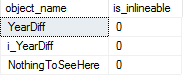
None of these functions can be inlined:
Bummer.
Unfortunately, the only real solution here is to rewrite the function entirely as an inline table valued function.
CREATE OR ALTER FUNCTION dbo.InlineYearDiff(@d DATETIME)
RETURNS TABLE
WITH SCHEMABINDING
AS
RETURN
    SELECT DATEDIFF(HOUR, @d, GETDATE()) AS TimeDiff
GO
Thanks for reading!
Going Further
If this is the kind of SQL Server stuff you love learning about, you’ll love my training. Blog readers get 25% off the Everything Bundle — over 100 hours of performance tuning content. Need hands-on help? I offer consulting engagements from targeted investigations to ongoing retainers. Want a quick sanity check before committing to a full engagement? Schedule a call — no commitment required.
If this is the kind of SQL Server stuff you love learning about, you’ll love my training. Blog readers get 25% off the Everything Bundle — over 100 hours of performance tuning content. Need hands-on help? I offer consulting engagements from targeted investigations to ongoing retainers. Want a quick sanity check before committing to a full engagement? Schedule a call — no commitment required.
In this video, I dive into a fascinating SQL Server feature called SP Get App Lock, which allows for session-level locking on imaginary resources rather than physical objects like tables or indexes. This can be particularly useful for serializing access to specific sections of code without blocking other operations on the database. By using this method, I demonstrate how two stored procedures can run concurrently but still ensure that only one can modify a shared resource at any given time, thanks to an exclusive lock on an imaginary resource named “Locko.” This example showcases how SP Get App Lock can enhance overall system concurrency and provide a flexible way to manage access in complex applications.
Full Transcript
Howdy folks, Erik Darling here with Erik Darling Data. And I just realized that my VM is slightly off kilter, so I’m going to fix that before I continue recording. There we go. Yeah, I think that’s better. Alright, yeah, now that’s all framed up. Cool. Anyway, hopefully the rest of the video will be flawless. So this video is sponsored by a red pen. Thank you, red pen. What I want to talk about today… Oh, it’s also sponsored by this pair of scissors. Thank you, scissors. What I want to talk to you about today is something kind of neat that I’ve been messing with. And it’s been around for a while. It’s not even anything remotely new. But it’s called SP Get App Lock. And it’s a system store procedure that allows you to take a lock on kind of like an imaginary resource so that you can serialize access to that resource. Now, I know that a lot of people, when they think about like locking and serializing access, they might think about table locks, right? Like not table locks, but like locking a table or locking an index in some way. Or like doing a begin train and locking something that way. This is similar, but different because you’re not locking like a table or index.
or anything else weird. You’re just saying, I don’t want anything else to be able to use this section of code while I’m using it. So I’ve had a store procedure on this window. This is called SP App Lock 1. And what SP App Lock 1 does is since I asked on Twitter and everyone seemed hip to exact abort, I’m turning that on. And what this does is it… Oh, let me knock this out so it’s a little bit easier to read. So what this does is it calls SP Get App Lock and it locks a resource that I called Locko. Locko is not a table, not an index, not a view, not a thing. It’s just an imaginary resource. I’m taking a session level lock and the lock mode that I’m taking is exclusive. Now, I could take an exclusive or an update lock here in order to serialize access to that lock, to that imaginary resource. So I’m just doing exclusive because I don’t know. I’m feeling exclusive this evening.
And after I take this lock, I’m going to update a table called LockMe. And I’m going to set an ID column equal to 2. Then I’m going to wait for 10 seconds and then I’m going to release the lock. Over in this window, I am doing nearly the same thing.
SP App Lock 2 will run. It will… I don’t know why that’s red. That’s weird. Anyway. SP App Lock will run. Use Get App Lock. Try to take a lock on Locko at the session level. Again, an exclusive lock. And this one’s going to set the ID in the LockMe table to 3 rather than 2.
Then this one is going to wait for 10 seconds and then it’s going to release the lock. This one also releases the lock at the end. I forgot if I mentioned that or not. Anyway, these are already created. So I’m going to get rid of this and get rid of this.
And then I’m going to show you a little bit more setup. So I have a table called LockMe. And LockMe has nothing to do with LockO. LockMe is just a table that both of those door procedures are going to try to update.
Right now, I have the ID 1 in that table. Just the ID 1. I’m not playing any tricks with isolation levels here. The isolation level for this session that I’m running everything in is Read Committed.
You can see that right down here. My isolation level is Read Committed. I’m not using No Lock. I’m not using Read Uncommitted. I’m not doing anything crazy like that.
What I want to show you is two things. One, that you can use this to take locks on a section of code rather than on physical objects in the database. And what kind of locks that takes.
And how that can help you improve overall system concurrency. So I have to do this pretty quickly. I’m going to run sp.getAppLock1. Run get2.
And then I’m going to come over here. And I’m going to run sp.whoisActive. And a select. The select query now returns ID 2. Because that first door procedure set the ID to 2.
ID was 1 before. Now it’s 2. So the first thing we see here is that that table got updated. The update finished and it wasn’t locked.
Where it’s interesting is when we look at sp.whoisActive. And we have the wait4 from the first door procedure. And we have this other query called xpUserLock.
sp.getAppLock is a wrapper for xpUserLock. If we look at the wait info for those two columns, we can see that we’re about 4.5 seconds into the wait4.
Remember, there’s a 10-second wait4 in both store procedures. That’s the one from the first one running. And the second store procedure is waiting on an exclusive lock. But the exclusive lock that it’s waiting on is not on the table.
The exclusive lock that we’ve granted to the first store procedure is on locko. And locko is not a real thing. It’s imaginary.
But we’ve locked it so that nothing else can get in and run. This thing has taken an exclusive lock and it’s been granted. All right? You can see that right there.
Pretty cool. If we look at the lockXML for the query that’s waiting, in other words, the xpUserLock query that’s waiting, and we go down here, we can see that this one is attempting to lock locko.
Locko is just trying to take an exclusive lock on this. We can see the exclusive request mode, but this one is being…
Oops. Try that again. This one is being forced to wait. So we have waiting to get an exclusive lock. In other words, what we’ve done is we’ve run a store procedure, completed a modification to the table.
So that table is no longer locked. We were able to select ID2 from the lock. And then we ran another store procedure that wanted to do almost the same thing.
But it wasn’t waiting on the lock on that object. It was waiting on a lock on our imaginary locko resource. If we come back to this window, now that nothing’s running, these both finished, and we run this, and we select from lock me, now we’re going to get ID3 back.
So eventually, this second store procedure that was looking to set ID to 3 did run, and it did release everything. I could go back and forth showing you that this would happen in a different order in the same way if I did it with SP App Lock, if I executed SP App Lock 2 first and then SP App Lock 1, if I change the lock mode to update and all this other stuff.
I would encourage you to go read a bit of the documentation about SP App Lock to learn more. Anyway, that is about all the time I have before I go to bed because it’s late.
but I wanted to get this recorded just in case an asteroid hits tonight or something. Again, this video was sponsored by a red pen and a pair of scissors.
So thank you to our generous sponsors. Anyway, I hope you learned something. I hope you enjoyed the video and I will see you next time or whatever unless an asteroid hits. I hope you enjoyed it.
Going Further
If this is the kind of SQL Server stuff you love learning about, you’ll love my training. Blog readers get 25% off the Everything Bundle — over 100 hours of performance tuning content. Need hands-on help? I offer consulting engagements from targeted investigations to ongoing retainers. Want a quick sanity check before committing to a full engagement? Schedule a call — no commitment required.
I wanted to show you two situations with two different kinds of spools, and how they differ with the amount of work they do.
I’ll also show you how you can tell the difference between the two.
Two For The Price Of Two
I’ve got a couple queries. One generates a single Eager Index Spool, and the other generates two.
    SELECT TOP (1)
            u.DisplayName,
            (SELECT COUNT_BIG(*)
             FROM dbo.Badges AS b
             WHERE b.UserId = u.Id
             AND u.LastAccessDate >= b.Date) AS [Whatever],
            (SELECT COUNT_BIG(*)
             FROM dbo.Badges AS b
             WHERE b.UserId = u.Id) AS [Total Badges]
    FROM dbo.Users AS u
    ORDER BY [Total Badges] DESC;
    GO

    SELECT TOP (1)
            u.DisplayName,
            (SELECT COUNT_BIG(*)
             FROM dbo.Badges AS b
             WHERE b.UserId = u.Id
             AND u.LastAccessDate >= b.Date ) AS [Whatever],
            (SELECT COUNT_BIG(*)
             FROM dbo.Badges AS b
             WHERE b.UserId = u.Id
             AND u.LastAccessDate >= b.Date) AS [Whatever],
            (SELECT COUNT_BIG(*)
             FROM dbo.Badges AS b
             WHERE b.UserId = u.Id) AS [Total Badges]
    FROM dbo.Users AS u
    ORDER BY [Total Badges] DESC;
    GO
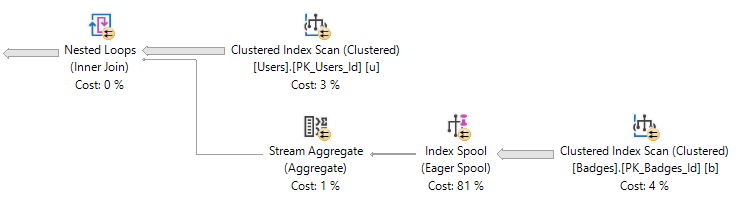
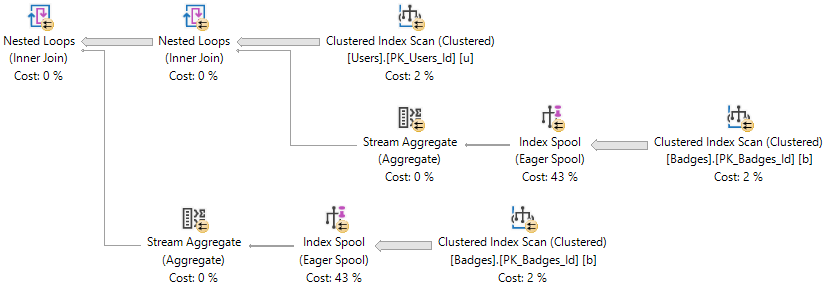
The important part of the plans are here:
UnoDos
The important thing to note here is that both index spools have the same definition.
The two COUNT(*) subqueries have identical logic and definitions.
Fire Sale
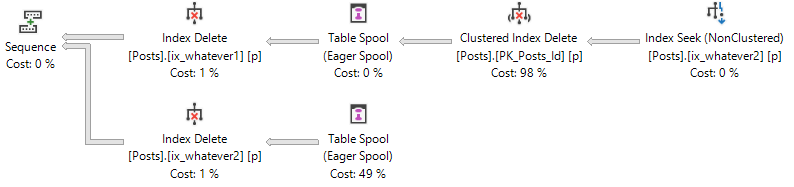
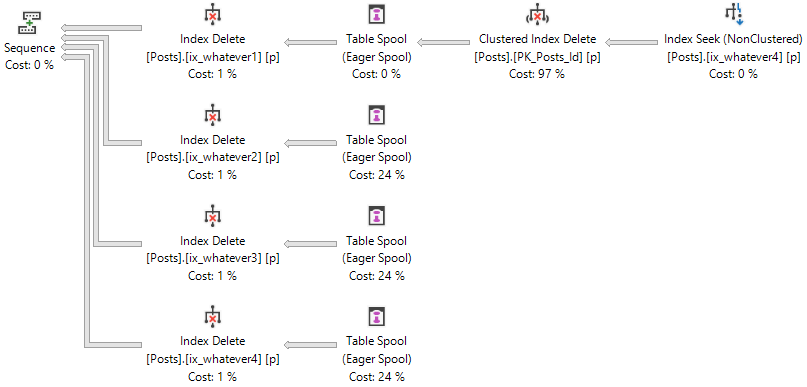
The other type of plan is a delete, but with a different number of indexes.
/*Add these first*/
CREATE INDEX ix_whatever1 ON dbo.Posts(OwnerUserId);
CREATE INDEX ix_whatever2 ON dbo.Posts(OwnerUserId);
/*Add these next*/
CREATE INDEX ix_whatever3 ON dbo.Posts(OwnerUserId);
CREATE INDEX ix_whatever4 ON dbo.Posts(OwnerUserId);

BEGIN TRAN
DELETE p
FROM dbo.Posts AS p
WHERE p.OwnerUserId = 22656
ROLLBACK
With two indexesWith four indexes
Differences?
Using Extended Events to track batch completion, we can look at how many writes each of these queries will do.
The select query with two spools does twice as many reads (and generally twice as much work) as the query with one spool
The delete query with four spools does identical writes as the one with two spools, but more work overall (twice as many indexes need maintenance)
Looking at the details of each select query, we can surmise that the two eager index spools were populated and read from separately.
In other words, we created two indexes while this query ran.
For the delete queries, we can surmise that a single spool was populated, and read from either two or four times (depending on the number of indexes that need maintenance).
Another way to look at it, is that in the select query plans, each spool has a child operator (the clustered index scan of Badges). In the delete plans, three of the spool operators have no child operator. Only one does, which signals that it was populated and reused (for Halloween protection).
Thanks for reading!
Going Further
If this is the kind of SQL Server stuff you love learning about, you’ll love my training. Blog readers get 25% off the Everything Bundle — over 100 hours of performance tuning content. Need hands-on help? I offer consulting engagements from targeted investigations to ongoing retainers. Want a quick sanity check before committing to a full engagement? Schedule a call — no commitment required.
If you’re coming to my precon, and really, I appreciate that you all chose to learn from me:
Join the Slack channel! Forgive their recent logo sins, and hang out in there to ask questions, yell at me, or ask when lunch is.
You can do that by going to http://sqlslack.com/ and entering your email address to get an invite. Once you’re in, you’ll wanna join #erikdarling-tuning.
Fair warning: if you’re gonna do this, do it well in advance. Downloading over public W-i-Fi is quite a gamble.
Lastly But Not Leastly
Check out all the other great sessions available that have seats remaining in them.
Thanks for reading!
Going Further
If this is the kind of SQL Server stuff you love learning about, you’ll love my training. Blog readers get 25% off the Everything Bundle — over 100 hours of performance tuning content. Need hands-on help? I offer consulting engagements from targeted investigations to ongoing retainers. Want a quick sanity check before committing to a full engagement? Schedule a call — no commitment required.