A delta rowgroup is a clustered index that’s used only with columnstore indexes. It improves columnstore compression and performance by storing rows until the number of rows reaches a threshold and are then moved into the columnstore.
This clustered index isn’t chosen by the person who creates the table. It’s a hidden internal column automatically added to delta rowgroups. Perhaps the implementation is similar to that of table spools:
The worktable is structured as if it was defined with a clustered index on zero columns. This means that a 4-byte uniqueifier is added to each row stored except the first.
You know how programmers are: they love reusing old code. If a similar implementation is used for delta rowgroups then it should be possible to see SQL Server errors with the right pattern of data loading. More investigation is required.
Defining the rules
It might be possible to find evidence of this clustered index by using DBCC PAGE. In the T-SQL code below, I create a table clustered columnstore index, insert 500 rows, delete 499 rows, insert 500 more rows, and delete 499 rows again:
CREATE TYPE dbo.SEAN_GALLARDY_INT FROM SMALLINT NOT NULL;

DROP TABLE IF EXISTS dbo.view_hidden_clustered_index;

CREATE TABLE dbo.view_hidden_clustered_index (
	ID SEAN_GALLARDY_INT,
	INDEX CCI CLUSTERED COLUMNSTORE
);

GO

CREATE OR ALTER PROCEDURE #p AS
BEGIN
	SET NOCOUNT ON;

	DECLARE @value_to_insert INT = 1;

	WHILE @value_to_insert <= 500
	BEGIN
		INSERT INTO dbo.view_hidden_clustered_index VALUES (@value_to_insert);

		SET @value_to_insert = @value_to_insert + 1;
	END;

	DELETE FROM dbo.view_hidden_clustered_index
	WHERE ID < 500;

	WHILE @value_to_insert <= 1000
	BEGIN
		INSERT INTO dbo.view_hidden_clustered_index VALUES (@value_to_insert);

		SET @value_to_insert = @value_to_insert + 1;
	END;

	DELETE FROM dbo.view_hidden_clustered_index
	WHERE ID > 500 AND ID < 1000;
END;

GO

EXEC #p;
There’s only a single page that stores the 2 rows currently held by the table. This can be viewed with the undocumented DBCC PAGE, TF 3604, and the undocumented sys.dm_db_database_page_allocations:
DECLARE @file_id SEAN_GALLARDY_INT;
DECLARE @page_id INT;

SELECT @file_id = allocated_page_file_id, @page_id = allocated_page_page_id
FROM sys.dm_db_database_page_allocations
    (DB_ID(), OBJECT_ID('dbo.view_hidden_clustered_index'),NULL, NULL, 'DETAILED')
WHERE is_allocated = 1 AND allocation_unit_type = 1 AND is_iam_page = 0 and page_type = 1;

DBCC TRACEON(3604);
DBCC PAGE('TEST',@file_id,@page_id,3) WITH TABLERESULTS;
DBCC TRACEOFF(3604);
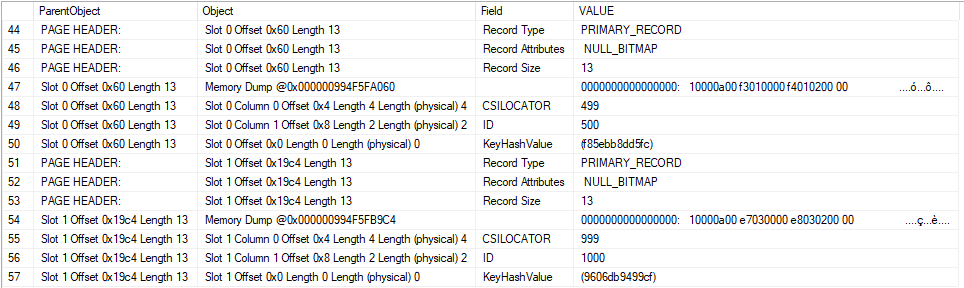
The information that we’re looking for is near the bottom of the result set:
A few things are worth calling out. The 500th row that was inserted into the table has a value of 499 for the “CSILOCATOR” field. This value appears to be stored in little-endian format in the memory dump for Slot 0 Offset 0x60. You can decode the raw value to 499 in T-SQL if desired:
SELECT CAST(0x000001F3 AS INT);
The 1000th row that was inserted into the table into the table has a value of 999 for the CSILOCATOR field. Most importantly, this CSILOCATOR field has a length of four bytes. A typical four byte int in SQL Server has a maximum value of 2147483647. If it’s possible to load billions of rows into a single delta rowgroup then we may run out of values for the CSILOCATOR field.
Of course, a single delta rowgroup cannot hold more than 1048576 rows. As you can see in this example, SQL Server does not always reuse freed up values for the CSILOCATOR field. The table currently has two rows, yet the field has advanced to 999. The right pattern of deletes, inserts, and updates should allow the CSILOCATOR to continue to grow without running out of room for rows in the delta rowgroup.
As a final note, I cannot prove that the CSILOCATOR field corresponds to the clustered index, but it certainly seems to serve the function of a uniqueifier that would be needed for said clustered index.
Running up the score
I need to find a relatively efficient way to advance the CSILOCATOR because I need to do it over 2 billion times, if my theory is correct about the maximum allowed value. Both updating all of the rows in a delta rowgroup and deleting and reinserting advance the CSILOCATOR. I expected that small batch sizes would work best, and they did. For my table’s schema, the sweet spot for updates is about 275 rows and the sweet spot for delete/inserts is about 550 rows. Delete/inserts appeared to be faster than updates for the purpose of constantly reloading the same rows over and over.
Strategies that use multiple CPU cores are possible, but I wanted to do other work on this PC and didn’t want to listen to a loud fan all day. Here’s what the final testing code looked like:
DROP TABLE IF EXISTS dbo.delta_store_test;

CREATE TABLE dbo.delta_store_test (
	ID TINYINT NOT NULL,
	INDEX CCI CLUSTERED COLUMNSTORE
);


DROP TABLE IF EXISTS dbo.LOG_TABLE;

CREATE TABLE dbo.LOG_TABLE (
	log_time DATETIME,
	loop_count INT,
	PRIMARY KEY (log_time)
);

GO

DROP TABLE IF EXISTS dbo.delta_store_source;
CREATE TABLE dbo.delta_store_source (
	ID TINYINT NOT NULL
);

INSERT INTO dbo.delta_store_source
SELECT TOP (550) 1
FROM master..spt_values t1
OPTION (MAXDOP 1);

GO

CREATE OR ALTER PROCEDURE #p AS
BEGIN
	SET NOCOUNT ON;

	DECLARE @loops INT = 0;

	WHILE @loops <= 8000000
	BEGIN
		DELETE FROM dbo.delta_store_test

		INSERT INTO dbo.delta_store_test
		SELECT 1
		FROM dbo.delta_store_source WITH (TABLOCK);

		SET @loops = @loops + 1;

		IF @loops % 10000 = 0
		BEGIN
			INSERT INTO dbo.LOG_TABLE
			VALUES (GETDATE(), @loops);
		END;
	END;
END;

GO

EXEC #p;
If you’re wondering about the temporary stored procedure creation, it’s a habit that I’ve gotten into whenever I write a T-SQL while loop. While not applicable here, very fast loops can incur ASYNC_NETWORK_IO overhead due to the passing of DONE tokens to the client.
Winning the game
After about seven hours the code reaches its glorious end:
Msg 666, Level 16, State 2, Procedure #p, Line 11 [Batch Start Line 26]
The maximum system-generated unique value for a duplicate group was exceeded for index with partition ID 72057596406595584. Dropping and re-creating the index may resolve this; otherwise, use another clustering key.
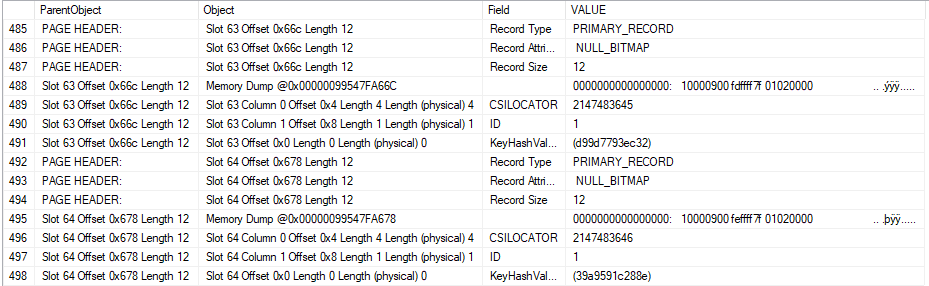
I loaded a few more rows into the table until I was unable to insert even one row. Using DBCC PAGE and friends again, we can see that the CSILOCATOR has a very large value of 2147483646.
Issuing a REBUILD does resolve the issue because it wipes away our sins, as REBUILDs often do. Naturally using another clustering key is not an option.
Joe: 1
Microsoft: 0
The cost of playing
My desktop computer has an intel core i5-4670 processor. Intel claims a TDP of 84 watts. Using CPUID HWMonitor, it looks like my CPU uses about 15 W of additional power when running the workload. It’s a single core workload, so I feel that 15 W is reasonable. 15 watts is 0.015 kW, and when used over 7 hours it translates to 0.105 kWh. My last electric bill has a rate of $0.11663 per kWh, so the total cost of this test comes out to about 1.2 cents. I will be sending Erik an invoice.
Final thoughts
It is possible to hit error 666 when maliciously loading data into a columnstore index. It requires loading over 2 billion rows into the same delta rowgroup, so it’s difficult to think of a production scenario that would lead to this outcome. For those of you with eccentric workloads that give cause for concern, you can roughly check if you are running of IDs by running a query similar to the following for each columnstore table:
SELECT 2147483647 - 1 - MAX(CAST(SUBSTRING(%%physloc%%, 5, 4) AS INT)) REMAINING_CSILOCATORS
FROM dbo.delta_store_test;
In the last post, we looked at how to see if your query is misbehaving, or if things are running normally.
Note that I didn’t say “good” here. Just normal.
For you.
What Have You Done For Me Lately?
Using sp_WhoIsActive in a slightly different way, we can see what a query has been up to over a duration of our choosing.
The delta columns are what happened over the span of time we pick. The columns that come back normally are cumulative to where the query is at now.
So for a 5 seconds interval:
EXEC sp_WhoIsActive @delta_interval = 5;
Stacked
I’m stacking a couple screens shots from the normal single line of results, because they’re a little too wide all at once.
What deltas can help you figure out is how “active” your query really is.
In other words, it can answer the question: is my query stuck, or is my query doing something?
As an example, here’s a query that opened a transaction, ran an update, and then… sat there.
Over all, we’ve done 4.4 million reads, 80k writes, and used about 7k ms of CPU.
But in the last five seconds, we haven’t done anything at all.
Thanks for reading!
Going Further
If this is the kind of SQL Server stuff you love learning about, you’ll love my training. Blog readers get 25% off the Everything Bundle — over 100 hours of performance tuning content. Need hands-on help? I offer consulting engagements from targeted investigations to ongoing retainers. Want a quick sanity check before committing to a full engagement? Schedule a call — no commitment required.
Look, it’s impressive enough that sp_WhoIsActive works as well as it does. Most people who’ve been using it for a while are familiar with using @get_plans to retrieve query plans, or @get_locks to see locking information. I’m gonna spend a couple posts talking about less well known flags that I really like.
We’re gonna start off with one that can help you figure out if a particular query is misbehaving, or if things are just cruising along normally.
Nipples
I’ve got a stored procedure. What it does is unimportant. What’s important is that it’s sensitive to parameter sniffing.
We may not know this walking into an emergency, but we can figure it out pretty quickly using sp_WhoIsActive.
EXEC sp_WhoIsActive @get_avg_time = 1;
Breathe Easy
This’ll give us back the usual information about how long our query has been running, but now right next to it is another column that ends in (avg).
When you use this switch, sp_WhoIsActive goes into the plan cache and looks at how long a particular query runs for on average.
If that number is much lower than how long the query has been running for, and it isn’t being blocked, you just might have a case of parameter sniffing on your hands.
Thanks for reading!
Going Further
If this is the kind of SQL Server stuff you love learning about, you’ll love my training. Blog readers get 25% off the Everything Bundle — over 100 hours of performance tuning content. Need hands-on help? I offer consulting engagements from targeted investigations to ongoing retainers. Want a quick sanity check before committing to a full engagement? Schedule a call — no commitment required.
Last week’s thrilling, stunning, flawless episode of whatever-you-wanna-call-it.
Video Summary
In this video, I discuss various technical topics related to SQL Server and database optimization. Starting off, I address issues around bad estimates and locking, explaining how local variables can lead to inaccurate row estimation and resulting in page-level locks instead of the more efficient row-level locks when using a recompile hint or correct parameters. Moving on, I delve into the problem of parameter sniffing, proposing an approach where SQL Server could cache multiple plans based on histogram data to handle different levels of data skew. This would involve analyzing histograms for potential skew and creating candidate plans that can be selected at runtime based on the actual parameter values. Lastly, I touch upon scaling this solution across multiple histograms and consider how query store can help mitigate some of these issues by automatically caching and reusing efficient execution plans.
Full Transcript
Yeah. So that’s, that’s apparently live. Fun. Fun. I feel like I don’t expect anyone to show up. I haven’t been here for two weeks. I’ve abandoned you. I’ve left you. Nice, sweet people, completely alone. Not here answering your questions. Uh, I was even a little bit late today because I had to, uh, do the, an adult thing. And I had to talk to an accountant about taxes. I was, I was like, I don’t know how to do anything. He’s just like, what do you do for work? I’m like, I’m a database consultant. He’s like, that sounds smart. And it was like, it’s like, yeah, yeah, but I just, I just don’t know anything about money or taxes. And he just, like, it’s, it’s funny when, um, people, people think that, uh, you know, when you’re, you’re smart about one thing that should have carry over to other things. Not the case. Not the case. I am, I am useless and hopeless when it comes to other, other endeavors.
All right. So I have, I have to Google some tax forms and I have to go to some websites about dealing with stuff. And it’s just not, not enjoyable. Not enjoyable at all. Anyway, there are, there are exactly two of you here, which is exactly how many people I would expect to show up after two weeks of not.
So if you have a question, you can, you can ask a question. My video just showed up. That’s weird. Uh, I had a weird error before this thing even started. Uh, Jesus Christ.
Who’s going to hear? Uh, before we even started a bump, uh, when I went to start up the webcast, they told me that my webcam was in use and I had to unplug it and plug it back in, but then video showed up immediately.
Expatriate never paid. I would love to, I would love to, uh, I don’t know, live somewhere in Europe. My, my new retirement plan is smoking cigarettes in a French graveyard. That’s, that’s how I’m going to spend my, my waning years.
Getting, getting ready to die. Surrounded by death and a cloud of cigarette smoke. Assuming they just still allowed to smoke by then. I don’t, I don’t know if I’m going to be able to retire until I’m very old. So.
There’s that to look forward to. I hope anyway. All right. Taking a look around here. I’m, uh, I’m getting some blog posts scheduled for the next few weeks. Cause, uh, all the travel and other nonsense really put me behind my blogging schedule.
I wasn’t, uh, I wasn’t, I wasn’t, uh, I wasn’t in my game with that. Getting caught up is tough because then I have to think about stuff very quickly. Oh, whatever.
All right. Six of you. One of you has to have a question about something. SQL Server. I don’t know. What else do you people do? What do you do for fun? I need a haircut.
This wave is annoying me. I’m going to just mess my hair up so I don’t have to look at it. There we go. I feel better now. It’s getting aggravating. Seven of you.
Seven of you and no SQL Server questions. Ah, man. It’s a downer. I was in Minneapolis, Minnesota, visiting a client on site, uh, without, without revealing too much.
It was a large, uh, what do you call it? God, why can’t I think of the name now? Um, CPA accounting. It’s a large accounting company.
And, uh, it was very funny to have me walking around there looking the way I look with all these people who have clearly done all the traditionally correct things in life just staring at me. And this, why is anyone listening?
Why is anyone talking to him? Like, huh? It was, it was, it was amusing. Anyway, we have some questions. Some questions. Uh, let’s see. Uh, do we have any recommendations on where to start if you want to enable columnstore indexes? Well, yeah.
First is to figure out if it’s even good for what you’re doing. If you’re doing OLTP, you probably don’t need columnstore. And that’s just kind of the end of it. If you are, if you have a data warehouse or you have some reporting needs, then columnstore might be a good idea.
Uh, but further, further that depends on which, version of SQL Server you’re on. If you’re on 2012, it’s not a good. Comptor is not your friend on 2012, 2014.
It might kind of be your friend. 2016. You’ll be on okay terms. 2017 clustered columnstore is probably going to be your jam. Yeah. So 2006. So I would, I would, you know, uh, you could try cluster, clustered columnstore out.
I promise I can talk English. Uh, so, you know, it, it, take a, take a look at, so a kind of a fun way to see if batch mode would be helpful at all is to just create like an empty temp table with a clustered columnstore index on it and do like that, that left join on one equals zero to, uh, to one of your data warehouse queries and see if you get batch mode operations and see if it improves the speed at all.
So there’s a good way to figure out if it’s good, if it will help at all is to do that and get batch mode involved on some level. Uh, just so, you know, you can be like, well, you know, like rather than going through all the pain of converting, because like there, there are some limitations with columnstore, especially in 2016.
temp tables and see if batch mode helps anything. Peter says that he tweeted a question after the last office hours. That was like three weeks ago. Now, man, three, three, three damn weeks ago.
I can’t remember three days ago. Three hours ago was fuzzy. So the forest says, what are some common misconceptions you encounter among people new to SQL Server? God, like everything. It depends. Like, I don’t know, like depending on how new they are, they might not have any conceptions.
It could be misconceptions. So the fact that like a lot of the times, um, you know, people just think it’s like an Excel file, right? You know, like what they see in management studio is the way data is stored. It’s like, this will be easy.
I can do whatever I want. Uh, but some, I don’t know, common misconceptions. Jeez Louise. People think it’s a lot smarter than it is so that it’ll take care of a lot more things than it actually will. Databases are not your friend. They do not have your back.
Databases want you to fail. Uh, Louie says, what version of SQL was the client on? Uh, I believe, if I remember correctly. Yeah, it was 2014. Cause there was some, there was, cause I, cause I wanted to see if query store was around, but they weren’t on 2016 yet.
Let’s see here. Peter says, given proc one with two batches, with two plans each, are there four possible proc plan combos or two, uh, four. If branching and store procedures means that you could, means that when, when, when an initial plan is compiled, all possible plans are explored and compiled.
What really sucks is that they do it with the initial set of variables. So if like any part of your branching is like, if you want to select from this table, then we’ll follow this branch.
Or if you want to join these tables and we follow a different branch and you get, and I don’t know, it’s weird, weird, bad things happen with nulls. It’s, it’s awful and terrible. And you should either use dynamic SQL or nested store procedures to do it. Cause if logic and store procedures, it’s just stinky.
Oh man. I got thinking about smoking cigarettes in a French graveyard. Now, of course, all I want to do is smoke a cigarette in a French graveyard. Damn. Uh, Max says, can you explain what you meant in bad estimates and locking?
I couldn’t get the point. What did you do to fix the issue? Uh, yeah. So, uh, my, my blog post, I think it was today. I forget when things get published. Uh, I ran into an issue recently with declared variables and declared variables were causing a bad, bad overestimate and how many rows might, uh, result from, uh, a where clause.
So what was happening is, uh, Corey was running a local variable was in use in the where clause. And, uh, as a result, many, many more rows were expected to be, be returned. So the lock granularity was at the page level rather than at the row level. But the, when you use a recompile hint or you use a correct, you know, type of parameter or literal or whatever, uh, then you’ll get the correct estimate and you’ll get key level locks.
So, yeah, that was that. He just says, hashtag SQL office hours. Let’s make it happen. Ah, boy, that sounds exhausting.
Who has time for that? Is that Twitter? Sounds awful. Twitter’s the worst. I wish, I wish that I could like just run screaming. On Twitter. Run screaming.
Speaking of which, I’m going to see if anything is in there. What are you saying here? Uh, different thing. Yeah, apparently that was. Wait, forest. What did you just like?
Did this thing, this thing publish early? Oh, it must be just a blank video. Damn. Whatever. far says if you were at Microsoft, how would you, how would you solve parameters sniffing? That’s a great question.
And, uh, I think the answer would be that you couldn’t just have a single iteration of a plan. Based on the first set of parameters that get passed in, you would need, uh, uh, you would need to be a little bit more, I guess, I guess Microsoft would call, call it intelligent about, uh, whether you pursue a plan, a parameterized plan, or whether you, uh, go looking for other possibilities.
So like, like just like taking the simplest example of, uh, store procedure with a single parameter. If you have, if you look, if, if SQL Server looks at the histogram for that parameter and notes some amount of skew across values, it should mark that plan as, uh, a candidate for, uh, additional branches.
And if it, if it, if it, if it, if it, if it doesn’t denote skew, then it should just say, no, this one, this one’s going to be pretty stable no matter what. And then if you have a candidate plan, it says automatic plan correction. No, cause I don’t, cause I don’t, I don’t want SQL Server changing its idea mid flight.
I want SQL Server caching a plan and I want SQL Server using a, a completely different query from the start. So what, what, what I would like to see happen is you, you would have like a candidate plan for, uh, for like, you know, say, you know, typical example, stack overflow database users table reputation equals two.
You look at the reputation histogram, the reputation equals one users have quite a different set of data in the table from pretty much any other reputation, like more than all the other reputations combined. Uh, so what, what you would want to do is have a plan that is sort of suitable for, uh, unskewed values.
And then a plan that is rather suitable for the skewed values. So you would have the, you take this plan, SQL Server would look at a parameter, for that plan, look at the histogram that it’s going to use for that and say, all right, well, I know that I see that reputation equals one is a doozy. There’s like three, like, I don’t know, however many users for that 3 million or so users.
And then, uh, I would look at the rest of the rest of the values and say, well, all together there, they hardly break 3 million altogether. It’s like, you know, a million and a half of them for any value other than one, we can use this plan. And then for reputation equals one, we can use this plan.
Like, like it would just, it would be a, it would be a matter of like judging candidacy based on, uh, you know, histogram data, which can be wrong, but I would much rather see the attempt made than just kind of left to kick in the wind. I don’t, I don’t want to see plan correction while a plant, while a query is in flight, because, you know, that seems hacky.
That seems tacked on to me. I would rather see SQL Server do this when a plan is first compiled to say, look, there are different branches that are going to make sense for different levels of data flow. So I think like the next value down from one is like a 10 or 11 or something.
And so it might make sense to say, hey, look, we might need a different plan for the 10s and 11s, but everyone else, or the ones and ones and 10s and 11s, but everyone else can use this kind of small plan. So I think, I think really the solution would be sort of an initial look at histograms involved and figuring out if there is skew in those histograms. And if skew is detected, then you would, you know, cache different versions of the plan just because SQL Server already has compiled time and runtime values in the plan.
So it knows there’s a difference. It’s able to sniff the runtime value and do stuff with it. And if you already had a plan available for a different, for a different parameter, you could, you wouldn’t have to worry about plan caching or you wouldn’t have to worry about compiling a new plan at runtime.
You would just, just use a different branch of the plan based on the, the runtime value. Seems easy to me. I know it’s going to be harder when there’s like, when there’s like 50 parameter store procedures, but those probably aren’t the best candidates to start trying to fix parameters sniffing for.
There’s like, you know, let’s say between one and five parameters, it might, might be doable. Granted, there’s going to be some weird math in there, but math isn’t my strong suit. So I wouldn’t be in charge of that. I would just, I would just draw the big picture and let other people fill in the details.
Yeah. It would be, it’d be like a, like a Franken plan, right? It would just be like sewing different chunks of query plans together based on, based on what’s going on.
It’d be fun. I think it’d be fun. They should hire me just to do that. I would love to do that. Just get rid of plank. You could just get rid of plank hashing. We do have query store. So we don’t, don’t need the plank hash.
We could just turn on query store and say, Hey, you match this plan. Let’s use that. Right. It’d be fun. Peter says any thoughts on scaling that to multiple histograms or is most sniffing trouble isolated to one set of stats usually? Yes and no.
I think there are some statistics that are, are generally more uniform than others. You know, date, date values tend to be a bit more uniform. Granted, you’ll have some skew. If like, you know, you’re thinking about like an OLTP thing.
If you have a big sale or like black Friday comes along, you might, you probably have some more values in there then, but I think generally if you know, you’ll have a fairly stable, you know, per day number of orders or something. So, you know, that’s one thing you might grow like year over year or month over month, but you know, that’s where people, people generally aren’t when they look at historical stuff, they might, they’re probably looking at like just the newest stuff anyway.
So kind of like less of an issue there. Um, let’s go into multiple histograms. Yeah, of course it’d be tougher, but at the same time, it’s pretty easy to, to, to judge at, at that point, if you’re using multiple histograms, which of those histograms have skew involved in them.
So it would, it would purely be, uh, for histograms that show skew at compile time. It wouldn’t be like, you know, every, every history, every histogram involved. It’d be like your histogram would have to show, like, you know, some amount of skew towards one value or a group of values in order to make sense.
And for that to make sense, if they got rid of the plan cash, Josh, what, what would, how, what would I do with my, my time? We’re not writing XML queries. What would I do with myself?
What would I look at and stare and point and shock and horror? What would I do? What would I do? There is not coffee enough in the world today. Work out more.
That’d be nice. I mean, blog less, work out more. Ooh, Darren’s, Darren’s firing some shots. He says, obviously you don’t run high enough batch requests to second databases. No plan caching would chew up your CPU. I don’t know.
Depends on if you’re, if you’re running high batch requests to second workloads, typically you have a bunch of pretty small queries running. It doesn’t take a lot to generate a query plan for a pretty small query. Great.
Like usually when you see like the, like the, like the, like the plans that take a lot of compile time CPU, they’ll, they’ll be like, there’ll be larger plans, right? They’re like plans a lot of exploration space, a lot of operators, lots of joins and whatever. So I don’t know. I don’t know about that.
If you’re doing OLTP with 4,000 lines for procedures, I think you’re messing something up. The single use ones truly eat up 32 procs. If you go to Eric darling data.com and click on consulting, we can talk more about that.
SQL dev DBA says smoke cigs in a French graveyard. Yes, please. That, that’s that, that, that, that is something that I would do eventually. I don’t know.
Uh, let’s see. Uh, do you have any insight on how the optimizer chooses per predicate for a single plan? Or is it time to nerd snipe? I don’t know what that means. Uh, how the optimizer chooses per predicate for a single plan. Well, I mean, per predicate, it depends on the cardinality estimator version.
It’s either like the, the assumption of a complete lack of cohesiveness, or it’s like the exponential back off thing in the new one. So it depends on, depends on the, the, the cardinality estimator.
Uh, let’s see here. Peter says, what do they say at the gym? Don’t skip recompile day. I’ve never heard that at the gym. Mostly. I just hear, uh, either, either vague words of encouragement or someone yesterday was at the gym. And, uh, uh, I was, I was, I had finished doing squats.
I was doing, I was doing overhead presses, getting, getting them up there, right? Getting them up. And, uh, and I was, I was in between sets and this guy, and this guy walked over to an empty rack and he was like, finally, this thing’s empty. I’ve been waiting like days for an empty rack. I’m like, that is a problem at my gym.
There’s a, there’s not that, there’s not that many racks and sometimes waiting for one sucks. But, uh, uh, then, then he, you know, I’m like, yeah, yeah, you know, it’s, it’s, it sucks waiting sometimes, you know, just gotta be patient sometimes, you know?
And like, you know, like all the, all the, all the racks are like platforms, right? So, you know, there’s like squat, like a squat, place a squat or do presses or whatever. And then like, there’s a platform in back where you could deadlift from. So, you know, it depends on what you want to do. Two people can use a platform at a time and like, you know, just kind of switch off.
Like I wouldn’t want to be deadlifting while some dude was squatting. That’d be a little awkward, but, but like, I’m feeling like, all right, well, this guy, this guy clearly needs a rack for something important. He’s going to get in there and do some, some rack stuff. And then he proceeded to, uh, stretch, do planks and then take, uh, a 25 pound plate and do like head circles with it, like back around this, doing this stuff.
And I thought, sir, there is not a single thing that you’ve done in the last 15 minutes. They’re required a rack. Nevermind you waiting two days to get on the rack. Go, you could do that at home. It’s not, it’s not fair.
It’s not fair. Oh, let’s see here. I got lost in that. Uh, Josh replied, Corey says, have you heard of event sourcing? Ever seen it implemented? Seems like a lot of temporal tables. No, I don’t think it’s a very popular thing. I don’t, I don’t think, uh, I would want to talk to anyone doing it.
It sounds, it sounds dreadful. Sorry. Uh, let’s see. Darren says squat day. I walked in and all the racks had weights on them, had to alter my workout, come to find they weren’t being used. Yeah. People do that.
That’s why whenever, whenever I see that, I just take a seat near the racks and I, I, I look at my watch for a little bit. And then if I don’t see anyone come use a rack, so much like a deadlock victim, I pick whichever rack has the least amount of weight on it. And then I take that off, figuring if whoever has the least amount of weight on a rack would probably be the easiest for me to like stare down.
If they were like, I was using that. It was like, no, you weren’t. You were off doing lat pull downs or something. Nerd. All right. Well, I’m glad that, uh, glad that Josh and Darren are friends now.
Maybe you guys can, I don’t know. What do people do when they make friends online? You like meet up for coffee or something? I don’t know.
I don’t know anymore. I don’t make friends anymore, especially not online. Chat rooms are for losers. Faris says, speaking of, speaking of chat rooms, Faris says, uh, if you had to pick a no SQL database to learn, which would it be?
Ah, boy, you know, I think just because of the amount of time I spend trying to convince people to use it, I would, like, like, I wouldn’t say like for life, but the first one I would learn would be elastic search. Cause I think the stuff that it does, uh, like as far, like as far as like how it does tech search versus SQL servers, crappy full text indexing catalog search is phenomenal.
I think there’s some great stuff that elastic search does. Also it’s free. Like, like free, free. You can go download it for free. You can install it for free. You can run it in production for free.
If you want support, it costs money like postgres, but like on the, like on the front of things, it’s totally free to just learn and deploy. And I think it would be fun to mess with. Unfortunately, I am a terrible developer and I would have no idea how to get data into it or how to query it whatsoever. None.
I would need the world’s dumbest API and like a pack of crayons in order to get anything done or working in there. It would not be, not be my best work. Peter says, uh, reading up a bit on Mongo.
Boo. Oh, come on, man. Mongo use, uh, what is it? Redis or react or what are the other cool ones? What’s that? It’s that thing.
Microsoft has in Azure, whatever it’s called. Cosmopolitan DB or something. Yeah. Josh likes Raven DB. Josh likes Raven DB because of one specific feature. Don’t let him con you into thinking that Raven DB is amazing.
The one, what Raven DB does is it tells you why certain indexes were skipped. And Josh thinks that that would be a healthy add on to SQL Server. I do too. I think that would be helpful. Like, especially during demos to be like, what in SQL Server use that index?
Here’s exactly why. Because it would impact the reliability. Microsoft sucks at error messages. I tweeted about some today. They’re, they’re God awful. I wish Microsoft should hire me to write error messages. Think it would bring some clarity to the situation.
They should hire me to write error messages. They should hire Joe. I wish to write KB articles. Uh, I think that, I think that, I think that would round things out. It’d probably go broke paying us though. We’d do a lot of writing.
At least I think anyway. Can’t believe this thing already has a thumbs up. Peter says, but then why would they need a consultant? Well, for what everyone else needs consultants for, Peter, to supplement exist, exist, existing staff that has some very clear weaknesses.
That’s what. Whoever writes those error messages now, oh boy, you need help.
Almost a complete lack of clarity. Punctuation, capitalization. It’s wiggity whack, yo. Real wiggity whack. All right.
We are coming up on the half hour mark. And I’m seeing a distinct lack of sentences that end in question marks. Or comments that end in something else. So, Josh says, Eric would replace all of the sys messages with sounds like a string problem.
Perhaps, but, I would at the very least point people in the right direction. It wouldn’t be that, that please retry. Nonsense.
I would give people, I would say, yeah, I think you messed this up. Here’s what you should do instead. Like if someone tried to, I don’t know, duo, do, do, do things that are bad before SQL Server 2019. I would throw in error messages. Like if they tried to create a scalar function, I would, the first, then the first create, I would, I would throw an error message.
They’d be like, you sure? Look, this is what’s going to happen. It’s going to be bad if you do this. Unless you’re a consultant just writing a demo about them. You should avoid that. Yeah. I am too old for this. It’s time to go smoke cigarettes in a French graveyard. So, thank you for joining me this week.
I will, at this, at this, at this rate, I think I will be, I will not have anything in the way, next Friday. So, I should be able to do that. Actually, I would change all the error messages to don’t at me. That would be, that would be it.
Anyway, thanks for coming along. Thanks for watching. See you next time.
Going Further
If this is the kind of SQL Server stuff you love learning about, you’ll love my training. Blog readers get 25% off the Everything Bundle — over 100 hours of performance tuning content. Need hands-on help? I offer consulting engagements from targeted investigations to ongoing retainers. Want a quick sanity check before committing to a full engagement? Schedule a call — no commitment required.
A lot has been written about “kitchen sink” queries. A couple of my favorites are by Aaron Bertrand and Gail Shaw.
Both articles have similar start and end points. But I’m going to start at an even worse point.
Catch All Parameters
This is the worst possible idea.
    CREATE OR ALTER PROCEDURE dbo.AwesomeSearchProcedure (@SearchString NVARCHAR(MAX))
    AS
    SET NOCOUNT, XACT_ABORT ON;
    SET STATISTICS TIME, IO OFF;
    BEGIN

    DECLARE @AltString NVARCHAR(MAX) = N'%'

    SELECT TOP (1000) p.OwnerUserId, p.Title, p.CreationDate, p.LastActivityDate, p.Body
    FROM dbo.Posts AS p
    WHERE p.OwnerUserId LIKE ISNULL(N'%' + @SearchString + N'%', @AltString)
    OR    p.Title LIKE ISNULL(N'%' + @SearchString + N'%', @AltString)
    OR    p.CreationDate LIKE ISNULL(N'%' + @SearchString + N'%', @AltString)
    OR    p.LastActivityDate LIKE ISNULL(N'%' + @SearchString + N'%', @AltString)
    OR    p.Body LIKE ISNULL(N'%' + @SearchString + N'%', @AltString);

    END;
    GO
It doesn’t get any better if you do this, either.
    SELECT TOP (1000) p.OwnerUserId, p.Title, p.CreationDate, p.LastActivityDate, p.Body
    FROM dbo.Posts AS p
    WHERE (p.OwnerUserId LIKE N'%' + @SearchString + N'%' OR @SearchString IS NULL)
    OR    (p.Title LIKE N'%' + @SearchString + N'%' OR @SearchString IS NULL)
    OR    (p.CreationDate LIKE N'%' + @SearchString + N'%' OR @SearchString IS NULL)
    OR    (p.LastActivityDate LIKE N'%' + @SearchString + N'%' OR @SearchString IS NULL)
    OR    (p.Body LIKE N'%' + @SearchString + N'%' OR @SearchString IS NULL);
Sample Run
In both cases, just searching for a single value results in a query that runs for >2 minutes.
    EXEC dbo.AwesomeSearchProcedure @SearchString = N'35004';
    GO
The problem is that we’re just searching for an OwnerUserId, but SQL Server doesn’t know that.
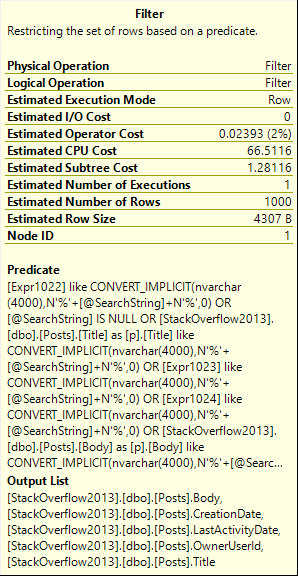
The query plan looks like this:
Badness
See that Filter? That’s where we do all of our search work. We scan the whole Posts table, and push every row across the pipe to the Filter.
Messy
Irritable
This pattern might work on a small amount of data, but like most things that are efficient in small doses this will quickly fall apart when your database reaches a mature size.
My example is pretty simple, too, just hitting one table. In real life, you monsters are going this across joins, throwing in row numbers, distincts, and ordering by the first 10 columns.
It only gets worse as it gets more complicated.
Thanks for reading!
Going Further
If this is the kind of SQL Server stuff you love learning about, you’ll love my training. Blog readers get 25% off the Everything Bundle — over 100 hours of performance tuning content. Need hands-on help? I offer consulting engagements from targeted investigations to ongoing retainers. Want a quick sanity check before committing to a full engagement? Schedule a call — no commitment required.
I know you don’t have bad queries. You’re smart people. But some people do!
Let’s also say that bad query is taking part in a modification.
UPDATE u2
SET u2.Reputation *= 2
FROM Users AS u
JOIN dbo.Users AS u2
ON CHARINDEX(u.DisplayName, u2.DisplayName) > 0
WHERE u2.Reputation >= 100000
AND u.Id <> u2.Id;
This query will run for so long that we’ll get sick of waiting for it. It’s really holding up writing this blog post.
Let’s try something a little different.
SELECT u.Id, u.DisplayName
INTO #Users
FROM dbo.Users AS u
WHERE u.Reputation >= 100000;

UPDATE u2
SET u2.Reputation *= 2
FROM #Users AS u
JOIN dbo.Users AS u2
ON CHARINDEX(u.DisplayName, u2.DisplayName) > 0
AND u.Id <> u2.Id;
This time, the query finishes in 43 seconds.
Plans and Events
The query plan looks like this:
You’re not cool.
Extended events can tell us when locks were taken and released to perform the update.
Ducked out
An exclusive lock was held on the table for over 35 seconds, so all but ~7 seconds of the plan has locks on the table we’re updating.
In real life, that’d probably mean a lot of blocking.
Alt Rock
Another way to handle this is to remove the long-running query from the update, and take advantage of the Primary Key/Clustered Index on the table.
First, isolate the rows we care about:
SELECT u2.Id, u2.Reputation * 2 AS DoubleRep
INTO #Updater
FROM #Users AS u
JOIN dbo.Users AS u2
ON CHARINDEX(u.DisplayName, u2.DisplayName) > 0
AND u.Id <> u2.Id;
Then do the update:
UPDATE u2
SET u2.Reputation = u.DoubleRep
FROM #Updater AS u
JOIN dbo.Users AS u2
ON u.Id = u2.Id;
This query only runs a few hundred milliseconds, so the locks taken are shorter.
Keep in mind, though, that the first insert query is still horrible.
It runs for ~40ish seconds, but at least we don’t lock any objects that other queries might care about.
Thanks for reading!
Going Further
If this is the kind of SQL Server stuff you love learning about, you’ll love my training. Blog readers get 25% off the Everything Bundle — over 100 hours of performance tuning content. Need hands-on help? I offer consulting engagements from targeted investigations to ongoing retainers. Want a quick sanity check before committing to a full engagement? Schedule a call — no commitment required.
I recently came across a bad locking problem. It was one of those things that happened “suddenly” and “for no reason”.
When I looked at the stored procedure, the code was something like this:
CREATE PROCEDURE dbo.bad_news(@PostTypeId INT)
AS
BEGIN

DECLARE @PTID INT
SELECT @PTID = CASE WHEN @PostTypeId < 1
                         OR @PostTypeId > 8
				    THEN 4
			   END
UPDATE p
SET p.Score += 1
FROM dbo.Posts AS p
WHERE p.PostTypeId = @PTID;

END
I mean, it would look like that if we were using Stack Overflow.
We weren’t, but I’ll leave the rest to your imagination.
Outside The Proc
We have this index:
CREATE INDEX ix_spanky ON dbo.Posts(PostTypeId);
Let’s run this code, and look at what happens.
BEGIN TRAN
UPDATE p
SET p.Score += 1
FROM dbo.Posts AS p
WHERE p.PostTypeId = 3;
ROLLBACK
We not only have exclusive locks on pages, but on the entire table now.
Overestimaters Anonymous
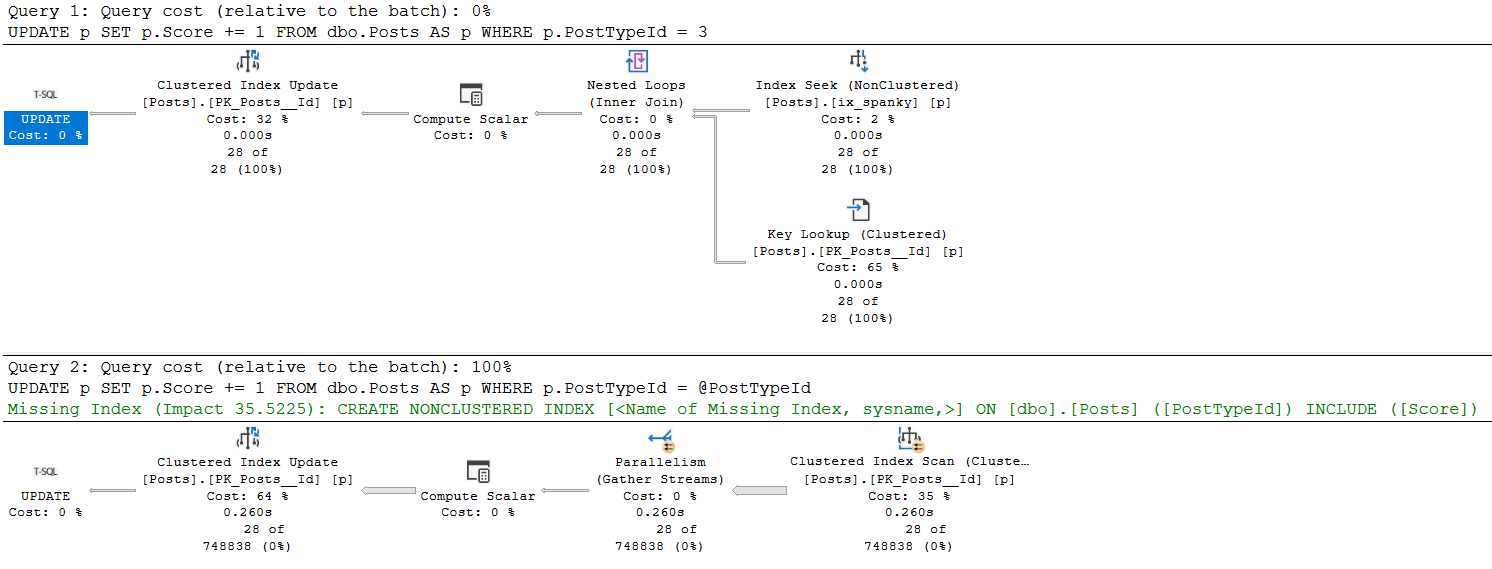
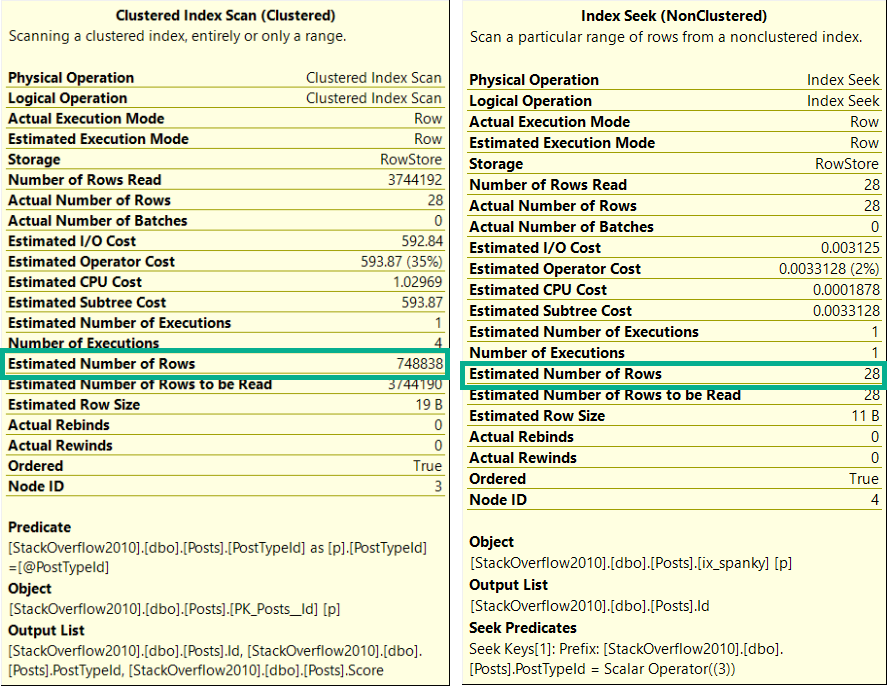
The execution plans for these two queries are much different.
umop
Likewise, the estimates are much different.
upside
Oh So Loco
This is a fairly well-documented outcome of using a “declared variable”, or the optimize for unknown hint.
The optimizer makes a usually-generally-bad guess at the number of rows it’ll have to deal with.
In this case, the stored procedure had been modified to account for bad values passed in from the application.
The outcome was severe blocking because modification queries were taking far more intrusive locks than necessary.
So, you know, don’t do that.
Thanks for reading!
Going Further
If this is the kind of SQL Server stuff you love learning about, you’ll love my training. Blog readers get 25% off the Everything Bundle — over 100 hours of performance tuning content. Need hands-on help? I offer consulting engagements from targeted investigations to ongoing retainers. Want a quick sanity check before committing to a full engagement? Schedule a call — no commitment required.
You want your stored procedure to be a unit of work that you can roll back if something goes awry.
At first, it’s a few quick operations.
But over the years, the code has gotten more complicated, data has gotten larger, and now you’ve got terrible blocking problems.
Do The Worm
Assuming you can’t get rid of the transaction, you need to think of it like a movie about interstellar travel.
You know the kind where someone folds a piece of paper in half and pokes a hole through it?
Your job is to make all the stuff that happens inside as fast as possible.
This won’t fix the blocking, but it will shorten it.
Other Approaches
It might be possible for you to get rid of the transaction if you can store the before and after data somewhere.
This will get rid of the transaction, so locks won’t be held for the duration of it, but it makes you do more work in the procedure.
For every row or set of rows you change, you have to get the current values, put them somewhere, and hang onto them.
If you need to roll back your work, you need to go through and put them back. This can cause all sorts of problems, especially if someone else is working on the same data at the same time. Who should win?
You can partially solve this with sp_getapplock, but then you’re locking access to code until the whole thing is done, and…
You’re back to having locking problems.
Another thing you might be able to implement if you can change table structure is add an “in use” bit column, and skip over rows that are in use by someone else. This is common in queue tables, but can be extended to other types of work tables.
Thanks for reading!
Going Further
If this is the kind of SQL Server stuff you love learning about, you’ll love my training. Blog readers get 25% off the Everything Bundle — over 100 hours of performance tuning content. Need hands-on help? I offer consulting engagements from targeted investigations to ongoing retainers. Want a quick sanity check before committing to a full engagement? Schedule a call — no commitment required.
There are all sorts of fun hints you can staple onto your queries that will make them behave differently.
Probably the most common one I see is the NOLOCK hint.
Don’t worry, this post has nothing to do with that.
You’ve been finger wagged to death about it already.
Other Lock Hints
Sometimes you want to try to control lock granularity. A noble effort, indeed.
To do that, you can use hints like ROWLOCK or PAGLOCK. They’ll let you tell the weevils inside your server to prefer those types of locks.
The thing is, both are still subject to lock escalation (unless you turn that off, too).
If we take an update query like this, and use sp_WhoIsActive to look at the locks:
    BEGIN TRAN;
    WITH x AS
    (
        SELECT TOP (5000)
                h.Score
        FROM dbo.HighQuestionScores AS h
        ORDER BY h.Id
    )
    UPDATE x
    SET  x.Score = 2147483647
    FROM x WITH (ROWLOCK);

    ROLLBACK
The only lock type that has an X type is the Key lock. The page and object lock types are only intent exclusive. You can read more about intent locks here.
Now, if we change the 5000 to 7000, we get much different results from sp_WhoIsActive.
We’ve hit lock escalation, and our precious ROWLOCK hint has been disregarded.
Funny, huh?
Thanks for reading!
Going Further
If this is the kind of SQL Server stuff you love learning about, you’ll love my training. Blog readers get 25% off the Everything Bundle — over 100 hours of performance tuning content. Need hands-on help? I offer consulting engagements from targeted investigations to ongoing retainers. Want a quick sanity check before committing to a full engagement? Schedule a call — no commitment required.
While working with a client who has a nasty blocking problem involving triggers, we were talking about using Snapshot Isolation to help fix the issue.
The thing is, there’s more than just stored procedures causing problems. Some of the issue is with triggers.
The prospect of having to modify a bunch of objects was a rightfully frightful one.
Funboy & Funboy & Funboy
In my database, I have Snapshot Isolation enabled.
I have a table with a trigger on it. The trigger doesn’t do anything except show me what my session’s isolation level is
CREATE TABLE dbo.t ( id INT NULL, dimdate DATETIME NULL );
CREATE TRIGGER dbo.dim_trigger
ON dbo.t
AFTER INSERT
AS
    BEGIN
        SET NOCOUNT ON;

        DECLARE @UserOptions TABLE ( SetOption VARCHAR(100), Value VARCHAR(100));
        DECLARE @IsolationLevel VARCHAR(100);

        INSERT @UserOptions
        EXEC ( 'DBCC USEROPTIONS WITH NO_INFOMSGS' );

        SELECT @IsolationLevel = 'Trigger:' + Value
        FROM   @UserOptions
        WHERE  SetOption = 'isolation level';

        PRINT @IsolationLevel;

    END;
I also have a stored procedure that checks the isolation level, and inserts into my table so that the trigger fires off.
CREATE OR ALTER PROCEDURE dbo.insert_t
AS
    BEGIN
        SET NOCOUNT ON;

        SET TRANSACTION ISOLATION LEVEL SNAPSHOT;

        DECLARE @UserOptions TABLE ( SetOption VARCHAR(100), Value VARCHAR(100));
        DECLARE @IsolationLevel VARCHAR(100);

        INSERT @UserOptions
        EXEC ( 'DBCC USEROPTIONS WITH NO_INFOMSGS' );

        SELECT @IsolationLevel = 'Procedure:' + Value
        FROM   @UserOptions
        WHERE  SetOption = 'isolation level';

        PRINT @IsolationLevel;

        INSERT dbo.t ( id, dimdate )
        VALUES ( 0, GETDATE());

    END;
On Notice
I’m only setting the isolation level in the stored procedure here.
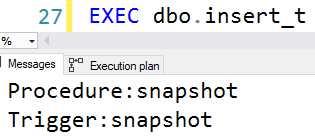
When I run it, both will return the same isolation level no matter what you set it to.
Consistency
Thanks to Scott Ivey, whose code I borrowed for this.
And thank you for reading!
Going Further
If this is the kind of SQL Server stuff you love learning about, you’ll love my training. Blog readers get 25% off the Everything Bundle — over 100 hours of performance tuning content. Need hands-on help? I offer consulting engagements from targeted investigations to ongoing retainers. Want a quick sanity check before committing to a full engagement? Schedule a call — no commitment required.