Are Self Joins Ever Better Than Key Lookups In SQL Server?

Sorta Topical


Like most tricks, this has a specific use case, but can be quite effective when you spot it.

I’m going to assume you have a vague understanding of parameter sniffing with stored procedures going into this. If you don’t, the post may not make a lot of sense.

Or, heck, maybe it’ll give you a vague understanding of parameter sniffing in stored procedures.

One For The Money


Say I have a stored procedure that accepts a parameter called @Reputation.

The body of the procedure looks like this:

    SELECT TOP (1000) 
	        u.*
    FROM dbo.Users AS u
    WHERE u.Reputation = @Reputation
    ORDER BY u.CreationDate DESC;

In the users table, there are a lot of people with a Reputation of 1.

There are not so many with a Reputation of 2.

+------------+---------+
| Reputation | records |
+------------+---------+
|          1 | 1090043 |
|          2 |    1854 |
+------------+---------+

Two For The Slow


Data distributions like this matter. They change how SQL Server approaches coming up with an execution plan for a query.

Which indexes to use, what kind of joins to use, how to aggregate data, if the plan should be serial or parallel…

The list goes on and on.

In this case, we have a narrow-ish nonclustered index:

    CREATE INDEX whatever 
        ON dbo.Users (Reputation, Age, CreationDate);

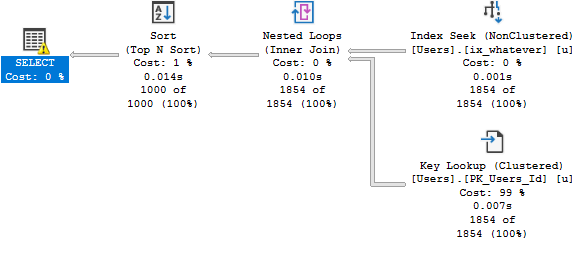
When I run my stored procedure and look for Reputation = 2, the plan is very fast.

EXEC dbo.WORLDSTAR @Reputation = 2;
SQL Server Query Plan
Getting to know you.

This is a great plan for a small number of rows.

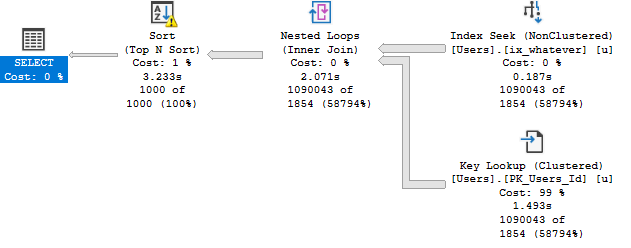
When I run it for a large number of rows, it’s not nearly as fast.

EXEC dbo.WORLDSTAR @Reputation = 1;
SQL Server Query Plan
Stuck on you.

We go from a fraction of a second to over three seconds.

This is bad parameter sniffing.

If we run it for Reputation = 1 first, we don’t have the same problem.

That’s good(ish) parameter sniffing.

Better For Everyone


Many things that prevent parameter sniffing will only give you a so-so plan. It may be better than the alternative, but it’s certainly not a “fix”.

It’s possible to get a better plan for everyone in this situation by re-writing the Key Lookup as a self join

    SELECT TOP (1000) 
	        u2.*
    FROM dbo.Users AS u
    JOIN dbo.Users AS u2
        ON u.Id = u2.Id
    WHERE u.Reputation = @Reputation
    ORDER BY u.CreationDate DESC;

The reason why is slightly complicated, but I’ll do my best to explain it simply.

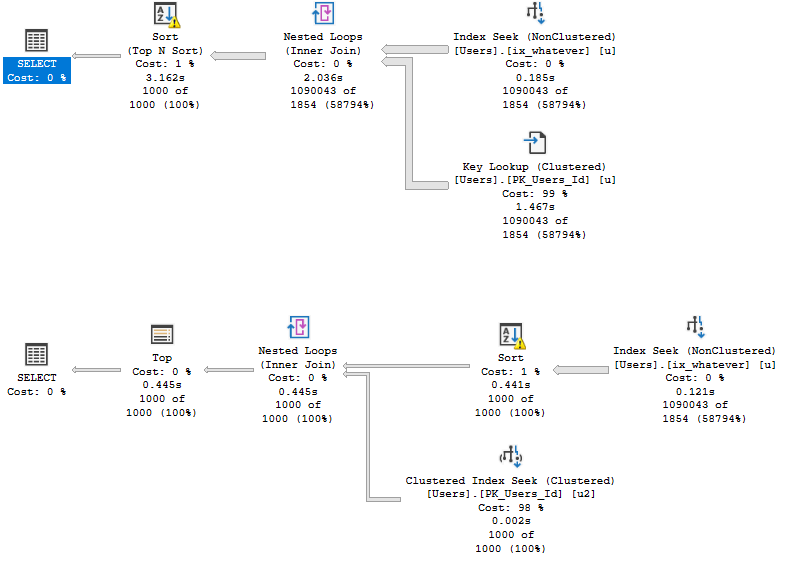
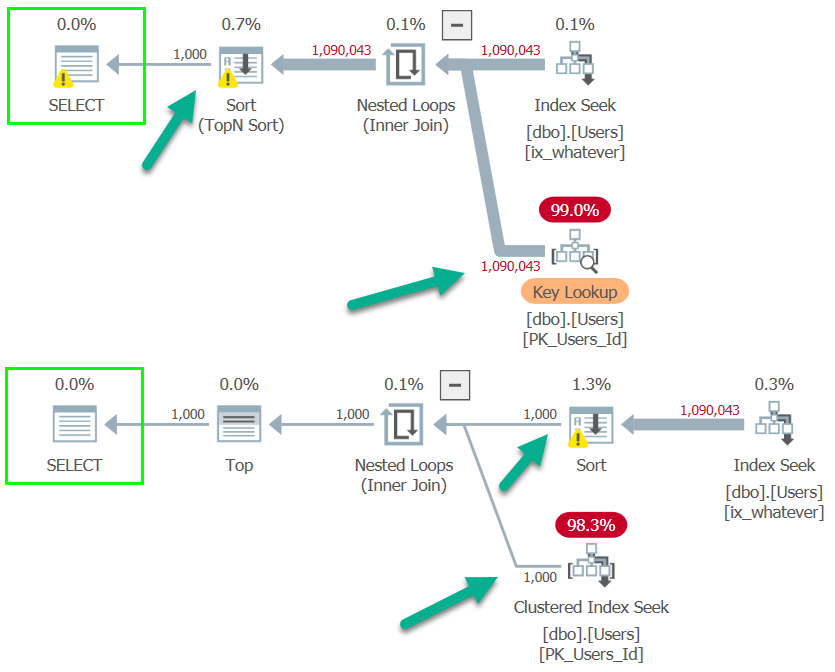
Here’s what the bad parameter sniffing plan looks like for each query.

Note that the Key Lookup plan still runs for ~3 seconds, while the self-join plan runs for around half a second.
SQL Server Query Plan
DAWG CHILL

While it’s possible for Key Lookups to have Sorts introduced to optimize I/O… That doesn’t happen here.

The main difference between the two plans (aside from run time), is the position of the Sort.

In the Key Lookup plan (top), the Key Lookup between the nonclustered and clustered indexes runs to completion.

In other words, for everyone with a Reputation of 1, we go to the clustered index to retrieve the columns that aren’t part of the nonclustered index.

In the self-join plan (bottom), all rows go into the Sort, but only the 1000 come out.

Different World


The difference is more obvious when viewed with Plan Explorer.
SQL Server Query Plan
Get’Em High

In the Key Lookup plan, rows aren’t narrowed until the end so a seek occurs ~1mm times.

In the self-join plan, they’re eliminated directly after the Index Seek, so the join only runs for 1000 rows and produces 1000 seeks.

This doesn’t mean that Top N Sorts are bad, it just means that they may not produce the most optimal plans for Key Lookups.

When This Doesn’t Work


Without a TOP, the self-join pattern isn’t as dramatically faster, but it is about half a second better (4.3s vs. 3.8s) for the bad parameter sniffing scenario, and far less for the others.

Of course, an index change to put CreationDate as the second key column fixes the issue by removing the need to sort data at all.

    CREATE INDEX whatever --Current Index
        ON dbo.Users (Reputation, Age, CreationDate);
    GO 
    
    CREATE INDEX apathy --Better Index For This Query
	    ON dbo.Users (Reputation, CreationDate, Age);
    GO

But, you know, not everyone is able to make index changes easily, and changing the key column order can cause problems for other queries.

Thanks for reading!

Going Further


If this is the kind of SQL Server stuff you love learning about, you’ll love my training. Blog readers get 25% off the Everything Bundle — over 100 hours of performance tuning content. Need hands-on help? I offer consulting engagements from targeted investigations to ongoing retainers. Want a quick sanity check before committing to a full engagement? Schedule a call — no commitment required.
How Bad Cardinality Estimates Lead To Bad Query Plan Choices: Tuning Indexes For Better Performance

Batch Cussidy


In the last post, we looked at how SQL Server 2019’s Batch Mode for Row Store could have helped our query.

In short, it didn’t. Not because it’s bad, just because the original guess was still bad.

Without a hint, we still got a poorly performing Merge Join plan. With a hint, we got a less-badly-skewed parallel plan.

Ideally, I’d like a good plan without a hint.

In this post, I’ll focus on more traditional things we could do to improve our query.

I’ll approach this like I would if you gave me any ol’ query to tune.

Here’s what we’re starting with:

    SELECT   p.*
    FROM     dbo.Posts AS p
    JOIN     dbo.Votes AS v
        ON p.Id = v.PostId
    WHERE    p.PostTypeId = 2
    AND      p.CreationDate >= '20131225'
    ORDER BY p.Id;

First Pass


I don’t know about you, but I typically like to index my join columns.

Maybe not always, but when the optimizer is choosing to SORT 52 MILLION ROWS each and every time, I consider that a cry for help.

Indexes sort data.

Let’s try that first.

	CREATE INDEX ix_fluffy 
	    ON dbo.Votes(PostId);

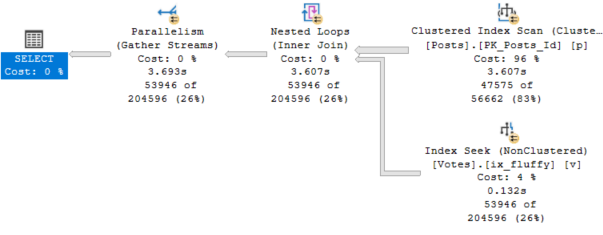
This is… Okay.

SQL Server Query Plan
Willingly!

I’m not saying this plan is great. It’s certainly faster than the Merge Join plan, and the optimizer chose it without us having to hint anything.

It takes 3.6 seconds total. I think we can do better.

Second Pass


I wonder if a temp table might help us.

    SELECT   *
	INTO     #p
    FROM     dbo.Posts AS p
    WHERE    p.PostTypeId = 2
    AND      p.CreationDate >= '20131225';

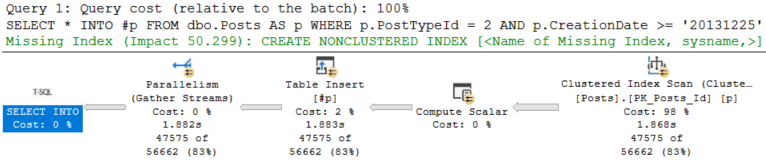
This is… Okay. Again.

The Insert takes 1.8 seconds:

SQL Server Query Plan
Scrunchy face.

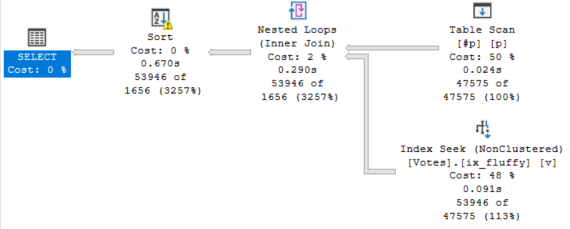
The final select takes 670ms:

SQL Server Query Plan
Add’em up.

Usually this is the point where I’ll stop and report in:

“I’ve spent X amount of time working on this, and I’ve gotten the query from 27 seconds down to about 2.5 seconds. I can do a little more and maybe shave more time off, but I’ll probably need to add another index. It’s up to you though, and how important this query is to end users.”

We could totally stop here, but sometimes people wanna go one step further. That’s cool with me.

Third Pass


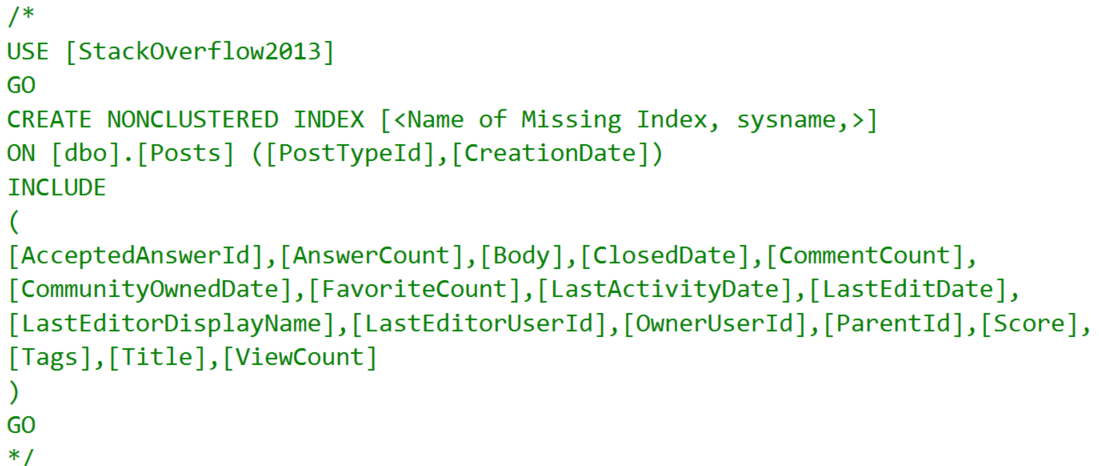
The insert query is asking for an index, but it’s a dumb dumb booty head index.

SQL Server Query Plan
Thanks, Robots.

Yep. Include every column in the table. Sounds legit.

Let’s hedge our bets a little.

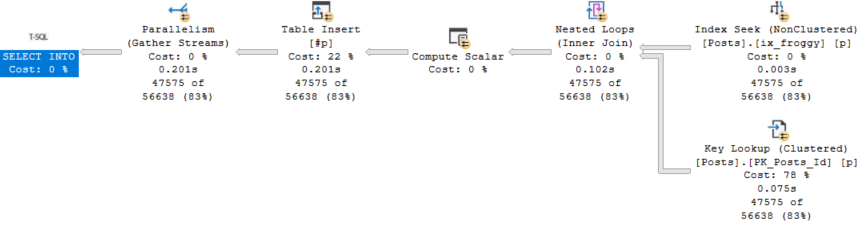
    CREATE INDEX ix_froggy
	    ON dbo.Posts(PostTypeId, CreationDate);

I bet we’ll use a narrow index on just the key columns here, and do a key lookup for the rest.

SQL Server Query Plan
Righto

This time I was right, and our Insert is down to 200ms.

This doesn’t change the speed of our final select — it’s still around 630-670ms when I run it.

Buuuuuuut, this does get us down to ~900ms total.

Final Destination


Would end users notice 900ms over 2.5 seconds? Maybe if they’re just running it in SSMS.

In my experience, by the time data ends up in the application, gets rendered, and then displayed to end users, your query tuning work can feel a bit sabotaged.

They’ll notice 27 seconds vs 2.5 seconds, but not usually 2.5 seconds vs 1 second.

It might make you feel better as a query tuner, but I’m not sure another index is totally worth that gain (unless it’s really helping other queries, too).

Thanks for reading!

Going Further


If this is the kind of SQL Server stuff you love learning about, you’ll love my training. Blog readers get 25% off the Everything Bundle — over 100 hours of performance tuning content. Need hands-on help? I offer consulting engagements from targeted investigations to ongoing retainers. Want a quick sanity check before committing to a full engagement? Schedule a call — no commitment required.
How Bad Cardinality Estimates Lead To Bad Query Plan Choices: Does SQL Server 2019 Batch Mode On Rowstore Help?

Bad Fit


In the last post, I tried to play some tricks on the optimizer to have Batch Mode make a query faster.

It didn’t quite work out the way I wanted.

That isn’t to knock Batch Mode. It’s not supposed to fix everything, and I played a silly trick to get some operators to use it.

But it did make me curious if 2019’s Batch Mode for Row Store would improve anything.

After all, no dirty tricks are involved, which means more operators can potentially use Batch Mode, and maybe we’ll avoid that whole skewed parallelism problem.

I mean, what are the odds that I’ll get the exact same plans and everything?

Spoiler


SQL Server Query Plan
50%

The Merge Join plan is still wack as hell.

The forced hash join plan got better, though.

Still Skewy?


The skewed parallelism isn’t as contagious going across without the separate Filter/Bitmap operator.

SQL Server Query Plan
Uggo

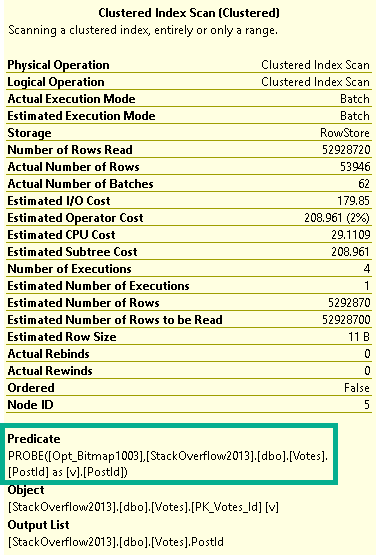
With both the Hash Join and the Scan of Votes occurring in Batch Mode, the Bitmap is able to be pushed to the storage engine.

Note that there’s no explicit Bitmap filter anywhere in the plan, but one still shows up in the predicate of the Scan of the Votes table.

SQL Server Query Plan
Something new

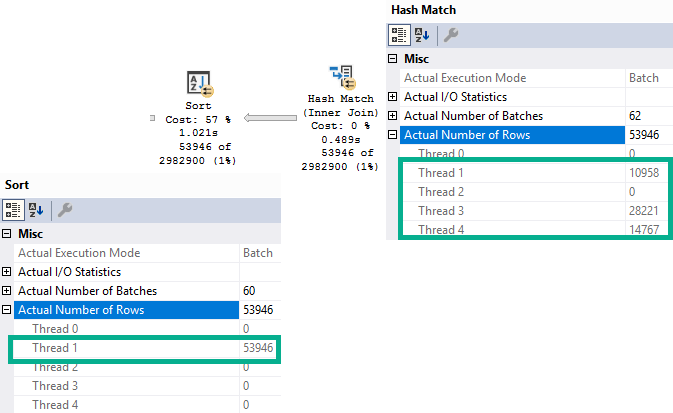
With 3 out of 4 threads doing… vaguely even work, we end up in a better place, especially compared to only one thread doing any work.

At least now I can show you the Batch Mode Sort lie about being parallel.

SQL Server Query Plan
Crud

Three threads with rows at the Hash Join go into the Sort on a single thread.

You Know…


As much as I love these new bells and whistles, I’m gonna go back to good ol’ fashion query tuning next.

The problem here is still that a bad estimate causes a Merge Join to be chosen in the first place.

When we force the Hash Join, query runtime is reduced at the expense of a quite large memory grant.

This is likely preferable for most people (especially with Batch Mode Memory Grant Feedback), but it doesn’t address the root cause.

Thanks for reading!

Going Further


If this is the kind of SQL Server stuff you love learning about, you’ll love my training. Blog readers get 25% off the Everything Bundle — over 100 hours of performance tuning content. Need hands-on help? I offer consulting engagements from targeted investigations to ongoing retainers. Want a quick sanity check before committing to a full engagement? Schedule a call — no commitment required.
How Bad Cardinality Estimates Lead To Bad Query Plan Choices: Does Batch Mode Help?

Notes and Notability


In the last post, I showed you a query where a bad plan was chosen because of bad guesses.

In this post, I’m going to see if Batch Mode will help anything.

To do that, we’re going to use an empty temp table with a clustered columnstore index on it.

    CREATE TABLE #t (id INT NOT NULL, 
	                 INDEX c CLUSTERED COLUMNSTORE);

First Up, No Hints


    SELECT   p.*
    FROM     dbo.Posts AS p
    JOIN     dbo.Votes AS v
        ON p.Id = v.PostId
	LEFT JOIN #t ON 1 = 0
    WHERE    p.PostTypeId = 2
    AND      p.CreationDate >= '20131225'
    ORDER BY p.Id;
SQL Server Query Plan
Deeply Unsatisfying

Though this plan is ~6 seconds faster than the Merge Join equivalent in the last post, that’s not the kind of improvement I’m shooting for.

Remember than the Hash Join plan in Row Mode ran in 2.6 seconds.

The only operator to run in Batch Mode here is the Sort. To be fair, it’s really the only one eligible with the trick we used.

Forcing this plan to run in parallel, we go back to a 27 second runtime with no operators in Batch Mode.

Next Up, Hash Hint


Disappointingly, this gets worse. The Row Mode only plan was 2.6 seconds, and this is 6.8 seconds.

SQL Server Query Plan
Hush now

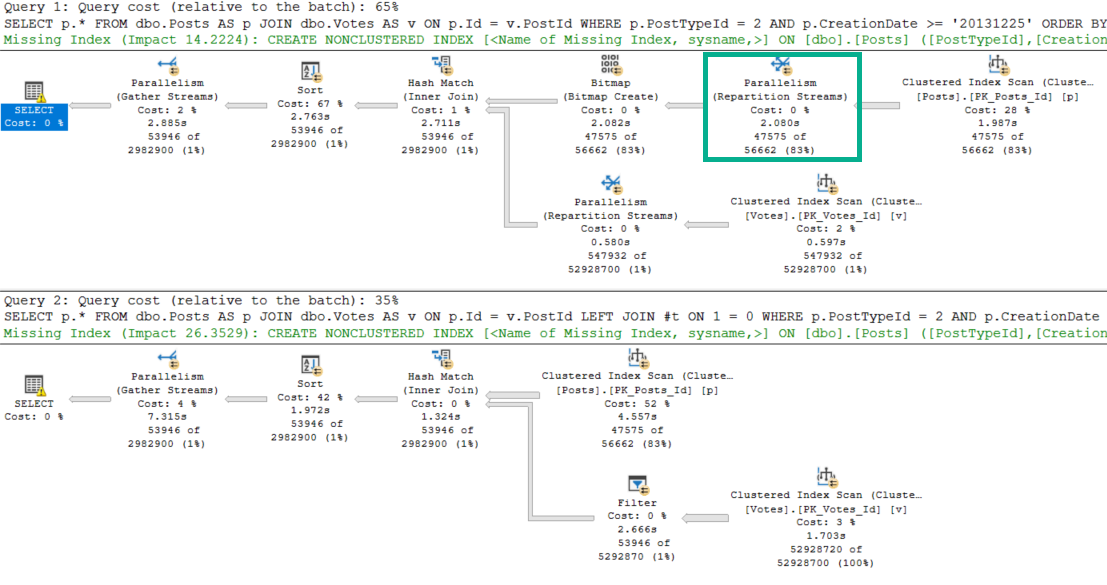
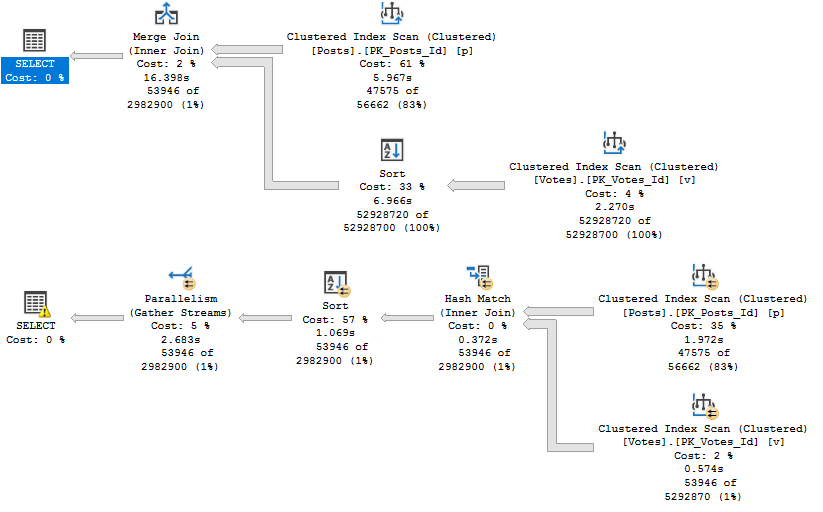
The answer to why the Batch Mode plan is 3x slower lies in our Row Mode plan. Let’s look at them head to head.

SQL Server Query Plan
Pick me!

See that Repartition Streams operator? It literally saves the entire query.

The Batch Mode plan doesn’t get one. Because of that, Bad Things Happen™

Skew Job


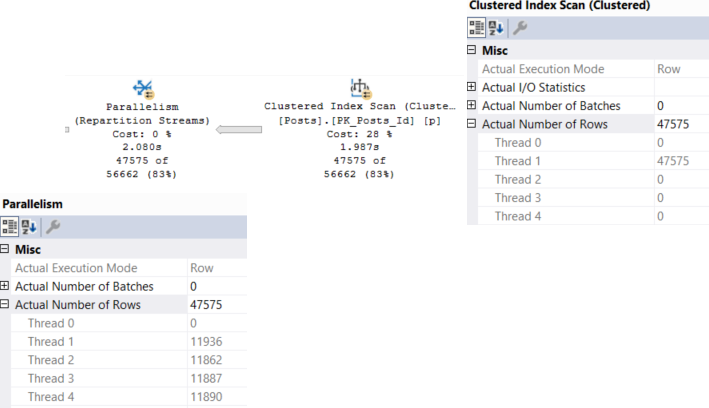
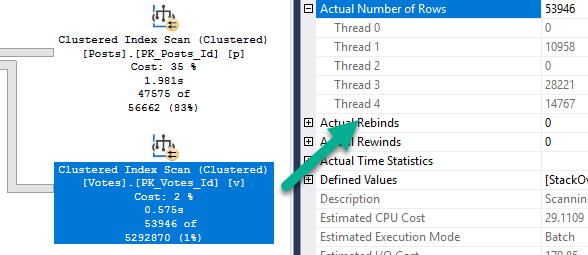
Both plans start out with an unfortunate scan of the Posts table.

SQL Server Query Plan
Sucktown

But in the Row Mode plan, Repartition Streams does exactly what it sounds like it does, and balances things out. The number of rows on each thread is even because of this. Crazy to think about, but threads dividing work up evenly is, like, a good thing.

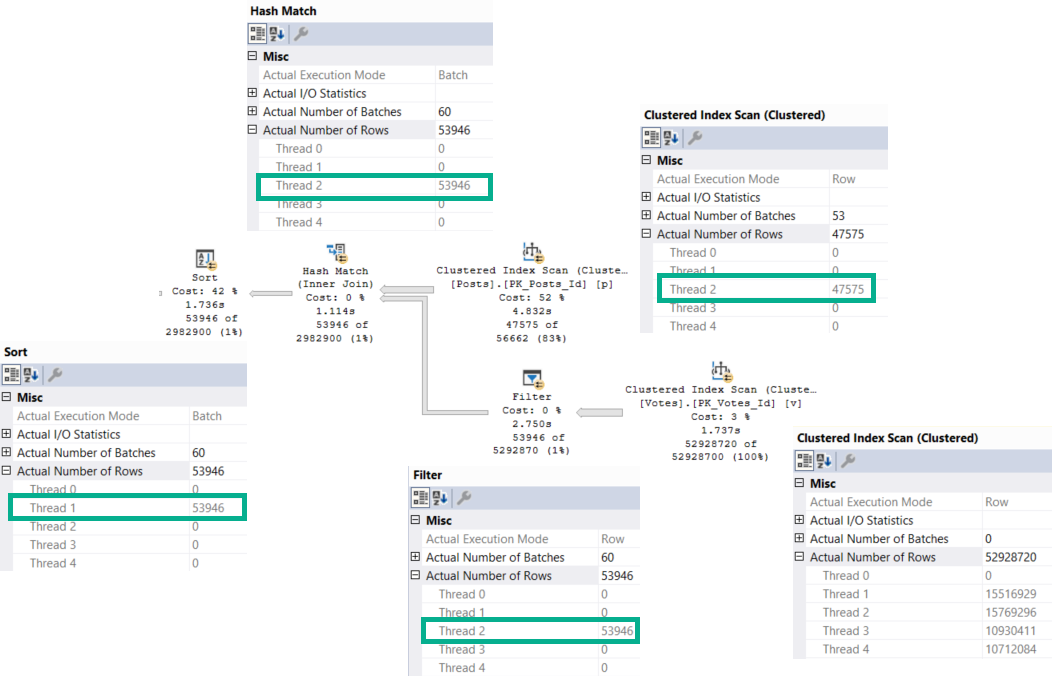
In the Batch Mode plan, that… doesn’t happen.

SQL Server Query Plan
Apology dog


We have the dreaded serial parallel query. Aside from the Scan of the Votes table, only one thread is ever active across the rest of the query.

This isn’t a limitation of Batch Mode generally, though I suspect it has something to do with why we don’t see Repartition Streams show up.

One limitation of Batch Mode is with Sorts — they are single threaded — a point this particular demo obfuscates, unless they’re a child operator of a Window Aggregate.

Well, Darn


I was expecting some fireworks there.

Maybe 2019 will help?

In the next post, we’ll look at that.

Thanks for reading!

Going Further


If this is the kind of SQL Server stuff you love learning about, you’ll love my training. Blog readers get 25% off the Everything Bundle — over 100 hours of performance tuning content. Need hands-on help? I offer consulting engagements from targeted investigations to ongoing retainers. Want a quick sanity check before committing to a full engagement? Schedule a call — no commitment required.
How Bad Cardinality Estimates Lead To Bad Query Plan Choices

Let’s Run A Cruddy Query


We’ve got no supporting indexes right now. That’s fine.

The optimizer is used to not having helpful indexes. It can figure things out.

    SELECT   p.*
    FROM     dbo.Posts AS p
    JOIN     dbo.Votes AS v
        ON p.Id = v.PostId
    WHERE    p.PostTypeId = 2
    AND      p.CreationDate >= '20131225'
    ORDER BY p.Id;
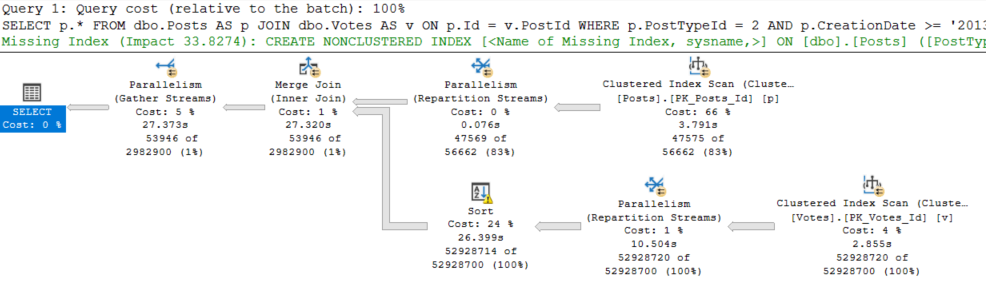
SQL Server Query Plan
Snap City.

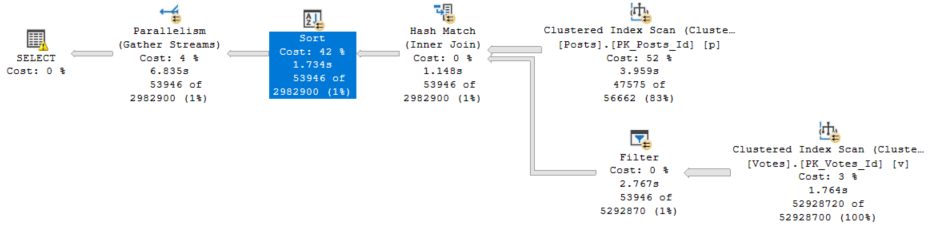
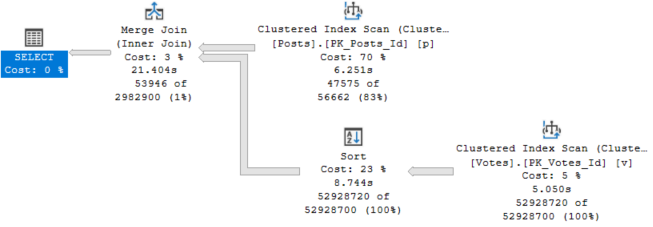
So uh. We got a merge join here. For some reason. And a query that runs for 27 seconds.

The optimizer was all “no, don’t worry, we’re good to sort 52 million rows. We got this.”

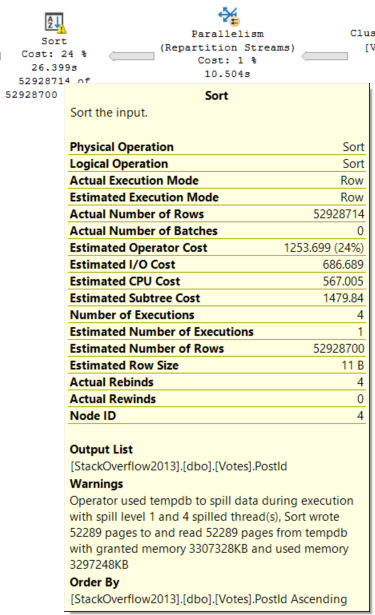
SQL Server Query Plan
YOU’VE GOT THIS.

[You don’t got this — ED]

Choices, Choices


Since we have an order by on the Id column of the Posts table, and that column is the Primary Key and Clustered index, it’s already in order.

The optimizer chose to order the PostId column from the Votes table, and preserve the index order of the Id column.

Merge Joins expect ordered input on both sides, don’tcha know?

It could have chosen a Hash Join, but then the order of the Id column from the Posts table wouldn’t have been preserved on the other side.

Merge Joins are order preserving, Hash Joins aren’t. If we use a Hash Join, we’re looking at ordering the results of the join after it’s done.

But why?

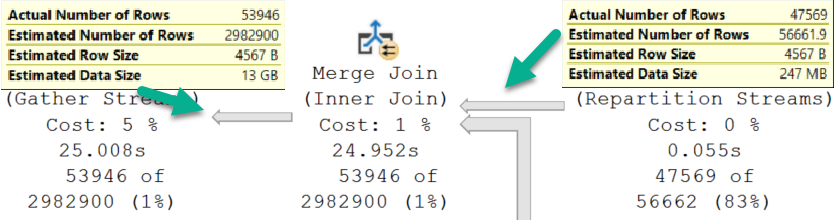
SQL Server Query Plan
Good Guess, Bad Guess

Going into the Merge Join, we have a Good Guess™

Coming out of the Merge Join, we have a Bad Guess™

Thinking back to the Sort operator, it only has to order the PostId column from the Votes table.

That matters.

Hash It Up


To compare, we need to see what happens with a Hash Join.

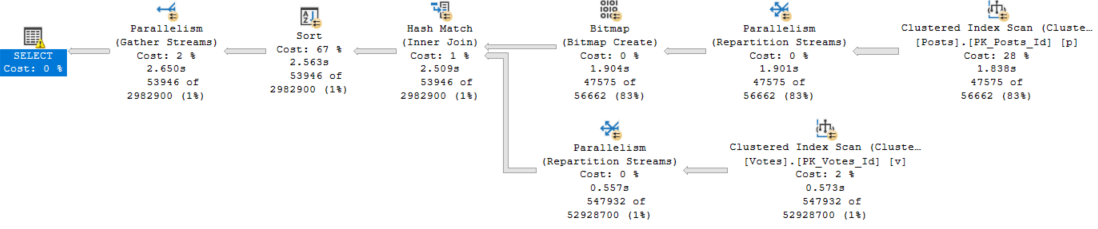
SQL Server Query Plan
smh

Okay, ignore the fact that this one runs for 2.6 seconds, and the other one ran for 27 seconds.

Just, like, put that aside.

Here’s why:

SQL Server Query Plan
Neither Nor

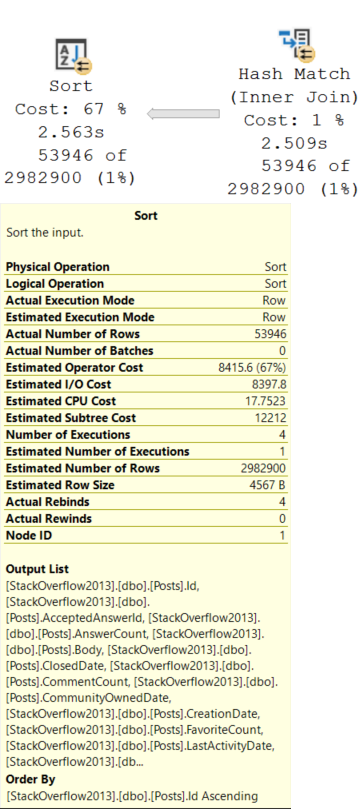
This Sort operator is different. We need to sort all of the columns in the Posts table by the Id column.

Remember that the Id column is now out of order after the Hash Join.

Needing to sort all those columns, including a bunch of string columns, along with an NVARCHAR(MAX) column — Body — inflates the ever-weeping-Jesus out of the memory grant.

SQL Server Query Plan
I see.

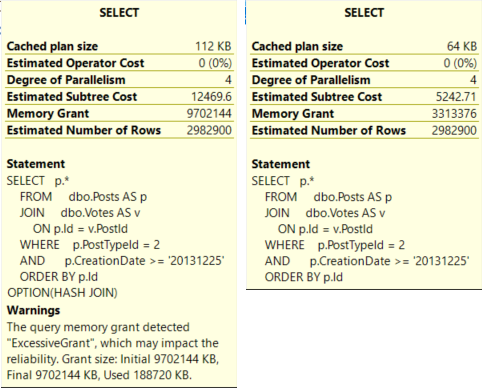
The Hash Join plan is not only judged to be more than twice as expensive, but it also asks for a memory grant that’s ~3x the size of the Merge Join plan.

Finish Strong


Let’s tally up where we’re at.

Both queries have identical estimated rows.

The optimizer chooses the Merge Join plan because it’s cheaper.

  • The Merge Join plan runs for 27 seconds, asks for 3.3GB of RAM, and spills to disk.
  • The Hash Join plan runs for 3 seconds, asks for 9.7GB of RAM and doesn’t spill, but it only uses 188MB of the memory grant.

That has impacted the reliability.

In a world where memory grants adjust between executions, I’ll take the Hash Join plan any day of the week.

But this is SQL Server 2017, and we don’t get that without Batch Mode, and we don’t get Batch Mode without playing some tricks.

There are lots of solutions if you’re allowed to tune queries or indexes, but not so much otherwise.

In the next couple posts, I’ll look at different ways to approach this.

Thanks for reading!

Going Further


If this is the kind of SQL Server stuff you love learning about, you’ll love my training. Blog readers get 25% off the Everything Bundle — over 100 hours of performance tuning content. Need hands-on help? I offer consulting engagements from targeted investigations to ongoing retainers. Want a quick sanity check before committing to a full engagement? Schedule a call — no commitment required.
Does Using DISTINCT In SQL Server Queries Cause Performance Problems?

Footnote


I have two queries. They return the same number of rows.

The only difference is one column in the select list.

This query has the Id column, which is the primary key and clustered index of the Posts table.

    SELECT   DISTINCT
             p.Id, p.AcceptedAnswerId, p.AnswerCount, p.Body, p.ClosedDate,
             p.CommentCount, p.CommunityOwnedDate, p.CreationDate,
             p.FavoriteCount, p.LastActivityDate, p.LastEditDate,
             p.LastEditorDisplayName, p.LastEditorUserId, p.OwnerUserId,
             p.ParentId, p.PostTypeId, p.Score, p.Tags, p.Title, p.ViewCount
    FROM     dbo.Posts AS p
    JOIN     dbo.Votes AS v
        ON p.Id = v.PostId
    WHERE    p.PostTypeId = 2
    AND      p.CreationDate >= '20131225'
    ORDER BY p.Id;

The query plan for it looks like this:

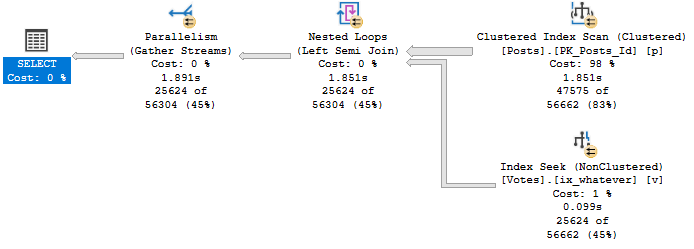
SQL Server Query Plan
Eligible

Notice that no operator in this plan performs any kind of aggregation.

There’s no Hash Match Aggregate, no Stream Aggregate, no Distinct Sort, NADA!

It runs for ~1.9 seconds to return about 25k rows.

Lessen


Watch how much changes when we remove that Id column from the select list.

    SELECT   DISTINCT
             p.AcceptedAnswerId, p.AnswerCount, p.Body, p.ClosedDate,
             p.CommentCount, p.CommunityOwnedDate, p.CreationDate,
             p.FavoriteCount, p.LastActivityDate, p.LastEditDate,
             p.LastEditorDisplayName, p.LastEditorUserId, p.OwnerUserId,
             p.ParentId, p.PostTypeId, p.Score, p.Tags, p.Title, p.ViewCount
    FROM     dbo.Posts AS p
    JOIN     dbo.Votes AS v
        ON p.Id = v.PostId
    WHERE    p.PostTypeId = 2
    AND      p.CreationDate >= '20131225';

This is what the query plan now looks like:

SQL Server Query Plan
What’s wrong with you.

Zooming in a bit…

SQL Server Query Plan
Woof.

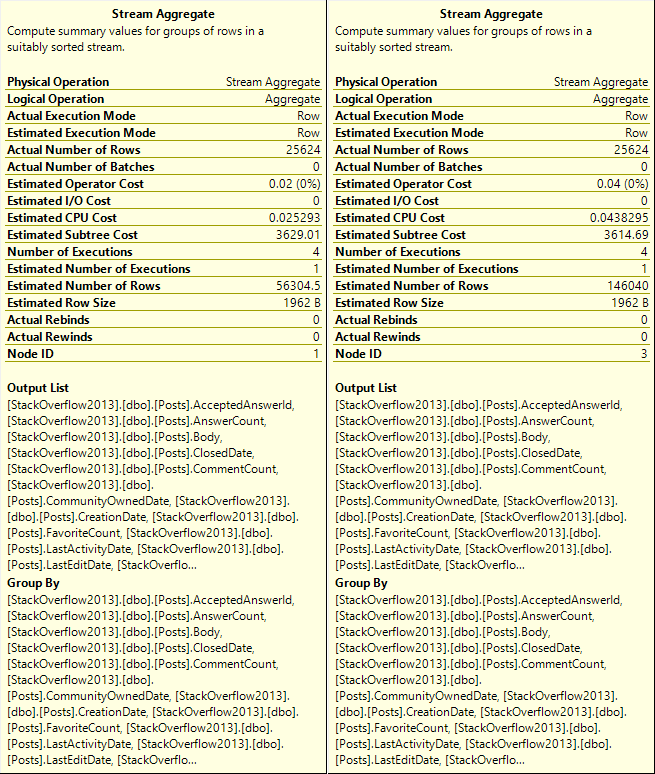
After we Scan the Posts table, we sort about 47k rows.

After the join to Votes, we aggregate data twice. There are two Stream Aggregate operators.

What do we sort?

SQL Server Query Plan
Boogers.

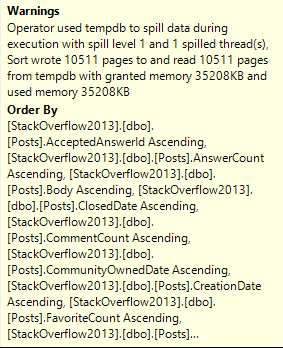
We Sort every column in the table by every column in the table.

In other words, we order by every column we’ve selected.

What do we aggregate?

SQL Server Query Plan

Everything. Twice.

What Does It All Mean?


When selecting distinct rows, it can be beneficial to include a column that the optimizer can guarantee is unique in the set of selected columns. Think of a primary key, or another column with a uniqueness constraint on it.

Without that, you can end up doing a lot of extra work to create a distinct result set.

Of course, there are times when that changes the logic of the query.

Thanks for reading!

Going Further


If this is the kind of SQL Server stuff you love learning about, you’ll love my training. Blog readers get 25% off the Everything Bundle — over 100 hours of performance tuning content. Need hands-on help? I offer consulting engagements from targeted investigations to ongoing retainers. Want a quick sanity check before committing to a full engagement? Schedule a call — no commitment required.
SQL Server Index Fragmentation And Broken Demos

Egg Meet Face


The other night I was presenting for a user group, and I had a demo break on me.

Not the first time, not the last time. But this was weird because I had rehearsed things that morning.

I skipped over it at the time, but afterwards I started thinking about what had happened, and walking back through other stuff I had done that day.

Turns out, I had fragmented my indexes, and that broke a trivial plan demo.

Just Too Trivial


The working demo looks like this.

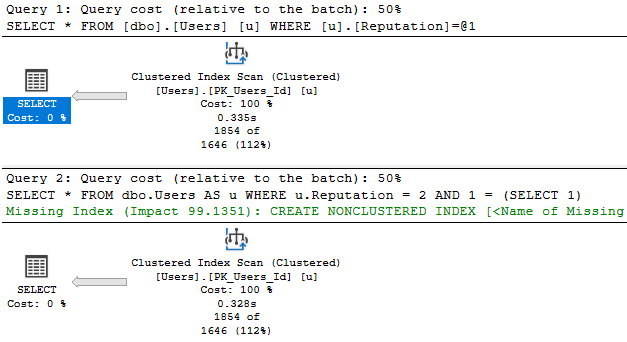
I run these queries. The top one receives a trivial plan, and doesn’t have a missing index request.

The bottom one gets full optimization, and one shows up.

	/*Nothing for you*/
	SELECT *
	FROM dbo.Users AS u
	WHERE u.Reputation = 2;

	/*Missing index requests*/
	SELECT *
	FROM dbo.Users AS u
	WHERE u.Reputation = 2
	AND 1 = (SELECT 1);
SQL Server Query Plan
Picture perfect.

Snap Your Shot


How I had broken this demo was by playing with Snapshot Isolation.

At some point earlier in the day, I had done something like this:

ALTER DATABASE StackOverflow2013 
    SET ALLOW_SNAPSHOT_ISOLATION ON;

BEGIN TRAN
UPDATE dbo.Users SET Reputation += 1
ROLLBACK

When you use optimistic isolation levels, a 14 byte pointer gets added to every row to keep track of its version.

If I had run the update without it, it wouldn’t have been a big deal. But, you know.

I’m not that lucky. Or smart.

See, after updating every row in the table, my table got uh… bigger.

SQL Server Query Results
Looter in a riot

Now, if I rebuild the table with snapshot still on, the problem goes away.

The problem is that I didn’t do that before or after my little experiment.

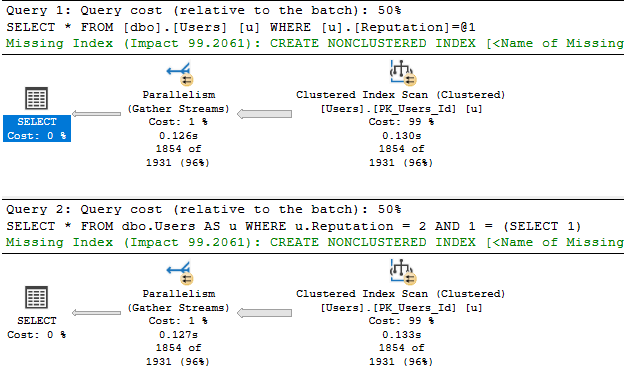
With a heavily fragmented index, both queries not only get fully optimized, but also go parallel.

SQL Server Query Results
Faster/Stronger

They’re both a bit faster. They both use a little more resources.

Why? Because SQL Server looked at the size of the table and decided it would be expensive to scan this big chonker.

Egg Wipes


Moral of the story: Index fragmentation makes your queries better.

Don’t @ me.

Going Further


If this is the kind of SQL Server stuff you love learning about, you’ll love my training. Blog readers get 25% off the Everything Bundle — over 100 hours of performance tuning content. Need hands-on help? I offer consulting engagements from targeted investigations to ongoing retainers. Want a quick sanity check before committing to a full engagement? Schedule a call — no commitment required.
Are Table Variable Indexes Ever Useful In SQL Server?

Oughtta Know


Indexes are good for so much more than what they’re given credit for by the general public.

One example where indexes can be useful is with the oft-maligned table variable.

Now, they won’t help you get a better estimate from a table variable. In versions prior to the upcoming 2019 release, table variables will only net you a single row estimate.

Yes, you can recompile to get around that. Yes, you can use a trace flag to occasionally be helpful with that.

Those defenses are inadequate, and you know it.

Help How?


Let’s say we have this query against a table variable.

SELECT u.DisplayName, b.Date
FROM dbo.Users AS u
CROSS APPLY
    (
        SELECT TOP 1 *
        FROM @waypops AS w
        WHERE u.Id = w.UserId
        ORDER BY w.Date DESC
    ) AS b
WHERE u.Reputation >= 100000;

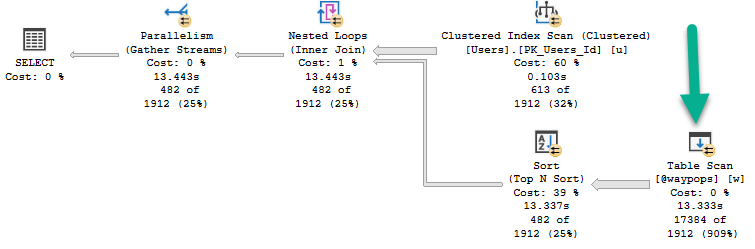
With an unindexed table variable, the plan looks like this:

SQL Server Query Plan
Sucko

You can see by the helpful new operator time stats in SSMS 18 that this query runs for 13.443 seconds.

Of that, 13.333 seconds is spent scanning the table variable. Bad guess? You bet.

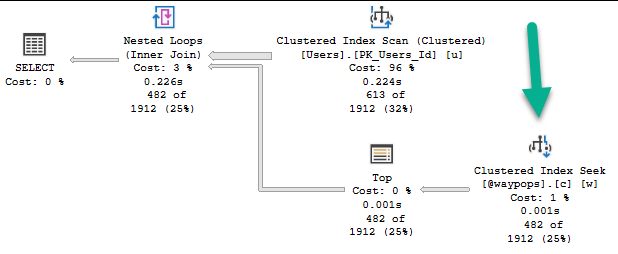
If we change the table variable definition to include an index, the plan changes, and runs much faster.

SQL Server Query Plan
Holla holla

The query no longer goes parallel, but it runs for 226ms.

A significant change aside from parallelism is that the Top operator is no longer a Top N Sort.

The clustered index has put the table variable data in useful order for our query.

Insertions


The table variable insert looks like this:

DECLARE @waypops TABLE 
(
  UserId INT NOT NULL,
  Date DATETIME NOT NULL
  --, INDEX c CLUSTERED(UserId, Date DESC)
);

INSERT @waypops 
        (UserId, Date)
SELECT b.UserId, b.Date
FROM dbo.Badges AS b
WHERE b.Name IN ( N'Popular Question')
UNION ALL 
SELECT b.UserId, b.Date
FROM dbo.Badges AS b
WHERE b.Name IN (N'Notable Question' )

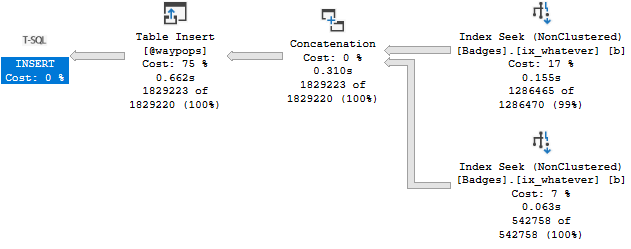
Right now, I’ve got the index definition quoted out. The insert runs for .662ms.

SQL Server Query Plan
Oh Boy

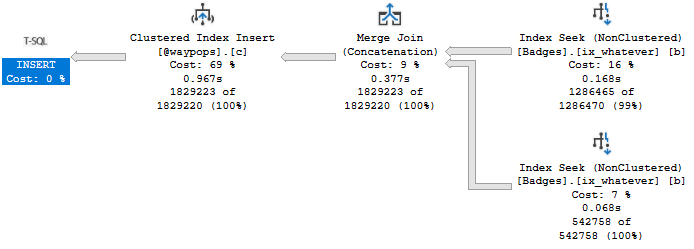
The insert with the index in place runs for .967ms:

SQL Server Query Plan
Grab an umbrella

Given the 13 second improvement to the final query, I’ll take the ~300ms hit on this one.

Wierda


If you’re wondering why I’ve got the insert query broken up with a UNION ALL, it’s because the alternative really sucks:

DECLARE @waypops TABLE 
(
  UserId INT NOT NULL,
  Date DATETIME NOT NULL
  , INDEX c CLUSTERED(UserId, Date DESC)
);

INSERT @waypops 
        (UserId, Date)
SELECT b.UserId, b.Date
FROM dbo.Badges AS b
WHERE b.Name IN ( N'Popular Question', N'Notable Question')
SQL Server Query Plan
@_@

This insert takes 1.4 seconds, and introduces a spilling sort operator.

So uh, don’t do that IRL.

Thanks for reading!

Going Further


If this is the kind of SQL Server stuff you love learning about, you’ll love my training. Blog readers get 25% off the Everything Bundle — over 100 hours of performance tuning content. Need hands-on help? I offer consulting engagements from targeted investigations to ongoing retainers. Want a quick sanity check before committing to a full engagement? Schedule a call — no commitment required.
Should An Optimistic Isolation Level Be The New Default For SQL Server Databases?

Two Words


Alright, I’ve lied to you already. There are way more than two words involved, here.

I recently had breakfast (JUST BREAKFAST, GOD) with Microsoft’s Most Handsome Man™, and the topic came up.

Partially because there are such fundamental changes coming to SQL Server, and also because it’s already the default in Azure SQL DB.

If I had to name a redeeming quality of Azure SQL DB, that would be it.

Unboxing


I’ve seen pessimistic locking causing problems and heartache on many, many servers.

While it wasn’t totally the fault of the isolation level (query and index tuning was needed, and there was some other silliness), it shouldn’t take that kind of dedication to make It Just Run Faster©.

Possibly the worst side effect is people leaning heavily on reading dirty data (via read uncommitted/nolock) to avoid issues.

You can’t preach about the evils of dirty reads without offering ways to avoid blocking.

Yes, I’m looking at you.

You all cackle at seeing NOLOCK everywhere, but I don’t hear much about solving blocking problems without it.

Standards and Futures


Right now “other major database platforms” offer optimistic locking as the default.There are implementation differences, but the net result is the same.

Readers and writers don’t suffer locking contention, and only fully committed data is read.

SQL Server currently offers optimistic locking via Read Committed Snapshot Isolation (RCSI from here), and Snapshot Isolation (SI from here).

Right now, they both send row versions to tempdb. But in the works for SQL Server 2019 is a feature called Accelerated Database Recovery (ADR from here). The mechanism that makes this possible is a Persistent Version Store (PVS from here) that’s local to the database, not tempdb.

While RCSI and SI could end up sending quite a bit of data to tempdb, which could cause contention there without a lot of precautions and setup work, any potential contention from ADR would be localized.

I know, Microsoft has been addressing tempdb, too. Setup now configures tempdb in a mostly sane way, and trace flags 1117 and 1118 are the default behavior in 2016+. That should make optimistic locking a more comfortable setting for people, but no. No. I hardly ever see it in use.

Dependencies


Breaking changes are hard. I know, there are people out there who depend on pessimistic locking for certain patterns to maintain correctness.

The thing is, it’s a lot easier to have just these processes use pessimistic locking while allowing the rest of the us to not have to sprinkle NOLOCK hints every which where to get a report to run.

An example of a process that requires some locking hints is Paul White’s post about Sequence Tables.

At this point in time, if you’re implementing a queue in SQL Server, you should be the one learning about how to get the kind of locking you need to get it working. Normal people who just want their app to work shouldn’t be the ones staring at articles about isolation levels, locking hints, lock escalation, etc.

Get It, Get It


This is a good problem to get in front of. I’d be quite happy to not have to talk about the reader/writer aspects of locking anymore.

In the same way, it would be nice to not have to talk to users who are endlessly frustrated by locking problems, explain dirty reads, explain optimistic isolation levels, caution them against certain issues, and then tell them to have fun removing all those old lock hints.

Thanks for reading!

Going Further


If this is the kind of SQL Server stuff you love learning about, you’ll love my training. Blog readers get 25% off the Everything Bundle — over 100 hours of performance tuning content. Need hands-on help? I offer consulting engagements from targeted investigations to ongoing retainers. Want a quick sanity check before committing to a full engagement? Schedule a call — no commitment required.
The Real Value Of Optimistic Isolation Levels In SQL Server

Erroneous


While a lot of people speak highly of optimistic locking because it cuts down on blocking issues, I think it’s of equal or higher value that dirty reads are prevented.

“Imagine” a situation where someone ran a query they shouldn’t have.

Either forgetting a join, a where, or some other limiting condition.

You know, while they’re continuously integrating something.

Out, damn spot


    BEGIN TRAN;
    UPDATE h
    SET h.Score = 2147483647
    FROM dbo.HighQuestionScores AS h
    WHERE 1=1;

This will update every row in the table. I know this because once upon a time, I wrote a similar query and learned the importance of backups.

I also learned that tools that throw a warning when modification queries are missing WHERE clauses think this one is just fine.

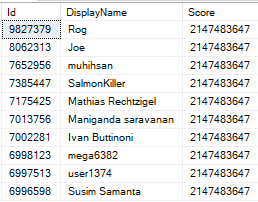
But now if I go into another window, this query will return wrong results.

    SELECT TOP 10 *
    FROM dbo.HighQuestionScores AS hqs WITH(NOLOCK)
    ORDER BY hqs.Id DESC;
SQL Server Query Results
BIGINT FOR U

In fact, any query that runs with a nolock hint will show incorrect values here.

  • Boss runs a report? Wrong.
  • Trigger fires based on a score change? Wrong.
  • User checks their account? Wrong.

Fully Correct


    SET TRANSACTION ISOLATION LEVEL SNAPSHOT;
    
    SELECT TOP 10 *
    FROM dbo.HighQuestionScores AS hqs
    ORDER BY hqs.Id DESC;

This query uses the snapshot isolation level.

It would do the same thing under read committed snapshot isolation, but without needing to set the isolation level.

But now we don’t get someone’s accident in our query results.

SQL Server Query Results
Big Baby

Remember folks: yeah, blocking sucks, but incorrect data is usually way, way worse.

Thanks for reading!

Going Further


If this is the kind of SQL Server stuff you love learning about, you’ll love my training. Blog readers get 25% off the Everything Bundle — over 100 hours of performance tuning content. Need hands-on help? I offer consulting engagements from targeted investigations to ongoing retainers. Want a quick sanity check before committing to a full engagement? Schedule a call — no commitment required.