When we talk about finding queries to tune, there’s an unfortunate term that gets thrown around: Expensive Queries.
Why is it unfortunate? Well, it reinforces the wrong mindset when it comes to query tuning, and leads people down the wrong path, looking at the wrong metrics.
SQL Server does have a cost-based optimizer, but those costs don’t mean anything to your hardware, or even to how long a query runs for.
Those costs are all estimates, based on two-decade old computer specs. There are many times when they’re wrong, or not properly aligned with reality.
Worse, it leads people to want to do crazy things like sort the plan cache by query cost to find things to tune.
Worse than that, they’ll look at “query cost relative to batch” to compare two queries for efficiency.
Ethically Sourced
There are many sources to find queries eating up your server hardware.
The point of this post isn’t to teach you how to use any of those things, but to teach you how to be smarter about using them in whatever way you’re comfortable.
My two favorite metrics to look at when looking for queries to tune are CPU and RAM. I explain why in the post, but the short story is that they’re reliable, real-life metrics that can be directly measured before and after to gauge progress.
I don’t look at things like reads, because those might go up or down while your query runtime doesn’t change at all.
They’re also pretty misleading if you’re looking at STATISTICS IO in a lot of circumstances, like with lookups.
Sortie
A while back I recorded a bunch of videos that show how cached/estimated plans can be really misleading when it comes to costs and all that stuff.
You can find it here:
Thanks for reading!
Going Further
If this is the kind of SQL Server stuff you love learning about: these days I have AI do the annoying stuff for me. My new video course teaches you to work the same way, and I teach whole teams in a one-day workshop. Someone still has to know enough SQL Server to keep the robots in check, and that’s what my training is for.
Despite the many metric tons of blog posts warning people about this stuff, I still see many local variables and optimize for unknown hints. As a solution to parameter sniffing, it’s probably the best choice 1/1000th of the time. I still end up having to fix the other 999/1000 times, though.
In this post, I want to show you how using either optimize for unknown or local variables makes my job — and the job of anyone trying to fix this stuff — harder than it should be.
Passenger
Like most things, we’re going to start with an index:
CREATE INDEX r ON dbo.Users(Reputation);
GO
I’m going to have a stored procedure that uses three different ways to pass a value to a where clause:
CREATE OR ALTER PROCEDURE
    dbo.u
(
    @r int,
    @u int
)
AS
BEGIN

    /* Regular parameter */
    SELECT
        c = COUNT_BIG(*)
    FROM dbo.Users AS u
    WHERE u.Reputation = @r
    AND   u.UpVotes = @u;

    /* Someone who saw someone else do it at their last job */
    DECLARE
        @LookMom int = @r,
        @IDidItAgain int = @u;

    SELECT
        c = COUNT_BIG(*)
    FROM dbo.Users AS u
    WHERE u.Reputation = @LookMom
    AND   u.UpVotes = @IDidItAgain;

    /* Someone who read the blog post URL wrong */
    SELECT
        c = COUNT_BIG(*)
    FROM dbo.Users AS u
    WHERE u.Reputation = @r
    AND   u.UpVotes = @u
    OPTION(OPTIMIZE FOR UNKNOWN);

END;
GO
First Way
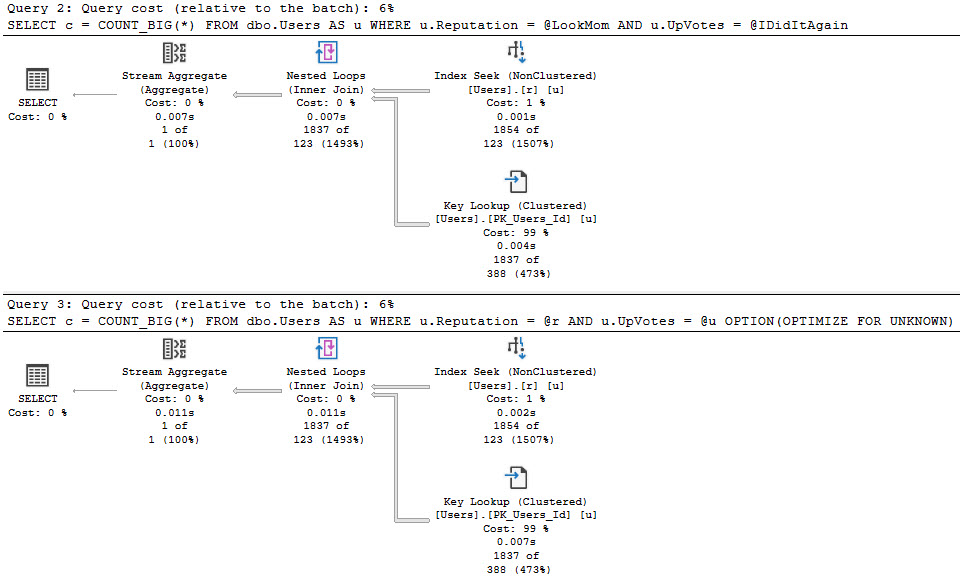
The best case is we run this for a small number of rows, and no one really notices. Even though we get bad guesses for the second two queries, it’s not a huge deal.
hands on
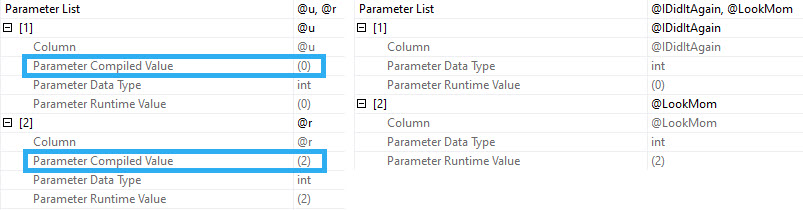
When you run procedures like this, SQL Server doesn’t cache the compile time values the same way it does when you use parameters. Granted, this is because it technically shouldn’t matter, but if you’re looking for a way to execute the procedure again to reproduce the issue, it’s up to you to go figure out what someone did.
? vs ?♂️
Since I’m getting the actual plans here, I get the runtime values for both, but those don’t show up in the plan cache or query store version of plans.
That’s typically a huge blind spot when you’re trying to fix performance issues of any kind, but it’s up to you to capture that stuff.
Just, you know, good luck doing it in a way that doesn’t squash performance.
Second Way
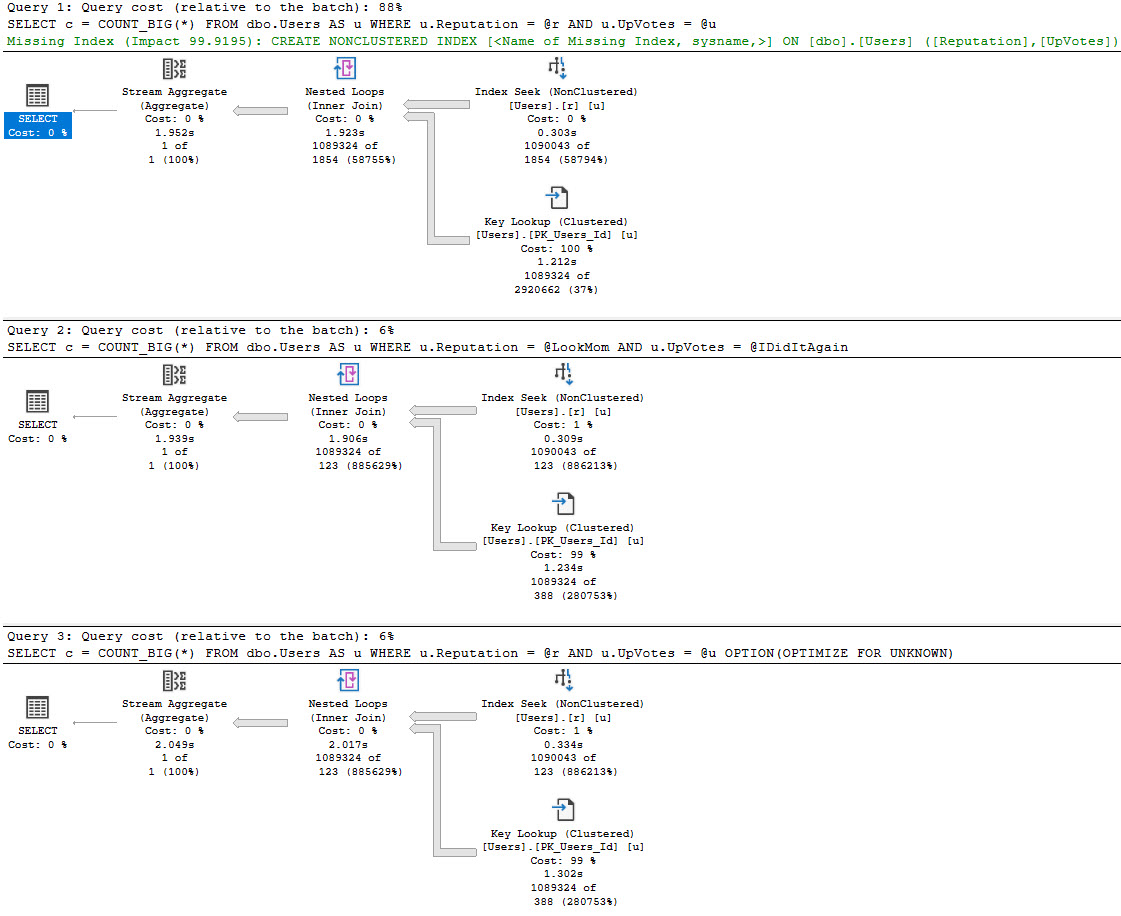
In this example, our index is only on the Reputation column, but our where clause is also on the UpVotes column.
In nearly every situations, it’s better to have your query do all the filtering it can from one index source — there are obviously exceptions — but the point here is that the optimizer doesn’t bother with a missing index request for the second two queries, only for the first one.
That doesn’t matter a ton if you’re looking at the query and plan right in front of you, but if you’re also using the missing index DMVs to get some idea about how useful overall a new index might be, you’re out of luck.
mattered
In this case, the optimizer doesn’t think the second two plans are costly enough to warrant anything, but it does for the first plan.
I’m not saying that queries with local variables or optimize for unknown hints always do this, or that parameterized plans will always ask for (good) indexes. There are many issues with costing and SARGability that can prevent them from showing up, including getting a trivial plan.
This is just a good example of how Doing Goofy Things™ can backfire on you.
Thanks for reading!
Going Further
If this is the kind of SQL Server stuff you love learning about: these days I have AI do the annoying stuff for me. My new video course teaches you to work the same way, and I teach whole teams in a one-day workshop. Someone still has to know enough SQL Server to keep the robots in check, and that’s what my training is for.
If this is the kind of SQL Server stuff you love learning about: these days I have AI do the annoying stuff for me. My new video course teaches you to work the same way, and I teach whole teams in a one-day workshop. Someone still has to know enough SQL Server to keep the robots in check, and that’s what my training is for.
In this video, I delve into startup expression predicates and their often misunderstood role in SQL Server query execution plans. I highlight how these can appear as clever attempts to guide the optimizer but frequently lead to suboptimal performance due to cached plan issues. By examining specific query examples, I demonstrate how startup expression predicates can cause misleading execution plans, making troubleshooting a challenging task. This video wraps up a series where we explored various aspects of SQL Server’s optimization and caching mechanisms, offering insights into what to watch out for when analyzing query plans.
Full Transcript
Ah, sweet relief. If you’re watching this video, you’re watching, I think, the last video in this series. So this is about startup expression predicates, and I’ve seen people use these in vague attempts to be clever with the optimizer, but they often don’t turn out so well. So let’s look at this query plan right quick. We can see, looking at this, that we did about 300 milliseconds worth of work from here over to here, right? So if we pop on in, we can see we did some stuff here, right? We also have this filter operator. This filter operator is a startup expression predicate. So what these allow SQL Server to do is you can position them fairly early in an execution plan, and only if, like, you know, something meets this filter condition, do we do stuff on the other side of this filter. Down here we have another one. Alright, we have another startup expression predicate, and you can see that for this portion of the plan, we didn’t do anything, right? If we look at stuff from this portion of the plan, there are no rows that travel through here, and there is no time spent in here. So this startup expression predicate did not fire. This one does.
So this one does. If we did. If we scroll down a little bit further, we can see where we spent a little bit more time in the plan joining to this users table. There’s no startup expression predicate here. Based on the logic of the query, we join to the users table. Let’s get rid of some of those squiggles. We join to the users table no matter what, and then our left join, it only comes if certain expressions match these filters. So that’s one thing. That’s one execution of the plan. Well, let’s look at another one. And this one is going to take slightly longer. Let’s, um, I opened that. That felt very silly. I was like, I’m going to go do something. I’m not going to go do something. Never mind. This is silly of me. I don’t know why I would have done that. Anyway, so this one runs for around about 22 seconds. And if we look at the execution plan, if we look at the execution plan, uh, we can see differences now, right? So this portion of the plan now has zero percentage cost or zero, zero rows coming through it.
And we spent no time in any of these things, right? No, zero time, no rows. Now all of the plan cost time is spent in this one. You can see this, this startup expression predicate did, did get met. The problem is that the problem is that the cached plan reflected the first iteration. So SQL Server did a very, didn’t, just didn’t do a happy, healthy job of figuring out exactly what we were going to, um, what we were going to get from this portion of the branch. SQL Server created a plan, estimated stuff for this, for the first execution, which touched this branch. And this branch got kind of a crappy execution plan.
So we ended up doing, oh, I don’t know, four, five, nine, eight, six, five, seven. Uh, that’s, that’s, that’s seven fingers. So we ended up doing about almost 4.6 million key lookups out of an estimated one. And of course that one estimate comes from the prior execution with the parameters that we passed in. Alan is with the program your EBS has vida.
If we run the query, given what we have to look at over here, right, where we check comments, check posts, blah, blah, blah. If we run that, it’s not going to be too bad. It’s going to be fairly quick.
That query finished in, I forget how long, 11 seconds. Oh, no, well, less than that because we’re doing some averaging in here. So not a good example.
Sorry about that. Math is hard, right? So we would run this first query again. It would run fairly quickly. We would say, you’re on drugs, end user. There’s no way.
This is slow. Looking at this cached execution plan, we would focus on this branch and this branch, and we would have this branch might not jump out at us. We might be like, oh, we got to fix stuff in here. We got to do all sorts of things to this branch.
It’s all broken. It’s a broken fix it. I don’t know. So there’s also another, I’d like to speak to the manager moment here, where for some reason, we gather streams and then do a nested loops join and then distribute streams. But I would imagine that’s because of the crazy cardinality estimate based on it being part of that branch that didn’t fire.
Now, again, quite deceiving and quite frustrating. Thankfully, I don’t see people doing this a lot. And by this, I mean the thing with the startup expression predicates like we looked at over here.
Oops, that didn’t turn out well. That’s not formatted well at all. And I don’t have SQL prompt on this one, so that’s fun.
We just got to hit enter a few times, though. We’ll be all set on that. Yay, fun times. Thank you for formatting that for me. Anyway, so I don’t see people doing things like this a lot, where their join has some conditional predicate in there.
But when I do see it, I know that I’m in for a wild ride figuring out exactly how things executed and when. Anyway, sorry. I had a jungle moment and I thought back to a situation where I had to troubleshoot one of these.
And it was like two days of digging through stuff and interrogating end users and trying to figure out exactly what happened. It wasn’t enjoyable. So anyway, I need to go drink now.
This is terrible. So that was that. And this is another way in which the planned cache can lie to you. Not lie to you. It can be very deceiving. It can be very difficult to figure out exactly what you should be troubleshooting.
Anyway, thank you for watching. That is, for now, the entire series. So I’m going to say thank you for watching the entire series. Who knows?
Maybe I’ll add stuff on later. And then I’ll get to… It’ll be like a dramatic cliffhanger. Or I’ll do an encore. But for now, thank you for watching the entire thing. And I will see you in some other video some other time.
Goodbye.
Going Further
If this is the kind of SQL Server stuff you love learning about: these days I have AI do the annoying stuff for me. My new video course teaches you to work the same way, and I teach whole teams in a one-day workshop. Someone still has to know enough SQL Server to keep the robots in check, and that’s what my training is for.
If this is the kind of SQL Server stuff you love learning about: these days I have AI do the annoying stuff for me. My new video course teaches you to work the same way, and I teach whole teams in a one-day workshop. Someone still has to know enough SQL Server to keep the robots in check, and that’s what my training is for.
If this is the kind of SQL Server stuff you love learning about: these days I have AI do the annoying stuff for me. My new video course teaches you to work the same way, and I teach whole teams in a one-day workshop. Someone still has to know enough SQL Server to keep the robots in check, and that’s what my training is for.
If this is the kind of SQL Server stuff you love learning about: these days I have AI do the annoying stuff for me. My new video course teaches you to work the same way, and I teach whole teams in a one-day workshop. Someone still has to know enough SQL Server to keep the robots in check, and that’s what my training is for.
In this video, I delve into the intricacies of loop joins and their behavior when parameter sensitivity or sniffing comes into play. I share a scenario where a query runs exceptionally fast but then encounters issues when using different parameters, leading to a poorly optimized plan that takes much longer to execute. The video explores how SQL Server caches plans based on initial execution parameters and the challenges this poses for maintaining optimal performance across various input scenarios. Through detailed analysis of query plans and execution statistics, I highlight why recompiling queries might be worth considering in certain situations, especially when dealing with parameter sniffing issues that can significantly impact performance.
Full Transcript
Yay! We’re getting closer to done. So, I must confide in you, nice people, that I have now taken off another piece of clothing during the recording of these videos. And I’ll give you a hint. You can decide which piece of clothing it is. The hint is it’s two feet. The mind wanders. Anyway, what we’re going to talk about in this edition of PlanCacheLyres is when loop joins, when loops are not quite living, or not quite giving you the information that you need about them. So, I’ve got, one of the reason that this is, this is a parameter related PlanCacheLyer is because the number of loops that you have to do depends on the number of rows. And of course, SQL Server, if you have enough rows coming back, will probably not, probably not choose a loop join. However, in the case of parameter sensitivity, parameter sniffing, we might have a query like this that runs very quickly. My gosh, that’s fast. If you look at the query plan, this took just about 22 milliseconds to run. Right? Impressive. Yeah? Good, good. 22 milliseconds. You are fast. And keep in mind these numbers down here. Uh, 518. 518. 518. 391 to 518. That’s okay. We’ve still, we’ve still managed to, to do well here down to where we got 10 of 10 for our, our top 10. Right there. Yeah. Look at that. That’s nice. That’s a good, good plan. Uh, when we run it for parent ID equals zero, it is an un-good plan. Uh, this is the saved version of the plan that I’ve got.
Where this takes two minutes and 28 seconds to run in its entirety. Uh, some stuff to keep in mind here. Um, you know, looking at this plan, we had a whole bunch of nice, tiny, narrow little lines where nested loops made sense. Over here, uh, we have, again, big thick lines with nested loops. Again, not scientific, but usually a pretty good indicator that maybe we made a bad choice. Uh, we have a bad choice. Uh, we have a bad choice. And the operator costs are all inherited from the, the previously compiled plan. The cost of 0%, the estimate of 518 rows, which turns out to be drastically wrong across this entire thing. At least until we get to 10 of 10 over here, which that’s great. But, uh, what, what, you know, we see in the actual plan is things like, uh, the number of executions here. Right. And see, we did a lot of those, right? And that, that should match the number that we see there. Uh, on the, on this inner side of nested loops, we’ll see another really high number of executions.
But this stuff is all, all missing from the estimated plans because the, or the cash plans, because the cash plans will only give us, or rather I should clear that out. They should only give us these lines, right? Say we estimated 517.998 executions. That was dismally, dreadfully wrong, wasn’t it? That was not, not anywhere near reality. Uh, if we look at the cash plan, of course, we’re going to come up, we’re going to come upon a couple frustrating things. One, again, the very low cost. Uh, two, if we go over here, um, you know, I only, I only have the plan in cash this time around for the small one.
But if we look at, uh, I mean, that’s the only one that’s in cash list. That’s the one I ran. The other plan would reuse this plan. The other query would reuse this plan like we just saw. But what we would see in the plan cache is, you know, just the crappy little tiny little arrows. We would see the estimated, estimated number of executions. And it might be difficult to figure out why this is slow, especially because, um, when SQL Server caches a plan like this, well, the, the execution parameters that get cached along with it are for the first execution.
Now, uh, something else, something that I added to Blitzcache a while back was getting, uh, cached execution parameters from the plan XML. This can get a little bit faulty, especially if you’re declaring variables in the plan, in, in, inside of a store procedure or something. Then I can’t get those for some reason. They don’t show up in the same way. Um, the other thing that, uh, is, can be a little odd is if you have multiple, uh, multiples of the same plan in cash, you’ll get, you’ll see duplicate parameters.
I stuck that in there because I thought it might be helpful for parameter sniffing, stuff like that. But if we go look at what SQL Server, how we executed that query, we will see that this first parameter. Why this is unhelpful is because when we have that, all we’re able to generate is this fast plan.
I can run this a million times, one million times, and it will always be fast. Always. Let’s never be slow. Sad, right?
And the, the, uh, the cash plan will never give us any more detail. However, if, you know, we get very lucky and we find, uh, the parameter that causes things to really fly off the hinges, we’re only lucky if we run this query first, right?
Because, like, if we clear out the proc, if we free the proc cache and we just look at an estimated plan for this, we’ll see that this query plan looks a little bit different, right? We go parallel, at least in the estimated plan.
Well, I don’t know if this will happen in real life. Who knows? But now, now this one runs quickly. And if we look at the execution plan for it, we can see why. All right.
Things, we went parallel. Things got sorted around a little bit. There are some differences between this and the, the, uh, well, I should, I should just have that open. All right. Differences between these two plans.
Look at that sort operator is. We do the sort really early on over here. In this plan, we do the, the sort at the end. You know, there’s just, uh, a whole lot of stuff that ends up differently so that we need to process way more rows, uh, throughout all of this plan. Whereas in this plan, we process a lot of rows early on, weed those out, and then go about our work.
And we have, we have a fairly quick plan. What sucks here is that if we look in the plan cache now, right, for, for this iteration, for, uh, just parent ID zero, we’ll see a higher cost, of course. We went parallel and all that stuff.
Uh, and if we go over here, we’ll see that we use a little extra CPU to, um, uh, we used extra, extra CPU in order to, uh, reduce walk lock time, right? We went parallel, but the cache execution parameters here will just be for zero. If we run this with the zero plan, this will be quick too.
So the, really, in the only way that this gives up the ghost completely or in a meaningful way is if we, get this, get this parameter, run it, cache the plan for this, and then run it for parent ID zero. So this is why parameter sniffing is so tough is because not only do you need the parameter for the, for, for, like, get the good plan for a, a parameter, uh, then you need the parameter that when it reuses that plan, uh, things go to, things go to hell.
And then you need to run them in the right order to reproduce it. So this is why we’re parameter sniffing is one of those very, very tough things. And this is why, one of those reasons why I’m like, maybe recompile isn’t the worst thing in the world.
Like, maybe it’s not your enemy. Maybe we should, maybe we should have a second look at recompile. Anyway, uh, that’s it for this video. In the next video, we will talk about spills.
Ooh, spills, chills, thrills. Um, I’m, I’m almost 40, so I need to write a will. Uh, sad.
Anyway, uh, I will see you in the next video. Thanks for watching.
Going Further
If this is the kind of SQL Server stuff you love learning about: these days I have AI do the annoying stuff for me. My new video course teaches you to work the same way, and I teach whole teams in a one-day workshop. Someone still has to know enough SQL Server to keep the robots in check, and that’s what my training is for.
In this video, I delve into a fascinating aspect of SQL Server execution plans—merge joins that can be misleading when observed in the plan cache. By examining an example where a query took over a minute to execute, I demonstrate how adding indexes can reduce overall runtime but still leave significant time spent on merge join operations. I explain why many-to-many merge joins are particularly problematic and show you how to identify them using SQL Server’s execution plans and tools like SP_BlitzCache. This video aims to equip you with the knowledge to recognize and address these tricky scenarios, ensuring your queries run as efficiently as possible. Stay tuned for more updates on the latest SQL Server performance tips and tricks in my next video!
Full Transcript
Hello! We are here in this video to talk about how merge joins can be a little weird and misleading when you see them in the plan cache. Now, I’ve jumped ahead a little bit here, and the reason is because there’s really not a whole lot of reason to have you sit around staring at queries that run for 30 seconds. So what I’m going to show you is is the execution plan prior to adding these two indexes. If we look over at this execution plan, it runs for about a minute total. If we zoom in over here, about a minute and two seconds. There is a fairly, I mean, this would make an okay slow repartition streams demo too, right, like 13 seconds there. But we can see that we spent a fairly significant amount of time in these two indexes. And these two sorts, and they spill off the disk. Things generally go poorly here, you know, going from 13 seconds to 26 seconds, and from 5 seconds to, geez, almost 10 seconds there. That sucks, and that takes a long time. But if we add up 26 and 10, we are about 10. Let’s just call that 36 seconds. We still spend 20 seconds in the merge join. And the reason that we do is that we spend 20 seconds in the merge join.
So we do that. Now this is where the plan cache doesn’t lie to you. If we hover over the merge join, and we scroll down here, and we look at this, we can see that many to many is set to true. And what many to many means is that there are duplicates on the outer side of the merge join. This is where many to many matters. Now, SQL Server has choices. It could have stuck some sort of aggregation on one side or the other, and it could have eliminated duplicate values to make it a non-many. Many to many to many join. You won’t see this if you join a unique index to a non-unique index because this won’t be many to many. It’ll be one to many. But anyway, for this merge join, we can see that it is many to many. And if we go into the properties of the merge join, and we go into actual IO statistics, we can see normally if you were to turn set statistics IO on, you would see in the output a work table for the merge join. Newer versions of SQL Server have that IO information in the execution plan. So I find myself less and less using the set statistics time and IO stuff on newer versions of SQL Server because so much stuff is in the execution plans.
But if we go and we look at the logical reads that the merge join is doing, you can see just how much work went into, was done on the work table. Right? Like a lot of work went into that work table. That work table did work. Right? Work table did work. Now, to sort of screen out some of the noise here, I’ve, like, if you look at the merge join, when we look at our where columns, we can see it’s where the post ID column on the comments table is equal to the votes, the post ID column in the votes table. If we go back and look here, I created indexes on comments and votes that lead with post ID. So these columns will now be in the order that the merge join wants them in. We don’t have to sort them.
Now, if I go look at the execution plan after that happened, we can still see we improved the speed a bit. Right? It’s now down to about 40 seconds from about a minute. So we shaved off about 20 seconds. Unfortunately, that 20 seconds was all over here. We didn’t have to sort data. We know those two sorts didn’t spill. We didn’t have to, you know, because we had the data in order, we didn’t have to sort it and spill a bunch of stuff to disk. But we still have a lot of time spent in this merge join. And this merge join is still of the many to many variety. And if we look in the properties again of the merge join, we go here properties.
And we go to IO statistics, we do the exact same amount of work in that hidden work table that gets spun up to deal with the duplicate values in there. So we do quite a bit of work in that merge join regardless of indexing because it is the many to many variety. SP blitz cache will warn you about many to many joins, but because we don’t have information about the per operator breakdown the way the execution plan is, we don’t have that information in the cache plan.
I can’t tell you how big, bad, ugly, or consequential the work table for the many to many merge is. So if we look at the query plan here, we’ll still see that the many to many merge join is true. But if we go to the properties like we did in the actual plan, we won’t have all that good information about the IO work that it did, which is, you know, a bummer, right?
It’s not fun stuff there. But at least Blitzcache will warn you about many to many merges. It’s up to you to figure out if you have a plan with lots of merge joins in it, you will have to do some hovering. It could be one, it could be multiple. And there’s not really like a whole lot of good hint in the metadata about how many, about, you know, how much work the merge join did. There’s just nothing in here that, nothing in there that tells us really.
It’d be nice. I mean, I say it would be nice, but it’s kind of a niche thing anyway. I don’t think it’s worth the engineering time that it would take to add a column to like work table IO or something, work table reads or something in the DMVs. I don’t know. Maybe it would be.
Maybe, maybe work table reads would be the most fantastic piece of troubleshooting telemetry that SQL Server performance students have ever seen. I kind of doubt it though. I have my doubts there. I have some doubts. Anyway, that wraps up how many to many, or how merge joins can be tricky. Remember to keep an eye out for that many to many thing.
Blitzcache will show you under expert mode if your merge joins are of the many to many variety. And sometimes, you know, you know, sometimes indexing can help other times, you know, making sure that, you know, one input, you know, it gets aggregated in some way first can, can take away the many to many thing. You might have, you know, a unique column that maybe you didn’t tell SQL Server was unique, right? Like you have a regular index on it, not a unique index on it or something. Or maybe SQL Server is just choosing the wrong join type and you need to dissuade it from that in some way. Maybe use one of those awful query hints that people get all worked up about. Me, I love query hints. I love them to death. Put them everywhere. Sprinkle them everywhere. Do what I want. Goodbye. I don’t have time for this. Anyway, that’s it for that. In the next video, we will start talking about, gosh, more new stuff. I have so much new stuff to tell you about.
It’s going to be fantastic. It’s going to be the newest stuff you have ever seen in your life. Anyway, I will see you in the next video. Thank you for watching.
Going Further
If this is the kind of SQL Server stuff you love learning about: these days I have AI do the annoying stuff for me. My new video course teaches you to work the same way, and I teach whole teams in a one-day workshop. Someone still has to know enough SQL Server to keep the robots in check, and that’s what my training is for.
In this video, I delve into an intriguing aspect of SQL Server’s plan caching behavior by exploring how stored procedures that execute dynamic SQL or other stored procedures can mislead you. I demonstrate the use of a stored procedure named `PCLSub` to illustrate how sub-executions—those nested within the main execution—can accumulate significant CPU costs, making the parent stored procedure appear as if it’s doing minimal work when in reality, it’s orchestrating complex operations. Through detailed analysis using tools like `sp_BlitzCache`, I show you how to uncover these hidden costs and understand the true workload of your stored procedures, helping you identify areas for optimization more effectively.
Full Transcript
HONK HONK! I am still Erik Darling with Erik Darling Data. And I am going to continue my series of things that lie to you in cached plans. And in this one I want to talk about what happens when you use a stored procedure to execute either a dynamic SQL or other stored procedures.
That’s the sub-executions, right? You know, like it’s not the main execution, it’s sub. It’s an execution within an execution. Sometimes within an execution. It’s executions all the way down.
Alright? Alright. Cool. So, I have this stored procedure thoughtfully named PCLSub, which is PlanCashLiar underscore sub, right? Sub-executions. Not subpar or anything like that.
But I’ve gone ahead and run it ahead of time. And the output here is just to show that we looped through some code 20 times. Now, on its own, that is very unimpressive.
Anyone can write a loop. But I want to show you what happened, or what query plans look like when, in the PlanCash, when we use a stored procedure to call other stored procedures. So, again, we’re going to see this low-cost, high CPU warning.
And maybe, maybe I should have included this in that section instead. I don’t know. But this one has a little bit more going on. So, I decided to give it its own thing. But it costs zero query bucks because, really, it doesn’t do anything other than execute other stuff.
But, if we go over here a little bit further, we’ll see that for one execution, we used a total of 75 seconds of CPU time. And the same thing on average because, divided by one, anything divided by one is itself. Good.
Yeah. Alright. Good on that. And, we used a total duration of about 20, well, let’s call it about 21 seconds there. 20.7. And I can round up on that one. I can also do that math. Alright.
Pretty good. Pretty good there. But, when we look at the query plan, we can see some stuff going on. Just not anything terribly helpful. We can see that we start a while loop here.
And, depending on that, we execute a procedure or execute a different procedure. And then, occasionally, we print something out. What really sucks is if we go to look at the text of this stored procedure, it’s going to look like that. While one is less than 20, boof, do nothing.
Not very helpful at all, is it? Well, you know, I, we can look at the text of the query from over here, the actual query text. And, I’m going to do a little bit of parsing here in front of you nice people.
Let’s get the while loop down here. And, let’s show that we declare some dynamic SQL and run it over here. And, let’s take careful note that we have this comment in there for dbo.sub.
So, we know that that dynamic SQL is run from dbo.sub. There is one exec. We exec sp execute SQL.
And, here is another exec where we call another stored procedure. Good stuff, right? So, we see exactly where those other execs are. And, we see exactly what was, what we were executing within the stored procedure.
So, good for us. So, now we can go look for some things. The first thing we’re going to go look at, look for, is the stored procedure that we called within there, called sub sub. And, if we go grab sub sub, we will see that select count, or the select count that’s inside the stored procedure.
And, we can see that it executed 10 times within sub, and that it used a total of about 32 seconds. Or, let’s call it 30. Let’s continue our rounding up extravaganza.
About 33 seconds of CPU time, and about 32 seconds on average. So, over 10 executions, we used 3 point, 3 point, whatever. Look at the numbers.
Do the math, right? Come on. And, that each execution on average. My brain is broken. On average. It took 822 milliseconds for a total of about 8.2 seconds total.
So, we’ve tracked that down. Now, let’s track down that statement. Alright. So, let’s run spBlitzCache. And, let’s use a couple of the less frequently used parameters there.
Now, we can use query filter to filter down to get procs or statements. And, we can use minimum execution count to tell SQL Server to ignore code that has executed less than a certain number of times. So, we’ll do that here.
And, as long as the plan cache didn’t clear out for some weird reason, we will get two things. We will get the text of the statement from sub sub. So, we have this statement here, which is the count from there.
And, we have the dynamic SQL, which has that dbo.sub comment in it. So, we can see that that came, where we added that comment there so we would know where that query came from. And, if we look at that query over here, or look at the metadata for that query over here, we’ll see that that also ran 10 times.
That this one used about 42 seconds of CPU time, total, for about 4.2 seconds on average. And, the average and totals, you know, they will multiply cleanly by 10 as well. So, good for us there.
We have started to figure this stuff out. And, if we look at everything in the database as a whole, I mean, don’t look at it as a whole. It might be quite completely filled in.
We will have the store procedure sub. We will have one of the statements from within sub. And, then we will have the procedure that sub calls. So, let’s just focus on these top three lines here, because these should give us enough information.
Where we have the one execution of the main store procedure resulted in 10 executions a piece of those two pieces of sub code. And, if we add up the CPU from those two pieces, we will get about that 75,000 number. And, the same thing with that.
Well, the average doesn’t quite work out, because we’re still dividing by one. And, that doesn’t quite work out. It’s difficult to figure that out. But, the total duration will also add up to there. So, main lessons here are a few things going on.
One, if you use a store procedure to call Dynamic SQL or other store procedures, it will inherit the metadata of those store procedures. And, that like the runtime, the CPU duration reads, writes, all that stuff will tally up to that main calling store procedure. That can be pretty misleading, if you see a store procedure that costs nothing, but has a lot, does a lot of work internally.
And, then you have to go kind of figure out what inside that store procedure does all that work internally. Now, there are other things that can cause this too. You know, it’s not, you know, like while loops, cursors, you know, things of that nature can also contribute to this phenomenon.
But, it’s important to realize, you know, that when the sub executions push their runtime, push their metrics up to the thing that calls them. And, that can be sort of confusing when you’re looking for expensive things to tune, and you look at this store procedure, and you’re like, oh, it’s just the stuff inside of it. And, sometimes, when you look, go to, if you use the, you know, just the query, the query plan to look at the text of something, it can be truncated and it’s very unhelpful.
So, this is another case in where the plan cache can be pretty unclear about what’s going on with something. We have to dig a little bit deeper to figure out what inside of the store procedure was going wild and crazy. All right. Cool.
All right. That does it for this one. In the next video, we will talk about something brand new, too. Woohoo! Yay! We’re gonna do it all day! By it, I mean record demos. Sick. Sick son of a gun.
All right. See you in the next video. Goodbye. See you in the next video. Goodbye.
Going Further
If this is the kind of SQL Server stuff you love learning about: these days I have AI do the annoying stuff for me. My new video course teaches you to work the same way, and I teach whole teams in a one-day workshop. Someone still has to know enough SQL Server to keep the robots in check, and that’s what my training is for.