The coupon code “whatever” will get you $75 off. It’s only got 10 uses, so hurry on over and use it before you miss out.
GO GO GO
Thanks for reading!
Going Further
If this is the kind of SQL Server stuff you love learning about, you’ll love my training. Blog readers get 25% off the Everything Bundle — over 100 hours of performance tuning content. Need hands-on help? I offer consulting engagements from targeted investigations to ongoing retainers. Want a quick sanity check before committing to a full engagement? Schedule a call — no commitment required.
I had a client recently with, wait for it, a performance problem. Or rather, two problems.
The OLTP part was working fine, but there was a reporting element that was dog slow, and would cause all sorts of problems on the server.
When we got into things, I noticed something rather funny: All of their reporting queries had very high estimated costs, and all the plans were totally serial.
The problem came down to two functions that were used in the OLTP portion, which were reused in the reporting portion.
Uh Ohs
I know what you’re thinking: 2019 would have fixed it.
Buuuuuuuuuuut.
No.
As magnificent and glorious as FROID is, there are a couple limitations that are pretty big gotchas:
The UDF does not invoke any intrinsic function that is either time-dependent (such as GETDATE()) or has side effects3 (such as NEWSEQUENTIALID()).
And
1SELECT with variable accumulation/aggregation (for example, SELECT @val += col1 FROM table1) is not supported for inlining.
Which is what both were doing. One was doing some date math based on GETDATE, the other was assembling a string based on some logic, and not the kind of thing that STRING_AGG would have helped with, unfortunately.
They could both be rewritten with a little bit of work, and once we did that and fixed up the queries using them, things looked a lot different.
Freeee
For these plans, it wasn’t just that they were forced to run on one CPU that was harming performance. In some cases, these functions were in WHERE clauses. They were being used to filter data from tables with many millions of rows.
Yes, there was a WHERE clause that looked like AND dbo.function(somecol) LIKE ‘%thing%’, which was… Brave?
Getting rid of those bottlenecks relieved quite a lot of pain.
If you want to find stuff like this on your own, here’s what you can do:
Looking at the execution plan, hit get the properties of the select operator and look for a “NonParallelPlanReason”
Run sp_BlitzCache and look for “Forced Serialization” warnings
Inspect Filter operators in your query plans (I’m almost always suspicious of these things)
Review code for scalar valued function calls
Thanks for reading!
Going Further
If this is the kind of SQL Server stuff you love learning about, you’ll love my training. Blog readers get 25% off the Everything Bundle — over 100 hours of performance tuning content. Need hands-on help? I offer consulting engagements from targeted investigations to ongoing retainers. Want a quick sanity check before committing to a full engagement? Schedule a call — no commitment required.
Our job now is to figure out how to even things out. To do that, we’re gonna need to mess with out index a little bit.
Right now, we have this one:
CREATE INDEX whatever
    ON dbo.Posts(PostTypeId, LastActivityDate)
	    INCLUDE(Score, ViewCount);
Which is fine when we need to Sort a small amount of data.
SELECT TOP (5000)
       p.LastActivityDate,
       p.PostTypeId,
       p.Score,
       p.ViewCount
FROM dbo.Posts AS p
WHERE p.PostTypeId = 4
AND   p.LastActivityDate >= '20120101'
ORDER BY p.Score DESC;
There’s only about 25k rows with a PostTypeId of 4. That’s easy to deal with.
The problem is here:
SELECT TOP (5000)
       p.LastActivityDate,
       p.PostTypeId,
       p.Score,
       p.ViewCount
FROM dbo.Posts AS p
WHERE p.PostTypeId = 1
AND   p.LastActivityDate >= '20110101'
ORDER BY p.Score DESC;
Theres 6,000,223 rows with a PostTypeId of 1 — that’s a question.
Don’t get me started on PostTypeId 2 — that’s an answer — which has 11,091,349 rows.
Change Management
What a lot of people try first is an index that leads with Score. Even though it’s not in the WHERE clause to help us find data, the index putting Score in order first seems like a tempting fix to our problem.
CREATE INDEX whatever
    ON dbo.Posts(Score DESC, PostTypeId, LastActivityDate)
	    INCLUDE(ViewCount)
The result is pretty successful. Both plans are likely fast enough, and we could stop here, but we’d miss a key point about B-Tree indexes.
It’s not so bad.
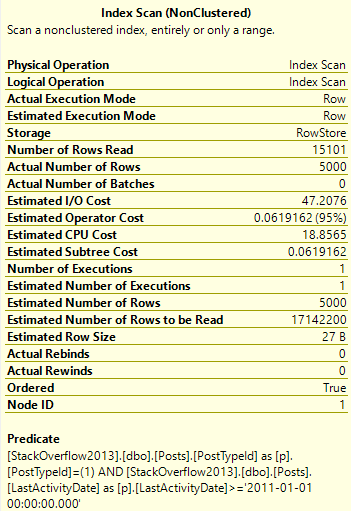
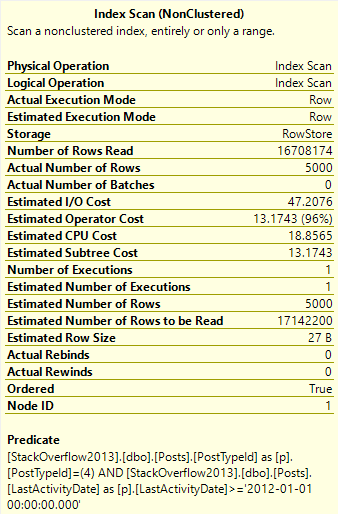
What’s a bit deceptive about the speed is the amount of reads we do to locate our data.
Scan-Some
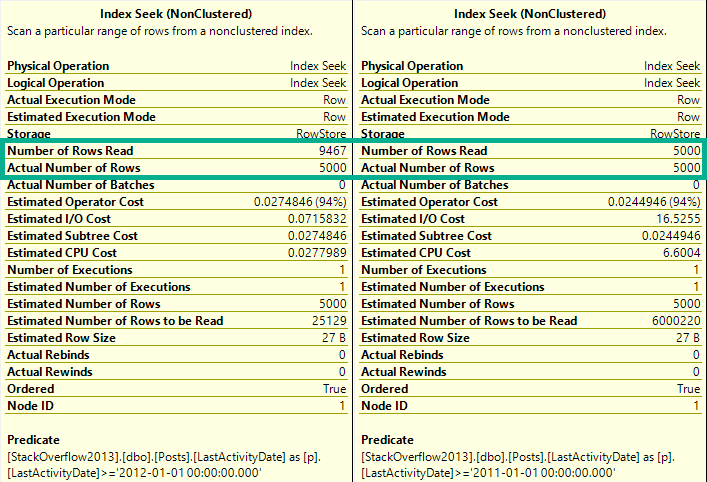
We only need to read 15k rows to find the top 5000 Questions — remember that these are very common.
We need to read many more rows to find the top 5000… Er… Whatever a 4 means.
Imaginary Readers
Nearly the entire index is read to locate these Post Types.
Meet In The Middle
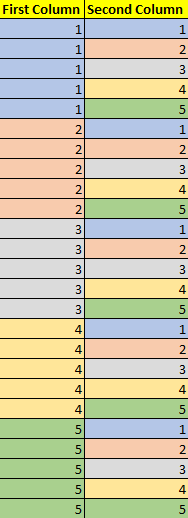
The point we’d miss if we stopped tuning there is that when we add key columns to a B-Tree index, the index is first ordered by the leading key column. If it’s not unique, then the second column is ordered within each range of values.
Pale Coogi Wave
Putting this together, let’s change our index a little bit:
CREATE INDEX whatever
    ON dbo.Posts(PostTypeId, Score DESC, LastActivityDate)
	    INCLUDE(ViewCount) WITH (DROP_EXISTING = ON);
With the understanding that seeking to a single PostTypeId column will bring us to an ordered Sort column for that range of values.
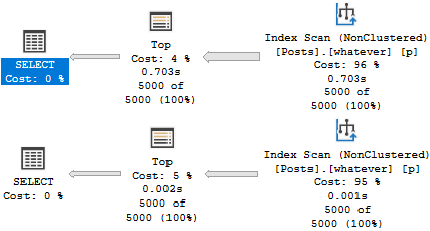
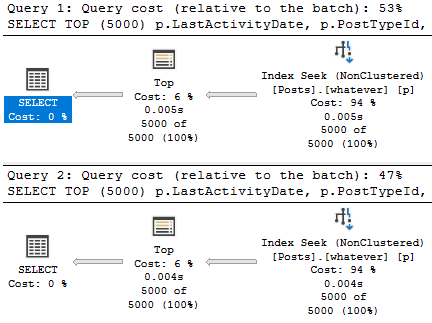
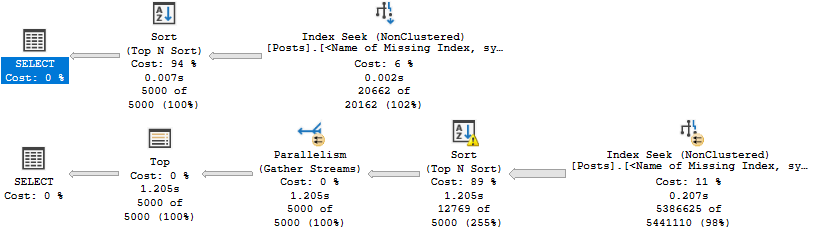
Now our plans look like this:
???
Which allows us to both avoid the Sort and keep reads to a minimum.
reed les
Interior Design
When designing indexes, it’s important to keep the goal of queries in mind. Often, predicates should be the primary consideration.
Other times, we need to take ordering and grouping into account. For example, if we’re using window functions, performance might be unacceptable without indexing the partition by and order by elements, and we may need to move other columns to parts of the index that may not initially seem ideal.
Thanks for reading!
Going Further
If this is the kind of SQL Server stuff you love learning about, you’ll love my training. Blog readers get 25% off the Everything Bundle — over 100 hours of performance tuning content. Need hands-on help? I offer consulting engagements from targeted investigations to ongoing retainers. Want a quick sanity check before committing to a full engagement? Schedule a call — no commitment required.
I asked you to design one index to make two queries fast.
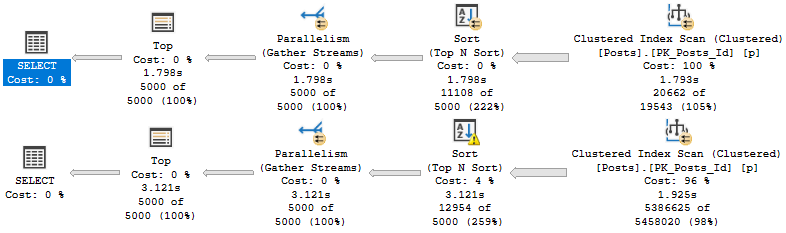
If we look at the plans with no supporting indexes, we’ll see why they need some tuning.
Get a job
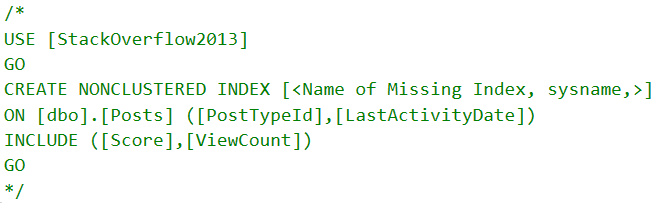
In both queries, the optimizer will ask for a “missing index”. That’s in quotes because, gosh darnit, I wouldn’t miss this index.
Green Screen
Nauseaseated
If we add it, results are mixed, like cheap scotch.
Keep Walking
Sure, there’s some improvement, but both aren’t fast. The second query does a lot of work to sort data.
We have an inkling that if we stopped doing that, our query may get quicker.
Let’s stop and think here: What are we ordering by?
Of course, it’s the thing in the order by: Score DESC.
Where Do We Go Now?
It looks like that missing index request was wrong. Score shouldn’t have been an included column.
Columns in the include list are only ordered by columns in the key of the index.
If we wanna fix that Sort, we need to make it a key column.
But where?
Get to work.
Going Further
If this is the kind of SQL Server stuff you love learning about, you’ll love my training. Blog readers get 25% off the Everything Bundle — over 100 hours of performance tuning content. Need hands-on help? I offer consulting engagements from targeted investigations to ongoing retainers. Want a quick sanity check before committing to a full engagement? Schedule a call — no commitment required.
SELECT TOP (5000)
       p.LastActivityDate,
       p.PostTypeId,
       p.Score,
       p.ViewCount
FROM dbo.Posts AS p
WHERE p.PostTypeId = 4
AND   p.LastActivityDate >= '20120101'
ORDER BY p.Score DESC;


SELECT TOP (5000)
       p.LastActivityDate,
       p.PostTypeId,
       p.Score,
       p.ViewCount
FROM dbo.Posts AS p
WHERE p.PostTypeId = 1
AND   p.LastActivityDate >= '20110101'
ORDER BY p.Score DESC;
Get to work.
Going Further
If this is the kind of SQL Server stuff you love learning about, you’ll love my training. Blog readers get 25% off the Everything Bundle — over 100 hours of performance tuning content. Need hands-on help? I offer consulting engagements from targeted investigations to ongoing retainers. Want a quick sanity check before committing to a full engagement? Schedule a call — no commitment required.
People often trash cursors even when they’re used for perfectly fine reasons.
I understand that this reaction may be because they’ve seen cursors misused in the past. Sometimes because they heard someone popular say it.
In either case, everything has a time and place, and there are many times when cursors aren’t the performance sucks people chalk them up to be.
Reasonable Uses
Places where cursors don’t freak me out:
Maintenance scripts (backup, checkdb, etc.)
Building dynamic strings
Batching modifications
Passing per-thing parameters to a stored procedure
It might shock you to find cursors in well-respected pieces of code, like sp_WhoIsActive. But if you crack open the procedure and search for “cursor”, you’ll find six of them that do different things. Do you still hate cursors?
What if I showed you Paul White his-very-self suggesting people use them?
Should you start out most code by writing a cursor? Absolutely not.
Should you convert every cursor to a while loop? Ehhhhh.
Should you understand when you should or shouldn’t use a cursor? Absolutely.
Some people have had pretty good careers talking about knee-jerk reactions, and I think seeing a cursor declared illicits many knee jerk reactions.
Read the code. Understand the requirements.
I tune queries all day long. The number of times someone has said THIS CURSOR IS A REAL BIG PROBLEM and been right is pretty small.
Often, there was a tweak to the cursor options, or a tweak to the query the cursor was calling (or the indexes available to it) that made things run in a more immediate fashion. I want to tune queries, not wrestle with logic that no one understands. Old code is full of that.
The number of times I’ve seen someone tell me they made something faster with totally broken logic and incorrect results is pretty high.
Thanks for reading!
Going Further
If this is the kind of SQL Server stuff you love learning about, you’ll love my training. Blog readers get 25% off the Everything Bundle — over 100 hours of performance tuning content. Need hands-on help? I offer consulting engagements from targeted investigations to ongoing retainers. Want a quick sanity check before committing to a full engagement? Schedule a call — no commitment required.
If this is the kind of SQL Server stuff you love learning about, you’ll love my training. Blog readers get 25% off the Everything Bundle — over 100 hours of performance tuning content. Need hands-on help? I offer consulting engagements from targeted investigations to ongoing retainers. Want a quick sanity check before committing to a full engagement? Schedule a call — no commitment required.
If this is the kind of SQL Server stuff you love learning about, you’ll love my training. Blog readers get 25% off the Everything Bundle — over 100 hours of performance tuning content. Need hands-on help? I offer consulting engagements from targeted investigations to ongoing retainers. Want a quick sanity check before committing to a full engagement? Schedule a call — no commitment required.
If this is the kind of SQL Server stuff you love learning about, you’ll love my training. Blog readers get 25% off the Everything Bundle — over 100 hours of performance tuning content. Need hands-on help? I offer consulting engagements from targeted investigations to ongoing retainers. Want a quick sanity check before committing to a full engagement? Schedule a call — no commitment required.
In this video, I delve into a unique scenario involving eager index pools in SQL Server and how they can occur even when an appropriate index seems to be in place. Specifically, I explore why these index pools might form despite having indexes that should theoretically work well for the query at hand. Using a real-world example where a `cross apply` is used to fetch data from another table, I illustrate how SQL Server’s decision-making process can lead to suboptimal performance due to the order of columns in an index and the lack of efficient seek predicates. By walking through this case study, I highlight the importance of carefully considering index design when optimizing queries, especially those involving complex joins and correlated subqueries.
Full Transcript
Howdy folks, Erik Darling here with Erik Darling Data, and I wanted to record a quick video about eager index pools and a reason why they may occur even though you’ve created an index that is perhaps nearby what your query is asking for. Now, I’ve vlogged before about why eager index pools might pop up if you’ve got no useful index or even if you have a very index that the optimizer ignores. But this is kind of a weird third case. And I’ve seen things like this happen maybe when someone listens to C1 of SQL Server’s missing index requests and the order of the columns in the key of the index which are just in which are only supplied to the missing index request by the ordinal position in the table might not be the most efficient, effective, happy index request. So, in this case, I have a query that is selecting data from the users table and then cross applying that cross applying to the badges table. And we want to get the top end per group. This is what we’re doing in here. This little chunk of query. So we’re selecting the top one badge name from badges correlated on user ID ordered by date descending. And this is an OK query, but it’s not just in the top one.
But it’s not really a great index because we lead our index with name, then user ID, then date descending. If we look at the badges table, you know, we might see, oh, well, you know, I don’t know, maybe SQL Server gave us a stem missing index request and now we didn’t make our query any better. So, what you might see here is because we have to correlate on user ID in order by date descending, but name is the first column in the index, we’re kind of buried, these two columns are kind of buried behind it. We don’t have an equality predicate on name. We had, if we, our where clause was also like, and badge name equals happy camper, then we might, then we could seek to here and then seek to here and then we would have this in order, but we don’t.
So we can easily display this, but it’s not helpful as a first column in the index. Now, why this is kind of funny is because we have this index and SQL Server uses the index that we created on this index over here called squirrel in order to feed into this index. So it’s basically taking this index and rearranging the columns in it.
If we zoom in a little bit and we look at what it’s doing, it creates that index keyed on user ID and then it has name and date in the included columns. Eager index pool structures are effectively clustered indexes, but you can think of them the same way as like a nonclustered index where the seek predicates are key columns and the output list are includes. It’s just like if you created a clustered index on user ID, name and date would technically be includes and that index.
So SQL Server does this down here because we have a nested loops join here. SQL Server is estimating that we would have to loop 13,659 times and SQL Server does not want to take 13,569 rows from here and then scan the entire badges table that many times. So it scans this index on the badges table once.
We have one number of execution, one scan. And just like in other times when we create an eager index pool, even though the plan says it’s parallel, all the rows end up on a single thread, which is no bueno as far as I’m concerned. These eager index pools always build serially.
So we build that index, which allows SQL Server to seek into this index 13,659 times, do a quick top one sort and then return data out. So the reason why I write a lot of queries that show stuff like this using cross supply is because cross supply most often optimizes as a nested loops join. Because it optimizes as a nested loops join, we kind of get the effect in our query plan where SQL Server is going to do something repetitive down here.
And SQL Server uses spools to sort of mitigate the effect of repetitive behavior. So eager index spools, table spools, stuff like that. All those things come into play on the inner side of nested loops.
And it’s just a lot easier to get SQL to say, I’m going to use a nested loops join when I use cross supply. It’s simply a demo writing effect. It’s not because cross supply is bad.
It’s not because nested loops join is bad, even though it kind of is. I’m kidding. Nested loops join is fine. Fine. All you nice OLT people out there with your nested loops joins. It’s just to kind of show you that a lot of times on the inner side of nested loops, in other words, on this side of nested loops, a lot of awkward things can happen.
In this case, SQL Server took an index that we thought might be okay, or rather, maybe we got a missing index request that said name, user ID, date. And we were like, ah, we’ll just create this index blindly, and all our queries will be faster. And then this query got slower because we forgot a semicolon.
So eager index spools may also happen just because you made a bad index or because you made an inopportune index for a specific query. In this case, it would make total sense if we just reorganized this index a little bit. If we took name from here, and we stuck it over here, and then we said, oh, I don’t know, what’s that thing with, I don’t have SQL prompt over here, so you’ll have to excuse the crappy typing.
Drop existing equals on. And we reorganized this index a little wee little bit. And you see that that took four seconds, which is a lot faster than the 18 seconds that it took for SQL Server to create that index pool.
If we reorganized our index a little bit, we can avoid minimizing SQL prompt. We can avoid the index pool altogether and have a much faster query. Anyway, just a quick example of how SQL Server may rearrange a nonclustered index.
It doesn’t always have to just get everything from a clustered index to feed into an eager index pool. So thank you for watching. Thank you for bearing with me as I messed up several things in there and had some incomplete thoughts and blabbered a little bit like I’m doing right now.
So I’m going to cut this short and get ready to record another video. Thank you for watching, and I will see you in the next one, assuming that you can still tolerate me after this. Goodbye.
Going Further
If this is the kind of SQL Server stuff you love learning about, you’ll love my training. Blog readers get 25% off the Everything Bundle — over 100 hours of performance tuning content. Need hands-on help? I offer consulting engagements from targeted investigations to ongoing retainers. Want a quick sanity check before committing to a full engagement? Schedule a call — no commitment required.