Why Parallel Queries are Sometimes Slow In SQL Server

You may have noticed large variations in elapsed time for parallel queries while performing query tuning or observing a production workload. This post reviews some of the possible explanations for those variations. I’m testing on SQL Server 2022 RC0 but this behavior can be observed on all currently supported versions of SQL Server.

The Setup

The test data is very simple. Insert ten million sequential integers into a single column table with a clustered index:

CREATE TABLE dbo.ParallelTest (
Id BIGINT NOT NULL,
CONSTRAINT PK_ParallelTest PRIMARY KEY (Id)
);

INSERT INTO dbo.ParallelTest (Id)
SELECT [value]
FROM GENERATE_SERIES(1, 10000000);

Now consider the following query:

SELECT SUM(a.ID + b.ID) s
FROM dbo.ParallelTest a
INNER JOIN dbo.ParallelTest b ON a.ID = b.ID
OPTION (USE HINT ('DISALLOW_BATCH_MODE'));

The query optimizer naturally picks a merge join for this query. The self-joined tables obviously have the same row count and the data is already sorted. That makes this query an ideal candidate for a serial merge join from the optimizer’s point of view . The USE HINT in the query isn’t particularly important and the example works without it, but its presence will be explained later. Here’s what the query plan looks like for me:
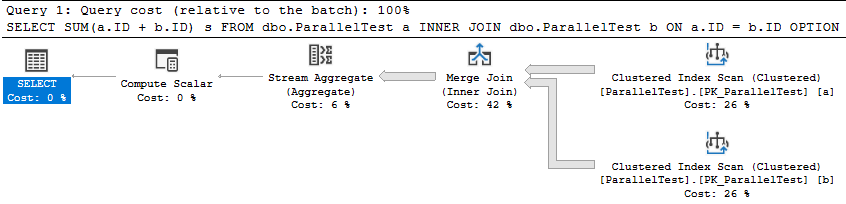
a59 serial merge

The query takes 2721 ms of CPU time and elapsed time to execute on my machine. It’s reasonable for CPU and elapsed time to match here because there’s nothing for the query to wait on. It’s the only user query running against the SQL instance. Next I’ll force a parallel merge join query plan by changing the query hints to the following:

SELECT SUM(a.ID + b.ID) s
FROM dbo.ParallelTest a
INNER JOIN dbo.ParallelTest b ON a.ID = b.ID
OPTION (MAXDOP 8, MERGE JOIN, USE HINT('ENABLE_PARALLEL_PLAN_PREFERENCE', 'DISALLOW_BATCH_MODE'));

I chose MAXDOP 8 because my test machine has 8 physical CPU cores. This is an unnatural query plan with a higher parallel cost than serial cost. The query optimizer only picked it because it was forced to. Note the presence of the exchange operators with a relatively high estimated cost:

a59 parallel merge

The parallel query takes 6465 ms of CPU time and 1723 ms of elapsed time to execute on my machine. It finished about 33% faster than the serial query but CPU time more than doubled. The exchange operators added a large overhead for this query. Next I’ll run the same query again but I’ll make one of my CPUs busier than before. Consider the following infinite loop coded as a stored procedure:

CREATE OR ALTER PROCEDURE #p AS
SET NOCOUNT ON;
DECLARE @i INT;
WHILE 1 = 1
SET @i = 0;
GO

EXEC #p;

This code does not accomplish anything besides efficiently using CPU resources, which is exactly what I need for my test. I’m running the merge query at MAXDOP 8 on a machine with 8 CPU cores so I’m pretty much guaranteed to see scheduler contention for some of the workers of the parallel query. They will compete for CPU resources with the infinite loop.

Take a moment to predict the performance penalty that the parallel query will experience due to the busy scheduler. Will it be 2X slower? 3X slower? Worse? For a few hints, recall that hash distributed exchange operators will generally try to force an equal amount of work to each thread. Also recall that a parallel merge join requires order-preserving exchange operators. I’ve included Erik running at MAXDOP 8 to hopefully prevent you from accidentally seeing the answer before you’ve finalized your prediction.

a59 erika59 erik

a59 erika59 erik

a59 erika59 erik

a59 erika59 erik

With the busy scheduler, the query now takes 6818 ms of CPU time and 31745 ms of elapsed time to execute on my machine. The same code is over 18X slower simply due to the highly efficient stored procedure that’s running on the same SQL instance. Here are the query wait stats in case they are of interest:

<Wait WaitType=”CXPACKET” WaitTimeMs=”454673″ WaitCount=”5262″ />
<Wait WaitType=”CXSYNC_PORT” WaitTimeMs=”32539″ WaitCount=”41″ />
<Wait WaitType=”CXSYNC_CONSUMER” WaitTimeMs=”43″ WaitCount=”14″ />

scheduler_ring_buffer_recorded

This is an inappropriately brief introduction to a complex topic, but workers cooperate with each other by sharing time on schedulers. Under normal conditions, a worker will execute code on the scheduler for up to 4 milliseconds before yielding. The worker yields in case there’s another worker waiting to execute on the scheduler. When there’s not the original worker immediately starts executing code again. An example of when a worker yields early is if it needs to wait for an I/O operation.

scheduler_ring_buffer_recorded is the name of a debug extended event that you should probably never use. I often don’t follow my own advice, so I used it to get an idea of how often workers were yielding to the scheduler for the merge join queries. I only looked at action types of “SCHEDULER_NONPREEMPTIVE_RESUME” and I admit that this analysis is quite approximate. For the MAXDOP 1 query, there was a total of 705 events over 2872 milliseconds. In other words, the average time spent on the scheduler before yielding is close to the 4 ms soft maximum. This should be expected for the serial query if all of the data is in the buffer pool. There is no memory grant for the query (the reason for the USE HINT) and there’s not really any reason to yield early.

The parallel query had significantly more yields. Looking at one worker thread as an example, it had 14862 events over 1714 milliseconds. In other words, it had around 35 times the number of scheduler yields compared to the MAXDOP 1 query. The higher number of yields is a performance liability when competing with workers from other queries on the same scheduler. The infinite loop stored procedure dominates the workers from the parallel and gets around 97% of the cpu time on the scheduler. That’s a big part of why the parallel query is 18X slower than before.

Note that you can also get this information by looking at the yield_count column of the sys.dm_of_schedulers DMV, but those numbers are server wide and aren’t isolated to one query. With that said, I did get reasonably similar results when comparing that column to the extended event results.

To summarize, parallel query performance overhead isn’t as simple as just the direct overhead of the exchange operators. A query changing from serial to parallel can result in completely different interactions between the workers and the scheduler. The serial query executed its code 4 milliseconds at a time. The parallel query had to yield significantly more often. This type of change isn’t something that you can directly observe in a query plan.

Why Parallel Queries are Sometimes Slow

There are many reasons why a parallel query may not be as efficient as you hoped. I find these to be the most common:

1) There is an overhead associated with parallel exchange operators which is not present in serial queries. Moving data between worker threads requires additional CPU time which adds to the overall execution time of the query. I believe this is what is described by the following quote from the documentation:

Simple queries, frequently found in transaction processing applications, find the additional coordination required to execute a query in parallel outweigh the potential performance boost.

2) There’s some kind of additional coordination required between threads which delays query completion. For example, an order-preserving repartition streams operator is generally worse for performance than one that doesn’t need to preserve order. A different type of example can be seen in my blog post about slow parallel scans caused by cloud storage.

3) Work may be unevenly distributed between worker threads. For example, an eager index spool can only be built with one thread. Other threads may be idle while that temporary index is built. For a different example, a filtered parallel scan of a table may not output the same number of rows to all threads. All else being equal, a parallel query that cannot use all of the CPUs allowed by MAXDOP is not as efficient as one that can.

4) Work may be evenly distributed between worker threads but some of the CPUs are busier than others. Some parallel queries are as slow as their busiest CPU, even when queries are evenly sharing time on the scheduler. Of course, dramatic performance penalties can be seen when the parallel query gets an uneven amount of time on the scheduler (like in the demo in this blog post).

Mitigations

Individual parallel query performance can degrade due to contention on a single scheduler that’s used by one or more of its workers. You are more likely to run into problems with higher DOP or a higher number of concurrent queries. Lowering MAXDOP decreases the odds that you’ll run into the worst type of contention because the query uses fewer schedulers. Decreasing the number of queries decreases contention per scheduler which also helps.

To explain it in a different way, the simplest way to reduce problems with parallel queries is to have fewer worker threads per scheduler. This is of course a balancing act, but it’s one that you must perform for some workloads. Set Cost Threshold for Parallelism and server/database/resource governor MAXDOP appropriately. When possible, don’t run too many concurrent queries for your hardware.

For very important queries for which performance is critical, consider changing to a type of parallelism that isn’t as susceptible to scheduler contention issues. The two most common methods are a parallel apply pattern, perhaps using demand partitioning, or batch mode execution.

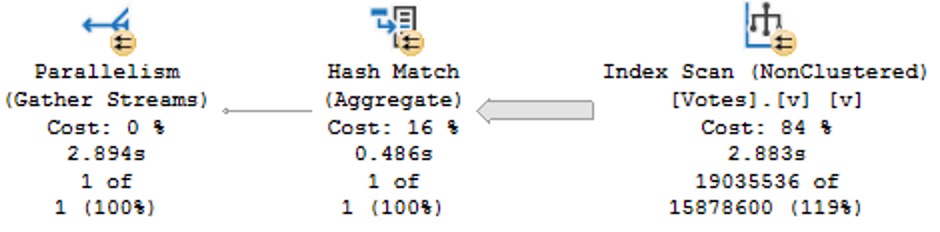
Batch mode is yet another complicated topic that I’m not going to explain here, but it uses a fundamentally different method of parallelism compared to row-mode execution which is generally much more robust against problems caused by busy schedulers. Below is a comparison of elapsed times with and without the infinite loop stored procedure running:

The elapsed time of the parallel batch mode query only changes slightly. This is also a nice property when considering overall server scalability.

Final Thoughts

I was going to originally blog about DOP feedback, but it’s taking a while for my feedback to kick in. Thanks for reading!
Different Ways To Parameterize Queries In SQL Server

The Importance Of Being Parameterized


Parameterization has many benefits for queries.

But first, let’s cover two things that aren’t exactly parameters!

  1. Local Variables
  2. Unsafe Dynamic SQL

Much more details at the post, but local variables are any variable that you declare inside a code block, e.g.

DECLARE
    @a_local_variable some_data_type;

And unsafe dynamic SQL is when parameters or local variables are concatenated into a string like so:

@sql += N'AND H.user_name = ''' + @injectable + ''';';

Note the series of single quotes and + operators (though the same would happen if you used the CONCAT function), and that square brackets alone won’t save you.

Now let’s talk about actual parameterization.

The same concept applies to ORM queries, but I can’t write that kind of code so go to this post to learn more about that.

Stored Procedures


The most obvious way is to use a stored procedure.

CREATE OR ALTER PROCEDURE
    dbo.Obvious
(
    @ParameterOne int
)
AS
BEGIN
SET NOCOUNT, XACT_ABORT ON;

    SELECT
        records = COUNT_BIG(*)
    FROM dbo.Users AS u
    WHERE u.Id = @ParameterOne;

END;

There are millions of upsides to stored procedures, but they can get out of hand quickly.

Also, the longer they get, the harder it can become to troubleshoot individual portions for performance or logical issues.

Developers without a lot of SQL experience can make a ton of mistakes with them, but don’t worry: young, good-looking consultants are standing by to take your call.

Inline Table Valued Functions


There are other kinds of functions in SQL Server, but these are far and away the least-full of performance surprises.

CREATE OR ALTER FUNCTION
    dbo.TheOnlyGoodKindOfFunction
(
    @ParameterOne int
)
RETURNS table
AS
RETURN

    SELECT
        records = COUNT_BIG(*)
    FROM dbo.Users AS u
    WHERE u.Id = @ParameterOne;
GO

Both scalar and multi-statement types of functions can cause lots of issues, and should generally be avoided when possible.

Inline table valued functions are only as bad as the query you put in them, but don’t worry: young, good-looking consultants are standing by to take your call.

Dynamic SQL


Dynamic SQL gets a bad rap from people who have:

  1. No idea what they’re talking about
  2. All the wrong kinds of experience with it
DECLARE
    @sql nvarchar(MAX) = N'',
    @ParameterOne int;

SELECT
    @sql += N'
    SELECT
        records = COUNT_BIG(*)
    FROM dbo.Users AS u
    WHERE u.Id = @ParameterOne;	
    ';

EXEC sys.sp_executesql
    @sql,
  N'@ParameterOne int',
    @ParameterOne;

This kind of dynamic SQL is just as safe and reusable as stored procedures, but far less flexible. It’s not that you can’t cram a bunch of statements and routines into it, it’s just not advisable to get overly complicated in here.

Note that even though we declared @ParameterOne as a local variable, we pass it to the dynamic SQL block as a parameter, which makes it behave correctly. This is also true if we were to pass it to another stored procedure.

Dynamic SQL is only as bad as the query you put in it, but don’t worry: young, good-looking consultants are standing by to take your call.

Forced Parameterization


Forced parameterization is a great setting. It’s unfortunate that everything thinks they want to turn on optimize for adhoc workloads, which is a pretty useless setting.

You can turn it on like so:

ALTER DATABASE [YourDatabase] SET PARAMETERIZATION FORCED;

Forced parameterization will take queries with literal values and replace them with parameters to promote plan reuse. It does have some limitations, but it’s usually a quick fix to constant-compiling and plan cache flushing from unparameterized queries.

Deciding whether or not to turn on this feature can be tough if you’re not sure what problem you’re trying to solve, but don’t worry: young, good-looking consultants are standing by to take your call.

Other


SQL Server may attempt simple parameterization in some cases, but this is not a guaranteed or reliable way to get the majority of the queries in your workload parameterized.

In general, the brunt of the work falls on you to properly parameterize things. Parameters are lovely things, which can even be output and shared between code blocks. Right now, views don’t accept parameters as part of their definitions, so they won’t help you here.

Figuring out the best thing to use and when to use it can be tough, but don’t worry: young, good-looking consultants are standing by to take your call.

Thanks for reading!

Going Further


If this is the kind of SQL Server stuff you love learning about, you’ll love my training. Blog readers get 25% off the Everything Bundle — over 100 hours of performance tuning content. Need hands-on help? I offer consulting engagements from targeted investigations to ongoing retainers. Want a quick sanity check before committing to a full engagement? Schedule a call — no commitment required.

Some Notes on sp_prepare And SQL Server 2022

OldBad


I admit that sp_prepare is an odd bird, and thankfully one that isn’t used a ton. I still run into applications that are unfortunate enough to have been written by people who hate bloggers and continue to use it, though, so here goes.

When you use sp_prepare, parameterized queries behave differently from normal: the parameters don’t get histogram cardinality estimates, they get density vector cardinality estimates.

Here’s a quick demo to show you that in action:

CREATE INDEX 
    p 
ON dbo.Posts
    (ParentId) 
WITH
(
    SORT_IN_TEMPDB = ON, 
    DATA_COMPRESSION = PAGE
);

DECLARE 
    @handle int = 
        NULL,
    @parameters nvarchar(MAX) = 
        N'@ParentId int',
    @sql nvarchar(MAX) = 
        N'
        SELECT
            c = COUNT_BIG(*)
        FROM dbo.Posts AS p
        WHERE p.ParentId = @ParentId;
        ';

EXEC sys.sp_prepare 
    @handle OUTPUT,
    @parameters,
    @sql;

EXEC sys.sp_execute 
    @handle, 
    184618;
 
EXEC sys.sp_execute 
    @handle, 
    0;
 
EXEC sys.sp_unprepare 
    @handle;

OldPlan


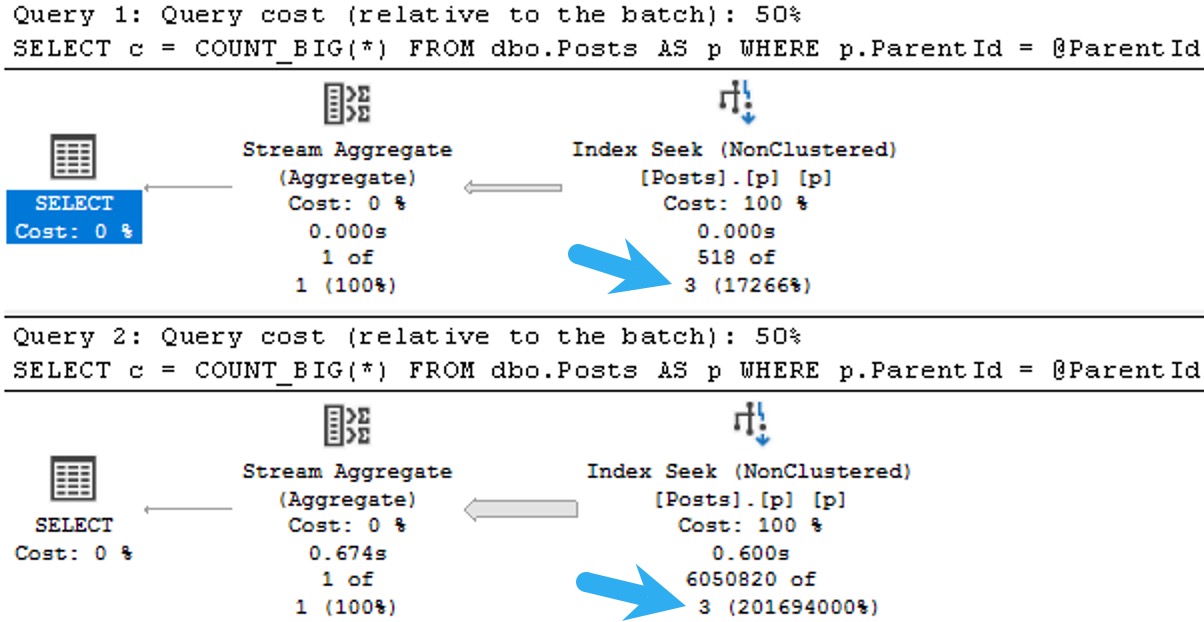
The plans for the two executions have the same poor cardinality estimate. In this case, since we have an ideal index and there’s no real complexity, there’s no performance issue.

But you can probably guess (at least for the second query) how being off by 201,694,000% might cause issues in queries that ask a bit more of the optimizer.

The point here is that both queries get the same incorrect estimate of 3 rows. If you add a recompile hint, or execute the same code using sp_executesql, the first query will get a histogram cardinality estimate, and the second query will reuse it.

SQL Server Query Plan
one up

Given the historical behavior of sp_prepare, I was a little surprised that the Parameter Sensitive Plan (PSP) optimization available in SQL Server 2022 kicked in.

NewDifferent


If we change the database compatibility level to 160, the plans change a bit.

ALTER DATABASE StackOverflow2013 SET COMPATIBILITY_LEVEL = 160;

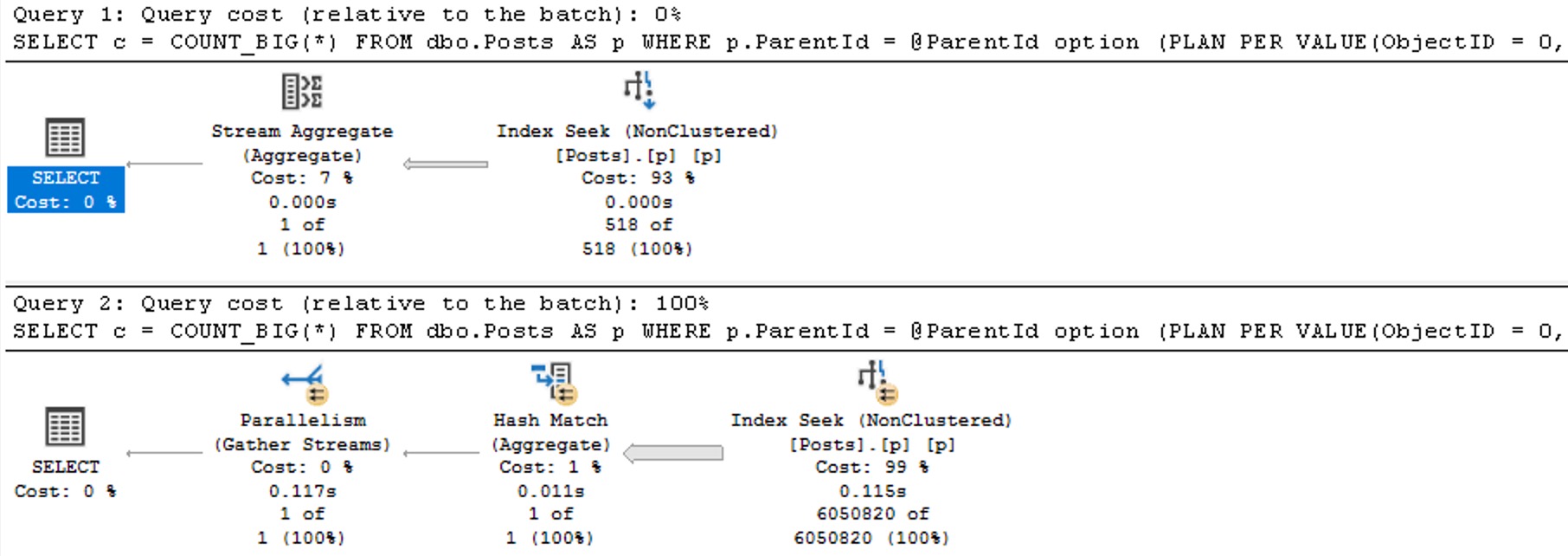
Now we see two different plans without a recompilation, as well as the plan per value option text at the end of the queries, indicating the PSP optimization kicked in.

SQL Server Query Plan
two up

The differences here are fairly obvious, but…

  • Each plan gets accurate cardinality
  • The second plan goes parallel to make processing ~6 million rows faster
  • Different aggregates more suited to the amount of data in play are chosen (the hash match aggregate is eligible for batch mode)

Thanks for reading!

Going Further


If this is the kind of SQL Server stuff you love learning about, you’ll love my training. Blog readers get 25% off the Everything Bundle — over 100 hours of performance tuning content. Need hands-on help? I offer consulting engagements from targeted investigations to ongoing retainers. Want a quick sanity check before committing to a full engagement? Schedule a call — no commitment required.

How To Convert Binary And Varbinary Strings In SQL Server

Noticeable


This is a short post that I wanted to write on the heels of doing a bunch of work in sp_QuickieStore.

Many times, pulling data out of odd structures like XML or JSON can lead to difficulty in correctly typing each output element. I run into this commonly with query plan XML, of course. You may run into it elsewhere.

The main issue is that I often need to compare what comes out of those odd data structures to data stored more properly in other system views. For example:

  • Query Hash: Binary 8
  • Query Plan Hash: Binary 8
  • SQL Handle: Varbinary 64
  • Plan Handle: Varbinary 64

There’s some shenanigans you can use around big ints, but I’ve run into a lot of bugs with that. I don’t want to talk about it.

Nutty


As an example, this won’t match:

SELECT
    c = 
        CASE
            WHEN '0x1AB614B461F4D769' = 0x1AB614B461F4D769
            THEN 1
            ELSE 0
        END;

The string does not implicitly convert to the binary 8 value. The same is true when you use varbinary values.

You might think that just converting the string to binary 8 would be enough, but no! This will still return a zero.

SELECT
    c = 
        CASE
            WHEN CONVERT(binary(8), '0x1AB614B461F4D769') = 0x1AB614B461F4D769
            THEN 1
            ELSE 0
        END;

In this case (ha ha ha), you need to use the additional culture parameter to make this work.

Objective


Here’s why:

SELECT
    no =
        CONVERT(binary(8), '0x1AB614B461F4D769'),
    yes = CONVERT(binary(8), '0x1AB614B461F4D769', 1);
no	                yes
0x3078314142363134	0x1AB614B461F4D769

The same is true with varbinary, too:

SELECT
    no =
        CONVERT(varbinary(64), '0x0900F46AC89E66DF744C8A0AD4FD3D3306B90000000000000000000000000000000000000000000000000000'),
    yes = CONVERT(varbinary(64), '0x0900F46AC89E66DF744C8A0AD4FD3D3306B90000000000000000000000000000000000000000000000000000', 1);
no
0x30783039303046343641433839453636444637343443384130414434464433443333303642393030303030303030303030303030303030303030303030303030	

yes
0x0900F46AC89E66DF744C8A0AD4FD3D3306B90000000000000000000000000000000000000000000000000000

The real answer here is to not rely on conversions, implicit or otherwise, when comparing data.

But, if you ever find yourself having to deal with some wonky binary data, this is one way to get yourself out of a scrape.

Thanks for reading!

Going Further


If this is the kind of SQL Server stuff you love learning about, you’ll love my training. Blog readers get 25% off the Everything Bundle — over 100 hours of performance tuning content. Need hands-on help? I offer consulting engagements from targeted investigations to ongoing retainers. Want a quick sanity check before committing to a full engagement? Schedule a call — no commitment required.

Views vs Indexed Views In SQL Server

Award Winning


Imagine you have a rather complicated query that you want to abstract into a simple query for your less-than-with-it end users.

A view is probably a pretty good way of doing that, since you can shrink your preposterously-constructed tour through every table in the schema down to a simple select-from-one-object.

The problem is that now everyone expects it to perform well throughout all time, under any circumstances, come what may. It’s sort of like how your parents expect dinner to be $20 and tips to be 20% regardless of where they go or what they order.

  • Lobster? $5.
  • Steak? $5.
  • Bottle of wine? $5.
  • Any dessert you can imagine? $5.
  • Tip? Gosh, mister, another $5?

I sincerely apologize to anyone who continues to live in, or who moved to Europe to avoid tipping.

If you’d like some roommates, I have some parents you’d get along with.

Viewfinder


Creating a view in SQL Server doesn’t do anything special for you, outside of not making people remember your [reference to joke above] query.

You can put all manner of garbage in your view, make it reference another half dozen views full of garbage, and expect sparkling clean query performance every time.

Guess what happens?

Reality.

When you use views, the only value is abstraction. You still need to be concerned with how the query is written, and if the query has decent indexes to support it. In other words, you can’t just write a view and expect the optimizer to do anything special with it.

SQL Server doesn’t cache results, it only caches raw data. If you want the results of a view to be saved, you need to index it.

Take these two dummy queries, one against a created view, and the other an ad hoc query identical to what’s in the view:

CREATE OR ALTER VIEW
    dbo.just_a_query
WITH SCHEMABINDING
AS
SELECT
    p.OwnerUserId,
    TotalScore = 
        ISNULL
        (
            SUM(p.Score), 
            0
        ),
    TotalPosts = 
        COUNT_BIG(*)
FROM dbo.Posts AS p
WHERE EXISTS
      (
          SELECT
              1/0
          FROM dbo.Votes AS v
          WHERE 
              v.PostId = p.Id      
      )
GROUP BY
    p.OwnerUserId;
GO 

SELECT
    p.OwnerUserId,
    TotalScore = 
        ISNULL
        (
            SUM(p.Score), 
            0
        ),
    TotalPosts = 
        COUNT_BIG(*)
FROM dbo.Posts AS p
WHERE EXISTS
      (
          SELECT
              1/0
          FROM dbo.Votes AS v
          WHERE 
              v.PostId = p.Id      
      )
AND 
    p.OwnerUserId = 22656
GROUP BY
    p.OwnerUserId;
GO 

SELECT
    jaq.*
FROM dbo.just_a_query AS jaq
WHERE 
    jaq.OwnerUserId = 22656;
GO 

The plans are identical, and identically bad. Why? Because I didn’t try very hard, and there’s no good indexes for them.

Remember when I said that’s important?

SQL Server Query Plan
avenues lined with trees

Keep in mind this is a query with some batch mode involved, so it could be a lot worse. But both instances complete within a second or so of each other.

So much for view performance.

Maintainer


The rules around indexed views are pretty strict, and the use cases are fairly narrow. I do find them quite useful on SQL Server Standard Edition where batch mode is terribly hobbled.

The horrible thing is that indexed views are so strict in SQL Server that we can’t even create one on the view in question. That really sucks. We get this error.

CREATE UNIQUE CLUSTERED INDEX 
    cuqadoodledoo
    ON dbo.not_just_a_query
(
    OwnerUserId
)
WITH
(
    SORT_IN_TEMPDB = ON,
    DATA_COMPRESSION = PAGE
);

Msg 10127, Level 16, State 1, Line 95

Cannot create index on view “StackOverflow2013.dbo.not_just_a_query” because it contains one or more subqueries. 

Consider changing the view to use only joins instead of subqueries. Alternatively, consider not indexing this view.

Alternatively, go screw yourself. Allowing joins but not exists is somewhat baffling, since they’re quite different in that joins allow for multiple matches but exists does not. We’d have to do a lot of fancy grouping footwork to get equivalent results with a join, since distinct isn’t allowed in an indexed view in SQL Server either.

We could also pull the exists out of the view, add the Id column to the select list, group by that and OwnerUserId, index both of them, and… yeah nah.

I have no idea who’s in charge of indexed views in the product at this point, but a sufficiently lubricated republic would likely come calling with tar and feathers in the face of this injustice.

This is basic query syntax. It’s not like uh… min, max, sum, avg, except, intersect, union, union all, cross apply, outer apply, outer joins, or um, hey, is it too late for me to change careers?

The Pain In Pain Falls Painly On The Pain


You may have ended up here looking to learn all the minute differences between views and indexed views in SQL Server.

You may be disappointed in reading this post, but I can assure you that you’re not nearly as disappointed in this post as I am with indexed views in SQL Server.

They’re like one of those articles about flying cars where you read the headline and you’re like “woah, I’m living in the future”, but then three paragraphs in you find out the cars don’t really fly or drive and they might actually just be igloos that are only big enough for an Italian Greyhound or a paper plane that the author’s kid glued wheels to.

If you actually have a use case for indexed views, you’ll have to be really careful about making sure their maintenance doesn’t kill performance.

Thanks for reading!

Going Further


If this is the kind of SQL Server stuff you love learning about, you’ll love my training. Blog readers get 25% off the Everything Bundle — over 100 hours of performance tuning content. Need hands-on help? I offer consulting engagements from targeted investigations to ongoing retainers. Want a quick sanity check before committing to a full engagement? Schedule a call — no commitment required.

Why MAX Data Types Are Usually A Bad Choice For SQL Server Columns

Easy Rider


When you’re trying to figure out how to store string data, it often seems easiest to just choose an extra long — even MAX — data type to avoid future truncation errors.

Even if you’re storing strings with a known, absolute length, developers may choose to not enforce that in the application, either via a drop down menu or other form of validation.

And so to avoid errors when users try to put their oh-so-important data in their oh-so-expensive database, we get columns added to tables that can fit a galaxy of data in them, when we only need to store an ashtray worth of data.

While getting data into those columns is relatively easy — most application inserts are single rows — getting data out of those columns can be quite painful, whether it’s searching or just presenting in the select portion of a query.

Let’s look at a couple simple examples of how that happens.

Search Engine


Let’s take a query like this one:

SELECT TOP (20)
    p.Id,
    p.Title,
    p.Body
FROM dbo.Posts AS p
WHERE p.Body LIKE N'SQL Server%';

The Body column in the Posts table is nvarchar and MAX, but the same thing would happen with a varchar column.

If you need a simple way to remember how to pronounce those data types, just remember to Pahk yah (n)vahcah in Hahvahd Yahd.

Moving on – while much has been written about leading wildcard searches (that start with a % sign), we don’t do that here. Also, in general, using charindex or patindex instead of leading wildcard like searching won’t buy you all that much (if anything at all).

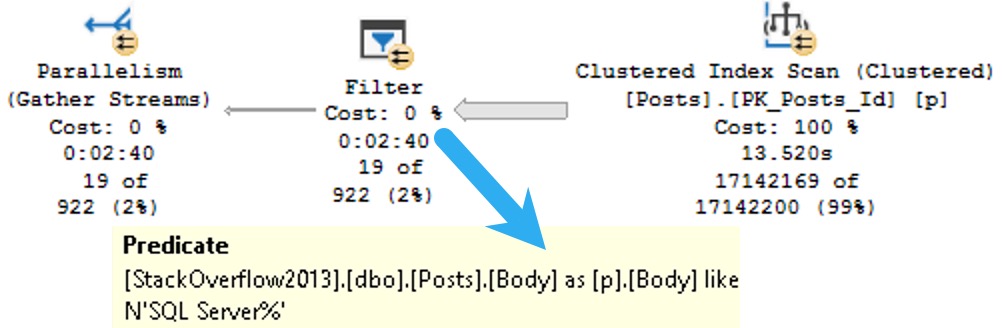
Anyway, since you can’t put a MAX datatype in the key of an index, part of the problem with them is that there’s no way to efficiently organize the data for searching. Included columns don’t do that, and so we end up with a query plan that looks some-such like this:

SQL Server Query Plan
ouch in effect

We spend ~13.5 seconds scanning the clustered index on the Posts table, then about two minutes and twenty seven seconds (minus the original 13.5) applying the predicate looking for posts that start with SQL Server.

That’s a pretty long time to track down and return 19 rows.

Let’s change the query a little bit and look at how else big string columns can cause problems.

Memory Bank


Rather than search on the Body column, let’s select some values from it ordered by the Score column.

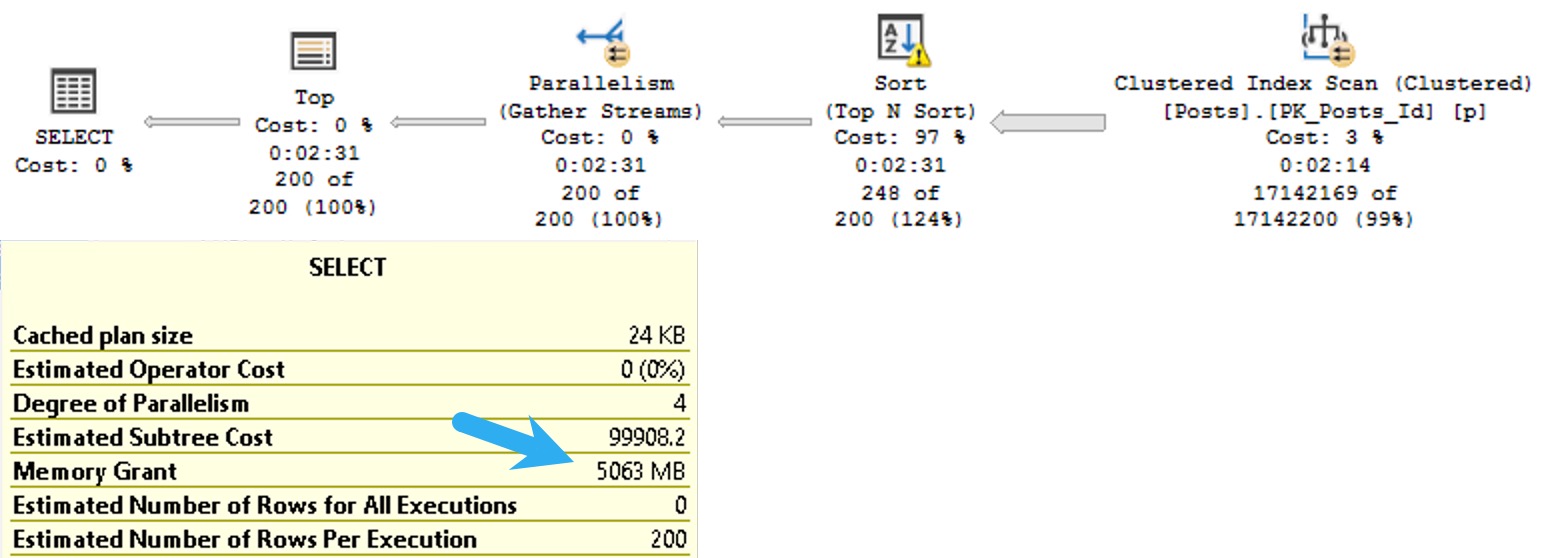
Since Score isn’t indexed, it’s not sorted in the database. That means SQL Server needs to ask for memory to put the data we’re selecting in the order we’re asking for.

SELECT TOP (200)
    p.Body
FROM dbo.Posts AS p
ORDER BY p.Score DESC;

The plan for this query asks for a 5GB memory grant:

SQL Server Query Pla
quietly

I know what you’re thinking: the Body column probably has some pretty big data in it, and you’re right. In this case, it’s the right data type to use.

The bad news is that SQL Server will makes the same memory grant estimation based on the size of the data we need to sort whether or not it’s a good choice.

I talk more about that in this Q&A on Stack Exchange.

Thanks for reading!

Going Further


If this is the kind of SQL Server stuff you love learning about, you’ll love my training. Blog readers get 25% off the Everything Bundle — over 100 hours of performance tuning content. Need hands-on help? I offer consulting engagements from targeted investigations to ongoing retainers. Want a quick sanity check before committing to a full engagement? Schedule a call — no commitment required.

Stop Making SQL Server Weird, Microsoft.

Ledgers And Tridents And Toads, Fido-hmy


With every release of SQL Server, Microsoft adds in a bunch of tadpole features. It’s up to those tadpoles to survive long enough to turn into beautiful uh… Frogs Toads.

The way they do that is by having enough paying customers use them — usually prodded by #MVPBuzz chasers — to get continued support and development.

All of this is subject to internal whims (like Microsoft rebranding, renaming, or rebasing a feature, take Mirroring >> Availability Groups), and external customer fancies (Tableau vs PowerBI, etc).

I feel bad for folks who latch onto these things with any sort of seriousness, like Big Data Clusters, or any of the dozens of other features that died before they could bump their butts on a log.

One marvels at the sheer number of “you better get on board” style session titles that have been molded around features where absolutely no one got on board.

Even Kubernetes (which I know isn’t a SQL Server feature) is sort of like K-Pop: Apparently millions of people like it, but I’ve never met a single person who actually uses it.

Maybe it’s more like a bot net. K-Bot? Not sure, here. I’m bad at creative writing.

They Don’t Like You Anyway


Microsoft has this weird perceived popularity issue.  Perhaps it’s the diminishing self-esteem that comes with age, with SQL Server turning 30-something and all. Microsoft keeps trying to make SQL Server appeal to swaths of people who will never like it, because it’s not the shiny new thing on the block.

They won’t love you like I do.

Adding in every passing fad to the product to try to stay young and hip does a great disservice to the product as a whole, which has many addressable flaws. Microsoft dedicates countless development cycles to goofy memes that will wither on the vine shortly after the first version.

Imagine if cars still came with cassette players, but not ones that can do anything cool like play both sides without flipping the tape over, or being able to fast forward or rewind to the start or end of a track.

You’d basically have Spatial Data And The Graph Nodes in your car trying to play Garage Days Re-Re-Revisited.

Duets


I do wish the Microsoft bean counters would dance with who they brung a bit more. You know, people who need a relational database with as few bugs and preventable performance issues as possible, with useful development features, and a coherent toolset?

Clearing the minefield of pitfalls that developers fall int0 (hello, MERGE!) would allow less effort to be spent on chasing down oddball problems and more time spent developing quality features.

It’s sort of like if I had a keyboard that fixed all my typos immediately, I’d have more time to write quality blog posts that don’t need several editorial passes.

Maybe someday.

Thanks for reading!

Going Further


If this is the kind of SQL Server stuff you love learning about, you’ll love my training. Blog readers get 25% off the Everything Bundle — over 100 hours of performance tuning content. Need hands-on help? I offer consulting engagements from targeted investigations to ongoing retainers. Want a quick sanity check before committing to a full engagement? Schedule a call — no commitment required.

SQL Server 2022 CTP 2.1 Improvements To Parameter Sensitive Plan Optimization

Hop On Your Good Foot


Several weeks back, I blogged about a missed opportunity with the new parameter sensitive plan feature. At the time, I thought that there was indeed sufficient skewness available to trigger the additional plan variants, and apparently some nice folks at Microsoft agreed.

If we step back through the old demo, we’ll get different results.

EXEC dbo.VoteSniffing 
    @VoteTypeId = 4;

EXEC dbo.VoteSniffing 
    @VoteTypeId = 2;

I’m not gonna go into a lot of depth here, because I’m writing this while traveling, but we get the (mostly) desired outcome of two different plans being generated. Each plan is more suitable to the amount of data that the query has to process.

SQL Server Query Plan
home improvement

I’d consider this a success, even if it adds more queries to the unidentifiable corpse-pile.

Thanks for reading!

Going Further


If this is the kind of SQL Server stuff you love learning about, you’ll love my training. Blog readers get 25% off the Everything Bundle — over 100 hours of performance tuning content. Need hands-on help? I offer consulting engagements from targeted investigations to ongoing retainers. Want a quick sanity check before committing to a full engagement? Schedule a call — no commitment required.

SQL Server 2022 Introduces IS [NOT] DISTINCT FROM; World Underwhelmed

Back In Time


Feeling quite old while remembering the first time I ever read this, and this note at the end:

This is the SQL language IS DISTINCT FROM feature —implemented in the query processor, but not yet available in the T-SQL language.

Groovy. Since at least 2011, this has been in the Query Processor, and here in 2022 we finally get the linguistic support.

The thing is, it’s pretty underwhelming, and I’m going to show you why I think so.

First, in the docs for SQL Server, all the examples use a single literal value, like so:

SELECT * FROM #SampleTempTable WHERE id IS DISTINCT FROM 17;

I went looking for other docs examples from vendors who have had the syntax around for 10+ years, and there wasn’t anything all that much more interesting.

Mostly case expressions and whatnot.

Big deal.

Alignment


First, if I try to run either of these queries, I’ll get an error after about 6 seconds.

SELECT
    c = COUNT_BIG(*)
FROM dbo.Comments AS c
WHERE c.UserId IS DISTINCT FROM 
               (
                   SELECT
                       v.UserId
                   FROM dbo.Votes AS v
               );

SELECT
    c = COUNT_BIG(*)
FROM dbo.Comments AS c
WHERE c.UserId IS NOT DISTINCT FROM 
               (
                   SELECT
                       v.UserId
                   FROM dbo.Votes AS v
               );

Why does it take 6 seconds to get an error? Because a few parts of the query plan have to do some work, and then finally:

Msg 512, Level 16, State 1, Line 1
Subquery returned more than 1 value. This is not permitted when the subquery follows =, !=, <, <= , >, >= or when the subquery is used as an expression.

Sort of like how sometimes you try to SUM a column and after a while you get an error about arithmetic overflow.

This is a bit annoying, because that means we need a way to return a single value to evaluate.

So Yeah…


We can’t even rewrite the queries like this to get around the error, but I do want to show you the plans.

This is why we have to wait several seconds to get an error (unless you change it to IS DISTINCT FROM ALL/ANY):

SELECT
    c = COUNT_BIG(*)
FROM dbo.Comments AS c
WHERE c.UserId IS DISTINCT FROM 
               (
                   SELECT
                       v.UserId
                   FROM dbo.Votes AS v
                   WHERE v.UserId = c.UserId
               );

SELECT
    c = COUNT_BIG(*)
FROM dbo.Comments AS c
WHERE c.UserId IS NOT DISTINCT FROM 
               (
                   SELECT
                       v.UserId
                   FROM dbo.Votes AS v
                   WHERE v.UserId = c.UserId
               );

Adding a where clause inside the subquery doesn’t help.

But these query plans are total motherchucking disasters, anyway. We’ll get into indexing later, but right now they both have the same shape and operators, though slightly different semantics to deal with is/is not distinct.

SQL Server Query Plan
is not cool

Both plans run single threaded, and using Nested Loops as the physical join type, which stinks because we’re putting together two pretty big tables.

Not to mention that Eager Index Spool. What a filth.

Adding Indexes


We need these indexes to make things go any faster. Before we do anything else, let’s create these so we’re not just sitting around thumb-twiddling.

CREATE INDEX
    c
ON dbo.Comments
    (UserId)
WITH
(
    SORT_IN_TEMPDB = ON,
    DATA_COMPRESSION = PAGE
);

CREATE INDEX
    v
ON dbo.Votes
    (UserId)
WITH
(
    SORT_IN_TEMPDB = ON,
    DATA_COMPRESSION = PAGE
);

Thinking About It


Okay, so writing the query like we did up there isn’t going to get us anything. Perhaps my expectations are a bit too exotic.

Let’s try something a bit more austere:

SELECT
    c = COUNT_BIG(*)
FROM dbo.Comments AS c
JOIN dbo.Votes AS v
    ON c.UserId IS DISTINCT FROM v.UserId;

SELECT
    c = COUNT_BIG(*)
FROM dbo.Comments AS c
JOIN dbo.Votes AS v
    ON c.UserId IS NOT DISTINCT FROM v.UserId;

The first thing to be aware of here is that the IS DISTINCT FROM is an inequality predicate, so you’re stuck with Nested Loops as the physical join type:

SQL Server Query Plan
nightmare

I ran out of care-juice waiting for this to finish, so all you’re getting is an estimated plan. The lack of an equality predicate here means you don’t have Hash or Merge join as an option.

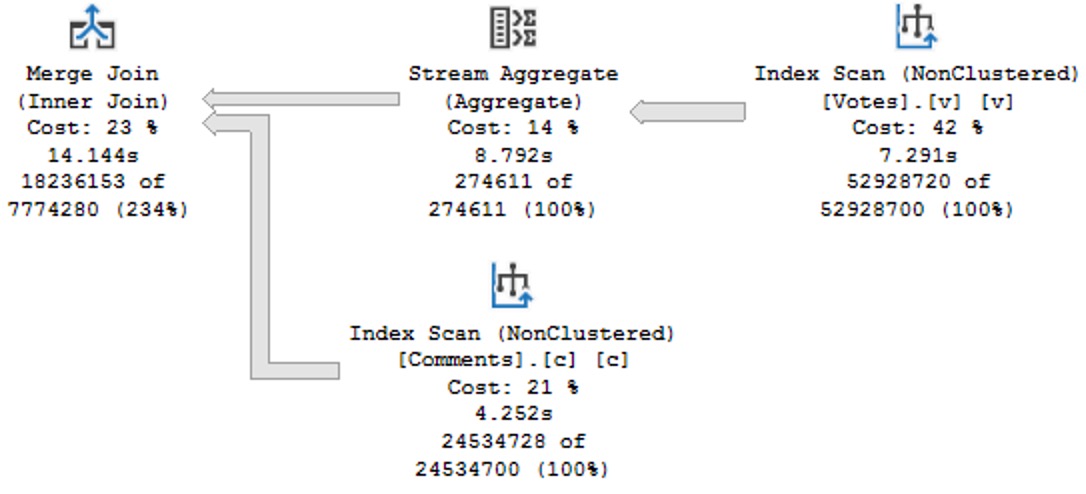
Following up on bad ideas, the IS NOT DISTINCT FROM is an equality predicate, but the plan chosen is a serial Merge Join variety, which drags on 14 seconds too long:

SQL Server Query Plan
change up

Drop An Index


If we simulate not having any useful indexes on one table or the other by hinting the clustered index, the performance outlook does not improve.

SELECT
    c = COUNT_BIG(*)
FROM dbo.Comments AS c WITH(INDEX = 1)
JOIN dbo.Votes AS v
    ON c.UserId IS NOT DISTINCT FROM v.UserId;

SELECT
    c = COUNT_BIG(*)
FROM dbo.Comments AS c
JOIN dbo.Votes AS v WITH (INDEX = 1)
    ON c.UserId IS NOT DISTINCT FROM v.UserId;

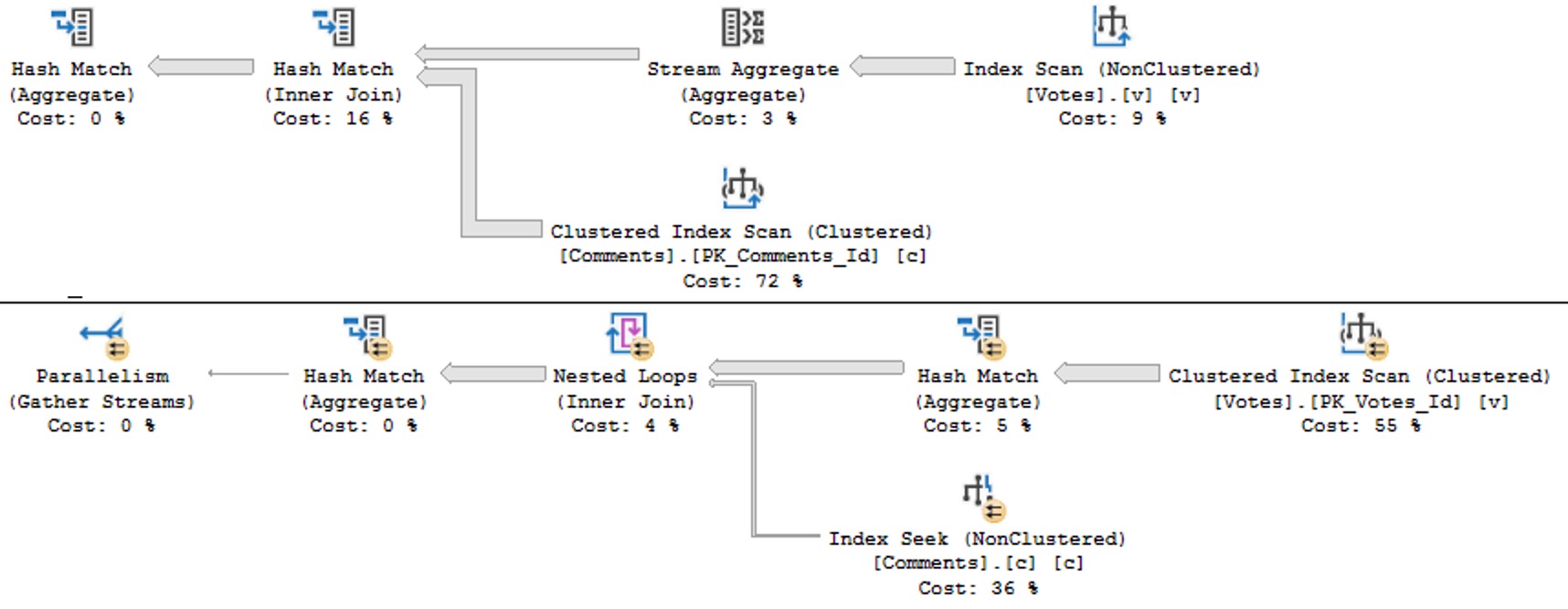
No useful parts of the first query happen in Batch Mode, but the second query is rescued by two hash aggregates happening in batch mode.

SQL Server Query Plan
ouching

An odd point to make on a blog focused on SQL Server performance tuning is that sometimes not having a useful index gets you a better plan.

Anyway, I’m going back to my vacation.

Thanks for reading!

Going Further


If this is the kind of SQL Server stuff you love learning about, you’ll love my training. Blog readers get 25% off the Everything Bundle — over 100 hours of performance tuning content. Need hands-on help? I offer consulting engagements from targeted investigations to ongoing retainers. Want a quick sanity check before committing to a full engagement? Schedule a call — no commitment required.

SQL Server 2022: Introduces the DATETRUNC Function, So You Can Truncate Your Dates And Stuff

Underscoring The Importance


When I first sat down to write about this, I made a funny mistake: I kept writing DATE_TRUNC over and over again.

In SQL Server it’s DATETRUNC.

Why? Because that’s the way it’s implemented in Postgres and DB2. Oracle, of course, just calls it TRUNC.

So, while it’s nice to have (what appears to be) the same behavior, it doesn’t exactly help to not have a 1:1 calling equivalent to other platforms.

I assume most of these additions to T-SQL are for cross-platform development and migrations.

Of course, Microsoft being so gosh darn late to this game means folks have probably been rolling-their-own versions of these functions for years.

If they went and called their system function DATE_TRUNC or even TRUNC, they might have some object naming issues to contend with.

Well, okay. But how does it work?

Childish Games


Here are some quick examples of how you call it.

SELECT TOP (10)
    u.DisplayName,
    year = 
        DATETRUNC(YEAR, u.LastAccessDate),
    quarter = 
        DATETRUNC(QUARTER, u.LastAccessDate),
    month = 
        DATETRUNC(MONTH, u.LastAccessDate),
    dayofyear = 
        DATETRUNC(DAYOFYEAR, u.LastAccessDate),
    day = 
        DATETRUNC(DAY, u.LastAccessDate),
    week = 
        DATETRUNC(WEEK, u.LastAccessDate),
    iso_week = 
        DATETRUNC(ISO_WEEK, u.LastAccessDate),
    hour = 
        DATETRUNC(HOUR, u.LastAccessDate),
    minute = 
        DATETRUNC(MINUTE, u.LastAccessDate),
    second = 
        DATETRUNC(SECOND, u.LastAccessDate),
    millisecond = 
        DATETRUNC(MILLISECOND, u.LastAccessDate),
    microsecond = 
        DATETRUNC(MICROSECOND, u.LastAccessDate) /*Doesn't work with datetime because there are no microseconds*/
FROM dbo.Users AS u;

And here are the results:

SQL Server Query Results
workin’

The thing to note here is that there’s no rounding logic involved. You just go to the start of whatever unit of time you choose. Of course, this doesn’t seem to do anything to the millisecond portion of DATETIME, because it’s not precise enough.

But for anyone out there who was hoping for a SOMONTH function to complement the EOMONTH function, you get this instead.

Works well enough!

But does it perform, Darling?

UnSARGable?


To make any test like this worthwhile, we need an index to make data searchable.

CREATE INDEX
    v
ON dbo.Votes
    (CreationDate)
WITH
(
    SORT_IN_TEMPDB = ON,
    DATA_COMPRESSION = PAGE
);

You know, because that’s what they do. To make searching faster. Hello.

So look, under these perfect circumstances, everything performs well. But we have to do a lot of typing.

SELECT
    c = COUNT_BIG(*)
FROM dbo.Votes AS v
WHERE v.CreationDate >= DATETRUNC(YEAR, CONVERT(datetime, '20130101 00:00:00.000'));

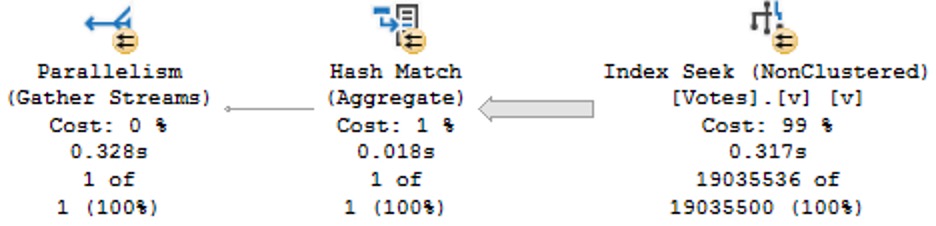
Note here that we’re working on a literal value, not a column value, and we have to tell the datetrunc function which type we want via the convert function so that we get a simple seek plan:

SQL Server Query Plan
grin

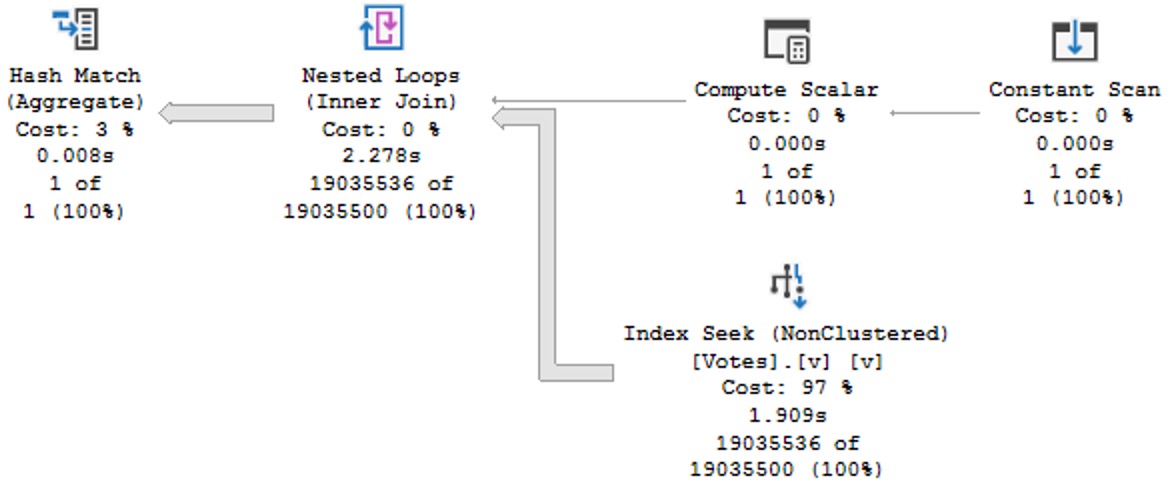
Without all that, we get a dynamic seek plan:

SELECT
    c = COUNT_BIG(*)
FROM dbo.Votes AS v
WHERE v.CreationDate >= DATETRUNC(YEAR, '20130101 00:00:00.000');

This has some… obvious performance issues compared to the above plan with correct data types.

SQL Server Query Plan
query pan

Query Pranks


Frequent blog readers will not be surprised that wrapping a table column in the new DATETRUNC function yields old performance problems:

SELECT
    c = COUNT_BIG(*)
FROM dbo.Votes AS v
WHERE DATETRUNC(YEAR, v.CreationDate) >= CONVERT(datetime, '20130101 00:00:00.000');

This is particularly annoying because we’re truncating the column to the beginning of the year, which should be searchable in the index since that’s the sort order of the data in the index.

SQL Server Query Plan
shined out

Like most functions, these are fine in the presentation layer, but terrible in the relational layer. There’s no warning about this performance degradation in the documentation, either at the example of using the function in a where clause, or in the final closing remarks.

But that’s par for the course with any of these built-in functions.

Thanks for reading!

Going Further


If this is the kind of SQL Server stuff you love learning about, you’ll love my training. Blog readers get 25% off the Everything Bundle — over 100 hours of performance tuning content. Need hands-on help? I offer consulting engagements from targeted investigations to ongoing retainers. Want a quick sanity check before committing to a full engagement? Schedule a call — no commitment required.