SQL Server 2022 CTP 2.1 dropped recently, and there’s some new stuff in it! What kind of new stuff?
Well, there’s some linguistic stuff:
APPROX_PERCENTILE_DISC
APPROX_PERCENTILE_CONT
DATETRUNC
IS [NOT] DISTINCT FROM
Bit manipulation:
LEFT_SHIFT
RIGHT_SHIFT
BIT_COUNT
GET_BIT
SET_BIT
How useful any of that will be depends on how you use SQL Server. I’ve never heard anyone yearning for bit manipulation functions, but perhaps I travel in the wrong circles.
Inside You
As far as “unannounced” stuff, here’s some of what I noticed:
There’s a new database scoped configuration called LEDGER_DIGEST_STORAGE_ENDPOINT. The name seems fairly self-documenting, but I can’t picture myself using ledger enough to explore it further.
Again, their usefulness will depend on how you use the product.
Here are some new extended events:
query_ce_feedback_telemetry
query_feedback_analysis
query_feedback_validation
resumable_add_constraint_executed
I don’t think I’ll need to add any of these to sp_HumanEvents, but I’m sure you’ll see them in lots of Microsoft demos.
There are also some new wait stats, but I think I’ll be ignoring them.
CDC_SCAN_FINISHED
CORRUPTED_PAGE_PROCESS
DW_DB
DW_WS_DB_LIST
NATIVE_SHUFFLE_WRITE_BUFFER_DEQUEUE
PARQUET_INDEX_BUILD_MANIFEST_SYNC
PURVIEW_POLICY_SDK_PREEMPTIVE_SCHEDULING
PWAIT_S3_TEMP_CREDENTIAL
RBAC_AAD_GROUP_INFO
SPINLOCK_EXT
WAIT_EXTGOV_PERMCACHE_DECISIONLOCK
WAIT_EXTGOV_PERMCACHE_RESOURCELOCK
Nothing all that juicy this time around. Maybe next time!
Thanks for reading!
Going Further
If this is the kind of SQL Server stuff you love learning about, you’ll love my training. Blog readers get 25% off the Everything Bundle — over 100 hours of performance tuning content. Need hands-on help? I offer consulting engagements from targeted investigations to ongoing retainers. Want a quick sanity check before committing to a full engagement? Schedule a call — no commitment required.
In this video, I delve into the exciting new parameter-sensitive plan optimization introduced in SQL Server 2022. After a bit of a hiatus from recording videos due to other commitments and personal projects, the release of SQL Server 2022 has reignited my passion for sharing knowledge with you all. The video explores how this feature works by running queries multiple times with different input values, demonstrating the creation of distinct plans based on parameter sensitivity. I also highlight some quirks in query store data handling and plan cache management that arise from this optimization, offering insights into what developers might encounter as they adapt to these changes.
Full Transcript
Hello, hello, hello. Erik Darling here with Erik Darling Data. And I know that it’s been a little while since I recorded anything. That’s mostly because I’ve been really busy. I’ve still been writing nice things for all you kind and pleasant folks out there, but recording, I don’t know, it takes a special kind of thing for me to want to record something. And a lot of the stuff that I’ve been writing about has just not been stuff that I’ve been like, yeah, let’s record it. Let’s do a video about it. So I’ve been slacking a little bit on there. And, but now we have SQL Server 2022, and it has rekindled my desire to record things. So you’re welcome. Thank you, Microsoft, for releasing SQL Server 2022. And, I’ve been digging a lot into the parameter-sensitive plan optimization in SQL Server 2022. Because, I mean, apart from it being a very cool thing that now we have this, like, new layer of intelligent query processing where, all of a sudden, like, we don’t have the same, well, we don’t have the same. We don’t always have the same issue with parameter. We have new issues to deal with, like, when it misses out on perhaps a potentially useful optimization.
But anyway, now we have at least the built-in heuristic ability to occasionally get some help with parameter sniffing when the optimizer deems a parameter, a quality predicate, sensitive enough or having a sufficient skewness to generate multiple plans. So, what I’m going to do is run this main query here in a loop 10 times with two different sets of input values. One is going to be a 1 and a 0 up here, and the other is going to be a 2 and a 184618 down here. So if I run this, first we’re going to clear out the plan cache. We’re going to set, we’re going to clear all the data out of query store because I want this to be very clear.
All right, I’m going to clear it to make it, shut up. And I’m also just going to make sure that everyone knows that my database is in compat level 160, which is the magical new SQL Server 2022 compat level. I mean, I guess it’s old news if you’re up in Azure, but I don’t know. I don’t think people in Azure care, obviously. If they did, they wouldn’t use Azure. So we’re going to run those in a loop, and it’s going to finish pretty quickly because it’s an expert query tuner.
Even when I have queries that are parameter sensitive, they still manage to finish very quickly when I get my hands on them. But the main stuff that we need to pay attention to in here is if you look up here, we’re going to have, and this is how you’re going to know that your plans have received the parameter sensitive plan optimization. You’re going to see this option plan per value, and you’re going to get some query variant ID attached to your query.
Right now, you only have three options, or you only get three plans as part of this, right? So you will certainly only create three parameters, different parameter sensitive plans based on like bucketized values. And you can see those bucketized values if you look a little bit further over in the text of that hint where you see this predicate range, right?
And so you have stuff at the low end of the range, and you’ll have stuff at the high end of the range, and then you’ll have stuff in the middle of the range, which would be your third plan. I’m at the very top and very bottom of this, so I only have the two variant IDs. But if we scroll down through this, we’re going to see two distinct plans.
Really, they’re very similar in a lot of ways. The only thing that’s really different are these estimates over here, because one of them will actually find 50,000 rows, and the other one will not find anywhere near 50,000 rows. They’ll only find 518 rows.
And you can also see, of course, which parameter predicate… Oh, I didn’t go over it further enough. I’m goofy. I’m all out of practice here. You can also see which parameter SQL Server decided was the sensitive one, the sad little lad who dropped his lolly and leaves. And decided that that’s the one that needed some extra help and attention.
Needed a Kleenex and some spit on the cheek. But if you look through this stuff, these two plans are basically going to go back and forth over and over again. It’s going to be all query variant 2 and all query variant 3 going all the way down to the bottom.
And that’s the end of it, right? So these both executed 10 times a piece, just sort of in that loop. Now, where things get interesting…
If you read my blog, you would have seen a post sort of recently about how the parameter sensitive plan optimization, at least right now, as of this build, this first CTP build, kind of messes up plan cache stuff. Because when a store procedure calls a query and the query executes, it used to be, or at least it currently is, that you can figure out… Like there’s a parent object ID that gets tied back from the query to the store procedure that call this.
You can be like, oh, this query came from the store procedure. Great. That messes that up. They all get weird different SQL handles. Everything’s kind of a weird shamble over there.
There’s sort of a similar situation in query store. It’s not exactly the same. I mean, it is the same with you can’t tie statements back to the store procedure that called them. But there’s an additional sort of bit of weirdness that I want to talk you through here.
So what I’m going to do is execute these queries. And there’s nothing all that special or interesting about these queries. I’m not going to explain them because querying query store data is the hell on earth. I feel bad for anyone who does it.
I wrote spquickie store so that you wouldn’t have to do it because I care about you deeply as people. And I want you to have long and happy lives so you don’t have to think about these things. So looking through query store data, we have three distinct executions of this query, which is weird because we only had two plans, but I’m going to show you where that third thing comes from.
So if we blow this column up a little bit, and I wish there was a better way to do this without running some dumb substring parsing, we’ll see in this section that top plan, that ends the score descending clause of the query. The two ones below it have the plan per value, predicate range, blah, blah, blah stuff at the end of it.
All well and good. Where things get kind of interesting though, is if we, come on, move it, some scroll bars, not anyone’s friend, is when we look through other parts of this, right?
So we have query ID 123, plan ID 123, query text ID 123, okay, fine. Plan ID 1 doesn’t show up in runtime stats, right? So just kind of like a silly run, like query on, to get data out of the runtime stats view.
Query ID 1 doesn’t show up in there, right? We have, or sorry, plan ID 1 doesn’t show up there. We have plan ID 2 and 3 in there, right? So these two are in there.
This top one isn’t. Down at the bottom, and I will explain this query because this one is relatively simple to explain. We’re hitting a new view in SQL Server 2022 called sys.queryStoreVariant. And that is brand new.
And this is the one that tells us when a plan had a variant or a deviant in it somewhere. What’s kind of interesting here is that we have query variant query ID 2 and 3, right? So these query IDs would match up to these query IDs here.
Query ID 1 isn’t in there, right? Because it doesn’t have that option plan per value stuff in it. We have parent query ID, which does match up to that. And then we have dispatcher plan ID, which only shows you one.
Okay. Here’s where things get a little tricky. If we were to look for a plan, if we were to purely look for plans that have a variant in them, right? That were, you know, dispatched some other query plans.
This is all we get back. And as far as I know, I’m the first person to talk about this. So, you know, go me. Gold star, A plus, A for effort, all that stuff. We get this single operator back.
Multiple plan. Right? That’s all we get back here. Not a whole lot of detail. And if we go look at the XML, there’s a little bit more to see, but it’s kind of just weird stuff. You know, I mean, it’s all, you know, XML, which sucks to look at.
But we have this parameter sensitive predicate thing in here. We have a little bit of information about the, you know, the query. Like we can see what the query text is.
Just doesn’t have the parameter sensitive stuff tacked onto it. We can see the index that got used. We can see the boundary values for the parameter sensitivity stuff. And we can see the predicate that was considered parameter sensitive. Right?
So we get, there’s some, there’s some stuff in there, but it doesn’t show us the whole execution plan. If we click on any other, any of those other query plans, we’ll get the plan back. Like I said, there was the one that has a missing index attached to it. And then this one down here is the one that doesn’t have the missing index attached to it.
So those are the two variants that we saw when I executed the other scripts. So you have to be a little bit careful how you identify stuff in query store. Obviously you’d want to use the query variant query ID.
If you wanted to find the actual statements that had the varying plans in them. But right now getting, getting this dispatch or plan ID is just kind of useless. I wish there was another column that maybe had query variant plan ID in it so that we could say, Oh, this query was attached to this, you know, variant on the plan.
That might be kind of nice. The other thing that’s kind of interesting to look at in here is some of the hashes, right? So somehow these all have the same query hash, which is interesting.
I mean, because of the two of them have the option plan stuff at the end of them. So it almost doesn’t make sense for them to have that, but maybe, maybe that’s not considered as part of the hash value in there. Maybe that gets, maybe that gets sent in afterwards.
I don’t know. And then we have the query plan hash, which, you know, I guess that makes sense because, you know, we have this one where, you know, the, obviously that just that single multiple plan operator is not going to hash out to the same stuff. But then, you know, I mean, the other two are the same because it’s fundamentally the same plan.
It’s a blah, blah, key lookup. I mean, there was no difference in plan shape or anything. So in situations where the, the plan vary, the plan, the different plans generated had different shapes, different operators, parallel, not parallel, stuff like that. These would likely, these would likely vary.
What’s interesting to me though, is we have this query hash over here where they all end up being the same, but then quite obviously for last compile batch SQL handle and statement SQL handle, these are all very different values, right? This one’s 02, blah, blah, 51, 87, 72.
So these are all very different, right? These are all like just completely different SQL handles for things, right? These are all, these are all way different values. And even the statement SQL handles over, over here, obviously quite different values of the most will cooperate. Thank you very much, Mr. Mouse.
You are so useful today. Almost as useful as my liver. These all have very different values, right? So like, there’s a lot of stuff that’s just sort of spread out in here where, you know, before, there would at least be like some semblance of, of like, stuff you could figure out, right?
You could like, say, oh, the SQL handle for this query hasn’t changed. So this is where stuff gets a little bit trickier to identify and kind of get, get to the bottom of in here. So I guess the main thing here is be on the lookout for this, these kinds of changes.
Be on the lookout for maybe your query store scripts not working or getting you the value data that you want back as you start getting these new views into things. Obviously this dispatcher plan ID that just shows you the multiple plan operators, not very useful, right?
Like that’s not a very good query plan for you to use. The parent query ID likewise, that’s just going to get you this thing back, right? Query ID one, right?
That’s just going to get you that, you know, like that, the, the initial query without any of the parameter sensitive stuff attached to it. But you really want to be using this as query variant query ID, because this is what’s going to get you to these column to rather to these rows over here that have the more interesting plans. So, you know, be aware of this stuff, you know, as much as I love the idea of fixing parameter sniffing, I wish that there was a little bit less sort of nonsense, nonsense and shenanigans going on behind the scenes with all of the, the, the different values that, the, the queries generate and stuff.
I understand there has to be some separation. It wouldn’t make sense for everything to be just kind of congealed in together, but I do wish that there were a little bit more tooling or visibility into some of this stuff. For example, I mean, like, like I said earlier, it would be really helpful to have a query variant plan ID in here to track us to the plan IDs that we care about where there are variations.
And, you know, even in query store, you know, I talked about the plan cache earlier, even in query store, anything that gets called in the store procedure has a zero for a parent object ID when it gets a parameter sensitive plan optimization. So it’s going to be interesting seeing if that’s kind of stuff gets fixed or worked out as, as the CTPs roll out and we get closer to closer to RTM time. But anyway, sort of an initial observation, maybe at some point in the future, this video will be completely wrong.
Uh, that would be nice, but who knows? Uh, anyway, uh, I’m going to go now cause it’s, um, yeah, again, it’s seven, like seven 30 on a Friday. I’m going to, I’m going to go, uh, have, pour me a nice glass of something into my, my beer gut magazine, uh, mug.
And, uh, you know, maybe, maybe, maybe I’ll remember recording this video tomorrow. Maybe not. We’ll see. It’s all, it’s all a coin toss. It’s all up in the air.
Anyway, thanks for watching. Uh, I will see you hopefully in another video soon. Now the SQL Server 2022 stuff does have me, uh, back on to, uh, to actually record videos again. So I don’t know. I’ll have to work on that.
You have to brush off the rust and anything. Anyway, goodbye.
Going Further
If this is the kind of SQL Server stuff you love learning about, you’ll love my training. Blog readers get 25% off the Everything Bundle — over 100 hours of performance tuning content. Need hands-on help? I offer consulting engagements from targeted investigations to ongoing retainers. Want a quick sanity check before committing to a full engagement? Schedule a call — no commitment required.
In my quest to tell you about new stuff in SQL Server 2022, I forgot to take a look at new things in sys.database_scoped_configurations.
It turns out that’s important, because some stuff has to be turned on if you want it to work. Here’s a list of new database scoped configurations for SQL Server 2022:
Some stuff is on by default, some stuff isn’t. You might notice DOP_FEEDBACK and OPTIMIZED_PLAN_FORCING are both off by default, here (even though I turned them on).
ALTER DATABASE SCOPED CONFIGURATION SET DOP_FEEDBACK = ON;
ALTER DATABASE SCOPED CONFIGURATION SET OPTIMIZED_PLAN_FORCING = ON;
Invitation Only
You might think that Microsoft is so excited about new features (especially in CTP builds) that they want them to be easy to preview and test by people who care enough to do that stuff.
No so much, it turns out.
Heck, I’ve seen several presentations that said Query Store would be on by default in new databases created on SQL Server 2022 instances, but I haven’t had that happen yet and that’s not even a new feature.
Anyway, not much here beyond this. Mind your database scoped database configurations when you’re testing out new features. Also make sure to check for extended events that help you track down if/when heuristics for those features kick in.
Thanks for reading!
Going Further
If this is the kind of SQL Server stuff you love learning about, you’ll love my training. Blog readers get 25% off the Everything Bundle — over 100 hours of performance tuning content. Need hands-on help? I offer consulting engagements from targeted investigations to ongoing retainers. Want a quick sanity check before committing to a full engagement? Schedule a call — no commitment required.
This is just a quick post to list out new wait stats in SQL Server 2022. How many will be useful, time will tell.
Some waits that I think might be interesting:
CXSYNC_CONSUMER (Currently in Azure)
CXSYNC_PORT (Currently in Azure)
PARALLEL_DB_SEEDING_SEMAPHORE
PLPGSQL
It looks like maybe automatic seeding for Availability Groups is getting the ability to process multiple databases at once, and we’re getting some parallel query waits that used to be Azure only.
I’m really scratching my head about PLPGSQL though. That’s the “programming language” that Postgres supports, which is sort of like what Oracle supports.
If this is the kind of SQL Server stuff you love learning about, you’ll love my training. Blog readers get 25% off the Everything Bundle — over 100 hours of performance tuning content. Need hands-on help? I offer consulting engagements from targeted investigations to ongoing retainers. Want a quick sanity check before committing to a full engagement? Schedule a call — no commitment required.
A while back, I wrote a bunch of posts about things I’d like to see vNext take care of. In this post, since it’s Friday and I don’t wanna do anything, will round those up and cover whether or they made it in or not.
Well, maybe I’ll need to update the list for future releases of SQL Server 2022.
Hmpf.
Thanks for reading!
Going Further
If this is the kind of SQL Server stuff you love learning about, you’ll love my training. Blog readers get 25% off the Everything Bundle — over 100 hours of performance tuning content. Need hands-on help? I offer consulting engagements from targeted investigations to ongoing retainers. Want a quick sanity check before committing to a full engagement? Schedule a call — no commitment required.
Why two are zero-based and one is not is beyond what I can explain to you, here.
Perhaps that will be addressed in a future release.
Thanks for reading!
Going Further
If this is the kind of SQL Server stuff you love learning about, you’ll love my training. Blog readers get 25% off the Everything Bundle — over 100 hours of performance tuning content. Need hands-on help? I offer consulting engagements from targeted investigations to ongoing retainers. Want a quick sanity check before committing to a full engagement? Schedule a call — no commitment required.
I can’t have my dear friend Brent being all distraught with all those fast cars around. That’s how accidents happen, and I fear he might leave the Blitz scripts to me in his will or something.
In Paul’s post, he talks about using undocumented trace flag 8666 to get additional details about Sort operators.
Let’s do that. Paul is smart, though he is always completely wrong about which season it is.
DROP TABLE IF EXISTS
    dbo.Votes_CCI;

SELECT
    v.*
INTO dbo.Votes_CCI
FROM dbo.Votes AS v;
I’m using the Votes table because it’s nice and narrow and I don’t have to tinker with any string columns.
Strings in databases were a mistake, after all.
DBCC TRACEON(8666);
CREATE CLUSTERED COLUMNSTORE INDEX
    vcci
ON dbo.Votes_CCI
ORDER (Postid);
DBCC TRACEOFF(8666);
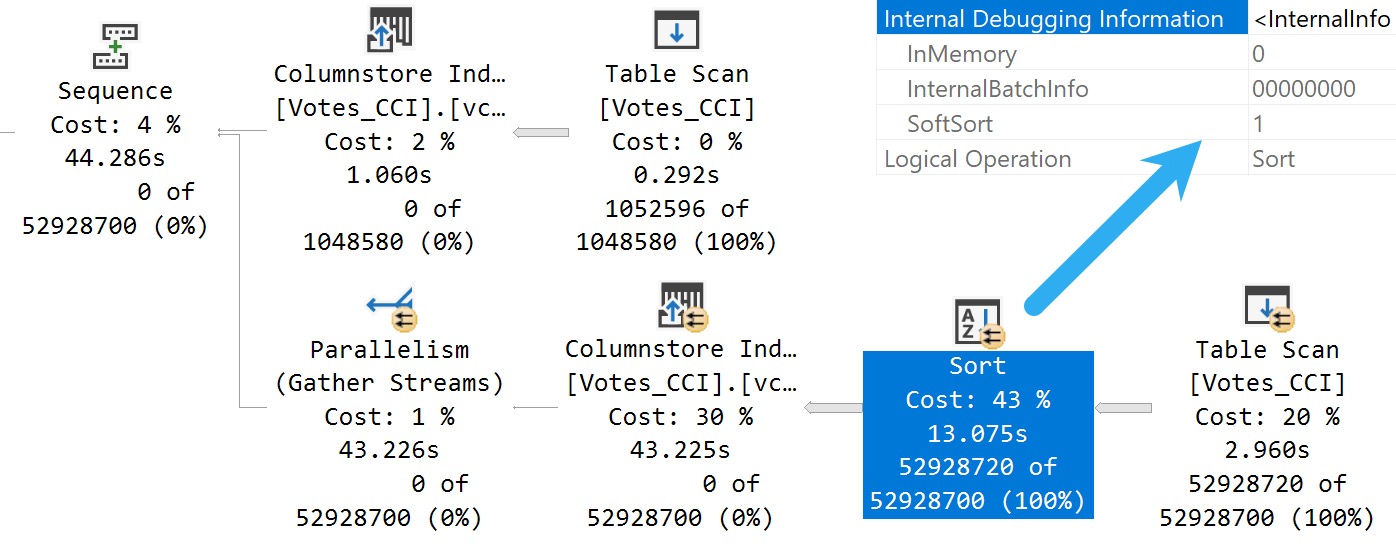
Here’s what we get back in the query plan:
Tainted Sort
We’ve got a Soft Sort! What does our seasonally maladjusted friend say about those?
A “soft sort” uses only its primary memory grant and never spills. It doesn’t guarantee fully-sorted output. Each sort run using the available memory grant will be sorted. A “sort sort” represents a best effort given the resource available. This property can be used to infer that a Sort is implemented with CQScanPartitionSortNew without attaching a debugger. The meaning of the InMemory property flag shown above will be covered in part 2. It does not indicate whether a regular sort was performed in memory or not.
Well, with that attitude, it’s not surprising that there are so many overlapping buckets in the column store index. If it’s not good enough, what can you do?
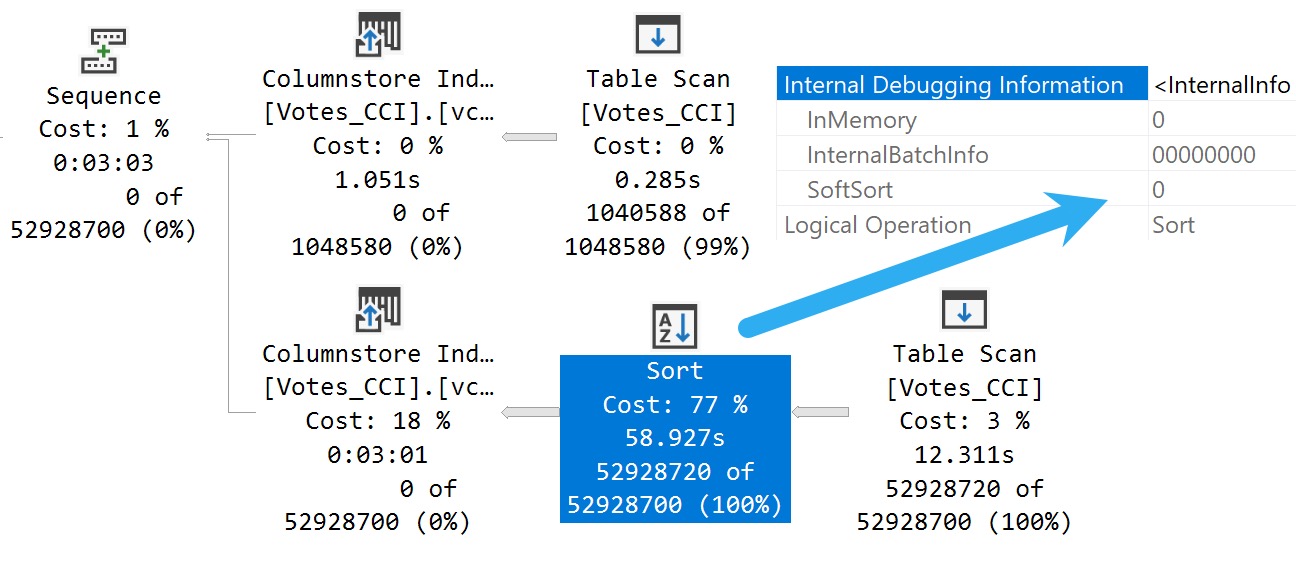
Building the index with the Soft Sort here also leads to things being as bad as they were in Brent’s post.
Insert Debugging Here
Alas, there’s (almost) always a way. Microsoft keeps making these trace flag things.
There are a bunch of different ways to track them down, but figuring out the behavior of random trace flags that you may find just by enabling them isn’t easy.
One way to tie a trace flag to a behavior is to use WinDbg to step through different behaviors in action, and see if SQL Server checks to see if a trace flag is enabled when that behavior is performed.
If you catch that, you can be reasonably sure that the trace flag will have some impact on the behavior. Not all trace flags can be enabled at runtime. Some need to be enabled as startup options.
Sometimes it’s hours and hours of work to track this stuff down, and other times Paul White (b|t) already has notes on helpful ones.
The trace flag below, 2417, is present going back to SQL Server 2014, and can help with the Soft Sort issues we’re seeing when building ordered clustered column store indexes today.
Here’s another one:
DBCC TRACEON(8666, 2417);
CREATE CLUSTERED COLUMNSTORE INDEX
    vcci
ON dbo.Votes_CCI
ORDER (Postid)
WITH(MAXDOP = 1);
DBCC TRACEOFF(8666, 2417);
The MAXDOP 1 hint isn’t strictly necessary. With a parallel plan, you may see up to DOP overlapping row groups.
community service
That’s why it was a popular maneuver to emulate this behavior by creating a clustered row store index, and then create a clustered column store index over it with drop existing and a MAXDOP 1 hint.
At DOP 1, you don’t see that overlap. It takes a lot longer of course — 3 minutes instead of 30 or so seconds — which is a real bummer. But without it, you could see DOP over lapping rowgroups.
If you want All The Pretty Little Rowgroups, this is what you have to do.
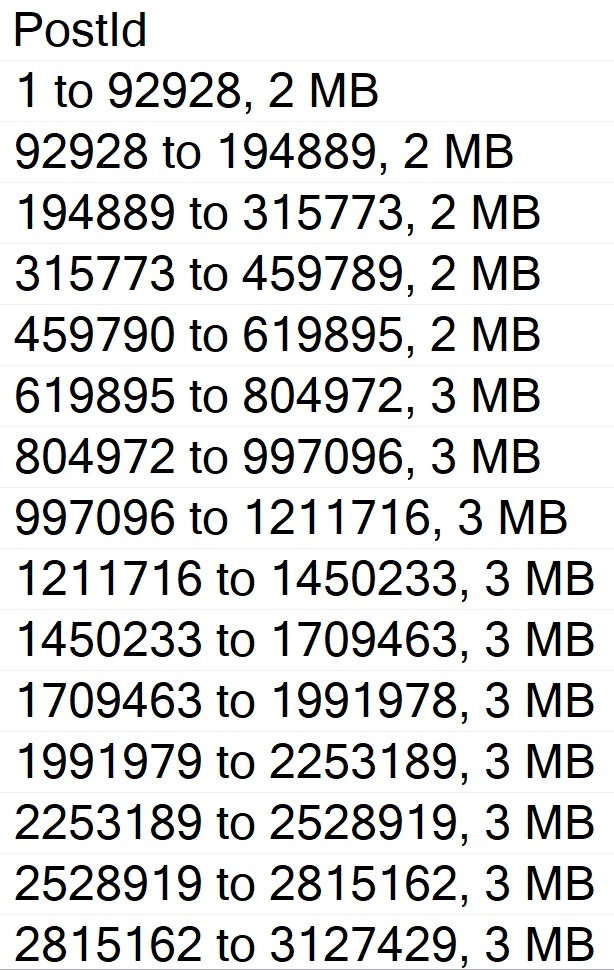
Anyway, the result using sp_BlitzIndex looks a lot better now:
EXEC sp_BlitzIndex
    @TableName = 'Votes_CCI';
capture the flag
How nice.
You can also use undocumented and unsupported trace flag 11621, which is
[A] feature flag for the ‘partition sort on column store order’ so the end result is similar, but via a different mechanism to 2417.
A partition sort is useful in general to prevent unnecessary switching between partitions. If you sort the stream by partition, you process all the rows for one before moving on to the next. A soft sort is ok there because it’s just a performance optimization. Worst case, you end up switching between partitions quite often because the sort ran out of memory, but correct results will still occur.
Chain Gang
A “reasonable” alternative to trace flags maybe to adjust the index create memory configuration option. If we set it down to the minimum value, we get a “helpful” error message:
This index operation requires 123208 KB of memory per DOP.
The total requirement of 985800 KB for DOP of 8 is greater than the sp_configure value of 704 KB set for the advanced server configuration option “index create memory (KB)”.
Increase this setting or reduce DOP and rerun the query.
If you get the actual execution plan for the clustered column store index create or rebuild with the Soft Sort disabled and look at the memory grant, you get a reasonable estimate for what to set index create memory to.
Changing it does two things:
Avoids the very low memory grant that Soft Sorts receive, and causes the uneven row groups
The Soft Sort keeps the index create from going above that index create memory number
Setting index create memory for this particular index creation/rebuild to 5,561,824 gets you the nice, even row groups (at MAXDOP 1) that we saw when disabling the Soft Sort entirely.
Bottom line, here is that uneven row groups happen with column store indexes when there’s a:
Parallel create/rebuild
Low memory grant create/rebuild
If this sort of thing is particularly important to you, you could adjust index create memory to a value that allows the Soft Sort adequate memory.
But that’s a hell of a lot of work, and I hope Microsoft just fixes this in a later build.
The bits for this were technically available in SQL Server 2019 as well, but I’m not telling you how to do that. It’s not supported, and bad things might happen if you use it.
I mean, bad things happen in SQL Server 2022 where it’s supported unless you use an undocumented trace flag, but… Uh. I dunno.
This trace flag seems to set things back to how things worked in the Before Times, though, which is probably how they should have stayed.
Thanks for reading!
Going Further
If this is the kind of SQL Server stuff you love learning about, you’ll love my training. Blog readers get 25% off the Everything Bundle — over 100 hours of performance tuning content. Need hands-on help? I offer consulting engagements from targeted investigations to ongoing retainers. Want a quick sanity check before committing to a full engagement? Schedule a call — no commitment required.
Brent recently blogged about ordered columnstore indexes in SQL Server 2022 and had some trouble with them, so I decided to take a look into the mechanics of the feature. I’m testing on SQL Server 2022 CTP 2.0.
What does the ordered columnstore feature do?
A sort operator may be added to query plans that insert into the table. The sort operator is a bit unusual in that the data may not be fully sorted.
A sort operator is added when initially creating an ordered columnstore index. The level of rowgroup elimination fragmentation will depend on memory, DOP, and other factors.
A sort operator is added when rebuilding an ordered columnstore index. The level of rowgroup elimination fragmentation will depend on memory, DOP, and other factors.
Technical details for insert
The sort for inserting into an ordered columnstore is a DML request sort. It appears to use the same internal mechanism as the sort that’s added for inserting into partitioned columnstore tables. The difference is that the data is sorted by the specified columns instead of a calculated partition id. In my testing, the sort appears to be a best effort sort that does not spill to tempdb. This means that if SQL Server thinks there won’t be enough memory then the data will not be fully sorted. Parallel inserts have an additional complication. Consider the following query plan image:
That is a row mode sort. It is a row mode sort because a batch mode parallel sort would put all resulting rows on a single thread which would make the parallel insert pointless. However, there’s no repartition streams operator as a child of the sort. Data is sorted on each thread in a best effort fashion. Even if there is enough memory to fully sort the data, you will end up with DOP threads of sorted data instead. The data will not be sorted globally. The split into threads will increase rowgroup elimination fragmentation.
As mentioned earlier, the sort operator does not always appear. It is not present when the cardinality estimate is very low (around 250 rows). I suspect that the same logic is used for adding the sort as adding the memory grant for compression. For very low cardinality estimates, the data will be inserted into delta rowgroups, even if there’s more than 102399 rows. By that same reasoning, I expect that there is no sort operator if the INSERT query hits a memory grant timeout.
For more information on this sort, see CQScanPartitionSortNew in Paul White’s blog post about different sort types in SQL Server.
Technical details for CREATE/REBUILD index
I spent less time looking into the sort that’s added as part of CREATE or REBUILD index. In my testing, the sort again does not spill to tempdb. The sort is also performed on a per thread basis for parallel index operations. The minimum fragmentation level will be achieved for a MAXDOP 1 operation with sufficient memory. Reducing memory or running the create index in parallel will increase fragmentation. This is unfortunate because ordered columnstore indexes do not support online index creation or rebuilds.
An unpopular opinion
I think that the community worries too much with columnstore with respect to achieving perfect segment ordering and keeping rowgroups at exactly 1048576 rows. If you perform basic maintenance and partition tables appropriately then that should be good enough for most data warehouse workloads. Most query performance issues are going to be caused by getting no elimination at all, scanning through too many soft-deleted rows, or the usual query performance problems. Scanning 11 rowgroups instead of 5 probably isn’t why your queries on columnstore indexes are slow today.
Final thoughts
As is, this feature can be described as a poor man’s partitioning. The sweet spot for this functionality feels very limited to me in its current state, but we’re still on CTP 2.0. Maybe there will be changes before RTM. Thanks for reading!
There are some code comments you see that really set the stage for how tuning a query is going to go.
Usually one misgiving about how SQL Server works gives way to a whole levee-breaking bevy of other ones and three days later you can’t feel your legs but dammit it’s done.
Okay, maybe it was three hours, but it felt like three days. Something about the gravitation pull of these black hole queries.
One fix I’ve been wishing for, or wish I’ve been fixing for, is a cure for local variables. I’d even be cool if Forced Parameterization was that cure, but you know…
Time will tell.
Husk
Let’s say we’ve got this stored procedure, which does something similar to the “I’m gonna fix parameter sniffing with a local variable hey why is everything around me turning to brimstone before my very eyes?” idea, but with… less of an end-of-times vibe.
CREATE OR ALTER PROCEDURE
    dbo.IndexTuningMaster
(
    @OwnerUserId int,
    @ParentId int,
    @PostTypeId int
)
AS
BEGIN
SET NOCOUNT, XACT_ABORT ON;

    /*Someone passed in bad data and we got a bad query plan,
      and we have to make sure that doesn't happen again*/

    DECLARE
        @ParentIdFix int =
            CASE
                WHEN @ParentId < 0
                THEN 0
                ELSE @ParentId
            END;

    SELECT TOP (1)
        p.*
    FROM dbo.Posts AS p
    WHERE p.ParentId = @ParentIdFix
    AND   p.PostTypeId = @PostTypeId
    AND   p.OwnerUserId = @OwnerUserId
    ORDER BY
        p.Score DESC,
        p.Id DESC;

END;
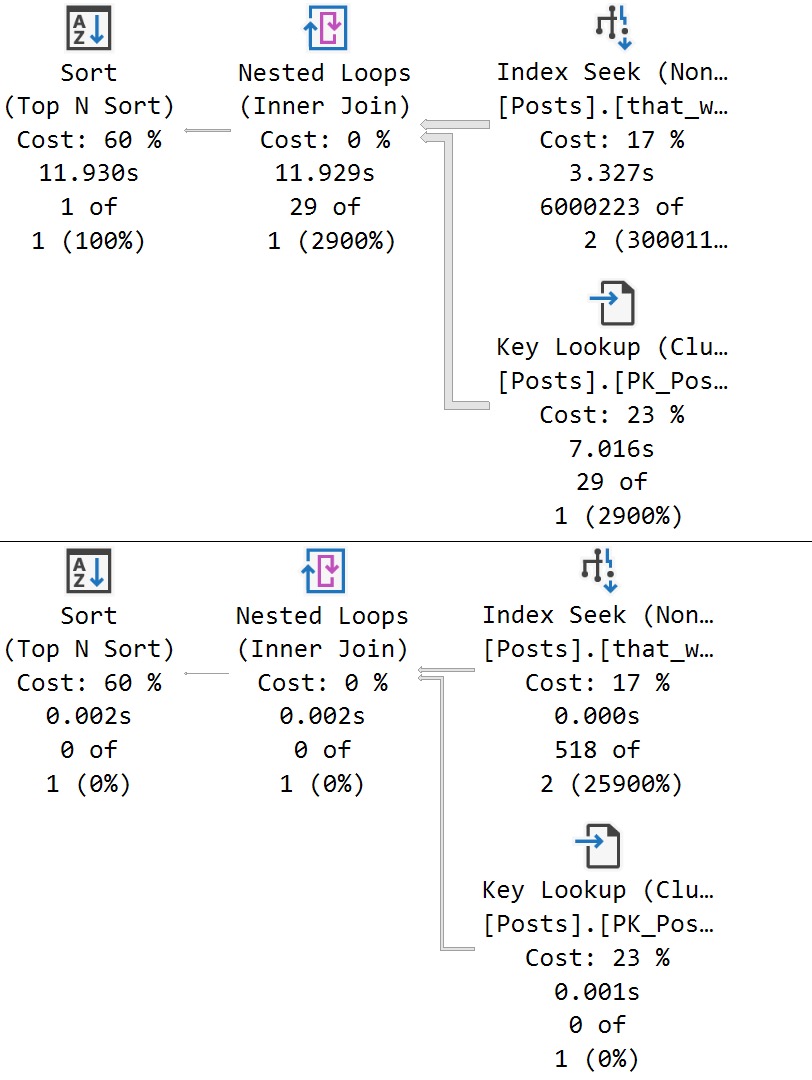
We get a super low guess for both. obviously that guess hurts a large set of matched data far worse than a small one, but the important thing here is that both queries receive the same bad guess.
This is a direct side effect of the local variable’s poor estimate, which PSP isn’t quite yet ready to go up against.
Thanks for reading!
Going Further
If this is the kind of SQL Server stuff you love learning about, you’ll love my training. Blog readers get 25% off the Everything Bundle — over 100 hours of performance tuning content. Need hands-on help? I offer consulting engagements from targeted investigations to ongoing retainers. Want a quick sanity check before committing to a full engagement? Schedule a call — no commitment required.
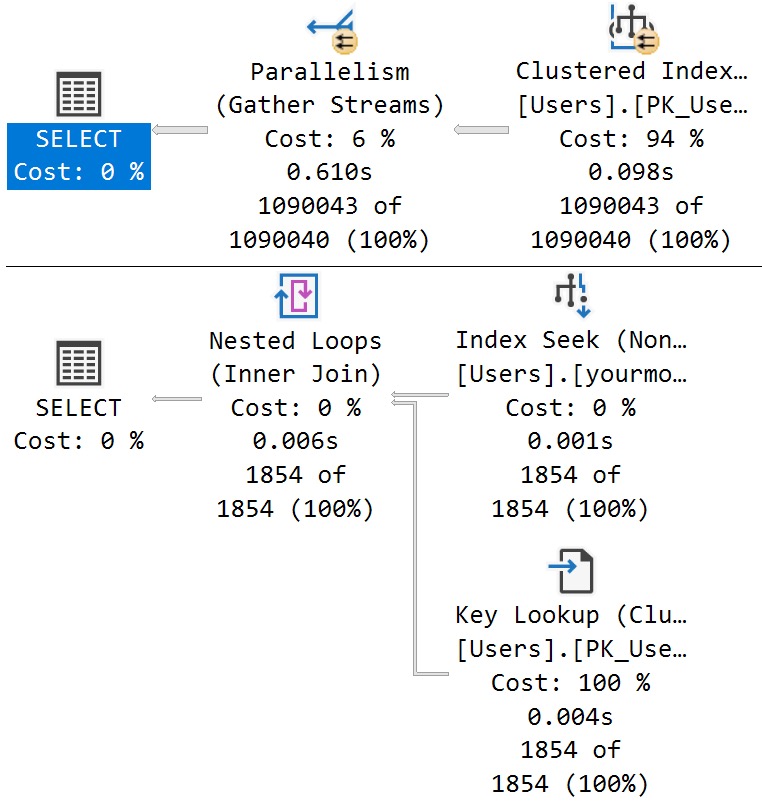
While the Parameter Sensitive Plan (PSP) optimization won’t fix every problem with this lazy coding habit, it can fix some of them in very specific circumstances, assuming:
The parameter is eligible for PSP
The parameter is present across IF branches
We’re going to use a simple one parameter example to illustrate the potential utility here.
After all, if I make these things too complicated, someone might leave a comment question.
The horror
IFTTT
Here’s the procedure we’re using. The point is to execute one branch if @Reputation parameter is equal to one, and another branch if it equals something else.
In the bad old days, both queries would get a plan optimized at compile time, and neither one would get the performance boost that you hoped for.
In the good news days that you’ll probably get to experience around 2025, things are different!
CREATE OR ALTER PROCEDURE
    dbo.IFTTT
(
    @Reputation int
)
AS
BEGIN
SET NOCOUNT, XACT_ABORT ON;

SET STATISTICS XML ON;

    IF @Reputation = 1
    BEGIN
        SELECT
            u.Id,
            u.DisplayName,
            u.Reputation,
            u.CreationDate
        FROM dbo.Users AS u
        WHERE u.Reputation = @Reputation;
    END;

    IF @Reputation > 1
    BEGIN
        SELECT
            u.Id,
            u.DisplayName,
            u.Reputation,
            u.CreationDate
        FROM dbo.Users AS u
        WHERE u.Reputation = @Reputation;
    END;

SET STATISTICS XML OFF;

END;
GO
Johnson & Johnson
If we execute these queries back to back, each one gets a new plan:
EXEC dbo.IFTTT
    @Reputation = 1;
GO

EXEC dbo.IFTTT
    @Reputation = 2;
GO
psychic driving
Optimize For You
The reason why is in the resulting queries, as usual. The Reputation column has enough skew present to trigger the PSP optimization, so executions with differently-bucketed parameter values end up with different plans.
And of course, each plan has different compile and runtime values:
care
If I were to run this demo in a compatibility level under 160, this would all look totally different.
This is one change I’m sort of interested to see the play-out on.
Thanks for reading!
Going Further
If this is the kind of SQL Server stuff you love learning about, you’ll love my training. Blog readers get 25% off the Everything Bundle — over 100 hours of performance tuning content. Need hands-on help? I offer consulting engagements from targeted investigations to ongoing retainers. Want a quick sanity check before committing to a full engagement? Schedule a call — no commitment required.