You need to design indexes so that you can support your queries by making it easy for them to locate data. That’s your where clause, and guess what?
Your modification queries have where clauses, too.
How You Can Make Indexing Better
Make sure you’re reviewing your indexes regularly. Things that you need to keep an eye on:
Duplicative indexes
Under-utilized indexes
Even when indexes are defined on the same columns, they’re separate sets of pages within your data files.
If you have indexes that are on very similar sets of columns, or supersets/subsets of columns, it’s probably time to start merging them
If you have indexes that just aren’t being read, or aren’t being read anywhere near as much as they’re written to, you should think about ditching them
Cleaning up indexes like this gives you more breathing room to add in other indexes later.
It also gives you far fewer objects competing for space in memory.
That means the ones you have left stand a better chance of staying there, and your queries not having to go to disk for them.
How You Can Make Indexes Better
There are all sorts of things you can do to make indexes better, too. I don’t mean rebuilding them, either!
I mean getting smarter about what you’re indexing.
Things like filtered indexes and index compression can net you big wins when it comes to reducing the overall size of indexes.
My friend Andy Mallon has some Great Posts™ about compression over on his blog:
If this is the kind of SQL Server stuff you love learning about, you’ll love my training. Blog readers get 25% off the Everything Bundle — over 100 hours of performance tuning content. Need hands-on help? I offer consulting engagements from targeted investigations to ongoing retainers. Want a quick sanity check before committing to a full engagement? Schedule a call — no commitment required.
It’s likely also obvious that your join clauses should also be SARGable. Doing something like this is surely just covering up for some daft data quality issues.
SELECT
    COUNT_BIG(*) AS records
FROM dbo.Users AS u
JOIN dbo.Posts AS p
    ON ISNULL(p.OwnerUserId, 0) = u.Id;
If 0 has any real meaning here, replace the NULLs with zeroes already. Doing it at runtime is a chore for everyone.
But other things can be thought of as “SARGable” too. But perhaps we need a better word for it.
I don’t have one, but let’s define it as the ability for a query to take advantage of index ordering.
World War Three
There are no Search ARGuments here. There’s no argument at all.
But we can plainly see queries invoking functions on columns going all off the rails.
Here’s an index. Please enjoy.
CREATE INDEX c ON dbo.Comments(Score);
Now, let’s write a query. Once well, once poorly. Second verse, same as the first.
SELECT TOP(1)
    c.*
FROM dbo.Comments AS c
ORDER BY
    c.Score DESC;

SELECT TOP(1)
    c.*
FROM dbo.Comments AS c
ORDER BY
    ISNULL(c.Score, 0) DESC;
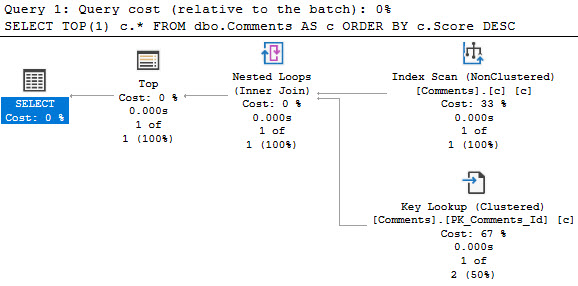
The plan for the first one! Yay!
inky
Look at those goose eggs. Goose Gossage. Nolan Ryan.
The plan for the second one is far less successful.
trashy vampire
We’ve done our query a great disservice.
Not Okay
Grouping queries, depending on scope, can also suffer from this. This example isn’t as drastic, but it’s a simple query that still exhibits as decent comparative difference.
SELECT
    c.Score
FROM dbo.Comments AS c
GROUP BY
    c.Score
HAVING
    COUNT_BIG(*) < 0;

SELECT
    ISNULL(c.Score, 0) AS Score
FROM dbo.Comments AS c
GROUP BY
    ISNULL(c.Score, 0)
HAVING
    COUNT_BIG(*) < 0;
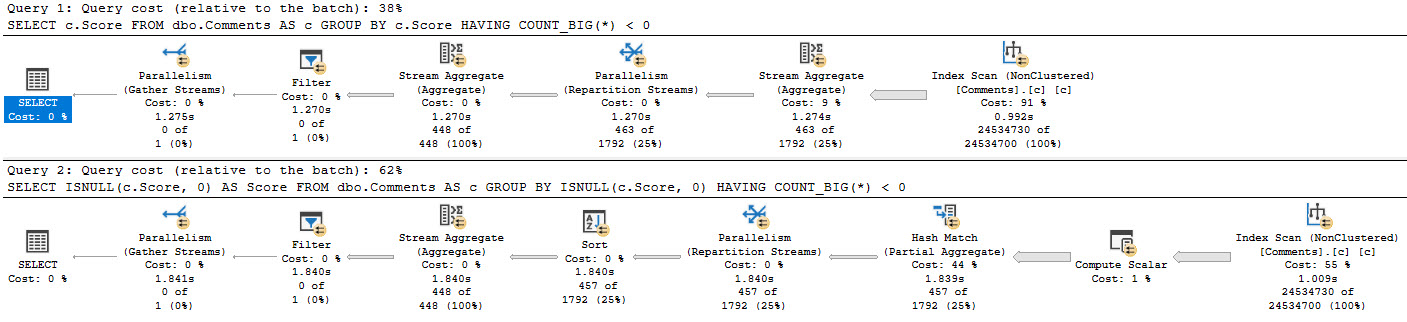
To get you back to drinking, here’s both plans.
the opposite of fur
We have, once again, created more work for ourselves. Purely out of vanity.
Indexable
Put yourself in SQL Server’s place here. Maybe the optimizer, maybe the storage engine. Whatever.
If you had to do this work, how would you prefer to do it? Even though I think ISNULL should have better support, it applies to every other function too.
Would you rather:
Process data in the order an index presents it and group/order it
Process data by applying some additional calculation to it and then grouping/ordering
That’s what I thought.
Thanks for reading!
Going Further
If this is the kind of SQL Server stuff you love learning about, you’ll love my training. Blog readers get 25% off the Everything Bundle — over 100 hours of performance tuning content. Need hands-on help? I offer consulting engagements from targeted investigations to ongoing retainers. Want a quick sanity check before committing to a full engagement? Schedule a call — no commitment required.
In this video, I dive into the world of SQL Server memory management and how it can be a tricky beast to tame. I share my personal experience with a large table that exceeds the available memory on my VM, illustrating just how critical memory is for SQL operations, even when you think you have plenty. I also explore the often misunderstood relationship between buffer pool memory and non-buffer pool memory, highlighting why simply setting server memory might not be enough to ensure smooth query performance.
Full Transcript
Oh boy. Oh boy. Erik Darling here with Erik Darling Data to this very day. I’m thinking about taking data out of the company title. I don’t really, I don’t actually care for data. I actually, I actually sort of hate it. It seems to be a big problem for people. Either they have too much of it, they don’t know what they have, they have, they have stuff they shouldn’t have. I don’t know, it just seems like, seems like data is nothing but trouble. I think this would be the Erik Darling Fun Company where we only talk about fun, non-dreary. things because data is very dreary, isn’t it? There’s no good news. It’s all depressing. And speaking of depressing, today I’m going to talk about memory, something which I have very little of, personally. But thankfully, my laptop has a decent amount of. My laptop sitting, my new laptop sitting over here to the right of me has 128 gigs of memory in it. And I have a single VM with 96 gigs of memory in it. Unheard of, I know. Unheard of. A single laptop with 128 gigs of memory. Amazing. But this memory is going to have a tough time in life. Because despite the fact that there are 96 gigs of memory in my laptop, I have this table in this Stack Overflow database that is 120 gigs. 120.
And as we all know, SQL Server does not work with pages on disk. Doesn’t matter how good your disks are. Doesn’t matter how expensive they are. Doesn’t matter how much. You paid your storage vendor for all flash and memory, NVMe, whatever. Other fine words they have for these disks. It’s before my 9am cocktails. So this might not be the smoothest take that I’ve ever done in my life. But, yeah, so SQL Server doesn’t care about pages on disk. Anything that you want to do with your data.
Whether it’s a read or a modification, it must end up in memory first. Hmm? Hmm. So even if we were to completely overtake memory on this VM with data from this table, it’s still not completely fitting there. Now, right now, in the buffer pool, well, it went down a little bit. I don’t know why it did. I didn’t do anything.
But actually, this is a good thing. So the buffer pool. Boy, oh boy. Monte Carlo. I might need to pour myself a Monte Carlo if I’m going to continue recording this video. So if we look at right now, what’s in the buffer pool is about 76 gigs of data.
Dreary, dreary data. And if I come over here and I run this count, I’ve been bullied a little bit into changing my query formatting. And so I’m going to give it, I’m going to give this a shot. It’s a little spidery for me.
I’m going to send a little alias in there. So it’s a little spidery for me. I don’t know if I like everything on a new line and indent it over. I’m going to give it a shot. I’m going to see, I’m going to see how it works out.
But if I run this, and I come back over here, and I start running this, we’re going to see the buffer pool gradually go up a little bit, right? 86. Oh, it’s climbing a little bit. Oh, it’s fluctuating. But it’s right around 86 gigs, which is fine because I have max server memory set to about 88 gigs here.
Now, the second query is looking for non-buffer pool memory, right? And I have a filter on here that’s looking, that’s filtering out stuff to make sure it has at least a gig of memory assigned to it. But, oops, I’m going to see this pre-9 a.m.
This pre-9 a.m. cocktail stuff is rough. But if I look over here, there’s a whole bunch of non-buffer pool memory that’s probably, I don’t know, about 2 gigs worth of stuff. I’m not a math guy. I don’t want to write another query to prove it to you.
But I would imagine that the 86 gigs of buffer pool is diminished by 2 gigs because of all the other stuff in here, right? But right now, the thing that I care about is anything, any non-buffer pool memory that has more than a gig of stuff in it, right? And if I run this and look, it’s going to be about 86 gigs.
So that’s just about there. Okay, fine. Now, here’s where people get all messed up when it comes to SQL Server. They look at, you know, I don’t know, the amount of data they have, and they think, well, 64 gigs will do.
It doesn’t matter how much data is actually in there. It’s like, I don’t know. I’m looking at this cloud instance, and if I keep adding memory, then the cores keep going up, and it keeps getting more expensive.
So I’m just going to stop adding memory. But memory is important. And not just for this buffer pool thing, because I want you to watch what happens to the buffer pool as I run queries that need memory.
So I’m just going to select a top 1,000. See, this is very spidery looking to me. It’s quite spidery.
I’m going to select a top 1,000 from comments ordered by score descending. And, of course, I do not have an index on this comments table that puts the score column in order. So I am going to have to physically sort this.
And sorting data is one of those SQL Server’s tiny little baby hands comes and breaks out the, comes and starts ordering the data. But we need memory to do that. We need a memory grant to do that.
So if I come over here and I run this, and I start looking at the buffer pool and what other memory is getting used, you can see that SQL Server has granted that query 16 gigs of memory. And as memory gets loaned out to that query, the size of the buffer pool goes down. And if I throw another one of those in the mix, we’ll see non-buffer pool memory go up again and buffer pool memory go down again.
This is getting into a rough situation. My buffer pool is severely limited, right? So now let’s get another one in there, right?
Let’s get a third one in there. Now we can see non-buffer pool memory. It’s up to 50. It’s almost half and half, right? It’s almost half of our buffer pool is gone to memory clerk SQL reservation. So SQL Server has made a reservation at Shea memory clerk, and we have granted these queries memory, and we have taken that memory from the buffer pool.
All right? We have stolen that memory from the buffer pool. It’s ours now.
So this is something that a lot of people don’t plan for when they start designing or speccing SQL Servers or choosing cloud instances. The memory you choose is not purely for the buffer pool. The memory that you choose has many, many other tasks.
We saw that even before there was 50 gigs of memory granted out to these queries, what happened? There’s about 2 gigs to other stuff, right? Just other things.
I don’t know. It’s playing cache, other doodads, gizmos, whatever SQL Server has to do. I don’t really know. I’m not good at this stuff. But all these queries have finished running now, and what I want you to notice is that the buffer pool is down to 32 gigs. 32 gigs.
And it’s not immediately coming back up, is it? They can keep running this query, and it’s going to stay right where it is. Even though there’s nothing else down here, SQL Server isn’t immediately just like, oh, well, come on, get in the buffer pool. Come on, the water’s fine.
It’s beautiful in here. Is it? No, it’s not happening. It’s not happening. SQL Server is not immediately filling. Because what does it know? How does it know what we need in there?
It doesn’t. SQL Server is not that smart. SQL Server is dumb like me. That’s why I like it. But if we come over here and we run this count query again against the post table, we will slowly see the buffer pool start to fill back up. And here it comes.
Coming roaring back to life. But this is sort of a funny thing because this is a situation that people often confuse with parameter sniffing. Waiting for SQL Server to read a bunch of pages from disk into memory is not exactly a fast thing all the time.
Right? Depending on the size of your data or the type of the data that you’re reading in. Like all sorts of stuff.
Like what you have to read. You can end up waiting a very, very long time to read pages from disk off into memory. Now, this count against the post table just ran for about 40 seconds.
It doesn’t take that long. It doesn’t actually take that long to count records in the post table. It’s like it’s not a 40 second operation.
But going off to disk and reading stuff can be a not fun thing to do. And this is something that you need to think very, very carefully about when you’re designing hardware or picking hardware or picking an instance size for your SQL Server. It’s not only how much data you have.
What are the memory requirements of your queries? Right? Because this thing ran for 24 seconds this time. It ran for 40 seconds last time reading a bunch of stuff from disk into memory.
But we had a bunch more stuff in memory this time. So we actually had a slightly faster query. We look at the properties of this. And we look at the weight stats. Number one is going to be page IOL action.
What do you know? About 16 seconds of the time we spent in this query was reading pages from disk into memory. Crazy, right?
Crazy. Well, it is 9.05 about. And it is time for my 9 a.m. cocktail. So I am going to go have that.
And I am going to bid you a fun to do. Thank you for watching. And I hope you learned something. And I will see you in another video another time. Goodbye. Thank you very much. Goodbye. Bye.
Going Further
If this is the kind of SQL Server stuff you love learning about, you’ll love my training. Blog readers get 25% off the Everything Bundle — over 100 hours of performance tuning content. Need hands-on help? I offer consulting engagements from targeted investigations to ongoing retainers. Want a quick sanity check before committing to a full engagement? Schedule a call — no commitment required.
My dislike for implicit transactions is well documented. Recently, while working with a client, I noticed that they had a bunch of them causing blocking.
Digging in a little bit further, I noticed they were all coming from an Agent Job. Of course, by default, Agent runs with a bunch of wacked-out ANSI options.
To get the job to perform better — which it did — it had to make use of a filtered index on an archival task. If you scroll way down in that doc, you’ll see a note:
In order to create, or have queries use your filtered index, they need to have very specific options set correctly.
Baggage
Rather than just setting the required options, which was apparently a lot of typing, someone had just set all the ANSI defaults on.
SET ANSI_DEFAULTS ON;
But this comes with some additional baggage, in the form of implicit transactions. If you run DBCC USEROPTIONS; with that turned on:
Set Option              Value
----------------------- --------------
textsize                2147483647
language                us_english
dateformat              mdy
datefirst               7
statistics XML          SET
lock_timeout            -1
quoted_identifier       SET
arithabort              SET
ansi_null_dflt_on       SET
ansi_defaults           SET
ansi_warnings           SET
ansi_padding            SET
ansi_nulls              SET
concat_null_yields_null SET
cursor_close_on_commit  SET
implicit_transactions   SET <---- UwU what's this
isolation level         read committed
It sets all the things you actually need, plus a couple other options for implicit transactions and cursor close on commit.
Baggage
Of course, had someone just done a bit more typing, all would have been well and good.
SET ANSI_NULLS ON;
SET ANSI_PADDING ON;
SET ANSI_WARNINGS ON;
SET ARITHABORT ON;
SET CONCAT_NULL_YIELDS_NULL ON;
SET QUOTED_IDENTIFIER ON;
Using SET ANSI_DEFAULTS OFF;is equally disappointing, sort of.
Set Option              Value
----------------------- --------------
textsize                2147483647
language                us_english
dateformat              mdy
datefirst               7
lock_timeout            -1
arithabort              SET
concat_null_yields_null SET
isolation level         read committed
It really does just flip everything off. Not that I’m saying it shouldn’t — but maybe we need a command in between?
SET ANSI_DEFAULTS BACK_TO_NORMAL; or something.
Whatever “normal” means.
Thanks for reading!
Going Further
If this is the kind of SQL Server stuff you love learning about, you’ll love my training. Blog readers get 25% off the Everything Bundle — over 100 hours of performance tuning content. Need hands-on help? I offer consulting engagements from targeted investigations to ongoing retainers. Want a quick sanity check before committing to a full engagement? Schedule a call — no commitment required.
When I was checking out early builds of SQL Server 2019, I noticed a new DMV called dm_db_missing_index_group_stats_query, that I thought was pretty cool.
It helped you tie missing index requests to the queries that requested them. Previously, that took a whole lot of heroic effort, or luck.
With this new DMV, it’s possible to combine queries that look for missing indexes with queries that look for tuning opportunities in the plan cache or in Query Store.
It seems to tie back to dm_db_missing_index_groups, on the index_group_handle column in this DMV joined to the group handle column in the new DMV.
If you’re wondering why I’m not giving you any code samples here, it’s because I’m going to get some stuff built into sp_BlitzIndex to take advantage of it, now that it’s documented.
Special thanks to William Assaf (b|t) for helping to get this done.
Thanks for reading!
Going Further
If this is the kind of SQL Server stuff you love learning about, you’ll love my training. Blog readers get 25% off the Everything Bundle — over 100 hours of performance tuning content. Need hands-on help? I offer consulting engagements from targeted investigations to ongoing retainers. Want a quick sanity check before committing to a full engagement? Schedule a call — no commitment required.
I talk to a lot of people about performance tuning. It seems like once someone is close enough to a database for long enough, they’ll have some impression of parameter sniffing. Usually a bad one.
You start to hear some funny stuff over and over again:
We should always recompile
We should always use local variables
We should always recompile and use local variables
Often, even if it means writing unsafe dynamic SQL, people will be afraid to parameterize things.
Between Friends
To some degree, I get it. You’re afraid of incurring some new performance problem.
You’ve had the same mediocre performance for years, and you don’t wanna make something worse.
The thing is, you could be making things a lot better most of the time.
Fewer compiles and recompiles, fewer single-use plans, fewer queries with multiple plans
Avoiding the local variable nonsense is, more often than not, going to get you better performance
A Letter To You
I’m going to tell you something that you’re not going to like, here.
Most of the time when I see a parameter sniffing problem, I see a lot of other problems.
Shabbily written queries, obvious missing indexes, and a whole list of other things.
It’s not that you have a parameter sniffing problem, you have a general negligence problem.
After all, the bad kind of parameter sniffing means that you’ve got variations of a query plan that don’t perform well on variations of parameters.
Once you start taking care of the basics, you’ll find a whole lot less of the problems that keep you up at night.
If that’s the kind of thing you need help with, drop me a line.
Thanks for reading!
Going Further
If this is the kind of SQL Server stuff you love learning about, you’ll love my training. Blog readers get 25% off the Everything Bundle — over 100 hours of performance tuning content. Need hands-on help? I offer consulting engagements from targeted investigations to ongoing retainers. Want a quick sanity check before committing to a full engagement? Schedule a call — no commitment required.
Most queries will have a where clause. I’ve seen plenty that don’t. Some of’em have surprised the people who developed them far more than they surprised me.
But let’s start there, because it’s a pretty important factor in how you design your indexes. There are all sorts of things that indexes can help, but the first thing we want indexes to do in general is help us locate data.
Why? Because the easier we can locate data, the easier we can eliminate rows early on in the query plan. I’m not saying we always need to have an index seek, but we generally want to filter out rows we don’t care about when we’re touching the table they’re in.
Burdens
When we carry excess rows throughout the query plan, all sorts of things get impacted and can become less efficient. This goes hand in hand with cardinality estimation.
At the most severe, rows can’t be filtered when we touch tables, or even join them together, and we have to filter them out later.
Equality predicates preserve ordering of other key columns in the index, which may or may not become important depending on what your query needs to accomplish.
Post Where
After the where clause, there are some rather uncontroversial things that indexes can help with:
When you’re trying to figure out a good index for one query, you usually want to start with the where clause.
Not always, but it makes sense in most cases because it’s where you can find gains in efficiency.
If your index doesn’t support your where clause, you’re gonna see an index scan and freak out and go in search of your local seppuku parlor.
After that, look to other parts of your query that could help you eliminate rows. Joins are an obvious choice, and typically make good candidates for index key columns.
At this point, your query might be in good enough shape, and you can leave other things alone.
If so, great! You can make the check out to cache. I mean cash.
Thanks for reading!
Going Further
If this is the kind of SQL Server stuff you love learning about, you’ll love my training. Blog readers get 25% off the Everything Bundle — over 100 hours of performance tuning content. Need hands-on help? I offer consulting engagements from targeted investigations to ongoing retainers. Want a quick sanity check before committing to a full engagement? Schedule a call — no commitment required.
Part of reviewing any server necessarily includes reviewing indexes. When you’re working through things that matter, like unused indexes, duplicative indexes, heaps, etc. it’s pretty clear cut what you should do to fix them.
Missing indexes are a different animal though. You have three general metrics to consider with them:
Uses: the number of times a query could have used the index
Impact: how much the optimizer thinks it can reduce the cost of the query by
Query cost: How much the optimizer estimates the query will cost to run
Of those metrics, impact and query cost are entirely theoretical. I’ve written quite a bit about query costing and how it can be misleading. If you really wanna get into it, you can watch the whole series here.
In short: you might have very expensive queries that finish very quickly, and you might have very low cost queries that finish very slowly.
Especially in cases of parameter sniffing, a query plan with a very low cost might get compiled and generate a missing index request. What happens if every other execution of that query re-uses the cheaply-costed plan and runs for a very long time?
You might have a missing index request that looks insignificant.
Likewise, impact is how much the optimizer thinks it can reduce the cost of the current plan by. Often, you’ll create a new index and get a totally different plan. That plan may be more or less expensive that the previous plan. It’s all a duck hunt.
The most reliable of those three metrics is uses. I’m not saying it’s perfect, but there’s a bit less Urkeling there.
When you’re looking at missing index requests, don’t discount those with lots of uses for low cost queries. Often, they’re more important than they look.
Thanks for reading!
Going Further
If this is the kind of SQL Server stuff you love learning about, you’ll love my training. Blog readers get 25% off the Everything Bundle — over 100 hours of performance tuning content. Need hands-on help? I offer consulting engagements from targeted investigations to ongoing retainers. Want a quick sanity check before committing to a full engagement? Schedule a call — no commitment required.
My dear friend Kendra asked… Okay, look, I might have dreamed this. But I maybe dreamed that she asked what people’s Cost Threshold For Blogging™ is. Meaning, how many times do you have to get asked a question before you write about it.
I have now heard people talking and asking about in-memory table variables half a dozen times, so I guess here we are.
Talking about table variables.
In memory.
Yes, Have Some
First, yes, they do help relieve tempdb contention if you have code that executes under both high concurrency and frequency. And by high, I mean REALLY HIGH.
Like, Snoop Dogg high.
Because you can’t get rid of in memory stuff, I’m creating a separate database to test in.
Here’s how I’m doing it!
CREATE DATABASE trash;

ALTER DATABASE trash
ADD FILEGROUP trashy
    CONTAINS MEMORY_OPTIMIZED_DATA ;

ALTER DATABASE trash
ADD FILE
(
    NAME=trashcan,
    FILENAME='D:\SQL2019\maggots'
)
TO FILEGROUP trashy;

USE trash;

CREATE TYPE PostThing
AS TABLE
(
    OwnerUserId int,
    Score int,
    INDEX o HASH(OwnerUserId)
    WITH(BUCKET_COUNT = 100)
) WITH
(
    MEMORY_OPTIMIZED = ON
);
GO
Here’s how I’m testing things:
CREATE OR ALTER PROCEDURE dbo.TableVariableTest(@Id INT)
AS
BEGIN

    SET NOCOUNT, XACT_ABORT ON;

    DECLARE @t AS PostThing;
    DECLARE @i INT;

    INSERT @t
        ( OwnerUserId, Score )
    SELECT
        p.OwnerUserId,
        p.Score
    FROM Crap.dbo.Posts AS p
    WHERE p.OwnerUserId = @Id;

    SELECT
        @i = SUM(t.Score)
    FROM @t AS t
    WHERE t.OwnerUserId = 22656
    GROUP BY t.OwnerUserId;

    SELECT
        @i = SUM(t.Score)
    FROM @t AS t
    GROUP BY t.OwnerUserId;

END;
GO
If we flip database compatibility levels to 150, deferred compilation kicks in. Great. Are you on SQL Server 2019? Are you using compatibility level 150?
Don’t get too excited.
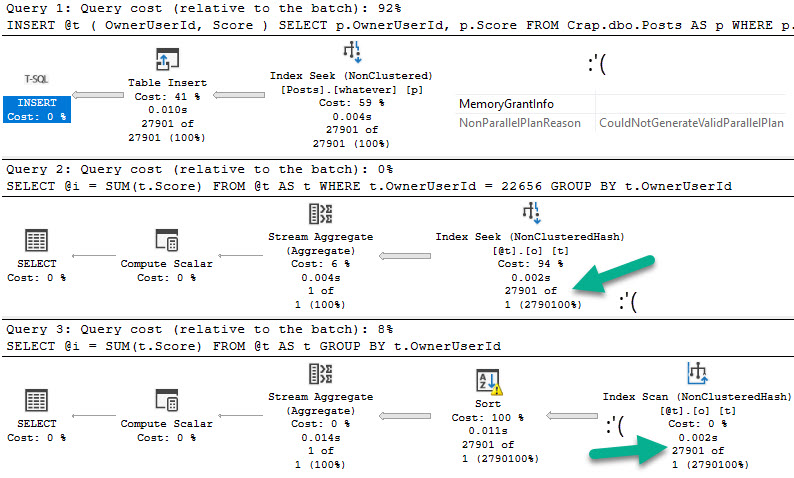
Let’s give this a test run in compat level 140:
DECLARE @i INT = 22656;
EXEC dbo.TableVariableTest @Id = @i;
everything counts in large amounts
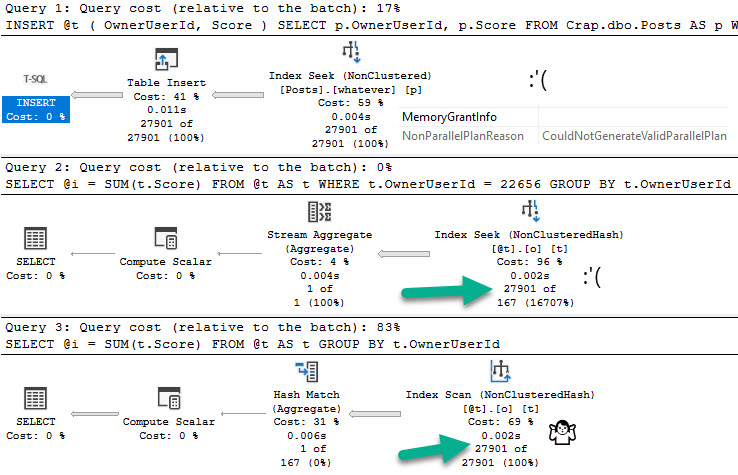
Switching over to compat level 150:
yeaaahhhhh
Candy Girl
So what do memory optimized table variables solve?
Not the problem that table variables in general cause.
They do help you avoid tempdb contention, but you trade that off for them taking up space in memory.
Precious memory.
Do you have enough memory?
Thanks for reading!
Going Further
If this is the kind of SQL Server stuff you love learning about, you’ll love my training. Blog readers get 25% off the Everything Bundle — over 100 hours of performance tuning content. Need hands-on help? I offer consulting engagements from targeted investigations to ongoing retainers. Want a quick sanity check before committing to a full engagement? Schedule a call — no commitment required.
But I know how it is out there! Sometimes it’s hard to get in and change a bunch of logic and tinker with things.
In some cases, you can improve performance by wrapping chunks of code in transactions.
Fear Of Commitment
In this example, there’s an automatic commit every time the update completes. That means every time we step through the loop, we send a record to the transaction log.
This can result in very chatty behavior, which even good storage can have a tough time with. There are likely other aspects of transaction logging impacted by this, but I only have so much time before this call starts.
SET NOCOUNT ON;

DECLARE
    @cur_user int = 0,
    @max_user int = 0;

SELECT
    @cur_user = MIN(u.Id),
    @max_user = MAX(u.Id)
FROM dbo.Users AS u
WHERE u.Age IS NULL;

WHILE @cur_user <= @max_user
BEGIN

    UPDATE u
        SET u.Age = DATEDIFF(YEAR, u.CreationDate, u.LastAccessDate)
    FROM dbo.Users AS u
    WHERE u.Id = @cur_user
    AND   u.Age IS NULL;

    SET @cur_user = (SELECT MIN(u.Id) FROM dbo.Users AS u WHERE u.Id > @cur_user);

END;
This code runs for nearly 5 minutes before completing. Looking at a ~60 second sample turns up some gnarly gnumbers.
barkley
Batched Commit
Without changing the logic of the update, we can get things in better shape by using transactions and periodically committing them.
SET NOCOUNT ON;

DECLARE
    @rows bigint = 0,
    @cur_user int = 0,
    @max_user int = 0;

SELECT
    @cur_user = MIN(u.Id),
    @max_user = MAX(u.Id)
FROM dbo.Users AS u
WHERE u.Age IS NULL;

BEGIN TRANSACTION;

WHILE @cur_user <= @max_user
BEGIN

    UPDATE u
        SET u.Age = DATEDIFF(YEAR, u.CreationDate, u.LastAccessDate)
    FROM dbo.Users AS u
    WHERE u.Id = @cur_user
    AND   u.Age IS NULL;

    IF @rows = (@rows + @@ROWCOUNT)
    BEGIN
        COMMIT TRANSACTION;
        RETURN;
    END;
    ELSE
    BEGIN
        SET @rows = (@rows + @@ROWCOUNT);
        SET @cur_user = (SELECT MIN(u.Id) FROM dbo.Users AS u WHERE u.Id > @cur_user AND u.Age IS NULL);
    END;

    IF @rows >= 50000
    BEGIN
        RAISERROR('Restarting', 0, 1) WITH NOWAIT;
        SET @rows = 0;
        COMMIT TRANSACTION;
        BEGIN TRANSACTION;
    END;

END;

IF @@TRANCOUNT > 0
COMMIT
The first thing we’ll notice is that the code finishes in about 1 minute rather than 5 minutes.
How nice! I love when things move along. The metrics look a bit better, too.
scalp issues
We have almost no waits on WRITELOG, and we write far less to the transaction log (35MB vs 13MB).
We also got to do some snazzy stuff with @@ROWCOUNT. Good job, us.
Thanks for reading!
Going Further
If this is the kind of SQL Server stuff you love learning about, you’ll love my training. Blog readers get 25% off the Everything Bundle — over 100 hours of performance tuning content. Need hands-on help? I offer consulting engagements from targeted investigations to ongoing retainers. Want a quick sanity check before committing to a full engagement? Schedule a call — no commitment required.