In the year 950 B.C., Craig Freedman write a post about subqueries in CASE expressions. It’s amazing how relevant so much of this stuff stays.
In today’s post, we’re going to look at a slightly different example than the one given, and how you can avoid performance problems with them by using APPLY.
Like most query tuning tricks, this isn’t something you always need to employ, and it’s not a best practice. It’s just something you can use when a scalar subquery doesn’t perform as you’d like it to.
How Much Wood
Our starting query looks like this. The point of it is to determine the percentage of answered questions per month.
SELECT
    x.YearPeriod,
    MonthPeriod =
        RIGHT('00' + RTRIM(x.MonthPeriod), 2),
    PercentAnswered =
        CONVERT(DECIMAL(18, 2),
           (SUM(x.AnsweredQuestion * 1.) /
           (COUNT_BIG(*) * 1.)) * 100.)
FROM
(
    SELECT
        YearPeriod = YEAR(p.CreationDate),
        MonthPeriod = MONTH(p.CreationDate),
        CASE
            WHEN EXISTS
                 (
                     SELECT
                         1/0
                     FROM dbo.Votes AS v
                     WHERE v.PostId = p.AcceptedAnswerId
                     AND   v.VoteTypeId = 1
                 )
            THEN 1
            ELSE 0
        END AS AnsweredQuestion
    FROM dbo.Posts AS p
    WHERE p.PostTypeId = 1
) AS x
GROUP BY
    x.YearPeriod,
    x.MonthPeriod
ORDER BY
    x.YearPeriod ASC,
    x.MonthPeriod ASC;
Smack in the middle of it, we have a case expression that goes looking for rows in the Votes table where a question has an answer that’s been voted as the answer.
Amazing.
To start with, we’re going to give it this index.
CREATE INDEX p
    ON dbo.Posts(PostTypeId, AcceptedAnswerId)
    INCLUDE(CreationDate)
WITH(MAXDOP = 8, SORT_IN_TEMPDB = ON);
Planpains
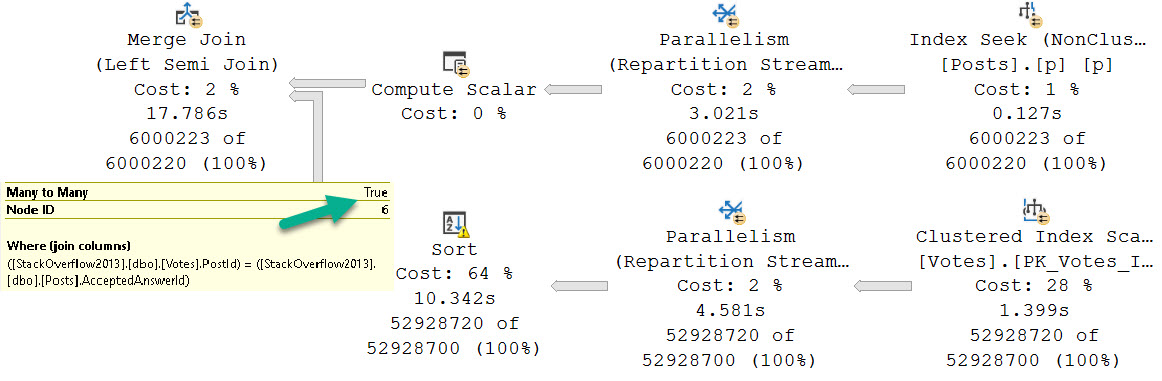
In all, this query will run for about 18 seconds. The majority of it is spent in a bad neighborhood.
but first
Why does this suck? Boy oh boy. Where do we start?
Sorting the Votes table to support a Merge Join?
Choosing Parallel Merge Joins ever?
Choosing a Many To Many Merge Join ever?
All of the above?
Bout It
If we change the way the query is structured to use OUTER APPLY instead, we can get much better performance in this case.
SELECT
    x.YearPeriod,
    MonthPeriod =
        RIGHT('00' + RTRIM(x.MonthPeriod), 2),
    PercentAnswered =
        CONVERT(DECIMAL(18, 2),
           (SUM(x.AnsweredQuestion * 1.) /
           (COUNT_BIG(*) * 1.)) * 100.)
FROM
(
    SELECT
        YearPeriod = YEAR(p.CreationDate),
        MonthPeriod = MONTH(p.CreationDate),
        oa.AnsweredQuestion
    FROM dbo.Posts AS p
    OUTER APPLY
    (
        SELECT
            AnsweredQuestion =
                CASE
                    WHEN v.Id IS NOT NULL
                    THEN 1
                    ELSE 0
                END
        FROM dbo.Votes AS v
        WHERE v.PostId = p.AcceptedAnswerId
        AND   v.VoteTypeId = 1
    ) oa
    WHERE p.PostTypeId = 1
) AS x
GROUP BY
    x.YearPeriod,
    x.MonthPeriod
ORDER BY
    x.YearPeriod ASC,
    x.MonthPeriod ASC;
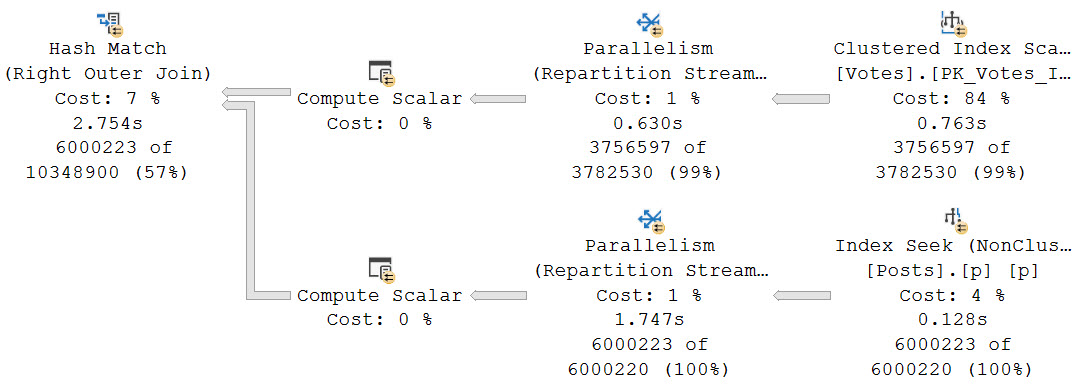
This changes the type of join chosen, and runs for about 3 seconds total.
buttercup
We avoid all of the problems that the parallel many-to-many Merge Join brought us.
Thanks, Hash Join.
It’s also worth noting that the OUTER APPLY plan asks for an index that would help us a bit, though like most missing index requests it’s a bit half-baked.
USE [StackOverflow2013]
GO
CREATE NONCLUSTERED INDEX [<Name of Missing Index, sysname,>]
ON [dbo].[Votes] ([VoteTypeId])
INCLUDE ([PostId])
GO
Index Plus
Any human could look at this query and realize that having the PostId in the key of the index would be helpful, since we’d have it in secondary order to the VoteTypeId column
CREATE INDEX v
    ON dbo.Votes(VoteTypeId, PostId)
WITH(MAXDOP = 8, SORT_IN_TEMPDB = ON);
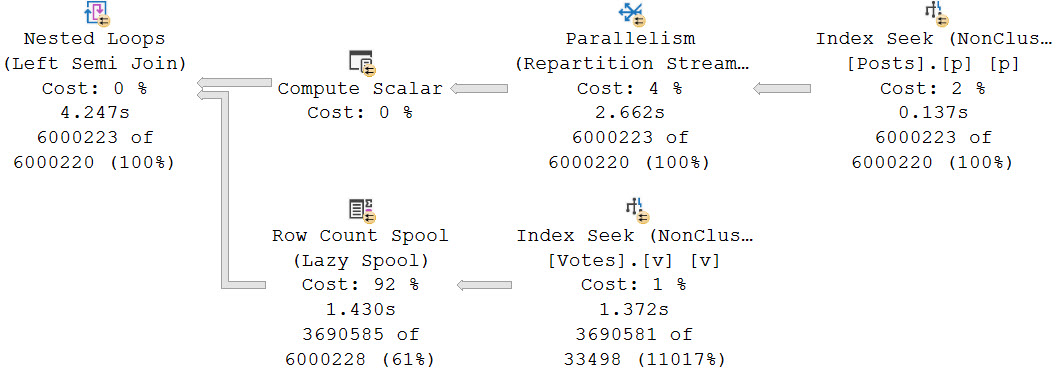
If we add that index, we can make the subquery fairly competitive, at about 4.5 seconds total.
bloop join
But the issue here is now rather than poorly choosing a Sort > Merge Join, we go into a Nested Loops join for ~6 million rows. That’s probably not a good idea.
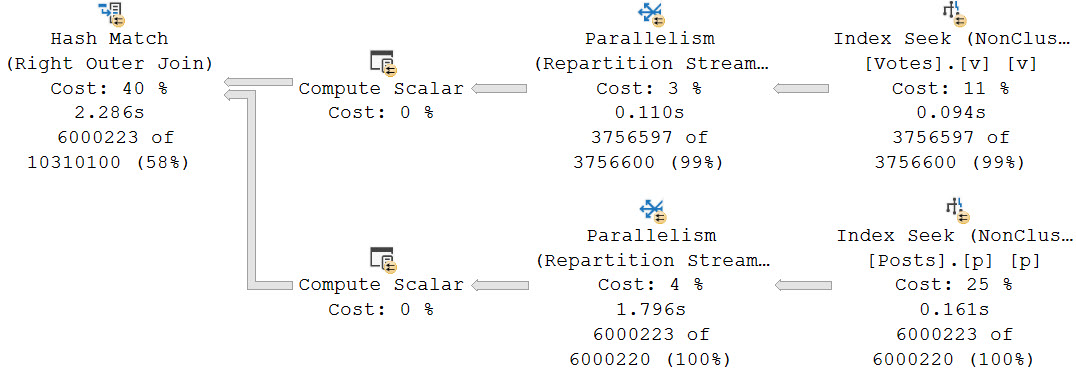
This index doesn’t leave as profound a mark on the APPLY version of the query. It does improve overall runtime by about half a second, but I don’t think I’d create an index just to get a half second better.
astro weiner
But hey, who knows? Maybe it’d help some other queries, too.
Indexes are cool like that.
Back On The Map
If you’ve got subqueries in your select list that lead to poor plan choices, you do have options. Making sure you have the right indexes in place can go a long way.
You may be able to get competitive performance gains by rewriting them as OUTER APPLY. You really do need to use OUTER here though, because it won’t restrict rows and matches the logic of the subquery. CROSS APPLY would act like an inner join and remove any rows that don’t have a match. That would break the results.
Thanks for reading!
Going Further
If this is the kind of SQL Server stuff you love learning about, you’ll love my training. Blog readers get 25% off the Everything Bundle — over 100 hours of performance tuning content. Need hands-on help? I offer consulting engagements from targeted investigations to ongoing retainers. Want a quick sanity check before committing to a full engagement? Schedule a call — no commitment required.
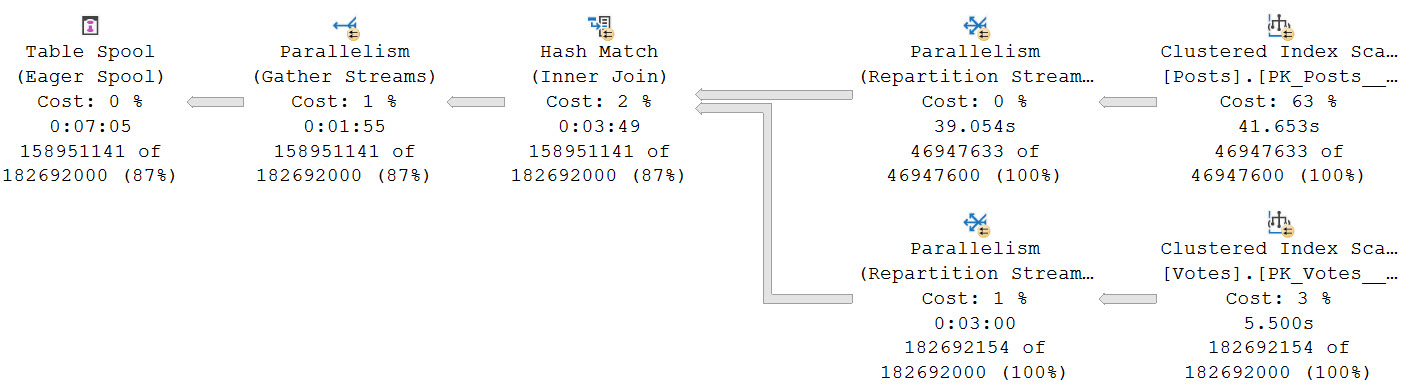
Using the scenario from yesterday’s post as an example of why you might want to think about rewriting queries with Table Spools in them to use temp tables instead, look how the optimizer chooses a plan with an Eager Table Spool.
The “Eager” part means the entire set of rows is loaded into a temporary object at once.
drugas
That’s a lot of rows, innit? Stick some commas in there, and you might just find yourself staring down the barrel of a nine digit number.
Worse, we spend a long time loading data into the spool, and doing so in a serial zone. There’s no good way to know exactly how long the load is because of odd operator times.
If you recall yesterday’s post, the plan never goes back to parallel after that, either. It runs for nearly 30 minutes in total.
Yes Your Tempdb
If you’re gonna be using that hunka chunka tempdb anyway, you might as well use it efficiently. Unless batch mode is an option for you, either as Batch Mode On Rowstore, or tricking the optimizer, this might be your best bet.
Keep in mind that Standard Edition users have an additional limitation where Batch Mode queries are limited to a DOP of 2, and don’t have access to Batch Mode On Rowstore as of this writing. The DOP limitation especially might make the trick unproductive compared to alternatives that allow for MOREDOP.
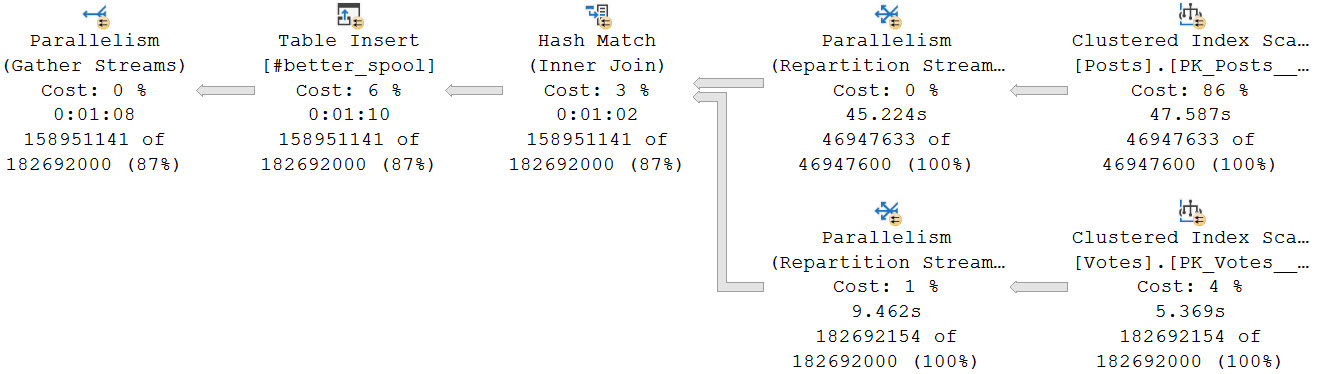
For example, if we dump that initial join into a temp table, it only takes about a minute to get loaded at a DOP of 8. That is faster than loading data into the spool (I mean, probably. Just look at that thing.).
sweet valley high
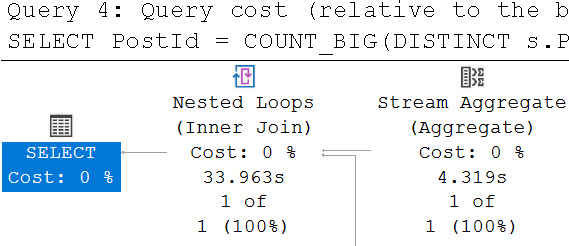
The final query to do the distinct aggregations takes about 34 seconds.
lellarap
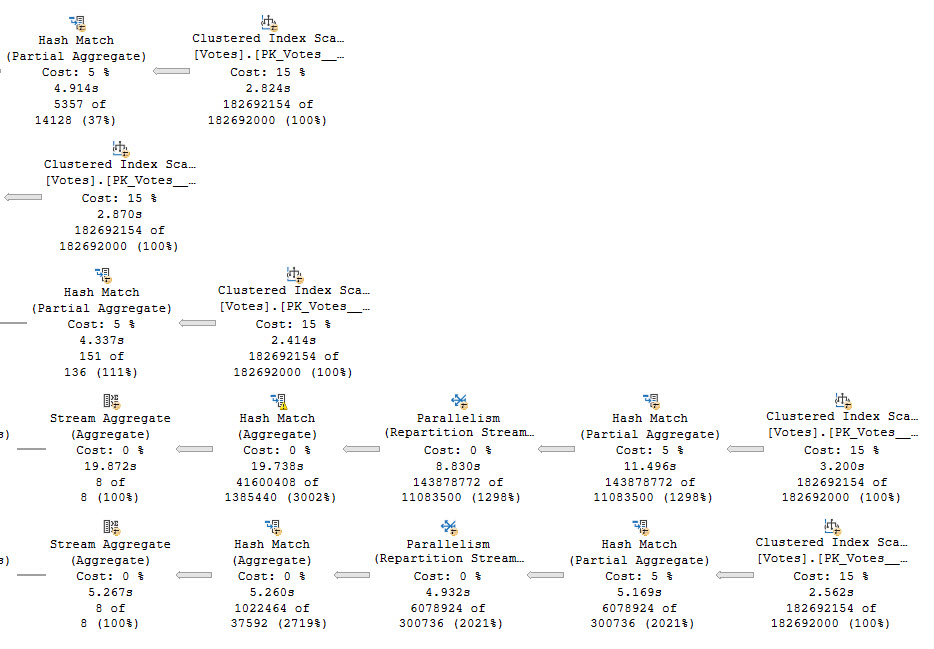
Another benefit is that each branch that does a distinct aggregation is largely in a parallel zone until the global aggregate.
muggers
In total, both queries finish in about a 1:45. A big improvement from nearly 30 minutes relying on the Eager Table Spool and processing all of the distinct aggregates in a serial zone. The temp table here doesn’t have that particular shortcoming.
In the past, I’ve talked a lot about Eager Index Spools. They have a lot of problems too, many of which are worse. Of course, we need indexes to fix those, not temp tables.
Thanks for reading!
Going Further
If this is the kind of SQL Server stuff you love learning about, you’ll love my training. Blog readers get 25% off the Everything Bundle — over 100 hours of performance tuning content. Need hands-on help? I offer consulting engagements from targeted investigations to ongoing retainers. Want a quick sanity check before committing to a full engagement? Schedule a call — no commitment required.
Well over 500 years ago, Paul White wrote an article about distinct aggregates. Considering how often I see it while working with clients, and that Microsoft created column store indexes and batch mode rather than allow for hash join hints on CLR UDFs, the topic feels largely ignored.
But speaking of all that stuff, let’s look at how Batch Mode fixes multiple distinct aggregates.
Jumbo Size
A first consideration is around parallelism, since you don’t pay attention or click links, here’s a quote you won’t read from Paul’s article above:
Another limitation is that this spool does not support parallel scan for reading, so the optimizer is very unlikely to restart parallelism after the spool (or any of its replay streams).
In queries that operate on large data sets, the parallelism implications of the spool plan can be the most important cause of poor performance.
What does that mean for us? Let’s go look. For this demo, I’m using SQL Server 2019 with the compatibility level set to 140.
SELECT
   COUNT_BIG(DISTINCT v.PostId) AS PostId,
   COUNT_BIG(DISTINCT v.UserId) AS UserId,
   COUNT_BIG(DISTINCT v.BountyAmount) AS BountyAmount,
   COUNT_BIG(DISTINCT v.VoteTypeId) AS VoteTypeId,
   COUNT_BIG(DISTINCT v.CreationDate) AS CreationDate
FROM dbo.Votes AS v;
In the plan for this query, we scan the clustered index of the Votes table five times, or once per distinct aggregate.
skim scan
In case you’re wondering, this results in one intent shared object lock on the Votes table.
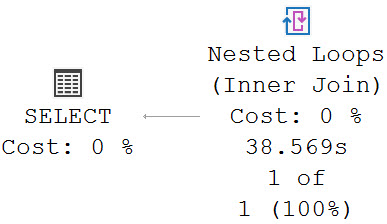
This query runs for 38.5 seconds, as the crow flies.
push the thing
A Join Appears
Let’s join Votes to Posts for no apparent reason.
SELECT
   COUNT_BIG(DISTINCT v.PostId) AS PostId,
   COUNT_BIG(DISTINCT v.UserId) AS UserId,
   COUNT_BIG(DISTINCT v.BountyAmount) AS BountyAmount,
   COUNT_BIG(DISTINCT v.VoteTypeId) AS VoteTypeId,
   COUNT_BIG(DISTINCT v.CreationDate) AS CreationDate
FROM dbo.Votes AS v
JOIN dbo.Posts AS p
    ON p.Id = v.PostId;
The query plan now has two very distinct (ho ho ho) parts.
problemium
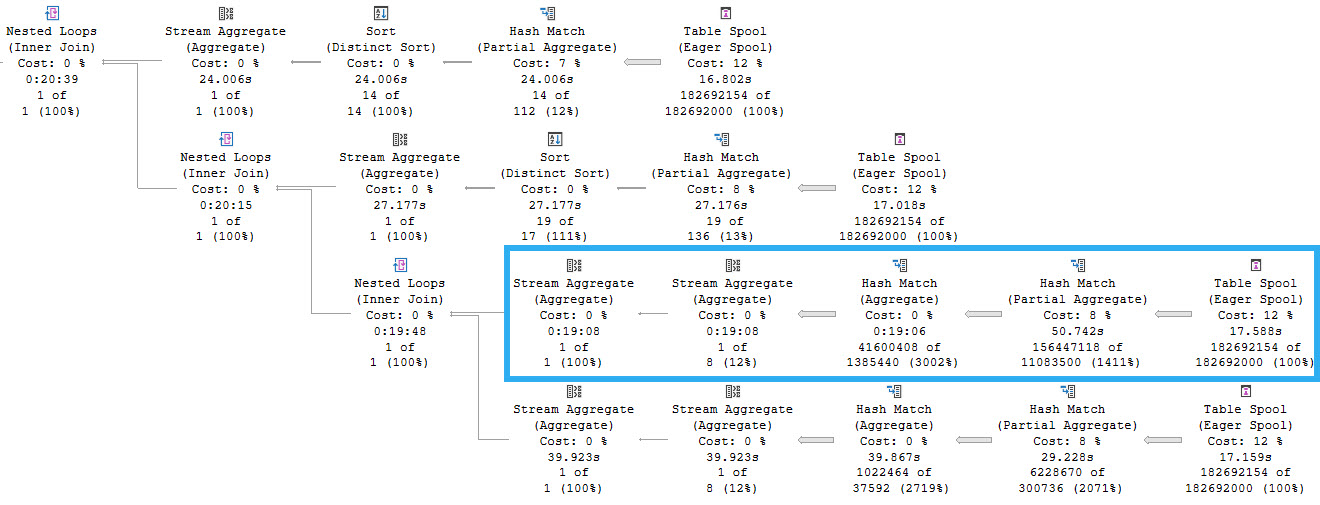
This is part 1. Part 1 is a spoiler. Ignoring that Repartition Streams is bizarre and Spools are indefensible blights, as we meander across the execution plan we find ourselves at a stream aggregate whose child operators have executed for 8 minutes, and then a nested loops join whose child operators have run for 20 minutes and 39 seconds. Let’s go look at that part of the plan.
downstream
Each branch here represents reading from the same spool. We can tell this because the Spool operators do not have any child operators. They are starting points for the flow of data. One thing to note here is that there are four spools instead of five, and that’s because one of the five aggregates was processed in the first part of the query plan we looked at.
The highlighted branch is the one that accounts for the majority of the execution time, at 19 minutes, 8 seconds. This branch is responsible for aggregating the PostId column. Apparently a lack of distinct values is hard to process.
But why is this so much slower? The answer is parallelism, or a lack thereof. So, serialism. Remember the 500 year old quote from above?
Another limitation is that this spool does not support parallel scan for reading, so the optimizer is very unlikely to restart parallelism after the spool (or any of its replay streams).
In queries that operate on large data sets, the parallelism implications of the spool plan can be the most important cause of poor performance.
Processing that many rows on a single thread is painful across all of the operators.
Flounder Edition
With SQL Server 2019, we get Batch Mode On Row store when compatibility level gets bumped up to 150.
The result is just swell.
yes you can
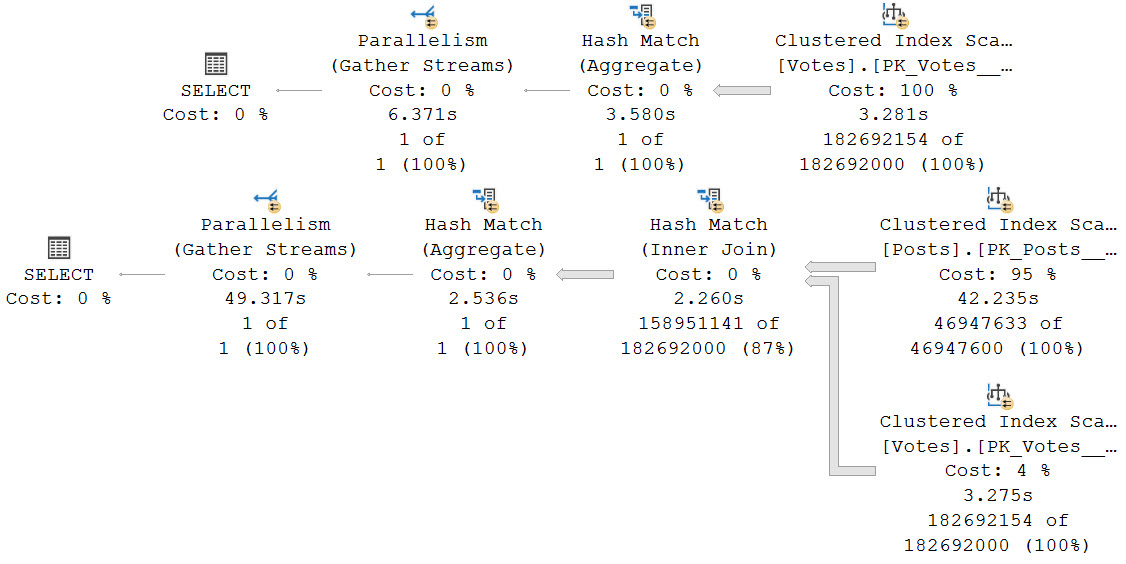
The second query with the join still runs for nearly a minute, but 42 seconds of the process is scanning that big ol’ Posts table.
Grumpy face.
Thanks for reading!
Going Further
If this is the kind of SQL Server stuff you love learning about, you’ll love my training. Blog readers get 25% off the Everything Bundle — over 100 hours of performance tuning content. Need hands-on help? I offer consulting engagements from targeted investigations to ongoing retainers. Want a quick sanity check before committing to a full engagement? Schedule a call — no commitment required.
In this video, I dive into a real-world scenario where I used my SSMS tuning setup to optimize a query for one of my help reviews. The query in question was particularly slow and caused significant delays during live demos due to its execution time. After analyzing the execution plan, which took over 2 minutes to run, I decided to tackle the issue by rewriting the query to eliminate unnecessary join conditions and reduce redundant operations. This approach not only sped up the query significantly but also provided a clearer, more efficient execution path for SQL Server to follow. By sharing this experience, I hope to offer some practical insights into optimizing complex queries for smoother performance in real-world scenarios.
Full Transcript
Oh boy, oh my goodness. This is, this is quite a day, quite a Friday. Uh, Erik Darling here with Erik Darling Data. It would be Darling Data, but someone else, someone else got there first. I mean, for the domain. I mean, I still have the company. Whatever. I mean, no one else got here first. That would be awkward. Like, hostile takeover of my own company. Anyway. Uh, today we are drinking something red that my wife walked in and handed me, so I have no details. Uh, it smells nice though. And, uh, this video is, uh, going to build, oh geez, we’re building things, we’re building on things. There’s a pattern forming here. Uh, where we’re going to, uh, build a little bit on a video that I recorded, I think, last week. I don’t remember.
The weeks are still, time is still very strange to me. Uh, talking about, you know, how I set up SSMS to tune queries. And here’s an example of actually when I used it to do that same, to do that very thing. Same very thing. Uh, recently. To, uh, one of my help reviews. Uh, what’s up memory? And, uh, I don’t know why I named it that. I was, I guess because who is memory sounded stupid. Uh, so, yeah. Uh, so this, this, this help review will tell you, uh, what’s in, what’s in your buffer pool currently. And that’s helpful, I guess, because everyone wants to know what’s in their buffer pool constantly all the time.
Uh, I use it for demos that I do for things that, uh, I find helpful. So, I don’t know. Maybe you will too. I don’t know. If you don’t, go do something else with your life. I don’t care that much. Um, but, what I found is every time I wanted to use this thing on a, uh, on an instance with a good chunk of memory, it would be, it was slow. Terribly, dreadfully, painfully slow. If we look at the execution plan, uh, we see that it took about 2 minutes and 44 seconds to run.
And, uh, who could wait that long for anything? Uh, and it made, uh, certain demos very difficult to do live or even to, like, sort of do off-the-cuff recording. I would have to, like, pre-stage everything so that it would be set up here. So, we were just, like, like, sitting around waiting for this and awkwardly staring at the camera.
Or, like, doing a cut scene or a montage, lifting weights in my short shorts, running on a beach, karate-kicking seagulls, whatever. Uh, but, I mean, just, you know, kind of, like, digging through the execution plan. Again, very helpfully looking at the operator times under these things, right?
So, we no longer have to care about percentages because, I mean, not that they meant anything anyway. Shut up, car. But, it was helpful, it’s much more helpful to sort of, like, follow the yellow brick road of operator times to when things sort of drop off and pick up.
So, kind of framing this a little bit, we have this nested loops join that hits 2.15. And we have this concatenation that is at 0.001. And down here, we have this table spool, which takes a minute and 36 seconds.
Prior to that table spool, we do some nonsense where we hit this view, sysalloc units. And, uh, I’m mispronouncing that would have been deadly. Uh, and this one down here, sys.buffer descriptors.
And we sort of join those together. And then we spend a bunch of time in the spool and a bunch of time in this nested loops join. And this, and the spool, of course, is trying to save us some trouble with the nested loops join.
It’s like, oh, I don’t know how repetitive this stuff is going to be. I don’t know if I want to do everything down here over and over again. I’m going to use a spool to cache some information and reuse it if I can.
Uh, you know, I don’t know how helpful this spool actually was. We look at the properties of the spool. And we look at the, uh, the rebinds and the rewinds.
Well, you know, I guess, I guess it’s okay. Deal with it. But, uh, I don’t like this spool. And if you look at the nested loops join, and kind of zoom in on the tool tip, it’s all happening because of this very, very difficult predicate.
Uh, there’s a lot of and and or logic in this join condition. Let’s go zoom in on what the join condition looked like beforehand. Uh, and this is, you know, sort of many times looking at, uh, queries and looking at, uh, you know, things that people wrote up in the real world.
This is like the enemy of performance. This is not a good thing to do if you want queries to run quickly. Uh, especially, you know, bigger queries, more rows, things you have to worry about, performance. Ah, terrifying.
So, uh, you know, my initial reaction. And I guess we can just come over here. My initial reaction was just to try a query hint on here for no performance spools. Zero performance spools.
Which would get rid of, uh, actually gets rid of a few different kinds of spools in query plans. And get rid of row count spools. Uh, lazy table spools. And, uh, lazy index spools. It does not get rid of eager index spools.
Uh, the only thing that does that is a, uh, uh, turning off certain query rules via other things that we’re not talking about here. But, um, no, with the no performance spool hit, if we look at the query plan, we get a faster one. Still faster.
56 seconds. So we did better. It still takes a full minute. It’s still a lot of time to kill. We don’t feel like talking, really. It’s, uh, you know, kind of dragging along the query plan. You know, it’s kind of the same, same set of yuckiness.
Like, why does it take five seconds to seek into an index? Like, what, what are you doing? You know, who designs these things? Add an index.
Add a good index. Why is this? This is silly. Uh, and then this one, or three seconds. And, you know, like, like focusing in on the operator times. There’s a thing that’s like, we have big jumps, right? Not like, we don’t want like incremental ones. Incremental ones are boring.
What if that big jump to where we got up there? And, you know, I guess like a six second jump is pretty big, right? 5.7 seconds up to there. Okay. Well, you know, something to think about. Uh, but, you know, kind of, again, following this road, right?
So now we have that same join, I think. Uh, but we have, uh, like a bunch of stuff down here that just sort of takes a lot of, without the, without the spool, we have to do a lot of, the optimizer chooses a much different plan.
Whereas like a bunch of different stuff happens. Right. And, uh, I don’t know. I’m kind of got lost with what I was going to say about this one, but you know, it’s Friday and you’re not paying attention anyway.
So it doesn’t matter all that much. Does this do? No. Outer references. So this time we get a part, we get an apply nested loops where, uh, rather than the regular nested loops where everything happened at the join, where it was with the spool. Now we have, we get an apply nested loops where it takes, uh, the type and the, uh, owner ID and it pushes things down.
If I’m, if I’m looking at the right join, even at this point, I’m, I forget. Anyway, uh, that’s how I tune queries. I forget things. Uh, but yeah. So, uh, what I, what I, what I thought looking at it was, geez, this is a performance problem that I’ve solved for other people.
A lot of them, a whole bunch of times. Why don’t I solve it for myself for once? And so I rewrote the query and I’ll show you what I did in a minute. But now the execution plan, I, this finishes in about seven seconds.
So now everything that’s slow in here is purely Microsoft’s fault. There’s no like really, really big jumps in the query plan. Uh, you know, we still get, have no buffer descriptors was kind of annoying, but not the biggest deal in the world.
But anyway, let’s get onto the rewrite. Uh, all the stuff up here is superfluous. I mean, that’s just like display level stuff. Uh, what really ended up making a difference was, so the first time I was thinking about rewriting this, I thought that I would just do this thing in here and separate out each of the join conditions.
So in this one, I have one explicit join condition with no, uh, this space there. Ugh, I stink. Uh, and then another one with this explicit join condition. So no like and or in crap in here.
And, you know, looking there could cool. And at first I thought that I would do this and I would, uh, just preserve the original join logic, which up here is, uh, from buffer descriptors joined over to allocation units.
But, uh, I found that hitting that buffer descriptors view three times was painful. So I ended up pulling the buffer descriptors part out and just doing one join to it at the end once I had everything else, uh, done out here.
So now the query is just grabbing all this stuff, right? Having fun doing things, pulling out information. And then, uh, when we get outside of that sort of inner query where we, after we just, I just called that X because, uh, I don’t know, Mr. X.
And then, uh, we do our grouping and our ordering out here. And we do all the summing in whatnot up here with our case expressions here where they’re far less dangerous.
And of course, uh, repeating this query with three explicit joins is a lot faster. Now it’s a lot faster for reasons that I’ve talked about in other posts where, you know, if we’re writing a single purpose queries, it’s a lot easier for the optimizer to go, uh, to deal with that and to make an efficient query plan.
Um, I’ll, I’ll probably blog more about that in the future, but for now, that’s what you get because we’re about at the 10 minute mark and I’m about to get my Friday evening started. And, uh, I hope, well, I mean, by the time you see this, it’ll be Tuesday, but that’s your fault.
Anyway, thank you for watching.
Going Further
If this is the kind of SQL Server stuff you love learning about, you’ll love my training. Blog readers get 25% off the Everything Bundle — over 100 hours of performance tuning content. Need hands-on help? I offer consulting engagements from targeted investigations to ongoing retainers. Want a quick sanity check before committing to a full engagement? Schedule a call — no commitment required.
sp_PressureDetector now includes statement start and end offsets, in case you want to build plan guides for queries
WhatsUpMemory got a huge performance tuning, which I’ll talk about in tomorrow’s post!
Nothing else here. Happy downloading and analyzing.
Or analysing, if you’re from a refined country.
Thanks for reading!
Going Further
If this is the kind of SQL Server stuff you love learning about, you’ll love my training. Blog readers get 25% off the Everything Bundle — over 100 hours of performance tuning content. Need hands-on help? I offer consulting engagements from targeted investigations to ongoing retainers. Want a quick sanity check before committing to a full engagement? Schedule a call — no commitment required.
After my smash hit double diamond post about index tuning, I got a question questioning my assertion that compressed indexes are also compressed in the buffer pool.
Well, this should be quick. A quick question. Eighty hours later.
First, two indexes with no compression:
CREATE INDEX o
ON dbo.Posts
    (OwnerUserId);

CREATE INDEX l
ON dbo.Posts
    (LastEditorDisplayName);
Now let’s create a couple indexes with compression:
CREATE INDEX o
ON dbo.Posts
    (OwnerUserId)
WITH(DATA_COMPRESSION = ROW);

CREATE INDEX l
ON dbo.Posts
    (LastEditorDisplayName)
WITH(DATA_COMPRESSION = PAGE);
I’m choosing compression based on what I think would be sensible for the datatypes involved.
For the integer column, I’m using row compression, and for the string column I’m using page compression.
If this is the kind of SQL Server stuff you love learning about, you’ll love my training. Blog readers get 25% off the Everything Bundle — over 100 hours of performance tuning content. Need hands-on help? I offer consulting engagements from targeted investigations to ongoing retainers. Want a quick sanity check before committing to a full engagement? Schedule a call — no commitment required.
In this video, I delve into a minor but irritating graphical quirk in SQL Server Management Studio (SSMS) that has been bugging me for some time now. It’s not just an SSMS issue; it seems to manifest in other places within the SQL Server ecosystem as well. The problem arises when looking at execution plans, specifically in parallel operators, where the sorting of properties pane entries becomes erratic and frustratingly out of order—especially when dealing with more than nine threads. I walk through a workaround for this issue, explaining how to navigate around it by opening tooltips and manually selecting rows, but ultimately, I encourage viewers to voice their frustration through Microsoft’s User Voice platform. By voting on the relevant issue, we can collectively push for improvements in SSMS, making it a more pleasant environment for query tuning and analysis.
Full Transcript
Erik Darling. Bum, bum, bum. He still does not own ErikDarling.com because I’m a cheapskate and I don’t want to pay $1,500 for my own name on the internet. That seems a little outlandish to me. Maybe when it gets down under $1,000, I’ll do it. Anyway, it’s now Sunday, apparently, and today’s broadcast is brought to you by Dom Perignon 2009. And this was brought home from the lovely restaurant, per se. This is their wine stopper thing that they gave us for the bottle. I don’t know that they normally give these out, but it’s the coolest thing that I own now. So, if they want to sponsor me in other ways, I would happily take their sponsorship. But anyway, today’s video is about a minor graphical annoyance that I have with SQL Server Management Studio. Now, this is not the only place that you’ll see an oddity like this. There are many other places within SQL Server. Gosh, this smells good.
Oh, this is not the only place that you can do. Within SQL Server Management Studio where you’ll see this. Maybe it happens in Azure Data Studio, too. I don’t know. I refuse to install that. Anyway, here’s what it is. So, we have this query that does dumb things, admittedly dumb things. I know it’s dumb. I know it’s stupid looking. I know it serves absolutely no purpose in what it does. But when we look at the execution plan, more importantly, when we dive into the parallel operators of the execution plan, something aggravating happens. So, let’s go do what we should do as professional query tuners, always.
Open up the properties pane and let’s open this up. Now, completely ignoring the fact that this is the best parallel skew demo ever written. Open up the properties pane. What the hell is going on here? And then down here. Why? Why? Now, the other place where this used to come up is in the wait stats. So, I think it was… Maybe it was… I can’t remember if it was an SSMS version that fixed it or a SQL Server version that fixed it. It would make sense that it was an SSMS version that fixed it.
But who knows? If you looked at the wait stats, the wait stats would be sorted incorrectly, too. So, that actually is apparently fixed now. But, you know, good. But we still have this problem. And this problem persists across… Ah, come on. So, here’s another funny thing. Sometimes when you go to get the properties, the tooltip shows up. And then you can’t get them because the tooltip shows up over the properties.
And who knows where that is? So, what you have to do is be sneaky, a sneaky little rabbit. And you have to get the tooltip and then hit properties and then crack that open and then highlight that row so that we preserve it. We preserve the positioning across all these operators and go click. And look, they all sort wonky.
The sorting is a muck. Well, except on this one where there’s nothing happening because that’s a gather stream. So, if we crack this one open… Well, this one… I mean, at least the skew is gone here. Alright? At least we don’t have the skew here, but we still have this quite unfortunate sorting.
Anyway, if you’re the type of person who doesn’t like that, doesn’t like the way that looks, think that looks foolish, I have a user voice item that you can vote on. You can express your contempt and disdain for the current state of sorting parallel threads above 9, I guess, in SQL Server Management Studio.
And the link will be attached to the YouTube video and probably in the blog post as well. I just haven’t written it yet, but it’s there. So, watch out for that. Vote for it. Help me make SQL Server Management Studio a nicer place to live and do business.
Sorry, I can’t stop staring at this wine stopper. It’s like the neatest contraption. I bet that like… I could just order these from like a restaurant wholesale place. I bet it’s not even like some extra fancy thing.
I’m probably… It’s probably overblown just because it has a fancy restaurant name etched in the top. Anyway, I’m gonna go get back to enjoying the smell of this champagne on yet another rainy day. Thank you for watching. Thank you for hopefully voting on this issue.
And hopefully, democracy will win and we’ll get this whole sorting thing straightened out. Have a nice day.
Going Further
If this is the kind of SQL Server stuff you love learning about, you’ll love my training. Blog readers get 25% off the Everything Bundle — over 100 hours of performance tuning content. Need hands-on help? I offer consulting engagements from targeted investigations to ongoing retainers. Want a quick sanity check before committing to a full engagement? Schedule a call — no commitment required.
In this video, I delve into an intriguing aspect of SQL Server query optimization by demonstrating how different database compatibility levels can influence execution plans and performance. I illustrate this concept using two databases: the master database set to compatibility level 150 (SQL Server 2019) and the stack overflow database at compatibility level 140. By running a specific query in each context, I show that the same operation yields different execution plans due to batch mode on rowstore being enabled only in the higher compatibility level. This example highlights how changing the database context can lead to more efficient query execution without altering the actual code or adding hints. I hope this video provides you with valuable insights into leveraging database compatibility levels for optimizing your queries, especially when dealing with mixed workloads across different databases.
Full Transcript
That champagne still smells wonderful. Legally wonderful. Anyway, I want to show you something kind of interesting. And you can interpret this in your own way, and you can implement this in your own way when it might suit you. And it may suit you someday. If you have certain groups of queries that work really well, when they do one thing but not really the same. really well when they do another thing. I’m going to show you exactly what I mean by that. Now, let’s start off by making very, very sure that we are all clear about what context this database, what context, what database context, that champagne may have smelt a little too good, what database context this query is taking place in. Let’s also be quite sure that we understand which compatibility levels of data. these two queries are taking place in across these two databases. The master database is in compatibility level 150 and the stack overflow database is in compatibility level 140. So master is in 2019 where we get all sorts of fancy things if we are on the most enterprising edition possible like batch mode on rowstore and well no, because scalar UDF inlining is both standard and enterprise.
So, I don’t know, there’s some other stuff in 2019 that I suppose is okay too. I’m not sure what though. Every time I install it, my computer just blue screens. I’m kidding. I’m kidding. It’s fine. It’s production ready. Go use it. Go crazy. Go crazy. And just to make extra sure, right? Like I’m not kidding with you. We are in the master database.
And yet, when I run this query to select a count of records from the post table in the stack overflow 2013 database, we get a very particular query plan. Now, if you’ve watched other videos of mine, you would know that this hash match aggregate to implement a global aggregate could only be done via stream aggregate in prior versions of SQL Server. So, with the proliferation of batch mode, this can now be a hash aggregate. We no longer have to use a stream aggregate.
So, this hash match aggregate is taking place in batch mode. That should be a vocal warm-up exercise. I’m going to tell my vocal coach about that. Hash match aggregate. So, this is a batch aggregate. As well as this clustered index scan are taking place in batch mode. So, the hash match aggregate is batched. I said that fast, didn’t I? And that’s interesting because the stack overflow 2013 database is in 140 compat level where batch mode on rowstore should not be possible.
This is, if you look at the storage. Shut up. Emergency. If you look at the storage, this is rowstore. And we’re not doing any tricky stuff like joining to another table with a clustered columnstore index it on it or something to get batch mode happening. This is a natural occurrence within the query. Right? It just happens. Right? It’s nice. It’s cool. So, great. We have this thing happening.
Now, if you come over here and we very, very clearly use the stack overflow database and we reiterate the fact that the stack overflow database is in 140 compat level and we look at masters and we only run the query in the context of the stack overflow database. And we actually get the query plan. Good job, me. We have a different execution plan. Don’t we?
We see that stream aggregate that was only, that had to be used in prior versions or, not in prior versions of SQL Server, just in the context of a rowstore only query. So, that’s that. And you may find this to be an attractive option if you have a group of, let’s say, reporting queries that you can execute from another database context that’s in compatibility level 150 against another database. Maybe that’s turned more transactional in nature in compatibility level 140 so that we don’t have to worry about hinting and changing all sorts of stuff.
We can just change the, we can just execute from a slightly different context and still get all the benefits of the optimization, the compatibility level and the optimizer abilities of the database where the query originates. So, take that as you will, implement it as you must. I hope you learned something. I hope you enjoyed this thankfully much shorter video so my champagne doesn’t get warm. Well, I don’t like the smell of warm champagne, especially on camera.
Thanks for watching.
Going Further
If this is the kind of SQL Server stuff you love learning about, you’ll love my training. Blog readers get 25% off the Everything Bundle — over 100 hours of performance tuning content. Need hands-on help? I offer consulting engagements from targeted investigations to ongoing retainers. Want a quick sanity check before committing to a full engagement? Schedule a call — no commitment required.
In this video, I delve into the intricacies of how data caching affects query performance in SQL Server. Starting with a 37-gig table, I demonstrate how having all necessary data cached in memory can drastically reduce execution times from 14 seconds to just half a second, showcasing the power of efficient buffer pool utilization. As we move on to larger datasets, I explore scenarios where memory limitations and inappropriate indexing strategies can lead to prolonged page IO latch wait times, emphasizing the importance of optimizing both memory allocation and index design for optimal performance.
Full Transcript
Silly, shameful, slut of a charlatan. Silly, shame… Dang! My vocal coach is not going to be happy with me. Erik Darling here with Erik Darling Data, the Darlingest Data of them all, I hear. And on this rainy afternoon, I am enjoying a glass of champagne. If I were drinking a cocktail, I would go over the ingredients with you. Well, since I’m drinking a one-ingredient cocktail, it is a Paul Lenoir composition number three, and it is a 100% Chardonnay Grand Cru of some sort.
I did my best to memorize everything on the label, but I have probably failed you as miserably as I have failed my voice training coach. And anyway, getting to the point, today’s video… Actually, this is one of two videos I’m recording today. The other one is different, but I love when one demo spawns two things I can talk about.
So stay tuned for that useless information that has no bearing on your life whatsoever, or your Saturday afternoon. Unless you’re going to watch it, which… Thanks. Thanks for watching. But this video is going to continue on with a theme that I have been talking about in blog posts and other videos lately about how queries can steal space from the buffer pool, where you store your data pages that SQL Server gives out to queries, and how important it is to make sure that you have the appropriate hardware for your workload.
Because oftentimes when I’m working with clients, they go, well, how do I know if I have the right hardware? How do I know this out of the other thing? And I’m going to show you a little bit about that, and also a little bit about how to tell things are good, bad, or ugly for you. So, what we’re going to look at first, because I have to explain a little bit about this environment, is what it looks like.
So, this server, this VM, here we go, let’s go deep. This VM has 16 virtual processors. Mm-hmm. 16 of them.
This is a laptop. I’m very impressed. And this VM has 96 gigs of memory, because the right thing to do is to multiply 96 by 1024, and you get that number. Or else you’re a metric idiot.
So, we have that. And the laptop itself, my laptop, this 17-inch thing sitting next to me working very hard, is like so. So, we have this processor in there, with eight real cores, and let’s call it eight fake cores.
Actually, I don’t know which ones are real and fake. It could go this way, too. It could have real and fake in that direction.
I don’t really know. I don’t really care. Hyper-threaded like a loser anyway. It doesn’t matter which ones are fake. Half of them are fake. And so, I guess the 16 virtual cores that the VM have are like really virtual. I don’t know.
Extra virtual. Eight of them are fake. Eight of them are wrong. Eight of them are not things. And my laptop. Again, my laptop has 128 gigs of memory. If your production SQL Server has less than this, and you are concerned about performance, boy, howdy.
I will gladly open up my darling data’s cloud to you. Just watch out when I run demos. Things get a little hairy.
And you’ll notice that I have SSDs in this thing. I don’t know why disk D is zero. It’s a brave choice, but let’s move on. If we measure the disks that I have in here, and the only one I ran was the top line, because that’s the only one that I really care about for these purposes.
You can see that I can read, and this is gigabytes of, oh, I’m sorry. I forgot to hit a button. This is gigabytes a second.
All right. Gigabytes, not megabytes. I can read data at 3.2 gigs a second. I can write data right around 2.6 gigs a second. So that’s nice.
It’s pretty sweet, right? 3.2 gigs a second. I like that. I like the sound of that. That sounds good. And, you know, when I’m working with clients and talking about sort of like the correct hardware for SQL Server, at some point someone is always going to jump up on their desk and talk, we need faster disks, damn it.
Well, technically the fastest disk out there is memory. So let’s focus on that. But most people who I talk to are not using direct attached storage. Most people who I talk to are virtualized in some way and using a SAN in some way.
And so they are not going to get this. They’re not going to get all this goodness here. They are going to get much different speeds.
And it’s not going to be the fault of their disks. When they talk about getting faster and faster disks, that’s great. But the data still has to get to those disks somehow. And it’s usually the getting to those disks that doesn’t work well.
I mean, you can make it work well, but most people don’t. And the point of this all is to say that I have very fast disks. They are undeniably fast disks.
And I want to show you two different things here. So on that 2019 server, I have two copies of the Stack Overflow database. I have a full, let’s call it a full Stack Overflow, a full stack over here.
And the full stack database, I forget, I think the last date is at the end of 2019 or so. Maybe, yeah, the end of 2019. So it’s a pretty recent copy and it’s a pretty big copy.
And then I have this other copy of Stack Overflow that ends in 2013. So the last date in here is Christmas Eve of, or New Year’s Eve. Not Christmas Eve.
New Year’s Eve of 2013. And that’s technically when the world should have ended anyway, if God still listened to me. Which I don’t know why God stopped listening to me. I give such great advice about everything else.
Getting rid of the planet Earth was right in the plan since day one, end in 2013. I don’t know why mine’s got changed. Anyway.
What we have here is a few things. And these are helper views that I use in some of my demonstrations. And I will have links to the GitHub links to these up in the YouTube description and in the blog post, hopefully, if I, as long as I remember. And so what happens here?
What we’re going to do is we’re going to look at how big this index is. We’re going to clear out memory. We’re going to get the execution plan for this count query from the post table. We’re going to look at what’s in memory afterwards.
Right? We know that since we’re clearing out memory that nothing’s going to be in there. And then we’re going to run the query again afterwards, again getting the execution plan. And we’re going to do the same.
So this is in the 2013 database. That’s that context. And then we’re going to do that again in the big Stack Overflow database. And if you’ll notice, I have this hint on the, on this, this query, because apparently the nice people who make the dynamic management views in SQL Server are not terribly good at, at designing them and performance stinks unless you tinker with things a little bit.
So Microsoft, if you would like some consultation on how to make these things faster, I am available for you. I care about your health and wellness and happiness, especially that of Joe Sack. Everyone else?
I’m kidding. I’m kidding. You’re all fine people. So let’s look at what happens here. Let’s look. So at the very beginning, right, we have this. And this tells us how big the, the clustered index on the post table is.
Because I don’t have any nonclustered indexes right now. And by gosh, I’m a terrible DBA for that, huh? So this copy, right, 2013 is about 37 gigs.
And a number that I have a lot of physical agony trying to round between 47 and 40, between 4.7 gigs and 4.8 gigs. I just don’t know where to go with it. It’s just so in the middle.
But you can see there, you decide for yourself. It is 4741.96, yada, yada, yada, megabytes. You can go to gigabytes with that any way you want.
Any way you want, baby. So we run this query. We have the execution plan for it. We look at what’s in memory afterwards, which is basically the entire table, or at least all the pages that we needed to get a count. Which is great.
The count again to make sure we didn’t cheat. We didn’t mess around here. We didn’t count fewer rows. That is the number of rows in the table if you look at the nice matching row count there. Wow, that database sure is consistent.
And then let’s look at the query plans. So the first time this runs, we get a query that takes about 14 seconds. That’s reading from clean Bufferville.
We had to get everything from disk. And it took about 14 seconds for us to read about 37 gigs from disk up into memory. You can see all that time spent right in here.
And if you look at the properties over here, because we are on such a spankin’ new version of SQL Server. SQL Server 2019 probably patched up to the latest. Again, I’m a terrible DBA, so I don’t really know these things off the top of my head.
But if you look at the weight stats over here, so very important thing whenever you’re looking at query plans, especially actual execution plans, actual factual plans, is to be hitting the properties of different operators and looking at the stuff that comes up in this window.
Because all sorts of fun, interesting things show up there that just don’t show up in the tooltips. If you look at that tooltip, there’s hardly any information there. If you look at what’s in the properties pane, boy howdy.
Whoo! Whoo! If you’re data-driven, you could spend days driving around in there. So let’s look at the weight stats of this thing. And way up at the top, way, way, way up at the top, I think the rest of these, honestly, the rest of these weight stats in here are going to be completely useless, but way up at the top, we spend 10 seconds reading pages from disk into memory.
So for about 37-gig table, reading data at 3.2 gigs a second takes 10 seconds. Would you believe that? Would you believe that?
Would you believe that math? Would you believe that math to get 32 gigs of pages into memory? Well, I guess it’s a little bit worth a lot of pages.
I don’t know. Math works out. It’s there. It’s perfectly fine. Don’t worry about it. I’m sure there were other things involved. I’m sure there were other things involved. So that’s what happened there, right?
Cool. 14 seconds. And now let’s look at the execution plan for the second run when everything was already there. Quite a remarkable difference, isn’t it?
Hmm? Quite remarkable. About half a second to run that query. If you go look at the wait stats for this, we will no longer have 10 wait stats here. And on top of that, we will no longer have, well, I mean, crossing my fingers now that I’ve said it, we don’t have any weights on page IO.
I didn’t actually didn’t look at this before I ran it. Again, on top of being a terrible DBA, I’m also a terrible presenter. So just never watch anything I do.
You’ll be horrified. So we look at this and what do we have? No weights on reading pages from disk. We have some internal weights for SQL Server to do things that it has to do, but we don’t have any weights on disk anymore. Wonderful.
And that solved a 14 second problem for us by about 13 and a half seconds, having that data already in there. This gets worse when we have bigger data, bigger data, big, big data. What we’re going to see here is a slightly different scenario running through the exact same thing as in the other one.
We have slightly different information. This table, rather than being 37 gigs, is about 120 gigs with 22 gigs of lob data. I told you the world should have ended in 2013 and you didn’t listen to me.
And then after we read pages from disk into memory, notice now that we don’t have the entire table cached in memory anymore. We do not have that. We do not have enough space in the 96 gigs of data or 96 gigs of memory that we have assigned to this server.
We’re hobbled a little bit by the max server memory setting. If you go with the properties and we look at memory, you will see that I have about 88 gigs. Again, if you divide 90112 by 1024 because you’re a smart person, you will get back 88 gigs.
So we have 88 gigs of memory assigned to this. We read about 83 gigs of this table up into memory. I’m sure there’s other memory needs on here.
There’s other stuff going on that the TGL server needs some memory for. So we use about 83 gigs of space for the buffer pool and we have that hanging about in there. Wonderful.
Perfect. Glorious. Wonderful. Like the champagne. I’m told that I’m not allowed to drink on camera by my lawyer. I’m just going to smell it.
Mmm. That smells delicious. So let’s look at this when we have a bigger table. All right.
So we have to, when we read this one from disc, that takes 40, well, rounding this isn’t bad. This takes about 43 seconds. I’m willing to round there. I’m willing to go the extra mile for you. And if we, again, because we are very smart performance, we’re terrible DBAs, but we are very smart performance tuners.
If we go look at the properties of this. Now we look at the weight stats here. We have, oh, that’s a tough rounder. Oh, it’s so close. It’s right in the middle.
Oh, I can’t make these decisions. We now have about 32-ish seconds of page IO latch weight. So about 32-ish seconds of our lives were spent reading pages from disc up into memory. And if we go look at that second execution plan, this one’s going to be different.
Isn’t it? This one is going to have run for 34 seconds. Why?
Because we had to read stuff back into memory. We only had some of this stuff in memory. We didn’t have the right stuff in memory. If we go look at weight stats and we look at the top one, we will have spent a little bit less time reading pages from disc into memory, but we still had to read a whole bunch of pages from disc into memory, right?
So less, but still not great. If we crack that first one back open, so we go from, oh, wait, that’s the wrong one. I went back too far. Demo over.
Leave. Leave. All of you. If we go back to the source one, it’s 42 seconds versus 34 seconds. So that didn’t turn out too much better, did it? And again, this is reading data very fast. This is not slow data.
This is fast data. I like my data big. I like my data fast. I like the smell of that champagne. It’s a, it’s the, these are the few of my favorite things. And so the point here is that if you are looking at your server, if you’re looking at the weight stats on your server and you see that you are waiting a lot on page IO latch weight.
So again, we come back to these weight stats over here. If you find yourself waiting on page IO latch underscore S to the H, you most likely have a deficiency. Now, your deficiency could be in one of three areas.
You could have too little memory. That would be an obvious deficiency. You could have inappropriate indexes for your workload, either too many indexes, right? Cause too many things competing for space in the buffer pool that you have to keep reading up and flushing out and bring them back and come on again, off again and missing indexes, right?
So you could have a lack of opportune indexes for your queries. That’s another one. And you could also have queries that are battling your buffer pool for memory, for memory grants, right?
So things like sorts and hashes that require memory that will take memory away from your buffer pool. So those are three places where you could have some room to improve. Often when I look at servers, all three are true.
Often when I look at servers, they are laughably smaller than my production, my production laptop, which is again, this. Oh, wait, I should go back to the CPU graph so you can see all my fake CPUs again. So this and this, all right, that’s my laptop.
Cost me about four grand from Lenovo. It was a good sale, but you know. Put some money into your production SQL Server that runs your business.
I put some money into the production SQL Server that runs mine. It’s just what we do. Got to spend money to make money in here.
So anyway, what we talked about today, a little bit, sort of in a nutshell, is, God, I forget. Well, there was a champagne. That was good.
There was the size of my laptop, the size of the VM, the size of the two stack overflow databases, and the size, two different sizes of the post table. And how having more, and how having the data fully in memory when we needed to read it was very, very helpful. That query went from 14 or seconds down to about half a second.
But when we had a table that didn’t fully fit into memory, even reading from it again with some of the data in memory didn’t save us all that much time. We still ended up in a pretty tough spot. And we also talked about how if you see your servers waiting a lot on page IOLatch waits.
Now it could be more than .underscore sh. There are also page IOLatch underscore ex and underscore up and I think KP and KL and some other ones. But the ones that you’ll see the most often are page IOLatch sh and page IOLatch ex.
That is an exclusive page IOLatch and that is when modification queries need data. The SH is shared latches for select queries for the most part there. So that’s what you would look at.
And if you see a lot of those waits, if you like yours, if the amount of time that queries are waiting on those waits is significant, then you have some work to do. You have to look at how you have sized your server. You have to look at how you have designed your indexes.
And you have to look at how your queries are asking for memory. If you need help with that stuff, I guess that’s where someone like me comes in. But I don’t know, you’re watching this YouTube video for free.
Apparently you like free. So who knows? Anyway, thank you for watching. I hope you learned something. I’m going to take another sniff of my champagne and enjoy my Saturday. Bye.
Going Further
If this is the kind of SQL Server stuff you love learning about, you’ll love my training. Blog readers get 25% off the Everything Bundle — over 100 hours of performance tuning content. Need hands-on help? I offer consulting engagements from targeted investigations to ongoing retainers. Want a quick sanity check before committing to a full engagement? Schedule a call — no commitment required.
In this video, I share my setup and process for tuning code, whether it’s stored procedures or functions. I demonstrate how I split the screen to compare the original code with the optimized version side by side, ensuring that any changes are clearly visible and easily reversible if needed. By keeping a results window on one side and an execution plan on the other, I can quickly verify query outcomes and identify performance bottlenecks without interrupting my workflow. This setup allows me to track improvements over time and make informed decisions about breaking down complex queries into more manageable parts. Additionally, I show how to set up this split screen using the Window File menu in SQL Server Management Studio (SSMS), making it a straightforward process for anyone looking to improve their coding efficiency.
Full Transcript
Erik Darling here, Erik Darling Data. Normally I say that I wanted to record a video, but didn’t actually want to record a video. I wanted to go take a nap. So here we are. And this video is decidedly non-technical. This is me dipping my toes into professional development. Kidding. I would never do that. I have no soft skills whatsoever. My softest skill is being nice to bartenders. That’s my soft skill. This video is about how I set up to tune code. Whether it’s a stored procedure or a function or anything else in the world. It’s important. It is muy importante. to have a good setup so that you can be as efficient as possible while people are paying you to fix things for them. So what I always do, and this is an admittedly smushed version of what I do. I usually have a slightly larger screen, but for the purposes of recording, 1920 by 1080 is just what you’re gonna get. Sorry. That’s it. So what I always do is I have a split screen. And I have a split screen for a couple reasons. One is because I want to compare what the code looked like before I made any changes. I’ll usually do that. I’ll usually keep the the virgin version on the right side, the untouched version on the right side.
And I’ll keep that over here so that I know exactly what things looked like before I went and did anything. I can also keep that over here in case something over here gets so screwed up that I just need to start over. That never happens to me though. Too good at my job. So that’s the first thing, right? So you have this thing over here. This is what things looked like before. This is what things looked like after. The other thing that I have in there. The other thing that I have in there is another useful window in this setup is this one right here. And what we get in this window, and what will also be in I believe this window, are the results and query plans. You see, if you have a long or even long-ish running query, the last thing you want to do is have to keep running it to see if the results are right, and see what the execution plan looked like and if it got any better or worse or faster.
So over here, I’ll keep a copy of the version. So over here, I’ll keep a copy of the stored procedure run, the virgin stored procedure run, as is, with the hopefully correct results. There have been several times when working with people when we have been looking at the results of a query and they’ve been like, oh wait, that’s not right. That can’t possibly be. And then we have a different issue to tackle, but that is not really the point here.
The point here is we should assume that the results of this query are correct, and that we are trying to reproduce those results in a faster manner. Crazy. So we have the results over here, so we can easily compare side by side the results, make sure things line up. Does 355 have 1045? Yes, it does. 1045. Look at that. That’s great.
I also like to keep the execution plan up, so that I can see which parts of the query that I want to focus on. Oop, I grabbed the wrong thing there. Story of my life. So I can see which parts of the query I want to focus on. And then, as I get to tuning on this side, I haven’t done anything over here yet, so don’t judge me.
Then I can compare like, okay, well, you know, this video used to take 9.4 or this video, this insert. This insert used to take 9.4 seconds and I got it down on this side to X number of seconds. And then over here, I’ll do the same thing. It’s like, oh, the select took 42 seconds and now I managed to get it this much faster.
So I have a before and after. And I can also kind of see like, you know, there are a lot of times when tuning a query, when it makes a lot of sense to break a query up into multiple pieces, right? Like you don’t want to run, like sometimes having that one big query is like the worst idea.
It’s like, shoot, man, I don’t understand what this query does. And like breaking it up into multiple pieces is a good idea. And then like you have to figure out if those multiple pieces are all faster than the one big one.
So this is just a very helpful general setup for me. Now, another thing that I’ll do is I’ll keep a copy of some notes over on the left side. Let’s say that, you know, I’m running my query and maybe it’s going on for a little bit longer than I thought it would.
I’ll probably have SP who is active open over here so I can see what’s going on when the query runs, get the plan for it, see what’s happening. If I need to make any notes or create any indexes that don’t really make sense to have as a comment, I’ll put that over on this side so that I can reference it pretty easily without having to flip around through a million windows.
And I’ll just remember what I did when. So this is how I set up and get organized to tune code. And I don’t know.
I don’t think there’s anything too ambitious in here. It should be a pretty easy thing for you to reproduce. Oh yeah, I forgot. I forgot to show you how to do this.
There’s always something. Again, if you take, if you have, if you want to get this split screen set up, you just go to the window file menu up here and you choose new, new vertical tab group. And if you choose new vertical tab group, you will get that line in the middle where you can have two sets of queries.
Two sets of queries there. If you, if you don’t, if you don’t already have a vertical tab group set up, you can also set up a, a horizontal tab group. I don’t know how much more helpful that would be though.
That might, that might not be as helpful, but I find the vertical tab group very helpful. I hope that you, my dear watcher, listener, reader, stalker, maybe future drinking buddy if you play your cards right, have enjoyed this video. Hope that maybe you, you learned something like maybe to lead with the instruction.
Maybe not. This is what happens when I record videos sober. It’s your fault you did this to me.
It’s your fault. Never happened again though, I promise. Never happened again. Anyway, thank you for watching. I hope you learned something. And I’m going to go take a nap.
Have a good day.
Going Further
If this is the kind of SQL Server stuff you love learning about, you’ll love my training. Blog readers get 25% off the Everything Bundle — over 100 hours of performance tuning content. Need hands-on help? I offer consulting engagements from targeted investigations to ongoing retainers. Want a quick sanity check before committing to a full engagement? Schedule a call — no commitment required.