I got a mailbag question recently about some advice that floats freely around the internet regarding indexing for windowing functions.
But even after following all the best advice that Google could find, their query was still behaving poorly.
Why, why why?
Ten Toes Going Up
Let’s say we have a query that looks something like this:
SELECT
    u.DisplayName,
    u.Reputation,
    p.Score,
    p.PostTypeId
FROM dbo.Users AS u
JOIN
(
    SELECT
        p.Id,
    	p.OwnerUserId,
    	p.Score,
    	p.PostTypeId,
    	ROW_NUMBER() OVER
    	(
    	    PARTITION BY
    		    p.OwnerUserId,
    			p.PostTypeId
    		ORDER BY
    		    p.Score DESC
    	) AS n
    FROM dbo.Posts AS p
) AS p
    ON  p.OwnerUserId = u.Id
    AND p.n = 1
WHERE u.Reputation >= 500000
ORDER BY u.Reputation DESC,
         p.Score DESC;
Without an index, this’ll drag on forever. Or about a minute.
But with a magical index that we heard about, we can fix everything!
Ten Toes Going Down
And so we create this mythical, magical index.
CREATE INDEX bubble_hard_in_the_double_r
ON dbo.Posts
(
    OwnerUserId ASC,
    PostTypeId ASC,
    Score ASC
);
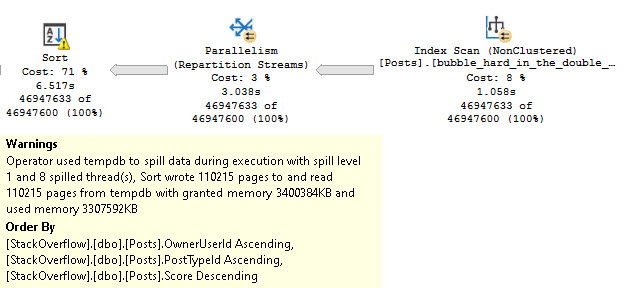
But there’s still something odd in our query plan. Our Sort operator is… Well, it’s still there.
grinch
Oddly, we need to sort all three columns involved in our Windowing Function, even though the first two of them are in proper index order.
OwnerUserId and PostTypeId are both in ascending order. The only one that we didn’t stick to the script on is Score, which is asked for in descending order.
Dram Team
This is a somewhat foolish situation, all around. One column being out of order causing a three column sort is… eh.
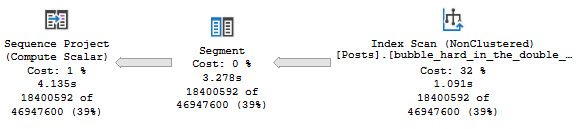
We really need this index, instead:
CREATE INDEX bubble_hard_in_the_double_r
ON dbo.Posts
(
    OwnerUserId ASC,
    PostTypeId ASC,
    Score DESC
);
mama mia
Granted, I don’t know that I like this plan at all without parallelism and batch mode, but we’ve been there before.
Thanks for reading!
Going Further
If this is the kind of SQL Server stuff you love learning about, you’ll love my training. Blog readers get 25% off the Everything Bundle — over 100 hours of performance tuning content. Need hands-on help? I offer consulting engagements from targeted investigations to ongoing retainers. Want a quick sanity check before committing to a full engagement? Schedule a call — no commitment required.
There are things that queries just weren’t meant to do all at once. Multi-purpose queries are often just a confused jumble with crappy query plans.
If you have a Swiss Army Knife, pull it out. Open up all the doodads. Now try to do one thing with it.
If you didn’t end up with a corkscrew in your eye, I’m impressed.
En Masse
The easiest way to think of this is conditionals. If what happens within a stored procedure or query depends on something that is decided based on user input or some other state of data, you’ve introduced an element of uncertainty to the query optimization process.
Of course, this also depends on if performance is of some importance to you.
Since you’re here, I’m assuming it is. It’s not like I spend a lot of time talking about backups and crap.
There are a lot of forms this can take, but none of them lead to you winning an award for Best Query Writer.
IFTTT
Let’s say a stored procedure will execute a different query based on some prior logic, or an input parameter.
Here’s a simple example:
IF @i = 1
BEGIN
    SELECT
        u.*
    FROM dbo.Users AS u
    WHERE u.Reputation = @i;
END;

IF @i = 2
BEGIN
    SELECT
        p.*
    FROM dbo.Posts AS p
    WHERE p.PostTypeId = @i;
END;
If the stored procedure runs for @i = 1 first, the second query will get optimized for that value too.
Using parameterized dynamic SQL can get you the type of optimization separation you want, to avoid cross-optimization contamination.
Dynamic SQL is so good at helping you with parameter sniffing issues that I have an entire session about it.
Thanks for reading!
Going Further
If this is the kind of SQL Server stuff you love learning about, you’ll love my training. Blog readers get 25% off the Everything Bundle — over 100 hours of performance tuning content. Need hands-on help? I offer consulting engagements from targeted investigations to ongoing retainers. Want a quick sanity check before committing to a full engagement? Schedule a call — no commitment required.
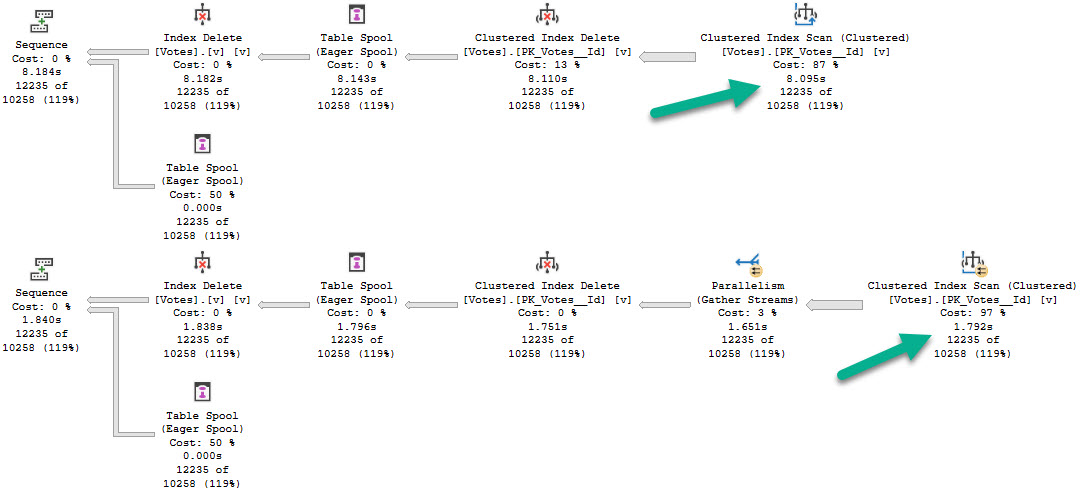
If you compare the performance of queries that output into a @table variable vs one that outputs into a #temp table, you’ll see a difference:
bang bang bang
Even though the parallel zone is limited here, there’s a big difference in overall query time. Scanning the Votes table singe-threaded vs. in parallel.
When you’re designing processes to be as efficient as possible, paying attention to details like this can make a big difference.
Thanks for reading!
Going Further
If this is the kind of SQL Server stuff you love learning about, you’ll love my training. Blog readers get 25% off the Everything Bundle — over 100 hours of performance tuning content. Need hands-on help? I offer consulting engagements from targeted investigations to ongoing retainers. Want a quick sanity check before committing to a full engagement? Schedule a call — no commitment required.
When I’m tuning queries, people will often ask me what metrics I look at to judge efficiency. Usually, it’s just getting things to be done faster.
Sometimes it’s okay to use more CPU via a parallel plan to get your query faster. Sometimes it’s okay to do more reads to get a query faster.
Sure, it’s cool when it works out that you can reduce resources overall, but every query is special. It all sort of depends on where the bottleneck is.
One thing I’ve been asked about several times is about how important it is to clear out the plan cache and drop clean buffers between runs.
While this post is only about the dropping of cleanly buffers, let’s touch on clearing the plan cache in some way quickly.
Dusted
Clearing out the plan cache (or recompiling, or whatever) is rarely an effective query tuning mechanism, unless you’re working on a parameter sniffing issue, or trying to prove that something else about a query is causing a problem. Maybe it’s local variables, maybe it’s a bad estimate from a table variable.
You get the point.
But starting with a new plan every time is overblown — if you change things like indexes or the way the query is written, you’re gonna get a new plan anyway.
If you’re worried about long compile times, you might also want to do this to prove it’s not necessarily the query that’s slow.
Busted
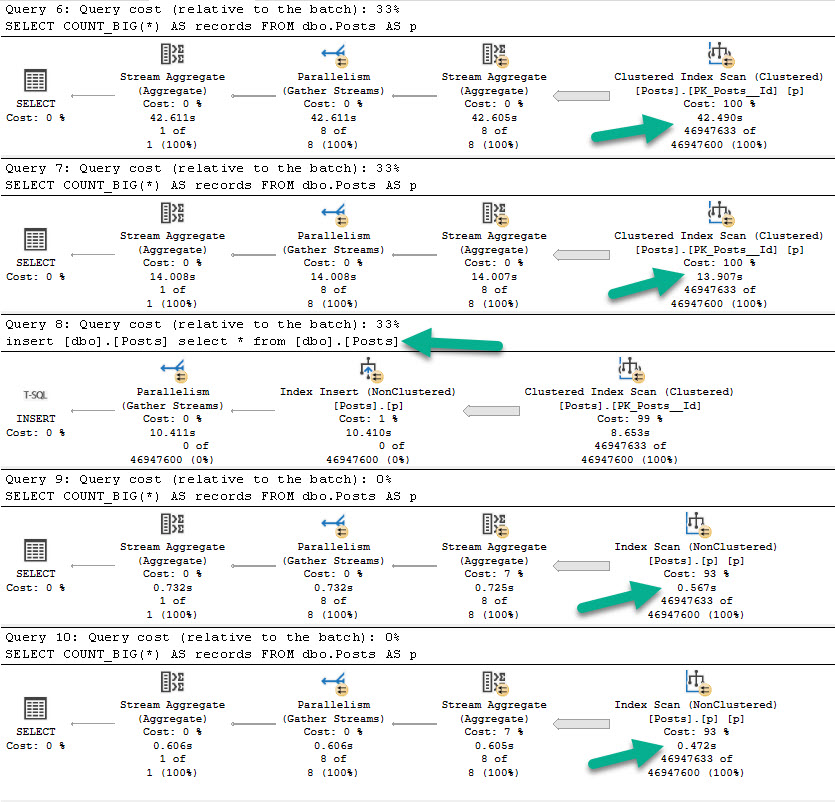
Let’s look at a big picture. The script that generates this picture is as follow:
--Calgon
DBCC DROPCLEANBUFFERS;

--o boy
SELECT
    COUNT_BIG(*) AS records
FROM dbo.Posts AS p;

--table manners
SELECT
    COUNT_BIG(*) AS records
FROM dbo.Posts AS p;

--so considerate
CREATE INDEX p ON dbo.Posts(Id);

--y tho?
DBCC DROPCLEANBUFFERS;

--woah woah woah
SELECT
    COUNT_BIG(*) AS records
FROM dbo.Posts AS p;

--hey handsome
SELECT
    COUNT_BIG(*) AS records
FROM dbo.Posts AS p;
We’re gonna drop them buffferinos, run the same count query twice, add a real narrow index, then count twice again.
Great. Great. Great.
different lifetime
Annalieses
For the first two executions, we performance tuned the query by about 30 seconds, just by… reading data from memory.
Hm. Okay. Unless you’re trying to prove that you don’t have enough memory, or that storage sucks, you’re not really convincing me of much.
Yes, RAM is faster than disk. Now what?
For the second two executions, query performance got way better. But reading the smaller index from disk hardly changed overall execution time.
If it’s not a strong enough argument that getting a query from 14 seconds down to half a second with a better index means you need an index, you might be working for difficult people.
Of course, Size Matters™
brick to back
The second query finishes much faster because we have a much smaller amount of data to read, period. If we had a where clause that allowed our index to seek to a specific chunk of data, we could have done even less work. This shouldn’t surprise anyone, though. Reading 450MB is faster than reading 120,561MB.
This is not a math test.
Coasting
Starting queries out with an empty buffer pool doesn’t really offer any insights into if you’ve tuned the query. It only exaggerates a difference that is usually not a reality.
It is a useful tool if you want to prove that:
You need more memory
You need better storage
You need a different index
But I sure wouldn’t use it to prove that I made a query better.
Thanks for reading!
Going Further
If this is the kind of SQL Server stuff you love learning about, you’ll love my training. Blog readers get 25% off the Everything Bundle — over 100 hours of performance tuning content. Need hands-on help? I offer consulting engagements from targeted investigations to ongoing retainers. Want a quick sanity check before committing to a full engagement? Schedule a call — no commitment required.
In this video, I share my experiences and insights on residual predicates in SQL Server queries, particularly focusing on how they can affect performance when using indexes and temporary tables. I start by recounting a series of 15 frustrating takes where I was interrupted while recording, leading to an impromptu discussion over a Monte Carlo cocktail—2.5 ounces of bourbon, about an ounce of Benedictine, and a dash of bitters—which surprisingly made me more talkative than motivated for writing. The video delves into the nuances of residual predicates by examining an index on the `post` table in the Stack Overflow database, specifically how the order of key columns impacts seek operations and overall query performance. I explore various strategies to optimize queries, including using outer applies twice and leveraging temporary tables, all while emphasizing the importance of understanding index dependencies for effective query tuning.
Full Transcript
This is the, I want to say, 15th take where I’ve started recording and been interrupted rudely, brusquely, or is it brusquely, brusquely, probably brusquely. It’s like a rude broccoli, brusquely. But I’m recording a video today. I was going to just write a blog post, but I was not so rudely interrupted by this lovely drink called the Monte Carlo, which is 2.5 ounces of bourbon, about an ounce of Benedictine, and just about whatever kind of bitters you have sitting around the house. You could do Angostura, cherry, just about anything you might have. And it’s, it’s a very nice cocktail. It’s stiff. It’s a stiff one. And, uh, it, it, it killed my motivation to write, but it did make me a bit talkative. So we’re going to chat today. We’re going to have a little chit chat. A sitting chit chat. It’s probably the best idea. About, uh, residual predicates, uh, and different ways that you can fix them, uh, or make them faster, I guess. Figure out if they’re a problem. It’s probably a good thing. All right. We could figure out if there’s an issue with this residual predicate. Figure it out. So we’ve got this index. Because where would we be without an index? Be nowhere without an index. We’ve got this index on the on the post table. The stack overflow database on the post type ID. Oh, I highlighted too much. Post type ID is score and owner user ID columns. And we have this index because it is fantastic for this query right here. Because this query has a where clause on post type ID and score and a join clause on owner user ID. Now in the grand scheme of things, this is a fairly good indexing strategy.
Because we are, we have our, our key columns up front that help us with the where clause. It helps the where clause find data. But we still have our join, our join clause column in the key of the index. So that’s a pretty good starting place. Like if you need to design an index, you’re like, I need to, I need to help this query. I need to, where this query has to find data, has to join, has to do all sorts of stuff. And that’s a pretty good way to design an index. Help it find all the data that it needs and then help it join whatever data it needs. So that’s a pretty good, pretty good strategy there. And the thing is, when we, we put that data into a temp table, right? Let’s, let’s actually run that and do it. Because I want to show you just how fantastically fast this query runs because of this professional grade index.
It finishes, my friends, in 12 milliseconds. 12 milliseconds. Fantastic. Who’s the best query tuner?
Who’s the best query tuner? The problem is, or the problem becomes, that when we need to, uh, use that temp table to derive some additional information from our database. We want, we have some figuring out to do. Uh, we have a query that just does not run as fast as we would like it to.
So we’ll hit F5 here and we’ll wait patiently for around about seven seconds for this thing to churn its wheels and do whatever it is it needs to do to, to send us data back. Okay. 6.6 seconds. Fine. I said about seven. I didn’t say exactly seven.
I don’t get on my case buster. There is our 6.6 seconds of time. And what happens in the query plan really isn’t all that important. It’s just, it’s not that important.
I mean, we, we can see that we have another semi-disaster as a repartition stream. Oh, I’m sorry. That’s over here. We have this repartition streams over here.
I don’t like. But this query takes about seven seconds. And if we look at the index seek over here, something kind of interesting shows up. We were able to seek to the post type ID that we care about.
Right? One and two. That’s good. That’s fine. We come over here. We join to that owner user ID column.
And that’s, that’s probably fine too. I’m not going to complain too much about that. But I am going to complain about the fact that this takes seven seconds. And that’s about, I don’t know, depending on how good of a query tuner you are, somewhere between four and six seconds too slow.
Now, normally, something that I enjoy getting to do in my, my life and my query tuning work with people is taking a sub query like that, a scalar sub query in the select clause and replacing it with an outer apply. Now we have to use outer apply here. If we use cross apply, we will restrict results.
One thing that this scalar sub query does, despite the fact that it has a where clause with an and in it. So it’s extra, extra where clausey. But one thing that would, might happen is we might not have a result from that sub query show up, but that wouldn’t restrict rows.
This would, this would restrict rows if we used cross apply. But if we use outer apply, something terrible will happen. My, my normal query tuning trickery will not work.
Now, if you’ve read my blog, you may be familiar with how much I hate eager index pools. Now you can’t see how terrible it is here. But if we go look at a query plan that I have saved off professionally, saved off for you, we can see that we have a query that will spend eight seconds scanning the post table and then a minute and 20 seconds building an index for us.
If you want to know more about that, you can read all my other posts about eager index pools. But what’s extra funny about this particular eager index pool, really about every eager index pool, is that even if we got it to go in parallel, it would not run faster. It actually runs a few seconds slower.
Look at that, a minute and 31 seconds. And that is because, of course, the eager index pool is a dirty, filthy liar. And all, I think, I want to say, I’m going to say off the cuff, that’s 46 million rows. And they all end up on one single, solitary thread.
So getting this query to go parallel does not provide any benefit for us whatsoever. Lovely, isn’t that? Lovely.
Lovely. Now, we could try doing all sorts of stuff with top one to get rid of the max, but unfortunately, if we do that, both of those plans are going to end up doing the same gosh darn thing with these eager index pools. Have mercy.
Have mercy on all of us. Hmm. So, this is where I started feeling personally aggrieved because I felt, in my professional query tuning opinion, that there is no way that my lovely outer apply trick should be slower, should result in an index pool. All right.
So, what I did was, rather than go with the max, I wanted to do the top one thing, but I also wanted to try separating things out a little bit, doing things a little bit different, differently. And, so, I’m going to run this select from my temp table with just the results of post type ID 1. Remember, up here, we’re looking for post type ID 1 or 2.
That’s a question or an answer right there. And if we run this, this is remarkably fast. Despite having a very lazy spool over here, it is remarkably fast.
This is not our problem. We can kind of get a feel for this because if we look at the index seek over here, right, we don’t even have to really get the properties. We can just get the tool tip.
But you can see that we read 472,310 rows. Right? It’s not too bad. I mean, maybe a lot of rows, kind of.
But this is a very fast query. Very fast. 233 milliseconds. Nearly broke the sound barrier. Definitely broke a track record.
You show me someone with a 233 second mile. Oh. Love to meet that person. That person is a spaceship. Space jokes.
Hate myself. But if we try that again with the post type ID equals two portion of the query, this will be incredibly slow. And it’s so slow, in fact, that I refuse to run this query and make you watch it run.
Because even though it has the exact same query plan shape, the time is not what it once was. This takes a full two minutes and one second, which is actually somehow a little bit worse than that eager index spool plan. Somehow, we found a way to be worse than an eager index spool.
Now, if we look at the index seek over here, we read quite a few more rows. I don’t know what this number is. It is a three, three, nine, seven, five, four, five, four, nine, oh.
That is a ten digit number of rows that we end up reading. That we end up seeking to. Because you know how seeks are always so much faster.
I kind of wish we had just scanned this thing. Because the seek is not working out for us here. So, despite all we’ve done to set up our query and our indexes to provide a nice seek, we do not get a very timely seek, do we? This is two minutes of seeking.
Now, what’s kind of interesting is we seek to this post type ID. And then we have this residual predicate on owner user ID. This is where the problem really is.
Just as we can seek to post type ID equals two, that doesn’t really buy us a whole lot. There are a lot of post type ID, post type IDs of two in the post table. There are many of them.
There are lots of answers in the post table. And the fact that we can seek to every single one of them is great. But then we can’t just immediately seek to the owner user ID that we care about. Because we have that score column in the middle, remember?
Because we’re using that index over here, that east index. And our index, of course, because it looks like this, we can seek to here. But then we have this sort of thing right here in between what we need to seek to next.
We have this score column sitting between us. And this goes back to a lot of stuff that I’ve said and talked about and written about with indexes, where when you create these rowstore indexes, the order of key columns matters quite a bit because we introduce dependencies going from right to left, right?
So we can seek to post type ID and we can seek to score. But even if we seek to post type ID, we can’t seek to owner user ID after that. We have to go through score somehow to get to owner user ID.
So we kind of get a bit stuck, don’t we? We’re stuck not being able to get through score. And of course, having score second actually works out pretty well for us generally because when we seek to this post type ID, we have score in order for the order by here.
So having score in the index there is actually a good idea. I mean, not only for this part of the query, but that first query that populated the temp table, that was a good idea there too.
That helped that query finish very quickly. So one thing we could do if we were feeling particularly ambitious is we could use outer apply twice. In the first outer apply, we can get the top one score for what we know is fast, right?
Post type ID one is fast. This finishes in 233 milliseconds. God bless.
And we can use the score that we pull out of here as an additional predicate in the second apply. And what this does is it helps us bridge that gap between post type ID and owner user ID. We’re going to use score as another predicate.
So we’re going to be able to use the full extent of our key columns. If we run the query like this, this will also finish very quickly. In fact, we 290 milliseconds is still breaking some records.
So that is absolutely lovely. But keep in mind, we have the optimizers telling us we could have we could do better. We can create an index and do do better.
But that’s okay. It’s okay. You’re allowed to be wrong, optimizer. That’s why I’m here. So whenever I explain that to people, though, they get very confused, right? Because if you look at the query plan, right, you have this one seek up here that does the residual predicate thing.
It is on your owner user ID and it’s fast. It doesn’t matter because it does a very small number of reads, 473, 2,310 reads. And then when we come and look at the index seek down here, it looks a little funny, doesn’t it?
So in this one we look for that post type ID equals 2 first and then we have another seek predicate now. Where score is greater than expression 1,0003. And that’s just lovely.
We have another seek predicate and that other seek predicate helps us have another thing to help us find our data faster. That expression, that expression 1, 0, 0, 3 is what comes from here, right? So getting the score from this part is our, is expression 1, 0, 0, 3.
And one way to kind of make it a little bit easier to visualize what’s going on in your head is to take the result of that first apply operation, right? Where we get post type ID equals 1. And dump that into a temp table, right?
And that happens very quickly. And 57, this goes parallel and takes 57 milliseconds now. Whew. I’m going to have to fan myself.
I’m going to have to spritz, give myself a spritz, take a cold shower. But now, well this 2 isn’t slow. My comment is a liar. But now if we select from that second temp table and we outer apply the portion to get post type beta equals 2, what we’re going to do is take the score that’s in our temp table and use that as a predicate.
So before we took the one from the first outer apply and use it as a predicate in the second outer apply. But a slightly easier way to visualize that is to do something like this. And if we run this query, this will also be lightning fast.
This is 58 milliseconds. That further breaks our track record. Because now we’re down to like a hundred and something milliseconds between the insert into the temp table and that. So that’s actually maybe the better strategy.
Maybe. I don’t know. I might be crazy. Maybe we should take this first outer apply and put it into our initial temp table select and then get the second one after that. And we would only use one temp table instead of two, which would be wonderful and lovely.
But who knows? Who knows? Now, the whole reason why this works is because of the order of the key columns in our index. Again, post type ID and then score sort of set this thing that we can’t get past.
Right? Because the ordering of the index depends on the ordering of our key columns. So it’s ordered by post type ID.
And then within duplicates of post type ID, we have score in order. And then within the duplicates of score, we have owner user ID in order. So it’s that dependency going from left to right or right to left in the in the rowstore indexes that really kind of beat this query up because we couldn’t seek to post type ID and then seek to owner user ID. We couldn’t just like hop, skip and jump over score to get there.
Could we? Now, we could. We could. We could. Try shuffling the key, the order of the key columns, right? We could go post type ID owner user ID then score, but.
We can’t always change indexes. It’s not always easy. That index might be there for a bunch of other queries too. If we change this index, it’s going to mess up a whole bunch of other queries potentially, isn’t it? It’s going to mess a whole bunch of downstream stuff up.
Maybe other queries doing things. We don’t know. We don’t know what might happen. We don’t know. We could add another index, but then we have two indexes that have nearly the same data in them. And that’s.
It’s depressing, isn’t it? Why would we ever want that? Duplicative indexes. Another thing that we could do is. Get our max score a slightly different way by using something like row number.
So we could get row number from posts for that and then do our filtering after we get the row number. But. Ah.
Boy oh boy. In row mode. This sucks. In row mode. This is just as slow as the first query we ran. It took seven seconds. It’s not breaking any. Well, I actually guess that.
I suppose that actually is breaking track record still, isn’t it? No one has a seven second mile. But yeah, this takes this takes actually this one takes much closer to 300 milliseconds closer to seven seconds than the original query, which took 6.6 seconds. But.
If we. Get some batch mode involved. Now I have this table called T. I mean fine. I’m not the most creative person in the world.
I have this table called T in my database. And this table called T is not for Texas. It is for table. And this T table has a clustered columnstore index on it. And if we do a stupid looking left join to that table.
Ah, I messed that all up. Apologize. It’s the first mistake I’ve made all day. We do this stupid join to our T table. Something interesting will happen.
Get you out of here. But this finishes. Now in about 2.2 seconds. Because we have a bunch of stuff that’s going to happen in batch mode now.
We see this window aggregate operator. Fantastic. Fantastic. We’re going to have a sort that happens. Oh, second mistake I made today.
This sort that happens in batch mode. We have this window aggregate that happens in batch mode. And because the sort is a child operator of a window aggregate. All this this can parallelize rather nicely.
A rather nice parallelization. But batch mode sorts when they’re not the child operator of a window aggregate. All the rows end up on one thread which can sometimes be worse.
I mean this they’re still getting the batch mode efficiencies of the sort. But that whole one thread thing is a little little wonky. But anyway.
That’s another way you could potentially fix the query. It’s just by getting a row number and doing some batch modeing. Which is perfectly acceptable. But let’s make sure we clean up after ourselves.
So thank you for watching. I hope you enjoyed this video. I hope you enjoy the remainder of whatever day this is. And well, maybe in the future I’ll drink some more Monte Carlos and get talkative and record some more videos.
I do miss you. Where have you been? Huh.
Around I guess. Cheers. Thank you. I was going to say something profound. I forget what it is now though. That always happens to me.
It’s right on the tip of my tongue. Well, anyway.
Going Further
If this is the kind of SQL Server stuff you love learning about, you’ll love my training. Blog readers get 25% off the Everything Bundle — over 100 hours of performance tuning content. I’m also available for consulting if you just don’t have time for that and need to solve performance problems quickly.
USE StackOverflow;

EXEC dbo.DropIndexes;

/*
CREATE INDEX east
    ON dbo.Posts
        (PostTypeId, Score, OwnerUserId)
WITH ( MAXDOP = 8,
       SORT_IN_TEMPDB = ON,
       DATA_COMPRESSION = ROW );
*/

DROP TABLE IF EXISTS #t;
GO

SELECT
    u.Id,
    u.Reputation,
    u.DisplayName,
    p.Id AS PostId,
    p.Title
INTO #t
FROM dbo.Users AS u
JOIN dbo.Posts AS p
    ON p.OwnerUserId = u.Id
WHERE u.Reputation >= 1000
AND   p.PostTypeId = 1
AND   p.Score >= 1000
ORDER BY u.Reputation DESC;


/*
CREATE INDEX east
    ON dbo.Posts(PostTypeId, Score, OwnerUserId);
*/
SELECT
    t.Id,
    t.Reputation,
    (
        SELECT
            MAX(p.Score)
        FROM dbo.Posts AS p
        WHERE p.OwnerUserId = t.Id
        AND   p.PostTypeId IN (1, 2)
    ) AS TopPostScore,
    t.PostId,
    t.Title
FROM #t AS t
ORDER BY t.Reputation DESC;


/*
Usually I love replacing select
list subqueries with APPLY

Just show the saved plan here
*/
SELECT
    t.Id,
    t.Reputation,
    pq.Score,
    t.PostId,
    t.Title
FROM #t AS t
OUTER APPLY --We have to use outer apply to not restrict results!
(
    SELECT
        MAX(p.Score) AS Score
    FROM dbo.Posts AS p
    WHERE p.OwnerUserId = t.Id
    AND   p.PostTypeId IN (1, 2)
) AS pq
ORDER BY t.Reputation DESC;


/*
TOP (1) also spools
*/
SELECT
    t.Id,
    t.Reputation,
    (
        SELECT TOP (1)
            p.Score
        FROM dbo.Posts AS p
        WHERE p.PostTypeId IN (1, 2)
        AND   p.OwnerUserId = t.Id
        ORDER BY p.Score DESC
    ) AS TopPostScore,
    t.PostId,
    t.Title
FROM #t AS t
ORDER BY t.Reputation DESC;

SELECT
    t.Id,
    t.Reputation,
    pq.Score,
    t.PostId,
    t.Title
FROM #t AS t
OUTER APPLY
(
    SELECT TOP (1)
        p.Score
    FROM dbo.Posts AS p
    WHERE p.PostTypeId IN (1, 2)
    AND   p.OwnerUserId = t.Id
    ORDER BY p.Score DESC
) AS pq
ORDER BY t.Reputation DESC;


/*
CREATE INDEX east
    ON dbo.Posts(PostTypeId, Score, OwnerUserId);
*/
SELECT
    t.Id,
    t.Reputation,
    pq.Score,
    t.PostId,
    t.Title
FROM #t AS t
OUTER APPLY --This one is fast
(
    SELECT TOP (1)
        p.Score
    FROM dbo.Posts AS p
    WHERE p.PostTypeId = 1
    AND   p.OwnerUserId = t.Id
    ORDER BY p.Score DESC
) AS pq
ORDER BY t.Reputation DESC;

SELECT
    t.Id,
    t.Reputation,
    pa.Score,
    t.PostId,
    t.Title
FROM #t AS t
OUTER APPLY --This two is slow...
(
    SELECT TOP (1)
        p.Score
    FROM dbo.Posts AS p
    WHERE p.PostTypeId = 2
    AND   p.OwnerUserId = t.Id
    ORDER BY p.Score DESC
) AS pa
ORDER BY t.Reputation DESC;


/*
Use the Score!
*/
SELECT
    t.Id,
    t.Reputation,
    ISNULL(pa.Score, pq.Score) AS TopPostScore,
    t.PostId,
    t.Title
FROM #t AS t
OUTER APPLY --This one is fast
(
    SELECT TOP (1)
        p.Score --Let's get the top score here
    FROM dbo.Posts AS p
    WHERE p.PostTypeId = 1
    AND   p.OwnerUserId = t.Id
    ORDER BY p.Score DESC
) AS pq
OUTER APPLY --This two is slow...
(
    SELECT TOP (1)
        p.Score
    FROM dbo.Posts AS p
    WHERE p.PostTypeId = 2
    AND   p.OwnerUserId = t.Id
    AND   pq.Score < p.Score --Then use it as a filter down here
    ORDER BY p.Score DESC
) AS pa
ORDER BY t.Reputation DESC;


SELECT
    t.Id,
    t.Reputation,
    ISNULL(pq.Score, 0) AS Score,
    t.PostId,
    t.Title
INTO #t2
FROM #t AS t
OUTER APPLY --This one is fast
(
    SELECT TOP (1)
        p.Score --Let's get the top score here
    FROM dbo.Posts AS p
    WHERE p.PostTypeId = 1
    AND   p.OwnerUserId = t.Id
    ORDER BY p.Score DESC
) AS pq;


SELECT
    t.Id,
    t.Reputation,
    ISNULL(pa.Score, t.Score) AS TopPostScore,
    t.PostId,
    t.Title
FROM #t2 AS t
OUTER APPLY
(
    SELECT TOP (1)
        p.Score
    FROM dbo.Posts AS p
    WHERE p.PostTypeId = 2
    AND   p.OwnerUserId = t.Id
    AND   t.Score < p.Score --Then use it as a filter down here
    ORDER BY p.Score DESC
) AS pa
ORDER BY t.Reputation DESC;


/*
What happened?
 * Index key column order
   * (PostTypeId, Score, OwnerUserId)

Other things we could try:
 * Shuffling index key order, or creating a new index
   * (PostTypeId, OwnerUserId, Score)

 * Rewriting the query to use ROW_NUMBER() instead
  * Have to be really careful here, probably use Batch Mode

*/

/*
CREATE TABLE dbo.t
(
id int NOT NULL,
INDEX c CLUSTERED COLUMNSTORE
);
*/

SELECT
    t.Id,
    t.Reputation,
    pa.Score,
    t.PostId,
    t.Title
FROM #t AS t
LEFT JOIN dbo.t AS tt ON 1 = 0
OUTER APPLY
(
    SELECT
        rn.*
    FROM
    (
        SELECT
            p.*,
            ROW_NUMBER()
                OVER
                (
                    PARTITION BY
                        p.OwnerUserId
                    ORDER BY
                        p.Score DESC
                ) AS n
        FROM dbo.Posts AS p
        WHERE p.PostTypeId IN (1, 2)
    ) AS rn
    WHERE rn.OwnerUserId = t.Id
    AND   rn.n = 1
) AS pa
ORDER BY t.Reputation DESC;


DROP TABLE #t, #t2;
The title might look like it’s technical, since usually when I’m talking about Reputation = 1, I’m talking about querying the Stack Overflow database.
This post isn’t about that Reputation, it’s about your Reputation, and hopefully how you choose to protect it while you exist, and after you not exist.
This also isn’t a horn-tooting post. If you think I am horn-tooting, refer back to this sentence. There is, likewise, no high-horsing here. There are no horses, high or otherwise.
I try to teach people things here. This is just another thing.
Hazy Shade Of Writer
Late last year I agreed to write a book. It came to my attention after the fact that the publisher had recently released a work by someone who, several years ago, was found to have exhibited a pattern of untoward behavior with female members of the SQL Server community. I brought this up, and they were dismissive of my concerns on the matter.
I’m stopping short of adding any further details, because I don’t want anyone who has experienced trauma from this to experience more. Quite the opposite.
After that interaction, I withdrew from the project. There are plenty of ways for me to help people learn about SQL Server that don’t make profits for companies that turn a blind eye to that sort of behavior.
Continuing would have meant I turn a blind eye to it, and that’s not how I want to be known by anyone, especially people who are far more likely to be victimized than I am. I’m your friend, too.
I’m not pretending that I have the strongest morals and ethics, or that I’m a paragon of virtue, but continuing with the project just didn’t sit right with me.
After all, from where I sit in my office, I can hear my two daughters playing.
Fighting.
Playing again.
Not sure.
Something in between.
They’ll figure it out.
Choice Cuts
It’s easy to build a bad reputation, quickly or slowly. Anyone can do it. It’s hard to build and keep a good reputation.
When choosing who to be involved with, it’s important to consider who they’re involved with. I don’t mean that you have to blacklist people who you disagree with (that can be a dangerous personal precedent to set), but do think carefully about the kind of behavior you’re not okay with.
If you see that behavior, you’ve probably found someone you don’t want to associate with. If you see someone condoning that behavior, you’ve probably found two.
Redemption needs to exist, otherwise there would be no point in trying to learn and change. I’ve learned some tough lessons in life and changed because of them. Many people I know have, too. It’s generally a good thing, lest we all remain babbling and unwashed.
Not that that’s a bad way to spend Saturday night, but I digress.
People also need to be able to make mistakes and come back from them. There are good ways to do that: taking ownership, apologizing, etc. I’d never give sincerity the cold shoulder.
Lunch Alone
This doesn’t just go for when it’s easy to make the right choice. One reason there is no horn nor horse for me here is that it was a very easy decision to make.
But that does make it an easy lesson to teach, hopefully. Even if no one ever said a word about the entanglement, I would have felt wrong about it. If you don’t have a good reputation with yourself, you probably won’t have one with other people.
When you hit those moments in your life, and in your career, follow your instincts. I realize that it’s hard when a project promises some esteem, or monetary gain when monetary gains are scarce, but in the long run it’s worth it.
The least regret is no regret.
Or regerts, as a wise tattoo artist once inscribed.
If this is the kind of SQL Server stuff you love learning about, you’ll love my training. Blog readers get 25% off the Everything Bundle — over 100 hours of performance tuning content. Need hands-on help? I offer consulting engagements from targeted investigations to ongoing retainers. Want a quick sanity check before committing to a full engagement? Schedule a call — no commitment required.
Something is broken in the way that you store data.
You’re overloading things, and you’re going to hit big performance problems when your database grows past puberty.
Thanks for reading!
Going Further
If this is the kind of SQL Server stuff you love learning about, you’ll love my training. Blog readers get 25% off the Everything Bundle — over 100 hours of performance tuning content. Need hands-on help? I offer consulting engagements from targeted investigations to ongoing retainers. Want a quick sanity check before committing to a full engagement? Schedule a call — no commitment required.
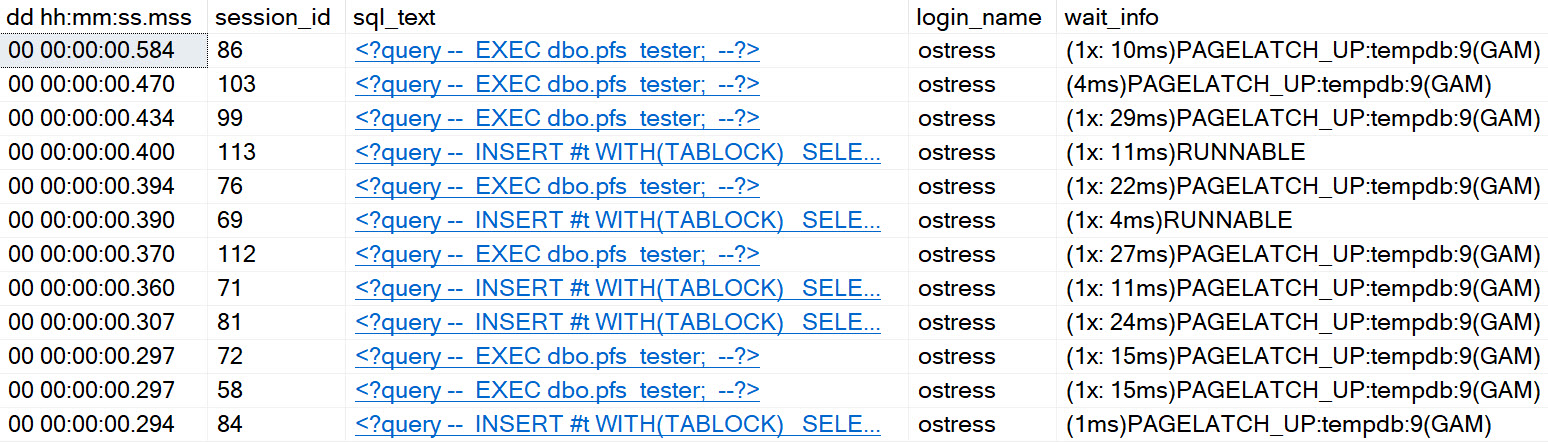
Even on SQL Server 2019, with in-memory tempdb metadata enabled, and an appropriate number of evenly sized data files, you can experience certain types of contention in tempdb.
It’s better. It’s definitely and totally better, but it’s still there. With that in mind, I wrote a stored procedure that you can stick in your favorite stress tool, to see how tempdb handles different numbers of concurrent sessions. You can download it here, on GitHub.
If you need a tool to run a bunch of concurrent sessions against SQL Server, my favorite two free ones are:
If you’re on < SQL Server 2016, you might need trace flags 1117 and 1118
You might have a bunch of other stuff hemming up tempdb, too
Check out this video for some other things that can cause problems too.
Thanks for reading!
Going Further
If this is the kind of SQL Server stuff you love learning about, you’ll love my training. Blog readers get 25% off the Everything Bundle — over 100 hours of performance tuning content. Need hands-on help? I offer consulting engagements from targeted investigations to ongoing retainers. Want a quick sanity check before committing to a full engagement? Schedule a call — no commitment required.
Filtered indexes are really interesting things. Just slap a where clause on your index definition, and you can do all sorts of helpful stuff:
Isolate hot data
Make soft delete queries faster
Get a histogram specific to the span of data you care about
Among other things, of course. There are some annoying things about them though.
They only work with specific ANSI options
If you don’t include the filter definition columns in the index, it might not get used
They only work when queries use literals, not parameters or variables
Majorly
Part of the optimizer’s process consists of expression matching, where things like computed columns, filtered indexes, and indexed views are considered for use in your query.
I mean, if you have any of them. If you don’t, it probably just stares inwardly for a few nanoseconds, wondering why you don’t care about it.
Something that this part of the process is terrible at is any sort of “advanced” expression matching. It has to be exact, or you get whacked.
Here’s an example:
DROP TABLE IF EXISTS dbo.is_deleted;

CREATE TABLE dbo.is_deleted
(
    id int PRIMARY KEY,
    dt datetime NOT NULL,
    thing1 varchar(50) NOT NULL,
    thing2 varchar(50) NOT NULL,
    is_deleted bit NOT NULL
);

INSERT dbo.is_deleted WITH(TABLOCK)
(
    id,
    dt,
    thing1,
    thing2,
    is_deleted
)
SELECT
    x.n,
    DATEADD(MINUTE, x.n, GETDATE()),
    SUBSTRING(x.text, 0, 50),
    SUBSTRING(x.text, 0, 50),
    x.n % 2
FROM (
SELECT
    ROW_NUMBER() OVER
    (
        ORDER BY 1/0
    ) AS n,
    m.*
FROM sys.messages AS m
) AS x;

CREATE INDEX isd
ON dbo.is_deleted
    (dt)
INCLUDE
    (is_deleted)
WHERE
    (is_deleted = 0);
Overly
If you run that setup script, you’ll get yourself a table that’s ripe for a filtered index on the is_deleted column.
But it doesn’t work with every type of query pattern. Some people are super fancy and want to find NOTs!
SELECT
    COUNT_BIG(*) AS records
FROM dbo.is_deleted AS id
WHERE id.dt >= GETDATE() + 200
AND   (NOT 1 = id.is_deleted)
AND   1 = (SELECT 1);
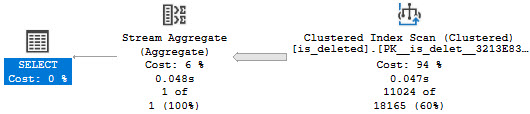
I have the 1 = (SELECT 1) in there for reasons. But we still get no satisfaction.
hurtin
If we try to force the matter, we’ll get an error!
SELECT
    COUNT_BIG(*) AS records
FROM dbo.is_deleted AS id WITH(INDEX = isd)
WHERE id.dt >= GETDATE() + 200
AND   (NOT 1 = id.is_deleted)
AND   1 = (SELECT 1);
The optimizer says non.
Msg 8622, Level 16, State 1, Line 84
Query processor could not produce a query plan because of the hints defined in this query.
Resubmit the query without specifying any hints and without using SET FORCEPLAN.
It has no problem with this one, though.
SELECT
    COUNT_BIG(*) AS records
FROM dbo.is_deleted AS id
WHERE id.dt >= GETDATE() + 200
AND   (0 = id.is_deleted)
AND   1 = (SELECT 1);
Underly
It would be nice if there were some more work put into filtered indexes to make them generally more useful.
In much the same way that a general set of contradictions can be detected, simple things like this could be too.
Computed columns have a similar issue, where if the definition is col1 + col2, a query looking at col2 + col1 won’t pick it up.
It’s a darn shame that such potentially powerful tools don’t get much love.
Thanks for reading!
Going Further
If this is the kind of SQL Server stuff you love learning about, you’ll love my training. Blog readers get 25% off the Everything Bundle — over 100 hours of performance tuning content. Need hands-on help? I offer consulting engagements from targeted investigations to ongoing retainers. Want a quick sanity check before committing to a full engagement? Schedule a call — no commitment required.