This is one of the most frustrating things I’ve seen from the optimizer in quite a while.
Here are a couple tables, with a foreign key between them:
CREATE TABLE dbo.ct(id int PRIMARY KEY, dt datetime);

CREATE TABLE dbo.ct_fk(id int PRIMARY KEY, dt datetime);

ALTER TABLE dbo.ct ADD CONSTRAINT
    ct_c_fk FOREIGN KEY (id) REFERENCES dbo.ct_fk(id);
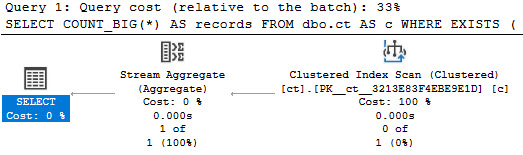
When we use the EXISTS clause, join elimination occurs normally:
SELECT COUNT_BIG(*) AS [?]
FROM dbo.ct AS c
WHERE EXISTS
(
    SELECT 1/0
    FROM dbo.ct_fk AS cf
    WHERE cf.id = c.id
);
all the chickens
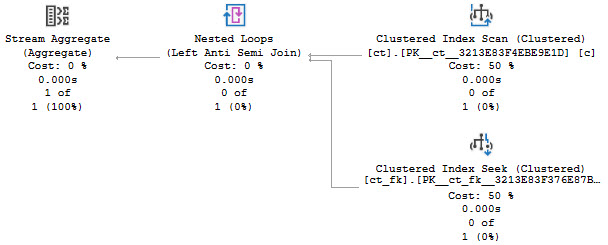
But when we use NOT EXISTS, it… doesn’t.
SELECT COUNT_BIG(*) AS [?]
FROM dbo.ct AS c
WHERE NOT EXISTS
(
    SELECT 1/0
    FROM dbo.ct_fk AS cf
    WHERE cf.id = c.id
);
?
Thanks for reading!
Going Further
If this is the kind of SQL Server stuff you love learning about, you’ll love my training. Blog readers get 25% off the Everything Bundle — over 100 hours of performance tuning content. Need hands-on help? I offer consulting engagements from targeted investigations to ongoing retainers. Want a quick sanity check before committing to a full engagement? Schedule a call — no commitment required.
There are two common questions people ask about changed data that CDC doesn’t support very naturally:
When did it change?
Who changed it?
While it is possible to join to cdc.lsn_time_mapping to get that information, you may be dealing with a box product that doesn’t support that functionality.
Or something.
Hypothetically.
They’re Just Tables
The kinda funny thing about the tables that all of your changed data ends up in is that… they’re regular tables.
They’re not in the sys schema, they’re in the cdc schema. You can alter them in all sorts of ways. You can drop and truncate them if you want. I mean, not in that order, but you get my point. There’s no special protection for them.
That means you can add a column like this to them to track when the rows ended up in there. This also saves you from altering production tables to account for when things change.
ALTER TABLE cdc.dbo_Posts_CT
    ADD ChangeTime datetime DEFAULT SYSDATETIME();
Oversight
I do think it’s a pretty big oversight to not have a column like this in the table already, but maybe people use CDC in far different ways than I normally see it used.
Or maybe not, and everyone has to come up with some workaround like this to deal with it. It could be that CDC data ends up like a lot of other data, and people get really excited about having it, but never actually look at it.
Thanks for reading!
Going Further
If this is the kind of SQL Server stuff you love learning about, you’ll love my training. Blog readers get 25% off the Everything Bundle — over 100 hours of performance tuning content. Need hands-on help? I offer consulting engagements from targeted investigations to ongoing retainers. Want a quick sanity check before committing to a full engagement? Schedule a call — no commitment required.
SQL Server comes with some great features for tuning queries:
Computed Columns
Filtered Indexes
Indexed Views
But there’s an interoperability issue when you try to use things together. You can’t create a filtered index with the filter definition on a computed column, nor can you create a filtered index on an indexed view.
If you find yourself backed into a corner, you may need to consider using an indexed view without any aggregation (which is the normal use-case).
Empty Tables
If we try to do something like this, we’ll get an error.
DROP TABLE IF EXISTS dbo.indexed_view;
GO

CREATE TABLE dbo.indexed_view
(
    id int PRIMARY KEY,
    notfizzbuzz AS (id * 2)
);
GO

CREATE INDEX n
    ON dbo.indexed_view (notfizzbuzz)
WHERE notfizzbuzz = 0;
GO
Yes, I’m putting the error message here for SEO bucks.
Msg 10609, Level 16, State 1, Line 19
Filtered index 'nfb' cannot be created on table 'dbo.indexed_view' because the column 'notfizzbuzz' in the filter expression is a computed column.
Rewrite the filter expression so that it does not include this column.
An Indexed View Doesn’t Help
If we run this to create an indexed view on top of our base table, we still can’t create a filtered index, but there’s a different error message.
CREATE OR ALTER VIEW dbo.computed_column
WITH SCHEMABINDING
AS
SELECT
    iv.id,
    iv.notfizzbuzz
FROM dbo.indexed_view AS iv;
GO

CREATE UNIQUE CLUSTERED INDEX c
    ON dbo.computed_column(id);

CREATE INDEX nfb
    ON dbo.computed_column(notfizzbuzz)
WHERE notfizzbuzz = 0;
Msg 10610, Level 16, State 1, Line 37
Filtered index 'nfb' cannot be created on object 'dbo.computed_column' because it is not a user table.
Filtered indexes are only supported on tables.
If you are trying to create a filtered index on a view, consider creating an indexed view with the filter expression incorporated in the view definition.
But what a thoughtful error message it is! Thanks, whomever wrote that.
Still Needs Help
We can create this indexed view just fine.
CREATE OR ALTER VIEW dbo.computed_column
WITH SCHEMABINDING
AS
SELECT
    iv.id,
    iv.notfizzbuzz
FROM dbo.indexed_view AS iv
WHERE iv.notfizzbuzz = 0;
GO

CREATE UNIQUE CLUSTERED INDEX c
    ON dbo.computed_column(id);
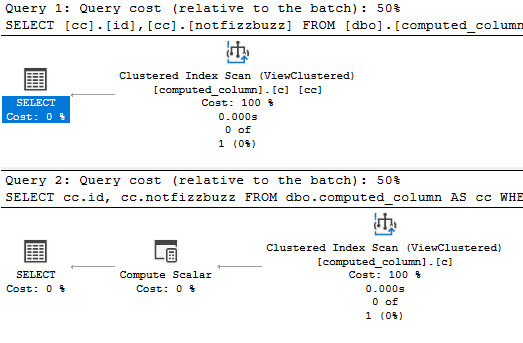
But if we try to select from it, the view is expanded.
SELECT
    cc.id,
    cc.notfizzbuzz
FROM dbo.computed_column AS cc
WHERE cc.notfizzbuzz = 0;
If we run the query like this, and look at the end of the output, we’ll see a message at the bottom that our query is safe for auto (simple) parameterization. This may still happen even if the plan doesn’t remain trivial (more detail at the link above!)
DBCC FREEPROCCACHE;
GO
DBCC TRACEON(8607, 3604);
GO
SELECT
    cc.id,
    cc.notfizzbuzz
FROM dbo.computed_column AS cc
WHERE cc.notfizzbuzz = 0;
DBCC TRACEOFF(8607, 3604);
GO

********************
** Query marked as Cachable
** Query marked as Safe for Auto-Param
********************
Making It Work
The two ways we can run this query to get the indexed view to be used are like so:
SELECT
    cc.id,
    cc.notfizzbuzz
FROM dbo.computed_column AS cc WITH(NOEXPAND)
WHERE cc.notfizzbuzz = 0;


SELECT
    cc.id,
    cc.notfizzbuzz
FROM dbo.computed_column AS cc
WHERE cc.notfizzbuzz = 0
AND   1 = (SELECT 1);
thanks i guess
A Closer Look
If we put those two queries through the ringer, we’ll still see auto (simple) parameterization from the first query:
DBCC FREEPROCCACHE;
GO
DBCC TRACEON(8607, 3604);
GO
SELECT
    cc.id,
    cc.notfizzbuzz
FROM dbo.computed_column AS cc WITH(NOEXPAND)
WHERE cc.notfizzbuzz = 0;
GO
DBCC TRACEOFF(8607, 3604);
GO

********************
** Query marked as Cachable
** Query marked as Safe for Auto-Param
********************

DBCC FREEPROCCACHE;
GO
DBCC TRACEON(8607, 3604);
GO
SELECT
    cc.id,
    cc.notfizzbuzz
FROM dbo.computed_column AS cc
WHERE cc.notfizzbuzz = 0
AND   1 = (SELECT 1);
GO
DBCC TRACEOFF(8607, 3604);
GO

********************
** Query marked as Cachable
********************
It’s goofy, but it’s worth noting. Anyway, if I had to pick one of these methods to get the plan I want, it would be the NOEXPAND version.
Using that hint is the only thing that will allow for statistics to get generated on indexed views.
In case you’re wondering, marking the computed column as PERSISTED doesn’t change the outcome for any of these issues.
Thanks for reading!
Going Further
If this is the kind of SQL Server stuff you love learning about, you’ll love my training. Blog readers get 25% off the Everything Bundle — over 100 hours of performance tuning content. Need hands-on help? I offer consulting engagements from targeted investigations to ongoing retainers. Want a quick sanity check before committing to a full engagement? Schedule a call — no commitment required.
I see a lot of tables that look something like this:
CREATE TABLE dbo.orders
(
    order_id int NOT NULL PRIMARY KEY
         DEFAULT (NEXT VALUE FOR dbo.order_id),
    order_date datetime NOT NULL,
    order_ship_date datetime NOT NULL,
    order_total money NOT NULL,
    order_tax money NOT NULL,
    customer_id int NOT NULL
        DEFAULT (NEXT VALUE FOR dbo.customer_id),
    customer_fullname nvarchar(250),
    customer_street nvarchar(250),
    customer_street_2 nvarchar(250),
    customer_city nvarchar(250),
    customer_state nvarchar(250),
    customer_zip nvarchar(250),
    customer_country nvarchar(250)
);
Looking at the design, there are two big problems:
There are “order” columns that are going to get a lot of inserts and updates
You’re going to be storing the same customer information over and over again
The more related, but not independent, data you store in the same table, the harder it becomes to effectively index that table.
A while back, I blogged about Tables Within Tables, but uh… surprisingly, the problem still exists! Usually when I blog about something, the problem disappears. Hm.
Better But Not Best
If we follow some practical guidance and put named columns into their own table, we end up with this:
CREATE TABLE dbo.orders
(
    order_id int NOT NULL PRIMARY KEY
         DEFAULT (NEXT VALUE FOR dbo.order_id),
    order_date datetime NOT NULL,
    order_ship_date datetime NOT NULL,
    order_total money NOT NULL,
    order_tax money NOT NULL,
    customer_id int NOT NULL
);

CREATE TABLE dbo.customers
(
    customer_id int NOT NULL PRIMARY KEY
        DEFAULT (NEXT VALUE FOR dbo.customer_id),
    customer_fullname nvarchar(250),
    customer_street nvarchar(250),
    customer_street_2 nvarchar(250),
    customer_city nvarchar(250),
    customer_state nvarchar(250),
    customer_zip nvarchar(250),
    customer_country nvarchar(250)
);
This is a better scenario, because we only store customer information once, and inserts/updates to order information don’t impact people working with customer data.
But this still isn’t great — what if a customer wants to send an order to a different address?
If we wanted to store everything in this table, we’d be breaking other practical rules: we’d have to have multiple rows for users, or we’d have to add columns columns to the table to deal with multiple addresses. That’s a mess both for people who don’t use all those extra columns, and for people who might have half a dozen addresses they send to.
Getting There
A better way to phrase the customer table might be like this:
CREATE TABLE dbo.customers
(
    customer_id int NOT NULL PRIMARY KEY
        DEFAULT (NEXT VALUE FOR dbo.customer_id),
    default_fullname nvarchar(250),
    default_street nvarchar(250),
    default_street_2 nvarchar(250),
    default_city nvarchar(250),
    default_state nvarchar(250),
    default_zip nvarchar(250),
    default_country nvarchar(250)
);
Most of the time, people are going to send stuff to one address — call it home if you want. It’s probably also their billing address, so it makes sense for it to be the default, and to have it be the first choice.
Then we’ll have a table of EAV data that looks like this:
CREATE TABLE dbo.customers_address_book
(
    address_id int NOT NULL
        DEFAULT (NEXT VALUE FOR dbo.address_id),
    customer_id int NOT NULL,
    address_type tinyint,
    customer_fullname nvarchar(250),
    customer_street nvarchar(250),
    customer_street_2 nvarchar(250),
    customer_city nvarchar(250),
    customer_state nvarchar(250),
    customer_zip nvarchar(250),
    customer_country nvarchar(250),
    CONSTRAINT pk_cab_id PRIMARY KEY (customer_id, address_id)
);
In a table like this, whenever a customer ships to a non-default address it gets stored off here. Now customers can have as many addresses as they want to choose from without us having to have an extra bloated table of default information plus non-default information.
Because of the way this data is modeled, we don’t need to keep adding columns to accommodate multiple addresses. We just tack rows on, and since this data isn’t likely to get updated the insert/select pattern should end up with minimal blocking.
Tomato Sauce
I know, horrifying. You might have to write a join. You poor, downtrodden developer.
Of course, this makes the most sense when you’re dealing with OLTP workloads. And sure, a lot of these columns probably don’t need to be as long as they are, but that’s a totally different post.
When you’re dealing with reporting data, de-normalizing is generally preferred. Though if you’re doing serious reporting and using column store indexes, I’d probably wanna keep the strings out as much as possible, and just key back to them in other tables. Yuck.
Have I ever mentioned that strings in databases were a mistake?
Thanks for reading!
Going Further
If this is the kind of SQL Server stuff you love learning about, you’ll love my training. Blog readers get 25% off the Everything Bundle — over 100 hours of performance tuning content. Need hands-on help? I offer consulting engagements from targeted investigations to ongoing retainers. Want a quick sanity check before committing to a full engagement? Schedule a call — no commitment required.
When I’m working with clients, we look at a lot of stuff together to make sure things are in good working order.
If we’re tuning a single query, the goal is pretty easy to define. We want it to finish as fast as possible.
How you get there is where things may get interesting, but let’s be honest: most of the time you’re going to be fixing the same half a dozen problems in some combination.
Note that the query finishing, and results being finished returning are two different metrics. A query may finish very quickly, but returning results may take considerably longer for various reasons.
You can think of this as responsiveness, and it’s a cornerstone to building something people are happy with. When you’re talking about user experience, performance has to be part of the conversation.
How fast individual queries finish also plays a big part in overall concurrency.
Put Through
Typically this matters more for OLTP workloads. Data warehouses aren’t usually high concurrency environments in that the Batch Requests/Sec counter is sitting around bored. Joe Obbish has a great talk on improving data warehouse loading patterns, because usually isn’t always. Ha ha ha. Barf.
Workloads that do have OLTP characteristics are more sensitive to all sorts of things, and I don’t just mean parameters. Locking and Deadlocking are high up on the list, along with available hardware resources.
Rather obviously, if you want to improve overall throughput, having queries finish as quickly as possible is an attractive goal. You can run way more queries in one second if they take 100ms than if they take 900ms, you know? You know. You’re smart.
Factorials
What are the factors that influence query speed?
Starting in the database:
Well written queries
Thoughtful indexes
Maintained Statistics
Correctly stored data types
Properly normalized tables
Moving out a little bit further, there are some important settings:
Parallelism
Optimistic Isolation Levels
Max Server Memory
tempdb stuff
Instant File Initialization
Lock Pages In Memory (mostly)
Further out, we have the hardware:
CPU
Memory
Disk
Network Path To Disks (SAN)
A lot of times something being off in one place can make it look like there’s a bottleneck in another place. Probably the easiest example to conjure up is if you’re missing an opportune nonclustered index, and you end up scanning a clustered index over and over again. The clustered index doesn’t fit in memory, so you end up generating a lot of PAGEIOLATCH_SH waits.
It might look like you have a memory shortage, but in reality you could be making far better use of the memory you have.
Margin For Error
Being able to identify and fix specific bottlenecks is an important skill. Wait stats and other counters can be useful, but are often underwhelming unless you’re watching at the right time, or you have a monitoring tool that logs them for you. Bottlenecks can live in many places, and oftentimes performance tuning is like playing whack-a-mole with them.
Hitting hard limits and running out of CPU or RAM is never fun. Picking hardware that’s up to the task is step one, but staying on top of query and index tuning to make sure it stays adequate for longer is a process that you need to go through. If this is the sort of thing you need help with, drop me a line.
Thanks for reading!
Going Further
If this is the kind of SQL Server stuff you love learning about, you’ll love my training. Blog readers get 25% off the Everything Bundle — over 100 hours of performance tuning content. Need hands-on help? I offer consulting engagements from targeted investigations to ongoing retainers. Want a quick sanity check before committing to a full engagement? Schedule a call — no commitment required.
Temporal tables are cool, but keeping all that history can be stressful. Change Tracking adds overhead to every transaction, and requires Snapshot Isolation to be successful. Change Data Capture can also run into problems scanning the transaction log, depending on transaction volume, etc.
Change Data Capture is also a little unfortunate in that it doesn’t track schema changes like adding or dropping columns, or changing column data types. Change Tracking doesn’t either, it just tracks the keys of what changed when data is modified.
Temporal Tables are different, because it will add new, and drop removed columns from the history table as they change in the base table. It’ll also push data type changes across. But the history table will not have the various permutations tracked. It just mirrors current state.
Just The Columns, Ma’am
Let’s say your needs aren’t robust enough to need any one of those highly specialized features, or even triggers to move data around when it changes.
You’re perfectly free and able to add the tracking columns that temporal tables use to your base tables, but adding them is far from free. When I added them to the 17 million row Posts table, it took about 40 seconds. My laptop doesn’t suck, either.
To show you a little how it works, let’s create a copy of the Votes table from Stack Overflow.
CREATE TABLE dbo.Votes_Tracked
(
    Id int NOT NULL,
    PostId int NOT NULL,
    UserId int NULL,
    BountyAmount int NULL,
    VoteTypeId int NOT NULL,
    CreationDate datetime NOT NULL,
    LastModified datetime2 GENERATED ALWAYS AS ROW start NOT NULL
        CONSTRAINT DF_LastModified DEFAULT (SYSDATETIME()),
    JunkDate datetime2 GENERATED ALWAYS AS ROW END HIDDEN NOT NULL
        CONSTRAINT DF_JunkDate DEFAULT ('9999-12-31 23:59:59.9999999'),
    PERIOD FOR SYSTEM_TIME (LastModified, JunkDate),
    CONSTRAINT PK_Votes_Id
        PRIMARY KEY CLUSTERED (Id ASC)
);
GO
Note that you need two columns to define the “period for system time”, and one of them will always be useless. That’s why I called it JunkDate, and not, like, whatever. But the good news is you can define that column as HIDDEN so that it doesn’t show up in all your queries.
Now we can stick some data in there and see how it works.
INSERT
    dbo.Votes_Tracked WITH (TABLOCK)
(
    Id,
    PostId,
    UserId,
    BountyAmount,
    VoteTypeId,
    CreationDate
)
SELECT
    Id,
    PostId,
    UserId,
    BountyAmount,
    VoteTypeId,
    CreationDate
FROM StackOverflow2013.dbo.Votes AS v
WHERE v.CreationDate >= '20130101';
Looking Around
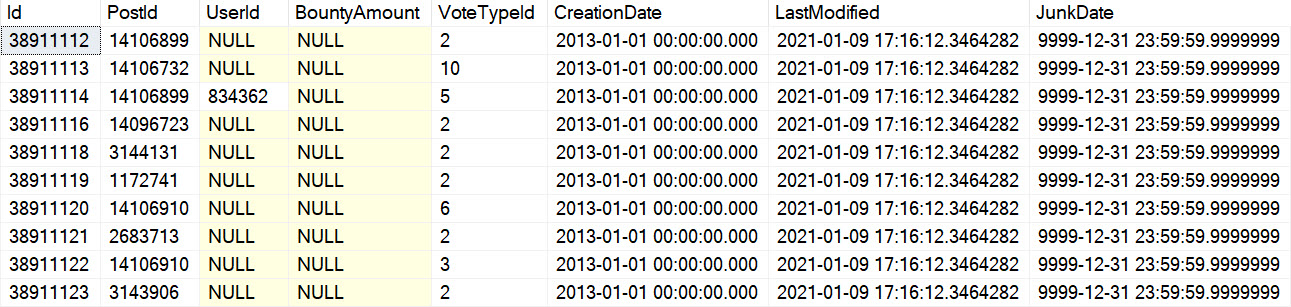
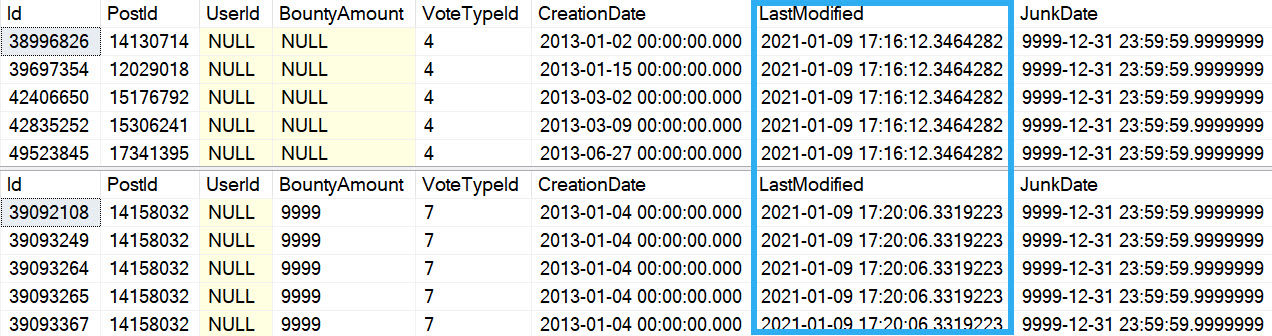
The table data looks like this:
woah man
If we run an update:
UPDATE v
    SET v.BountyAmount = 9999
FROM dbo.Votes_Tracked AS v
WHERE v.VoteTypeId = 7;
temporally yours
Note that these screen caps were taken without the HIDDEN keyword added to the table definition: that was an after thought recommended by my friend Peter.
Whatabouts?
Of course, if you remove rows from the table, they’re just gone. You’d still need a trigger to cover deletes, if you need to track those.
And if you want to remove those columns later, it takes a little bit of tweaking.
ALTER TABLE dbo.Votes_Tracked DROP CONSTRAINT DF_LastModified, DF_JunkDate;
ALTER TABLE dbo.Votes_Tracked DROP COLUMN JunkDate, LastModified;

Msg 13588, Level 16, State 1, Line 63
Column 'JunkDate' in table 'Crap.dbo.Votes_Tracked' cannot be dropped because it is a part of period definition.
Of course, the table isn’t system versioned, so this command will also fail:
ALTER TABLE dbo.Votes_Tracked SET (SYSTEM_VERSIONING = OFF);

Msg 13591, Level 16, State 1, Line 66
SYSTEM_VERSIONING is not turned ON for table 'Crap.dbo.Votes_Tracked'.
If you want to remove them, you’ll need to use this:
ALTER TABLE dbo.Votes_Tracked DROP PERIOD FOR SYSTEM_TIME;
Now you’ll be able to remove them.
Is This A Good Idea?
Well, it depends on what you need. If you just need to know when a row changed, and you don’t need to know what changed or who changed it, it can work in a more automated way than triggers. It does require an additional column, which isn’t ideal, but it’s not a gigantic column, and you don’t need to worry about indexing it because the data is junk.
I haven’t found any ridiculous downsides to this, but I’ll keep this updated if I do.
Thanks for reading!
Going Further
If this is the kind of SQL Server stuff you love learning about, you’ll love my training. Blog readers get 25% off the Everything Bundle — over 100 hours of performance tuning content. Need hands-on help? I offer consulting engagements from targeted investigations to ongoing retainers. Want a quick sanity check before committing to a full engagement? Schedule a call — no commitment required.
Implementing soft deletes for an app that’s been around for a while can be tough. In the same way as implementing Partitioning can be tough to add in later to get data management value from (rebuilding clustered indexes on the scheme, making sure all nonclustered indexes are aligned, and all future indexes are too, and making sure you have sufficient partitions at the beginning and end for data movement).
Boy, I really stressed those parentheses out.
If you do either one from the outset, it’s far less painful to manage. The structural stuff is there for you from the beginning, and you can test different strategies early on before data change become difficult to manage.
Queries
The first and most obvious thing is that all your queries now need to only find data that isn’t deleted.
Almost universally, it’s easier to put views on top of tables that have the appropriate bit search for deleted or not deleted rows than to expect people to remember it.
CREATE VIEW dbo.Users_Active
AS
SELECT
    u.*
FROM dbo.Users AS u
WHERE u.is_deleted = 0;

CREATE VIEW dbo.Users_Inactive
AS
SELECT
    u.*
FROM dbo.Users AS u
WHERE u.is_deleted = 1;
It’s not that views have any magical performance properties; they’re just queries after all, but it gives you an explicit data source.
Indexes
Depending on how your other queries search for data, you may need to start accounting for the is_deleted flag in your indexes. This could make a really big difference if the optimizer stops choosing your narrower nonclustered indexes because it hates key lookups.
Typically, other predicates will give you a selective-enough result set that a residual predicate on a bit field won’t make much difference. If you’ve already got a seek to the portion of data you’re interested in and most of it will be not-deleted, who cares?
And let’s be honest, in most implementations deleted rows will be the minority of data, and searches for it will be far less common. Usually it’s just there for an occasional audit.
In adjacent cases where instead of deleted you need to designate things as currently active, and you may have many inactive rows compared to active rows, filtered indexes can be your best friend.
Coming back to the views, I don’t think that making them indexed is necessary by default, but it might be if you’re using forced parameterization and filtered indexes.
CREATE TABLE dbo.Users(id int, is_deleted bit);
GO

CREATE INDEX u ON dbo.Users (id) WHERE is_deleted = 0;
GO

SELECT
    u.id, u.is_deleted
FROM dbo.Users AS u
WHERE u.is_deleted = 0;
Under simple parameterization, this can be fine. Under forced parameterization, things can get weird.
tutor the tutors
Tables and Tables
In some cases, it might be easier to create tables specifically for deleted rows so you don’t have unnecessary data in your main tables. You can implement this easily enough with after triggers. Just make sure they’re designed to handle multiple rows.
If you want something out of the box, you might mess with:
Temporal tables
Change Data Capture
Change Tracking
However, none of those help you deal with who deleted rows. For that, you’ll need an Audit.
Thanks for reading!
Going Further
If this is the kind of SQL Server stuff you love learning about, you’ll love my training. Blog readers get 25% off the Everything Bundle — over 100 hours of performance tuning content. Need hands-on help? I offer consulting engagements from targeted investigations to ongoing retainers. Want a quick sanity check before committing to a full engagement? Schedule a call — no commitment required.
When tuning queries, one pattern I see over and over again is people running crazy-long queries. Maybe they worked well-enough at some point, but over the years they just kept getting slower and slower.
Sometimes there are comments, and other times there’s enough domain knowledge on the call to understand how a query ended up in the shape it’s in. One persistent idea is that tempdb is something to be avoided. Either because it was “slow” or to avoid contention.
Granted, if a query has been around long enough, these may have been valid concerns at some point. In general though, temp tables (the # kind, not the @ kind) can be quite useful when query tuning.
You Might Be Using It, Anyway
Even if there’s some rule against directly using temp tables, queries can end up using tempdb by the caseload anyway.
Consider that Spool operators explicitly execute in tempdb, any spills will go to tempdb, and work tables that are used in a number of circumstances occur in tempdb. The bigger and more complicated your queries are, the more likely you are to run into cases where the optimizer Spools, Spills, or use some other workspace area in tempdb in your query plan.
Worse, optimizations available for temp tables aren’t available to on-the-fly operators. You also lose the ability to take further action by indexing your temp tables, etc.
It’s Often Easier Than Other Options
Many times when tuning queries, I’ll be puzzled by the optimizer’s choices. Sometimes it’s join type, other times it’s join order, or something else. Perhaps the most common reason is some misestimation, of course.
Query and index hints are great to experiment with, but are often unsatisfying as permanent fixes. I’m not saying to never use them, but you should explore other options first. In other words, keep temp tables on the table.
Thanks for reading!
Going Further
If this is the kind of SQL Server stuff you love learning about, you’ll love my training. Blog readers get 25% off the Everything Bundle — over 100 hours of performance tuning content. Need hands-on help? I offer consulting engagements from targeted investigations to ongoing retainers. Want a quick sanity check before committing to a full engagement? Schedule a call — no commitment required.
The fine folks over at the Carnegie Mellon Database Group have been putting on a series of talks about different databases, and they finally got around to my beloved SQL Server.
This is a really interesting talk, but don’t stop there. Be sure to check out their other videos. They’re a little more database agnostic, but still generally useful.
If this is the kind of SQL Server stuff you love learning about, you’ll love my training. Blog readers get 25% off the Everything Bundle — over 100 hours of performance tuning content. Need hands-on help? I offer consulting engagements from targeted investigations to ongoing retainers. Want a quick sanity check before committing to a full engagement? Schedule a call — no commitment required.
In this video, I delve into the world of parameter sniffing and explore how dynamic SQL can be a powerful tool in addressing it. I start by explaining what dynamic SQL is—essentially, it’s a string that you build into a query to execute—and highlight its flexibility and usefulness in various scenarios, such as making decisions based on user input or analyzing SQL Server configurations. However, I also emphasize the potential pitfalls of using dynamic SQL without proper caution, particularly when concatenating user inputs directly into your queries, which can lead to security vulnerabilities like SQL injection. To combat these issues, I walk through how to safely use dynamic SQL and introduce `sp_executesql` with parameters, ensuring that the parameter values are passed securely and reducing the risk of malicious code execution. Throughout the video, I provide practical examples and insights into when recompile hints might not be the best solution, especially in scenarios where queries execute frequently or take a long time to compile. By the end, you’ll have a clearer understanding of how dynamic SQL can help mitigate parameter sniffing issues while maintaining security and performance.
Full Transcript
Hello and welcome to defeating parameter sniffing with Dynamic SQL. I’ll be your host, I’m Erik Darling. If you want to get in touch with me about anything related to this talk or SQL Server or, I don’t know, just ask me how my day was, you can get in touch with me via any of these things. I have a website, I have an email address, and I have a Twitter handle I’m a triple threat as far as contact methods go. If you want to download the demo database and demo scripts to play around with on your own, you can go to these bit.ly links, but keep in mind they are case sensitive. And if you type them in incorrectly, I cannot be held personally responsible for wherever your browser ends up taking you because there’s no longer my links. So mind your S’s and D’s in those links right there. Now, of course, I say all that because I’m not going to use any of these things. Because this talk is given under the Creative Commons license, meaning you can do all sorts of stuff with it, and you can present it, and you can do all that as long as you attribute and you don’t change the licensing on that. But of course, I don’t have any, I’m not cool enough or rich enough to have any lawyers. So I don’t know, I’ll just have to beat you up next time I see you if you if you do any of these things, if you do any of these things dirty. So the reason why I want to give this talk is, of course, because parameter sniffing can be a really, really tough problem to solve. But the first thing we should clear up is that parameter sniffing isn’t always a problem. It gets as a very, very bad reputation, because when it is a problem, it is nuts. But it is quite often happening on many SQL servers all across the globe. And no one is complaining, it might even be happening in outer space. I don’t know exactly how far reaching Microsoft is, they might have like stuck SQL Server on like an asteroid or something and just sent it barreling into space. I don’t know.
But I’m sure that it’s out there. Parameter sniffing away. Now, most of the time, this is a good thing because SQL Server thinks up a query plan and uses it and then keeps using it. And no one’s any the wiser. No one’s complaining performance is okay. And everything is nice and stable in your server. And isn’t that wonderful? I mean, I think it’s wonderful. I think it’s wonderful. Sort of kind of makes me like the Maytag man where I’m like, you know, sitting there waiting for a phone call. Someone’s like, hey, we’re a performance problem. And then there’s no performance problem, because everything’s fine. And then I get sad and lonely. But there are of course, lots of other ways that you can fix parameter sniffing other than using dynamic SQL. But this is a kind of a fun, interesting method that I’ve used a lot with clients and that I want to share with the world. Because deep down inside, I’m a nice person and I do care about sharing with the world.
But before we get into exactly how to fix dynamic SQL, or how to fix parameter sniffing with dynamic SQL, I need to make sure everyone understands what dynamic SQL is, and how to use it safely. What a parameter is, and how they can cause performance problems. What parameter sniffing looks like, and how you can observe it happening. And of course, what information you need to reproduce it. All good things to know.
And of course, I want to teach you these things, because I want you to understand what is constantly happening on your SQL Server, when it’s good, and when it’s bad. So the first question that we’re going to answer today is, what is dynamic SQL? This is a good question, isn’t it? What is that dynamic SQL stuff? What is that wall of red text that I struggle with? Incorrect. Syntax near. Single tick. And of course, dynamic SQL is a string that you build into a query to execute. That is the most basic definition I can think of for dynamic SQL.
And of course, dynamic SQL is a very flexible coding paradigm with all sorts of cool stuff you can do with it. You can make decisions based on user input, the state of data, or where the query is executing. You might take a table name as input. You might see if a user has permission to go do something. If you are the type of crazy person who writes scripts that analyze SQL Server, well, you might need to make some decisions about which DMBs you touch and which column names you go and select from, depending on which version and edition of SQL Server you’re on.
You might need to figure out if objects exist before you run a query or do something. Like, let’s say you have a server where you have a database per client or something, right? And you want to add an index to a table, but you already added it to some tables and others. You go through every database and figure out if that index exists before you go and create it. All sorts of good stuff you can do with dynamic SQL.
Another great use for dynamic SQL is figuring out which search arguments you want to have in your where clause based on what people are searching for. Now, the problem with dynamic SQL, or one of the problems, one of the many myriad problems with dynamic SQL is that people write it in an unsafe way. Now, the easiest, for instance, to look at is when people use just exec to execute strings willy nilly. Now, of course, this isn’t always a problem.
You might ask for user input like this, but then not actually use that user input in the string that you execute. You might have a hard-coded string that you execute based on user input, and you are not going to get SQL injected when you do this, because there is no untrustworthy user ickiness drifting into your queries to run. We just get a hard-coded string that executes.
Someone would have to go to a pretty great lengths to, like, get into your code and change that hard-coded string to something malicious and then, you know, do stuff. So I’m not saying it’s impossible, but it’s certainly difficult. Now, if you look at the execution plan, of course, we’re just going to have selected from the votes table, because that is what our user instructed us to do.
Of course, the problem with exec is not when you do something like this. The problem with exec is when you do something like this, where you concatenate a value into a string, right? So you either use concat or the plus signs or whatever else, and this is where users can do all sorts of icky, nasty, ugly stuff.
Now, I hate strings in databases. I realize why they’re there, and they might have to be there for certain things. But let’s say that we have this column, which is an Envarkar 250, where every time someone asks a question in the Stack Overflow database, what happens?
They need to have a title for that question so people know what they’re getting into when they click the link. And with 250 characters available, you sure can fit a lot of nonsense into a string. You can fit, like, this entire Union All statement.
And I know what you’re thinking. You know, little Bobby tables. Go drop all our tables. I hate little Bobby tables. I hate that cartoon. Because it really does sort of distract people from what is often the intent of SQL injection, which is not to just inconvenience a DBA somewhere by dropping a table or a database or something.
It is to steal information. And if we look at what happens with the result of this query, we get a bunch of valid search results back, which match exactly what we are looking for. But we also get back a list of tables from the Stack Overflow database.
And this is probably not what we wanted users getting back. I mean, this whole list of tables here. So that’s not good. And if you look over in the Messages tab, we will see an issue.
We will see that we did search for where a title was like anything. But then we also concatenated this whole string on. And we got results back from a system table.
Now, it’s very easy, I think, to, in terms of, like, security, maybe disallow an application user from being able to drop a table or drop a database or do something crazy. But the more and more that I work with SQL Server and different applications, the more I see applications doing kind of crazy administrative stuff. Like, they might be creating indexes.
They might be creating databases. They might be creating schema. They might be creating agent jobs, taking backups, like, creating, like, security certificates, doing all sorts of things. You need a pretty elevated privilege to go out and do. Now, if you want to spend years of your life doing every grant and revoke to make that work out without, you know, someone being able to, say, select from sys.tables, well, that’s great for you.
But I think you’re going to have a really hard time with that. The other thing that’s difficult is that a lot of applications, when they do stuff like upgrades or whatever, they might need to hit those dynamic management views to see if certain things exist or not. So you’re going to have an even tougher time because no one out there in the world is writing their applications to use very specific logins for very specific tasks.
So until that happens, we’re going to have a tough time with SQL injection and Dynamic SQL. Now, of course, you could use sp-execute SQL to buy yourself a little bit of security here. But when we use sp-execute SQL, we still need to use parameters.
So in this case, we’re still being dum-dums and concatenating all this stuff into a string. And even though we’re using sp-execute SQL, we are afforded no protection here. If I run this the exact same way that I ran the last query, we are going to get the exact same results back where we get all of the tables from sys.tables.
And we are going to get, of course, that whole union all put into the select list, right? All that stuff is still in there. We did not save the day.
In order to make Dynamic SQL as safe as can be, we need to write our Dynamic SQL so that we are not concatenating the parameter into the string. The parameter has to be part of the string. See, the title is in red here, which means it’s inside of the Dynamic SQL.
The parameter is coming from inside of the Dynamic SQL. It’s terrifying. And, of course, when we do that, we need to give sp-execute SQL a little information about the parameter that exists inside of it. And we, of course, need to set that parameter to a value.
And when I run the Dynamic SQL like this, what we get back is something totally different. We get back no search results because there is no post in the post table. There is no question in the post table that has a title of UnionAllSelectYibidaBibidaBibida.
It’s just not in there. And if we go look at the Messages tab, we no longer have that whole big UnionAll as part of our string. We just have a single parameter in here.
So SQL Server went and searched for the contents of the parameter rather than taking that parameter and concatenating it into the string and getting a whole bunch of malicious code on top of it. I believe that dirty payload or something. So that is when dynamic SQL can be unsafe and backfire.
But dynamic SQL is often the only tool that you can use to fix some performance issues. Now, if you write queries like this, you should feel bad about yourself and the way that you write queries. It should feel terrible.
It should hire me to help you fix them. But I get it. If you do this stuff and you stick a recompile hint on there, everything will go swimmingly. The problem becomes if queries execute frequently or if they take a long time to compile.
If they’re very complicated queries, they might take a very long time to compile an execution plan. And these can be times when a recompile hint works against you. The other kind of bummer about the recompile hint is that, I mean, it’s a little bit less of a bummer if you have query store turned on or if you have a monitoring tool.
But a kind of unfortunate side effect of recompile is that you do not have any sort of long forensic history in the plan cache about how many times a query executed, if there’s a lot of variation in it and stuff like that. So there is some stuff missing. There’s stuff that recompile takes away too.
There’s stuff that recompile can mess with. Now, let’s look at an example of recompile and the problem that it fixes. Now, I have two indexes on the POST table.
I have an index called 1z and an index called 3z. It would have been 1z, 2z, but 2z was on a different table. So we’ll get to that.
We’ll get to 2z in a bit. But 1z is on owner user ID, score, and creation date. Keep that in mind. Owner user ID is the leading column here. And on 3z, parent ID is the leading column, and owner user ID is the second column.
Now, what I’m going to do is run three queries using slightly different techniques to figure out nullability of parameters. We’ll do this one with an OR clause. We’ll do this one with ISNULL, and we’ll do this one with COALESSE.
Now, these don’t have recompile hints on them, so things are going to be a little bit awkward for all of these queries. And if we look at the execution plans, something kind of funny happens. This first one, even though it gets a good cardinality estimate for how many rows are going to come out of the index scan, we use the index that starts with parent ID instead of the index that starts with owner user ID.
And, of course, we have to scan that index because owner user ID is not the leading column. And even more troublesome is that we need to do, in the key lookup, we need to evaluate the predicate on creation date. So that’s very, very weird.
I don’t even have an explanation for this. SQL Server just got cracked out on me. I started drinking heavily. But the other two queries sort of have different performance issues. Even though they use the right index, if you look very, very closely, whether we use ISNULL or COALESSE, we get the same bad estimate across the board.
And notice that we still scan the nonclustered index, even though it reads with owner user ID. We still have to scan it. And if we look at the predicate that gets applied here, it is gigantic.
It is unfriendly. It is not friendly to being able to seek into the index because SQL Server on the fly has to figure out if a parameter is null or if it’s not null. And then it also has to figure out a plan that’s safe for any particular parameter being null or not.
We might not be able to seek to nulls in a not nullable column if the parameter we pass in is null. And that we could just seek the entire index. Wouldn’t that be unfortunate?
If we look at the predicates for COALESSE, they’re even more unfortunate. We get these gigantic case expressions. I mean, not that this query does significantly better or worse, but it’s just aggravating to look at. I just don’t like looking at it.
So using any of these methods, we get incorrect index usage. We get bad estimates. And we maybe get like just not maybe not like the best possible execution plan for our query. Recompile will help, of course.
Right. So if we run those same three queries with recompile hints, what’s going to happen is we’re going to get very different execution plans. And regardless of which method we choose, we are going to get accurate guesses. Right.
So now we’re able to seek into our indexes. We get a good guess. We use the correct index in this first one. Yippee-ki-yay. I’m not going to finish that thought probably. But then if we look at these two, not only do we use the correct index and seek, despite those crazy functions being in there, but look what happens. We get good guesses too.
Right. So we get spot on with those. And of course, the index seek just turns into a simple case of seeking to a literal value here and applying a predicate on this value here. So that’s pretty good.
Recompile is pretty awesome for these situations. Right. I’m totally fine. Again, not anti-recompile. I’m totally fine with you using it. But I do want you to be careful with it.
Use it judiciously. Use it when you know it’s a good idea. Use it when it’s safe. Now let’s ask ourselves a related question. Let’s ask ourselves just what a parameter is.
Good question to ask. What’s a parameter? What’s going on in there? What’s the frequency, Mr. Parameter? So there are different things in SQL Server that have parameters as part of their definition. So you can create store procedures with parameters.
That’s pretty obvious. You can create functions that accept parameters. And you can pass parameters into Dynamic SQL.
Like so. Now, parameters are not the same as declared variables. I have a whole long blog post about that at my website here.
So if you want to go look at that, you can. Sometimes it’s just easier to search Erik Darling data for local variables. And you’ll come to that post rather than try to memorize that whole URL.
But you’re smart. I’m sure you could figure that out. But anyway, if you declare a variable like this. And then use it in a query like this. Like specific.
Pretty specifically in a where clause. It is not the same as if you use a parameter. It is a much different thing. However, you can magically turn variables into parameters. By passing them to store procedures or functions.
Or passing them into Dynamic SQL. You can transmogrify them into. To magical, wonderful parameters. And have them not be variables anymore.
And this distinction is important. Because local variables do not usually get you good guesses for cardinality estimates. Right?
So what I’m going to do is declare these vote type ID variables. And set them equal to for here and to here. And I’m going to run both of these queries. And we’re going to admire the devastation.
I mean the first one is fine because it’s 733 rows. If your queries have problems counting 733 rows, you have a very different problem than parameter sniffing. You might just want to turn that server off because it’s terrible.
Anyway. Or you could call me for help too. I’m not going to complain either way. But what happens here is we get the same sort of stock guess regardless of how many rows are actually going to come out of the index seek here.
So SQL Server just uses the same cardinality estimation process. And it’s not even actually a cardinality estimate. Cardinality estimates are like math equations.
This is just a magic number guess. So that’s fun for you. Right? Cool. Anyway. In a perfect world, those would get correct-ish estimates.
Right? We would just maybe get the same behavior as using a parameter there. But that’s not what we get. And of course, if we start treating that variable like a parameter, well, this is where some trouble might start. So what I’m going to do is use dynamic SQL and pass a parameter to it for vote type ID.
The first time around, we’re going to use vote type ID 4, which only has 733 rows. And the second time around, we’re going to use vote type ID 2, which has something like 37 million rows. And if I run these two queries, we’re going to see where the problem with parameters starts to kick in.
Right? So even though we return two very different counts here, the execution plans, well, the execution plan, rather, gets reused. All right?
We get a good guess for 733 rows for vote type ID 4. But we get a very bad guess for vote type ID 2, which returns a count of 37 million rows. This query ends up taking nearly five seconds to run versus the zero seconds this one takes.
Yee. That’s no good. Of course, if we run those in reverse order, something different happens that works out mostly in our favor. All right?
Both of these finish relatively quickly. All right? But the execution plans are different now. These go parallel. All right? So we get a good guess here. And SQL Server says, this looks like it’s going to be an expensive date. I’m going to go parallel.
I’m going to have my little racing stripes on all these things. All right? So SQL Server’s like, yes, more CPUs, please. But now this query down here, which returns very few rows, also does the same thing because it reuses the guess for finding a large amount of data. Now, maybe that’s okay.
Maybe that’s not a big deal. Maybe that’s just the performance improvement that we need across the board. I’m not going to argue with that.
I’m not going to tell you it’s bad. But I am going to caution you a little bit because when queries go parallel, they use more CPU. They reserve more threads to use. And if some knucklehead admin comes along and doesn’t understand parallelism or a CX packet or weight stats, they might come look at your server and they might say, ah, I found this wonderful script on the internet.
It will tell me about the weights that I have and all their percentages. And they might run that script and might say, wow, this server has 99% CX packet weights. We should set max stop to one.
And then what happens? You have a lot of slow serial queries that could benefit from parallelism because we engaged parallelism perhaps when it was inappropriate. So that’s something to just be a little careful of.
If you’re going to tune your queries to go parallel constantly, you’re going to need to tune your admins to ignore those CX packet and CX consumer weights. CX consumer is on the newer SQL Server stuff, but it’s a bit of a digression that we don’t need to get into. Of course, there are very, very good reasons to parameterize.
We just saw a case where, you know, SQL Server using different execution plans got very different performance profiles of those queries. Right? There were some changes in the queries that might not have existed if we used just a plan based on whatever parameter we passed in.
Right? Not reusing plans. But there are very, very good reasons to parameterize. Now, if you write dynamic SQL that looks like this, it, of course, will not be parameterized.
And if you run queries that look like this for different values, SQL Server is not going to reuse execution plans. SQL Server is going to regard these queries with a great amount of distrust. And we are going to get different query plans based on what values get passed in.
Now, that all finished relatively quickly, which is by design. I’m pretty good at this stuff right now because I don’t want to sit here for a long time while queries run. That’s no fun for anybody.
But let’s look at what happened. We have all these literal values. Right? And for each one of these literal values, SQL Server is going to think up its very own special execution plan. And if you look through the list of execution plans, there are going to be three main strategies that we see.
Some queries are going to choose a key lookup based on how many rows they think are going to come out of this index seek. Some are going to skip that key lookup situation. And they’re just going to scan the clustered index and then go into a stream aggregate.
And even still, some others are going to scan the clustered index and go into a hash match aggregate. This is something that is a new sort of perk of SQL Server 2019’s batch mode on rowstore. It used to be that you could only have a stream aggregate for a scalar aggregate.
Now you can also have a hash aggregate for a scalar aggregate. So fun stuff there. Thanks, 2019, for giving me a third query plan to tell people about, I suppose. Now, if we look at the plan cache, and I highly, highly recommend if you are going to go looking at the plan cache, you use SP Blitz cache to do it.
But I also highly, highly recommend turning query plans off. Do not collect query plans for SP Blitz cache or else it will run for a very long time and you will question my sanity as a presenter and a performance tuner. But if you run this with query plans turned off, we’re going to get back to the top 10 statements that executed in here.
And if we look at the query text for them that got stored when the plans were generated, we can revalidate the fact that every single one of these literal value queries got a brand new execution plan. And we can even see, if we look over here, that all of them executed exactly once because SQL Server did not trust them to be the same query.
Bummer, right? Of course, if we parameterize like this, say between start date and, well, I’m going to use between. Aaron Bertrand might yell at me later.
I don’t care. He’s Canadian. I don’t know. Maybe he’s too polite to yell at me. Who knows? But if we turn query plans back on, because now we need them again, and we run this, we’re going to get all 11 of those queries back.
But all 11 of the queries that print out are going to look like this. We have these parameters in there rather than those literal values. All of the execution plans in this case will be the same, which is really to be expected when we reuse plans.
And if we look in SP Blitzcache, of course, turning query plans off, what are we going to get? One example of the query text with the parameters in it. Here, start date and adding 11 days to the start date.
And we will see that we got 14 executions of that query. So plan reuse, if you want it, you’re going to have to parameterize for it. So parameterization can be a very, very good technique.
You know, it’s like the opposite sort of opposite end of the spectrum, really. It’s like if you have using recompile hints everywhere, you know, you’re going to have a bunch of queries that just show one execution and not a lot going on. If you don’t parameterize queries, you’re going to see a whole bunch of the same query saying one execution and maybe using slightly different execution plans.
And then if you parameterize, you’re going to see all of the executions for a query since it’s parameterized. Now, it can be a real drawback to not parameterize because if you have a bunch of single-use statements and query plans, you might have a hard time with your plan cache because if you wanted to figure out, like, just how much this query is running, you need to find different ways to identify that query and then, like, add that up and tally things up by, like, a query hash or a query plan hash or something.
And if you have optimized or ad hoc workloads turned on, then what is that? Fix it, not fix it, and makes your job harder because all of those single-use plans just end up with a stub and you really don’t have a lot of feedback about that stub.
So that’s no good at all. So let’s recap what we know so far. We know that we can write Dynamic SQL to produce different queries situationally.
We know that we have to write it in a safe way to prevent people from stealing data or otherwise defacing our databases. We know that parameters and variables are treated much differently by the optimizer. We know that parameters encourage plan reuse.
And we know that that can be great if you have a good enough execution plan for everyone and not so great if your data has a lot of skew in it. Or if you use parameters to search for different volumes of data. So, like, rather than just, like, an equality which might get hurt by there being skew in the data, you know, you might have one query that searches for, like, everything that’s over a dollar and then another query that searches for everything that’s over, like, a million dollars.
And clearly, the one dollar query is going to return a lot of results and the over a million dollar query is not going to return as many results. So you can also see disparity with range-type queries, too. Now, the first thing you want to do if you suspect parameter sniffing is rule a couple things out.
There are a couple things that happen in SQL Server that always, always, always get confused for parameter sniffing. The first one is resource contention. If you need to figure out resource contention, you can grab my script, SP Pressure Detector.
It’s available on my website. You don’t have to memorize this whole URL. That’s in there for the sake of people who download the script and click on stuff. You can also go to my site.
There’s a little tab up top that says scripts. And if you hover your beautiful, cute little mouse over that, it’ll give you the option to which scripts you want to look at. The second thing you have to rule out is blocking.
And I think just about the best tool out there for that is SP WhoisActive. You can go to a very easy-to-memorize website to get that and troubleshoot blocking. And we’ll look at how to use SP WhoisActive to evaluate parameter sniffing.
But first, let’s talk a little bit about Query Store because Query Store is very cool. The plan cache, it’s a whole lot harder to track down parameter sniffing issues with the plan cache. Mostly because what you get back in the plan cache is just the compiled parameter value for a query.
You don’t get the runtime value. Now, the reason why that stinks is because if you want to reproduce a parameter sniffing situation, you need some things.
You need the query plan. You need the text of the query. You need the indexes available. And you need the parameters that were used to both compile and run whatever query we’re looking at. Now, you don’t get the runtime values in Query Store.
But you do get a couple interesting views where you can look at regressed queries and you can look at queries with a very high variance in resource usage. So you can look at that by a whole bunch of different things, CPU, res, writes, duration, all that stuff.
So let’s look at how SP WhoisActive can help us evaluate a parameter sniffing scenario. So the first thing I want to do is walk you through these parameters that I’m going to be using because they’re very, very important to how we troubleshoot the problem.
GetFullInnerText will tell us which query is currently executing. You’re probably pretty used to seeing that output already. GetOuterCommand will tell us if that query was called in a store procedure or some other larger batch of queries.
GetPlans will go and fetch us the execution plan. And GetAverageTime will go out and look at the plan cache and look at how long a query normally runs, how long a query runs for on average so we can compare the current runtime to the current average.
Now what we’re going to be looking for when we run SP WhoisActive like this is of course queries running for a longer than average amount of time. We’re going to look at the outer command to see if we have a store procedure that’s getting hit by parameter sniffing.
If not, then we look at the inner text and see if we just have a regular ad hoc query, perhaps something generated by Dynamic SQL that’s having problems. And then we’re also going to get the query plan and runtime values for parameters.
So we’re going to look at the execution plan and along with all the other goodies that we get, we’re also going to do something that we should always be doing when we are evaluating execution plans.
We’re going to go into the properties where all of the Pro Tools live. That’s where all the real SQL Server professionals go and look at stuff. I mean, it’s where I go look at stuff, so I assume everyone else does it. I could be wrong.
They might have much smarter things that they do. Crap. Now I feel very insecure. Might need to start drinking. So if we want to reproduce a parameter sniffing situation, we need to run the procedure first with the compile time value and then again with the runtime value.
Now what I have is a store procedure that I call take a chance. And what take a chance does is does some randomization of a number. And depending on what that number is, we are either going to set parent ID to zero or use some other modulus mapped out number in here.
Now the reason we’re doing that is because in the post table, there are around about 6 million or so rows that match a parent ID of zero. But then every other row in the table has a very, very small number of rows associated with it.
So sometimes this is going to run and use a small number of row plan. And then it’s going to hit parent ID zero and run for a lot longer. Other times we might start with parent ID zero and have some other weird juggling back and forth.
But let’s go create this. And we’re going to use, I think, a great tool for this called RML Utilities. It’s distributed by Microsoft.
If you might be easier to search for RML Utilities and go download it that way, then try to memorize this whole insane link. I still can’t memorize it and I go to it frequently. It’s strange, right?
But anyway, I mean, I say Microsoft distributes it. They haven’t done work on it in a very, very long time. So maybe I just said they used to distribute it and now it’s just sort of floating out there in the either. But we’re going to run, make extra double careful extra sure that I actually copied that string.
And we’re going to run store procedure, take a chance, 10 cycles and 100 threads per cycle. So that’s good. That’s all running.
And let’s go and run SP who is active. I should have put that in a new window when I told myself to. And run that. And what we’re going to have, right? I can probably kill this off now so that I don’t set my CPUs on fire.
What we’re going to have here is the output that I was just telling you about. Isn’t that wonderful? So the first couple columns are going to be pretty indicative of the problem of parameter sniffing.
They are currently executing for around 20 seconds. But on average, they run for around 0 seconds. So obviously that’s a problem.
If a query is normally running in 0 seconds and it’s now currently running for 20 seconds, we have an issue. And up here, we can see the text of the query that’s currently running. We can see the command that called the query.
In this case, our store procedure. And if we come way over here, we will have our execution plan. Our beautiful, wonderful, lovely execution plan where things are maybe not looking so hot. Because we have this query that’s just doing a whole lot more work than it should.
We have some pretty bad guesses up here. I’m sure 6 was a good guess when this first ran, but now 6 is not so great of a guess. And if we go look at the properties of the select operator, what we’re going to see is a parameter list.
And more importantly, what we’re going to see is the value that the query plan was compiled for and the value that the query is currently executing with. So starting with 34 and ending up with 0, what does that get us? A bad execution plan for when we need to return 6 million rows, but probably a great execution plan when we only need to return 6 rows.
So that’s fun and interesting. Thank you, spwhoisactive, and thank you, AdamMechanic, for writing that. Now, that’s cool.
That’s great. We’ve learned a few things about parameter sniffing. But now we should probably learn about how to fix parameter sniffing. That’s what we’re here for.
And we’re going to learn how we can do that with our good friend, DynamicSQL. But now we have to put all the things that we’ve learned together. So we know that we have parameters that we can use to make decisions when we build a query to execute.
Right? And we know that DynamicSQL is capable of building different strings based on that. So why don’t we use DynamicSQL to build different strings based on what we know about our data, about the parameters being passed in?
Now, first, we need to understand where skew lives, of course. Is it within equality predicates? Do we have some outliers in our data that have a lot of rows associated with them?
Do we have a problem with ranges? Do we sometimes search for a small range of data and sometimes search for a very large range of data? There’s some tug of war going on with that.
And, of course, we should also take some time to evaluate our queries before we go digging in and blaming parameter sniffing. Because we might be doing a whole lot of things that are messing up query performance that have nothing to do with the parameters that we’re using. Or rather, they are maybe equally at fault as the parameters that we’re using.
So hopefully everyone has a safe place to go and reproduce these issues. If not, well, I mean, I don’t know what to tell you. I’ve got a laptop.
So first, let’s look at some skewed data in the Stack Overflow database. Now, if we look at the vote type ID frequencies in the votes table, we’re going to see some pretty big disparities in the data volume present here. If we sort of draw some lines around small, medium, and large ranges of values, even within these ranges, there’s some pretty big disparities.
We’re going from like 37 million to 3.7 million. It’s a pretty big drop. There’s not much of a drop between 3.7 million and 2 million or even 1.2 million. But that’s a huge drop.
And then if we look at down here below, it’s a pretty big drop even after that where we go way down to a very small number of rows per group. This is skew. So when people tell you to index for selectivity, you should say, okay, well, what’s selective?
Because this doesn’t look very selective to me. This stuff maybe looks a little bit selective. And of course, this stuff maybe a little bit more selective.
And this stuff probably, well, I mean, not highly selective, but a lot more selective than we’re seeing for like this. So we have these procedures right now. Or rather, we have these indexes for our procedure right now.
So we have 1sie and 2sie. We know 1sie from earlier on the post table. And now we finally get to meet 2sie on the votes table, which is on vote type ID and creation date. Good stuff.
And we have this procedure, which is going to select some stuff from votes, join to posts, join to users. And the only parameter that we’re filtering on is vote type ID. And we’re doing that, of course, because vote type ID causes all sorts of problems.
Now, there are a whole bunch of different regressions if we run this store procedure in different orders. It’s not very interesting to do all of them. It wouldn’t like show you all of them because it just, trust me, it’s not that much fun.
It’s not that interesting. But if we, say, run it for plan 7, or rather vote type ID 7, this will finish very quickly for 7. It’s about 40 milliseconds.
Good stuff there. But if we reuse 7’s execution plan for 1, things go a little bit less well for our query. Things slow down rather significantly for our query.
Not in a way that we’re going to be happy with. Of course, we’re never happy when queries slow down. Unless we just want to, like, go take lunch and say, ah, this query’s going to take a half hour.
Let’s start it running and go start drinking. When we look at the execution plan now, this runs for around 11 seconds, 11 and a half seconds. And that’s not good.
From 40 milliseconds to 11 and a half seconds. And, of course, we’re only returning a top 200. But, again, this is a data volume issue. And starting way over here, the amount of data that we have to process is not a friendly amount for the query plan that we’ve chosen. All sorts of bad things happen because of this.
We end up taking about nine and a half seconds just getting up to this nested loops join. There’s all sorts of yucky stuff happening in this query. So that’s not good.
Now, of course, we could fix this with recompile. If we just recompile our store procedure, and if we actually hit the right button, we hit F5 instead of F4, we will recompile the store procedure. And if we were to run this, say, first for one, we would get a much different execution plan, especially if we’re on SQL Server 2019.
I’m going to get all this crazy adaptive join-y stuff. Look at this craziness happening in here. Woo-hoo!
Thanks, SQL Server. And the important thing, though, is that this query finishes in 1.8 seconds. But if we rerun this now for 7, 7 faces a little bit of a regression using that bigger plan.
Remember, this used to finish in about 40 milliseconds. Now it takes just under a second for 7 to do all the stuff that it has to do. So that’s not good, right?
Going from big to small and small to big, we’re not able to very effectively share plans from either side of that. Now, if we run this in slightly different order, right? If we look at, say, plan 7.
Actually, no, we’ll do it. We’ll look at plan 9 because plan 9 is interesting. Plan 9 uses the big plan, right? It doesn’t take quite as long as when we use vote type ID 1, but watch what happens if we use plan 7 for plan 9.
All right? That finishes in about 40 milliseconds, and now plan 9 finishes very quickly, too. All right?
So it’s interesting that if we were to use recompile here, vote type ID 9 would actually get a worse execution plan made specifically, tailored exactly for it. All right?
So recompile is not only obfuscating for the plan cache, but recompile can actually make some queries worse. Because when you see here, the SQL Server made a good guess about plan 9, and it came with an execution plan for it, but plan 9 actually did better with the plan for vote type ID 7.
So that’s a very, very interesting thing to think about now, is that we might have to test some queries with different execution plans in order to figure this stuff out. So our first option is to trick the optimizer into building a different execution plan by sticking some useless logic into our WHERE clause.
Let me show you what that means. First, we’re going to clear out the plan cache, because we’re allowed to do that. And the second thing is we’re going to turn this into the safe kind of dynamic SQL.
Yes, yes. Very safe. The next thing that we’re going to do is add some of this useless, meaningless logic to it.
So if the vote type ID is one that has to process a large volume of data, then we’re going to say, add where, or add and 1 equals select 1 to the WHERE clause. If we are processing a small amount of data, we’re going to add and 2 equals select 2 to the WHERE clause.
Now, the one thing that I do, one sort of side note that I do want to point out here, is that whenever you write dynamic SQL that’s going to be generated by a store procedure, it is common, common courtesy, to add a comment to the query that gets built in the dynamic SQL to tell people where it originated from.
So please, if you’re going to write dynamic SQL, do this, so that when some handsome, young, earnest consultant comes in and wants to start working with your queries that generate dynamic SQL, they will know where to find them in the store procedures.
They’ll know which store procedure to go and look at. I thank you for that. So now let’s run this store procedure for a couple different values. So if we run this for 7 and 1, which are two plans that we experimented with earlier, we’re going to get back two different execution plans.
For vote type ID 7, we get back the fast 40 millisecond plan. And for vote type ID 1, we get back the fast big, well, I mean, I mean, let’s say fast, but 1.8 seconds, right?
It’s faster than 11 seconds. Maybe there’s some query tuning we could do here. After all, SQL Server is telling us in this fabulous green text that we need an index. Hearts racing.
So because we told SQL Server to build different strings based on what got passed in, SQL Server came up with different execution plans for them. There’s 2 equals select 2, and there’s 1 equals select 1.
And because SQL Server built slightly different strings, it built two different execution plans. But we would actually be able to reuse execution plans within all of these. So these will all get reused when we process bigger, small amounts of data.
I understand that it’s a little bit tough sometimes to put hard-coded values like this into your query plan. Sometimes you might have to run a count query and make some runtime decision about what gets returned by that count query to figure out if you want a big plan or a little plan.
And, you know, that is a little bit trickier, but it is something you can do. For me, though, you know, I like using the votes table, and I like using that vote type ID column, and I have no problem hard-coding this.
Now, another similar option to that, now, is to use an optimize for a specific value hint. Now, I’m being very specific. We are not optimizing for unknown here, because this would probably not solve the problem that we want.
It usually introduces many other problems. When people say that they fixed parameter sniffing by using optimize for unknown or declaring a local variable, well, I mean, they’re sort of right.
They did get rid of parameter sniffing, but they usually introduced some other weird plan issues along the way, because you get that wonky estimate, that density vector estimate, when you use unknown or a local variable.
But the optimizing for a specific value will work the same as the, you know, whatever equals select whatever. You will get plan reuse for each optimize for, and the only sort of warning here is that it’s probably not as safe as the one equals select one, two equals select two method if you need to replace string values in there.
So just sort of an example of what that looks like would be to stick an option optimize for hint at the end of your query. And sort of a funny tokenized looking value here.
And then you could just, in the dynamic SQL, replace that tokenized string with a different number, or with a different optimize for value. So that’s another way that you can do it.
And I’m not going to go and run that, because just about the same thing happens. But you get what you get, and you better not cry about it. So those are both fine techniques if you’ve got a pretty manageable number of values to deal with, and their overall distribution will be stable.
Right? So what I mean by that is in the votes table, like, we might have, you know, we might add 10 years of data to it, but all the most common votes would still be the big values, and all of the least common votes would still be the small values.
Right? We’d still, like, keep, we would still maintain the overall distribution of data. Just maybe the numbers would get higher, but they would still be, like, you know, relative to whatever they started at.
Equality predicates does make this easier, of course, because we can figure out if there’s skew for an equality. If there’s, like, an outlier value or set of values, we can always figure out if there’s skew there.
What’s a little bit trickier is if we have a range of values that we’re evaluating. So what I did for this is I wrote a function, and I know you’re going to, oh, no, not a function, Eric, not a function.
Please, no function. But this is the good kind of function. This is a good which. This is the kind of function that returns a table. This is the inline table-valued function that you’ve heard so much about. And what this is going to do is take a parameter, called procid.
This will make more sense in a minute. And it’s going to go out into the plan cache, and it’s going to search the plan cache for where the object ID equals the proc ID that we pass in. And we are going to get back all of the information about parameters from that query.
Good stuff. And what we’re going to do with that information is use that to help us make decisions. Now, a sort of simple demonstration of exactly how that function works within a store procedure.
This won’t work in an ad hoc query, unfortunately. But what we can do is take this parameter value, use it to find some data here, and then use the plan cache to go and get the parameter values for our store procedure.
The only thing is that this only works the first time, or rather, this only works after the first time that you execute it. So if we run this query once, we’re going to get back nothing about parameters.
But if we run this query a second time, we will get back information here. Let me say SQL Server.
What happened? Last time we executed this, or rather, the time we compiled a plan for this, we executed it with the value 8 for param 1. So good stuff there.
Now, this is what we need it for. We need it for situations where we are looking for some kind of range. So start date and end date is a pretty common one.
And here are where clause, where again, Aaron Bertrand is probably going to yell at me for using between with dates. But again, Canadians, right? What are you going to do with them?
Now, if we run this for one day in 2013, we will get back this execution plan, which finishes relatively quickly, 425 milliseconds.
But then if we go and reuse that for looking at a year of data, what’s SQL Server going to tell us? I don’t like you.
SQL Server is going to yell at us, scream at us, kick, drag its feet, poke our eyes. I don’t know. Who knows what else? But the execution plan for this, this takes about six and a half seconds. It’s a pretty painful degradation in performance.
All right? Not a good time there. And now let’s look at how we can use that function and a similar technique that we saw before to get around parameter sniffing issue.
So what we’re going to have to do is a little bit of work in order to solve a pretty big problem. We’re going to need a couple placeholder parameters to hold a compile start date and end date.
And then we’re going to go out to the plan cache once and dump all our parameter information into a temp table. And we’re going to do that because it’s better than making two trips out to the plan cache.
All right? So we’re going to set compile start date and compile end date from the previous compilations of the query here.
And then, so kind of a funny thing that I discovered while I was writing this is that if I don’t use the parameters in some way in the store procedure, they don’t actually get cached with the store procedure.
They will get cached with the dynamic SQL, but that’s far less helpful because dynamic SQL executes in a different context from the store procedure. And that’s why we need to do stuff like put the store procedure name in here.
Otherwise, it won’t be associated with it in any way. We completely detach. It’s like a headless, it’s like a procedureless code, I guess, if you wanted to use a cool hip term. Serverless is still cool, right? Could still talk about that.
But then, depending on some stuff, we will decide whether or not we want to put a recompile hint on the end of our query. So the sort of situationally appropriate circumstances that I wanted to look at are if the date diff between the current start date and end date is greater than 3, and the date diff between the previously compiled start and end date is less than 2, then we’re going to add a recompile hint.
And then sort of the inverse of that, where if the current start date and end date is less than 2, and the previous start date and end date is greater than 3, then we’ll use a recompile hint.
Otherwise, we will just add a semicolon to the end of our query so Itzik doesn’t come and yell at us. He stares at me in my sleep sometimes.
It’s very uncomfortable. The big fella is an imposing fella. Scares the dickens out of you at night. Anyway, he’s really nice.
He doesn’t actually come stare at me at night. Not that I’d be opposed to that. Maybe not because I left the semicolon off. But anyway, let’s clear the proc cache, get rid of you, and let’s run this.
Now we’re going to execute the first version twice and then the second version. And we’re going to look at both the execution plans and the query text that gets returned here. So for the first two executions, we do something very normal.
We just execute our query. No recompile hint. All right. And then for the third one, where our range changed, we do put a recompile hint on.
Now, for the life in New York, it’s always a party. Anyway, now let’s run the inverse fact. Actually, let’s look at execution plans.
I got all thrown off by the musical accompaniment. If we look at either of the first two executions, we’re going to see that 428 millisecond plan again. And if we look at the third execution, we’ll get a different execution plan that finishes in about three and a half seconds.
So that’s about three seconds better than the ineffective plan that we would have reused here, which is good, right? Three seconds faster. That’s probably a good thing. Now let’s run that in the inverse order.
First two executions, what are they going to be? The big plan. It’s more effective for processing a large volume of data. All right.
That big one takes three and a half seconds. And then on the third iteration, we use the other plan that takes about half a second. All very, very good. Good stuff there.
And if you look over at the messages tab, we’ll see the same thing as last time where the first two queries execute without recompile hints. And then the third iteration executes with our recompile hint. So we have a very, very happy time there.
So anyway, wipe the sweat off. What we learned during this session is that dynamic SQL is a string that you can build into a query to execute.
In order to use it safely, we need to parameterize, and we need to use SP execute SQL. A parameter is something that you can pass to a procedure, a function, or to dynamic SQL.
And it is not a local variable. Very important. Parameters can cause performance problems when execution plans get reused for highly skewed amounts of data.
All right. So data volume. And parameter sniffing, when we look at it, it looks like the query got a lot slower for absolutely no apparent reason.
But remember, we do need to check and see if there are resource contention issues or blocking issues before we go and firmly say we are facing a parameter sniffing problem. If you want to easily detect parameter sniffing while it’s happening, SP who is active is very, very helpful.
Remember all the parameters that I gave you for that, though, the inner text, outer command, query plan, and average time. And then in order to reproduce parameter sniffing, the four things that we need follow the Q-tip acronym, the query plan, the text of the query, the indexes available, and the parameters used to compile and run the query.
And then if we want to fix it with dynamic SQL, what we need to do is isolate skewed values or detect incompatible ranges, and that will help us figure out if we need to generate a different string or something along the way and run that.
So again, thank you for having me. Again, I’m Erik Darling with Erik Darling Data. You can reach me at any of these methods, and you can also get the scripts and database at these links.
Thanks for joining me. If you have any questions, you can ask them wherever in the chat window is. I’m not sure. They don’t tell me anything ahead of time. But anyway, if you don’t have any questions, go start drinking.
I know that’s what I’m going to do. Thanks again. Goodbye.
Going Further
If this is the kind of SQL Server stuff you love learning about, you’ll love my training. Blog readers get 25% off the Everything Bundle — over 100 hours of performance tuning content. Need hands-on help? I offer consulting engagements from targeted investigations to ongoing retainers. Want a quick sanity check before committing to a full engagement? Schedule a call — no commitment required.