Using Plan Guides To Get Around Query Hints In SQL Server

Prophesy As


According to Not-Australians, there used to be a trace flag that would get queries to ignore any supplied hints. It doesn’t work anymore, which sucks, kinda.

Because people do lots of stupid things with hints. Real stupid things. Things you wouldn’t believe the stupid of.

Let’s say, for example, hypothetically of course, that your front end application would add an index hint to every query.

That index hint may or not be helpful to your query in any way. But there it is.

Let’s also posit, using the very depths of our imaginations, that the front end developer was unlikely to change that behavior.

Planning Fields


We’ve got a couple indexes:

CREATE INDEX r 
    ON dbo.Users(Reputation) 
WITH(MAXDOP = 8, SORT_IN_TEMPDB = ON);

CREATE INDEX c 
    ON dbo.Users(CreationDate) 
WITH(MAXDOP = 8, SORT_IN_TEMPDB = ON);

And we’ve got a query that, via an index hint, is being forced to use the wrong index.

DECLARE @Reputation int = 2;
EXEC sp_executesql N'SELECT * FROM dbo.Users WITH (INDEX  = c) WHERE Reputation = @Reputation;',
                   N'@Reputation int',
                   @Reputation;

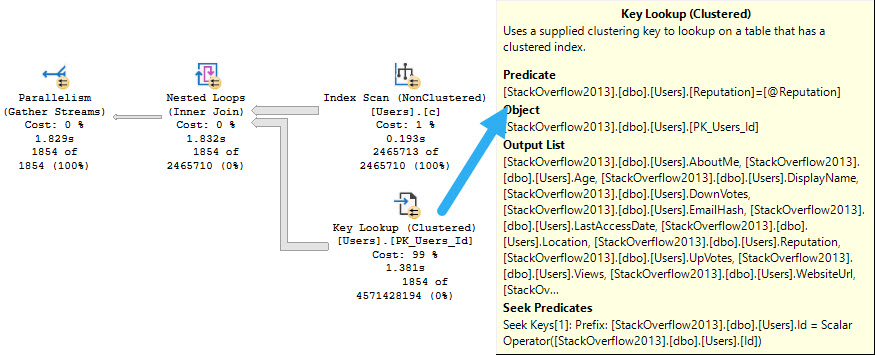
The ensuing query plan makes no sense whatsoever.

SQL Server Query Plan
i really mean it

The things are all backwards. We scan the entire nonclustered index, and do a lookup to the clustered index just to evaluate the @Reputation predicate.

The idea is bad. Please don’t do the idea.

Guiding Bright


There are two things we could do here. We could hint the query to use the index we want, sure.

But what if we change something about this index, or add another one to the table? We might want the optimizer to have a bit more freedom to choose.

I mean, I know. That has its own risks, but whatever.

We can add a plan guide that looks like this:

EXEC sp_create_plan_guide
@name = N'dammit',
@stmt = N'SELECT * FROM dbo.Users WITH (INDEX  = c) WHERE Reputation = @Reputation;',
@type = N'SQL',
@module_or_batch = NULL,
@params = N'@Reputation int',
@hints =  N'OPTION(TABLE HINT(dbo.Users))';

If we were writing proper queries where tables are aliased, it’d look like this:

EXEC sp_create_plan_guide
@name = N'dammit',
@stmt = N'SELECT u.* FROM dbo.Users AS u WITH (INDEX  = c) WHERE u.Reputation = @Reputation;',
@type = N'SQL',
@module_or_batch = NULL,
@params = N'@Reputation int',
@hints =  N'OPTION(TABLE HINT(u))';

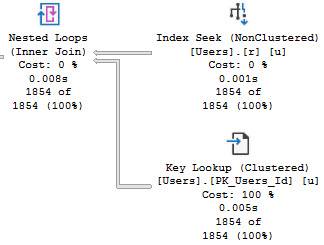
When we re-run our query, things look a lot better:

SQL Server Query Plan
focus

Thanks for reading!

Going Further


If this is the kind of SQL Server stuff you love learning about, you’ll love my training. Blog readers get 25% off the Everything Bundle — over 100 hours of performance tuning content. Need hands-on help? I offer consulting engagements from targeted investigations to ongoing retainers. Want a quick sanity check before committing to a full engagement? Schedule a call — no commitment required.
An Overlooked Benefit Of Batch Mode With Windowing Functions In SQL Server

Lavender


If you ask people who tune queries why batch mode is often much more efficient with windowing functions, they’ll tell you about the window aggregate operator.

That’s all well and good, but there’s another, often sneaky limitation of fully row mode execution plans with windowing functions.

Let’s go take a look!

Global Aggregates


One thing that causes an early serial zone in execution plans is if you use a windowing function that only has the order by

For example, let’s look at the plans for these two queries:

WITH Comments AS 
(
    SELECT
        ROW_NUMBER() 
            OVER(ORDER BY 
                     c.CreationDate) AS n
    FROM dbo.Comments AS c
)
SELECT *
FROM Comments AS c
WHERE c.n = 0;

WITH Comments AS 
(
    SELECT
        ROW_NUMBER() 
            OVER(PARTITION BY 
                     c.UserId
                 ORDER BY 
                     c.CreationDate) AS n
    FROM dbo.Comments AS c
)
SELECT *
FROM Comments AS c
WHERE c.n = 0;

The resulting estimated plans look like this, using the 140 compatibility level:

SQL Server Query Plan
oops

In the top plan, where the windowing function only has an order by, the serial zone happens immediately before the Segment operator. In the second plan, the parallel zone carries on until right before the select operator.

If you’re wondering why we’re only looking at estimated plans here, it’s because repartition streams ruins everything.

In The Year 2000


In compatibility level 150, things change a bit (yes, a window aggregate appears):

SQL Server Query Plan
merry christmas

And the window aggregate appears within the parallel zone. The parallel zone does end before the filter operator, which may or may not be a disaster depending on how restrictive your filter is, and how many rows end up at it.

Also note the distinct lack of a repartition streams operator ruining everything. We’ll talk about that tomorrow.

Thanks for reading!

Going Further


If this is the kind of SQL Server stuff you love learning about, you’ll love my training. Blog readers get 25% off the Everything Bundle — over 100 hours of performance tuning content. Need hands-on help? I offer consulting engagements from targeted investigations to ongoing retainers. Want a quick sanity check before committing to a full engagement? Schedule a call — no commitment required.

Making The Most Of Temp Tables Part 3: More Opportune Indexes To Make Queries Go Faster

I Know You


You have too many indexes on too many tables already, and the thought of adding more fills you with a dread that has a first, middle, last, and even a confirmation name.

This is another place where temp tables can save your bacon, because as soon as the query is done they basically disappear.

Forever. Goodbye.

Off to buy a pack of smokes.

That Yesterday


In yesterday’s post, we looked at how a temp table can help you materialize an expression that would otherwise be awkward to join on.

If we take that same query, we can see how using the temp table simplifies indexing.

SELECT
    p.OwnerUserId,
    SUM(p.Score) AS TotalScore,
    COUNT_BIG(*) AS records,
    CASE WHEN p.PostTypeId = 1 
         THEN p.OwnerUserId
         WHEN p.PostTypeId = 2
         THEN p.LastEditorUserId
    END AS JoinKey
INTO #Posts
FROM dbo.Posts AS p
WHERE p.PostTypeId IN (1, 2)
AND   p.Score > 100
GROUP BY CASE
             WHEN p.PostTypeId = 1 
             THEN p.OwnerUserId
             WHEN p.PostTypeId = 2 
             THEN p.LastEditorUserId
         END,
         p.OwnerUserId;

CREATE CLUSTERED INDEX c ON #Posts(JoinKey);

SELECT *
FROM #Posts AS p
WHERE EXISTS
(
    SELECT 1/0
    FROM dbo.Users AS u
    WHERE p.JoinKey = u.Id
);

Rather than have to worry about how to handle a bunch of columns across the where and join and select, we can just stick a clustered index on the one column we care about doing anything relational with to get the final result.

Thanks for reading!

Going Further


If this is the kind of SQL Server stuff you love learning about, you’ll love my training. Blog readers get 25% off the Everything Bundle — over 100 hours of performance tuning content. Need hands-on help? I offer consulting engagements from targeted investigations to ongoing retainers. Want a quick sanity check before committing to a full engagement? Schedule a call — no commitment required.

Making The Most Of SQL Server Temporary Tables Part 2: Materializing Expressions

Bad Data


A lot of the time when I see queries that are written with all sorts of gymnastics in the join or where clause and I ask some questions about it, people usually start complaining about the design of the table.

That’s fine, but when I ask about changing the design, everyone gets quiet. Normalizing tables, especially for Applications Of A Certain Age™ can be a tremendously painful project. This is why it’s worth it to get things right the first time. Simple!

Rather than make someone re-design their schema in front of me, often times a temp table is a good workaround.

Egg Splat


Let’s say we have a query that looks like this. Before you laugh, and you have every right to laugh, keep in mind that I see queries like this all the time.

They don’t have to be this weird to qualify. You can try this if you have functions like ISNULL, SUBSTRING, REPLACE, or whatever in joins and where clauses, too.

SELECT
    p.OwnerUserId,
    SUM(p.Score) AS TotalScore,
    COUNT_BIG(*) AS records
FROM dbo.Users AS u
JOIN dbo.Posts AS p
    ON u.Id = CASE 
                   WHEN p.PostTypeId = 1 
                   THEN p.OwnerUserId
                   WHEN p.PostTypeId = 2
                   THEN p.LastEditorUserId
              END
WHERE p.PostTypeId IN (1, 2)
AND   p.Score > 100
GROUP BY p.OwnerUserId;

There’s not a great way to index for this, and sure, we could rewrite it as a UNION ALL, but then we’d have two queries to index for.

Sometimes getting people to add indexes is hard, too.

People are weird. All day weird.

Steak Splat


You can replace it with a query like this, which also allows you to index a single column in a temp table to do your correlation.

SELECT
    p.OwnerUserId,
    SUM(p.Score) AS TotalScore,
    COUNT_BIG(*) AS records,
    CASE WHEN p.PostTypeId = 1 
         THEN p.OwnerUserId
         WHEN p.PostTypeId = 2
         THEN p.LastEditorUserId
    END AS JoinKey
INTO #Posts
FROM dbo.Posts AS p
WHERE p.PostTypeId IN (1, 2)
AND   p.Score > 100
GROUP BY CASE
             WHEN p.PostTypeId = 1 
             THEN p.OwnerUserId
             WHEN p.PostTypeId = 2 
             THEN p.LastEditorUserId
         END,
         p.OwnerUserId;

SELECT *
FROM #Posts AS p
WHERE EXISTS
(
    SELECT 1/0
    FROM dbo.Users AS u
    WHERE p.JoinKey = u.Id
);

Remember that temp tables are like a second chance to get schema right. Don’t waste those precious chances.

Thanks for reading!

Going Further


If this is the kind of SQL Server stuff you love learning about, you’ll love my training. Blog readers get 25% off the Everything Bundle — over 100 hours of performance tuning content. Need hands-on help? I offer consulting engagements from targeted investigations to ongoing retainers. Want a quick sanity check before committing to a full engagement? Schedule a call — no commitment required.
Making The Most Of Temp Tables In SQL Server Part 1: Fully Parallel Inserts

Sing Along


If you have a workload that uses #temp tables to stage intermediate results, and you probably do because you’re smart, it might be worth taking advantage of being able to insert into the #temp table in parallel.

Remember that you can’t insert into @table variables in parallel, unless you’re extra sneaky. Don’t start.

If your code is already using the SELECT ... INTO #some_table pattern, you’re probably already getting parallel inserts. But if you’re following the INSERT ... SELECT ... pattern, you’re probably not, and, well, that could be holding you back.

Pile On


Of course, there are some limitations. If your temp table has indexes, primary keys, or an identity column, you won’t get the parallel insert no matter how hard you try.

The demo code is available here if you’d like to test it out.

SQL Server Query Plan
amanda lear

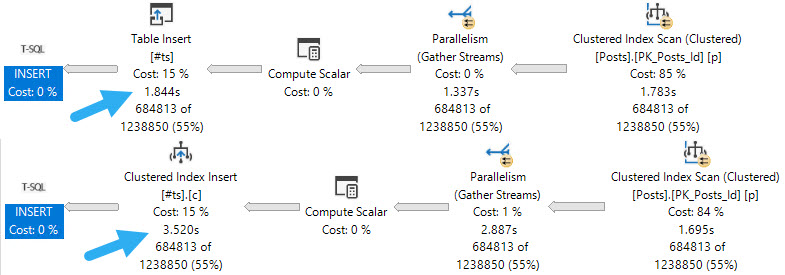
The first thing to note is that inserting into an indexed temp table, parallel or not, does slow things down. If your goal is the fastest possible insert, you may want to create the index later.

No Talent


When it comes to parallel inserts, you do need the TABLOCK, or TABLOCKX hint to get it, e.g. INSERT #tp WITH(TABLOCK) which is sort of annoying.

But you know. It’s the little things we do that often end up making the biggest differences. Another little thing we may need to tinker with is DOP.

SQL Server Query Plan
little pigs

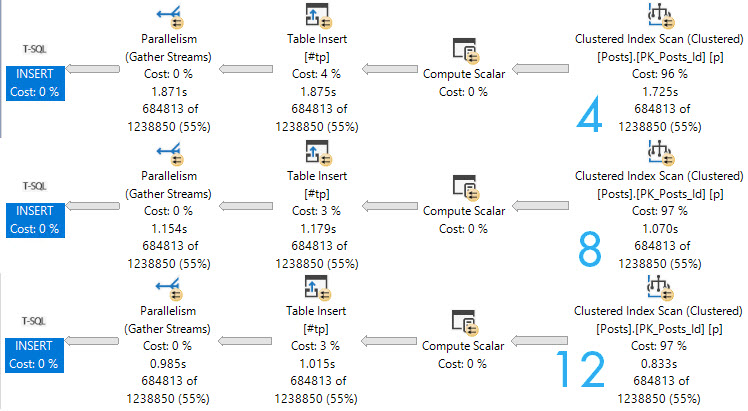
Here are the query plans for 3 fully parallel inserts into an empty, index-less temp #table. Note the execution times dropping as DOP increases. At DOP 4, the insert really isn’t any faster than the serial insert.

If you start experimenting with this trick, and don’t see noticeable improvements at your current DOP, you may need to  bump it up to see throughput increases.

Also remember that if you’re doing this with clustered column store indexes, it can definitely make things worse.

Page Supplier


Though the speed ups above at higher DOPs are largely efficiency boosters while reading from the Posts table, the speed does stay consistent through the insert.

If we crank one of the queries that gets a serial insert up to DOP 12, we lose some speed when we hit the table.

SQL Server Query Plan
oops

Next time you’re tuning a query and want to drop some data into a temp table, you should experiment with this technique.

Thanks for reading!

Going Further


If this is the kind of SQL Server stuff you love learning about, you’ll love my training. Blog readers get 25% off the Everything Bundle — over 100 hours of performance tuning content. Need hands-on help? I offer consulting engagements from targeted investigations to ongoing retainers. Want a quick sanity check before committing to a full engagement? Schedule a call — no commitment required.
An Edge Case When Working With Date Parameters In SQL Server

Wheeze Man


When people tell you that working with correct data types is important, it’s for a variety of very good reasons.

Not only can you avoid performance issues, but you can avoid strange query plan distractions, too.

Let’s look at an example for when you use date parameters against datetime columns.

Wrong And Mean


Index from outta nowhere pow!

CREATE INDEX pe ON dbo.Posts(LastEditDate);

The important thing about the LastEditDate column in the Posts table is that it’s nullable.

Not all posts will get edited. Especially mine. They’re always correct the first time.

Basically read only, if we’re being honest about things.

Or maybe it’s about 50/50.

If your columns aren’t nullable, you’ll run into far fewer problems and ambiguities.

I’d like a new data type called ABYSS. Or maybe VOID.

The Problem: Wrong Data Type And NULL Checks


DECLARE @d date = '20170601';
DECLARE @sql nvarchar(MAX) = N'
SELECT
    COUNT_BIG(*) AS records
FROM dbo.Posts AS p
WHERE p.LastEditDate > @d
AND   p.LastEditDate IS NOT NULL;'

EXEC sp_executesql @sql, 
                   N'@d date', 
                   @d;
GO

If we pass in a parameter that has a date datatype, rather than date time, an odd thing will happen if we add in a redundant IS NOT NULL check.

SQL Server Query Plan
yortsed

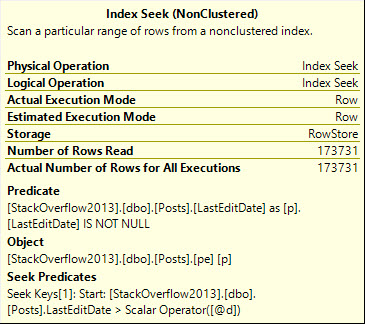
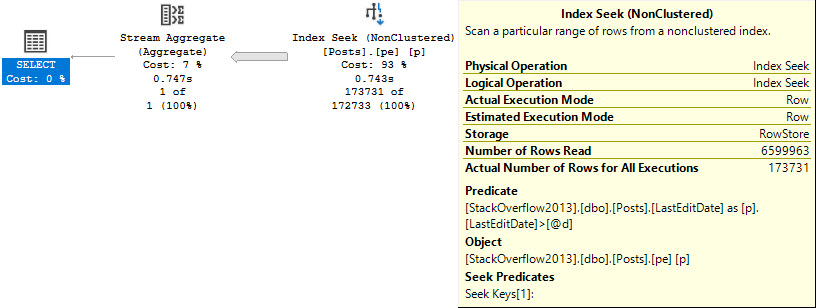
The seek predicate will only seek to the first non-NULL value, rather than immediately to the start of the range of dates we care about, which means we end up reading a lot more rows than necessary.

Note the query runtime of 743 milliseconds, and that we end up reading quite a few more rows than we return.

And here I was told Seeks are always efficient ?

Solution One: Stop Checking For NULLs


If we either stop checking for NULLs, we’ll get around the issue.

DECLARE @d date = '20170601';
DECLARE @sql nvarchar(MAX) = N'
SELECT
    COUNT_BIG(*) AS records
FROM dbo.Posts AS p
WHERE p.LastEditDate > @d;'

EXEC sp_executesql @sql, 
                   N'@d date', 
                   @d;
GO

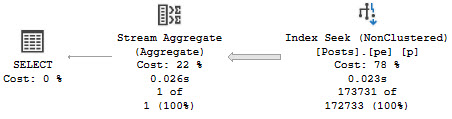
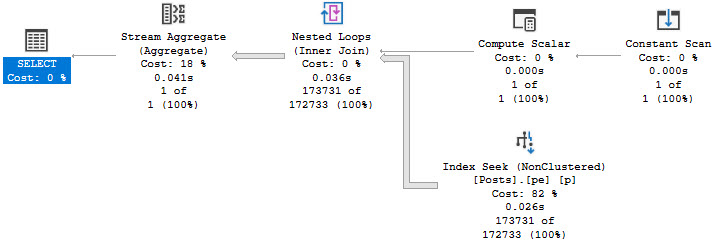
The plan for this query looks a bit different, but performance is no worse for the wear.

SQL Server Query Plan
still using the wrong datatype

Note the 25 millisecond execution time. A clear improvement over the 743 milliseconds above. Though the query plan does look a bit odd.

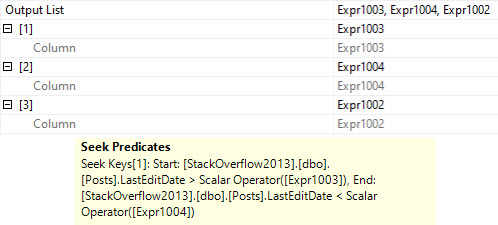
The compute scalar gins up a date range, which is checked in the seek:

SQL Server Query Plan
HELLO COMPUTER

I wonder what Expr1002 is up to.

Solution Two: Just Use The Right Datatype To Begin With


In reality, this is what we should have done from the start, but the whole point of this here blog post is to show you what can happen when you Do The Wrong Thing™

When we use the right datatype, we get a simple plan that executes quickly, regardless of the redundant NULL check.

DECLARE @d date = '20170601';
DECLARE @sql nvarchar(MAX) = N'
SELECT
   COUNT_BIG(*) AS records
FROM dbo.Posts AS p
WHERE p.LastEditDate > @d
AND   p.LastEditDate IS NOT NULL;'

EXEC sp_executesql @sql, 
                   N'@d datetime', 
                   @d;
SQL Server Query Plan
no fuss, no muss

Here, the NULL check is a residual predicate rather than the Seek predicate, which results in a seek that really seeks instead of just meandering past some NULLs.

SQL Server Query Plan
gerd jerb

Thanks for reading!

Going Further


If this is the kind of SQL Server stuff you love learning about, you’ll love my training. Blog readers get 25% off the Everything Bundle — over 100 hours of performance tuning content. Need hands-on help? I offer consulting engagements from targeted investigations to ongoing retainers. Want a quick sanity check before committing to a full engagement? Schedule a call — no commitment required.

Why You Shouldn’t Ignore Filter Operators In SQL Server Query Plans Part 2

If You Remember Part 1


We looked at a couple examples of when SQL Server might need to filter out rows later in the plan than we’d like, and why that can cause performance issues.

Now it’s time to look at a few more examples, because a lot of people find them surprising.

As much as I love surprising people, sometimes I’d much rather… not have to explain this stuff later.

Since all my showering and errands are out of the way, we should be able to get through this list uninterrupted.

Unless I get thirsty.

Max Datatypes


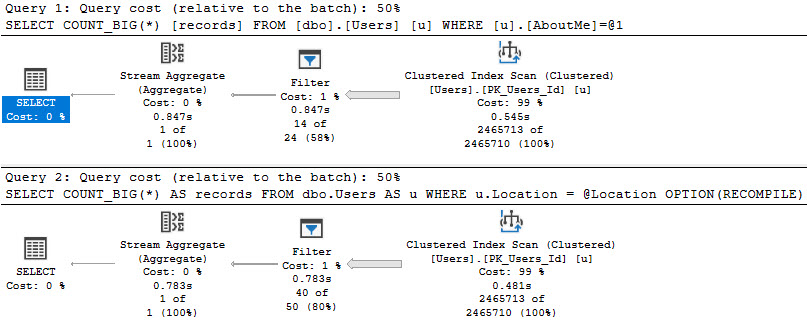
If we need to search a column that has a MAX datatype, or if we define a parameter as being a MAX datatype and search a more sanely typed column with it, both will result in a later filter operation than we may care for.

SELECT 
    COUNT_BIG(*) AS records
FROM dbo.Users AS u
WHERE u.AboutMe = N'Hi';

DECLARE @Location nvarchar(MAX) = N'here';
SELECT 
    COUNT_BIG(*) AS records 
FROM dbo.Users AS u 
WHERE u.Location = @Location 
OPTION(RECOMPILE);

Even with a recompile hint!

SQL Server Query Plan
opportunity knocked

Here we can see the value of properly defining string widths! If we don’t, we may end up reading entire indexes, and doing the work to weed out rows later.

Probably something that should be avoided.

Functions


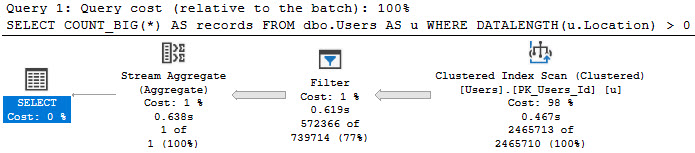
There are some built-in functions, like DATALENGTH, which can’t be pushed when used in a where clause.

Of course, if you’re going to do this regularly, you should be using a computed column to get around the issue, but whatever!

SELECT 
    COUNT_BIG(*) AS records
FROM dbo.Users AS u
WHERE DATALENGTH(u.Location) > 0;
SQL Server Query Plan
measuring up

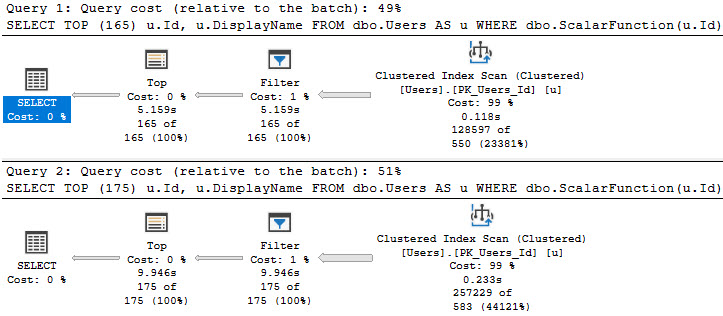
And of course, everyone’s favorite love-to-hate, the scalar UDF.

Funny thing about these, is that sometimes tiny bumps in the number of rows you’re after can make for big jumps in time.

SELECT TOP (165)
    u.Id,
    u.DisplayName
FROM dbo.Users AS u
WHERE dbo.ScalarFunction(u.Id) > 475
ORDER BY u.Id;

SELECT TOP (175)
    u.Id,
    u.DisplayName
FROM dbo.Users AS u
WHERE dbo.ScalarFunction(u.Id) > 475
ORDER BY u.Id;
SQL Server Query Plan
10 more rows, 5 more seconds

Complexity


Sometimes people (and ORMs) will build up long parameter lists, and use them to build up a long list IN clause list, and even sometimes a long OR clause list.

To replicate that behavior, I’m using code I’m keeping on GitHub in order to keep this blog post a little shorter.

To illustrate where things can get weird, aside from the Filter, I’m going to run this with a few different numbers of parameters.

EXEC dbo.Longingly @loops = 15;
EXEC dbo.Longingly @loops = 18;
EXEC dbo.Longingly @loops = 19;

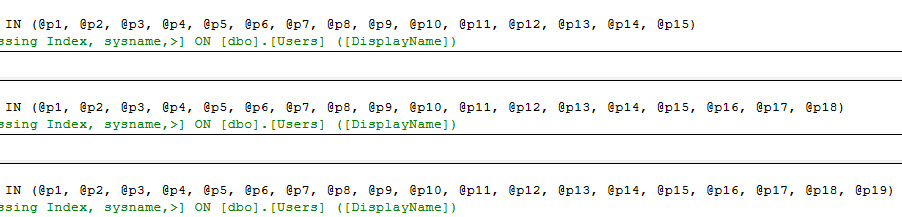
This will generate queries with different length IN clauses:

SQL Server Missing Index Request
bigger than others

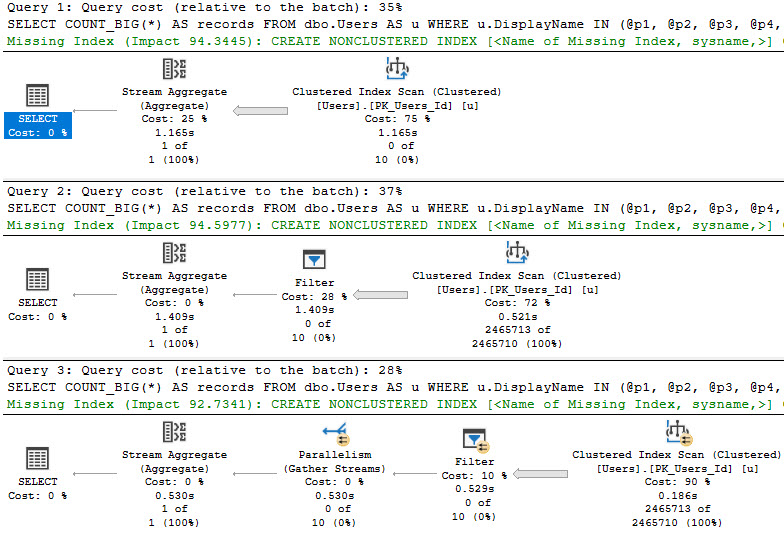
Which will result in slightly different query plans:

SQL Server Query Plan
THREE!

We can see some tipping points here.

  • At 15 parameters, we get a scan with a stream aggregate
  • At 18 parameters, we get a scan with a filter
  • At 19 parameters, we get a parallel scan with a filter

Parallelism to the rescue, again, I suppose.

Thanks for reading!

Going Further


If this is the kind of SQL Server stuff you love learning about, you’ll love my training. Blog readers get 25% off the Everything Bundle — over 100 hours of performance tuning content. Need hands-on help? I offer consulting engagements from targeted investigations to ongoing retainers. Want a quick sanity check before committing to a full engagement? Schedule a call — no commitment required.
Why You Shouldn’t Ignore Filter Operators In SQL Server Query Plans Part 1

Source Of Frustration


Ahem.

*taps mic*

When we write queries that need to filter data, we tend to want to have that filtering happen as far over to the right in a query plan as possible. Ideally, data is filtered when we access the index.

Whether it’s a seek or  a scan, or if it has a residual predicate, and if that’s all appropriate isn’t really the question.

In general, those outcomes are preferable to what happens when SQL Server is unable to do any of them for various reasons. The further over to the right in a query plan we can reduce the number of rows we need to contend with, the better.

There are some types of filters that contain something called a “startup expression”, which are usually helpful. This post is not about those.

Ain’t Nothin’ To Do


There are some cases when you have no choice but to rely on a Filter to remove rows, because we need to calculate some expression that we don’t currently store the answer to.

For example, having:

SELECT 
    p.OwnerUserId,
    COUNT_BIG(*) AS records
FROM dbo.Posts AS p
JOIN  dbo.Comments AS c
    ON c.PostId = p.Id
JOIN dbo.Votes AS v
    ON v.PostId = p.Id
GROUP BY p.OwnerUserId
HAVING COUNT_BIG(*) > 2147483647;

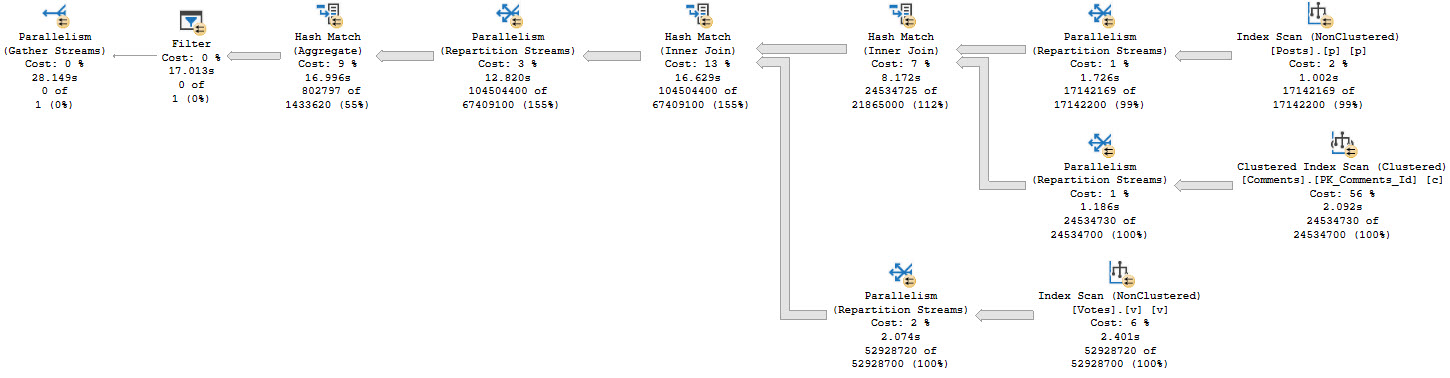
We don’t know which rows might qualify for the count filter up front, so we need to run the entire query before filtering things out:

SQL Server Query Plan
this cold night

There’s a really big arrow going into that Filter, and then nothing!

Likewise, filtering on the result of a windowing function will get you a similar execution plan.

Of course, there’s not a lot to be done about these Filters, is there?

Unless you pre-compute things somewhere else, you have to figure them out at runtime.

Leftish Fetish


If you write yourself a left join, Filters may become more common, too.

You might do something terrible:

SELECT 
    COUNT_BIG(*) AS records
FROM dbo.Users AS u
LEFT JOIN dbo.Posts AS p
    ON p.OwnerUserId = u.Id
WHERE DATEDIFF(YEAR, p.CreationDate, p.LastActivityDate) > 5;

Or you might do something that seems reasonable:

SELECT 
    COUNT_BIG(*) AS records
FROM dbo.Users AS u
LEFT JOIN dbo.Posts AS p
    ON p.OwnerUserId = u.Id
WHERE p.Id IS NULL;

But what you get is disappointing!

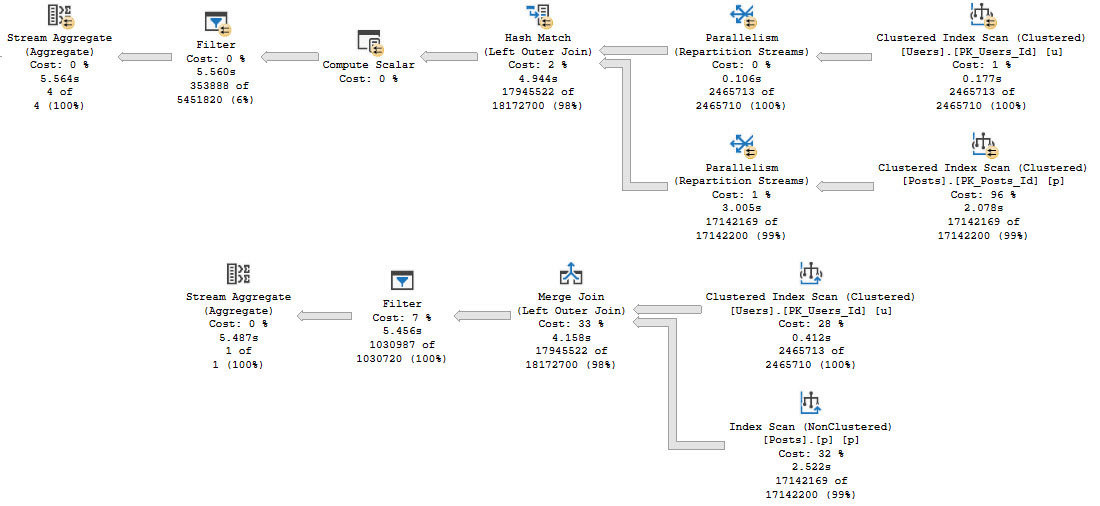
SQL Server Query Plan
not a gif

What we care about here is that, rather than filtering rows out when we touch indexes or join the tables, we have to fully join the tables together, and then eliminate rows afterwards.

This is generally considered “less efficient” than filtering rows earlier. Remember when I said that before? It’s still true.

Click the links above to see some solutions, so you don’t feel left hanging by your left joins.

The Message


If you see Filters in query plans, they might be for a good reason, like calculating things you don’t currently know the answer to.

They might also be for bad reasons, like you writing a query in a silly way.

There are other reasons they might show up too, that we’ll talk about tomorrow.

Why tomorrow? Why not today? Because if I keep writing then I won’t take a shower and run errands for another hour and my wife will be angry.

Thanks for reading!

Going Further


If this is the kind of SQL Server stuff you love learning about, you’ll love my training. Blog readers get 25% off the Everything Bundle — over 100 hours of performance tuning content. Need hands-on help? I offer consulting engagements from targeted investigations to ongoing retainers. Want a quick sanity check before committing to a full engagement? Schedule a call — no commitment required.
How To Avoid SQL Injection In Dynamic SQL Queries In SQL Server

Injectables


Dynamic SQL is always a hot topic. I love using it. Got a lot of posts about it.

Recently, while answering a question about it, it got me thinking about safety when accepting table names as user input, among other things.

The code in the answer looks like this:

CREATE OR ALTER PROCEDURE dbo.SelectWhatever (@SchemaName sysname, @TableName sysname)
AS
BEGIN
SET NOCOUNT, XACT_ABORT ON;

DECLARE @SafeSchema sysname = NULL,
        @SafeTable sysname = NULL,
        @SQL NVARCHAR(MAX) = N'';

SELECT @SafeSchema = SCHEMA_NAME(t.schema_id),
       @SafeTable  = t.name
FROM sys.tables AS t
WHERE t.schema_id = SCHEMA_ID(ISNULL(@SchemaName, 'dbo'))
AND   t.name = ISNULL(@TableName, 'SomeKnownTable');

IF (@SafeSchema IS NULL)
BEGIN
    RAISERROR('Invalid schema: %s', 0, 1, @SchemaName) WITH NOWAIT;
    RETURN;
END;

IF (@SafeTable IS NULL)
BEGIN
    RAISERROR('Invalid table: %s', 0, 1, @TableName) WITH NOWAIT;
    RETURN;
END;


SET @SQL += N'
SELECT TOP (100) *
/*dbo.SelectWhatever*/
FROM ' + QUOTENAME(@SafeSchema) 
       + N'.'
       + QUOTENAME(@SafeTable)
       + N';';

RAISERROR('%s', 0, 1, @SQL) WITH NOWAIT;
EXEC sys.sp_executesql @SQL;

END;

Sure, there are other things that I could have done, like used OBJECT_ID() and SCHEMA_ID() functions to validate existence, but I sort of like the idea of hitting the system view, because if you follow that pattern, you could expand on it if you need to accept and validate column names, too.

Expansive


Yeah, I’m using some new-version-centric stuff in here, because I uh… I can. Thanks.

If you need examples of how to split strings and create CSVs, get them from the zillion other examples on the internet.

CREATE OR ALTER PROCEDURE dbo.SelectWhatever (@SchemaName sysname, @TableName sysname, @ColumnNames NVARCHAR(MAX))
AS
BEGIN
SET NOCOUNT, XACT_ABORT ON;

DECLARE @SafeSchema sysname = NULL,
        @SafeTable sysname = NULL,
        @SafeColumns NVARCHAR(MAX) = NULL,
        @SQL NVARCHAR(MAX) = N'';

SELECT @SafeSchema = SCHEMA_NAME(t.schema_id),
       @SafeTable  = t.name
FROM sys.tables AS t
WHERE t.schema_id = SCHEMA_ID(ISNULL(@SchemaName, 'dbo'))
AND   t.name = ISNULL(@TableName, 'SomeKnownTable');

SELECT @SafeColumns = STRING_AGG(QUOTENAME(c.name), ',')
FROM sys.columns AS c
WHERE c.object_id = OBJECT_ID(@SafeSchema + N'.' + @SafeTable)
AND   c.name IN ( SELECT TRIM(ss.value) 
                  FROM STRING_SPLIT(@ColumnNames, ',') AS ss );


IF (@SafeSchema IS NULL)
BEGIN
    RAISERROR('Invalid schema: %s', 0, 1, @SchemaName) WITH NOWAIT;
    RETURN;
END;

IF (@SafeTable IS NULL)
BEGIN
    RAISERROR('Invalid table: %s', 0, 1, @TableName) WITH NOWAIT;
    RETURN;
END;

IF (@SafeColumns IS NULL)
BEGIN
    RAISERROR('Invalid column list: %s', 0, 1, @ColumnNames) WITH NOWAIT;
    RETURN;
END;


SET @SQL += N'
SELECT TOP (100) ' 
       + @SafeColumns
       + N'
/*dbo.SelectWhatever*/
FROM ' + QUOTENAME(@SafeSchema) 
       + N'.'
       + QUOTENAME(@SafeTable)
       + N';';

RAISERROR('%s', 0, 1, @SQL) WITH NOWAIT;
EXEC sys.sp_executesql @SQL;

END;

Normally I’d raise hell about someone using a function like STRING_SPLIT in a where clause, but for simple DMV queries you’re not likely to see a significant perf hit.

There’s a lot of stuff you’ll see in DMV queries that are not okay in normal queries.

Some explanations


It would be nice if we had a dynamic SQL data type that did some of this stuff for us. Sort of like XML document validation with less obtuse error messages.

Until that time which will never come, we have to do the hard work. One way to make your dynamic SQL a little bit safer is to keep user inputs as far away from the execution as you can.

In the above example, I declare a separate set of variables to hold values, and only use what a user might enter in non-dynamic SQL blocks, where they can’t do any harm.

If there’s anything goofy in them, the “@Safe” variables end up being NULL, and an error is thrown.

Also, I’m using QUOTENAME on every individual object: Schema, Table, and Column, to cut down on any potential risks of naughty object values being stored there. If I had to do this for a database name, that’d be an easy add on, using sys.databases.

If you’ve got to work with stringy input for dynamic SQL, this is one way to make the ordeal a bit more safe. You can also extend that to easier to locate key values, like so:

CREATE PROCEDURE dbo.SaferStringSearch (@UserEquals NVARCHAR(40) = NULL, @UserLike NVARCHAR(40))
AS
SET NOCOUNT, XACT_ABORT ON
BEGIN

CREATE TABLE #ids(id INT NOT NULL PRIMARY KEY);

INSERT #ids WITH (TABLOCK) ( id )
SELECT u.Id
FROM dbo.Users AS u
WHERE u.DisplayName = @UserEquals
UNION
SELECT u.Id
FROM dbo.Users AS u
WHERE u.DisplayName LIKE @UserLike;

DECLARE @SQL NVARCHAR(MAX) = N'
SELECT p.*
FROM dbo.Posts AS p
WHERE EXISTS
(
    SELECT 1/0
    FROM #ids AS i
    WHERE i.id = p.OwnerUserId
);
';

EXEC sp_executesql @SQL;

END;

I get that this isn’t the most necessary use of dynamic SQL in the world, it’s really just a simple way to illustrate the idea.

Stay Safe


If you’ve got to pass strings to dynamic SQL, these are some ways to make the process a bit safer.

In the normal course of things, you should parameterize as much as you can, of course.

For search arguments, that’s a no-brainer. But for objects, you can’t do that. Why? I don’t know.

I’m not a programmer, after all.

Thanks for reading!

Going Further


If this is the kind of SQL Server stuff you love learning about, you’ll love my training. Blog readers get 25% off the Everything Bundle — over 100 hours of performance tuning content. Need hands-on help? I offer consulting engagements from targeted investigations to ongoing retainers. Want a quick sanity check before committing to a full engagement? Schedule a call — no commitment required.