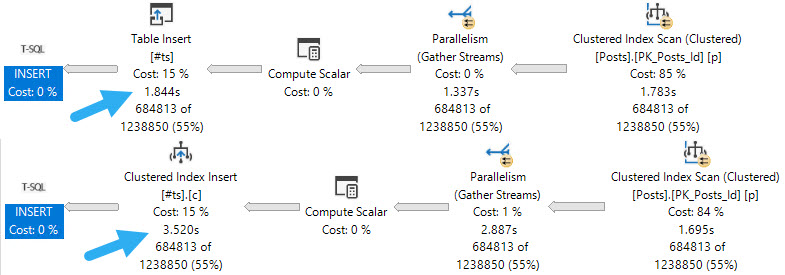
If you have a workload that uses #temp tables to stage intermediate results, and you probably do because you’re smart, it might be worth taking advantage of being able to insert into the #temp table in parallel.
If your code is already using the SELECT ... INTO #some_table pattern, you’re probably already getting parallel inserts. But if you’re following the INSERT ... SELECT ... pattern, you’re probably not, and, well, that could be holding you back.
Pile On
Of course, there are some limitations. If your temp table has indexes, primary keys, or an identity column, you won’t get the parallel insert no matter how hard you try.
The first thing to note is that inserting into an indexed temp table, parallel or not, does slow things down. If your goal is the fastest possible insert, you may want to create the index later.
No Talent
When it comes to parallel inserts, you do need the TABLOCK, or TABLOCKX hint to get it, e.g. INSERT #tp WITH(TABLOCK) which is sort of annoying.
But you know. It’s the little things we do that often end up making the biggest differences. Another little thing we may need to tinker with is DOP.
little pigs
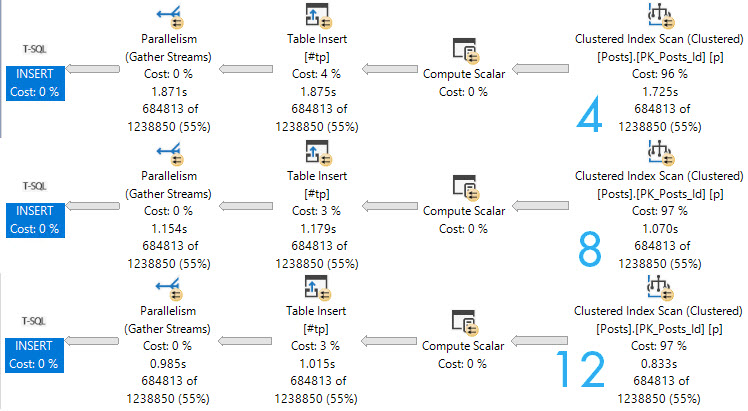
Here are the query plans for 3 fully parallel inserts into an empty, index-less temp #table. Note the execution times dropping as DOP increases. At DOP 4, the insert really isn’t any faster than the serial insert.
If you start experimenting with this trick, and don’t see noticeable improvements at your current DOP, you may need to bump it up to see throughput increases.
Though the speed ups above at higher DOPs are largely efficiency boosters while reading from the Posts table, the speed does stay consistent through the insert.
If we crank one of the queries that gets a serial insert up to DOP 12, we lose some speed when we hit the table.
oops
Next time you’re tuning a query and want to drop some data into a temp table, you should experiment with this technique.
Thanks for reading!
Going Further
If this is the kind of SQL Server stuff you love learning about, you’ll love my training. Blog readers get 25% off the Everything Bundle — over 100 hours of performance tuning content. Need hands-on help? I offer consulting engagements from targeted investigations to ongoing retainers. Want a quick sanity check before committing to a full engagement? Schedule a call — no commitment required.
So you’re that odd soul who has been listening to rumors about table variables. Perhaps things about them only being in memory, or that they’re okay to use if you only put less than some arbitrary number of rows in them.
Those things are both wrong. But of course, my favorite rumor is the one about arbitrary numbers of rows being safe.
Ouch! What a terrible performance
Let’s do everything in our power to help SQL Server make a good guess.
We’ll create a couple indexes:
CREATE INDEX free_food ON dbo.Posts(OwnerUserId);
CREATE INDEX sea_food ON dbo.Comments(UserId);
Those stats’ll be so fresh you could make tartare with them.
We’ll create our table variable with a primary key on it, which will also be the clustered index.
DECLARE @t TABLE( id INT PRIMARY KEY );
INSERT @t ( id )
VALUES(22656);
And finally, we’ll run the select query with a recompile hint. Recompile fixes everything, yeah?
SELECT AVG(p.Score * 1.) AS lmao
FROM   @t AS t
JOIN   dbo.Posts AS p
    ON p.OwnerUserId = t.id
JOIN   dbo.Comments AS c
    ON c.UserId = t.id
OPTION(RECOMPILE);
GO
How does the query do for time? Things start off okay, but keep the cardinality estimate in mind.
Get the hook
But quickly go downhill.
Your granny lied!
Fish are dumb, dumb, dumb
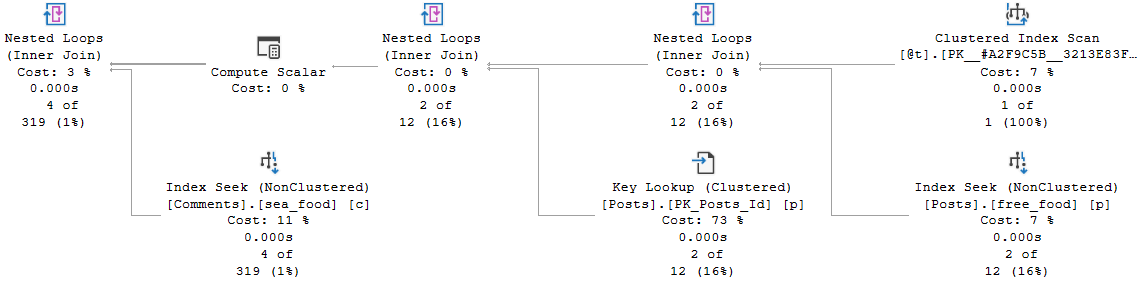
The whole problem here is that, even with just one row in the table variable, an index on the one column in the table variable, and a recompile hint on the query that selects from the table variable, the optimizer has no idea what the contents of that single row are.
That number remains a mystery, and the guess made ends up being wrong by probably more than one order of magnitude. Maybe even an order of manure.
Table variables don’t gather any statistical information about what’s in the column, and so has no frame of reference to make a better cardinality estimate on the joins.
If we insert a value that gets far fewer hits in both the Posts and Comments tables (12550), the estimate doesn’t really hurt. But note that the guesses across all operators are exactly the same.
You don’t swing it like you used to, man
C’est la vie mon ami
You have a database. Data is likely skewed in that database, and there are already lots of ways that you can get bad guesses. Parameter sniffing, out of date stats, poorly written queries, and more.
Databases are hard.
The point is that if you use table variables outside of carefully tested circumstances, you’re just risking another bad guess.
All of this is tested on SQL Server 2019, with table variable deferred compilation enabled. All that allows for is the number of rows guessed to be accurate. It makes no attempt to get the contents of those rows correct.
So next time you’re sitting down to choose between a temp table and a table variable, think long and hard about what you’re going to be doing with it. If cardinality esimation might be important, you’re probably going to want a temp table instead.
Thanks for reading!
Going Further
If this is the kind of SQL Server stuff you love learning about, you’ll love my training. Blog readers get 25% off the Everything Bundle — over 100 hours of performance tuning content. Need hands-on help? I offer consulting engagements from targeted investigations to ongoing retainers. Want a quick sanity check before committing to a full engagement? Schedule a call — no commitment required.
The important thing to understand about parallelism is it’s great when appropriate. Striking a balance between what should go parallel, the CPU usage it’s allowed, and what should stay serial can be tough.
It can be especially difficult when parameter sniffing comes into play. Here are a couple scenarios:
For a small amount of data, a serial query plan runs quickly and uses relatively few resources
For a large amount of data, a query re-uses the serial plan and runs for >20 seconds
For a small amount of data, a re-used parallel plan overloads the server due to many concurrent sessions
For a large amount of data, the re-used parallel plan finishes in 2-3 seconds
What do you do? Which plan do you favor? It’s an interesting scenario. Getting a single query to run faster by going parallel may seem ideal, but you need extra CPU, and potentially many more worker threads to accomplish that.
In isolation, you may think you’ve straightened things out, but under concurrency you run out of worker threads.
There are ways to address this sort of parameter sniffing, which we’ll get to at some point down the line.
Wrecking Crew
One way to artificially slow down a query is to use some construct that will inhibit parallelism when it would be appropriate.
There are some exotic reasons why a query might not go parallel, but quite commonly scalar valued functions and inserts to table variables are the root cause of otherwise parallel-friendly queries staying single-threaded and running for long times.
While yes, some scalar valued functions can be inlined in SQL Server 2019, not all can. The list of ineligible constructs has grown quite a bit, and will likely continue to. It’s a feature I love, but it’s not a feature that will fix everything.
Databases are hard.
XML Fetish
You don’t need to go searching through miles of XML to see it happening, either.
All you have to do is what I’ve been telling you all along: Look at those operator properties. Either hit F4, or right click and choose the properties of a select operator.
nonparallelplanreasonokaybutwhycanyoupleasetellme
Where I see these performance surprises! pop up is often when either:
Developers develop on a far smaller amount of data than production contains
Vendors have clients with high variance in database size and use
In both cases, small implementations likely mask the underlying performance issues, and they only pop up when run against bigger data. The whole “why doesn’t the same code run fast everywhere” question.
Well, not all features are created equally.
Simple Example
This is where table variables catch people off-guard. Even the “I swear I don’t put a lot of rows in them” crowd may not realize that the process to get down to very few rows is impacted by these @features.
SELECT TOP (1000) c.Id
FROM dbo.Comments AS c
ORDER BY c.Score DESC;
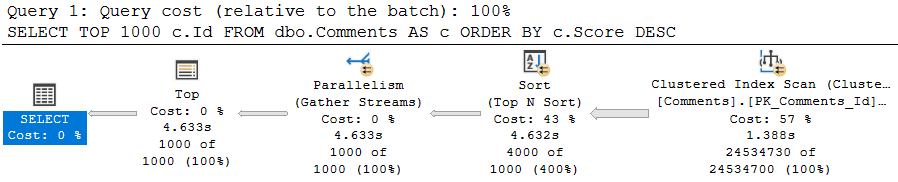
This query, on its own, is free to go parallel — and it does! It takes about 4.5 seconds to do so. It’s intentionally simple.
don’t @ me
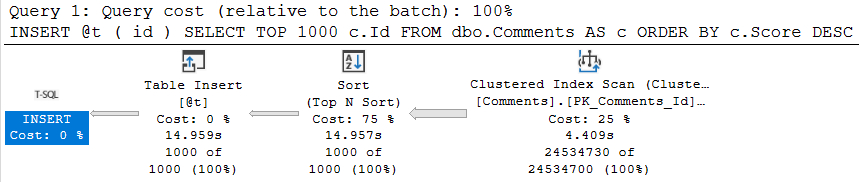
Once we try to involve a @table variable insert, parallelism goes away, time increases 3 fold, and the non-parallel plan reason is present in the plan XML.
DECLARE @t TABLE(id INT);

INSERT @t ( id )
SELECT TOP 1000 c.Id
FROM dbo.Comments AS c
ORDER BY c.Score DESC;
well.
Truesy
This can be quite a disappointing ramification for people who love to hold themselves up as responsible table variable users. The same will occur if you need to update or delete from a @table variable. Though less common, and perhaps less in need of parallelism, I’m including it here for completeness.
This is part of why multi-statement table valued functions, which return @table variables, can make performance worse.
To be clear, this same limitation does not exist for #temp tables.
Anyway, this post went a little longer than I thought it would, so we’ll look at scalar functions in tomorrow’s post to keep things contained.
Thanks for reading!
Going Further
If this is the kind of SQL Server stuff you love learning about, you’ll love my training. Blog readers get 25% off the Everything Bundle — over 100 hours of performance tuning content. Need hands-on help? I offer consulting engagements from targeted investigations to ongoing retainers. Want a quick sanity check before committing to a full engagement? Schedule a call — no commitment required.
Rather than just give you that one row estimate, it’ll wait until you’ve loaded data in, and then it will use table cardinality for things like joins to the table variable. Just be careful when you use them in stored procedures.
That can be a lot more helpful than what you currently get, but the guesses aren’t quite as helpful when you start using a where clause, because there still aren’t column-level statistics. You get the unknown guess for those.
How Can You Test It Out Before SQL Server 2019?
You can use #temp tables.
That’s right, regular old #temp tables.
They’ll give you nearly the same results as Table Variable Deferred Compilation in most cases, and you don’t need trace flags, hints, or or SQL Server 2019.
Heck, you might even fall in love with’em and live happily ever after.
The Fine Print
I know, some of you are out there getting all antsy-in-the-pantsy about all the SQL Jeopardy differences between temp tables and table variables.
I also realize that this may seem overly snarky, but hear me out:
Sure, there are some valid reasons to use table variables at times. But to most people, the choice about which one to use is either a coin flip or a copy/paste of what they saw someone else do in other parts of the code.
In other words, there’s not a lot of thought, and probably no adequate testing behind the choice. Sort of like me with tattoos.
Engine enhancements like this that benefit people who can’t change the code (or who refuse to change the code) are pretty good indicators of just how irresponsible developers have been with certain ✌features✌. I say this because I see it week after week after week. The numbers in Azure had to have been profound enough to get this worked on, finally.
I can’t imagine how many Microsoft support tickets have been RCA’d as someone jamming many-many rows in a table variable, with the only reasonable solution being to use a temp table instead.
I wish I could say that people learned the differences a lot faster when they experienced some pain, but time keeps proving that’s not the case. And really, it’s hardly ever the software developers who feel it with these choices: it’s the end users.
Thanks for reading!
Going Further
If this is the kind of SQL Server stuff you love learning about, you’ll love my training. Blog readers get 25% off the Everything Bundle — over 100 hours of performance tuning content. Need hands-on help? I offer consulting engagements from targeted investigations to ongoing retainers. Want a quick sanity check before committing to a full engagement? Schedule a call — no commitment required.
In this video, I explore the often-maligned table variables in SQL Server and delve into their pros and cons. I start by comparing table variables to temporary tables through a series of stored procedures that insert data into both types of objects and measure execution times. The results show that for high-frequency, low-row operations, table variables can outperform temp tables due to reduced overhead. However, when dealing with indexes and needing column-level statistics for better query optimization, temp tables shine, as demonstrated by a scenario where the temp table’s plan was significantly more accurate and efficient than the table variable’s. I conclude by highlighting that while table variables have their uses, especially in scenarios requiring frequent execution on small datasets, they should be used judiciously considering the potential performance implications of incorrect query plans.
Full Transcript
I was going to write a song about table variables, and then I realized that I have no songwriting abilities whatsoever. That rhyming with variables is unpleasant. Not something that I would wish on anyone in this difficult time. So, I need to turn off query plans according to this. I don’t know what drunk wrote this thing, but whatever. So, table variables have, I think, a deservedly bad reputation for the most part. You can get terrible estimates from them, and even with recompile hints or trace flags, you still don’t get column level statistically information about the distribution of values in your table variables. You’ll get table cardinal. You’ll know how many rows are in the table, but you won’t know the breakdown of the values in those rows.
And also, when you modify a table variable, modifications are all forced to run serially, unless you’re sneaky about it. I have a couple blog posts about those things here. Hopefully, those bit.ly links will be easy enough for you to remember. They are case sensitive, though, so if you’re going to get your little fingers to work, remember to capitalize the correct letters on those. I’ll leave those there and count to a number beyond your imagination as quickly as I can, so that you can memorize them for later. So, first, I want to show you where table variables can be better than temp tables. Like, they have a bad reputation, but sometimes they can be good, too. So, I’m going to create two stored procedures here, and I promise I’m not farting that’s a motorcycle or something.
But I have these two stored procedures here. This first one is called temp table test, where we’re going to insert some stuff into a temp table, the pound sign, and then I have the exact same thing, except we’re going to use a table variable, the at sign table. So, I’m going to go and I’m going to create these two stored procedures. I’m pretty sure I already have them created, but what the hell. Let’s make double short. And then what I’m going to do, and this is why I have query plans turned off, if we’re being honest about things, I’m going to run a test where, for 50,000 iterations, I’m going to, as quickly as possible, execute the temp table stored procedure, and then execute the table variable stored procedure.
I’m going to see which one finishes more quickly. And while I do that, oh, I went up too far. Ha ha! My mouse wheel has been a little wonky lately, but I have both of those. Okay, good. And, well, I run that. I want to bring up that with SQL Server 2019, you do get better table cardinality estimates for table variables, but you still don’t get column level statistical information from table variables. And I’m pretty sure I have a post about that coming up. But this is SQL Server 2017. Not RTM. It’s just, SSMS doesn’t report CU levels for some reason. Microsoft made this big stink of, oh, we’re not a servicing model. We’re not going to do more service packs.
But SSMS is still like RTM, despite the fact that I am on CU 19, SQL Server 2017. Not weird or confusing at all. But we can see, now with these results returned, that the store procedure in the loop that inserted into the temp table, rather, took 17 and a half seconds. And the store procedure that did the same thing with the table variable took five seconds. Now, there is overhead with temp tables. And that overhead is unfortunately where the performance comes from. I know generating the statistics, all that other good stuff, that has overhead when you do it. And when you do it a lot, well, you have to do it a lot. That adds up.
So, if you are, if, and this is a thing that I learned from Michael, Mr. Michael J. Swart, that if you have very, very high frequency execution code, table variables can be a lot better to use than temp tables. Now, this also assumes that plan shape does not matter, that there are no performance issues that could come from, you know, say, joining that temporary object off somewhere else, putting a lot of rows in it and going to do something. You know, it’s just, there’s a lot of circumstances where, you know, like the overhead, the overhead might be worth it.
But, but if you just have very high frequency execution code operating on a small number of rows, and there is no, like, a query optimization impact to the bad guesses that come from table variables, then it might not be the worst thing in the world to use them in those scenarios. I mean, they are there for a reason. Microsoft didn’t devote developer time to them for no reason. I mean, maybe, maybe, maybe, maybe, maybe it could have been like a, a code portability thing between other competitive database platforms and SQL Server, but who knows at the time?
I have heard nothing about the Oracle checklist from people at Microsoft, so whatever. Now, let’s look, let’s look at when table variables are less good. All right, when they’re not quite as hot.
So the first thing I’m going to do, actually I should put a little, put a little space in there, happy little space. No mistakes, just happy little spaces. So I’m going to create a couple indexes on the post table and the comments table on the owner user ID and ID.
And the first thing I’m going to do, the first thing I want to show you rather, is, well, after these indexes create, the first thing I’m going to show you, is that if we create a temp table, when we insert values into that temp table. Now, this is where the column level statistics can matter a lot for temp tables and table variables.
The first thing I’m going to, the first value I’m going to put in there is John Skeet’s ID. John Skeet is legendary. John Skeet has many questions, well, not many questions, but he has many answers, many comments.
He is quite prolific in the Stack Overflow data. And the other set of values in there that I’m going to put in is people who barely use the site, people with a reputation of one, ordered by how recently they created their account.
So people who are not avid site users, if they have any answers, I’d be surprised. They might have like one question. Some people sign up, ask a question and leave.
Some people sign up, then do nothing. They’re just like, oh, I have an account. I was going to answer the data to do something else. I was wrong. You know, there’s like lots of stuff. So the first thing I’m going to do is now that those indexes are done is I’m going to stick those values into a temp table, pound sign T temp table, and then I’m going to get a count from those.
All right, so I’m going to do that. I’m going to turn execution plans back on. And I’m going to prove to you that this is a reasonably fast executing piece of code. The insert takes 232 milliseconds.
There are perhaps things we could do to make that better. I hadn’t really thought about it too much. And then the join down here is a reasonably fast join at 0.016 milliseconds. Now, if we were to repeat this experiment with a table variable, it would take a long time.
All right, so if I do the same thing here, I’m going to run that. But I’m not going to wait to show you the results. I’m going to show you a saved copy of the plan.
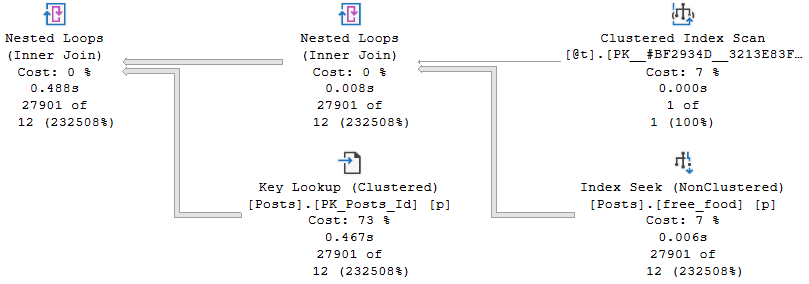
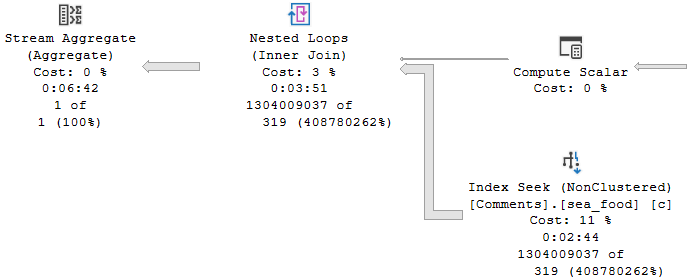
Not because this is slow. This part is fine. The insert is fine. What’s not fine is the query that we run next, which runs for, your eyes are not lying to you, five minutes and four seconds. And we have our table variable guess here.
We have our index seat guess here, which is not so good. We guess 24 O’s and we get 2700, 901. And then we go into this nested loops join, expecting 24 O’s, getting 27901.
And then we spend four and a half minutes in a nested loop join, going and getting values out of the comments table. When we are expecting 638 and we got 1304009037. I’m not going to bother trying to figure out what that number is.
It is a big number. And this takes a very long time. This was not a happy time for this query running. And the reason that we got such a better guess from the temp table was because we got column level statistics about what values were in there.
We were able to use those statistics to come up with a better joined execution plan. And we were able to use those to not end up running in nested loops hell for five minutes. Crazy that, isn’t it?
Crazy. Absolutely insane. Crazy. So, if you’re going to use table variables, high frequency execution is one of the primary things that I would look for in a workload that might benefit from table variables. But also you need to look at how you’re going to use table variables afterwards.
If I took those two store procedures that I showed you earlier and I said, hey, we’re going to see what happens when we run this in a loop. Well, this one getting to 50,000 executions at five minutes per execution, that’s not happening. I’m not sitting here for that long.
I don’t love you that much. There are limits to my love and patience. The temp table one would finish rather quickly, even for 50,000 executions. So there are things to consider with how we’re using the table variable down the line.
And if column level statistical information might help those activities further on down the line. So, there we have it. For the most part, if we care about performance and statistical information, then we would probably want to err on the side of temp tables.
If we care about speed of execution, the frequency of execution, then we might want to use table variables. This changes a little bit, like I said, in SQL Server 2019. But I have another post about that where I address that specifically.
Anyway, that is all I have to say here. I’m going to stop talking. I’m going to hit the stop button. I’m going to eat some cashews and probably record another video once I get done feeling gross about cashew things.
Quarantine is not fun. Goodbye.
Going Further
If this is the kind of SQL Server stuff you love learning about, you’ll love my training. Blog readers get 25% off the Everything Bundle — over 100 hours of performance tuning content. Need hands-on help? I offer consulting engagements from targeted investigations to ongoing retainers. Want a quick sanity check before committing to a full engagement? Schedule a call — no commitment required.
In this video, I dive into the world of table variables in SQL Server 2019, exploring how they’ve been improved but still come with their own set of challenges. Specifically, I highlight the issue of cardinality estimation for table variables, which can lead to suboptimal query plans due to a lack of column-level statistics. By comparing table variables with temporary tables, I demonstrate that while SQL Server 2019 has made significant strides in improving these estimates, there are still scenarios where you might face performance issues. The video showcases how using temporary tables instead can provide more accurate cardinality estimates, but also points out the downsides of this approach, such as increased execution time and complexity.
Full Transcript
Erik Darling here to start a line of hand lotion reviews. No kidding. Though that would be more topical. And if you don’t see the pun that just occurred there, topical reviews of hand lotion, I think you should stop watching. You should get a new hobby. You should go collect rocks or something. Go investigate slime. I’m kidding. I’m sure it’s fine. Not everyone is doing it. You should go check it out. Now that isn’t the puns. Cool. So this video is not about hand lotion though. If this counts as sponsorship, then whatever. This video is about table variables, sort of generally, but more specifically table variables in SQL Server 2019. Now, in SQL Server 2019, Microsoft has made attempts to fix a lot of common problems that people will have. hit with query performance. And one of those issues is with table variable cardinality estimation.
In versions prior to SQL Server 2019, unless you applied a recompile hint or some goofy trace flag, you would get a one row estimate from a table variable. Now that changes a little bit with multi-statement table valued functions which are turn table variables. We’re not going to get into all that detail here. Just know that they are different. Now in SQL Server 2019, what happens is we pause after we insert data into a table variable. Now there’s a little bit of a branch here. So if it’s a stored procedure, you will pause. You will look at the number of rows that were inserted into the table variable and then SQL Server will cache that guess. So if you’re thinking to yourself, it sounds like table variables just became a new source of parameter sniffing. Well, golly and gosh, you are correct. In ad hoc queries, you will pause for each execution and SQL Server will look at the number of rows that went in and then we will, of course, just guess the number of rows that went into the table. Now an important thing that’s missing from all versions of SQL Server and across all table variables is that we have no column level information about the data that got put into our table variable.
We do not have a statistics histogram. We have nothing of the sort. We do not have any information that you would find in a normal statistics object that would tell you about the data distribution, distinctness, rows, average rows, range rows, all that good stuff. We don’t get that no matter what.
All we get is table cardinality. So while that is an improvement, there are times when that guess can go horrifically. Well, when that table cardinality guess just isn’t what makes a big difference. Sometimes it is, other times it isn’t. So I have this query. But I’m not going to run this query over here.
I’m going to run this query over here because we’re going to run this. And then we’re going to talk about what happens with table variables versus 10 tables. So I’m going to kick that off running. And the first thing that I want to note is that estimated plans do not help us here. If you look at this estimated plan, we can see that we insert 1001 rows estimated here. There we go. 1001. Hooray, hooray, hooray, hooray. But in this plan down below, we still get the one row guess sad face. We are not helped by the old estimated plan. No, we’re not. So let’s move on a little bit. Now, what I need to point out here is that table variables behind the scenes use a temporary object, a pound signed temp, pound, not signed, pound signed, pound sand temporary object. And if I run this query, it’ll thankfully run pretty quickly. And if you look over at the messages tab, we will see our mysterious pound signed object that gets created. Now, I wish that there were a way that I could pre-detect that pound signed object so that I could show you that there are no statistics involved with that thing. But I can’t.
What I can show you is that statistics exist for temporary tables, the pound sign actual temporary tables. I call them temporary tables plus because they’re temporary tables plus statistics. All right, or table variables plus statistics. That’s a good, it’s a good one. Good way to talk about things, right? So let’s look at what happens when we run this code. If we hit F5 here, and we use these super duper fancy new DMV or this this single singular super duper fancy new DMV as of SQL Server 2016, brand new, we will get some information back statistically about what data went into that temp table. We will have that. And yes, this can be cached. And yes, this can cause an issue. And I yes, I do have a video about that. And yes, I will link to it in the details. So you can go watch that later. But anyway, that’s the point there. So when SQL Server makes guesses about things, it can use this wonderful batch of his of information to look at what rows are in here.
And it can use that you can use that information to make a guess about what it’s going to have to do uh in the in the rest of the query. So if we turn on the query plan and we we rerun this, we have a lot of fun. We look at the execution plan. SQL Server can use information from over here to make guesses about what’s going to happen down here and how to choose that execution plan. Now, what I want to point out really quickly is that this query that I’m running here now, it doesn’t matter. I can leave off that DVCC free proc cache thing. I can run that this returns very, very quickly over here. This same query using a table variable is still executing over here after nearly three minutes.
So we we we have a we I think we have a plan quality issue on our hands here. I’m not really sure what else to tell you. Now, I know what you’re thinking, Eric, there’s no recompile hint here. But gosh darn it, this is SQL Server 2019. We don’t need a recompile hint. We get the same information without it because this is us running it over here and we get the table variable deferred compilation. Now, what’s sort of interesting is if we go a little bit deeper into things, right, if we look a little bit beyond the histogram, beyond, beyond, beyond, beyond, beyond, beyond. And we use this query that hits a table variable and we try to get cardinality estimation information from it. What we’ll get over in the messages tab is a whole bunch of stuff that I don’t understand at all. I start reading through it and I get I get cranky. But one thing that shows up in here that I think is very interesting is this line right here. CST call black box. That doesn’t sound like something that’s going to reveal a lot of information to us, does it? So let’s let’s search in here and let’s search in here. Let’s see. Yep, there it is. There’s I mean the first iteration of it. This actually shows up a bunch of times in here.
But we can see that when SQL Server tried to make a guess, it was guessing from a black box. It’s a no, no, no. You got me. Screwed there. Can’t nothing we can do about that. But if we as mature, experienced data professionals use a pound sign temporary table instead, and we on this query, we will get I mean first thing I want to point out in the execution plan is that we get a dead to rights accurate cardinality estimate over here. I think I forgot to show you that up here. If we come forward here. I don’t know. Maybe we will. Maybe we won’t. I don’t know what’s going to happen now.
Yeah, we get well, that’s weird. I don’t know. I forget. I forget what my point was there. But if we go look at the information over here. Yeah, two, no, one, one, yeah, rather than 12. Yeah, because it was good. Oh, yeah, because it gets 12 up there. I’m all I apologize. I’m exhausted today.
Come back over here. It gets 12 rows would come out of this 12. 12. Ha ha ha. Eric screwed up. No, Eric is exhausted. Eric hasn’t slept in like three nights. So deal with it. This video is free. I don’t want to hear about it. So yeah, we we made a guess of 12 rows up here. And we make an accurate guess down here of 27901 rows. There we go. Bingo, bingo.
We are set. We are sweet. We are golden. But we are still executing over here. That’s less than ideal. But anyway, what we have over here is, of course, where SQL Server makes its cardinality estimation. Over the messages tab over here and look, we will get accurate cardinality guesses down here. SQL Server will not use a black box to try and guess what was happening. And in case you didn’t notice, we just finished over here after five minutes and 51 seconds.
So we can see that over here, we we did pretty well. Yeah, we inserted 1000 rows very quickly. And if we head on down here and look, you can see that we we got our accurate table cardinality of 1001 rows. But we didn’t get that column level cardinality that would help us make better guesses on down the line. So if we scroll down a little bit here. Oh, actually, no, let’s blow this up a little because I care about your experience as an end user somewhat.
If we look over here, we got our 1001 row guess, which was great. And then down here, we things sort of fell apart. We got 35,000 rows back when we guessed 378. And then if we go, oh, go away tooltip. I don’t need you. If we go down here, where we guessed 10,099 rows, we got 1304009472. Now keep in mind that is from a key lookup. So that is a total number of rows that have and that have exited there. So you know, you know, keep in mind that there’s that going on.
The key lookups are kind of tricky. I’ll put a blog post together about that. But anyway, we can see over here that we maintained that guess that was not so hot there. And that we took five and a half minutes to run there. So sadness increases exponentially. Anyway, point is, the temp tables versus table variables thing can still matter even in SQL Server 2019. The lack of column level statistics can really still harm cardinality estimation. You may find in many cases that just getting table cardinality is good enough to solve many of your query problems. But oftentimes you will still need that true to life cardinality estimation that comes from column level statistics, which you don’t get even if you apply a recompile hint here. So I don’t know, whatever. I’m Erik Darling and I endorse hand washing and hand lotioning and staying indoors. Those are those are the three things that I endorse currently. I also endorse temp tables for the most part over table variables. Right, 99% of the time.
97. 96 and a half. I don’t know.
Going Further
If this is the kind of SQL Server stuff you love learning about, you’ll love my training. Blog readers get 25% off the Everything Bundle — over 100 hours of performance tuning content. Need hands-on help? I offer consulting engagements from targeted investigations to ongoing retainers. Want a quick sanity check before committing to a full engagement? Schedule a call — no commitment required.
Normally, I link people to this post by Kendra and this post by Paul when I need to point them to information about what goes wrong with local variables. They’re both quite good, but I wanted something a little more specific to the situation I normally see with people locally, along with some fixes.
First, some background:
In a stored procedure (and even in ad hoc queries or within dynamic SQL, like in the examples linked above), if you declare a variable within that code block and use it as a predicate later, you will get either a fixed guess for cardinality, or a less-confidence-inspiring estimate than when the histogram is used.
The local variable effect discussed in the rest of this post produces the same behavior as the OPTIMIZE FOR UNKNOWN hint, or executing queries with sp_prepare. I have that emphasized here because I don’t want to keep qualifying it throughout the post.
That estimate will be based on the number of rows in the table, and the “All Density” of the column multiplied together, for single equality predicates. The process for multiple predicates depends on which cardinality estimation model you’re using.
CREATE INDEX flubber
    ON dbo.Posts(OwnerUserId);

DBCC SHOW_STATISTICS(Posts, flubber);
Injury
For example, this query using a single local variable with a single equality:
DECLARE @oui INT = 22656;
SELECT COUNT(*) FROM dbo.Posts AS p WHERE p.OwnerUserId = @oui;
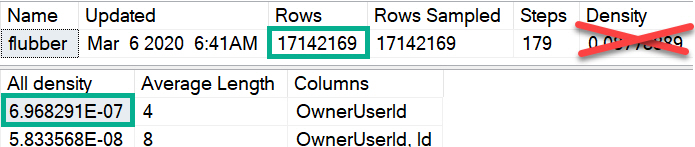
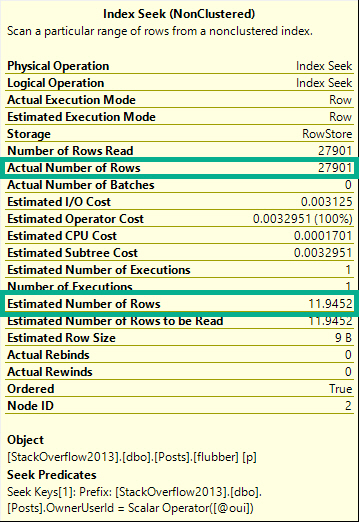
Will get an estimate of 11.9-ish, despite 27,901 rows matching over here in reality.
Poo
Which can be replicated like so, using the numbers from the screenshot up yonder.
SELECT (6.968291E-07 * 17142169) AS [?]
Several Different Levels
You can replicate the “All Density” calculation by doing this:
SELECT (1 /
         CONVERT(FLOAT, COUNT(DISTINCT p.OwnerUserId))
         ) AS [All Density]
FROM Posts AS p
GO
Notice I didn’t call the estimate “bad”. Even though it often is quite bad, there are some columns where the distribution of values will be close enough to this estimate for it not to matter terribly for plan shape, index choice, and overall performance.
Don’t take this as carte blanche to use this technique; quite the opposite. If you’re going to use it, it needs careful testing across a variety of inputs.
Why? Because confidence in estimates decreases as they become based on less precise information.
In these estimates we can see a couple optimizer rules in action:
Inclusion: We assume the value is there — the alternative is ghastly
Uniformity: The data will have an even distribution of unique values
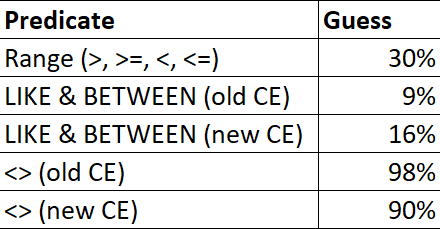
For ranges (>, >=, <, <=), LIKE, BETWEEN, and <>, there are different fixed guesses.
Destined for Lateness
These numbers may change in the future, but up through 2019 this is what my testing resulted in.
Heck, maybe this behavior will be alterable in the future :^)
No Vector, No Estimate
A lot of people (myself included) will freely interchange “estimate” and “guess” when talking about this process. To the optimizer, there’s a big difference.
An estimate represents a process where math formulas with strange fonts that I don’t understand are used to calculate cardinality.
A guess represents a breakdown in that process, where the optimizer gives up, and a fixed number is used.
Say there’s no “density vector” available for the column used in an equality predicate. Maybe you have auto-create stats turned off, or stats created asynchronously is on for the first compilation.
You get a guess, not an estimate.
ALTER DATABASE StackOverflow2013 SET AUTO_CREATE_STATISTICS OFF;
GO

DECLARE @oui INT = 22656;
SELECT COUNT(*) FROM dbo.Posts AS p WHERE p.OwnerUserId = @oui;
SELECT COUNT(*) FROM dbo.Posts AS p WHERE p.OwnerUserId = @oui OPTION(USE HINT('FORCE_LEGACY_CARDINALITY_ESTIMATION'));
GO

ALTER DATABASE StackOverflow2013 SET AUTO_CREATE_STATISTICS ON;
GO
Using the new cardinality estimator (CE), which Microsoft has quite presumptuously started calling the Default CE, I get a guess of 4,140.
Using the legacy CE, which maybe I’ll start referring to as the Best CE, to match the presumptuousness of Microsoft, I get a guess of 266,409.
Though neither one is particularly close to the reality of 27,901 rows, we can’t expect a good guess because we’re effectively poking the optimizer in the eyeball by not allowing it to create statistics, and by using a local variable in our where clause.
These things would be our fault, regardless of the default-ness, or best-ness, of the estimation model.
If you’re keen on calculating these things yourself, you can do the following:
SELECT POWER(CONVERT(FLOAT, 17142169), 0.75) AS BEST_CE;
SELECT SQRT(CONVERT(FLOAT, 17142169)) AS default_ce_blah_whatever;
SELECT COUNT_BIG(*)
FROM dbo.Posts AS p
WHERE p.CreationDate = p.CommunityOwnedDate;

SELECT COUNT_BIG(*)
FROM dbo.Posts AS p
WHERE p.CreationDate = p.CommunityOwnedDate
OPTION(USE HINT('FORCE_LEGACY_CARDINALITY_ESTIMATION'));
The so-called “default” CE thinks 1,714,220 rows will match for a column-equals-column comparison, and the “legacy” CE thinks 6.44248 rows will match, assuming that histograms are available for both of these queries.
How many actually match? 59,216.
I never said this was easy, HOWEVER!
Ahem.
The “legacy” CE estimate comes from advanced maths that only people who vape understand, while the so-called “default” CE just guesses ten percent, in true lazybones fashion. “You treat your stepmother with respect, Pantera!“, as a wise man once said.
Second, what we want to happen:
Code that uses literals, parameters, and other sniff-able forms of predicates use the statistics histogram, which typically has far more valuable information about data distribution for a column. No, they’re not always perfect, and sure, estimates can still be off if we use this, but that’s a chance I’m willing to take.
Even if they’re out of date. Maybe. Maybe not.
Look, just update those statistics.
American Histogram X
Like I mentioned before, these estimates typically have higher confidence levels because they’re often based on more precise details about the data.
If I had to rank them:
Direct histogram step hits for an equality
Intra-step hits for an equality
Direct histogram step hits for a range
Intra-step hits for a range
Inequalities (not equals to)
Joins
1000 other things
All the goofy stuff you people do to make this more difficult, like wrapping columns in functions, mismatching data types, using local variables, etc.
Of course, parameterized code does open us up to parameter sniffing issues, which I’m not addressing in this post. My only goal here is to teach people how to get out of performance jams caused by local variables giving you bad-enough estimates. Ha ha ha.
Plus, there’s a lot of negativity out there already about parameter sniffing. A lot of the time it does pretty well, and we want it to happen.
Over-Under
The main issues with the local variable/density vector estimates is that they most often don’t align well with reality, and they’re almost certainly a knee-jerk reaction to a parameter sniffing problem, or done out of ignorance to the repercussions. It would be tedious to walk through all of the potential plan quality issues that could arise from doing this, though I did record a video about one of them here.
Instead of doing all that stuff, I’d rather walk through what works and what doesn’t when it comes to fixing the problem.
But first, what doesn’t work!
Temporary Objects Don’t Usually Work
If you put the value of the local variable in a #temp table, you can fall victim to statistics caching. If you use a @table variable, you don’t get any column-level statistics on what values go in there (even with a recompile hint or trace flag 2453, you only get table cardinality).
There may be some circumstances where a #temp table can help, or can get you a better plan, but they’re probably not my first stop on the list of fixes.
The #temp table will require a uniqueness constraint to work
This becomes more and more difficult if we have multiple local variables to account for
And if they have different data types, we need multiple #temp tables, or wide tables with a column and constraint per parameter
From there, we end up with difficulties linking those values in our query. Extra joins, subqueries, etc. all have potential consequences.
Inline Table Valued Functions Don’t Work
They’re a little too inline here, and they use the density vector estimate. See this gist for a demo.
Recompile Can Work, But Only Do It For Problem Statements
It has to be a statement-level recompile, using OPTION(RECOMPILE). Putting recompile as a stored procedure creation option will not allow for parameter embedding optimizations, i.e. WITH RECOMPILE.
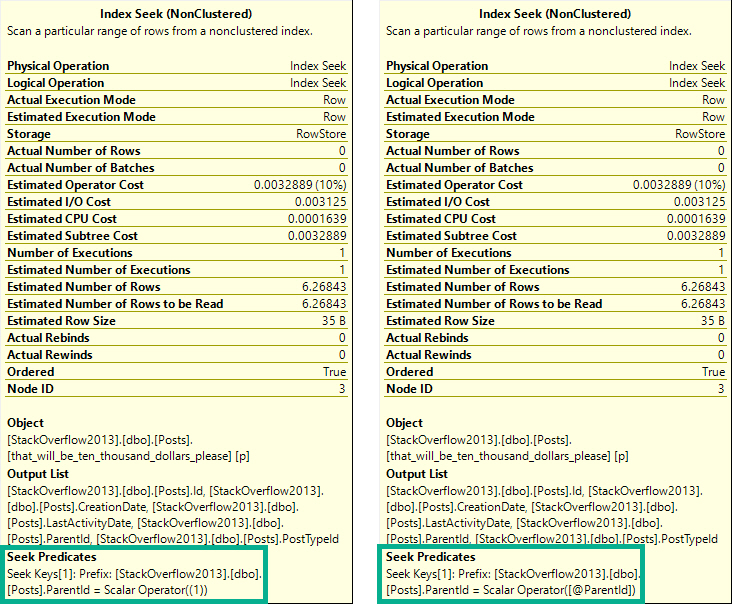
One of these things is not like the other.
The tool tip on the left is from a plan with a statement-level recompile. On the right is from a plan with a procedure-level recompile. In the statement-level recompile plan, we can see the scalar operator is a literal value. In the procedure-level recompile, we still see @ParentId passed in.
The difference is subtle, but exists. I prefer statement-level recompiles, because it’s unlikely that every statement in a procedure should or needs to be recompiled, unless it’s a monitoring procedure or something else with no value to the plan cache.
Targeting specific statements is smarterer.
Erer.
A more detailed examination of this behavior is at Paul’s post, linked above.
Dynamic SQL Can Work
Depending on complexity, it may be more straight forward to use dynamic SQL as a receptacle for your variables-turned-parameters.
CREATE PROCEDURE dbo.game_time(@id INT)
AS BEGIN
    DECLARE @id_fix INT;
    SET @id_fix = CASE WHEN @id < 0 THEN 1 ELSE @id END;

    DECLARE @sql NVARCHAR(MAX) = N'';
    SET @sql += N'SELECT COUNT(*) FROM dbo.Posts AS p WHERE p.OwnerUserId = @id;';

    EXEC sys.sp_executesql @sql, N'@id INT', @id_fix
END;
Separate Stored Procedures Can Work
If you need to declare variables internally and perform some queries to assign values to them, passing them on to separate stored procedures can avoid the density estimates. The stored procedure occurs in a separate context, so all it sees are the values passed in as parameters, not their origins as variables.
In other words, parameters can be sniffed; variables can’t.
CREATE PROCEDURE dbo.game_time(@id INT)
AS
BEGIN
    DECLARE @id_fix INT;
    SET @id_fix = CASE WHEN @id < 0 THEN 1 ELSE @id END;

    EXEC dbo.some_new_proc @id_fix;
END;
Just pretend the dynamic SQL from above occupies the stored procedure dbo.some_new_proc here.
Optimizing For A Value Can Work
But choosing that value is hard. If one is feeling ambitious, one could take the local parameter value, compare it to the histogram on one’s own, then choose a value on one’s own that, one, on their own, could use to determine if a specific, common, or nearby value would be best to optimize for, using dynamic SQL that one has written on one’s own.
Ahem.
CREATE PROCEDURE dbo.game_time(@id INT)
AS BEGIN
    DECLARE @id_fix INT;
    SET @id_fix = CASE WHEN @id < 0 THEN 1 ELSE @id END;

    DECLARE @a_really_good_choice INT;
    SET @a_really_good_choice = 2147483647; --The result of some v. professional code IRL.

    DECLARE @sql NVARCHAR(MAX) = N'';
    SET @sql += N'SELECT COUNT(*) FROM dbo.Posts AS p WHERE p.OwnerUserId = @id OPTION(OPTIMIZE FOR(@id = [a_really_good_choice]));';
    SET @sql = REPLACE(@sql, N'[a_really_good_choice]', @a_really_good_choice);

    EXEC sys.sp_executesql @sql, N'@id INT', @id_fix;
END;
GO
Wrapping Up
This post aimed to give you some ways to avoid getting bad density vector estimates with local variables. If you’re getting good guesses, well, sorry you had to read all this.
When I see this pattern in client code, it’s often accompanied by comments about fixing parameter sniffing. While technically accurate, it’s more like plugging SQL Server’s nose with cotton balls and Lego heads.
Sometimes there will be several predicate filters that diminish the impact of estimates not using the histogram. Often a fairly selective predicate evaluated first is enough to make this not suck too badly. However, it’s worth learning about, and learning how to fix correctly.
Thanks for reading!
Going Further
If this is the kind of SQL Server stuff you love learning about, you’ll love my training. Blog readers get 25% off the Everything Bundle — over 100 hours of performance tuning content. Need hands-on help? I offer consulting engagements from targeted investigations to ongoing retainers. Want a quick sanity check before committing to a full engagement? Schedule a call — no commitment required.
If this is the kind of SQL Server stuff you love learning about, you’ll love my training. Blog readers get 25% off the Everything Bundle — over 100 hours of performance tuning content. Need hands-on help? I offer consulting engagements from targeted investigations to ongoing retainers. Want a quick sanity check before committing to a full engagement? Schedule a call — no commitment required.
You already know that your temp table needs an index. Let’s say there’s some query plan ouchie from not adding one. You’ve already realized that you should probably use a clustered index rather than a nonclustered index. Adding a nonclustered index leaves you with a heap and an index, and there are a lot of times when nonclustered indexes won’t be used because they don’t cover the query columns enough.
Do not explicitly drop temp tables at the end of a stored procedure, they will get cleaned up when the session that created them ends.
Do not alter temp tables after they have been created.
Do not truncate temp tables
Move index creation statements on temp tables to the new inline index creation syntax that was introduced in SQL Server 2014.
Where it can be a bad option is:
If you can’t get a parallel insert even with a TABLOCK hint
Sorting the data to match index order on insert could result in some discomfort
After Creation
This is almost always not ideal, unless you want to avoid caching the temp table, and for the recompilation to occur for whatever reason.
It’s not that I’d ever rule this out as an option, but I’d wanna have a good reason for it.
Probably even several.
After Insert
This can sometimes be a good option if the query plan you get from inserting into the index is deficient in some way.
Like I mentioned up above, maybe you lose parallel insert, or maybe the DML Request Sort is a thorn in your side.
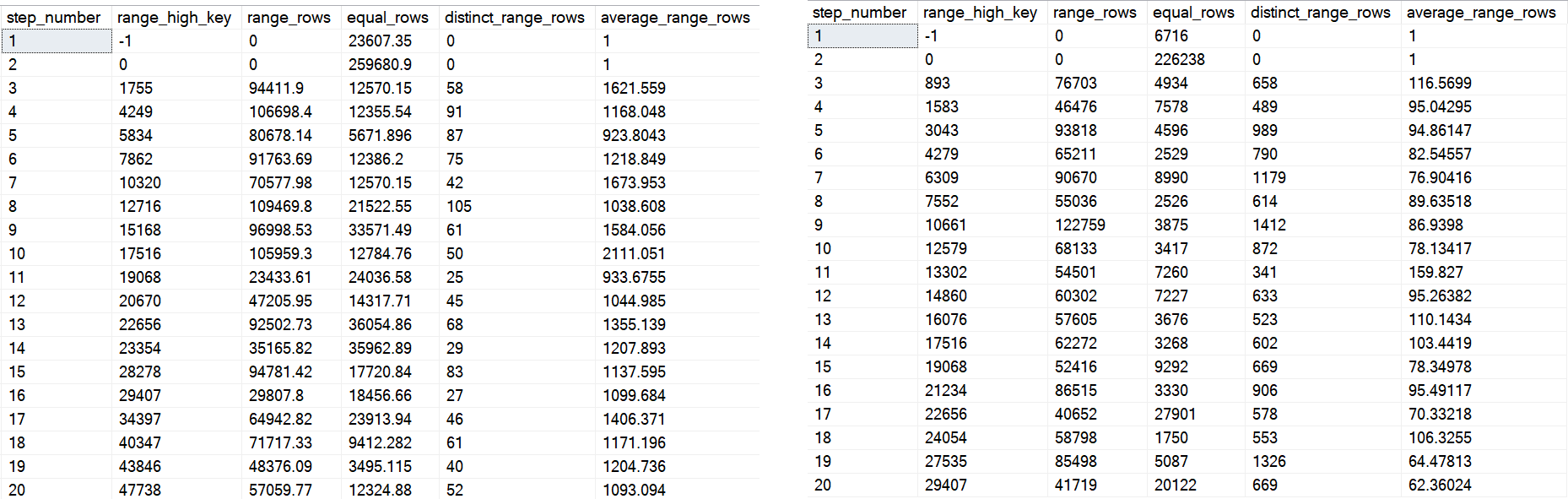
This can be awesome! Except on Standard Edition, where you can’t create indexes in parallel. Which picks off one of the reasons for doing this in the first place, and also potentially causes you headaches with not caching temp tables, and statement level recompiles.
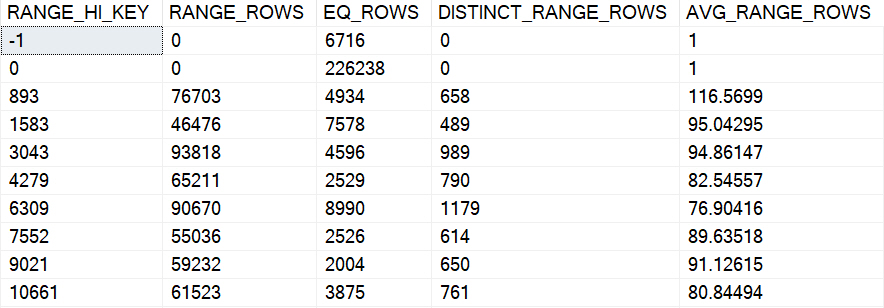
One upside here is that if you insert data into a temp table with an index, and then run a query that causes statistics generation, you’ll almost certainly get the default sampling rate. That could potentially cause other annoyances. Creating the index after loading data means you get the full scan stats.
Hooray, I guess.
This may not ever be the end of the world, but here’s a quick example:
DROP TABLE IF EXISTS #t;
GO

--Create a table with an index already on it
CREATE TABLE #t(id INT, INDEX c CLUSTERED(id));

--Load data
INSERT #t WITH(TABLOCK)
SELECT p.OwnerUserId
FROM dbo.Posts AS p;

--Run a query to generate statistics
SELECT COUNT(*)
FROM #t AS t
WHERE t.id BETWEEN 1 AND 10000
GO

--See what's poppin'
SELECT hist.step_number, hist.range_high_key, hist.range_rows,
    hist.equal_rows, hist.distinct_range_rows, hist.average_range_rows
FROM tempdb.sys.stats AS s
CROSS APPLY tempdb.sys.dm_db_stats_histogram(s.[object_id], s.stats_id) AS hist
WHERE OBJECT_NAME(s.object_id, 2) LIKE '#t%'
GO
DROP TABLE #t;


--Create a query with no index
CREATE TABLE #t(id INT NOT NULL);

--Load data
INSERT #t WITH(TABLOCK)
SELECT p.OwnerUserId
FROM dbo.Posts AS p;

--Create the index
CREATE CLUSTERED INDEX c ON #t(id);

--Run a query to generate statistics
SELECT COUNT(*)
FROM #t AS t
WHERE t.id BETWEEN 1 AND 10000

--See what's poppin'
SELECT hist.step_number, hist.range_high_key, hist.range_rows,
    hist.equal_rows, hist.distinct_range_rows, hist.average_range_rows
FROM tempdb.sys.stats AS s
CROSS APPLY tempdb.sys.dm_db_stats_histogram(s.[object_id], s.stats_id) AS hist
WHERE OBJECT_NAME(s.object_id, 2) LIKE '#t%'
GO
DROP TABLE #t;
Neckin’ Neck
On the left is the first 20 steps from the first histogram, and on the right is the first 20 from the second one.
You can see some big differences — whether or not they end up helping or hurting performance would take a lot of different tests. Quite frankly, it’s probably not where I’d start a performance investigation, but I’d be lying if I told you it never ended up there.
All Things Considerateded
In general, I’d stick to using the inline index creation syntax. If I had to work around issues with that, I’d create the index after loading data, but being on Standard Edition brings some additional considerations around parallel index creation.
Thanks for reading!
Going Further
If this is the kind of SQL Server stuff you love learning about, you’ll love my training. Blog readers get 25% off the Everything Bundle — over 100 hours of performance tuning content. Need hands-on help? I offer consulting engagements from targeted investigations to ongoing retainers. Want a quick sanity check before committing to a full engagement? Schedule a call — no commitment required.
This is the part of SQL Server I often find myself rolling my eyes at: poor feature interoperability, and that V1 smell that… never seems to turn into that V2 smell.
The full script is hosted here. I don’t want a tedious post full of setting up partitioning, etc.
I wanna get to the stuff that you might care about later.
If You Wanna…
The utility of Partitioning is being able to quickly switch partitions in and out. Data management. Not query performance (unless you’re using columnstore).
If you want to do that with temporal tables, your staging and “out” tables need to match exactly, down to the temporal-ness.
For example, this won’t work:
CREATE TABLE dbo.Votes_Deletes_Stage
(
    Id INT NOT NULL,
    PostId INT NOT NULL,
    UserId INT NULL,
    BountyAmount INT NULL,
    VoteTypeId INT NOT NULL,
    CreationDate DATETIME NOT NULL,
    SysStartTime DATETIME2(7) NOT NULL, --Versioning column
    SysEndTime DATETIME2(7) NOT NULL --Versioning column
    CONSTRAINT dr_rockzo_Stage PRIMARY KEY CLUSTERED (CreationDate, Id) ON [PRIMARY]
) ON [PRIMARY];
You gotta have all the same stuff you used to get your partitioned table set up for temporal-ness.
CREATE TABLE dbo.Votes_Deletes_Stage
(
    Id INT NOT NULL,
    PostId INT NOT NULL,
    UserId INT NULL,
    BountyAmount INT NULL,
    VoteTypeId INT NOT NULL,
    CreationDate DATETIME NOT NULL,
    SysStartTime DATETIME2(7) GENERATED ALWAYS AS ROW START HIDDEN
        CONSTRAINT df_VotesDeletes_Stage_SysStartTime
            DEFAULT SYSDATETIME(),
    SysEndTime DATETIME2(7) GENERATED ALWAYS AS ROW END HIDDEN
        CONSTRAINT df_VotesDeletes_Stage_SysEndTime
            DEFAULT CONVERT(DATETIME2(7), '9999-12-31 23:59:59.9999999')
    CONSTRAINT dr_rockzo_Stage PRIMARY KEY CLUSTERED (CreationDate, Id) ON [PRIMARY],
  PERIOD FOR SYSTEM_TIME([SysStartTime], [SysEndTime])
) ON [PRIMARY];
Then If You Wanna…
Switch data in or out, you have to turn off the temporal-ness.
Msg 13546, Level 16, State 1, Line 97
Switching out partition failed on table ‘DeletesDemo.dbo.Votes_Deletes’ because it is not a supported operation on system-versioned tables. Consider setting SYSTEM_VERSIONING to OFF and trying again.
“Consider turning off the feature that takes forever to turn back on with large tables so you can do the thing partitioning does quickly”
Don’t worry, the color red you’re seeing is totally natural.
And hey, once you’ve turned it off, you can swap a partition in or out.
A Normal Partitioning Problem
The partition you’re going to switch in needs to have a constraint on it that tells the whatever that the data you’re switching in is valid for the partition you’re swapping it into.
Msg 4982, Level 16, State 1, Line 105
ALTER TABLE SWITCH statement failed. Check constraints of source table ‘DeletesDemo.dbo.Votes_Deletes_Stage’ allow values that are not allowed by range defined by partition 8 on target table ‘DeletesDemo.dbo.Votes_Deletes’.
The thing is, this error message sucks. It sucks all the suck. Especially when dealing with temporal tables, you might think something odd happened with the constraints on your versioning columns. They both have constraints on them. WHICH CONSTRAINT IS THE PROBLEM?
If you’re new to Partitioning, you may not have ever switched data into or out of a table before. This error message can be a real head-scratcher.
The fix is to add a check constraint to your staging table — the one you’re swapping in — that tells Partitioning about what’s in the table. In my case, I have the Votes_Deletes table partitioned by CreationDate, by one year ranges. For me, Partition 8 contains values for the year 2013. To make sure it’s safe to swap my staging partition into the partition for that year, it needs a constraint:
ALTER TABLE dbo.Votes_Deletes_Stage
ADD CONSTRAINT ck_yrself
    CHECK (CreationDate >= '20130101' AND CreationDate < '20140101'
         AND CreationDate IS NOT NULL);
And You Should Probably
Turn the temporal-ness back on. When you do that, you have an option. Do you want to make sure your data is consistent?
ALTER TABLE dbo.Votes_Deletes SET (SYSTEM_VERSIONING = ON
 ( HISTORY_TABLE=dbo.Votes_Deletes_History,
   DATA_CONSISTENCY_CHECK= ON) );
If you don’t, re-enabling is instant. Buuuuuuut you take the chance that some data in your table may have changed while you were tooting around trying to get partitions swapped in and out. I have no idea what the ramifications of skipping the check might be. In the context of this post, probably nothing. If you’ve got a full history table and the specter of changes during this whole shebang…
This is what the query plan for turning it back on looks like.
Two minutes for what?
There’s nothing in the history table. If there were, this could get really bad (trust me, ha ha ha). What checks do we do when the history table is empty?
Le Shrug, as they say in the land of protest.
But a 53 million row assert sure does take a couple minutes.
Thanks for reading!
Going Further
If this is the kind of SQL Server stuff you love learning about, you’ll love my training. Blog readers get 25% off the Everything Bundle — over 100 hours of performance tuning content. Need hands-on help? I offer consulting engagements from targeted investigations to ongoing retainers. Want a quick sanity check before committing to a full engagement? Schedule a call — no commitment required.