I know what you’re thinking: this is another post that asks for a hint to materialize CTEs.
You’re wrong. I don’t want another hint that I can’t add to queries to solve a problem because the code is coming from a vendor or ORM.
No, I want the optimizer to smarten up about this sort of thing, detect CTE re-use, and use one of the New And Improved Spools™ to cache results.
Let’s take a look at where this would come in handy.
Standalone
If we take this query by itself and look at the execution plan, it conveniently shows one access of Posts and Users, and a single join between the two.
SELECT
    u.Id AS UserId,
    u.DisplayName,
    p.Id AS PostId,
    p.AcceptedAnswerId,
    TotalScore =
        SUM(p.Score)
FROM dbo.Users AS u
JOIN dbo.Posts AS p
    ON p.OwnerUserId = u.Id
WHERE u.Reputation > 100000
GROUP BY
    u.Id,
    u.DisplayName,
    p.Id,
    p.AcceptedAnswerId
HAVING SUM(p.Score) > 1
invitational
Now, let’s go MAKE THINGS MORE READABLE!!!
Ality
WITH spool_me AS
(
    SELECT
        u.Id AS UserId,
        u.DisplayName,
        p.Id AS PostId,
        p.AcceptedAnswerId,
        TotalScore =
            SUM(p.Score)
    FROM dbo.Users AS u
    JOIN dbo.Posts AS p
        ON p.OwnerUserId = u.Id
    WHERE u.Reputation > 100000
    GROUP BY
        u.Id,
        u.DisplayName,
        p.Id,
        p.AcceptedAnswerId
    HAVING SUM(p.Score) > 1
)
SELECT
    a.UserId,
    a.DisplayName,
    a.PostId,
    a.AcceptedAnswerId,
    a.TotalScore,
    q.UserId,
    q.DisplayName,
    q.PostId,
    q.AcceptedAnswerId,
    q.TotalScore
FROM spool_me AS a
JOIN spool_me AS q
    ON a.PostId = q.AcceptedAnswerId
ORDER BY a.TotalScore DESC;
Wowee. We really done did it. But now what does the query plan look like?
oh, you
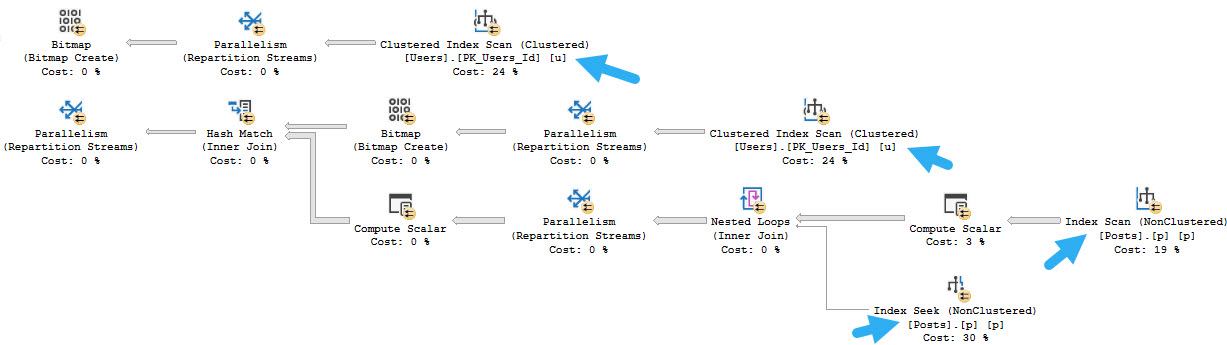
There are now two accesses of Posts and two accesses of Users, and three joins (one Hash Join isn’t in the screen cap).
Detection
Obviously, the optimizer knows it has to build a query plan that reflects the CTE being joined.
Since it’s smart enough to do that, it should be smart enough to use a Spool to cache things and prevent the additional accesses.
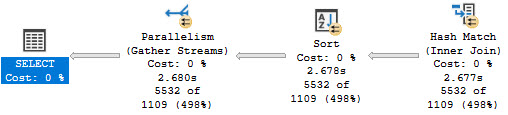
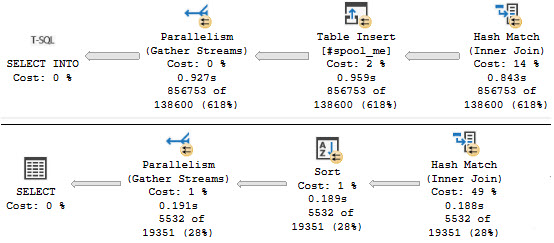
Comparatively, using a #temp table to simulate a Spool, is about twice as fast. Here’s the CTE plan:
double
Here’s the Spool Simulator Plan™
professionals
Given the optimizer’s penchant for spools, this would be another chance for it to shine on like the crazy diamond it is.
Thanks for reading!
Going Further
If this is the kind of SQL Server stuff you love learning about, you’ll love my training. Blog readers get 25% off the Everything Bundle — over 100 hours of performance tuning content. Need hands-on help? I offer consulting engagements from targeted investigations to ongoing retainers. Want a quick sanity check before committing to a full engagement? Schedule a call — no commitment required.
I’ve written at length about what local variables do to queries, so I’m not going to go into it again here.
What I do want to talk about are better alternatives to what you currently have to do to fix issues:
RECOMPILE the query
Pass the local variable to a stored procedure
Pass the local variable to dynamic SQL
It’s not that I hate those options, they’re just tedious. Sometimes I’d like the benefit of recompiling with local variables without all the other strings that come attached to recompiling.
Hint Me Baby One More Time
Since I’m told people rely on this behavior to fix certain problems, you would probably need a few different places to and ways to alter this behavior:
Database level setting
Query Hint
Variable declaration
Database level settings are great for workloads you can’t alter, either because the queries come out of a black box, or you use an ORM and queries… come out of a nuclear disaster area.
Query hints are great if you want all local variables to be treated like parameters. But you may not want that all the time. I mean, look: you all do wacky things and you’re stuck in your ways. I’m not kink shaming here, but facts are facts.
You have to draw the line somewhere and that somewhere is always “furries”.
And then local variables.
It may also be useful to allow local variables to be declared with a special property that will allow the optimizer to treat them like parameters. Something like this would be easy enough:
DECLARE @p int PARAMETER = 1;
Hog Ground
Given that in SQL Server 2019 table variables got deferred compilation, I think this feature is doable.
Of course, it’s doable today if you’ve got a debugger and don’t mind editing memory space.
Thanks for reading!
Going Further
If this is the kind of SQL Server stuff you love learning about, you’ll love my training. Blog readers get 25% off the Everything Bundle — over 100 hours of performance tuning content. Need hands-on help? I offer consulting engagements from targeted investigations to ongoing retainers. Want a quick sanity check before committing to a full engagement? Schedule a call — no commitment required.
In this video, I delve into the often misunderstood world of table variables in SQL Server, exploring their uses and benefits, particularly when dealing with high concurrency and frequent execution. Using a series of stored procedures to test both temp tables and table variables, I demonstrate how these objects perform under stress using RML Utilities’ O Stress tool. The results show that while temp tables can lead to significant contention and slower performance due to their serialization issues, table variables shine in scenarios requiring quick, parallel query execution. This video aims to provide clarity on when it’s appropriate to use table variables over other temporary storage options, highlighting the importance of choosing the right tool for the job based on your specific workload requirements.
Full Transcript
Erik Darling here with Erik Darling Data, named one of the top 1001 sexiest SQL Server consulting companies in the world by BeerGut Magazine. And on this lovely Sunday, and it is Sunday, and so am I, I am enjoying a GinFizz of sorts. Mmm. Mmm. What a delicacy. Today we’re going to talk about when you should use table variables. Table variables get sort of an understandably bad rap for a lot of reasons. You know, you get the forced serialization when you modify them, you get the crappy estimates unless you recompile or throw some hokey trace flags at them. You get the the, um, what do you call it? What was the other one? There was another good one I had. Oh yeah. SQL Server has no idea what’s in them. Not only does it have no idea how much is in them, but it has no idea what the contents of that much is. And that’s not good. Often not good when we care about things like queries that have good cardinality estimates and perform well and plan shape makes a, makes a huge difference. But, uh, they’re there for a reason. They, they do not exist just to make consultants money finger wagging at you. Poor people who are there for a reason. They do not exist just to make consultants money finger wagging at you. Poor people who are there for a reason. They do not exist just to make consultants money finger wagging at you.
Who, who, who keep using them for no particular reason. Uh, they do exist for a good reason. And, uh, I’ve, I’ve talked a little bit about how they help when you, uh, have very high frequency execution for queries. Uh, but what I didn’t explore then was, uh, what happens when you also have very high concurrency along with the high frequency execution. And that’s what we’re going to look at today. Now I am going to use a, uh, a couple store procedures. that I used, uh, in the past to look at how these two different types of objects perform. Uh, one of them is a temp table test. And, um, you know, I know it’s not maximally, maximally realistic, but that’s fine. Cause all it has to do is show you behavior. Not everything is going to be a hundred percent true to life, real world. This is what happened demo this, but it just shows you what happens in the real world when you use different objects for different purposes. And this is the whole point. Thanks for watching. I’m just going to leave now, go enjoy my, my gin fizz. So this, uh, this one here is a temp table tester and we create a temp table. I don’t know how I missed a semi colon. There’s a sloppy of me. It’s been gone. It’s going to kill me next time I see him and I get assassinated. Uh, actually no, it’s not even my fault. Cause I, I use SQL prompt and I hit, uh, insert semi colons. And I don’t know what, what was going on with that. I don’t know. Maybe SQL prompt is dumb, but all this does is create a temp table. Uh, insert into the temp table and then we’re done with it. Uh, this one down here, look, see this, the semi colons here. I don’t know what, what the H E double, double doglegs happened.
No, but this one declares a table variable and then does the exact same thing. Now, of course, we have to pass something in to these store procedures and, uh, I don’t want to have to do that in a weird way. So what I did is I wrote a wrapper store procedure, uh, for, for these things. And, uh, it’s called the temp test wrapper. You know, I’ll have all this code somewhere. I mean, probably, probably in the blog post. I’m not going to stick all the code in the YouTube description. That’s annoying.
Uh, but it’ll be, it’ll, it’ll accompany the blog post along with some links to other things that I’ve written about table variables in the past. Uh, including the miraculous video where I, I test running these store procedures in a loop. Won’t that be fun for you? Uh, so yeah, so this thing, uh, declares a, uh, declares a variable and, uh, we set that variable to some random number between, uh, uh, one and the max ID in the post database, which is first exact overflow 2013 is currently 2119501.
In case you had trouble reading that number. And then, uh, you know, with the test procedure is, oh, you know, uh, temp, temp table test, then we’ll run temp table test. And if the test proc that we pass in up here is that, then we’ll run that. And I guess I should, I mean, I don’t really need to make it unicode. I guess I, I guess I should for completeness, right?
And make sure I don’t go against any of my, any of my own best practices mismatching data types. Not that this is going to matter, but whatever. I don’t want to get hoisted by my own petard or whatever that’s called unitard. Um, but you know, if we run these things, we get query plans turned on over here.
If we, uh, if we test these things out and run them, uh, we will get an execution plan that, uh, accurately portrays what we wanted to do. We have an insert into our pound sign temp table and then insert into our at sign table variable. We are all good. So what I’m going to do next is run use O stress from the lovely and talented RML utilities.
And I’m going to use that to, uh, run a bunch of concurrent threads 1000 times. So 300 sessions for 1000 iterations. And I just want to make a lot of busy work for the server. There’s no other point to it. Just plain busy work.
And let’s go over here and let’s, uh, plug that into. Oh, stress and get off that off and running. And let’s come over to here to SP who is active.
And we’re going to use this get task info parameter to get, uh, additional weight stat information. We see a whole bunch of page latch EX weights. And if we run this a whole bunch of times, uh, that’s what we’re just going to see piling up, right? Maybe they’re not terribly long.
Maybe this is no, not the worst, but you know, we can obviously see the, the tempDB contention occurring. We can see SQL Server trying to figure out where to put stuff, where things go, where do you belong? Um, I don’t know.
I don’t know where to go anymore. So if we keep running this, we’re just going to keep seeing it, right? It’s obvious signs of contention. Now, if, uh, we have code where it matters that, uh, that like, you know, what, what we’re putting into our, our temp table, we might just have to deal with some of that contention.
We might just have to, you know, live with it because we might need some of the, uh, the benefits of temp tables that table variables don’t have. You can put data into them in a, in a parallel query. You can, uh, you can create indexes on them that actually make a big difference because, you know, you get statistical information, you get all accurate.
Well, I mean, you know, usually accurate row counts. So there are some, you know, kind of iffies around, um, uh, temp tables getting cached and stored procedures. But as I always say, if that is your biggest problem, you should just go on vacation and find a new job where you will have interesting problems to solve again. Uh, but if you look, that whole thing took about 40 seconds to complete.
39.368, which is close enough to 40 for me. And I’m going to order a 40 later in remembrance of this fine demo. Uh, but next let’s go and look at table variables.
All right. Let’s, for good luck, we’re going to clear that out. And now we’re going to run the table variable version. Come back over here and let’s start running who is active.
And we’ll start seeing that wait info column. It doesn’t have anything in it. We’re not really waiting on anything. And, uh-oh, we’re done in eight seconds. So, if we were measuring this workload, right?
And I know it’s not the most realistic thing in the world, but, you know, let’s just say you have a lot of user sessions that come in, do something quick, and get out. So, well, if, you know, the idea is to make those user sessions as quick as possible because you don’t want them hanging around doing things, well, then we need to maybe consider the type of temporary object that we’re using to push those queries through. So, table variables do have very good uses in this case.
In this case, you know, we had an 8.3 second workload versus, what was that, almost 40 seconds if I’m remembering correctly. And I should remember correctly because now I have to order a 40 later and remembrance of that fine query. So, I’ll let you know how that smells in another video.
So, anyway, you know, table variables do get a lot of flack, and rightly so. They have probably messed up performance for people more times than they have solved a big performance problem. But this is a case where I would absolutely use one.
It’s a little bit of a niche case, but there are definitely industries, and there are definitely workloads where this kind of thing is, you know, the norma. The norma. The normal.
The norma. This is the norma gene. But, yeah, if you have that type of workload where you have very, very high frequency execution, and you need to push a bunch of tiny little queries through very, very quickly, table variables just might be the solution for you.
Now, of course, like, you know, one step further is, you know, the in-memory table variable, which I blogged about recently. I suppose I should put a link to that somewhere, too. I don’t know where it’s going to end up, though.
I don’t like to make promises about putting things in the YouTube description because quite often I forget. And I’m bad about remembering to go back and do it until someone leaves a comment and says, Hey, you said you were going to put this in the thing, and then you didn’t.
I’m like, yeah, sorry. Happens to me all the time. I’m forgetful. That’s why I blog a lot and record videos so I can remember. I don’t have to remember.
Anyway, I’m going to get back to my gin fizz and my Sunday because I am Sunday. And I will see you in another video another time. Thank you for watching.
Going Further
If this is the kind of SQL Server stuff you love learning about, you’ll love my training. Blog readers get 25% off the Everything Bundle — over 100 hours of performance tuning content. I’m also available for consulting if you just don’t have time for that and need to solve performance problems quickly.
USE StackOverflow2013;
EXEC dbo.DropIndexes;
SET NOCOUNT ON;
DBCC FREEPROCCACHE;
GO

CREATE INDEX whatever
ON dbo.Posts
    (OwnerUserId)
INCLUDE
    (Score);
GO

CREATE OR ALTER PROCEDURE dbo.TempTableTest (@Id INT)
AS
BEGIN
SET NOCOUNT, XACT_ABORT ON;

    CREATE TABLE #t(i INT NOT NULL);

    INSERT
        #t ( i )
    SELECT
        p.Score
    FROM dbo.Posts AS p
    WHERE p.OwnerUserId = @Id;

END;
GO

CREATE OR ALTER PROCEDURE dbo.TableVariableTest (@Id INT)
AS
BEGIN
SET NOCOUNT, XACT_ABORT ON;

    DECLARE @t TABLE (i INT NOT NULL);

    INSERT
        @t ( i )
    SELECT
        p.Score
    FROM dbo.Posts AS p
    WHERE p.OwnerUserId = @Id;

END;
GO


CREATE OR ALTER PROCEDURE dbo.TempTestWrapper (@TestProc sysname)
AS
BEGIN
SET NOCOUNT, XACT_ABORT ON;

DECLARE @rando int =
    ((ABS(CHECKSUM(NEWID())) % 21195018) + 1); /*this is the max id in posts for SO2013*/

IF @TestProc = N'TempTableTest'
    BEGIN
        EXEC dbo.TempTableTest @rando;
    END;

IF @TestProc = N'TableVariableTest'
    BEGIN
        EXEC dbo.TableVariableTest @rando;
    END;

END;
GO

/*Testing*/
EXEC dbo.TempTestWrapper @TestProc = 'TempTableTest';
EXEC dbo.TempTestWrapper @TestProc = 'TableVariableTest';

/*

ostress -SSQL2019S -d"StackOverflow2013" -Q"EXEC dbo.TempTestWrapper @TestProc = 'TempTableTest';" -U"ostress" -P"ostress" -q -n300 -r1000 -o"C:\temp\crap"

ostress -SSQL2019S -d"StackOverflow2013" -Q"EXEC dbo.TempTestWrapper @TestProc = 'TableVariableTest';" -U"ostress" -P"ostress" -q -n300 -r1000 -o"C:\temp\crap"

*/
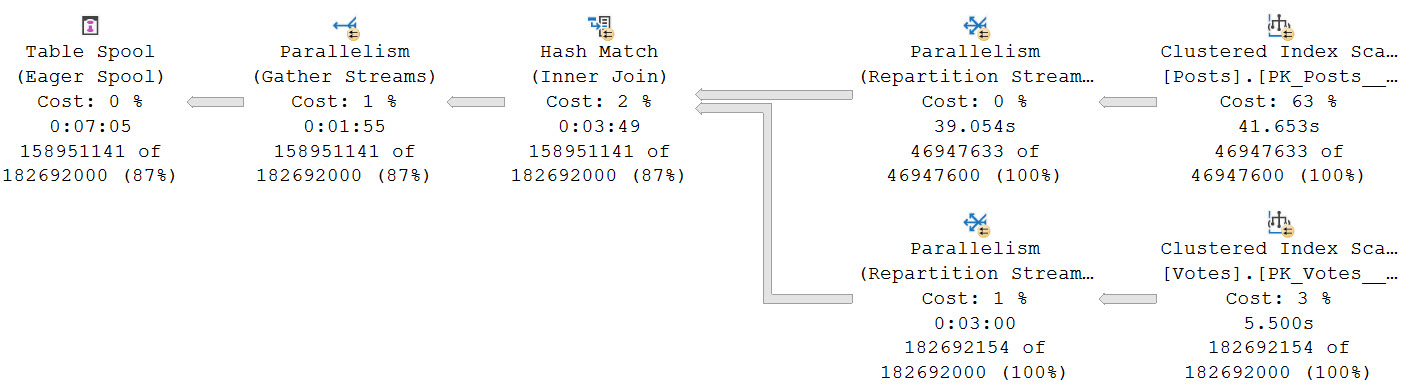
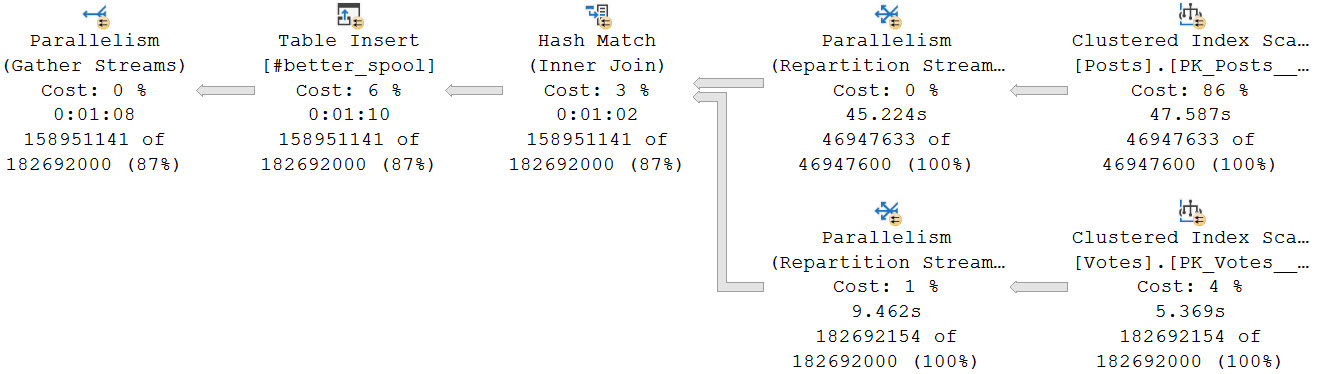
Using the scenario from yesterday’s post as an example of why you might want to think about rewriting queries with Table Spools in them to use temp tables instead, look how the optimizer chooses a plan with an Eager Table Spool.
The “Eager” part means the entire set of rows is loaded into a temporary object at once.
drugas
That’s a lot of rows, innit? Stick some commas in there, and you might just find yourself staring down the barrel of a nine digit number.
Worse, we spend a long time loading data into the spool, and doing so in a serial zone. There’s no good way to know exactly how long the load is because of odd operator times.
If you recall yesterday’s post, the plan never goes back to parallel after that, either. It runs for nearly 30 minutes in total.
Yes Your Tempdb
If you’re gonna be using that hunka chunka tempdb anyway, you might as well use it efficiently. Unless batch mode is an option for you, either as Batch Mode On Rowstore, or tricking the optimizer, this might be your best bet.
Keep in mind that Standard Edition users have an additional limitation where Batch Mode queries are limited to a DOP of 2, and don’t have access to Batch Mode On Rowstore as of this writing. The DOP limitation especially might make the trick unproductive compared to alternatives that allow for MOREDOP.
For example, if we dump that initial join into a temp table, it only takes about a minute to get loaded at a DOP of 8. That is faster than loading data into the spool (I mean, probably. Just look at that thing.).
sweet valley high
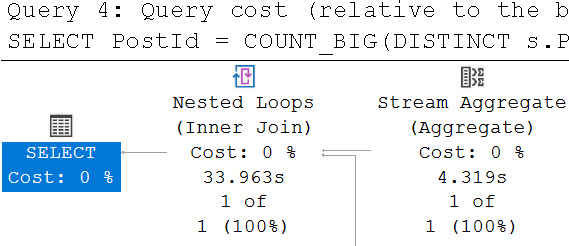
The final query to do the distinct aggregations takes about 34 seconds.
lellarap
Another benefit is that each branch that does a distinct aggregation is largely in a parallel zone until the global aggregate.
muggers
In total, both queries finish in about a 1:45. A big improvement from nearly 30 minutes relying on the Eager Table Spool and processing all of the distinct aggregates in a serial zone. The temp table here doesn’t have that particular shortcoming.
In the past, I’ve talked a lot about Eager Index Spools. They have a lot of problems too, many of which are worse. Of course, we need indexes to fix those, not temp tables.
Thanks for reading!
Going Further
If this is the kind of SQL Server stuff you love learning about, you’ll love my training. Blog readers get 25% off the Everything Bundle — over 100 hours of performance tuning content. Need hands-on help? I offer consulting engagements from targeted investigations to ongoing retainers. Want a quick sanity check before committing to a full engagement? Schedule a call — no commitment required.
My dear friend Kendra asked… Okay, look, I might have dreamed this. But I maybe dreamed that she asked what people’s Cost Threshold For Blogging™ is. Meaning, how many times do you have to get asked a question before you write about it.
I have now heard people talking and asking about in-memory table variables half a dozen times, so I guess here we are.
Talking about table variables.
In memory.
Yes, Have Some
First, yes, they do help relieve tempdb contention if you have code that executes under both high concurrency and frequency. And by high, I mean REALLY HIGH.
Like, Snoop Dogg high.
Because you can’t get rid of in memory stuff, I’m creating a separate database to test in.
Here’s how I’m doing it!
CREATE DATABASE trash;

ALTER DATABASE trash
ADD FILEGROUP trashy
    CONTAINS MEMORY_OPTIMIZED_DATA ;

ALTER DATABASE trash
ADD FILE
(
    NAME=trashcan,
    FILENAME='D:\SQL2019\maggots'
)
TO FILEGROUP trashy;

USE trash;

CREATE TYPE PostThing
AS TABLE
(
    OwnerUserId int,
    Score int,
    INDEX o HASH(OwnerUserId)
    WITH(BUCKET_COUNT = 100)
) WITH
(
    MEMORY_OPTIMIZED = ON
);
GO
Here’s how I’m testing things:
CREATE OR ALTER PROCEDURE dbo.TableVariableTest(@Id INT)
AS
BEGIN

    SET NOCOUNT, XACT_ABORT ON;

    DECLARE @t AS PostThing;
    DECLARE @i INT;

    INSERT @t
        ( OwnerUserId, Score )
    SELECT
        p.OwnerUserId,
        p.Score
    FROM Crap.dbo.Posts AS p
    WHERE p.OwnerUserId = @Id;

    SELECT
        @i = SUM(t.Score)
    FROM @t AS t
    WHERE t.OwnerUserId = 22656
    GROUP BY t.OwnerUserId;

    SELECT
        @i = SUM(t.Score)
    FROM @t AS t
    GROUP BY t.OwnerUserId;

END;
GO
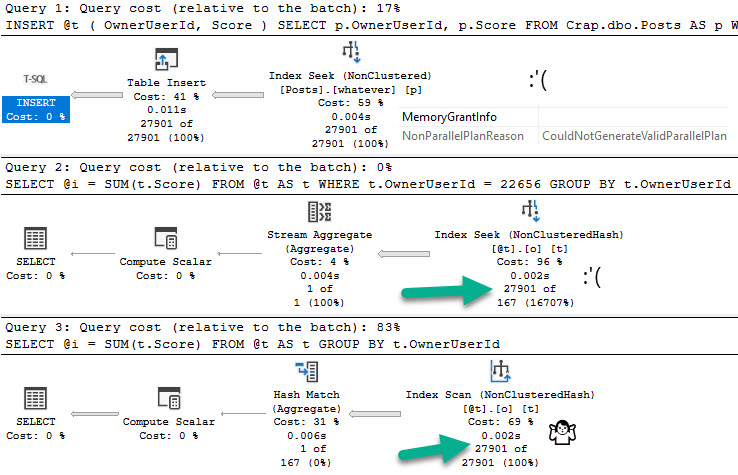
If we flip database compatibility levels to 150, deferred compilation kicks in. Great. Are you on SQL Server 2019? Are you using compatibility level 150?
Don’t get too excited.
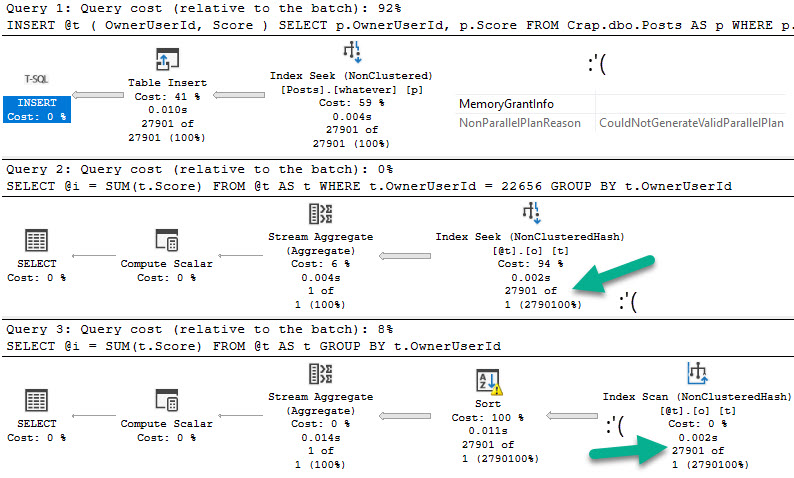
Let’s give this a test run in compat level 140:
DECLARE @i INT = 22656;
EXEC dbo.TableVariableTest @Id = @i;
everything counts in large amounts
Switching over to compat level 150:
yeaaahhhhh
Candy Girl
So what do memory optimized table variables solve?
Not the problem that table variables in general cause.
They do help you avoid tempdb contention, but you trade that off for them taking up space in memory.
Precious memory.
Do you have enough memory?
Thanks for reading!
Going Further
If this is the kind of SQL Server stuff you love learning about, you’ll love my training. Blog readers get 25% off the Everything Bundle — over 100 hours of performance tuning content. Need hands-on help? I offer consulting engagements from targeted investigations to ongoing retainers. Want a quick sanity check before committing to a full engagement? Schedule a call — no commitment required.
Temporal tables are cool, but keeping all that history can be stressful. Change Tracking adds overhead to every transaction, and requires Snapshot Isolation to be successful. Change Data Capture can also run into problems scanning the transaction log, depending on transaction volume, etc.
Change Data Capture is also a little unfortunate in that it doesn’t track schema changes like adding or dropping columns, or changing column data types. Change Tracking doesn’t either, it just tracks the keys of what changed when data is modified.
Temporal Tables are different, because it will add new, and drop removed columns from the history table as they change in the base table. It’ll also push data type changes across. But the history table will not have the various permutations tracked. It just mirrors current state.
Just The Columns, Ma’am
Let’s say your needs aren’t robust enough to need any one of those highly specialized features, or even triggers to move data around when it changes.
You’re perfectly free and able to add the tracking columns that temporal tables use to your base tables, but adding them is far from free. When I added them to the 17 million row Posts table, it took about 40 seconds. My laptop doesn’t suck, either.
To show you a little how it works, let’s create a copy of the Votes table from Stack Overflow.
CREATE TABLE dbo.Votes_Tracked
(
    Id int NOT NULL,
    PostId int NOT NULL,
    UserId int NULL,
    BountyAmount int NULL,
    VoteTypeId int NOT NULL,
    CreationDate datetime NOT NULL,
    LastModified datetime2 GENERATED ALWAYS AS ROW start NOT NULL
        CONSTRAINT DF_LastModified DEFAULT (SYSDATETIME()),
    JunkDate datetime2 GENERATED ALWAYS AS ROW END HIDDEN NOT NULL
        CONSTRAINT DF_JunkDate DEFAULT ('9999-12-31 23:59:59.9999999'),
    PERIOD FOR SYSTEM_TIME (LastModified, JunkDate),
    CONSTRAINT PK_Votes_Id
        PRIMARY KEY CLUSTERED (Id ASC)
);
GO
Note that you need two columns to define the “period for system time”, and one of them will always be useless. That’s why I called it JunkDate, and not, like, whatever. But the good news is you can define that column as HIDDEN so that it doesn’t show up in all your queries.
Now we can stick some data in there and see how it works.
INSERT
    dbo.Votes_Tracked WITH (TABLOCK)
(
    Id,
    PostId,
    UserId,
    BountyAmount,
    VoteTypeId,
    CreationDate
)
SELECT
    Id,
    PostId,
    UserId,
    BountyAmount,
    VoteTypeId,
    CreationDate
FROM StackOverflow2013.dbo.Votes AS v
WHERE v.CreationDate >= '20130101';
Looking Around
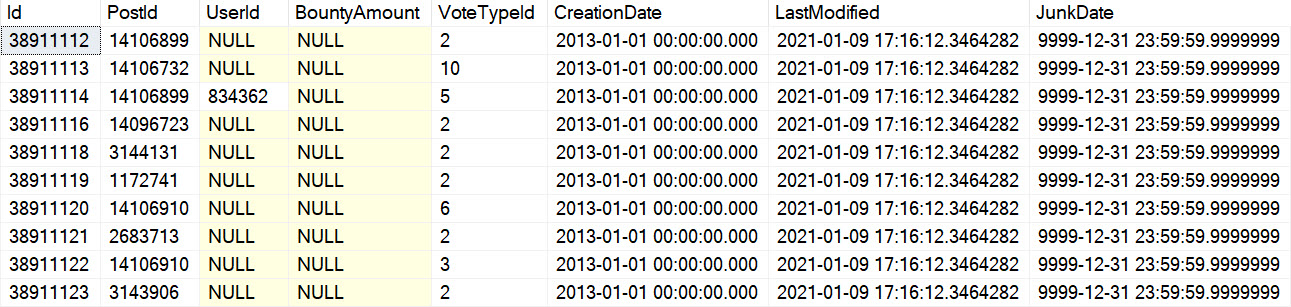
The table data looks like this:
woah man
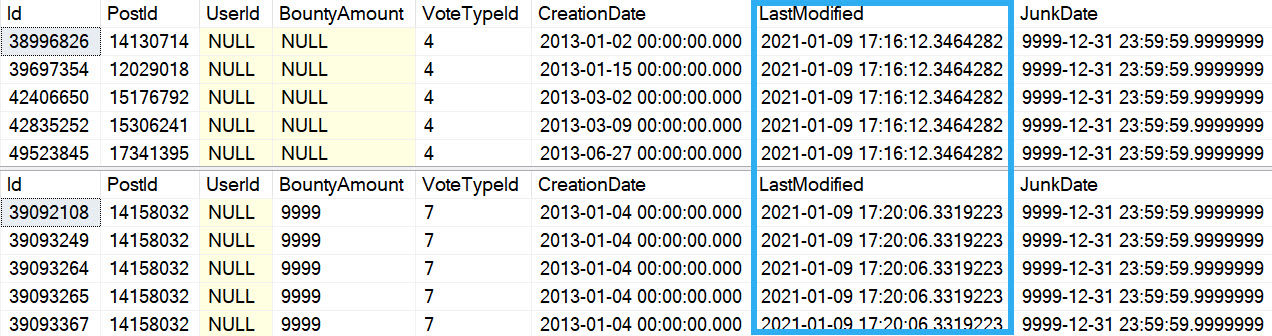
If we run an update:
UPDATE v
    SET v.BountyAmount = 9999
FROM dbo.Votes_Tracked AS v
WHERE v.VoteTypeId = 7;
temporally yours
Note that these screen caps were taken without the HIDDEN keyword added to the table definition: that was an after thought recommended by my friend Peter.
Whatabouts?
Of course, if you remove rows from the table, they’re just gone. You’d still need a trigger to cover deletes, if you need to track those.
And if you want to remove those columns later, it takes a little bit of tweaking.
ALTER TABLE dbo.Votes_Tracked DROP CONSTRAINT DF_LastModified, DF_JunkDate;
ALTER TABLE dbo.Votes_Tracked DROP COLUMN JunkDate, LastModified;

Msg 13588, Level 16, State 1, Line 63
Column 'JunkDate' in table 'Crap.dbo.Votes_Tracked' cannot be dropped because it is a part of period definition.
Of course, the table isn’t system versioned, so this command will also fail:
ALTER TABLE dbo.Votes_Tracked SET (SYSTEM_VERSIONING = OFF);

Msg 13591, Level 16, State 1, Line 66
SYSTEM_VERSIONING is not turned ON for table 'Crap.dbo.Votes_Tracked'.
If you want to remove them, you’ll need to use this:
ALTER TABLE dbo.Votes_Tracked DROP PERIOD FOR SYSTEM_TIME;
Now you’ll be able to remove them.
Is This A Good Idea?
Well, it depends on what you need. If you just need to know when a row changed, and you don’t need to know what changed or who changed it, it can work in a more automated way than triggers. It does require an additional column, which isn’t ideal, but it’s not a gigantic column, and you don’t need to worry about indexing it because the data is junk.
I haven’t found any ridiculous downsides to this, but I’ll keep this updated if I do.
Thanks for reading!
Going Further
If this is the kind of SQL Server stuff you love learning about, you’ll love my training. Blog readers get 25% off the Everything Bundle — over 100 hours of performance tuning content. Need hands-on help? I offer consulting engagements from targeted investigations to ongoing retainers. Want a quick sanity check before committing to a full engagement? Schedule a call — no commitment required.
When tuning queries, one pattern I see over and over again is people running crazy-long queries. Maybe they worked well-enough at some point, but over the years they just kept getting slower and slower.
Sometimes there are comments, and other times there’s enough domain knowledge on the call to understand how a query ended up in the shape it’s in. One persistent idea is that tempdb is something to be avoided. Either because it was “slow” or to avoid contention.
Granted, if a query has been around long enough, these may have been valid concerns at some point. In general though, temp tables (the # kind, not the @ kind) can be quite useful when query tuning.
You Might Be Using It, Anyway
Even if there’s some rule against directly using temp tables, queries can end up using tempdb by the caseload anyway.
Consider that Spool operators explicitly execute in tempdb, any spills will go to tempdb, and work tables that are used in a number of circumstances occur in tempdb. The bigger and more complicated your queries are, the more likely you are to run into cases where the optimizer Spools, Spills, or use some other workspace area in tempdb in your query plan.
Worse, optimizations available for temp tables aren’t available to on-the-fly operators. You also lose the ability to take further action by indexing your temp tables, etc.
It’s Often Easier Than Other Options
Many times when tuning queries, I’ll be puzzled by the optimizer’s choices. Sometimes it’s join type, other times it’s join order, or something else. Perhaps the most common reason is some misestimation, of course.
Query and index hints are great to experiment with, but are often unsatisfying as permanent fixes. I’m not saying to never use them, but you should explore other options first. In other words, keep temp tables on the table.
Thanks for reading!
Going Further
If this is the kind of SQL Server stuff you love learning about, you’ll love my training. Blog readers get 25% off the Everything Bundle — over 100 hours of performance tuning content. Need hands-on help? I offer consulting engagements from targeted investigations to ongoing retainers. Want a quick sanity check before committing to a full engagement? Schedule a call — no commitment required.
When you have queries that need to process a lot of data, and probably do some aggregations over that lot-of-data, batch mode is usually the thing you want.
Originally introduced to accompany column store indexes, it works by allowing CPUs to apply instructions to up to 900 rows at a time.
It’s a great thing to have in your corner when you’re tuning queries that do a lot of work, especially if you find yourself dealing with pesky parallel exchanges.
Oh, Yeah
One way to get that to happen is to use a temp table with a column store index on it.
SELECT
    v.UserId,
    SUM(v.BountyAmount) AS SumBounty
FROM dbo.Comments AS c
JOIN dbo.Votes AS v
    ON  v.PostId = c.PostId
    AND v.UserId = c.UserId
GROUP BY v.UserId
ORDER BY SumBounty DESC;

CREATE TABLE #t(id INT, INDEX c CLUSTERED COLUMNSTORE);

SELECT
    v.UserId,
    SUM(v.BountyAmount) AS SumBounty
FROM dbo.Comments AS c
JOIN dbo.Votes AS v
    ON  v.PostId = c.PostId
    AND v.UserId = c.UserId
LEFT JOIN #t AS t
    ON 1 = 0
GROUP BY v.UserId
ORDER BY SumBounty DESC;
If you end up using this enough, you may just wanna create a real table to use, anyway.
Remarkable!
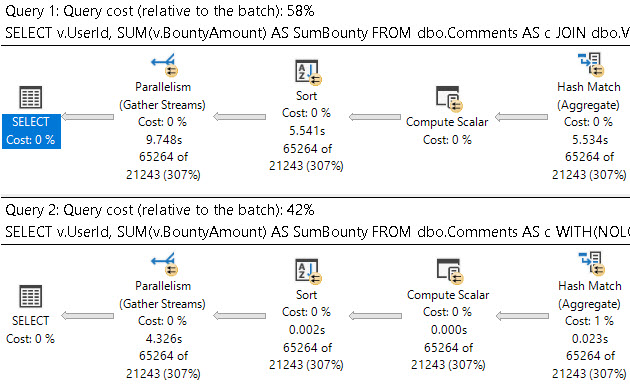
If we look at the end (or beginning, depending on how you read your query plans) just to see the final times, there’s a pretty solid difference.
you can’t make me
The first query takes around 10 seconds, and the second query takes around 4 seconds. That’s a pretty handsome improvement without touching anything else.
Thanks for reading!
Going Further
If this is the kind of SQL Server stuff you love learning about, you’ll love my training. Blog readers get 25% off the Everything Bundle — over 100 hours of performance tuning content. Need hands-on help? I offer consulting engagements from targeted investigations to ongoing retainers. Want a quick sanity check before committing to a full engagement? Schedule a call — no commitment required.
You have too many indexes on too many tables already, and the thought of adding more fills you with a dread that has a first, middle, last, and even a confirmation name.
This is another place where temp tables can save your bacon, because as soon as the query is done they basically disappear.
Forever. Goodbye.
Off to buy a pack of smokes.
That Yesterday
In yesterday’s post, we looked at how a temp table can help you materialize an expression that would otherwise be awkward to join on.
If we take that same query, we can see how using the temp table simplifies indexing.
SELECT
    p.OwnerUserId,
    SUM(p.Score) AS TotalScore,
    COUNT_BIG(*) AS records,
    CASE WHEN p.PostTypeId = 1
         THEN p.OwnerUserId
         WHEN p.PostTypeId = 2
         THEN p.LastEditorUserId
    END AS JoinKey
INTO #Posts
FROM dbo.Posts AS p
WHERE p.PostTypeId IN (1, 2)
AND   p.Score > 100
GROUP BY CASE
             WHEN p.PostTypeId = 1
             THEN p.OwnerUserId
             WHEN p.PostTypeId = 2
             THEN p.LastEditorUserId
         END,
         p.OwnerUserId;

CREATE CLUSTERED INDEX c ON #Posts(JoinKey);

SELECT *
FROM #Posts AS p
WHERE EXISTS
(
    SELECT 1/0
    FROM dbo.Users AS u
    WHERE p.JoinKey = u.Id
);
Rather than have to worry about how to handle a bunch of columns across the where and join and select, we can just stick a clustered index on the one column we care about doing anything relational with to get the final result.
Thanks for reading!
Going Further
If this is the kind of SQL Server stuff you love learning about, you’ll love my training. Blog readers get 25% off the Everything Bundle — over 100 hours of performance tuning content. Need hands-on help? I offer consulting engagements from targeted investigations to ongoing retainers. Want a quick sanity check before committing to a full engagement? Schedule a call — no commitment required.
A lot of the time when I see queries that are written with all sorts of gymnastics in the join or where clause and I ask some questions about it, people usually start complaining about the design of the table.
That’s fine, but when I ask about changing the design, everyone gets quiet. Normalizing tables, especially for Applications Of A Certain Age™ can be a tremendously painful project. This is why it’s worth it to get things right the first time. Simple!
Rather than make someone re-design their schema in front of me, often times a temp table is a good workaround.
Egg Splat
Let’s say we have a query that looks like this. Before you laugh, and you have every right to laugh, keep in mind that I see queries like this all the time.
They don’t have to be this weird to qualify. You can try this if you have functions like ISNULL, SUBSTRING, REPLACE, or whatever in joins and where clauses, too.
SELECT
    p.OwnerUserId,
    SUM(p.Score) AS TotalScore,
    COUNT_BIG(*) AS records
FROM dbo.Users AS u
JOIN dbo.Posts AS p
    ON u.Id = CASE
                   WHEN p.PostTypeId = 1
                   THEN p.OwnerUserId
                   WHEN p.PostTypeId = 2
                   THEN p.LastEditorUserId
              END
WHERE p.PostTypeId IN (1, 2)
AND   p.Score > 100
GROUP BY p.OwnerUserId;
There’s not a great way to index for this, and sure, we could rewrite it as a UNION ALL, but then we’d have two queries to index for.
Sometimes getting people to add indexes is hard, too.
People are weird. All day weird.
Steak Splat
You can replace it with a query like this, which also allows you to index a single column in a temp table to do your correlation.
SELECT
    p.OwnerUserId,
    SUM(p.Score) AS TotalScore,
    COUNT_BIG(*) AS records,
    CASE WHEN p.PostTypeId = 1
         THEN p.OwnerUserId
         WHEN p.PostTypeId = 2
         THEN p.LastEditorUserId
    END AS JoinKey
INTO #Posts
FROM dbo.Posts AS p
WHERE p.PostTypeId IN (1, 2)
AND   p.Score > 100
GROUP BY CASE
             WHEN p.PostTypeId = 1
             THEN p.OwnerUserId
             WHEN p.PostTypeId = 2
             THEN p.LastEditorUserId
         END,
         p.OwnerUserId;

SELECT *
FROM #Posts AS p
WHERE EXISTS
(
    SELECT 1/0
    FROM dbo.Users AS u
    WHERE p.JoinKey = u.Id
);
Remember that temp tables are like a second chance to get schema right. Don’t waste those precious chances.
Thanks for reading!
Going Further
If this is the kind of SQL Server stuff you love learning about, you’ll love my training. Blog readers get 25% off the Everything Bundle — over 100 hours of performance tuning content. Need hands-on help? I offer consulting engagements from targeted investigations to ongoing retainers. Want a quick sanity check before committing to a full engagement? Schedule a call — no commitment required.