A T-SQL Query To Get The Text Between Two Delimiters In SQL Server

I swear It’s Not String Splitting


I have to do this a fair amount, and I always go look at this little cheat sheet that I have.

Then it occurred to me that it might be worth sharing the details here, in case anyone else runs into the same need.

The way I learned to do it is with SUBSTRING and CHARINDEX, which is a pretty common method.

Why CHARINDEX? Because it accepts an optional 3rd parameter that PATINDEX doesn’t, where you can give it a starting position to search. That comes in really handy! Let’s look at how.

The first thing we need for our test case is the starting point, which I’ve arbitrarily chosen as a colon in error messages.

SELECT
    m.*,
    parsed_string = 
        SUBSTRING
        (
            m.text, /*First argument*/ 
            CHARINDEX(':', m.text), /*Second argument*/ 
            LEN(m.text)/*Third argument*/
        )
FROM sys.messages AS m
WHERE m.language_id = 1033
AND   m.text LIKE N'%:%:%';

But the results aren’t exactly what we want! We can still see all the colons.
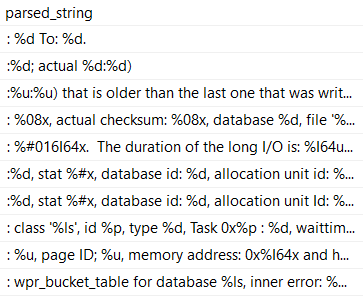
2020 10 08 15 36 04
colonics

What we really need is to cut out the semi-colon, which means we need to move one character over.

Keep in mind that this will change based on the length of the string you’re searching for. If you were looking for ‘Erik’, you’d need to move over four positions.

Sometimes it’s easier to remember that by calling LEN on the search string.

SELECT 
    m.*,
    SUBSTRING
    (
        m.text,
        CHARINDEX(':', m.text) + LEN(':'),
        LEN(m.text)
    ) AS parsed_string
FROM sys.messages AS m
WHERE m.language_id = 1033
AND   m.text LIKE N'%:%:%';

That’ll get us to where we need to be for the first position! Now we need to get the text up to the second colon, which is where things get a little more complicated.

Right now, we’re just getting everything through the end of the error message, using LEN as the 3rd argument to SUBTSTRING.

To start with, let’s establish how we can use the third argument in CHARINDEX.

SELECT 
    m.*,
    SUBSTRING
    (
        m.text, 
        CHARINDEX
        (
            ':', m.text
        ) + LEN(':'),
        CHARINDEX
        (
            ':', 
            m.text, /*!*/
            CHARINDEX
            (
                ':', 
                m.text
            ) + LEN(':')/*!*/
        )
    ) AS parsed_string
FROM sys.messages AS m
WHERE m.language_id = 1033
AND   m.text LIKE N'%:%:%';

The start of the third argument is going to look nearly identical to the first one, except we’re going to start our search in the string after the first colon.

The code in between the exclamation points is the same as the second argument to SUBSTRING.

That’s because it gives us the correct starting position to start looking for the second colon from.

But, you know, this still doesn’t get us what we need, exactly. We need to chop some characters off.

How many?
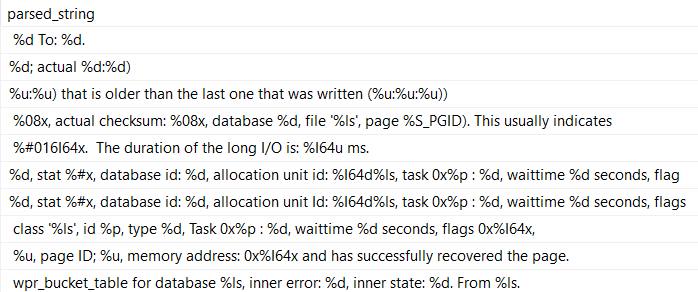
2020 10 08 15 47 10
1, 2, skip a few

I’ll save you some delicate CPU brain cycles: we need to subtract the length of the search string, and then subtract the number of positions in that the first search hit was.

SELECT 
    m.*,
    SUBSTRING
    (
        m.text, /*First argument*/
        CHARINDEX /*Begin Second argument*/
        (
            ':', 
            m.text
        ) + LEN(':'), /*End Second argument*/
        CHARINDEX /*Begin Third argument*/
        (
            ':', /*CHARINDEX of the first : after...*/
            m.text, 
            CHARINDEX /*The CHARINDEX of the first : in the string...*/
            (
                ':', 
                m.text
            ) + LEN(':')
        )
        - LEN(':') /*Minus 1, effectively*/
        - CHARINDEX(':', m.text) /*Minus the CHARINDEX of the first : in the string*/
        /*End Third argument*/
    ) AS parsed_string
FROM sys.messages AS m
WHERE m.language_id = 1033
AND   m.text LIKE N'%:%:%';

Which finally gives us what we’re asking for:
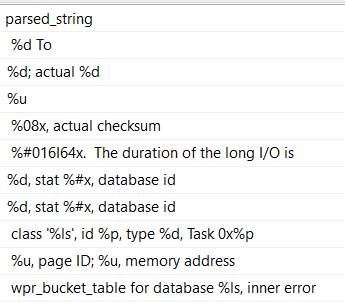
2020 10 08 15 49 15
all smiles

Now, this may not make you totally happy. After all, there are still leading and trailing spaces on each line.

If you want to get rid of those, you can either adjust your LEN functions, or you can call TRIM, LTRIM/RTRIM on the final result. I don’t care, really.

They’re your strings. They shouldn’t even be in the database.

Thanks for reading!

Going Further


If this is the kind of SQL Server stuff you love learning about, you’ll love my training. Blog readers get 25% off the Everything Bundle — over 100 hours of performance tuning content. Need hands-on help? I offer consulting engagements from targeted investigations to ongoing retainers. Want a quick sanity check before committing to a full engagement? Schedule a call — no commitment required.

Please Use Block Quotes For Code Comments In Your T-SQL

Options!


When you’re writing code, you have some options when it comes to leaving comments:

  • Double dashes at the start of a line: -- Comment!
  • Block quotes around a section of text: /* Comment! */
  • No comment whatsoever:

The problem with the double-dash method is that there’s no terminator for it. If you end up pasting the query from a DMV where it’s not all nicely formatted, it’s pretty likely going to end up all on a single line.

With a long enough query, it can be a real pain to scroll across looking for comments and separating them to a new line so you can run the query.

What really sucks is that tools that can automatically format T-SQL for you can’t handle this either. If I could just right click and solve the problem, I’d be talking about that instead.

So, please: If you’re going to put comments in your code, use the block quotes.

2020 09 29 9 22 14
clearly superior

Thanks for reading!

Going Further


If this is the kind of SQL Server stuff you love learning about, you’ll love my training. Blog readers get 25% off the Everything Bundle — over 100 hours of performance tuning content. Need hands-on help? I offer consulting engagements from targeted investigations to ongoing retainers. Want a quick sanity check before committing to a full engagement? Schedule a call — no commitment required.
How SQL Server Treats NULLs In Case Expressions

I Forgot


Honest, I did. It happens to the best of us.

Why, just last week I forgot everything for 3 hours.

It was lovely.

These two queries look close enough , but they aren’t.

--Numero Uno
SELECT   CASE v.UserId WHEN NULL 
                       THEN 'NULL!'
                       ELSE 'NOT NULL!'
         END AS Scrubbed,
         v.VoteTypeId,
         COUNT_BIG(*) AS records
FROM     dbo.Votes AS v
GROUP BY CASE v.UserId WHEN NULL 
                       THEN 'NULL!'
                       ELSE 'NOT NULL!'
         END,
         v.VoteTypeId
ORDER BY v.VoteTypeId;

--Numero Dos
SELECT   CASE WHEN v.UserId IS NULL THEN 'NULL!'
              WHEN v.UserId IS NOT NULL THEN 'NOT NULL!'
         END AS Scrubbed,
         v.VoteTypeId,
         COUNT_BIG(*) AS records
FROM     dbo.Votes AS v
GROUP BY CASE WHEN v.UserId IS NULL THEN 'NULL!'
              WHEN v.UserId IS NOT NULL THEN 'NOT NULL!'
         END,
         v.VoteTypeId
ORDER BY v.VoteTypeId;

Results To Gridiot


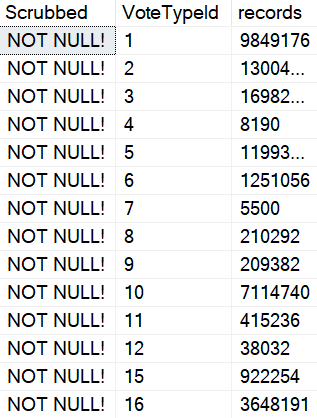
The first query returns what appears to be rather odd results.

2020 06 02 21 15 59
dumb party

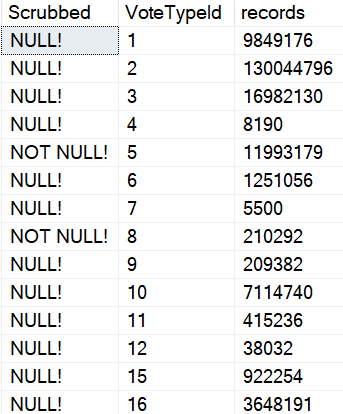
There are many NULLs in this column, and they’re exposed when we run the second query.

2020 06 02 21 16 23
Get’em

See them? All the NULLs? They’re here now.

1-900-MUPPET


The first query is the same thing as saying UserId = NULL.

That doesn’t get you anywhere at all in a database.

What is this, EXCEL?

To judge the NULL and the NOT NULL, you have to use IS NULL and IS NOT NULL.

But I forgot about that in CASE expressions, so I decided to write it down.

Thanks for reading!

Going Further


If this is the kind of SQL Server stuff you love learning about, you’ll love my training. Blog readers get 25% off the Everything Bundle — over 100 hours of performance tuning content. Need hands-on help? I offer consulting engagements from targeted investigations to ongoing retainers. Want a quick sanity check before committing to a full engagement? Schedule a call — no commitment required.

Forced Parameterization Doesn’t Fix SQL Injection Problems In SQL Server

Short and Sweaty


If you have stored procedures that do things like this:

IF @OwnerUserId IS NOT NULL
   SET @Filter = @Filter + N' AND p.OwnerUserId = ' + RTRIM(@OwnerUserId) + @nl;
IF @CreationDate IS NOT NULL
   SET @Filter = @Filter + N' AND p.CreationDate >= ''' + RTRIM(@CreationDate) + '''' + @nl;
IF @LastActivityDate IS NOT NULL
   SET @Filter = @Filter + N' AND p.LastActivityDate < ''' + RTRIM(@LastActivityDate) + '''' + @nl;
IF @Title IS NOT NULL 
   SET @Filter = @Filter + N' AND p.Title LIKE ''' + N'%' + @Title + N'%''' + @nl;
IF @Body IS NOT NULL
   SET @Filter = @Filter + N' AND p.Body LIKE ''' + N'%' + @Body + N'%'';';    
IF @Filter IS NOT NULL
   SET @SQLString += @Filter;

PRINT @SQLString
EXEC (@SQLString);

Or even application code that builds unparameterized strings, you’ve probably already had someone steal all your company data.

Way to go.

But Seriously


I was asked recently if the forced parameterization setting could prevent SQL injection attacks.

Let’s see what happens! I’m using code from my example here.

EXEC dbo.AwesomeSearchProcedure @OwnerUserId = 35004, 
                                @Title = NULL, 
                                @CreationDate = NULL, 
                                @LastActivityDate = NULL, 
                                @Body = N''' UNION ALL SELECT t.object_id, t.name, NULL, NULL, SCHEMA_NAME(t.schema_id) FROM sys.tables AS t; --';

If we look at the printed output from the procedure, we can see all of the literal values.

SELECT TOP (1000) p.OwnerUserId, p.Title, p.CreationDate, p.LastActivityDate, p.Body
FROM dbo.Posts AS p
WHERE 1 = 1 
AND p.OwnerUserId = 35004
AND p.Body LIKE '%' UNION ALL SELECT t.object_id, t.name, NULL, NULL, SCHEMA_NAME(t.schema_id) FROM sys.tables AS t; --%';

But if we look at the query plan, we can see partial parameterization (formatted a little bit for readability)

2020 05 05 11 23 36
dang
where @0 = @1 and p . OwnerUserId = @2 
and p . Body like '%' union all select t . object_id , t . name , null , null , SCHEMA_NAME ( t . schema_id ) from sys . tables as t

Slightly More Interesting


If we change the LIKE predicate on Body to an equality…

IF @Body IS NOT NULL
   SET @Filter = @Filter + N' AND p.Body = ''' + @Body + ';';

The parameterization will change a little bit, but still not fix the SQL injection attempts.

Instead of the ‘%’ literal value after the like, we get @3 — meaning this is the third literal that got parameterized.

2020 05 05 11 28 02
dang
where @0 = @1 and p . OwnerUserId = @2 
and p . Body = @3 union all select t . object_id , t . name , null , null , SCHEMA_NAME ( t . schema_id ) from sys . tables as t

But the injecty part of the string is still there, and we get the full list of tables in the database back.

Double Down


If you’d like to learn how to fix tough problems like this, and make your queries stay fast, check out my advanced SQL Server training.

Thanks for reading!

Going Further


If this is the kind of SQL Server stuff you love learning about, you’ll love my training. Blog readers get 25% off the Everything Bundle — over 100 hours of performance tuning content. Need hands-on help? I offer consulting engagements from targeted investigations to ongoing retainers. Want a quick sanity check before committing to a full engagement? Schedule a call — no commitment required.

Error Handling In SQL Server Cursors

Spit My Last Error


Video Summary

In this video, I delve into error handling within SQL Server cursors, a topic that recently sparked some interest on Twitter. Initially stumped by the challenge, I decided to create a simple table with numbers 0 through 10 to illustrate my point. As we navigate through the code and its execution, you’ll see firsthand how a cursor can get stuck in an infinite loop due to unhandled errors. By adding a `FETCH NEXT` statement within the catch block, I demonstrate a practical solution that allows the cursor to continue processing rows even after encountering an error. This video is not just about solving a specific problem but also serves as a reminder of the importance of robust error handling in stored procedures—especially when working with cursors.

Full Transcript

Don’t make fun of my hair. It’s not funny. It’s not amusing. It is a sad, sad reality that I’m living in, that we’re all living in, living through, hopefully living through, surviving in these trying times. So let’s talk about error handling in cursors because there was a spec a spec of interest on Twitter about seeing something about this. So this is funny because I was stumped by this. I was stumped by this and I was staring at it for a while, just not being able to figure it out. So what I’m going to do is create a table with the numbers 0 through 10 in it. So when we look at the results of just the select query, we’re going to start at 0 and kind of count up to 10. Alright, so let’s put that in the table, right? I guess we’ll select star from the table just to prove them. I hope select star isn’t too rough on this single column. Maybe I should add a computed column to stop myself from doing that. I don’t know. I’m undecided on that. 0 through 10. So that’s 11 rows altogether, right? Sort of confusing when you see 1, 0, and then 11, 10 down there. At least it is for me, but I’m kind of dumb. So, you know, I have that going for me. So what I originally started this, I was working on something.

I mean, it was a similar setup. You know, I was doing everything right, too. I was using a cursor and I was using a table variable for all the right things, right? So I was using a table variable to catch errors and I was using a cursor to iterate over something that I shouldn’t, like it was not a set-based thing that I could have just used a window function for. It was actually something that should be iterated over. It was re-enabling untrusted foreign keys and I figured, hey, what better use for a cursor than enabling foreign keys. So what I have here in my setup is some dynamic SQL. I just have this little variable in here to throw it away because I don’t want to return the table results.

I just want to look at the messages tab and show you what’s going on. Then I have this thing over here, which is going to catch this query inside of the cursor. I’ll get to that in a minute. And then I have a table that is going to catch error messages. And what I’m going to do after that is open my cursor and fetch everything into my variable here.

And then, of course, we’ll fetch status equals zero. I am going to print out my message with raise error. I’m going to execute my dynamic SQL and then I’m going to try to fetch next into my variable. variable. And I’m doing this inside of a try-catch block because, you know, working on SP underscore human events, I have gotten quite enamored with the old begin-try, begin-catch.

Because error handling is, I think, pretty valuable when you’re working with a big store procedure, right? Knowing exactly where something happened, where the error was, what the error was, like what was going on. That’s really, really valuable stuff. And I know there’s, you know, a certain amount of error handling that is just like, you know, maybe overboard.

But what the hell? You know, I like going overboard once in a while. You know why I like going overboard? Because it beats the crap out of being on a cruise ship. That’s why. So let’s, without too much further time wasting, let’s run this whole thing.

And let’s look at what happens. Now, if you go over to the Messages tab, you’re going to notice, I think, what I noticed. And, I mean, the first thing you’re going to notice is I forgot to set no count on. So we’re going to get this one row back. But the other thing is that we kept getting the same error over and over again.

We were stuck in an infinite loop. We did not just get 11 rows back because we moved on to the next one. We got, I don’t know, however many this one. I’m not counting. Are you crazy? But we kept hitting, we would keep hitting this error over and over again.

We would keep dividing by zero and we would never move on. Now, the way around this is to double up on our fetch next. And we actually need to take this right here and we need to put another version of it inside of the catch block.

And now when I run this whole thing and I declare my cursor and I step through, what am I going to get? I’m going to get a row back from my error catching table variable. And over in the Messages tab, I’m going to get this, right, where we divided by zero and we affected one row.

We got an error and then we went through and we did a bunch of stuff that actually would divide, right? And then we got this and, you know, I don’t know. We got one row effect. I don’t really know. I don’t really care.

That’s probably the select over here, right? But then back in that error catching table, we got the error number, the error severity, the error state, and the divide by zero and the error message, which is divide by zero encountered. So there we go. That’s that.

That’s how you do error handling inside of a cursor and still have your cursor make forward progress. If you only have the fetch next here, you’re just going to get stuck in an infinite loop. But if you put a fetch next in the catch block, you will catch the error and then move on.

And then you will start back here. Now, what I thought was a little weird about this is maybe like the fetch status thing, like not bailing out, but I don’t know.

Maybe I don’t understand cursors. There’s a lot I don’t understand. Maybe cursors is one of those things that I will just hopefully never understand. Or maybe I want to understand them.

I don’t know. Maybe my next training module will be all about the wonders of cursors. Wouldn’t that be fun for you? Thanks for watching.

Going Further


If this is the kind of SQL Server stuff you love learning about, you’ll love my training. Blog readers get 25% off the Everything Bundle — over 100 hours of performance tuning content. I’m also available for consulting if you just don’t have time for that and need to solve performance problems quickly.

If you wanna play with the code I used to try things out on your own, here it is:

CREATE TABLE zero_ten (id INT NOT NULL PRIMARY KEY);

INSERT dbo.zero_ten ( id )
SELECT 0 AS id
UNION ALL 
SELECT TOP (10) ROW_NUMBER() OVER(ORDER BY 1/0)
FROM sys.messages AS m

SELECT * FROM dbo.zero_ten AS zt;
RETURN;

DECLARE c CURSOR LOCAL STATIC FOR
SELECT N'DECLARE @atmosphere INT; SELECT @atmosphere = 1/' + RTRIM(zt.id)
FROM dbo.zero_ten AS zt;

DECLARE @joydivision NVARCHAR(MAX) = N'';
DECLARE @errors TABLE
(
    id INT PRIMARY KEY IDENTITY,
    error_number INT,
    error_severity INT,
    error_state INT,
    error_message NVARCHAR(MAX)
);

OPEN c;
FETCH NEXT FROM c
INTO @joydivision;

WHILE @@FETCH_STATUS = 0
BEGIN
    BEGIN TRY
        RAISERROR(@joydivision, 0, 1) WITH NOWAIT;
        EXEC sys.sp_executesql @joydivision;
        FETCH NEXT FROM c INTO @joydivision;
    END TRY
    BEGIN CATCH
        INSERT @errors ( error_number, error_severity, error_state, error_message )
        SELECT ERROR_NUMBER(), ERROR_SEVERITY(), ERROR_STATE(), ERROR_MESSAGE();
        --FETCH NEXT FROM c INTO @joydivision;
    END CATCH;
END;

SELECT *
FROM @errors AS e;

CLOSE c;
DEALLOCATE c;
GO


A Funny Thing Happened With Create Or Alter In SQL Server

“Funny”


Going Further


If this is the kind of SQL Server stuff you love learning about, you’ll love my training. Blog readers get 25% off the Everything Bundle — over 100 hours of performance tuning content. Need hands-on help? I offer consulting engagements from targeted investigations to ongoing retainers. Want a quick sanity check before committing to a full engagement? Schedule a call — no commitment required.

An Unfortunate Performance Side Effect Of The OUTPUT Clause In SQL Server

Put Out


I see people using OUTPUT to audit modifications from time to time, often because “triggers are bad” or “triggers are slow”.

Well, sometimes, sure. But using OUTPUT can be a downer, too.

Let’s look at how.

A Process Emerges


Say we’ve got a table that we’re using to track user high scores for their questions.

CREATE TABLE dbo.HighQuestionScores
(
    Id INT PRIMARY KEY CLUSTERED,
    DisplayName NVARCHAR(40) NOT NULL,
    Score BIGINT NOT NULL
);

To test the process, let’s put a single user in the table:

INSERT dbo.HighQuestionScores WITH (TABLOCK)
        (Id, DisplayName, Score)
SELECT u.Id, u.DisplayName, p.Score
FROM dbo.Users AS u
JOIN 
(
    SELECT p.OwnerUserId, 
	       MAX(p.Score) AS Score
    FROM dbo.Posts AS p
    WHERE p.PostTypeId = 1
    GROUP BY p.OwnerUserId
) AS p ON p.OwnerUserId = u.Id
WHERE u.Id = 22656;

To exacerbate the problem, I’m not going to create any helpful indexes here. This is a good virtual reality simulator, because I’ve seen your indexes.

Yes you. Down in front.

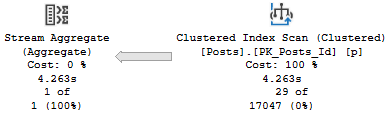
The relevant part of the query plan is the scan of the Posts table:

SQL Server Query Plan
Practice

It’s parallel, and takes 1.8 seconds.

Aw, dit


Now let’s add in an OUTPUT clause.

I’m going to skip over inserting the output into any structure, because I want you to understand that the target doesn’t matter.

INSERT dbo.HighQuestionScores WITH (TABLOCK)
        (Id, DisplayName, Score)
OUTPUT Inserted.Id,
       Inserted.DisplayName,
       Inserted.Score
SELECT u.Id, u.DisplayName, p.Score
FROM dbo.Users AS u
JOIN 
(
    SELECT p.OwnerUserId, MAX(p.Score) AS Score
    FROM dbo.Posts AS p
    WHERE p.PostTypeId = 1
    GROUP BY p.OwnerUserId
) AS p ON p.OwnerUserId = u.Id
WHERE u.Id = 22656;

The relevant part of the plan now looks like this:

SQL Server Query Plan
Golf Coach

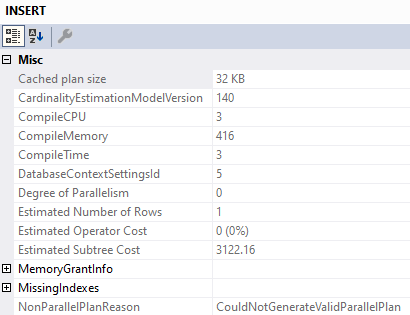
We’ve lost parallelism, and inspecting the properties of the Insert operator tells us why:

SQL Server Query Plan Tool Tip
Less Successful

We’ve got a Non Parallel Plan Reason. Why aren’t there any spaces? I don’t know.

Why can’t that go parallel? I also don’t know.

What About Triggers?


If we create a minimal trigger on the table, we can see if it has the same overhead.

CREATE OR ALTER TRIGGER dbo.hqs_insert ON dbo.HighQuestionScores
AFTER INSERT
AS
BEGIN
SET NOCOUNT ON;

    SELECT Inserted.Id,
           Inserted.DisplayName,
           Inserted.Score
    FROM Inserted;

END

Let’s go back to the original insert, without the output! We care about two things:

  • Is the parallel portion of the insert plan still there?
  • Is there any limitation on parallelism with the Inserted (and by extension, Deleted) virtual tables?

The answers are mostly positive, too. The insert plan can still use parallelism.

I’m not gonna post the same picture here, you can scroll back fondly.

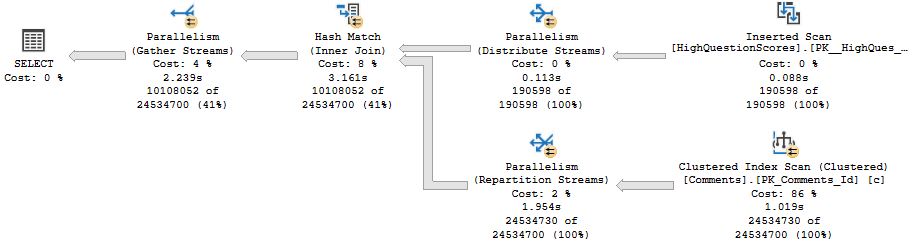
Though the select from the Inserted table within the trigger doesn’t go parallel, it doesn’t appear to limit parallelism for the entire plan. It does appear that reads from the Inserted table can’t use parallelism (sort of like the table variable in a MSTVF).

Let’s modify the trigger slightly:

CREATE OR ALTER TRIGGER dbo.hqs_insert ON dbo.HighQuestionScores
AFTER INSERT
AS
BEGIN
SET NOCOUNT ON;

    DECLARE @Id INT
	DECLARE @DisplayName NVARCHAR(40)
	DECLARE @Score BIGINT

    SELECT @Id = Inserted.Id,
           @DisplayName = Inserted.DisplayName,
           @Score = Inserted.Score
    FROM Inserted
	JOIN dbo.Comments AS c 
	    ON c.UserId = Inserted.Id;

END

And for variety, let’s insert a lot more data into our table:

TRUNCATE TABLE dbo.HighQuestionScores;

INSERT dbo.HighQuestionScores WITH (TABLOCK)
        (Id, DisplayName, Score)
SELECT u.Id, u.DisplayName, p.Score
FROM dbo.Users AS u
JOIN 
(
    SELECT p.OwnerUserId, MAX(p.Score) AS Score
    FROM dbo.Posts AS p
    WHERE p.PostTypeId = 1
    GROUP BY p.OwnerUserId
) AS p ON p.OwnerUserId = u.Id
WHERE u.Id < 500000;

Here’s the query plan:

SQL Server Query Plan
Wrecking Ball

The read from Inserted is serial, but the remainder of the plan fully embraces parallelism like a long lost donut.

Togetherness


Given a well-tuned workload, you may not notice any particular overhead from using OUTPUT to audit certain actions.

Of course, if you’re using them alongside large inserts, and those large inserts happen to run for longer than you’d like, it might be time to see how long they take sans the OUTPUT clause. It’s entirely possible that using a trigger instead would cause fewer performance issues.

Thanks for reading!

Going Further


If this is the kind of SQL Server stuff you love learning about, you’ll love my training. Blog readers get 25% off the Everything Bundle — over 100 hours of performance tuning content. Need hands-on help? I offer consulting engagements from targeted investigations to ongoing retainers. Want a quick sanity check before committing to a full engagement? Schedule a call — no commitment required.
How To Get Greatest And Least Values In A SQL Server Query

Update: Azure SQL DB And SQL Server 2022 Will Have These


So be on the lookout.

Spinning Out Of Control


It’s sorta kinda pretty crazy when every major database platform has something implemented, and SQL Server doesn’t.

Geez, even MySQL.

But a fairly common need in databases is to find the max value from two columns.

Maybe even across two tables.

Track V


For one table, it’s fairly straight forward.

SELECT     MAX(x.CombinedDate) AS greatest
FROM       dbo.Users AS u
CROSS APPLY( VALUES( u.CreationDate ), ( u.LastAccessDate )) AS x( CombinedDate );

We’re using our old friend cross apply with a values clause to create on “virtual” column from two date columns.

As far as indexing goes, I couldn’t find any performance difference between these two. They both take about 1 second.

CREATE INDEX smoochies ON dbo.Users(CreationDate, LastAccessDate);
CREATE INDEX woochies ON dbo.Users(LastAccessDate, CreationDate);

Indexing strategy will likely rely on other local factors, like any where clause filtering.

Monolith


A similar pattern will work across two tables:

SELECT     MAX(x.Score)
FROM       dbo.Posts AS p
JOIN       dbo.Comments AS c
    ON p.Id = c.PostId
CROSS APPLY( VALUES( p.Score ), ( c.Score )) AS x ( Score );

Though this is the worst possible way to write the query. It runs for around 10 seconds.

The indexes I have for this query look like so:

CREATE INDEX thicc ON dbo.Posts(Id, Score);
CREATE INDEX milky ON dbo.Comments(PostId, Score);

Reversing the key column order helps — the query runs in about 3 seconds, but I need to force index usage.

Of course, this is still the second worst way to write this query.

The best way I’ve found to express this query looks like so:

SELECT MAX(x.Score)
FROM
    (
     SELECT MAX(p.Score) AS Score
     FROM dbo.Posts AS p
    ) AS p
CROSS JOIN
    (
     SELECT MAX(c.Score) AS Score
     FROM dbo.Comments AS c
    ) AS c
CROSS APPLY( VALUES( p.Score ), ( c.Score )) AS x( Score );

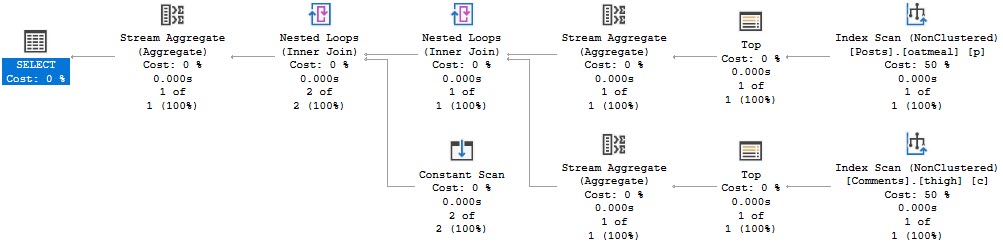
The cross join here isn’t harmful because we only produce two rows.

And it finishes before we have time to move the mouse.

SQL Server Query Plan
Mousey

Likewise, the faster pattern for a single table looks like this:

SELECT MAX(x.Dates)
FROM
    (
     SELECT MAX(u.CreationDate) CreationDate
     FROM dbo.Users AS u
    ) AS uc
CROSS JOIN
    (
     SELECT MAX(u.LastAccessDate) LastAccessDate
     FROM dbo.Users AS u
    ) AS ul
CROSS APPLY (VALUES (uc.CreationDate), (ul.LastAccessDate)) AS x (Dates);

Because we’re able to index for each MAX

CREATE INDEX smoochies ON dbo.Users(CreationDate);
CREATE INDEX woochies ON dbo.Users(LastAccessDate);

Of course, not every query can be written like this, or indexed for perfectly, but it’s gruel for thought if you need specific queries like this to be as fast as possible.

Thanks for reading!

Going Further


If this is the kind of SQL Server stuff you love learning about, you’ll love my training. Blog readers get 25% off the Everything Bundle — over 100 hours of performance tuning content. Need hands-on help? I offer consulting engagements from targeted investigations to ongoing retainers. Want a quick sanity check before committing to a full engagement? Schedule a call — no commitment required.
Why Functions Are Bad in SQL Server Where Clauses

Raised Right


It seems like every time I check out a server, the query plans are a nightmare. Users are freaking out, and management’s coffee is more Irish than Colombian.

Many times, the issue is that people are using presentation layer functions for relational processes. The where clause, joins, group by, and order by parts of a query.

Think about built-in string and date functions, wrapped around columns, and the problems they can cause.

These are things you should actively be targeting in existing code, and fighting to keep out of new code.

Nooptional


When you’re trying to get rid of them, remember your better options

  • Cleaning data on input, or via triggers: Better than wrapping everything in RTRIM/LTRIM
  • Using computed columns: Better than relying on runtime calculations like DATEADD/DATEDIFF
  • Breaking queries up: Use UNION ALL to query for either outcome (think ISNULL)
  • Using indexed views: If you need to calculate things in columns across tables
  • Creating reporting tables: Sometimes it’s easier to denormalize a bit to make writing and indexing easier
  • Using #temp tables: If you have data that you need to persist a calculation in and the query to generate it is complicated

Note the things I’m not suggesting here:

  • CTEs: Don’t materialize anything
  • @table variables: Cause more problems than they solve
  • Views: Don’t materialize unless indexed
  • Functions: Just no, thanks

More Work


Yes, finding and fixing this stuff is more work for you. But it’s a whole lot less work for the optimizer, and your server, when you’re done.

If that’s the kind of thing you need help with, drop me a line.

Thanks for reading!

Going Further


If this is the kind of SQL Server stuff you love learning about, you’ll love my training. Blog readers get 25% off the Everything Bundle — over 100 hours of performance tuning content. Need hands-on help? I offer consulting engagements from targeted investigations to ongoing retainers. Want a quick sanity check before committing to a full engagement? Schedule a call — no commitment required.
When SELECT * Doesn’t Matter In SQL Server Queries

Pavlovian


There’s a strange response to some things in the SQL Server community that borders on religious fervor. I once worked with someone who chastised me for having SELECT * in some places in the Blitz scripts. It was odd and awkward.

Odd because this person was the most Senior DBA in the company, and awkward because they didn’t believe me that it didn’t matter in some cases.

People care about SELECT * for many valid reasons, but context is everything.

One For The Money


The first place it doesn’t matter is EXISTS. Take this index and this query:

CREATE INDEX specatular_blob ON dbo.Posts(PostTypeId, OwnerUserId);

SELECT COUNT(*) AS records
FROM   dbo.Users AS u
WHERE  EXISTS ( SELECT * 
                FROM dbo.Posts AS p 
				WHERE p.OwnerUserId = u.Id 
				AND p.PostTypeId = 2 );

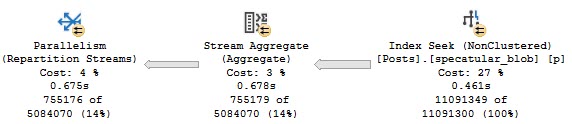
The relevant part of the query plan looks like this:

SQL Server Query Plan
What’s My Name

We do a seek into the index we created on the two columns in our WHERE clause. We didn’t have to go back to the clustered index for everything else in the table.

That’s easy enough to prove if we only run the subquery — we have to change it a little bit, but the plan tells us what we need.

SELECT *
FROM   dbo.Posts AS p
WHERE  p.OwnerUserId = 22656
AND    p.PostTypeId = 2;

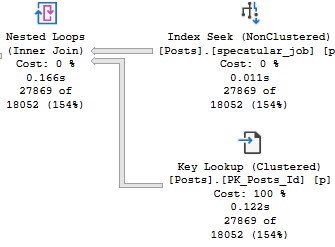
This time we do need the clustered index:

SQL Server Query Plan
Who We Be

You can even change it to something that would normally throw an error:

SELECT COUNT(*) AS records
FROM   dbo.Users AS u
WHERE  EXISTS ( SELECT 1/0 
                FROM dbo.Posts AS p 
				WHERE p.OwnerUserId = u.Id 
				AND p.PostTypeId = 2 );

Two For Completeness


Another example is in derived tables, joins, and apply.

Take these two queries. The first one only selects columns in our nonclustered index (same as above).

The second one actually does a SELECT *.

/*selective*/
SELECT     u.Id,
           u.DisplayName,
		   ca.OwnerUserId, --I am only selecting columns in our index
		   ca.PostTypeId,
		   ca.Id
FROM       dbo.Users AS u
CROSS APPLY( SELECT TOP (1) * --I am select *
             FROM dbo.Posts AS p 
			 WHERE p.OwnerUserId = u.Id 
			 AND p.PostTypeId = 2 
			 ORDER BY p.OwnerUserId DESC, p.Id DESC) AS ca
WHERE U.Reputation >= 100000;

/*less so*/
SELECT     u.Id,
           u.DisplayName,
		   ca.* --I am select *
FROM       dbo.Users AS u
CROSS APPLY( SELECT TOP (1) * --I am select *
             FROM dbo.Posts AS p 
			 WHERE p.OwnerUserId = u.Id 
			 AND p.PostTypeId = 2 
			 ORDER BY p.OwnerUserId DESC, p.Id DESC) AS ca
WHERE U.Reputation >= 100000;

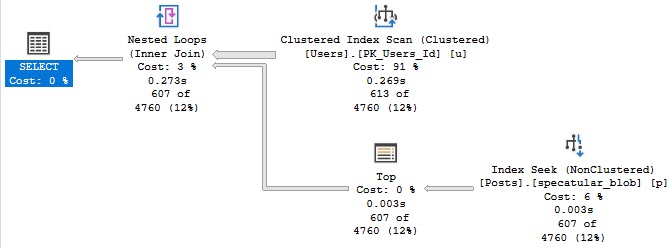
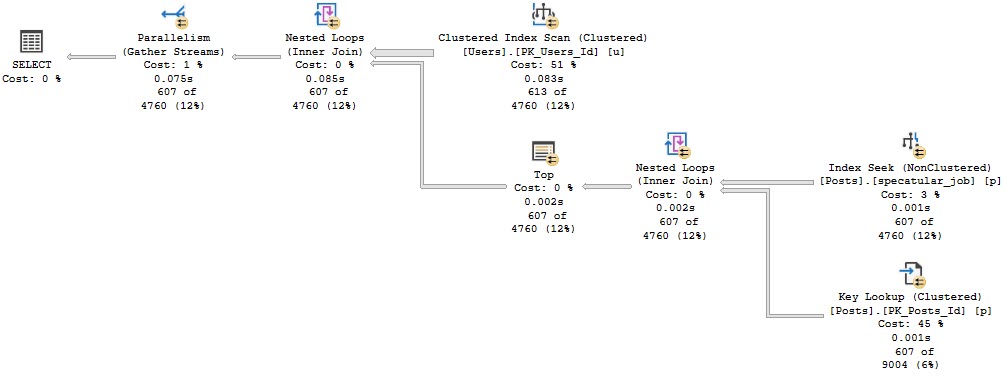
The first query only touches our narrow nonclustered index:

SQL Server Query Plan
Blackout

The second query does a key lookup, because we really do select everything.

SQL Server Query Plan
Party Up

Trash Pile


I know, you’ve been well-conditioned to freak out about certain things. I’m here to help.

Not every SELECT * needs to be served a stake through the heart and beheading.

Thanks for reading!

Going Further


If this is the kind of SQL Server stuff you love learning about, you’ll love my training. Blog readers get 25% off the Everything Bundle — over 100 hours of performance tuning content. Need hands-on help? I offer consulting engagements from targeted investigations to ongoing retainers. Want a quick sanity check before committing to a full engagement? Schedule a call — no commitment required.