Look, Functions Suck
That’s why smart people have been working on making them suck less.
The things I see people doing with them range from “you know there’s a system function that does that” to “oh wow, you wrote an entire program in here”.
I’m not kidding. I once saw a function that was a wrapper for ISNULL that returned the results of ISNULL. I have no idea why.
If I had to think of a DBA prank, writing scalar UDFs that are just wrappers for system functions would be pretty high up there.
Especially if they had the same names as the system functions.
Turning Down The Suck
A while back, Jonathan Kehayias blogged about a way to speed up UDFs that might see NULL input.
Which is great, if your functions see NULL inputs.
But what if… What if they don’t?
And what if they’re in your WHERE clause?
And what if they’re in your WHERE clause multiple times?
Oh my.
Tick, Tick, Tick
Here’s our function.
CREATE FUNCTION dbo.TotalScore(@UserId INT)
RETURNS BIGINT
WITH RETURNS NULL ON NULL INPUT, SCHEMABINDING
AS
BEGIN
    DECLARE @TotalScore BIGINT;
    SELECT @TotalScore =
    (
        SELECT ISNULL(SUM(p.Score), 0)
        FROM dbo.Posts AS p
        WHERE p.OwnerUserId = @UserId
    ) +
    (
        SELECT ISNULL(SUM(c.Score), 0)
        FROM dbo.Comments AS c
        WHERE c.UserId = @UserId
    )
    RETURN @TotalScore;
END
GO
What it does is go out to the Posts and Comments tables and sums up the Score columns for a user.
We’ll use it in our query like this:
SELECT u.DisplayName,
       u.Reputation
FROM dbo.Users AS u
WHERE u.Reputation >= 100000
AND dbo.TotalScore(u.Id) >= 10000
AND dbo.TotalScore(u.Id) < 20000
ORDER BY u.Id;
We want to find people with a total score between 10 and 20 thousand.
Right on.
When we run the query, the plan looks like this, showing 2 seconds of runtime.

Tock, Tock, Tock
I know, I know. Get to the point. Make it faster, bouncer-man.
Our goal is to get the function to run fewer times, so we’ll replace multiple calls to it with one call.
SELECT u.DisplayName,
       u.Reputation
FROM dbo.Users AS u
CROSS APPLY
    (
        VALUES (dbo.TotalScore(u.Id))
    ) AS t (Score)
WHERE u.Reputation >= 100000
AND   t.Score >= 10000
AND   t.Score < 20000
ORDER BY u.Id;
Using this technique, the query runs for about 780ms.

Tale of the XE
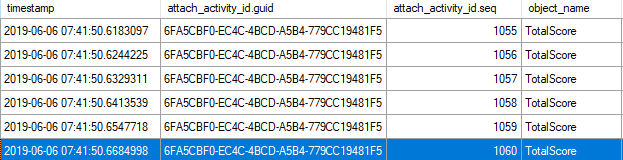
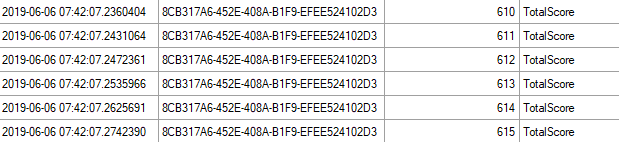
What happens that makes this faster is more evident if we use the XE session from Jonathan’s post for similar reasons, and look at how many times the function was called.
If we look at the activity sequence, it goes up to 1060 for the first query:
And only 615 for the second query:
Exeunt
Right now, if we want scalar UDFs to run faster, we can:
- Tune the underlying query (if there is one)
- Have them run fewer times
- Wait for SQL Server 2019
In tomorrow’s post, I’ll look at the same scenario using CTP 3 of SQL Server 2019.
Thanks for reading!
Going Further
If this is the kind of SQL Server stuff you love learning about, you’ll love my training. Blog readers get 25% off the Everything Bundle — over 100 hours of performance tuning content. Need hands-on help? I offer consulting engagements from targeted investigations to ongoing retainers. Want a quick sanity check before committing to a full engagement? Schedule a call — no commitment required.
One thought on “A Hidden Value Of Apply With SQL Server Scalar UDFs”
Comments are closed.