Be Careful When You Alter SQL Server Indexed Views

Yo, Is That Mary?


Video Summary

In this video, I dive into the quirky behavior of indexed views in SQL Server, particularly focusing on what happens when you alter an index view. I share my personal experience with a six-year-old daughter who recently discovered that I’m on YouTube, which led to a priceless moment of realization for her. The main takeaway is that altering an index view can drop any indexes created on it, whether they are clustered or nonclustered. This can be quite surprising and potentially problematic if you’re not aware of this behavior. I walk through the process step-by-step using a simple example where creating or altering a view called “top comments” results in the disappearance of its index when altered. The video is light-hearted, filled with personal anecdotes, and aimed at making what could be a complex topic more approachable for SQL Server enthusiasts.

Full Transcript

This is gonna be one of those videos that you watch maybe because you see it on Twitter and then you’ll see it in a blog post a month later and be disappointed that it’s just a blog post with a video that you saw a month ago. But them’s the breaks when you have 30 blog posts already lined up. What do you want me to tell you? My six-year-old daughter recently discovered that I am on YouTube and the look on her face when she discovered that was priceless. Anyway, I’m here to talk, I shouldn’t introduce myself. My name’s Erik. I am, I am the janitor here at Erik Darling Data and I’m here to talk about something kind of funny that happens. with indexed views. Now, an indexed view is a pretty cool thing. It’s a, it’s a, it materializes a view. It makes that view a real, a real person like Pinocchio, what makes that view a real boy. And, I’m, it doesn’t matter if you use create or alter or create or alter here. It’s always the same thing, which I’ll, I’ll, I’ll walk through, but let’s create or alter a view called top comments. Now, if you want to create an index view, there are a whole bunch of rules that you have to follow.

There’s far too many rules for me to get into here, but a couple, one, a couple that we need for this particular index view are schema binding, which you need for all index views and account big column if you have an aggregate. Now, you can create index views without an aggregate that don’t have account big column because that wouldn’t make any sense. But, if you’re going to aggregate, uh, data in an index view, which is kind of like the whole point of an index view, or the whole point of most index views that I see, well, this is a pretty good, well, this is something you have to do anyway. So, let’s create this view and, uh, we’ll go look at that view and object explorer. You can see all the stupid things that I create, uh, writing demos. And that one was called, uh, top comments, I believe.

And if you go look, there is no index here, right? There’s no index on this view. And if we come back over here and we execute this, we’ll have an index on that view now. And now if we refresh, oh yeah, we’ve got to go up here to refresh. I promise I know what I’m doing. If we go here, refresh, and we look at top comments, we will now have an index on that view. So, we do have an index on that view now. Watch. Pay very careful, close attention to what’s going to happen next.

I’m going to say, I’m going to get rid of this window by hitting control and R. And I’m going to create or alter my view. And let’s go back and look. Let’s refresh this whole thing again. And let’s go into top comments. And look, my index is gone. My index has been dropped.

Now, if I go create that index again, it’ll show back up in there. And if I just run this as an alter view, I realize that not everyone is on at least SQL Server 2016. What’s that, 16? Then everyone can do create or alter. But if I do alter view, and I run this, and we go back and we look at top comments by refreshing, because we’re smart people and we know what we’re doing now, my index will be gone. Fun, right? So, moral of the story, be careful when you’re altering index views.

When you alter an index view, it drops any indexes you create on it. So, it will drop the clustered index. If you create additional nonclustered indexes on your index views, it will drop those too. And, I don’t know. You might not be lucky enough to have a very easy time recreating your indexes on your views.

It might not always be as painless a process as I have here on my view on my nice 64 gig of RAM laptop. Yes. 64 gig of RAM laptop. Anyway, I’m Eric, and I, of course, am the head chef at Erik Darling Data.

Thank you for watching. Thank you. I hope you learned something. I hope you at least enjoyed me rambling. It was probably better than whatever else you were going to do for the last four and a half minutes. I mean, probably not.

Anyway, thanks for watching, and I will see you in another video, another time, another place. Goodbye. What do you think I do? Have Bert Hold Faith? I order you. I started out before you. You did it to me, whatever’s all because I have a mythOL time.

Video Summary

In this video, I dive into the quirky behavior of indexed views in SQL Server, particularly focusing on what happens when you alter an index view. I share my personal experience with a six-year-old daughter who recently discovered that I’m on YouTube, which led to a priceless moment of realization for her. The main takeaway is that altering an index view can drop any indexes created on it, whether they are clustered or nonclustered. This can be quite surprising and potentially problematic if you’re not aware of this behavior. I walk through the process step-by-step using a simple example where creating or altering a view called “top comments” results in the disappearance of its index when altered. The video is light-hearted, filled with personal anecdotes, and aimed at making what could be a complex topic more approachable for SQL Server enthusiasts.

Full Transcript

This is gonna be one of those videos that you watch maybe because you see it on Twitter and then you’ll see it in a blog post a month later and be disappointed that it’s just a blog post with a video that you saw a month ago. But them’s the breaks when you have 30 blog posts already lined up. What do you want me to tell you? My six-year-old daughter recently discovered that I am on YouTube and the look on her face when she discovered that was priceless. Anyway, I’m here to talk, I shouldn’t introduce myself. My name’s Erik. I am, I am the janitor here at Erik Darling Data and I’m here to talk about something kind of funny that happens. with indexed views. Now, an indexed view is a pretty cool thing. It’s a, it’s a, it materializes a view. It makes that view a real, a real person like Pinocchio, what makes that view a real boy. And, I’m, it doesn’t matter if you use create or alter or create or alter here. It’s always the same thing, which I’ll, I’ll, I’ll walk through, but let’s create or alter a view called top comments. Now, if you want to create an index view, there are a whole bunch of rules that you have to follow.

There’s far too many rules for me to get into here, but a couple, one, a couple that we need for this particular index view are schema binding, which you need for all index views and account big column if you have an aggregate. Now, you can create index views without an aggregate that don’t have account big column because that wouldn’t make any sense. But, if you’re going to aggregate, uh, data in an index view, which is kind of like the whole point of an index view, or the whole point of most index views that I see, well, this is a pretty good, well, this is something you have to do anyway. So, let’s create this view and, uh, we’ll go look at that view and object explorer. You can see all the stupid things that I create, uh, writing demos. And that one was called, uh, top comments, I believe.

And if you go look, there is no index here, right? There’s no index on this view. And if we come back over here and we execute this, we’ll have an index on that view now. And now if we refresh, oh yeah, we’ve got to go up here to refresh. I promise I know what I’m doing. If we go here, refresh, and we look at top comments, we will now have an index on that view. So, we do have an index on that view now. Watch. Pay very careful, close attention to what’s going to happen next.

I’m going to say, I’m going to get rid of this window by hitting control and R. And I’m going to create or alter my view. And let’s go back and look. Let’s refresh this whole thing again. And let’s go into top comments. And look, my index is gone. My index has been dropped.

Now, if I go create that index again, it’ll show back up in there. And if I just run this as an alter view, I realize that not everyone is on at least SQL Server 2016. What’s that, 16? Then everyone can do create or alter. But if I do alter view, and I run this, and we go back and we look at top comments by refreshing, because we’re smart people and we know what we’re doing now, my index will be gone. Fun, right? So, moral of the story, be careful when you’re altering index views.

When you alter an index view, it drops any indexes you create on it. So, it will drop the clustered index. If you create additional nonclustered indexes on your index views, it will drop those too. And, I don’t know. You might not be lucky enough to have a very easy time recreating your indexes on your views.

It might not always be as painless a process as I have here on my view on my nice 64 gig of RAM laptop. Yes. 64 gig of RAM laptop. Anyway, I’m Eric, and I, of course, am the head chef at Erik Darling Data.

Thank you for watching. Thank you. I hope you learned something. I hope you at least enjoyed me rambling. It was probably better than whatever else you were going to do for the last four and a half minutes. I mean, probably not.

Anyway, thanks for watching, and I will see you in another video, another time, another place. Goodbye. What do you think I do? Have Bert Hold Faith? I order you. I started out before you. You did it to me, whatever’s all because I have a mythOL time.

Going Further


If this is the kind of SQL Server stuff you love learning about, you’ll love my training. Blog readers get 25% off the Everything Bundle — over 100 hours of performance tuning content. Need hands-on help? I offer consulting engagements from targeted investigations to ongoing retainers. Want a quick sanity check before committing to a full engagement? Schedule a call — no commitment required.

The Fastest Way To Get The Highest Value In SQL Server Part 1

Expresso


Let’s say you wanna get the highest thing. That’s easy enough as a concept.

Now let’s say you need to get the highest thing per user. That’s also easy enough to visualize.

There are a bunch of different ways to choose from to write it.

In this post, we’re going to use four ways I could think of pretty quickly, and look at how they run.

The catch for this post is that we don’t have any very helpful indexes. In other posts, we’ll look at different index strategies.

Query #1

To make things equal, I’m using CROSS APPLY in all of them.

The optimizer is free to choose how to interpret this, so WHATEVER.

SELECT u.Id,
       u.DisplayName,
	   u.Reputation,
	   ca.Score
FROM dbo.Users AS u
CROSS APPLY
(
    SELECT MAX(Score) AS Score
	FROM dbo.Posts AS p
	WHERE p.OwnerUserId = u.Id

) AS ca
WHERE u.Reputation >= 100000
ORDER BY u.Id;

The query plan is simple enough, and it runs for ~17 seconds.

SQL Server Query Plan
Big hitter

Query #2

This uses TOP 1.

SELECT u.Id,
       u.DisplayName,
	   u.Reputation,
	   ca.Score
FROM dbo.Users AS u
CROSS APPLY
(
    SELECT TOP (1) p.Score
	FROM dbo.Posts AS p
	WHERE p.OwnerUserId = u.Id
	ORDER BY p.Score DESC

) AS ca
WHERE u.Reputation >= 100000
ORDER BY u.Id;

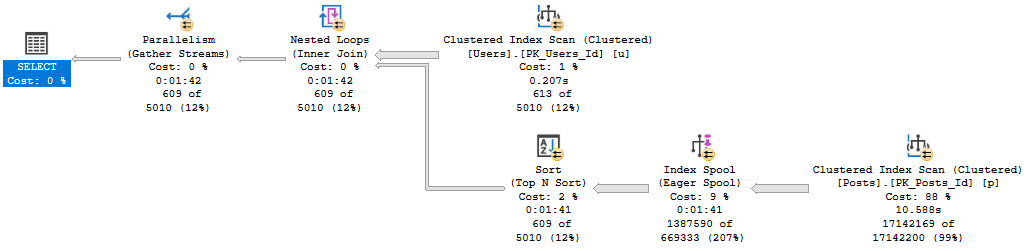
The plan for this is also simple, but runs for 1:42, and has one of those index spool things in it.

SQL Server Query Plan
Unlucky

Query #3

This query uses row number rather than top 1, but has almost the same plan and time as above.

SELECT u.Id,
       u.DisplayName,
	   u.Reputation,
	   ca.Score
FROM dbo.Users AS u
CROSS APPLY
(
    SELECT p.Score,
	       ROW_NUMBER() OVER (ORDER BY p.Score DESC) AS n
	FROM dbo.Posts AS p
	WHERE p.OwnerUserId = u.Id
) AS ca
WHERE u.Reputation >= 100000
AND ca.n = 1
ORDER BY u.Id;
SQL Server Query Plan
Why send me silly notes?

Query #4

Also uses row number, but the syntax is a bit more complicated.

The row number happens in a derived table inside the cross apply, with the correlation and filtering done outside.

SELECT u.Id,
       u.DisplayName,
	   u.Reputation,
	   ca.Score
FROM dbo.Users AS u
CROSS APPLY
(
    SELECT * 
	FROM 
	(
        SELECT p.OwnerUserId,
	           p.Score,
	           ROW_NUMBER() OVER (PARTITION BY p.OwnerUserId 
			                      ORDER BY p.Score DESC) AS n
	    FROM dbo.Posts AS p
	) AS p
	WHERE p.OwnerUserId = u.Id
	AND p.n = 1
) AS ca
WHERE u.Reputation >= 100000
ORDER BY u.Id;

This is as close to competitive with Query #1 as we get, at only 36 seconds.

SQL Server Query Plan
That’s a lot of writing.

Wrap Up


If you don’t have helpful indexes, the MAX pattern looks to be the best.

Granted, there may be differences depending on how selective data in the table you’re aggregating is.

But the bottom line is that in that plan, SQL Server doesn’t have to Sort any data, and is able to take advantage of a couple aggregations (partial and full).

It also doesn’t spend any time building an index to help that one.

In the next couple posts, we’ll look at different ways to index for queries like this.

Thanks for reading!

Going Further


If this is the kind of SQL Server stuff you love learning about, you’ll love my training. Blog readers get 25% off the Everything Bundle — over 100 hours of performance tuning content. Need hands-on help? I offer consulting engagements from targeted investigations to ongoing retainers. Want a quick sanity check before committing to a full engagement? Schedule a call — no commitment required.

SQL Server T-SQL Protip: watch those TOPs without ORDER BY

In the documentation for TOP, the following is listed as a best practice:

In a SELECT statement, always use an ORDER BY clause with the TOP clause. Because, it’s the only way to predictably indicate which rows are affected by TOP.

Let’s work through a real world example.

The good


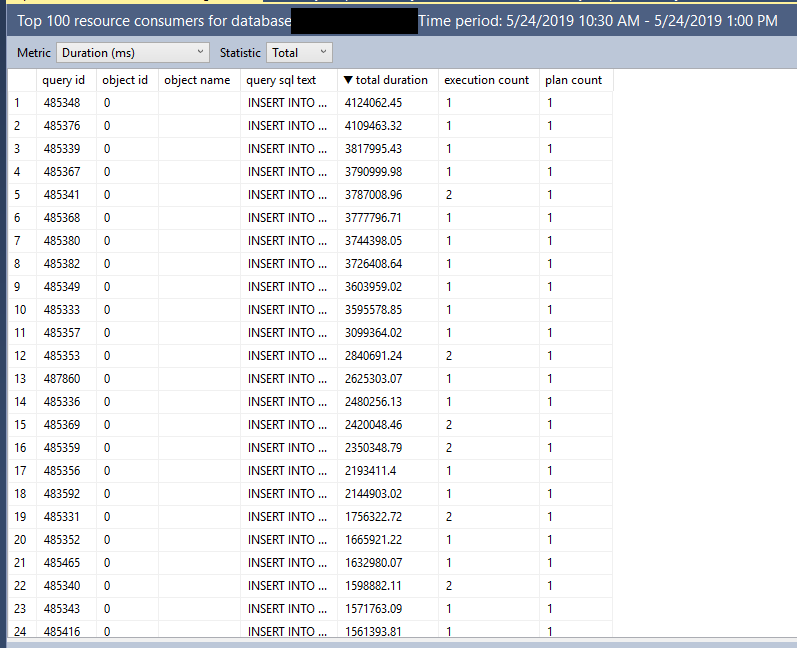
One of the great things about the “Top Resource Consuming Queries” query store SSMS report is that it is always able to render the query plan, even for very complex queries. I’m not aware of a pure T-SQL solution that can avoid requiring the end user to save xml to files in all cases. The report nearly always takes a long time to run, so it’s easy to capture the T-SQL that powers the grid details version:

DECLARE @results_row_count INT = 100,
@interval_start_time DATETIMEOFFSET = '2019-05-24 15:30:00 +00:00',
@interval_end_time DATETIMEOFFSET = '2019-05-24 18:00:00 +00:00';
 
SELECT TOP (@results_row_count)
    p.query_id query_id,
    q.object_id object_id,
    ISNULL(OBJECT_NAME(q.object_id),'') object_name,
    qt.query_sql_text query_sql_text,
    ROUND(CONVERT(float, SUM(rs.avg_duration*rs.count_executions))*0.001,2) total_duration,
    SUM(rs.count_executions) count_executions,
    COUNT(distinct p.plan_id) num_plans
FROM sys.query_store_runtime_stats rs
    JOIN sys.query_store_plan p ON p.plan_id = rs.plan_id
    JOIN sys.query_store_query q ON q.query_id = p.query_id
    JOIN sys.query_store_query_text qt ON q.query_text_id = qt.query_text_id
WHERE NOT (rs.first_execution_time > @interval_end_time OR rs.last_execution_time < @interval_start_time)
GROUP BY p.query_id, qt.query_sql_text, q.object_id
HAVING COUNT(distinct p.plan_id) >= 1
ORDER BY total_duration DESC;

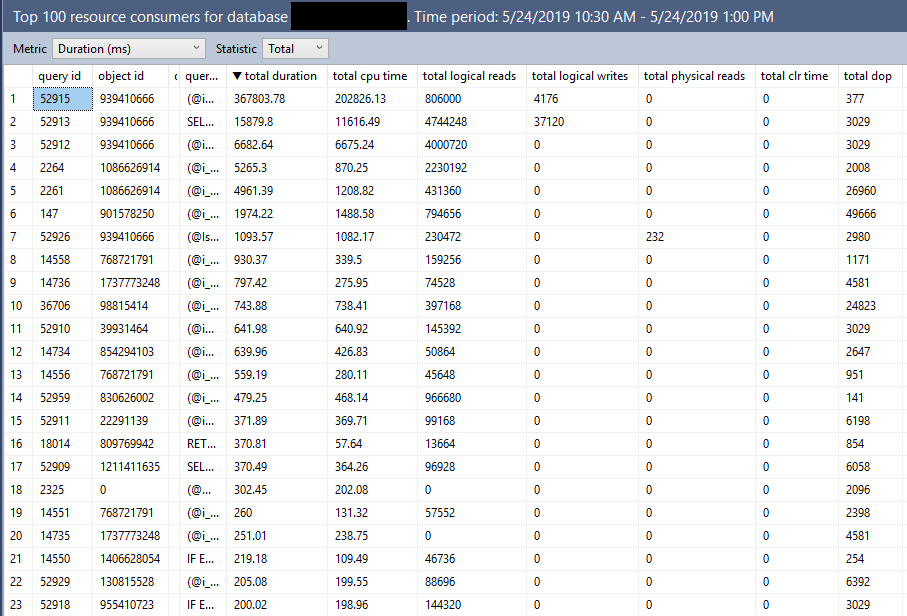
Note the presence of the ORDER BY. I get exactly the results that I was expecting:

a41 good

The bad


If I ask for extra details (who doesn’t want more details?), a significantly more complex query is generated:

-- grid format query with additional details
DECLARE @results_row_count INT = 100,
@interval_start_time DATETIMEOFFSET = '2019-05-24 15:30:00 +00:00',
@interval_end_time DATETIMEOFFSET = '2019-05-24 18:00:00 +00:00';
 
With wait_stats AS
(
SELECT
    ws.plan_id plan_id,
    ws.execution_type,
    ROUND(CONVERT(float, SUM(ws.total_query_wait_time_ms)/SUM(ws.total_query_wait_time_ms/ws.avg_query_wait_time_ms))*1,2) avg_query_wait_time,
    ROUND(CONVERT(float, SQRT( SUM(ws.stdev_query_wait_time_ms*ws.stdev_query_wait_time_ms*(ws.total_query_wait_time_ms/ws.avg_query_wait_time_ms))/SUM(ws.total_query_wait_time_ms/ws.avg_query_wait_time_ms)))*1,2) stdev_query_wait_time,
    CAST(ROUND(SUM(ws.total_query_wait_time_ms/ws.avg_query_wait_time_ms),0) AS BIGINT) count_executions,
    MAX(itvl.end_time) last_execution_time,
    MIN(itvl.start_time) first_execution_time
FROM sys.query_store_wait_stats ws
    JOIN sys.query_store_runtime_stats_interval itvl ON itvl.runtime_stats_interval_id = ws.runtime_stats_interval_id
WHERE NOT (itvl.start_time > @interval_end_time OR itvl.end_time < @interval_start_time)
GROUP BY ws.plan_id, ws.runtime_stats_interval_id, ws.execution_type ),
top_wait_stats AS
(
SELECT TOP (@results_row_count)
    p.query_id query_id,
    q.object_id object_id,
    ISNULL(OBJECT_NAME(q.object_id),'') object_name,
    qt.query_sql_text query_sql_text,
    ROUND(CONVERT(float, SUM(ws.avg_query_wait_time*ws.count_executions))*1,2) total_query_wait_time,
    SUM(ws.count_executions) count_executions,
    COUNT(distinct p.plan_id) num_plans
FROM wait_stats ws
    JOIN sys.query_store_plan p ON p.plan_id = ws.plan_id
    JOIN sys.query_store_query q ON q.query_id = p.query_id
    JOIN sys.query_store_query_text qt ON q.query_text_id = qt.query_text_id
WHERE NOT (ws.first_execution_time > @interval_end_time OR ws.last_execution_time < @interval_start_time)
GROUP BY p.query_id, qt.query_sql_text, q.object_id
),
top_other_stats AS
(
SELECT TOP (@results_row_count)
    p.query_id query_id,
    q.object_id object_id,
    ISNULL(OBJECT_NAME(q.object_id),'') object_name,
    qt.query_sql_text query_sql_text,
    ROUND(CONVERT(float, SUM(rs.avg_duration*rs.count_executions))*0.001,2) total_duration,
    ROUND(CONVERT(float, SUM(rs.avg_cpu_time*rs.count_executions))*0.001,2) total_cpu_time,
    ROUND(CONVERT(float, SUM(rs.avg_logical_io_reads*rs.count_executions))*8,2) total_logical_io_reads,
    ROUND(CONVERT(float, SUM(rs.avg_logical_io_writes*rs.count_executions))*8,2) total_logical_io_writes,
    ROUND(CONVERT(float, SUM(rs.avg_physical_io_reads*rs.count_executions))*8,2) total_physical_io_reads,
    ROUND(CONVERT(float, SUM(rs.avg_clr_time*rs.count_executions))*0.001,2) total_clr_time,
    ROUND(CONVERT(float, SUM(rs.avg_dop*rs.count_executions))*1,0) total_dop,
    ROUND(CONVERT(float, SUM(rs.avg_query_max_used_memory*rs.count_executions))*8,2) total_query_max_used_memory,
    ROUND(CONVERT(float, SUM(rs.avg_rowcount*rs.count_executions))*1,0) total_rowcount,
    ROUND(CONVERT(float, SUM(rs.avg_log_bytes_used*rs.count_executions))*0.0009765625,2) total_log_bytes_used,
    ROUND(CONVERT(float, SUM(rs.avg_tempdb_space_used*rs.count_executions))*8,2) total_tempdb_space_used,
    SUM(rs.count_executions) count_executions,
    COUNT(distinct p.plan_id) num_plans
FROM sys.query_store_runtime_stats rs
    JOIN sys.query_store_plan p ON p.plan_id = rs.plan_id
    JOIN sys.query_store_query q ON q.query_id = p.query_id
    JOIN sys.query_store_query_text qt ON q.query_text_id = qt.query_text_id
WHERE NOT (rs.first_execution_time > @interval_end_time OR rs.last_execution_time < @interval_start_time)
GROUP BY p.query_id, qt.query_sql_text, q.object_id
)
SELECT TOP (@results_row_count)
    A.query_id query_id,
    A.object_id object_id,
    A.object_name object_name,
    A.query_sql_text query_sql_text,
    A.total_duration total_duration,
    A.total_cpu_time total_cpu_time,
    A.total_logical_io_reads total_logical_io_reads,
    A.total_logical_io_writes total_logical_io_writes,
    A.total_physical_io_reads total_physical_io_reads,
    A.total_clr_time total_clr_time,
    A.total_dop total_dop,
    A.total_query_max_used_memory total_query_max_used_memory,
    A.total_rowcount total_rowcount,
    A.total_log_bytes_used total_log_bytes_used,
    A.total_tempdb_space_used total_tempdb_space_used,
    ISNULL(B.total_query_wait_time,0) total_query_wait_time,
    A.count_executions count_executions,
    A.num_plans num_plans
FROM top_other_stats A LEFT JOIN top_wait_stats B on A.query_id = B.query_id and A.query_sql_text = B.query_sql_text and A.object_id = B.object_id
WHERE A.num_plans >= 1
ORDER BY total_duration DESC
)

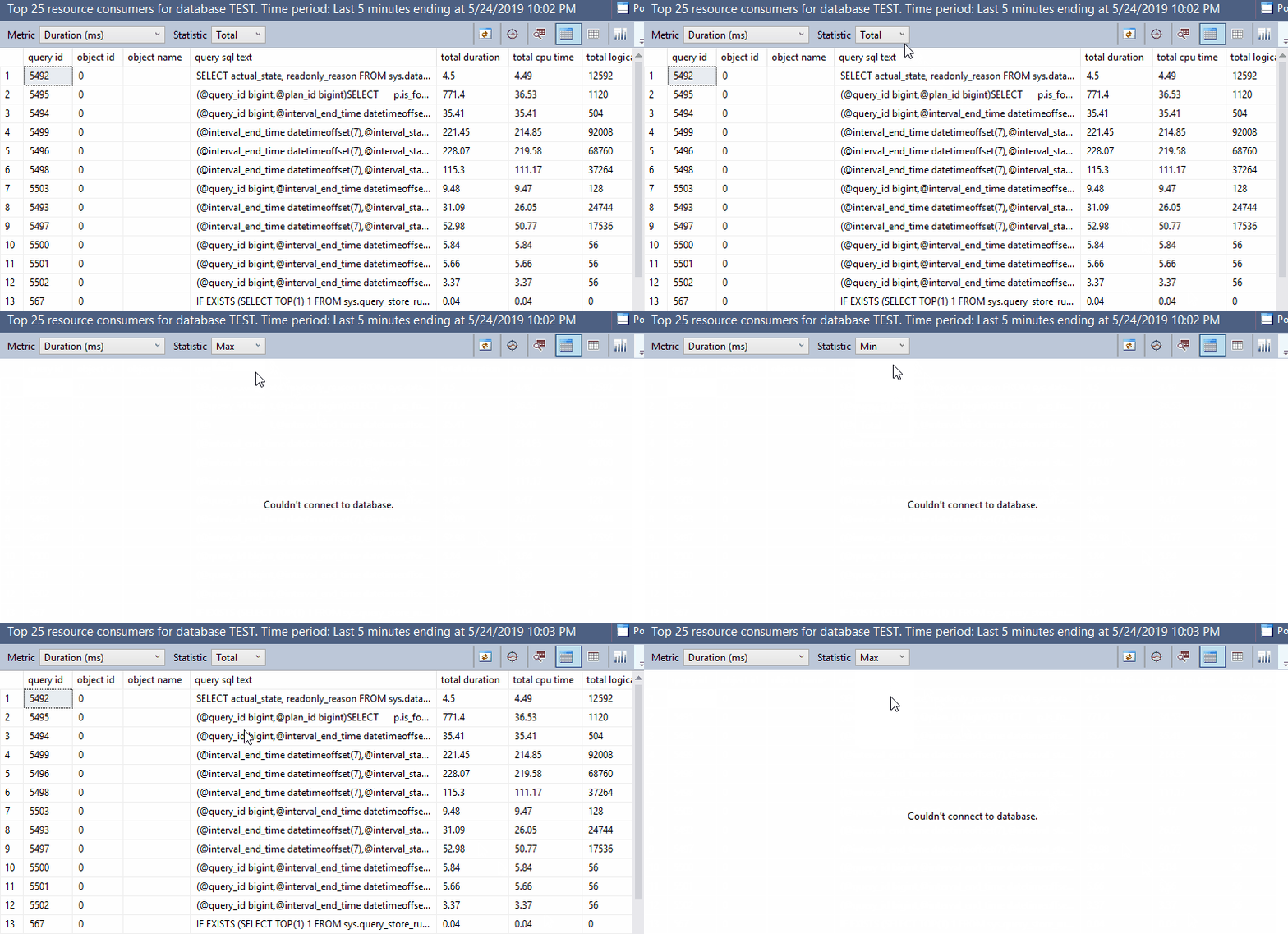
Now we have not 1, not 2, but THREE TOP operators! But only one of them has an ORDER BY. The results are completely different, and are pretty much useless:

a41 bad

The ugly


This has nothing to do with TOP as far as I know, but I included it just for fun:

a41 ugly

Final thoughts


All of you developers out there should watch your TOPs and make sure you’re using ORDER BY as needed. Otherwise, you might end up with annoyed end users writing blog posts about your code.

Thanks for reading!

Going Further


If this is the kind of SQL Server stuff you love learning about, you’ll love my training. Blog readers get 25% off the Everything Bundle — over 100 hours of performance tuning content. Need hands-on help? I offer consulting engagements from targeted investigations to ongoing retainers. Want a quick sanity check before committing to a full engagement? Schedule a call — no commitment required.

Top 1 vs. Row Number in SQL Server

Cruel, Cruel Number


One is the loneliest number. Sometimes it’s also the hardest number of rows to get, depending on how you do it.

In this video, I’ll show you how a TOP 1 query can perform much differently from a query where you generate row numbers and look for the first one.

Thanks for watching!

Video Summary

In this video, I delve into an interesting performance discrepancy between two queries that produce the same results but exhibit vastly different execution times. The primary query uses a `CROSS APPLY` with `TOP 1`, which surprisingly took over a minute to return just 101 rows, despite minimal logical reads on the involved tables. By examining the execution plan and statistics, I highlight how an index spool operator was created behind the scenes by SQL Server, significantly impacting performance due to its single-threaded nature even in a parallel query context. To contrast this, I demonstrate a slightly modified version of the query that uses `ROW_NUMBER` instead, achieving a much faster execution time with similar logical reads but vastly reduced CPU and elapsed times. This comparison underscores how simple query rewrites can have substantial performance benefits.

Full Transcript

Howdy folks, Erik Darling here with Erik Darling Data because Brent is lazy. And I was kind of enjoying my Saturday afternoon and writing some blog posts when I came across what I thought was an interesting difference between two queries that are written slightly differently, give you the same results but quite different performance. So I wanted to talk about that with you and unfortunately to talk about that with you I have to put this drink down to operate the computer. So, but that’s okay. because it’s a quick video and hopefully no one will notice. Now, I have this query here and the whole point of the query is to get the top 100 users by reputation and their most recent badge. And to do that I’m using cross apply with the top one over to the badges table. And if you look down in the corner you can probably see that this query ran for a little over a minute to return those 101 rows. That’s a pretty long time for not a lot of data.

Now, we can figure out why when we start looking at some different aspects of the query. And by different aspects I mean what happened with statistics time and IO and what happened in the query plan. Now, the CPU and elapsed time are almost the same which is a little bit weird because this is a parallel plan. Usually the whole point of a parallel plan is to use multiple threads to cut down on the total elapsed time. So you sacrifice using extra CPU to make the query overall run quicker. And you can also see that we didn’t do a lot of work against users or badges.

The users table we did 44,000 logical reads and the badges table we did about 50,000 logical reads. That’s not a lot of reads. The other thing we’re running into though is that we have this work table.

And this work table does a ton of logical reads. That’s about 24 million. So we have to ask ourselves where that came from.

And if we look over at the execution plan, it’ll become a little bit more obvious. Well, it’s really obvious to me and now it’s going to be obvious to you too. That work table comes from this index spool operator.

SQL Server wanted an index so badly on this data that it created an index behind your back up in tempdb. And it didn’t ask for an index. If you look at this top line here, there is no missing index request.

If we go and we look in the execution plan XML, there will be no missing index request. There is just this query running where SQL Server says, I’m going to create an index for you, you lazy bad DBA. What really stinks about this index spool?

Well, there’s a couple things that stink about it. One is that after this query runs, SQL Server will throw it away. And if this query runs again, or if this query runs a million times, every time this query runs, this spool will get created and thrown away. But what’s particularly nasty about these index spools is that if we go look at the properties, and we look at where all the rows line up across the parallel threads in the query, they all end up on one.

And it doesn’t matter how big this table is. It doesn’t matter, like if you use a different table, if I use seven different tables. Index spools build the index behind them single threaded.

That’s just the way it goes. So all eight million rows end up on one single thread. In this case, it’s thread three.

If I ran it a bunch of different times, they might end all end up on one different thread, but they would all always end up on one thread. That’s no good. We don’t like that.

And that’s basically what made this parallel query run like a serial query. Because this whole unit of work is done serially. And this is really where we spent the majority of the time in the query.

Well, that stinks. And you see this pretty frequently, specifically with cross-apply with a top one. And it’s because the optimizer can’t really unroll that.

And what I mean by unroll that is just turn it into a regular join. It’s going to use like kind of like the literal translation of cross-apply to go get a row and apply it to what’s down here. The optimizer is free to transform that into a regular join, but it doesn’t, especially when a top is involved.

Now, let’s contrast that with a query that’s written slightly differently. It’s still going to return the same results, but we’re going to use row number instead. We’re even still going to use cross-apply.

And we’re going to select the user ID and the name from the badges table. But this time we’re going to generate a row number over the same columns that we generated the top one with. And then we’re going to end up filtering out the results to only where row number equals one.

Now, remember that first query took a minute and three seconds to run. And if we go and execute this, it will be significantly faster. I forget how fast, but long enough for me to take a sip.

Now, that took six seconds. Why did that only take six seconds? Why did we end up with like, you know, you can see that it’s the same amount of reads here, the 44,000 and 49,000.

But for the CPU time and elapsed time, we did way better. That’s about, you know, there was like a tenth of the time. One percent of the time.

I’m not good. I’m not good at math no matter what. It doesn’t matter if it’s Saturday morning or not. If we look over in the execution plan, this plan is also parallel. But we don’t have any spooling operators.

You know, we, in this case, the optimizer was free to take that cross supply. And rather than do a nested loops row by row join, it was free to transform that into a hash join right here. And when we went and generated the row number over all the results of the badges table partitioned by user ID and ordered by the date column, we filtered out all of those rows, all of the rows that we weren’t using with this filter operator pretty early on.

So we still did it. And I’m not saying that this query is perfect and that we couldn’t tune things better and that we couldn’t make things better for this query. But it just goes to show you that sometimes a pretty simple rewrite can have pretty profound effects on a query.

And that, you know, sometimes that cross-apply with top is not always the best form of a query that can be written. Anyway, I’m going to go get back to the rest of this. I hope you enjoyed this.

I hope you learned something. And I will see you, I don’t know, maybe, maybe, maybe I’ll record something later that I won’t remember. I don’t know. We’ll see. Thanks for watching.

Video Summary

In this video, I delve into an interesting performance discrepancy between two queries that produce the same results but exhibit vastly different execution times. The primary query uses a `CROSS APPLY` with `TOP 1`, which surprisingly took over a minute to return just 101 rows, despite minimal logical reads on the involved tables. By examining the execution plan and statistics, I highlight how an index spool operator was created behind the scenes by SQL Server, significantly impacting performance due to its single-threaded nature even in a parallel query context. To contrast this, I demonstrate a slightly modified version of the query that uses `ROW_NUMBER` instead, achieving a much faster execution time with similar logical reads but vastly reduced CPU and elapsed times. This comparison underscores how simple query rewrites can have substantial performance benefits.

Full Transcript

Howdy folks, Erik Darling here with Erik Darling Data because Brent is lazy. And I was kind of enjoying my Saturday afternoon and writing some blog posts when I came across what I thought was an interesting difference between two queries that are written slightly differently, give you the same results but quite different performance. So I wanted to talk about that with you and unfortunately to talk about that with you I have to put this drink down to operate the computer. So, but that’s okay. because it’s a quick video and hopefully no one will notice. Now, I have this query here and the whole point of the query is to get the top 100 users by reputation and their most recent badge. And to do that I’m using cross apply with the top one over to the badges table. And if you look down in the corner you can probably see that this query ran for a little over a minute to return those 101 rows. That’s a pretty long time for not a lot of data.

Now, we can figure out why when we start looking at some different aspects of the query. And by different aspects I mean what happened with statistics time and IO and what happened in the query plan. Now, the CPU and elapsed time are almost the same which is a little bit weird because this is a parallel plan. Usually the whole point of a parallel plan is to use multiple threads to cut down on the total elapsed time. So you sacrifice using extra CPU to make the query overall run quicker. And you can also see that we didn’t do a lot of work against users or badges.

The users table we did 44,000 logical reads and the badges table we did about 50,000 logical reads. That’s not a lot of reads. The other thing we’re running into though is that we have this work table.

And this work table does a ton of logical reads. That’s about 24 million. So we have to ask ourselves where that came from.

And if we look over at the execution plan, it’ll become a little bit more obvious. Well, it’s really obvious to me and now it’s going to be obvious to you too. That work table comes from this index spool operator.

SQL Server wanted an index so badly on this data that it created an index behind your back up in tempdb. And it didn’t ask for an index. If you look at this top line here, there is no missing index request.

If we go and we look in the execution plan XML, there will be no missing index request. There is just this query running where SQL Server says, I’m going to create an index for you, you lazy bad DBA. What really stinks about this index spool?

Well, there’s a couple things that stink about it. One is that after this query runs, SQL Server will throw it away. And if this query runs again, or if this query runs a million times, every time this query runs, this spool will get created and thrown away. But what’s particularly nasty about these index spools is that if we go look at the properties, and we look at where all the rows line up across the parallel threads in the query, they all end up on one.

And it doesn’t matter how big this table is. It doesn’t matter, like if you use a different table, if I use seven different tables. Index spools build the index behind them single threaded.

That’s just the way it goes. So all eight million rows end up on one single thread. In this case, it’s thread three.

If I ran it a bunch of different times, they might end all end up on one different thread, but they would all always end up on one thread. That’s no good. We don’t like that.

And that’s basically what made this parallel query run like a serial query. Because this whole unit of work is done serially. And this is really where we spent the majority of the time in the query.

Well, that stinks. And you see this pretty frequently, specifically with cross-apply with a top one. And it’s because the optimizer can’t really unroll that.

And what I mean by unroll that is just turn it into a regular join. It’s going to use like kind of like the literal translation of cross-apply to go get a row and apply it to what’s down here. The optimizer is free to transform that into a regular join, but it doesn’t, especially when a top is involved.

Now, let’s contrast that with a query that’s written slightly differently. It’s still going to return the same results, but we’re going to use row number instead. We’re even still going to use cross-apply.

And we’re going to select the user ID and the name from the badges table. But this time we’re going to generate a row number over the same columns that we generated the top one with. And then we’re going to end up filtering out the results to only where row number equals one.

Now, remember that first query took a minute and three seconds to run. And if we go and execute this, it will be significantly faster. I forget how fast, but long enough for me to take a sip.

Now, that took six seconds. Why did that only take six seconds? Why did we end up with like, you know, you can see that it’s the same amount of reads here, the 44,000 and 49,000.

But for the CPU time and elapsed time, we did way better. That’s about, you know, there was like a tenth of the time. One percent of the time.

I’m not good. I’m not good at math no matter what. It doesn’t matter if it’s Saturday morning or not. If we look over in the execution plan, this plan is also parallel. But we don’t have any spooling operators.

You know, we, in this case, the optimizer was free to take that cross supply. And rather than do a nested loops row by row join, it was free to transform that into a hash join right here. And when we went and generated the row number over all the results of the badges table partitioned by user ID and ordered by the date column, we filtered out all of those rows, all of the rows that we weren’t using with this filter operator pretty early on.

So we still did it. And I’m not saying that this query is perfect and that we couldn’t tune things better and that we couldn’t make things better for this query. But it just goes to show you that sometimes a pretty simple rewrite can have pretty profound effects on a query.

And that, you know, sometimes that cross-apply with top is not always the best form of a query that can be written. Anyway, I’m going to go get back to the rest of this. I hope you enjoyed this.

I hope you learned something. And I will see you, I don’t know, maybe, maybe, maybe I’ll record something later that I won’t remember. I don’t know. We’ll see. Thanks for watching.

Going Further


If this is the kind of SQL Server stuff you love learning about, you’ll love my training. Blog readers get 25% off the Everything Bundle — over 100 hours of performance tuning content. Need hands-on help? I offer consulting engagements from targeted investigations to ongoing retainers. Want a quick sanity check before committing to a full engagement? Schedule a call — no commitment required.
Manipulating Cardinality Estimates with SQL Server T-SQL Scalar UDFs

For this post I’m using the legacy cardinality estimator on SQL Server 2016 SP1.

The Problem


Scalar user defined functions are evil but sometimes necessary. The following scenario will sound a bit contrived but it’s based on a real world problem. Suppose that end users can filter the amount of data returned by a query by inputting values into a UDF that does some kind of translation. Below is a sample schema:

CREATE TABLE dbo.Example (
ID BIGINT NOT NULL,
NOT_ID VARCHAR(100) NOT NULL,
PRIMARY KEY (ID));

INSERT INTO dbo.Example WITH (TABLOCK)
(ID, NOT_ID)
SELECT TOP (1000000)
  ROW_NUMBER() OVER (ORDER BY (SELECT NULL))
, REPLICATE('Example', 14)
FROM master..spt_values t1
CROSS JOIN master..spt_values t2;

GO

CREATE FUNCTION dbo.MY_FAVORITE_UDF (@ID BIGINT)
RETURNS BIGINT AS
BEGIN
	RETURN @ID;
END;

Consider the following part of a much bigger query:

SELECT ID, NOT_ID
FROM dbo.Example
WHERE ID >= dbo.MY_FAVORITE_UDF(100000)
AND ID <= dbo.MY_FAVORITE_UDF(900000);

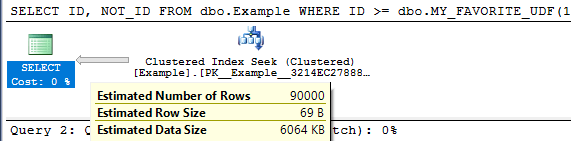
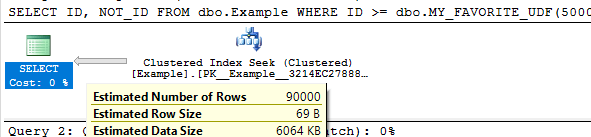
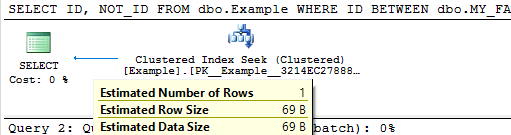
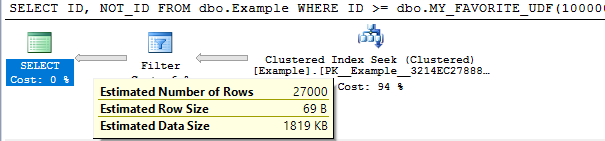
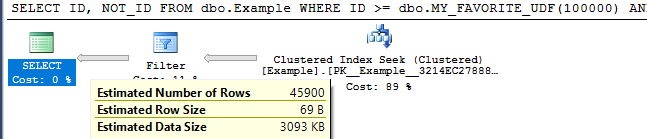
For this demo it’s not important that the UDF do anything so I must made it return the input. To keep things simple I’m not going to follow best practices around writing the query to avoid executing the UDFs for each row in the table.  With the legacy cardinality estimator we get a cardinality estimate of 30% of the rows in the base table for each unknown equality condition. This means that a BETWEEN against two UDFs will give a cardinality estimate of 9%. The important point is that the cardinality estimate will not change as the inputs for the UDFs change, except for the trivial case in which the inputs are the same. This can easily be seen by varying the inputs and looking at the estimated execution plans:

SELECT ID, NOT_ID
FROM dbo.Example
WHERE ID >= dbo.MY_FAVORITE_UDF(100000)
AND ID <= dbo.MY_FAVORITE_UDF(900000);

Query plan:

blog picture 1

SELECT ID, NOT_ID
FROM dbo.Example
WHERE ID >= dbo.MY_FAVORITE_UDF(500000)
AND ID <= dbo.MY_FAVORITE_UDF(499999);

Query plan:

blog picture 2

SELECT ID, NOT_ID
FROM dbo.Example
WHERE ID BETWEEN dbo.MY_FAVORITE_UDF(1)
AND dbo.MY_FAVORITE_UDF(1);

Query plan:

blog-picture-3.png

The cardinality estimate (CE) of just that simple query doesn’t really matter. But it could matter very much if that query was part of a larger query with other joins. The 9% estimate may not serve us well depending on the rest of the query and what end users tend to input. We might know that the end users tend to pick large or small ranges. Even if we don’t know anything about the end users, certain queries may do better with larger or smaller cardinality estimates.

Decreasing the Cardinality Estimate


Let’s suppose that we do some testing and find that a cardinality estimate of lower than 9% is the best choice for typical end user inputs. There are a few techniques available to decrease the cardinality estimate by a fixed percentage.

Method 1

First option is to use TOP PERCENT along with an OPTIMIZE FOR hint. I’m not really a fan of TOP PERCENT. The implementation always spools unless it gets optimized out with TOP (100) percent. It would be nice if it didn’t spool. Anyway, perhaps getting a different cardinality estimate is worth the spool. Below is one method to get a cardinality estimate of 3% of the base table:

DECLARE @top_percent FLOAT = 100;

SELECT TOP (@top_percent) PERCENT ID, NOT_ID
FROM dbo.Example
WHERE ID >= dbo.MY_FAVORITE_UDF(100000)
AND ID <= dbo.MY_FAVORITE_UDF(900000)
OPTION (OPTIMIZE FOR (@top_percent = 33.33333333));

Query plan:

blog picture 4

The percent value is a float so we can go almost anywhere between 0 – 9% for the final estimate. However, if we have to use scalar UDFs in this fashion there’s a chance that we’re doing it to write platform agnostic code. The TOP trick here isn’t likely to work in other platforms.

Method 2

Suppose we add another inequality against a UDF that’s guaranteed not to change the results. 0.3^3 = 0.027 so we would expect an estimate of 2.7%. That is indeed what happens:

SELECT ID, NOT_ID
FROM dbo.Example
WHERE ID >= dbo.MY_FAVORITE_UDF(100000)
AND ID <= dbo.MY_FAVORITE_UDF(900000) -- redundant filter to change CE
AND ID > dbo.MY_FAVORITE_UDF(100000) - 1;

Query plan:

blog picture 5
We can also mix things up with OR logic to make more adjustments. The query below has a fixed CE of 4.59%:

SELECT ID, NOT_ID
FROM dbo.Example
WHERE ID >= dbo.MY_FAVORITE_UDF(100000)
AND ID <= dbo.MY_FAVORITE_UDF(900000) -- redundant filter to change CE
AND (ID > dbo.MY_FAVORITE_UDF(100000) - 1
OR ID > dbo.MY_FAVORITE_UDF(100000) - 2);

Query plan:

blog picture 6

It should be possible to mix and match to get something close to the CE that you want. I need to reiterate that as the code is written this will lead to additional UDF executions per row. You can also use techniques with fixed CE that don’t involve UDFs if you’re confident that Microsoft won’t change the guesses for them (which for the legacy cardinality estimator is probably a pretty safe assumption at this point).

Increasing the Cardinality Estimate


In some cases we will want a cardinality estimate above 9%.

Method 1

The TOP PERCENT trick won’t work here since TOP on its own can’t increase a cardinality estimate. We can use OR logic with UDFs to raise the estimate. Consider this filter condition:

ID >= dbo.MY_FAVORITE_UDF(100000)
OR ID >= dbo.MY_FAVORITE_UDF(900000) - 1

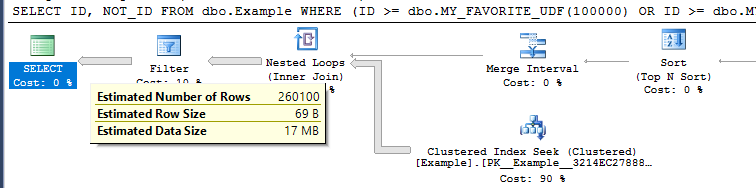
The first inequality gives an estimate of 30% and the second inequality gives an estimate of (100% – 30%) * 30% = 21%. In total we would get an estimate of 51%. If we apply that twice we should get an overall estimate of 0.51 * 0.51 = 26.01% . This is indeed what happens:

SELECT ID, NOT_ID
FROM dbo.Example
WHERE (ID >= dbo.MY_FAVORITE_UDF(1)
OR ID >= dbo.MY_FAVORITE_UDF(1) - 1)
AND (ID <= dbo.MY_FAVORITE_UDF(2)
OR ID <= dbo.MY_FAVORITE_UDF(2) + 1);

Query plan:

blog picture 7

By adding more UDFs to the OR clauses we can increase the cardinality estimate further.

Method 2

For another way to do it we can take advantage of the fact that an inequality filter against a UDF has the same cardinality as the negated condition. That means that this:

SELECT ID, NOT_ID
FROM dbo.Example

EXCEPT

SELECT ID, NOT_ID
FROM dbo.Example
WHERE -- negate original expression
ID < dbo.MY_FAVORITE_UDF(100000) OR ID > dbo.MY_FAVORITE_UDF(900000);

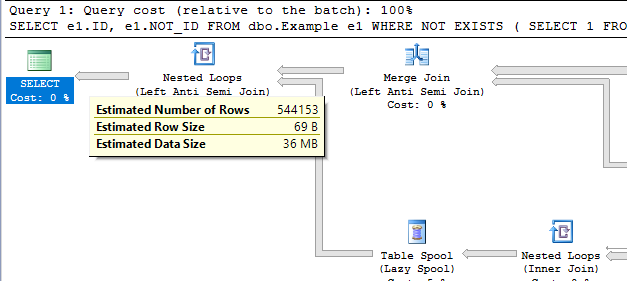
Will return the same results as the original query but have a much higher cardinality estimate. Writing it in a better way, we see a cardinality estimate of ~54.4%:

SELECT e1.ID, e1.NOT_ID
FROM dbo.Example e1
WHERE NOT EXISTS (
	SELECT 1
	FROM dbo.Example e2
	WHERE e1.ID = e2.ID
	-- negate original expression
	AND e2.ID < dbo.MY_FAVORITE_UDF(100000) OR e2.ID > dbo.MY_FAVORITE_UDF(900000)
);

Query plan:

blog picture 8
This can be adjusted up and down by adding additional UDFs. It comes with the cost of an additional join so it’s hard to think of an advantage of doing it this way.

Method 3

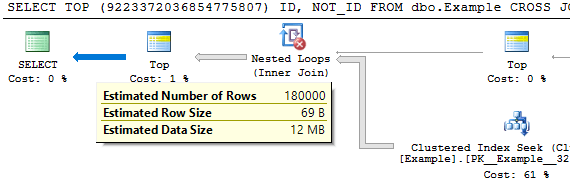
For a third option we can use the MANY() table-valued function developed by Adam Machanic. This function can be used to increase the cardinality estimate of a point in a plan by a whole number. If we want a cardinality estimate of 18% from the UDF it’s as easy as the following:

SELECT TOP (9223372036854775807) ID, NOT_ID
FROM dbo.Example
CROSS JOIN dbo.Many(2)
WHERE ID BETWEEN dbo.MY_FAVORITE_UDF(100000)
AND dbo.MY_FAVORITE_UDF(900000);

Query plan:

blog picture 9

I added the superfluous TOP to prevent the MANY() reference from getting moved around in the plan. This method has the disadvantage that it may not be platform-agnostic.

Hopefully you never find yourself in a situation where you need to use tricks like this. Thanks for reading!

Going Further


If this is the kind of SQL Server stuff you love learning about, you’ll love my training. Blog readers get 25% off the Everything Bundle — over 100 hours of performance tuning content. Need hands-on help? I offer consulting engagements from targeted investigations to ongoing retainers. Want a quick sanity check before committing to a full engagement? Schedule a call — no commitment required.