It’s a matter of how and what, and when data gets logged for them, not a matter of tool quality.
I’d love to see a more complete picture of these things when trying to diagnose or troubleshoot issues.
Thanks for reading!
Going Further
If this is the kind of SQL Server stuff you love learning about, you’ll love my training. Blog readers get 25% off the Everything Bundle — over 100 hours of performance tuning content. Need hands-on help? I offer consulting engagements from targeted investigations to ongoing retainers. Want a quick sanity check before committing to a full engagement? Schedule a call — no commitment required.
People mainly use it for stored procedures (I think?), but it can also work like this:
DECLARE @sql1 NVARCHAR(MAX) = N'SELECT TOP 10 * FROM dbo.Users AS u WHERE u.Reputation > @i';
DECLARE @sql2 NVARCHAR(MAX) = N'SELECT TOP 10 * FROM dbo.Posts AS p WHERE p.Score > @i';

SELECT column_ordinal, name, system_type_name
FROM   sys.dm_exec_describe_first_result_set(@sql1, NULL, 0);

SELECT column_ordinal, name, system_type_name
FROM   sys.dm_exec_describe_first_result_set(@sql2, NULL, 0);
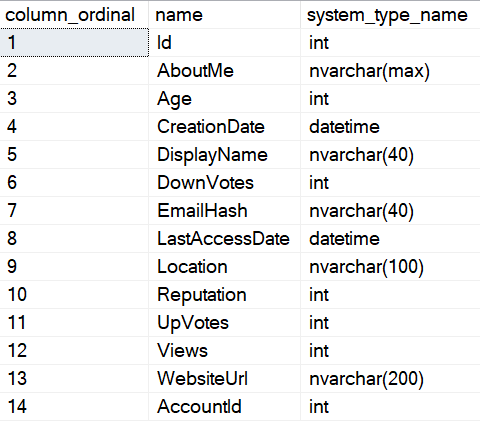
The results for the Users table look like this:
For you must
Don’t Judge Me
The best way I’ve found to do this is to use that output to generate an ALTER TABLE to add the correct columns and data types.
Here’s a dummy stored procedure that does it:
CREATE OR ALTER PROCEDURE dbo.dynamic_temp ( @TableName NVARCHAR(128))
AS
    BEGIN
        SET NOCOUNT ON;

        CREATE TABLE #t ( Id INT );
        DECLARE @sql NVARCHAR(MAX) = N'';

        IF @TableName = N'Users'
            BEGIN
                SET @sql = @sql + N'SELECT TOP 10 * FROM dbo.Users AS u WHERE u.Reputation > @i';
            END;

        IF @TableName = N'Posts'
            BEGIN
                SET @sql = @sql + N'SELECT TOP 10 * FROM dbo.Posts AS p WHERE p.Score > @i';
            END;

        SELECT   column_ordinal, name, system_type_name
        INTO     #dfr
        FROM     sys.dm_exec_describe_first_result_set(@sql, NULL, 0)
        ORDER BY column_ordinal;

        DECLARE @alter NVARCHAR(MAX) = N'ALTER TABLE #t ADD ';

        SET @alter += STUFF((   SELECT   NCHAR(10) + d.name + N' ' + d.system_type_name + N','
                                FROM     #dfr AS d
                                WHERE    d.name <> N'Id'
                                ORDER BY d.column_ordinal
                                FOR XML PATH(N''), TYPE ).value(N'.[1]', N'NVARCHAR(4000)'), 1, 1, N'');

        SET @alter = LEFT(@alter, LEN(@alter) - 1);

        EXEC ( @alter );

        INSERT #t
        EXEC sys.sp_executesql @sql, N'@i INT', @i = 10000;

        SELECT *
        FROM   #t;

    END;
GO
I can execute it for either Users or Posts, and get back the results I want.
So yeah, this is generally a pretty weird requirement.
It might even qualify as Bad Idea Spandex™
Thanks for reading!
Going Further
If this is the kind of SQL Server stuff you love learning about, you’ll love my training. Blog readers get 25% off the Everything Bundle — over 100 hours of performance tuning content. Need hands-on help? I offer consulting engagements from targeted investigations to ongoing retainers. Want a quick sanity check before committing to a full engagement? Schedule a call — no commitment required.
A lot of people still expect odd things from CTEs.
Performance fences
Cached results
There’s no clue in how they’re written that you won’t get those.
I’ve gone back and forth on whether or not this would be worthwhile. It totally could be, but it’d have to be pretty thoughtful.
Materialization vs. Fencing
The difference here is subtle but necessary. Right now, people will use TOP, which sets a row goal, and provides some logical isolation of the query in your CTE.
The problem remains that if that CTE is referenced via join > 1 time, the internal syntax is re-run each time.
Even if your query is fenced off, it is not materialized.
Fencing could leverage existing NOEXPAND hints, but materialization would likely require a new hint that performed the equivalent of SELECT… INTO #t, and then replaced references to the CTE alias with a pointer to the temporary object.
Indexing
One appeal of temp tables is that there is additional indexing flexibility, so any syntax would have to allow existing inline index syntax of temp tables to be used.
In other words, an index that may not make sense on a real table given your existing workload might make sense on a temp table. Or like, if a temp table is the result of joining two tables together, there could be a compound index you could create on the temp table that’s otherwise impossible to create.
Next feature request: multi-table indexes ?
Thanks for reading!
Going Further
If this is the kind of SQL Server stuff you love learning about, you’ll love my training. Blog readers get 25% off the Everything Bundle — over 100 hours of performance tuning content. Need hands-on help? I offer consulting engagements from targeted investigations to ongoing retainers. Want a quick sanity check before committing to a full engagement? Schedule a call — no commitment required.
Often when query tuning, I’ll try a change that I think makes sense, only to have it backfire.
It’s not that the query got slower, it’s that the results that came back were wrong different.
Now, this can totally happen because of a bug in previously used logic, but that’s somewhat rare.
And wrong different results make testers nervous. Especially in production.
Here’s a Very Cheeky™ example.
Spread’em
This is my starting query. If I run it enough times, I’ll get a billion missing index requests.
WITH topusers AS
(
    SELECT   TOP (1)
             u.Id, u.DisplayName
    FROM     dbo.Users AS u
    ORDER BY u.Reputation DESC
)
SELECT   u.Id,
         u.DisplayName,
         SUM(p.Score * 1.0) AS PostScore,
         SUM(c.Score * 1.0) AS CommentScore,
         COUNT_BIG(*) AS CountForSomeReason
FROM     topusers AS u
JOIN     dbo.Posts AS p
    ON p.OwnerUserId = u.Id
JOIN     dbo.Comments AS c
    ON c.UserId = u.Id
WHERE    p.Score >= 5
AND      c.Score >= 1
GROUP BY u.Id, u.DisplayName;
For the sake of argument, I’ll add them all. Here they are:
CREATE INDEX ix_tabs
    ON dbo.Users ( Reputation DESC, Id )
    INCLUDE ( DisplayName );

CREATE INDEX ix_spaces
    ON dbo.Users ( Id, Reputation DESC )
    INCLUDE ( DisplayName );

CREATE INDEX ix_coke
    ON dbo.Comments ( Score) INCLUDE( UserId );

CREATE INDEX ix_pepsi
    ON dbo.Posts ( Score ) INCLUDE( OwnerUserId );

CREATE NONCLUSTERED INDEX ix_tastes_great
    ON dbo.Posts ( OwnerUserId, Score );

CREATE NONCLUSTERED INDEX ix_less_filling
    ON dbo.Comments ( UserId, Score );
With all those indexes, the query is still dog slow.
Maybe It’s Me
I’ll take my own advice. Let’s break the query up a little bit.
DROP TABLE IF EXISTS #topusers;

WITH topusers AS
(
    SELECT   TOP (1)
             u.Id, u.DisplayName
    FROM     dbo.Users AS u
    ORDER BY u.Reputation DESC
)
SELECT *
INTO #topusers
FROM topusers;

CREATE UNIQUE CLUSTERED INDEX ix_whatever
    ON #topusers(Id);

SELECT   u.Id,
         u.DisplayName,
         SUM(p.Score * 1.0) AS PostScore,
         SUM(c.Score * 1.0) AS CommentScore,
         COUNT_BIG(*) AS CountForSomeReason
FROM     #topusers AS u
JOIN     dbo.Posts AS p
    ON p.OwnerUserId = u.Id
JOIN     dbo.Comments AS c
    ON c.UserId = u.Id
WHERE    p.Score >= 5
AND      c.Score >= 1
GROUP BY u.Id, u.DisplayName;
Still dog slow.
Variability
Alright, I’m desperate now. Let’s try this.
DECLARE @Id INT,
        @DisplayName NVARCHAR(40);

SELECT   TOP (1)
            @Id = u.Id,
		    @DisplayName = u.DisplayName
FROM     dbo.Users AS u
ORDER BY u.Reputation DESC;


SELECT   @Id AS Id,
         @DisplayName AS DisplayName,
         SUM(p.Score * 1.0) AS PostScore,
         SUM(c.Score * 1.0) AS CommentScore,
         COUNT_BIG(*) AS CountForSomeReason
FROM dbo.Posts AS p
JOIN  dbo.Comments AS c
    ON c.UserId = p.OwnerUserId
WHERE    p.Score >= 5
AND      c.Score >= 1
AND      (c.UserId = @Id OR @Id IS NULL)
AND      (p.OwnerUserId = @Id OR @Id IS NULL);
Let’s get some worst practices involved. That always goes well.
Except here.
Getting the right results seemed like it was destined to be slow.
Differently Resulted
At this point, I tried several rewrites that were fast, but wrong.
What I had missed, and what Joe Obbish pointed out to me, is that I needed a cross join and some math to make it all work out.
WITH topusers AS
(
    SELECT   TOP (1)
             u.Id, u.DisplayName
    FROM     dbo.Users AS u
    ORDER BY u.Reputation DESC
)
SELECT     t.Id AS Id,
           t.DisplayName AS DisplayName,
           p_u.PostScoreSub * c_u.CountCSub AS PostScore,
           c_u.CommentScoreSub * p_u.CountPSub AS CommentScore,
           c_u.CountCSub * p_u.CountPSub AS CountForSomeReason
FROM       topusers AS t
JOIN       (   SELECT   p.OwnerUserId,
                        SUM(p.Score * 1.0) AS PostScoreSub,
						COUNT_BIG(*) AS CountPSub
               FROM     dbo.Posts AS p
               WHERE    p.Score >= 5
               GROUP BY p.OwnerUserId ) AS p_u
			   ON p_u.OwnerUserId = t.Id
CROSS JOIN (   SELECT   c.UserId, SUM(c.Score * 1.0) AS CommentScoreSub, COUNT_BIG(*) AS CountCSub
               FROM     dbo.Comments AS c
               WHERE    c.Score >= 1
               GROUP BY c.UserId ) AS c_u
               WHERE c_u.UserId = t.Id;
This finishes instantly, with the correct results.
The value of a college education!
Realizations and Slowness
After thinking about Joe’s rewrite, I had a terrible thought.
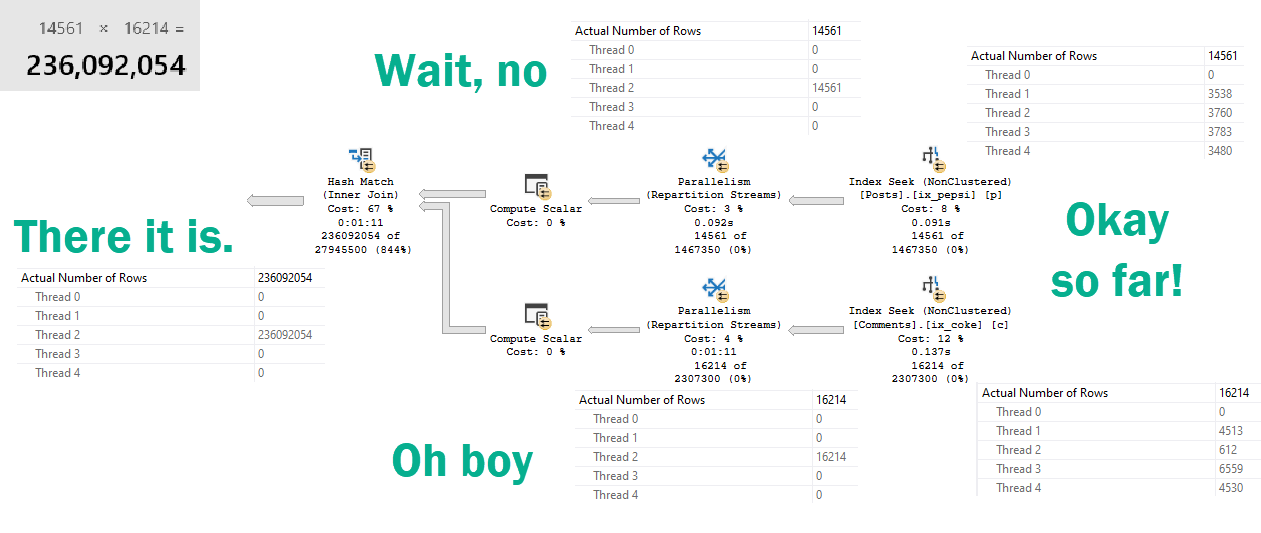
All the rewrites that were correct but slow had gone parallel.
“Parallel”
Allow me to illustrate.
In a row?
Repartition Streams usually does the opposite.
But here, it puts all the rows on a single thread.
“For correctness”
Which ends up in a 236 million row parallel-but-single-threaded-cross-hash-join.
SQL Server uses the correct join (inner or outer) and adds projections where necessary to honour all the semantics of the original query when performing internal translations between apply and join.
The differences in the plans can all be explained by the different semantics of aggregates with and without a group by clause in SQL Server.
What’s amazing and frustrating about the optimizer is that it considers all sorts of different ways to rewrite your query.
In milliseconds.
It may have even thought about a plan that would have been very fast.
But we ended up with this one, because it looked cheap.
Untuneable
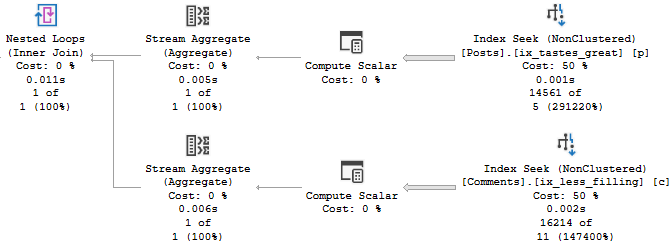
The plan for Joe’s version of the query is amazingly simple.
Bruddah.
Sometimes giving the optimizer a different query to work with helps, and sometimes it doesn’t.
Rewriting queries is tough business. When you change things and still get the same plan, it can be really frustrating.
Just know that behind the scenes the optimizer is working hard to rewrite your queries, too.
If you really want to change the execution plan you end up with, you need to present the logic to the optimizer in different ways, and often with different indexes to use.
Other times, you just gotta ask Joe.
Thanks for reading!
Going Further
If this is the kind of SQL Server stuff you love learning about, you’ll love my training. Blog readers get 25% off the Everything Bundle — over 100 hours of performance tuning content. Need hands-on help? I offer consulting engagements from targeted investigations to ongoing retainers. Want a quick sanity check before committing to a full engagement? Schedule a call — no commitment required.
In SQL Server 2019, a few cool performance features under the intelligent query processing umbrella depend on cardinality estimation.
Batch Mode For Row Store (which triggers the next two things)
Adaptive Joins
Memory Grant Feedback
If SQL Server doesn’t estimate > 130k(ish) rows are gonna hop on through your query, you don’t get the Batch Mode processing that allows for Adaptive Joins and Memory Grant feedback. If you were planning on those things helping with parameter sniffing, you now have something else to contend with.
Heft
Sometimes you might get a plan with all that stuff in it. Sometimes you might not.
The difference between a big plan and little plan just got even more confusing.
Let’s say you have a stored procedure that looks like this:
CREATE OR ALTER PROCEDURE dbo.lemons(@PostTypeId INT)
AS
BEGIN

    SELECT OwnerUserId,
	       PostTypeId,
		   SUM(Score * 1.0) AS TotalScore,
		   COUNT_BIG(*) AS TotalPosts
	FROM dbo.Posts AS p
	JOIN dbo.Users AS u
	    ON p.OwnerUserId = u.Id
	WHERE PostTypeId = @PostTypeId
	AND u.Reputation > 1
	GROUP BY OwnerUserId,
             PostTypeId
	HAVING COUNT_BIG(*) > 100;

END
GO
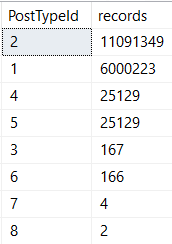
There’s quite a bit of skew between post types!
Working my way down
Which means different parameters will get different plans, depending on which one comes first.
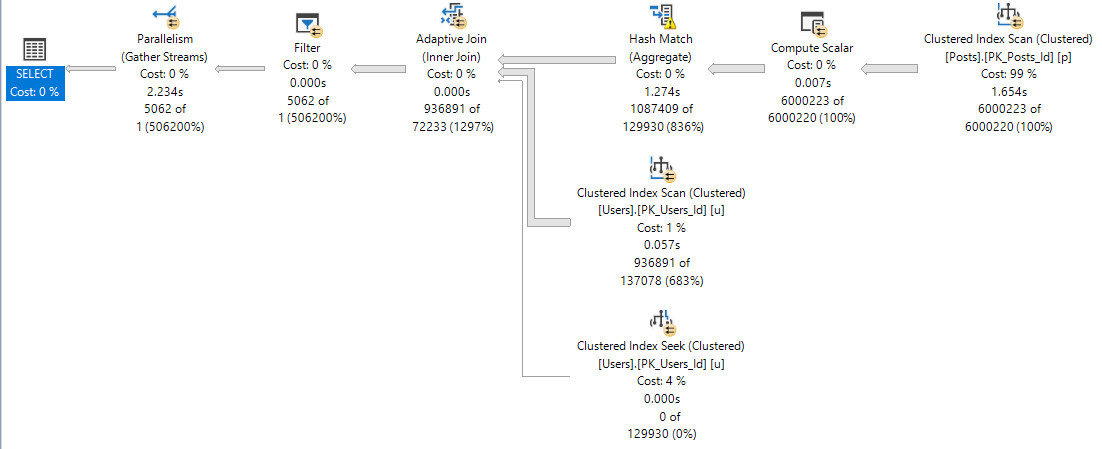
At 12 seconds, one might accuse our query of sub-par performance.
One and Lonely
When one runs first, the plan is insanely different.
22 2s
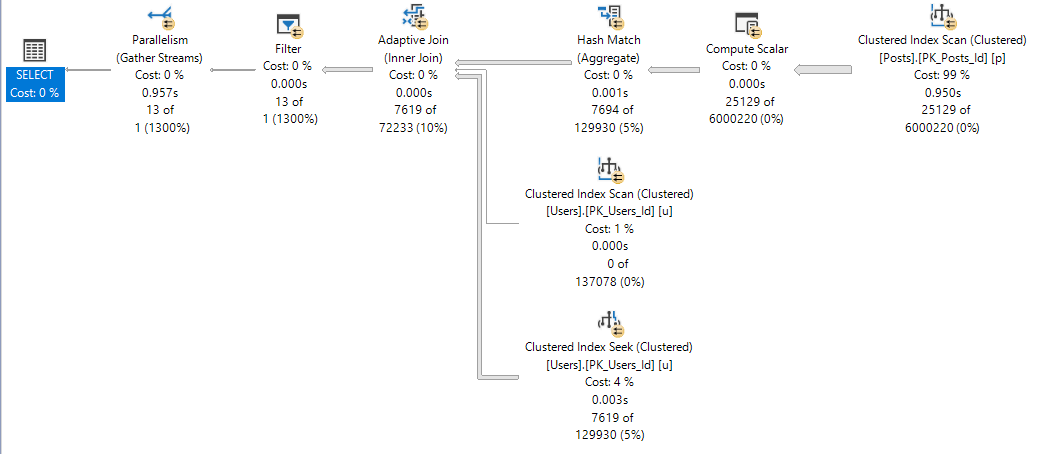
It’s about 10 seconds faster. And the four plan?
Not too shabby.
Four play
We notice the difference between 116ms and 957ms in SSMS.
Are application end users aware of ~800ms? Sometimes I wonder.
Alma Matters
The adaptive join plan with batch mode operators is likely a better plan for a wider range of values than the small plan.
Batch mode is generally more efficient with larger row counts. The adaptive join means no one who doesn’t belong in nested loops hell will get stuck there (probably), and SQL Server will take a look at the query in between runs to try to find a happy memory grant medium (this doesn’t always work splendidly, but I like the effort).
Getting to the point, if you’re going to SQL Server 2019, and you want to get all these new goodies to help you avoid parameter sniffing, you’re gonna have to start getting used to those OPTIMIZE FOR hints, and using a value that results in getting the adaptive plan.
I wish there was a query hint that pushed the optimizer towards picking this sort of plan, so we don’t have to rely on potentially changing values to optimize for.
Thanks for reading!
Going Further
If this is the kind of SQL Server stuff you love learning about, you’ll love my training. Blog readers get 25% off the Everything Bundle — over 100 hours of performance tuning content. Need hands-on help? I offer consulting engagements from targeted investigations to ongoing retainers. Want a quick sanity check before committing to a full engagement? Schedule a call — no commitment required.
Rounding out a few posts about SQL Server’s choice of one or more indexes depending on the cardinality estimates of literal values.
Today we’re going to look at how indexes can contribute to parameter sniffing issues.
It’s Friday and I try to save the real uplifting stuff for these posts.
Procedural
Here’s our stored procedure! A real beaut, as they say.
CREATE OR ALTER PROCEDURE dbo.lemons(@Score INT)
AS
BEGIN
    SELECT TOP (1000)
	       p.Id,
           p.AcceptedAnswerId,
           p.AnswerCount,
           p.CommentCount,
           p.CreationDate,
           p.LastActivityDate,
		   DATEDIFF( DAY,
		             p.CreationDate,
					 p.LastActivityDate
				   ) AS LastActivityDays,
           p.OwnerUserId,
           p.Score,
		   u.DisplayName,
		   u.Reputation
	FROM dbo.Posts AS p
	JOIN dbo.Users AS u
	    ON u.Id = p.OwnerUserId
	WHERE p.PostTypeId = 1
	AND   p.Score > @Score
	ORDER BY u.Reputation DESC;
END
GO
Here are the indexes we currently have.
CREATE INDEX smooth
    ON dbo.Posts(Score, OwnerUserId);

CREATE INDEX chunky
    ON dbo.Posts(OwnerUserId, Score)
	INCLUDE(AcceptedAnswerId, AnswerCount, CommentCount, CreationDate, LastActivityDate);
Looking at these, it’s pretty easy to imagine scenarios where one or the other might be chosen.
Heck, even a dullard like myself could figure it out.
Rare Score
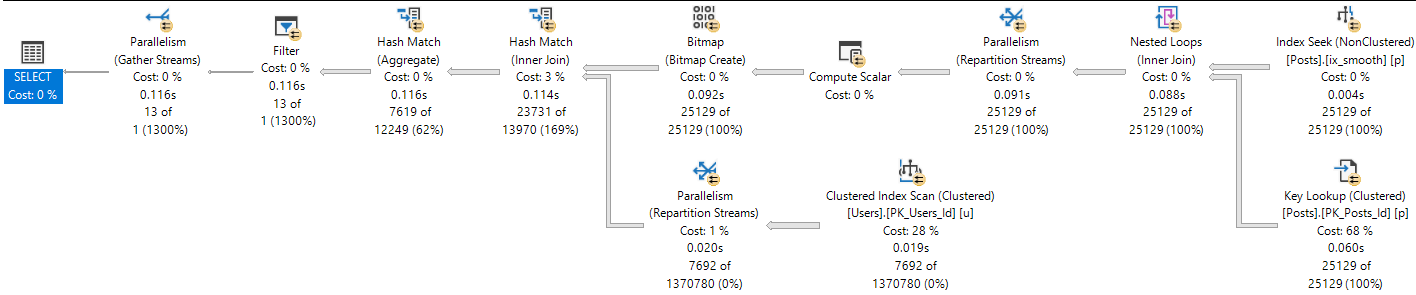
Running the procedure for an uncommon score, we get a tidy little loopy little plan.
EXEC dbo.lemons @Score = 385;
It’s hard to hate a plan that sinishes in 59ms
Of course, that plan applied to a less common score results in tomfoolery of the highest order.
Lowest order?
I’m not sure.
Except when it takes 14 seconds.
In both of these queries, we used our “smooth” index.
Who created that thing? We don’t know. It’s been there since the 90s.
Sloane Square
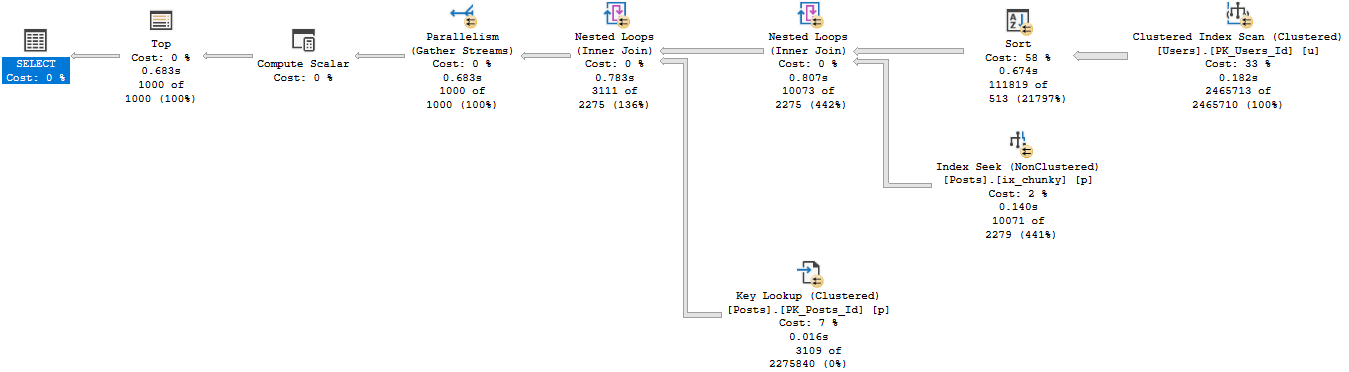
If we recompile, and start with 0 first, we get a uh…
Well darnit
We get an equally little loopy little plan.
The difference? Join order, and now we use our chunky index.
Running our procedure for the uncommon value…
Don’t make fun of me later.
Well, that doesn’t turn out so bad either.
Pound Sand
When you’re troubleshooting parameter sniffing, the plans might not be totally different.
Sometimes a subtle change of index usage can really throw gas on things.
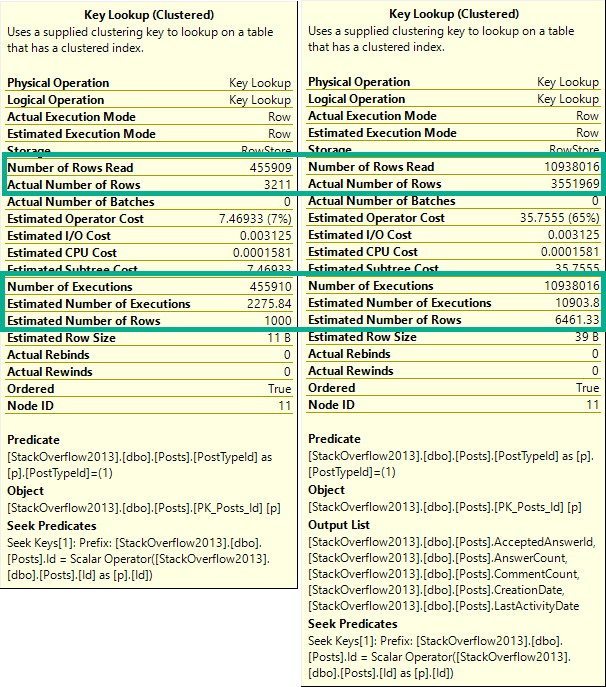
It’s also a good example of how Key Lookups aren’t always a huge problem.
Both plans had them, just in different places.
Which one is bad?
It would be hard to figure out if one is good or bad in estimated or cached plans.
Especially because they only tell you compile time parameters, and not runtime parameters.
Neither one is a good time parameter.
Thanks for reading!
Going Further
If this is the kind of SQL Server stuff you love learning about, you’ll love my training. Blog readers get 25% off the Everything Bundle — over 100 hours of performance tuning content. Need hands-on help? I offer consulting engagements from targeted investigations to ongoing retainers. Want a quick sanity check before committing to a full engagement? Schedule a call — no commitment required.
When I’m working with clients, people who don’t spend a lot of time working with indexes have a lot of questions about indexes.
The general rule about leading column selectivity is an easy enough guideline to follow, but what happens if you’re not looking for equality predicates?
What if you’re looking for ranges, and those ranges might sometimes be selective, and other times not?
LET’S FIND OUT!
Chicken and Broccoli
Let’s take these queries against the Posts table. The number next to each indicates the number of rows that match the predicate.
SELECT COUNT_BIG(*) AS records /*6050820*/
FROM   dbo.Posts AS p
WHERE  p.ParentId < 1
AND 1 = (SELECT 1);

SELECT COUNT_BIG(*) AS records /*3*/
FROM   dbo.Posts AS p
WHERE  p.Score > 19000
AND 1 = (SELECT 1);

SELECT COUNT_BIG(*) AS records /*23*/
FROM   dbo.Posts AS p
WHERE  p.ParentId > 21100000
AND 1 = (SELECT 1);

SELECT COUNT_BIG(*) AS records /*6204153*/
FROM   dbo.Posts AS p
WHERE  p.Score < 1
AND 1 = (SELECT 1);
In other words, sometimes they’re selective, and sometimes they’re not.
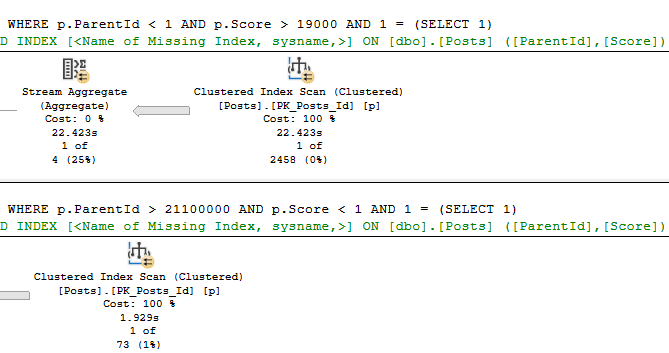
If we run these without any indexes, SQL Server will ask for single column indexes on ParentId and Score.
But our queries don’t look like that. They look like this (sometimes):
SELECT COUNT_BIG(*) AS records
FROM   dbo.Posts AS p
WHERE  p.ParentId < 1
AND    p.Score > 19000
AND 1 = (SELECT 1);

SELECT COUNT_BIG(*) AS records
FROM   dbo.Posts AS p
WHERE  p.ParentId > 21100000
AND    p.Score < 1
AND 1 = (SELECT 1);
When we run that, SQL Server asks for… the… same index.
Huhhhhh
Missing index request column order is pretty basic.
Instead, we’re gonna add these:
CREATE INDEX ix_spaces
ON dbo.Posts(ParentId, Score);

CREATE INDEX ix_tabs
ON dbo.Posts(Score, ParentId);
Steak and Eggs
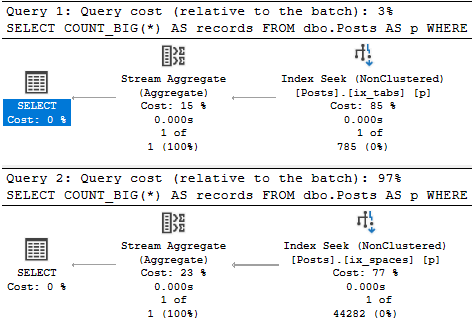
When we run those two queries again, each will use a different index.
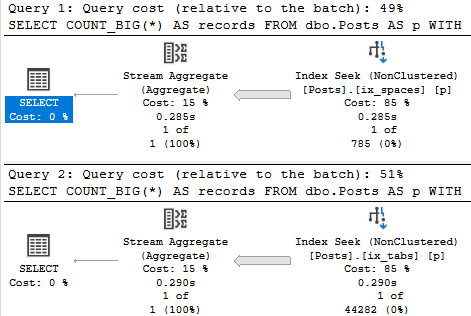
If we force those queries to use the opposite index, we can see why SQL Server made the right choice:
SELECT COUNT_BIG(*) AS records
FROM   dbo.Posts AS p WITH (INDEX = ix_spaces)
WHERE  p.ParentId < 1
AND    p.Score > 19000
AND 1 = (SELECT 1);

SELECT COUNT_BIG(*) AS records
FROM   dbo.Posts AS p WITH (INDEX = ix_tabs)
WHERE  p.ParentId > 21100000
AND    p.Score < 1
AND 1 = (SELECT 1);
Having two indexes like that may not always be the best idea.
To make matters worse, you probably have things going on that make answers less obvious, like actually selecting columns instead of just getting a count.
This is where it pays to look at your indexes over time to see how they’re used, or knowing which query is most important.
There isn’t that much of a difference in time or resources here, after all.
Thanks for reading!
Going Further
If this is the kind of SQL Server stuff you love learning about, you’ll love my training. Blog readers get 25% off the Everything Bundle — over 100 hours of performance tuning content. Need hands-on help? I offer consulting engagements from targeted investigations to ongoing retainers. Want a quick sanity check before committing to a full engagement? Schedule a call — no commitment required.
In this video, I dive into the challenges of working with large and complex SQL queries, particularly those that are overly nested or contain numerous CTEs (Common Table Expressions). I share a specific example where I had to optimize a query that was running for about 30 seconds. By breaking down the query into smaller, more manageable parts and using temporary tables, we were able to significantly reduce execution time—from around 15 seconds to just under two seconds. This process not only improved performance but also made it easier to analyze and tune each component of the query independently. The video emphasizes the importance of avoiding overly complex queries and suggests that breaking down large queries into smaller, logically separated parts can lead to more efficient and maintainable code.
Full Transcript
Howdy folks, Erik Darling here with Erik Darling Data. Still, apparently, I guess. I guess we’re cool for the summer. And I realized that I had been writing and working with and talking a lot, and I even have a couple blog posts scheduled about how much I hate people who write big queries because they’re very misguided. People think, a lot of people who I’ve talked to, are like, well, you know, I have a CTEof this view or this drive table and SQL Server should cache that result and then do something else. And that’s just not what happens. And kind of like the more you just string together these, these little constructs, or nest them as deeply as your heart desires, or, you know, keep sort of tagging joins onto things. You know, it, it, it just doesn’t, just doesn’t scale well. I’ll say that. At some point, it makes sense both from a performance perspective and from an understandability and tunability perspective to break your query up at sort of logical stopping points to just not keep adding things on to your query to give you the results you want or give you some new piece of information. It’s not a good idea.
So I have this, this query in particular that I wrote from scratch. And while I was writing it and running it and everything, SQL Server came up with a number of missing index suggestions for me. It actually came up with six. And I’ve thoughtfully labeled them missing index one through six down here. And I’ve added all these already. I’m not going to sit here and make you watch me add these indexes. But they’re all stuff that SQL Server was like, hey, if you add this, it’ll make the query faster. And to some extent, they did. But this query still runs for about 30 seconds. So we have this question post thing up here that basically finds questions with some filters on them to make sure they have like a positive score and they’ve accepted an answer and they haven’t been closed or community owned. And sort of the same deal with answers down here. I just make sure they have a positive score and that they’re not community owned. And then what we do is join those two tables together on the parent ID of the answer equaling the ID of the question to make sure that we don’t have someone who’s self answered. Right? So that’s the only point of that.
And then we go and hit the votes table to see if there are any bounties assigned to those questions or answers. And then we come out of there and we do some sort of annoying, complicated stuff to join back to the users table, get some information about comment scores. But this is, you know, I know it’s not fun looking at code like this. You don’t have to understand it all. You just have to understand that this is the kind of code that I see when I work with people that I end up doing this exact same process that I’m going to show you. So let’s look at the query plan real quick. This inserts 2,000, 29,380 rows and it runs for 30 seconds right there. We zoom in on this. That’s 30 seconds of wall clock time that we spend running this query.
If we zoom out and we look at the query plan, zoom to fit, I want nothing to do with this. I will not sit there and try to troubleshoot this plan as it is. That is completely misguided. It’s not a way to, not a good way to do anything. What I do when I see a query like that is I think, well, that query is too big for me and it’s probably too big for the optimizer too. I bet the optimizer is not having a very good time with that. So what I do mentally is I start looking for breaking points in the query and scroll down a little bit. Let’s say we can take these first two CTE, right? These first two, the answer post thing and the question post thing.
And let’s just control, let’s highlight the right part first and hit control L and SQL Server thinks that about 184,000 rows are going to come out of there and that about 773,000 rows are going to come out of there. And if we go the whole nine with that and we look, SQL Server thinks that about 8,000 rows are going to come out of that. That might be a good guess. It might not be. We don’t, we’re only looking at the estimated plan, so we can’t figure that out. So if we wanted to, if we wanted to do something smart with this, we could take the results of that initial set of joins and just dump those into a table, ensuring that there is no collusion with, no self-collusion on here.
Whenever there’s self-collusion, I get worried that there are other perversions afoot. So let’s run this query. Let’s get query plans turned on. Let’s run this and see what happens. Okay. That takes about, let’s go to the execution plan, about three seconds.
Okay. That’s fair. Three seconds is totally fair because we’re, we’re hitting not, if we look at the, the estimates and the actuals over here, zoom in on that. Wait, no, sorry. Zoom in on, zoom in on this one. Here we go. SQL Server thought that 8,300 rows are going to come out of there, but we ended up with 2.05 million rows.
So let me ask you a question right from the get-go. If SQL Server is making a bad guess by that much here, how much do you think that bad guess hurts us downstream? How much do you think SQL Server being off by, oh, 2 million rows is hurting the other query?
I would guess a pretty good amount. I would also guess that it would be really, really tough to track down that poor estimate if you were just staring at that great big lump of query plan. Staring at this much smaller lump of query plan, it’s a lot easier to figure these things out.
I’m not going to dig in on why this takes two, three seconds and we get the estimate wrong by that much. I’m just going to say, okay, we have, we have that set of data in a temp table. This is a pretty self-contained issue.
We can come back to this later. All right. So now let’s look at bounties, right? So this is the second, well, this is technically the fourth CTE in there. We had the first two that joined to each other, right, and that third CT. So this is number four.
This is bounties. So let’s run this and let’s see how long bounties takes. Let’s see how we do with bounties. Bounties sure is dragging on for a long time, isn’t it? Bounties is, oh boy, bounties is chugging. Okay.
So that took a while, right? Let’s look at the query plan. And this is just about 16 seconds. Yowza. 15.7 seconds. What are we going to do about that? Well, this is a really strange looking execution plan to me. If it’s not strange looking to you, I don’t know.
Perhaps you’re from another planet. But we have these, if we look over here, let’s start with the right because everyone tells you to read from right to left. So let’s start with the right. We have these constant scans. And they concatenate together. And they compute a scalar apparently. And I think it’s very funny that we go from these thick arrows to these thin arrows to this thick arrow to this thin arrow to this thick arrow.
It’s just like thick, thin, thick, thick, thick, thick, thick, thick, thick, thick. A lot of thicks. A lot of switches from thick to thin in there. It’s worse than me. I’m balloon, yo-yo dieting. But where these constant scans come from is a little tough to track down, especially in older versions of SSMS, where you don’t have these row counts automatically by operators. But if you look at this arrow here, we have that 2.05 million number, right? And if we go look here, and that’s the same number. We look here, that’s the same number. So these two constant scans are actually emitted from here. And what they’re doing is they’re trying to make sense of this join on an or clause. Sometimes you’ll get that constant scan thing. Other times you’ll get a table spool. Depends on how SQL Server is feeling that day. But it does something really goofy.
It takes these 2 million rows and these 2 million rows, and it turns them into 410 million rows. And then it sorts 410 million rows, right? Oh, it’s top end sort, right? 410 million rows. Attempts to merge them together, but doesn’t because we still get 410 million rows on the other side.
So this entire thing was an exercise in futility. Then we seek into this index 410 million times. Okay. I’m starting to understand why this thing is slow. And if you’ve read my blog at any point in the past, I don’t know, week or so, week and a half, you’ve probably seen that I hate joins with or clauses.
So let’s not do this. Let’s get rid of this. Let’s do this differently. So what I’m going to show you is what happens when we just union all those two things together. Right? So exact same query, just we have one join here and one join here, and I union all them together. Right? Because if I use union, SQL Server is going to try to make a distinct result set. And if I try to make a distinct result set, that can slow things down.
So if we look at this execution plan, we are down to about two seconds just by splitting up that join with the or clause in it. Right? Did two separate queries, yet somehow it was way, way faster. Right? It was like 15 seconds down to 1.9 seconds. I’m pretty cool with that. So since I’m so cool with that, what I’m going to say is we’re going to take that and dump it into a temp table on its own.
All right? And that will still be pretty quick. That should be about two seconds. Yeah, 1.8 seconds there. Not bad. Not too shabby. Right? And so now all we have to do is look at how this last part of the query performs with those temp tables rather than with all those CTE chained together.
And this finishes very quickly too. This finishes in about 2.2, well, 2.3 seconds. Right? So that finishes quick. So now we have three queries essentially. Right? We have that first CTEthat we stick in a temp table. The second CTEthat we stick in a temp table.
And now this third query that just hits that last temp table. So we’ve broken the query down into three steps. And the sum of those three steps is much, much shorter than all of those steps put together into one big chained together CTEquery. All right? So now because I want to show you something cool, what I’m going to do is take all of these.
I’m going to take all of that and I’m going to do it all in one go. I’m going to drop out those temp tables that I created before. And I’m going to do the exact same thing. So have this here.
And that’s going to stick into a temp table. And then this is going to go and stick into a temp table. And then this is going to go and run from the final temp table. And then we’re just going to check to make sure that we have the same number of rows going. Now this should take, if I turn the query plans off, it takes around about five seconds. With the query plans turned on, it’s a little bit longer.
All right. Eight seconds. I’ll live with that. But now what we have, and I think this is really the whole point of this exercise, what we have is three queries that we can try to figure out that are all much, much smaller in size. We have, you know, I don’t know.
We already added six indexes for this thing. There’s another missing index request there and another one there and another one there. Maybe they’d help. Maybe they wouldn’t. I don’t know. But we have three distinct queries now that we can work with. All right. We have, you know, we can investigate why each one of these is slow individually. And that’s much, much less difficult than it is to figure out why those chained together CTE and other nonsense are all performing poorly.
So we could go further from here. We could keep going. We could keep trying to tune things further. But I’m pretty happy going from roundabout 30 seconds, roundabout.
Well, I mean, that was eight seconds with the query plans. Oops. I have to get rid of those temp tables first. So if we turn query plans off and look at this, it should be a little bit quicker. But, you know, it’s nice to be able to test things in different ways and get your results back and everything.
But anyway, we went from, oh, it took seven seconds that time. Good for us. Anyway. So anyway, the moral of the story is when you get called in to tune a very, very big query like that, generally speaking, it’s not a good idea to try to consume that query as a whole.
The first steps I always take are just like what we saw here. I start looking at individual parts of the query, individual statements, how they tie together. And I start breaking them up into logical points like that, where I’ll stick one set of data into a temp table, work off that set of data. Just because, you know, we could totally try indexing temp tables and other stuff.
But I just find that, you know, materializing results, which CTE, derived tables, views don’t do, materializing results and giving SQL Server a known quantity to work off of, to build stats on, to, you know, figure out relationships with, is usually much, much better than asking it to do that over just the results of a whole bunch of queries, kind of tacked and hammered and duct taped and glued and, I don’t know, bound and gagged.
Oh, it’s getting, oh, it’s getting, sorry, I didn’t mean to bring my personal life into this. But it’s like kind of like lumping them all together into one sort of crazy mess. So anyway, that’s sort of the moral of this story.
Stop writing big queries. Unless you really know what you’re doing. If your last name is Mechanic or White, not Ozar, if your last name is Obish, yeah, then you can write big queries. Otherwise, I don’t want to hear about it.
Anyway, I hope you enjoyed watching this. I hope you learned something. I hope you take what you learned here and start fixing some problems with it. And I don’t know. I will apparently see you in the next video. Goodbye.
Going Further
If this is the kind of SQL Server stuff you love learning about, you’ll love my training. Blog readers get 25% off the Everything Bundle — over 100 hours of performance tuning content. Need hands-on help? I offer consulting engagements from targeted investigations to ongoing retainers. Want a quick sanity check before committing to a full engagement? Schedule a call — no commitment required.
I get called in to tune a lot of pretty crazy queries. Hands down, the most common scenario is that at some point someone decided to abstract away some of the logic.
Sometimes it’s views, CTEs, or derived tables. Sometimes it’s functions. obviously functions can have a weirder set of effects, but the general idea is the same.
If you start chaining things, or nesting them together, you’re making the optimizer’s job harder and likely introducing a lot of overhead.
Deep Thinkers
There’s no “caching” of steps in a query. If you nest a view however-many-levels-deep, each step isn’t magically materialized.
Same goes for CTEs. If you string a bunch together and reference them multiple times, you’ll start to see some very repetitive branches in your query plans.
Now, there are tricks you can play to get what happens inside of one of these steps “fenced off”, but not to get the result set fully materialized.
It’s a logical separation, not a physical one.
Scustin’
With functions, I mean, one is generally bad enough for a demo. When you start nesting them, introducing loops or recursion, or even mixing scalar and multi-statement functions, things get way worse.
Depending on where the compute scalar that handles the function is placed in the query plan, it can end up “only” running once per row returned by the query.
This is true of scalar valued functions, and MSTVFs that are cross applied. MSTVFs that are simply joined may not exhibit this behavior, though inner joins may be optimized as lateral (apply) joins under different circumstances. So uh. Yeah. Keep fighting that fight.
Is, shockingly, still relevant today. A question I’ve started asking people is something along the lines of “when you’re writing a query, or trying to figure out why a query’s slow, do you ever search around for articles about SQL Server performance?”
The answer usually isn’t “yes”. A lot of the problem is that people don’t know what to search for.
They use <some other programming language> and functions are just fine.
Why would functions be bad in a database?
As another example, if you remove a bunch of elements from an array, you have an array without those elements.
When you filter a bunch of rows out of a query with a CTE (or whatever), you don’t have a copy of the table without those rows in it.
Terminus
A lot of people have been trying to get this information in front of as many people as possible for a long time.
I used to think it was just a matter of blogging, presenting, or recording more videos to get people to stop making the same mistakes.
Now I think it’s mostly a case of “I want someone else to do this for me”, and all those things are your street cred.
Thanks for reading!
Going Further
If this is the kind of SQL Server stuff you love learning about, you’ll love my training. Blog readers get 25% off the Everything Bundle — over 100 hours of performance tuning content. Need hands-on help? I offer consulting engagements from targeted investigations to ongoing retainers. Want a quick sanity check before committing to a full engagement? Schedule a call — no commitment required.
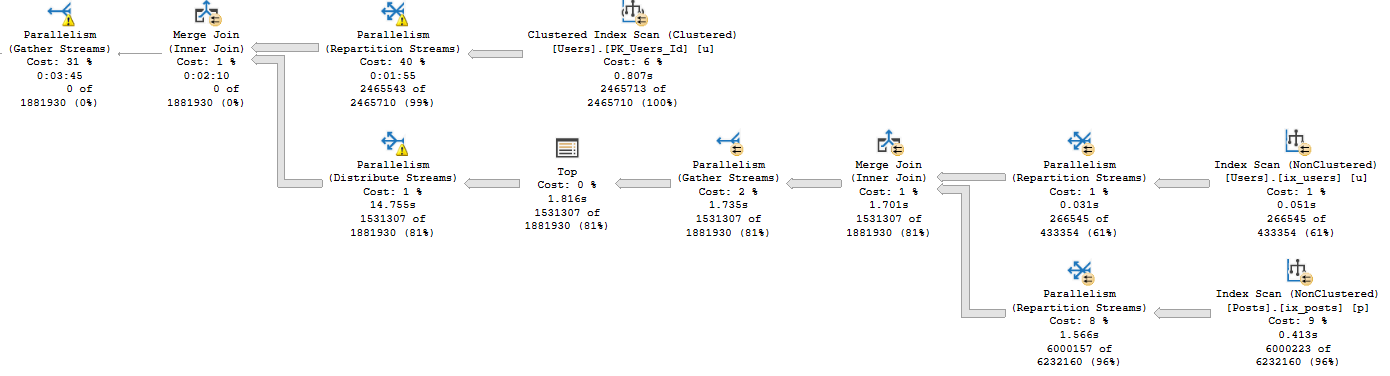
The root of this demo was trying to show people silly things about CTEs, how TOP can fence things off, and how TOP introduces a serial zone in plans unless it’s used inside the APPLY operator.
The result was this magnificent beast.
Long Mane
Why is this magnificent?
Because we have the trifecta. We have a spill on all three types of parallel exchanges.
It’s not gonna work out
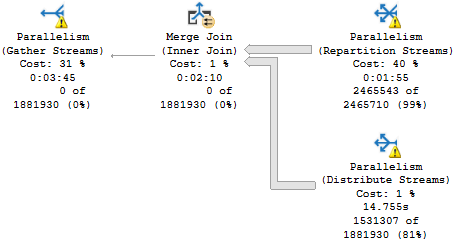
Let’s take a closer look at those beauties.
*slaps hood*
Why Did That Happen?
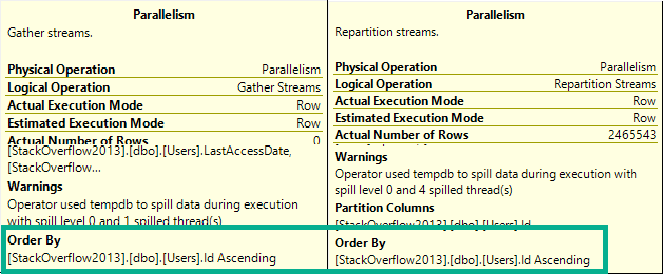
This plan has a Merge Join, which requires ordered input.
That means the Repartition and Gather Streams operators preserve the order of the Id column in the Users table.
News Of The World
They don’t actually order by that column, they just keep it in order.
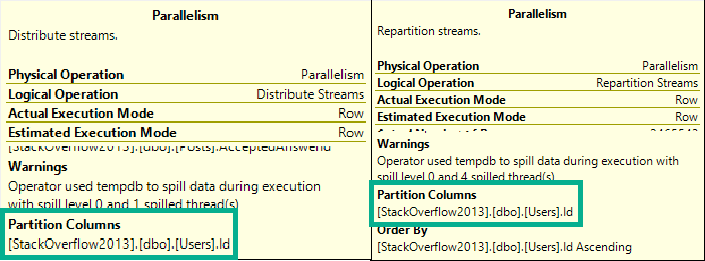
But what about Distribute Streams? GREAT QUESTION!
Legalize Burberry
It has the same Partition Column as Repartition Streams. They both have to respect the same order going into the Merge Join, because it’s producing ordered output to the Gather Streams operator.
In short, there’s a whole lot of buffers filling up while waiting for the next ordered value.
Were Parallel Merge Joins A Mistake?
[Probably] not, but they always make me nervous.
Especially when exchange operators are the direct parent or child of an order preserving operator. This also goes for stream aggregates.
I realize that these things are “edge cases”. It says so in the documentation.
The Exchange Spill event class indicates that communication buffers in a parallel query plan have been temporarily written to the tempdb database. This occurs rarely and only when a query plan has multiple range scans… Very rarely, multiple exchange spills can occur within the same execution plan, causing the query to execute slowly. If you notice more than five spills within the same query plan’s execution, contact your support professional.
Well, shucks. We only have three spills. It looks like we don’t qualify for a support professional.
Thanks for reading!
Going Further
If this is the kind of SQL Server stuff you love learning about, you’ll love my training. Blog readers get 25% off the Everything Bundle — over 100 hours of performance tuning content. Need hands-on help? I offer consulting engagements from targeted investigations to ongoing retainers. Want a quick sanity check before committing to a full engagement? Schedule a call — no commitment required.