Hash spills are nothing like sort spills, in that even with (very fast) disks, there’s no immediate benefit to breaking the hash down into pieces via a spill.
In fact, there are many downsides, especially when memory is severely constrained.
The query that I’m using looks about like this:
SELECT   v.PostId,
		 COUNT_BIG(*) AS records
FROM dbo.Votes AS v
GROUP BY v.PostId
HAVING COUNT_BIG(*) >  2147483647
The way this is written, we’re forced to count everything, and then only filter out rows at the end.
The idea is to spend no time waiting on rows to be displayed in SSMS.
Just One Int
To get an idea what performance looks like, I’m starting with one integer column.
With no spills and a 776 MB memory grant, this runs for about 15 seconds.
Hello
If we drop the grant down to about 10 MB, we spill a bunch, but runtime doesn’t go up too much.
Hurts A Little
And if we drop it down to 4.5 MB, things go absolutely, terribly, pear shaped.
Hurts A Lot
The difference in both the number of pages spilled and the spill level are pretty dramatic.
TWO THOUSAND!
Expansive
If we expand the query a bit to look like this, memory starts to matter more:
SELECT   v.PostId,
         v.UserId,
		 v.BountyAmount,
		 v.VoteTypeId,
		 v.CreationDate,
		 COUNT_BIG(*) AS records
FROM dbo.Votes AS v
GROUP BY v.PostId,
         v.UserId,
		 v.BountyAmount,
		 v.VoteTypeId,
		 v.CreationDate
HAVING COUNT_BIG(*) >  2147483647
Extra Extra
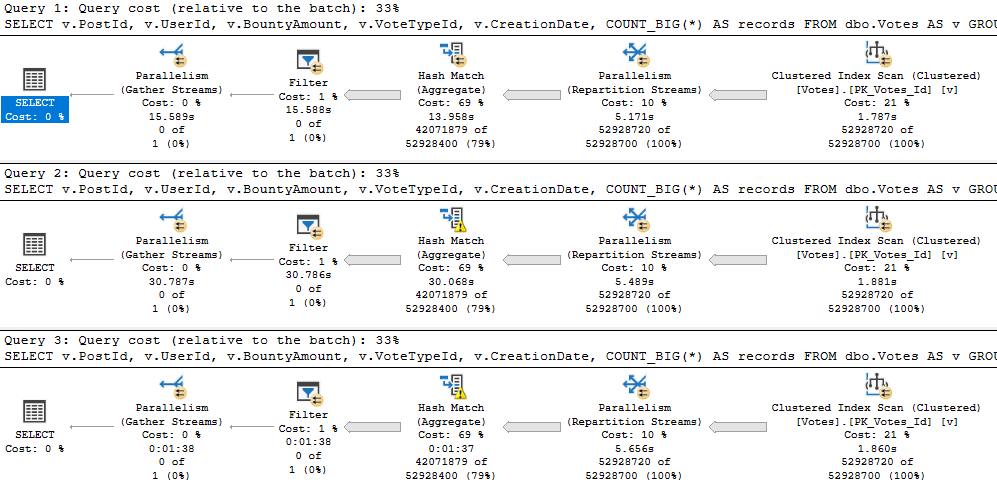
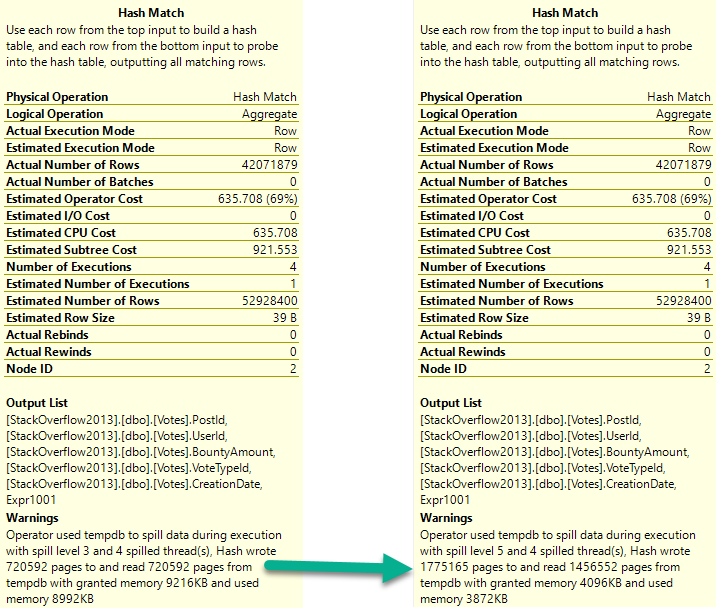
With more columns, the first spill escalates to a higher level faster, and the second spill absolutely wipes out.
It runs for almost 2 minutes.
EATS IT
As a side note, I really hate how long that Repartition Streams operator runs for.
Predictably
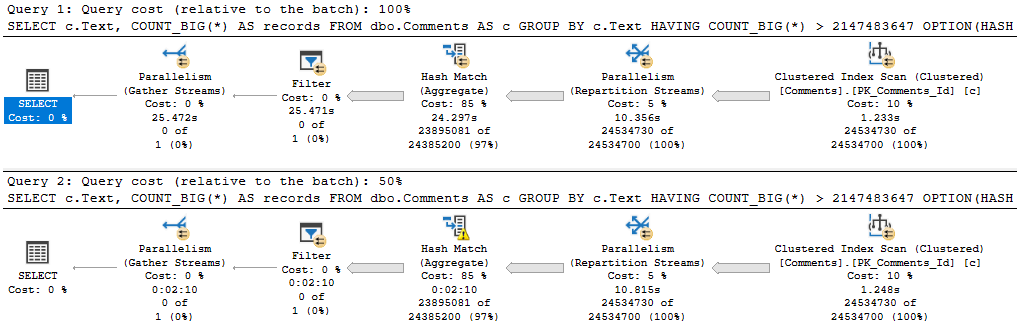
When we get the Comments table involved, that string column beats us right up.
Love On An Escalator
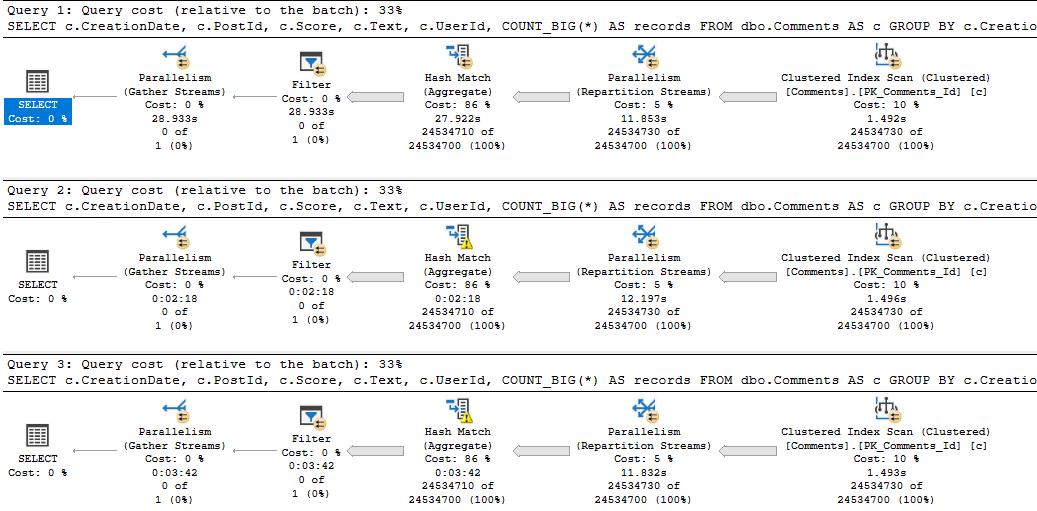
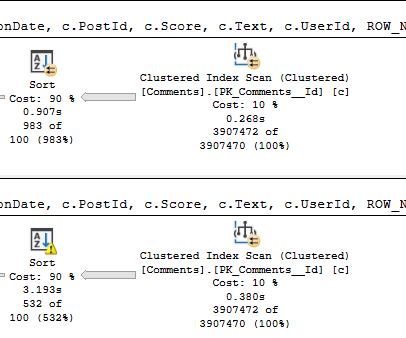
The first query asks for the largest possible grant on my laptop: 9.7GB. The second query gets 10MB.
The spill is godawful.
When we reduce the memory grant to 4.5MB, the spill runs another 1:20, for a total of 3:31.
Crud
Those spills are the root cause of why these queries run longer than any we’ve seen to date in this series.
Something quite funny happens when Hashes of any variety spill “too much” — which you can read about in more detail here.
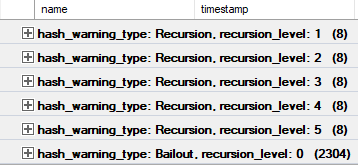
There’s an Extended Event called “hash warning” that we can use to track recursion and bailout.
Here’s the final output aggregated:
[outdated political joke]What happens when a Hash Aggregate bails out?
In Which I Belabor The Point Anyway, Despite Saying…
Not to belabor the point too much, but if we select and group all the columns in the Comments table, things get a bit worse.
Not fond
Three minutes of spills. What a time to be alive.
But, yeah, the bulk of the trouble here is caused by the string column.
Adding in some numbers and a date on top doesn’t have a profound effect.
Taking Up
While Sort Spills certainly dragged query performance down a bit when memory was severely limited, Hash Spills were far more detrimental.
If I had to choose between which one to investigate first, it’d be Hash spills.
But again, small spills are often not worth the effort, and in some cases, you may always see spills.
If your server is totally under-provisioned from a memory perspective, or if there are multiple concurrent memory consuming operations (i.e. they can’t share intra-query memory), it may not be possible for a large enough grant to be give to satisfy all of them.
This is part of why writing very large queries can be perilous, and it’s usually worth splitting them up.
In tomorrow’s post, we’ll look at hash joins.
Thanks for reading!
Going Further
If this is the kind of SQL Server stuff you love learning about, you’ll love my training. Blog readers get 25% off the Everything Bundle — over 100 hours of performance tuning content. Need hands-on help? I offer consulting engagements from targeted investigations to ongoing retainers. Want a quick sanity check before committing to a full engagement? Schedule a call — no commitment required.
In yesterday’s post, we looked at a funny situation where a query that spilled was about 5 seconds faster than one that didn’t.
Here’s what the query looked like:
SELECT x.PostId
FROM (
SELECT v.PostId,
       ROW_NUMBER() OVER ( ORDER BY v.PostId DESC ) AS n
FROM dbo.Votes AS v
) AS x
WHERE x.n = 1;
Now, I can add more columns in, and the timing will hold up:
SELECT x.Id,
       x.PostId,
	   x.UserId,
	   x.BountyAmount,
	   x.VoteTypeId,
	   x.CreationDate
FROM (
SELECT v.Id,
       v.PostId,
	   v.UserId,
	   v.BountyAmount,
	   v.VoteTypeId,
	   v.CreationDate,
       ROW_NUMBER() OVER ( ORDER BY v.PostId DESC ) AS n
FROM dbo.Votes AS v
) AS x
WHERE x.n = 1;
Gas Pedal
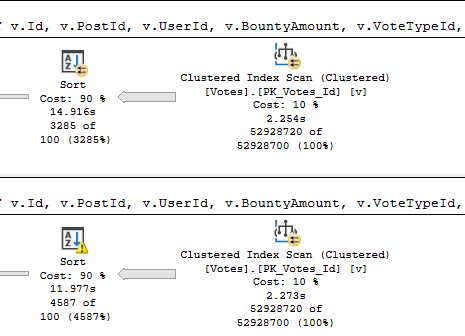
They both got slower, the non-spill plan by about 2.5s, and the spill plan by about 4.3s.
But the spill plan is still 3s faster. With fewer columns it was 5s faster, but hey.
No one said this was easy.
Fully comparing things from yesterday, when memory is capped at 0.0, the query takes much longer now, with more columns:
Killing Time
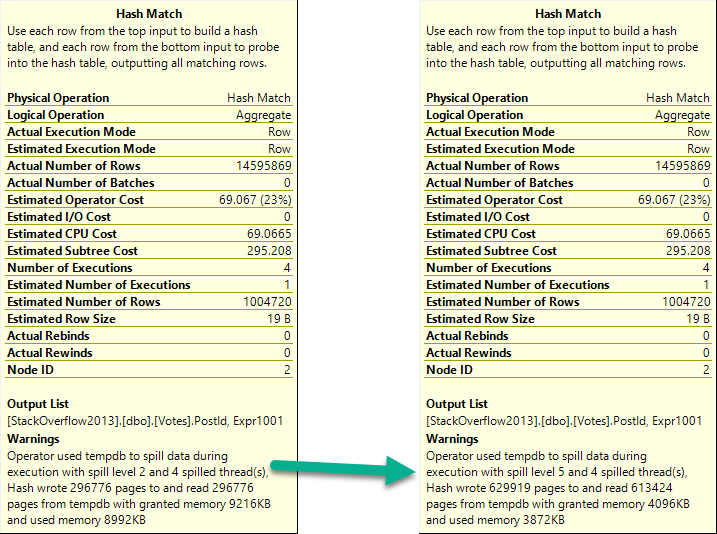
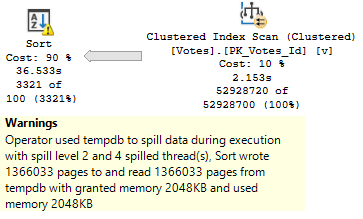
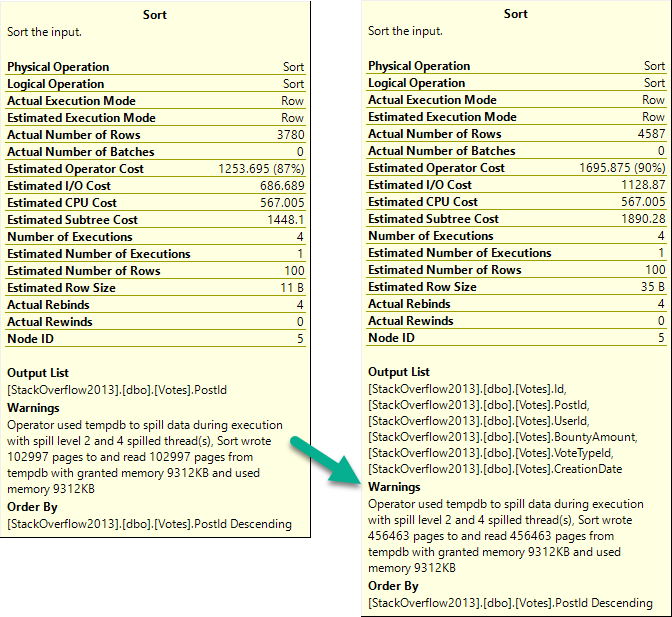
To compare the “fast” spills, here’s yesterday and today’s warnings.
More Pages, More Problems
With one integer column, we spilled 100k pages.
With five integer columns and one datetime column, we spill 450k pages.
That’s a non-trivial amount. That’s like every column adding 75k pages to the spill.
If you’re really worried about spills: STOP SELECTING SO MANY COLUMNS.
For The Worst
I promised to show you things going quite downhill, and for the spill query to no longer be faster.
To do that, we need a different table.
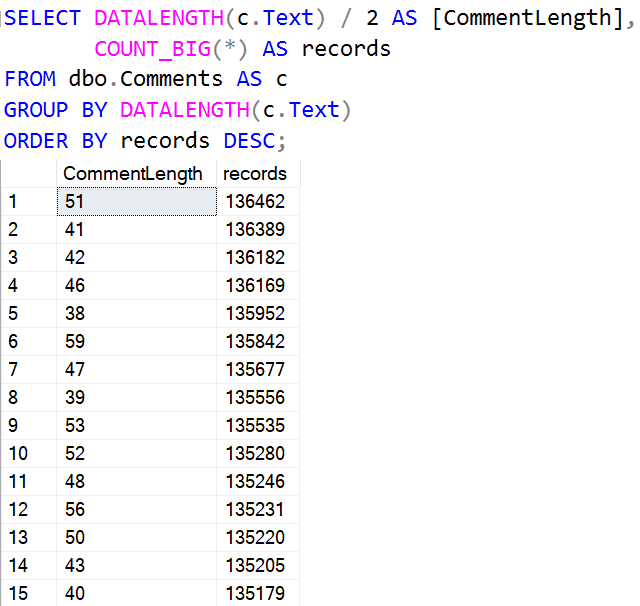
I’m going to use the Comments table, because it has a column called Text in it, which is an NVARCHAR(700).
Very few comments are 700 characters long. The majority are < 120 or so.
5-7-9
This query looks about like so:
SELECT x.Id,
       x.CreationDate,
	   x.PostId,
	   x.Score,
	   x.Text,
	   x.UserId
FROM (
SELECT c.Id,
       c.CreationDate,
	   c.PostId,
	   c.Score,
	   c.Text,
	   c.UserId,
       ROW_NUMBER()
           OVER ( ORDER BY c.PostId DESC ) AS n
FROM dbo.Comments AS c
) AS x
WHERE x.n = 1
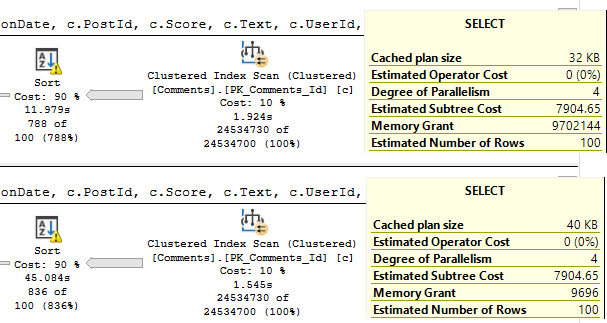
And the results are… icky.
Gigs To Spare?
The top query asks for 9.7GB of RAM. That’s as much as my laptop can give out.
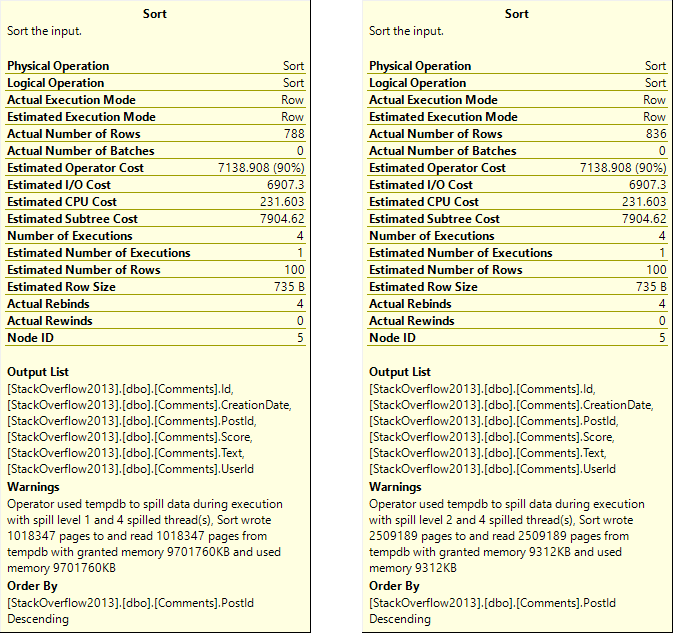
It still spills. Nearly 10GB of memory grant, and it still spills.
If you care about spills: STOP OVERSIZING STRING COLUMNS:
Billy Budd
Apparently only spilling 1mm pages is a lot faster than spilling 2.5mm pages.
But still much slower than not spilling string columns.
Who knew?
Matters of Whale
I was using the Stack Overflow 2013 database for that, which is fairly big relative to the 64GB of RAM my laptop has.
If I go back to using the 2010 version, we can get a better comparison, because the first query won’t spill anymore.
It’s like what all those query tuners keep telling you.
Some points to keep in mind here:
I’m testing with (very fast) local storage
I don’t have tempdb contention
But still, it seems like spilling out non-string columns is significantly less painful than spilling out string columns.
Ahem.
“Seems.”
I’ll reiterate two points:
Stop selecting so many columns
Stop oversizing string columns
In the next two posts, we’ll look at hash match and hash join spills under similar circumstances.
Thanks for reading!
Going Further
If this is the kind of SQL Server stuff you love learning about, you’ll love my training. Blog readers get 25% off the Everything Bundle — over 100 hours of performance tuning content. Need hands-on help? I offer consulting engagements from targeted investigations to ongoing retainers. Want a quick sanity check before committing to a full engagement? Schedule a call — no commitment required.
Every post this week is going to be about spills. No crazy in-depth, technical, debugger type stuff.
Just some general observations about when they seem to matter more for performance, and when you might be chasing nothing by fixing them.
The queries I use are sometimes a bit silly looking, but the outcomes are ones I see.
Sometimes I correct them and it’s a good thing. Other times I correct them and nothing changes.
Anyway, all these posts started because of the first demo, which I intended to be a quick post.
Oh well.
Intervention
Spills are a good thing to make note of when you’re tuning a query.
They often show up as a symptom of a bigger problem:
Parameter sniffing
Bad cardinality estimates
My goal is generally to fix the larger symptom than to hem and haw over the spill.
It’s also important to keep spills in perspective.
Some are small and inconsequential
Some are going to happen no matter what
And some spills… Some spills…
Can’t Hammer This
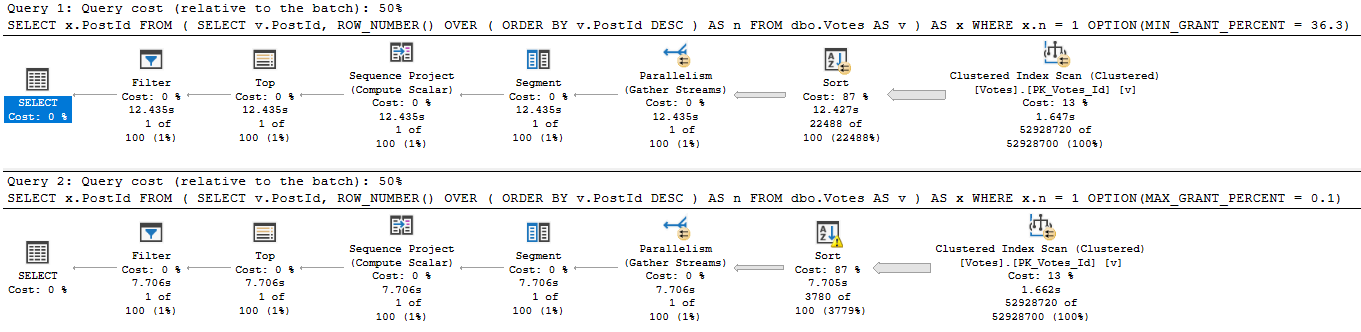
Pay close attention to these two query plans.
Completely unfounded
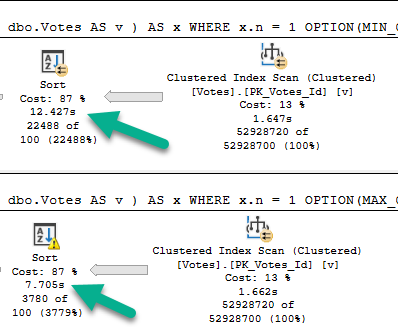
Not sure where to look? Here’s a close up.
Grounded
See that, there?
Yeah.
That’s a Sort with a Spill running about 5 seconds faster than a Sort without a Spill.
Wild stuff, huh? Here’s what it looks like.
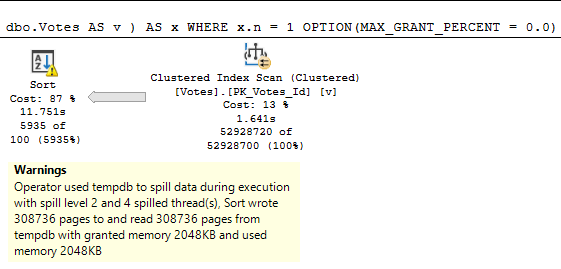
Still got it.
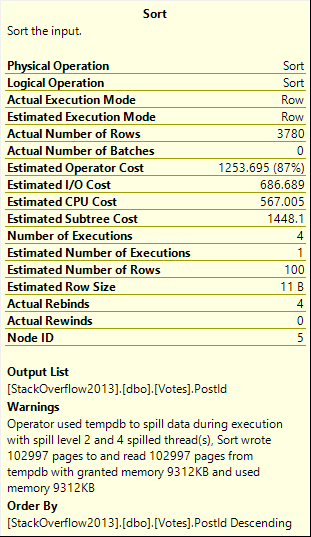
Not inconsequential. >100k 8kb pages.
Spill level 2, too. Four threads.
A note from future Erik: if I run this with the grant capped at 0.0 rather than 0.1, the spill plan takes 12 seconds, just like the non-spill plan.
There are limits to how efficiently a spill can be handled when memory is capped at a level that increases the number of pages spilled without increasing the spill level.
Z to the Ero
But it’s still funny that the spill and non-spill plans take about the same time.
Why Is This Faster?
Well, the first thing we have to talk about is storage, because that’s where I spilled to.
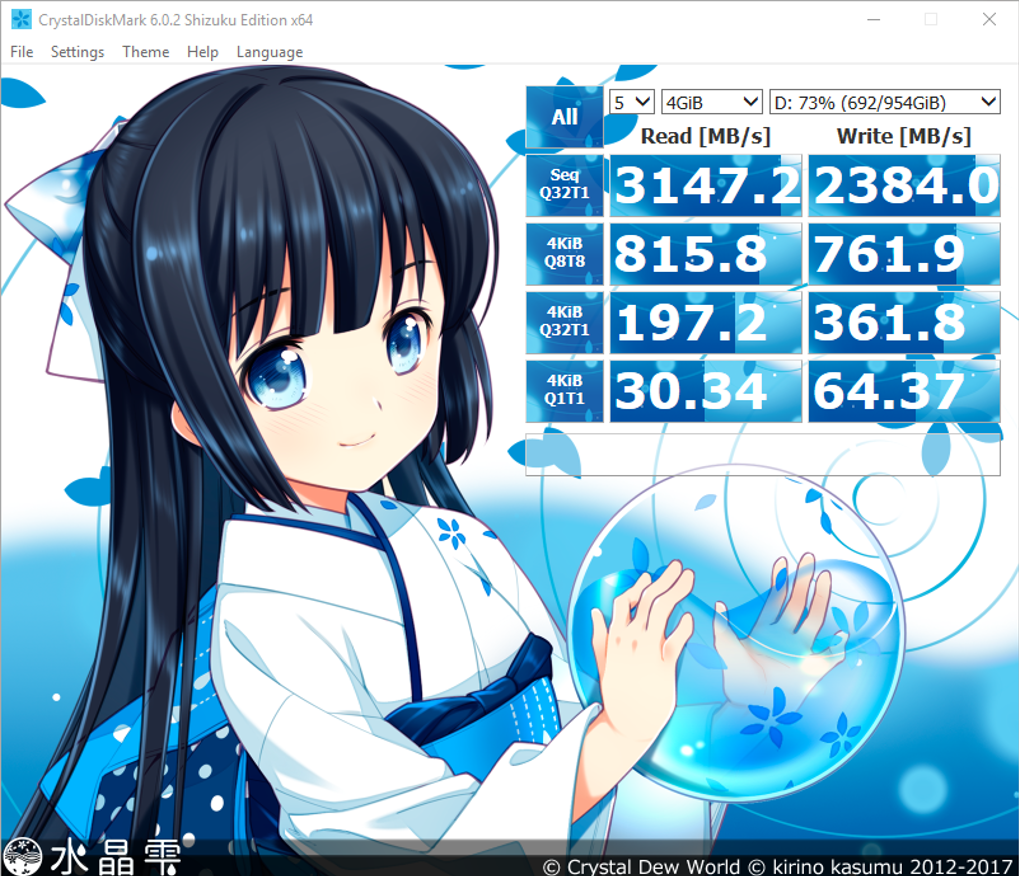
My Lenovo P52 has some seriously fast SSDs in it. Here’s what they give me, via Crystal Disk Mark:
Girlfriend In A Cartoon
If you’re on good local storage, you might see those speeds.
If you’re on a SAN, I don’t care how much anyone squawks about how fast it is: you’re not gonna see that.
(But seriously, if you do get those speeds on a SAN, tell me about your setup.)
Multiple merge passes can be used to work around this. The general idea is to progressively merge small chunks into larger ones, until we can efficiently produce the final sorted output stream. In the example, this might mean merging 40 of the 800 first-pass sorted sets at a time, resulting in 20 larger chunks, which can then be merged again to form the output. With a total of two extra passes over the data, this would be a Level 2 spill, and so on. Luckily, a linear increase in spill level enables an exponential increase in sort size, so deep sort spill levels are rarely necessary.
Next, Paul White showing an Adam Machanic demo:
Well, okay, I’ll paraphrase here. It’s faster to sort a bunch of small things than one big thing.
If you watch the demo, that’s what happens with using the cross apply technique.
And that’s what’s happening here, too, it looks like.
On With It
The spills to (very fast) disk work in my favor here, because we’re sorting smaller data sets, then reading from (very fast) disk more small data sets, and sorting/merging those together for a final finished product.
Of course, this has limits, and is likely unrealistic in many tuning scenarios. I probably should have lead with that, huh?
But hey, if you ever fix a Sort Spill have have a query slow down, now you know why.
In tomorrow’s post, you’ll watch my luck run out (very fast) with different data.
Thanks for reading!
Going Further
If this is the kind of SQL Server stuff you love learning about, you’ll love my training. Blog readers get 25% off the Everything Bundle — over 100 hours of performance tuning content. Need hands-on help? I offer consulting engagements from targeted investigations to ongoing retainers. Want a quick sanity check before committing to a full engagement? Schedule a call — no commitment required.
Last week’s thrilling, stunning, flawless episode of whatever-you-wanna-call-it.
Video Summary
In this video, I discuss how to improve query performance by addressing plan warnings and residual IO on index scans. I explain that such warnings often indicate the need for better-indexed columns or additional indexes to optimize data retrieval efficiently. The discussion then shifts to a lighthearted note about my current state—feeling unwell due to weather conditions, which are particularly bothersome as I age. Despite feeling under the weather, I engage with viewers by answering questions and sharing some personal music preferences, including “Procession,” “Your Silent Face,” “Age of Consent,” and “Bizarre Love Triangle” from New Order. The conversation also touches on Azure managed instances, expressing both enthusiasm for their potential and acknowledging current limitations, while emphasizing the ongoing improvements Microsoft is making in this space.
Full Transcript
I feel like crap today. No one shows up. I’ll be relieved. Oh, someone showed up. Now I have to stick around. Darn it. Darn it all. Two people showed up. Oh, God. Now I have to stay for twice as long. That’s how it works, right? You guys are exponential. Oh, all right.
You’re very quiet people, though. Don’t even say hello. It’s rude. Rudy, Rudy Poo. There we go. Finally. Finally. Four people. My goodness. I didn’t realize that many people were so thirsty for SQL Server. Who knows?
I’m a little bit more. I’ll take that back a step here. I have no idea how much of this content will be SQL Server related compared to other things. No idea. We’ll have to wait and find out. We’ll see later.
Lars asks, do your AG listeners use NTLM or Kerberosoth? Good news and bad news. The good news is I don’t have any AG listeners. I mean, good news for me. That’s great news for me because if I had AG listeners, I would be doing things I hate. The bad news for you. The bad news is that means I don’t know. And, you know, I’m going to go out on a weird limb here. I don’t think AG listeners use either one. I think they just handle where the request gets sent and the type of authentication is handled by SQL Server when it arrives there. I don’t think the listener does any of that. Listeners are very, they really don’t do a lot. Listeners kind of don’t do much at all.
Listeners are kind of like, I don’t know. Weird, dumb, lazy things. SPNs won’t create for listeners. I’ve never tried to create an SPN for a listener. As far as I know, they don’t, yeah, they don’t need them. Darren, Darren, thank you for, thank you for chiming in, Darren. Yes, listeners do not need, require, get SPNs. They’re quite virtual things. I forget what, I forget the conversation that I was having about listeners before my friend, Mr. Sean Gilardi from Microsoft. I forget, it was, like, someone had asked a question on Stack Exchange, like, like, how do I fail a listener over or something? And it was just like, you don’t, they’re not that real. They’re not, like, physical things. They are very virtual.
Seems like they should use Kerberos. Yes, again, as far as I know, they just direct traffic and then the authentication is handled by SQL Server, not the listener at all. I don’t like that. I think that they just, they do nothing except say, you go here, you go here, you go here, you go here. Or everyone goes here because we don’t, we don’t want to pay $7,000 a core for over there. We just want to pay over here and pay software assurance. Host names. Host names, yeah, host names indeed.
Oh, man. People wonder why I just stick with performance tuning. All this other stuff is hard. Hard. Too much for me. Stick with query optimization. The optimizers are much more simple. Dependable and reliable than all this HADR stuff.
People are crazy with it. Yeah, perf tuning is really easy. You just throw a no-lock hint on everything and stick stuff in a temp table and you’re done. That’s it. Add an index once in a while.
Look busy. Twiddle your thumbs. Yep. Waiting for that index to build. Let me back in a bit. Oy, oy, oy.
So Lee asks, what kind of approach would you take to getting rid of table spools? I know indexes can help alleviate these, but what if that doesn’t help? So spools generally happen on the inner side of nested loops because SQL Server is terrified of doing vicious repetitive work. Especially if you have non-sargable predicates that are like the result of, you know, like is null or date at or date diff or something.
You know, join or where clause. That can certainly contribute to it. So like you see a lot of like L trim, R trim, replace in your joins and where clauses and they end up on the inner side of nested loops.
There’s a pretty good chance that SQL Server is going to use a table spool. So two things that is a repetitive work. So obviously nested loops, right? So something’s going to happen a whole bunch of times and SQL Server is afraid that the work is going to be repetitive. So what you’ll often see is the outer side of nested loops.
Maybe sort data before the nested loops join. And what happens next is funny. So SQL Server will take the data from the outer side of nested loops. Maybe sort it to put it in order.
If it’s already in order, then it doesn’t bother. It just goes into the nested loops join. On the inner side of nested loops, you’ll have that table spool. And what that table spool does, if it’s eager, is SQL Server will sort the data from over here. Or sort it if it’s not already sorted.
So that repetitive values from the outer side will be in order, obviously, right? Order is important. So what happens is SQL Server takes them. And so that it knows if the value one comes out over here and the next 10 values are one, it can take that spool, go run the subtree, get all the subtree for the value one, bring it into the spool, and then use it 10 more times.
So when you go get that first initial value, that’s a rebind. And when you go reuse the spool for that initial value, it’s a rewind. So rebind on one, rewind 10 more times for one, and use the data in the spool.
The next value is 2, and let’s say that happens 5 more times. You hit this, you go get the data for 2, bring it into the spool, and then reuse it 5 more times. So a rebind and then 5 rewinds.
If you really, really want, one of the best ways to get rid of table spools like that is to tell SQL Server that the data coming from the outer side is unique. So you can do that with either a select distinct, you can do that by dumping something into a temp table and putting some sort of unique clustered index or primary key on it.
Sometimes you can simply select distinct values into a temp table and then use that instead. And that’s generally the best way to get rid of the table spool is to separate the repetitive work, or remove the repetitive work, rather.
So when SQL Server knows that it’s only going to see 1.1 and 1.2 and 1.3 and 1.4 and 1.5 and so on, then it stops. Then it stops trying to do the spool.
Yeah, unique. All right, so if you have a set of numbers that are, let’s say you have 1 to 10, and that’s you have 10 1s and 10 2s and 10 3s and 10 4s and 10 5s, that’s not unique. But if you select distinct, 1, 2, 3, 4, 5, 6, 7, 8, 9, 10, you have one value.
And you can go get just that thing for 1, and then we’ll get the thing for 2, and SQL Server won’t. Does select distinct into a set of uniqueness flag? Well, when the statistics get built on that, then SQL Server will probably figure out pretty quickly that things are unique.
If you do that and you still don’t get rid of the spool, then you probably will have to add a primary key or unique clustered index on that temp table. I generally tell people to avoid nonclustered indexes on temp tables because if they’re not wide enough for the query, then they’re not going to get used, and then you’re maintaining the heap structure of the temp table plus the nonclustered index structure on the temp table.
So if you’re going to index a temp table, please make it a clustered index. Otherwise, you’re just maintaining two temporary objects, which I think that’s pretty dumb.
I would never do that. But yeah, heaps get statistics too. Heaps are not opposed to statistics. The only thing that doesn’t is the old table variable. I don’t think you can add those to temp tables, Lars.
I don’t think you can add constraints like that to temp tables. I want to say tempDB as opposed to foreign key and uniqueness constraints like that. You can add a primary key because that’s an index on the table, and that’s sort of a different beast, but I think unique constraints and the foreign keys and stuff like that are off-limits for temporary objects.
I remember, or at least remember a few times trying to do demos for foreign key stuff and using temp tables. Yeah, you can’t foreign key in tempDB.
It’s just not a thing. Not a thing you can do. I remember one time a while back, I was trying to write a demo using foreign keys. By the way, Peter, very funny. YouTube asked me to approve that comment, apparently because it thought it was dirty words.
You were trying to tell me to FK myself. So I remember trying to do some demos in tempDB about foreign keys, and I remember getting a bunch of errors like, you can’t do that here, or I could set it up, but it wouldn’t work.
And I was like, what the hell is going on? I was like, oh yeah, tempDB. It’s always tempDB. Always, always, always. Always, always, always.
Damn you, tempDB. I would love to go foreign key myself and then take a nap. I feel like crap today. It’s hot, and there’s thunderstorms coming, and since I’m old, weather has a disparate impact on my sinuses.
And so whenever things get high pressure outside, they get high pressure in my head, and I spend the day wondering if I need to go to the hospital. I’m like, is my brain about to explode? What’s happening? I don’t feel like I’m here right now. My hands don’t work right.
So things like air travel and bad weather are a lot of fun when you get old. Lee, you can ask all the questions you want because I have approximately 17 minutes to kill, and no one else is asking them, so please ask away.
Ask away. Question is, the plan warning operation caused residual IO on the index scan. Would you say that this is an area I should focus on with a plan when trying to improve query performance? In my example, the actual rows read is far higher than the amount of rows returned.
So sure. I think you’re going to see that warning in Century One Plan Explorer. I don’t think that’s in Management Studio. And when the reads are far higher like that, I’m actually writing a blog post sort of related to this. It generally tells me that the index keys are maybe not in the right order for that, or we don’t have a good index to find that data.
So if, you know, just as a quick example, let’s say that we needed to find like where reputation equals two, but either we don’t have an index on reputation, or we have an index on like another column and then reputation, SQL Server can’t easily seek to just the values we need for that.
So that might be a case where the, what do you call it? The index columns are in the wrong order. So if you put reputation first, you could easily just find that. That starts to matter much, much more on larger tables because you would, you know, if let’s say you have a 500 row table and, you know, you have to read 500 rows to find 200 values.
So what? If you have, you know, like a 10 million row table and you have to read 10 million rows to find five values, that’s much less fun for everybody. So check your indexes, make sure that you have a good index to find that data, find the data for your predicates or joins or whatever that you’re looking for.
And then if you don’t, I don’t know, go, go create one with no lock middle of the day, maxed up 57, something like that. That’s usually how it works, right?
It’s usually how it works. Let’s see. Uh, the next question we have is a good question. Wow. What are your top four new order songs?
Um, let’s see, probably procession, I think is my first one. Procession is first. Uh, your silent face would be second. Right?
So procession, your silent face, uh, probably age of consent. And then bizarre love triangle. I think those are my four. I almost wish that, um, I almost wish that 24 hour party people was a new order song because that would have snuck into the list.
If it was just not happy Monday. Let’s see. Does the Mac behind me boot? Yes.
Yes. It does. It boots up. I can use it. I even have a bunch of dumb discs and games for it. It’s just, it’s just very slow to use. This is the ravages of time. Just try this. Uh, let’s see.
Let’s catch up on some comments and questions here. Um, uh, let’s see. Lee says in the example, the actual rose, right? Oh, we already covered that. Uh, SQL WB says, Eric, if you’ve done any dabbling in Azure managed instances, I’m still on the fence since they have so many restrictions as compared to standard Azure setups. Yeah.
So, um, I really love where they’re going with them. They’re sort of like brand, brand new. Um, you know, they, they just like pretty recently got general availability release. And so, you know, I, I really like where they’re headed with them. Like, uh, the, the PM for those Jovan was on Twitter asking about, uh, DTC and how people use it and how if they implemented it up there, like how they would want to use it and what they would want to see from it.
So, you know, it’s, there’s lots of, they’re making progress with getting things like more on par with the box product, right? They’re slowly adding in things. This is no small undertaking to get this going. So like the cool part about Azure managed instances is that you get Microsoft, I mean, for better or worse, right?
We don’t know, cause it’s the cloud, right? Which is like Airbnb for your, for your data, right? You’re, you, you, you paid for it, you paid for the space, but it’s still someone else’s apartment. And you have to like wonder if like, you know, I don’t know, just herpes on the toothpaste or something. But anyway, so like, uh, I love where they’re going with it.
I love that they’re coming out. So Microsoft manages your backups. Microsoft manages, uh, the high availability. It has the same restriction where like once data goes in, data, getting data out is not quite as good. It’s on that like weird internal version of SQL Server that gets used in Azure. So, you know, um, they’re, they’re, they’re getting better with it.
And I like, uh, I like what I like. I like the idea behind them. And I think that that’s what Azure SQL DB should have started out as, but you know, better late than never. And I’m sure that, um, you know, I’m sure that is they mature and become a more competent product that, you know, the, the issues that perhaps Lee is running into and the roadblocks that you’re, you’re finding for, uh, you know, getting your workload up there and running will diminish.
So, you know, give it time, you know, it’s like anything early adoption, early adopters always have the most pain, but they also get the best prices because, you know, let’s, let’s face it. You were like, I was with you when you were terrible. Like you owe me money.
It’s like my wife. Like I was with you when you were broke. Buy me a Louis Vuitton bag. FK to self. Also the initial setup time is, uh, a little painful for me.
Genses is right now. For some reason, the first time you create one, it takes like a week. I don’t like, I think they have an actual person like, like, like wiring things in and like going to do stuff. They have to like, I don’t know. I, I picture some like, some like weird Kung Fu master, like prove you’re a Kung Fu master thing where someone has to like, sit in the Lotus position where they get beat with sticks and not feel anything.
And then like ascend a mountain and pick a flower and then like go underwater for 30 minutes. And so like, there’s like someone must have to go through some real, real misery to get those things set up. And yeah, the amount of time it takes.
Someone’s, I think someone’s like, someone goes out and buys a computer. They’re going on Dell.com. They’re like, Oh, we got to figure this out. Like, what do they want? 512 gigs of Ram. Oh, it’s expensive. Charge them extra.
Yeah, it is. It is. It, it, it’s a, it’s a, it’s a union estimate is what it is, man. The trades are slacking in that data center. It’s like, we will show up.
We’ll probably be there. We’ll be there within this four hour window. And if for some reason we won’t be in the, there in that four hour window, we will call you at hour five and tell you that we might be four hours late. Yeah.
I think if you work in any data center, your, your title is order monkey, because you are trying to bring order to that chaos. I read someone on Twitter was saying that, uh, their data center went down because a drunk driver hit like a, an electric pole by there and knocked out electricity.
And the battery power did not last as long as anticipated. The battery power lasted for like two, two to four hours or something. And then it just by everything shut down. Yeah.
The other tough thing about, uh, the cloud and managed instances, um, is that, well, so like you have, if you’re on prem, right, if you are living on, on planet earth, like the Duran Duran song, and you have multiple environments, like you have a production environment that you do all your real work on, you pay, pay for that.
And then you have, you know, dev or UA, UAT or QC or whatever lower environments, uh, you can use, you know, developer edition for those and you can use whatever you want for those. And it doesn’t really cost you much aside from like the hardware. Up in the cloud, there’s no real classification for like, this is just a development server.
If you need to have a development server, that’s in any way lined up with the specs of prod, you could end up spending a pretty serious chunk of change. And that’s, that’s kind of a big, big stopper for a lot of people who are like, wait a minute, but where are we supposed to test this stuff?
Microsoft’s like, then just speeds off in the solid gold Bugatti. It’s a, it’s tough. It’s expensive. It’s like, Oh, you wanted to rent another Airbnb.
Okay. That’ll be twice the price. Sorry about that. Should’ve read the fine print. Oh, he says one final point. SSMS is still not up to speed with managed instances. Although the past month has been better.
Let me tell you about SSMS 18. I wish that I could do it. I’ll, you know, I’m going to, when I get done with this, I’m going to record a video because when I use SSMS 18, there are two things that constantly make it crash. They irk the hell out of me because it’s, they both have to do with extended events.
And it’s not because I use extended events a lot. It’s that when I do use them, I just want to be able to use them and get the hell. They’re not, they’re not fun to use. So if you open up the extended events GUI and you say, I want to have a new session.
And then you, let’s say enter a name for the session in that first window. And then you click on events, which is the next node down in that little left side piece over there. It just crashes. It goes unresponsive and crashes. Goodbye. That’s it. Done.
Done. The other thing is if you like say use management studio 17.9 and you create a session there and you get it running and then you say an SSMS 18.1 watch live data, you can do that, right?
And live data starts streaming in. But when you close that watch live data window, SSMS crashes. It just says goodbye. And so it, it, it, it makes me wonder. It really makes me wonder, I truly wonder if anyone tests this stuff. I get the feeling that they don’t because those, those are two pretty huge usability things.
And if you like, it doesn’t take much poking around to discover those. It takes nothing. Nothing. Ridiculous. Let’s see. Azure data studio.
Oof. I haven’t even downloaded it. I don’t, I don’t care. I’m going to be completely honest. I don’t care because all of the things that I do revolve around query plans and query plans in Azure data studio are garbage. They just, they, they, they don’t have anything anywhere near the level of detail that the ones in management studio do.
And I am not excited at all about the plan explorer add in because what the plan explorer add in doesn’t give you is a lot of the operator time stuff. And it doesn’t give you, I really, I, the way that you can, the way that plan explorer handles parallelism and showing parallel threads and row counts where it’s like in some weird tab four bars over and it’s like row by row.
And like, there’s like a column. It’s not, not easy to look at some things in plan explorer. There are some things it does quite well.
Um, but, uh, like, like if I had to, if I have to troubleshoot a long store procedure, uh, plan explorer is the first thing I’m going to go to. But with the operator time stuff and the, the parallelism stuff, most of, most of what I, what I’m doing these days is in SQL Server management studio 18, which, which, you know, it makes it frustrating because you have these awesome advances in one area, but you have these, you know, just terrible crashes in other areas.
So it’s like, well, why did I didn’t, does anyone over there use extended events? As I wonder, I wonder, I wonder, I wonder. Azure data studio was great for worksheets. I don’t even know what the desert worksheet is. Nope.
I like it. Oh, it’s too much. It’s not, it’s not my thing. Like, I’m glad it works for people and it solves problems for people, but it’s not, not my jam. Azure SQL serverless. Serverless is a lie.
It’s like saying this can is canless. It’s on a server. Good for demos. All my demos revolve around query plans. What am I going to show people? HTML, paste the plan.
There’s no, there’s no, there’s no, all the detail on that is not there. Not with the stuff that I want to show people. It does not have that in there. No, no, no. I would, I need, I need the good query plans. You put the good query plans in Azure data studio. We can talk.
Then we’ll talk. Then I’ll think about it. Well, it’s just, you know, different tools make sense for different people. You know, some people are very like, Oh, you got to use visual studio code for everything.
Oh, have you tried notepad plus plus? I’m like, doesn’t do what I need it to do. Different functionality. So I was just like, man, I really want to show you this execution plans. Like, have you tried power shell for what? It’s not what I need.
I want to show you this query plan. Well, have you tried DBA tools? I’m like, man, it’s not what I need. I need this stuff. Yeah.
That’s the other thing is I don’t want to have to learn a whole new thing right now. One of my favorite tools other than SSMS. I mean, again, plan explorer for, uh, for big store procedures where I, where like management studio is just an utter failure for displaying those.
Uh, but other than that, I don’t, I don’t use a whole lot. I’m pretty low fi. My stuff, you know, I, um, keep a lot of stuff in text files. Uh, you know, I, I w I was a big MS paint guy until I, um, I started using snag it for my screen caps and they have a pretty decent photo editor in there.
So, some people, some people, he just says, my wife is very judgy when she catches me in MS paint.
Well, you know, what, what does she use? but she has a Mac with $7,000 Photoshop product on it. It’s messed up. MS paint is awesome. Remember, good old days of MS paint.
She does have them. Of course she does. You know how I knew that? Photoshop may be involved. Yeah. You know how I knew that? Hmm. Very intuitive, very intuitive person. Know everything.
Know everything. Evernote. Evernote is good. Yeah. I use it. I, I use Evernote. I probably don’t like fully utilize it in the way that I should. Like it’s, it’s Evernote is kind of like a junk drawer for me. The only thing that I, uh, I consistently use it for is like workout stuff.
So I can just like put stuff in there real quickly, update stuff, make notes. But, um, yeah, aside from that, I’m, it is, it is pretty much just a drunk drawer of like, I like this picture. Sure. I would like to do something with this picture. Eventually.
Hmm. I haven’t used OneNote though. I know Buck Woody had a tweet or a blog post about how he uses OneNote for all sorts of crazy things. And I realized that my life is not nearly as complicated as his. And that I, I don’t need that level of functionality.
I just don’t. So, wake up, stave off the hangover. Eat some breakfast, work, continue working, go to the gym, come home, continue working, start drinking, eventually stop working because this is too much drinking.
Go to bed. Paints a fun picture of life as a, as a consultant, doesn’t it? I’m, I’m mostly, mostly joking. That’s most of my, most of my days and nights are not that, that difficult. I felt.
very, very rarely is there a weekend, weekday hangover rather. It’s not, not big on the, the week, the, the weekday drinking because, I don’t know. I, I feel like if I’m going to go to the gym, it should at least hang around for a while.
Right. At least give it a fair chance. And if I drink during the week, I don’t give it a fair chance. So don’t do that. Really special occasions. Once in a while, weekend warrior of sorts. Terrible word.
That is. All right. We are about, we’re a little over the half hour mark and that is all I am contractually obligated to deal with you people for. So I’m going to get going and open, open my door and let the air conditioning back in. Thanks for hanging out.
Thanks for all the great questions this week. And I will, I’m not sure about next week yet. We’ll have to wait and see. I’m doing a bit of traveling. So we’ll, we’ll figure out if I have the bandwidth to do this. Also might be at a slightly different time. It might be, it might be at a time that makes Europeans very happy.
We’ll, we’ll see. All right. Take care. Goodbye.
Going Further
If this is the kind of SQL Server stuff you love learning about, you’ll love my training. Blog readers get 25% off the Everything Bundle — over 100 hours of performance tuning content. Need hands-on help? I offer consulting engagements from targeted investigations to ongoing retainers. Want a quick sanity check before committing to a full engagement? Schedule a call — no commitment required.
In yesterday’s post, we looked at plans with a good index. The row number queries were unfortunate, but the MAX and TOP 1 queries did really well.
Today, I wanna see what the future holds. I’m gonna test stuff out on SQL Server 2019 CTP 3.1 and see how things go.
I’m only going to hit the interesting points. If plans don’t change, I’m not gonna go into them.
Query #1
With no indexes, this query positively RIPS. Batch Mode For Row Store kicks in, and this finishes in 2 seconds.
SELECT u.Id,
       u.DisplayName,
	   u.Reputation,
	   ca.Score
FROM dbo.Users AS u
CROSS APPLY
(
    SELECT MAX(Score) AS Score
	FROM dbo.Posts AS p
	WHERE p.OwnerUserId = u.Id

) AS ca
WHERE u.Reputation >= 100000
ORDER BY u.Id;
So many illustrations
With an index, we use the same plan as in SQL Server 2017, and it finishes in around 200 ms.
No big surprise there. Not worth the picture.
Query #2
Our TOP 1 query should be BOTTOM 1 here. It goes back to its index spooling ways, and runs for a minute.
SELECT u.Id,
       u.DisplayName,
	   u.Reputation,
	   ca.Score
FROM dbo.Users AS u
CROSS APPLY
(
    SELECT TOP (1) p.Score
	FROM dbo.Posts AS p
	WHERE p.OwnerUserId = u.Id
	ORDER BY p.Score DESC

) AS ca
WHERE u.Reputation >= 100000
ORDER BY u.Id;
With an index, we use the same plan as in SQL Server 2017, and it finishes in around 200 ms.
No big surprise there. Not worth the picture.
I feel like I’m repeating myself.
Query #3
This is our first attempt at row number. It’s particularly disappointing when we see the next query plan.
SELECT u.Id,
       u.DisplayName,
	   u.Reputation,
	   ca.Score
FROM dbo.Users AS u
CROSS APPLY
(
    SELECT p.Score,
	       ROW_NUMBER() OVER (ORDER BY p.Score DESC) AS n
	FROM dbo.Posts AS p
	WHERE p.OwnerUserId = u.Id
) AS ca
WHERE u.Reputation >= 100000
AND ca.n = 1
ORDER BY u.Id;
On its own, it’s just regular disappointing.
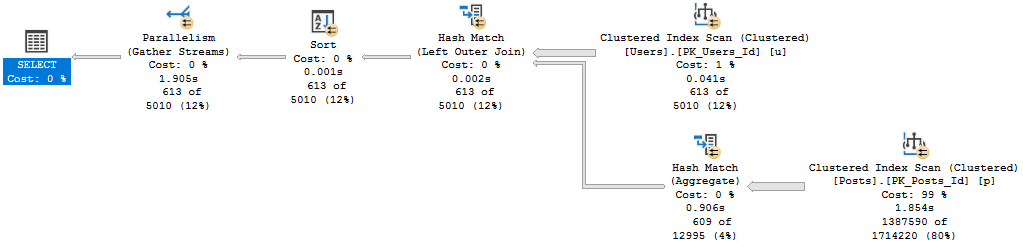
Forget Me
Serial. Spool. 57 seconds.
With an index, we use the same plan as in SQL Server 2017, and it finishes in around 200 ms.
No big surprise there. Not worth the picture.
I feel like I’m repeating myself.
Myself.
Query #4
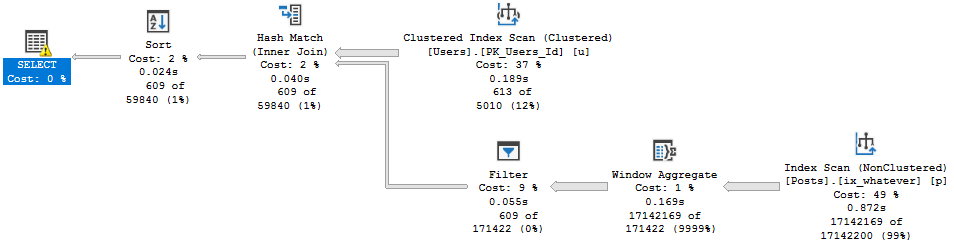
Why this plan is cool, and why it makes the previous plans very disappointing, is because we get a Batch Mode Window Aggregate.
SELECT u.Id,
       u.DisplayName,
	   u.Reputation,
	   ca.Score
FROM dbo.Users AS u
CROSS APPLY
(
    SELECT *
	FROM
	(
        SELECT p.OwnerUserId,
	           p.Score,
	           ROW_NUMBER() OVER (PARTITION BY p.OwnerUserId
			                      ORDER BY p.Score DESC) AS n
	    FROM dbo.Posts AS p
	) AS p
	WHERE p.OwnerUserId = u.Id
	AND p.n = 1
) AS ca
WHERE u.Reputation >= 100000
ORDER BY u.Id;
Guillotine
It finishes in 1.7 seconds. This is nice. Good job, 2019.
With the index we get a serial Batch Mode plan, which finishes in about 1.4 seconds.
Confused.
If you’re confused about where 1.4 seconds come from, watch this video.
Why Aren’t You Out Yet?
SQL Server 2019 did some interesting things, here.
In some cases, it made fast queries faster.
In other cases, queries stayed… exactly the same.
When Batch Mode kicks in, you may find queries like this speeding up. But when it doesn’t, you may find yourself having to do some good ol’ fashion query and index tuning.
No big surprise there. Not worth the picture.
I feel like I’m repeating myself.
Myself.
Myself.
Going Further
If this is the kind of SQL Server stuff you love learning about, you’ll love my training. Blog readers get 25% off the Everything Bundle — over 100 hours of performance tuning content. Need hands-on help? I offer consulting engagements from targeted investigations to ongoing retainers. Want a quick sanity check before committing to a full engagement? Schedule a call — no commitment required.
In yesterday’s post, we looked at four different ways to get the highest value per use with no helpful indexes.
Today, we’re going to look at how those same four plans change with an index.
This is what we’ll use:
CREATE INDEX ix_whatever
    ON dbo.Posts(OwnerUserId, Score DESC);
Query #1
This is our MAX query! It does really well with the index.
SELECT u.Id,
       u.DisplayName,
	   u.Reputation,
	   ca.Score
FROM dbo.Users AS u
CROSS APPLY
(
    SELECT MAX(Score) AS Score
	FROM dbo.Posts AS p
	WHERE p.OwnerUserId = u.Id

) AS ca
WHERE u.Reputation >= 100000
ORDER BY u.Id;
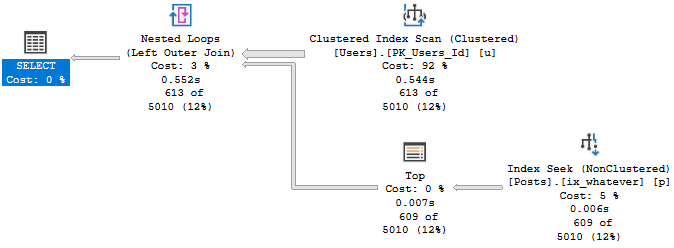
It’s down to just half a second.
Phoney
Query #2
This is our TOP 1 query with an ORDER BY.
SELECT u.Id,
       u.DisplayName,
	   u.Reputation,
	   ca.Score
FROM dbo.Users AS u
CROSS APPLY
(
    SELECT TOP (1) p.Score
	FROM dbo.Posts AS p
	WHERE p.OwnerUserId = u.Id
	ORDER BY p.Score DESC

) AS ca
WHERE u.Reputation >= 100000
ORDER BY u.Id;
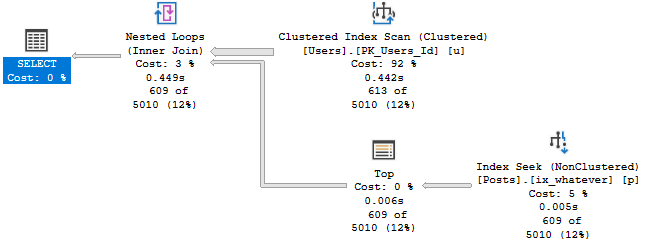
Aliveness
This finished about 100ms faster than MAX in this run, but it gets the same plan.
Who knows, maybe Windows Update ran during the first query.
Query #3
This is our first attempt at row number, and… it’s not so hot.
SELECT u.Id,
       u.DisplayName,
	   u.Reputation,
	   ca.Score
FROM dbo.Users AS u
CROSS APPLY
(
    SELECT p.Score,
	       ROW_NUMBER() OVER (ORDER BY p.Score DESC) AS n
	FROM dbo.Posts AS p
	WHERE p.OwnerUserId = u.Id
) AS ca
WHERE u.Reputation >= 100000
AND ca.n = 1
ORDER BY u.Id;
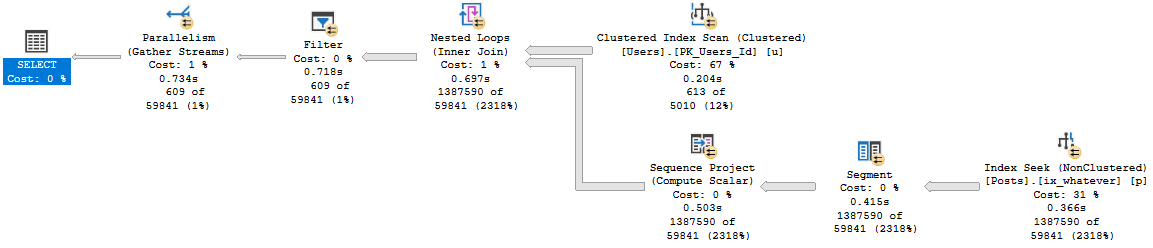
While the other plans were able to finish quickly without going parallel, this one does go parallel, and is still about 200ms slower.
Bad Bed
Query #4
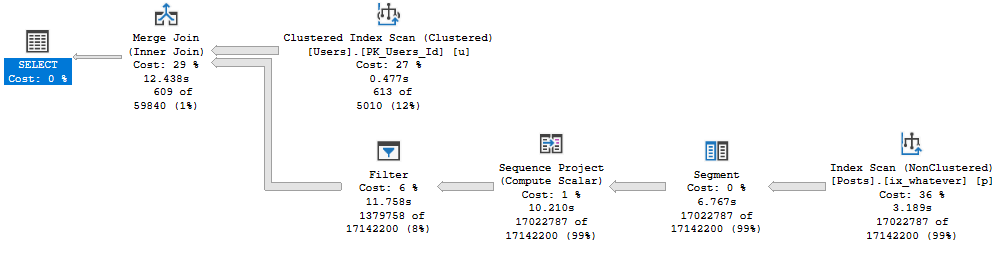
Is our complicated cross apply. The plan is simple, but drags on for almost 13 seconds now.
SELECT u.Id,
       u.DisplayName,
	   u.Reputation,
	   ca.Score
FROM dbo.Users AS u
CROSS APPLY
(
    SELECT *
	FROM
	(
        SELECT p.OwnerUserId,
	           p.Score,
	           ROW_NUMBER() OVER (PARTITION BY p.OwnerUserId
			                      ORDER BY p.Score DESC) AS n
	    FROM dbo.Posts AS p
	) AS p
	WHERE p.OwnerUserId = u.Id
	AND p.n = 1
) AS ca
WHERE u.Reputation >= 100000
ORDER BY u.Id;
Wrong One
Slip On
In this round, row number had a tougher time than other ways to express the logic.
It just goes to show you, not every query is created equal in the eyes of the optimizer.
Now, initially I was going to do a post with the index columns reversed to (Score DESC, OwnerUserId), but it was all bad.
Instead, I’m going to do future me a favor and look at how things change in SQL Server 2019.
Thanks for reading!
Going Further
If this is the kind of SQL Server stuff you love learning about, you’ll love my training. Blog readers get 25% off the Everything Bundle — over 100 hours of performance tuning content. Need hands-on help? I offer consulting engagements from targeted investigations to ongoing retainers. Want a quick sanity check before committing to a full engagement? Schedule a call — no commitment required.
SELECT u.Id,
       u.DisplayName,
	   u.Reputation,
	   ca.Score
FROM dbo.Users AS u
CROSS APPLY
(
    SELECT MAX(Score) AS Score
	FROM dbo.Posts AS p
	WHERE p.OwnerUserId = u.Id

) AS ca
WHERE u.Reputation >= 100000
ORDER BY u.Id;
The query plan is simple enough, and it runs for ~17 seconds.
Big hitter
Query #2
This uses TOP 1.
SELECT u.Id,
       u.DisplayName,
	   u.Reputation,
	   ca.Score
FROM dbo.Users AS u
CROSS APPLY
(
    SELECT TOP (1) p.Score
	FROM dbo.Posts AS p
	WHERE p.OwnerUserId = u.Id
	ORDER BY p.Score DESC

) AS ca
WHERE u.Reputation >= 100000
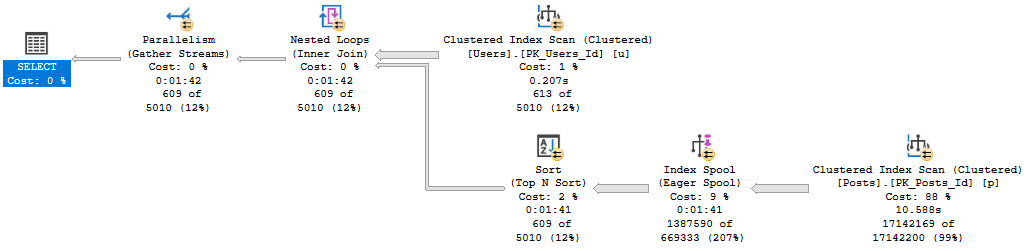
ORDER BY u.Id;
The plan for this is also simple, but runs for 1:42, and has one of those index spool things in it.
Unlucky
Query #3
This query uses row number rather than top 1, but has almost the same plan and time as above.
SELECT u.Id,
       u.DisplayName,
	   u.Reputation,
	   ca.Score
FROM dbo.Users AS u
CROSS APPLY
(
    SELECT p.Score,
	       ROW_NUMBER() OVER (ORDER BY p.Score DESC) AS n
	FROM dbo.Posts AS p
	WHERE p.OwnerUserId = u.Id
) AS ca
WHERE u.Reputation >= 100000
AND ca.n = 1
ORDER BY u.Id;
Why send me silly notes?
Query #4
Also uses row number, but the syntax is a bit more complicated.
The row number happens in a derived table inside the cross apply, with the correlation and filtering done outside.
SELECT u.Id,
       u.DisplayName,
	   u.Reputation,
	   ca.Score
FROM dbo.Users AS u
CROSS APPLY
(
    SELECT *
	FROM
	(
        SELECT p.OwnerUserId,
	           p.Score,
	           ROW_NUMBER() OVER (PARTITION BY p.OwnerUserId
			                      ORDER BY p.Score DESC) AS n
	    FROM dbo.Posts AS p
	) AS p
	WHERE p.OwnerUserId = u.Id
	AND p.n = 1
) AS ca
WHERE u.Reputation >= 100000
ORDER BY u.Id;
This is as close to competitive with Query #1 as we get, at only 36 seconds.
That’s a lot of writing.
Wrap Up
If you don’t have helpful indexes, the MAX pattern looks to be the best.
Granted, there may be differences depending on how selective data in the table you’re aggregating is.
But the bottom line is that in that plan, SQL Server doesn’t have to Sort any data, and is able to take advantage of a couple aggregations (partial and full).
In the next couple posts, we’ll look at different ways to index for queries like this.
Thanks for reading!
Going Further
If this is the kind of SQL Server stuff you love learning about, you’ll love my training. Blog readers get 25% off the Everything Bundle — over 100 hours of performance tuning content. Need hands-on help? I offer consulting engagements from targeted investigations to ongoing retainers. Want a quick sanity check before committing to a full engagement? Schedule a call — no commitment required.
In this video, I demonstrate a couple of issues that can cause SQL Server Management Studio (SSMS) 18.1 to crash, particularly when using Extended Events. I start by showing how creating and attempting to configure an Extended Events session can lead to significant CPU spikes and the application freezing, often forcing me to forcibly close it. The video then moves on to illustrate another scenario where simply switching tabs or closing a window can cause SSMS to become unresponsive, sometimes even restarting entirely. These issues highlight ongoing challenges with SSMS 18.1 and prompt me to hope that the development team will investigate these crashes to improve future versions.
Full Transcript
So this is a hopefully short video to illustrate a couple things that will crash SQL Server Management Studio 18.1. I am using 18.1 because I am, at least I think, a pretty decent human being when it comes to updating software. Often that comes back to bite me, but besides the point. So anyway, the first thing is if I go into extended events and I click on new session, and I will name this session, I don’t know, something, because whatever, it’s gonna crash anyway. And then I go into events. This doesn’t ever actually fill out. And if I sit around waiting long enough, CPU will spike up very, very high, and this will die terribly. So I’m just gonna kill that off. We’re already not responding. Get rid of you. Go, go, go, go, go away. Alright, so, uh, let’s open this back up. And, uh, hopefully, show you the second part. There we go. We are booting. We are coming into existence. We are being birthed into life. Ah, there we go. Okay, still waiting a little bit. Alright, let’s, let’s resize you. Let’s fit you perfectly into the 1920 by 1080 screen space. Don’t look at my password. It’s not a good one.
It’s very secret. Ah, loading master. There we go. Nice advertisement for SQL prompt. You owe me $30, Steve Jones. So anyway, the next thing, let’s just pretend that, uh, I had, uh, the extended events session that I wanted, uh, which is to look at hash spills already written. Um, alright, so I’ll, I’ll actually script this session out so you can see what it looks like. It’s not doing any, any weird hanky-panky. And I’ll give you a, I’ll give, I’ll give SQL prompt another nice, uh, plug here. Steve Jones now owes me $60. Uh, so this is just creating a session to look at hash spills. Uh, and if I start this thing up, and I, let’s say, watch live data.
And then I run the, where’d that, where’d that query go? Oh, that’s the other thing. Uh, when you switch tabs, sometimes it doesn’t show you which query you, you, you, you wanted immediately. So now I’m going to run this. And we should start getting some live data in. Hopefully. If I’ve written this query properly, which I’m pretty sure that I should have. Uh, we’ll see. I don’t know. Maybe. It’s been better. It’s been worse. Sometimes it takes a minute. Not a, not a full minute. Sometimes it takes some time. I don’t know how long, though.
Da-da-da. Da-da-da. Da-da-da. Alright, I’m going to pause this and wait for some data to come in. I’ll be right back. Alright, as soon as I hit pause, we had data start coming in. Wasn’t that lucky for us? But now let’s say, okay, I’m sick of watching this. I don’t want to, I don’t want to watch this thing spill anymore. I’m just going to close, I’m just going to close this window.
Uh, eventually this will make Management Studio, uh, go away too. And we’re not responding. And again, if I, oh, there, it just disappears on me. So I don’t even have to intervene to have that. It just restarted. Anyway, uh, I’m recording this in hopes that someone on the Management Studio team can look into why so much Extended Events stuff crashes. And SSMS 18.1, because I’d really love to uninstall SSMS 17.9 and use 18.1 exclusively, because I really like those operator time things.
Anyway, uh, bye. Bye.
Going Further
If this is the kind of SQL Server stuff you love learning about, you’ll love my training. Blog readers get 25% off the Everything Bundle — over 100 hours of performance tuning content. Need hands-on help? I offer consulting engagements from targeted investigations to ongoing retainers. Want a quick sanity check before committing to a full engagement? Schedule a call — no commitment required.
I get why these things happen. You’re the <new person> somewhere, and someone asks for you to add something to a report, or something
You look at the original query, and it’s like 1000 lines long.
There’s dozens of joins, and a half-mile where clause full of ands and ors.
There’s no way you’re messing with that. You just tack your left join on and walk away.
Fine.
Everything’s Eventual
Don’t get me wrong. Though some combination of skill, luck, hardware, or size of data, this might work for a while.
SQL Server might even help you out with a parallel plan. They’re sort of the Great Equalizer™ for performance.
Optimizer thinks this is gonna be a doozy? Have some more CPU!
Be my guest. They’re free, right?
Eventually, though, this will get slower and slower.
This is usually about the time someone gives me a call.
Chewy and Chompy
See, when a query is big and complicated to you, there’s a pretty good chance you’re gonna get a big and complicated query plan, because it’s big and complicated to the optimizer, too.
This isn’t to say the optimizer is dumb or bad or ugly; it’s just that there’s only so long it’s willing to spend coming up with a plan.
Remember, cheap plan fast. Not perfect, not great, maybe good enough.
Cheap and fast.
Even worse, the bigger a query plan is, the less likely it is to be helpful to analyze.
Costs get so spread out, it’s hard to focus on what might make a difference.
Hatchet Act
When I have to tune a query like this, there’s some stuff I’ll try out first to get a feel for what’s going on, but ultimately your best friend is breaking things up.
The optimizer is just like you and me. The more chances and choices we have, the more likely we are to screw one up.
Really big queries usually have some logical stopping points, that you might wanna try materializing by sticking them in a #temp table.
CTEs
Derived tables
Subqueries
UNION/UNION ALL
Initial Inner Joins
The last point there might be a little unclear. I mean that usually your query starts off with some inner joins, then people start tacking left joins on.
If you grab the most restrictive stuff first, that’s sometimes a good starting place.
But really, all of those things are valid. It’s easier to tune a bunch of small queries than one big query.
The Hounds Of Hinterville
This is also where I’m a big fan of hints — not because I want them to stay, but because I wanna see how the plan changes.
Join and aggregate hints, recompile, trying to force a parallel plan, FAST 1, etc. are all valid experiments to see if there’s something the optimizer isn’t figuring out on its own.
Figuring out why is harder, but hey, the only way to get good at that is to keep tuning.
Hints are great to learn from, and sometimes the only way to get the plan you want.
Thanks for reading!
Going Further
If this is the kind of SQL Server stuff you love learning about, you’ll love my training. Blog readers get 25% off the Everything Bundle — over 100 hours of performance tuning content. Need hands-on help? I offer consulting engagements from targeted investigations to ongoing retainers. Want a quick sanity check before committing to a full engagement? Schedule a call — no commitment required.
Last week’s thrilling, stunning, flawless episode of whatever-you-wanna-call-it.
Video Summary
In this video, I delved into some detailed SQL Server performance tuning scenarios and queries related to memory management and query optimization. I started by discussing the importance of monitoring memory usage in a database environment, particularly for an OLTP system where user queries and reports are frequent. We explored how to identify and mitigate memory pressure using tools like SP_BlitzCache and resource governor, as well as how to manage memory grants with hints like `MAX_GRANT_PERCENT`. For ETL processes in data warehouses, we discussed the potential impact of memory pressure on columnstore index compression and load times.
I also addressed a specific query from Justin about singleton lookups, explaining that these are typically associated with key lookups, especially when using nonclustered indexes to find partial data and then needing to retrieve additional columns from the clustered index. We used `SP_BlitzCache` to track down expensive key lookup warnings and reviewed how `sys.dm_db_index_usage_stats` can provide insights into index usage patterns in query plans. The discussion highlighted the importance of profiling workloads and capturing detailed query plans to diagnose performance issues effectively.
Full Transcript
All right. There we go. Yay, audio. Yay, audio. I don’t know why this thing decided to start picking a different microphone, but now I just have to remember to check that every single week. The rest of my life.
Now this is, this is a kind of thing that’s going to make me move to Twitch. I can’t share screens. I can’t have multiple people. The number of things I can’t do is amazing. So yeah, I’m thinking about getting off of YouTube for this.
As much as I like being able to… Yeah, sorry about that, Forrest. I don’t know why. I don’t know why. I couldn’t tell you. This is, this is why I’m thinking about switching this thing over to Twitch, because YouTube is very limited in what it allows me to do, aside from a stand here, like a monkey looking for props.
Like, this headband that my daughter made me. Unfortunately, the flower has fallen off of the headband. I’m sure I’d look just as creepy in it either way.
So, I’ve got that going for me. It’s a good time. I also, I love the smell of gardenias, gardenia flowers. I like magnolias too.
And silver linden, I believe they are. But I particularly like the smell of gardenia. So, I bought a candle. It said gardenia on it. There it is. Gardenia. And what I didn’t realize when I bought it, is that it’s a creepy candle.
Because when the candle melts, it turns into massage oil when poured. Melts into massage oil. So, now I’ve got this creepy candle in my office.
And that’s that. It smells nice though. It smells wonderful. It smells exactly like gardenia. I don’t know how they do that. Fantastic. Fantastic scent of gardenia. I just have to forget that it’s creepy.
It’s a creepy candle. I don’t know. I don’t really have anything else interesting over here. Right now. Yeah.
This is it. So, let me ask. Are you able to access Zoom conferences from work? Do you use Zoom at work? Do you use Zoom at work? Not Zoom like the MP3 player. Zoom like the thing that SQL Server does.
Z-O-O-M. Because Zoom offers a little bit more flexibility. It’s not quite as. Yeah. So, Zoom is a little bit better for that kind of stuff.
But. You know. It’s not quite as. Just show up on my YouTube channel and hop right on. It’s kind of like. I’d have to. Set up. Invites or. I don’t know. It’s weird. Anyway. I would like to collect as few email addresses as possible.
For. For things in my life. Anyway. Uh. Yeah. So. Maybe I’ll do that. And. And tech.
And tech. Not tech. The technological news. I. I ditched my Fitbit. I have thrown my Fitbit away. The thing is useless. It has never given me an accurate reading. On anything. Ever. Not sleep.
Not heart rate. No. Gone. No. It’s not a cardio thing. It’s a. I don’t know. I. I just don’t. I don’t think. I don’t think. Me and the Fitbit ever.
Ever quite got along. I think we are always at odds. Because. I would do things like. Sleep. And it would do things like. Tell me I’m awake. For hours. I don’t know. Anyway. We do have a technical question this week. Can you believe we have a technical question?
Hello Alex. Hello. Gather Uncle. Hello everyone. Uh. We have a technical question. From. My friend Ted. Who unfortunately can’t be with us today.
He’s not dead. Don’t worry. He just. Had other things to do. And. Ted says that. He has a server. That he thinks is under memory pressure. And when he looks in. Sys. Dm. Os.
Memory. Clerks. To see how memory is being used. He sees what you’d. What will. Something you wouldn’t expect. For an. OLTP or server. Now. This server has a 360 gig. Database on there. Uh.
Ted didn’t mention. Ted didn’t mention. How much memory. The server has. But. Uh. He did say that when he looks in. That dmv. Um. That. Let’s see if I’ll make sure I read this right.
See the SQL optimizer. Entry has. 22.4 gigs. The object store lock manager has 5.6 gigs and SQL buffer pool only has 1.4 gigs. Should I. And he wants to know if he should be concerned.
Be concerned about that. And. The short answer. The short answer. Is yes. Yes. You should. Because. The entry that you’re seeing. The.
The entry that’s in there. For. Uh. Memory clerk. SQL optimizer. Is. The memory clerk that gets. Populated when. Uh. You are giving out memory grants. To queries.
So when you. Have a query that does a. Big sort or a big hasher. You. Small ones. You have to give that thing memory. And when you give that thing memory. It has to come from somewhere. SQL Server and windows do not go into cahoots.
Or collusion in order to make more memory for you or to. Compress things in memory or. Do anything else. Though. What happens is you. You end up mostly taking memory from. The buffer pool. And.
So. One other way that you can validate this is if you look in. Uh. Some of the perfmon counters. If you look at the stolen pages. Perfmon counter. You’ll be able to see. How much. Uh. Aggregated. Uh.
Memory has been stolen away from the buffer pool. So. The. Quick answer is that yes. This server is definitely under. Memory pressure. And yes. You should be concerned. But. You should also try to correlate it with some events. So.
First. I think what I would look for. Is. Resource semaphore weights. Because resource semaphore weights are most likely going to show up when. Queries are waiting on waiting to get memory to run to do those. Sorty hashy things.
We don’t want to judge the severity of the memory pressure. So we’re going to look at stolen pages. We’re going to look at look for resource semaphore weights. And. And then. Uh. Well. After that.
You know. You’re going to have to figure out a way to figure out when those weights are happening. Right. So you could try logging SP who is active to a table. If you don’t have a monitoring tool. You could get a trial. Monitoring tool. I would suggest. Sentry one performance advisor. Uh.
Get a trial of that. Set it up and try to figure out when. These memory weights happen. You can be able to see very clearly in. In the. In the dashboard there. When. Memory is tanking. For. And. Hopefully be able to track it down to some query activity. So like.
You know. Stuff that is definitely. Going to. Um. Cause memory issues. Uh. If you. Have. You know. 360 gig database is your biggest one. Well. If you. If you don’t have. A lot of memory on that server. Say.
That server is a standard edition box of maybe. 64. 96. Or 128 gigs of RAM. You’ve got way more data than RAM. And when you need to do things like run check DB. Or. Read a big table in some other way. And it has to come from memory to. This is going to knock a lot of other stuff out of.
Out of memory. And then on top of that. You’ve got. The potential for. Query memory grants. To be at odds with even things that you’re trying to read into memory. Just. Gnashing teeth.
Together. So. Yes. I would be concerned. But I would also want to. You know. Measure my. My. My concernedness. Make sure that I am. It. Like. It makes you wonder if. This is just something like.
Like. You were running some scripts you found out there on the internet. You just. Went and hit F5. Some stranger said. Hey kid. Run this script. And you ran it. And. You saw that. You saw this happening. But you know. It’s one of those things where it’s like. Well. Are users complaining about it? Is this something that.
That happens. During maintenance. Like. Say you rebuild a bunch of indexes. Or reorg a bunch of indexes. Read a bunch of stuff on into memory. And then that happens. I don’t know. It’s lots of things to think about. Because. Index rebuild and all that require. Memory too.
When they. They sort data into index key order. Every single time you run them. Crappy. Crappy. Anyway. Gazaranco. Says. Is. On a similar subject.
For ETL DW server. Would you care about memory pressure. E.g. Truncating everything. And inserting each day. So not OLTP. I would not. Well. That depends a little bit. So if it’s a data warehouse.
And. You. Are using columnstore indexes. And you are coming under memory pressure. You can end up. With. Poorly. Compressed.
Row groups. Because. The memory pressure will not allow. You to read in. Big row groups. And compress them. Something like that. Joe Obish explained it once to me. And this is as much as I can remember. My. Louvre. Addle brain.
But yeah. So there. There are times when I would worry about it. If you’re using rowstore indexes. Perhaps a bit less. If you’re hitting. If you’re hitting memory pressure. For. Load queries that are. I don’t know. Again. Sorting. Hashing things. It might slow them down a bit.
But. You know. That’s. That’s kind of up to you to figure out. If I’m hitting a lot of memory pressure. When users are running queries. Or when reports are getting generated. Then I might pay a little bit more attention to it. You know. If. So. If ETL load times are cutting into.
When people need to run reports. And sure. I would worry about memory pressure. Then. Because perhaps memory pressure. Is the reason that. Things are slowing down. And if. You know. Because you don’t. You don’t want loads to still be going on. When people are trying to generate reports.
If that’s not happening. And people are just. Hitting. Memory pressure. When they run reports. Well. It’s a little bit of a different story. You know. You do need to exercise. Some. Caution. And. You know. The way that.
You. You let people do things. So. There. There are. A couple of things that I would explore. Maybe. You have. A bunch of processes. That.
Are all asking for too much memory. In which case. You could. Use resource governor. Or if you’re on a newer version of SQL Server. Like 2012. SP3 plus. Or something. You could use the max. Grant. Percent hint. To limit the amount of memory.
That a query asks for. You can reduce memory pressure quite a bit. By reducing the memory grants. That queries are asking for quite a bit. You know. If you have. So. What I would. Do is. Try running.
SP blitz cache on there. See if. Any of your queries. Are getting the unused memory. Grant. Hint warning. You might see that. If you’re on. A new enough. Version. You might see that in there.
If it’s. If it’s in the DMVs. Other things that you could look at. Well. You do. Kind of be on a query by query basis. You would have to. You know. You would have to profile queries. In some way to. Like. Use extended events.
Or. Profilers. Like. I don’t even know. I don’t even know if that’s in profiler. Jeez. You might have to just use extended events. Or. Or. Or. Or trace things. In a specific way. To see. How much. How much.
Like. You could use. Sys.dm resource. Semaphores. And. The memory grants. One. To see if. Queries are. Using. The amount of memory. That they’re being given. Stuff like that. So. That’s one. That’s what I would look at. That finishes in time.
I just feel it could be quicker. Well. I don’t know. What makes you feel that way? Is it. Like a. I guess. Or. Is it. Rooted in fact.
At some point. I don’t know. I don’t know. I don’t know. What you’re up to over there. You crazy kids. Your ETL processes. Let’s see. Justin. Justin. Has a question. I’m going to go for this. Justin.
I’m not going to read ahead. I’m just going to read the question. As I look at it. I’m. I’m avoiding. I’m averting my eyes. So I can’t see it. Justin says. Could you shed some light. On what events increment. Singleton lookup count. I have an index. It has zero scans and seeks. But millions of singleton lookups. Yes.
Usually. Key lookups. So where you. Where I see that most commonly. Is with the primary key. And or clustered index of a table. Where you have. Say some narrow. nonclustered indexes. That help queries.
Find certain bits of data. But they don’t cover all the columns needed. By. The rest of the query. Say that. That. So you have like a single. Column index. God forbid. On. On a table. And. You know.
Your query is like selecting three columns. From that table. Where your. Single column index. Equals something. And so SQL Server says. I’ll use you. Little index. I will. Find this data. That I’m very interested in. And then I will. Go back to my cluster index.
And I will find. I will get the rest of the data needed. For this. Query. So that’s usually when I see it. That’s what I would look for. Again. You could. If you’re. In perhaps tracking the source query. For some of this stuff down.
What I would do is grab. SP bliss cache. From. The first responder kit. And I would. Run that. And I would look for. Expensive key lookup warnings. If you see. Expensive key lookup warnings. You may have found your culprit.
If you. Crack open some query plans. And you see. Key lookups in there. And all that. And you. Of course. May have also find your. Culprit. But yeah. That’s usually what I see. Driving that. That thing to take up. It’s a lot of fun.
Learning about this stuff. Isn’t it? A lot of fun. The other fun thing. About. Sys. Dmdb. Index. Usage.
Stats. Is that. They. Will. Show you. Or. Rather. Sys. Dmdb. Index.
Usage. Usage. Stats. Is that. They. Happened. Or show you. Usage. In query plans. If that. If there’s an operator in the plan that is accessed. That table in some way. Even if that operator doesn’t execute.
Fun. Operational stats is even crazier, but. We’re not going to talk about that. Justin says I have searched the last three months of query plans and no lookups on that guy. Oh, I don’t know. Were there any.
Was it on the inner side of nested loops anywhere? Where do you have. These query plans saved to. These three months of query plans. That’s what I would be. That’s what I would be very interested in.
Where did you. Where did it come from? And see it just updates. Oh yeah. I’m not sure then. You might need to. Profile your workload in some way that allows you. To capture queries that specifically touch that table.
You know, like there’s a lot of reasons why plans don’t get cached. Or why plans might not be. Collected for various reasons. You know, recompilations hit like saying recompile recompilation events. Using temp tables, you know.
Server memory. There’s all sorts of reasons why you might not see something in there. Redgate SQL monitor. You know. You know. You know.
You know. All right. Uncomfortable silence. I might want to. Perhaps try monitoring the server in a different way. That. It captures things a bit differently. Would be.
Would be. Would be my first suggestion. Again. Sentry one performance advisor does a very good job of capturing. Plans like that. And you know. Telling you when they ran and what weight stats went on. And kind of what they did in there. And you can even query the.
The repository directly. To. You know. I believe they might log. Stuff like that in there. Because I know that when. You open plans up in plan explorer. They tell you the. The lookups. And all that stuff. And I know that plan explorer is built into performance advisor.
So. There’s all sorts of stuff that you can find in the repo that. That might. Might show you. A different perspective. On your server. Anyway. No problem. Happy to answer. Happy to. Have something of moderate value to contribute.
Once in a while. Once in a great great while. All right. Let’s see here. Uh. Uh. Uh. Well. Okay. All right. No questions over there. We have questions over here. No.
All right. It’s a 500 gig index. And I was hoping to get rid of it. Is that clustered? Non-clustered? What kind of index is that? Non.
Oh. Oh. You have. Lookups against a non-clustered? Well. Then. You’re not going to find key lookups there that help. I would just look for where. That call. That. That index is just on the inner side of a nested loops join. Perhaps.
That might. That might. Might. Might lead you to some. Might. Might lead that horse to water. Uh. 500 gigs. Yeah. Someone. You could just take that column out of the index. I mean. That’s what I would do. There’s no.
No need to have multiple copies of that. That’s. Well. I mean. I could say there’s no need. So like if. You know. Say you ever. God forbid. Hit. Database corruption. It might. You might be thankful. Someday that someone is like. Oh yeah. We have.
We have another copy of that column in this nonclustered index. We can just. We can just put it back from there. But. You know. Oh. I would. I would much rather just have a good backup. Cause now. You know. Your backup is going to be 500 gigs bigger because of that index. Damn it.
I’m sure it’s not just that columns fault. I’m sure there are some other bad choices in there. But. Who am I to judge? Big old nobody. All right.
Do we have any other questions? Does anyone else. Have something they want to know about? Cause I am ready to go to bed. Ready for sleep. I mean.
Maybe a nap or something. I don’t know. I don’t know. I don’t know. I don’t know. Peter says, I always read the docs to mean that. An index on a VARCAR max is only an index. On the VARCAR 900 portion of the field. Uh.
I’m not sure that. That’s the case for. Included columns though. And that’s the thing. Is included columns don’t have any restrictions on. All right.
Alex says, I’ve got a couple of tables with aggressive indexes. Total lock weight times greater than five minutes row and page with short average weights by SP Blitz index. There was a high number of lock escalation attempts with zero escalations. All are clustered IDXP case.
What is the best course of actions to resolve the issue? Um. Well. That’s a fairly easy one. If you don’t have any nonclustered indexes on the table, then you’ve got your answer. Is that everything that goes in and out of that table, all the traffic, whether it’s a modification, you know, insert, update, delete, or a re query just to select has to go through somewhere. And those indexes are that indexes that somewhere.
So it might be a good idea to check out what indexes you have on there. You know, if they’re, if you just have a clustered index primary key, no missing, no missing index request doesn’t mean anything. That means nothing.
Nothing. Missing index requests are low level garbage. Low level garbage. Um. So what I would do is pay very careful attention to, um, a couple things. One.
Modification queries that hit that table. Probably that have a where clause. So like an update with a where clause or a delete with a where clause. Uh. And make sure that you have indexes that support seeks for your updates and deletes. The other thing that I would do is.
Um. Make sure that. If I am modifying that table, I’m not doing so in gigantic chunks like, you know, 100,000, 500,000, million rows plus at a time. Uh.
Uh. Because that’ll certainly lead to way more lock escalation attempts. So when I see a lot of lock escalation attempts, I can, I can tell that either you’re doing very, very big modifications to the query and SQL Server is attempting to lock the table rather than take row or page level locks. And that usually happens either when modification queries need to have a where clause or something where they need to find data.
And they don’t have an efficient way to find that data or where you’re just saying update. Hey, most of this table will do something crazy. And, and you end up trying to update like a bunch of RC lock escalation happens. To simplify this a bunch.
SQL Server will attempt to. To escalate locks when it hits around 5,000 row or page locks. And it’ll attempt to escalate row or page locks up to a table level lock. It doesn’t go row page table. It just goes row table or page table. So I can tell that either. You don’t have the right indexes, which is why SQL Server can’t find exactly what it needs to lock.
So for example, it might say, well, I was going to take a bunch of these row locks, but I can’t because I can’t find rows. And say I’ll just lock a bunch of these pages and then it ends up just saying, oh, we need way too many pages here. Let’s go for the table.
So that, that definitely happens when either you’re doing big modifications. And let me go grab my, probably the most, I wish I had a tracker on how many, how many times I’ve sent people this link. But let me paste into chat a link from Mr. Michael J. Swart, my favorite Canadian about batching modifications.
Well worth a read. Well worth modeling code after. I think, anyway. I mean, again, who am I to judge?
But yeah, those are the things that I would look for. I’ve noticed, perhaps anecdotally, that modification queries are less prone to register missing index requests. For reasons that I’m not quite sure of.
I’m not sure if it’s because a lot of modification queries end up doing eager spool work at some point, or if there’s something built in, built in that makes them less prone to getting missing index requests. I just feel like something terrible has to be going on for a SQL Server to be like, yeah, we need an index to help this, this modification. Because I don’t think, because missing index requests don’t care about, about locks.
Missing index requests aren’t there to help you resolve locking problems. They might just sort of, you know, by nature of offering a half decent index suggestion end up solving a locking problem. But the goal of a missing index request is not to resolve locking.
It is to resolve where clauses and key lookups. Because every missing index request I see is a haphazard spray of columns from the where clause in the keys. And then join and selected columns in the includes.
So, you know, perhaps not ideal for most people or workloads or figuring out why you’re hitting locks or blocks or deadlocks or any of that good stuff. A lot of crazy gutches with those missing index requests. Almost enough to make you wonder.
Makes a fellow wonder. Gets the noggin joggin at full sprint. What the code looks like in Azure or Azure, Azure, to generate the A-B testing of indexes. I’d be curious about that.
Justin says, funny enough, the name of my troubled index is missing index 208. So it sounds like someone used the database tuning advisor to do that, maybe. Unless 2087048 is a bug ticket number or a really terribly formatted and confusing date in the future.
Is the zeroth month of 2087 the 48th day or something? I don’t know. I don’t know.
I don’t know. I don’t know what will happen. It’s crazy out there. Crazy. Oh my God. We have. Okay, cool. No, we don’t have a question. We don’t have a question there.
Fun stuff. It says, when you’re not fixing SQL servers, what else do you get up to? Boy. Anyway, let’s see. I go to the gym.
And I participate in barbell training because it, it, it appeals to, it appeals to me because it’s not cardio. That’s, that’s, that’s up there. And, uh, I do that four or five days a week, kind of depending on my schedule.
Uh, and then aside from that, I’m mostly a, I don’t know. I would, I don’t want to say home body cause I’m not like just sitting home a lot. My family body though, drag my family places, make them eat things.
I like going to restaurants. Restaurants are nice. People make food for you and you eat it and then you leave and you don’t have to clean anything or anything like that. It’s a wonderful, wonderful idea for an exchange of currency.
Food for money. I like it. Prepared food for money too. Not like one of those garbage delivery services where they’re like, cook your own food. We’ll give you chicken. And you’re like, I don’t need that. I don’t know. That’s about it.
Occasionally go to a movie. I hate, I’ve hated every movie that I’ve seen recently though. Hated every movie that I’ve seen recently. Hated TV recently too. Game of Thrones last season was. Then Avengers was.
Like, like, like it was almost like, like Hollywood was like, all right, we have two big franchises ending. Let’s pit them against each other to see who can come up with the worst ending. And they both lost.
Dismal dismal. The only thing. The only thing. The only thing I’ve liked. He’s only is season 10 of Masterchef. It’s the best thing on television right now. Best thing on television. I don’t know.
Sabrina’s a bum out. Umbrella Academy was pretty good. I just want every show to be the X-Files again. So I ended up watching the X-Files. I’ve been rewatching Archer.
I’m telling you about things you didn’t ask about. I’m sorry. It’s been like, it’s been an hour now. I’m boring all of you. I’m going to go open my office door. So I have air conditioning back. Thanks for hanging out and doing stuff, asking, asking great questions. You’ve been a wonderful crowd.
And I will see you next week at the same time place. Probably. Goodbye.
Going Further
If this is the kind of SQL Server stuff you love learning about, you’ll love my training. Blog readers get 25% off the Everything Bundle — over 100 hours of performance tuning content. Need hands-on help? I offer consulting engagements from targeted investigations to ongoing retainers. Want a quick sanity check before committing to a full engagement? Schedule a call — no commitment required.