In this video, I delve into the intricacies of the `OPTIMIZE FOR SEQUENTIAL KEY` feature in SQL Server, providing a detailed demonstration that showcases its potential benefits. After making some adjustments to my demo script—such as passing parameters instead of literals and increasing the number of threads from 400 to 500—I ran the test with both `OPTIMIZE FOR SEQUENTIAL KEY` off and on. The results were quite telling: when turned on, the operation completed in just 24 seconds compared to around 35 seconds without it. Additionally, I observed significant improvements in metrics like page latch EX and write log, which dropped dramatically. While these metrics are interesting, they may not fully capture the overall impact on performance for more complex scenarios. This video aims to provide insights into when this feature might be beneficial, especially for specific workload patterns, while acknowledging that there’s still much to learn about its full implications in production environments.
Full Transcript
Howdy folks, Erik Darling with Erik Darling Data. Again, to talk a little bit more about that optimize for sequential key thing. Because I made some changes and I think I have a better example of how it works. Now, I’m going to run the demo script while I talk about some of the changes. But the changes that I made to the demo script are the demo script itself are, well, I should point out a couple things. One is that I changed my procedure a little bit before I was passing in some literals. I noticed that sometimes, not every time, but sometimes I was getting weird, very high compilations. Like it was like literally a one for one of every time this thing ran, it compiled. And I wanted to control for that a little bit. So rather than passing in literals, I’m going to pass in some parameters from up here. Those will get set in the script down here. And the other thing that I did was I booted my script. I boosted the threads way, way up. That should actually be 500, not 400. So now I have 500 threads running for 1000 iterations against the table. The table itself hasn’t changed. But let me kick this off. And let me do this and this. And while this runs, the other change that I made was that I put my VM back on my SSD bank. In my desktop at home, I have an NVMe card and I have an SSD bank.
For some reason, when this VM is on the NVMe card, my write log weights are bizarre. I don’t know if it’s something weird with the way that my CPU talks to the NVMe card. I’m sure Glenberry could tell me in about three seconds what’s wrong with my setup. But for some reason, this behaves a little bit better when it’s sitting on the SSDs. I don’t know if that’s a point of interest for anyone. But another thing that I did was I changed my VM setup a little bit. What I have for my desktop is actually six physical cores with 12 up here with hyper threading. But I wanted to have my physical cores in the VM only matched up to a number of physical cores within the server. So I changed that to six. Now, when I run 500 threads for 1000 iterations against the table over here with optimize for sequential key off, that takes around about 35 seconds down there.
If we come over here and look at what Blitz first measured during that time, we have page latch EX. We have about 7200 seconds of it. We have page latch SH for about 3300 seconds. And we have write log for about 2500 seconds. That’s all cool. I don’t know if that’s good, bad or ugly for whatever 500 times 1000 singleton inserts is. I have no idea. But I’m going to show you now what happens when we change this to turn this on to turn optimize for sequential key on so we hopefully get all the benefit of that feature. And I’m going to make sure that table is extra dead and buried. I’m going to get this ready to rerun. And to not fully spoil the surprise, I’m not going to change the time over here. We’re just going to hit execute. And then we’re going to come over here and we’re going to let this run. And we’re going to let 500 threads go on this thing.
Now, I’m not going to lie. I’ve recorded this several times. And several times the demo gods have bit me in the butt with the timing. But I’m confident this time. And I’m confident this time because I’ve told many gods now that I really would just like to go have a glass of rosé on this hot ass day. And there we go. The gods listened. And the gods had that thing finished in 24 seconds. So a full 11 seconds better than with optimize for sequential key off. If we look at our weight stats now, page latch EX is dramatically lower at 100 seconds to what was like think 3350 seconds.
Write log is also reduced. It was at about 2500 seconds before. It’s down to 1900 seconds now. Page latch SH is almost non-existent. So a lot of metrics improved alongside turning that on. I don’t know that those are all metrics that I would rely on to tell me if I needed to turn this on. Or if they were metrics that I would keep my eyes peeled for if I turn this on in production, I might just really want to make sure that I’m getting better throughput on things.
Now, that’s tough to measure. It’s easy for me here because I’m running O-Stress on my desktop and I look at the number of threads and I look at the number of iterations and I can see exactly how long they ran for. In real life, when you have to go figure out if you should turn this on or if turning it on might do something awful to your server, because we still don’t know how it works for various reasons. That Microsoft hasn’t told us yet. They probably have some stuff that they want to think about patiently before they write it down.
I imagine it’s going to be a very thoughtful exercise in blogging on their part. But anyway, where was I? I forget. Rosé, glass of, that’s right. Anyway, thank you for watching. I’m going to keep my eye on this feature because I think it holds a lot of promise for some fairly specific workload patterns, but still a pretty cool thing to see Microsoft working on.
Anyway, thanks for watching and I will see you in another video after several glasses of Rosé. Goodbye.
Video Summary
In this video, I delve into the intricacies of the `OPTIMIZE FOR SEQUENTIAL KEY` feature in SQL Server, providing a detailed demonstration that showcases its potential benefits. After making some adjustments to my demo script—such as passing parameters instead of literals and increasing the number of threads from 400 to 500—I ran the test with both `OPTIMIZE FOR SEQUENTIAL KEY` off and on. The results were quite telling: when turned on, the operation completed in just 24 seconds compared to around 35 seconds without it. Additionally, I observed significant improvements in metrics like page latch EX and write log, which dropped dramatically. While these metrics are interesting, they may not fully capture the overall impact on performance for more complex scenarios. This video aims to provide insights into when this feature might be beneficial, especially for specific workload patterns, while acknowledging that there’s still much to learn about its full implications in production environments.
Full Transcript
Howdy folks, Erik Darling with Erik Darling Data. Again, to talk a little bit more about that optimize for sequential key thing. Because I made some changes and I think I have a better example of how it works. Now, I’m going to run the demo script while I talk about some of the changes. But the changes that I made to the demo script are the demo script itself are, well, I should point out a couple things. One is that I changed my procedure a little bit before I was passing in some literals. I noticed that sometimes, not every time, but sometimes I was getting weird, very high compilations. Like it was like literally a one for one of every time this thing ran, it compiled. And I wanted to control for that a little bit. So rather than passing in literals, I’m going to pass in some parameters from up here. Those will get set in the script down here. And the other thing that I did was I booted my script. I boosted the threads way, way up. That should actually be 500, not 400. So now I have 500 threads running for 1000 iterations against the table. The table itself hasn’t changed. But let me kick this off. And let me do this and this. And while this runs, the other change that I made was that I put my VM back on my SSD bank. In my desktop at home, I have an NVMe card and I have an SSD bank.
For some reason, when this VM is on the NVMe card, my write log weights are bizarre. I don’t know if it’s something weird with the way that my CPU talks to the NVMe card. I’m sure Glenberry could tell me in about three seconds what’s wrong with my setup. But for some reason, this behaves a little bit better when it’s sitting on the SSDs. I don’t know if that’s a point of interest for anyone. But another thing that I did was I changed my VM setup a little bit. What I have for my desktop is actually six physical cores with 12 up here with hyper threading. But I wanted to have my physical cores in the VM only matched up to a number of physical cores within the server. So I changed that to six. Now, when I run 500 threads for 1000 iterations against the table over here with optimize for sequential key off, that takes around about 35 seconds down there.
If we come over here and look at what Blitz first measured during that time, we have page latch EX. We have about 7200 seconds of it. We have page latch SH for about 3300 seconds. And we have write log for about 2500 seconds. That’s all cool. I don’t know if that’s good, bad or ugly for whatever 500 times 1000 singleton inserts is. I have no idea. But I’m going to show you now what happens when we change this to turn this on to turn optimize for sequential key on so we hopefully get all the benefit of that feature. And I’m going to make sure that table is extra dead and buried. I’m going to get this ready to rerun. And to not fully spoil the surprise, I’m not going to change the time over here. We’re just going to hit execute. And then we’re going to come over here and we’re going to let this run. And we’re going to let 500 threads go on this thing.
Now, I’m not going to lie. I’ve recorded this several times. And several times the demo gods have bit me in the butt with the timing. But I’m confident this time. And I’m confident this time because I’ve told many gods now that I really would just like to go have a glass of rosé on this hot ass day. And there we go. The gods listened. And the gods had that thing finished in 24 seconds. So a full 11 seconds better than with optimize for sequential key off. If we look at our weight stats now, page latch EX is dramatically lower at 100 seconds to what was like think 3350 seconds.
Write log is also reduced. It was at about 2500 seconds before. It’s down to 1900 seconds now. Page latch SH is almost non-existent. So a lot of metrics improved alongside turning that on. I don’t know that those are all metrics that I would rely on to tell me if I needed to turn this on. Or if they were metrics that I would keep my eyes peeled for if I turn this on in production, I might just really want to make sure that I’m getting better throughput on things.
Now, that’s tough to measure. It’s easy for me here because I’m running O-Stress on my desktop and I look at the number of threads and I look at the number of iterations and I can see exactly how long they ran for. In real life, when you have to go figure out if you should turn this on or if turning it on might do something awful to your server, because we still don’t know how it works for various reasons. That Microsoft hasn’t told us yet. They probably have some stuff that they want to think about patiently before they write it down.
I imagine it’s going to be a very thoughtful exercise in blogging on their part. But anyway, where was I? I forget. Rosé, glass of, that’s right. Anyway, thank you for watching. I’m going to keep my eye on this feature because I think it holds a lot of promise for some fairly specific workload patterns, but still a pretty cool thing to see Microsoft working on.
Anyway, thanks for watching and I will see you in another video after several glasses of Rosé. Goodbye.
Going Further
If this is the kind of SQL Server stuff you love learning about, you’ll love my training. Blog readers get 25% off the Everything Bundle — over 100 hours of performance tuning content. Need hands-on help? I offer consulting engagements from targeted investigations to ongoing retainers. Want a quick sanity check before committing to a full engagement? Schedule a call — no commitment required.
In this video, I explore a new and exciting feature in SQL Server that addresses the issue of last page contention. Last page contention can significantly impact performance when inserting high-frequency rows into an index’s last page, leading to increased latch waits and writes to the transaction log. To demonstrate its effectiveness, I created a table based on Stack Overflow’s votes table and ran tests with both the `OPTIMIZE FOR SEQUENTIAL KEY` option turned off and on. The results were quite telling: when the option was enabled, there was a notable reduction in page latch waits, particularly for `PAGE_LATCH_EX`, which dropped from around 256 seconds to just 56 seconds within a 20-second sample window. However, I encountered some limitations due to running this on a VM with only eight cores and an NVMe drive, which might not fully leverage the feature’s potential. Despite these challenges, the feature shows promise for those facing last page contention issues and could significantly improve performance in suitable scenarios.
Full Transcript
Hello, out there, and out in the world. This is off to a good start. I’m not exhausted at all. So, I’m supposedly Erik Darling with Erik Darling Data, because no one else will have me. And I’m going to talk about something new, brand new. I’m sorry if this is going to make this video seem dated at some point, but brand new thing that dropped in CTRL. and then Trendish Kitberger after the pet peevels are data. Now if you want ver bösealles, 432 K кол nieuk Stelleיר. Vector Paradjes is a bad port security. And that got the question, again, I’m like the test provider of 433 Washington. Vector Gesch trenders And this is the idea that that controls the picture 333 Davies volvs on кр��ongeb� web video game.
And so, I’m sorry for a packet, but I’m going to take this video весь the image and list. We’ll start right now. And instead we need to look here for a substance. And the show you just took a tweet.
and beyond or a date that was in sequence that started you know at a first of the whatever and ended at the something else of the whatever that SQL Server makes them pretty bad guesses pretty bad off histogram guesses if your stats didn’t update and it’s not that it’s not has nothing to do with that this is to address something known as the last page contention issue what that means is that you if you have an ascending key so it is sort of related if you have an ascending or it could be descending to the ascending or descending key and you are you constantly find yourselves adding high frequency rows to the very end of the index that last page in the index is always going to be under contention because everything is going to want to write to it now this is a brand new feature and I have no idea how it works internally but I’m able to observe a little bit of the effects by looking at weight stats during execution so I have a table here that I designed to absorb some rights that’s based on the votes table and the stack overflow database and I’ve just renamed it votes insert and this is the option to turn optimized for a sequential key either on or off right I’m going to turn it off to show you at first and this is the procedure that I’m going to run using RML utilities O stress and RML utilities I’m going to use this to run this is the procedure I’m going to be running in a big loop I’m going to be running 150 threads on it that should be 150 because when I do 200 threads for some reason I run into some weird stuff so I’m going to make that 150 and I’m going to do it 2,000 times so we’re going to end up with 150 times 2,000 rows in the table by the time we’re done now this is a store procedure it’s boring or I’m just inserting some literal values I don’t want to do one I don’t I’m trying to start as simple as possible so as I do not confuse things down the line so this is going to be my procedure and this is going to be the table that we start with with optimize for sequential key off now I’m going to get some stuff ready I’m going to get oh that’s clear screen I’m terribly unprofessional of me so this is the RML command that I’m going to be running and over here I’m going to be using spblitz first the open source store procedure over at first responder kit org to measure what we do for a 20 second window all right all right so what I’m going to do is hit f5 to kick this off and then I’m going to switch right over to this window and I’m going to kick off the command to start running thing so hopefully this all goes very I’ve been practicing so hopefully this goes very smoothly boom boom boom all right so this is often running and blitz first is measuring what we’ve got going on and this is going to run for if I remember correctly about 15 or so seconds that’s why I have 20 seconds on the blitz first sample just so that when when this runs I have a little bit of padding time in case I screw something up terribly or I don’t know something goes devastatingly wrong now in that 20 second window let me blow up management studio so we can get a little bit more information here when I look at what happened in there we have 1500 seconds of right log weights we have 240 seconds of page latch ex weights 35 seconds of latch sh and 20.6 seconds of latch ex this all took about 17 seconds to run cool good we can see that stack overflows log file got a whole bunch of writes to it and that in that time 162 megs were written there sweet all right now let’s go back and look at what happens when we turn on the optimize for sequential key option turn that on all right so we’re going to drop our table and start from start from scratch again and we’re going to run the same exact stored procedure because I am far too lazy to do anything to have like two copies and try and switch and all that stuff so we’re going to do the same exact thing now this option is turned on now so we recreated with this able this turned on so we’re going to see if there’s any difference in I don’t know time or weight stats or any of that good stuff so we’re going to hit f5 wait we’re gonna get our command ready we’re gonna execute and then run this so now this is often running with optimize for sequential key turned on this is this is what is going to save everyone with last page content I wish there was a better way to judge if you were hitting last page contention like I wish it and it makes me wonder a little bit why there isn’t a why this isn’t the default like I wonder what this changes behind the scenes like I wonder what the trade-off is that this isn’t turned on immediately because this seems like kind of a no-ringer thing to have like because who’s gonna go like if you’re having last page contention problems either you’re very smart and you’re able to judge that or you aren’t or you’re not that you’re not smart you just don’t know what’s what’s happening you don’t know that you’re having this problem so it’d be nice if there was something like internally that would look at and indexes that how they get inserted to and say hey you look like you’re having some contention on the last page let me turn this knob for you I don’t know just something like that you know just something so that you can say it just runs faster that’s what I always like so this finished and this took about 19 seconds and what we can notice here is that there was a dramatic downtick in page latch EX that was around 256 seconds of it for the last 20 second sample now we’re down to about 56 seconds so this did improve another couple things that changed quite a bit our page lat or sorry latch SH and latch EX these are both way down these were at like 30 and 26 seconds before now they’re down to nothing what went up and the wall that I’m hitting with this is right log now there’s a few reasons for this one looks like let’s start off this is a VM that I’m running this in so clearly there’s gonna be some funkiness because VMs always bring some funk into the equation it’s hyper V so there’s not like I mean it’s not terribly complicated whatever I’m doing in here it’s a VM with eight cores and it’s sitting right now on my nice NVMe drive I have a one terabyte NVMe drive that gets crazy fast speeds on just about everything and this is the that’s the drive that this VM is sitting on so I don’t have a slow drive but it is a VM sitting on that drive the other thing is that this VM only has eight cores in it so it only has two log writers whether that’s the type of hardware that this this feature is aimed at is also up in the air I don’t have much much bigger hardware that I could test it on the server that this sits on has 12 cores I don’t think that really gets me much else as far as log writer goes even if I gave so it’s six physical cores 12 with hyper thing I don’t think I even do much better if I had all 12 cores going I’m already kind of weirdly oversubscribed giving it eight oh I know the hyper threading gods are cruel cruel people anyway uh so well this didn’t go great for me I am hitting that weird wall with right log and if I had a bigger server to test it on they got more log writers based on the Numa node core whatever crazy equation they came up with this might turn out better there is a huge reduction in page latch though so that that it does work it it’s probably just not working under my specific circumstances as well as it should um if you’re in a situation where you know you have more cores more log writers uh maybe you’re on physical hardware there’s a lot of things that could be different about this that would get us better right log throughput right now that’s the main thing that I’m hitting anyway I am very hopeful that for the people who have this issue this will be a good a good feature for and that it will help solve that problem I am very much looking forward to learning more about how it works internally I know that the I know that Pam LaHood has promised a blog post about it as soon as some red tape gets cut but I don’t know Pam if you just want to send me what you were going to write I’ll put it on mind we’ll just pretend it never happened all right let’s pretend pretend pretend that it was it was just me looking at things I broke out windbag I was really smart I don’t know whatever I’ll give you 20 bucks all right 50 bucks all right that’s all I got that’s all I got anyway thank you for watching I hope you learned something I hope you enjoyed yourselves and I hope you’re excited for this feature too see you
Going Further
If this is the kind of SQL Server stuff you love learning about, you’ll love my training. Blog readers get 25% off the Everything Bundle — over 100 hours of performance tuning content. Need hands-on help? I offer consulting engagements from targeted investigations to ongoing retainers. Want a quick sanity check before committing to a full engagement? Schedule a call — no commitment required.
In this video, I delve into a peculiar performance issue that arose from a stored procedure and a missing index request. The scenario began when a user passed an unusual negative value to the stored procedure, causing significant performance degradation. To mitigate the problem, developers implemented a catch to convert any negative values to zero, ensuring the execution plan remained stable. However, this fix led to further complications as another query against the same table exhibited poor performance due to a missing index request. The video explores how adding an index suggested by SQL Server’s missing index feature improved one query but significantly slowed down another, highlighting the importance of carefully testing database changes in development environments before deployment.
Full Transcript
Hello, Erik Darling here with Erik Darling Data. And I wanted to talk about sort of a funny situation that I was recently asked to remedy. And that funny situation, well, the funny situation started with a stored procedure, sort of was escalated by a missing index request. And all came tumbling down on top of that stored procedure. So the stored procedure, it didn’t look like this because it was not, it was not, it was not an issue with Stack Overflow. I’m going to level with you. To be very honest, Stack Overflow has never asked me to fix a performance problem. I just keep having to find these random performance problems in the, when I do demos in the database. It’s the damnedest thing, isn’t it? Anyway. In real life, it was a slightly different scenario, but it was a stored procedure. And at some point, at some point, some user, we should call them a loser probably, had passed in a bad piece of data to the stored procedure. In fact, it was someone had passed a negative value into the stored procedure once. And that caused everything to fly off the rails.
Everything went really, really, really badly with this stored procedure. So the developers in charge of it put this catch in to fix things. Where if someone passed in a negative value for their stored procedure, they would, they would revert the value to zero to a positive number so that they did not get their big, golly gosh, awful plan. So this is what the stored procedure looks like. And, you know, there’s a pretty simple select top one query after that. Not a big deal. And in fact, if we go and we look, we can see that ever since we converted this database from access to SQL Server 2000, we have had this index in place, the single key column index in place. And with that index in place, this stored procedure runs relatively quickly. And by relatively quickly, I mean, instantly. If we look at the execution plan, this thing finishes in 87 milliseconds.
There’s a missing index request. But if I have a query that’s ending, that’s finishing in 87 milliseconds, I’m not like jumping up and down and saying, hey, we really, really need to add this missing index request for reasons. Right. Like I can run this a million times every time I run this. It’s quick. And I’m not running this for like a small value. I’m running this for John Skeet and John Skeet’s got all the values. John Skeet has a lot of the most posts in the posts table. So you can, this is not like just like some wimpy value that we’re searching for. Every time we run this, it is reliably under the 90 millisecond mark.
Right. So that’s a very fast stored procedure. At least I think it’s fast. You might, you might not. You, you might be a much better query tuner than I am and have a much faster, have a much different view of what’s a fast stored procedure. Now where things got kind of weird is, and this is even with this like funny catch in place, everyone would, normally you’d see this and chop someone’s head off for declaring a variable inside a stored procedure and then feeding it into a where clause. But, but, but everything’s okay here. Where things got bad was, there was this other query. And this other query was also against the post table, but it had a different where clause.
Now what I’m going to do is I’m going to run this store, I’m going to, not store procedure, this piece of code. And this piece of code is sort of going to look at, look, is going to look a lot like what the other query was doing. And this one takes about two seconds to finish, to get a top one. And it happened because we didn’t have another useful index for this, for this query to use. So we scanned the whole clustered index and the whole thing. Well, I mean, I guess that’s closer to about two and a half seconds there. 2.381 by 120 milliseconds.
We’re under. Now there’s a missing index request for this. I’m going to show you the missing index. Missing index details. Now if we zoom in here, zoom in and look at, look at what SQL Server thinks a helpful index is. It’s, I mean, it’s, it’s on the post table, obviously, because that’s where we’re selecting data from. And it’s on parent ID and then creation date and then last activity date. And we’re including post type ID.
Now, what you might notice at this point is that there’s some overlap between this missing index request and the query we have that’s fast. So A, they’re both on the post table. And B, the where clause for our query inside the store procedure also has parent ID and post type ID in the where clause on top of owner user ID. Right now, we have a single column index on owner user ID. When we seek to that and do a key lookup for everything else, we’re cool. We’re in great shape.
But we have this missing index request. And this missing index request was, was super, was everywhere. It was endemic. It was, I mean, it’s a big missing index request. I’m probably using all sorts of wrong words here. Let me turn off execution plans. And let’s run SP Blitz index and look at the post table. So over on the post table, the second thing we’re going to have down here is missing index requests.
Now, this one up top is the one that’s on the table for that query that we ran. And over in this window, I have run, I have run that query, as they say in the south, a whole mess of times. So this is printed out this phrase every time this, this has been running for doing a lot of stuff. But we have this missing index request. And this missing index request was showing, well, I mean, quite a bit of use, 14, almost 1,500 uses.
It would bring the query cost to zero. Impact is 100%. And the average query cost is absolutely astronomical. It is 3,474.1810 query box on that thing. So when we look at the estimated benefit of adding, I can hear my kids screaming in the background maybe.
If we look at the estimated benefit of adding this, it’s 515 million query box that we would have created or saved by adding this index to our workload. All right. You’ve talked me into its SQL Server. You have shown me that if I add this index, it would have been used 1,500 times by this very expensive query. Now, if I run that very expensive query, oh, wait, I did that. Two and a half seconds. Cool. We got that.
We have a benchmark there, right? This is two and a half seconds to do this. All right. Two and a half. Cool. Now, this is the index that someone came along and added. Someone charged a lot of money to add this index on parent ID, creation date and last activity date, and include post type ID.
Because that’s what SQL Server asked for. SP Blitz Index didn’t make this up. It didn’t conjure this out of nowhere. It showed us what SQL Server’s own DMVs have told us.
What they don’t tell us, though, is what if this index goes and screws up some other query? So let’s create this index. And this will take a moment. This will take a moment here. Create this index. This great index on parent ID and creation date and last activity date, including post type ID. Get that whole post table in there.
That took 12 seconds. But let’s look. Because now I want to make sure that this helped this query. And by God, it does. This thing finishes instantly. Now, if we turn query plans back on and look at this query, holy smokes, that is zeros.
Look it. Zeros. All zeros. We didn’t spend anything doing this. What an amazing index. What a fantastic index. That’s the best index that’s ever been created. Except now, this query slows down. This query is not as fast as it used to be.
This query has taken some extra time. This query now takes 14 seconds to run. Remember, this one was running reliably in under 90 milliseconds. And now, it just took 14 seconds to run. If we go look at the execution plan, we can see that was the entire time this thing ran.
We spent a second here. And we spent 9 seconds here. So that’s 10 seconds. Then we spent 4 seconds doing a nutty loops join. And then we spent, well, we spent to spend any time doing this sort. But, whew.
I mean, that’s bad enough. Imagine if you were tuning queries and indexes and you added that index. It was like, yeah, this is going to make everything much better. And then it made a vital query go much slower. Well, this happened for a pretty funny reason.
And a pretty funny reason is that when we declare a local variable for, what do you call it up there? Where is it going? For a parent ID.
We get a very, very bad guess in here for what’s equal, how many rows this equals several thinks are going to happen. Things are going to evaluate to true for any given predicate on parent ID. In fact, if we go look at the query plan, we go look at this seek, we can see that the estimated number of rows is 1.87.
But the actual number of rows is 6, 0, 0, 0, 2, 2, 3. 6, 0, 0, 0, 2, 2, 3. Yeah, that’s a seven finger number.
That’s a big number. We were off by a lot there. We made a pretty big mistake. If we look at the key lookup, this thing will have executed once for every row that came out of there. And that’s no good either. So we had kind of a funny, perfect storm of things go wrong here.
And if there’s a lesson, it’s that, you know, while SQL Server’s missing index requests are a lot better than nothing, they’re a good sign that we need to do some work. They are like a crying baby.
On your tables and DMBs. Whereas SQL Server says, hey, we could be doing something better over here. We have to be very careful how those indexes change other queries in the workload. And this is why, you know, we must, as responsible data peoples, tell people to test things carefully in a development environment before just releasing these changes into prod. Because you can introduce all sorts of funny regressions here where you might make one query much better.
But you can make another query much worse. Now, granted, this is not the best thing to do here. This is not a good practice. I’m not condoning doing this. But this is what made sort of the perfect storm of weird stuff happen. We’re adding that other index made this query much, much worse.
Anyway, that’s it for me. Thanks for watching. I hope you learned something. I hope you were shocked and horrified by what I showed you. And I will see you in some other video. Goodbye.
Going Further
If this is the kind of SQL Server stuff you love learning about, you’ll love my training. Blog readers get 25% off the Everything Bundle — over 100 hours of performance tuning content. Need hands-on help? I offer consulting engagements from targeted investigations to ongoing retainers. Want a quick sanity check before committing to a full engagement? Schedule a call — no commitment required.
Last week’s thrilling, stunning, flawless episode of whatever-you-wanna-call-it.
Thanks for watching!
Video Summary
In this video, I share my day-to-day struggles and the challenges of balancing work and personal life. After discussing how sleep has been elusive lately, I transition into talking about my current projects, focusing on SQL Server training materials for both beginners and advanced users. The content ranges from foundational concepts like indexes and query plans to more complex topics such as hardware optimization and query tuning techniques. I also delve into the importance of read committed snapshot isolation (RC SI) and how it can significantly improve database performance by reducing blocking issues.
Full Transcript
I’m exhausted today. Beyond compare exhausted today. Sleep has not been my friend lately. Sleep has been. Sleep has been for someone else lately. Sleep has not been for me. Wish there was a good reason for it. Just like, sleep, cared, deprived, annoyed. So everyone go home. We’re out of here. It’s okay. I’ll stick around. I’ll try to be a reasonably perky host in this podcast. It would be really nice if you two showed me who was here.
The chat would know. I can’t see who was here. I can’t see anyone’s name. So you all have to say hello in order for me to say hello to you personally. Yes, Rowdy. Yes, Rowdy. I will be perky. Just for you. You be Rowdy, I’ll be perky. That’s about the best deal we can come to. Maybe. Maybe. Maybe. No. That’d be a weird thing. Weird. I have so much stuff to write. So much stuff to write.
It’s an awful, tremendous mountain of things to write. I’m just hoping that I can get through it all. Hoping. All of it’s about SQL servers here. None of it’s about anything weird or foreign or strange. I’m not going to like start writing on Python. Your home’s sick? My goodness. How do you get sick? Are you still in Texas? Last day I heard you live in Texas. Who knows where you are now? Man about town. Man about the country. You could be in an RV.
You could be in an RV. Was you up in it. You weren’t right my arts. And right. I’m sorry. I’m sorry. I hate work, man. But you can go out here and sit there and sit there and speak down at home when you are sleeping. something you like baseball you could be a football person my docket for today consists of trying to get through writing things for clients about what’s wrong with their servers and then trying to put put more of a dent in the the training stuff that i’m trying to produce for my site i have i have a lot of stuff written i have a lot of decks made a little demos written and uh right now up to the point where uh i’m going to do the query tuning bit so i’ve done like my sort of my intro stuff let’s go read read what i’ve done uh yeah so i’ve got my intro stuff i’ve got four decks in there about uh sort of starting like throw like a beginner’s deck um i said i think it’s probably my take on how to think like the engine probably the little engine they couldn’t uh after that uh you know some intro stuff on indexes and weight stats and query plans and then there’s like a like a real i mean i’m not gonna pretend that i can i can like deep deep deep dive but there’s like stuff you should know about the optimizer without going into holy crap what’s going on like so it’s it’s it’s high level it’s it’s not not very specific uh after that we talk about hardware so we talk about all like you know we go in depth on like you know cpu memory disk uh weight stats you’ll see related to those like when things get bad bad on the server like when things start to fall apart some of that’s based on um my my server tuning pre-con material uh then we get into some weird weight stats so my weird weight stats list consists of all the stuff that people tell you you should ignore that you should not you might you might have a favorite weight stat script that lists out a bunch of you can safely ignore these don’t worry about those pal but in reality they’re terrible terrible don’t listen to people on the internet about sql server they’re all wrong after that we get get further into indexes talk about like you know your normal run of the mill rowstore indexes you’re clustered you’re not clustered uh we get into some special indexes and uh eventually i will when i feel like it this may be about when i feel like it there will be stuff on uh partitioning i’m not crazy about partitioning i’m going to explain partitioning but i’m going to compare it to one of my all-time favorite things in sql server we’ll get into that that’s going to be a top secret it’s a big secret uh and then after that’s all the query tuning stuff is going to be like the the easy medium and hard sort of leveled off stuff there so you know we’ll have to start with the easy stuff like the implicit conversions and the you know uh like you don’t have an index and sarg ability and we’ll go on to the harder harder stuff and we tackling spools and giving them noogies and all sorts of stuff that guy’s a fan yeah that sounds great i’m gonna buy that i’m gonna buy that too we’ll show anything from you and then uh eventually eventually i think after the query tuning stuff it’ll be blocking and blocking but it’s never been my favorite thing in the world never been like wow i love i love walking and walking so i’m trying to figure out how to approach that in a way that it’ll be fun because my my favorite way to approach that is is to turn on read committed snapshot isolation or snapshot isolation and i just walk away from everything but you know there’s there’s stuff that people should know about what makes walking better and what how blocky is made see alexa you should live stream yourself trying to automate stuff using power i have nothing to automate i’ve literally i wish i had something to automate i don’t have anything to automate give me something to automate my life i would love to do it i think most of the things that that i need to automate are are done for me through biological processes i go to bed i wake up things leave my body things in my body treat treat every single day all right he says i need some serious help with getting back into query tuning well uh if if you feel like you or any or other others on your staff might benefit from the trainings of a decent looking consultant i would be more than happy to uh to to yell at people about things in a nice way i’ll be more than happy to point yes this is something you should do it stuff like that that’s helpful right that’s what people want to hear about query tuning yes you should do it yes you should tune that query yes that is slow tune it make it so aaron says rcsi should be the default i agree i agree wholeheartedly rcsi should absolutely be the default it lines up much better with what people would expect from a data boss i think and uh beyond that i think that um it’s it’s unfair to throw pessimistic locking at people and expect them to not immediately go to using your lockings and get it wrong i mean morally ethically i mean if if i look hard enough i can probably even find where it’s legally wrong to do that if you need a certain type of blocking you should be investigating the necessary hints or like sp get at lock in order to in order to get the kind of locking you need the rest of us should humbly be able to live our lives without having to deal with blocking and blocking just between readers right because it’s nonsense absolute nonsense it’s been a mistake for years i can’t i can’t say it drives me nuts the number of people i’ve seen just break down because they they can’t figure out why everything is slow sometimes or usually something like that it’s it’s just locking you go look at you go look at lock weights and it’s something like like like like lock weights are you know 30 40 50 percent of server uptime and the average milliseconds per weight is like five ten fifteen twenty seconds or beyond and you’re like yeah this is the problem you found it how are we gonna fix it it’s just like our csi is just that button it’s always right there always right there every every other smart database stuff every other smart database it’s not even it’s not even like you know uh not even like like microsoft would be the outlier unlike microsoft would get made fun of for being pessimistic by default microsoft would be like welcome to the club thanks for joining so you you finally figured it out how nice it is azure sqdb is pessimistic or optimistic by default let’s see why the box product has to be done and ugly let’s see here airlock says i automated system inventory server stats but the server configurations disk space information patching completeness account permissions on the server oh wow yeah you you must have do you have a lot of servers how many servers do you do that for that’s what i’d be curious about it’s a very enterprisey thing that’s a very like i have 20 servers and i don’t feel like i feel like figuring this out i’d also be curious if you have monitoring on those servers like if you have a monitoring tool looking at those things 120 get scanned holy cow not just for sql server either oh yeah if i had 120 servers i i’d probably i’d probably buy buy a bigger stake in power cell too me with my me with my one server i don’t know that i yeah solar lens so there are like things that i wouldn’t i wouldn’t wish on people like burpees or herpes or turkey bacon that list may or may not go on and extend to certain monitors uh you know go with go with god baron said the same thing wasn’t a good estate tool out there but i do pay for monitor service century is much better than what i’d write yet century one century one is i think um if i had to pick a monitoring tool to to work with professionally century wouldn’t probably be different that would probably be that would probably be what i could with i like i like stuff about it you know it’s not perfect no monitoring tool is but i think from what i do century one gives me the best round of information gives me the best i can point and click on some stuff and get stuff done you know it’s tougher with other it’s it’s either it’s either really hard with other monitoring tools or i just i just haven’t had the the luck of clicking in the right place on the other monitoring tools sometimes i use other monitoring tools and i right click on something and i’m like oh i would love to i would love to right click here and get more information and then i right click and it’s like save as png i’m like i don’t want to save this i want to do something else with it you know dig in what is the point of you it’s ridiculous all right he says been digging into custom queries against essentially db’s lots of data in there yeah uh i wrote a custom query in a blog post um and it’s actually kind of a cool one i was i was i was rather i was rather proud of myself for writing it uh what it is it’s a query that looks uh in the century one repository for queries that have waited a long time on getting a memory grant so and then it like compares like how long the query waited to get a grant and how long it ran after it got the grant and it’s usually crazy like i found like i found some crazy stuff when i was digging through some client repos where it was like it was like 20 30 seconds to get a memory grant and this was a goddess stories of don’t man y’all need some memory i can’t sell you that but y’all need some now that i think really i should go into ram ram sales i think i would make a killing on ram sales the century db isn’t the most intuitive but it is elegant uh i don’t know that i call it elegant but uh uh yeah i think my biggest issue with it is uh like decoding some of the hashes in there like using decompress or whatever someone’s someone’s up there stealing a car or something or maybe there’s there we go but uh yeah it’s uh so like i always run into weird issues where like when i try to use decompress on like the encoded columns where like it was somebody like the value is corrupt and i’m like well no it’s not but i’m not gonna i’m not gonna keep trying here either it goes or it doesn’t i don’t know let’s see here what else do we have going on anything come in i don’t know why i always i always look to see if someone has asked me a question somewhere else like like twitter or email or whatever but no one ever does it’s time to get lonely out there but me a very lonely very very lonely i don’t know i think uh at least i hope that um is i skipped your question where’s your question oh look at that i did uh joe says would it be odd or wrong to have a table with some indexes that are page compressed some row compressed and some with no compression at all no i don’t think so uh i mean it might not be like at first glance i would i would probably be weirded out about it at first glance i’d probably like you know what happened there but there are valid reasons you know without without without digging into like the the scant fiddle that i remember about the compression documentation now there are certain there are certain values that uh like i believe it’s string value or string values date values maybe that work better with page compression and then like integer values work better with row compression and uh some indexes don’t compress well at all in fact some with some indexes if they’re if they have a lot of write activity if they have a lot of modification activity compression can actually cause uh some issue or not issues but i think compression can slow down uh modifications in some places at least you know this is going off stuff that i remember from you know a long time ago when i was messing with it don’t it’s not probably not chapter and verse correct but it’s uh it’s decent enough it’s it’s a good enough memory to uh to uh to have that in my head so groudy says the weight stats are awesome i got into time-based index usage and operations yeah well there you go yeah a lot a lot of monitoring tools collect lots of cool stuff you know um it will be be nice if you know they got some of the stuff got exposed more in the gui so that you didn’t have to go writing crazy database queries to to get it i mean i mean on the other hand it’s cool that they let you go in there let’s see uh alexis what webcam do you use i use a logitech brio uh it’s a little dusty on top right now it’s the logitech brio i like it a lot uh i don’t recommend using the microphone for it but using it uh using it for a webcam is pretty darren says do you have any methodology you follow when auditing indexing by auditing do you mean like index changes or do you mean like the current state of indexes and if indexes should be kept or dropped or modified in some way there’s a slight difference it’s like not like a well you know it’s a big difference current state yeah so i mean i love blitz index for that uh run it in mode zero if you just want kind of uh like the the important stuff on your bigger tables run it in mode four if you want absolutely everything you know i’ll go you know i’ll go through and it’s it it prioritizes stuff for you in a pretty good way it’s not perfect but it’s it’s pretty good um i think i think what i like best about it is that uh it gives you a really good view assuming that you know uh your server has been up for a little bit and assuming that you know um uh in that you’re not on a version where index rebuilds or perhaps some recent modifications have cleared out valuable usage statistics above your indexes um it gives you a really good view too if indexes are used or not right so but uh if how how much if if all indexes overlap so you know it’s important to you know make sure that if you’re going to go in and start adding indexes to help queries go faster that you’ve cleaned up some of the cruft some of the not so hot indexes in there that already exist so you know the first thing i always look at because it’s the easiest to sort of pick out and say screw this are like the unused indexes so if like you know indexes have millions of rights against them and no reads or a very low amount of reads let’s index will call that out and you can pretty safely get rid of those you know i keep everything as a like i keep a create drop script for everything so that i know um so like if i drop an index and something goes terribly wrong the table i can add that it makes back pretty easily and then uh after after that is when i look at the uh the duplicate and borderline duplicate indexes just because i i quite often find that once i get rid of uh some of the unused stuff the uh a bit a few of the more than a few of the the border the duplicates will disappear with them so i usually do the dupes and borderline dupes last because those are a little bit more work right you have to like look at the full index definition the key columns the order the included columns and then figure out if you could like work them together in some way that makes sense and that’s more brain work that’s not as easy as just saying that’s been used zero times it’s been written to 50 million times it’s got to go it’s just taking up space it’s not helping anything uh and then so like the next thing next next next trip around will be the dupes and borderline dupes and then uh you know after that after that i’ll um so like i have very mixed feelings about the missing index requests uh you know they are certainly a good sign that we could do we could have something better like we could have a we could have a helpful index on this table the number of caveats to the indexes that that get suggested are pretty big but what i’ll usually do is like you know pick some of the really high value ones in there like what’s index will give you an estimated benefit number if it’s over like five ten million then i’m like okay we’re gonna we’re gonna we’re gonna go with this and we’re gonna see what happens right because like at that point you know it’s again it’s not going to be the best most perfect wonderful index in the world but it’s going to be a good enough bridge to get us to when we can figure out what would be so like if sql server is just absolutely screaming for some index i’ll go ahead and create it just to shut it up and then you know when i like when i have a more intimate knowledge of the workload the query is running then i’ll be able to figure out what that what the better index is for that situation because i mean it’s not like the missing indexing is always wrong but it’s wrong at a good enough pace that you know i don’t buy it for everything you know like that recommends columns and like their ordinal position in the table not by like the absolute order that they should be in in the where clause uh that they’re in the where clause or like even by which one’s more selective or anything there’s a lot of like the optimizer doesn’t really take sorts into account it always seems to stick joint columns and has included columns there’s just like a lot of stuff about the missing index requests that you know they they irk you when you’ve reached a certain point of query and index tuning but up until then they the suggestions are probably better than anything you’re going to come up with just staring at the workload right they’re they’re they’re there for a reason and they’re they’re usually a good enough bridge until you can really get in and fine two things it even says in the documentation it’s not meant for fine-drain index tuning so uh you know read that carefully if you need like you know if you need like very specific advice and don’t tell anyone i said this use dta instead just don’t create every damn index it suggests dta will do a better job than the missing index requests but dta will ask for crazy banana bonkers town indexes too dta will ask for 11 indexes that are almost the same definition just flipped around a little bit with like slightly different includes or slightly different order of key columns and it’s he agrees uh but you know so it does require adult supervision it’s the suggestions are better but it still requires an adult to sit there and go through the suggestions and say yes or no to them to me dta is usually a four-letter word because i spend a lot of time cleaning up dta messes where someone was just like oh look at these hundred indexes we need those it’s just like it’s same or whatever and and and a hundred indexes get created but you know it’s it needs adult supervision like anything else it’s the the suggestions are better than the missing index request dmds but it requires just as much adult supervision as the missing index requests and says the unused is going to be helpful seems like there’s a lot of indexes that don’t have the correct leading edge column uh well you know uh again that’s that’s an intimate workload knowledge thing that is not something that i can just say yes or nothing to here uh usually think of missing indexes as a need to index here but this might not be yeah you know it’s like it like like i said about like i’ve been saying about missing indexes for a very long time is uh they’re a lot like a crying baby right like there’s a lot of reasons that a baby could be crying and it’s it’s up to you is the the hopefully sober and caring adult to figure out exactly why that baby is crying and exactly what that baby needs to stop crying you know it might be a burp it might be a dirty diaper it might be hungry it just might want to do something but might be bored babies get you know babies get bored babies get bored and cry it’s like i just want to do something else like yeah i get it baby i’m gonna do something else i mean it’s it’s up to you to kind of figure it out it’s a it’s the the crying baby of performance tuning you know something is happening over here and it’s up to us to uh figure out how to how to fix that happening it’s uh it’s interesting though like like what like one of my pet peeves with the missing index requests is that uh when sql server has a query plan with an index in it that index pool will get created and then thrown away every time the query runs but no missing index request gets generated either in the query plan or in the missing index dmds but dta will suggest a pretty decent index to cover the index missing indexes some reason they overlook that some reason i don’t know why but you know microsoft stopped responding to my phone call my emails get a lot of my emails i seem to bounce i talk about this stuff i don’t know there’s lots of stuff that i would love to make better that i would love to love to make like getting like you know actionable like more like like more actionable feedback more readily available to people but you know not everything not everything solves a big enough s.a.p customer problem so not everything gets prioritized the way that i do instead we get poly base and we get uh poly base we get python java r we get we get lots of stuff but we still have the same performance problems lots of stuff microsoft is not dancing with who they from a lot of those find that indicating protection so which is um the party says i like the dubstep remix of this episode yes so certainly a lot of noise behind this thing one of these days one of these days i will i will be a a very rich consultant who lives in a high eyes surrounded by glass where there is no environmental anything no toys no bugs no wind no heat nothing someday I’ll be there someday when I am I guess these these webcasts will be a lot quieter I don’t know I don’t know maybe maybe maybe I’ll be too rich to do maybe I’ll maybe I’ll just have an army of SQL SQL serpents I’ll just sit around eating caviar Dallas offices are cheap yes but they’re in Dallas which poses quite quite an issue for me because Dallas is too hot constantly I don’t have a car and it’s in Dallas that commute alone makes it not worthwhile anyway we’re about at the half-hour mark and I have I have a lot of stuff right so I’m gonna get going thank you for hanging out with me thanks for uh for doing this thing with me and I will talk to you next week
Going Further
If this is the kind of SQL Server stuff you love learning about, you’ll love my training. Blog readers get 25% off the Everything Bundle — over 100 hours of performance tuning content. Need hands-on help? I offer consulting engagements from targeted investigations to ongoing retainers. Want a quick sanity check before committing to a full engagement? Schedule a call — no commitment required.
You can pretend it’s in a stored procedure, and that the date filter is a parameter if you want.
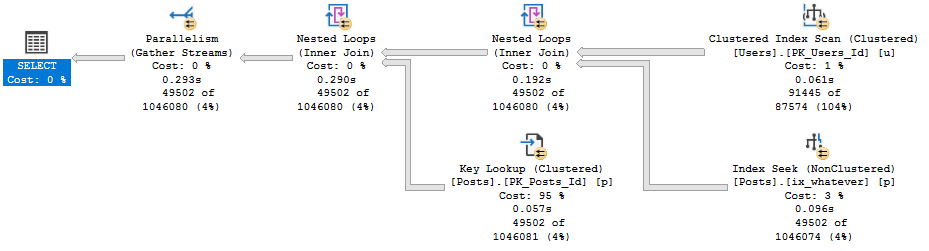
SELECT u.DisplayName, p.Score
FROM dbo.Users AS u
JOIN dbo.Posts AS p
ON p.OwnerUserId = u.Id
WHERE u.CreationDate >= '20131201';
A long time ago, when we migrated Stack Overflow from Access to SQL Server 2000, we created indexes.
This one has worked alright.
CREATE INDEX ix_whatever
    ON dbo.Posts(OwnerUserId);
But Now We’re On 2019
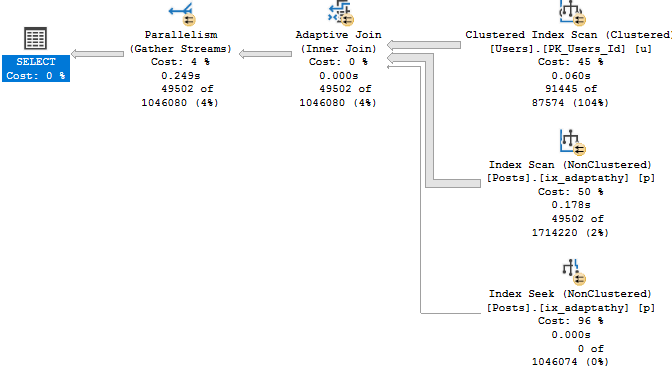
And we’ve, like, read a lot about Adaptive Joins, and we think this’ll be cool to see in action.
Unfortunately, our query doesn’t seem to qualify.
Shame shame shame
Now, there’s an Extended Event that… Used to work.
These days it just stares blankly at me. But since I’ve worked with this before, I know the problem.
It’s that Key Lookup — I’ll explain more in a minute.
Index Upgrade
First, let’s get rid of the Lookup so we can see the Adaptive Join happen.
CREATE INDEX ix_adaptathy
    ON dbo.Posts(OwnerUserId, Score);
New new new
As We Proceed
Let’s think about what Adaptive Joins need:
An index on the column(s) you’re joining
This gives us a realistic choice between using a Nested Loops join to do efficient Seeks, or an easy scan for a Hash Join.
That index has to cover the query
Without a covering index, there’s too much for the optimizer to think about.
It’s not just making a choice between a Nested Loops or Hash Join, it’s also factoring in the cost of a Lookup.
This used to trigger the XE on eajsrUnMatchedOuter, meaning the outer table didn’t have an index that matched the query.
Why Revisit This?
When SQL Server 2019 comes out, people are gonna have really high hopes for their workloads automagickally getting faster.
While there are lots of things that it’ll likely help, it’s going to take a lot of work on your part to make sure your queries and indexes allow for the automagick to kick in.
Thanks for reading!
Going Further
If this is the kind of SQL Server stuff you love learning about, you’ll love my training. Blog readers get 25% off the Everything Bundle — over 100 hours of performance tuning content. Need hands-on help? I offer consulting engagements from targeted investigations to ongoing retainers. Want a quick sanity check before committing to a full engagement? Schedule a call — no commitment required.
When you’re measuring query changes to see if your performance changes have made a difference, a common way to do that is to use STATISTICS TIME and IO.
They’re not perfect, but the barrier to entry is super low, and you can get a good enough feel for if you’re on the right track.
In a perfect world, people would only select the rows and columns they need.
Also in a perfect world: that really embarrassing thing you did in 3rd grade wouldn’t pop into your head every time you’re about to do something really important.
Durex
What can make judging differences tough is if you’re returning a lot of rows to SSMS.
Sometimes it feels like you can reduce reads and CPU time, but your overall query time hasn’t changed.
Now with query operator times, that becomes easier to see.
And Earl
Let’s take this query, which returns ~271k rows.
SET STATISTICS TIME, IO ON;

SELECT c.Score, c.UserId, c.Text
FROM dbo.Comments AS c
WHERE c.Score BETWEEN 5 AND 30
ORDER BY c.Score DESC
In the Stack Overflow 2013 database, this runs for about 3 wall clock seconds.
It says so in the bottom corner of SSMS.
Since we turned on stats time, we can look in the messages window to see that information.
Here are the relevant details:
 SQL Server Execution Times:
   CPU time = 3516 ms,  elapsed time = 3273 ms.
What looks odd here is that CPU and elapsed time are near-equal, but the plan shows parallelism.
Tired of roaches
Thankfully, with operator times, the actual plan helps us out.
Tired of rats
The query itself ran for <900ms.
The situation isn’t so dire.
More Ales
In stats time, elapsed time measures until results are done getting to SSMS.
It might look like this query “ran” for ~3 seconds, but it didn’t. The query finished processing data in under a second, but it took another couple seconds for SSMS to render the results.
You can do a mock test by doing something like this:
DECLARE @blob_eater VARCHAR(8000);

SELECT @blob_eater = c.Score,
       @blob_eater = c.UserId,
	   @blob_eater = c.Text
FROM dbo.Comments AS c
WHERE c.Score BETWEEN 5 AND 30
ORDER BY c.Score DESC
Now when we run the query, stats time is much closer to the operator finish time:
 SQL Server Execution Times:
   CPU time = 2954 ms,  elapsed time = 897 ms.
Thanks for reading!
Going Further
If this is the kind of SQL Server stuff you love learning about, you’ll love my training. Blog readers get 25% off the Everything Bundle — over 100 hours of performance tuning content. Need hands-on help? I offer consulting engagements from targeted investigations to ongoing retainers. Want a quick sanity check before committing to a full engagement? Schedule a call — no commitment required.
In this video, I delve into the intricacies of parameter sniffing in SQL Server and address a question posed by Bradley Jamrozik on Twitter regarding optimizing for large values to ensure always getting powerful execution plans. I explain why simply opting for a big value might not be the best approach due to resource constraints, particularly focusing on concurrency limits such as worker threads and memory grants. By examining these limitations through practical examples on my laptop’s hardware setup, I illustrate how different execution plans can impact the number of concurrent queries that SQL Server can handle efficiently.
Full Transcript
Howdy folks, Erik Darling here with Erik Darling Data. You should be used to that by now. If you’re not, I’m sorry. You just have trouble accepting change in your life. Change and then stability, I guess. Anyway, I’m recording this video because I got asked a, not good, but a great question not too long ago on Twitter by Bradley Jamrozik, or Rozeker, Rozeker. I don’t know how to pronounce that, Bradley. I apologize. You can correct me somewhere. I hear that correcting people on the internet is sometimes, sometimes happens. It’s a bit of a national pastime at this point. Anyway, the question was, when you’re dealing with a parameter sniffing situation, in a situation where SQL Server comes up with two or even more different execution plans based on which parameter it was compiled with the first time around, why not always just optimize for a big, why not just optimize for a big, crazy value so that you always get a big, powerful plan, probably parallel, probably ask for a decent chunk of memory, all that other stuff. Well, there are, I think, for me, some pretty fair reasons not to always do that. And those fair reasons come down to, of course, resources.
Now, if I look at the hardware that I have in my laptop, I have a processor in there with four cores that are hyper-threaded, unfortunately. I apologize to everyone out there who hates hyper-threading. And I also have 64 gigs of memory in my laptop, of which about 50 is dedicated to SQL Server. When I run these two queries, I can see how many worker threads I have available for SQL Server, which is 576. And I can see how much memory I have available to give out to queries. If I go down here and I zoom in a little bit, I can see that my total and my available memory are about the same. And this is how much memory in gigs I can give out to queries for memory grants.
Memory grants is, of course, memory that queries ask for outside of the usual. I have to run stuff to do other things like sort or hash or, you know, do some columnstore stuff that, excuse me, that consumes additional memory. And these are limits. When you start up SQL Server, depending on how many cores you have assigned to your server, and depending on how much memory you have in your server and your max server memory, SQL Server sets limits for how much it’ll allow itself to give out for different things.
Whenever a query runs, it has to take a little piece from those things. The more pieces that these queries are asking for, the fewer queries in total you can have running. For example, with a serial query, with 576 worker threads, I can run 576 copies of that query. If I have a query that goes parallel and it reserves more worker threads, well, whatever DOP is, is going to tell SQL Server how many parallel threads it can use in a branch.
And if I have multiple concurrent branches, SQL Server, just for example, on my laptop, I have max DOP set to 4. So if I have two concurrent branches, that’s 8 threads. And if I have three concurrent branches, that’s 12 threads. So the more parallel queries, the more parallel branches in those queries, the more threads they can just reserve and run with.
Ditto memory. If a query comes along and asks for a large memory grant, and SQL Server is able to grant the entire thing, well, if I have a query that asks for one gig of memory, and currently I can run just about 37 of them, or let’s just say 36 to be safe.
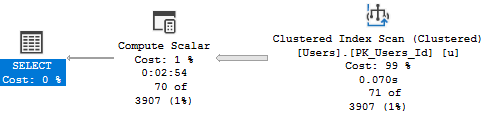
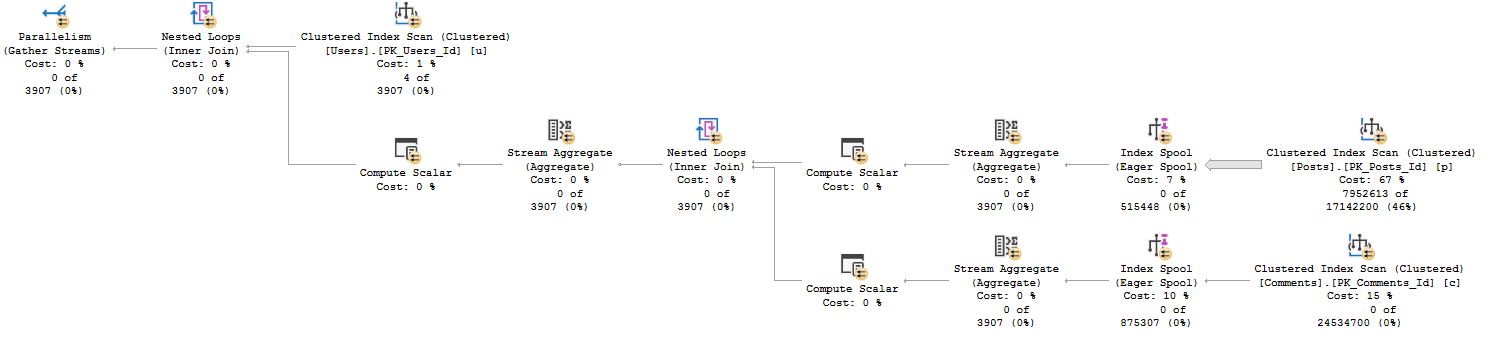
If I have a query that asks for 10 gigs of memory, I can run far fewer of them concurrently. So if we go over to this tab, and we look at a store procedure where I’ve recompiled before executing for two different parameters, 9 and 0, I get two different execution plans.
This top plan is a serial plan, and if I look at how much memory it asks for, it’s about 17 megs. 1, 7, 1, 1, 2. And if I look at how many threads it asks for, an F4 over here, it’s just one, because it’s a serial query.
This will come in handy in a minute. If I look at the second query, look at the select operator, this thing has asked for, let’s see, 7794944. That’s a seven-digit number.
So since it’s 779, I’m going to say that’s 7.8 gigs of memory, as opposed to 17 for the serial query. If you remember what’s on that other tab, about 37, I can’t run as many of these at once as I can of the other one at once. Far fewer, in fact.
If I look at how many threads this thing asks for, if I… Sorry, we’re going to have a dance party for a moment. Oh, alright.
You know, I’m always worried about playing music while a video, while I’m recording a video. But you know what? It’s alright with me. Anyway, if we look at how many threads this query reserved, we can see that we had one branch that was available to execute concurrently.
And we reserved four threads. So that’s not a ton. Granted, there are queries where you can have a lot more than this going on.
But for this query, in four threads, we can run far fewer of these copies concurrently than we can of the single-threaded version. So for me, when I think about why not just optimize for a big value, right? Why not just have every query run as forcefully as possible?
It’s a concurrency thing. And I know that when a lot of people think about concurrency, they think of locking and blocking and deadlocks and other things that kind of hold other queries up. But concurrency goes beyond that.
Concurrency also goes into, you know, from a resource perspective, right? So like not a logical resource like a lock, but a physical resource like how many threads you have or how much memory you have to give out to queries. These are hard limits.
The more queries you have that take up more of those resources, the fewer of those queries you can run. On a larger server, like on a big, big server, that might shut up windows. That might make less of a difference.
On a smaller server, say that’s maybe already a little bit underpowered for your workload, you might end up with a pretty bad situation. If you run out of worker threads, you hit a weight called thread pool. If you run out of memory to give out to queries, you hit a weight called resource semaphore.
So when asked why not just go with the big plan, well, it’s because of that. Because you have hard limits inside of your SQL Server for how much you can give out to queries. Of course, if you don’t care about concurrency, then the problem is solved for you.
Anyway, my name’s Erik Darling with Erik Darling Data. And thank you for watching. Bye.
Video Summary
In this video, I delve into the intricacies of parameter sniffing in SQL Server and address a question posed by Bradley Jamrozik on Twitter regarding optimizing for large values to ensure always getting powerful execution plans. I explain why simply opting for a big value might not be the best approach due to resource constraints, particularly focusing on concurrency limits such as worker threads and memory grants. By examining these limitations through practical examples on my laptop’s hardware setup, I illustrate how different execution plans can impact the number of concurrent queries that SQL Server can handle efficiently.
Full Transcript
Howdy folks, Erik Darling here with Erik Darling Data. You should be used to that by now. If you’re not, I’m sorry. You just have trouble accepting change in your life. Change and then stability, I guess. Anyway, I’m recording this video because I got asked a, not good, but a great question not too long ago on Twitter by Bradley Jamrozik, or Rozeker, Rozeker. I don’t know how to pronounce that, Bradley. I apologize. You can correct me somewhere. I hear that correcting people on the internet is sometimes, sometimes happens. It’s a bit of a national pastime at this point. Anyway, the question was, when you’re dealing with a parameter sniffing situation, in a situation where SQL Server comes up with two or even more different execution plans based on which parameter it was compiled with the first time around, why not always just optimize for a big, why not just optimize for a big, crazy value so that you always get a big, powerful plan, probably parallel, probably ask for a decent chunk of memory, all that other stuff. Well, there are, I think, for me, some pretty fair reasons not to always do that. And those fair reasons come down to, of course, resources.
Now, if I look at the hardware that I have in my laptop, I have a processor in there with four cores that are hyper-threaded, unfortunately. I apologize to everyone out there who hates hyper-threading. And I also have 64 gigs of memory in my laptop, of which about 50 is dedicated to SQL Server. When I run these two queries, I can see how many worker threads I have available for SQL Server, which is 576. And I can see how much memory I have available to give out to queries. If I go down here and I zoom in a little bit, I can see that my total and my available memory are about the same. And this is how much memory in gigs I can give out to queries for memory grants.
Memory grants is, of course, memory that queries ask for outside of the usual. I have to run stuff to do other things like sort or hash or, you know, do some columnstore stuff that, excuse me, that consumes additional memory. And these are limits. When you start up SQL Server, depending on how many cores you have assigned to your server, and depending on how much memory you have in your server and your max server memory, SQL Server sets limits for how much it’ll allow itself to give out for different things.
Whenever a query runs, it has to take a little piece from those things. The more pieces that these queries are asking for, the fewer queries in total you can have running. For example, with a serial query, with 576 worker threads, I can run 576 copies of that query. If I have a query that goes parallel and it reserves more worker threads, well, whatever DOP is, is going to tell SQL Server how many parallel threads it can use in a branch.
And if I have multiple concurrent branches, SQL Server, just for example, on my laptop, I have max DOP set to 4. So if I have two concurrent branches, that’s 8 threads. And if I have three concurrent branches, that’s 12 threads. So the more parallel queries, the more parallel branches in those queries, the more threads they can just reserve and run with.
Ditto memory. If a query comes along and asks for a large memory grant, and SQL Server is able to grant the entire thing, well, if I have a query that asks for one gig of memory, and currently I can run just about 37 of them, or let’s just say 36 to be safe.
If I have a query that asks for 10 gigs of memory, I can run far fewer of them concurrently. So if we go over to this tab, and we look at a store procedure where I’ve recompiled before executing for two different parameters, 9 and 0, I get two different execution plans.
This top plan is a serial plan, and if I look at how much memory it asks for, it’s about 17 megs. 1, 7, 1, 1, 2. And if I look at how many threads it asks for, an F4 over here, it’s just one, because it’s a serial query.
This will come in handy in a minute. If I look at the second query, look at the select operator, this thing has asked for, let’s see, 7794944. That’s a seven-digit number.
So since it’s 779, I’m going to say that’s 7.8 gigs of memory, as opposed to 17 for the serial query. If you remember what’s on that other tab, about 37, I can’t run as many of these at once as I can of the other one at once. Far fewer, in fact.
If I look at how many threads this thing asks for, if I… Sorry, we’re going to have a dance party for a moment. Oh, alright.
You know, I’m always worried about playing music while a video, while I’m recording a video. But you know what? It’s alright with me. Anyway, if we look at how many threads this query reserved, we can see that we had one branch that was available to execute concurrently.
And we reserved four threads. So that’s not a ton. Granted, there are queries where you can have a lot more than this going on.
But for this query, in four threads, we can run far fewer of these copies concurrently than we can of the single-threaded version. So for me, when I think about why not just optimize for a big value, right? Why not just have every query run as forcefully as possible?
It’s a concurrency thing. And I know that when a lot of people think about concurrency, they think of locking and blocking and deadlocks and other things that kind of hold other queries up. But concurrency goes beyond that.
Concurrency also goes into, you know, from a resource perspective, right? So like not a logical resource like a lock, but a physical resource like how many threads you have or how much memory you have to give out to queries. These are hard limits.
The more queries you have that take up more of those resources, the fewer of those queries you can run. On a larger server, like on a big, big server, that might shut up windows. That might make less of a difference.
On a smaller server, say that’s maybe already a little bit underpowered for your workload, you might end up with a pretty bad situation. If you run out of worker threads, you hit a weight called thread pool. If you run out of memory to give out to queries, you hit a weight called resource semaphore.
So when asked why not just go with the big plan, well, it’s because of that. Because you have hard limits inside of your SQL Server for how much you can give out to queries. Of course, if you don’t care about concurrency, then the problem is solved for you.
Anyway, my name’s Erik Darling with Erik Darling Data. And thank you for watching. Bye.
Going Further
If this is the kind of SQL Server stuff you love learning about, you’ll love my training. Blog readers get 25% off the Everything Bundle — over 100 hours of performance tuning content. Need hands-on help? I offer consulting engagements from targeted investigations to ongoing retainers. Want a quick sanity check before committing to a full engagement? Schedule a call — no commitment required.
There’s a pinky-out saying about wine: don’t hate the grape.
People say it because the same kind of grape can be grown by different people in different places.
Due to many, ahem, local factors, wine made with that grape can taste miraculously different.
It’s with that in mind that I’m going to say this: don’t ignore the wait.
No matter what script you’re using to look at wait stats, try unquoting the ignoreable list and seeing what shows up.
Get curious. Poke around. You might find something interesting.
Twosifer
While experimenting with FROID, I came up with a function and query that generate some weird waits.
Those waits are EXECSYNC, and CXCONSUMER. Now, under normal circumstances, you might be able to ignore them.
But things are rarely normal when you’re experiencing performance problems, are they? If you ignore too much, you can miss big problems.
Going back to running this query, I can see the wait stats that get generated in sys.dm_exec_session_wait_stats when the query is finished.
SELECT u.DisplayName,
       dbo.TotalScore(u.Id) AS TotalScore
FROM dbo.Users AS u
WHERE u.Reputation >= 200000
ORDER BY u.Id;
Here’s what those waits look like:
Better Off Dead
If one were to follow advice — even advice from Microsoft — one may miss important clues as to what happened.
CXCONSUMER waits being high is fairly tightly correlated to skewed parallelism, and this is no exception.
EXECSYNC represents a serial zone within a parallel plan, in this case building two Eager Index Spools:
SPOOL-TA-TOES
When you spend a long time building indexes single threaded, you spend a long time waiting on CXCONSUMER (and not so much time at all waiting on CXPACKET).
Being able to put the waits together with the query plan can help you tune queries more efficiently.
This is especially true if you’re on earlier versions of SQL Server/SSMS where the kind of detail shown in query plans here doesn’t exist.
Last week’s thrilling, stunning, flawless episode of whatever-you-wanna-call-it.
Video Summary
In this video, I dive into the daily struggles of working in a hot environment that seems to never end. From the moment I step into my office, it feels like I’m stepping into an oven, and by midday, I’m drenched in sweat. Despite the discomfort, I manage to keep things light-hearted as I address various technical questions from the community. We tackle topics ranging from database performance tuning and server hardware requirements to antivirus software issues and the latest SQL Server versions. It’s a mix of practical advice and personal anecdotes that hopefully provide some relief and useful insights for anyone navigating similar challenges in their work or learning journey.
Full Transcript
It’s hot. It’s so hot. Everything is sweat. Shower five, six times a day just to try to stay ahead of me. It’s awful. Awful. It’s like, it’s so hot that I’m just like tired. I just feel exhausted from existing. I’m busy. The worst. I don’t even, I don’t know, I don’t know how to make it better. The beer comes down soon. I guess. I guess. Alright, look at this. healthy, happy crowd. Look at all these nice people. Get better air. I have great ones. I just haven’t put them in yet. That’s half the battle. I haven’t put them in yet. I have one air conditioner. It’s like 14,000 BTUs. I’m pretty sure it’s illegal in Europe to have an air conditioner like this one. It could like, probably like preserve.
meat. I have a pair of meat. If I put meat in front of it. Then I have a couple smaller ones for the smaller ones. But that big one, man. That’s something. The thing is, it’s like, I don’t know. It’s only, like only in the 70s. It’s just so human. It’s like death human. It’s like living in a mouth. And this is sitting in a tongue constantly. It’s like, constant, constant tongue in my entire being. It’s terrible. Oh, man. So, everyone excited for the weekend? Big weekend plans. Fun, interesting, exciting things to do this weekend. Yes. Yes. You do need to turn them on. Plug them in. Mount them in a window. All sorts of weird steps you have to go through before air conditioners actually work. I know. I know, man.
It’s like, I’m not going to go through the weekend. I know, man. I know. I know. I know. I know. The ADR paper came out. Looking forward to reading it. Well, you should paste the link in chat. Don’t keep it to yourself. Forest. Julie says, SoonerCon, science fiction, fantasy, literary con. Man of visitor is guest. All right, Julie. Where are you going with that? What is SoonerCon?
Weekend plans. Weekend plans. There we go. All right. Now it all makes sense. It’s like, Julie, you’re crazy. Someone call an ambulance for Julie. Wow. Darren says, Holy jeez. Darren says, Have you ever seen anyone that just maxed up on a schedule to match changing workloads during the day? No, that’s pretty creative, though. I think if most people, I mean, I want to say most people. I will say most people who would have those needs might just invest in resource governor and have different workloads run under different logins so that you can classify them and set maxed up differently.
But, you know, you can’t do that on every version of SQL Server. You can only do that on enterprise. Well, I’ve never personally seen that, though, but I guess I don’t hear that much. I don’t think that would freak me out too badly. that would have been a lot more. I don’t think that much. I don’t think that’s good.
Let’s see. Nothing interesting there. Twitter is terrible as usual. All right. Good stuff. Lee asks, Lee inquires, why does option recompile not seem to work sometimes? We had an issue the other day where it made zero difference even though we knew it was using a poor plan.
Oh, man. So there’s a lot of missing detail here. And it could just be that even with a recompile and SQL Server thought that it was choosing a good plan.
That would be my guess. You say not work, I mean, that’s a gray area for anything. But if I walk up to me and my hands are like, this doesn’t work. What’s not working?
What exactly didn’t work? I’ll give you an example of the difference. Like, I’m testing a lot of my current demos on SQL Server 2019. And I frequently complain that they don’t work anymore.
It doesn’t mean that they’re like throwing errors. It just means that they are no longer exhibiting the behavior that they used to. Screw you, SQL Server 2019.
You’re making me do work. He says, we passed the values through another set of parameters and then it used a new different plan.
Oh, so you did the optimize for unknown trick. You declared variables, set them equal to the other variables, and then did the thing. I guess that’s it.
I would like to see this dynamic sequence, too. Because I bet. Yeah.
Yeah. So when you declare local variables like that, it’s basically like saying optimize for unknown. And you can, I mean, sometimes the guesses are like okay. A lot of the times the guesses are very bad.
I probably wouldn’t want to leave that solution in place for very long. Who knows when that ticking time bomb will go off. So you know what?
I think you should post. I think you should post this on DBA.StackExchange.com. I think you should show us the dynamic SQL. I think you should show us the plans.
I think you should get us some more information. All in one place we can see. Because then you could get a great answer. From me here, you’re just going to get a very speculative answer.
The proc will be rewritten. All right, fine. Fine. I didn’t want to help anyway.
I didn’t want to help. You think about that. Unless you’re hiring me. Is that me you’re hiring me to do it? That would be awesome. Woohoo, I have a job.
I’m just kidding. I still do. On the plus side though, I have stopped applying for jobs. So I no longer feel rejected.
It turns out that I get as many jobs when I don’t apply to them as I do when I do apply to them. So I have the same number of jobs just without any threat of rejection.
So that’s nice. I feel fine. I feel a-okay.
It’s a good time. Good time. Good time. Good time. Still hot.
Still too hot. Still too hot to exist. I don’t have any plans this weekend in case you’ll want to.
I got nothing. Low key. Low key. As usual. I’m going to buy some ice cold wine.
And then just drown myself in it. That’s my big plan. There’s a lot of weird-well not weird, but there’s a lot of oddly placed school holidays right now.
I’m not saying the holidays are weird. I’m just saying the timing during the week is weird. Like today, my daughter had Tuesday and Thursday off. And so like there were weird like sleepovers and like play dates.
And I was just like, just go to school. Go to school. It’s too much work when you’re not in school.
It’s exhausting. Can’t keep track of the babies. I have a gigantic fan in here.
Actually, you can’t see it anymore. Never mind. But the gigantic fan is not helping my situation. It’s all downhill.
The opposite of Lee Brown Hill. It’s Eric Downhill. All right.
Do we have questions? Does anyone have a question? Anybody? You can make something up. Even if you know the answer, you can just make up a question. Otherwise, I’m going to go back to sweating off camera.
Which is preferable for me. Because these headphones add about 30 degrees to my head. 30 degrees.
Darren asks if I work with JSON and single server at all. No, and I probably won’t unless all of a sudden query plans get converted to JSON. Boris asks, what’s your naming convention for test machines?
My, I don’t have one. I named them SQL and then the version they are. So my test VMs are back to SQL Server 2008 with the most recent service pack. And we’ll just call it SQL 2008, 2008 R2, 2012, 2014.
Because I have no need for it. I don’t have dev and QA and test and all that. All I have is a few lowly VMs.
I just have to make sure that scripts don’t return written results on. Rex says he’s working on an issue with McAfee post upgrade or McAfee post upgrade causing 98% CPU and the application gets orphan sessions.
It sounds like someone didn’t do the right AV exclusions. And some like McAfee is trying to scan your SQL Server stuff. Like MDS, LDS, bin folder, things like that.
I’ve never really understood the point of having antivirus on a SQL Server. People aren’t generally uploading things to it. Like putting things on there.
I don’t know. That’s just me though. Seems like it causes more trouble than it’s worth. Yeah, the database server hosting the database.
Yeah, I got you. Jane says, any reason not to use SQL Server 2017 in production over SQL Server 2016? Haha, I wouldn’t use either one.
I would just wait for SQL Server 2019. Why put yourself behind the upgrade eight ball when SQL Server 2019 will be out in, I don’t know, three, four months?
I’m going to use the newest, latest, greatest, buggiest version of SQL Server that Microsoft has available in production. That sounds like a much better time than me.
I would wait for that. Let’s see. That’s a good name.
I’m going to go with that part of it. What would you recommend is essential basics to learn for a newly appointed junior DBA with no DBA or SQL experience?
Well, that depends on what you’re administering a little bit. If it’s your job to just deal with backups and check DB and uptime and looking after whatever HADR is in place and making sure that your servers have the right settings, then it’s a different story than if you’re looking at indexes and performance.
So scope your job for me. Tell me what you do day to day. I will give you a better answer. Farah says, what are common issues to watch out for on 100 core plus servers?
Oh, man. I don’t know. Not thread cool. Licensing. Licensing would be an issue that I would watch out for pretty hard.
That’s expensive. That sounds like an interesting one. I would be really careful how I set maxed out.
Really careful. Martin says he’d be worried about having enough IO to serve those cores. I would have so much RAM in that server that IO would not be an issue.
I would have just like if you can afford a 100 core server, which indicates that you have Enterprise Edition. a 100 core server that’s not a problem.
If you have a 100 core server, then there is absolutely no reason that you shouldn’t have that thing packed to the gills with memory. I don’t care if you have a 4 gigabyte database on that server. I would have like 8 terabytes of memory.
That’s an interesting point though because you’ve got to figure with, you know, per core you can do about 200 megs a second if they’re like decently fast cores. If you have a 100 core server though, I’d be a little bit curious what the clock speed is on those. If it’s over 2 I might be surprised.
Like 1.6, 1.8, somewhere in there. Those wide processors have grandpa speeds on them. They’re not fun.
I see a lot of people have to buy those too. They get a VM host and they have to get enough cores to serve a whole bunch of guests and it’s just 28, 56, 48 cores of garbage. I saw a VM server recently with AMD chips in it.
It was fast. Why did you do that to us? Why? Why?
Just cut one of your lights off. AMD in the server.
That’ll be the day. AMD’s going to start writing checks on for you. Yes, keep saying that. Monitoring.
You know what’s funny is every time I post one of these things I’m like go ahead ask your questions via email or you know what do you call it? Twitter or wherever. Like literally ask a question in any way that you want.
My DMs are open and all I get are porn bots saying hi to me. Then following me and then getting their account gets deleted shortly afterwards. I end up even lonelier than the more.
The story of my life. Porn bots and loneliness. Title of my memoirs. All right.
Waiting. Watching. Staring. All right. I’m going to give this one more shot.
No. All right. Thanks for showing up. It is too hot to stand here. Oh man.
There we go. James had to ask. James had to catfish me. James says what do you recommend the minimum hardware requirements for a production system that has a thousand gigabyte database. My current company has a setup of two cores and four gigs of RAM for all their new systems.
Are you messing with me? Like physically trying to mess with me? That’s not going to fly.
Unless there is like. Do you have users? I guess would be my question. Because if you if you don’t have if you don’t have users that will probably work really really well. Yeah.
So the the funny thing about you know where I would start with that is you know the sort of funny thing about SQL Server is that it doesn’t work with pages on disk. Anything that you want to read like presumably people want to read stuff out of that hundred gig database. And I’m willing to bet that your your tables or indexes are over the four gig mark.
So anything that SQL wants to read or do anything with it doesn’t matter if it’s insert update delete select it has to be in memory first. So.
Oh. It’s funny. It’s funny too because even if you’re on standard edition. 2012.
You can put like 96 gigs of memory in there and you can cache 64 gigs of memory right in the buffer pool. And then you can have like 16 gigs for the OS and you can have like I don’t know 30 or something 20 something in there. Just for SQL Server to use for caches and memory grants and all that other fun stuff.
And if you have SQL Server 2014 or newer 17 you can have a hundred and oh excuse you. You can have 128 gigs of RAM just for the buffer pool. You can cache that entire database in memory.
So I would go out on a limb and say that that is probably inadequate hardware for a 100 gig database. Matter of fact I would probably say that that is mostly only adequate hardware for a four gigabyte database. Maybe eight if you’re very lucky.
Maybe even 12 if you’re if you have incredibly good indexing and incredibly well written queries. But otherwise this is not going to pan out as well. So you know well I’m sure that there are you know query and index tuning opportunities available in that database.
I just don’t think that with four gigs of RAM I would I would just walk away from that server. There is absolutely no point in trying to do anything that that’s always going to suck. Yeah it’s basically like a bare minimum when that was installed.
Yeah you can hire me to do anything you want. I will do anything for money. Keep the women in my life happy.
Let’s see here. This is so Nandalusian says it’s not for me it’s for someone I’ve recently appointed so I don’t know what’s best to prioritize for learning. They got thrown in and had to learn as fast as things fell over.
I don’t want them to have the same experience. I want them to have a good rounded education being a DBA. So they’re less surprised by the challenges of the role. Yeah that makes sense.
But again you haven’t told me what they’re going to be responsible for. So if you have them being responsible for like backups and check DB then that’s the first kind of round of stuff they have to learn about. If you have them responsible for a 12 node AG they better they better get their button gear.
Wanting something about AG. You see what I mean about how the scope of the job can be different. Can we get lead to different advice.
Like if they’re just managing like a few agent jobs and maybe if they’re I don’t know just making sure that the server is up and running. That’s a that’s a totally different DBA than you know someone who’s got to go in and check out indexes and see if they make sense. All that other stuff monitor performance not just like up down red green monitoring or whatever color blind colors people have up in the world.
You know what I mean? It’s like different skill sets different things you have to do. Every city truck sounds like that.
Every single one. The city has not had a quiet truck in 25 years. Every truck sounds like an earthquake when it goes by.
Every truck. Fire the city. I don’t know other things I’m thinking about with the 100 gig database on.
And so here’s another funny thing. I’m going to go ahead and assume that that VM or that server that it’s sitting on is a virtual machine. And I’m going to tell you something very funny about virtual machines.
When you buy licensing for them they have a minimum of four cores. So you’re actually you’ve actually paid for two cores that you’re not using. And if that’s standard edition that’s four grand and if it’s enterprise edition that’s 14 grand.
So that’s actually a very stupid setup from a licensing perspective because you’re actually paying for things that you’re not using. And imagine if I was if I was like yeah come to my restaurant. It costs two grand per plate or per seat.
And you have to buy a minimum of four seats to come in. And then you only show up with two people. I get to keep four grand and not do any work.
You’re giving Microsoft money that they haven’t earned. All that all that licensing money that you are not using. It’s silly. It’s money out the door.
No such thing as a two core VM with SQL Server. Start with four. You’re paying for them. Why would you want to give Microsoft free money? Do you have any idea how much free money they have from not fixing anything?
Decades. You keep paying them. You get new versions with features that are broken, half implemented. Don’t really work.
You just keep paying and paying and paying. And then you give them free money with unused cores. It’s ridiculous. Absolutely ridiculous. Absolutely positively ridiculous.
Whoever’s rule that is, I would just, I would pull them in an alley and beat them. The only solution for that level of stupid is probably beatings. I can’t think of anything else that would cure that level of inanity.
So I was like, isn’t it like, that’s how everything starts out. And then like, if there’s a problem, they can magically find more hardware. Or is it like, if there’s a problem, it’s SQL Server’s fault.
And it couldn’t possibly be the hardware because it’s a DM or something. I hate it. Yeah.
It’s always SQL Server’s fault. Oh, Raphael don’t do that. Don’t add hot CPU. Don’t have the hot add CPU. No. It’s not good.
Yeah. Sorry to hear all that. So the first thing I would do is disable hot add CPU.
The second thing I would do is make sure that, you know, the CPU setup of the VM is not a gate. I would do like two by two by what’s that, 16, 20. Wait, you said 24 cores.
And 8, 8, 4, 16 plus 4 is 20. 8 plus 8 plus 4 is 20. I’m being told, whispering in my earpiece, it’s 20.
Cal Bay’s light. Yeah! Wow!
You have so much to do. I’m so glad that you’re here to tell me this story. so you hey you have you have much work to do my friend if you want to keep those 24 cores you’re gonna have to skew upgrade if you want to not have SQL server act like a piece of crap you should disable the hot ad CPU and then snow will probably work itself out once you work that out but yeah that’s that’s something that’s something you’re I would I would also try to take your boss’s job I don’t think he’s very good at it you can tell him I said I’m not afraid unless he’s from Yonkers I would recommend I would recommend you for your boss’s position change maxed up to 8 already I don’t even know if I would put it at 8 I might put it at 4 because that that one poor split up CPU just just might get real real in a real weird place with it at 8 I might I might even lower it for probably be my number at least until that other thing gets straight the the other thing gets straightened out I might change it to 8 man at least if it’s 4 you can like keep all your queries within a thing your boss is incompetent is the problem and I don’t think your boss is gonna go check on SQL server parallelism settings pretty sure that you could make that change do your thing and if he or she he or she I don’t want to assume anyone’s role in this this great wide world has anything to say about you can say Erik Darling told them maxed up 4 eric darling tell your tell your boss that he’s wrong you shouldn’t have that job he’s micromanaging bosses shouldn’t be setting those kind of limits on their employees they should not but bosses tech bosses who manage technical employees and who outsource the management of technology to other people should not ever micromanage little things like that ever it’s a big mistake you end up with things being technically dumb especially if you don’t listen to your technical employees well the things that they know best I am very technical with SQL Server but if you expected me to do something technical or you wanted me to make a technical decision about like an availability group happen would say what do you know what availability groups you know you tell me what you want to do with the availability you tell me why it makes sense I’ll ask you hard questions about why you want to do that and see if you thought this whole thing through but I’m not gonna say you can only set maxed up can’t set it to for only eight the only change you can make this maxed up idiot why would a boss make that kind of you about boss who presumably knows nothing about SQL that’s why they hired you I don’t get fire your boss throw him on a window anyway season my physical hosts are two newman nodes with six cores each 12 cores would be the maximum recommended maximum recommended for what like to give the VM you have physical VM hosts with six cores for 12 cores what we gotta talk we have to have a long talk yeah so here’s the problem with that you have a VM host with two sockets and six cores per socket so you have 12 cores total for a VM host and you want to give 12 cores to SQL Server the issue becomes if you have anything else on that box and you have SQL Server trying to co-schedule something where it’s already co-scheduling SQL Server is already co-scheduling quite a bit even if it’s just even if it’s by itself on a VM host SQL Server is being scheduled by vSphere zero server is being scheduled by Windows and then SQL Server is being internally scheduled by itself so you have three layers of scheduling going on already and now you want to know if you throw other VMs on that host they’re also being co-scheduled on the same process is it there is co co co like recursive infinite recursion of of of co-processing going on and that’s just a really terrible idea I’m going to give you a quick example that’s a little bit more extreme than what you’re telling me about and it was I was working with a client when I was still still with Brent and these people had a four core VM I think I’ve told this at a four core VM and they were they had performance problems I said yeah I agree you do you have performance problems because you have a four core VM and you have like a 200 and something gig database you have 16 gigs of RAM and it was really really not pretty and then like the further the further we dug in it turned out that not only did the VM have four cores but it was another consultant who had set up this VM host and the the VM host itself had four cores and the VM host itself was hosting 12 other SQL Server work so there were times we will I was like something’s weird here I didn’t know that stuff until like a little bit later but when I was first trying to poke around itself you’d like run a query do it finish in simply run the same query again take four seconds on the same query again finish it’s run the same query again 11 seconds on the same query instant run the same query 25 it was like every time we ran this query it was like all over the place with how long it would take and wouldn’t you know eventually it came to light that there was no no there was no remote no one it was one no my node with four cores there were 12 other SQL servers sharing the same four cores that was it every every every of the 12 servers on that VM host were using the same four cores and everything was attempting to be scheduled at once and I think the entire box had like maybe 64 gigs of RAM it was like shittier than my laptop I’m sorry crappier than my laptop oh yeah it was a bad time with VM with VM hosts like that if you have a one-to-one mapping of your of your your your your your your guest to your host you have done yourself a tremendous disservice there’s not something you should be doing anyway whoo we have we’ve gone to almost 40 minutes which is which is almost 10 minutes longer than I usually go for anyway I’m gonna get going and try and go take my fourth shower of the day and do that because people are starting to leave now I’ve talked too long anyway goodbye have a great weekend I will see you next time hopefully hopefully hopefully everyone can make it my weekend is not installing air conditioning my weekend will be installing air conditioning and then lying in front of it making sacrifices to the god of gods of Freon that’s mine goodbye
Video Summary
In this video, I dive into the daily struggles of working in a hot environment that seems to never end. From the moment I step into my office, it feels like I’m stepping into an oven, and by midday, I’m drenched in sweat. Despite the discomfort, I manage to keep things light-hearted as I address various technical questions from the community. We tackle topics ranging from database performance tuning and server hardware requirements to antivirus software issues and the latest SQL Server versions. It’s a mix of practical advice and personal anecdotes that hopefully provide some relief and useful insights for anyone navigating similar challenges in their work or learning journey.
Full Transcript
It’s hot. It’s so hot. Everything is sweat. Shower five, six times a day just to try to stay ahead of me. It’s awful. Awful. It’s like, it’s so hot that I’m just like tired. I just feel exhausted from existing. I’m busy. The worst. I don’t even, I don’t know, I don’t know how to make it better. The beer comes down soon. I guess. I guess. Alright, look at this. healthy, happy crowd. Look at all these nice people. Get better air. I have great ones. I just haven’t put them in yet. That’s half the battle. I haven’t put them in yet. I have one air conditioner. It’s like 14,000 BTUs. I’m pretty sure it’s illegal in Europe to have an air conditioner like this one. It could like, probably like preserve.
meat. I have a pair of meat. If I put meat in front of it. Then I have a couple smaller ones for the smaller ones. But that big one, man. That’s something. The thing is, it’s like, I don’t know. It’s only, like only in the 70s. It’s just so human. It’s like death human. It’s like living in a mouth. And this is sitting in a tongue constantly. It’s like, constant, constant tongue in my entire being. It’s terrible. Oh, man. So, everyone excited for the weekend? Big weekend plans. Fun, interesting, exciting things to do this weekend. Yes. Yes. You do need to turn them on. Plug them in. Mount them in a window. All sorts of weird steps you have to go through before air conditioners actually work. I know. I know, man.
It’s like, I’m not going to go through the weekend. I know, man. I know. I know. I know. I know. The ADR paper came out. Looking forward to reading it. Well, you should paste the link in chat. Don’t keep it to yourself. Forest. Julie says, SoonerCon, science fiction, fantasy, literary con. Man of visitor is guest. All right, Julie. Where are you going with that? What is SoonerCon?
Weekend plans. Weekend plans. There we go. All right. Now it all makes sense. It’s like, Julie, you’re crazy. Someone call an ambulance for Julie. Wow. Darren says, Holy jeez. Darren says, Have you ever seen anyone that just maxed up on a schedule to match changing workloads during the day? No, that’s pretty creative, though. I think if most people, I mean, I want to say most people. I will say most people who would have those needs might just invest in resource governor and have different workloads run under different logins so that you can classify them and set maxed up differently.
But, you know, you can’t do that on every version of SQL Server. You can only do that on enterprise. Well, I’ve never personally seen that, though, but I guess I don’t hear that much. I don’t think that would freak me out too badly. that would have been a lot more. I don’t think that much. I don’t think that’s good.
Let’s see. Nothing interesting there. Twitter is terrible as usual. All right. Good stuff. Lee asks, Lee inquires, why does option recompile not seem to work sometimes? We had an issue the other day where it made zero difference even though we knew it was using a poor plan.
Oh, man. So there’s a lot of missing detail here. And it could just be that even with a recompile and SQL Server thought that it was choosing a good plan.
That would be my guess. You say not work, I mean, that’s a gray area for anything. But if I walk up to me and my hands are like, this doesn’t work. What’s not working?
What exactly didn’t work? I’ll give you an example of the difference. Like, I’m testing a lot of my current demos on SQL Server 2019. And I frequently complain that they don’t work anymore.
It doesn’t mean that they’re like throwing errors. It just means that they are no longer exhibiting the behavior that they used to. Screw you, SQL Server 2019.
You’re making me do work. He says, we passed the values through another set of parameters and then it used a new different plan.
Oh, so you did the optimize for unknown trick. You declared variables, set them equal to the other variables, and then did the thing. I guess that’s it.
I would like to see this dynamic sequence, too. Because I bet. Yeah.
Yeah. So when you declare local variables like that, it’s basically like saying optimize for unknown. And you can, I mean, sometimes the guesses are like okay. A lot of the times the guesses are very bad.
I probably wouldn’t want to leave that solution in place for very long. Who knows when that ticking time bomb will go off. So you know what?
I think you should post. I think you should post this on DBA.StackExchange.com. I think you should show us the dynamic SQL. I think you should show us the plans.
I think you should get us some more information. All in one place we can see. Because then you could get a great answer. From me here, you’re just going to get a very speculative answer.
The proc will be rewritten. All right, fine. Fine. I didn’t want to help anyway.
I didn’t want to help. You think about that. Unless you’re hiring me. Is that me you’re hiring me to do it? That would be awesome. Woohoo, I have a job.
I’m just kidding. I still do. On the plus side though, I have stopped applying for jobs. So I no longer feel rejected.
It turns out that I get as many jobs when I don’t apply to them as I do when I do apply to them. So I have the same number of jobs just without any threat of rejection.
So that’s nice. I feel fine. I feel a-okay.
It’s a good time. Good time. Good time. Good time. Still hot.
Still too hot. Still too hot to exist. I don’t have any plans this weekend in case you’ll want to.
I got nothing. Low key. Low key. As usual. I’m going to buy some ice cold wine.
And then just drown myself in it. That’s my big plan. There’s a lot of weird-well not weird, but there’s a lot of oddly placed school holidays right now.
I’m not saying the holidays are weird. I’m just saying the timing during the week is weird. Like today, my daughter had Tuesday and Thursday off. And so like there were weird like sleepovers and like play dates.
And I was just like, just go to school. Go to school. It’s too much work when you’re not in school.
It’s exhausting. Can’t keep track of the babies. I have a gigantic fan in here.
Actually, you can’t see it anymore. Never mind. But the gigantic fan is not helping my situation. It’s all downhill.
The opposite of Lee Brown Hill. It’s Eric Downhill. All right.
Do we have questions? Does anyone have a question? Anybody? You can make something up. Even if you know the answer, you can just make up a question. Otherwise, I’m going to go back to sweating off camera.
Which is preferable for me. Because these headphones add about 30 degrees to my head. 30 degrees.
Darren asks if I work with JSON and single server at all. No, and I probably won’t unless all of a sudden query plans get converted to JSON. Boris asks, what’s your naming convention for test machines?
My, I don’t have one. I named them SQL and then the version they are. So my test VMs are back to SQL Server 2008 with the most recent service pack. And we’ll just call it SQL 2008, 2008 R2, 2012, 2014.
Because I have no need for it. I don’t have dev and QA and test and all that. All I have is a few lowly VMs.
I just have to make sure that scripts don’t return written results on. Rex says he’s working on an issue with McAfee post upgrade or McAfee post upgrade causing 98% CPU and the application gets orphan sessions.
It sounds like someone didn’t do the right AV exclusions. And some like McAfee is trying to scan your SQL Server stuff. Like MDS, LDS, bin folder, things like that.
I’ve never really understood the point of having antivirus on a SQL Server. People aren’t generally uploading things to it. Like putting things on there.
I don’t know. That’s just me though. Seems like it causes more trouble than it’s worth. Yeah, the database server hosting the database.
Yeah, I got you. Jane says, any reason not to use SQL Server 2017 in production over SQL Server 2016? Haha, I wouldn’t use either one.
I would just wait for SQL Server 2019. Why put yourself behind the upgrade eight ball when SQL Server 2019 will be out in, I don’t know, three, four months?
I’m going to use the newest, latest, greatest, buggiest version of SQL Server that Microsoft has available in production. That sounds like a much better time than me.
I would wait for that. Let’s see. That’s a good name.
I’m going to go with that part of it. What would you recommend is essential basics to learn for a newly appointed junior DBA with no DBA or SQL experience?
Well, that depends on what you’re administering a little bit. If it’s your job to just deal with backups and check DB and uptime and looking after whatever HADR is in place and making sure that your servers have the right settings, then it’s a different story than if you’re looking at indexes and performance.
So scope your job for me. Tell me what you do day to day. I will give you a better answer. Farah says, what are common issues to watch out for on 100 core plus servers?
Oh, man. I don’t know. Not thread cool. Licensing. Licensing would be an issue that I would watch out for pretty hard.
That’s expensive. That sounds like an interesting one. I would be really careful how I set maxed out.
Really careful. Martin says he’d be worried about having enough IO to serve those cores. I would have so much RAM in that server that IO would not be an issue.
I would have just like if you can afford a 100 core server, which indicates that you have Enterprise Edition. a 100 core server that’s not a problem.
If you have a 100 core server, then there is absolutely no reason that you shouldn’t have that thing packed to the gills with memory. I don’t care if you have a 4 gigabyte database on that server. I would have like 8 terabytes of memory.
That’s an interesting point though because you’ve got to figure with, you know, per core you can do about 200 megs a second if they’re like decently fast cores. If you have a 100 core server though, I’d be a little bit curious what the clock speed is on those. If it’s over 2 I might be surprised.
Like 1.6, 1.8, somewhere in there. Those wide processors have grandpa speeds on them. They’re not fun.
I see a lot of people have to buy those too. They get a VM host and they have to get enough cores to serve a whole bunch of guests and it’s just 28, 56, 48 cores of garbage. I saw a VM server recently with AMD chips in it.
It was fast. Why did you do that to us? Why? Why?
Just cut one of your lights off. AMD in the server.
That’ll be the day. AMD’s going to start writing checks on for you. Yes, keep saying that. Monitoring.
You know what’s funny is every time I post one of these things I’m like go ahead ask your questions via email or you know what do you call it? Twitter or wherever. Like literally ask a question in any way that you want.
My DMs are open and all I get are porn bots saying hi to me. Then following me and then getting their account gets deleted shortly afterwards. I end up even lonelier than the more.
The story of my life. Porn bots and loneliness. Title of my memoirs. All right.
Waiting. Watching. Staring. All right. I’m going to give this one more shot.
No. All right. Thanks for showing up. It is too hot to stand here. Oh man.
There we go. James had to ask. James had to catfish me. James says what do you recommend the minimum hardware requirements for a production system that has a thousand gigabyte database. My current company has a setup of two cores and four gigs of RAM for all their new systems.
Are you messing with me? Like physically trying to mess with me? That’s not going to fly.
Unless there is like. Do you have users? I guess would be my question. Because if you if you don’t have if you don’t have users that will probably work really really well. Yeah.
So the the funny thing about you know where I would start with that is you know the sort of funny thing about SQL Server is that it doesn’t work with pages on disk. Anything that you want to read like presumably people want to read stuff out of that hundred gig database. And I’m willing to bet that your your tables or indexes are over the four gig mark.
So anything that SQL wants to read or do anything with it doesn’t matter if it’s insert update delete select it has to be in memory first. So.
Oh. It’s funny. It’s funny too because even if you’re on standard edition. 2012.
You can put like 96 gigs of memory in there and you can cache 64 gigs of memory right in the buffer pool. And then you can have like 16 gigs for the OS and you can have like I don’t know 30 or something 20 something in there. Just for SQL Server to use for caches and memory grants and all that other fun stuff.
And if you have SQL Server 2014 or newer 17 you can have a hundred and oh excuse you. You can have 128 gigs of RAM just for the buffer pool. You can cache that entire database in memory.
So I would go out on a limb and say that that is probably inadequate hardware for a 100 gig database. Matter of fact I would probably say that that is mostly only adequate hardware for a four gigabyte database. Maybe eight if you’re very lucky.
Maybe even 12 if you’re if you have incredibly good indexing and incredibly well written queries. But otherwise this is not going to pan out as well. So you know well I’m sure that there are you know query and index tuning opportunities available in that database.
I just don’t think that with four gigs of RAM I would I would just walk away from that server. There is absolutely no point in trying to do anything that that’s always going to suck. Yeah it’s basically like a bare minimum when that was installed.
Yeah you can hire me to do anything you want. I will do anything for money. Keep the women in my life happy.
Let’s see here. This is so Nandalusian says it’s not for me it’s for someone I’ve recently appointed so I don’t know what’s best to prioritize for learning. They got thrown in and had to learn as fast as things fell over.
I don’t want them to have the same experience. I want them to have a good rounded education being a DBA. So they’re less surprised by the challenges of the role. Yeah that makes sense.
But again you haven’t told me what they’re going to be responsible for. So if you have them being responsible for like backups and check DB then that’s the first kind of round of stuff they have to learn about. If you have them responsible for a 12 node AG they better they better get their button gear.
Wanting something about AG. You see what I mean about how the scope of the job can be different. Can we get lead to different advice.
Like if they’re just managing like a few agent jobs and maybe if they’re I don’t know just making sure that the server is up and running. That’s a that’s a totally different DBA than you know someone who’s got to go in and check out indexes and see if they make sense. All that other stuff monitor performance not just like up down red green monitoring or whatever color blind colors people have up in the world.
You know what I mean? It’s like different skill sets different things you have to do. Every city truck sounds like that.
Every single one. The city has not had a quiet truck in 25 years. Every truck sounds like an earthquake when it goes by.
Every truck. Fire the city. I don’t know other things I’m thinking about with the 100 gig database on.
And so here’s another funny thing. I’m going to go ahead and assume that that VM or that server that it’s sitting on is a virtual machine. And I’m going to tell you something very funny about virtual machines.
When you buy licensing for them they have a minimum of four cores. So you’re actually you’ve actually paid for two cores that you’re not using. And if that’s standard edition that’s four grand and if it’s enterprise edition that’s 14 grand.
So that’s actually a very stupid setup from a licensing perspective because you’re actually paying for things that you’re not using. And imagine if I was if I was like yeah come to my restaurant. It costs two grand per plate or per seat.
And you have to buy a minimum of four seats to come in. And then you only show up with two people. I get to keep four grand and not do any work.
You’re giving Microsoft money that they haven’t earned. All that all that licensing money that you are not using. It’s silly. It’s money out the door.
No such thing as a two core VM with SQL Server. Start with four. You’re paying for them. Why would you want to give Microsoft free money? Do you have any idea how much free money they have from not fixing anything?
Decades. You keep paying them. You get new versions with features that are broken, half implemented. Don’t really work.
You just keep paying and paying and paying. And then you give them free money with unused cores. It’s ridiculous. Absolutely ridiculous. Absolutely positively ridiculous.
Whoever’s rule that is, I would just, I would pull them in an alley and beat them. The only solution for that level of stupid is probably beatings. I can’t think of anything else that would cure that level of inanity.
So I was like, isn’t it like, that’s how everything starts out. And then like, if there’s a problem, they can magically find more hardware. Or is it like, if there’s a problem, it’s SQL Server’s fault.
And it couldn’t possibly be the hardware because it’s a DM or something. I hate it. Yeah.
It’s always SQL Server’s fault. Oh, Raphael don’t do that. Don’t add hot CPU. Don’t have the hot add CPU. No. It’s not good.
Yeah. Sorry to hear all that. So the first thing I would do is disable hot add CPU.
The second thing I would do is make sure that, you know, the CPU setup of the VM is not a gate. I would do like two by two by what’s that, 16, 20. Wait, you said 24 cores.
And 8, 8, 4, 16 plus 4 is 20. 8 plus 8 plus 4 is 20. I’m being told, whispering in my earpiece, it’s 20.
Cal Bay’s light. Yeah! Wow!
You have so much to do. I’m so glad that you’re here to tell me this story. so you hey you have you have much work to do my friend if you want to keep those 24 cores you’re gonna have to skew upgrade if you want to not have SQL server act like a piece of crap you should disable the hot ad CPU and then snow will probably work itself out once you work that out but yeah that’s that’s something that’s something you’re I would I would also try to take your boss’s job I don’t think he’s very good at it you can tell him I said I’m not afraid unless he’s from Yonkers I would recommend I would recommend you for your boss’s position change maxed up to 8 already I don’t even know if I would put it at 8 I might put it at 4 because that that one poor split up CPU just just might get real real in a real weird place with it at 8 I might I might even lower it for probably be my number at least until that other thing gets straight the the other thing gets straightened out I might change it to 8 man at least if it’s 4 you can like keep all your queries within a thing your boss is incompetent is the problem and I don’t think your boss is gonna go check on SQL server parallelism settings pretty sure that you could make that change do your thing and if he or she he or she I don’t want to assume anyone’s role in this this great wide world has anything to say about you can say Erik Darling told them maxed up 4 eric darling tell your tell your boss that he’s wrong you shouldn’t have that job he’s micromanaging bosses shouldn’t be setting those kind of limits on their employees they should not but bosses tech bosses who manage technical employees and who outsource the management of technology to other people should not ever micromanage little things like that ever it’s a big mistake you end up with things being technically dumb especially if you don’t listen to your technical employees well the things that they know best I am very technical with SQL Server but if you expected me to do something technical or you wanted me to make a technical decision about like an availability group happen would say what do you know what availability groups you know you tell me what you want to do with the availability you tell me why it makes sense I’ll ask you hard questions about why you want to do that and see if you thought this whole thing through but I’m not gonna say you can only set maxed up can’t set it to for only eight the only change you can make this maxed up idiot why would a boss make that kind of you about boss who presumably knows nothing about SQL that’s why they hired you I don’t get fire your boss throw him on a window anyway season my physical hosts are two newman nodes with six cores each 12 cores would be the maximum recommended maximum recommended for what like to give the VM you have physical VM hosts with six cores for 12 cores what we gotta talk we have to have a long talk yeah so here’s the problem with that you have a VM host with two sockets and six cores per socket so you have 12 cores total for a VM host and you want to give 12 cores to SQL Server the issue becomes if you have anything else on that box and you have SQL Server trying to co-schedule something where it’s already co-scheduling SQL Server is already co-scheduling quite a bit even if it’s just even if it’s by itself on a VM host SQL Server is being scheduled by vSphere zero server is being scheduled by Windows and then SQL Server is being internally scheduled by itself so you have three layers of scheduling going on already and now you want to know if you throw other VMs on that host they’re also being co-scheduled on the same process is it there is co co co like recursive infinite recursion of of of co-processing going on and that’s just a really terrible idea I’m going to give you a quick example that’s a little bit more extreme than what you’re telling me about and it was I was working with a client when I was still still with Brent and these people had a four core VM I think I’ve told this at a four core VM and they were they had performance problems I said yeah I agree you do you have performance problems because you have a four core VM and you have like a 200 and something gig database you have 16 gigs of RAM and it was really really not pretty and then like the further the further we dug in it turned out that not only did the VM have four cores but it was another consultant who had set up this VM host and the the VM host itself had four cores and the VM host itself was hosting 12 other SQL Server work so there were times we will I was like something’s weird here I didn’t know that stuff until like a little bit later but when I was first trying to poke around itself you’d like run a query do it finish in simply run the same query again take four seconds on the same query again finish it’s run the same query again 11 seconds on the same query instant run the same query 25 it was like every time we ran this query it was like all over the place with how long it would take and wouldn’t you know eventually it came to light that there was no no there was no remote no one it was one no my node with four cores there were 12 other SQL servers sharing the same four cores that was it every every every of the 12 servers on that VM host were using the same four cores and everything was attempting to be scheduled at once and I think the entire box had like maybe 64 gigs of RAM it was like shittier than my laptop I’m sorry crappier than my laptop oh yeah it was a bad time with VM with VM hosts like that if you have a one-to-one mapping of your of your your your your your your guest to your host you have done yourself a tremendous disservice there’s not something you should be doing anyway whoo we have we’ve gone to almost 40 minutes which is which is almost 10 minutes longer than I usually go for anyway I’m gonna get going and try and go take my fourth shower of the day and do that because people are starting to leave now I’ve talked too long anyway goodbye have a great weekend I will see you next time hopefully hopefully hopefully everyone can make it my weekend is not installing air conditioning my weekend will be installing air conditioning and then lying in front of it making sacrifices to the god of gods of Freon that’s mine goodbye
Going Further
If this is the kind of SQL Server stuff you love learning about, you’ll love my training. Blog readers get 25% off the Everything Bundle — over 100 hours of performance tuning content. Need hands-on help? I offer consulting engagements from targeted investigations to ongoing retainers. Want a quick sanity check before committing to a full engagement? Schedule a call — no commitment required.
This bit of confusion is largely solved in SQL Server 2019 under compatibility level 150, when FROID (scalar udf inlining) kicks in.
But, you know, we’re a ways off from 2019 dropping, being adopted, and compat level 150 being the operating norm.
So here goes!
Functional Querying
I’ve got a scalar valued function. What it does is unimportant, but I’m calling it in a query like this:
SELECT u.DisplayName,
       dbo.TotalScore(u.Id) AS TotalScore --<functione
FROM dbo.Users AS u
WHERE u.Reputation >= 200000
ORDER BY u.Id;
When I run this in SSMS, it’s obvious to us what’s going on.
But if I’m watching what’s happening on a server using sp_WhoIsActive, what’s going on might not be obvious.
I’m doing all this with just my query running to show how confusing things can get.
First Confusion: Query Text
Foggy
This doesn’t look at all like the text of our query. We can guess that it’s the function running in the select list since we know what we’re doing, but, you know…
We can bring some clarity by running sp_WhoIsActive like this:
This part is a little less obvious, but if we get an estimated plan for our query, or track down the query plan for the function, it becomes more obvious.
Questionable Taco
The query plan for the function is parallel — a cute ~nuance~ about scalar udfs is that they only prevent the query calling them from going parallel.
The function itself can go parallel. So that’s… nice.
I guess.
They Walked Inlined
In compat level 150, things are more clear.
CLRLY
The inner and outer text are the same. There’s more of that CXCONSUMER, though. Hoowee.
Might as well jump.
But at least now we have a query plan that matches the parallel waits, right?
In the next post, we’re gonna talk more about those wait stats, though.