So like, presented without much comment, this server level trigger will, in my limited testing, “work”.
Just make sure you understand something: this doesn’t stop the index from being created, it only rolls creation back afterwards.
If someone creates a gigantic index on an equally gigantic table, you’re in for a hell of a ride. I’d probably only deploy this on local dev boxes, and only if I really needed to prove a point.
CREATE OR ALTER TRIGGER CheckFillFactor
ON ALL SERVER
FOR CREATE_INDEX, ALTER_INDEX
AS
DECLARE @FillFactor NVARCHAR(4000);
DECLARE @Percent INT;
SELECT @FillFactor = EVENTDATA().value('(/EVENT_INSTANCE/TSQLCommand/CommandText)[1]', 'NVARCHAR(4000)');
IF UPPER(@FillFactor) LIKE '%FILLFACTOR%'
    BEGIN
        SET @FillFactor = REPLACE(@FillFactor, ' ', '');
        PRINT @FillFactor;
        SELECT @FillFactor = SUBSTRING(@FillFactor, CHARINDEX(N'FILLFACTOR=', @FillFactor) + LEN(N'FILLFACTOR='), PATINDEX('%[^0-9]%', @FillFactor) + 2);

		IF TRY_CONVERT(INT, @FillFactor) IS NULL
		    BEGIN
			    SET @Percent = LEFT(@FillFactor, 2);
			END;
		ELSE
		    BEGIN
			    SET @Percent = @FillFactor;
			END;

		IF @Percent < 80
            BEGIN
                RAISERROR('WHY YOU DO THAT?', 0, 1) WITH NOWAIT;
                ROLLBACK;
            END;
    END;
GO
It’ll work for create or alter index commands, i.e.
--Fails, under 80
CREATE INDEX whatever ON dbo.Users (Reputation) WHERE Reputation > 100000 WITH (FILLFACTOR = 70);

--Works, over 80
CREATE INDEX whatever ON dbo.Users (Reputation) WHERE Reputation > 100000 WITH (FILLFACTOR = 90);

--Fails, under 80
ALTER INDEX whatever ON dbo.Users REBUILD WITH (FILLFACTOR = 70);

--Works, uses default
CREATE INDEX whatever ON dbo.Users (Reputation) WHERE Reputation > 100000;
Pink Blood
Is it perfect? Probably not, but I threw it together quickly as a POC.
For instance, my first stab broke when fill factor wasn’t specified in the command.
My second stab broke when I changed the spacing around the “=”.
Let me know in the comments if you can get around it or break it, other than by changing server settings — I can’t go that far here.
Thanks for reading!
Going Further
If this is the kind of SQL Server stuff you love learning about, you’ll love my training. Blog readers get 25% off the Everything Bundle — over 100 hours of performance tuning content. Need hands-on help? I offer consulting engagements from targeted investigations to ongoing retainers. Want a quick sanity check before committing to a full engagement? Schedule a call — no commitment required.
There’s a strange response to some things in the SQL Server community that borders on religious fervor. I once worked with someone who chastised me for having SELECT * in some places in the Blitz scripts. It was odd and awkward.
Odd because this person was the most Senior DBA in the company, and awkward because they didn’t believe me that it didn’t matter in some cases.
People care about SELECT * for many valid reasons, but context is everything.
One For The Money
The first place it doesn’t matter is EXISTS. Take this index and this query:
CREATE INDEX specatular_blob ON dbo.Posts(PostTypeId, OwnerUserId);

SELECT COUNT(*) AS records
FROM   dbo.Users AS u
WHERE  EXISTS ( SELECT *
                FROM dbo.Posts AS p
				WHERE p.OwnerUserId = u.Id
				AND p.PostTypeId = 2 );
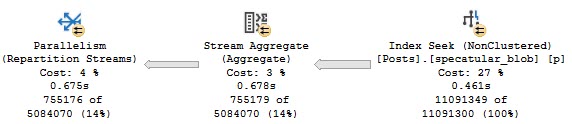
The relevant part of the query plan looks like this:
What’s My Name
We do a seek into the index we created on the two columns in our WHERE clause. We didn’t have to go back to the clustered index for everything else in the table.
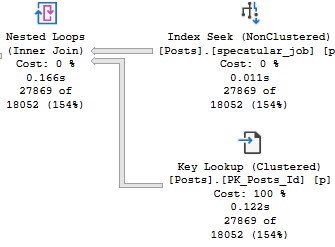
That’s easy enough to prove if we only run the subquery — we have to change it a little bit, but the plan tells us what we need.
SELECT *
FROM   dbo.Posts AS p
WHERE  p.OwnerUserId = 22656
AND    p.PostTypeId = 2;
This time we do need the clustered index:
Who We Be
You can even change it to something that would normally throw an error:
SELECT COUNT(*) AS records
FROM   dbo.Users AS u
WHERE  EXISTS ( SELECT 1/0
                FROM dbo.Posts AS p
				WHERE p.OwnerUserId = u.Id
				AND p.PostTypeId = 2 );
Two For Completeness
Another example is in derived tables, joins, and apply.
Take these two queries. The first one only selects columns in our nonclustered index (same as above).
The second one actually does a SELECT *.
/*selective*/
SELECT     u.Id,
           u.DisplayName,
		   ca.OwnerUserId, --I am only selecting columns in our index
		   ca.PostTypeId,
		   ca.Id
FROM       dbo.Users AS u
CROSS APPLY( SELECT TOP (1) * --I am select *
             FROM dbo.Posts AS p
			 WHERE p.OwnerUserId = u.Id
			 AND p.PostTypeId = 2
			 ORDER BY p.OwnerUserId DESC, p.Id DESC) AS ca
WHERE U.Reputation >= 100000;

/*less so*/
SELECT     u.Id,
           u.DisplayName,
		   ca.* --I am select *
FROM       dbo.Users AS u
CROSS APPLY( SELECT TOP (1) * --I am select *
             FROM dbo.Posts AS p
			 WHERE p.OwnerUserId = u.Id
			 AND p.PostTypeId = 2
			 ORDER BY p.OwnerUserId DESC, p.Id DESC) AS ca
WHERE U.Reputation >= 100000;
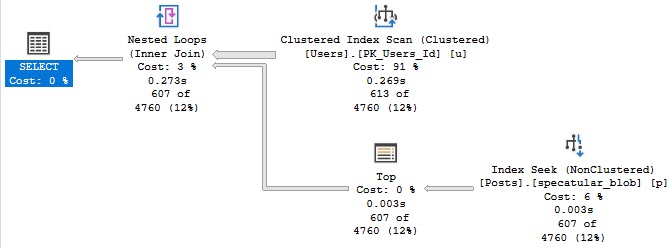
The first query only touches our narrow nonclustered index:
Blackout
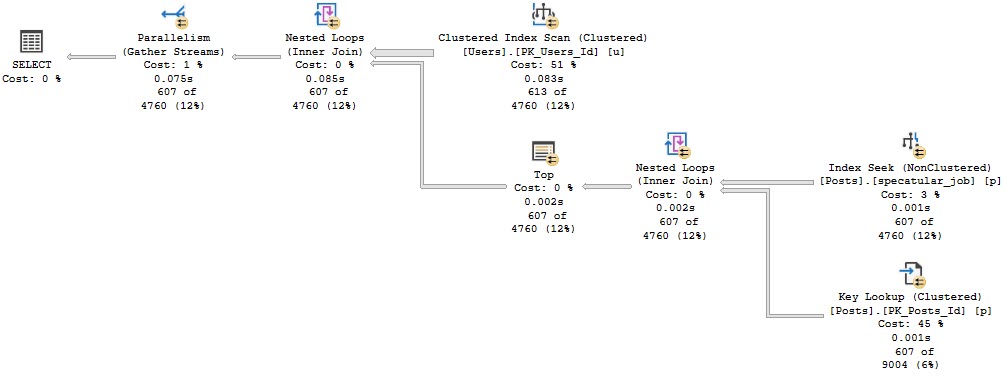
The second query does a key lookup, because we really do select everything.
Party Up
Trash Pile
I know, you’ve been well-conditioned to freak out about certain things. I’m here to help.
Not every SELECT * needs to be served a stake through the heart and beheading.
Thanks for reading!
Going Further
If this is the kind of SQL Server stuff you love learning about, you’ll love my training. Blog readers get 25% off the Everything Bundle — over 100 hours of performance tuning content. Need hands-on help? I offer consulting engagements from targeted investigations to ongoing retainers. Want a quick sanity check before committing to a full engagement? Schedule a call — no commitment required.
My Dear Friend™ Sean recently wrote a post talking about how people are doing index maintenance wrong. I’m going to go a step further and talk about how the method your index maintenance scripts use to evaluate fragmentation is wrong.
If you look at how the script you use to decide whether or not you’re going to rebuild indexes works, and this goes for maintenance plans, too (I ran PROFILER LONG LIVE PROFILER GO TEAM PROFILER to confirm the query), you’ll see they run a query against dm_db_index_physical_stats.
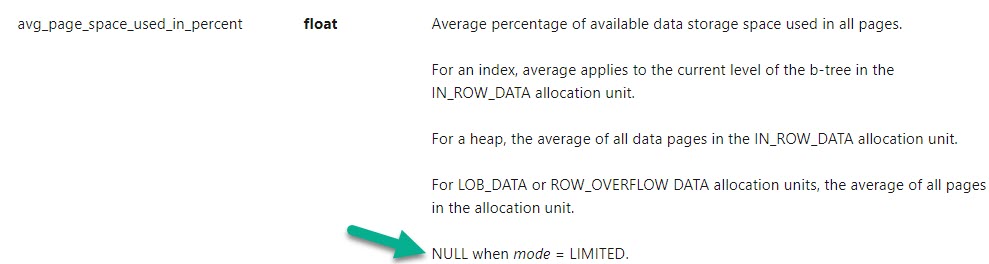
All of the queries use the column avg_fragmentation_in_percent to measure if your index needs to be rebuilt. The docs (linked above) for that column have this to say:
He cried
It’s measuring logical fragmentation. Logical fragmentation is when pages are out of order.
If you’re the kind of person who cares about various caches on your server, like the buffer pool or the plan cache, then you’d wanna measure something totally different. You’d wanna measure how much free space you have on each page, because having a bunch of empty space on each page means your data will take up more space in memory when you read it in there from disk.
You could do that with the column avg_page_space_used_in_percent.
BUT…
Oops
Your favorite index maintenance solution will do you a favor and only run dm_db_index_physical_stats in LIMITED mode by default. That’s because taking deeper measurements can be rough on a server with a lot of data on it, and heck, even limited can run for a long time.
But if I were going to make the decision to rebuild an index, this is the measurement I’d want to use. Because all that unused space can be wasteful.
The thing is, there’s not a great correlation between avg_fragmentation_in_percent being high, and avg_page_space_used_in_percent.
Local Database
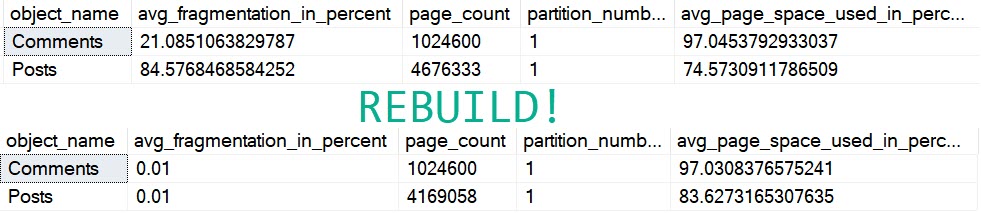
When looking at fragmentation in my copy of the Stack Overflow 2013 database:
Scum
Both of those tables are fragmented enough to get attention from a maintenance solution, but rebuilding only really helps the Posts table, even though we rebuilt both.
On the comments table, avg_page_space_used_in_percent goes down a tiny bit, and Posts gets better by about 10%.
The page count for Comments stays the same, but it goes down by about 500k for Posts.
This part I’m cool with. I’d love to read 500k less pages, if I were scanning the entire table.
But I also really don’t wanna be scanning the entire table outside of reporting or data warehouse-ish queries.
If we’re talking OLTP, avoiding scanning large tables is usually worthwhile, and to do that we create nonclustered indexes that help our queries find data effectively, and write queries with clear predicates that promote the efficient use of indexes.
Right?
Right.
Think About Your Maintenance Settings
They’re probably at the default of 5% and 30% for reorg and rebuild thresholds. Not only are those absurdly low, but they’re not even measuring the right kind of fragmentation. Even at 84% “fragmentation”, we had 75% full pages.
That’s not perfect, but it’s hardly a disaster.
Heck, you’ve probably been memed into setting fill factor lower than that to avoid fragmentation.
Worse, you’re probably looking at every table >1000 pages, which is about 8 MB.
If you have trouble reading and keeping 8 MB tables in memory, maybe it’s time to go shopping.
Thanks for reading!
Going Further
If this is the kind of SQL Server stuff you love learning about, you’ll love my training. Blog readers get 25% off the Everything Bundle — over 100 hours of performance tuning content. Need hands-on help? I offer consulting engagements from targeted investigations to ongoing retainers. Want a quick sanity check before committing to a full engagement? Schedule a call — no commitment required.
Having some key lookups in your query plans is generally unavoidable.
You’ll wanna select more columns than you wanna put in a nonclustered index, or ones with large data types that you don’t wanna bloat them with.
Enter the key lookup.
They’re one of those things — I’d say even the most common thing — that makes parameterized code sensitive to the bad kind of parameter sniffing, so they get a lot of attention.
The thing is, most of the attention that they get is just for columns you’re selecting, and most of the advice you get is to “create covering indexes”.
That’s not always possible, and that’s why I did this session a while back on a different way to rewrite queries to sometimes make them more efficient. Especially since key lookups may cause blocking issues.
Milk and Cookies
At some point, everyone will come across a key lookup in a query plan, and they’ll wonder if tuning it will fix performance.
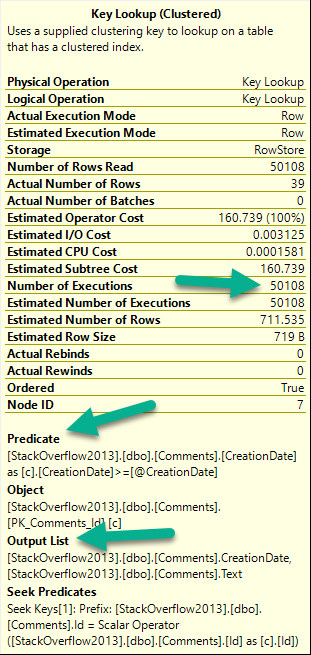
There are three things to pay attention to when you look at a key lookup:
I know what to do
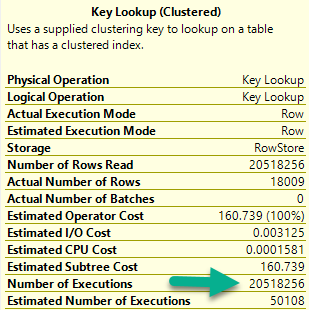
Number of executions: This is usually more helpful in an actual plan
If there are any Predicates involved: That means there are parts of your where clause not in your nonclustered index
If there’s an Output List involved: That means you’re selecting columns not in your nonclustered index
For number of executions, generally higher numbers are worse. This can be misleading if you’re looking at a cached plan because… You’re going to see the cached number, not the runtime number. They can be way different.
Notice I’m not worried about the Seek Predicates here — that just tells us how the clustered index got joined to the nonclustered index. In other words, it’s the clustered index key column(s).
Figure It Out
Here’s our situation: we’re working on a new stored procedure.
CREATE PROCEDURE dbo.predicate_felon (@Score INT, @CreationDate DATETIME)
AS
BEGIN

    SELECT *
    FROM dbo.Comments AS c
    WHERE c.Score = @Score
    AND   c.CreationDate >= @CreationDate
    ORDER BY c.CreationDate DESC;

END;
Right now, aside from the clustered index, we only have this nonclustered index. It’s great for some other query, or something.
CREATE INDEX ix_whatever
ON dbo.Comments (Score, UserId, PostId)
GO
When we run the stored procedure like this, it’s fast.
SQL Server wants an index — a fully covering index — but if we create it, we end up a 7.8GB index that has every column in the Comments table in it. That includes the Text column, which is an NVARCHAR(700). Sure, it fixes the key lookup, but golly and gosh, that’s a crappy index to have hanging around.
Bad Problems On The Rise
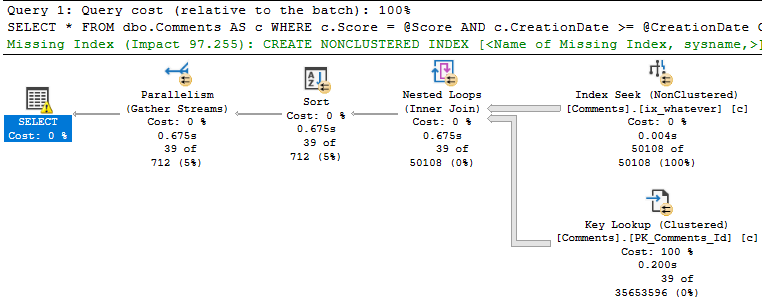
The issue turns up when we run the procedure like this:
EXEC dbo.predicate_felon @Score = 0, --El Zero
                         @CreationDate = '2013-12-31';
Not so much.
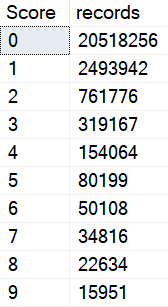
This happens because there are a lot more 0 scores than 6 scores.
Quiet time
Smarty Pants
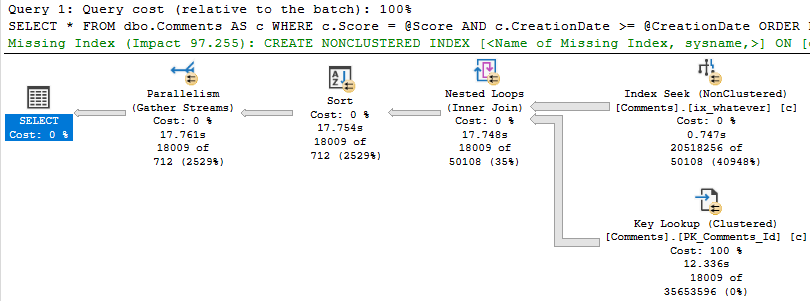
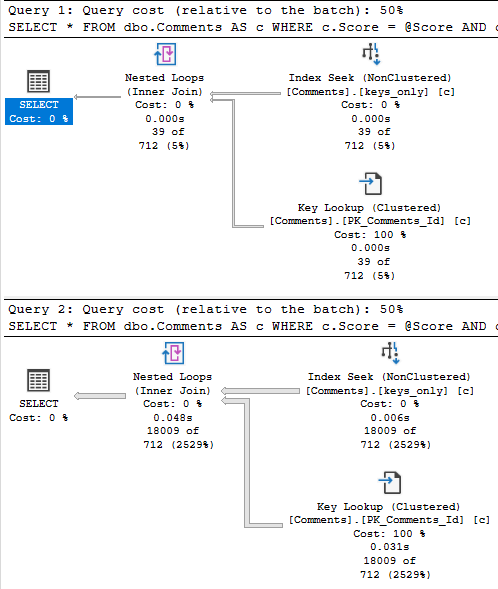
Eagle eyed readers will notice that the second query only returns ~18k rows, but it takes ~18 seconds to do it.
The problem is how much time we spend locating those rows. Sure, we can Seek into the nonclustered index to find all the 0s, but there are 20.5 million of them.
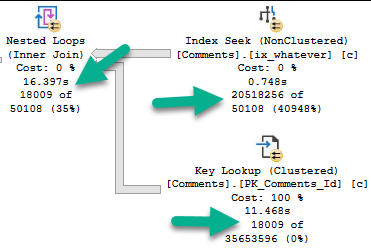
Looking at the actual plan, we can spot a few things.
Hunger ManagementHangman
The 18k rows we end up with are only filtered to with they key lookup, but it has to execute 20.5 million times to evaluate that extra predicate.
If we just index the key columns, the key lookup to get the other columns (PostId, Text, UserId) will only execute ~18k times. That’s not a big deal at all.
CREATE NONCLUSTERED INDEX keys_only
    ON dbo.Comments ( Score, CreationDate );
This index is only ~500MB, which is a heck of a lot better than nearly 8GB covering the entire thing.
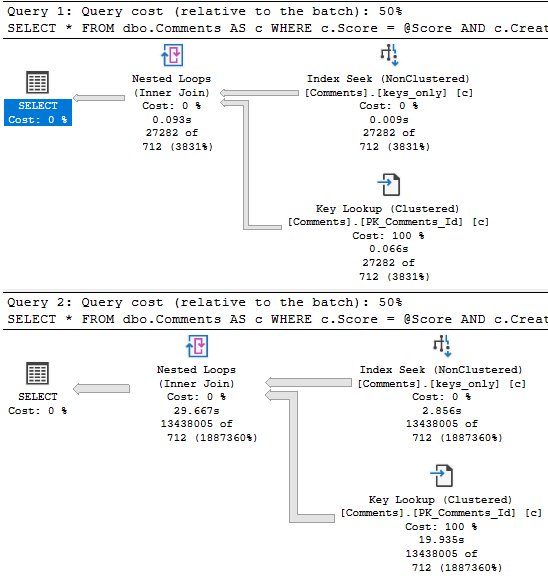
With that in place, both the score 6 and score 0 plans are fast.
rq
Why This Is Effective, and When It Might Not Be
This works here because the date filter is restrictive.
When we can eliminate more rows via the index seek, the key lookup is less of a big deal.
If the date predicate were much less restrictive, say going back to 2011, boy oh boy, things get ugly for the 0 query again.
Of course, returning that many rows will suck no matter what, so this is where other techniques come in like Paging, or charging users by the row come into play.
What? Why are you looking at me like that?
Thanks for reading!
Going Further
If this is the kind of SQL Server stuff you love learning about, you’ll love my training. Blog readers get 25% off the Everything Bundle — over 100 hours of performance tuning content. Need hands-on help? I offer consulting engagements from targeted investigations to ongoing retainers. Want a quick sanity check before committing to a full engagement? Schedule a call — no commitment required.
Today we’re going to look at how unused indexes add to locking problems.
Hold My Liquor
Video Summary
In this video, I delve into the impact of unused indexes on lock escalation in SQL Server. Starting off with a real-world scenario where I demonstrate how these unused indexes can significantly affect query performance by altering lock behavior, I walk you through an example update query and show how adding even seemingly helpful indexes can lead to excessive locking. By experimenting with various indexes and observing the resulting lock patterns, I aim to illustrate that having numerous indexes on frequently modified data can accelerate lock escalation, potentially causing more blocking issues. This video is a continuation of my exploration into unused indexes and their hidden costs, encouraging viewers to think critically about index quality rather than just quantity.
Full Transcript
Ehhhhh. It’s 8.30 in the morning and I’m recording this because I have a call in like an hour and I have some stuff that I got to do before that. I was going to record it last night but I got sleepy. Anyway, we’re going to talk about how unused indexes. Now, yesterday’s post was about how unused indexes could mess up the buffer pool, how they get going there when queries read them to put writes on them, right? To modify them. So here we’re going to talk about how that can change lock escalation. Now, the, like I’m not going to set up a weird workload to like say, hey, look at these indexes are so unused, blah, blah, blah. I don’t want you to think about these as just being like extra indexes. I want you to think about these being unused indexes. These are low quality indexes. They’re not like just extra. They’re not just like hanging around, but not like we had a certain number of indexes. You can’t have more than that because it’s just going to ruin your life. I just want you to think of it as a context. Like you ran SP Blitz index or something. You saw like unused indexes or you saw like indexes with a high right to read ratio against them and you want to know like what problems they might cause. There are a bunch of them. We talked about the buffer pool yesterday when we have to maintain these indexes when they’re written to and today we’re going to look at how they affect lock escalation. Now, the update query that I’m going to run is over in this window.
It updates everyone’s age where the user reputation equals 191 and of course I chose that number for a very specific reason. Now, let’s make sure that we don’t have any indexes going on here and we don’t. And I just want to show you really quickly that when we run this with no index on the table, we update 1500 rows. And when we look at the request mode, we have locked exclusively some pages. We have only asked for an intent exclusive lock on the object. The thing is without a helpful index to help us find user IDs with this reputation.
Let’s put that down a little bit. Without a helpful index to help us find user IDs of this reputation. This query just takes like excessive little of this where we’ll take like an object level lock pretty quickly. Right now. So, if we run this query, we can get one. And if we get this run this query, we can’t this this query is effectively blocked because this person has a reputation of 191, which is a record that we’re updating. So, let’s kill that and let’s roll this back and let’s add a helpful index and look how locking changes. So, that index is now in place. We’ll run our update.
And now let’s look at what we have locked. And now we only have intent exclusive locks on pages. We only have an intent exclusive lock on the object. And now we have exclusive locks on the key of an index. That index is the index we have the locks on is the one that we just created over here on the reputation column. So, we would still be able to select this data, but we wouldn’t be able to select this data because this data would still be locked.
Cool. Now, let’s roll this back and let’s see at what point of adding indexes does SQL Server say, well, I’m just going to lock the entire table. So, we’re going to add this index. And the point of all these indexes is that they all have the age column in them somewhere. So, that means that we’re going to have to modify them. Right? If they didn’t have the age column in them, we wouldn’t have to touch them.
But since these all have the age column in them and we’re updating age, well, that’s just a break. So, we added that index. Let’s go over here and look at this. Still 1500 rows. And when we run this, now we just have more locks on more keys. Okay? We went up from 1500 to 3100 something. Right? We effectively doubled the amount of locks.
So, now, go back and we’ll add our next index. What will happen now? Where will this go? We’ll do begin trend. Update that. Come back over here and look. Now, we just have more total locks over here. We still only have intent exclusive locks down here.
We only have the exclusive, like, I’ll mess with you locks up here. Fine. Roll this back. All right. Now, we’re going to add a full one, two, three, fourth, fourth index to the table. And when that’s in place, we’ll go look and see what happens. We’ll come run our update over here. We can trend 1556. What happens now? Well, 9000 locks up here. That’s getting up there, right?
And everything you heard about lock escalation is weird. All right. Let’s add another index to the mix. Let’s go get this one on there. And it was funny when I was practicing writing this, the amount of times I forgot to roll this back before trying to create an index. It was terrible. It was very unprofessional. And there was a lot of just terrible blocking involved.
So let’s go and run this now. And now we have, well, still attended the, but, but, but, but. And now we just have 10,000, almost 11,000 key locks. Ooh, boy, SQL Server. What are you up to? I’m being quite devilish, quite devilish this morning. It was being quite devilish last night too, if I do say so myself. That’s SQL Server. All right.
So now we’re going to go run this update again with a yet another index on the table and we’ll run this and 14,000 key locks, one exclusive lock. All right. Only on key intent, intent, funny, right? Funny stuff. All right. Roll you back. Messed everything up. Messed the whole thing up. Now let’s add one more index.
Let’s see what we add when we add this one to the pile. What happens? Begin turn, run that, see what kind of locks we have. And finally, we have an exclusive lock on the object. So now we have a full table lock, which means that if we wanted to run this count query, we couldn’t.
This query is now blocked. So the bottom line on what I was trying to, what I’m trying to get to you, get, get across to you here, is that when you have a lot of indexes on a table, you typically increase lock escalation when you need to modify data. Now, this is assuming that, you know, you have indexes on data that is frequently modified.
This can be very frequent for, you know, of course, inserts because inserts, you know, they just kind of write to wherever. Single row inserts, probably not, probably not as bad, but, you know, probably take quite a bit of that. But, you know, when you update data or when you delete data with a where clause, depending on how much data you’re deleting, you may see lock escalation occur much faster when you have more indexes on the table and you’re taking more locks.
Because the locks are, like, cumulative, right? So you may see lock escalation happen faster when you have more indexes. Now, there’s all sorts of ways to remedy this, right?
There’s all sorts of ways to get around, like, the terrible reader-on-writer locking that we were just looking at, you know, there’s optimistic isolation levels. There’s, of course, the fabulous, wonderful no-lock hint that I see everyone use so successfully and so happily. I’m kidding.
It’s a miserable experience for everybody. Anyway, that’s it for me. I’m going to go finish my coffee and, I don’t know, I’ll probably be embarrassed by how incoherent I was on this later. Anyway, thanks for watching.
I hope you learned something. I hope you liked the video. Maybe? Maybe? I don’t know. Maybe you did. Maybe you didn’t. Anyway, I’m Eric with Erik Darling Data. I’m actually Erik Darling, too, so if that counts.
Anyway, thank you for watching and I will see you in another video at another time. Maybe I’ll wear a cowboy hat in the video. It doesn’t exactly look like a cowboy hat.
Before I get my jacket, I perhaps Hong Haut, who will get on Tuesday? I certainly don’t know. I’m here waiting. Maybe I’m going to see one of my shoes. Sometimes I could walk a basketball over your shoes and do my shoes and do my shoes. Or there is a little惹 of a laundry thing from now, and then I will open any shoes. Maybe I can walk a covered aba or a cafeteria. Right, absolutely. Okay, sure.
Video Summary
In this video, I delve into the impact of unused indexes on lock escalation in SQL Server. Starting off with a real-world scenario where I demonstrate how these unused indexes can significantly affect query performance by altering lock behavior, I walk you through an example update query and show how adding even seemingly helpful indexes can lead to excessive locking. By experimenting with various indexes and observing the resulting lock patterns, I aim to illustrate that having numerous indexes on frequently modified data can accelerate lock escalation, potentially causing more blocking issues. This video is a continuation of my exploration into unused indexes and their hidden costs, encouraging viewers to think critically about index quality rather than just quantity.
Full Transcript
Ehhhhh. It’s 8.30 in the morning and I’m recording this because I have a call in like an hour and I have some stuff that I got to do before that. I was going to record it last night but I got sleepy. Anyway, we’re going to talk about how unused indexes. Now, yesterday’s post was about how unused indexes could mess up the buffer pool, how they get going there when queries read them to put writes on them, right? To modify them. So here we’re going to talk about how that can change lock escalation. Now, the, like I’m not going to set up a weird workload to like say, hey, look at these indexes are so unused, blah, blah, blah. I don’t want you to think about these as just being like extra indexes. I want you to think about these being unused indexes. These are low quality indexes. They’re not like just extra. They’re not just like hanging around, but not like we had a certain number of indexes. You can’t have more than that because it’s just going to ruin your life. I just want you to think of it as a context. Like you ran SP Blitz index or something. You saw like unused indexes or you saw like indexes with a high right to read ratio against them and you want to know like what problems they might cause. There are a bunch of them. We talked about the buffer pool yesterday when we have to maintain these indexes when they’re written to and today we’re going to look at how they affect lock escalation. Now, the update query that I’m going to run is over in this window.
It updates everyone’s age where the user reputation equals 191 and of course I chose that number for a very specific reason. Now, let’s make sure that we don’t have any indexes going on here and we don’t. And I just want to show you really quickly that when we run this with no index on the table, we update 1500 rows. And when we look at the request mode, we have locked exclusively some pages. We have only asked for an intent exclusive lock on the object. The thing is without a helpful index to help us find user IDs with this reputation.
Let’s put that down a little bit. Without a helpful index to help us find user IDs of this reputation. This query just takes like excessive little of this where we’ll take like an object level lock pretty quickly. Right now. So, if we run this query, we can get one. And if we get this run this query, we can’t this this query is effectively blocked because this person has a reputation of 191, which is a record that we’re updating. So, let’s kill that and let’s roll this back and let’s add a helpful index and look how locking changes. So, that index is now in place. We’ll run our update.
And now let’s look at what we have locked. And now we only have intent exclusive locks on pages. We only have an intent exclusive lock on the object. And now we have exclusive locks on the key of an index. That index is the index we have the locks on is the one that we just created over here on the reputation column. So, we would still be able to select this data, but we wouldn’t be able to select this data because this data would still be locked.
Cool. Now, let’s roll this back and let’s see at what point of adding indexes does SQL Server say, well, I’m just going to lock the entire table. So, we’re going to add this index. And the point of all these indexes is that they all have the age column in them somewhere. So, that means that we’re going to have to modify them. Right? If they didn’t have the age column in them, we wouldn’t have to touch them.
But since these all have the age column in them and we’re updating age, well, that’s just a break. So, we added that index. Let’s go over here and look at this. Still 1500 rows. And when we run this, now we just have more locks on more keys. Okay? We went up from 1500 to 3100 something. Right? We effectively doubled the amount of locks.
So, now, go back and we’ll add our next index. What will happen now? Where will this go? We’ll do begin trend. Update that. Come back over here and look. Now, we just have more total locks over here. We still only have intent exclusive locks down here.
We only have the exclusive, like, I’ll mess with you locks up here. Fine. Roll this back. All right. Now, we’re going to add a full one, two, three, fourth, fourth index to the table. And when that’s in place, we’ll go look and see what happens. We’ll come run our update over here. We can trend 1556. What happens now? Well, 9000 locks up here. That’s getting up there, right?
And everything you heard about lock escalation is weird. All right. Let’s add another index to the mix. Let’s go get this one on there. And it was funny when I was practicing writing this, the amount of times I forgot to roll this back before trying to create an index. It was terrible. It was very unprofessional. And there was a lot of just terrible blocking involved.
So let’s go and run this now. And now we have, well, still attended the, but, but, but, but. And now we just have 10,000, almost 11,000 key locks. Ooh, boy, SQL Server. What are you up to? I’m being quite devilish, quite devilish this morning. It was being quite devilish last night too, if I do say so myself. That’s SQL Server. All right.
So now we’re going to go run this update again with a yet another index on the table and we’ll run this and 14,000 key locks, one exclusive lock. All right. Only on key intent, intent, funny, right? Funny stuff. All right. Roll you back. Messed everything up. Messed the whole thing up. Now let’s add one more index.
Let’s see what we add when we add this one to the pile. What happens? Begin turn, run that, see what kind of locks we have. And finally, we have an exclusive lock on the object. So now we have a full table lock, which means that if we wanted to run this count query, we couldn’t.
This query is now blocked. So the bottom line on what I was trying to, what I’m trying to get to you, get, get across to you here, is that when you have a lot of indexes on a table, you typically increase lock escalation when you need to modify data. Now, this is assuming that, you know, you have indexes on data that is frequently modified.
This can be very frequent for, you know, of course, inserts because inserts, you know, they just kind of write to wherever. Single row inserts, probably not, probably not as bad, but, you know, probably take quite a bit of that. But, you know, when you update data or when you delete data with a where clause, depending on how much data you’re deleting, you may see lock escalation occur much faster when you have more indexes on the table and you’re taking more locks.
Because the locks are, like, cumulative, right? So you may see lock escalation happen faster when you have more indexes. Now, there’s all sorts of ways to remedy this, right?
There’s all sorts of ways to get around, like, the terrible reader-on-writer locking that we were just looking at, you know, there’s optimistic isolation levels. There’s, of course, the fabulous, wonderful no-lock hint that I see everyone use so successfully and so happily. I’m kidding.
It’s a miserable experience for everybody. Anyway, that’s it for me. I’m going to go finish my coffee and, I don’t know, I’ll probably be embarrassed by how incoherent I was on this later. Anyway, thanks for watching.
I hope you learned something. I hope you liked the video. Maybe? Maybe? I don’t know. Maybe you did. Maybe you didn’t. Anyway, I’m Eric with Erik Darling Data. I’m actually Erik Darling, too, so if that counts.
Anyway, thank you for watching and I will see you in another video at another time. Maybe I’ll wear a cowboy hat in the video. It doesn’t exactly look like a cowboy hat.
Before I get my jacket, I perhaps Hong Haut, who will get on Tuesday? I certainly don’t know. I’m here waiting. Maybe I’m going to see one of my shoes. Sometimes I could walk a basketball over your shoes and do my shoes and do my shoes. Or there is a little惹 of a laundry thing from now, and then I will open any shoes. Maybe I can walk a covered aba or a cafeteria. Right, absolutely. Okay, sure.
Going Further
If this is the kind of SQL Server stuff you love learning about, you’ll love my training. Blog readers get 25% off the Everything Bundle — over 100 hours of performance tuning content. Need hands-on help? I offer consulting engagements from targeted investigations to ongoing retainers. Want a quick sanity check before committing to a full engagement? Schedule a call — no commitment required.
When you find unused indexes, whether using Some Script From The Internet™, sp_BlitzIndex, or Database Telepathy, the first thing most people think of is “wasted space”.
Sure, okay, yeah. That’s valid. They’re in backups, restores, they get hit by CHECKDB. You probably rebuild them if there’s a whisper of fragmentation.
But it’s not the end of the story.
Not by a long shot.
Today we’re going to look at how redundant indexes can clog the buffer pool up.
Holla Back
If you want to see the definitions for the views I’m using, head to this post and scroll down.
Heck, stick around and watch the video too.
LIKE AND SUBSCRIBE.
Now, sp_BlitzIndex has two warnings to catch these “bad” indexes:
Unused Indexes With High Writes
NC Indexes With High Write:Read Ratio
Unused are just what they sound like: they’re not helping queries read data at all. Of course, if you’ve rebooted recently, or rebuilt indexes on buggy versions of SQL Server, you might get this warning on indexes that will get used. I can’t fix that, but I can tell you it’s your job to keep an eye on usage over time.
Indexes with a high write to read ratio are also pretty self-explanatory. They’re sometimes used, but they’re written to a whole lot more. Again, you should keep an eye on this over time, and try to understand both how important they might be to your workload, or how much they might be hurting your workload.
I’m not going to set up a fake workload to generate those warnings, but I am going to create some overlapping indexes that might be good candidates for you to de-clutter.
Index Entrance
The Votes table is pretty narrow, but it’s also pretty big — 53 million rows or so as of Stack 2013.
Here are my indexes:
CREATE INDEX who ON dbo.Votes(PostId, UserId) INCLUDE(BountyAmount);
CREATE INDEX what ON dbo.Votes(UserId, PostId) INCLUDE(BountyAmount);
CREATE INDEX [where] ON dbo.Votes(CreationDate, UserId) INCLUDE(BountyAmount);
CREATE INDEX [when] ON dbo.Votes(BountyAmount, UserId) INCLUDE(CreationDate);
CREATE INDEX why ON dbo.Votes(PostId, CreationDate) INCLUDE(BountyAmount);
CREATE INDEX how ON dbo.Votes(VoteTypeId, BountyAmount) INCLUDE(UserId);
First, I’m gonna make sure there’s nothing in memory:
CHECKPOINT;
GO 2
DBCC DROPCLEANBUFFERS;
GO
Don’t run that in production. It’s stupid if you run that in production.
Now when I go to look at what’s in memory, nothing will be there:
SELECT *
FROM dbo.WhatsUpMemory AS wum
WHERE wum.object_name = 'Votes'
I’m probably not going to show you the results of an empty query set. It’s not too illustrative.
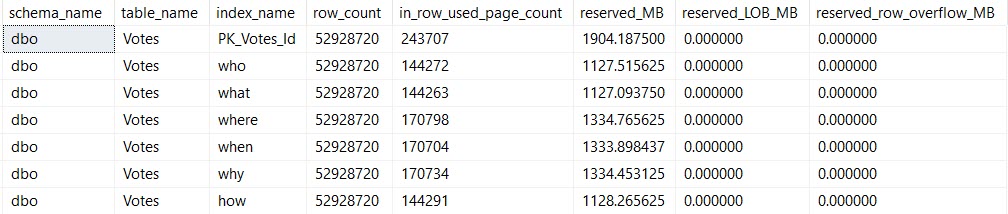
I am going to show you the index sizes on disk:
SELECT *
FROM dbo.WhatsUpIndexes AS wui
WHERE wui.table_name = 'Votes';
Size Mutters
And I am going to show you this update:
UPDATE v
SET v.BountyAmount = 2147483647
FROM dbo.Votes AS v
WHERE v.BountyAmount IS NULL
AND   v.CreationDate >= '20131231'
AND v.VoteTypeId > 2;
After The Update
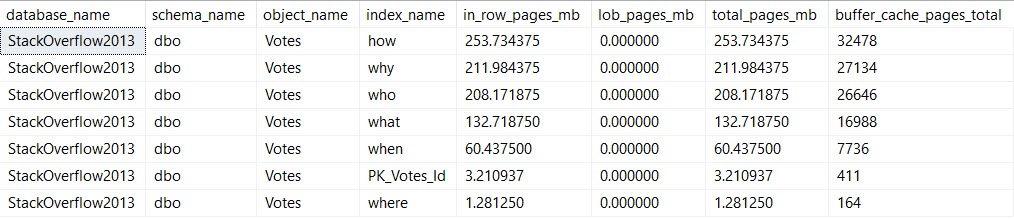
This is when things get more interesting for the memory query.
Life Of A Moran
We’re updating the column BountyAmount, which is present in all of the indexes I created. This is almost certainly an anti-pattern, but it’s good to illustrate the problem.
Pieces of every index end up in memory. That’s because all data needs to end up in memory before SQL Server will work with it.
It doesn’t need the entirety of any of these indexes in memory — we’re lucky enough to have indexes to help us find the 10k or so rows we’re updating. I’m also lucky enough to have 64GB of memory dedicated to this instance, which can easily hold the full database.
But still, if you’re not lucky enough to be able to fit your whole database in memory, wasting space in the buffer pool for unused (AND OH GODD PROBABLY FRAGMENTED) indexes just to write to them is a pretty bad idea.
After all, it’s not just the buffer pool that needs memory.
You also need memory for memory grants (shocking huh?), and other caches and activities (like the plan cache, and compressed backups).
Cleaning up those low-utilization indexes can help you make better use of the memory that you have.
Thanks for reading!
Going Further
If this is the kind of SQL Server stuff you love learning about, you’ll love my training. Blog readers get 25% off the Everything Bundle — over 100 hours of performance tuning content. Need hands-on help? I offer consulting engagements from targeted investigations to ongoing retainers. Want a quick sanity check before committing to a full engagement? Schedule a call — no commitment required.
In this video, I dive into the quirky behavior of indexed views in SQL Server, particularly focusing on what happens when you alter an index view. I share my personal experience with a six-year-old daughter who recently discovered that I’m on YouTube, which led to a priceless moment of realization for her. The main takeaway is that altering an index view can drop any indexes created on it, whether they are clustered or nonclustered. This can be quite surprising and potentially problematic if you’re not aware of this behavior. I walk through the process step-by-step using a simple example where creating or altering a view called “top comments” results in the disappearance of its index when altered. The video is light-hearted, filled with personal anecdotes, and aimed at making what could be a complex topic more approachable for SQL Server enthusiasts.
Full Transcript
This is gonna be one of those videos that you watch maybe because you see it on Twitter and then you’ll see it in a blog post a month later and be disappointed that it’s just a blog post with a video that you saw a month ago. But them’s the breaks when you have 30 blog posts already lined up. What do you want me to tell you? My six-year-old daughter recently discovered that I am on YouTube and the look on her face when she discovered that was priceless. Anyway, I’m here to talk, I shouldn’t introduce myself. My name’s Erik. I am, I am the janitor here at Erik Darling Data and I’m here to talk about something kind of funny that happens. with indexed views. Now, an indexed view is a pretty cool thing. It’s a, it’s a, it materializes a view. It makes that view a real, a real person like Pinocchio, what makes that view a real boy. And, I’m, it doesn’t matter if you use create or alter or create or alter here. It’s always the same thing, which I’ll, I’ll, I’ll walk through, but let’s create or alter a view called top comments. Now, if you want to create an index view, there are a whole bunch of rules that you have to follow.
There’s far too many rules for me to get into here, but a couple, one, a couple that we need for this particular index view are schema binding, which you need for all index views and account big column if you have an aggregate. Now, you can create index views without an aggregate that don’t have account big column because that wouldn’t make any sense. But, if you’re going to aggregate, uh, data in an index view, which is kind of like the whole point of an index view, or the whole point of most index views that I see, well, this is a pretty good, well, this is something you have to do anyway. So, let’s create this view and, uh, we’ll go look at that view and object explorer. You can see all the stupid things that I create, uh, writing demos. And that one was called, uh, top comments, I believe.
And if you go look, there is no index here, right? There’s no index on this view. And if we come back over here and we execute this, we’ll have an index on that view now. And now if we refresh, oh yeah, we’ve got to go up here to refresh. I promise I know what I’m doing. If we go here, refresh, and we look at top comments, we will now have an index on that view. So, we do have an index on that view now. Watch. Pay very careful, close attention to what’s going to happen next.
I’m going to say, I’m going to get rid of this window by hitting control and R. And I’m going to create or alter my view. And let’s go back and look. Let’s refresh this whole thing again. And let’s go into top comments. And look, my index is gone. My index has been dropped.
Now, if I go create that index again, it’ll show back up in there. And if I just run this as an alter view, I realize that not everyone is on at least SQL Server 2016. What’s that, 16? Then everyone can do create or alter. But if I do alter view, and I run this, and we go back and we look at top comments by refreshing, because we’re smart people and we know what we’re doing now, my index will be gone. Fun, right? So, moral of the story, be careful when you’re altering index views.
When you alter an index view, it drops any indexes you create on it. So, it will drop the clustered index. If you create additional nonclustered indexes on your index views, it will drop those too. And, I don’t know. You might not be lucky enough to have a very easy time recreating your indexes on your views.
It might not always be as painless a process as I have here on my view on my nice 64 gig of RAM laptop. Yes. 64 gig of RAM laptop. Anyway, I’m Eric, and I, of course, am the head chef at Erik Darling Data.
Thank you for watching. Thank you. I hope you learned something. I hope you at least enjoyed me rambling. It was probably better than whatever else you were going to do for the last four and a half minutes. I mean, probably not.
Anyway, thanks for watching, and I will see you in another video, another time, another place. Goodbye. What do you think I do? Have Bert Hold Faith? I order you. I started out before you. You did it to me, whatever’s all because I have a mythOL time.
Video Summary
In this video, I dive into the quirky behavior of indexed views in SQL Server, particularly focusing on what happens when you alter an index view. I share my personal experience with a six-year-old daughter who recently discovered that I’m on YouTube, which led to a priceless moment of realization for her. The main takeaway is that altering an index view can drop any indexes created on it, whether they are clustered or nonclustered. This can be quite surprising and potentially problematic if you’re not aware of this behavior. I walk through the process step-by-step using a simple example where creating or altering a view called “top comments” results in the disappearance of its index when altered. The video is light-hearted, filled with personal anecdotes, and aimed at making what could be a complex topic more approachable for SQL Server enthusiasts.
Full Transcript
This is gonna be one of those videos that you watch maybe because you see it on Twitter and then you’ll see it in a blog post a month later and be disappointed that it’s just a blog post with a video that you saw a month ago. But them’s the breaks when you have 30 blog posts already lined up. What do you want me to tell you? My six-year-old daughter recently discovered that I am on YouTube and the look on her face when she discovered that was priceless. Anyway, I’m here to talk, I shouldn’t introduce myself. My name’s Erik. I am, I am the janitor here at Erik Darling Data and I’m here to talk about something kind of funny that happens. with indexed views. Now, an indexed view is a pretty cool thing. It’s a, it’s a, it materializes a view. It makes that view a real, a real person like Pinocchio, what makes that view a real boy. And, I’m, it doesn’t matter if you use create or alter or create or alter here. It’s always the same thing, which I’ll, I’ll, I’ll walk through, but let’s create or alter a view called top comments. Now, if you want to create an index view, there are a whole bunch of rules that you have to follow.
There’s far too many rules for me to get into here, but a couple, one, a couple that we need for this particular index view are schema binding, which you need for all index views and account big column if you have an aggregate. Now, you can create index views without an aggregate that don’t have account big column because that wouldn’t make any sense. But, if you’re going to aggregate, uh, data in an index view, which is kind of like the whole point of an index view, or the whole point of most index views that I see, well, this is a pretty good, well, this is something you have to do anyway. So, let’s create this view and, uh, we’ll go look at that view and object explorer. You can see all the stupid things that I create, uh, writing demos. And that one was called, uh, top comments, I believe.
And if you go look, there is no index here, right? There’s no index on this view. And if we come back over here and we execute this, we’ll have an index on that view now. And now if we refresh, oh yeah, we’ve got to go up here to refresh. I promise I know what I’m doing. If we go here, refresh, and we look at top comments, we will now have an index on that view. So, we do have an index on that view now. Watch. Pay very careful, close attention to what’s going to happen next.
I’m going to say, I’m going to get rid of this window by hitting control and R. And I’m going to create or alter my view. And let’s go back and look. Let’s refresh this whole thing again. And let’s go into top comments. And look, my index is gone. My index has been dropped.
Now, if I go create that index again, it’ll show back up in there. And if I just run this as an alter view, I realize that not everyone is on at least SQL Server 2016. What’s that, 16? Then everyone can do create or alter. But if I do alter view, and I run this, and we go back and we look at top comments by refreshing, because we’re smart people and we know what we’re doing now, my index will be gone. Fun, right? So, moral of the story, be careful when you’re altering index views.
When you alter an index view, it drops any indexes you create on it. So, it will drop the clustered index. If you create additional nonclustered indexes on your index views, it will drop those too. And, I don’t know. You might not be lucky enough to have a very easy time recreating your indexes on your views.
It might not always be as painless a process as I have here on my view on my nice 64 gig of RAM laptop. Yes. 64 gig of RAM laptop. Anyway, I’m Eric, and I, of course, am the head chef at Erik Darling Data.
Thank you for watching. Thank you. I hope you learned something. I hope you at least enjoyed me rambling. It was probably better than whatever else you were going to do for the last four and a half minutes. I mean, probably not.
Anyway, thanks for watching, and I will see you in another video, another time, another place. Goodbye. What do you think I do? Have Bert Hold Faith? I order you. I started out before you. You did it to me, whatever’s all because I have a mythOL time.
Going Further
If this is the kind of SQL Server stuff you love learning about, you’ll love my training. Blog readers get 25% off the Everything Bundle — over 100 hours of performance tuning content. Need hands-on help? I offer consulting engagements from targeted investigations to ongoing retainers. Want a quick sanity check before committing to a full engagement? Schedule a call — no commitment required.
Indexes remind me of salt. And no, not because they’re fun to put on slugs.
More because it’s easy to tell when there’s too little or too much indexing going on. Just like when you taste food it’s easy to tell when there’s too much or too little salt.
Salt is also one of the few ingredients that is accepted across the board in chili.
To continue feeding a dead horse, the amount of indexing that each workload and system needs and can handle can vary quite a bit.
Appetite For Nonclustered
I’m not going to get into the whole clustered index thing here. My stance is that I’d rather take a chance having one than not having one on a table (staging tables aside). Sort of like a pocket knife: I’d rather have it and not need it than need it and not have it.
At some point, you’ve gotta come to terms with the fact that you need nonclustered indexes to help your queries.
But which ones should you add? Where do you even start?
Let’s walk through your options.
If Everything Is Awful
It’s time to review those missing index requests. My favorite tool for that is sp_BlitzIndex, of course.
Now, I know, those missing index requests aren’t perfect.
I’m gonna share an industry secret with you: No one else looking at your server for the first time is going to have a better idea. Knowing what indexes you need often takes time and domain/workload knowledge.
If you’re using sp_Blitzindex, take note of a few things:
How long the server has been up for: Less than a week is usually pretty weak evidence
The “Estimated Benefit” number: If it’s less than 5 million, you may wanna put it to the side in favor of more useful indexes in round one
Duplicate requests: There may be several requests for indexes on the same table with similar definitions that you can consolidate
Insane lists of Includes: If you see requests on (one or a few key columns) and include (every other column in the table), try just adding the key columns first
Of course, I know you’re gonna test all these in Dev first, so I won’t spend too much time on that aspect ?
If One Query Is Awful
You’re gonna wanna look at the query plan — there may be an imperfect missing index request in there.
Hip Hop Hooray
And yeah, these are just the missing index requests that end up in the DMVs added to the query plan XML.
They’re not any better, and they’re subject to the same rules and problems. And they’re not even ordered by Impact.
Cute. Real cute.
sp_BlitzCache will show them to you by Impact, but that requires you being able to get the query from the plan cache, which isn’t always possible.
If You Don’t Trust Missing Index Requests
And trust me, I’m with you there, think about the kind of things indexes are good at helping queries do:
Find data
Join data
Order data
Group data
Keeping those basic things in mind can help you start designing much smarter indexes than SQL Server can give you.
You can start finding all sorts of things in your query plans that indexes might change.
If this is the kind of SQL Server stuff you love learning about, you’ll love my training. Blog readers get 25% off the Everything Bundle — over 100 hours of performance tuning content. Need hands-on help? I offer consulting engagements from targeted investigations to ongoing retainers. Want a quick sanity check before committing to a full engagement? Schedule a call — no commitment required.
Often when query tuning, I’ll try a change that I think makes sense, only to have it backfire.
It’s not that the query got slower, it’s that the results that came back were wrong different.
Now, this can totally happen because of a bug in previously used logic, but that’s somewhat rare.
And wrong different results make testers nervous. Especially in production.
Here’s a Very Cheeky™ example.
Spread’em
This is my starting query. If I run it enough times, I’ll get a billion missing index requests.
WITH topusers AS
(
    SELECT   TOP (1)
             u.Id, u.DisplayName
    FROM     dbo.Users AS u
    ORDER BY u.Reputation DESC
)
SELECT   u.Id,
         u.DisplayName,
         SUM(p.Score * 1.0) AS PostScore,
         SUM(c.Score * 1.0) AS CommentScore,
         COUNT_BIG(*) AS CountForSomeReason
FROM     topusers AS u
JOIN     dbo.Posts AS p
    ON p.OwnerUserId = u.Id
JOIN     dbo.Comments AS c
    ON c.UserId = u.Id
WHERE    p.Score >= 5
AND      c.Score >= 1
GROUP BY u.Id, u.DisplayName;
For the sake of argument, I’ll add them all. Here they are:
CREATE INDEX ix_tabs
    ON dbo.Users ( Reputation DESC, Id )
    INCLUDE ( DisplayName );

CREATE INDEX ix_spaces
    ON dbo.Users ( Id, Reputation DESC )
    INCLUDE ( DisplayName );

CREATE INDEX ix_coke
    ON dbo.Comments ( Score) INCLUDE( UserId );

CREATE INDEX ix_pepsi
    ON dbo.Posts ( Score ) INCLUDE( OwnerUserId );

CREATE NONCLUSTERED INDEX ix_tastes_great
    ON dbo.Posts ( OwnerUserId, Score );

CREATE NONCLUSTERED INDEX ix_less_filling
    ON dbo.Comments ( UserId, Score );
With all those indexes, the query is still dog slow.
Maybe It’s Me
I’ll take my own advice. Let’s break the query up a little bit.
DROP TABLE IF EXISTS #topusers;

WITH topusers AS
(
    SELECT   TOP (1)
             u.Id, u.DisplayName
    FROM     dbo.Users AS u
    ORDER BY u.Reputation DESC
)
SELECT *
INTO #topusers
FROM topusers;

CREATE UNIQUE CLUSTERED INDEX ix_whatever
    ON #topusers(Id);

SELECT   u.Id,
         u.DisplayName,
         SUM(p.Score * 1.0) AS PostScore,
         SUM(c.Score * 1.0) AS CommentScore,
         COUNT_BIG(*) AS CountForSomeReason
FROM     #topusers AS u
JOIN     dbo.Posts AS p
    ON p.OwnerUserId = u.Id
JOIN     dbo.Comments AS c
    ON c.UserId = u.Id
WHERE    p.Score >= 5
AND      c.Score >= 1
GROUP BY u.Id, u.DisplayName;
Still dog slow.
Variability
Alright, I’m desperate now. Let’s try this.
DECLARE @Id INT,
        @DisplayName NVARCHAR(40);

SELECT   TOP (1)
            @Id = u.Id,
		    @DisplayName = u.DisplayName
FROM     dbo.Users AS u
ORDER BY u.Reputation DESC;


SELECT   @Id AS Id,
         @DisplayName AS DisplayName,
         SUM(p.Score * 1.0) AS PostScore,
         SUM(c.Score * 1.0) AS CommentScore,
         COUNT_BIG(*) AS CountForSomeReason
FROM dbo.Posts AS p
JOIN  dbo.Comments AS c
    ON c.UserId = p.OwnerUserId
WHERE    p.Score >= 5
AND      c.Score >= 1
AND      (c.UserId = @Id OR @Id IS NULL)
AND      (p.OwnerUserId = @Id OR @Id IS NULL);
Let’s get some worst practices involved. That always goes well.
Except here.
Getting the right results seemed like it was destined to be slow.
Differently Resulted
At this point, I tried several rewrites that were fast, but wrong.
What I had missed, and what Joe Obbish pointed out to me, is that I needed a cross join and some math to make it all work out.
WITH topusers AS
(
    SELECT   TOP (1)
             u.Id, u.DisplayName
    FROM     dbo.Users AS u
    ORDER BY u.Reputation DESC
)
SELECT     t.Id AS Id,
           t.DisplayName AS DisplayName,
           p_u.PostScoreSub * c_u.CountCSub AS PostScore,
           c_u.CommentScoreSub * p_u.CountPSub AS CommentScore,
           c_u.CountCSub * p_u.CountPSub AS CountForSomeReason
FROM       topusers AS t
JOIN       (   SELECT   p.OwnerUserId,
                        SUM(p.Score * 1.0) AS PostScoreSub,
						COUNT_BIG(*) AS CountPSub
               FROM     dbo.Posts AS p
               WHERE    p.Score >= 5
               GROUP BY p.OwnerUserId ) AS p_u
			   ON p_u.OwnerUserId = t.Id
CROSS JOIN (   SELECT   c.UserId, SUM(c.Score * 1.0) AS CommentScoreSub, COUNT_BIG(*) AS CountCSub
               FROM     dbo.Comments AS c
               WHERE    c.Score >= 1
               GROUP BY c.UserId ) AS c_u
               WHERE c_u.UserId = t.Id;
This finishes instantly, with the correct results.
The value of a college education!
Realizations and Slowness
After thinking about Joe’s rewrite, I had a terrible thought.
All the rewrites that were correct but slow had gone parallel.
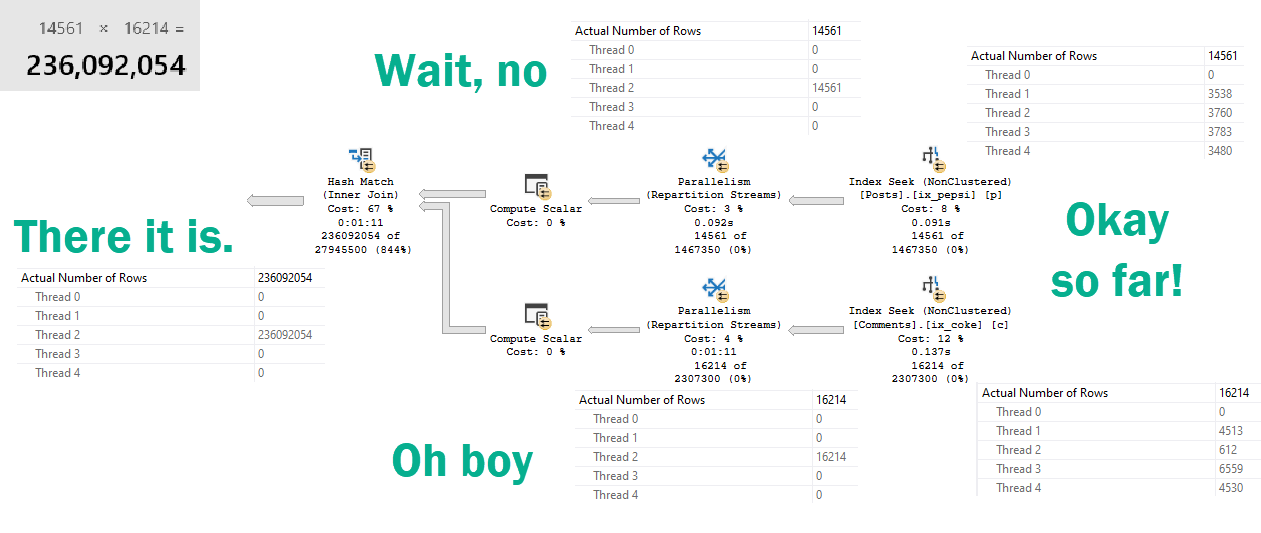
“Parallel”
Allow me to illustrate.
In a row?
Repartition Streams usually does the opposite.
But here, it puts all the rows on a single thread.
“For correctness”
Which ends up in a 236 million row parallel-but-single-threaded-cross-hash-join.
SQL Server uses the correct join (inner or outer) and adds projections where necessary to honour all the semantics of the original query when performing internal translations between apply and join.
The differences in the plans can all be explained by the different semantics of aggregates with and without a group by clause in SQL Server.
What’s amazing and frustrating about the optimizer is that it considers all sorts of different ways to rewrite your query.
In milliseconds.
It may have even thought about a plan that would have been very fast.
But we ended up with this one, because it looked cheap.
Untuneable
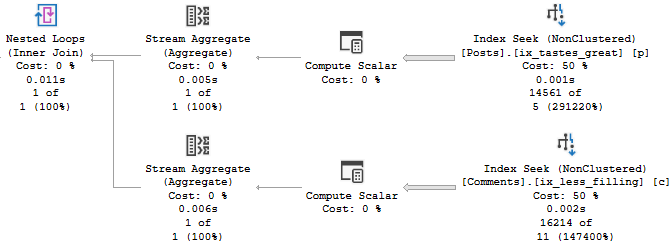
The plan for Joe’s version of the query is amazingly simple.
Bruddah.
Sometimes giving the optimizer a different query to work with helps, and sometimes it doesn’t.
Rewriting queries is tough business. When you change things and still get the same plan, it can be really frustrating.
Just know that behind the scenes the optimizer is working hard to rewrite your queries, too.
If you really want to change the execution plan you end up with, you need to present the logic to the optimizer in different ways, and often with different indexes to use.
Other times, you just gotta ask Joe.
Thanks for reading!
Going Further
If this is the kind of SQL Server stuff you love learning about, you’ll love my training. Blog readers get 25% off the Everything Bundle — over 100 hours of performance tuning content. Need hands-on help? I offer consulting engagements from targeted investigations to ongoing retainers. Want a quick sanity check before committing to a full engagement? Schedule a call — no commitment required.
Rounding out a few posts about SQL Server’s choice of one or more indexes depending on the cardinality estimates of literal values.
Today we’re going to look at how indexes can contribute to parameter sniffing issues.
It’s Friday and I try to save the real uplifting stuff for these posts.
Procedural
Here’s our stored procedure! A real beaut, as they say.
CREATE OR ALTER PROCEDURE dbo.lemons(@Score INT)
AS
BEGIN
    SELECT TOP (1000)
	       p.Id,
           p.AcceptedAnswerId,
           p.AnswerCount,
           p.CommentCount,
           p.CreationDate,
           p.LastActivityDate,
		   DATEDIFF( DAY,
		             p.CreationDate,
					 p.LastActivityDate
				   ) AS LastActivityDays,
           p.OwnerUserId,
           p.Score,
		   u.DisplayName,
		   u.Reputation
	FROM dbo.Posts AS p
	JOIN dbo.Users AS u
	    ON u.Id = p.OwnerUserId
	WHERE p.PostTypeId = 1
	AND   p.Score > @Score
	ORDER BY u.Reputation DESC;
END
GO
Here are the indexes we currently have.
CREATE INDEX smooth
    ON dbo.Posts(Score, OwnerUserId);

CREATE INDEX chunky
    ON dbo.Posts(OwnerUserId, Score)
	INCLUDE(AcceptedAnswerId, AnswerCount, CommentCount, CreationDate, LastActivityDate);
Looking at these, it’s pretty easy to imagine scenarios where one or the other might be chosen.
Heck, even a dullard like myself could figure it out.
Rare Score
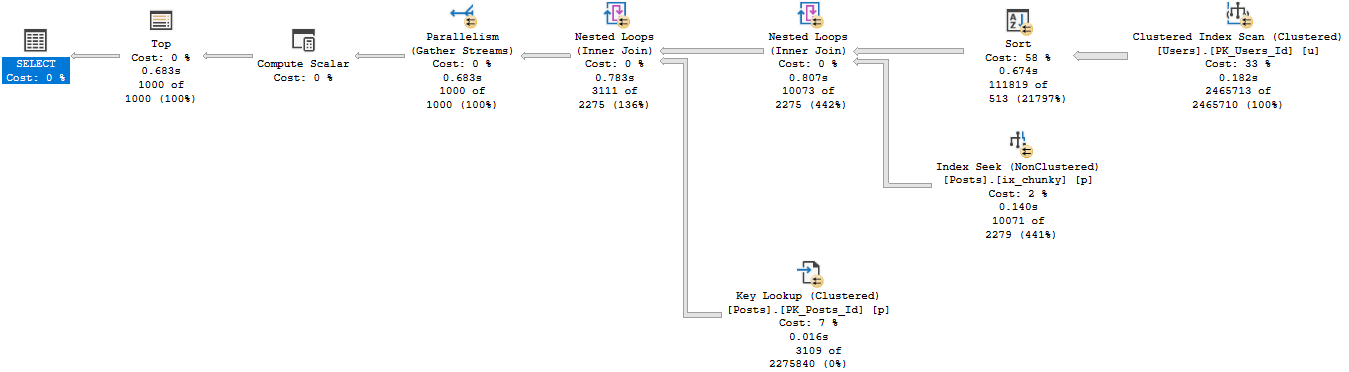
Running the procedure for an uncommon score, we get a tidy little loopy little plan.
EXEC dbo.lemons @Score = 385;
It’s hard to hate a plan that sinishes in 59ms
Of course, that plan applied to a less common score results in tomfoolery of the highest order.
Lowest order?
I’m not sure.
Except when it takes 14 seconds.
In both of these queries, we used our “smooth” index.
Who created that thing? We don’t know. It’s been there since the 90s.
Sloane Square
If we recompile, and start with 0 first, we get a uh…
Well darnit
We get an equally little loopy little plan.
The difference? Join order, and now we use our chunky index.
Running our procedure for the uncommon value…
Don’t make fun of me later.
Well, that doesn’t turn out so bad either.
Pound Sand
When you’re troubleshooting parameter sniffing, the plans might not be totally different.
Sometimes a subtle change of index usage can really throw gas on things.
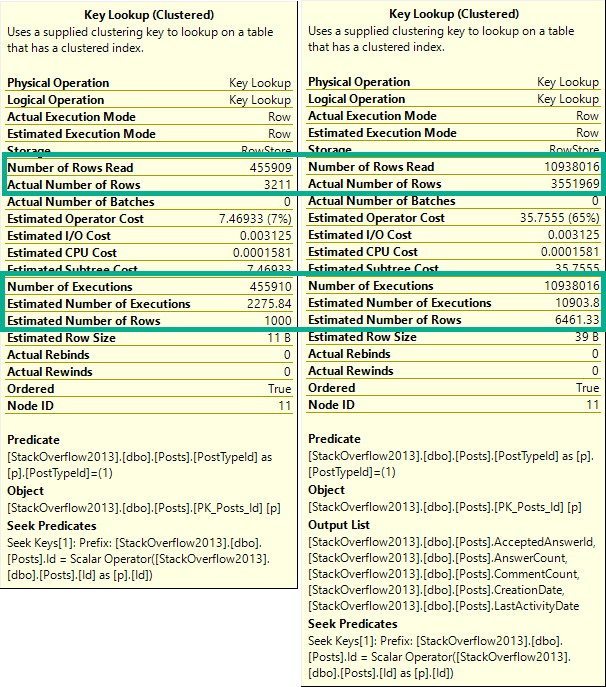
It’s also a good example of how Key Lookups aren’t always a huge problem.
Both plans had them, just in different places.
Which one is bad?
It would be hard to figure out if one is good or bad in estimated or cached plans.
Especially because they only tell you compile time parameters, and not runtime parameters.
Neither one is a good time parameter.
Thanks for reading!
Going Further
If this is the kind of SQL Server stuff you love learning about, you’ll love my training. Blog readers get 25% off the Everything Bundle — over 100 hours of performance tuning content. Need hands-on help? I offer consulting engagements from targeted investigations to ongoing retainers. Want a quick sanity check before committing to a full engagement? Schedule a call — no commitment required.